06 February 2020

ML-fairness-gym: A Tool for Exploring Long-Term Impacts of Machine Learning Systems


Machine learning systems have been increasingly deployed to aid in high-impact decision-making, such as determining criminal sentencing, child welfare assessments, who receives medical attention and many other settings. Understanding whether such systems are fair is crucial, and requires an understanding of models’ short- and long-term effects. Common methods for assessing the fairness of machine learning systems involve evaluating disparities in error metrics on static datasets for various inputs to the system. Indeed, many existing ML fairness toolkits (e.g., AIF360, fairlearn, fairness-indicators, fairness-comparison) provide tools for performing such error-metric based analysis on existing datasets. While this sort of analysis may work for systems in simple environments, there are cases (e.g., systems with active data collection or significant feedback loops) where the context in which the algorithm operates is critical for understanding its impact. In these cases, the fairness of algorithmic decisions ideally would be analyzed with greater consideration for the environmental and temporal context than error metric-based techniques allow.

In order to facilitate algorithmic development with this broader context, we have released ML-fairness-gym, a set of components for building simple simulations that explore potential long-run impacts of deploying machine learning-based decision systems in social environments. In “Fairness is not Static: Deeper Understanding of Long Term Fairness via Simulation Studies” we demonstrate how the ML-fairness-gym can be used to research the long-term effects of automated decision systems on a number of established problems from current machine learning fairness literature.

An Example: The Lending Problem
A classic problem for considering fairness in machine learning systems is the lending problem, as described by Liu et al. This problem is a highly simplified and stylized representation of the lending process, where we focus on a single feedback loop in order to isolate its effects and study it in detail. In this problem formulation, the probability that individual applicants will pay back a loan is a function of their credit score. These applicants also belong to one of an arbitrary number of groups, with their group membership observable by the lending bank.

The groups start with different credit score distributions. The bank is trying to determine a threshold on the credit scores, applied across groups or tailored to each, that best enables the bank to reach its objectives. Applicants with scores higher than the threshold receive loans, and those with lower scores are rejected. When the simulation selects an individual, whether or not they will pay the loan is randomly determined based on their group’s probability of payback. In this example, individuals currently applying for loans may apply for additional loans in the future and thus, by paying back their loan, both their credit score and their group’s average credit score increases. Similarly, if the applicant defaults, the group’s average credit score decreases.

The most effective threshold settings will depend on the bank’s goals. A profit-maximizing bank may set a threshold that maximizes the predicted return, based on the estimated likelihood that applicants will repay their loans. Another bank, seeking to be fair to both groups, may try to implement thresholds that maximize profit while satisfying equality of opportunity, the goal of which is to have equal true positive rates (TPR is also called recall or sensitivity; a measure of what fraction of applicants who would have paid back loans were given a loan). In this scenario, machine learning techniques are employed by the bank to determine the most effective threshold based on loans that have been distributed and their outcomes. However, since these techniques are often focused on short-term objectives, they may have unintended and unfair consequences for different groups.
Top:Changing credit score distributions for the two groups over 100 steps of simulation. Bottom: (left) The bank cash and (right) the TPR for group 1 in blue and group 2 in green over the course of the simulation.
Deficiencies in Static Dataset Analysis
A standard practice in machine learning to assess the impact of a scenario like the lending problem is to reserve a portion of the data as a “test set”, and use that to calculate relevant performance metrics. Fairness is then assessed by looking at how those performance metrics differ across salient groups. However, it is well understood that there are two main issues with using test sets like this in systems with feedback. If test sets are generated from existing systems, they may be incomplete or reflect the biases inherent to those systems. In the lending example, a test set could be incomplete because it may only have information on whether an applicant who has been given a loan has defaulted or repaid. Consequently, the dataset may not include individuals for whom loans have not been approved or who have not had access to loans before.

The second issue is that actions informed by the output of the ML system can have effects that may influence their future input. The thresholds determined by the ML system are used to extend loans. Whether people default or repay these loans then affects their future credit score, which then feed back into the ML system.

These issues highlight the shortcomings of assessing fairness in static datasets and motivate the need for analyzing the fairness of algorithms in the context of the dynamic systems in which they are deployed. We created the ML-fairness-gym framework to help ML practitioners bring simulation-based analysis to their ML systems, an approach that has proven effective in many fields for analyzing dynamic systems where closed form analysis is difficult.

ML-fairness-gym as a Simulation Tool for Long-Term Analysis
The ML-fairness-gym simulates sequential decision making using Open AI’s Gym framework. In this framework, agents interact with simulated environments in a loop. At each step, an agent chooses an action that then affects the environment’s state. The environment then reveals an observation that the agent uses to inform its subsequent actions. In this framework, environments model the system and dynamics of the problem and observations serve as data to the agent, which can be encoded as a machine learning system.
Flow chart schematic of the agent-environment interaction loop used in the simulation framework. Agents affect environments via a choice of action. Environments change in response to the action and yield parts of their internal state as an observation. Metrics examine the history of the environment to evaluate outcomes.
In the lending example, the bank acts as the agent. It receives loan applicants, their credit scores and their group membership in the form of observations from the environment, and takes actions in the form of a binary decision to either accept or reject for a loan. The environment then models whether the applicant successfully repays or defaults, and adjusts their credit score accordingly. The ML-fairness-gym simulates the outcomes so that the long-term effects of the bank’s policies on fairness to the applicant population can be assessed.

Fairness Is Not Static: Extending the Analysis to the Long-Term
Since Liu et al.’s original formulation of the lending problem examined only the short-term consequences of the bank’s policies — including short-term profit-maximizing policies (called the max reward agent) and policies subject to an equality of opportunity (EO) constraint — we use the ML-fairness-gym to extend the analysis to the long-term (many steps) via simulation.
Top: Cumulative loans granted by the max reward and EO agents, stratified by the group identity of the applicant. Bottom: Group average credit (quantified by group-conditional probability of repayment) as the simulation progresses. The EO agent increases access to loans for group 2, but also widens the credit gap between the groups.
Our long-term analysis found two results. First, as found by Liu et al., the equal opportunity agent (EO agent) overlends to the disadvantaged group (group 2, which initially has a lower average credit score) by sometimes applying a lower threshold for the group than would be applied by the max reward agent. This causes the credit scores of group 2 to decrease more than group 1, resulting in a wider credit score gap between the groups than in the simulations with the max reward agent. However, our analysis also found that while group 2 may seem worse off with the EO agent, from looking at the Cumulative loans graph, we see that the disadvantaged group 2 receives significantly more loans from the EO agent. Depending on whether the indicator of welfare is the credit score or total loans received, it could be argued that the EO agent is better or more detrimental to group 2 than the max reward agent.

The second finding is that equal opportunity constraints — enforcing equalized TPR between groups at each step — does not equalize TPR in aggregate over the simulation. This perhaps counterintuitive result can be thought of as an instance of Simpson’s paradox. As seen in the chart below, equal TPR in each of two years does not imply equal TPR in aggregate. This demonstrates how the equality of opportunity metric is difficult to interpret when the underlying population is evolving, and suggests that more careful analysis is necessary to ensure that the ML system is having the desired effects.
An example of Simpson's paradox. TP are the true positive classifications, FN corresponds to the false negative classifications and TPR is the true positive rate. In years 1 and 2, the lender applies a policy that achieves equal TPR between the two groups. The aggregation over both years does not have equal TPR.
Conclusion and Future Work
While we focused on our findings for the lending problem in this blog post, the ML-fairness-gym can be used to tackle a wide variety of fairness problems. Our paper extends the analysis of two other scenarios that have been previously studied in the academic ML fairness literature. The ML-fairness-gym framework is also flexible enough to simulate and explore problems where “fairness” is under-explored. For example, in a supporting paper, “Fair treatment allocations in social networks,” we explore a stylized version of epidemic control, which we call the precision disease control problem, to better understand notions of fairness across individuals and communities in a social network.

We’re excited about the potential of the ML-fairness-gym to help other researchers and machine learning developers better understand the effects that machine learning algorithms have on our society, and to inform the development of more responsible and fair machine learning systems. Find the code and papers in the ML-fairness-gym Github repository.

How to Mirror an iPhone or iPad Screen to a Windows PC


mirror-iphone-ipad-windows

If you have an iPhone, there are a lot of great ways to use it in tandem with a Mac. Staying within the Apple ecosystem lets you access Continuity features like a universal clipboard, handing off Safari links, and more.

Unlock the free "iPhone and iPad Shortcuts" cheat sheet now!

This will sign you up to our newsletter

Enter your Email

But what if you have an iPhone and Windows PC? Thankfully, you still have options for making them work together. Here’s how to mirror your iPhone to a PC—this also works with iPad!

Screen Mirror Your iPhone to a PC With LonelyScreen

Apple’s AirPlay protocol makes it easy to connect your iPhone to an Apple TV, HomePod, or other Apple devices. But this doesn’t work to for non-Apple devices, so you can’t mirror your iPhone to your laptop running Windows. That’s where LonelyScreen comes in.

This utility allows your Windows computer to accept AirPlay connections, so it’s the key for this process. Head to the LonelyScreen download page. You’ll see a download button under Free Trial Download—go ahead and install that on your system.

Note that LonelyScreen does cost $15/year for personal use. However, if you use its functionality often, it’s a fair price, especially compared to what similar tools charge.

The software should install in seconds. Once it does, you may see a Windows Firewall prompt letting you know that it blocked access to the app. Check the box to allow access through Private networks (like your home). You can also check Public networks (like coffee shops) if you like, but it’s not required (or as secure).

Windows Firewall Prompt

Click Allow Access, then open LonelyScreen if it didn’t open already. You’ll see a warning about using the free trial; click Maybe Later to proceed.

From there, you’ll see the main LonelyScreen window. You can click the LonelyScreen text to change the name of your AirPlay server, if you like. That’s all you need to do on your computer for now.

mirror iphone to pc - LonelyScreen Main Window

How to Cast Your iPhone to LonelyScreen

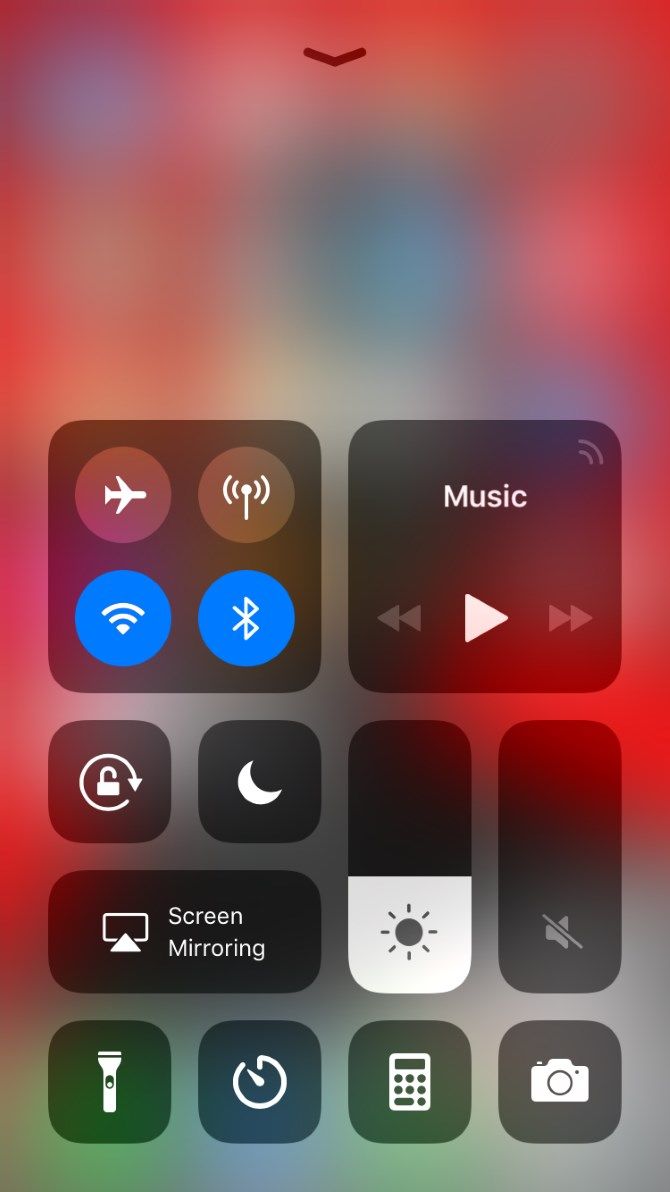
Next, grab your iPhone or iPad that you want to screen mirror to your PC. Open Control Center by swiping down from the top-right corner on iPhone X and later, or an iPad running iOS 12 or later. On older iPhone models, swipe up from the bottom of the screen.

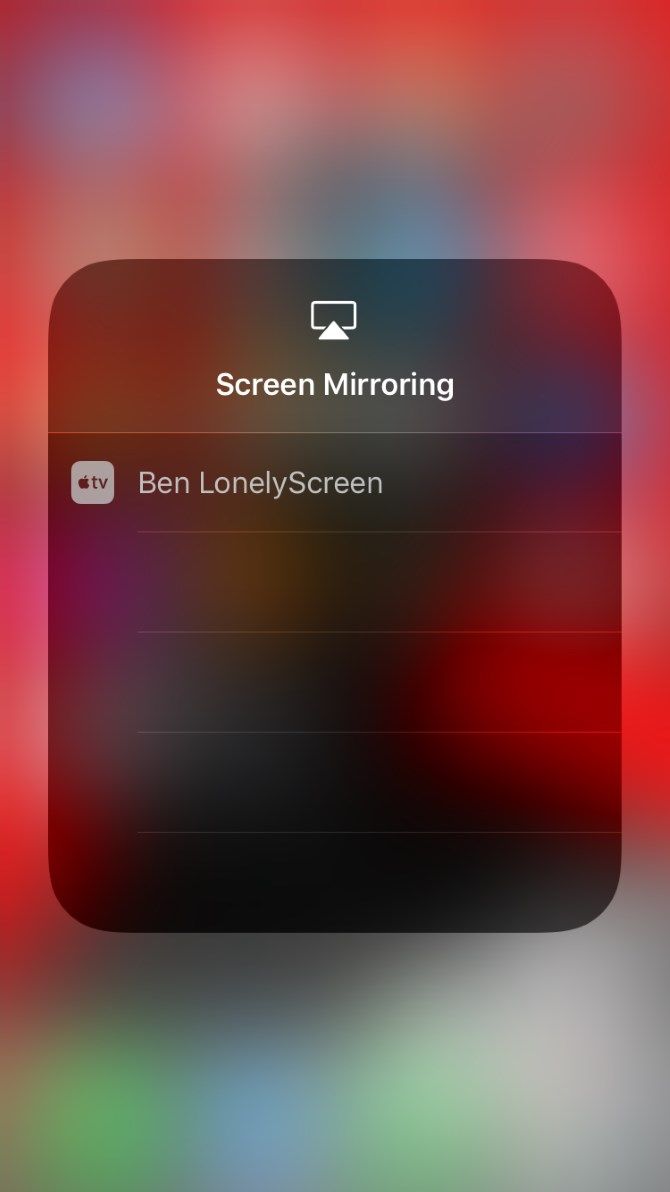
With Control Center open, you should see a Screen Mirroring shortcut among the buttons. Tap that, and you’ll see a list of available AirPlay devices.

If everything went right so far, you should see your LonelyScreen server in the list. Tap it to start mirroring your screen to your PC.

From there, do whatever you’d like on your iPhone and you’ll see it in real time in the LonelyScreen window. You may want to maximize the window for a better view.

Screen mirroring your iPhone to your laptop in this way doesn’t let you control your phone through LonelyScreen, so you can’t click to navigate around your phone. However, it does let you create screen recordings with a built-in tool.

If you don’t see the red button at the bottom of the LonelyScreen window, click the small arrow in the bottom-right corner to expand the bottom panel. When you click the red Record button, LonelyScreen will start recording everything on your iPhone or iPad’s display.

Perform whatever actions you’d like to record, then click the red button again to stop. The app will place the video file inside your user account’s Videos directory.

mirror iphone to pc - LonelyScreen AirPlay Receiver screen

To close the connection, either deselect LonelyScreen from the Screen Mirroring shortcut in Control Center, or close the LonelyScreen app window on your PC.

What If LonelyScreen Doesn’t Work?

Projecting your iPhone’s screen to a PC is really as easy as running LonelyScreen and connecting your iPhone via AirPlay. However, if it doesn’t work for some reason, you should make sure you have a few items in order:

  • Make sure you have LonelyScreen open. You can minimize the LonelyScreen window, but closing it will prevent you from mirroring.
  • Confirm that you’ve let LonelyScreen through your firewall. The app displays a small banner on its main window if it can’t get through the firewall. Click Fix to allow it to communicate.
  • Make sure you have a compatible device. Nearly all modern iOS devices work with LonelyScreen, but if you have an exceptionally old model that doesn’t support AirPlay, it won’t work.
    • At least an iPhone 4s, iPad 2, original iPad mini, or iPod touch 5 is required.
  • Enable Wi-Fi on your iPhone and connect it to the same network as your PC. AirPlay won’t work if your devices are on different networks.
  • Reboot your PC and iPhone. Sometimes a quick reboot will fix minor glitches.

Practical Uses for iPhone and iPad Screen Mirroring

Why would you want to mirror your iPhone screen to your PC? Perhaps you’re giving a presentation and need an easy way to show your audience steps on your iPhone. Thanks to LonelyScreen’s built-in recording feature, mirroring is also an easy way to record screencasts on your iPhone.

Aside from this, having your phone’s contents on a larger screen lets someone else watch what you’re doing easily. In a pinch, you could use it to easily play a video on your phone on a bigger screen without transferring the file. It also allows you to monitor an app on your phone without reaching for it constantly.

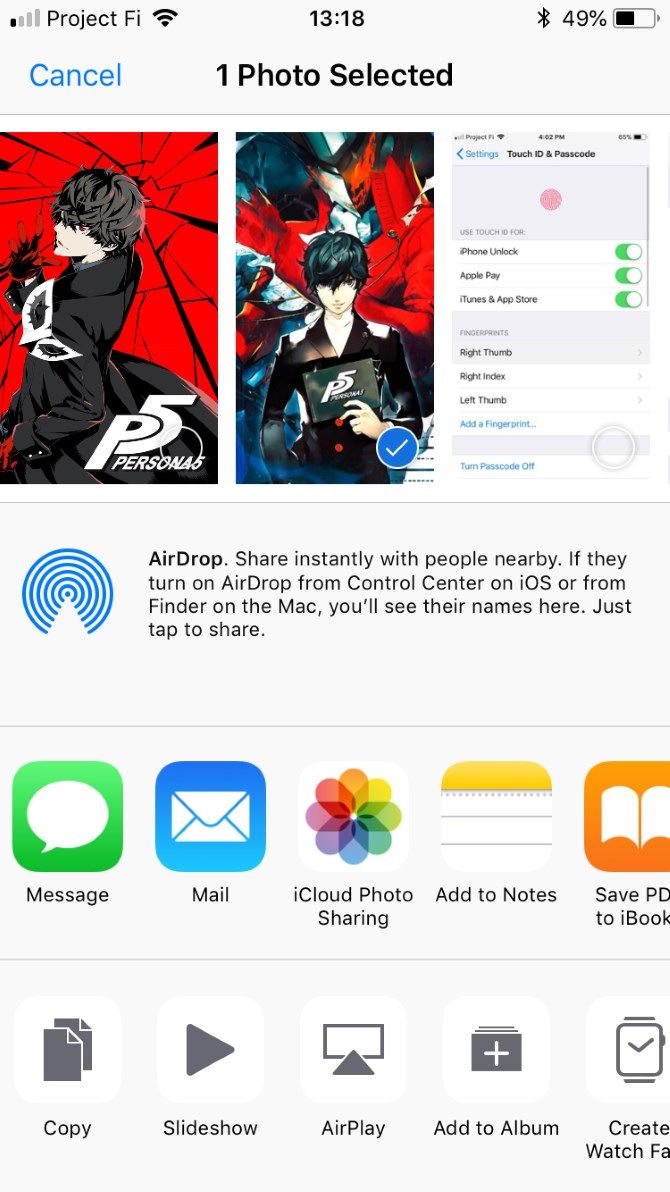
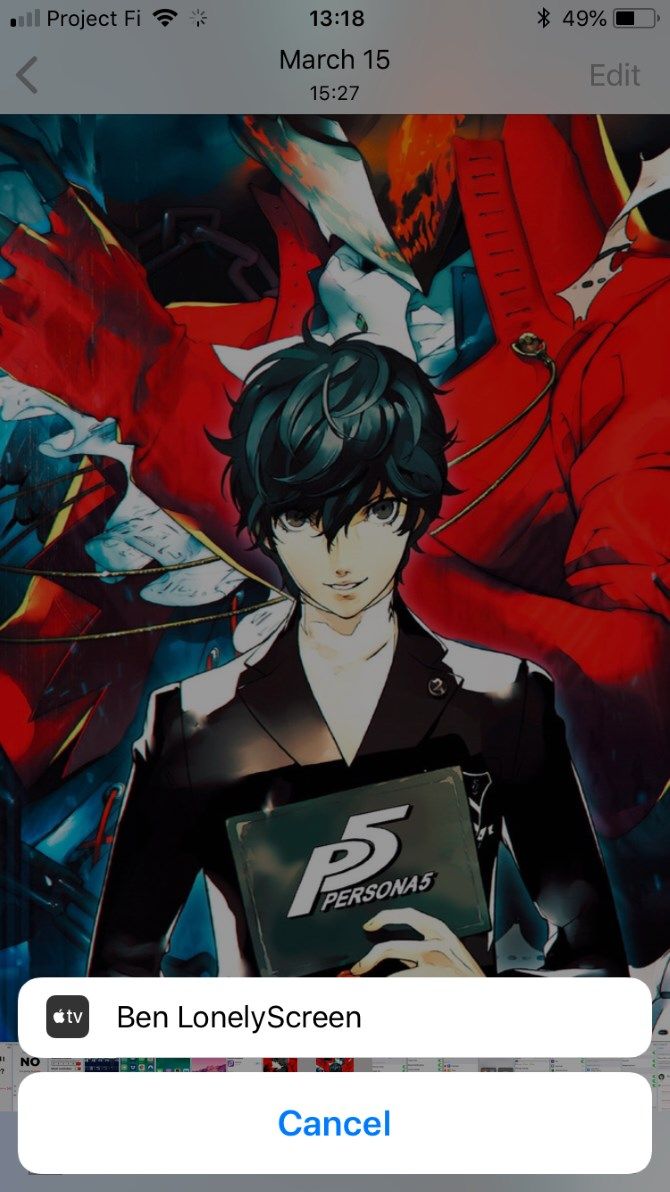
Note that aside from screen mirroring, you can also use LonelyScreen for casting media. Many apps have the AirPlay symbol, sometimes under the Share menu, that lets you cast them to your PC.

When playing music, for instance, you can open the Control Center and Force Touch on the Now Playing panel to send it to your PC through AirPlay.

Screen Mirroring iPhone and iPad to Your PC: Success!

Now you know how to mirror your iPhone or iPad’s screen right to your laptop or desktop. While it requires an extra program compared to native Mac support, it’s still dead-simple. After using LonelyScreen for our testing, the free trial still worked, albeit with warning boxes every once in a while. For occasional use, then, there’s no reason not to keep it around.

For alternatives, check out more ways to cast your screen to PC. We’ve also shown what to do when your iPhone won’t connect to your computer.

Read the full article: How to Mirror an iPhone or iPad Screen to a Windows PC


Read Full Article

How to Play PlayStation (PS1) Games on PC


The original PlayStation, also known as PSX or the PS1, boasts an amazing array of games. The PS1 is long out of date, but the games are still lots of fun to play. Thankfully, if your favorite PS1 games are no longer available, you can still play them on your PC.

A PlayStation 1 emulator brings your favorite PS1 games back to life. All you need is an emulator, a PS1 BIOS, and your old PS1 games. Here’s how to play PlayStation One (PS1) games on your PC!

What Is the Best PS1 Emulator?

An emulator is a type of software you install on your PC. It allows you to reproduce physical hardware in a software setting, all from the comfort of your existing computer. Emulators exist for various types of hardware and platforms.

A gaming emulator reproduces a gaming console, allowing you to play anything from a Commodore 64 to an arcade gaming cabinet, from a Nintendo 64 to a PlayStation 1, all without the need for the original console.

There are a lot of PS1 emulators out there. However, ePSXe remains the best option for performance, stability, and additional features. Updates are slow, but ePSXe has over a decade of development under its belt, which makes it a great option to start playing your old PS1 games once more.

So, let’s get started with ePSXe.

How to Download ePSXe

First things first: you need to download the latest version of ePSXe.

Download: ePSXe for Windows (Free)

There is no installation process for ePSXe. You extract the files from the archive and then run ePSXe from the same folder.

Right-click the ePSXe download, select your ZIP program, and extract. Unsure what an archive and a ZIP program are? Read our guide explaining how to extract files from common archives before continuing with this tutorial.

When you run ePSXe for the first time, you may encounter a dialog box asking you to extract additional files. Extract them, then fire up ePSXe.

ePSXe BIOS Configuration

There are several steps to complete before you can play a PS1 game in the ePSXe emulator. Before anything can happen, you need a PlayStation 1 BIOS.

A BIOS is a low-level software that starts when you boot your computer and is usually associated with your PC. The BIOS your PlayStation 1 uses is slightly different from the one your PC uses. Your PS1 BIOS contains information relating to your PlayStation 1 hardware, such as the version, manufacturing region, and more.

ePSXe won’t run without a proper PS1 BIOS. The PlayStation 1 BIOS also dictates which games you can play, depending on its geographical region (such as Europe, North America, Japan, and so on). There are simulated PS1 BIOS files, but they don’t work as well as the real deal.

Disclaimer: While there are PS1 BIOS files available online, the only legal method of obtaining BIOS files is to rip the BIOS from your existing PS1. Check out the following video to understand exactly how to rip your PS1 BIOS. You rip your PS1 BIOS at your own risk.

Once you rip your PS1 BIOS, you need to copy and paste the archive into the BIOS directory. You’ll find the BIOS directory in the ePSXe folder. The location of your ePSXe BIOS folder depends on where you extracted the emulator. For example, my ePSXe BIOS folder is C:\Users\Gavin\Downloads\ePSXe205\bios.
Once you paste the BIOS archive into the correct folder, you must extract the contents. The emulator cannot read the ZIP file, only its contents.

How to Set Up ePSXe

Once the BIOS is in place, you can continue setting up ePSXe.

ePSXe Graphics Configuration

You’ll first come to a menu displaying different graphics options and the suggestions of the ePSXe development team. If you have an AMD or Nvidia graphics card, select Pete’s OpenGL2 GPU core 2.0.0 and click Config.

epsxe graphics config default settings

There are a lot of graphics options here that you could configure. Over time, you can tweak the settings as you become more familiar with what they do. How you tweak your ePSXe experience depends on your graphics card.

Most modern computers outstrip the capabilities of the original PS1, which had a 33.0MHz CPU (yes, megahertz—it was the early 90s!), 2MB RAM, and 1MB VRAM. This means your average PC can make use of the full gamut of ePSXe graphics configuration options.

I would advise running the PlayStation 1 game you want to play first, then making graphics tweaks later. Furthermore, you could also check out our short guide to video game graphics and settings. It details how certain graphics settings affect performance and visual effects for all games, not just ePSXe.

There is an easy graphics tweak option you can make right now. In the bottom-right corner of the configuration options are the Default options. You can select Fast or Nice graphics. Here are the changes after you select Nice graphics:

epsxe nice graphics settings advanced

The difference between the basic and nice graphics is noticeable, even on game loading screens. For example, here is the loading screen for Crash Bandicoot using the default ePSXe graphics settings:

epsxe basic graphics settings

And here is the same Crash Bandicoot loading screen using the Nice graphics options:

epsxe nice graphics advanced graphics

You can see that the logo, menu lettering, background, and game character are far smoother in the second image.

ePSXe Sound, Drive, and Controller Configuration

Now for the sound configuration. It is easiest to leave this as the default option as ePSXe handles most PS1 game sound well.

Next up is the CD-ROM plugin. If you’re using Windows 10, select ePSXe CDR WNT/W2K core 2.0.0, then continue.

Finally, you can set up your controllers for use with ePSXe. ePSXe supports several controllers out of the box. Click the drop-down menu in the top-right corner to choose your input type. You can select between a keyboard, keyboard and mouse, Direct Input, and XInput.

epsxe controller config directinput

If you’re using an Xbox 360 or Xbox One controller, select XInput. It will map your controller automatically, and your game should play without fault. If you’re using a PlayStation DualShock controller, check out the following guide explaining how to use a PS4 controller on a PC or Mac.

There is also a specific guide on how to connect a DualShock controller to ePSXe.

epsxe controller config XInput

How to Get PS1 Games on to Windows 10

Now that ePSXe is ready, you can pick your favorite PS1 games and fire them up. PlayStation 1 games are freely available online. However, MakeUseOf cannot help you find them. Downloading data files for games that you do not own is piracy.

ePSXe can run files that use the extensions BIN, ISO, CUE, IMG, CD, and a few others. These files relate to the disc images that contain the PS1 game data. You can rip your original PS1 games in the same way you might rip a DVD to your computer. However, you must make sure the output file is an ISO (or one of the other PS1 game file formats ePSXe accepts) or else your PS1 game won’t load.

Once you have your PS1 ISO ready, you can load it up in ePSXe. Head to File > Run ISO, then browse to the PS1 game location. Select the PS1 game file, and it will begin loading. There you have it. You’re now playing a PS1 game on your PC!

Tips on Using ePSXe

From here on out, you can play your PS1 games using whatever control scheme you decide. However, here are a few tips to help your ePSXe experience run smoothly.

  • To leave ePSXe’s emulation, press ESC. You’ll return to the main ePSXe screen. From the main screen, you can adjust the emulation settings, controller settings, and much more. To return to the game, head to Run > Continue.
  • You can save and load games from the main menu. Head to the Run menu, then Save State or Load State, depending on what you want to do. ePSXe also emulates PlayStation 1 memory cards so that you can create a save file within your game.
  • If the game you are playing has multiple discs (such as Final Fantasy 7), you can switch to the next one using File > Change Disc, then selecting the next disc.
  • Local multiplayer is available. You can use a combination of gamepads and your keyboard to make sure every person has a controller. ePSXe also simulates Multitap, which allows up to four local players in the same game.

You can enhance ePSXe and your PS1 games with additional plugins. Figuring out which plugins work best with your setup and with whichever games you want to play is tricky at times. However, you can check out the recommended list of ePSXe plugins and figure out which plugins work with your PC.

You Can Now Play the Best PS1 Games on PC

You can now cut loose and play your favorite PS1 games on your PC. The PlayStation 1 has so many classic genre-defining games. It is hard not to look back at the aging console fondly.

Still, the PlayStation 1 isn’t the only old console you can emulate. When you’re done with ePSXe, here’s how to emulate your favorite PlayStation 2 games. Alternatively, if you prefer mobile gaming, you can also emulate Android on your PC.

Image Credit: Graphic farm/Shutterstock, Kevandre/DeviantArt

Read the full article: How to Play PlayStation (PS1) Games on PC


Read Full Article

How to Hide Your Online Status in WhatsApp


It’s hard to look back and remember a time when the world operated on SMS. Services like WhatsApp have made chatting with your friends and family easier than ever.

However, that ease of communication has come at a price. We now expect to be able to see whether the recipient is online and reading your messages at that very moment.

Unfortunately, we’ve all heard of arguments breaking out over whether messages were sent/received/seen/read. If you’d like to restore a bit of privacy to your instant messaging, here’s how to hide your online status on WhatsApp…

How to Hide Your Online Status in WhatsApp

WhatsApp makes it fairly straightforward to disable your online status, but there’s a trade-off which we’ll discuss later in the article.

For now, to hide your WhatsApp online status, follow the steps below:

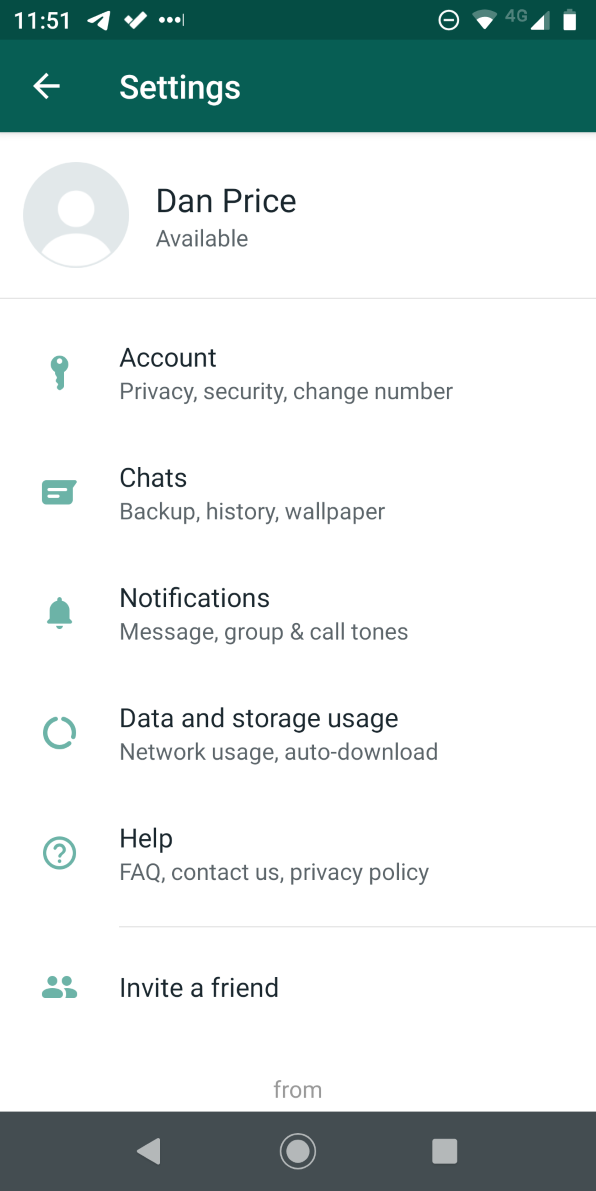
  1. Open WhatsApp.
  2. Click on the three vertical dots in the upper right-hand corner.
  3. Tap on Settings.
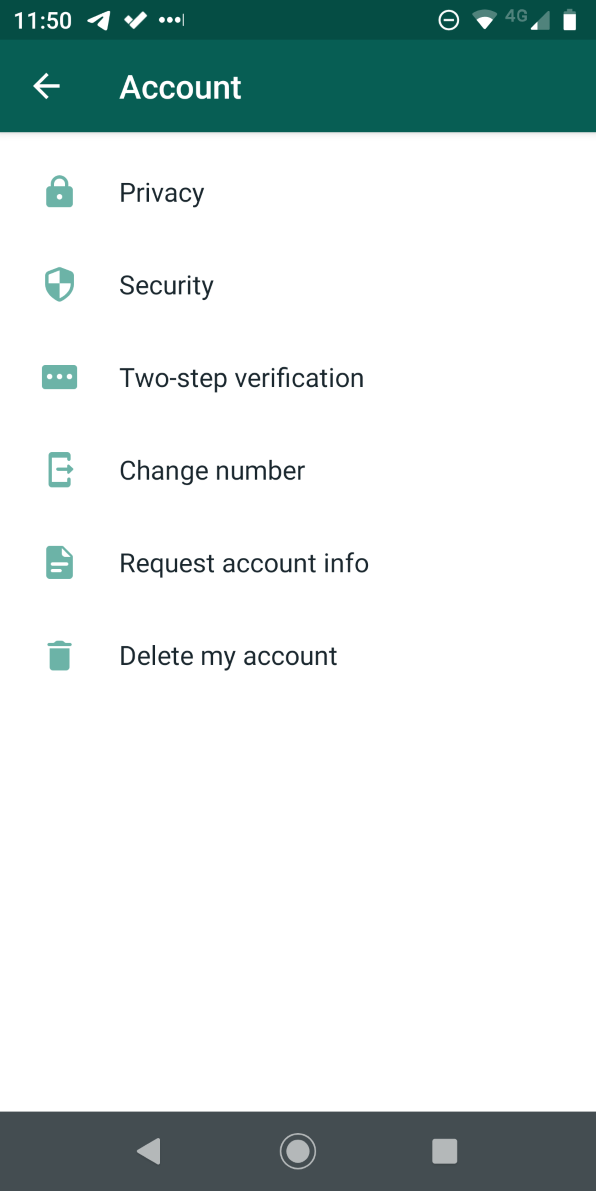
  4. From the Settings menu, select Account.
  5. Next, tap on Privacy.
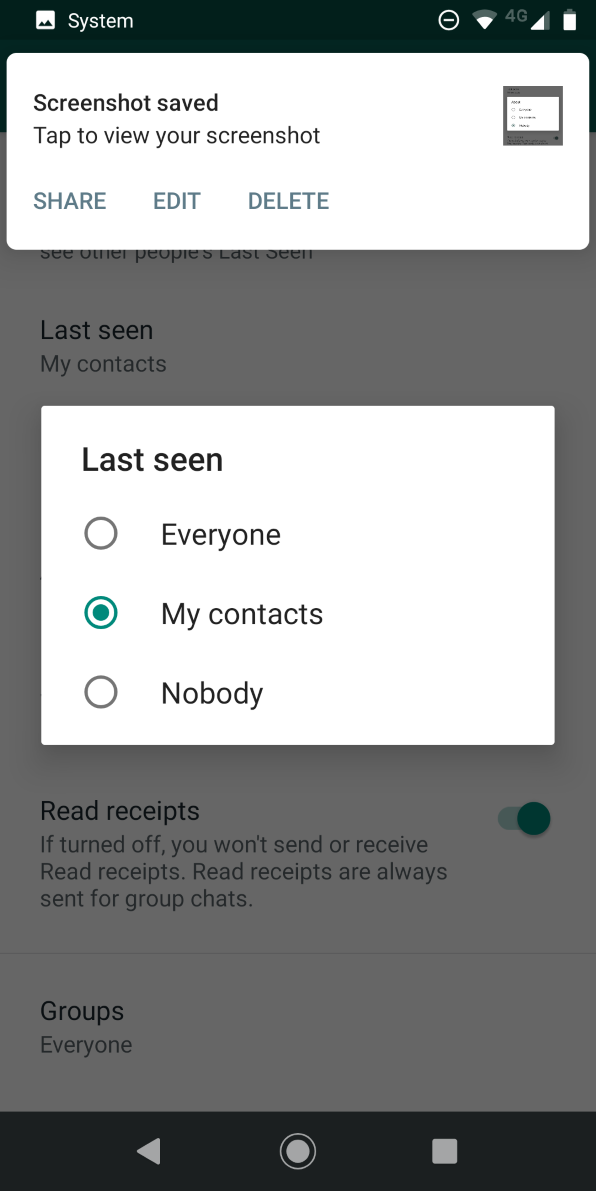
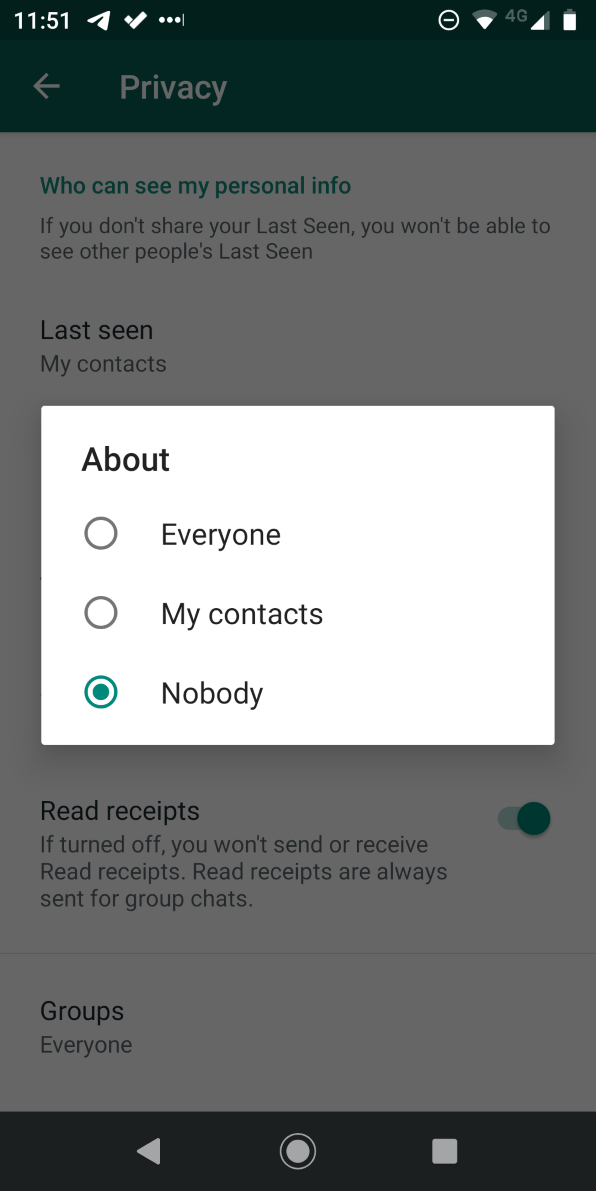
  6. Choose Last Seen from the list of options.
  7. In the pop-up window, choose Nobody.

So, what about that trade-off? By disabling your online status, it means you will not be able to see other people’s online status either. It prevents people from snooping on other users while simultaneously masking their own actions.

Sadly, there’s also no way to set the visibility of your online status on a user-by-user basis. For example, it’s impossible to let your family and friends know that you’re online while stopping your boss from seeing the same information.

Other WhatsApp Privacy Options to Change

While you’re in the Privacy menu, it’s worth paying attention to a couple of the other WhatsApp privacy options that are available.

You can also restrict the visibility of your profile photo, about page, and status. The final setting is to disable read receipts. Like your online status, disabling read receipts is reciprocal. Disabling yours means that you won’t be able to see receipts from other people.

To learn more about using WhatsApp, here are some essential WhatsApp tips and tricks you need to know.

Read the full article: How to Hide Your Online Status in WhatsApp


Read Full Article

How Secure Is Skype and Other Video Conferencing Tools?


video-call-security

Video conferencing software is handy for everything from talking to family members who live far away to setting up big international work meetings. But some of the software used for conferencing may not be as secure as you think it is. There are a number of security vulnerabilities to be found in conferencing software like Skype.

Vulnerabilities in Skype

Video Conferencing Security - Vulnerabilities in Skype

Skype is one of the most popular video conferencing tools for both personal use and for business communications. And now the app is owned by Microsoft, one of the largest technology companies in the world. So you might assume that it is without security issues. Unfortunately, that’s not the case.

In 2018, a researcher disclosed a security vulnerability which allowed malware to change users’ computers via the Skype update mechanism. If hackers were able to take advantage of this vulnerability, they could run code which allows them full access over Windows PCs which had Skype installed. Hackers could have installed software, stolen data, or spied on users.

Fortunately, Microsoft had identified and patched this issue before the reports emerged. In a post on the Microsoft support forums, a member of the Skype team said that this issue only affected Skype versions 7.40 and lower. “The issue was in the program that installs the Skype software—the issue was not in the Skype software itself,” she said in the post. “The installer for the current version of Skype for Windows desktop (v8) does NOT have this issue, and it has been available since October, 2017”.

The good news in this case is that Microsoft patched the issue before the public became aware of it. However, take this as a reminder about how important it is to keep your software up to date.

Vulnerabilities in Zoom

Video Conferencing Security - Vulnerabilities in Zoom

Another popular video conferencing option, especially for businesses, is Zoom. But this too has had its share of security issues.

Mac Local Web Server Vulnerability

In 2019, security researcher Jonathan Leitschuh announced a vulnerability he had identified in the Zoom app for Mac. The exploit used the local web server which runs in the background to enable Zoom to function on Mac. That local web server had vulnerabilities which allowed hackers to interact with it through websites. It could even turn on users’ cameras without their permission. Leitschuh warned that hackers could use the vulnerability to turn on cameras to gather information for phishing attacks.

Strangely, at first Zoom responded in a blog post by essentially denying that this was a problem. The company said that it had released a fix but “we did not force our users to update because it is empirically a low-risk vulnerability.” They also went on to criticize the researcher for the way he disclosed the vulnerability. In some ways this behavior was more worrying that the vulnerability itself. Security issues happen to practically every software company, but companies should be proactive in protecting users when concerns come to light.

Zoom eventually walked back from their position, saying, “we misjudged the situation and did not respond quickly enough”. They released an update to the Mac app which removed the local web server and fixed the problem. They also pledged to improve their bug bounty program to hopefully avoid problems like this in future.

Spying on Meetings via Meeting IDs

Another Zoom vulnerability was disclosed by Check Point Research in January 2020. The firm discovered an issue with the way Zoom assigns Meeting IDs. These IDs are strings of nine to 11 digits which designate a virtual room for participants to meet in. It is possible to also set a password for meetings. But if hosts don’t set a password, the Meeting ID is the only thing keeping the meeting private.

Check Point discovered they could randomly generate Zoom Meeting IDs. Then they could quickly check whether these IDs were valid. In the end, they were able to predict around four percent of randomly generated Meeting IDs. With these Meeting IDs, the researchers were able to access meetings which should have been private.

The good news here was that Zoom seemed to have learned from their previous mistakes regarding security. When Check Point disclosed the vulnerability to Zoom, Zoom quickly took action to fix it. They brought in protections like adding a password to future meetings by default.

Zoom also changed their system to make it harder for outsiders to tell if a Meeting ID is valid or not. Finally, they block devices which repeatedly scan for Meeting IDs.

These changes should make it much harder for any hackers to view Zoom meetings they shouldn’t.

Vulnerabilities in Webex

Video Conferencing Security - Vulnerabilities in Webex

One more video conferencing option you’ll see used in the business world is Cisco’s Webex Meetings Suite and Webex Meetings Online sites. This software had its own vulnerability disclosed in January 2020 as well. The vulnerability allowed an unauthorized person to join a meeting which should have been password protected, even when they did not have the correct password.

The vulnerability took advantage of an issue in the Webex mobile app, when a user clicks on a weblink to a meeting. The browser then directs the app to open. The unauthorized user could sneak in at this point.

In this case, Cisco disclosed the vulnerability themselves. The company also said it has fixed the bug and that no update of software is required.

How to Secure Your Video Conferencing Software

With all these vulnerabilities, it’s not easy to be completely sure that your video conferencing software is secure. But there are some steps you can take to improve your video conferencing security:

  • Keep your software up to date. All of the vulnerabilities we discussed in this article have now been fixed. But you can only get the fix if you update your software. Not updating your software leaves these security holes open.
  • Check what hardware your apps have access to. Whether you’re on PC or a mobile app, you can check whether software has access to your camera or microphone. If you want to attend meetings with audio only, you can revoke access to your camera altogether.
  • See if your laptop has a camera indicator light. Many modern laptops with built-in webcams have an indicator LED somewhere which lights up when the webcam is in use. Check if yours does, and if the light goes on while you’re not using your camera then investigate further.
  • Remember security for conferencing is a two-way street. When you’re conferencing, you don’t just need to make sure your own software is up to date. You should also encourage the people you are chatting with to update their software too.

Alternative Video Conferencing Software

Any type of software can be vulnerable to security issues. If you want to try something different to mainstream conferencing software like Skype, check out our list of the best free Skype alternatives.

Read the full article: How Secure Is Skype and Other Video Conferencing Tools?


Read Full Article

Chromebook vs. Tablet: Which Is Right For You?


chromebook-vs-tablet

You need a new device to browse the internet, but you don’t want to spend the money on a clunky new laptop. That leaves you with two different, but viable options: a Chromebook or a tablet. Both of these devices allow you to easily stream videos, surf the web, and download apps.

Unlock the "Chrome OS Keyboard Shortcuts" cheat sheet now!

This will sign you up to our newsletter

Enter your Email

So, what exactly makes these devices stand out from each other? This handy comparison can help you determine whether a Chromebook or tablet is right for you.

What Has the Best Display—Chromebook or Tablet?

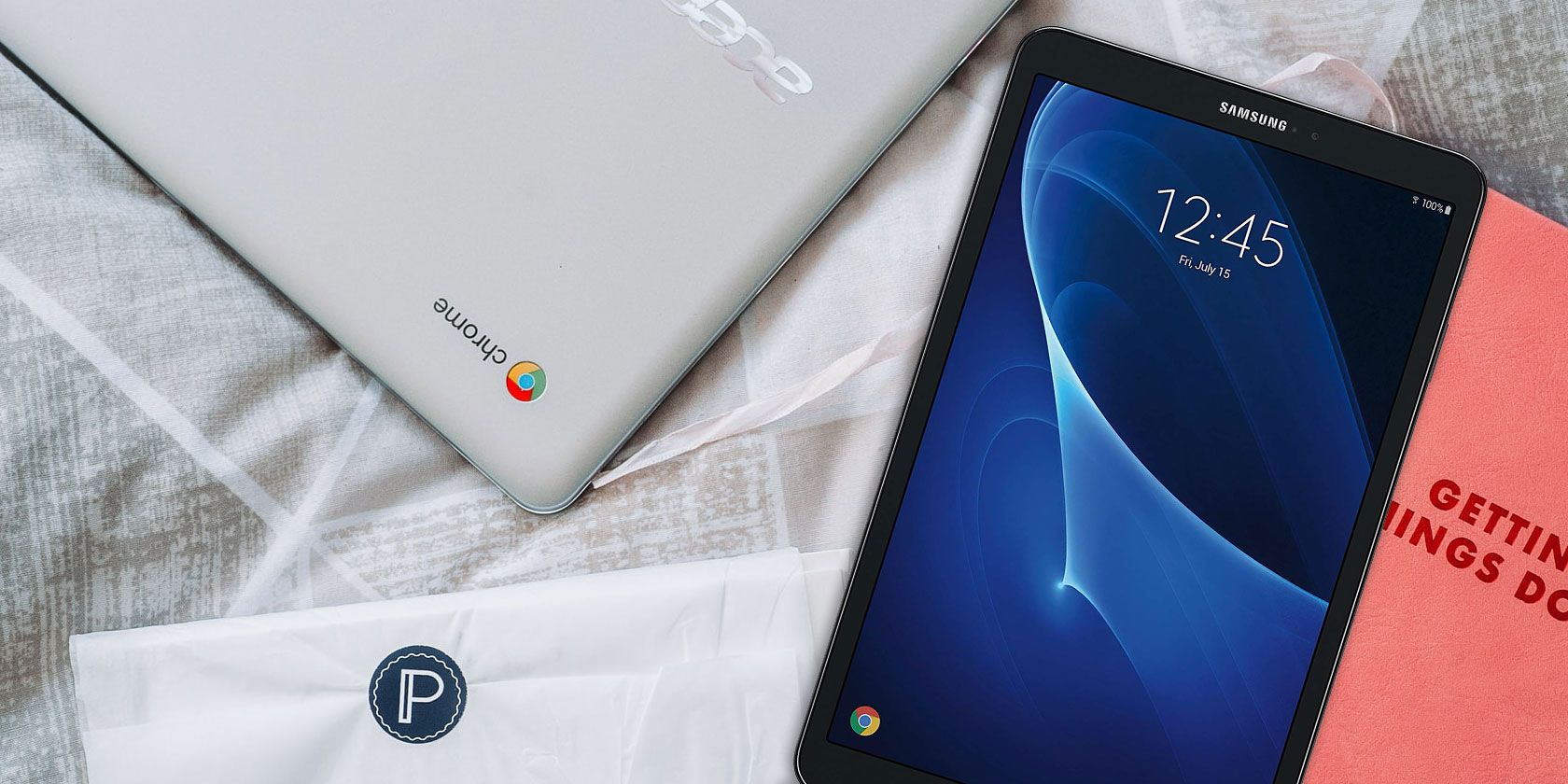
Chromebook Tablet Display Comparison
Image Credit: Pixabay/Pexels

You might think that Chromebooks can beat tablets in terms of display. After all, Chromebooks tend to have a bigger display of 11 inches or more. However, Chromebooks typically have a screen resolution of 1366×768. Only more expensive Chromebooks, like the Chromebook Pixel, exceed this average resolution.

The display size and resolution of tablets depends on the brand. For example, the iPad Air has a 10.5-inch display and a resolution of 2224×1668, while the 10-inch Surface Go has a resolution of 1800×1200. Either way, tablets tend to have a higher resolution and better displays than Chromebooks. This makes tablets more ideal for watching videos, playing games, or creating artwork.

You should also keep in mind that while all tablets use touchscreens, not every Chromebook comes with this feature. Some touchscreen Chromebooks include the Google Pixelbook Go, Asus Chromebook Flip, and Samsung Chromebook Pro. No matter which Chromebook you’re looking at, make sure to check the specs for touchscreen capabilities.

Portability

Tablets are the clear winners when it comes to portability. Although tablets vary greatly in size, they usually weigh in at under two pounds. The large Pixel Slate boasts a 12.3-inch display, and weighs a mere 1.6 pounds. Not to mention that it’s only a little more than a quarter of an inch thick. You’ll find that smaller tablets will have an even lighter weight than this example.

As for Chromebooks, they can weigh anywhere from 2 to 4 pounds. The HP Chromebook 15 is on the heavier side, with a weight of 4 pounds. The Google Pixelbook Go is one of the lighter Chromebooks, weighing only 2.3 pounds.

That said, the extra pound or two that a Chromebook weighs might matter to you, especially if you plan on carrying your device with you all day. You can also easily slip a tablet into a backpack or large purse, however, a thicker and larger Chromebook will require a bit more space.

Peripherals

Chromebook vs. Tablet Peripherals
Image Credit: Miguel Tomas/Unsplash

A Chromebook comes with a trackpad, as well as a keyboard. The built-in keyboard and mouse make it comfortable to type and browse the web. When you’re done, you can fold it up and tuck it away inside of a bag just like a laptop.

Since a tablet has a touchscreen by default, it doesn’t come with a keyboard and mouse attached. Using the touchscreen to type is tedious—you’ll find yourself going slower and making more mistakes than if you were to type on a traditional keyboard.

To avoid typing directly on the touchscreen, you can purchase a Bluetooth keyboard for your tablet. This means that you’ll have to spend more cash in addition to the tablet itself, and the same goes for a stylus or Bluetooth mouse.

If you plan on using your device for work or school, go with a Chromebook. This way, you don’t have to fiddle with a portable keyboard when you want to settle down and get work done.

Apps

You can install apps on both Chromebooks and tablets, but these apps will differ depending on the tablet’s OS. Chromebooks run on Chrome OS, an OS designed by Google to integrate seamlessly with Google Drive and the Google Chrome browser. You can still install powerful apps for your Chromebook like Microsoft Office and Adobe Lightroom, in addition to games and streaming apps.

On Android tablets, you’ll get access to the millions of apps available on the Google Play Store. You can technically download apps from Google Play on your Chromebook, but many of them aren’t optimized for Chromebooks. With an iPad, you also have millions of apps to choose from Apple’s App Store.

Unfortunately, Chromebooks are limited to apps from the Chrome Web Store and a selection of apps from the Google Play Store. This means that Android and iOS tablets still have access to a wider range of apps.

Battery Life

Neither tablets or Chromebooks will disappoint you when it comes to battery life. Both devices will last hours as you perform any small tasks.

To get more specific, Chromebooks can generally last up to 12 hours. The Acer Chromebook 14 can last 12 hours on a full charge, while the Lenovo Chromebook S330 will last you 10 hours.

Some tablets are capable of lasting even longer than Chromebooks. The Yoga Tab 3 can last a whopping 15 hours before you need to recharge it. All in all, the battery life of tablets and Chromebooks depends on which model you choose.

Performance

You obviously can’t expect to play wildly demanding games on a tablet or a Chromebook. Some high-end Chromebooks have an Intel Core i5 or i7 CPU, giving them a huge upgrade in performance. This means you’ll see faster loading times, smooth-running applications, and better multitasking.

One of the most powerful tablets, the iPad Pro, has the A12X Bionic chip, while the Google Pixel Slate has an Intel Core i5 processor. In other words, the performance of premium tablets and Chromebooks is nearly tied. Just like battery life, performance all comes down to which tablet and Chromebook you compare.

What’s the Best Value: Chromebook or Tablet?

You can’t beat the value of Chromebooks and tablets when compared to full-blown laptops. At the lowest, you’ll find Chromebooks for $159, while some of the most high-performing Chromebooks (like the Google Pixelbook) cost about $1,000.

Tablets also vary greatly in price. At just $50, you can buy a cheap tablet like the Amazon Fire 7, but you’ll have to shell out $800 if you want the iPad Pro. Like I mentioned earlier, this price can increase if you want peripherals.

You’re better off purchasing either device in the middle of its price range. That way, you can take advantage of the affordable price and great performance of a mid-range device.

Chromebooks vs. Tablets: Which Device Is the Winner?

There’s no clear winner between Chromebooks and tablets. When it comes to which one is better, it depends on what you’re looking for in a device. If you need a device to do work on, go with a keyboard-wielding Chromebook. Otherwise, a tablet is the better option if you just want to play games, look at photos, or watch videos.

Considering a Chromebook as your next device? Make sure to check out the ultimate how-to guide for Chromebook beginners.

Read the full article: Chromebook vs. Tablet: Which Is Right For You?


Read Full Article

What Is TypeScript and Why Should Developers Try It?


whats-typescript

JavaScript is a unique programming language. It is built for web development and has different rules to other programming languages.

One of the more notable differences is that JavaScript is dynamically typed, which means you do not have to declare types when creating variables. Languages like C, C#, and Java will make you declare variable types. These are called statically typed variables.

Languages that use statically typed variables can offer more stability and reduce errors in code. TypeScript bridges the gap between JavaScript and traditional programming rules.

Variable Types

The type of the variable is the information you plan to store in the variable.

Here’s a Java variable, for example:

int myNumber = 10;

This variable is an int, which is short for integer. This lets you know that the variable myNumber plans to store an integer. If you try to store a different value in the variable, like a string of characters, the program will not run.

Here are some more variable types you may have used:

  • int—regular numbers
  • float—decimal numbers
  • char—single characters like ‘x’ or ‘a’
  • string—a series of characters like “Hello” and “This is a string”
  • boolean—true or false values

JavaScript does not require that you declare variable types. While it gives you more freedom, it can lead to some pretty bad habits. This is where TypeScript makes your job easier.

What Is TypeScript?

TypeScript is a version of JavaScript developed by Microsoft that introduces variable types into your code. It’s not a brand new language; think of it as a wrapper over plain JavaScript. It has a very similar syntax to JavaScript so it’s easy to get started.

To show how similar they are, here is a line of code in both JavaScript and TypeScript.

JavaScript:

let myNumber = 10;

TypeScript:

let myNumber: number = 10;

When you declare a variable in TypeScript you declare the type at the same time. It’s a small change that has a big impact.

TypeScript is a compiled language, unlike JavaScript which runs in the browser. Compiled languages can be faster and result in more efficient programs.

There isn’t any extra software to download though; TypeScript files are compiled into regular JavaScript files that can be used in any web app. TypeScript files are saved as .TS files.

How to Install TypeScript

It’s easy to get started with TypeScript:

  • Via the Node.js package manager (NPM)
  • Installing TypeScript’s Visual Studio plugins

Installing with NPM is easy with the command line:

> npm install -g typescript

If you’re using Visual Studio 2017, or Visual Studio 2015 Update 3, you already have TypeScript included. If it’s not installed you can download it through the TypeScript website.

TypeScript Benefits

JavaScript is already pretty great, what are the benefits to using TypeScript instead? There are plenty of reasons to use TypeScript for web development.

Typed Variables

TypeScript lets you assign types to variables in your code. You saw the example at the beginning, but how does this help you?

Having to assign types to your variables can make you a better coder. It forces you to think through every variable you write when planning your app. Doing so prevents mistakes from being made later in the code, keeps your app easy to read, and makes your code a breeze to test.

TypeScript gives you a lot of options to create variables.

Numbers

let myNumber: number = 10;

Strings

let myString: string = "TypeScript";

Boolean Variables

let myBoolean: boolean = true;

Arrays

When you define an array you will use the type of value contained in the array followed by square brackets.

let myArray: number [] = [1,2,3];

Any

This variable type is used when you want TypeScript to allow any kind of type to be assigned to the variable. This gives you more flexibility when you’re not sure about what your variable might become.

You can change the value of these variables freely.

let anyType: any = 10;
anyType = "Hello"; //No error
anyType = true; //Still no error

Void

Void types are used when you want no type to be assigned to the variable. This is great for functions that don’t return any value.

function randomMessage(): void { Console.log("This is just a message"); }

Null

Simply gives you a null value.

let myNull: null = null; //This is all you can do

Undefined

Just as simple, this gives you an undefined value.

let myUndefined: undefined = undefined; //This is all you can do

Added Features

TypeScript gives you some additional features and types that let you do more with JavaScript.

Tuple

A tuple is a special array that you declare with a fixed number of elements. These elements can have different types, but the tuple must stick to the types in the order that you declare.

let myTuple: [number,string];
myTuple = [45, "Hello"];
myTuple = ["Hello", 45]; // Error

Enum types

Enum types are a special type that assigns numeric values to a series

enum Color { Red, Green, Blue }

In this enum Red is assigned the value of 0, Green is 1, and Blue is 2. Enums are zero-indexed just like arrays in JavaScript.

Object classes

Object classes, interfaces, and inheritance are all supported in TypeScript.

JavaScript does not have a true class system for object-oriented programming. JavaScript uses a prototype system that is very similar, but not entirely the same. If you come from an object-oriented background this alone might sell you on TypeScript.

You can make a class with constructors

class Student { 
Name: string; constructor(first,middle,last) { 
this.Name = first + " " + middle + " " + last; } 
}

let newStudent = new Student("John", "Leonard","Smith");

You can make an interface and use it as a type.

interface Person {
 personName: string;

function sayHello(person: Person) {
 return "Hello " + person.personName;
}

Functions

TypeScript declares types in functions as well.

function addNum(num1: number, num2: number) {
 return num1 + num2;
}

You can also use default parameters in your functions. These are useful when you have a value you want to be set in your parameters in the event your function is run without an argument.

function addNums(num1: number, num2 = 15) {
 return num1 + num2;
}

addNums(5,5); // This will return 10
addNums(5); // This will return 20. There was no second value, so the default parameter of 15 is used

The TypeScript Compiler Helps Test Code

JavaScript running in the web browser is great because it’s simple. TypeScript uses a compiler to translate code into a JavaScript file, but isn’t that just extra work?

Not at all! The TypeScript compiler can help you test your code as you write. When you run a TypeScript file in your IDE it will flag errors as you go.

Debugging TypeScript in Visual Studio Code IDE

Cutting down on these errors in your IDE will clean up your code. By the time you compile to plain JavaScript, your code has been checked for type accuracy. The TypeScript compiler can be customized to your programming preferences.

Open Source

TypeScript is open-source and created by Microsoft. There are plenty of benefits to open-source software. The developer community is constantly working to iron out any bugs or add new features.

TypeScript works well with Visual Studio and Visual Studio Code. Visual Studio Code is a top choice for working in JavaScript so you’re off to a head start if you decide to use it.

Works With Other Web Frameworks

If you’re coding a web app frameworks are designed to save you time. Since JavaScript is the king of web development scripting, there are a lot of frameworks that are used. Many of these frameworks are very popular.

TypeScript doesn’t hold you back from using these very useful web frameworks. It’s compatible with React, Angular, Express, Babel, Vue.js, ASP.NET Core, and React Native.

Web Development and JavaScript

TypeScript was created to make web and app development easier for JavaScript developers. It’s pretty important that you have a foundation with JavaScript and how it works before diving into TypeScript.

Want a challenge? Download TypeScript and try a common project like creating a JavaScript slideshow. Build on your knowledge and pretty soon you’ll be a web development expert!

Read the full article: What Is TypeScript and Why Should Developers Try It?


Read Full Article

All of the Studio Ghibli Films, Ranked


studio-ghibli-films

Studio Ghibli is one of the most famous animation studios in the world. Founded in 1985, the company is well known for the quality of its anime films, having won awards for the likes of Studio Ghibli films, Spirited Away and My Neighbor Totoro.

The quality of Studio Ghibli’s output is undeniable, often thanks to the masterful eye that co-founder Hayao Miyazaki brings. It’s a tricky task to rank all of the Studio Ghibli films in order, but we’re going to do just that with the studio’s feature-length releases.

This article ranks all of the Studio Ghibli films from worst to best…

22. Tales from Earthsea (2006)

It’s hard to call any Studio Ghibli movie terrible, but Tales from Earthsea is undoubtedly the worst. It’s adapted from Ursula K. Le Guin’s Earthsea fantasy novels and directed by Goro Miyazaki, son of Ghibli co-founder Hayao Miyazaki. In retrospect, the younger Miyazaki was probably too inexperienced to tackle this.

Le Guin was disappointed with the end result as it strayed too far from her book’s story. Everyone else enjoyed the visuals, but were otherwise baffled.
21. Ocean Waves (1993)

Ocean Waves was made for TV by a group of younger Studio Ghibli members on a budget. While the film isn’t terrible, it’s not particularly memorable either. The animation is fine, but lacks flourish, and the teenage love triangle story doesn’t offer anything unique.

While there are some touching moments, it’s not enough to elevate this piece to the standard set by other Studio Ghibli films.

20. From Up on Poppy Hill (2011)

From Up on Poppy Hill is set in Yokohama, at a time when the war is over and the Olympics are on their way. It’s a simple story of young love, partnered with students trying to save their clubhouse from being knocked down.

There’s not much substance apart from that and there’s some odd character beats, but the film is elevated by its moral of how history can shape the future.

19. My Neighbors the Yamadas (1999)

My Neighbors the Yamadas is a series of vignettes with a comedic spin on everyday family life in Japan. The humor works regardless of where you live, since dysfunctional family dynamics are universal.

The watercolor style here would go on to be perfected in The Tale of the Princess Kaguya, but it’s still lush. Its only problem is the episodic nature of the film; the chunks work individually, but there’s no plot to tie everything together.

If you want more laughter, check out the best comedies to watch on Netflix.

18. When Marnie Was There (2014)

When Marnie Was There tells the story of an anxious young girl who discovers an abandoned mansion while staying with relatives for the summer. There she meets Marnie and the pair form an unlikely friendship.

This is a ghost story with heart, though it ultimately lacks the dramatic power or complete enchantment of other Studio Ghibli films.

17. The Cat Returns (2002)

After rescuing a cat that turns out to be a prince, a young student called Haru finds herself showered with gifts from the Cat King. He declares that she must marry his son and live in the Cat Kingdom, where she begins developing feline features.

The Cat Returns is an indirect sequel to Whisper of the Heart. It’s less ambitious than other Studio Ghibli films and not very emotionally involving, though not without its charm. Definitely one for cat lovers.

16. Arrietty (2010)

Arrietty is the Studio Ghibli take on Mary Norton’s book The Borrowers, a story about a miniature family who live under the floor, making their way through life by borrowing human trinkets. Arrietty is one such creature, and she forms a friendship with an ill human boy who lives above.

The story is gentle, but the difference in scale and perspective offers some captivating scenes.

15. Whisper of the Heart (1995)

Shizuku is a young girl who loves reading and dreams of being a writer. She’s enjoys spending time with friends, but retreats when with her family. When she meets Seiji, a boy incredibly determined to build violins in Italy, she begins to wish for a more interesting life.

The film may seem simple on the surface, but it’s excellently observed, with a real sweetness and sincerity. There’s also flying and talking cats for those who like reality sprinkled with fantasy.

14. Only Yesterday (1991)

It took a long time for Only Yesterday to get a theatrical release in the US, but it was well worth the wait. Miki Imai has lived in Tokyo her whole life when she travels to rural Yamagata to visit her sister. On her trip she thinks back to her younger self, questioning whether she’s stuck to her childhood dreams.

While the poignancy may be lost on younger viewers, this is a delicate and calm film that offers a meaningful reflection on the value of one’s own story and how to live in the moment.

13. Ponyo (2008)

Ponyo is definitely not Studio Ghibli’s maturest film, but accept that going in and you’ll have a whale of a time. That said, it’s more likely to be a hit with youngsters thanks to its reliance on visual splendor over deep storytelling.

Nevertheless, this film about a goldfish who wants to be human is bright and dazzling, with the water and the creatures within it brimming with character. It’s the very definition of charming.

12. Princess Mononoke (1997)

Ashitaka lives in the 14th century, in a world shared by humans, animals, and gods. Unfortunately, he has been infected with a curse. He seeks a cure and ends up in a war between the animals of the forest and a mining colony. It’s here that he meets Princess Mononoke, a human raised by wolves.

This is an epic and violent film, with imaginative monsters that will take you aback and a story that will keep you hooked. Reportedly, Miyazaki personally redrew around half of the film, and the dedication shows.

11. Nausicaä of the Valley of the Wind (1984)

Nausicaä of the Valley of the Wind is set in an apocalyptic future, where a few humans remain in a toxic jungle populated by huge insects. One of those humans is Nausicaä, who tries to bring peace to the world.

This film spawned Studio Ghibli, so it’s worth watching for that historical fact, but it’s also a rousing and relevant story that boasts a strong female lead. Miyazaki was still finding his feet, but this is a cracking early effort.

10. The Wind Rises (2013)

Director Hayao Miyazaki’s The Wind Rises is less wild than his other films, but no less worthy. This is about a talented airplane designer who adores flying, but creates a deadly fighter plane used in World War II.

There’s a running theme of aviation throughout many of Miyazaki’s creations, but he’s always able to bring something new. This story shows us the difference between dreams and reality; and how we can be grounded by the latter. This is a personal, quiet, and powerful tale.

9. Grave of the Fireflies (1988)

If there’s one Studio Ghibli film you’ll need to get your tissues ready for, it’s Grave of the Fireflies. This film is designed to make you weep, though is perhaps too manipulative. Seita and Setsuko are two siblings who find their house bombed during World War II and set out on a journey of survival as everything around them burns.

Whereas much of the Studio Ghibli oeuvre is about dreamlike fantasy, Grave of the Fireflies is all too real. A resolutely bleak and affecting watch.

8. Pom Poko (1994)

Despite the age of Pom Poko, its core topic of environmental destruction remains every bit as relevant today. This is about shape-shifting raccoon dogs (tanuki in Japanese) who try to protect their forest by tricking the real estate developers into believing the land is haunted.

Pom Poko deftly bounces between humor and tragedy—just try to overlook the fact the tanuki get their special powers from their testicles.

7. The Tale of the Princess Kaguya (2013)

The Tale of the Princess Kaguya doesn’t look like most of the other Studio Ghibli films. In fact, it doesn’t look like other films, period, opting for a delightful watercolor style that morphs to reflect the character’s emotion.

Kaguya is the lead, discovered by a bamboo cutter inside a bamboo shoot. He decides to raise Kaguya with his wife, giving her a life of nobility they think is necessary. This was director Isao Takahata’s last film, the perfect send-off that encapsulates the joy of living.

6. Kiki’s Delivery Service (1989)

Kiki’s Delivery Service follows a young witch as she finds her place in the world, sent with her cat on a year-long apprenticeship. She lands in a coastal town and makes friends while jobbing as a flying delivery service for a bakery.

You can’t not feel good watching the film, as it’s overflowing with personality. There’s a meaningful message here about self-discovery and that awkward age of transition that gets better on repeat viewings.

If you liked Mary and the Witch’s Flower, a 2017 animation that can be downloaded from Netflix, you’ll likely enjoy Kiki’s Delivery Service.

5. Howl’s Moving Castle (2004)

Director Hayao Miyazaki has previously said that Howl’s Moving Castle is his favorite creation, strongly influenced by his anger about the Iraq war. In the film, a girl called Sophie becomes friends with a magician named Howl, who roams around in his gigantic mechanical castle. Envious of their friendship, a witch curses Sophie with old age.

If nothing else, you’ll remember the castle long after watching—it’s a remarkable steampunk creation—but there’s much to love in the wide landscapes and morals of acceptance too.

4. Porco Rosso (1992)

The titular Porco Rosso is a former World War I pilot, now bounty hunter, who has been turned into a pig. It’s one of the most fun and thrilling films from Studio Ghibli, more of an all-out action flick than the others, with a Hollywood-cool lead character and some fantastically directed aerial sequences.

Amusingly, Porco Rosso shares similarities in themes and characters with Casablanca, but we’ll leave you to decide which is better.

3. Castle in the Sky (1986)

Castle in the Sky was released over three decades ago, but it remains a timeless and superb adventure film that has inspired countless films since. The story follows a boy and girl who try to protect a crystal while hunting a castle.

It builds its world at a perfect pace, showing the contrast and connectivity of nature and technology, and keeps things engaging with all the classic action tropes: fighting, chasing, and a sprinkling of magic for good measure.

2. My Neighbor Totoro (1988)

Even if you’ve never seen a Studio Ghibli film, the chances are you recognize Totoro—a cuddly forest spirit that’s essentially the studio’s mascot. He’s excellent, but My Neighbor Totoro is also so much more.

It’s a film about childhood imagination and how the power of family and storytelling can help you through dark times. There’s pain, joy, hope, and everything in between here.

1. Spirited Away (2001)

Spirited Away is considered by many to be the pinnacle of animation, let alone the best of the Studio Ghibli films. It even won the Best Animated Feature at the 2003 Academy Awards, and it’s easy to see why.

A young girl called Chihiro enters an abandoned theme park and finds herself working in a bathhouse full of supernatural creatures. In any single moment it’s scary, exciting, beautiful, and imaginative.

There’s commentary on old versus new Japan if you want to analyze it at a deeper level, but it’s equally enjoyable as a visual feast. You’ll be drawn in and won’t want it to end.

How to Stream the Studio Ghibli Films

Now that you know what all of the Studio Ghibli films are and how they rank from worst to best, you probably want to watch some. Luckily, the Studio Ghibli films are coming to Netflix and other streaming services in 2020.

Whichever Studio Ghibli films you watch, you’re bound to find something positive in them. Whether it’s the gorgeous animation or the fantastical storytelling, Studio Ghibli films offer a great escape from the real world.

If you’ve caught the anime bug and want to explore some more anime films, here are the best anime sites on the web.

Read the full article: All of the Studio Ghibli Films, Ranked


Read Full Article

How Hoop hit #2 with its Tinder for Snapchat


Snapchat’s developer platform is blowing up as a gateway to teen social app users. Hoop is the latest Snap Kit blockbuster, rocketing to #2 on the overall App Store charts this month with its Tinder-esque swiping interface for discovering people and asking to message with them over Snapchat. Within a week of going viral, unfunded French startup Dazz saw Hoop score 2.5 million downloads.

The fact that such a dumbfoundingly simple and already ubiquitous style of app was able to climb the charts so fast demonstrates the potential of Snap Kit to drive user lock-in for Snapchat. Since the developer platform lets other apps piggyback on its login system and Bitmoji avatars, it creates new reasons for users to set up a Snapchat account and keep using it. It’s the same strategy that made Facebook an entrenched part of the internet, but this time it’s for a younger crowd.

In the first-ever interview about Hoop, Dazz’s 26-year-old co-founders Lucas Gervais and Alexi Pourret reveal that the idea came from watching users patterns in their previous experiment on the Snap Kit platform. They built an app called Dazz in 2018 that let users create polls and get anonymous answers from friends, but they noticed their 250,000 users “always ended up adding each other on Snap. So we decided to create Hoop, the app to make new Snap friends” Gervais tells me.

Gervais and Pourret have been friends since age 2, growing up in small town in France. They met their two developers in high school, and are now marketing students at university. With Hoop, they say the goal was to “meet everyone’s needs, from connecting people from different cultures to helping lonely people to feel better to simply growing your Snapchat community.”

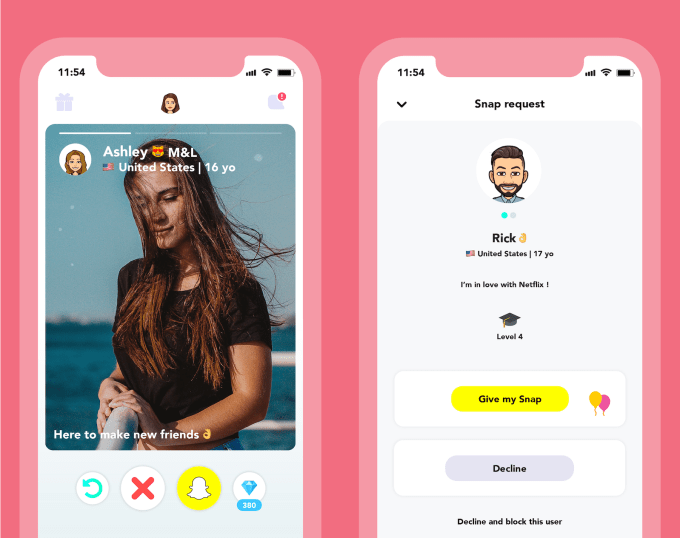
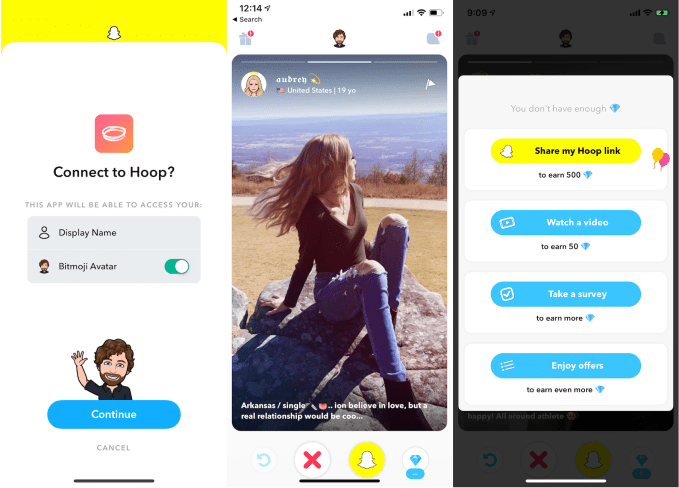
At first, Hoop for iOS or Android looks just like Tinder. You create an account with some photos and bio information, and start swiping through profiles. If you like someone, you tap a Snapchat button to request their Snap username so you can message them.

But then Hoop reveals its savvy virality and monetization strategy. Rather than being able to endlessly ‘swipe right’ and approach people, Hoop limits your asks by making you spend its in-app ‘diamonds’ currency to reach out. After about 10 requests to chat, you’ll have to earn more diamonds. You do that by sharing and getting friends to open your invite link to the app, adding people on Snapchat that you meet on Hoop, logging in each day, taking a survey, watching a video ad, and completing offers by signing up for streaming services or car insurance providers. It also trades diamonds for rating Hoop in the App Store, though that might run afowl of Apple’s rules.

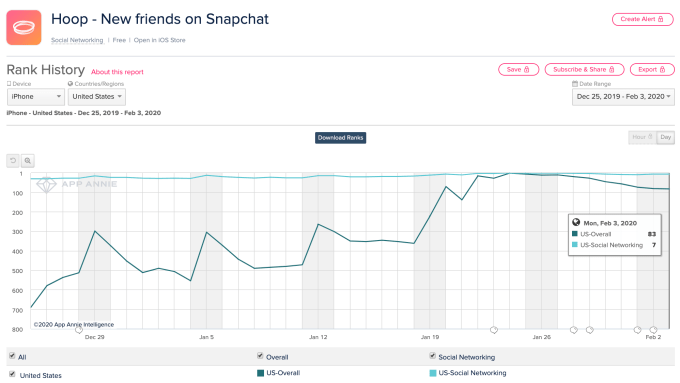
Those tactics helped Hoop climb as high as #2 on the overall iOS chart and #1 on the Social Apps chart on January 24th. It’s now at #83 overall and #7 in social, putting it above apps like Discord, LinkedIn, Skype, and new Vine successor Byte. Hoop had over 3 million installs as of a week ago.

There are certainly some concerns, though. Gervais claims that “We are not a meeting or dating app. We simply offer an easy way to make new Snap friends.” But since Tinder isn’t available for people under 18, they might be looking to Hoop instead. The app could also be used by adults to connect with teens. Hoop recently removed a search preference that let you see profiles in your age group first, which when combined with being able to change your age at will, could have been employed to target connecting with underage users.

Snap Kit keeps startups lean

Tools like Amazon’s AWS have made building a startup with a lean team and little money increasingly easy. Snap Kit’s ability to let developers skip the account creation and management process is another step in that direction. But the power to imbue overnight virality is something even Facebook never accomplished, though it helped build empires for developers like Zynga.

Another Snap Kit app called Yolo for receiving anonymous responses to questions shot up to #1 in May. Seven months later, it’s still at #51. The shows Snap Kit can offer longevity, not just flash-in-the-pan download spikes. Gervais calls the platform “a very powerful tool for developers.”

Three years ago I wrote that Snapchat’s anti-developer attitude was a liability. It needed to become a platform with a cadre of allies that could strengthen its role as an identity platform for teens, and insulate it against copycats like Facebook. That’s exactly what it did. By letting other apps launch themselves using its accounts, Stories, and Bitmoji, they wouldn’t need to copy its social graph, sharing format, or avatars and instead would drive attention to the originals.

If Snap can keep building useful developer tools, perhaps by adding real-world object scanning, augmented reality filters, and video calling to its platform, a Snapchat account could become a must-have for anyone who wants to use the next generation of apps. Then could come the crown jewel of a platform: discovery and virality. By building a section for promoting Snap Kit apps into Snapchat Discover, developers looking for shortcuts in both engineering and growth might join Evan Spiegel’s army.


Read Full Article

Jeff Weiner will step down as CEO of LinkedIn June 1, product head Ryan Roslansky steps up


There is a major change ahead for LinkedIn, the social network for the working world, now with 675 million members. Jeff Weiner, who has been leading the company as CEO for the past 11 years, is stepping down on June 1, 2020. His new role will be executive chairman. Ryan Roslansky, who is currently head of product, will be stepping up to the role of CEO, while Tomer Cohen, who had been under Roslansky, is stepping up to lead the product team.

The changes are the company’s biggest — and actually, only — big executive shakeup since LinkedIn was acquired by Microsoft for $26.2 billion in 2016. It’s notable that both of the new appointments are of long-time LinkedIn executives — don’t rock the boat too much, don’t fix what isn’t broken, and all that.

As for what Weiner will be doing next, in a blog post announcing his departure, he notes that LinkedIn was his “dream job” and that he’s moving on to the next “dream job” as executive chairman. I’m guessing we will start seeing his name floated around for other CEO roles in 3, 2, 1…

His tenure at LinkedIn followed a period of rapid growth at the company, where it doubled down on diversifying its revenues into advertising alongside subscriptions to its premium and recruitment businesses, a major refresh of the company’s mobile effort, a number of redesigns and experiments across the main platform to best leverage the position that it holds among its user base — based on some of the same social mechanics that underpin the likes of Facebook, but with a much more practical, professional, productivity bent — and, most of all, very torrid growth of its user base. Some love to poke it and lampoon its somewhat surprising ability to infer your connections and send countless attempts to your email to try to engage you more, but ultimately it’s a tool and platform that hasn’t really found a strong single competitor.

At the same time, it will be very interesting to see if the new leadership will be business as usual, or if the company will strike out and try to change things up, and if so, how. At a time when the likes of Facebook are finding a lot of criticism for their own take on social media, you can see an opportunity — and perhaps the right moment — for that change to come.


Read Full Article

How Hoop hit #2 with its Tinder for Snapchat


Snapchat’s developer platform is blowing up as a gateway to teen social app users. Hoop is the latest Snap Kit blockbuster, rocketing to #2 on the overall App Store charts this month with its Tinder-esque swiping interface for discovering people and asking to message with them over Snapchat. Within a week of going viral, unfunded French startup Dazz saw Hoop score 2.5 million downloads.

The fact that such a dumbfoundingly simple and already ubiquitous style of app was able to climb the charts so fast demonstrates the potential of Snap Kit to drive user lock-in for Snapchat. Since the developer platform lets other apps piggyback on its login system and Bitmoji avatars, it creates new reasons for users to set up a Snapchat account and keep using it. It’s the same strategy that made Facebook an entrenched part of the internet, but this time it’s for a younger crowd.

In the first-ever interview about Hoop, Dazz’s 26-year-old co-founders Lucas Gervais and Alexi Pourret reveal that the idea came from watching users patterns in their previous experiment on the Snap Kit platform. They built an app called Dazz in 2018 that let users create polls and get anonymous answers from friends, but they noticed their 250,000 users “always ended up adding each other on Snap. So we decided to create Hoop, the app to make new Snap friends” Gervais tells me.

Gervais and Pourret have been friends since age 2, growing up in small town in France. They met their two developers in high school, and are now marketing students at university. With Hoop, they say the goal was to “meet everyone’s needs, from connecting people from different cultures to helping lonely people to feel better to simply growing your Snapchat community.”

At first, Hoop for iOS or Android looks just like Tinder. You create an account with some photos and bio information, and start swiping through profiles. If you like someone, you tap a Snapchat button to request their Snap username so you can message them.

But then Hoop reveals its savvy virality and monetization strategy. Rather than being able to endlessly ‘swipe right’ and approach people, Hoop limits your asks by making you spend its in-app ‘diamonds’ currency to reach out. After about 10 requests to chat, you’ll have to earn more diamonds. You do that by sharing and getting friends to open your invite link to the app, adding people on Snapchat that you meet on Hoop, logging in each day, taking a survey, watching a video ad, and completing offers by signing up for streaming services or car insurance providers. It also trades diamonds for rating Hoop in the App Store, though that might run afowl of Apple’s rules.

Those tactics helped Hoop climb as high as #2 on the overall iOS chart and #1 on the Social Apps chart on January 24th. It’s now at #83 overall and #7 in social, putting it above apps like Discord, LinkedIn, Skype, and new Vine successor Byte. Hoop had over 3 million installs as of a week ago.

There are certainly some concerns, though. Gervais claims that “We are not a meeting or dating app. We simply offer an easy way to make new Snap friends.” But since Tinder isn’t available for people under 18, they might be looking to Hoop instead. The app could also be used by adults to connect with teens. Hoop recently removed a search preference that let you see profiles in your age group first, which when combined with being able to change your age at will, could have been employed to target connecting with underage users.

Snap Kit keeps startups lean

Tools like Amazon’s AWS have made building a startup with a lean team and little money increasingly easy. Snap Kit’s ability to let developers skip the account creation and management process is another step in that direction. But the power to imbue overnight virality is something even Facebook never accomplished, though it helped build empires for developers like Zynga.

Another Snap Kit app called Yolo for receiving anonymous responses to questions shot up to #1 in May. Seven months later, it’s still at #51. The shows Snap Kit can offer longevity, not just flash-in-the-pan download spikes. Gervais calls the platform “a very powerful tool for developers.”

Three years ago I wrote that Snapchat’s anti-developer attitude was a liability. It needed to become a platform with a cadre of allies that could strengthen its role as an identity platform for teens, and insulate it against copycats like Facebook. That’s exactly what it did. By letting other apps launch themselves using its accounts, Stories, and Bitmoji, they wouldn’t need to copy its social graph, sharing format, or avatars and instead would drive attention to the originals.

If Snap can keep building useful developer tools, perhaps by adding real-world object scanning, augmented reality filters, and video calling to its platform, a Snapchat account could become a must-have for anyone who wants to use the next generation of apps. Then could come the crown jewel of a platform: discovery and virality. By building a section for promoting Snap Kit apps into Snapchat Discover, developers looking for shortcuts in both engineering and growth might join Evan Spiegel’s army.


Read Full Article