04 December 2019

How to Fix Your Ubuntu Linux PC When It Won’t Boot


ubuntu-wont-boot

You’re booting up, preparing to do some work, edit a document, mix a composition, or just play a game… but something goes wrong.

Unlock the "Essential Linux Commands" cheat sheet now!

This will sign you up to our newsletter

Enter your Email

Ubuntu won’t boot.

Sadly, as reliable as Linux is in general, and as popular as Ubuntu is, sometimes it runs into problems, just like Windows 10 or macOS. In most cases, you’ll be able to work around this. Here’s how to fix Ubuntu booting problems.

Ubuntu Not Booting? Try These 5 Tips

Ubuntu typically works out of the box. But when problems booting arise, Ubuntu probably takes a while or simply does not boot at all.

If Ubuntu is not starting, work through these five steps:

  1. Check for bootable devices
  2. Is the GRUB bootloader working?
  3. Repair the bootloader menu
  4. Reinstall Ubuntu
  5. Replace faulty hardware

While these steps are designed for Ubuntu users, they can be applied to other Linux operating systems. Note, however, that if you’re using disk encryption, some of these fixes will not work.

If your Ubuntu system isn’t booting, it’s time to work through these five steps.

1. Is a Bootable Device Causing Ubuntu Boot Problems?

If your computer isn’t booting, could it be because there is a bootable disk attached or loaded?

You’re not alone. One of the most common problems with Ubuntu not booting occurs right after installation. This is because the Ubuntu boot disk (USB device or a DVD) is set as the boot device.

In short, Ubuntu won’t boot after install because the disk is still present. So, eject the disk, and ensure the correct boot device is selected.

Checking the boot device can be done in your system UEFI/BIOS, or if available, the boot order menu. Both can be accessed from the POST screen, which appears when your PC powers up. Take a moment to change the boot order, then try rebooting.

(If you run into trouble finding the boot order menu, check the computer’s (or motherboard’s) documentation.)

2. GRUB Bootloader Issues Might Stop Ubuntu Booting

GRUB is the bootloader that ensures the selected operating system boots. On a dual booting machine, it will list and boot all installed operating systems, including Windows.

However, installing Windows alongside Ubuntu can lead to the bootloader being overwritten, leading to problems booting Ubuntu.

Other issues can corrupt the bootloader, such as a failed upgrade, or power failure. It isn’t unusual for a bug to ruin the Linux experience.

To check the GRUB bootloader, restart your PC, while holding Shift. You should now see a list of the installed operating systems; navigate the menu using the arrow keys.
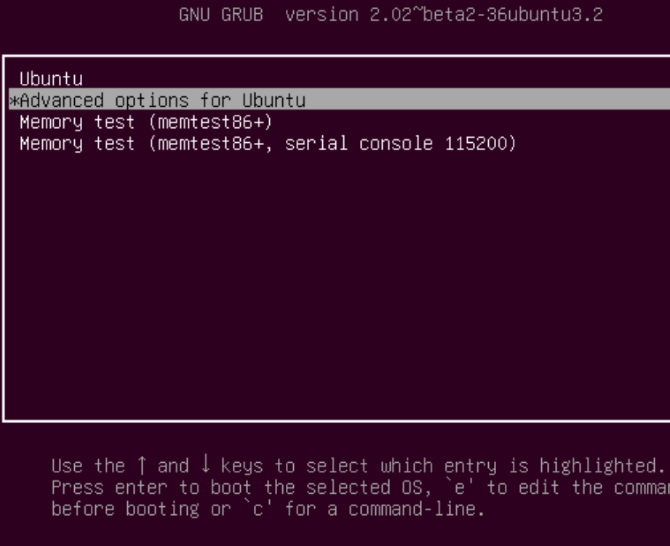
Check the GRUB bootloader is Ubuntu won't boot

If not, then the problem is that the GRUB bootloader is broken or overwritten. Repairing the bootloader is the only solution. (If you’re dual booting, you’ll still be able to access Windows).

Note: If you see the GRUB Bootloader, skip down to the next section.

Repair the GRUB Bootloader to Boot Ubuntu

If GRUB is not loading, then Ubuntu won’t boot. Fortunately, you can repair GRUB using the Ubuntu installation media. Restart the computer with the disc inserted and wait for it to load up.

Again, you may need to change the boot order, as described above. Make a note of the boot order before you change it!

With the installation disc booted into the Live environment, confirm you have a network connection and then open a Terminal. Enter:

sudo apt-add-repository ppa:yannubuntu/boot-repair

sudo apt update

sudo apt install -y boot-repair

boot-repair

This will install the boot-repair tool and run it after the final instruction. Wait for the system to be scanned, then select Recommended Repair. (There is also an Advanced options view, where you can select a default OS, default disk or partition, and more.)

Click Apply when done. You should now be able to restart your PC and boot into Ubuntu. Alternatively, it will be listed an option in the GRUB bootloader menu.

3. Ubuntu Still Won’t Boot? Fix the GRUB Bootloader Menu

If you can see the bootloader, then you don’t have to do any of the above. There is a built-in recovery tool which you can use to help fix Ubuntu booting problems.

In the bootloader menu, select Advanced options for Ubuntu. Next, use the arrow keys to select the entry appended with (recovery mode). Tap Enter to continue and wait as Ubuntu is booted into a slimmed down version.

Use the recovering menu to fix problems if Ubuntu won't start

(If you’ve ever booted Windows Safe Mode, this is similar.)

Several repair options can solve situations when Ubuntu won’t boot. The three you should try, in order, are:

  1. fsck: This is the file system check tool, which scans the hard disk drive and repairs any errors it finds.
  2. clean: Use this to make free space, useful if the reason for Ubuntu not booting is a lack of HDD space.
  3. dpkg: With this, you can repair broken software packages. Failed software installations or updates can cause problems with Ubuntu not starting. Repairing them should solve this.

If Ubuntu has never booted previously, you should also try the failsafeX tool. Graphics drivers or a problem with the Xorg graphical server might be the fault if Ubuntu won’t boot after installing. Use failsafeX to overcome this.

Note that the root menu item is for advanced users who have the skills to fix the problem manually.

4. Ubuntu Not Starting? Time to Reinstall

If Ubuntu won't boot up, take the time to reinstall it.

In the event of a dreadful failure that could prove time-consuming to resolve, you might prefer to simply reinstall Ubuntu. This can be done without overwriting your existing files and folders. In fact, it’s one of the easiest fixes if Ubuntu won’t boot.

Again, boot into the Live environment on your Ubuntu CD/DVD or USB drive, and begin the installation. The installer will detect the existing instance of Ubuntu and give you the option to Reinstall Ubuntu.

Look for the option with the note “Documents, music, and other personal files will be kept…” In most cases, installed software will be retained too.

Of course, as a precaution, you should already have a backup of all your Ubuntu data. This might have been made manually with a backup utility, or using a disk cloning tool like dd. You might prefer syncing data to the cloud via Dropbox or an open source cloud solution.

Once the reinstallation is complete, Ubuntu should be back up and running.

Note: The Erase Ubuntu and Install option is not advised unless other options fail and your data is backed up.

5. Replace Your Faulty Hardware

If Ubuntu won't boot, it may be a problem with your HDD
Image Credit: William Warby

Another cause of Ubuntu being unable to boot comes in the shape of faulty hardware. Boot problems can be caused by:

  • Hard disk drive and cabling
  • Motherboard
  • Processor (CPU)
  • Power Supply Unit

Try our guide for diagnosing a hard disk drive. You might also read up on focusing your efforts to diagnose hardware issues that prevent the computer from booting, and repairing them without breaking the bank.

Once a faulty HDD is replaced, you’ll typically need to reinstall Ubuntu from scratch. (Unless you had previously made full disc image backup, in which case this could be restored.)

It’s a scorched earth approach, but will solve problems with Ubuntu not starting.

Say Goodbye to Ubuntu Booting Problems!

If Ubuntu won’t boot, it isn’t necessarily going to be easy to get things running again. If the GRUB bootloader cannot be repaired, it could be a long time before you have a usable computer again. Yet another argument in favor of maintaining regular backups, or at least syncing your valuable data with the cloud!

Remember, this can happen with any operating system, not just Ubuntu. Having doubts? Here’s a quick reminder as to why you should stick with Ubuntu.

Read the full article: How to Fix Your Ubuntu Linux PC When It Won’t Boot


Read Full Article

The 8 Best PayPal Alternatives for Making Online Payments


paypal-guide

PayPal is the top dog when it comes to online payment services, processing over $150 billion worth of payments per quarter. It’s generally easy to use and a secure way to send money while buying products and services online, but it does have its downsides.

Fortunately, there are several online and mobile payment alternatives available to businesses and consumers. Below you can read some of the best PayPal alternatives for taking payments and sending money to your friends and family.

PayPal Alternatives for Businesses

One of the biggest questions regards PayPal alternatives for businesses. What services can a business use to use online and mobile payments instead of PayPal? There are several options available that businesses of all sizes can use.

1. Amazon Pay

amazon pay example on site

Amazon’s payment service first hit consumers in 2007. Since then, Amazon Pay has taken several different guises, including the now-defunct WebPay service. Not heard of WebPay? It was Amazon’s answer to PayPal, but it ceased operation in October 2014.

Amazon Pay is a great payment acceptance option for online services for a few reasons. If you’re already using Amazon, there’s a good chance the online marketplace holds your existing credit or debit card details, speeding up the checkout process.

Furthermore, you can use Amazon Pay to login and make purchases on heaps of sites using the Login and Pay service. The same service also provides additional protection for consumers, as well as those vendors using the service.

Although Amazon Pay no longer offers a personal payment service (e.g., person to person), the security found in the Login and Pay service makes it an excellent choice. Vendors will also find Amazon Pay a strong partner to help grow their business.

2. 2Checkout

2checkout

2Checkout is a payment processor that acts as a middleman between you and the payer. You can accept credit cards, debit cards, and even PayPal as a payment option. There is also the option to accept payment in over 80 currencies.

2Checkout adds a management layer to your online payment processing. Vendors can create weekly or monthly payment plans through the recurring billing option. There is an extensive backend with add ons and extensions, while the 2Checkout management panel contains a wealth of user and payment data to help you manage your payment processing.

The ease of use regarding international payments makes 2Checkout a worthwhile option for many businesses. It does have some drawbacks, however.

For example, if someone makes a chargeback, it’s going to cost you $20. The standard transaction processing fee is 3.5% + $0.35 domestically, but 2Checkout slaps another 1% for customers outside the US.

3. Stripe

stripe payment portal example

Stripe is one of the most popular PayPal alternatives for accepting payments online. There are many services that prefer Stripe payments over PayPal and for a good reason. It is also one of the easiest payment options if you’re setting up an online store.

Stripe handles a huge amount of the incoming online payment process, with a very fair fee structure to boot. You can collect online payments using a variety of payment methods, and Stripe moves the incoming payments to your bank account automatically. You also have access to an extensive payment processing backend, full of data to help you analyze your sales.

There are no hidden fees or changing payment fee brackets with Stripe. Each transaction has a 2.9% + $0.30 fee per successful charge, but there are no monthly fees or deductions. Your money can take a few days to arrive, however, which is a definite downside to Stripe. Furthermore, payments from an international card will incur an additional 1% transaction fee.

4. Traditional Merchant Account

Having a merchant account from a bank gives you the ability to accept credit cards directly. There is often a monthly fee, and you must be compliant with PCI Council security standards. However, if you do a lot of business and need to integrate a payment solution into your shopping cart or system, this is the best way to go.

Ask your local bank about merchant accounts or do some research to see if there’s an online solution that fits your needs. Make sure to find a reputable provider that doesn’t have a record of poor customer service, too.

If you’re not going to be doing a significant volume of online business, though, or you’re content with using another service to process your payments, don’t worry about getting a merchant account.

PayPal Alternatives for Friends and Family

These PayPal alternatives let you send money to your friends and family directly. Some services cross-over with the PayPal alternatives for businesses, without a doubt. However, if you want to send money without worry, check out these PayPal alternatives.

1. Google Pay

googlepay

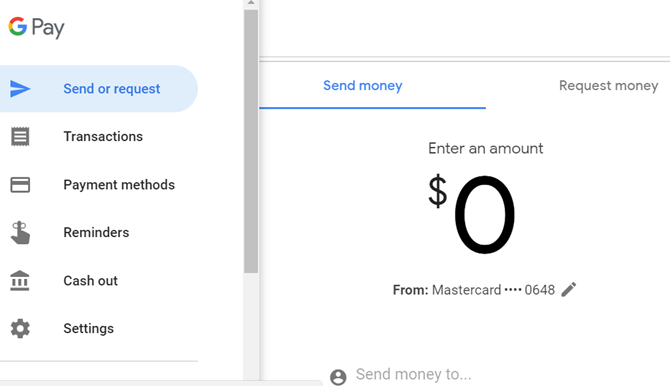
Google Pay, formerly known as Android Pay and Google Wallet, is Google’s mobile payment processing option.

As you might judge from the names, Google’s payment app has come through several iterations. At one time, you could use the Google Pay predecessor as a tap-to-pay and a peer-to-peer (P2P) payment app. Then, Google decided that you could only use the service as a P2P payment tool.

In its current iteration, Google Pay is an all-in-one mobile payment system. You can use it to make payments to your friends, at the local bar, your supermarket shop, and so on. The Google Pay digital wallet stores debit, credit, and loyalty cards, letting you make payment using your smartphone’s NFC chip.

Google Pay focuses on making mobile payments easy. “But Gavin, don’t all payment services do that?” Sure, they do. But Google Pay allows you send money to anyone with an email address or phone number, even if they’re not a Google Pay user. The recipient can instantly cash out to a bank account or debit card, granting almost instant access to your money.

Similar functionality is now also available to Gmail users, too.

Download: Gmail for Android | iOS (Free)

Download: Google Pay for Android | iOS (Free)

2. Apple Pay

apple pay ios example

Apple beat Google to mobile payments, as Apple Pay hit iPhones around the world back in 2014. Since then, Apple Pay has gone from strength to strength and at the time of writing has nearly 400 million users. Apple Pay isn’t limited to just iPhones. You can use Apple Pay from your iPad or Apple Watch, too.

Apple Pay allows you to upload credit, debit, and store loyalty cards for use with NFC payment terminals. It also makes it extremely easy to pay your friends and family for your share of the bill, or to send your kids a few bucks in a time of need. One downside, at least in comparison to Google Pay, is that your payment recipient must also use Apple Pay to access money sent to them.

You can still send someone money, even if they do not have the Apple Pay app installed. But to access and cash out their money to a debit card or otherwise, they must install Apple Pay.

3. WeChat Pay

WeChat Pay is a digital wallet and payment service available to WeChat users. WeChat is one of the biggest messaging services in the world. Every WeChat user has the option to use WeChat Pay. The sheer number of WeChat users—over 1.1 billion at the time of writing—means that WeChat Pay registers a huge number of users.

Although China has the highest number of WeChat users, the app has grown in popularity around the globe. The growth is in part due to Chinese users in different countries introducing the app to other people.

However, that belies the role of WeChat owner Tencent, the Chinese tech behemoth. Tencent owns and operates hundreds of companies. As such, WeChat has seen integrations with other Tencent services, including social media sites and gaming platforms.

Download: WeChat for Android | iOS (Free)

4. Facebook Messenger Payments

Some people will have misgivings about trusting Facebook with any form of payment information. After all, the social media giant has a terrible privacy record. Still, integrated Facebook Messenger Payments are extremely handy for a couple of reasons.

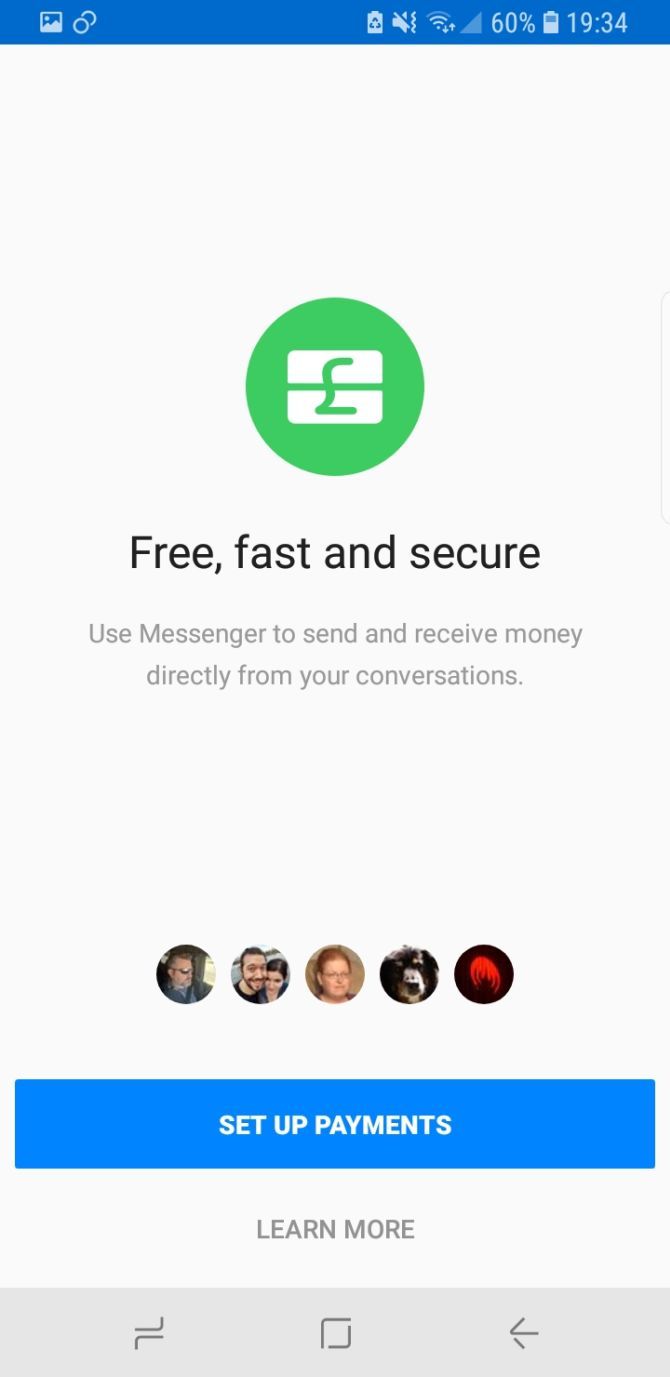
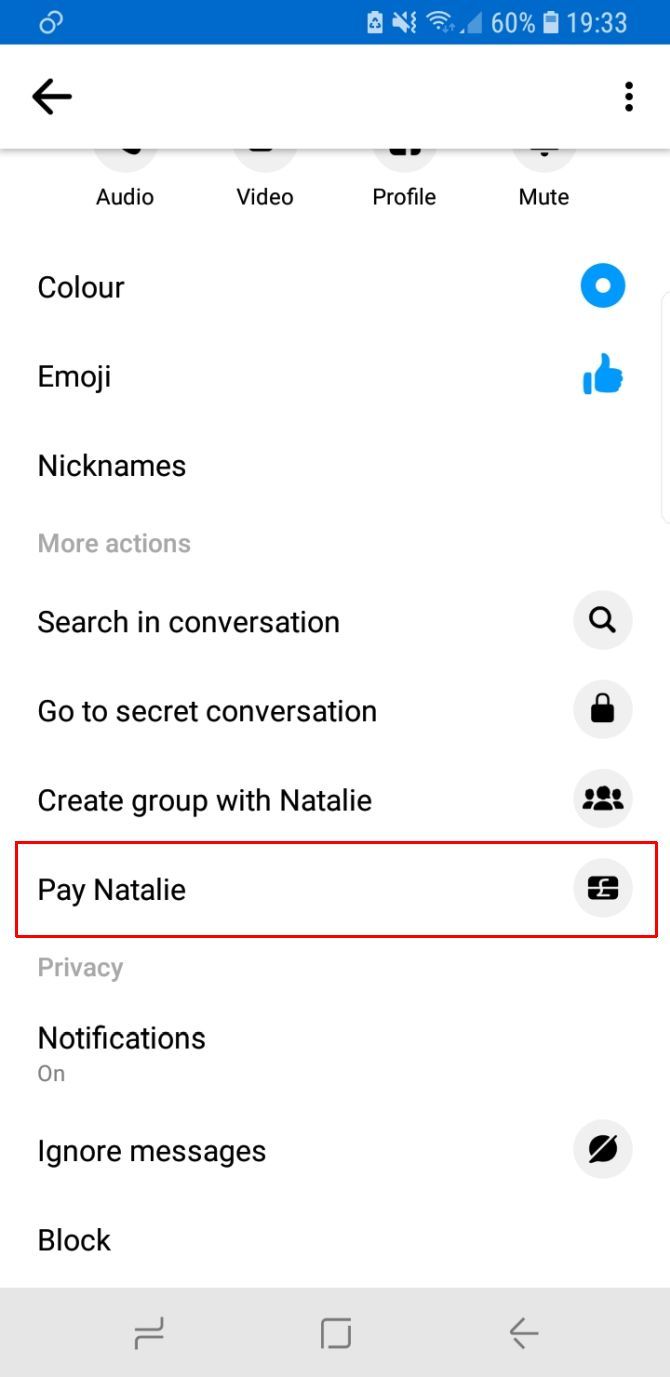
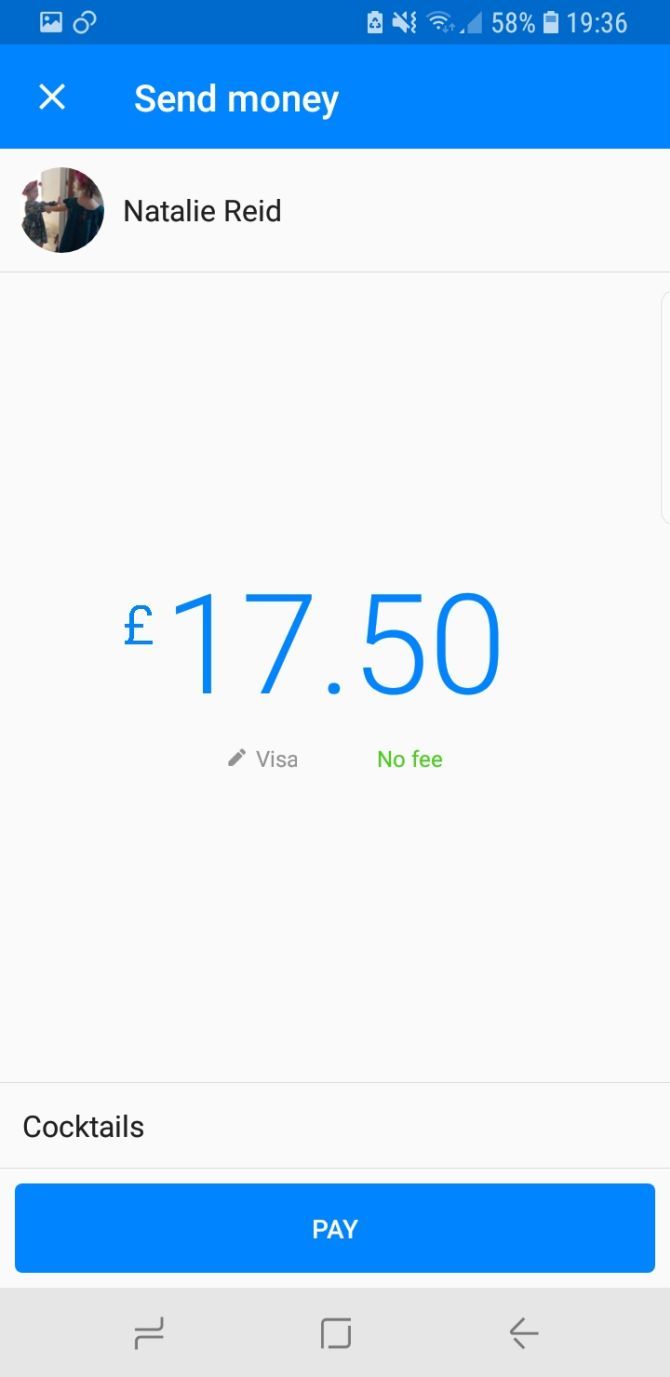
First up, Facebook Messenger Payments are super easy to use. Find your friend in the Messenger app, select Pay, and add the amount. Second, you can send and receive money from your friends and family without incurring any fees.

Finally, there is a strong chance your friend already has a Facebook account. Sending them money through the app requires no additional tools, keeping the whole payment process quick and simple.

Download: Facebook Messenger for Android | iOS (Free)

What Is the Best PayPal Alternative for Online Payments?

If you need to send money between your friends and family, choose one of the four options above. Apple users may prefer Apple Pay, especially as it integrates so well with Apple and iOS products. However, those with Android (and iOS!) devices should consider Google Pay, which offers a similar service without Apple’s restrictions.

Do you regularly make payments from a mobile app, like Google Pay or Apple Pay? If so, you should check out which NFC payment app is the most secure.

Read the full article: The 8 Best PayPal Alternatives for Making Online Payments


Read Full Article

The 8 Best Shotgun Mics for DSLR and Mirrorless Cameras


best-shotgun-mic

If you have invested in a good digital SLR or more modern mirrorless camera for video purposes, the built-in microphone is likely to leave you disappointed. Internal microphones are often tinny, too quiet, and offer little in the way of level adjustment.

To capture proper directional audio, you’ll want to invest in a shotgun microphone. These are usually mounted in the hot shoe connector on top of your camera body and can be angled or held off-camera to pick up optimal audio.

It can be tough to decide just which one you should buy, so here are a few of the best shotgun mics available today.

1. RØDE VideoMic Pro Plus

RØDE VideoMic Pro Plus RØDE VideoMic Pro Plus Buy Now On Amazon $319.99

The VideoMic Pro Plus is RØDE’s flagship broadcast-quality mirrorless or DSLR mountable microphone. Powered by the included LB-1 lithium-ion rechargeable battery or two AA batteries, the microphone has a frequency range of 20Hz-20kHz, making it particularly sensitive to lower frequencies.

It includes a two-stage high pass filter to better remove low frequencies like traffic noise and a high-frequency boost for improved clarity. You can adjust the gain in three stages: -10dB, 0dB, and +20dB, with a safety channel that records at a lower gain setting in case of clipping.

Other nifty features include auto power on/off, a detachable cable, and up to 10 years warranty when you register your microphone with RØDE. Like most of the other VideoMic models, the VideoMic Pro+ comes with a Rycote Lyre shock mount.

2. RØDE VideoMic Pro

RØDE VideoMic Pro RØDE VideoMic Pro Buy Now On Amazon $229.00

The VideoMic Pro is one step down from the Plus model, above. It’s not as sensitive capturing a frequency range from 40Hz-20kHz, though it features the same two-stage high pass filter and three-stage gain control at -10dB, 0dB, and +20dB.

This shotgun microphone is powered by a single 9V battery, which will give you 70 hours of recording when using a disposable alkaline battery. You can supply your own rechargeable 9V, but you won’t get anywhere near 70 hours from it.

The VideoMic Pro is a broadcast-quality microphone. You’ll get the usual shock mount for eliminating noise caused by sudden movements, and a ten-year warranty for registering your microphone too.

3. RØDE VideoMic

RØDE VideoMic RØDE VideoMic Buy Now On Amazon $139.95

If you’re looking for a solid budget option, you can do a lot worse than the standard VideoMic. This is a studio-quality microphone that captures the same 40Hz-20kHz frequency range as the more expensive option above, with slightly reduced

It is powered by a 9V battery, with a two-stage high pass filter for reducing low background noises. Level adjustment is possible to 0dB, -10dB and -20dB, and you’ll get a windshield and the Rycote Lyre shock mount in the box.

4. RØDE VideoMic GO

RØDE VideoMic GO RØDE VideoMic GO Buy Now On Amazon $109.95

The VideoMic GO is the lightest on-camera shotgun mic in the range. Weighing only 73g, this microphone requires no battery since it draws power from the camera it is connected to. As a result, the VideoMic GO won’t work with all cameras, so make sure you check RØDE’s product description to ensure compatibility before you buy.

Like the other RØDE microphones on this list, the GO comes with a windjammer and Rycote Lyre shock mount. It connects using a 3.5mm mini-jack and includes up to two years warranty when you register your product.

5. RØDE VideoMic NTG

Rode VideoMic NTG

The RØDE VideoMic NTG is a shotgun mic that blends the convenience of the VideoMic range with the broadcast-quality audio of RØDE’s professional NTG line. The critical feature for content producers is that the VideoMic NTG features the same annular line tube technology as the NTG5. The mic is portable, clocking in at just 94g.

To increase durability, the exterior of the microphone is made of rugged aerospace-grade aluminum. It is suitable for cameras and mobile devices thanks to the auto-sensing 3.5mm jack. The VideoMic NTG should last up to 30 hours and can be recharged using the USB-C port. You can also monitor your audio recordings using the USB-C port, too.

If you’re interested in learning more before making your choice, check out our overview of the RØDE VideoMic NTG.

6. TAKSTAR SGC-598

TAKSTAR SGC-598 TAKSTAR SGC-598 Buy Now On Amazon $21.32

Looking for something cheap and cheerful? The TAKSTAR SGC-598 is one of the best-selling affordable shotgun microphones on the market. You can pick it up for way less than even the cheapest RØDE, and it comes with a windscreen and shock-resistant mount in the box.

The 568 offers a frequency response between 50Hz and 16kHz, with a 10dB gain boost. A single AA battery powers it, so it should work with most cameras. It might not offer the best sound quality, but it’s hard to complain, considering the cost.

7. Zoom F1-SP

Zoom F1-SP Zoom F1-SP Buy Now On Amazon $239.95

You can’t beat an external recorder for absolute peace of mind when it comes to sound capture. The Zoom F1-SP is a bundle that features a field recorder, shotgun microphone, windscreen, shock-mount, and a 32GB micro-SDHC memory card.

The included SGH-6 microphone offers hyper-directional audio capture via the included Zoom F1 field recorder. The F1 can capture up to 24-bit/96kHz audio in WAV format. You can switch out the microphone attachment with aftermarket Zoom microphones to get even more life out of your audio setup.

8. Canon DM-E1

Canon DM-E1 Canon DM-E1 Buy Now On Amazon $239.00

Despite being pricey, the Canon DM-E1 is worth mentioning as it’s not just a shotgun microphone. There are actually three modes to choose from; shotgun, 90 degrees, and 120 degrees of audio capture. With the flick of a switch, you can go from traditionally narrow shotgun capture to much wider stereo modes for capturing larger groups.

With a frequency response of 50Hz to 16kHz, the DM-E1 doesn’t quite match the wide range of the VideoMic Pro Plus. It includes its own windscreen and shock-proof mount. The mic uses a single button-type lithium cell battery for power, so it should work with any camera. Connect it to your camera with the standard 3.5mm jack.

The Best Shotgun Mic for Any Budget

These microphones offer a compelling option for capturing sound at any budget. A good microphone will take your production quality up a notch since it’s tough to improve sound quality in post-production.

Looking for a simple desktop microphone for podcasting or narrating? Check out our roundup of the best mics for podcasting.

Read the full article: The 8 Best Shotgun Mics for DSLR and Mirrorless Cameras


Read Full Article

How to Watch Amazon Prime Video on Your TV With Chromecast


chromecast-amazon-tv

For a long time, Amazon Prime Video was not compatible with your Google Chromecast. Now, however, Amazon fully supports Chromecasts.

With Amazon having added support for your Chromecast, you can now watch Amazon Prime Video on your TV with a Chromecast.

Why Did Chromecast Support Take So Long?

Amazon’s lack of support for Chromecasts was part of the broader tit-for-tat between Amazon and Google. This also saw YouTube pulled from the Amazon Appstore, and Google refuse to sell its devices on the Amazon website.

After more than three years of stalemate, the situation finally changed in the summer of 2019.

The year had already seen a thawing of the relationship; the companies’ services started to become available on each other’s hardware products from April 2019 onwards. And in July 2019, Amazon added Chromecast support to its Prime Video app.

How to Watch Amazon Prime Video With a Chromecast

In this article, we look at what you need to get started, then explain how to watch Amazon Prime Video using your Chromecast.

What You Need to Watch Amazon Prime Video on a Chromecast

Before we look at how to watch Amazon Prime Video on a Chromecast, let’s first make sure you’ve got everything you need.

Obviously, you will require a subscription to Amazon Prime Video. Access is granted as part of an Amazon Prime subscription; you cannot buy standalone access. The price of Amazon Prime varies from country to country. In the United States, it costs $12.99/month or $119/year. In the UK, it’s £7.99/month or $79/year.

You’ll also need a Chromecast streaming dongle. Two versions are available—the 4K Chromecast Ultra and the standard, non-4K Chromecast.

The 4K model is more expensive. Amazon makes almost all its original series available in 4K, and plenty of movies also have a 4K option. Unlike Netflix, 4K access has no extra cost. Remember, you can only take advantage of 4K casting if you have a 4K TV.

If you have an Android TV box, there is a good chance it has Chromecast support built-in. Check with the manufacturer if you’re not sure.

Lastly, you will need a device from which to cast Amazon Prime Video. This could be a phone, tablet, desktop, or laptop. Windows, Mac, Android, and iOS are all supported.

Note: We’ve previously written about the best Amazon original shows if you’d like some inspiration on what to watch once you’ve got Amazon Prime Video up and running.

How to Cast Amazon Prime Video from Android and iOS

If you want to cast from a phone or tablet that runs either Android or iOS, it is easy to do so.

Note: The following guidance assumes you have already set up your Chromecast dongle and connected it to your Wi-Fi network.

amazon prime video chromecast

Before you begin, make sure that your phone/tablet and Chromecast are both on the same Wi-Fi network.

Next, download and install the Amazon Prime Video app on your device. Once the installation process is complete, you can fire up the app and enter your login details. They are the same as your Amazon account.

Now you can navigate to the TV show or movie that you want to cast. Start playing it in the usual way, and you will see a Cast button appear in the upper right-hand corner of the screen.

Tap on the icon, and you will see a list of all compatible devices on your network. Any Chromecast dongles, suitable Android TV devices, and supported products from other manufacturers will be displayed.

To start casting, simply tap on the name of the Chromecast dongle you want to connect to. Allow a few seconds for the connection to initiate, and playback will begin on your screen.

How to Cast Amazon Prime Video From Windows and Mac

Amazon has not released a standalone desktop app for either Windows or Mac. As such, the only way to cast Amazon Prime Video from a desktop or laptop computer to your Chromecast dongle is to use the Google Chrome web browser. These days, the casting functionality is built directly into the browser.

cast chrome amazon video

Once again, you need to make sure that your computer and Chromecast are both connected to the same Wi-Fi network. Also, ensure that your TV is showing the correct input channel.

When you’re ready, follow the step-by-step instructions below:

  1. Open the Chrome browser.
  2. Navigate to Amazon Prime Video and enter your login details.
  3. Find the video you want to watch.
  4. Begin playback in the usual way.
  5. In the upper right-hand corner of Chrome, click on the three vertical dots.
  6. Click Cast.
  7. In the Sources dropdown menu, click on Cast tab.
  8. Click on the name of the Chromecast dongle you want to connect to.

Keep in mind that the Chrome browser can only cast videos up to 1080p, even if you have a 4K video and a 4K Chromecast.

Other drawbacks include a lack of controls (you won’t be able to pause, fast-forward, rewind, or adjust other playback settings from the comfort of your sofa) and a lower bitrate than that to which you might be accustomed. A lower bitrate can lead to pixelation and lower-quality audio.

To stop casting, just click on the Cast icon in the Chrome toolbar, then click on the name of your Chromecast dongle for a second time.

Other Issues Watching Prime Video on a Chromecast

Aside from quality issues, there are some other things you need to be aware of when you cast Amazon Prime Video to a Chromecast.

For example, if you’re using a phone or tablet, you’re going to eat through your battery quickly. You might need a nearby plug socket if you’re planning an extended binge. You also need to consider processing power—casting from a low-power device might lead to signal drops).

And remember, if you cast your entire screen, you might encounter privacy issues. Do you really want other people in the room to see every notification you receive in real-time? That could prove embarrassing.

Is an Amazon Fire TV Stick a Better Choice?

If you’re merely considering buying a Chromecast, it’s also worth considering an Amazon Fire TV Stick. Unsurprisingly, Amazon Prime Video is well integrated into the Fire TV hardware. You’ll also get access to Alexa, Prime Photos, and plenty of third-party apps.

There is not a huge difference in price between the entry-level Amazon Fire TV Stick and entry-level Google Chromecast, so you should choose whichever device better suits your needs.

If you’d like to learn more about using a Chromecast, read our article explaining how to cast local media from a Mac to a Chromecast.

Read the full article: How to Watch Amazon Prime Video on Your TV With Chromecast


Read Full Article
Instagram still doesn’t age-check kids. That must change.


Instagram dodges child safety laws. By not asking users their age upon signup, it can feign ignorance about how old they are. That way, it can’t be held liable for $40,000 per violation of the Child Online Privacy Protection Act. The law bans online services from collecting personally identifiable information about kids under 13 without parental consent. Yet Instagram is surely stockpiling that sensitive info about underage users, shrouded by the excuse that it doesn’t know who’s who.

But here, ignorance isn’t bliss. It’s dangerous. User growth at all costs is no longer acceptable.

It’s time for Instagram to step up and assume responsibility for protecting children, even if that means excluding them. Instagram needs to ask users’ age at sign up, work to verify they volunteer their accurate birthdate by all practical means, and enforce COPPA by removing users it knows are under 13. If it wants to allow tweens on its app, it needs to build a safe, dedicated experience where the app doesn’t suck in COPPA-restricted personal info.

Minimum Viable Responsibility

Instagram is woefully behind its peers. Both Snapchat and TikTok require you to enter your age as soon as you start the sign up process. This should really be the minimum regulatory standard, and lawmakers should close the loophole allowing services to skirt compliance by not asking. If users register for an account, they should be required to enter an age of 13 or older.

Instagram’s parent company Facebook has been asking for birthdate during account registration since its earliest days. Sure, it adds one extra step to sign up, and impedes its growth numbers by discouraging kids to get hooked early on the social network. But it also benefits Facebook’s business by letting it accurately age-target ads.

Most importantly, at least Facebook is making a baseline effort to keep out underage users. Of course, as kids do when they want something, some are going to lie about their age and say they’re old enough. Ideally, Facebook would go further and try to verify the accuracy of a user’s age using other available data, and Instagram should too.

Both Facebook and Instagram currently have moderators lock the accounts of any users they stumble across that they suspect are under 13. Users must upload government-issued proof of age to regain control. That policy only went into effect last year after UK’s Channel 4 reported a Facebook moderator was told to ignore seemingly underage users unless they explicitly declared they were too young or were reported for being under 13. An extreme approach would be to require this for all signups, though that might be expensive, slow, significantly hurt signup rates, and annoy of-age users.

Instagram is currently on the other end of the spectrum. Doing nothing around age-gating seems recklessly negligent. When asked for comment about how why it doesn’t ask users’ ages, how it stops underage users from joining, and if it’s in violation of COPPA, Instagram declined to comment. The fact that Instagram claims to not know users’ ages seems to be in direct contradiction to it offering marketers custom ad targeting by age such as reaching just those that are 13.

Instagram Prototypes Age Checks

Luckily, this could all change soon.

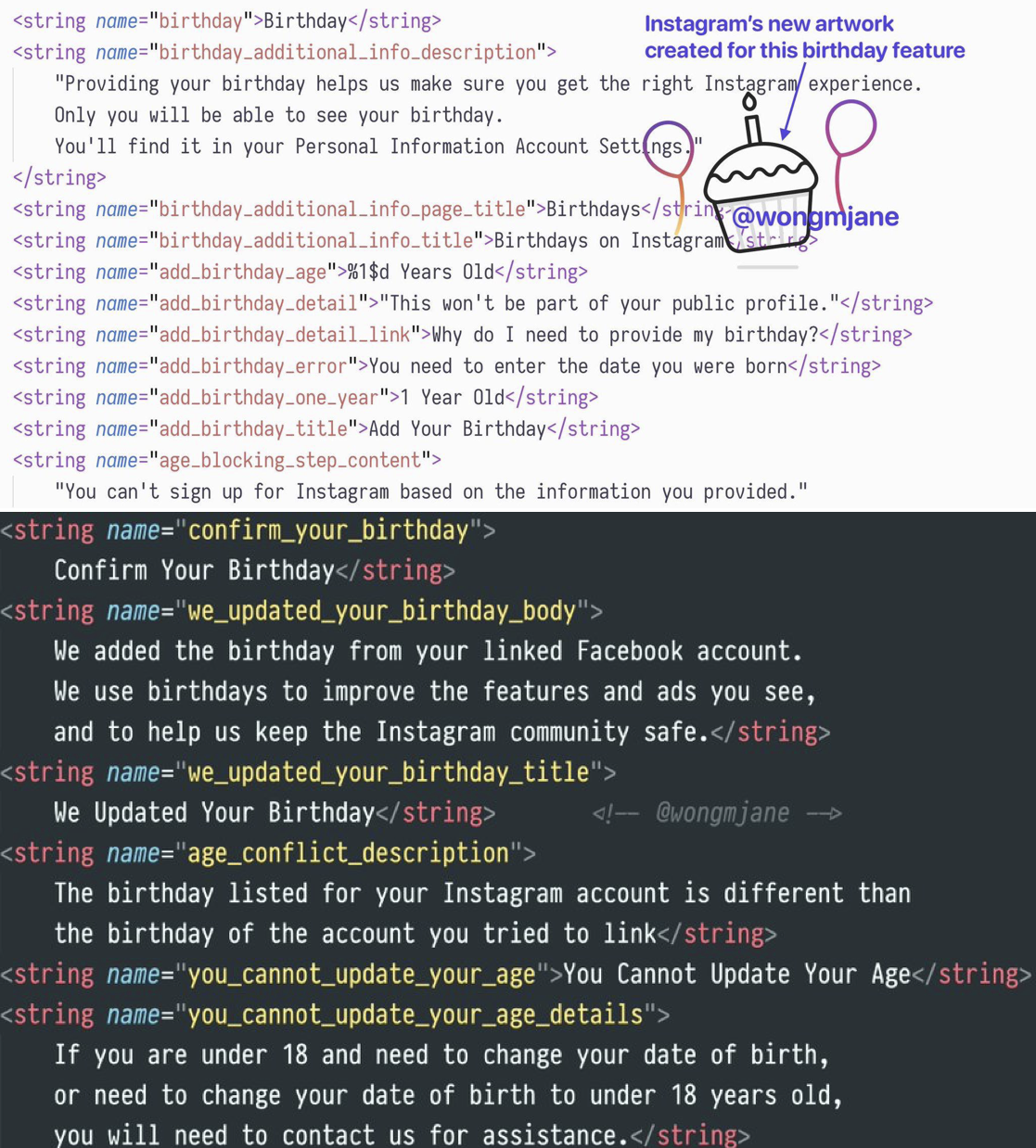
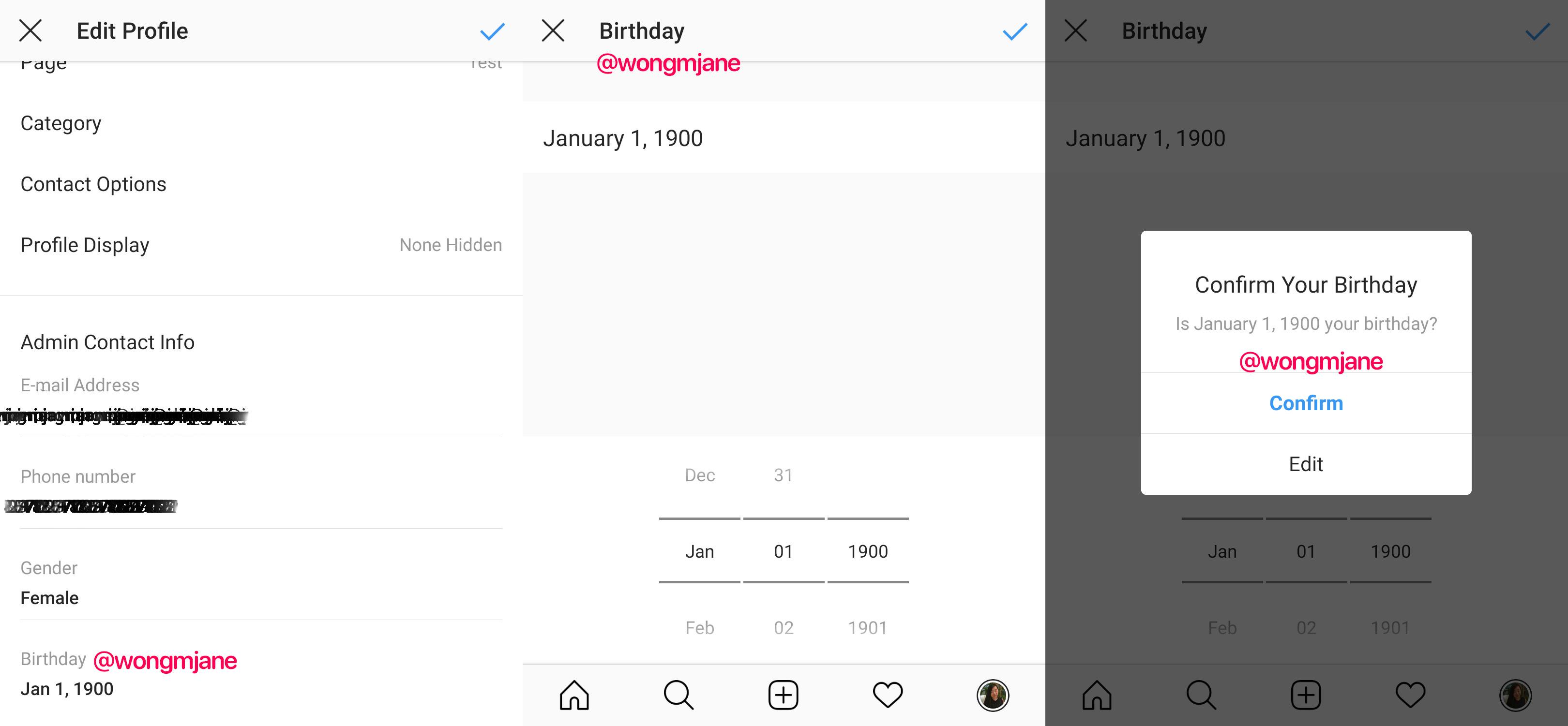
Mobile researcher and frequent TechCrunch tipster Jane Manchun Wong has spotted Instagram code inside its Android app that shows it’s prototyping an age-gating feature that rejects users under 13. It’s also tinkering with requiring your Instagram and Facebook birthdates to match. Instagram gave me a “no comment” when I asked about if these features would officially roll out to everyone.

Code in the app explains that “Providing your birthday helps us make sure you get the right Instagram experience. Only you will be able to see your birthday.” Beyond just deciding who to let in, Instagram could use this info to make sure users under 18 aren’t messaging with adult strangers, that users under 21 aren’t seeing ads for alcohol brands, and that potentially explicit content isn’t shown to minors.

Instagram’s inability to do any of this clashes with it and Facebook’s big talk this year about its commitment to safety. Instagram has worked to improve its approach to bullying, drug sales, self-harm, and election interference, yet there’s been not a word about age gating.

Meanwhile, underage users promote themselves on pages for hashtags like #12YearOld where it’s easy to find users who declare they’re that age right in their profile bio. It took me about 5 minutes to find creepy “You’re cute” comments from older men on seemingly underage girls’ photos. Clearly Instagram hasn’t been trying very hard to stop them from playing with the app.

Illegal Growth

I brought up the same unsettling situations on Musically, now known as TikTok, to its CEO Alex Zhu on stage at TechCrunch Disrupt in 2016. I grilled Zhu about letting 10-year-olds flaunt their bodies on his app. He tried to claim parents run all of these kids’ accounts, and got frustrated as we dug deeper into Musically’s failures here.

Thankfully, TikTok was eventually fined $5.7 million this year for violating COPPA and forced to change its ways. As part of its response, TikTok started showing an age gate to both new and existing users, removed all videos of users under 13, and restricted those users to a special TikTok Kids experience where they can’t post videos, comment, or provide any COPPA-restricted personal info.

If even a Chinese app social media app that Facebook CEO has warned threatens free speech with censorship is doing a better job protecting kids than Instagram, something’s gotta give. Instagram could follow suit, building a special section of its apps just for kids where they’re quarantined from conversing with older users that might prey on them.

Perhaps Facebook and Instagram’s hands-off approach stems from the fact that CEO Mark Zuckerberg doesn’t think the ban on under-13-year-olds should exist. Back in 2011, he said “That will be a fight we take on at some point . . . My philosophy is that for education you need to start at a really, really young age.” He’s put that into practice with Messenger Kids which lets 6 to 12-year-olds chat with their friends if parents approve.

The Facebook family of apps’ ad-driven business model and earnings depend on constant user growth that could be inhibited by stringent age gating. It surely doesn’t want to admit to parents it’s let kids slide into Instagram, that advertisers were paying to reach children too young to buy anything, and to Wall Street that it might not have 2.8 billion legal users across its apps as it claims.

But given Facebook and Instagram’s privacy scandals, addictive qualities, and impact on democracy, it seems like proper age-gating should be a priority as well as the subject of more regulatory scrutiny and public concern. Society has woken up to the harms of social media, yet Instagram erects no guards to keep kids from experiencing those ills for themselves. Until it makes an honest effort to stop kids from joining, the rest of Instagram’s safety initiatives ring hollow.


Read Full Article

Instagram still doesn’t age-check kids. That must change.


Instagram dodges child safety laws. By not asking users their age upon signup, it can feign ignorance about how old they are. That way, it can’t be held liable for $40,000 per violation of the Child Online Privacy Protection Act. The law bans online services from collecting personally identifiable information about kids under 13 without parental consent. Yet Instagram is surely stockpiling that sensitive info about underage users, shrouded by the excuse that it doesn’t know who’s who.

But here, ignorance isn’t bliss. It’s dangerous. User growth at all costs is no longer acceptable.

It’s time for Instagram to step up and assume responsibility for protecting children, even if that means excluding them. Instagram needs to ask users’ age at sign up, work to verify they volunteer their accurate birthdate by all practical means, and enforce COPPA by removing users it knows are under 13. If it wants to allow tweens on its app, it needs to build a safe, dedicated experience where the app doesn’t suck in COPPA-restricted personal info.

Minimum Viable Responsibility

Instagram is woefully behind its peers. Both Snapchat and TikTok require you to enter your age as soon as you start the sign up process. This should really be the minimum regulatory standard, and lawmakers should close the loophole allowing services to skirt compliance by not asking. If users register for an account, they should be required to enter an age of 13 or older.

Instagram’s parent company Facebook has been asking for birthdate during account registration since its earliest days. Sure, it adds one extra step to sign up, and impedes its growth numbers by discouraging kids to get hooked early on the social network. But it also benefits Facebook’s business by letting it accurately age-target ads.

Most importantly, at least Facebook is making a baseline effort to keep out underage users. Of course, as kids do when they want something, some are going to lie about their age and say they’re old enough. Ideally, Facebook would go further and try to verify the accuracy of a user’s age using other available data, and Instagram should too.

Both Facebook and Instagram currently have moderators lock the accounts of any users they stumble across that they suspect are under 13. Users must upload government-issued proof of age to regain control. That policy only went into effect last year after UK’s Channel 4 reported a Facebook moderator was told to ignore seemingly underage users unless they explicitly declared they were too young or were reported for being under 13. An extreme approach would be to require this for all signups, though that might be expensive, slow, significantly hurt signup rates, and annoy of-age users.

Instagram is currently on the other end of the spectrum. Doing nothing around age-gating seems recklessly negligent. When asked for comment about how why it doesn’t ask users’ ages, how it stops underage users from joining, and if it’s in violation of COPPA, Instagram declined to comment. The fact that Instagram claims to not know users’ ages seems to be in direct contradiction to it offering marketers custom ad targeting by age such as reaching just those that are 13.

Instagram Prototypes Age Checks

Luckily, this could all change soon.

Mobile researcher and frequent TechCrunch tipster Jane Manchun Wong has spotted Instagram code inside its Android app that shows it’s prototyping an age-gating feature that rejects users under 13. It’s also tinkering with requiring your Instagram and Facebook birthdates to match. Instagram gave me a “no comment” when I asked about if these features would officially roll out to everyone.

Code in the app explains that “Providing your birthday helps us make sure you get the right Instagram experience. Only you will be able to see your birthday.” Beyond just deciding who to let in, Instagram could use this info to make sure users under 18 aren’t messaging with adult strangers, that users under 21 aren’t seeing ads for alcohol brands, and that potentially explicit content isn’t shown to minors.

Instagram’s inability to do any of this clashes with it and Facebook’s big talk this year about its commitment to safety. Instagram has worked to improve its approach to bullying, drug sales, self-harm, and election interference, yet there’s been not a word about age gating.

Meanwhile, underage users promote themselves on pages for hashtags like #12YearOld where it’s easy to find users who declare they’re that age right in their profile bio. It took me about 5 minutes to find creepy “You’re cute” comments from older men on seemingly underage girls’ photos. Clearly Instagram hasn’t been trying very hard to stop them from playing with the app.

Illegal Growth

I brought up the same unsettling situations on Musically, now known as TikTok, to its CEO Alex Zhu on stage at TechCrunch Disrupt in 2016. I grilled Zhu about letting 10-year-olds flaunt their bodies on his app. He tried to claim parents run all of these kids’ accounts, and got frustrated as we dug deeper into Musically’s failures here.

Thankfully, TikTok was eventually fined $5.7 million this year for violating COPPA and forced to change its ways. As part of its response, TikTok started showing an age gate to both new and existing users, removed all videos of users under 13, and restricted those users to a special TikTok Kids experience where they can’t post videos, comment, or provide any COPPA-restricted personal info.

If even a Chinese app social media app that Facebook CEO has warned threatens free speech with censorship is doing a better job protecting kids than Instagram, something’s gotta give. Instagram could follow suit, building a special section of its apps just for kids where they’re quarantined from conversing with older users that might prey on them.

Perhaps Facebook and Instagram’s hands-off approach stems from the fact that CEO Mark Zuckerberg doesn’t think the ban on under-13-year-olds should exist. Back in 2011, he said “That will be a fight we take on at some point . . . My philosophy is that for education you need to start at a really, really young age.” He’s put that into practice with Messenger Kids which lets 6 to 12-year-olds chat with their friends if parents approve.

The Facebook family of apps’ ad-driven business model and earnings depend on constant user growth that could be inhibited by stringent age gating. It surely doesn’t want to admit to parents it’s let kids slide into Instagram, that advertisers were paying to reach children too young to buy anything, and to Wall Street that it might not have 2.8 billion legal users across its apps as it claims.

But given Facebook and Instagram’s privacy scandals, addictive qualities, and impact on democracy, it seems like proper age-gating should be a priority as well as the subject of more regulatory scrutiny and public concern. Society has woken up to the harms of social media, yet Instagram erects no guards to keep kids from experiencing those ills for themselves. Until it makes an honest effort to stop kids from joining, the rest of Instagram’s safety initiatives ring hollow.


Read Full Article

Google CEO Sundar Pichai is taking over as CEO of Alphabet


Google co-founders Larry Page and Sergey Brin just announced that Google CEO Sundar Pichai will be replacing Page as the CEO of parent company Alphabet.

It also sounds like Brin is stepping down from his role as Alphabet’s president.

Alphabet first came into existence in 2015 as “a collection of companies” that separates Google from “other bets” that aren’t part of its core businesses, such as Waymo (self-driving cars), Verily (life sciences), Calico (biotech R&D), Sidewalk Labs (urban innovation) and Loon (rural internet access via balloon).

At the time, Page shifted from the Google CEO role to Alphabet CEO, with Pichai stepping in to lead the search giant. However, Page and Brin write today that “Alphabet and Google no longer need two CEOs and a President. Going forward, Sundar will be the CEO of both Google and Alphabet.”

Rather than framing this as a departure, the pair suggests that they’ve “never been ones to hold on to management roles when we think there’s a better way to run the company” and that they remain “deeply committed to Google and Alphabet for the long term, and will remain actively involved as Board members, shareholders and co-founders.”


Updating


Read Full Article

Verizon and AWS announce 5G Edge computing partnership


Just as Qualcomm was starting to highlight its 5G plans for the coming years, Verizon CEO Hans Vestberg hit the stage at AWS re:Invent to discuss the carrier’s team up with the cloud computing giant.

As part of Verizon’s (TechCrunch’s parent company, disclosure, disclosure, disclosure) upcoming focus on 5G edge computing, the carrier will be the first to use the newly announced AWS Wavelength. The platform is designed to let developers build super low latency apps for 5G devices.

Currently, it’s being piloted in Chicago with a handful of high profile partners, including the NFL and Bethesda, the game developer behind Fallout and Elder Scrolls. No details yet on those specific applications (though remote gaming and live streaming seem like the obvious ones), but potential future uses include things like smart cars, IoT devices, AR/VR — you know, the sorts of things people cite when discussing 5G’s life beyond the smartphone.

“AWS Wavelength provides the same AWS environment — APIs, management console, and tools — that they’re using today at the edge of the 5G network,” AWS CEO Andy Jassy said on-stage. Starting with Verizon’s 5G network locations in the US, customers will be able to deploy the latency-sensitive portions of an application at the edge to provide single-digit millisecond latency to mobile and connected devices.”

As Verizon’s CEO joined Vestberg on stage, CNO Nicki Palmer joined Qualcomm in Hawaii, to discuss the carrier’s Mmwave approach to the next-gen wireless. The technology has raised some questions around its coverage area. Verizon has addressed this to some degree with partnerships with third-parties like Boingo.

The company plans to have coverage in 30 U.S. cities by end of year. That number is currently at 18.


Read Full Article

Qualcomm unveils Snapdragon 865 and 765 platforms


This morning at its annual Snapdragon summit in Hawaii, Qualcomm offered a glimpse at two new Snapdragon chips. You know how this works: the chipmaker offers some insight into the components that will power the vast majority of Android flagships over the course of the coming year.

The two headliners for the even are the flagship-level Snapdragon 865 and the lower-end 765. No surprise, Qualcomm is focused on 5G and AI for both systems — the latter of which has become an increasingly important piece of the mobile ecosystem, while the former is expected to start driving a majority of smartphone purchases beginning next year.

Here’ Qualcomm,

The flagship Snapdragon 865 Mobile Platform, which includes the Snapdragon X55 5G Modem-RF System, is the world’s most advanced 5G platform, delivering unmatched connectivity and performance for the next generation of flagship devices. The Snapdragon 765/765G brings integrated 5G connectivity, advanced AI processing, and select Snapdragon Elite Gaming experiences.

Notably, the mid-range765 features an integrated 5G option, unlike the higher-end 865, which utilizes the separate X55 5G modem. Like the latter decision is a sign of the relatively slow roll out of 5G handsets this year. They’ll surely become more of a mainstay in 2020, but many manufacturers will likely continue to offer non-5G options, particularly in countries where carriers have been slower to introduce the next-gen network.

Right now, it’s just a glimpse of what’s to come. Expect more information to be rationed out of the next few days of the summit.  We may also get a look at some of the first handsets this week in Hawaii, but likely the announcements will really begin in earnest comes CES and MWC in early-January and late-February, respectively.

Also new is Sonic Max, a new fingerprint scanning technology. The hook here is a much larger surface area for the in-screen scanner — 17x larger, according to Qualcomm’s numbers.


Read Full Article

This browser extension unhides Instagram Likes


Instagram is hiding Like counts to make people feel better. But what if you’re curious, competitive, or just petty? Now you can re-embrace the popularity contest by installing the Socialinsider Chrome extension that reveals Instagram Like and comment counts. “The Return Of The Likes” extension overlays the numbers of Likes and comments on the top right corner of posts on Instagram’s website. If you don’t want Instagram’s overprotective helicopter parenting, now you can download the extension here to put an end to it.

Obviously, it’s not as useful as showing Like counts right in the Instagram mobile app. You probably aren’t going to switch to browsing Insta just on the web, but if you see a post you want to know the Like count of, you can easily send yourself the permalink and open it on a computer.

Instagram is currently testing hiding Like counts with a percentage of users in every country worldwide. It started the experiment in Canada in April before adding six more countries in July and then the U.S. last month. Facebook launched a similar hidden likes experiment in Australia in September.

TechCrunch tested Return Of The Likes and verified that it works. It come from social media analytics company Socialinsider, which offers software for measuring engagement and benchmarking performance against competitors. The company insists that “No data is sent to Socialinsider servers.” We asked Instagram if the Chrome extension was in compliance with the app’s rules, and will update if we hear back.

As social media evolves, the emerging trend is for platforms to step in to protect users. In many cases, it’s warranted. Like counts can hurt people’s well-being by leading them into envy spirals comparing themselves against peers, or coercing them to self-censor to avoid an embarrassingly low Like count. Still, the question remains whether users deserve control over their own experience. Should we be able to opt back in to seeing Like counts, the way we have controls over block lists of offensive words?

After the platforms step up to ensure safety, we’ll have to decide when we want step in and demand to see what’s been covered up.

Additional reporting by Lucas Matney


Read Full Article

03 December 2019

Google Photos adds a chat feature to its app


An argument could be made that Google has over-indulged in its creation of way too many messaging apps in years past. But today’s launch of a new messaging service — this time within the confines of Google Photos — is an integration that actually makes sense.

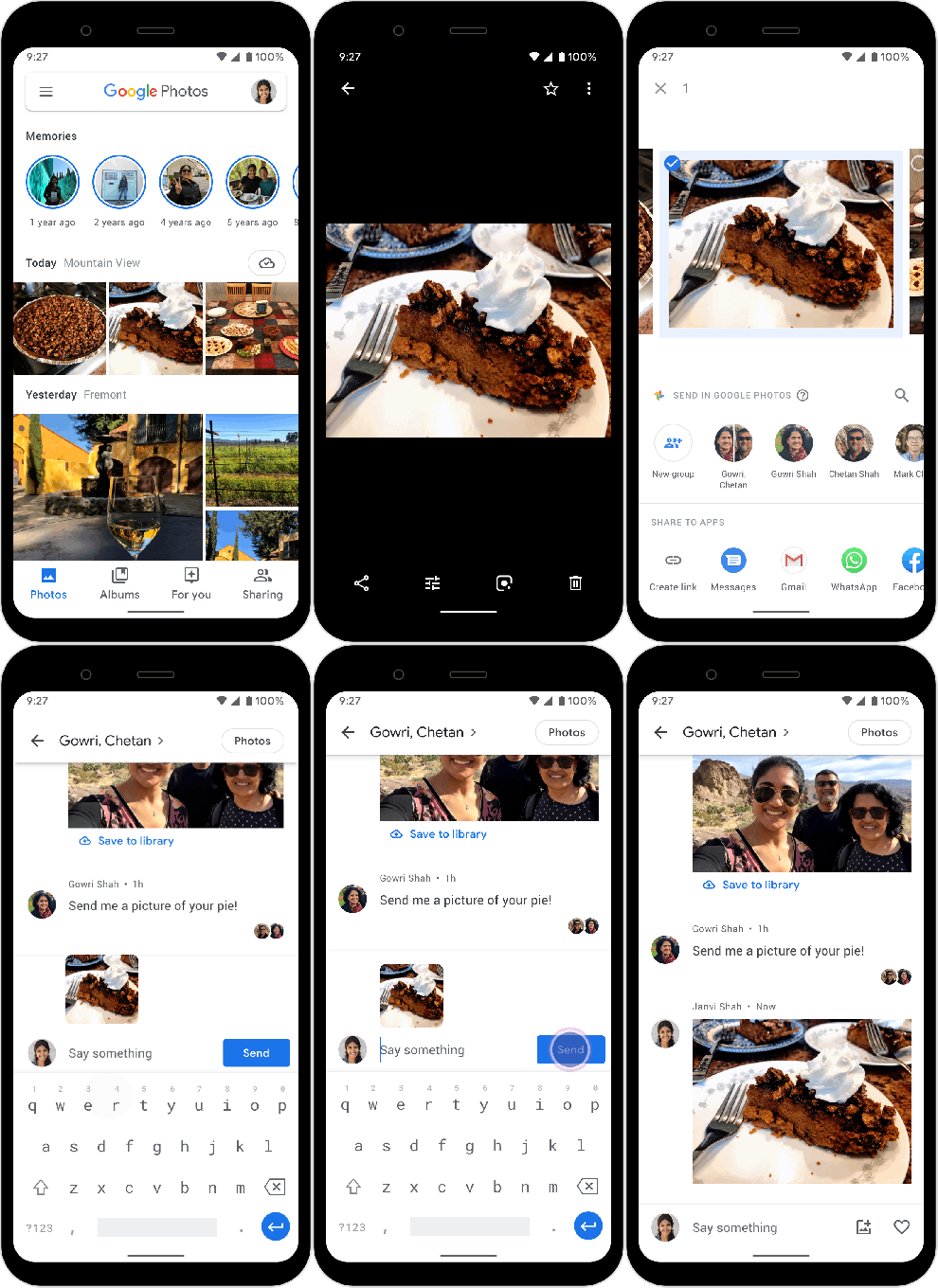
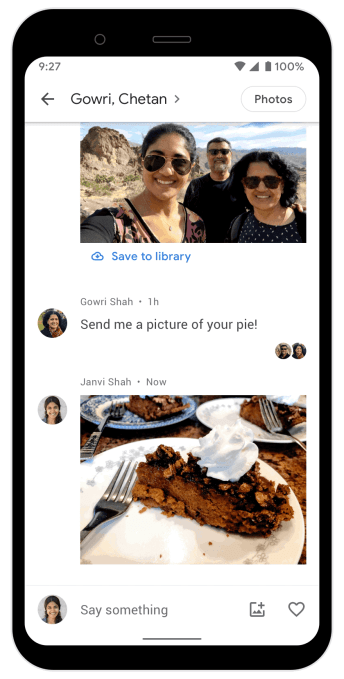
The company is rolling out a way to directly message photos and chat with another user or users within the Google Photos app. The addition will allow users to quickly and easily share those one-off photos or videos with another person, instead of taking additional steps to build a shared album.

The feature itself is simple to use. After selecting a photo and tapping share, you can now choose a new option “Send in Google Photos.” You can then tap on the icon of your most frequent contacts or search for a user by name, phone number of email.

The recipient will need a Google account to receive the photos, however, because they’ll need to sign-in to view the conversation. That may limit the feature to some extent, as not everyone is a Google user. But with now a billion some Google Photos users out there, it’s likely that more of the people you want to share will have an account, rather than not.

You can also use this feature to start a group chat by selecting “New group,” then adding recipients.

Once a chat has been started, you can return to it at any time from the “Sharing” tab in Google Photos. Here, you’ll be able to see the photos and videos you each shared, comments, text chats and likes. You can also save the photos you want to your phone or tap on the “All Photos” option to see just the photos themselves without the conversations surrounding them.

Explains Google, the idea with the new direct sharing option is not to replace users’ preferred messaging apps — a strategy that differs from Google’s investments in apps like Hangouts and Allo in previous years. Instead, the feature wants to relocate some of the photo-sharing activity that takes place in messaging apps to Google Photos.

Google had tried a similar idea with direct video sharing and messaging from the YouTube app. But the company later shut down that feature ahead of YouTube’s announcement of the $170M FTC fine for violating U.S. children’s privacy laws, COPPA. Likely, the chat feature there would have complicated YouTube’s product, now under increased regulatory scrutiny, because many kids were using direct messaging as a way to work around parental controls and other blocks on traditional messaging apps.

Google Photos makes more sense as a place to directly message friends and family, though, and the Google account requirement means users will have to be 13 or older to gain access. (Unless parents created a Google account for their child).

Direct messaging was previously announced as “coming soon” alongside Google Photos’ big fall update that also included the launch of Stories and other features.

The new feature is launching today but the rollout will take place over the next week. It will be supported across platforms, including iOS, Android and web.


Read Full Article