Despite ongoing public relations crises, Facebook kept growing in Q3 2019, demonstrating that media backlash does not necessarily equate to poor business performance.
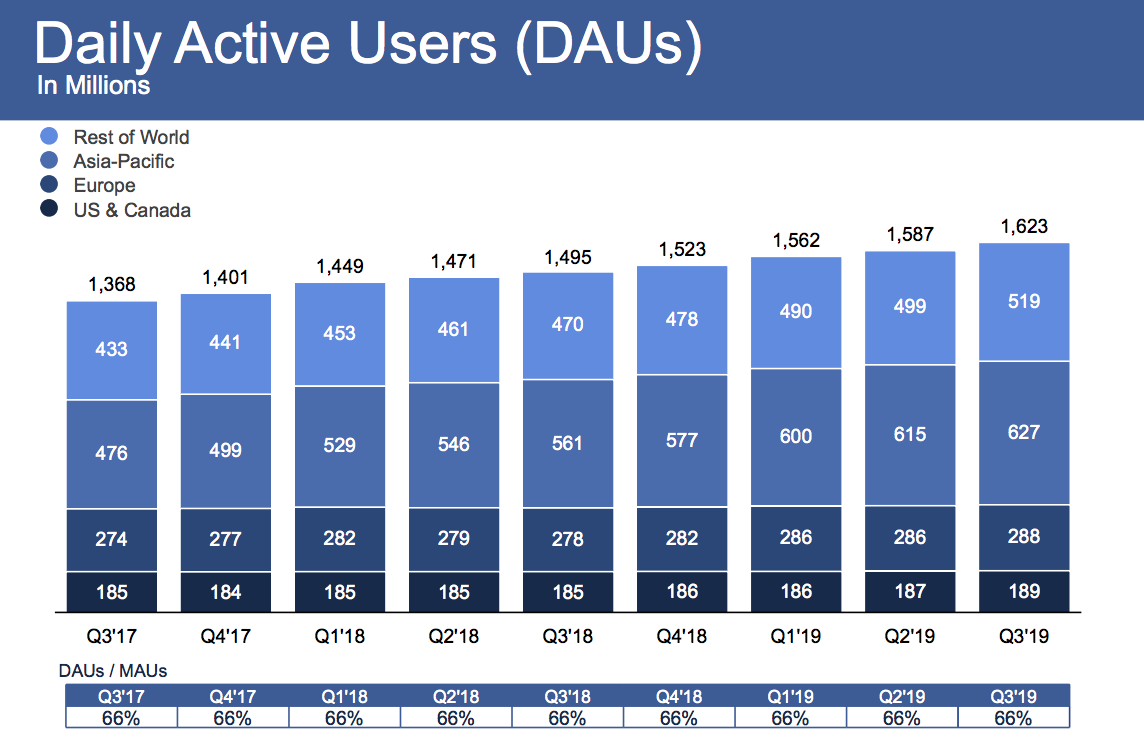
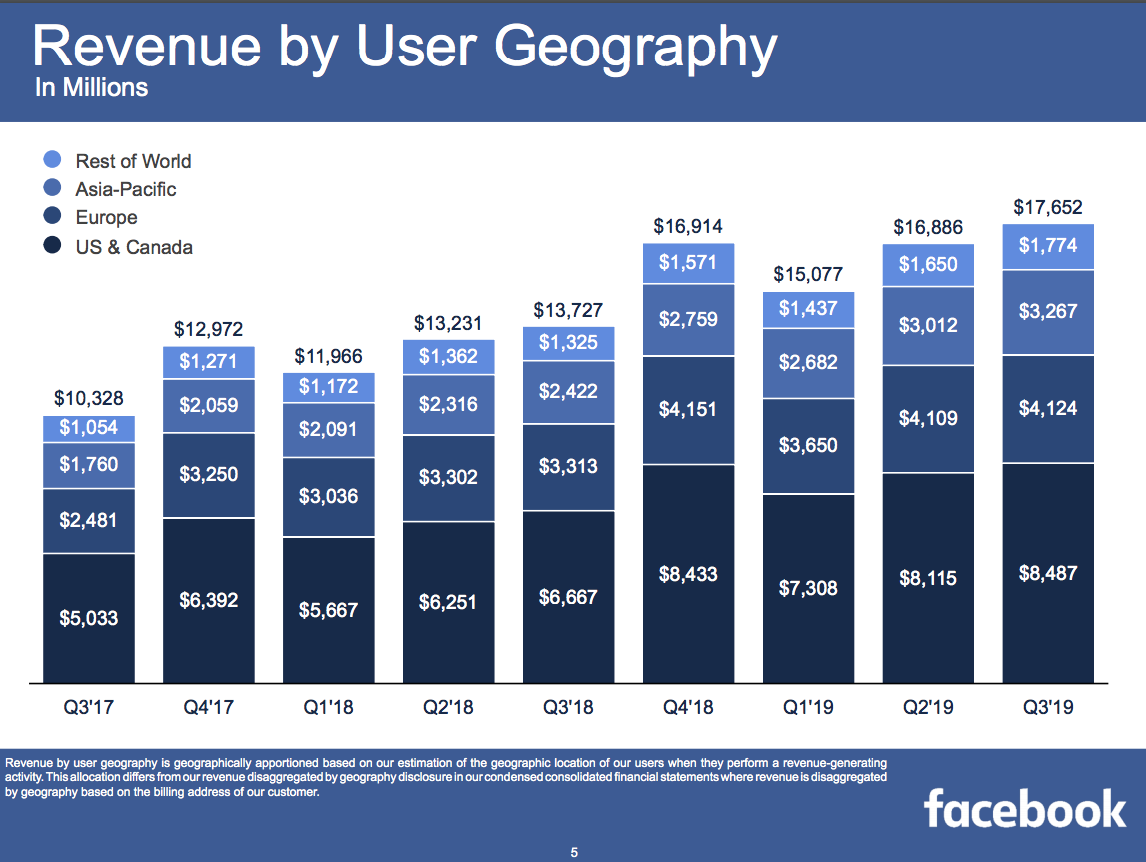
Facebook reached 2.45 billion monthly users, up 1.65 percent from 2.41 billion in Q2 2019 when it grew 1.6 percent, and it now has 1.62 billion daily active users, up 2 percent from 1.587 billion last quarter when it grew 1.6 percent. Facebook scored $17.652 billion of revenue, up 29 percent year-over-year, with $2.12 in earnings per share.
Facebook’s earnings beat expectations compared to Refinitiv’s consensus estimates of $17.37 billion in revenue and $1.91 earnings per share. Facebook’s quarter was mixed compared to Bloomberg’s consensus estimate of $2.28 EPS. Facebook earned $6 billion in profit after only racking up $2.6 billion last quarter due to its SEC settlement.
Facebook shares shot up 3.45% in after hours trading to $194.75 after earnings were announced, following a day where it closed down 0.56% at $188.25.
Notably, Facebook gained 2 million users in each of its core US & Canada and Europe markets that drive its business, after quarters of shrinkage, no growth, or weak growth there in the past 2 years. Average revenue per user grew healthily across all markets, boding well for Facebook’s ability to monetize the developing world where the bulk of user growth currently comes from. Facebook says 2.2 billion users access Facebook, Instagram, WhatsApp, or Messenger every day, and 2.8 billion use one of this family of apps each month.
Overall, it was another rough quarter for Facebook’s public perception as it dealt with outages and struggled to get buy-in from regulators for its Libra cryptocurrency project. Former co-founder Chris Hughes (who I’ll be leading a talk with at SXSW) campaigned for the social network to be broken up — a position echoed by Elisabeth Warren and other presidential candidates.
The company did spin up some new revenue sources, including taking a 30% cut of fan patronage subscriptions to content creators. It’s also trying to sell video subscriptions for publishers, and it upped the price of its Workplace collaboration suite. But gains were likely offset as the company continued to rapidly hire to address abusive content on its platform, which saw headcount grow 28% year-over-year to 43,000. There are still problems with how it treats content moderators, and Facebook has had to repeatedly remove coordinated misinformation campaigns from abroad. Appearing concerned about its waning brand, Facebook moved to add “from Facebook” to the names of Instagram and WhatsApp.
While it escaped with just a $5 billion fine as part of its FTC settlement that some consider a slap on the wrist, especially since it won’t have to significantly alter its business model. But the company will have to continue to invest and divert product resources to meet its new privacy, security, and transparency requirements. These could slow its response to a growing threat: Chinese tech giant ByteDance’s TikTok.
CEO Jack Dorsey just announced, via tweet, that Twitter will be banning all political advertising — with a few exceptions like voter registration.
“We believe political message reach should be earned, not bought,” Dorsey said.
He also said the company will share the final policy by November 15, and that it will start enforcing the policy on November 22.
We’ve made the decision to stop all political advertising on Twitter globally. We believe political message reach should be earned, not bought. Why? A few reasons…
What productive conflict can offer a workplace | Jess Kutch
Got an idea to make your workplace better? Labor organizer and TED Fellow Jess Kutch can show you how to put it into action. In this quick talk, she explains how "productive conflict" -- when people organize to challenge and change their work lives for the better -- can be beneficial for employees and employers alike.
Amazon Fresh is now free for Amazon Prime members. Amazon Fresh formerly cost $14.99/month on top of the price of a Prime membership, but it’s now included as an Amazon Prime benefit. Which means Prime members can get groceries delivered for free.
What Is Amazon Fresh?
Amazon Fresh is Amazon’s delivery service for groceries. Customers place an order for groceries, including fresh produce, frozen goods, and household essentials. And it’s delivered straight to their door within a couple of hours.
Amazon Fresh has been expanding of late, and it’s now available in more than 2,000 cities and towns across the US. However, the $14.99/month fee to use Amazon Fresh will have put some people off using the service. Which is why Amazon is now removing that barrier.
How to Buy Your Groceries From Amazon
Amazon announced that Amazon Fresh is now free in a post on Day One. Turning Amazon Fresh into a Prime benefit means Prime members in more than 2,000 US cities can now get their groceries delivered for free from Amazon Fresh or Whole Foods Market.
Amazon’s VP of Grocery Delivery, Stephanie Landry, said, “Prime members love the convenience of free grocery delivery on Amazon, which is why we’ve made Amazon Fresh a free benefit of Prime, saving customers $14.99 per month.”
If you’re a Prime member already using Amazon Fresh, you can continue using it for free. However, due to how popular Amazon thinks Fresh will now become, other Prime members will have to request an invitation to begin receiving Amazon Fresh deliveries.
When Amazon has the capacity to add you as an Amazon Fresh customer, you’ll be notified. You can then start doing your grocery shopping on Amazon, and have it delivered to your door for free within the space of a couple of hours. As long as you pay for Prime.
Other Amazon Prime Benefits Worth Using
Amazon Fresh is just the latest in a long line of benefits for Amazon Prime subscribers. There’s free shipping, obviously, but there are lots of other awesome Amazon Prime benefits you’ve probably overlooked. And we can now add Amazon Fresh to that list.
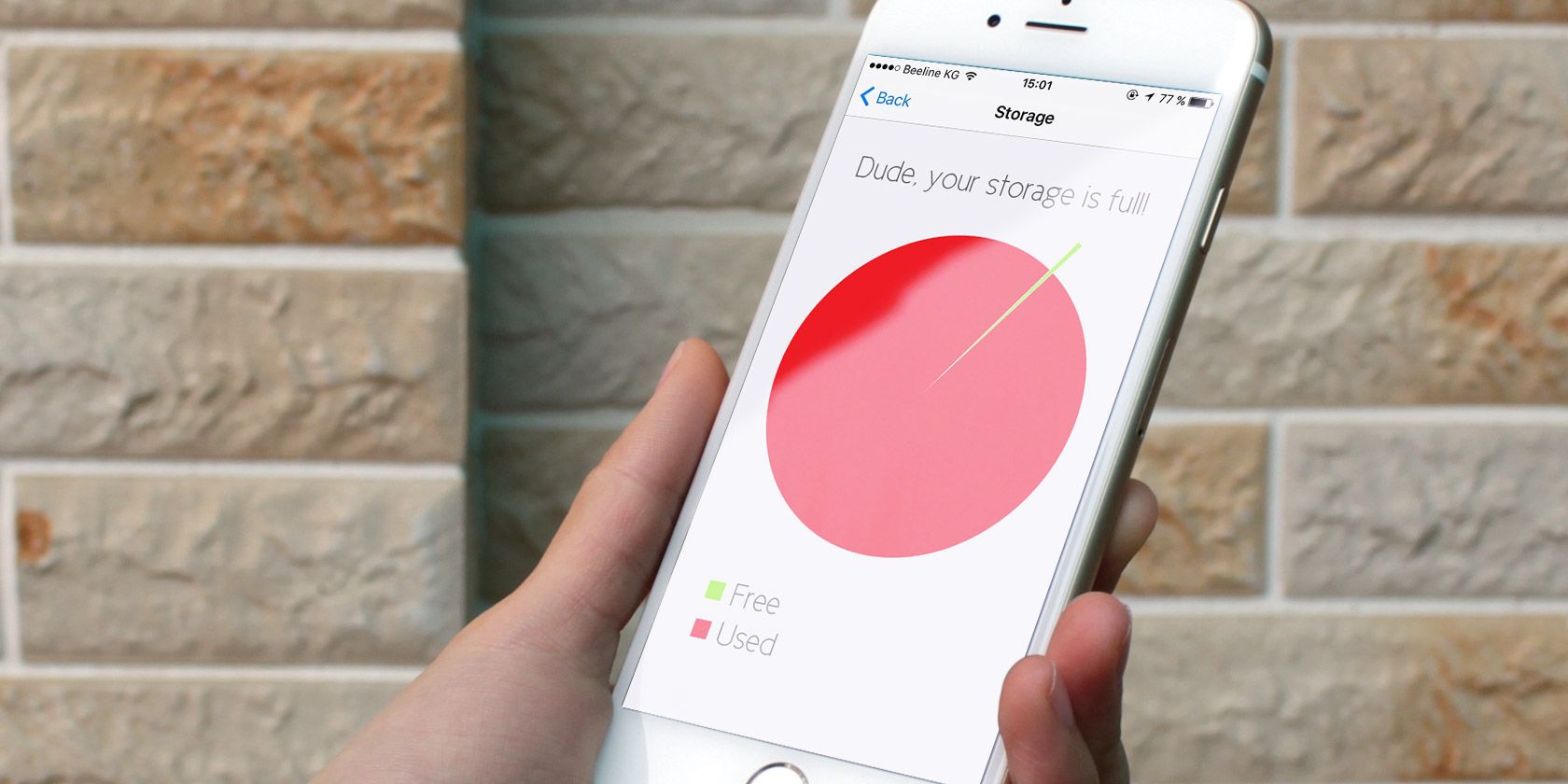
Depending on whether you get the base model or the Pro, the latest iPhone models come with a maximum of 256GB or 512GB of storage. Why, then, do we still need to solve the “iPhone Storage Full” problem?
The usual culprits are photos, 4K videos, games, and other digital hoarding habits. You can’t upgrade an iPhone’s storage. That leaves you with three choices—buy a bigger phone, get more cloud storage, or create free space on your iPhone.
The first two don’t work if you want to free up space right now. So let’s look at the ways to free up storage space with a bit of iOS jugglery.
Note: You should make a backup of your device with iTunes before you do anything major, like deleting photos or videos. We cover this below.
Get Familiar With iPhone Storage
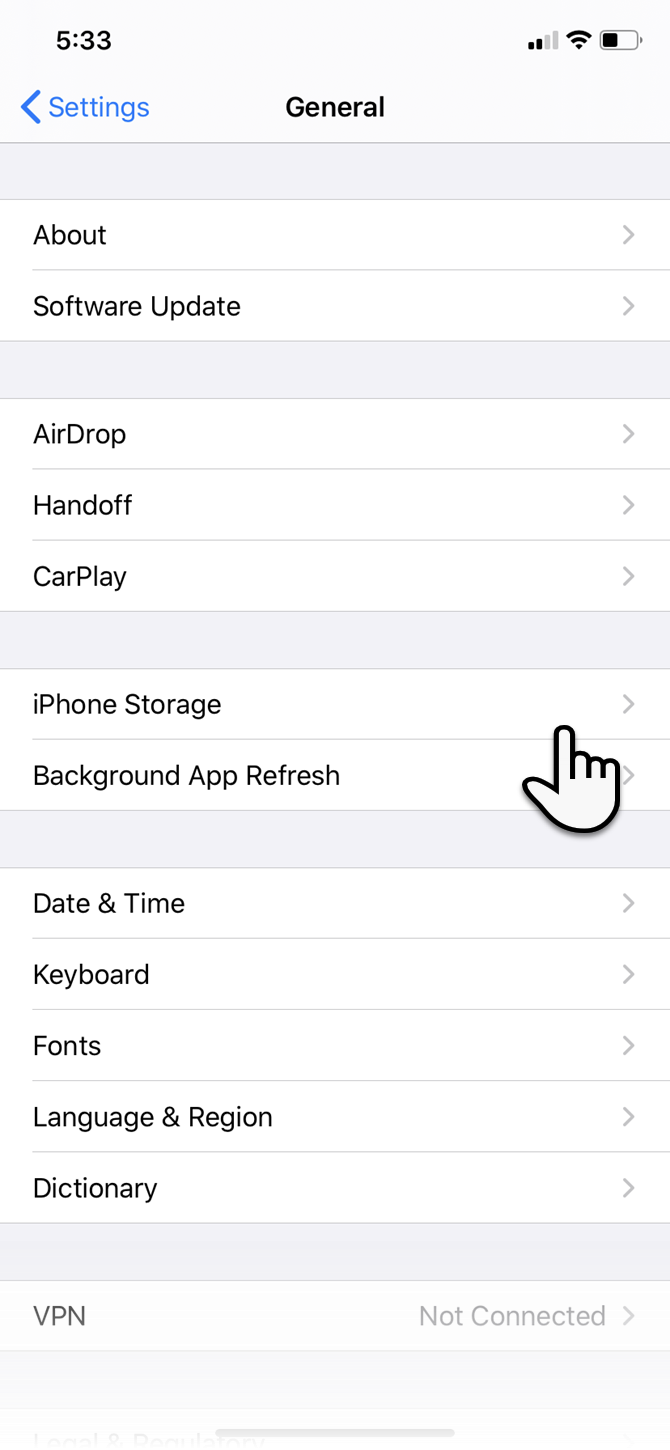
Newer versions of iOS have a dedicated iPhone Storage feature. It’s an improvement on the earlier Storage and iCloud Usage section. To find it, go to Settings > General >iPhone Storage.
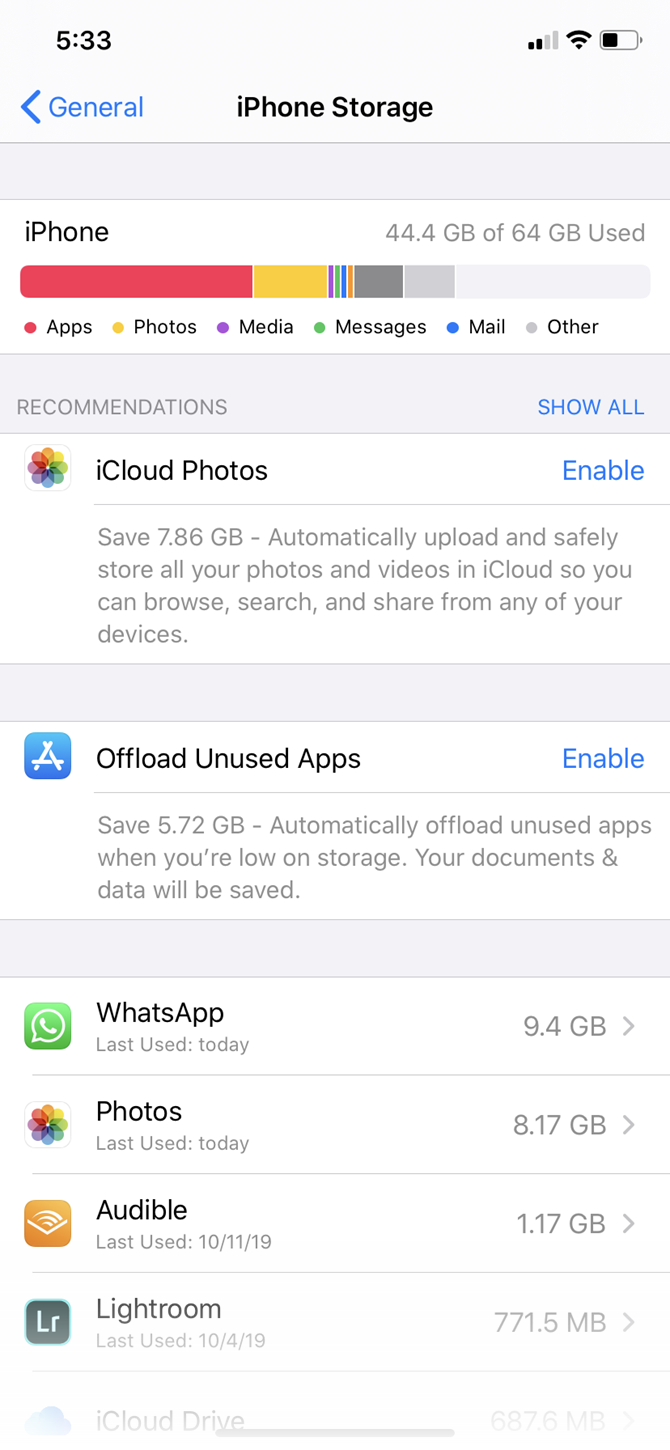
Here, you get a quick view of the storage space available on your device. The list of apps is ordered by the amount of storage each occupies. iOS suggests space-saving steps such as auto-deleting old messages, erasing large message attachments, and storing messages directly in iCloud.
Some of the Apple default apps will let you delete data from here. For instance, you can delete songs from the Music app, clean all website data from Safari, and review personal videos before you delete them.
But this screen is also important because it lets you target each app and act on them in two ways: offloading and deleting.
Offload or Delete Apps
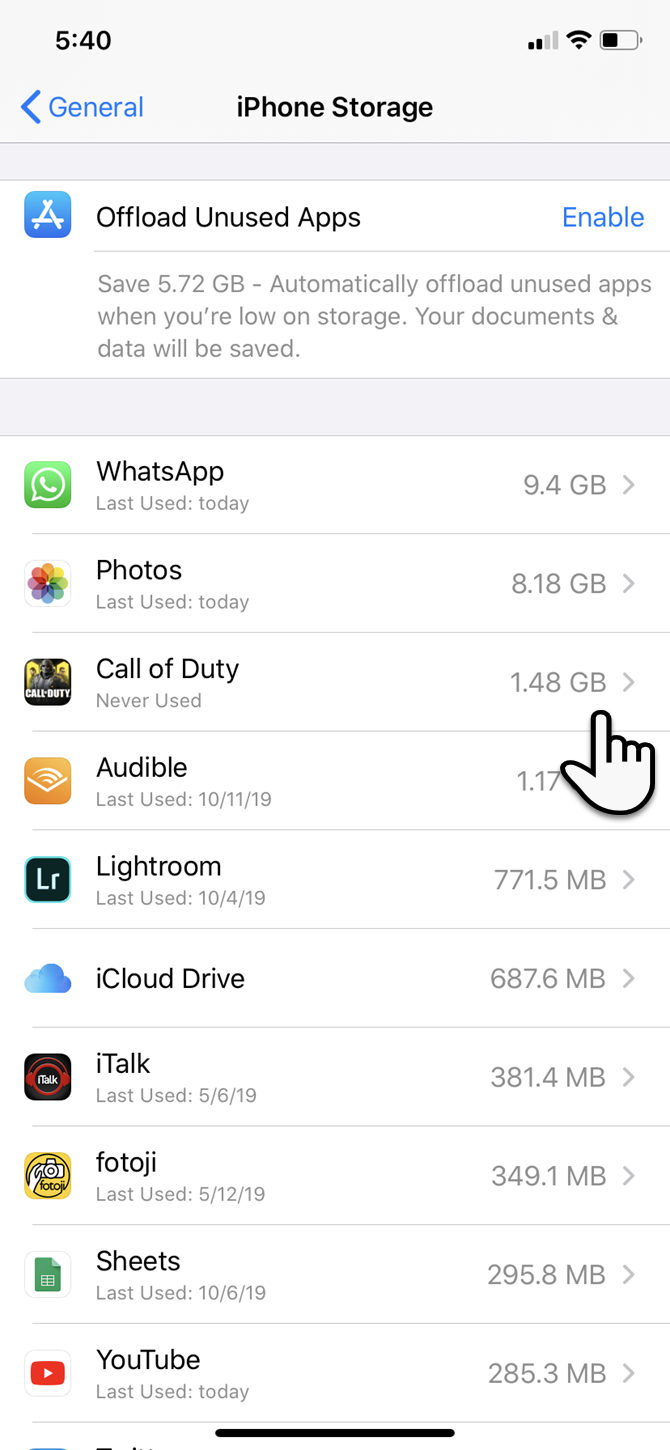
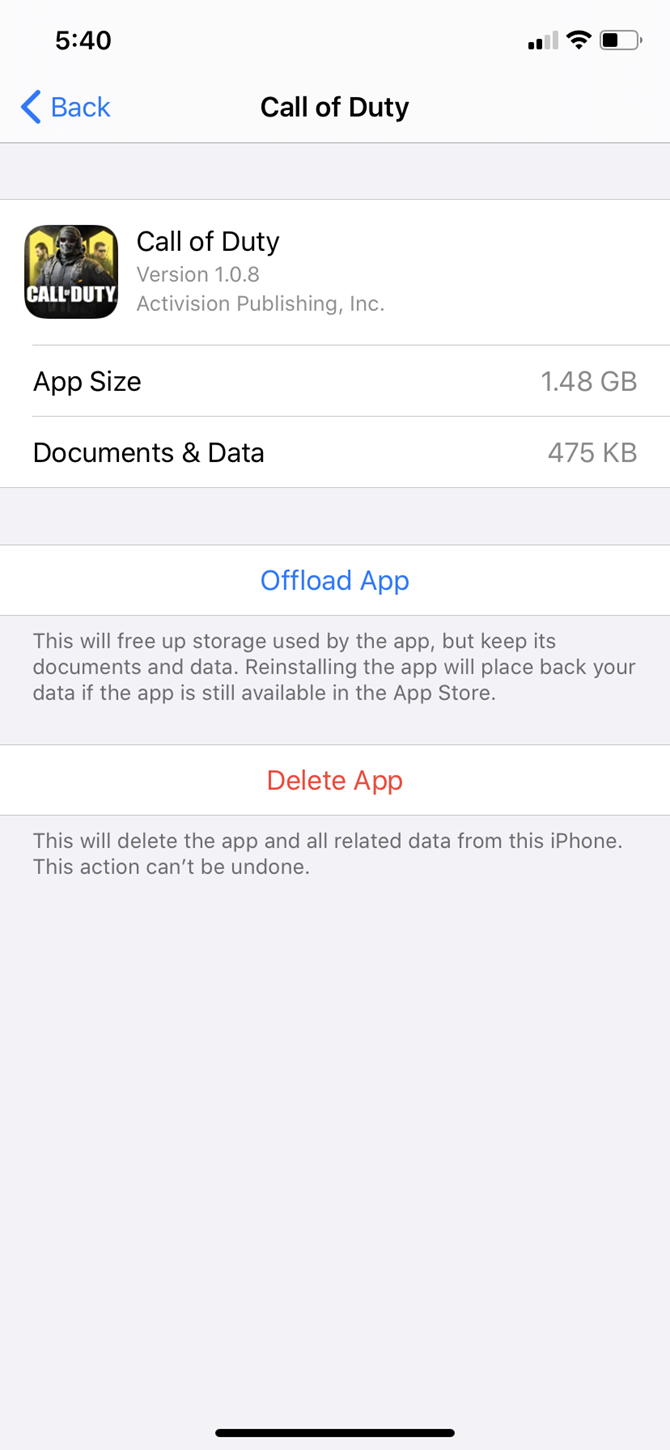
Tap an app on the list at Settings > General > iPhone Storage to view detailed info about its storage usage. At the bottom, you can choose one of two options: Offload App and Delete App.
Delete App removes the app and every bit of its data. It is the same as uninstalling the app from the home screen.
Offload App deletes the app’s core files, but keeps your personal data. This is useful for heavier apps (like PUBG Mobile) when you plan to use the app soon but need the space now. It lets you just remove the app; your important data will be there when you reinstall the app later.
Go down the list to pick the lowest hanging fruits. For instance, select the apps you use rarely and can safely offload or delete. You can make a choice according to your needs.
If you don’t want to do either, then go to the individual apps and delete unnecessary files that they save. For instance, you might erase large iMessage attachments or remove some downloaded songs from Spotify.
Delete games you’ve completed, as game files eat up a lot of space. They’re sometimes more of a space hog than photos and videos, which we will nix next.
Delete Photos and Videos
Videos and photos take up a lot of space on most people’s iPhones. You can take a few steps to clear them and make extra space:
Enable iCloud Photos to upload your photos and videos to the cloud and save space on your device.
Copy photos and videos from your iPhone to your computer and use the computer as a primary backup. Then delete them from your device.
After you clean up your photo stream, remember to empty the Recently Deleted album in Photos as well.
Select and delete old Live Photos (and photos taken in Burst Mode). The three-second moving pictures can take up a lot of space. You can disable Live Photos altogether, but we wouldn’t suggest this as they help create wonderful memories. Plus, you can also convert them into GIFs and videos.
If you shoot a lot with your iPhone’s Smart HDR option enabled, there is no need to save the normal photos along with the HDR copies. So…
Take Only HDR Photos
Tack-sharp iPhone photographs taken with High Dynamic Range (HDR) mode come at a price. Your iPhone saves two copies of the image in your photo library—the “normal” image (without HDR) and its HDR counterpart, which is a succession of three photos taken at different exposures.
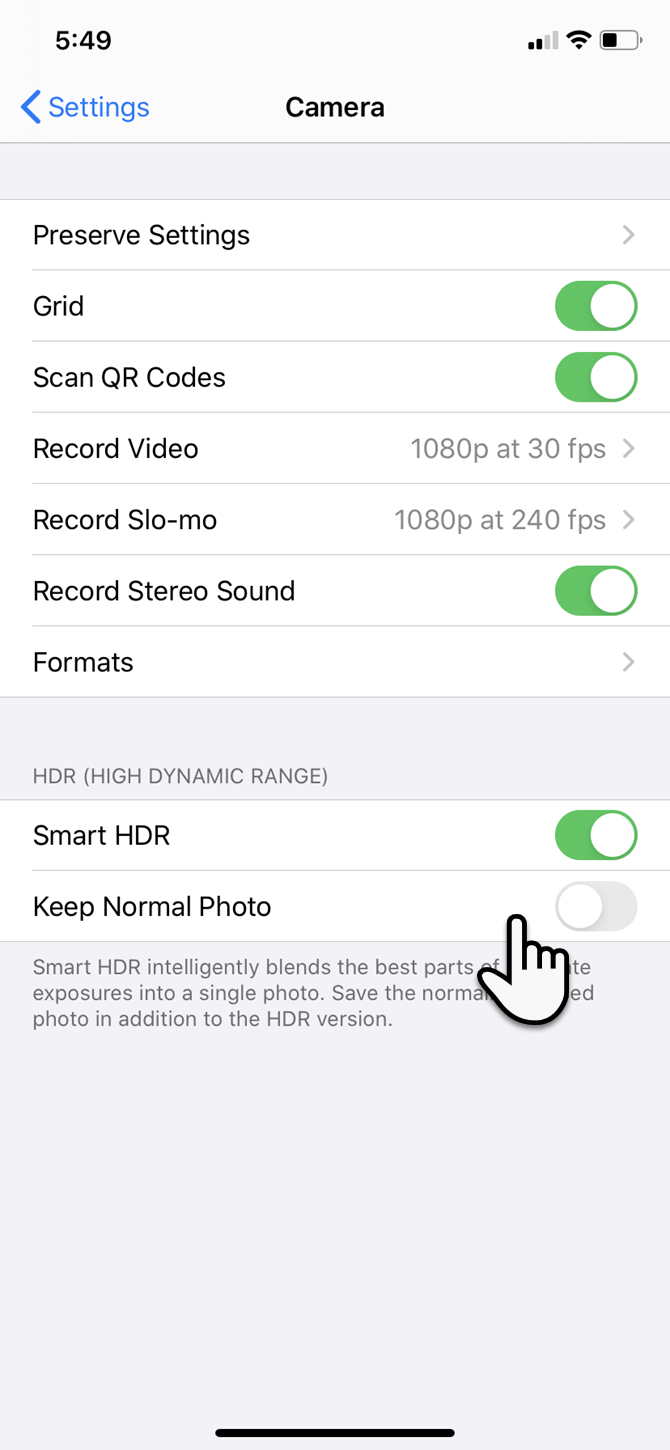
You can choose to disable the HDR mode by turning off the Smart HDR switch under Settings > Camera. You should also avoid tapping the HDR icon in the Camera app.
Alternatively, you can save space by not keeping the normal photo. To adjust this:
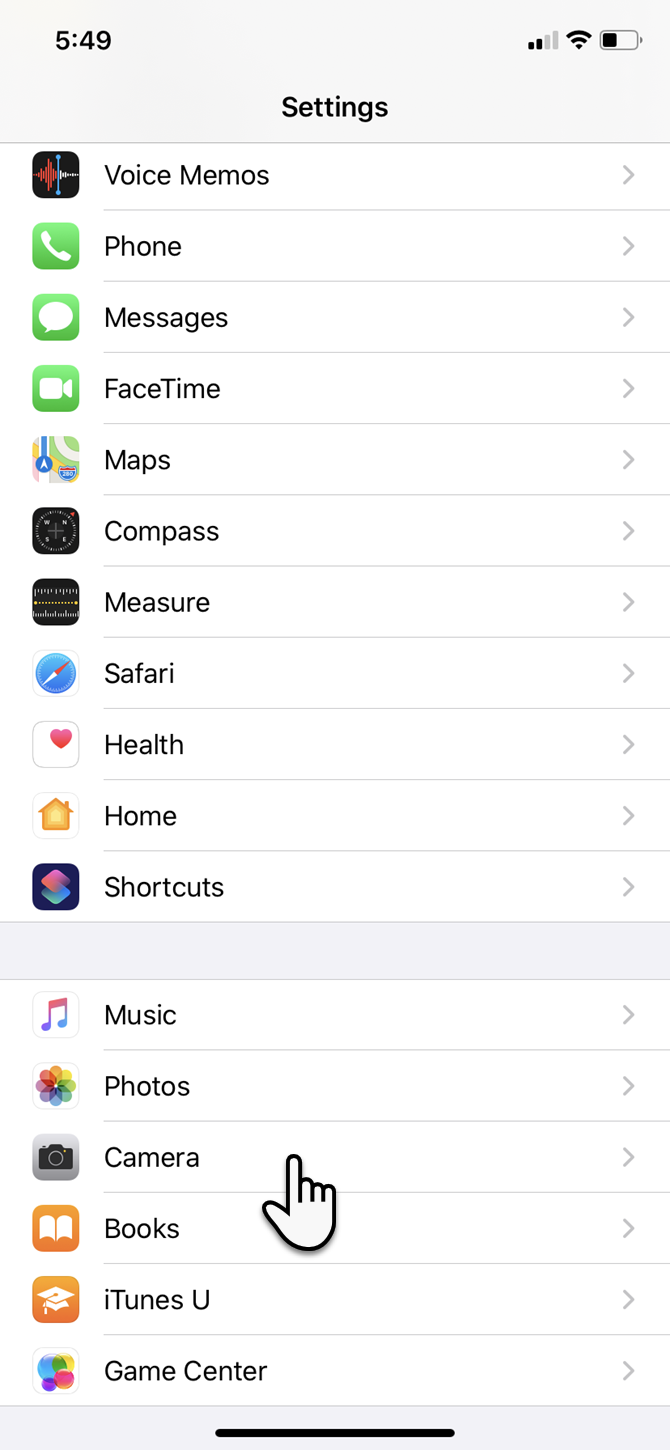
Go to Settings on your iOS device and tap Camera.
Toggle the Keep Normal Photo switch to the off position.
Wipe Browser Caches
In theory, browser cache acts as a speed booster, as the browser does not have to load every element of the page again. But temporary files from the numerous websites you visit every day can add up and clog your iPhone’s storage.
Here’s how you can clear Safari’s cache and free up a bit of space:
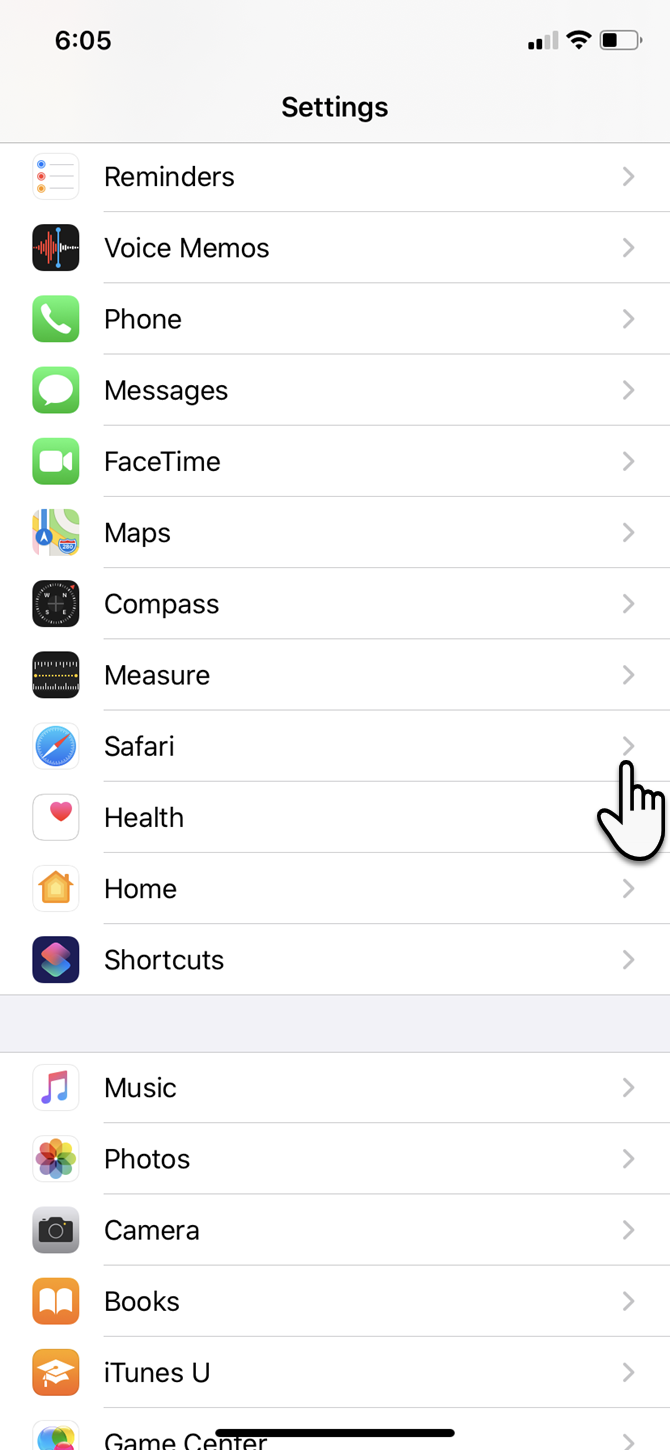
Tap the Settings app on the iPhone home screen.
Go down the menu and tap Safari.
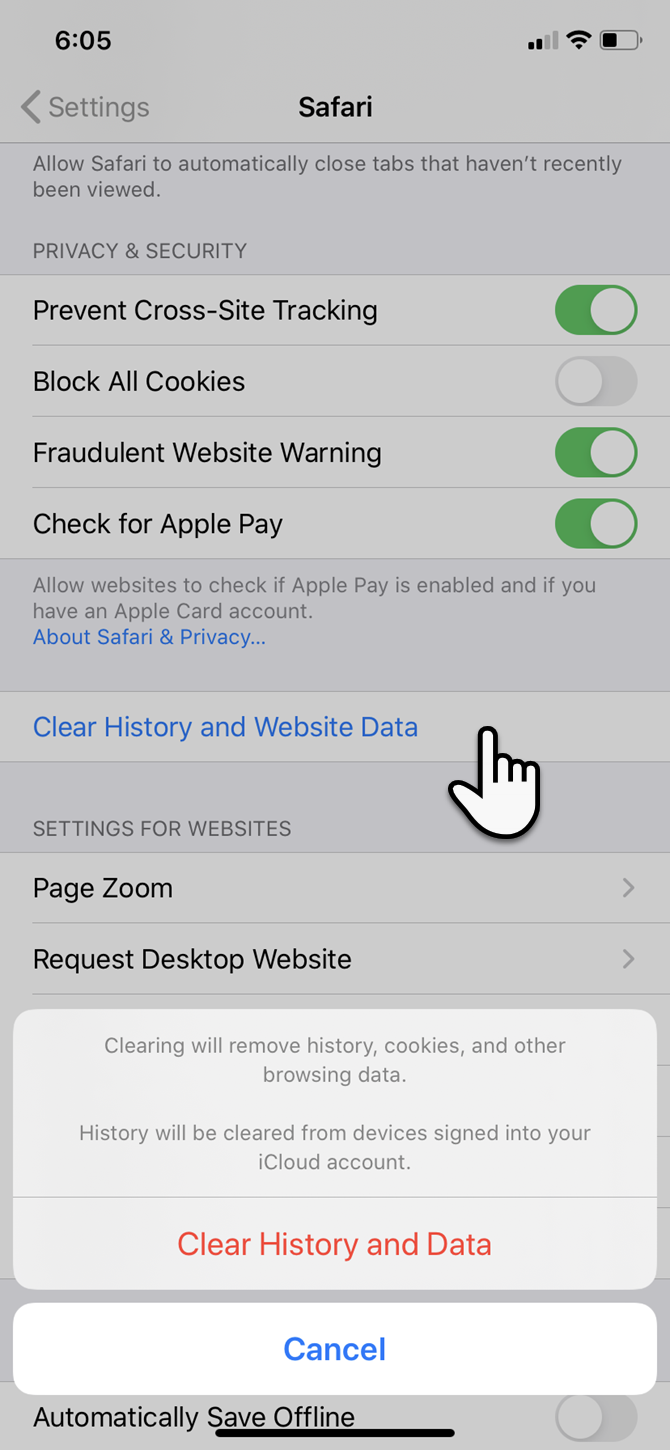
Within the list of Safari options, tap Clear History and Website Data.
In the confirmation box, tap Clear History and Data (or Cancel if you change your mind).
If you have Chrome installed…
Tap on the Chrome app to open it.
Select the three-dot menu at the bottom-right. Go to History > Clear browsing data.
In the next screen, select what you want to remove or keep. Then tap the red button to start the cleaning process after the confirmation popup.
Manage Your Messages
SMS, iMessages, and unattended spam messages can add up over time. You can limit the number of messages that get stored by automatically deleting them after some time.
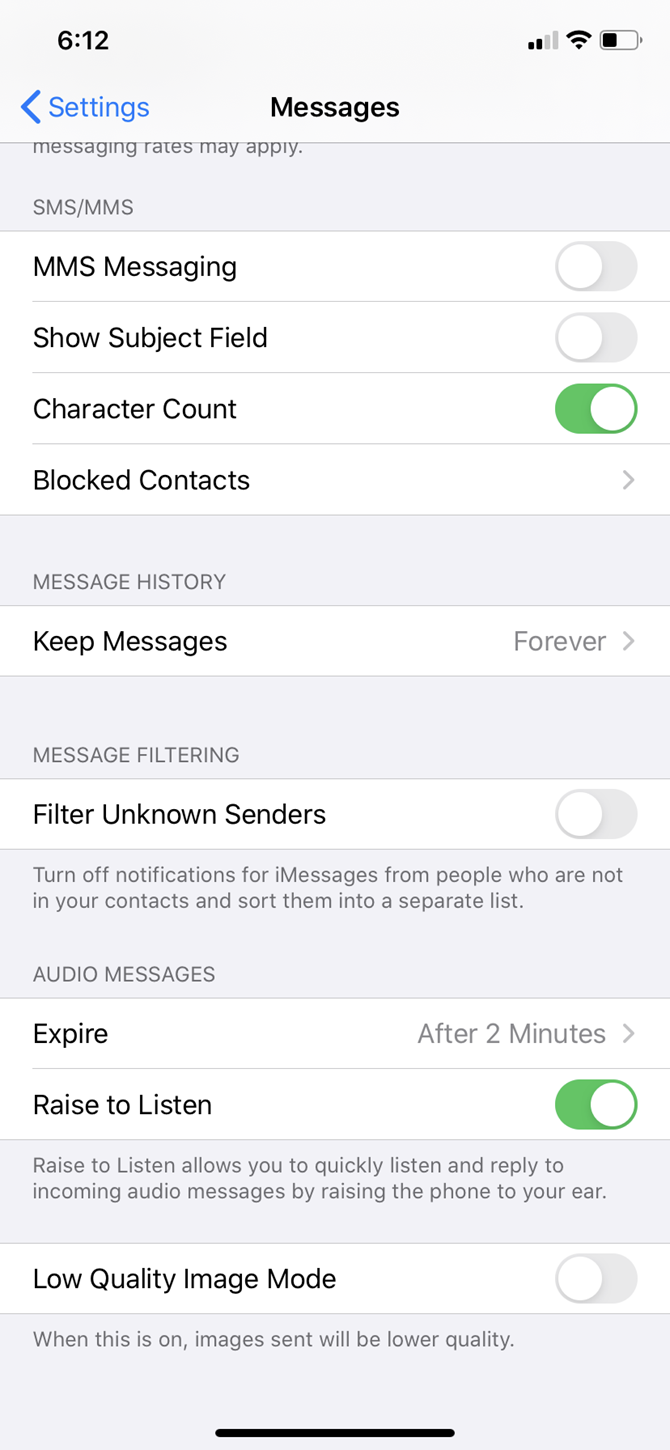
Go to Settings and scroll down the list to Messages.
Drill down to Message History.
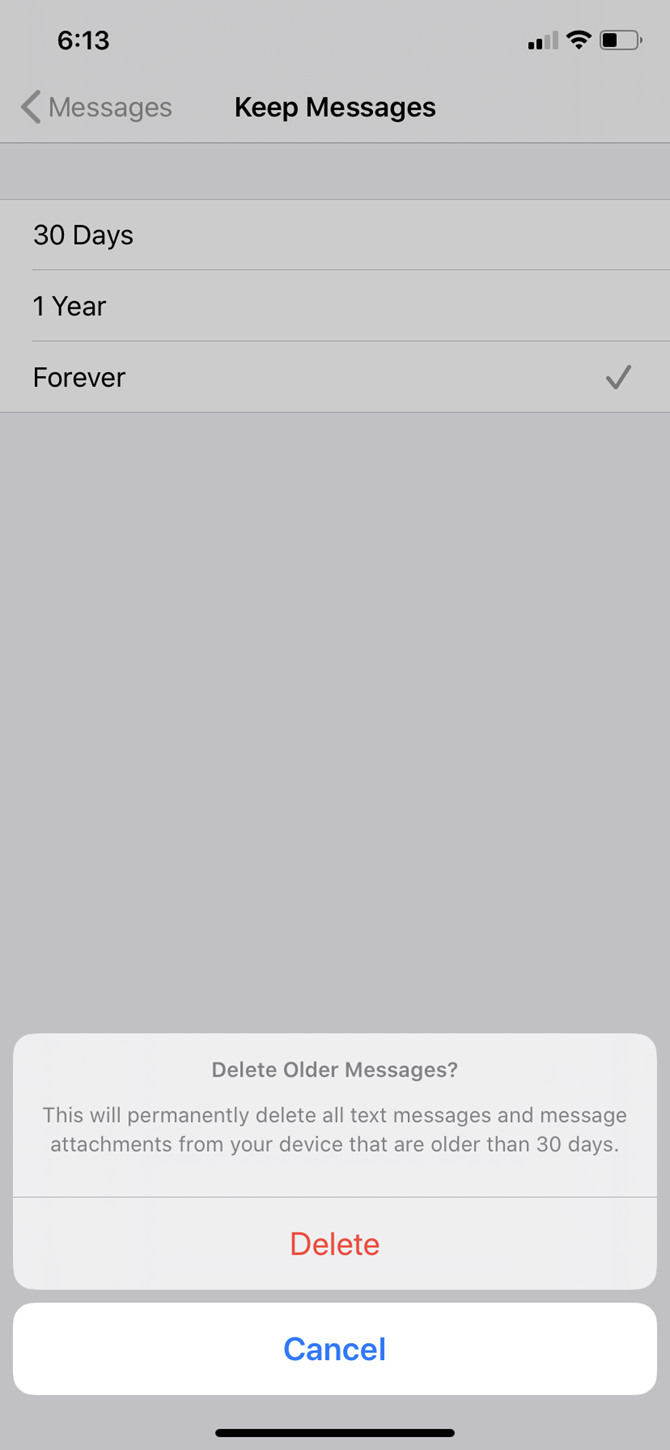
Choose either 30 days or 1 year instead of Forever.
Click Delete on the Delete Older Messages confirmation popup.
Optimize WhatsApp
Instant chat apps like WhatsApp and Telegram are sneaky space predators. Their daily use consumes a fair amount of space, which can add up fast. Let’s optimize WhatsApp storage and get back some space on your phone. There are several ways to do this:
For the nuclear option, uninstall WhatsApp and re-install it to start from a clean slate.
For a selective option, tap on each contact and go down the Contact Info to select Clear Chat.
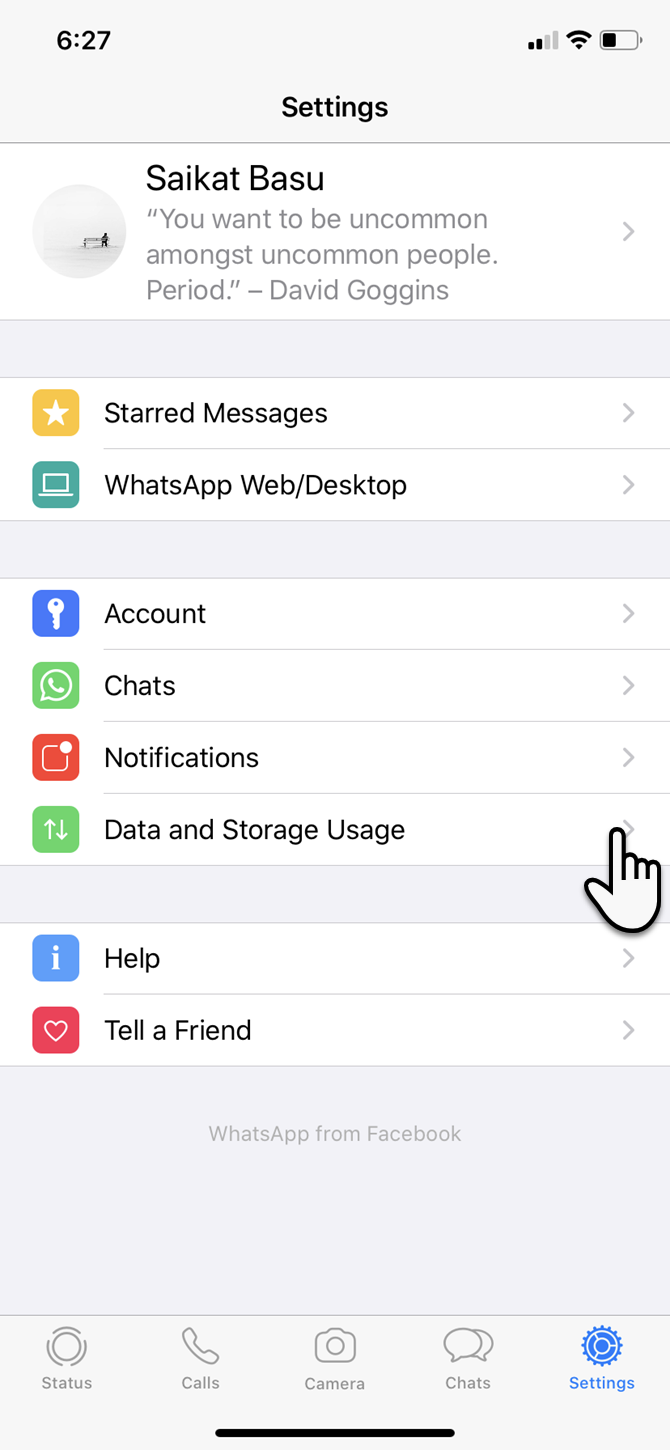
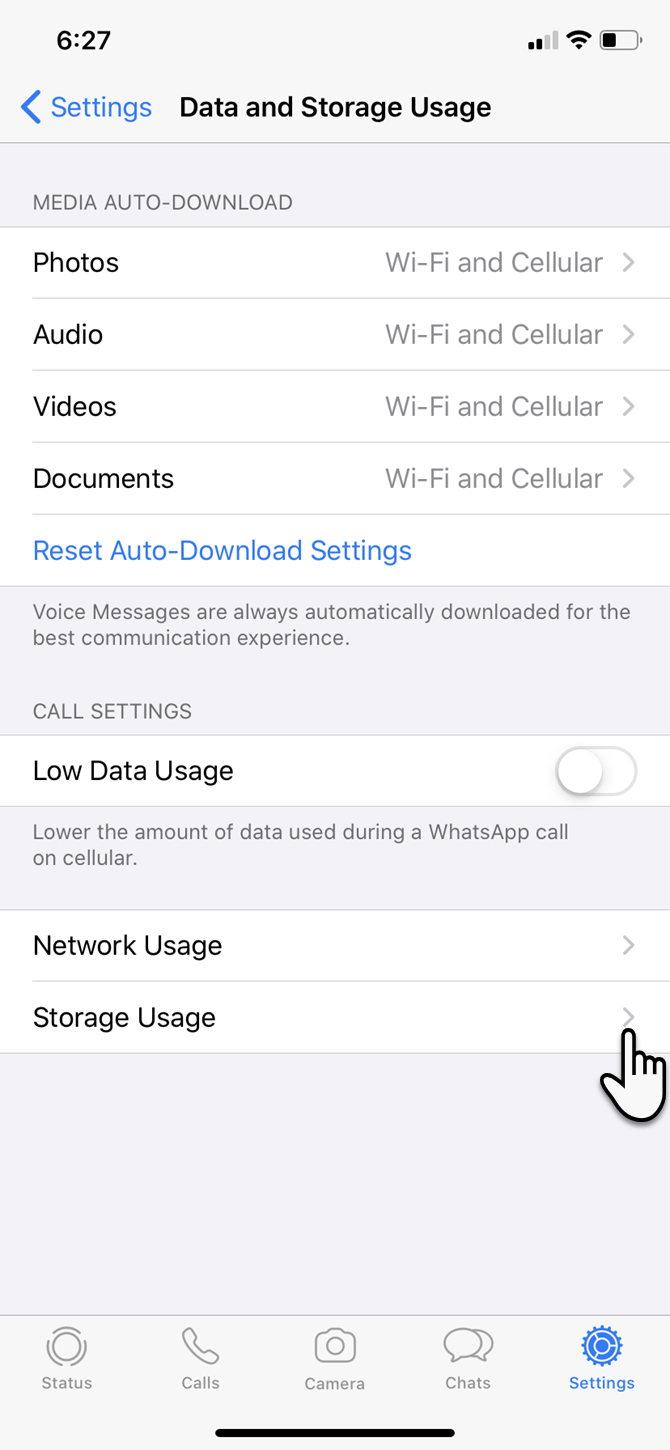
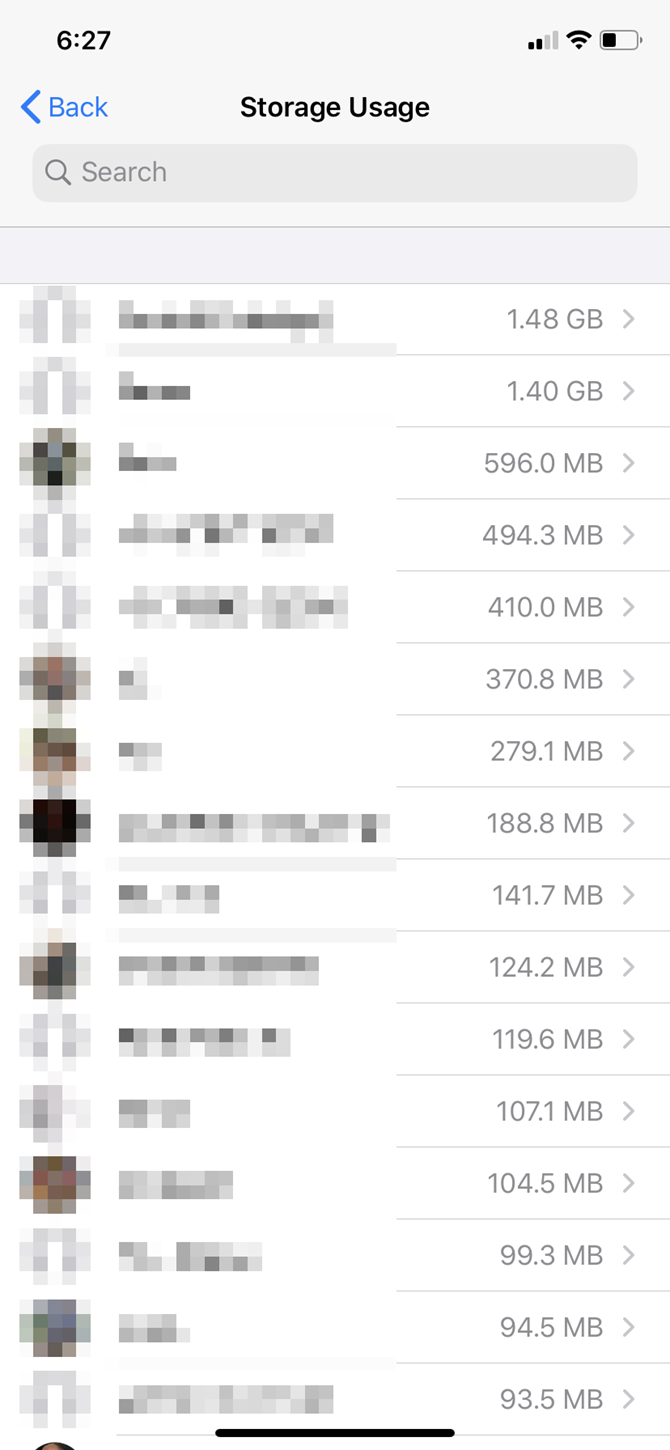
But if you want to be more surgical about it, then you can see how much storage each message thread is using. Launch WhatsApp > Settings > Data and Storage Usage > Storage Usage.
Use the list of your contacts to find the total storage size of each thread. Tap on any of these contacts and take action on that specific data by hitting Manage at the bottom.
For instance, clearing videos, photos, GIFs, and stickers while keeping documents can save you a lot of space.
Use External Storage With iOS 13
iPadOS and iOS 13 have added external storage support for iPhone and iPad. Though it is more useful for your workflow on an iPad, phone users can also plug in a flash drive and use it with the revamped Files app.
Apple says the exFAT, FAT32, HSF+, and APFS formats are supported. NTFS is not.
Clear the “Other” Space With a Backup and Restore
Resetting your phone is a nuclear option, but it can also be the quickest way to start afresh.
Even if you don’t do this, it’s always a good idea to keep your iPhone data backed up to your computer. You should always use your computer as a primary backup for heavier files like photos and videos, and not rely on your iPhone’s storage.
A backup allows you to reset your device and start from scratch with a better plan to re-organize your device. Resetting your phone is also the handiest way to reduce the Other data you will spot on the iPhone Storage screen. It is a holding area for cache files of all kinds, especially those from streaming services.
The Solution to a Space Crunch on Your iPhone
It’s not fun juggling content here and there for a few spare gigabytes. Next time, you should buy an iPhone with more space if you like shooting photos and videos, playing games, or saving music to your device for offline enjoyment.
Do you need to transfer files from Mac to Windows? Don’t worry; it’s a straightforward process.
There are a few different approaches you can take. You can easily do a Mac to Windows file transfer using both operating systems’ native tools. Alternatively, there are a few third-party solutions worth checking out.
Below we explain how to transfer files from Mac to Windows, as well as how to transfer files from PC to Mac.
How to Transfer Files From Mac to Windows
The most obvious way to transfer files from Mac to Windows is to use the built-in functions that both operating systems offer.
However, this has one significant drawback. The process will only work if both the Mac and Windows computers are on the same local network. If they aren’t, you can skip ahead to the section on third-party solutions.
Set Up File Sharing on a Mac
To share files between a Mac and PC, there are some settings that you’ll need to tweak. First, you need to allow your Mac to share its files. Follow these steps to do this:
Click on the Apple icon in the upper-left corner of the screen.
Go to System Preferences > Sharing.
Mark the checkbox next to File Sharing in the left panel.
Click on the Options button and a new window will open.
Enable the checkbox next to Share files and folders using SMB.
Additionally, tick the box next to Share files and folders using AFP.
In the Windows File Sharing section below, mark the checkbox alongside each user whose files you want to share.
Enter the users’ passwords.
Click on Done.
You’ll now be back on the Sharing window. Next, you need to choose which folders and users you’re going to share with your Windows computer. Press the Plus (+) and Minus (-) buttons below Shared Folders and Shared Users to adjust your preferences.
Finally, you need to make a note of your Mac’s IP address. You will see this below the File Sharing: On message.
Access Mac Files on Windows
Now it’s time to head to your Windows computer. Follow the instructions below to transfer files from Mac to Windows:
Open File Explorer.
In the address bar at the top of the window, type \\ followed by your Mac’s IP address. It should look something like this: \\192.168.1.68.
A new window will pop up asking for a username and password.
Enter the credentials exactly as they appear on your Mac.
File Explorer will display any folders and users that you’ve added to the Shared Folders and Shared Users lists on your Mac. You can move, edit, and copy folders like any other Windows folders. Thus, to transfer a file from Mac to Windows, just drag and drop it into one of your local folders.
How to Transfer Files From PC to Mac
That wasn’t too tough, right? Now let’s look at the reverse process: how to transfer files from Windows to Mac.
Set Up File Sharing on Windows
To begin, you need to make sure that Network Discovery is turned on in Windows. Fire up your Windows PC and work through the following steps:
Open the Settings app and go to Network & internet.
On the left panel, click on Status.
Under Change your network settings, select Sharing options.
Expand either the Private Network or Public Network menu, depending on your current connection type.
Mark the checkbox next to Turn on network discovery.
Mark the checkbox next to File and printer sharing.
Click on Save changes.
(Note: We don’t recommend enabling network discovery or file sharing on public networks. They are typically far less secure than private networks. Instead, use one of the other options we’ll briefly discuss later.)
To share folders on a case-by-case basis, right-click on the folder’s name and go to Properties > Sharing > Network File and Folder Sharing > Share.
You’ll also need to make a note of your Windows machine’s IP address (Settings > Network & internet > Wi-Fi > Hardware Properties) or computer name (Settings > System > About).
Access Windows Files on Mac
Once you’re happy with your sharing options, it’s time to transfer your files from PC to Mac. Follow the steps below to do this:
Open the Finder app.
In the menu bar at the top of the screen, select Go > Connect to Server.
Type either smb://[IP address] or smb://[computer name] and press Enter.
You will be prompted to enter your Windows username and password.
When you’re ready, click on Connect.
Your shared Windows content will be available in the Shared section of Finder. To transfer files from your PC to your Mac, just drag and drop as needed.
Other Ways to Share Files Between Mac and PC
You’re not limited to the above built-in methods; there are other ways to share files from Windows to Mac. These methods will work if your two computers are not on the same network.
1. Use a Cloud Storage Service
Dropbox, Google Drive, and OneDrive all have dedicated apps available for both Windows and macOS. Just install them on the two systems and upload/download the files as needed. If you have spare iCloud storage, you might also consider using that to share files.
2. Use a USB Stick
A simple-but-effective solution for anyone who needs to transfer files from Mac to Windows quickly is to use a USB flash drive. If you don’t own one, we recommend the SanDisk Ultra Flair 128GB model on Amazon.
3. Use Your Own Server
If you’ve already paid for web hosting, you could upload a file using FTP and download it back onto your other machine.
Formal education is good for many things; college, a job, a tick on your resume. However, it isn’t so good at preparing you for life. Many of us miss out on essential skills that are in high demand, like programming.
It’s also true that many of us will suffer from mental health impairments or mental illness throughout our lives. While it’s almost impossible to be fully in control of your condition, there are ways to support yourself.
If you’re after a way to help your mental health and have an interest in programming, then keep reading.
Cognitive Behavioral Therapy (CBT) is one of the more common non-pharmacological treatments for mental health problems. Although no medication is involved, CBT aims to help you reduce negative thoughts and feelings, and to develop mechanisms to help you to cope with different emotions and problems.
Although there are programming jobs where you need to turn up to an office, there are many remote programming jobs in demand right now. Programming is a relatively solitary task too, which can either end in elation if your code works, or stress and even spiraling thoughts if it doesn’t.
Despite the risks associated with programming, it can also be a great way to develop and test out the skills promoted through CBT. While CBT is often a prescribed program, it is possible to complete online courses or even learn the skills yourself through self-help books or research. If you’ve ever been stuck in a cycle of negative thoughts about yourself or your abilities, you may be able to develop skills to manage them through programming.
Of course, it’s easy to stay positive when things go right, and your code executes without a hitch. But when it doesn’t, using CBT techniques to manage those feelings will help you out. You can then apply these techniques throughout your daily life, too, as CBT is also one of the ways to stop procrastinating.
There are generally two parts to programming; creativity and problem-solving. Whether it’s fixing a bug or problem in your code, or hunting it out in someone else’s, it is a skill to be able to deconstruct an issue logically. Problem-solving can be logical, but it’s also a creative process too.
However, it’s not always so easy to see things that way. Negative and overwhelming thoughts generally cloud our minds and affect our mood and well-being. Stress is a term that’s often used quite casually, but it can be incredibly devastating and distressing, leading to worsening mental health.
Programmers are adept at breaking down an issue into manageable chunks that can be gradually crossed off your to-do list. It’s a skill that can be applied throughout your life outside of work too. That’s not to say that being a programmer will stop you from ever feeling overwhelmed or stressed. You’ll be better equipped to manage it though, especially if you use these problem-solving diagrams too.
One alternative treatment for depression and other mood disorders is through art and creative therapies. These are typically arts-based activities with the support of a trained professional. They often take place in a group setting but can also be taken in one-to-one sessions. The aim of these therapies to give you space where you can express yourself, and that may give you an outlet for emotions or thoughts that are hard to put into words.
As with any treatment, the session you attend should be accredited and regulated. However, that doesn’t mean you can’t apply similar techniques on your own too. Programming offers an ideal space for using arts and creative therapy techniques. You use language, but an entirely different one, where it may be easier to express yourself. Words in our spoken languages often come with a complicated backstory.
Programming languages allow you to flex your creativity, problem-solve, and work towards a goal. This is especially true if you get into programming as a hobby, or have side projects. It means you have a safe space to create and try out new things, and is just one of the ways you can start living creatively.
Combined with CBT and stress reduction techniques, this space to explore your creativity will help you manage the often challenging emotions mental health issues can bring up.
We said earlier that programming is a solitary task, and it often is. However, whether you work in an office or remotely, there is a large community of programmers out there. Sometimes the solution to a task will elude us; that’s when it’s time to reach out to other developers.
Stack Overflow is one of the most popular websites for developers for that reason. The forum has an incredibly active community that helps each other out. Post a question, and you’ll get a wide range of developers will different expertise chiming in. But the site isn’t only for work talk; it’s a hub for developers and programmers to chat too.
In fact, the Stack Overflow 2018 Survey found that 8.5 percent of users have a mood or emotional disorder, while 7.8 percent said they suffer from an anxiety disorder. That’s a significant proportion of the 1.3 million registered users. So, there are people who will understand and empathize with your own mental health struggles and be able to lend a sympathetic ear when you need it most.
We often think of programming as a purely digital activity, but there are many real-world programming communities too. Your workplace may have a professional network, or there might be a meet up in your local area. Being able to talk to people face-to-face helps some people reduce the isolation and loneliness associated with remote work and mental illness.
Support Your Mental Health With Programming
There’s a growing awareness that we should be looking after our mental health. And more people are opening up about their struggles than ever before. That doesn’t mean that your suffering isn’t incredibly personal, though, and you may not feel comfortable sharing how you feel with everyone.
You might be a pro at programming, or totally new to it. Either way, there are many ways programming can improve your mental well-being. Of course, you may also want to try these apps to manage your mental health too.
Although many people have purchased cellphones to replace their home phone, a landline is always a good asset to have. You might receive important phone calls to your home phone, and you don’t want to go through the trouble of giving all of your callers a new cellphone number.
If your home phone hasn’t been working as great as it used to, it’s time to get a new one. That’s why we’ve compiled this list of the best cordless phones with answering machines.
Best Cordless Phones With an Answering Machine
Ready to get rid of your old home phone? The following easy-to-use phones all have an answering machine and clear sound quality.
The Panasonic Expandable Cordless Phone System comes with three handsets that you can install around your home. Having multiple phones makes it much easier to quickly answer phone calls.
This phone also has a bi-lingual caller ID. When someone calls, you can have the phone read out the caller’s name in either Spanish or English. If you’re not around your house, the caller can leave a message on the telephone’s answering machine.
Additionally, this Panasonic cordless phone comes with background noise reduction during phone calls, as well as a simple call blocking system. With a large backlit display and compatibility with T-coil hearing aids, just about anyone can use this phone comfortably. As such, it may be the best cordless phone available today.
If you’re looking for a simple phone with one handset and an answering machine, go with the VTech VA17241BK Cordless Phone System. The phone records up to 14 minutes worth of messages, and also stores your 30 most recent calls.
It has a backlit screen that displays caller ID, new messages, as well as the time and date. Mount it on your wall or set it on a table to access your phone easily.
Phones without large displays are sometimes hard to see. Luckily, the AT&T Cordless PhoneEL52113Single Handset lets you clearly see the content on the screen. It comes with a white background and black lettering—this contrast makes it much easier to read.
The phone’s keypad has light-up buttons, along with an extra-large font for each number. You’ll no longer have to strain your eyes just to see the numbers written on the phone.
Not only does the phone record up to 14 minutes worth of messages on its answering machine, but it even keeps track of the last 50 calls that you received. It’s also compatible with hearing aids and has a crisp-sounding speakerphone.
For a phone that’s even more accessible, try the Panasonic KX-TGM420W Cordless Phone. If you have trouble hearing the caller on the other end of the line, you can turn the volume up to 40dB. You can also set the ringer’s volume up to 100dB, so you definitely won’t miss any calls.
When you’re on the phone with a fast-talker, it’s hard to understand them. This Panasonic phone solves this issue, as it comes with a button that slows down the caller’s voice in real-time. Simply press the Slow Talk button when you’re chatting with a quick-talker, or even when you’re using the phone’s answering machine.
You should also take advantage of this phone’s clear call display. Whenever someone calls, you’ll see a red, flashing light on the phone, as well as hear the name of the caller in English or Spanish.
The KX-TGD532W Cordless Phone is another great model from Panasonic, especially if you’re looking for something more affordable. You can get two handsets, along with a ton of features for a very reasonable price.
This phone gives you the ability to block up to 150 phone numbers with the touch of a button and gives you ten hours of talk time. The number of messages you received while you were away is displayed clearly on the phone’s base unit.
Best Digital Phone Adapters
Many home phone users are opting to drop their phone service provider and choosing to use their internet connection to make phone calls. To do this, you simply need to connect your phone to a VoIP adapter and service. While some VoIP services are completely free, others have a monthly fee—either way, you’ll still save money by cutting the cord on your landline.
The OBihai OBi200 VoIP Adapter is a fantastic option if you’re looking to get rid of your landline. As far as setup goes, all you have to do is connect the device to your router, connect it to your home phone, and then log into OBiTALK. You can use any VoIP service you want, and you can pair any cordless phone with it.
After connecting the MagicJackHome VoIP Phone Adapter to an internet connection, you can start making phone calls to anywhere in the United States, Canada, and Puerto Rico. Better yet, the device lets you keep your current phone number. You’ll even get caller ID, voicemail, as well as call forwarding.
This VoIP adapter also comes with one year of free service from MagicJack. After the time’s up, you’ll have to pay a small yearly fee to continue.
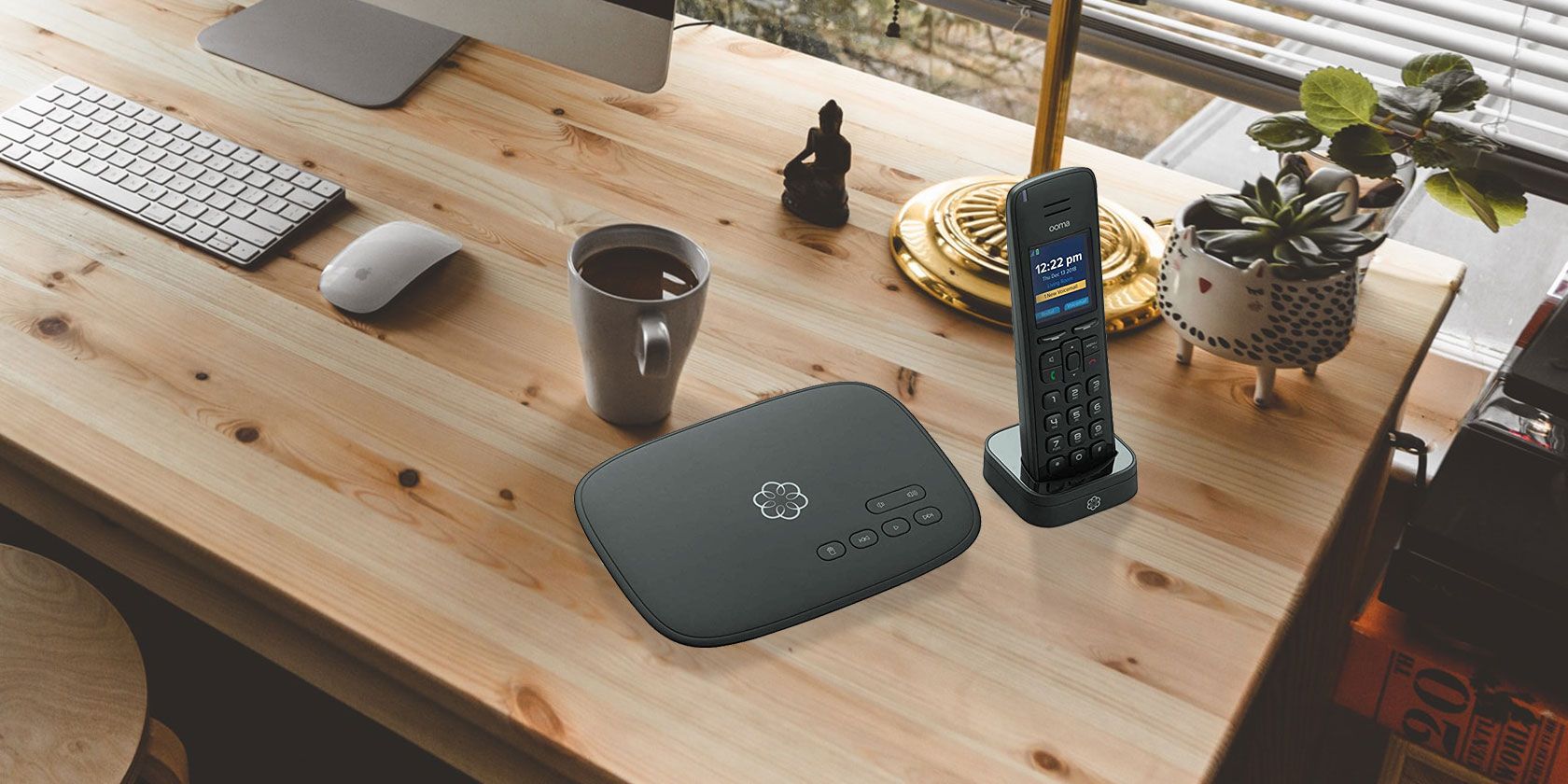
If you’re looking to change your phone and your phone service provider, consider buying the Ooma Telo Home Phone. This product comes with a handset that has crystal-clear sound quality, as well as free phone service. Plus, it’s just as easy to install as the other adapters on this list, and also comes with caller ID, voicemail, and access to 911.
The Best Cordless Phones With Answering Machines
When your phone crackles and you can barely hear the caller, you know it’s time for a new phone. The above phones are reliable options for anyone who wants ease-of-use, great sound quality, mobility, and a built-in answering machine.
Internet acronyms help you save effort by not having to type out common phrases all the time. But if you’re not in the know, they end up being more confusing than anything. That’s certainly the case with the TLDR acronym, as many have wondered what TLDR is.
We’ll teach you everything you should know about this common abbreviation. Let’s look at TLDR’s meaning, how to use it, and some examples of how it works.
Definition of TLDR
TLDR stands for too long; didn’t read. Many people think of TLDR as an acronym, but it’s technically an initialism.
An acronym is an abbreviation made up of initials that you can pronounce, like NATO. Meanwhile, an initialism is an abbreviation where you pronounce the individual letters, such as BBC. TL;DR falls under the initialism category, so you pronounce it “tee el dee are”.
Nowadays, most users write the TLDR abbreviation as simply TLDR. Its older and most proper form is TL;DR, which includes a semicolon between the L and D.
You might also see the TLDR acronym written as TL/DR or TL/DNR, which stands for did not read. These are less common, however, so most people will understand the standard TLDR just fine.
You can type the letters in uppercase or lowercase; it’s not a concern either way.
TLDR: The Meaning
Now that you know what TLDR stands for, let’s look at the meaning of TLDR.
TLDR by a Poster
TLDR is mainly used in internet forums, such as Reddit. If you’re unfamiliar, check out our introduction to Reddit to learn more about its culture.
The primary function of TLDR is to provide a summary of a longer post that people can read instead of the entire content. A lot of the time, this is done by the original poster (OP) as a courtesy to others.
For example, someone might write up a detailed analysis of a news story, share a long personal anecdote, or otherwise post a lot of text. This might be off-putting to some people, who don’t want or don’t have time to read it all.
As a compromise, the poster will offer a TLDR consisting of a few lines. These concisely summarize the post for people who just want to understand the basics and move on.
Of course, you lose out on some of the finer details by only checking the TLDR. As a compromise, many people will make their TLDR clever or snarky, making them especially enjoyable for people who have the context of the full post.
Most of the time, the OP includes the TLDR summary either at the end or beginning of the post. Including it at the beginning lets people know it’s there right away, so they don’t click away from the post. But putting it there can also spoil the story for people who want to read it all.
Most people know to check the bottom of a post for a TLDR summary, so it’s usually best to do this.
TLDR as a Comment
While TLDR often appears alongside forum posts, you can also use it as a response. Typically, people comment TL;DR to say that the original post is too long, and they didn’t feel like reading it.
They might engage better with the content if you offer a summary. But people can also use this in a more sarcastic way to indicate that what you posted is too long for them to care about.
Tldr Tom is that guy who would start sending you sarcastic answers to his own opening line when you didn't respond to him on tinder
Another form of TLDR comments comes from someone who offered a summary if the OP didn’t do so. People appreciate having a synopsis of content like this, so if you ever find a post intimidating and take the time to work through it, posting your own TLDR will probably go over well.
As mentioned earlier, coming up with a clever or sarcastic TLDR as a commenter is often a crowd-pleaser.
An Example of TLDR
Let’s look at a real-life usage of TLDR usage from Reddit:
This is a simple example, but it illustrates the usage of TLDR. The original post isn’t particularly long, though it is poorly formatted. The mass of text might put someone off from reading it all, so the TLDR line summarizes everything in a concise way.
Considerations With TLDR
You might wonder how you can use TLDR well in your own posts and avoid others requesting a TLDR in a snarky way. As we mentioned earlier, it’s usually best to put the TLDR at the end of the post to avoid “spoilers” and encourage people to read all of it.
But beyond this, you should think about how you write your main post to make a TLDR less important or even unnecessary. If what you wrote doesn’t really need a summary, then don’t include it. Sometimes just having a TLDR can signal that you know you’ve written too much and it could have been shortened.
In cases where you can’t avoid a large amount of text, you can still format it to make it easy to read. Break up your paragraphs so there’s not too much in any of them. Use text options like bullet points or horizontal lines to make the text visually distinctive.
Like most other internet acronyms, it’s wise to avoid TLDR in formal writing. It’s fine to use when chatting with coworkers privately, but you probably don’t want to use it in a department-wide email. Instead, stick with the more professional “In summary” or “Synopsis” if you want to offer a TLDR-like line.
Related Abbreviations and Phrases to Know
We’ve covered what you must know about TLDR, but there are a few related abbreviations you should also be familiar with.
One is TL;DC. This stands for too long; don’t care. It’s like TLDR but is more hostile. People use it to indicate that the text is simply too long for them to consider, so they’re not going to read it.
TL;DW, meanwhile, stands for too long; didn’t watch. This is the equivalent of TLDR for video content. You’ll often see this on videos posted to Reddit. Because many people browse at work or on their phones, they might not be able to watch or hear the video. Thus, this is a way to ask for a text summary of the video content.
Finally, you should also be aware of what a wall of text means. While people overuse this term, its proper meaning is a long and rambling block of text with little to no formatting. It probably has no paragraph separation and contains loads of run-on sentences. Walls of text are difficult to read and parse.
there's approximately four people i'll send walls of texts to (over the the course of hours where they're busy and don't respond) and never feel the need to apologize cause i know they'll respond to every single thing eventually
A wall of text does not (or should not) simply mean a long post. There’s nothing wrong with a lot of well-formatted text that isn’t overly wordy. Don’t worry about people who don’t have the attention span to read it.
TLDR Browser Extensions
As a representation of how TLDR has become established in culture, you’ll find several TLDR browser extensions. These allow you to get a summary version of any page you read online. Several of them are outdated, and none are wildly popular, but they’re worth a look if you love summaries.
TLDR This is the most updated version, available for Chrome and Firefox. It scans an article and provides a summary of five sentences or under. If it doesn’t work for you, Chrome has other options, such as TL;DR. However, they haven’t seen updates in years.
Download: TLDR This for Chrome | Firefox (Free) Download: TL;DR for Chrome (Free)
Use TLDR Wisely
To summarize, TLDR lets you provide a small summary of a post online or request one from the original poster. If you write up something wordy, consider whether it needs a TLDR. It’s not appropriate in every instance, but it’s often appreciated in today’s online world with short attention spans.
When you get time off from work or school, it feels like a blessing. However, what if you don’t want to waste that time browsing social media sites or binge-watching Netflix?
Thankfully, there are plenty of creative things you can do when you get bored. And if you find these creative activities relaxing, you’ll be spending your downtime being productive.
Here are some creative things to do when you’re bored.
Lemonade stands, yard sales, bake sales—do whatever makes you happy. You don’t need to be an entrepreneur to get started with these ideas. And you can start out with few resources.
Have you got a day of boredom to kill? Set up a stand in the neighborhood and sell watermelon slices on a summer’s day. Or if you have an ice shaver machine at home, you can sell snow cones.
The small cash you make can be used for a good cause. Depending on the time you have, you can get creative with promotions and design fun and engaging posters for your project.
Go ahead and use social media to promote it. It can be a good way to connect with people on your friends list.
Learning might sound dull and dreary but you don’t have to limit yourself to learning how to create spreadsheets or how to start programming. There are a number of skills that can be both fun and educative.
For example, play with design software such as Photoshop or Gravit. They are very easy to use (but difficult to master), and if you have some quirky or funny quotes in mind, you can design T-shirts.
You could even post your T-shirt designs on Merch by Amazon to make some money.
Or if you have the gift of the gab, you can start a podcast. You don’t need to be too technical to begin an audio podcast. Just think about a topic you want to talk about and prepare the content. You can host the podcast at places like Podbean and Libsyn.
3. Set Up a Shop on Etsy or Fiverr
If you visit Etsy or Fiverr, you’ll find people selling all kinds of goods and services. While Etsy is for goods, Fiverr is mainly for services.
You can make clay pots or paper flowers in your free time and list them on Etsy. Or if you want to sell services, you can try anything from recording a puppet message to dressing up as a king and singing a rap song for someone’s birthday.
There are very few limits on what you can sell online. And those aren’t the only two selling platforms either. You can paint when you’re bored and sell it on Art Fire or Spoonflower.
4. Tidy Up Like Marie Kondo
Tidying up and decluttering is a good way to kill time. But if you’ve heard about Marie Kondo and her popular phrase “does it spark joy,” you already know the kind of tidying up we are talking about.
The KonMari method by Marie Kondo is a creative way to declutter your space and organize things. In this method, instead of focusing on what to get rid of, the focus is on what to keep. This change in mindset can help you declutter in a non-regretful way.
If you are going to throw away a thing because it’s practically useless but it does give you joy or happiness when you hold it, it’s best to keep it.
It’s worth spending time sorting your playlists; deleting old songs, and adding some new ones.
Different types of music can help with different moods. For example, when you’re working out, you might want energizing music that will help you exercise better.
If you’re feeling stressed due to all the work pressure, slow tempo music will work best as it soothes your mind. When you’re sad, create a playlist with fast tempo songs that can uplift your spirits.
6. Give Your Resume a Makeover
If you have a boring resume that lists your experiences and qualifications in the same old traditional format, now is the time you give it a creative makeover.
Why limit yourself to a text resume when you can create a video resume instead? Record a neat video and upload it to your YouTube channel.
You can also create an entire website about your portfolio and give prospective employers a link to it. Create a resume using Canva and add that to your website. It is a great way to display your experiences and qualifications in a visually appealing way. Here’s how to create a resume using Canva to help you get started.
You can even create a booklet resume. Get someone on Envato to do the job for you if you lack the design skills.
A capsule wardrobe is a wardrobe where you set aside specific clothes for a season.You mix and match these clothes with each other. These are the clothes you already have and love to wear. A capsule wardrobe typically works for about three months and then it needs to be updated for the next season.
It will let you get dressed quickly, always be in your favorite clothes, and have a neat closet.
When you create a capsule wardrobe, make sure you select a base color. Let’s say you selected black. Now you’ll have some black clothes in your wardrobe that will go with everything else.
Find More Ideas on Creative Websites
As we’ve explored in this article, there are a number of creative things you do when you’re bored. And if you ever run out of creative ideas, you can always visit sites such as Pinterest, Tumblr, and Dribble to find new inspiration.
While you would need to be at home to do most of these activities, there are also plenty of things to do online when you’re bored at work. They may not be particularly creative or productive, but they are fun.
As much as we’d like to think that we’re entering an era of autonomous robots, they’re actually still pretty helpless. To keep them from falling down all the time, a human’s fast reflexes could be the solution. But the human has to feel what the robot is feeling — and that’s just what these researchers are testing.
Bipedal robots are excellent in theory for navigating human environments, but naturally are more prone to falling than quadrupedal or wheeled robots. Although they often have sophisticated algorithms that help keep them upright, in some situations those just might not be enough.
As a way to bridge that gap, researchers at MIT and the University of Illinois-Champaign put together a sort of hybrid human-robot system reminiscent of either Pacific Rim or Evangelion, depending on your nerd alignment (or Robot Jox, if you want to go that way).
Although the references may be sci-fi, the need for this kind of thing is real, explained U of I’s João Ramos, co-creator of the system with MIT’s Sangbae Kim.
“We were motivated by watching the 2011 Tohoku, Japan, earthquake, tsunami and subsequent Fukushima Dai-ichi nuclear plant disaster unfold. We thought that if a robot could have entered the power plant after the disaster, things could have ended differently,” Ramos said in a U of I news release.
The robot they created is a small bipedal one they call Little Hermes, and it is hooked up directly to a human operator, who stands on a pressure-sensing plate and wears a force-feedback vest.
The robot generally follows the operator’s movements, not in a 1:1 sense (especially since the robot is much smaller than a person), but after interpreting those movements in terms of center of gravity and force vectors, makes a corresponding one almost simultaneously. (The MIT writeup goes into a bit more detail, as does the video below.)
Meanwhile, if the robot were to, say, encounter an unexpected slope or obstacle, those forces are conveyed to the operator via the vest. Feeling pressure indicating a leftward lean, the operator will reflexively take a step in that direction using those excellent instincts we animals have developed. Naturally the robot does the same thing and, hopefully, catches itself.
This feedback loop could make on-site rescue robots and others on uncertain footing more reliable. The technology is not limited to legs, though, or even to Little Hermes. The team wants to set up similar feedback systems for feet and hands, so mobility and grip can be further improved.
Just as as tangible as airplanes, computers and contraception, The Roman Empire, the Iroquois Confederacy and the United States of America are also human inventions.
Technology is how we do things, and political institutions are how we collaborate at scale. Government is an immensely powerful innovation through which we take collective action.
Just like any other technology, governments open up new realms of opportunity. These opportunities are morally neutral: humans have leveraged political institutions to provide public educationand murder ethnic minorities. Specific features like explicit protections for human rights and civil liberties are designed to help mitigate certain downside risks.
Like any tool, systems of governance require maintenance to keep working. We expect regular software updates, but forget that governance is also in constant flux, and begins to fail when it falls out of sync with the culture. Without preventative maintenance, pressure builds like tectonic forces along a fault line until a new order snaps into place, often violently.Malka Older points out that “democracy is not a unitary state that can be achieved, but a continuous process. We need to keep reinventing and refining government, to keep up with changes in society and technology and to keep it from being too easy for elites with resources to exploit.”


 (@jack)