17 July 2019

Retro Gaming on Raspberry Pi: Understanding ROMs, RetroPie, Recalbox, and More


raspberry-pi-retro-gaming

Virtual reality gaming is on the rise. Mobile gaming is increasingly popular. Playing MMOs with headsets for voice chat and streaming the experience is all the rage.

Experts predicted all this years ago.

But who could have foreseen the rise of retro gaming? What sane person could have guessed that a credit card-sized single-board computer would become instrumental in the retro gaming explosion?

The versatile Raspberry Pi can emulate a vast collection of gaming platforms. Interested in building a retro gaming machine with a Raspberry Pi? Here’s what you need to know about RetroPie ROMs, downloads, and more.

What You Need for a Raspberry Pi Gaming Center

You’ll need several elements for a robust and reliable Raspberry Pi retro gaming center. Before looking at the software, let’s first look at the hardware.

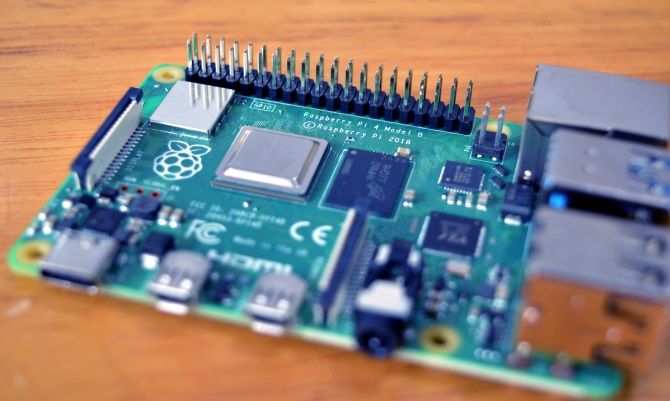
Raspberry Pi 4 board

The Raspberry Pi

Since its 2012 release, the Raspberry Pi has had several iterations, each more powerful than the one before. These days, you have two reliable options.

  • Raspberry Pi 4 (our coverage): Features a 1.5GHz 64-bit quad-core ARM Cortex-A72 system-on-a-chip (SOC) with up to 4GB LPDDR RAM (shared with the GPU). Measures 3.370 × 2.224 inches (85.60 × 56.5 mm). Has 802.11b/g/n/ac wireless networking and Bluetooth built in.
  • Raspberry Pi Zero (our guide): uses a 1GHz single-core ARM1176JZF-S SOC with 512MB (shared with the GPU). This more compact device is 2.56 × 1.18 inches (65 × 30 mm), and has a wireless variant, the Zero W.

Although you can get good results using a Raspberry Pi 3B+, the increased performance on offer with the Raspberry Pi 4 means you should take that option.

Other Hardware and Cables

In addition to the Raspberry Pi, you’ll also need an HDMI cable, reliable microSD card, a keyboard/mouse combo for initial setup, and game controllers. While a 1GB Raspberry Pi 4 costs under $40, if you’re starting from scratch, you should be able to buy the complete kit for under $100.

However, if you’re opting for the enhanced RAM of the 4GB Raspberry Pi 4, you’ll find your budget stretched.

You might also opt for a starter kit, which includes most of what you need (save the keyboard and mouse).

The Best Raspberry Pi Retro Gaming Emulators

Once you’ve got your Raspberry Pi and associated hardware, it’s time to find the right emulators. While you can install these individually, it’s far preferable to install an emulation suite. This is a package—usually ready to be written to the microSD card—consisting of many top emulators. Any that aren’t included you can often add alongside the pre-installed emulators.

Six current projects are available to choose from. Before downloading, ensure they support the platforms you wish to emulate.

1. RetroPie

Probably the most famous of the retro gaming software options for the Raspberry Pi, RetroPie gives access to a vast collection of emulators, via the EmulationStation user interface. Emulators are presented via the RetroArch front end, while various ported games (several PC games run natively on the Pi) are bundled.

RetroPie also includes the MAME arcade machine emulator and supports numerous controllers.

Download: RetroPie

2. RecalBox

RecalBox supports over 40 emulators, including MAME, and in excess of 30,000 titles. Again, using the EmulationStation UI, and with emulation support from RetroArch/libretro.

Gaming is enhanced on RecalBox with the cheat codes, a Rewind tool (to help you undo in-game mistakes) and screenshot functionality.

RecalBox is quite like RetroPie but comes solely as a writable microSD card image and cannot be manually installed.

RecalBox and RetroPie both include the option to install Kodi.

Download: RecalBox

3. PiPlay

Featuring 12 emulated machines plus the ScummVM point-and-click adventure game platform, PiPlay is the compact alternative to RetroPie and RecalBox. You can download PiPlay and write it to a microSD card, or install directly to your Raspberry Pi via GitHub.

Without the slick UI of the EmulationStation, PiPlay has a more traditional, text-based user interface. It’s a stable emulation solution, however, with good support for popular controllers.

Download: PiPlay

4. Lakka

Describing itself as “a lightweight Linux distribution that transforms a small computer into a full-blown emulation console,” Lakka also uses RetroArch. Supporting around 40 emulators with thousands of games, Lakka is a strong alternative to RetroPie and RecalBox.

Game ROMs can be uploaded to Lakka from a separate PC over your network. By booting with BerryBoot or NOOBS, you can dual-boot Lakka alongside other Raspberry Pi operating systems.

Download: Lakka

5. Pi Entertainment System (PES)

An ArchLinux-based collection of emulators bundled with RetroArch, PES offers 18 hardware platforms plus MAME. There’s also Kodi and support for several game controllers (including the perennially popular PS3 and PS4 control pads).

PES also adds wireless networking and network gaming to retro platforms (except the N64), and can be dual-booted using BerryBoot.

Download: Pi Entertainment System

6. Batocera

An out-of-the-box retro gaming solution, Batocera is available for all Raspberry Pi models. It supports a wide number of gaming platforms; all you need to do is plug in a controller and play.

Minimal configuration is required with Batocera. Everything is pre-installed and enabled, although you’ll find that some platforms are unavailable on the Raspberry Pi. Versions of Batocera are available for x86 devices with a wider selection of supported emulators.

Download: Batocera

Which Emulation Suite Should You Choose?

With so many emulation systems to choose from, you might find your options a little overwhelming. Generally, if you want a system that will emulate almost anything, choose RecalBox or RetroPie. There’s very little difference between them.

For a more specific experience (featuring emulators you’re actually going to use), meanwhile, try Batocera, PiPlay, Lakka, or PES.

Where to Get RetroPie ROM Downloads

To enjoy games (or even applications) on an emulator, you’ll need to acquire ROMs. Both game ROMs and BIOS ROMs are required. It’s easy to overlook the requirement for the BIOS ROMs, but without these, the emulators cannot launch the games.

ROMs for RetroPie emulators can be found legally and illegally

The legality of this is a bit muddy. It was once the case that if you owned the original, you were safe to use the ROM. These days, with peer-to-peer networking common even on apparently standard download sites, the practice is a bit risky.

Alternatives are available: the main solution is to create your own ROMs. Specialist hardware is available to do this, although it differs depending on the specifics of the platform. For example, you can purchase a USB device that connects a Commodore 64 Datasette (cassette player) to a PC.

This information is given, of course, strictly in the understanding that you retain the ROMs for your own use. A search of eBay may yield the results you’re looking for.

How to Add ROMs to RetroPie and Other Suites

ROMs must be copied to the correct directory on your Raspberry Pi. An FTP solution that supports SSH, such as FileZilla, is the best option here. However, some emulation suites offer a browsable interface for uploading ROMs from your main PC.

When it comes to playing the games, meanwhile, your chosen retro gaming suite will feature a user-friendly game library browser. All it takes is for you to navigate to the game you want (using the game controller) and launch it.

Retro Controller Options: What Can You Use?

Various controllers are compatible with your Raspberry Pi retro gaming rig. Wired controllers typically provide the best results, but some high-profile Bluetooth controllers should work.

Sony PlayStation 3 and 4 controllers can connect to Raspberry Pi

These include Xbox One, Xbox 360, and PlayStation 3 and 4 controllers. So, you can realistically use a PS4 controller on a Raspberry Pi with an N64 emulator. Mix and match!

Meanwhile, a large selection of USB controllers should work with your Raspberry Pi and chosen gaming suite. Configuration of controllers takes place when the Pi boots into RetroPie, RecalBox, etc., so you’ll quickly get an idea of what works and what doesn’t.

For improved retro feels, meanwhile, old-style joysticks and console controllers with USB connectors are available.

See our list of the best RetroPie controllers for some ideas.

Consider a Retro-Themed Case

Case options are considerable. My own preference is to use a standard Raspberry Pi 3 case and keep it out of sight. You might prefer a prouder approach and display your Pi in a retro console-themed case. Plenty are available online, resembling mini SNES consoles, among many other retro device designs.

There’s also 3D printing. A ton of retro-styled cases can be bought as digital files, ready for production in a 3D printer. If you don’t have your own 3D printer, don’t worry. Many services are available that will produce 3D projects on your behalf. Simply select the case design you want and find a 3D printing service to produce it. They’ll require you to upload the design and pay up front, then ship it to you once complete.

Meanwhile, if you want to take a more hands-on approach to building a case, why not use a slick game station build as inspiration?

Retro Gaming on the Raspberry Pi: Easy Win!

You can accomplish a lot with a Raspberry Pi. It can be used as a media center, a desktop computer, or a music streaming device.

But perhaps the real killer application for a Raspberry Pi is as a retro gaming machine. As you’ve seen, it’s straightforward to set up and a library of ROMs will ensure you have games to play.

Want more gaming options or the Raspberry Pi? Here’s how to stream PC games to your Raspberry Pi.

Read the full article: Retro Gaming on Raspberry Pi: Understanding ROMs, RetroPie, Recalbox, and More


Read Full Article

7 Sites to Send Free Text Messages to Cell Phones (SMS)


Even though users are slowly moving away from SMS text messages to other forms of text messaging, SMS text messages still have their uses.

But did you know that it’s possible to text someone from your computer? Indeed, many texting websites let you send free SMS messages. Many don’t even have a registration process.

Here are the best sites to send free text messages to cell phones.

1. TextEm

textem free sms

TextEm lets you send free text messages, but you need first to create an account. Although some people may prefer to send a message anonymously, having an account brings some notable benefits.

For example, you can curate a list of frequently used contacts and—depending on the recipient’s carrier—get replies back into your TextEm inbox. If the carrier does not support responses to TextEm, you can set up email replies instead.

More than 100 carriers from the United States and Canada are supported. If you need to send a message to a number outside North America, it is not the service for you.

TextEm does not support bulk messaging; you cannot send the same message to several numbers at the same time. Don’t worry, some of the other services we’ll discuss do have the feature.

2. SendSMSnow

sendsmsnow free sms

SendSMSnow is another free SMS service which requires you to create an account before you can send messages.

Once you do make an account, you can generate a phonebook of contacts, add profile pictures, and receive replies to your messages in your personal inbox.

SendSMSnow also supports group messaging, though it is not free. For every message you send, you will be charged one cent for every user in the group. For example, a single SMS sent to a 20-person group would cost $0.20.

In theory, the service works with cell phone numbers worldwide. We have no way to verify the claims, but you can reasonably expect most North American and Europe carriers to be supported.

The number of characters in messages is capped at 130.

3. Txt2Day

txt2day free sms

Txt2Day lets you send free text messages online with no registration. That makes the service perfect for sending one-off messages without exposing all your personal information (perhaps, for example, if you’ve accidentally left your phone and home and urgently need to get in contact with someone).

The list of supported carriers is smaller than that offered by TextEm and SendSMSnow. It is predominately focused on the large US companies, though there’s also support for a few European and Mexican ones such as Movistar, Telcel, T Mobile UK, and Vodafone Italy.

Because you do not need to create an account to send messages, there is no way to receive replies on the site. As such, the service is unsuitable for back-and-forth conversations. Some carriers support email replies, but it’s hit-and-miss at best.

Your messages on Txt2Day can be up to 140 characters long.

4. OpenTextingOnline

opentextingonline free sms

OpenTextingOnline is a texting website that lets you send free SMS messages online without creating an account.

It works with carriers in about 50 countries. Most of North America and the European Union is covered, but so too are some less-common locations like India, Nepal, Panama, and New Zealand. Just be aware that not all the carriers in all the countries are supported. For more exotic locations, you might find only one or two work.

Again, because you do not need to make an account, you cannot receive replies to your messages. And unlike Txt2Day, email replies are not available.

The maximum number of characters per message is 140.

5. txtDrop

txtdrop free sms

txtDrop is a well-established name in the world of free SMS online. It’s been operational since 2013 and according to its own statistics has successfully delivered almost 25 million messages in that time.

You don’t need to create an account, but you can receive replies in your email inbox should you wish.

txtDrop is also unique in that it offers a macOS widget. If you install it, you will be able to send messages directly from your Mac desktop without needing to visit the official site. And if you run a website, there’s even a widget you can use on your page.

The service only lets you send free messages to the United States and Canada. Other locations are not supported.

6. Send Anonymous SMS

send anoymous sms free sms

Another way to send free text messages online with no registration is to head to Send Anonymous SMS.

As the name suggests, the service requires no personal details in order for you to send a free text message. So, if you want to prank someone, fire off a quick message, or just use a service to anonymously contact people, this service might be the answer.

Unlike the other free SMS sites we’ve mentioned, you can theoretically spoof a phone number that’ll show on the other person’s screen when they receive the message. It is unclear how that would work, but it’s worth a shot if you’re trying to pull off a prank. Just make sure you stay on the right side of the law.

Send Anonymous SMS has a maximum of 145 characters and supports more than 80 different countries around the world.

7. TextEmNow

textemnow free sms

The final service we like is TextEmNow. The main reason that it’s worth recommending is because of the site’s higher character count. Unlike most free SMS sites—which have a limit of around 150 characters—TextEmNow lets you write messages that are up to 300 characters long.

The site’s developers also claim they do not log any IP addresses. We can’t say whether it’s true, but every other texting site we have discussed explicitly say they do log IPs (for spam/abuse monitoring), so TextEmNow’s approach is a refreshing change.

Technically, you can use TextEmNow to text any mobile number in the world, but as we’ve seen elsewhere, location-specific restrictions may apply.

Sending Free Text Messages From a Computer

In summary, yes you can text someone from your computer for free. But the service that’s right for you depends on a few factors:

  • Where is the recipient based?
  • Do you need to be able to receive replies?
  • Is anonymity a critical feature?
  • Do you want to use a privacy-conscious service?

If you would like to learn more about using SMS, check out our articles on how to use SMS in a clever way and how to view SMS messages on your computer.

Read the full article: 7 Sites to Send Free Text Messages to Cell Phones (SMS)


Read Full Article

The Latest Windows 10 Version Won’t Be the Last One


last-version-windows

Windows 10 marked a big change in the way Microsoft offers updates to Windows. No longer do you have to pay for operating system upgrades when a new version releases. Instead, everyone can upgrade to the latest version of Windows for free.

But this doesn’t mean that the latest Windows version is so simple. Let’s take a look at what the latest Windows 10 update is, how Windows 10 changed this game, and what we can expect looking forward.

What Is the Latest Version of Windows?

Technically speaking, Windows 10 is the newest version of Windows. But this is only part of the story, because Windows 10 regularly receives major updates that significantly change it.

For instance, at the time of writing, the current Windows 10 version is the May 2019 Update, which is version 1903. Microsoft typically releases two new feature updates to Windows 10 each year, aiming for March and September.

Note that in addition to major versions, Windows 10 has many different builds as well. See our guide on finding your Windows 10 version for more info and to see which one you’re on.

How to Upgrade to the Latest Version of Windows 10

Windows 10 Download Latest Version

If you’ve realized you don’t have the current Windows 10 version installed and want to update, it’s not difficult. While it will eventually come via Windows Update (head to Settings > Update & Security > Windows Update to check), you can trigger the update right away by visiting Microsoft’s Download Windows 10 page.

Here, simply click the Update now button and you’ll download a small installer that starts the process. This will walk you through the update so you can get the latest version. Make sure you follow our tips for safely upgrading Windows 10 beforehand, though.

How Does Windows 10 Version Support Work?

It’s important to note that you don’t have to upgrade to the newest version of Windows 10 right away. Microsoft offers support for each major version for 18 months after it releases. And thanks to recent changes with the way Windows applies updates, you won’t be forced to upgrade to the next version earlier than you want to.

Taking an example, this means that the May 2019 Update will receive support until December 2020. Even though new versions will (presumably) release in March and September of 2020, you can stay on the May 2019 update until December 2020, if you like. At that time, Windows will prompt you to install the latest version so you’re not running an unsupported OS.

If you want to block future feature updates from installing, visit Settings > Update & Security > Windows Update and choose Advanced options. Under Choose when updates are installed, change the box under A feature update… to defer them for a number of days. The maximum is 365.

Windows 10 Defer Feature Updates

While it’s a good idea to hold off on upgrading right away so you avoid any early release bugs, most people are best off updating to the latest version before long. They include new features that are often pretty handy—see our master list of new Windows 10 features to check some out.

When Did Windows 10 Come Out?

Windows 10 first launched to the public on July 29, 2015. Since then, it’s seen several updates that have added new features, tweaked existing elements, and introduced quality of life changes.

Below is a brief Windows 10 version history list, including version numbers and common names. See Wikipedia’s Windows 10 version history page for more info.

  • Initial release (1507): July 29, 2015
  • November Update (1511): November 10, 2015
  • Anniversary Update (1607): August 2, 2016
  • Creators Update (1709): April 5, 2017
  • Fall Creators Update (1709): October 17, 2017
  • April 2018 Update (1803): April 30, 2018
  • October 2018 Update (1809): November 13, 2018
  • May 2019 Update (1903): May 21, 2019

Note that version numbers refer to the year and month of intended release, so version 1903 was scheduled to launch in March of 2019.

Why Microsoft Changed the Windows 10 Model

We’ve found out what the latest version of Windows 10 is, reviewed the history of Windows 10 versions, and know how the support lifecycle works. At this point, you may wonder why Microsoft switched to this model.

To answer this, we have to look at the history of Windows and how other platforms changed the model for OS updates.

The Old Model of Paying for OS Upgrades

Decades ago, buying an operating system upgrade was totally normal. Windows 95 cost $210 when it launched, and considering most home computers were at least $1,000 at the time, people were happy to spend even more to get the latest and greatest OS. Of course, Windows 95 was also a drastic improvement over Windows 3.1.

However, this expectation changed over time. Instead of getting excited for the newest Windows release, most people would instead buy a device and use whatever OS it came with until the computer stopped working. Why would you pay for an upgrade to Windows 7 when Windows XP works just fine?

windows xp end of support popup message

This mindset infamously led to the long life and painful death of Windows XP. Microsoft supported it for 12 years, even after it released Windows Vista, 7, and 8. The company had to spend time and resources to come up with patches for an ancient OS, which millions of people kept using even after it was no longer supported.

This also causes a big problem for software developers. They have to keep every Windows version (which can differ wildly) in mind when creating programs. This can result in software not taking advantage of the latest Windows features, so as not to alienate those on older versions.

And in extreme cases, if a developer feels that creating software for Windows is such a hassle that it’s not worth his time, he might decide to go elsewhere. A lack of great Windows apps makes Windows a less compelling platform, which Microsoft obviously doesn’t want.

The result of people never paying to upgrade is fragmentation across Windows versions, which is a major issue for Microsoft. With the rise of mobile platforms, a better way became clear.

The Rise of Free Upgrades

Download macOS Mojave Free

Meanwhile, on mobile devices, new version upgrades are pretty much always free. When Apple releases a new version of iOS, everyone with a compatible device can download it on launch day at no cost. Android suffers from fragmentation with system updates, but you still don’t have to pay to upgrade.

Apple has done this with the Mac platform for some time, as well. Years ago, the company used a similar approach to Windows—you had to pay to buy each new version of Mac OS X when it arrived. But since 2013, when the company released Mavericks for free, all Mac feature updates are free to anyone with a compatible device.

When companies make the latest updates available to everyone at no charge, they can more quickly deprecate older versions. As mentioned, people have an expectation that an OS will work for a decent amount of time after they’ve paid for it.

Even after 12 years, some people were still upset that Microsoft pulled the plug on Windows XP. But nobody really cares when Apple stops supporting a version of macOS from three or four years ago, because they’ve already upgraded for free. Meanwhile, app developers can be confident that the majority of users have the latest OS version, letting them take advantage of the new features more quickly.

How Does Microsoft Make Money Now?

Buy Office 365

You might wonder how Microsoft makes money if it’s not selling Windows upgrades for $100 or more apiece. As it turns out, the company has many other sources of income.

Microsoft earns money when it sells Windows licenses to device manufacturers. Companies like HP and Lenovo have to pay Microsoft to put Windows on their devices, which you buy in the store ready-to-use. This is also the case with volume licensing, where large businesses pay money to run Windows on lots of computers and gain access to IT tools for deployment and other purposes.

Microsoft sells some hardware on its own, such as the Surface line of laptops. The company also shows ads in its Outlook webmail. And don’t forget about Office, which is still widely popular and brings in regular money through Office 365 subscriptions.

Aside from these, Windows 10 enables other revenue sources for Microsoft. While the Windows Store isn’t exactly the one-stop shop Microsoft hoped it would be, the company gets a cut of purchases made there. And Cortana’s search sends you to Bing if she can’t find an answer on your PC.

The Latest and Greatest: Windows 10

Windows 10 will continue to grow as time goes on. For the reasons discussed above, Microsoft doesn’t have any motive to uproot the “Windows as a service” model it’s set up. With the recent changes to forced updating, if they want to, Windows 10 users can stay on an older version for some time before upgrading to stay current.

There’s one last hurdle to Microsoft Windows 10 vision: Windows 7. Its support ends in January 2020, so you need to upgrade if you’re still using Windows 7.

Read the full article: The Latest Windows 10 Version Won’t Be the Last One


Read Full Article

Social chat app Capture launches to take a shot at less viral success


At first glance launching a new social app may seem as sensible a startup idea as plunging headfirst into shark-infested waters. But with even infamous curtain-ripper Facebook now making grand claims about a ‘pivot to privacy’ it’s clear something is shifting in the commercial shipping channels that contain our digital chatter.

Whisper it: Feeds are tiring. Follows are tedious. Attention is expiring. There’s also, of course, the damage that personal digital baggage left out in the open can wreak long after the fact of a blown fuse or fleeting snap.

Public feeds have become vehicles of self-promotion; carefully and heavily curated — which of course brings its own peer pressures to keep up with friends’ lux exploits and the influencer ‘gram aesthetic that pretends life looks like a magazine spread.

Yet for a brief time, in the gritty early years of social media, there was something akin to spontaneous, confessional reality on show online. People do like to share. That’s mostly been swapped for the polish of aspirational faking it on apps like Facebook-owned Instagram. While genuine friend chatter has moved behind the quasi-closed doors of group messaging apps, like Facebook-owned WhatsApp (or rival Telegram).

If you want to chat more freely online without being defined by your existing social graph the options are less mainstream friendly to say the least.

Twitter is genuinely great if you’re willing to put in the time and effort to find interesting strangers. But its user growth problem shows most consumers just aren’t willing (or able) to do that. Telegram groups also require time and effort to track down.

Also relevant in interest-based chat: Veteran forum Reddit, and game chat platform Disqus — both pretty popular, though not in a way that really cuts across the mainstream, tending to cater to more niche and/or focused interests. Neither is designed for mobile first either.

This is why Capture’s founders are convinced there’s a timely opportunity for a new social app to slot in — one which leverages smartphone sensors and AI smarts to make chatting about anything as easy as pointing a camera to take a shot.

They’re not new to the social app game, either. As we reported last year, two of Capture’s founders were part of the team behind the style transfer app Prisma, which racked up tens of millions of downloads over a few viral months of 2016.

And with such a bright feather in their cap, a number of investors — led by General Catalyst — were unsurprisingly eager to chip into Capture’s $1M seed, setting them on the road to today’s launch.

Point and chat

“The main idea behind the app is during the day you’ve got different experiences — working, watching some TV series etc, you’re sitting in an arena watching some sports, or something like that. So we imagine that you should open the app during any type of experience you have during the day,” says Capture co-founder and CEO Alexey Moiseenkov fleshing out the overarching vision for the app.

“It’s not for your friends; it’s the moment when you should share something or just ask something or discuss something with other people. Like news, for example… I want to discuss news with the people who are relevant, who want to discuss it. And so on and on. So I imagine it is about small groups with the same goal, discussing the same experience, or something like that. It’s all about your everyday life.”

“Basically you can imagine our app as like real-time forum,” he adds. “Real-time social things like Reddit. So it’s more about live discussion, not postponing something.”

Chat(room) recommendations are based on contextual inferences that Capture can glean from the mobile hardware. Namely where you are (so the app needs access to your location) and even whether you’re on the move or lounging around (it also accesses the accelerometer so can tell the angle of the phone).

The primary sensory input comes from the camera of course. So like Snap it’s a camera-first app, opening straight into the rear lens’ live view.

By default chats in Capture are public so it also knows what topics users are discussing — which in turn further feeds and hones its recommendations for chats (and indeed matching users).

Co-founder and CMO Aram Hardy (also formerly at Prisma) gives the example of the free-flowing discussion you can see unrolling in YouTube comments when a movie trailer gets its first release — as the sort of energetic, expressive discussion Capture wants to channel inside its app.

“It’s exploding,” he says. “People are throwing those comments, discussing it on YouTube, on web, and that’s a real pain because there is no tool where you can simply discuss it with people, maybe with people around you, who are just interested in this particular trailer live on a mobile device — that’s a real pain.”

“Everything which is happening around the person should be taken into consideration to be suggested in Capture — that’s our simple vision,” he adds.

Everything will mean pop culture, news, local events and interest-based communities.

Though some of the relevant sources of pop/events content aren’t yet live in the app. But the plan is to keep bulking out the suggestive mix to expand what can be discovered via chat suggestions. (There’s also a discovery tab to surface public chats.)
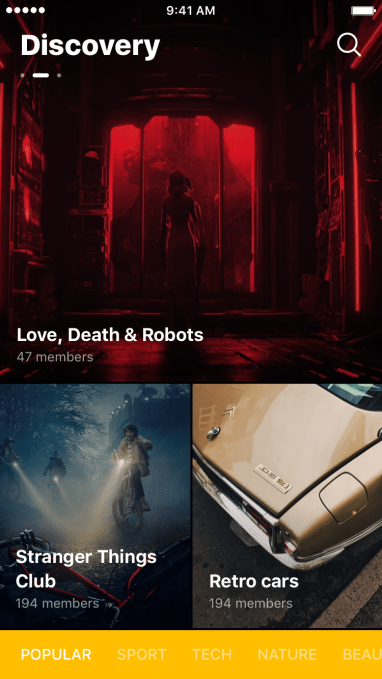
Discovery 1

Hardy even envisages Capture being able to point users to an unfolding accident in their area — which could generate a spontaneous need for locals or passers by to share information.

The aim for the app — which is launching on iOS today (Android will come later; maybe by fall) — is to provide an ever ready, almost no-barrier-to-entry chat channel that offers mobile users no-strings-attached socializing free from the pressures (and limits) of existing social graphs/friend networks; as well as being a context-savvy aid for content and event discovery, which means helping people dive into relevant discussion communities based on shared interests and/or proximity.

Of course location-based chatting is hardly a new idea. (And messaging giant Telegram just added a location-based chats feature to its platform.)

But the team’s premise is that mobile users are now looking for smart ways to supplement their social graph — and it’s betting on a savvy interface unlocking and (re)channelling underserved demand.

“People are really tired of something really follower based,” argues Moiseenkov. “All this stuff with a following, liking and so on. I feel there is a huge opportunity for all the companies around the world to make something based on real-time communication. It’s more like you will be heard in this chat so you can’t miss a thing. And I think that’s a powerful shot.

“We want to create a smaller room for every community in the Internet… So you can always join any group and just start talking in a free way. So you never shared your real identity — or it’s under your control. You can share or not, it’s up to you. And I think we need that.

“It’s what we miss during this Facebook age where everybody is ‘real’. Imagine that it’s like a game. In a game you’re really free — you can express yourself what way you want. I think that’s a great idea.”

“The entry threshold [for Twitter] is enormous,” adds Hardy. “You can’t have an account on Twitter and get famous within a week if you’re not an influencer. If you’re a simple person who wants to discuss something it’s impossible. But you can just create a chat or enter any chat within Capture and instantly be heard.

“You can create a chat manually. We have an add button — you can add any chat. It will be automatically recognized and suggested to other users who are interested in these sort of things. So we want every user to be heard within Capture.”

How it works

Capture’s AI-powered chatroom recommendations are designed to work as an onboarding engine for meeting relevant strangers online — using neural networks and machine learning to do the legwork of surfacing relevant people and chats.

Here’s how the mobile app works: Open the app, point the camera at something you view as a conversational jumping off point — and watch as it processes the data using computer vision technology to figure out what you’re looking at and recommend related chats for you to join.

For example, you might point the camera around your front room and be suggested a chatroom for ‘interior design trends and ideas’ , or at a pot plant and get ‘gardeners’ chat, or at your cat and get ‘pet chat’ or ‘funny pets’.
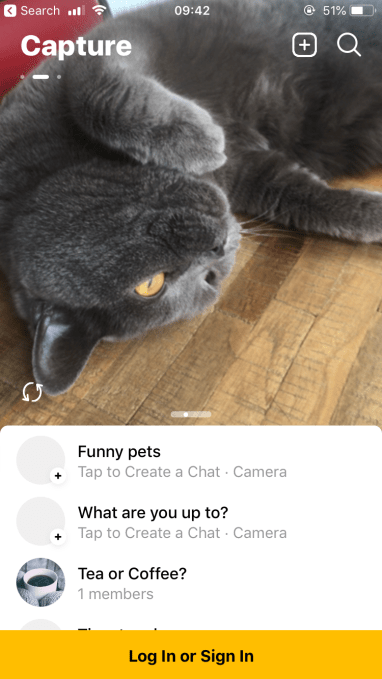
Capture app

Point the camera at yourself and you might see suggestions like ‘Meet new friends’, ‘Hot or not?’, ‘Dating’, ‘Beautiful people’ — or be nudged to start a ‘Selfie chat’, which is where the app will randomly connect you with another Capture user for a one-to-one private chat.

Chat suggestions are based on an individual user’s inferred interests and local context (pulled via the phone) and also on matching users across the app based on respective usage of the app.

At the same time the user data being gathered is not used to pervasively profile uses, as is the case with ad-supported social networks. Rather Capture’s founders say personal data pulled from the phone — such as location — is only retained for a short time and used to power the next set of recommendations.

Capture users are also not required to provide any personal data (beyond creating a nickname) to start chatting. If they want to use Capture’s web platform they can provide an email to link their app and web accounts — but again that email address does not have to include anything linked to their real identity.

“The key tech we want to develop is a machine learning system that can suggest you the most relevant stuff and topics for you right now — based on data we have from your phone,” continues Moiseenkov. “This is like a magical moment. We do not know who you are — but we can suggest something relevant.

“This is like a smart system because we’ve got some half graph of connection between people. It’s not like the entire graph like your friends and family but it’s a graph on what chat you are in, so where are you discussing something. So we know this connection between people [based on the chats you’re participating in]… so we can use this information.

“Imagine this is somehow sort of a graph. That’s a really key part of our system. We know these intersections, we know the queries, and the intersection of queries from different people. And that’s the key here — the key machine learning system then want to match this between people and interests, between people and topics, and so on.

“On top of that we’ve got recognition stuff for images — like six or seven neural networks that are working to recognize the stuff, what are you seeing, how, what position and so on. We’ve got some quite slick computer vision filters that can do some magic and do not miss.

“Basically we want to perform like Google in terms of query we’ve got — it’s really big system, lots of tabs — to suggest relevant chats.”

Image recognition processing is all done locally on the user’s device so Capture is not accessing any actual image data from the camera view — just mathematical models of what the AI believes it’s seen (and again they claim they don’t hold that data for long).

“Mostly the real-time stuff comes from machine learning, analyzing the data we have from your phone — everybody has location. We do not store this location… we never store your data for a long time. We’re trying to move into more private world where we do not know who you are,” says Moiseenkov.

“When you log into our app you just enter the nickname. It’s not about your phone number, it’s not about your social networks. We sometimes — when you just want to log in from other device — we ask you an email. But that’s all. Email and nickname it’s nothing. We do not know nothing about you. About your person, like where you work, who’s your friends, so on and so on. We do not know anything.

“I think that’s the true way for now. That’s why gaming is so fast in terms of growing. People just really want to share, really want to log in and sign up [in a way] that’s easy. And there is no real barriers for that — I think that’s what we want to explore more.”

Chatroulette

Having tested Capture’s app prior to launch I can report that the first wave chat suggestions are pretty rudimentary and/or random.

Plus its image recognition often misfires (for instance my cat was identified as, among other things, a dog, hamster, mouse and even a polar bear (!) — as well as a cat — so clearly the AI’s eye isn’t flawless, and variable environmental conditions around the user can produce some odd and funny results).

 

Capture app

The promise from the founders is that recommendations will get better as the app ingests more data and the AI (and indeed Capture staff performing manual curation of chat suggestions) get a better handle on what people are clicking on and therefore wanting to talk with other users about.

They also say they’re intending to make better linkage leaps in chat suggestions — so rather than being offered a chatroom called ‘Pen’ (as I was),  if you point the Capture camera at a pen, the app might instead nudge you towards more interesting-sounding chats — like ‘office talk’ or ‘writing room’ and so on.

Equally, if a bunch of users point their Capture cameras at the same pen the app might in future be smart enough to infer that they all want to join the same chatroom — and suggest creating a private group chat just for them.

On that front you could imagine members of the same club, say, being able to hop into the same discussion channel — summoning it by scanning a mutual object or design they all own or have access to. And you could also imagine people being delighted by a scanner-based interface linked to custom stuff in their vicinity — as a lower friction entry point vs typing in their directions. (Though — to be clear — the app isn’t hitting those levels of savvy right now.)

“Internally we imagine that we’re like Google but without direct query typing,” Moiseenkov tells TechCrunch. “So basically you do the query — like scanning the world around you. Like you are in some location, like some venue, imagine all this data is like a query — so then step by step we know what people are clicking, then improving the results and this step by step, month by month, so after three month or four month we will be better. So we know what people are clicking, we know what people are discussing and that’s it.”

“It’s tricky stuff,” he adds. “It’s really really hard. So we need lots of machine learning, we need lots of like our hands working on this moderating stuff, replacing some stuff, renaming, suggest different things. But I think that’s the way — that’s the way for onboarding people.

“So when people will know that they will open the app in the arena and they will receive the right results the most relevant stuff for this arena — for the concert, for the match, or something like that, it will be the game. That’s what we want to achieve. So every time during the day you open the app you receive relevant community to join. That’s the key.”

Right now the founders say they’re experimenting with various chat forms and features so they can figure out how people want to use the app and ensure they adapt to meet demand.

Hence, for example, the chatroulette-style random ‘selfie chat’ feature. Which does what it says on the tin — connecting you to another random user for a one-to-one chat. (If selfie chats do end up getting struck out of the app I hope they’ll find somewhere else to house the cute slide-puzzle animation that’s displayed as the algorithms crunch data to connect you to a serendipitous interlocutor.)

They’re also not yet decided on whether public chat content in Capture will persist indefinitely — thereby potentially creating ongoing, topics-based resources — or be ephemeral by default, with a rolling delete which kicks in after a set time to wipe the chat slate clean.

“We actually do not know what will be in the next one to three months. We need to figure out — will it be consistent or ephemeral,” admits Moiseenkov. “We need to figure out certain areas, like usage patterns. We should watch how people behave in our app and then decide what will be the feed.”

Capture does support private group chats as well as public channels — so there’s certainly overlap with the messaging platform Telegram, which also supports both. Though one nuance between them is Capture Channels let everyone comment but only admins post vs Telegram channels being a pure one-way broadcast.

But it’s on interface and user experience where Capture’s approach really diverges from the more standard mobile messaging playbook.

If you imagine it as a mash-up of existing social apps Capture could be thought of as something like a Snap-style front end atop a Telegram-esque body yet altogether sleeker, with none of the usual social baggage and clutter. (Some of that may creep in of course, if users demand it, and they do have a reactions style feature linked up to add in so… )

“With our tool you can find people not from your graph,” says Moiseenkov. “That’s the key here. So with WhatsApp it’s really hard to invite people not from your graph — or like friends of friends. And that’s a really tough question — where I can find the relevant people whom I chat about football? So now we add the tool for you in our app to just find these people and invite them to your [chat].”

“It’s really really hard not to like your friend’s post on Instagram because it’s social capital,” he adds. “You are always liking these posts. And we are not in this space. We do not want to move in this direction of followers, likers, and all this stuff — scrolling and endless communication.

“Time is changing, my life is changing, my friends and family somehow is changing because life is changing… We’re mobile like your everyday life… the app is suggesting you something relevant for this life [now]. And you can just find people also doing the same things, studying, discussing the same things.”

Community building

Why include private chats at all in Capture? Given the main premise (and promise) of the app is its ability to combine strangers with similar interests in the same virtual spaces — thereby expanding interest communities and helping mobile users escape the bubbles of closed chat groups.

On that Moiseenkov says they envisage communities will still want to be able to create their own closed groups — to maintain “a persistent, consistent community”.

So Capture has been designed to contain backchannels as well as open multiple windows into worlds anyone can join. “It’s one of opportunities to make this and I think that we should add it because we do not know exact scenarios right from the launch,” he says of including private conduits alongside public chats.

Given the multiple chat channels in the first release Capture does risk being a bit confusing. And during our interview the founders joke about having created a “maximal viable product” rather than the usual MVP.

But they say they’re also armed to be able to respond quickly to usage patterns — with bits and pieces lined up in the background so they can move quickly to add/remove features based on the usage feedback they get. So, basically, watch this space.

All the feature creep and experimentation has delayed their launch a little though. The app had been slated to arrive in Q4 last year. Albeit, a later-than-expected launch is hardly an unusual story for a startup.

Capture also of course suffers from a lack of users for people to chat to at the point of release — aka, the classic network effect problem (which also makes testing it prior to launch pretty tricky; safe to say, it was a very minimalist messaging experience).

Not having many users also means Capture’s chat suggestions aren’t as intelligent and savvy as the founders imply they’ll be.

So again the MVP will need some time to mature before it’s safe to pass judgement on the underlying idea. It does feel a bit laggy right now — and chat suggestions definitely hit and miss but it will be interesting to see how that evolves as/if users pile in. capture app

Part of their plan is to encourage and nurture movie/TV/entertainment discussion communities specifically — with Hardy arguing there’s “no such tool” that easily supports that. So in future they want Capture users to be notified about new series coming up on Netflix, or Disney’s latest release. Then, as users watch that third party content, their idea is they’ll be encouraged to discuss it live on their mobiles via Capture.

But movie content is only partially launched at this stage. So again that’s all just a nice idea at this stage.

Testing pre-launch on various celebrity visages also drew a suggestive blank — and Hardy confirmed they’ve got more pop culture adds planned for the future.

Such gaps will likely translate into a low stickiness rate at first. But when the team’s ambition is to support a Google-esque level of content queries the scale of the routing and pattern matching task ahead of them is really both massive and unending.

To get usage off the ground they’re aiming to break the content recommendation problem down into more bite-size chunks — starting by seeding links to local events and news (sourced from parsing the public Internet); and also by focusing on serving specific communities (say around sports), and also linked to particular locations, such as cities — the latter two areas likely informed by in what and where the app gets traction.

They’ve also hired a content manager to help with content recommendations. This person is also in charge of “banning some bad things and all that stuff”, as they put it. (From the get go they’re running a filter to ban nudity; and don’t yet support video uploads/streams to reduce their moderation risk. Clearly they will need to be very ‘on it’ to avoid problem usage mushrooming into view and discouraging positive interactions and community growth within the app. But again they say they’re drawing on their Prisma experience.)

They also say they want this social app to be more a slow burn on the growth front — having seen the flip side of burn out viral success at Prisma — which, soon after flooding the social web with painterly selfies, had to watch as tech giants ruthlessly cloned the style transfer effect, reducing their novelty factor and pushing users to move on to their next selfie lens fix.

“As data-driven guys we’re mostly looking for some numbers,” says Moiseenkov when asked where they hope to be with Capture in 12 months’ time. “So I think achieving something like 1M or 2M MAU with a good retention and engagement loop by then is our goal.

“We want to keep this growth under control. So we could release the features step by step, more about engagement not more about viral growth. So our focus is doing something that can keep engagement loop, that can increase our spend time in the app, increase the usage and so on, not driving this into the peak and like acquiring all the trends.”

“Conclusions are drawn from Prisma!” adds Hardy with investor-winning levels of chutzpah.

While it’s of course super early to talk business model, the question is a valid one given Capture’s claims of zero user profiling. Free apps backed by VC will need to monetize the hoped for scale and usage at some point. So how does Capture plan to do that?

The founders say they envisage the app acting as a distribution tool. And for that use case their knowing (only) the timing, location and subject of chats is plenty enough data to carry out contextual targeting of whatever stuff they can get paid to distribute to their users.  

They are also toying with models in a Patreon style — such as users being able to donate to content authors who are in turn distributing stuff to them via Capture. But again plans aren’t fully formed at this nascent stage.

“Our focus right now is more like going into partnerships with different companies that have lots of content and lots of events going on,” says Hardy. “We also are going to ask for permission to get access to music apps like Spotify or Apple Music to be aware of those artists and songs a person is interested in and is listening to. So this will give us an opportunity to suggest relevant new albums, maybe music events, concerts and so on and so forth.

“For example if a band is coming to your city and we know we have access to Apple Music we know you’re listening to it we’ll suggest a concert — we’ll say ‘hey maybe you can win a free ticket’ if we can partner… with someone, so yeah we’re moving into this in the near future I think.”


Read Full Article

16 July 2019

Daily Crunch: Facebook and Libra go to Washington


The Daily Crunch is TechCrunch’s roundup of our biggest and most important stories. If you’d like to get this delivered to your inbox every day at around 9am Pacific, you can subscribe here.

1. Highlights from Facebook’s Libra Senate hearing

David Marcus, the head of Facebook’s blockchain subsidiary Calibra, testified before the Senate Banking Committee today. He said Calibra will be interoperable, so users can send money back and forth with other wallets, and he committed to data portability, so users can switch entirely to a competitor.

At the same time, Marcus said Facebook will embed only its own wallet into its messaging apps Messenger and WhatsApp, which could give the company a sizable advantage.

2. Twitter.com launches its big redesign with simpler navigation and more features

The company has been testing a new version of its desktop website since the beginning of the year, and yesterday, the final product started rolling out to the public.

3. Blackstone is acquiring mobile ad company Vungle

Multiple sources with knowledge of the deal said that the acquisition price was north of $750 million. As part of the transaction, Vungle has also reached a settlement with founder Zain Jaffer, who filed a wrongful termination lawsuit against the company earlier this year.

Curve Cash in App 1

4. Curve, the ‘over-the-top’ banking platform, raises $55M at a $250M valuation

The startup lets you consolidate all of your bank cards into a single Curve card and app to make it easier to manage your spending and access other benefits.

5. Meredith Whittaker, AI researcher and an organizer of last year’s Google walkout, is leaving the company

Whittaker and another one of the walkout’s organizers, Claire Stapleton, previously said they had faced retaliation from Google after the protest. Other employees also claimed they had experienced fallout as a result of their participation, which Google denied.

6. Newsletter platform Substack raises $15.3M round led by a16z

Although Substack started out two years ago as a way to turn newsletters into a paid subscription business, it’s since added support for podcasts and discussion threads. As CEO Chris Best put it, the goal is to allow writers and creators to run their own “personal media empire.”

7. Why commerce companies are the advertising players to watch in a privacy-centric world

We’re witnessing the beginning of a sweeping upheaval in how companies are allowed to obtain, process, manage, use and sell consumer data, and the implications for the digital ad competitive landscape are massive. (Extra Crunch membership required.)


Read Full Article

Voyant Photonics raises $4.3M to fit lidar on the head of a pin


Lidar is a critical method by which robots and autonomous vehicles sense the world around them, but the lasers and sensors generally take up a considerable amount of space. Not so with Voyant Photonics, which has created a lidar system that you really could conceivably balance on the head of a pin.

Before getting into the science, it’s worth noting why this is important. Lidar is most often used as a way for a car to sense things at a medium distance — far away, radar can outperform it, and up close ultrasonics and other methods are more compact. But from a few feet to a couple hundred feed out, lidar is very useful.

Unfortunately even the most compact lidar solutions today are still, roughly, the size of a hand, and the ones ready for use in production vehicles are still larger. A very small lidar unit that could be hidden on every corner of a car, or even inside the cabin. It could provide rich positional data about everything in and around the car with little power and no need to disrupt the existing lines and design. (And that’s not getting into the many, many other industries that could use this.)

Lidar began with the idea of, essentially, a single laser being swept across a scene multiple times per second, its reflection carefully measured to track the distances of objects. But mechanically steered lasers are bulky, slow, and prone to failure, so newer companies are attempting other techniques like illuminating the whole scene at once (flash lidar) or steering the beam with complex electronic surfaces (metamaterials) instead.

One discipline that seems primed to join in the fun is silicon photonics, which is essentially the manipulation of light on a chip for various purposes — for instance, to replace electricity in logic gates to provide ultra-fast, low-heat processing. Voyant, however, has pioneered a technique to apply silicon photonics to lidar.

In the past, attempts in chip-based photonics to send out a coherent laser-like beam from a surface of lightguides (elements used to steer light around or emit it) have been limited by a low field of view and power because the light tends to interfere with itself at close quarters.

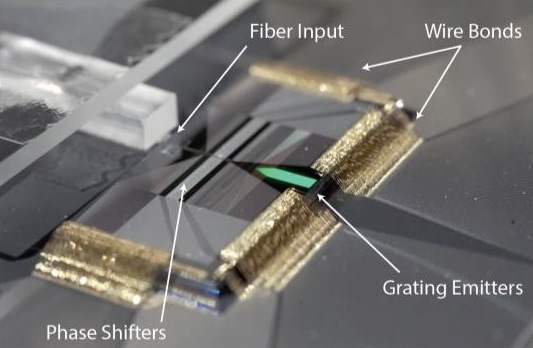
Voyant’s version of these “optical phased arrays” sidesteps that problem by carefully altering the phase of the light traveling through the chip. The result is a strong beam of non-visible light that can be played over a wide swathe of the environment at high speed with no moving parts at all — yet it emerges from a chip dwarfed by a fingertip.

LIDAR Fingertip Crop

“This is an enabling technology because it’s so small,” said Voyant co-founder Steven Miller. “We’re talking cubic centimeter volumes. There’s a lot of electronics that can’t accommodate a lidar the size of a softball — think about drones and things that are weight sensitive, or robotics, where it needs to be on the tip of its arm.”

Lest you think this is just a couple yahoos who think they’ve one-upped years of research, Miller and co-founder Chris Phare came out of the Lipson Nanophotonics Group at Columbia University.

“This lab basically invented silicon photonics,” said Phare. “We’re all deeply ingrained with the physics and devices-level stuff. So we were able to step back and look at lidar, and see what we needed to fix and make better to make this a reality.”

The advances they’ve made frankly lie outside my area of expertise so I won’t attempt to characterize them too closely, except that it solves the interference issues and uses a frequency modulated continuous wave technique, which lets it measure velocity as well as distance (Blackmore does this as well). At any rate their unique approach to moving and emitting light from the chip lets them create a device that is not only compact, but combines transmitter and receiver in one piece, and has good performance — not just good for its size, they claim, but good.

“It’s a misconception that small lidars need to be low-performance,” explained Phare. “The silicon photonic architecture we use lets us build a very sensitive receiver on-chip that would be difficult to assemble in traditional optics. So we’re able to fit a high-performance lidar into that tiny package without any additional or exotic components. We think we can achieve specs comparable to lidars out there, but just make them that much smaller.”

photonics testbed

The chip-based lidar in its test bed.

It’s even able to be manufactured in a normal fashion like other photonics chips. That’s a huge plus when you’re trying to move from research to product development.

With this first round of funding, the team plans to expand the team and get this tech out of the lab and into the hands of engineers and developers. The exact specs, dimensions, power requirements and so on are all very different depending on the application and industry, so Voyant can make decisions based on feedback from people in other fields.

In addition to automotive (“It’s such a big application that no one can make lidar and not look at that space,” Miller said), the team is in talks with numerous potential partners.

Although being at this stage while others are raising 9-figure rounds might seem daunting, Voyant has the advantage that it has created something totally different from what’s out there, a product that can safely exist alongside popular big lidars from companies like Innoviz and Luminar.

“We’re definitely talking to big players in a lot of these places, drones and robotics, perhaps augmented reality. We’re trying to suss out exactly where this is most interesting to people,” said Phare. “We see the evolution here being something like bringing room size computers down to chips.”

The $4.3 million raised by Voyant comes from Contour Venture Partners, LDV Capital, and DARPA, which naturally would be interested in something like this.


Read Full Article
UK deep tech VC IQ Capital launches new $125M growth fund, closes third VC fund at $175M


IQ Capital, a U.K.-based deep tech fund that has invested in startups such as Paragraf, Senseye and Funderbeam, has launched a new $125 million Growth Opportunities Fund and closed its third venture fund, IQ Capital Fund III, at $175 million. This brings the total new capital to be invested to more than $300 million. National Grid Partners have joined British Patient Capital and a number of other global institutions as an investor in IQ Capital Fund III.

The move is part of a wider shift in VC investing across Europe toward so-called deep tech (AI, biotech, blockchain, etc.).For instance, Adara Ventures, a Spanish VC firm, recently closed its third fund with commitments in excess of €65 million to back European early-stage deep tech startups.

IQ says the $125 million fund will provide later-stage capital to the best-performing companies in their existing portfolio. The first to benefit from this is Privitar, a startup in data privacy engineering that IQ Capital funded from seed stage as part of its $40 million Series B funding round announced last month.

Alongside the launch of the new fund, IQ Capital has reached the final closing for its third venture fund at $175 million, which focuses on investing into companies at seed and Series A stage. In the last year, IQ Capital has invested in 12 companies, including Causalens, Concirrus and Iotic. Previous Fund II startups include Thought Machine, Fluidic Analytics, Paragraf and Speechmatics.

Max Bautin, co-founder and partner at IQ Capital, said in a statement: “The partners, Ed Stacey, Kerry Baldwin, and I, have been investing in deep-tech for over 20 years, and during this time we’ve seen investment in the sector grow from tens of millions p.a. to $1.75 billion deployed across Europe in 2018 alone. Half of this capital was invested into UK start-ups, reinforcing the UK as a leader in Europe, with well-established technology ecosystems formed in Cambridge, Bristol, Oxford, and London.

“IQ Capital has grown its funds under management over 10x in the last five years, following exits to Google, Apple, and Facebook, and a double-dragon to Oracle. The investment team has tripled in size over the same period with recent joiners Rick Hao, Daniel Carew and Marek Chalupnik. IQ Capital is now firmly established as the leading deep tech investor in the UK.”

Lisa Lambert, founder and president of National Grid Partners said: “IQ Capital…is positioned as the go-to deep-tech fund in the EU, and the team has a proven ability to connect with founders through all stages, from seed to exit.”


Read Full Article

Highlights from Facebook’s Libra Senate hearing


Facebook will only build its own Calibra cryptocurrency wallet into Messenger and Whatsapp, and will refuse to embed competing wallets, the head of Calibra David Marcus told the Senate Banking Committee today.

Calibra will be interoperable so users can send money back and forth with other wallets, and Marcus committed to data portability so users can switch entirely to a competitor. But solely embedding Facebook’s own wallet into its leading messaging apps could give the company a sizable advantage over banks, PayPal, Coinbase, or any other potential wallet developer.

Other highlights from the “Examining Facebook’s Proposed Digital Currency and Data Privacy Considerations” hearing included Marcus saying:

  • The US should “absolutely” lead the world in rule-making for cryptocurrencies
  • “Yes” Libra will comply with all US regulations and not launch until the US lawmakers’ concerns have been answered
  • “You will not have to trust Facebook” because it’s only one of 28 current and potentially 100 or more Libra Association members and it won’t have special privileges
  • “Yes I would” accept his compensation from Facebook in the form of Libra as a show of trust in the currency
  • It is “not the intention at all” for Calibra to sell or directly monetize user data directly, though if it offered additional financial services in partnership with other financial organizations it would ask consent to use their data specifically for those purposes.
  • Facebook’s core revenue model around Libra is that more online commerce will lead businesses to spend more on Facebook ads

But Marcus also didn’t clearly answer some critical questions about Libra and Calibra.

Unanswered Questions

Chairman Crapo asked if Facebook would collect data about transactions made with Calibra that are made on Facebook, such as when users buy products from businesses they discover through Facebook. Marcus instead merely noted that Facebook would still let users pay with credit cards and other mediums as well as Calibra. That means that even though Facebook might not know how much money is in someone’s Calibra wallet or their other transactions, it might know how much the paid and for what if that transaction happens over their social networks.

Senator Tillis asked how much Facebook has invested in the formation of Libra. TechCrunch has also asked specifically how much Facebook has invested in the Libra Investment Token that will earn it a share of interest earned from the fiat currencies in the Libra Reserve. Marcus said Facebook and Calibra hadn’t determined exactly how much it would invest in the project. Marcus also didn’t clearly answer Senator Toomey’s question of why they Libra Association is considered a not-for-profit organization if it will pay out interest to members.

Perhaps the most worrying moment of the hearing was when Senator Sinema brought up TechCrunch’s article citing that “The real risk of Libra is crooked developers”. There I wrote that Facebook’s VP of product Kevin Weil told me that ““There are no plans for the Libra Association to take a role in actively vetting [developers]”, which I believe leaves the door open to a crypto Cambridge Analytica situation where shady developers steal users money, not just their data.

Senator Sinema asked if an Arizonan was scammed out of their Libra by a Pakistani developer via a Thai exchange and a Spanish wallet, would that U.S. citizen be entitled to protection to recuperate their lost funds. Marcus responded that U.S. citizens would likely use American Libra wallets that are subject to protections and that the Libra Association will work to educate users on how to avoid scams. But Sinema stressed that if Libra is designed to assist the poor who are often less educated, they could be especially vulnerable to scammers.

The hearing is ongoing and we’ll continue to update this article with more highlights


Read Full Article

Highlights from Facebook’s Libra Senate hearing


Facebook will only build its own Calibra cryptocurrency wallet into Messenger and Whatsapp, and will refuse to embed competing wallets, the head of Calibra David Marcus told the Senate Banking Committee today.

Calibra will be interoperable so users can send money back and forth with other wallets, and Marcus committed to data portability so users can switch entirely to a competitor. But solely embedding Facebook’s own wallet into its leading messaging apps could give the company a sizable advantage over banks, PayPal, Coinbase, or any other potential wallet developer.

Other highlights from the “Examining Facebook’s Proposed Digital Currency and Data Privacy Considerations” hearing included Marcus saying:

  • The US should “absolutely” lead the world in rule-making for cryptocurrencies
  • “Yes” Libra will comply with all US regulations and not launch until the US lawmakers’ concerns have been answered
  • “You will not have to trust Facebook” because it’s only one of 28 current and potentially 100 or more Libra Association members and it won’t have special privileges
  • “Yes I would” accept his compensation from Facebook in the form of Libra as a show of trust in the currency
  • It is “not the intention at all” for Calibra to sell or directly monetize user data directly, though if it offered additional financial services in partnership with other financial organizations it would ask consent to use their data specifically for those purposes.
  • Facebook’s core revenue model around Libra is that more online commerce will lead businesses to spend more on Facebook ads

But Marcus also didn’t clearly answer some critical questions about Libra and Calibra.

Unanswered Questions

Chairman Crapo asked if Facebook would collect data about transactions made with Calibra that are made on Facebook, such as when users buy products from businesses they discover through Facebook. Marcus instead merely noted that Facebook would still let users pay with credit cards and other mediums as well as Calibra. That means that even though Facebook might not know how much money is in someone’s Calibra wallet or their other transactions, it might know how much the paid and for what if that transaction happens over their social networks.

Senator Tillis asked how much Facebook has invested in the formation of Libra. TechCrunch has also asked specifically how much Facebook has invested in the Libra Investment Token that will earn it a share of interest earned from the fiat currencies in the Libra Reserve. Marcus said Facebook and Calibra hadn’t determined exactly how much it would invest in the project. Marcus also didn’t clearly answer Senator Toomey’s question of why they Libra Association is considered a not-for-profit organization if it will pay out interest to members.

Perhaps the most worrying moment of the hearing was when Senator Sinema brought up TechCrunch’s article citing that “The real risk of Libra is crooked developers”. There I wrote that Facebook’s VP of product Kevin Weil told me that ““There are no plans for the Libra Association to take a role in actively vetting [developers]”, which I believe leaves the door open to a crypto Cambridge Analytica situation where shady developers steal users money, not just their data.

Senator Sinema asked if an Arizonan was scammed out of their Libra by a Pakistani developer via a Thai exchange and a Spanish wallet, would that U.S. citizen be entitled to protection to recuperate their lost funds. Marcus responded that U.S. citizens would likely use American Libra wallets that are subject to protections and that the Libra Association will work to educate users on how to avoid scams. But Sinema stressed that if Libra is designed to assist the poor who are often less educated, they could be especially vulnerable to scammers.

The hearing is ongoing and we’ll continue to update this article with more highlights


Read Full Article

Sony’s new A7R IV camera is a 61 MP full-frame mirrorless beast


Sony unveiled the latest in its line of interchangeable lens mirrorless cameras on Tuesday, debuting the A7R IV, its top-of-the-line full-frame digital shooter aimed at pros. The new camera packs a walloping 61-megapixel sensor, and will retail for $3,500 when it goes on sale this September.

The camera’s image resolution is a “world first” for a 35mm equivalent full-frame digital sensor, Sony notes, and that’s not where the improvements on this successor to the wildly popular A7R III ends: The A7R IV also has 10fps rapid shooting with continuous autofocus and autoexposure tracking capabilities; 567 phase-detect autofocus points that cover 74% of the frame; real-time eye autofocus tracking for stills and movies, which can handle both human and animal subjects; 4K movie recording without any pixel binning and with S-Log 2/3 support for editing (although without a 60p mode, as it caps out at 30p); ISO range of 100-32000 (and 50-102400 expandable); battery life of around 539 shots with the EVF or 670 shots without, and much more.

sony alpha a7r iv

This Sony camera is clearly a shot across the bow at recent entrants into the full-frame mirrorless camera market including Nikon and Canon, and it looks like Sony will be upping one of its biggest advantages by offering even better subject-tracking autofocus, which is a category where it already has a strong lead. The high-resolution sensor is another area where the competition will be left behind, since the Nikon Z7 captures at 45.7 MP and the Canon R maxes out at 30.3 MP.

Real-time eye autofocus in movie recording will also help a lot for video shooters, after Sony introduced it to still shooting for the A7 and A7R III via a firmware update in April. Touch tracking allows shooters to just tap the thing they want to maintain autofocus on using the back display LCD while shooting, and a new digital audio interface added to the camera’s hot shoe connector means recording with shotgun mic that support the feature without any additional cable clutter.

The A7R IV also offers five-axis in-body image stabilization, a 5.76 million-to UXGA OLED EVF, boosted weather and dust resistance, wireless tethered shooting capabilities and dual UHS-II SD card slots for storage.

4c655fcd857f3705932f315b2c74b332


Read Full Article