30 April 2019

Fast, Cheap, and Absolutely Terrifying: The Kugoo S1 Electric Scooter


Our verdict of the Kugoo S1:
If you are keen to get in on the electric scooter trend, the Kugoo S1 is fun, compact, fast, and has a good battery–just don't expect a smooth ride!
810

Electric scooters are gaining popularity, and there are options at the budget end of the market worth considering. Many are advertised as transport for the last mile, or urban commuting vehicles. All of them are way too much fun.

Today we are looking at the Kugoo S1, a low price electric scooter that promises 30km (18 miles) of range and speeds of up to 30km/h (18mph).

Join us as we take a look at these claims, and work out if budget electric scooters are the future of urban transport, or just an expensive toy! As always, we have a Kugoo S1 to give away at the end of the article, courtesy of GeekBuying.

Getting Started

Kugoo S1 Foldable Electric Scooter
The S1 is available for $339.99 from GeekBuying, which puts it at the budget end of the price range. Not much comes in the box. Alongside the scooter, you get the 42V 1.5A charging pack, and a comprehensive but straightforward manual.

Kugoo S1 Charger and Manual

The manual suffers a little from translation but covers everything needed to get started. The scooter charges via a connector next to the primary hinge and a red/green LED indicator on the charge pack shows when charging finishes. Charge time is around 4 hours from empty to full.

Whenever you receive anything you plan to ride on or in, the first thing to do is check it for safety. I found the S1 to be put together well. Nothing needs tightening, and the build feels solid. Before finding out just how terrifying 30km/h on a scooter is, let’s look at the specs.

Kugoo S1: In Numbers

  • Range: 30km (18 miles)
  • Max Speed: 30km/h (18mph)
  • Brakes: Front regenerative magnetic brake, back stomp brake
  • Charge Time: 4 hours
  • Battery Power: 36v 8.8AH Li-Ion 18650
  • Motor Power: 350W
  • Max Weight: 120KG
  • Max Torque: 13.3N.M
  • Climbing Gradient: 15°
  • Wheels: 8.5 inch non-pneumatic non-slip
  • Weight: 11 Kg
  • Display: 7 x 4cm (2.8 X 1.5 Inch) OLED color display
  • Price: $339.99 at time of review

A couple of things jump out immediately from these specs.

Kugoo has priced the S1 a little cheaper than the Xiaomi M365, the most obvious competitor. The differences don’t stop there either.

The 350W motor is more powerful than the M365 and many others at this price. It weighs less, but can take more weight, and has a faster claimed top speed.

One notable difference is the inclusion of allegedly “Military Grade” non-pneumatic wheels made seemingly from some kind of hardened rubber. The S1 does, however, have shocks front and back to compensate for the lack of air in the tires.

The front wheel of the Kugoo S1

Also missing here is a rear disc brake. The S1 uses a front mounted regenerative magnet brake and a rear stomp brake which is confusingly listed as an emergency brake in the manual.

On paper, the S1 looks good. Does the experience match up to the numbers?

Setting Off

The Kugoo S1 in motion

Unfolding the S1 is intuitive. The back brake doubles as a catch to hold the folded scooter together. The main hinge clicks into place easily, and the adjustable height bars are held in place with a quick release clamp. The bars clip into the main display and feel surprisingly robust given their design.

The S1 turns on using one of 5 buttons mounted to the OLED display. The color display is easy to see even in bright conditions and displays your current speed, speed setting from one to three, battery level, and a choice between total distance traveled, current trip travel and elapsed time.

The handlebars, buttons, and OLED display of the S1
Two thumb paddles control acceleration and braking. Setting off was smooth, and acceleration is constant. The scooter defaults to speed 1 which presumably is the speed that the 30KM range is based on.

The Speed

The Kugoo S1, in motion

Before trying the S1, I assumed Kugoo would have added the lowest speed setting as a way of claiming massive range, and it would be too slow to actually be useful or fun. I was surprised to find that even the lowest speed settings were more than fast enough for moving around a smooth surfaced urban environment.

Practicality aside, I was expecting to have to crank up the speed to have fun, and I was wrong. The speedometer measured 17km/h (10mph) maximum for speed setting 1, and if I were trying to conserve battery life, I’d be perfectly happy traveling this fast.

That said, speed settings 2 and 3 topped out at 22 and 28km/h (14 and 17mph), and felt significantly faster. I weigh 80KG, so the claimed top speed of 30km/h is certainly possible.

The display of the S1 registering 27km/h

Just to make sure that the onboard display was accurate I set up a rudimentary speed test to measure distance traveled per elapsed camera frame. I found the speedometer to be accurate.

Personal experiences will of course vary, but I found the top speed of this scooter to be in that sweet spot where fun meets certain injury if something goes wrong.

In other words—if you want speed at a low budget you will not be disappointed. Just don’t come to us if you break a collarbone or two.

The Brakes

The front wheel motor also operates as a regenerative magnet brake

My first experience with the left thumb-activated brake was… interesting. Having read up on the Kugoo S1 before starting, I was assuming to find the braking force underwhelming. I found the opposite to be true, and the regenerative magnetic brake took a large chunk off my speed instantly, causing me almost to jump over the front bars.

After adjusting to this, I found it to be relatively easy to judge when to start braking, and as my time with the S1 continued I found that the brake mellowed out somewhat.

While the stopping power of the brake is okay for usage in a controlled environment, the claimed stopping distance of 4 meters seems to only apply to the lowest speed setting.

The rear foot brake also triggers the front brake, and according to the manual is only for emergencies. Anyone coming from a non-electric scooter will find this a strange adjustment.

The rear wheel and brake of the S1

I’m not entirely convinced that the back brake did trigger the front either. I noticed a marked difference when using the thumb trigger in conjunction with the stomp brake, despite the manual warning me not to, and the combination of both brought the stopping distance down significantly.

I don’t quite understand the omission of a disc brake on the back wheel of the S1. Perhaps it was a price saving measure, or they just thought it wasn’t needed, but I feel it could have added an extra level of stopping power.

Nevertheless, at no point did I feel out of control with the Kugoo S1, though I can imagine those less experienced with scooters falling foul of the odd brake setup. Also, be wary of the potential savage first few hours of brake use!

The Ride

The S1 from the side on a bumpy surface

Riding the Kugoo S1 is as smooth as the surface you choose to ride on. As predicted, the lack of air in the tires does make a difference. While it is an advantage on smooth ground and contributes to the feeling of speed, as soon as you move off the smooth ground you are going to feel it!

The front and rear shocks likely contribute to a slightly more comfortable ride, but I found my wrists and feet to be aching after my first day riding. I spent a lot more time on the S1 than most people would on their commute, so this might not be a big deal for some people. If comfort is an issue, you may want to look for something with pneumatic tires.

Portability

The S1 folded up

When folded, the S1 measures 95 x 34 x 18.5 cm (37 x 13 x 7 Inches) and will fit in any car boot. This is mostly due to the way the bars fold down. The design of these bars is one of the coolest features of the Kugoo S1. Folding them out locks them into place, and two thumb buttons release them.

A gif showing off the folding handlebars of the S1

When unfolded, the handlebars can operate at three heights. I measure 180cm and found the second and third settings to be equally comfortable, though I can imagine taller folks being glad of the highest setting.

Folding the S1 requires a combination of pressing down on the release catch and jerking forward the handlebars. This movement is easier to learn with the front wheel up against a wall, but without following a video on how to fold it I wouldn’t have worked it out.

The catch is so stiff that you will feel like you are doing something wrong, and I was close to breaking out the hammer when I finally worked it out. This makes sense, as you don’t want this thing folding by accident on you at 30 km/h!

The Weight

At 24 pounds, The Kugoo S1 is a little lighter than the Xiaomi M365, but this isn’t enough of a difference to matter. The technology that powers electric scooters is heavy, and there is no easy way to get around it. Premium scooters employ carbon fiber bodies to save weight, but ultimately big battery packs are heavy components.

Depending on the user, the S1 can be carried in one hand, but the weight combined with the center of balance makes it unwieldy at best. If you plan to keep this scooter in the garage and just move it into your car boot, it’s not a problem, but if you need to carry it up a set of stairs every day be prepared for a workout.

The Battery

The OLED screen of the S1 with speed and battery display

The stated battery range of 30km will be a big draw for many people. Once again, this figure is highly dependent on the weight of the user, along with the environmental temperature, with colder temperatures resulting in less range. The weather was generally good throughout my testing. The battery drained thoroughly twice during testing. Once at 22km, and once at 15km.

Bear in mind this was using multiple speed settings interchangeably and over many different surfaces. Given its performance over my usage, I have no reason to believe that the 30km isn’t attainable on the lowest speed setting. This battery life should be more than adequate for commuting between a car or train and workplace, or for having fun on a day out.

Everything Else

Kugoo S1 front facing LED light

The S1 has 26 front mounted LEDs as a headlight, and a small red LED backlight. Both work fine for visibility, and the front mounted LEDs are bright enough for some evening use. I wouldn’t want to be going full speed in the dark relying solely on them, but they’re fine otherwise.

The S1's unfortunately placed kick stand

The kickstand works, and the scooter can be left standing upright. You really don’t want to forget to put it up before you set off though or you may catapult yourself.

Unfortunately, it is attached to the bottom of the scooter in such a way that the scooter can never lie flat on the floor. Not only this, but the metal kickstand edge when folded will scratch your floor. This was clearly an afterthought to an otherwise well-designed scooter.

The Kugoo S1 has no smartphone app, though its large display up front makes one somewhat unnecessary, and the need for a dedicated app for your scooter is dubious at best anyway.

Should You Buy One?

The Kugoo S1 is a tremendous amount of fun, at times the kind of fun that may land you in an ambulance, though that would be no fault of the scooter! Its only main downfall is the lack of air in the tires and the lack of a rear disc brake, but neither of these things are problematic enough to cause any problems.

Before you purchase, you should check local laws. Riding an electric scooter or Segway on a public road or path is illegal in the UK, which makes this decidedly less useful there.

There are other scooters close to this price that may give a more comfortable ride, but the S1 delivers on the three main things it promises. It has a great range, it’s fast, and it folds down to a small size.

For $339.99 can you really ask for more?

Enter the Competition!

Kugoo S1 Electric Scooter Giveaway

Read the full article: Fast, Cheap, and Absolutely Terrifying: The Kugoo S1 Electric Scooter


Read Full Article

Improve Your Android Gaming Experience With 7 Tips and Apps

10 Essential Gadgets for Bike Riders and Cyclists

10 Free Calendars You Should Add to Your Google Calendar


free-calendars-google

You probably know that Google Calendar has tons of great features that help you manage your wild schedule. But did you know that it also offers sharable calendars? These let you import all sorts of events onto your calendar without doing any of the work of setting them up.

Let’s take a look at some of the most useful public (or at least, free) calendars you can add to your Google Calendar. With them, you can keep track of nearly anything.

1. Holidays

Google Calendar Holidays

Google Calendar has built-in support for all sorts of holidays. To access them, click the Gear icon above your calendar and choose Settings. On the left side, expand the Add calendar section and choose Browse calendars of interest.

Here you’ll see holidays broken down by religion, such as Christian Holidays and Muslim Holidays. You can also expand Regional holidays to add calendars for public holidays in a huge list of countries.

Simply check the box for any holiday calendar you’d like to add, and you’ll see it appear in your list of Other calendars. If you’d like to get an idea of what holidays a calendar contains, click the Preview icon (which looks like an eye) to check it out first.

2. Sports Schedules

Google Calendar Sports Schedule

The next integrated option Google Calendar offers lets you keep track of your favorite sports teams. On the same Browse calendars of interest page as described above, you can browse by sport such as Baseball, Football, and Hockey.

From there, select a league and you can check the boxes for your team. Now you’ll always know when to cheer them on to victory.

3. Phases of the Moon

Google Calendar Phases Moon

Our last stop on Google’s calendars of interest is the lunar cycle. If you’re interested in astronomy, or just want a bit more content to flesh out your lonely calendar, adding this will let you know when the moon changes phases.

Like all calendars, you’ll find it at the bottom-right corner of your Google Calendar page. You can click the three-dot Menu button to change the calendar color, hide it from the list, or change other settings.

4. Esports Schedules

Let’s break away from options built into Google Calendar and check out some public calendars from around the web next.

Maybe you’re not interested in sports, but enjoy esports (video game competitions). In that case, you’ll be happy to know you can add esports schedules into Google Calendar too.

You’ll need to find a link for your league of choice. Two popular games to get you started are Rocket League Esports calendar and Overwatch League calendar. Both of these let you add them to your Google Calendar in one click.

Note that these aren’t official, so they may not receive updates for future seasons.

5. Weather

Google Calendar Weather Forecast

Google Calendar used to offer weather integration by default, but this is no longer the case. But don’t despair; you can still add the weather to your calendar pretty easily.

On your Google Calendar, click the Plus button next to Other calendars and choose From URL. On the resulting page, paste the following Weather Underground URL:

https://ical.wunderground.com/auto/ical/12345.ics

Replace the “12345” with your five-digit ZIP code, then click the Add calendar button. After a moment, you’ll see a new event at the top of every day with the conditions, plus the high and low temperature.

6. TV Shows

TV Calendar

If you like to watch new episodes of your favorite shows as soon as they air, it can be tough keeping track of when they all come on. Thankfully, you can use some handy websites to add them all to your calendar.

Head to pogdesign.co.uk/cat/ and you’ll see a calendar with the entire month’s schedule for shows. You’ll need to create an account in order to save your favorites.

Once you’ve made an account, you’ll also want to tweak the Settings to your liking. Make sure you’ve selected the correct time zone; you can adjust preferences like whether to show the episode name as well.

From there, you can browse the schedule or search for your favorite shows using the bar at the top-right. When you find a show you want to track, click the Add to Favorites button on its profile page.

Importing to Google Calendar

Import Google Calendar File

Repeat this for all shows you want to track, then hover over the Account button and click the .iCal entry.

This will download a file that provides a “limited 2 week overview” of your chosen shows. Thus it’s not a long-term solution but can help in the season when lots of new shows are starting.

You can add this file to your Google Calendar by clicking the Plus next to Other Calendars and choosing Import. Browse to the file on your computer and select it to import. Instead of adding a new calendar, this will simply add the events to the calendar you select. Thus, you may want to create a dedicated calendar for TV shows if you don’t want to clutter your main one.

To keep track of everything you’ve watched so far, we recommend taking a look at Trakt.

7. Movie Releases

First Showing Google Calendar

It’s easy to lose track of what’s in theaters at the moment. FirstShowing.net has you covered with a schedule of every movie planned for release this year.

Click the 20XX Schedule tab at the top and you can browse the list of movies for that year. At the top of the current year, you’ll see a Google Calendar button. Clicking this provides a preview of the calendar; hit the Plus button at the bottom-right to add it to your own calendar. Find the 2019 movie calendar here.

You’ll need to repeat the process for next year’s calendar when it becomes available. While the website’s list includes limited-release movies as well as wide-release films, the Google Calendar only shows those showing nationwide.

8. Upcoming Reddit AMAs

Reddit AMA Calendar

One of the most popular subreddits on Reddit is /r/AMA, which stands for Ask Me Anything. These are essentially open question-and-answer sessions held with notable figures.

If you’re a huge AMA fan and want an easy way to keep track of what’s coming up, this calendar is for you. Even if you’re not big into them, you might enjoy looking through the calendar to see if anyone you’re interested in is doing an AMA.

No idea how Reddit works? Check out our introduction to Reddit for a primer.

9. Concerts

JamBase Calendar

Nothing is worse than realizing one of your favorite bands played a concert in your city… last week. JamBase helps you avoid this plight by helping you track your favorite bands and those who are coming to your area.

Once you’ve signed up for an account, check out shows in your area or look for your favorite bands. After adding upcoming shows to your JamBase calendar, click the My JamBase button in the top-right and choose Calendar.

Here you can click Add to Google Calendar. Now all your planned concerts are easy to track, and you won’t miss the show of a lifetime ever again.

10. Fictional Holidays

So you have Father’s Day and Christmas on your calendar, but what about Gondorian New Year from Lord of the Rings? Can you recall when Harry Potter’s birthday is? Are you ready for this year’s Festivus celebration?

If you aren’t up on these holidays, this calendar from Atlas Obscura can help. It details over 75 fictional holidays, mostly from movies and TV shows, that you can celebrate alongside real ones.

More Useful Calendars to Choose From

If there’s a calendar you were hoping to find but didn’t see here, there’s a lot more where these came from. Check out the site iCalShare, which is chock-full of public calendars you can add to yours.

There’s a fair amount of garbage on the site, but if you look past that, you’ll find some neat calendars. The Best of iCalShare section includes calendars for Lesser Known Holidays and the NASA Launch Schedule, among others.

Dress Up Your Google Calendar

We’ve looked at some great options to flesh out your Google Calendar a bit. Not everyone will appreciate every option, but there are definitely some useful choices here.

Having all your scheduled events in one place reduces the likelihood of double-scheduling, which is never fun. For even more efficiency, check out some Google Calendar tips for better time management.

Read the full article: 10 Free Calendars You Should Add to Your Google Calendar


Read Full Article

Old Facebook finally wants you to ‘Meet New Friends’


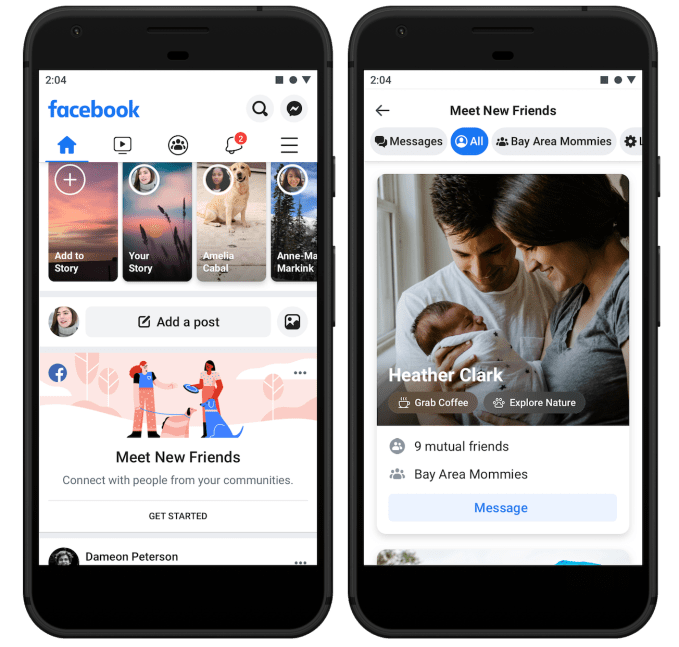
Facebook’s social graph is aging, full of long-lost acquaintances and hometown friends you don’t care much about seeing in the News Feed any more. But Facebook is now testing a pivot away from its core identity of connecting you with existing friends so it can revitalize the social graph and keep people coming back. Facebook’s “Meet New Friends” lets you browse people from shared communities such as your school, workplace or city who’ve also opted in to the feature. It’s now in testing in a few markets before it’s rolled out more widely soon.

Meet New Friends could give people fresh pals to follow in their News Feed, or help recently registered users grow their network until they have access to enough content to keep them busy. And eventually, Facebook could layer on monetization features similar to dating apps where users pay to be shown more prominently to potential connections.

Fidji Simo, the head of Facebook’s main app, tells me Meet New Friends was based on emerging behaviors the company had spotted. “Developing relationships with people they didn’t already know is very different from the core use case of Facebook,” but she notes, “We’ve already seen that naturally happen in Groups, and Meet New Friends will make that a bit easier.”
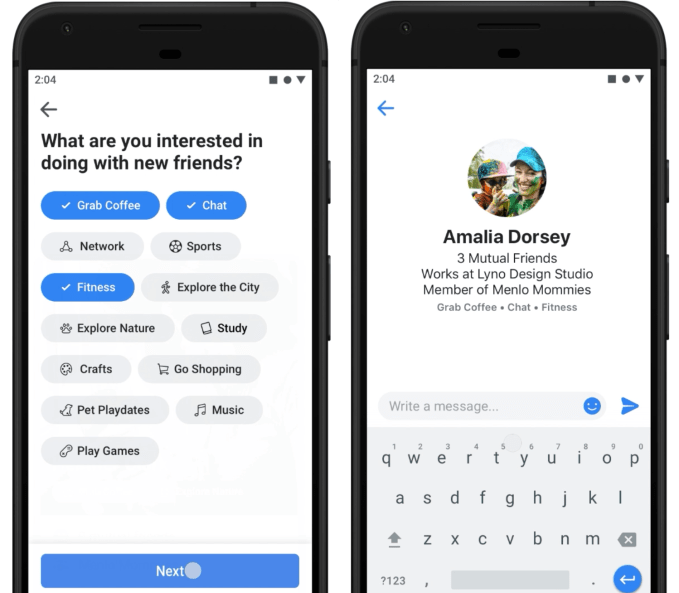

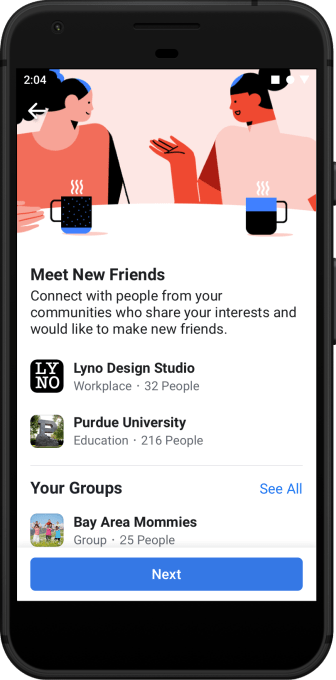
When users open Meet New Friends, they pick the communities through which they’re open to meeting new friends. For now they choose between schools, employers and locations, but Facebook will eventually add Groups too. In that sense it works a bit like Facebook Dating, which rolls out to 14 new countries today and opens to dating friends with its new Secret Crush feature.

Algorithms will sort potential connections by who is most relevant, such as those with mutual friends or shared interests, but you won’t get “matched” where both users have to state their interest in the other. Instead, users can just browse profiles, and then either send people a friend request (which might feel a bit out of the blue), or send them a single text-only message to a recipient’s dedicated Meet New Friends chat inbox. They can’t message that same person again until they respond (to prevent spamming), and the text-only limitation ensures no unsavory photos get blasted around. If they do reply, the thread moves to Facebook Messenger.

Meet New Friends will pit Facebook against a range of other apps, from local-focused Meetup and Nextdoor to verticalized apps like Hey Vina for women only to dating-affiliated apps like Bumble BFF. But Facebook benefits from its ubiquity, so users can try Meet New Friends without feeling embarrassed by downloading an app just to make them less lonely.

For years, the mildly creepy People You May Know feature has been a cornerstone of Facebook’s growth strategy. But it’s still just about recreating your offline social graph online. As Facebook strives to become more meaningful to people’s lives, fostering new friendships could give people a fuzzy feeling about the giant corporation.


Read Full Article

Facebook Dating opens to friends with Secret Crush


Facebook built Dating to be privacy-safe, hoping to avoid the awkwardness of friends or family checking out your romance profile. But now Facebook has found a way to let you silently express your affection for a friend without them knowing unless they reciprocate.

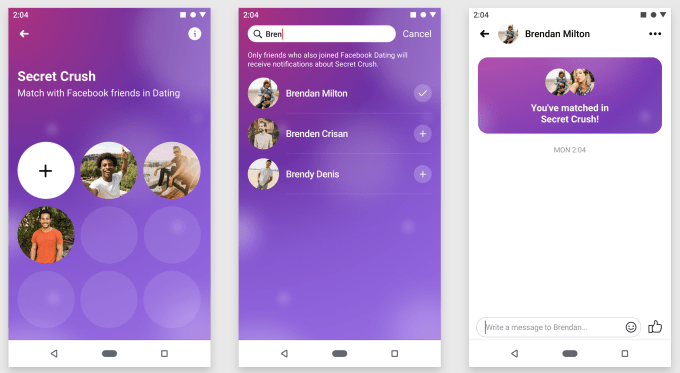
Facebook Dating is opening in 14 more countries, bringing the total to 19. It will launch in the US before the end of the year. Dating brings with it a new feature called Secret Crush that expands it beyond strangers and friends-of-friends. Choose up to 9 friends you like-like. If they’ve opted into Facebook Dating, they’ll get a notification that some friend has a crush on them. If they add you as a Secret Crush too, you’re both notified and can chat on Messenger.

Facebook Dating product manager Charmaine Hung tells me that “I have 2000 Facebook friends. I’m not best friends with all 2000 people, and there’s a good chance that one of that could be a really good match with me. I trust them, I appreciate them, and I know we’re compatible. The only thing missing is knowing if we’re both interested in being more than just friends without the fear of rejection if you were to do this in real life.”

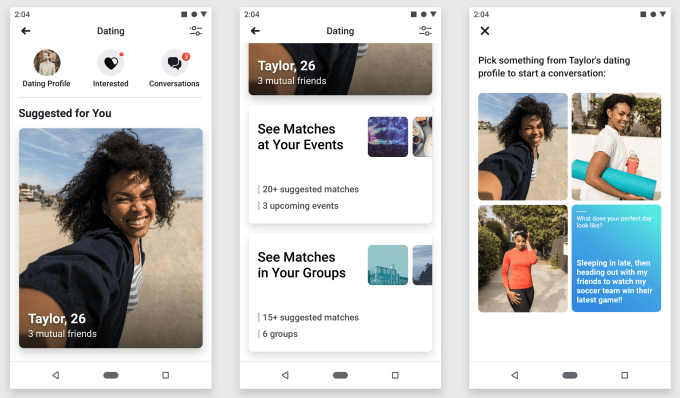
Facebook announced Dating at F8 a year ago and launched it in Colombia in September. Users opt-in, and then browse Events and Groups they’re part of for potential matches. They send them a text-only message based on something in their profile which goes to a special Dating inbox. And if that person reciprocates, they can chat and maybe meet up. Now it’s opening in the Philippines, Vietnam, Singapore, Malaysia, Laos, Brazil, Peru, Chile, Bolivia, Ecuador, Paraguay, Uruguay, Guyana, and Suriname.

One concern with Secret Crush is that users might spam the feature by constantly adding a removing people from their list until they discover a match. That’s why Facebook will only let you sub out one person per day after you reach your initial limit of 9.

Currently there’s still no plan to monetize Dating, but that’s not the point. After years of scandals, Facebook needs to prove it deserves to be your social network. Mindlessly browsing the News Feed has proven to be exhausting and at times detrimental to health. But if the app can introduce you to your future spouse, or even just a summer fling, you might keep a place in your for Facebook too.


Read Full Article

Instagram officially tests hiding Like counts


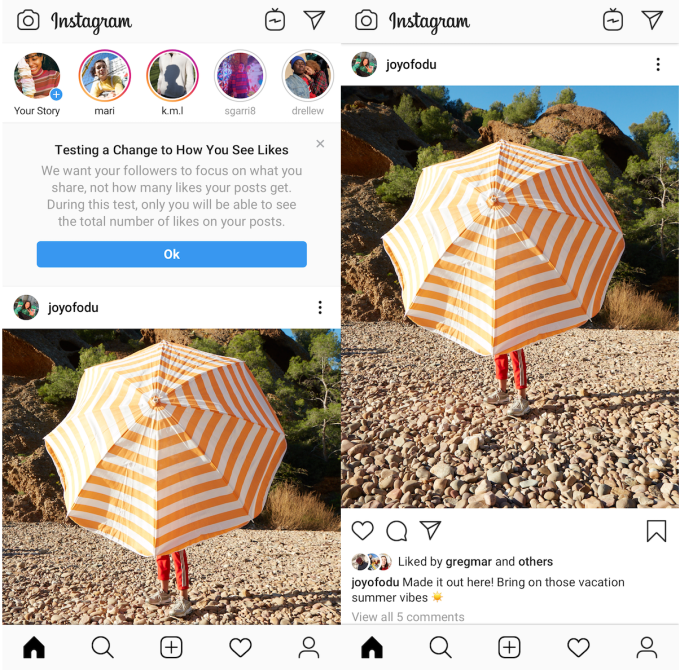
Would we feel less envious, shameful and competitive if Instagram didn’t tell us how many Likes a post received? That’s the idea behind Instagram now hiding Like counts from both a post’s viewers and its author as part of an experiment in Canada. A post’s creator can still open the Likers window to see the names of everyone who hearted their post, but they’d have to count them manually.

Even though Like totals would still impact how the algorithm ranks a post in the feed, if rolled out, the change would refocus Instagram on self-expression instead of being a popularity contest. Users might be less likely to delete a photo or video because it didn’t get enough Likes, or resort to their Finsta account to post something authentic but less “perfect.” It could make us less likely to envy-spiral because we wouldn’t see friends or influencers getting more Likes than us. And people might be more willing to post what truly represents their complicated identities because they’re not battling for the biggest Like count.

“Later this week, we’re running a test in Canada that removes the total number of likes on photos and video views in Feed, Permalink pages and Profile,” an Instagram spokesperson tells TechCrunch. “We are testing this because we want your followers to focus on the photos and videos you share, not how many likes they get.” The small percentage of Canadian users in the test will see a notice atop their feed warning them of  “a change to how you see Likes.”

One big concern, though, is that influencers often get discovered for paid promotions or have their sponsored content measured by public Like counts or a screenshot of their Liker list. “We understand that this is important for many creators, and while this test is in exploratory stages, we are thinking through ways for them to communicate value to their brand partners,” an Instagram spokesperson tells TechCrunch.

TechCrunch first reported two weeks ago that Instagram had prototyped hiding public Like counts, as spotted by Jane Manchun Wong. The company confirmed the feature had been built but not tested in the wild. The news immediately set off a wave of commentary from users. Many, while initially shocked, thought it would make Instagram usage healthier and cutback on some of the toxic anxiety produced by staring at the little numbers.

So why test in Canada? “Canadians are highly social and tech savvy, with over 24 million people connecting across our family of apps each month. We wanted to test this with a digitally savvy audience that has a thriving community on Instagram,” a company spokesperson told us.

It’s reassuring to see Instagram adding new well-being features after the departure of founders Kevin Systrom and Mike Krieger. Systrom in particular had been a big proponent of reducing envy and inauthenticity on social media, which was part of the impetus for launching Instagram Stories, where users could share unpolished looks at their lives. Before he left in September, Instagram rolled out its Your Activity dashboard showing the average time you spent per day on the app, plus a “You’re All Caught Up” warning that tells users they’ve seen all recent feed posts and can stop scrolling.

A 2013 study by Krasnova et al. discovered that 20 percent of envy-causing situations that experiment participants experienced happened on Facebook. They also determined that Facebook causes toxic envy, noting that “intensity of passive following is likely to reduce users’ life satisfaction in the long-run, as it triggers upward social comparison and invidious emotions.” Instagram, with its focus on imagery and manicured looks at our lives, might cause even more envy. Hiding Likes would be a strong step toward us judging ourselves less.


Read Full Article

Facebook Messenger will get desktop apps, co-watching, emoji status


To win chat, Facebook Messenger must be as accessible as SMS, yet more entertaining than Snapchat. Today, Messenger pushes on both fronts with a series of announcements at Facebook’s F8 conference, including that it will launch Mac and PC desktop apps, a faster and smaller mobile app, simultaneous video co-watching and a revamped Friends tab, where friends can use an emoji to tell you what they’re up to or down for.

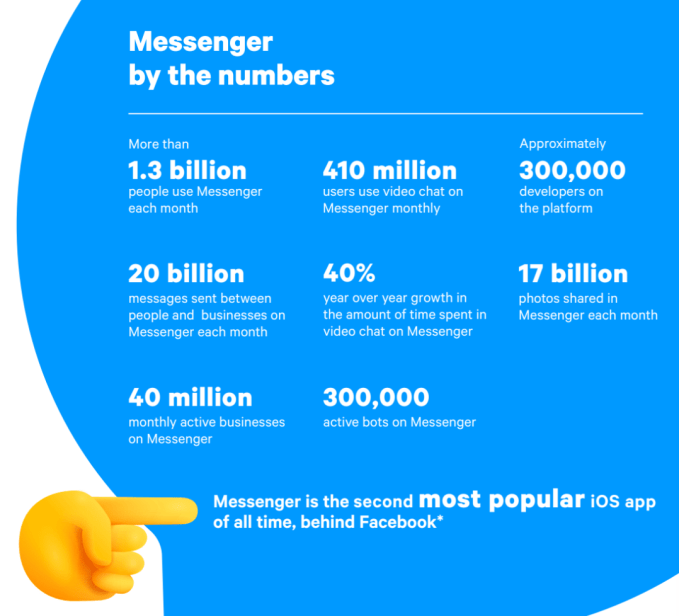
Facebook is also beefing up its tools for the 40 million active businesses and 300,000 businesses on Messenger, up from 200,000 businesses a year ago. Merchants will be able to let users book appointments at salons and masseuses, collect information with new lead generation chatbot templates and provide customer service to verified customers through authenticated m.me links. Facebook hopes this will boost the app beyond the 20 billion messages sent between people and businesses each month, which is up 10X from December 2017.

“We believe you can build practically any utility on top of messaging,” says Facebook’s head of Messenger Stan Chudnovsky. But he stresses that “All of the engineering behind it is has been redone” to make it more reliable, and to comply with CEO Mark Zuckerberg’s directive to unite the backends of Messenger, WhatsApp and Instagram Direct. “Of course, if we didn’t have to do all that, we’d be able to invest more in utilities. But we feel that utilities will be less functional if we don’t do that work. They need to go hand-in-hand together. Utilities will be more powerful, more functional and more desired if built on top of a system that’s interoperable and end-to-end encrypted.”

Here’s a look at the major Messenger announcements and why they’re important:

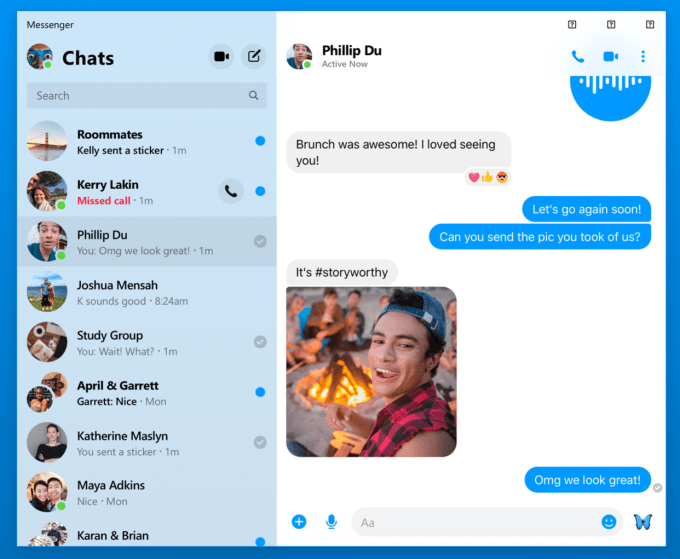
Messenger Desktop – A stripped-down version of Messenger focused on chat, audio and video calls will debut later this year. Chudnovsky says it will remove the need to juggle and resize browser tabs by giving you an always-accessible version of Messenger that can replace some of the unofficial knock-offs. Especially as Messenger focuses more on businesses, giving them a dedicated desktop interface could convince them to invest more in lead generation and customer service through Messenger.

Facebook Messenger’s upcoming desktop app

Project Lightspeed – Messenger is reengineering its app to cut 70 mb off its download size so people with low-storage phones don’t have to delete as many photos to install it. In testing, the app can cold start in merely 1.3 seconds, which Chudnovsky says is just 25 percent of where Messenger and many other apps are today. While Facebook already offers Messenger Light for the developing world, making the main app faster for everyone else could help Messenger swoop in and steal users from the status quo of SMS. The Lightspeed update will roll out later this year.

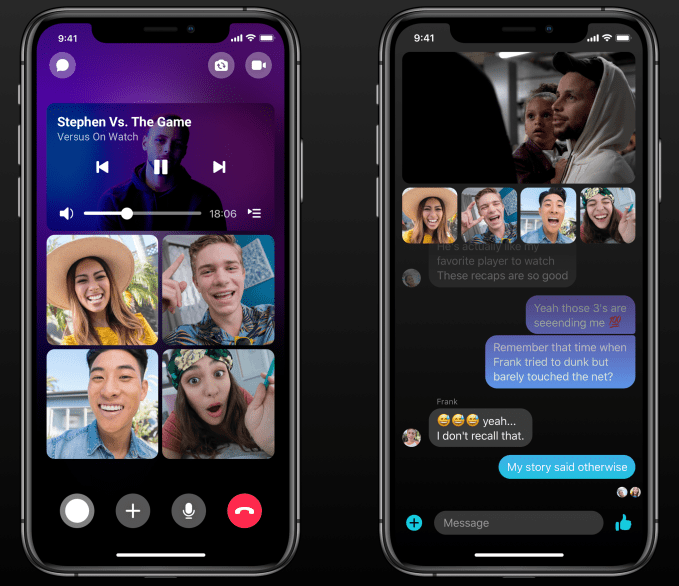
Video Co-Watching – TechCrunch reported in November that Messenger was building a Facebook Watch Party-style experience that would let users pick videos to watch at the same time as a friend, with reaction cams of their faces shown below the video. Now in testing before rolling out later this year, users can pick any Facebook video, invite one or multiple friends and laugh together. Unique capabilities like this could make Messenger more entertaining between utilitarian chat threads and appeal to a younger audience Facebook is at risk of losing.

Watch Videos Together on Messenger

Business Tools – After a rough start to its chatbot program a few years ago, where bots couldn’t figure out users’ open-ended responses, Chudnovsky says the platform is now picking up steam with 300,000 developers on board. One option that’s worked especially well is lead-generation templates, which teach bots to ask people standardized questions to collect contact info or business intent, so Messenger is adding more of those templates with completion reminders and seamless hand-off to a live agent.

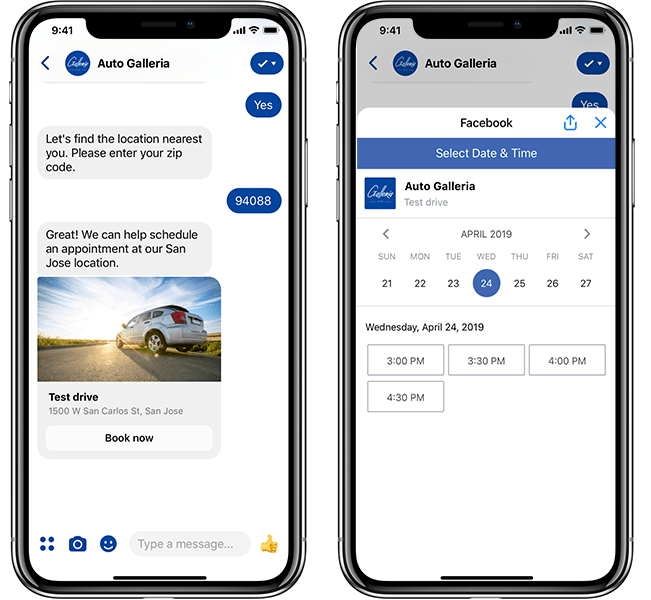
To let users interact with appointment-based businesses through a platform they’re already familiar with, Messenger launched a beta program for barbers, dentists and more that will soon open to let any business handle appointment booking through the app. And with new authenticated m.me links, a business can take a logged-in user on their website and pass them to Messenger while still knowing their order history and other info. Getting more businesses hooked on Messenger customer service could be very lucrative down the line.

Appointment booking on Messenger

Close Friends and Emoji Status – Perhaps the most interesting update to Messenger, though, is its upcoming effort to help you make offline plans. Messenger is in the early stages of rebuilding its Friends tab into “Close Friends,” which will host big previews of friends’ Stories, photos shared in your chats, and let people overlay an emoji on their profile pic to show friends what they’re doing. We first reported this “Your Emoji” status update feature was being built a year ago, but it quietly cropped up in the video for Messenger Close Friends. This iteration lets you add an emoji like a home, barbell, low battery or beer mug, plus a short text description, to let friends know you’re back from work, at the gym, might not respond or are interested in getting a drink. These will show up atop the Close Friends tab as well as on location-sharing maps and more once this eventually rolls out.

Messenger’s upcoming Close Friends tab with Your Emoji status

Facebook Messenger is the best poised app to solve the loneliness problem. We often end up by ourselves because we’re not sure which of our friends are free to hang out, and we’re embarrassed to look desperate by constantly reaching out. But with emoji status, Messenger users could quietly signal their intentions without seeming needy. This “what are you doing offline” feature could be a whole social network of its own, as apps like Down To Lunch have tried. But with 1.3 billion users and built-in chat, Messenger has the ubiquity and utility to turn a hope into a hangout.


Read Full Article

Old Facebook finally wants you to ‘Meet New Friends’


Facebook’s social graph is aging, full of long-lost acquaintances and hometown friends you don’t care much about seeing in the News Feed any more. But Facebook is now testing a pivot away from its core identity of connecting you with existing friends so it can revitalize the social graph and keep people coming back. Facebook’s “Meet New Friends” lets you browse people from shared communities such as your school, workplace or city who’ve also opted in to the feature. It’s now in testing in a few markets before it’s rolled out more widely soon.

Meet New Friends could give people fresh pals to follow in their News Feed, or help recently registered users grow their network until they have access to enough content to keep them busy. And eventually, Facebook could layer on monetization features similar to dating apps where users pay to be shown more prominently to potential connections.

Fidji Simo, the head of Facebook’s main app, tells me Meet New Friends was based on emerging behaviors the company had spotted. “Developing relationships with people they didn’t already know is very different from the core use case of Facebook,” but she notes, “We’ve already seen that naturally happen in Groups, and Meet New Friends will make that a bit easier.”

When users open Meet New Friends, they pick the communities through which they’re open to meeting new friends. For now they choose between schools, employers and locations, but Facebook will eventually add Groups too. In that sense it works a bit like Facebook Dating, which rolls out to 14 new countries today and opens to dating friends with its new Secret Crush feature.

Algorithms will sort potential connections by who is most relevant, such as those with mutual friends or shared interests, but you won’t get “matched” where both users have to state their interest in the other. Instead, users can just browse profiles, and then either send people a friend request (which might feel a bit out of the blue), or send them a single text-only message to a recipient’s dedicated Meet New Friends chat inbox. They can’t message that same person again until they respond (to prevent spamming), and the text-only limitation ensures no unsavory photos get blasted around. If they do reply, the thread moves to Facebook Messenger.

Meet New Friends will pit Facebook against a range of other apps, from local-focused Meetup and Nextdoor to verticalized apps like Hey Vina for women only to dating-affiliated apps like Bumble BFF. But Facebook benefits from its ubiquity, so users can try Meet New Friends without feeling embarrassed by downloading an app just to make them less lonely.

For years, the mildly creepy People You May Know feature has been a cornerstone of Facebook’s growth strategy. But it’s still just about recreating your offline social graph online. As Facebook strives to become more meaningful to people’s lives, fostering new friendships could give people a fuzzy feeling about the giant corporation.


Read Full Article