09 February 2019

Transportation Weekly: Amazon’s secret acquisition and all the AV feels


Welcome to Transportation Weekly; I’m your host Kirsten Korosec, senior transportation reporter at TechCrunch. I cover all the ways people and goods move from Point A to Point B — today and in the future — whether it’s by bike, bus, scooter, car, train, truck, robotaxi or rocket. Sure, let’s include hyperloop and eVTOLs, or air taxis, too.

Yup, another transportation newsletter. But I promise this one will be different. Here’s how.

Newsletters can be great mediums for curated news — a place that rounds up all the important articles a reader might have missed in any given week. We want to do a bit more.

We’re doubling down on the analysis and adding a heaping scoop of original reporting and well, scoops. You can expect Q&As with the most interesting people in transportation, insider tips, and data from that white paper you didn’t have time to read. This isn’t a lone effort either. TechCrunch senior reporter Megan Rose Dickey, who has been writing about micro mobility since before the scooter boom times of 2017, will be weighing in each week in our “Tiny But Mighty Mobility” section below. Follow her @meganrosedickey.

Consider this a soft launch. There might be content you like or something you hate. Feel free to reach out to me at kirsten.korosec@techcrunch.com to share those thoughts, opinions, or tips.

Eventually, we’ll have a way for readers to sign up and have Transportation Weekly delivered each week via email. For now, follow me on Twitter @kirstenkorosec to ensure you see it each week.

Now, let’s get to the good stuff.


ONM …

There are OEMs in the automotive world. And here, (wait for it) there are ONMs — original news manufacturers.


This is where investigative reporting, enterprise pieces and analysis on transportation will live.

We promised scoops in Transportation Weekly and here is one. If you don’t know journalist Mark Harris, you should. He’s an intrepid gumshoeing reporter who TechCrunch has been lucky enough to hire as a freelancer. Follow him @meharris.

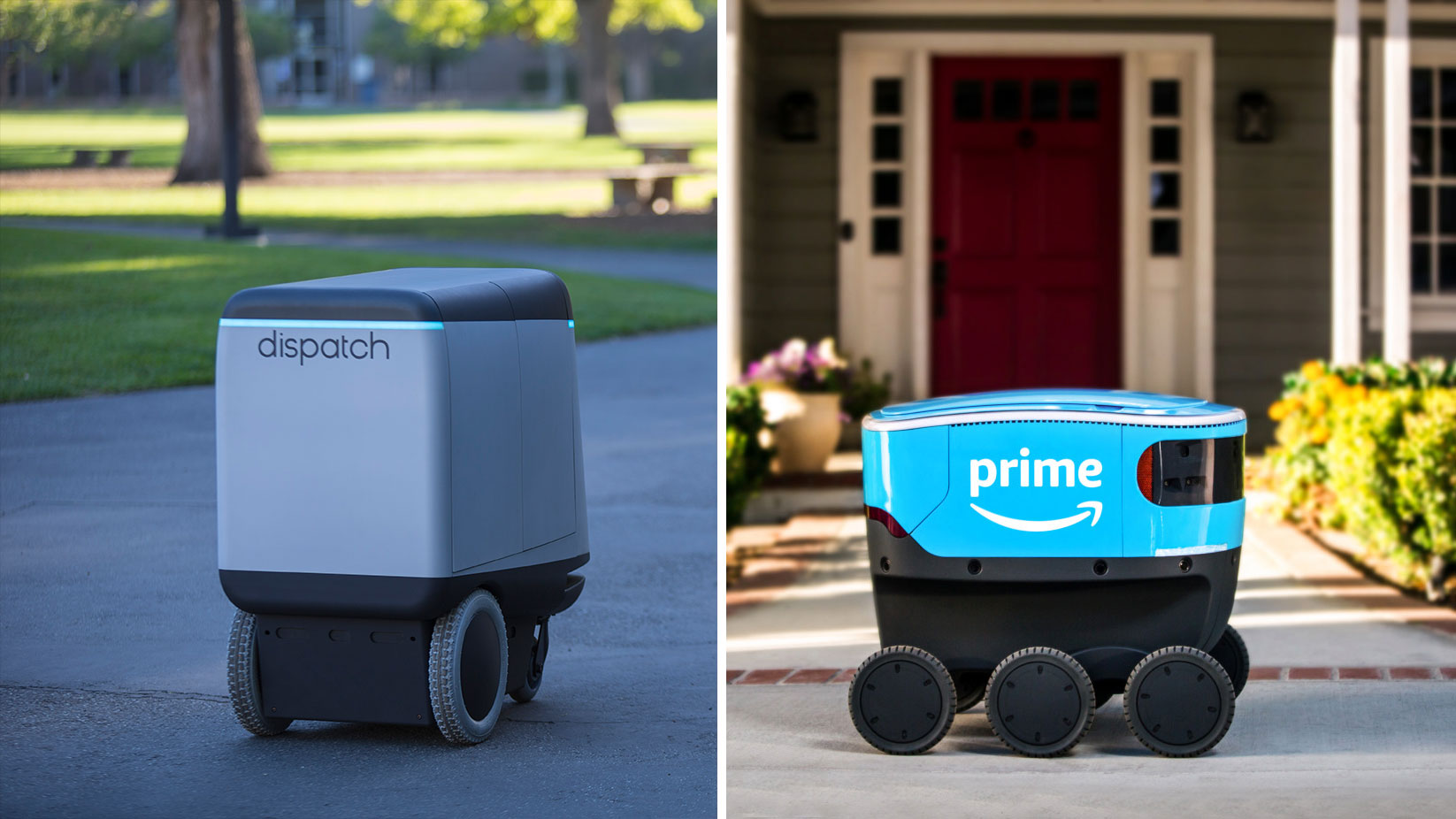
Amazon quietly acquired robotics company Dispatch to build Scout
dispatch-amazon-scout
Remember way back in January when Amazon introduced Scout, their autonomous delivery bot? There was speculation at the time that Amazon had bought the Estonian-based company Starship Technologies. Harris did some investigating and discovered some of the intellectual property and technology behind Scout likely came from a small San Francisco startup called Dispatch that Amazon stealthily acquired in 2017.

It’s time to stop thinking about Amazon as just an e-commerce company. It’s a gigantic logistics company, probably the biggest on the planet, with a keen interest — and the cash to pursue those interests — in automation. Think beyond Scout. In fact, wander on down this post to the deal of the week.


Dig In

Each week, transportation weekly will spend a little extra time on an approach, policy, tech or the people behind it in our ‘Dig In” section. We’ll run the occasional column here, too.

This week features a conversation with Dmitri Dolgov, the CTO and VP of engineering at Waymo, the former Google self-driving project that spun out to become a business under Alphabet.
waymo-google-10-years

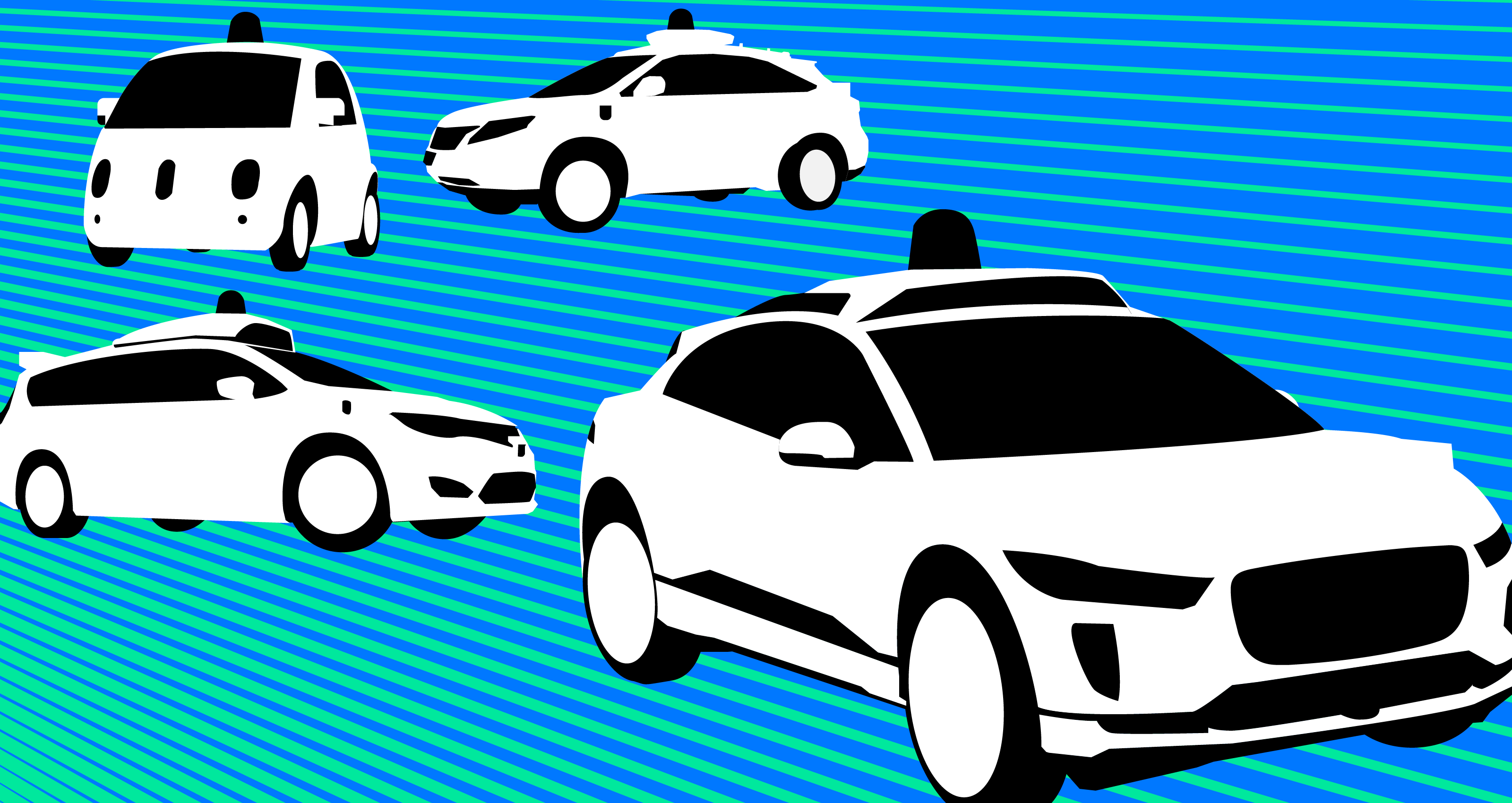
Ten years ago, right around now, about a dozen engineers started working on Project Chauffeur, which would turn into the Google self-driving project and eventually become an official company called Waymo. Along the way, the project would give rise to a number of high-profile engineers who would go on to create their own companies. It’s a list that includes Aurora co-founder Chris Urmson, Argo AI co-founder Bryan Salesky and Anthony Levandowski, who helped launch Otto and more recently Pronto.ai.

What might be less known is that many of those in the original dozen are still at Waymo, including Dolgov, Andrew Chatham, Dirk Haehnel, Nathaniel Fairfield and Mike Montemerlo.

Dolgov and I talked about the early days, challenges and what’s next. A couple of things that stood out during our chat.

There is a huge difference between having a prototype that can do something once or twice or four times versus building a product that people can start using in their daily lives. And it is, especially in this field, very easy to make progress on these kinds of one-off challenges.

Dolgov’s take on how engineers viewed the potential of the project 10 years ago …

I also use our cars every day to get around, this is how I got to work today. This is how I run errands around here in Mountain View and Palo Alto.


A little bird …

We hear a lot. But we’re not selfish. Let’s share.

blinky-cat-birdAn early investor, or investors, in Bird appear to be selling some of their shares in the scooter company, per a tip backed up by data over at secondary trading platform EquityZen. That’s not crazy considering the company is valued at $2 billion-ish. Seed investors should take some money off the table once a company reaches that valuation.

We’ve heard that David Sacks at Craft Ventures hasn’t sold a single Bird share. We hear Tusk Ventures hasn’t sold, either. That leaves a few others, including Goldcrest Capital, which was the lone seed investor, and then Series A participants Lead Edge Capital, M13, and Valor Equity Partners.

Got a tip or overheard something in the world of transportation? Email me or send a direct message to @kirstenkorosec.

While you’re over at Twitter, check out this cheeky account @SDElevator. We can’t guarantee how much of the content is actually “overheard” and how much is manufactured for the laughs, but it’s a fun account to peruse from time to time.

Another new entrant to the mobility parody genre is @HeardinMobilty.


Deal of the week

There’s so much to choose from this week, but Aurora’s more than $530 million Series B funding round announced Thursday morning is the winner.

The upshot? It’s not just that Aurora is now valued at more than $2.5 billion. The primary investors in the round — Sequoia as lead and “significant” investments from Amazon and T. Rowe Price — suggests Aurora’s full self-driving stack is headed for other uses beyond shuttling people around in autonomous vehicles. Perhaps delivery is next.

And believe it or not, the type of investor in this round tells me that we can expect another capital raise. Yes, Aurora has lots of runway now as well as three publicly named customers. But investors like Sequoia, which led the round and whose partner Carl Eschenbach is joining Aurora’s board, T. Rowe Price and Amazon along with repeaters like Index Ventures (general partner Mike Volpi is also on the board) have patience, access to cash and long-term strategic thinking. Expect more from them.

Other deals that got our attention this week:


Snapshot

Speaking of deals and Tesla … the automaker’s $218 million acquisition this month of Maxwell Technologies got me thinking about companies it has targeted in the past.

So, we went ahead and built a handy chart to provide a snapshot view of some of Tesla’s noteworthy acquisitions. tesla-acquisitions-chart1
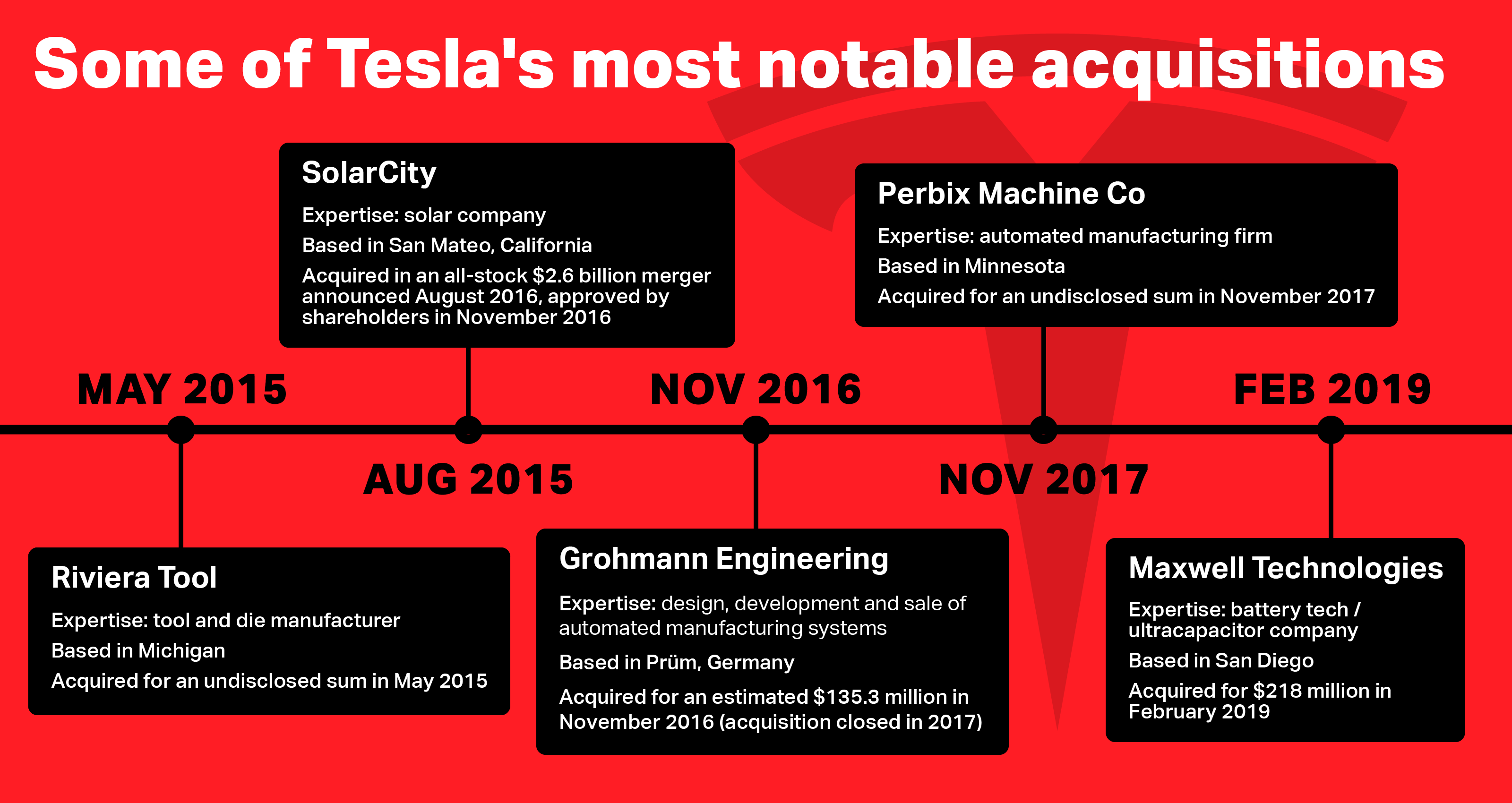
One note: Tesla CEO Elon Musk tweeted in 2018 that the company had acquired trucking carrier companies to help improve its delivery logistics. We’ve dug in and have yet to land on the company, or companies, Tesla acquired.

The deals that got away are just as interesting. That list includes a reported $325 million offer to buy Simbol Materials, the startup that was extracting small amounts of lithium near the Salton Sea east of San Diego.


Tiny but mighty mobility

Between Lime’s $310 million Series D round and the seemingly never-ending battle to operate electric scooters in San Francisco, it’s clear that micro mobility is not so micro.

Lime, a shared electric scooter and bikeshare startup, has now raised north of $800 million in total funding, surpassing key competitor Bird’s total funding of $415 million. Thanks to this week’s round of funding, Lime’s micromobility business is now worth $2.4 billion.

Lime currently operates its bikes and scooters in more than 100 cities worldwide. Over in San Francisco, however, Lime has yet to deploy any of its modes of transportation. Since last March, there’s been an ongoing battle among scooter operators to deploy their services in the city. The city ultimately selected Skip and Scoot for the pilot programs, leaving the likes of Lime, Uber’s JUMP and Spin to appeal the decision.

A neutral hearing officer has since determined SF’s process for determining scooter operators was fair, but the silver lining for the likes of JUMP, Spin and most likely, Lime, is that the city may open up its pilot program to allow additional operators beginning in April.


Notable reads

Two recent studies got my attention.

The first is from Bike Pittsburgh, an advocacy group and partner of Uber, that published the findings from its latest AV survey based on responses from local residents. The last time they conducted a similar survey was in 2017.

The takeaway: people there, who are among the most exposed to autonomous vehicles due to all the AV testing on public roads, are getting used to it. A bit more than 48 percent of respondents said they approve of public AV testing in Pittsburgh, down slightly from 49 percent approval rating in 2017. 

  • 21.21% somewhat approve
  • 11.62% neutral
  • 10.73% somewhat disapprove
  • 8.73% disapprove

One standout result was surrounding responses about the fatal accident in Tempe, Arizona involving a self-driving Uber that struck and killed pedestrian Elaine Herzberg in March 2018. Survey participants were asked “As a pedestrian or a bicyclist how did this change event and it’s outcome change your opinion about sharing the road with AVs?”

Some 60 percent of respondents claimed no change in their opinion, with another 37 percent claiming that it negatively changed their opinion. Nearly 3 percent claimed their opinion changed positively toward the technology.

Bike Pittsburgh noted that the survey elicited passionate open-ended responses. 

“The incident did not turn too many people off of AV technology in general,” according to Bike Pittsburgh. “Rather it did lead to a growing distrust of the companies themselves, specifically with Uber and how they handled the fatality.”

The other study, Securing the Modern Vehicle: A Study of Automotive Industry Cybersecurity Practices, was released by Synopsys, Inc.and SAE International.

The results, based on a survey of global automotive manufacturers and suppliers conducted by Ponemon Institute, doesn’t assuage my concerns. If anything, it puts me on alert.

  • 84% of automotive professionals have concerns that their organizations’ cybersecurity practices are not keeping pace with evolving technologies
  • 30% of organizations don’t have an established cybersecurity program or team
  • 63% test less than half of the automotive technology they develop for security vulnerabilities.

Testing and deployments

Pilots, pilots everywhere. A couple of interesting mobility pilots and deployments stand out.

Optimus Ride, the Boston-based MIT spinoff, has made a deal with Brookfield Properties to provide rides in its small self-driving vehicles at Halley Rise – a new $1.4 billion mixed-use development in Virginia. 

This is an example of where we see self-driving vehicles headed — for now. Small deployments that are narrowly focused in geography with a predictable customer base are the emerging trend of 2019. Expect more of them.

And there’s a reason why, these are the kinds of pilots that will deliver the data needed to improve their technology, as well as test out business models —gotta figure out how to money with AVs eventually — hone in fleet operational efficiency, placate existing investors while attracting new ones, and recruit talent.
Another deployment in the more conventional ride-hailing side of mobility is with Beat, the startup that has focused its efforts on Latin America.

Beat was founded by Nikos Drandakis in 2011 initially as Taxibeat. The startup acquired by Daimler’s mytaxi in February 2017 and Drandakis still runs the show. The company was focused on Europe but shifted to Latin America, and it’s made all the difference. (Beat is still available in Athens, Greece.) Beat has launched in Lima, Peru, Santiago, Chile and Bogota, Colombia and now boasts 200,000 registered drivers. 

Now it’s moving into Mexico, where more competitors exist. The company just started registering and screening drivers in Mexico City as it prepares to offer rides for passengers this month. 

TechCrunch spoke at length with Drandakis. Look out for a deeper dive soon.

Until next week, nos vemos.


Read Full Article

Waymo CTO on the company’s past, present and what comes next


A decade ago, about a dozen or so engineers gathered at Google’s main Mountain View campus on Charleston Road to work on Project Chauffeur, a secret endeavor housed under the tech giant’s moonshot factory X.

Project Chauffeur — popularly know as the “Google self-driving car project” — kicked off in January 2009. It would eventually graduate from its project status to become a standalone company called Waymo in 2016.

The project, originally led by Sebastian Thrun, would help spark an entire ecosystem that is still developing today. Venture capitalists took notice and stampeded in, auto analysts shifted gears, regulators, urban planners and policy wonks started collecting data and considering the impact of AVs on cities.

The project would also become a springboard for a number of engineers who would go on to create their own companies. It’s a list that includes Aurora  co-founder Chris Urmson,  Argo AI co-founder Bryan Salesky as well as Anthony Levandowski, who helped launch Otto and more recently Pronto.ai.

What might be less known is that many who joined in those first weeks are still at Waymo, including Andrew Chatham, Dmitri Dolgov, Dirk Haehnel, Nathaniel Fairfield and Mike Montemerlo. Depending on how one defines “early days,” there are others like Hy Murveit, Phil Nemec, and Dan Egnor, who have been there for eight or nine years.

Dolgov, Waymo’s CTO and VP of engineering, chatted recently with TechCrunch about the early days, its 10-year anniversary, and what’s next.

Below is an excerpt of an interview with Dolgov, which has been edited for clarity and length.

TC: Let’s go back to the beginning of how you got started. Take me to those first days at the Google self-driving project.

DOLGOV: When I think about what drew me to this field, it’s always been three main things: the impact of the technology, the technology itself, and the challenges as well as the people you get to work with. It’s pretty obvious, at this point, that it can have huge implications on safety, but beyond that, it can impact efficiency and remove friction from transportation for people and things.

There is this sense of excitement that never seems to die off. I remember the first time I got to work on a self-driving car. And it was the first time when the car drove itself using software that I had written, you know, just earlier in the day. So this was back in 2007. And that completely blew my mind. (Dolgov participated in the DARPA Urban Challenge in November 2007 before the Google project launched)

TC: What were these 10, 100-mile challenges that (Google co-founder) Larry Page came up with? Can you describe that to me a little bit?

DOLGOV: This was probably the main milestone that we created for ourselves when we started this project at Google in 2009. And the challenge was to drive 10 routes, each one was 100 miles long. And you had to drive each one from beginning to end without any human intervention.

These were really well defined very clearly, crisply defined routes. So in the beginning, you’d engage the self driving mode of a car, and then had to finish the whole 100 miles on its own.

The routes were intentionally chosen to sample the full complexity of the task. In those early days, for us, it was all about understanding the complexity of the problem. All of the routes were in the Bay Area. We had some driving in urban environments, around Palo Alto,  we had one that spent a lot of time on the freeways and went to all of the bridges in the Bay Area. We had one that went from Mountain View to San Francisco, including driving through Lombard Street. We had one that went around Lake Tahoe.

We tried to cover as much of the complexity of the environment as possible. And what’s really great about that task is that it really helped us very quickly understand the core complexity of the space.

TC: How long did it take to complete these challenges?

DMITRI: It took us until the fall of 2010.

TC: It’s kind of amazing to think that the project was able to complete these challenges in 2010, and yet, there still seems to be so much more work to complete on this task.

DOLGOV: Right. But I think this is the nature of the problem. There is a huge difference between having a prototype that can do something once or twice or a handful of times versus building a product that people can start using in their daily lives. And it is, especially in this field, when we started, it’s very easy to make progress on these kinds of one-off challenges.

But what really makes it hard is an incredible level of performance that you need from your system in order to make it into a product. And that’s number one. And number two, is the very long tail of complexity of the types of problems that you encounter. Maybe you don’t see them 99% of the time, but you still have to be ready for that 1% or 1.1%.

TC:  When you think back to those early days — or maybe even more recently — was there ever a moment when where there was a software problem, or even a hardware problem that seemed insurmountable and that maybe the tech just wasn’t quite there yet?

DOLGOV: In the early days, we had all kinds of problems that we faced. In the early history of this project, we only set out to solve some problems without really knowing how we were going to get there.

You start working on the problem, and you make progress towards this. Thinking back to how these past few years have felt to me: It’s been much less of a here’s one problem, or a small number of really hard problems and we kind of hit a wall.

Instead, it’s been more like hundreds of really hard problems. None of them feel like a brick wall because, you know, the team is amazing, the technology is really powerful, and you make progress on them.

But you’re always juggling like, hundreds of these types of really complex problems, where the further you get into solving each one of them, the more you realize just how hard it really is.

So it’s been a really interesting mix: on one hand, the problem getting more difficult, the more you learn about it. But on the other hand, technology making more rapid progress and breakthroughs happening at a higher rate than you would have originally anticipated.

TC: When did you realize that this project had changed (beyond the official announcements)? When did you realize it could be a business, that it was something that could be a lot more than just solving this problem?

DOLGOV: I would describe it as more of an evolution of our thinking and investing more effort into more clearly defining the product and commercial applications of this technology.

When we started, in that very first phase, the question was, “is this even feasible? Is technology going to work?” I think it was pretty clear to everybody that if the technology succeeded then there was going to be tremendous impact.

It wasn’t exactly clear what commercial application or what product would deliver that impact. But there was just so many ways that this technology would transform the world that we didn’t spend much time worrying about that aspect of it.

When you think about it, what we’re building here is a driver: our software, our hardware —the software that runs in the car, the software that runs in the cloud. We look at the entirety of our technology stack as a driver.

There are about 3 trillion miles in the U.S. that are driven by people. In some cases, they drive themselves, in some cases, they drive other people, in some cases, they drive goods. Once you have the technology that is “the driver,” you can deploy it in all these situations. But they have their pros and cons.

Over time, our thinking on ‘what are the most attractive ones?’ and ‘in what order do we tackle them?’ has matured.

This is what they’re doing today as a result of all of that work. Ride hailing is the first commercial application that we’re pursuing. Beyond that we are working on long-haul trucking, long range deliveries. We’re interested, at some point, deploying the technology in personally owned cars, local deliveries, public transportation, so forth and so on.

TC: What application are you most excited about? The one that you think maybe is overlooked or one you’re personally the most excited about?

DOLGOV: I’m super excited about seeing the technology and the driver being deployed in, you know, across the globe and across different commercial applications. But I think the one that I am the most excited about is the one we’re pursuing as our number one target right now, which is ride hailing.

I think it has the potential to affect positively the highest number of people in the shortest amount of time.

I also use our cars every day to get around, this is how I got to work today. This is how I run errands around here in Mountain View and Palo Alto. It’s wonderful to be able to experience these cars and it just removes a lot of the friction out of transportation.

TC: So you you take a self driving car to work every day right now?

DOLGOV: Yes, but in California, they still have people in them. 

TC: How long have you been doing that?

DOLGOV: Awhile. Actually, it seems like forever.

I’ve always spent time in the cars. I think it’s really important to experience the product that you’re building and have direct experience with the technology. This was obviously the case in the early days of the project when there was a small group of us doing everything.

As the team grew, I would still make sure I would experience the technology and go on test rides at least weekly, if not more frequently.

When we started pursuing the ride-hailing application, and we build an app for it, and we built out infrastructure to make it into a user-facing product, I was one of the earlier testers.

That must have been three years ago.

TC: Did you expect it to be at this point that you are right now, 10 years ago, did you expect like 10 years from now, this is where we’re going to be? Or did it happen faster or slower than you anticipated?

DOLGOV: So for me, I think on one hand, I would not have predicted some of the breakthroughs in the technology on the hardware front, on the software and AI and machine learning back in 2009. I think the technology today is much more powerful than I would have probably said in 2009.

On the another hand, the challenge of actually building a real product and deploying it so that people can use it has turned out to be more difficult than I expected. So it’s kind of a mix.

TC: What were some of those technological breakthroughs?

DOLGOV: There were a number of things. LiDARs and radars became much more powerful.

And by powerful, I mean longer range, higher resolution and more features, if you will, in terms of the things that they can measure — richer returns of the properties of the environment. So that’s on the sensing side.

Compute, especially in the hardware-accelerated parallel computation, that’s been very powerful for the advancement of neural networks. That has been a huge boost.

Then there’s deep learning and the neural nets themselves have led to a number of breakthroughs.

TC: Yeah, with the last two examples you gave, I think of those as being breakthroughs more recently, in just the last few years. Is that about the timeframe?

DOLGOV: We’ve always used machine learning on this project, but it was a different kind of machine learning then today.

I think in 2012 is probably when, on our project, there was meaningful effort and when we were working together with Google on both the self-driving technology and deep learning.

Arguably, at the time Google was the only company in the world seriously investing in both the self driving and deep learning.

At that point, we didn’t have the hardware to be able to run those nets on the car, in real time. But there were very interesting things you could do in the cloud.

For deep learning, 2013 was a pretty big year. I think this is when ImageNet won a big competition and it was a breakthrough for deep learning. It outperformed all the other approaches in the computer vision competition.

TC: In 2009, could you imagine a world in 2019, where numerous self-driving vehicle companies would be testing on roads in California? Was that something that seemed plausible?

DOLGOV: No, no that’s not the picture I had in mind in 2009 or 2010.

In those early days of the project, people kind of laughed at us. I think the industry made fun of this project and there were multiple funny spoofs on the Google self-driving car project.

It’s been pretty amazing to go from, ‘oh there is small, group of crazy folks trying to do this science fiction thing at Google’ to this becoming a major industry that we have today with dozens, if not hundreds, of companies pursuing this.

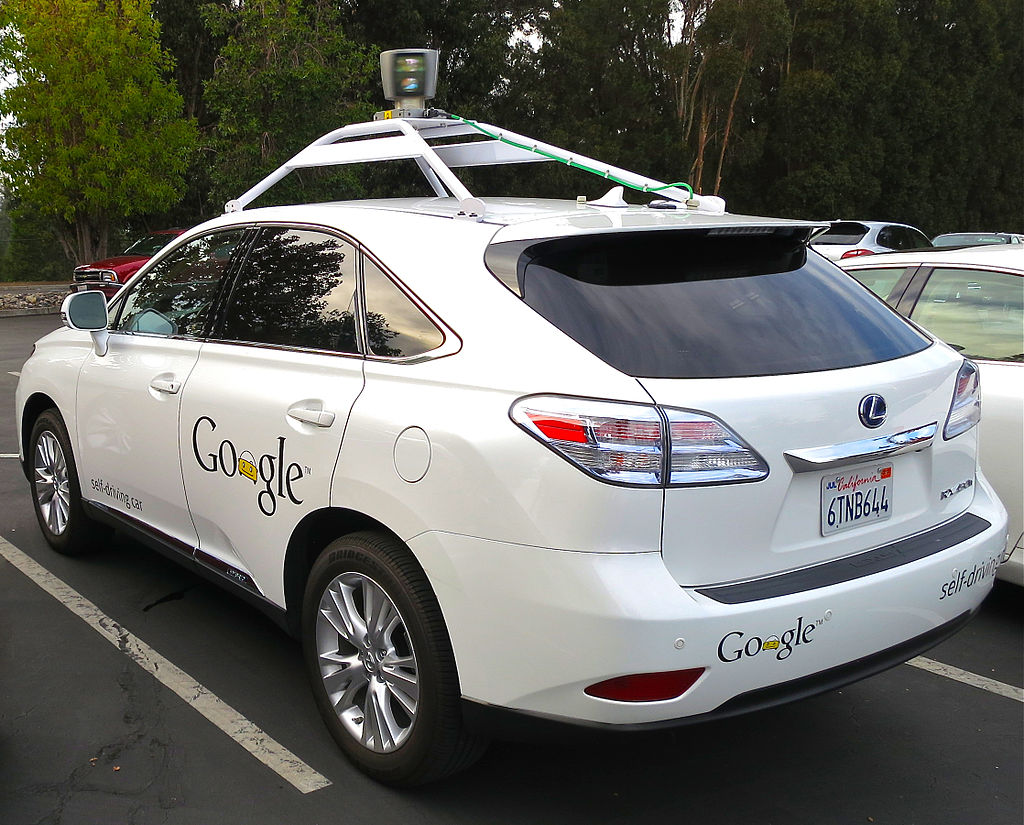
Google’s self-driving Lexus RX 450h

TC: What will be the tipping point that will get folks on board with self driving vehicles in their city? Is it a matter of just pure saturation? Or is it something else that that all the companies, Waymo included, are responsible of helping usher in?

DOLGOV: It seems like there’s always a spectrum of people’s attitudes towards new technology and change. Some of the negative ones are more visible. But actually, my experience over the last 10 years, the positive attitude and the excitement has been overwhelmingly stronger.

What I what I have seen over and over again, in this project that really is very powerful, and that is powerful and changes people’s attitudes from, uncertainty and anxiety to excitement and comfort and trust is being able to experience the technology.

You get people into one of our cars and then go for a ride. Even people who are anxious about getting into a car with nobody behind the wheel, once they experience it and once they understand how useful of a product it is, and how well the car behaves, and they starting trusting it, that really leads to change.

As the technology rolls out and more people get to experience it firsthand, that will help.

TC: Are the biggest challenges in 2009 the same as today? What are the final cruxes that remain?

DOLGOV: In 2009, all the challenges were all about one-off problems we needed to solve and today it’s all about turning it into a product.

It’s about the presentation of this self-driving stack and about building the tools and the framework for evaluation and deployment of the technology. You know, what has stayed true is that it’s all about the speed of iteration and the ability to learn new things and solve new technical problems as we discover them.


Read Full Article

You Can Now Declutter Twitter the Marie Kondo Way


If you’re active on Twitter then you probably follow too many people. But do those people all bring you joy? Do their tweets make you happy? Do they really deserve your time and attention? If not, it’s time to use the KonMari method on your Twitter feed.

Marie Kondo has made quite the name for herself in recent years. The KonMari method is a way of tidying up your house, only keeping the things that spark joy, and getting rid of everything else. And it turns out this can also be used to declutter Twitter.

Apply the KonMari Method to Twitter

Marie Kondo’s KonMari method can be applied to Twitter thanks to Tokimeki Unfollow. This is a tool designed to help you pare the number of people you follow on Twitter down to the bare minimum. At the end of the process you should have a more manageable feed.

Tokimeki Unfollow is the brainchild of Julius Tarng, a former product designer at Facebook. It works along the same principles as the KonMari method, asking you to really analyze everyone you follow on Twitter and judge whether they deserve their place.

To use Tokimeki Unfollow you have to authorize the app to use your account. Once signed in, you simply go through each account deciding what to do with them. You can choose to carry on following them, to add them to a list, or to unfollow them completely.

You’re advised not to look at people’s profiles. Instead, you’re meant to judge people on their most recent tweets alone. As Marie Kondo’s philosophy dictates, you need to decide if those tweets spark joy in you. And if they don’t, you should stop following that person.

Unfollow People Based on Their Tweets

Tokimeki Unfollow has been created using Glitch, and is open-source. Which means people can remix the tool and add new elements as they see fit. However, the biggest challenge by far is actually deciding to unfollow people based on nothing but their tweets.

If you use Tokimeki Unfollow on your Twitter followers then you should explore further. It turns out Twitter isn’t the only way you can apply the KonMari method to your digital life. And deleting apps, documents, and photos that no longer spark joy can be therapeutic.

Image Credit: Matt Brown/Flickr

Read the full article: You Can Now Declutter Twitter the Marie Kondo Way


Read Full Article

25 Amazingly Interesting YouTube Facts You Should Know


youtube-facts

YouTube is the world’s favorite video platform, but there’s a lot you probably don’t know about the site. With that in mind, here are some amazingly interesting YouTube facts for you to check out.

1. YouTube Began on Valentine’s Day

The YouTube.com domain was bought on Valentine’s Day, 2005. The first video was posted by co-founder Jawed Karim a little over two months later.

2. PayPal Funded YouTube’s Launch

The three YouTube founders—Chad Hurley, Steve Chen, and Jawed Karim—all worked for PayPal. They used their money from eBay’s buyout of PayPal to fund the site’s early development.

2. Google Owns YouTube

Google acquired YouTube for $1.65 billion in October 2006. Which was a lot of money at the time, but looks like a pittance now considering the value of YouTube.

3. Ads Appeared in 2007

Google is the largest ad company in the world, and it didn’t take long for it to start monetizing YouTube. The service’s first ad was broadcast in August 2007, just nine months after Google bought the site.

4. There Are Localized Versions of YouTube

In June 2007, YouTube started rolling out localized versions of its site. People in different places would get different recommendations and features, as well as a localized top-level domain (for example, .com, .co.uk, .fr, etc.).

The first 10 countries to get their own YouTube site were the U.S., U.K., Brazil, France, Ireland, Italy, Japan, the Netherlands, Poland, and Spain.

5. There Are 98 Versions of YouTube

youtube mexico home screen

Fast-forward to today, and the localization program has expanded dramatically. More than 98 countries now have their own version. The most recent went live in January 2019. They were Bolivia, Costa Rica, Ecuador, El Salvador, Guatemala, Honduras, Nicaragua, Panama, and Uruguay.

6. YouTube Has Been Censored Around the World

YouTube’s mission to get into households on every corner of the planet has not always been plain sailing. At various times, more than 25 countries have blocked access. All the usual suspects are there, as well as some surprises such as Germany, Finland, and Brazil.

7. YouTube Is Worth Billions

Today, YouTube’s annual revenue hovers around $15 billion. This has led Wall Street analysts to give the brand a value of more than $100 billion.

8. Americans Are Addicted to YouTube

In any given month, 80 percent of North American adults aged between 18 and 49 watch at least one video on YouTube.

9. YouTube Has More Reach Than Cable TV

In the United States, YouTube reaches more 18 to 49-year-olds than any broadcast or cable TV network.

10. YouTube Is Growing in Popularity

YouTube’s assault on traditional forms of television shows no signs of abating. The most recent data available shows that the time spent on YouTube has been enjoying double-digit percentage growth. At the same time, time spent watching TV is seeing a double-digit decline.

11. Ronaldinho Was First to 1 Million Views

For many soccer fans, Brazilian forward Ronaldinho is one of the greatest players to have ever played the game.

Thanks to his worldwide popularity, his tricks video (produced by Nike) was the first video to hit one million views in October 2005.

12. Avril Lavigne Was First to 100 Million Views

Avril Lavigne’s chart-topping hit Girlfriend was the first song to break 100 million views after its release in 2008. There was some controversy around how the video amassed its views, with Lavigne’s PR company accused of gaming the system.

13. Gangnam Style Was First to 1 Billion Views

The first video to smash through the 1 billion barrier was PSY’s global megahit, Gangnam Style. The South Korean artist achieved superstardom on the back of its success, with the U.N. calling the singer a “force for world peace.” A bit of an exaggeration, we’re sure you’ll agree.

14. Spanish Language YouTube Is Growing

The first Spanish-language video on YouTube to amass more than 1 billion views was Enrique Iglesias’ reggaeton song, Bailando.

15. The Most Popular Non-Music Video Is in Russian

The only non-music video in the most watched YouTube videos of all time is a Russian-language version of an episode of kids’ TV show, Masha and The Bear. It has been watched 3.4 billion times and counting.

16. 17 Videos Have Held the Number One Crown

In total, 17 different videos have held the record for being the most watched video on YouTube. The current holder is Luis Fonsi’s hit, Despacito. It took the record off Wiz Khalifa’s See You Again when it hit 2.9 billion views.

17. Justin Bieber’s Baby Isn’t the Most Hated Video

For a long time, the most disliked video on YouTube was the Justin Bieber song, Baby. It had received more than 10 million “thumbs down” in the nine years it had been live.

However, in December 2018 the record was smashed in spectacular fashion by YouTube Rewind 2018. In its first month of availability, it racked up an incredible 15 million downvotes.

18. HD Videos Went Live in 2009

We couldn’t start watching YouTube in high definition until the feature’s global rollout in November 2009.

19. YouTube Boasts 57,000 Years of Video Footage

The average video length on YouTube is four minutes and 20 seconds, and there are approximately 7 billion videos on the website in total.

We did some math (!) and can confirm that it would take around 30 trillion minutes to watch them all. Or, to put it another way, 58,000 years.

20. People Have Short Attention Spans

It’s safe to assume that the majority of those 7 billion videos are not worth watching. And it turns out that we give short shrift to videos that don’t immediately grab our attention. More than 20 percent of videos are switched off within the first 10 seconds of playback.

21. We All Watch Too Much YouTube

One person probably couldn’t get through all 58,000 years of YouTube. However, collectively, we make a darned good effort. We watch four billion hours of video every month—that’s 456,621 years worth!

22. YouTube Search Is Bigger Than Bing

YouTube is the second largest search engine in the world. It processes more queries than Bing and Yahoo combined.

Of course, it means Google also owns the world’s two most popular search engines. We’re not sure that level of centralization is a good thing.

23. A Decade of New Video Is Uploaded Every Day

YouTube sees 72 hours of newly uploaded video every minute. Over a 24-hour period, that’s more than a decade of new footage.

24. Tony Blair Is a YouTube Pioneer

Today, YouTube is well established as an essential way for politicians to get their message out to the public. That wasn’t always the case. In 2007, then-British Prime Minister Tony Blair became the first world leader to launch his own YouTube channel.

25. YouTube Isn’t the Number One Website

Despite all of these amazing statistics, YouTube is still only the second most visited site in the world (behind Google.com).

According to Alexa.com, Facebook, Baidu, and Wikipedia round out the rest of the top five.

YouTube’s Phenomenon Facts and Figures

So there you have it; that’s our list of the most interesting YouTube facts. The statistics are truly mind blowing, especially when YouTube didn’t even exist until relatively recently.

If you enjoyed our list of YouTube facts, make sure you check out some of our similar articles. We have also written. There are these surprising facts you didn’t know about Vimeo and interesting facts you didn’t know about Netflix.

Read the full article: 25 Amazingly Interesting YouTube Facts You Should Know


Read Full Article

How to Create a Personal Wiki Using Microsoft OneNote


onenote-wiki

Microsoft OneNote is a multipurpose note-taking app. You can mold it in any way to get your work done. With the built-in simple wiki system, you can make connections with other notes in the same section or another notebook. You can also link your notes with a web page, link to Office documents, and more.

Its deep linking structure ensures that you quickly engage in knowledge construction, critical thinking, and contextual learning. We’ll show you how to set up a wiki in OneNote and build your knowledge repository to manage information.

What Makes OneNote a Great Wiki

At its core, a wiki is a collaborative web space where anyone can add or edit content. On any given page, you can intuitively link between pages by marking up keywords and topics.

The software then automatically catalogs and creates a hierarchy of categories from top to bottom. Although OneNote cannot match a dedicated wiki app, it has some amazing wiki related features.

  • It’s free, cross-platform, and easy to set up. If you’ve a small team, you can share organized information without going through a steep learning curve.
  • OneNote doesn’t limit you to a particular information structure. Just like in a wiki, you can go to any depth. The notebook consists of sections. Each section can be divided into groups with different subjects. And each section can contain multiple pages or subpages, interlinked with each other.
  • Anyone with access privileges to the notebook can edit the OneNote content. They don’t even need to know wiki-style editing.

How to Set Up a Wiki in OneNote

1. Create a Homepage

We’ll set up a wiki homepage with a rough outline of the document. Outlines offer a condensed view of a particular subject. They’re often created to plan and summarize a project.

You can have an outline with a main heading at the top and three levels of main points below, each of which has five to six lines of detail in our example.

outlining in OneNote 2016

Since each project can be different, you can add goals, to-do list, a calendar, Kanban board, or anything to personalize them. With OneNote linking capabilities, you can connect each topic to a page, paragraph, a page in different sections, or to a separate notebook.

2. Link to a Page or Section Using Wiki Syntax

If you’re just getting started, you can instantly turn these points into individual pages. To do this, highlight your text and select Link to Pages from the context menu.

Each point creates a separate page in your notebook and inserts internal links pointing to the corresponding page.

link to pages in OneNote 2016

OneNote also supports link-creating syntax used in several wiki packages. Enter a pair of left brackets followed by the name of page or section. This text should match exactly with the name of your link target. Then end your link with a pair of right brackets.

If the name of your link target exists, the text will point to that location with a blue, solid line. Or else, OneNote will create a new blank page with a blue, broken line that tells you to add content to this page.

wiki syntax in OneNote

Note: Even if you delete the target link, OneNote will open that deleted page through the notebook recycle bin. The opportunity to restore that page expires after 60 days. If you have a section and page with the same name, wiki links will favor the page first. Try using the manual method to create links.

3. Link to a Section Through Link Dialog Box

Highlight the text that you want to link, then select Insert > Link. From the Link dialog box, click the Plus sign next to a notebook, expand the notebook and choose your desired section. Click the section or page you want to link, and click OK.

link to a section through link dialog box

Links that you create through wiki syntax or manual method won’t break if you change the name of the page or section.

Even if you move pages and sections around in your notebook, the link will remain intact. Behind the scene, OneNote automatically updates and maintains them as needed.

4. Link to a Specific Paragraph

You can also link to a specific paragraph in a notebook. This enables you to go directly to the exact information. Open the notebook and navigate to the paragraph you want to link.

Select your text, right-click and choose Copy Link to Paragraph. Then switch to a page in another section, highlight the text and insert your link through the link dialog box.

copy link to paragraph in OneNote

5. Link to Your Files and Office Documents

The main advantage of using OneNote as a wiki platform is its support for many different types of content. You can get similar features with other wiki packages, but it’s much easier to accomplish with OneNote. Navigate to the Files section, click the Insert tab and select File Attachment.

Alternatively, you can store the attachment in the cloud. In OneNote for Windows 10, go to Settings > Options then toggle the Store attachments in cloud option. When you insert a file, let’s say a PDF, it uploads the file to OneDrive and inserts a link to that file.

cloud attachment in OneNote for Windows 10

In the case of Microsoft Word documents, OneNote will display a live preview of the document. You can also link it to another page and see the changes made to the document in real time.

How to Create a Table of Contents in OneNote

One of the best things about wikis is that they do most of the things on the page automatically. When you create headings in the page, the wiki will automatically generate a table of contents.

Although OneNote does not let you create a table of contents by default, you can make a new page on the top level and link to pages using the wiki syntax.

To save time, install Onetastic and restart OneNote. Go to Macroland and install the table of contents macro. Select a link generation mode and choose Create New TOC Page.

You should also try out these macros to increase your productivity with OneNote. As of now, you can use macros only with OneNote 2016.

table of contents macro with onetastic

There are also macros for creating the table of contents in the current notebook and current page. And if you create more pages, you can also update the table of contents without deleting the present ones.

How to View Page History in OneNote

The history page shows all the edits users made to an article. In Wikipedia, you’ll see the page history as View history at the top right corner of the page. You can drill down to a vast selection of pages and edits going back for decades.

In OneNote 2016, navigate to the History section and click Page Versions. You’ll see all the edits you made to that page with their dates in the page navigation bar.

To restore the older version, click the yellow bar at the top of the page. You can then choose to restore the page or delete this history from page versions.

page versions in OneNote 2016

How to Collaborate With Other Users in OneNote

When you’re working on a wiki project, you might want to share notes with others in your group and collaborate together. Navigate to the File section and click Share to display sharing options. Click Share with People to display the share with people box.

Enter the email address of the people you want to share with and choose Can edit. Then click the Share button. Users have to click the invitation email to open the notebook in OneNote Online.

When more than one user is editing a notebook, each change made by a user is identified by their name or initials. Hover your mouse over the name to see the date and author of the page.

share notebook with your group

In OneNote for Windows 10, open the notebook you want to share. In the upper-right corner of the app window, click Share. Then repeat all the steps.

Once you start collaborating, maintaining your wiki pages gets simple and helps you manage lots of information quickly.

share notebook with OneNote for Windows 10

OneNote for Managing To-Do Lists

OneNote is a powerful wiki platform when you use it like one. The best way to understand what works for you is to experiment freely. See what features are useful, make regular edits to the way your information is structured, and how to integrate it into your workflow.

Did you know that you can also manage your to-do list with OneNote? Setting up a to-do list in OneNote is straightforward and offers many functionalities. To know more, read tips and tricks for using OneNote as your to-do list.

Read the full article: How to Create a Personal Wiki Using Microsoft OneNote


Read Full Article

The 8 Best Sites for Free College Courses Online


free-online-programming-courses

College and university courses are costlier than ever, making it difficult for many to afford the tuition required. But the internet has changed the game, with many institutions sharing courses online for free through open learning initiatives.

While most of these free courses don’t offer credit or certificates, they are a great way for you to expand your knowledge and keep up-to-date with your industry. Then, there’s the benefit of being able to learn anywhere, anytime, and at your own pace.

Interested in accessing free college-level courses? Here are some of the best sites to take free college courses online.

1. EdX

edx free courses website
EdX is one of the largest massive open online course providers in the world, giving over 14 million users access to free courses from universities around the world. Originally founded by Harvard University and Massachusetts Institute of Technology (MIT), the site now includes courses from the likes of Boston University, Caltech, and dozens of other prestigious universities from around the world.

You can study courses in a wide range of fields on the website—including science, education, history, medicine, and more. There is also a wide range of free computer programming courses available.

While the courses are free, verified certificates and degrees are not. EdX offers certification and online master’s degrees on the website, but these require users to pay fees or tuition.

 2. MIT OpenCourseware

mit opencourseware website

Massachusetts Institute of Technology (MIT) was a pioneer in offering online college courses. The university offers you the ability to download and follow their archived courses through their OpenCourseware platform.

The benefit of using the platform is that you get access to a huge range of actual courses that the university has offered over the years. The downside is that you may still need to purchase textbooks to follow the curriculums.

The website also doesn’t offer accreditation or certification, since these are archived courses. But they are a useful resource if you want to expand your knowledge on certain subjects.

3. Carnegie Mellon OpenLearning

carnegie mellon open learning initiative website
Carnegie Mellon University provides free online courses for anyone wishing to access them. In fact, it even offers materials for instructors who wish to teach their students these courses.

For independent learners, there are short courses on topics such as computer science, biology, psychology, and more. The downside is that the number of open courses is much more limited than many other open learning websites.

Carnegie Mellon’s open courses are similar to what a paying student would receive minus the course credit or access to an instructor.

4. Coursera

coursera website screenshot

Coursera is another online learning platform through which many universities and companies offer their open courses. Like many of the other course providers on the list, you can access courses for free, but you won’t receive accreditation or a certificate without a fee.

Nevertheless, the site provides a great platform for online learning. Major universities such as Duke and Columbia offer courses on the platform. Meanwhile, you can also access online courses from Google and companies such as Intel or Amazon.

If you wish to access the certification and specialization features on the platform, there is a monthly subscription that Coursera users can access. However, all individual courses are available to view for free if you choose the audit option. This gives you access to all the material and lectures in the course, minus a certificate or accreditation.

5. Stanford Online

stanford online course website

Stanford Online is the website through which Stanford University offers all its online courses. While you would have to pay tuition to complete a certificate or degree through the platform, the university’s open learning courses are available to anyone for free. This includes courses offered by the different university schools, such as Stanford School of Medicine and Stanford Business School.

These open courses are particularly useful for those looking for Continuing Medical Education (CME) credits, which can be earned by completing certain courses on the website without needing to spend a cent.

6. FutureLearn

futurelearn online courses website

FutureLearn is another platform that offers courses from universities and organizations around the world. Like the other open learning platforms, courses are available for free but certificates require a fee.

The website has an impressive range of courses across different fields, as well as various courses aimed at improving life skills. For example, FutureLearn has courses dedicated to improving your budgeting skills, online research skills, critical thinking, and job interview skills.

The platform is a great tool for those looking to expand both their academic knowledge and useful everyday skills.

7. OpenLearn

open university free course website

The OpenLearn platform offers content from The Open University. This university pledges to be open, offering the opportunity to learn for free to as many people as possible. While the university has physical classrooms based in the UK, it has also opened its content to anyone online through its OpenLearn website.

The online college courses are laid out extremely well and offer many different topics. A great feature is that it offers courses for differing skill and knowledge levels, from beginners to experts.

Once you have completed a course, you can receive a statement of participation to show potential employers. While this does not count towards university credits, it provides evidence that you have successfully completed courses from The Open University.

8. Harvard Online

harvard online courses website

If you’re interested in courses from Harvard University, the institution offers many through its online portal. While some of these courses are paid, there are dozens that are also available for free.

Some of the university’s free courses include religious studies, game development, app development, and data science. When you filter according to free courses, at least 71 are available on Harvard Online, so look at which ones might interest you.

Online Learning Is Easier Than Ever

These online courses are a great way to expand your knowledge on certain topics for free. But online learning is not only limited to these platforms. Increasingly, free apps are offering people ways to learn new skills with their smartphones.

From coding skills to foreign languages, apps can help you fit learning into your busy schedule. Check out these Android apps that will help you learn new skills anywhere, at any time.

Read the full article: The 8 Best Sites for Free College Courses Online


Read Full Article

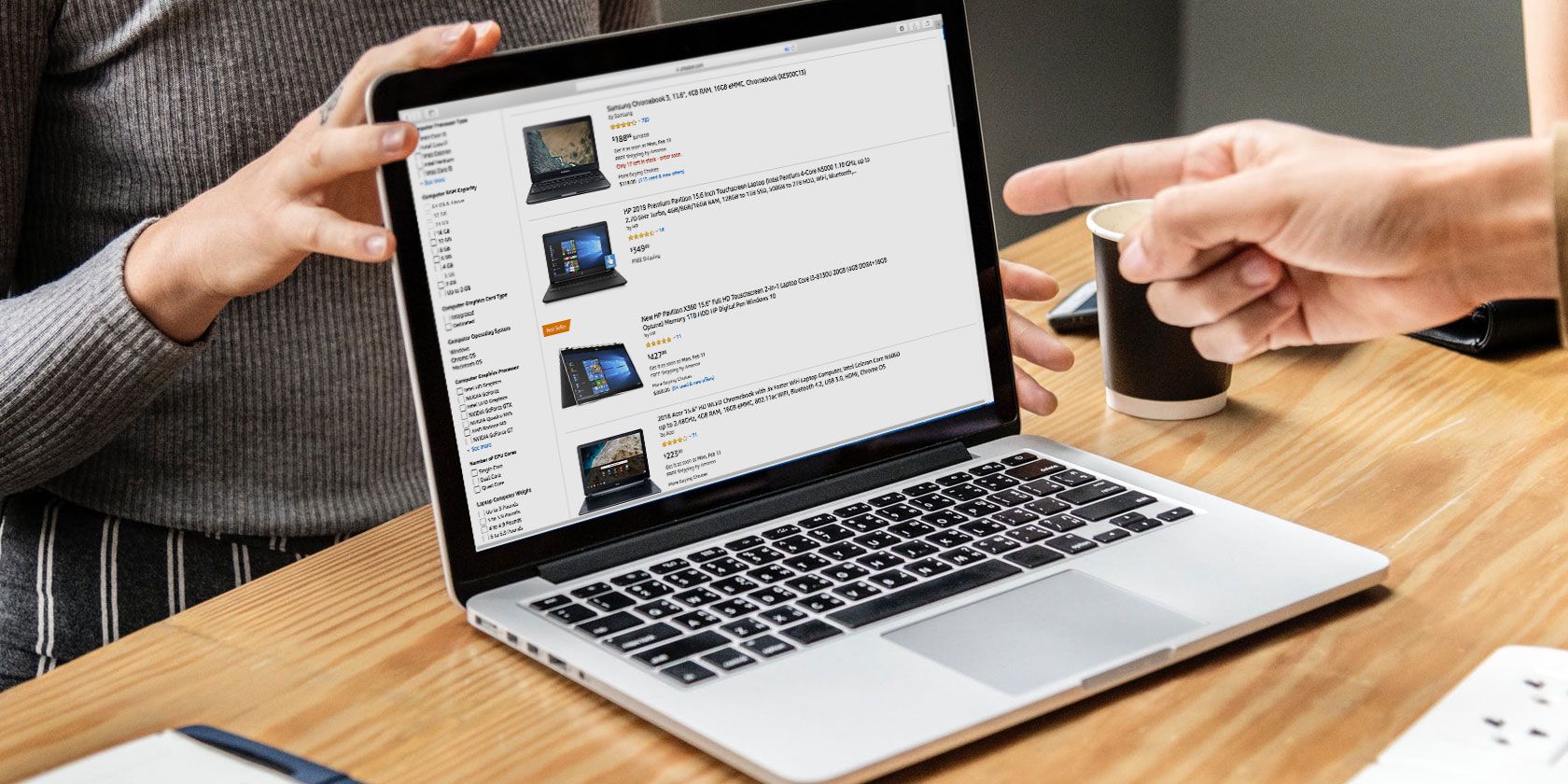
11 Features You Shouldn’t Overlook When Buying a New Laptop


buying-new-laptop

The laptop is the center of many people’s lives. It’s where you get your work done and once that’s over, binge-watch shows on Netflix. But choosing which one to buy isn’t as straightforward as one would hope.

You have to choose a style (notebook or hybrid, for example), the hardware specification, whether it’s suitable for prolonged mobile working… you get the idea. Even if you have figured these essentials out, there are a range of other significant factors buyers often overlook.

Here are several laptop features you should always double-check.

Commonly Overlooked Laptop Features

Most laptops today offer all the key features you would normally need. So it comes down to your personal preference which of the following aspects matter:

  1. Webcam placement
  2. Proprietary charging port
  3. Thunderbolt 3 compliant USB Type-C port
  4. SSD or HDD storage?
  5. RAM type
  6. Discrete or integrated graphics?
  7. Screen brightness
  8. Is it fanless?
  9. Windows Precision or Synaptics drivers?
  10. Backlit keyboard
  11. CPU generation and type

Here’s why these features are important and what happens if they’re not present.

1. Where’s the Webcam?

Most notebook computers have a webcam

This might seem a tad odd but yes, it’s important to know the webcam’s placement on modern notebooks. To reduce screen bezels, laptop makers have shifted the webcam at several different locations like inside the keyboard or at the bottom.

None of these locations are ideal for someone who uses a webcam regularly for video calls. Hence, if you do belong in that group, don’t forget to check the webcam on your potential purchase.

2. Is There a Proprietary Charging Port?

A lot of laptops today ship with USB Type-C multi-purpose ports that can be employed for both charging and connecting other peripherals. But a few still have a proprietary charging port which can feel like a bit of a hassle.

Especially if you already own an Android phone with a Type-C port, inspecting this will allow you to carry one less cable in your backpack.

3. Is the USB Type-C Port Thunderbolt 3 Compliant?

HDMI and card reader on Librem 13 ultrabook

Your work doesn’t end by simply ensuring your potential new laptop has a USB Type-C port. There’s one more feature you need to be aware of. Is that port Thunderbolt 3 compliant?

Having a Thunderbolt 3 port has numerous advantages since they bring much faster bandwidths, let you plug in multiple 4K monitors, and even external graphics. If a port supports Thunderbolt 3, it will usually have a little lightning icon beside it.

4. Does It Have an SSD or HDD?

One of the key features you should have in computers today is an SSD. Compared to the traditional hard drives (HDD), SSDs are flash storage and deliver much quicker app launch times, data operation speeds, you get the idea. Traditional HDDs, on the other hand, have moving parts and are substantially slower.

Unless you’re on a strict budget, SSDs are the way to go. Alternatively, you can also look into laptops which have both SSDs and HDDs if you want more storage, although they will be on the pricier side.

5. What Is the RAM Type?

Getting the laptop model with the highest amount of RAM is always recommended. But what most buyers overlook is the RAM type. Normally, you will have an option to choose between laptops with DDR3 or DDR4 RAM.

While you won’t experience a dramatic difference, DDR4 is where you should spend your money. This type consumes less power and offers higher data transfer rates.

6. Discrete or Integrated Graphics?

For people planning to play games or edit videos, another item that should be on your checklist is whether the laptop has discrete or integrated graphics.

In a nutshell, the most critical difference between the two is that onboard (integrated) graphics rely on the computer’s main RAM and dedicated (discrete) ones have their own. So when you’re about to perform heavy-duty tasks, the laptop has a much easier time processing everything with the latter.

7. How Bright Is the Screen?

Is the screen bright enough for you?

One of the most common areas where manufacturers tend to cut corners for bringing down the price is the display. Apart from the resolution, though, the other characteristic you shouldn’t miss out on is the brightness.

Whether you’re working out of cafes or taking your laptop on a trip, a dull display can turn out to be a major downside if you’re not careful. Ideally, you’d want the screen to have a brightness north of 300 nits.

8. Is It Fanless?

laptop innards view

In an effort to achieve thinner machines, laptop makers have also begun to omit the cooling fan and rely on alternative heat dissipation methods.

However, unless you’re a light user, fanless notebooks are not the way to go. While your laptop will be thin and free of that annoying fan noise, it will also need to deal with thermal throttling and overheating issues if you multitask between multiple programs.

Thermal throttling happens when your CPU downgrades performance for reducing the temperature levels by limiting the clock speeds. The bottom line is fanless machines are a double-edged sword and you should know what you’re going to use them for beforehand.

9. Windows Precision Drivers for the Trackpad?

Laptop with coffee

With Windows 10, Microsoft introduced a host of new multitasking gestures. The catch is that they’re only available if your computer’s trackpad is compatible with Windows Precision Drivers.

Plus, Windows Precision Drivers are much more accurate and responsive than the Synaptics counterparts they replace. To know if a particular laptop has them, go to Settings > Devices > Mouse and Touchpad and there, look for the “Your PC has a precision touchpad” note.

10. Is the Keyboard Backlit?

Most of us are familiar with every nook and cranny of our keyboards. But there are times when you’d like to type a special character or you’re just not used to working in dimly-lit spaces. For those scenarios, your laptop needs to have a backlit keyboard which you can illuminate anytime you want.

11. What Type of CPU Is Inside?

So you’ve understood and set your mind on which Intel CPU is right for your workflow. But there’s more to this equation than just choosing between i3, i5, or i7. There are other aspects, such as which generation of processors it belongs to, whether it’s a low-power variant, and more.

To get started on this, here’s how to understand which CPU you really need.

Keep These Features in Mind When Buying a Laptop

It’s all too easy to just buy a laptop and hope for the best. Many notebook computers and hybrids look like they’re suitable, but the internals are often very different.

As such, it’s important to ensure that the laptop you’re buying is fit for purpose and has all of the extra features you need, to the right standard. Keep these features in mind when shopping for a new laptop and if possible, try your preferred device in person before buying to make sure you’re happy with the choice.

Made your purchase? Here’s what to do with a brand new laptop.

Read the full article: 11 Features You Shouldn’t Overlook When Buying a New Laptop


Read Full Article

Trouble Sleeping? The EverSleep May Be The Wearable You Need

The Experian Dark Web Scan: Do You Need It and Can You Trust It?


dark-web-scan

Chances are that you’ve seen advertisements for services offering a dark web scan lately. They’ve even made their way to regular TV commercials, with Experian’s dark web scan being one of the most popular.

With data breaches becoming more common, it seems like a good idea to protect your security in this way. However, you could end up paying for pretty much nothing. Let’s take a look at Experian’s dark web scan and see what it actually does.

What Is the Dark Web?

We’ve talked about the dark web before, so we’ll summarize here if you’re not familiar.

The dark web is the name given to hidden websites that you can’t access without special software. Pages you can access via searching on Google or visiting directly only make up a part of the internet. To access sites on the dark web, you need to use a special browser (typically Tor) and know each site’s specific address.

Because the dark web (rightfully) has a reputation for illegal activity, it makes sense that you’d want to know if your information was being traded on it. So what does Experian offer?

Walking Through Experian’s Dark Web Scan

The Experian Dark Web Scan page promises to scan the dark web for your Social Security number, email, and phone number. It’s offered once for free, with no credit card information required. We walked through it to see what it actually entails.

Experian Dark Web Scan Info Page

To sign up, Experian asks for your name, current address, phone number, and email address. It also pre-checks a box to sign you up for marketing emails from Experian, which you probably don’t want.

After you enter this, Experian asks for the last four digits of your Social Security number to verify your identity. In theory, this protects you from someone illegally accessing your credit information. You’ll also need to provide your birthday and create an account username and password.

Once you submit your request for the scan, you’ll have to answer some questions about your recent credit activity to further confirm who you are. Then you’ll have to create a security question and PIN—make sure to answer the security question wisely.

Experian Credit Questions

Experian will check your credit score, which will not affect your credit. You’ll then see a prompt to start your Dark Web Triple Scan. Experian says it is “scanning the dark web globally” while it does this.

Results of Experian’s Dark Web Scan

After a few seconds, I got the results of my scan. According to Experian, my email address was compromised, but my Social Security number and phone number were clear.

Experian Security Report

The two websites that it listed as compromised for my email were Patreon and bitl.y. As it turns out, I’ve known about both of these breaches for years, so this didn’t reveal any new info to me. We’ll discuss this more in a moment.

At the bottom of the report, Experian lists that it didn’t scan “other personal information.” This includes your driver’s license, medical ID, bank accounts, and similar. It wants to sell you the $10/month Experian IdentityWorks paid service to do this.

Experian Paid Account Upgrade

After clicking around my new Experian account for a bit, I didn’t see anything particularly notable. Nearly everything requires upgrading to a paid account, which seems to be why Experian requires you to create an account to run this scan.

Is the Experian Dark Web Scan Worth It?

After walking through Experian’s offering, I feel confident in saying that it was pretty much worthless. The only information that it found was years-old breaches from major websites that have nothing to do with the dark web, which I already knew about and took action.

Experian’s “recommended actions” all revolve around you paying the company for more services. It wants you to sign up for more monitoring and even pay to access your credit score (which you can do elsewhere for free).

But this is a waste of money.

What You Should Do Instead

Don’t pay Experian for what you can do for free.

Check for Account Breaches

Thanks to the website haveibeenpwned, operated by security expert Troy Hunt, I already knew when my credentials were leaked by Patreon and bit.ly. Simply enter your email address and you’ll see all the breaches that affected you.

haveibeenpwned

From there, you can take action to secure your accounts by changing your passwords, setting up two-factor authentication, and similar. Click the Notify me tab at the top of the page and you’ll even receive an email when a future breach of your information happens.

For better security, we recommend using a password manager and generating unique passwords for each site. That way, if one password is exposed, hackers can’t use it to break into multiple accounts.

Don’t forget about other ways to check if your online accounts were hacked, too.

Freeze Your Credit

Experian wants you to subscribe so you can enable a “credit lock”, but you can already do 99% of what that lock offers by freezing your credit report. This used to cost a fee, but since late 2018, it’s free to freeze and thaw your credit in all 50 states.

When you freeze your credit, nobody can access it unless you use your unique PIN to temporarily unfreeze it. This makes it much harder for someone to steal your identity, as they can’t open new lines of credit in your name.

It’s a small hassle to unfreeze your credit when you do need it, like when applying for a loan, but it’s worth the added security.

You’ll need to freeze your credit with each of the three major agencies individually. Visit these pages to get started:

Why Dark Web Monitoring Is Useless

We’ve looked at what Experian’s dark web scan offers compared to alternatives, but what’s more important is what it doesn’t offer. Dark web scanning supposedly looks all over the dark web for your personal info, but this is impossible by the very nature of the dark web.

Nobody knows how many sites are on the dark web because they don’t link to each other like the standard web. Experian says that its scan “looks back to 2006 and searches over 600,000 web pages” for your information. However, we can safely assume that the dark web holds many millions of pages. Further, exchanges of sensitive information are private and wouldn’t be accessible to the public in searches like this.

Because of this, it’s clear that Experian and other dark web scanners do not scan the entire dark web for your information. This is impossible, and any service claiming to do so is lying. In all likelihood, these services instead scan giant dumps of leaked data (like haveibeenpwned does) to report if your information was leaked.

And while free services don’t scan for your Social Security number, chances are that it’s probably already leaked at some point. Remember the awful Equifax data breach in September 2017, which put the sensitive info of some 200 million people out into the wild for anyone to access? These breaches happen too often, and have probably leaked your private data already.

The best you can do is freeze your credit and proactively watch for signs of fraud. Paying Experian money to do scans you can do for free isn’t going to help much. Remember that in my trial, it didn’t actually find anything from the dark web. And if it did find a compromised Social Security number, it would recommend a credit freeze anyway.

Dark Web Scans: Forget the Hype

Frankly, seeing a credit agency like Experian start pushing its dark web scan in the wake of the Equifax data breach is frustrating.

These companies, that nobody has voluntarily chosen to work with, hold an immense amount of vital data on people. Then when one leaks this information due to gross negligence, another responds by selling you a product to “protect your identity” that you wouldn’t need if they hadn’t leaked info in the first place.

There’s no reason to pay for these dark scan services. Use the tools recommended above to take your identity protection into your own hands.

And after all this serious talk, it’s time to have some fun. Check out the coolest dark web websites you can visit now.

Read the full article: The Experian Dark Web Scan: Do You Need It and Can You Trust It?


Read Full Article

08 February 2019

Apple turns Ariana Grande and other musicians into Memoji for its latest ads


Just in time for the Grammy Awards, Apple has unveiled three new ads for Apple Music, featuring new singles from Ariana Grande, Khalid and Florida Georgia Line.

In each video, the musicians have been transformed in Memoji (the human-style Animoji variant that was announced last year), which lip synch to their latest songs. The ads probably won’t change any minds when it comes to Memoji and Animoji — but if you like the format, they’re are fun.

Apple actually created similar ads with Animoji lip synching to Childish Gambino and Migos before last year’s Grammys.

As The Verge points out, if you watch to the end of the videos and pay attention to the small print, you’ll notice that these Memoji were “professional animated.” So don’t feel too bad if your lip synching Animoji videos don’t look quite as good.


Read Full Article