06 December 2018

The 6 Best Sites to Rate and Review Teachers and Professors


teacher-templates

Before the Internet, students used to ask friends who took a class from a teacher or professor whether those classes were good to take. Were they too hard? Were the classes fun? They still do. But now, there are great online resources to rate and review teachers and professors too.

The following websites will help you see how others rate high school teachers and college professors. This way you can be better prepared, know what to expect, or entirely avoid those teachers or professors entirely.

Don’t wait until the first day of class to find out you made a bad decision. Here are some of the best “rate my teacher” sites to rate and review teachers and professors.

1. Rate My Professors

rate my professors

Rate My Professors is one of the most popular “rate my teacher” sites online. The site boasts more than 19 million ratings of over 1.7 million professors from students like you.

The ratings cover more than 7,500 schools from across the United States, Canada, England, Scotland, and Wales.

rate schools

Just search with the name of a professor or find your school by entering its name.

Displayed on every school’s page are the ratings of its top professors, the average professor ratings there, and how that school stacks up to similar schools.

school ratings

When you click on a professor or teacher’s name, you’ll see their overall quality, whether students would take a class from them again, and the level of difficulty of their classes. Below these are the actual reviews written by former students.

2. Rate My Teachers

rate my teachers main page

RateMyTeachers is another popular review site. The focus of this site is elementary and secondary school teachers for the United States, CanadaUnited KingdomIrelandAustralia, and New Zealand.

At the site, you can search for your teacher by name or search for your school for the full list of teachers. Once on the teacher’s page, you can rate your teacher on the page, or read about a teacher you’re considering taking a class from.

rate my teacher ratings

It’s another simple 1-to-5-star rating system, with the categories including characteristics like:

  • Effective
  • Integrity
  • Empathy
  • Respect
  • Determination
  • Homework

Anyone who has attended a class taught by a difficult teacher knows just how significantly the teacher’s personality and skill affect your grade. By doing your research on sites like this you can set yourself up for success and ensure that the odds of getting a good grade in the class are very high.

3. Uloop

uloop rate your teacher

Uloop is a site completely powered by college students around the country. It’s where students at nearly any school in the United States go to rate their teachers as a way to help other students avoid getting stuck with a bad professor.

The professor rates are in the special Professor Rating section of the site.

Students here rate professors by the following factors.

  • Helpfulness
  • Clarity
  • Easiness
  • Overall rating

Professor ratings also include comments written by former students, which will give you a great deal of insight into what the professor is like. You’ll learn what it’s like taking any of their classes.

uloop rate your teacher

Uloop itself features much more than just professor ratings.

It’s like a large bulletin board system for students. It covers things like campus jobs, housing, help with finding roommates, a textbook exchange, student loan help, and much more.

It’s a fantastic resource for college students to network with other students and get some additional resources for making college an easier experience.

4. Koofers

koofers main page

Like Uloop, Koofers is a general resource for college students, covering more than just professor ratings. It has a user base of well over 1.6 million students from around the world, so you can be sure that your school is covered.

Koofers gives you unique insight into college professors and the classes they offer. It shows you an overall rating by all of the student’s who’ve taken a class by the professor. It also shows you the overall GPA of students who’ve graduated from the class.

Student rankings of professors include:

  • Easiness
  • Helpfulness
  • Clarity
  • Knowledge
  • Textbook use
  • Exam Difficulty

It’s a great resource for learning more about both the professor and the class before signing up for a course.

Koofers also gives students access to other helpful resources like:

  • Test banks
  • Practice exams
  • Grade distribution data
  • Flashcards
  • Class schedule maker

There’s even an area that can help you locate and apply to internships and jobs, which is an important part of establishing your career even before you graduate.

5. Student Reviews

student reviews teacher ratings

At first glance, Student Reviews looks like a disorganized and cluttered website.

This is misleading because the website is actually a database filled with lots of helpful information for students. The site includes:

  • School ratings
  • College Finder
  • School rankings
  • Researching careers and pay rates
  • Help with choosing a career or major
  • Professor ratings

student reviews professors

Students rate professors here on a very long list of characteristics. These include whether the professor seems to enjoy teaching, how clearly they teach, whether they have respect for students, and more.

It’s a smaller database than the other sites listed. But there are still over a hundred thousand instructors rated. Students have already provided over two hundred thousand reviews on the site to date.

6. Rate Your Lecturer

rate your lecturer

If you’re based in the UK, you can make use of a great teacher rating site called Rate Your Lecturer.

It’s a site devoted to rating lots of things, including cities, universities, and lecturers. The lecturer section lets students rate lecturers by rating the pros and cons of each professor.

Students also rank lecturers by the quality of:

  • Lectures
  • Seminars
  • Tutorials
  • Feedback
  • Intranet Support
  • Office Hours
  • Approachability

Each rating is from 0 to 10 stars, with a final overall score for the lecturer based on all of the individual rankings.

rate your lecturer ratings

You can also search by University, which provides you with the top 5 lecturers at the school, as well as a list of other lecturers there who you can rate.

If you don’t see your lecturer listed, you can add them yourself and provide the first ranking.

Choosing Your Professor or Teacher

Taking a high school or University class from an instructor who you’ve never met before can be a very worrying experience.

Your grade is important to you. The last thing you want to see happen is a bad or inexperienced instructor have a negative impact on your grade and your overall GPA.

Doing your homework and choosing only the best instructors is not only smart, but it’s also what students who get the best grades do.

If you’re already in school and looking for even more ways to improve your grades, make sure to read through our list of checklist, schedule, and planner templates that’ll help you become an even more efficient and successful student.

Read the full article: The 6 Best Sites to Rate and Review Teachers and Professors


Read Full Article

Facebook Messenger Icons and Symbols: What Do They Mean?

How to Buy a Good Cheap Gaming Laptop for Under $500


good-gaming-laptop

You might be looking for one, but the hard truth is: the best cheap gaming laptop under $500 doesn’t exist—except on eBay, which is the only place where $500 can get you a real gaming laptop with proper a one-year warranty.

This article explains why used gaming laptops cost very little, and we’ll walk you through the process of buying a cheap gaming laptop that isn’t complete junk.

Why Are Used Laptops So Cheap?

Moore’s Law, loosely defined, theorized that computers double in complexity (and speed) every 2 years. But Moore’s Law died around 2012. Since then, each following processor generation saw declining improvements. In short: computers aren’t obsoleting as fast anymore. (In fact, if you own a slow computer, it probably needs malware removal.)

Just like CPUs, graphics processors (or GPUs)—the heart and soul of a gaming rig—aren’t getting much faster either.

Older Graphics Processors Are Still Fast

Game developers know better than anyone that computers aren’t getting much faster. Look at free-to-play games, like Fortnite. The required hardware isn’t just old—it’s a midrange graphics processor from 2012. Even AAA titles, like Assassin’s Creed Odyssey, only need an ancient GTX 660 GPU.

But how do you know which laptop GPU can run a game?

Which Laptop GPUs Are Worth Buying?

Every two years, Nvidia releases a new graphics processor architecture and they give it a name. The last three major releases were as follows:

Maxwell (2014): Maxwell represented a significant performance improvement over the previous generation, Kepler. Maxwell saw around 20% better gaming performance, even though it used the same technology node. Maxwell processors have a seven, eight, or nine at the front of their name.

Pascal (2016): Pascal represented an unusually big jump in performance over Maxwell due to its denser 14nm technology node. Pascal processors have a 10 in the front of their name, like the Nvidia GTX 1050.

Turing (2018): For the purposes of gaming, Turing offers a tiny performance advantage. Turing processors have a 20 in front of their name, like the GTX 2060.

Of the three architectures, the best bang-for-your-buck on eBay is Maxwell. Pascal and Turing are too new and expensive on used markets. And Kepler, from 2012, is starting to get less attention from developers.

Nvidia’s Maxwell Is a Good Deal

Maxwell was designed specifically around performance-per-watt, an advantage for laptops. Its former popularity also makes it less expensive on used marketplaces, like eBay.

On a mobile gaming computer, the most important part is the GPU. But sellers rarely list the graphics processor in the title of the auction—which leads to used gaming laptops selling for less than what they’re worth.

How to Identify a Maxwell GPU on Gaming Laptops

As mentioned earlier, eBay sellers rarely list the graphics processor. That means you’ll need to look that information up yourself.

Maxwell GPUs are identified by an eight or nine at the front of its model number. For example, look at a former midrange GPU, the GTX 950M:

The second number in a GPU model number indicates its power. For example, the GTX 950M about equals the modern Nvidia MX150, which is today’s entry-level gaming GPU. And that means the GTX 950M, or better, is what you need in a used laptop.

In case you want a beefier GPU, a mobile GTX 870M/970M equals a desktop-class Nvidia 1050Ti. And a GTX 880M/980M falls between a 1050Ti and a GTX 1060.

Getting back to the Maxwell GTX 950M, it plays modern games well enough. In benchmarks, it equals the MX150—which is today’s entry-level gaming GPU for laptops. More or less, when you’re buying from used markets, the GTX 850M or 950M are good starting points for a cheap gaming laptop. The benchmarks show it offers good enough performance on most free-to-play games, without costing an arm and a leg.

Fortnite Benchmarks for the GTX 850M

Fornite runs at 30+ frames-per-second (FPS) on an Nvidia GTX 850M with medium settings at 1080P. That’s the minimum acceptable speed for most games:

For reference, the 950M is slightly better than the 850M. But they are about comparable to each other. What you really need to pay attention to is anything with a higher tier.

So, while older cards aren’t state-of-the-art, they perform like $600-800 laptops (for example, the Acer E15, one of our favorite laptops).

The Disadvantages of Buying a Used Laptop

There are some disadvantages to buying a used laptop: First, old technology uses more power so it requires a heavier cooling solution and a larger (and heavier) battery.

Second, and this is a big one, the hardware has three or four years of wear and tear on it. Most components are relatively long lasting—with two exceptions: the lithium-ion battery and the hard disc drive (ways to use old HDDs).

Third-party warranties do cover HDDs, but they do not cover laptop batteries. Even so, if you do buy a laptop with an HDD, I recommend replacing the HDD with a Solid State Drive (SSD). And while laptops don’t need a working battery, most laptop replacement batteries cost very little.

While a warranty isn’t required, particularly if you know how to work on a computer, it can provide peace of mind.

Warranties for Used eBay Laptops

Third-party warranty companies used to not cover used electronics purchased on eBay. However, eBay and SquareTrade partnered together and now offer special warranties on used electronics.

How to Buy the Best Cheap Gaming Laptop on eBay

There are three basic steps to buying used on eBay.

Step 1: Find an Older Top-Ranked Gaming Laptop

Search the internet for phrases like “best gaming laptops of 2014” (2013 and 2015 also work). One of the best cheap gaming laptops, for the money, is the Asus G750. But really any good gaming laptop from this era works fine.

If you don’t like the G750, there are other examples of once-popular gaming laptops:

  • Alienware M14x
  • Razer Blade
  • Lenovo IdeaPad Y500
  • Alienware M18x

Because it released between 2013-2014, the laptop comes with a Haswell quad-core CPU and anywhere from an Nvidia Maxwell GTX 860M to a 970M GPU (avoid any 700-series GPUs). The average used price on eBay comes in for around $400. But if you purchase an $80 one-year SquareTrade warranty, that comes out to less than $500 for a gaming laptop that’s significantly better than anything you could buy new in that price range.

Step 2: Search eBay Completed Listings

Now search for that model on eBay. For example, a search for the Asus G750 returns dozens of results.

Unfortunately, when people sell their laptops they oftentimes don’t describe graphics processor in the laptop. And because they don’t list the most important part of a cheap gaming laptop, that means lower prices for you.

But don’t buy it yet. You’ll want to find what the G750 sold for in the past—that will give you a good idea of what the Asus G750 sells for today.

After navigating to eBay.com and searching for “Asus G750”, in the left column, under Show only, check the box for Completed Items. These indicate what prices people are buying similar laptops for.

Once you have an approximate price, pick any auction offered by a reputable seller (our best eBay buying tips) and buy it.

Step 3: Buy a Used Laptop Warranty at Checkout (Optional)

If you purchase using Buy It Now, you can also buy a SquareTrade warranty. The warranty has three important requirements. Pay careful attention.

First, the laptop must function at the time of purchase. Second, you have to use the Buy It Now option on checkout. Meaning you can’t buy a laptop using a traditional high-bid auction. Third, the warranty does not cover the lithium-ion battery. Fortunately, laptop batteries are usually very easy and inexpensive to replace. For example, a G750 replacement battery (with a substantial markup) costs very little.

If the laptop meets these requirements, you’ll see the following message after clicking on the Buy It Now button:

The SquareTrade warranty is overpriced, especially for a $400 laptop. But if you aren’t comfortable doing your own laptop repairs, it’s worth the peace of mind.

What’s the Best Cheap Gaming Laptop?

Some people (not me) say that a “cheap gaming laptop” is an oxymoron or self-contradicting term. That’s because new gaming laptops cost at least $600—and usually more. What those people forgot is the used market.

The best cheap gaming laptop is always used.

The major disadvantages to buying older, used laptops aren’t severe. Buying used means heavier laptops with greater component wear-and-tear, and greater battery drain—but you offset these problems if you purchase a warranty.

For many lightweight esports titles—such as Fortnite, DOTA 2, or even games like Grand Theft Auto V—the hardware requirements are fairly minimal. Even an Nvidia GTX 750M plays these games credibly well, but go up a tier and you can even play AAA games.

Furthermore, note that you can squeeze even more performance out of any laptop using these tips for improving gaming performance on any laptop!

Read the full article: How to Buy a Good Cheap Gaming Laptop for Under $500


Read Full Article

Buying a New Smartphone? 11 Features You Shouldn’t Skip Out On


new-smartphone

Buying a smartphone is a complicated process. You have to worry about whether it’s powerful enough, whether its camera can take Instagram-worthy portraits of your dog, the design, and more. But those, sadly, only scratch the surface.

There are a host of other aspects you should consider which might seem trivial but can significantly affect your experience.

Here are some overlooked features you should check when buying a new smartphone.

11 Features Your Next Phone Needs

The majority of smartphones today check all the items off an essentials list. Therefore, it usually comes down to your preferences which is where the following aspects matter.

  1. Oleophobic coating
  2. Gorilla Glass
  3. LCD or OLED?
  4. Storage type
  5. The right software pre-installed
  6. HDR for selfies
  7. Dedicated noise cancellation mic
  8. Quick charging
  9. Accessory support
  10. Notification LED
  11. Gyroscope

Here’s why these features are important and what happens if they’re not present.

1. Oleophobic Coating for Smooth Scrolling

Smartphone Display Coating Shot

Apart from the screen’s resolution and how bright it is, one other detail you should always look into is if the phone’s display has an oleophobic coating. Jargon aside, it’s an extra thin layer which prevents the screen from accumulating any sort of grease.

On smartphones, that usually comes from fingerprint smudges.

Therefore, if the phone’s screen doesn’t have an oleophobic coating or has one but of poor quality, it will quickly lose its smoothness and get oily in a matter of minutes. It will continue to work but won’t be as slick to touch as it was when you first took it out of the box.

While the majority of smartphones today have a decent oleophobic coating, it’s not available on all of them. To know whether a particular product has one, you can ask an expert or the company itself. You can even head into a store and use the demo piece for a while to understand how rapidly the display becomes greasy.

2. Gorilla Glass Protection

Broken Smartphone Screen Shot

In addition to the oleophobic coating, you should also make sure the display has a protective layer as well. In most cases, it will be from a company called Corning whose Gorilla Glass can be found on phones in all price ranges.

As the name suggests, these panels add an additional coat of protection to absorb shocks and falls. It’s worth pointing that this doesn’t guaranty your phone won’t be damaged if the phone slips out of your hand, but it will relatively bring down the amount of the impact.

Whether a phone has display protection can be found in their specifications sheet.

3. LCD vs. OLED: Which Do You Prefer?

Smartphone Front Screen Shot

OLED screens have invariably been hailed as a feature reserved for higher-end phones. While that’s mostly true since OLED panels are more expensive, they’re not always better.

There are several scenarios where an LCD display can come out on the top.

For starters, LCD screens are brighter which is especially apparent when you’re using your phone outdoors. Second, LCD displays have more natural, real colors compared to OLEDs which are known for their saturation and deep blacks.

Therefore, we would recommend selecting between them based on your preferences, not on which one costs more.

4. Storage Type Impacts Response Time

The internal storage affects every action you perform on your phone. While most buyers go over how much storage a phone has, they miss reviewing the storage type, which has a significant impact on the performance.

Storage type determines how quickly apps can write and read data. The best phones out there feature UFS 2.1 storage but if you’re looking for a budget phone, make sure it at least has eMMC 5.1. This information can be easily accessed on the official product page or third-party specifications platform.

5. OEM’s Software History

The phone you’re interested might be advertised with the latest software. But that could be simply a trick if the OEM doesn’t have a proven track record in updates. A positive history in pushing software updates ensures that your phone won’t take ages to receive the latest build.

This is primarily an Android concern due to its fragmentation issues. Therefore, read up on which companies roll out timely updates.

6. HDR for Selfies

Phone Camera View

To produce the right balance of foreground and background in pictures, almost all phones today ship with a camera mode called HDR.

For instance, if there’s a sharp light behind where you’re sitting, HDR tweaks the dynamic range in a way that the output won’t suffer in spite of the difficult scene. However, HDR is generally offered on the shots you take with the rear camera.

But if you’re someone who clicks more selfies, then you probably need it for the front snapper as well. This is something OEMs have started adding to their phones, so inquire about it for the phone you’re interested if you fall in the same group too.

7. Dedicated Mic for Noise Cancellation

With phones becoming smarter and more capable every day, the essentials are getting overshadowed. And one of those is the mic which comes into play when you’re on a phone call, recording perhaps a lecture or taking a video.

In order to offer a rich experience in these situations, most manufacturers today add a dedicated mic to their phones for noise cancellation. Some, unfortunately, still don’t. So look into this as well before acquiring your next smartphone.

8. Quick Charging: Proprietary or Universal?

Phone Charging Cables, Adapters

Quick charging isn’t the kind of perk you will have difficulties finding while searching for a new phone. But the one characteristic you should be on the lookout for is whether that touted quick charging is universal or proprietary.

Proprietary quick charging technologies only work on the company’s official, supplied adapter and cable. Therefore, if you lose that adapter or it malfunctions, you will have to again buy the original one which usually costs way more than a universal adapter.

9. Smartphone Accessory Support

A product’s accessory ecosystem plays a crucial role as well. Once you have bought a phone, you would be interested in getting a case, screen guards, maybe a charging dock, etc.

To ensure a particular phone has a decent accessory support, you will have to check how well-known the brand is, whether the phone you’re buying is popular, and lastly, how similar the phone looks to its predecessors and siblings.

That last part is critical because if the phone doesn’t differ much on design, case makers won’t have to do much to build cases for it which is why Apple products have an enormous accessory selection. Once you’ve made up your mind, don’t forget to acquire all the essential accessories for your shiny new device.

10. Notification LED Light

The notification light is another little feature you might overlook and regret later. It can quickly let you know whether there’s a pending notification or your phone has been completely charged.

A bunch of companies have begun replacing it with always-on displays but if you’re someone who values battery life more than anything, the notification LED light is clearly the way to go. Plus, you can customize the notification light precisely however you like.

11. Gyroscope

If you’re interested in Augmented Reality applications, don’t miss the gyroscope component. While the acceromeleter is sufficient for most users, it cannot determine the rotation of your phone which is a must for AR. That’s why you should ensure the phone you’re buying has a gyroscope sensor.

Understanding Smartphone Hardware

While having all the aforementioned features will certainly help you decide which smartphone suits your needs best, your research doesn’t end here.

There are a host of other technicalities you need to make sure of and to do that, understanding the basics of a smartphone’s hardware will always prove beneficial.

Read the full article: Buying a New Smartphone? 11 Features You Shouldn’t Skip Out On


Read Full Article

Hit the trackless nuclear wastes with this Laco RAD-AUX watch


Laco is a small German watch company famous for its Flieger watches – pieces designed for pilots featuring big crowns and legible faces. Now brand has teamed up with ABlogToWatch on a Fallout-themed watch that looks like something pulled out of a deserted vault.

The $2,950 watch contains an ETA 2824.2 movement and features a massively distressed case and band along with a clever case that hearkens back to 1950s A-Bomb/military design. It’s limited to 143 pieces and you can pre-order it for shipment in March. The entire package looks like something out of the Fallout game. Bethesda is not involved in the product, incidentally, but the entire thing is an homage to the Fallout universe.

From the site:

On the outside of the heavily-worn tin box, we see a stamp showing that it was issued to the Overseer of Vault #43. Inside the box, you’ll find the Laco RAD-AUX, a user manual, and an accumulation of a few odds and ends. Presumably, the additional artifacts were collected by the owner of the Laco RAD-AUX before it was discovered. There are realistic Polaroid-style photos depicting abandoned landscapes, mutated plant-life, and a curious panther named Gloria. A bottle cap bearing the mark of a sunset, which has been turned into a pin. There is also a New California Republic ’protection postcard’ which instructs you to place it near the entrance of your domicile, and each item included looks realistically tattered and aged.

The most interesting thing about this watch is the partnership with ABlogToWatch, a popular watch blog run by Ariel Adams, and Laco. These sorts of partnerships usually result in a boring, branded watch with an ugly blog logo hidden somewhere on the case. This partnership is more about Laco and Adams’ imagination taking flight over a mushroom cloud. Regardless, this is a great piece for folks who haven’t yet picked up a 3D-printed Pip Boy. Good luck, Vault Dweller!


Read Full Article

You can now once again flip the camera during FaceTime calls with just one tap


With the release of iOS 12, Apple hid the button that lets you jump from front camera to rear camera (or vice versa) during a FaceTime call. Previously a one-click thing, it was suddenly shoved away into a menu as if it wasn’t something you might use a half dozen times per call.

Don’t like the change? Good news! Apple is undoing it.

As of iOS 12.1.1, released today, the camera swap button is returning to the main call screen. Basically every FaceTime call I’ve had since this change was made has started with someone asking “Wait, how do I flip the screen. What the hell, where’d that button go?” so changing this back is the only right call.

This build also reintroduces the ability to take Live Photo captures during a one-on-one FaceTime call, if both people in the call have the feature toggled on. Don’t want anyone grabbing Live Photos mid-chat? A switch in FaceTime’s settings lets you disable it.

Beyond those two things, this update mostly polishes up existing features. According to the patch notes: real-time text now works when using Wi-Fi calling, Dual SIM support has been added for additional carriers, you can now hide the sidebar in the News app on the iPad and it has all the usual bug/performance fixes.


Read Full Article

Apple is starting to sell its first iPhone XR case, and it’s clear so you can show off your bright new phone


Apple’s new iPhone XR comes in a half dozen colors, including blue, yellow, red and coral. In fact, the colors are sufficiently fresh that it’d be kind of silly to buy a traditional phone case that would protect it but also hide if from plain view.

It’s for this reason that Apple just began selling a clear case, which, because it is Apple, sounds special despite being a clear plastic case. Think “thin, light, and easy to grip,” and “crafted with a blend of optically clear polycarbonate and flexible TPU materials, so the case fits right over the buttons for easy use.”

Also, a scratch-resistant coating has been applied not only to the exterior, but also to the interior.

Of course, a feature that early customers of the phone will appreciate even more is the ability to wirelessly charge their phones without having to remove the case.

They’ll also like the price, presumably. The new clear case is just $39. Indeed, the company introduced the iPhone XR in mid September as a lower-cost alternative to the iPhone XS Max.

Not that any version is exactly cheap — the IPhone XR is retailing right now for $749; the iPhone XS is $999; the iPhone XS Max, a dual-SIM iPhone that was also introduced in mid-September, starts at $1,099.


Read Full Article

05 December 2018

TF-Ranking: A Scalable TensorFlow Library for Learning-to-Rank


Ranking, the process of ordering a list of items in a way that maximizes the utility of the entire list, is applicable in a wide range of domains, from search engines and recommender systems to machine translation, dialogue systems and even computational biology. In applications like these (and many others), researchers often utilize a set of supervised machine learning techniques called learning-to-rank. In many cases, these learning-to-rank techniques are applied to datasets that are prohibitively large  scenarios where the scalability of TensorFlow could be an advantage. However, there is currently no out-of-the-box support for applying learning-to-rank techniques in TensorFlow. To the best of our knowledge, there are also no other open source libraries that specialize in applying learning-to-rank techniques at scale.

Today, we are excited to share TF-Ranking, a scalable TensorFlow-based library for learning-to-rank. As described in our recent paper, TF-Ranking provides a unified framework that includes a suite of state-of-the-art learning-to-rank algorithms, and supports pairwise or listwise loss functions, multi-item scoring, ranking metric optimization, and unbiased learning-to-rank.

TF-Ranking is fast and easy to use, and creates high-quality ranking models. The unified framework gives ML researchers, practitioners and enthusiasts the ability to evaluate and choose among an array of different ranking models within a single library. Moreover, we strongly believe that a key to a useful open source library is not only providing sensible defaults, but also empowering our users to develop their own custom models. Therefore, we provide flexible API's, within which the users can define and plug in their own customized loss functions, scoring functions and metrics.

Existing Algorithms and Metrics Support
The objective of learning-to-rank algorithms is minimizing a loss function defined over a list of items to optimize the utility of the list ordering for any given application. TF-Ranking supports a wide range of standard pointwise, pairwise and listwise loss functions as described in prior work. This ensures that researchers using the TF-Ranking library are able to reproduce and extend previously published baselines, and practitioners can make the most informed choices for their applications. Furthermore, TF-Ranking can handle sparse features (like raw text) through embeddings and scales to hundreds of millions of training instances. Thus, anyone who is interested in building real-world data intensive ranking systems such as web search or news recommendation, can use TF-Ranking as a robust, scalable solution.

Empirical evaluation is an important part of any machine learning or information retrieval research. To ensure compatibility with prior work, we support many of the commonly used ranking metrics, including Mean Reciprocal Rank (MRR) and Normalized Discounted Cumulative Gain (NDCG). We also make it easy to visualize these metrics at training time on TensorBoard, an open source TensorFlow visualization dashboard.
An example of the NDCG metric (Y-axis) along the training steps (X-axis) displayed in the TensorBoard. It shows the overall progress of the metrics during training. Different methods can be compared directly on the dashboard. Best models can be selected based on the metric.
Multi-Item Scoring
TF-Ranking supports a novel scoring mechanism wherein multiple items (e.g., web pages) can be scored jointly, an extension of the traditional scoring paradigm in which single items are scored independently. One challenge in multi-item scoring is the difficulty for inference where items have to be grouped and scored in subgroups. Then, scores are accumulated per-item and used for sorting. To make these complexities transparent to the user, TF-Ranking provides a List-In-List-Out (LILO) API to wrap all this logic in the exported TF models.
The TF-Ranking library supports multi-item scoring architecture, an extension of traditional single-item scoring.
As we demonstrate in recent work, multi-item scoring is competitive in its performance to the state-of-the-art learning-to-rank models such as RankNet, MART, and LambdaMART on a public LETOR benchmark.

Ranking Metric Optimization
An important research challenge in learning-to-rank is direct optimization of ranking metrics (such as the previously mentioned NDCG and MRR). These metrics, while being able to measure the performance of ranking systems better than the standard classification metrics like Area Under the Curve (AUC), have the unfortunate property of being either discontinuous or flat. Therefore standard stochastic gradient descent optimization of these metrics is problematic.

In recent work, we proposed a novel method, LambdaLoss, which provides a principled probabilistic framework for ranking metric optimization. In this framework, metric-driven loss functions can be designed and optimized by an expectation-maximization procedure. The TF-Ranking library integrates the recent advances in direct metric optimization and provides an implementation of LambdaLoss. We are hopeful that this will encourage and facilitate further research advances in the important area of ranking metric optimization.

Unbiased Learning-to-Rank
Prior research has shown that given a ranked list of items, users are much more likely to interact with the first few results, regardless of their relevance. This observation has inspired research interest in unbiased learning-to-rank, and led to the development of unbiased evaluation and several unbiased learning algorithms, based on training instances re-weighting. In the TF-Ranking library, metrics are implemented to support unbiased evaluation and losses are implemented for unbiased learning by natively supporting re-weighting to overcome the inherent biases in user interactions datasets.

Getting Started with TF-Ranking
TF-Ranking implements the TensorFlow Estimator interface, which greatly simplifies machine learning programming by encapsulating training, evaluation, prediction and export for serving. TF-Ranking is well integrated with the rich TensorFlow ecosystem. As described above, you can use Tensorboard to visualize ranking metrics like NDCG and MRR, as well as to pick the best model checkpoints using these metrics. Once your model is ready, it is easy to deploy it in production using TensorFlow Serving.

If you’re interested in trying TF-Ranking for yourself, please check out our GitHub repo, and walk through the tutorial examples. TF-Ranking is an active research project, and we welcome your feedback and contributions. We are excited to see how TF-Ranking can help the information retrieval and machine learning research communities.

Acknowledgements
This project was only possible thanks to the members of the core TF-Ranking team: Rama Pasumarthi, Cheng Li, Sebastian Bruch, Nadav Golbandi, Stephan Wolf, Jan Pfeifer, Rohan Anil, Marc Najork, Patrick McGregor and Clemens Mewald‎. We thank the members of the TensorFlow team for their advice and support: Alexandre Passos, Mustafa Ispir, Karmel Allison, Martin Wicke, and others. Finally, we extend our special thanks to our collaborators, interns and early adopters: Suming Chen, Zhen Qin, Chirag Sethi, Maryam Karimzadehgan, Makoto Uchida, Yan Zhu, Qingyao Ai, Brandon Tran, Donald Metzler, Mike Colagrosso, and many others at Google who helped in evaluating and testing the early versions of TF-Ranking.

Seized cache of Facebook docs raise competition and consent questions


A UK parliamentary committee has published the cache of Facebook documents it dramatically seized last week.

The documents were obtained by a legal discovery process by a startup that’s suing the social network in a California court in a case related to Facebook changing data access permissions back in 2014/15.

The court had sealed the documents but the DCMS committee used rarely deployed parliamentary powers to obtain them from the Six4Three founder, during a business trip to London.

You can read the redacted documents here — all 250 pages of them.

In a series of tweets regarding the publication, committee chair Damian Collins says he believes there is “considerable public interest” in releasing them.

“They raise important questions about how Facebook treats users data, their policies for working with app developers, and how they exercise their dominant position in the social media market,” he writes.

“We don’t feel we have had straight answers from Facebook on these important issues, which is why we are releasing the documents. We need a more public debate about the rights of social media users and the smaller businesses who are required to work with the tech giants. I hope that our committee investigation can stand up for them.”

The committee has been investigating online disinformation and election interference for the best part of this year, and has been repeatedly frustrated in its attempts to extract answers from Facebook.

But it is protected by parliamentary privilege — hence it’s now published the Six4Three files, having waited a week in order to redact certain pieces of personal information.

Collins has included a summary of key issues, as the committee sees them after reviewing the documents, in which he draws attention to six issues.

Here is his summary of the key issues:

  1. White Lists Facebook have clearly entered into whitelisting agreements with certain companies, which meant that after the platform changes in 2014/15 they maintained full access to friends data. It is not clear that there was any user consent for this, nor how Facebook decided which companies should be whitelisted or not.
  2. Value of friends data It is clear that increasing revenues from major app developers was one of the key drivers behind the Platform 3.0 changes at Facebook. The idea of linking access to friends data to the financial value of the developers relationship with Facebook is a recurring feature of the documents.
  3. Reciprocity Data reciprocity between Facebook and app developers was a central feature in the discussions about the launch of Platform 3.0.
  4. Android Facebook knew that the changes to its policies on the Android mobile phone system, which enabled the Facebook app to collect a record of calls and texts sent by the user would be controversial. To mitigate any bad PR, Facebook planned to make it as hard of possible for users to know that this was one of the underlying features of the upgrade of their app.
  5. Onavo Facebook used Onavo to conduct global surveys of the usage of mobile apps by customers, and apparently without their knowledge. They used this data to assess not just how many people had downloaded apps, but how often they used them. This knowledge helped them to decide which companies to acquire, and which to treat as a threat.
  6. Targeting competitor Apps The files show evidence of Facebook taking aggressive positions against apps, with the consequence that denying them access to data led to the failure of that business

The publication of the files comes at an awkward moment for Facebook — which remains on the back foot after a string of data and security scandals, and has just announced a major policy change — ending a long-running ban on apps copying its own platform features.

Albeit the timing of Facebook’s policy shift announcement hardly looks incidental — given Collins said last week the committee would publish the files this week.

The policy in question has been used by Facebook to close down competitors in the past, such as — two years ago — when it cut off style transfer app Prisma’s access to its live-streaming Live API when the startup tried to launch a livestreaming art filter (Facebook subsequently launched its own style transfer filters for Live).

So its policy reversal now looks intended to diffuse regulatory scrutiny around potential antitrust concerns.

But emails in the Six4Three files suggesting that Facebook took “aggressive positions” against competing apps could spark fresh competition concerns.

In one email dated January 24, 2013, a Facebook staffer, Justin Osofsky, discusses Twitter’s launch of its short video clip app, Vine, and says Facebook’s response will be to close off its API access.

As part of their NUX, you can find friends via FB. Unless anyone raises objections, we will shut down their friends API access today. We’ve prepared reactive PR, and I will let Jana know our decision,” he writes. 

Osofsky’s email is followed by what looks like a big thumbs up from Zuckerberg, who replies: “Yup, go for it.”

Also of concern on the competition front is Facebook’s use of a VPN startup it acquired, Onavo, to gather intelligence on competing apps — either for acquisition purposes or to target as a threat to its business.

The files show various Onavo industry charts detailing reach and usage of mobile apps and social networks — with each of these graphs stamped ‘highly confidential’.

Facebook bought Onavo back in October 2013. Shortly after it shelled out $19BN to acquire rival messaging app WhatsApp — which one Onavo chart in the cache indicates was beasting Facebook on mobile, accounting for well over double the daily message sends at that time.

The files also spotlight several issues of concern relating to privacy and data protection law, with internal documents raising fresh questions over how or even whether (in the case of Facebook’s whitelisting agreements with certain developers) it obtained consent from users to process their personal data.

The company is already facing a number of privacy complaints under the EU’s GDPR framework over its use of ‘forced consent‘, given that it does not offer users an opt-out from targeted advertising.

But the Six4Three files look set to pour fresh fuel on the consent fire.

Collins’ fourth line item — related to an Android upgrade — also speaks loudly to consent complaints.

Earlier this year Facebook was forced to deny that it collects calls and SMS data from users of its Android apps without permission. But, as we wrote at the time, it had used privacy-hostile design tricks to sneak expansive data-gobbling permissions past users. So, put simple, people clicked ‘agree’ without knowing exactly what they were agreeing to.

The Six4Three files back up the notion that Facebook was intentionally trying to mislead users.

In one email dated November 15, 2013, from Matt Scutari, manager privacy and public policy, suggests ways to prevent users from choosing to set a higher level of privacy protection, writing: “Matt is providing policy feedback on a Mark Z request that Product explore the possibility of making the Only Me audience setting unsticky. The goal of this change would be to help users avoid inadvertently posting to the Only Me audience. We are encouraging Product to explore other alternatives, such as more aggressive user education or removing stickiness for all audience settings.”

Another awkward trust issue for Facebook which the documents could stir up afresh relates to its repeat claim — including under questions from lawmakers — that it does not sell user data.

In one email from the cache — sent by Mark Zuckerberg, dated October 7, 2012 — the Facebook founder appears to be entertaining the idea of charging developers for “reading anything, including friends”.

Yet earlier this year, when he was asked by a US lawmaker how Facebook makes money, Zuckerberg replied: “Senator, we sell ads.”

He did not include a caveat that he had apparently personally entertained the idea of liberally selling access to user data.

Responding to the publication of the Six4Three documents, a Facebook spokesperson told us:

As we’ve said many times, the documents Six4Three gathered for their baseless case are only part of the story and are presented in a way that is very misleading without additional context. We stand by the platform changes we made in 2015 to stop a person from sharing their friends’ data with developers. Like any business, we had many of internal conversations about the various ways we could build a sustainable business model for our platform. But the facts are clear: we’ve never sold people’s data.

Zuckerberg has repeatedly refused to testify in person to the DCMS committee.

At its last public hearing — which was held in the form of a grand committee comprising representatives from nine international parliaments, all with burning questions for Facebook — the company sent its policy VP, Richard Allan, leaving an empty chair where Zuckerberg’s bum should be.


Read Full Article

App Stores to pass $122B in 2019, with gaming and subscriptions driving growth


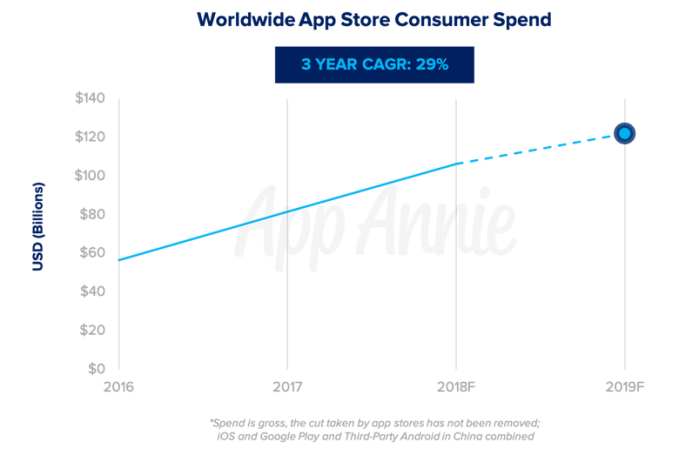
Mobile intelligence and data firm App Annie is today releasing its 2019 predictions for the worldwide app economy, including its forecast around consumer spending, gaming, the subscription market, and other highlights. Most notably, it expects the worldwide gross consumer spend in apps – meaning before the app stores take their own cut – to surpass $122 billion next year, which is double the size of the global box office market, for comparison’s sake.

According to the new forecast, the worldwide app store consumer spend will grow 5 times as fast as the overall global economy next year.

But the forecast also notes that “consumer spend” – which refers to the money consumers spend on apps and through in-app purchases – is only one metric to track the apps stores’ growth and revenue potential.

Mobile spending is also expected to continue growing for both in-app advertising and commerce – that is, the transactions that take place outside of the app stores in app like Uber, Amazon, and Starbucks, for example.

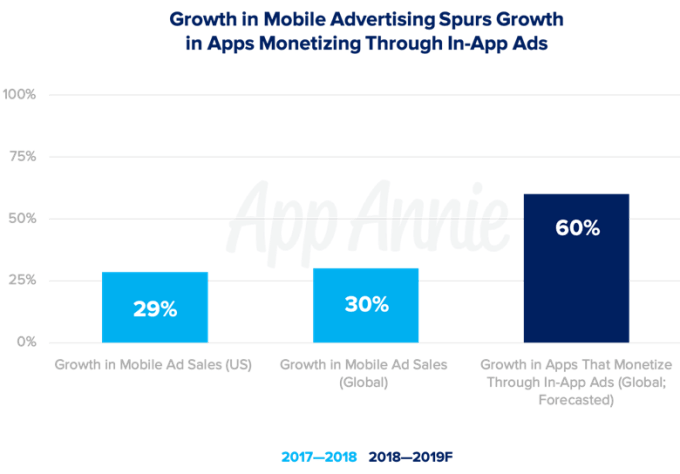
Specifically, mobile will account for 62 percent of global digital ad spend in 2019, representing $155 billion, up from 50 percent in 2017. In addition, 60 percent more mobile apps will monetize through in-app ads in 2019.

Mobile gaming to reach 60% market share

As in previous years, mobile gaming is contributing to the bulk of the growth in consumer spending, the report says.

Mobile gaming, which continues to be the fastest growing form of gaming, matured further this year with apps like Fortnite and PUBG, says App Annie. These games “drove multiplayer game mechanics that put them on par with real-time strategy and shooter games on PC/Mac and Consoles in a way that hadn’t been done before,” the firm said.

They also helped push forward a trend towards cross-platform gaming, and App Annie expects that to continue in 2019 with more games becoming less siloed.

However, the gaming market won’t just be growing because of experiences like PUBG and Fortnite. “Hyper-casual” games – that is, those with very simple gameplay – will also drive download growth in 2019.

Over the course of the next year, consumer spend in mobile gaming will reach 60 percent market share across all major platforms, including PC, Mac, console, handheld, and mobile.

China will remain a major contributor to overall app store consumer spend, including mobile gaming, but there may be a slight deceleration of their impact next year due to the game licensing freeze. In August, Bloomberg reported China’s regulators froze approval of game licenses amid a government shake-up. The freeze impacted the entire sector, from large players like internet giant Tencent to smaller developers.

If the freeze continues in 2019, App Annie believes Chinese firms will push towards international expansion and M&A activity could result.

App Annie is also predicting one breakout gaming hit for 2019: Niantic’s Harry Potter: Wizards Unite, which it believes will exceed $100 million in consumer spend in its first 30 days. Niantic’s Pokémon Go, by comparison, cleared $100 million in its first two weeks and became the fastest game to reach $1 billion in consumer spend.

But App Annie isn’t going so far as to predict Harry Potter will do better than Pokémon Go, which tapped into consumer nostalgia and was a first-to-market mainstream AR gaming title.

Mobile Video Streaming

Another significant trend ahead for the new year is the growth in video streaming apps, fueled by in-app subscriptions.

Today, the average person consumers over 7.5 hours of media per day, including watching, listening, reading or posting. Next year, 10 minutes of every hour will be spent consuming media across TV and internet will come from streaming video on mobile, the forecast says.

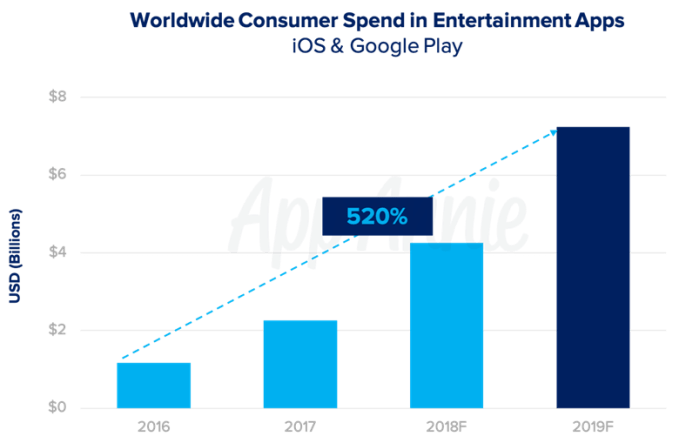
The total time in video streaming apps will increase 110 percent from 2016 to 2019, with consumer spend in entertainment apps up by 520 percent over that same period. Most of those revenues will come from the growth in in-app subscriptions.

Much of the time consumer spend streaming will come from short-form video apps like YouTube, TikTok and social apps like Instagram and Snapchat.

YouTube alone accounts for 4 out of every 5 minutes spent in the top 10 video streaming apps, today. But 2019 will see many changes, including the launch of Disney’s streaming service, Disney+, for example.

App Annie’s full report, which details ad creatives and strategies as well, is available on its blog.


Read Full Article

Yandex gets in the smartphone game


“The Google of Russia” is a fairly apt description, as far as those things go. Yandex has its hand in just about everything internet in its native Russia. Recently additions include a Prime-style service, a smart speaker and, yes, self-driving cars. So it was really only a matter of time before the company unleashed a smartphone on the world.

The internet giant’s first handset is called — rather uninspiredly — the Yandex.Phone. At least you know what you’re getting. Designwise, the handset also looks like a fairly bog standard middling Android handset.

The most interesting bits here are are, naturally, the inclusion of Yandex’s own software. The company says it’s the first to integrate its app ecosystem out of the box. That list includes Alice, the Alexa-style smart assistant it introduced in October of last year.

The spec aren’t much to write home about. There’s a 5.65 display and a pair of cameras on either inside. Inside, it’s got a Snapdragon 630 inside, coupled with 64GB of storage and 4GB of RAM. Oh, and there’s a headphone jack on-board, as well.

The price is certainly right, at 17,990 rubles ($270). It will be on sale tomorrow at the company’s flagship Moscow store, with wider availability starting the following day. As far as availability goes here in the States, I wouldn’t hold my breath. 


Read Full Article