16 November 2018

E3 slouches towards irrelevance again as Sony announces it’s skipping the show


I like E3. I really do. But it’s also monumentally dumb: game companies spending millions to show off essentially faked content to an increasingly jaded audience. And it’s increasingly out of step with how the gaming industry works. So it should come as no surprise that Sony will be skipping the show more or less altogether this year, joining Nintendo in taking a step back from spectacle.

Sony has been a part of CES for 20 years and this will be the first one it’s ever missed. I’ve gone to their events every time I’ve attended; I was there for their historic putdown of Microsoft after the latter announced some hugely unpopular restrictions on used games. I think you can actually see me near the front in the broadcast of that one. (You can! I’m at 1:29.)

And E3 has been a part of Sony’s yearly cadence as well. Like other companies, for years Sony hoarded information to debut at E3, TGS, and Gamescom, but E3 was generally where you saw new consoles and flagship titles debut. But as even E3’s organizers have admitted over and over again, that’s not necessarily a good thing.

Too often we have seen half-finished games on stage at E3 that end up cancelled before the year is out, or commitments made to dates the companies can’t possibly keep. Assigning a complex, creative industry to a yearly schedule of major announcements is a great way to burn them out, and that’s exactly what’s happening.

Variety first noticed Sony’s absence from ESA communications. In a statement issued to multiple outlets, Sony said:

As the industry evolves, Sony Interactive Entertainment continues to look for inventive opportunities to engage the community. PlayStation fans mean the world to us and we always want to innovate, think differently and experiment with new ways to delight gamers. As a result, we have decided not to participate in E3 in 2019. We are exploring new and familiar ways to engage our community in 2019 and can’t wait to share our plans with you.

They won’t be alone. Nintendo hasn’t had a real proper E3 press conference in years. Instead, they host a live stream around the event and have a big booth where people mainly just play games. Their Nintendo Direct videos come out throughout the year, when the titles and developers are good and ready.

Microsoft is still there, and still puts on quite a show. I remember the original announcement of the Kinect, probably one of the weirdest and dumbest things I’ve ever taken part in. It was memorable, at least.

But Microsoft is also doing its own thing, announcing throughout the year and on its own terms. The Xbox One X was only hinted at during E3, and announced in full much later. I wouldn’t be surprised if Microsoft also announced they were taking it easy this year at E3 — though this might also be a good opportunity for them to double down. With the schedules these huge shows go on, they might already be committed to one course or another.

Sony actually has its own PlayStation Experience event where it announces things and lets gamers and press play the latest, but even that was cancelled ahead of its expected December date. Is Sony just getting shy?

More likely they are leveraging their dominance in the console market to be a market leader and “decider,” as they say. They have no shortage of amazing games coming out, including lots of hot-looking exclusives. What have they got to prove? Although Sony itself is not participating in E3, the developers it backs will almost certainly be there. What better way to school the competition than to not show up and still have everyone talking about you?

With the PS4 Pro out there and a solid line-up already confirmed, Sony is sitting pretty for 2019, and the company probably feels this is a safe time to experiment with “inventive opportunities to engage the community,” as the statement put it. E3 will still be big, and it will still be fun. But the trend is clear: it just won’t be necessary.


Read Full Article

Cassette decks from Crosley take aim at tape-hoarding nostalgia-seekers


Crosley, makers of the “good enough” record players you see in Urban Outfitters and Target, have turned their retro novelty eye on the next obvious format: cassettes. These two new decks from the company have all the latest features from 1985, but also a handful of modern conveniences.

Let’s get one thing clear at the outset: these are certainly ridiculous. And yes, you can buy a boom box with a cassette deck right now, new, for $30 or so. But having browsed the stock I can tell you that most of them are pretty ugly. There are vintage ones too, but not all have aged well and may have unfixable issues like corrosion or motor problems.

And believe it or not, tapes are still around. People are manufacturing and recording on them because they’re fun and retro and analog. I’ve bought a few myself at shows in the last year.

So there is actually a market for a new, decent-looking, portable cassette player and radio.

The Crosley devices are pretty straightforward. There are two models; Each has a big mono speaker, a single-direction deck (meaning you’ll have to flip the tape), an AM/FM radio, and a built-in mic. The $60 CT100 model (top) has shortwave radio bands as well, and the capability to play music from an SD card or USB drive, while the $70 CT200 has treble and bass dials and a VU meter for easier recording of cassette-based podcasts. Both have handles.

Of the two I’d definitely go with the CT100, since presumably you can use the SD/USB player to record mixtapes of stuff you’ve downloaded. Record a little intro with the mic or pretend you’re the DJ between songs, and boom, it’s like you’re me in 1994. Plus you never know when shortwave will come in handy.

It’s silly, but it’s a silly world we live in. Silly and horrible. Maybe bringing back cassettes will help. Keep an eye out for these players wherever fake Ray-Bans plaid scarves are sold.


Read Full Article
FCC approval of Europe’s Galileo satellite signals may give your phone’s GPS a boost


The FCC’s space-focused meeting today had actions taken on SpaceX satellites and orbital debris reduction, but the decision most likely to affect users has to do with Galileo. No, not the astronomer — the global positioning satellite constellation put in place by the E.U. over the last few years. It’s now legal for U.S. phones to use, and a simple software update could soon give your GPS signal a major bump.

Galileo is one of several successors to the Global Positioning System that’s been in use since the ’90s. But because it is U.S.-managed and was for a long time artificially limited in accuracy to everyone but U.S. military, it should come as no surprise that European, Russian, and Chinese authorities would want their own solutions. Russia’s GLONASS is operational and China is hard at work getting its BeiDou system online.

The E.U.’s answer to GPS was Galileo, and the 26 (out of 30 planned) satellites making up the constellation offer improved accuracy and other services, such as altitude positioning. Test satellites went up as early as 2005, but it wasn’t until 2016 that it began actually offering location services.

A Galileo satellite launch earlier this year.

Devices already existed that would take advantage of Galileo signals — all the way back to the iPhone 6S, the Samsung Galaxy S7, and many others from that era forward. It just depends on the wireless chip inside the phone or navigation unit, and it’s pretty much standard now. (There’s a partial list of smartphones supporting Galileo here.)

When a company sells a new phone, it’s much easier to just make a couple million of the same thing rather than make tiny changes like using a wireless chipset in U.S. models that doesn’t support Galileo. The trade-off in savings versus complexity of manufacturing and distribution just isn’t worthwhile.

The thing is, American phones couldn’t use Galileo because the FCC has regulations against having ground stations being in contact with foreign satellites. Which is exactly what using Galileo positioning is, though of course it’s nothing sinister.

If you’re in the U.S., then, your phone likely has the capability to use Galileo but it has been disabled in software. The FCC decision today lets device makers change that, and the result could be much-improved location services.

Interestingly enough, however, your phone may already be using Galileo without your or the FCC’s knowledge. Because the capability is behind a software lock, it’s possible that a user could install an app or service bringing it into use. Perhaps you travel to Europe a lot and use a French app store and navigation app designed to work with Galileo and it unlocked the bands. There’d be nothing wrong with that.

Or perhaps you installed a custom ROM that included the ability to check the Galileo signal. That’s technically illegal, but the thing is there’s basically no way for anyone to tell! The way these systems work, all you’d be doing is receiving a signal illegally that your phone already supports and that’s already hitting its antennas every second — so who’s going to report you?

It’s unlikely that phone makers have secretly enabled the Galileo frequencies on U.S. models, but as Commissioner Jessica Rosenworcel pointed out in a statement accompanying the FCC action, that doesn’t mean it isn’t happening:

If you read the record in this proceeding and others like it, it becomes clear that many devices in the United States are already operating with foreign signals. But nowhere in our record is there a good picture of how many devices in this country are interacting with these foreign satellite systems, what it means for compliance with our rules, and what it means for the security of our systems. We should change that. Technology has gotten ahead of our approval policies and it’s time for a true-up.

She isn’t suggesting a crackdown — this is about regulation lagging behind consumer tech. Still, it is a little worrying that the FCC basically has no idea, and no way to find out, how many devices are illicitly tuning in to Galileo signals.

Expect an update to roll out to your phone sometime soon — Galileo signals will be of serious benefit to any location-based app, and to public services like 911, which are now officially allowed to use the more accurate service to determine location.


Read Full Article
Google My Business app revamp challenges Facebook Pages


Google is giving its business customers a new way to reach their customers. The company is today starting the rollout of a revamped Google My Business mobile application for iOS and Android that will offer new tools for viewing customer info — including followers, reviews and messages — as well as a way to quickly create content to publish to their business profile on Google.

The changes arrive shortly after a recent update to Google Maps that introduced a new “Follow” button for tracking businesses, in order to stay informed about promotions, events and other news. The move made Google’s business profiles more of a direct competitor with Facebook Pages.

In the redesigned Google My Business app, a new “Customers” tab will centralize a business’s customers and their potential customers — like those who have chosen to follow the business, as noted above. Here, the business owner can track their reviews and view and respond to their messages.

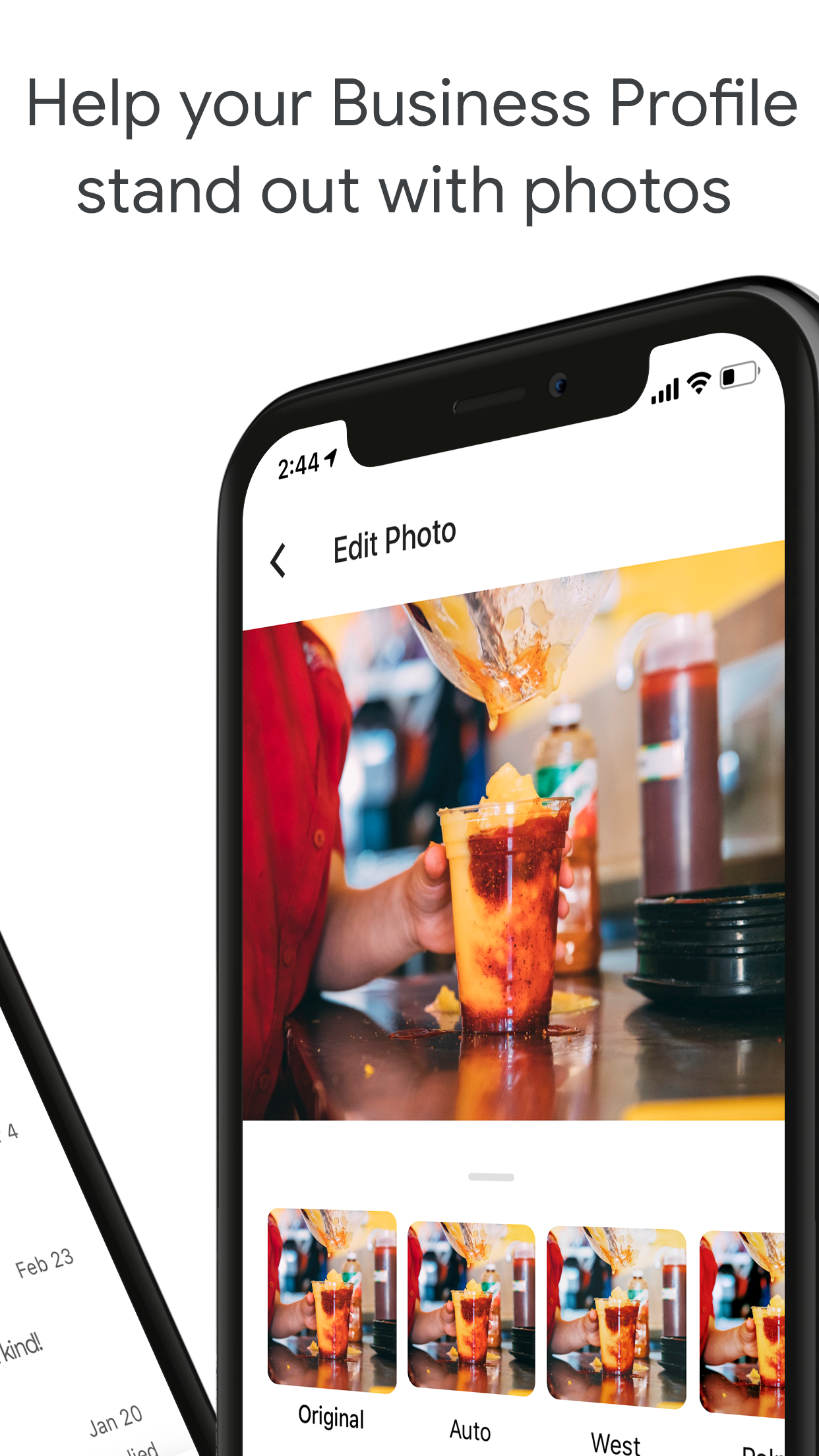
Photocentric posting experience - Scale

To reach a business, customers are able to use a “Message” button on Google Maps or from Google Search to connect.

Before, businesses had to respond to these incoming messages from their device’s messaging platform. This is the first time they’ve been able to do so from within the Google My Business app. Messaging was also previously limited to the U.S., Canada, Brazil and India, but will now be available across most countries worldwide as of this week.

Also new is a “Posts” button that allows business owners a way to add content updates to their business profile on Google.

For example, a business may want to alert customers about an upcoming sale or promo, an event or new products they have for sale.

These are the sorts of updates they would have normally published elsewhere on social media, like Facebook, Instagram and Twitter, perhaps. Now, they’ll be encouraged to do the same on Google’s platform, too, because of the potential to reach a wide range of customers through Google Maps and Search.

Google says the updates to the Google My Business app will begin to roll out on iOS and Android starting today, November 14.


Read Full Article
FCC approval of Europe’s Galileo satellite signals may give your phone’s GPS a boost


The FCC’s space-focused meeting today had actions taken on SpaceX satellites and orbital debris reduction, but the decision most likely to affect users has to do with Galileo. No, not the astronomer — the global positioning satellite constellation put in place by the E.U. over the last few years. It’s now legal for U.S. phones to use, and a simple software update could soon give your GPS signal a major bump.

Galileo is one of several successors to the Global Positioning System that’s been in use since the ’90s. But because it is U.S.-managed and was for a long time artificially limited in accuracy to everyone but U.S. military, it should come as no surprise that European, Russian, and Chinese authorities would want their own solutions. Russia’s GLONASS is operational and China is hard at work getting its BeiDou system online.

The E.U.’s answer to GPS was Galileo, and the 26 (out of 30 planned) satellites making up the constellation offer improved accuracy and other services, such as altitude positioning. Test satellites went up as early as 2005, but it wasn’t until 2016 that it began actually offering location services.

A Galileo satellite launch earlier this year.

Devices already existed that would take advantage of Galileo signals — all the way back to the iPhone 6S, the Samsung Galaxy S7, and many others from that era forward. It just depends on the wireless chip inside the phone or navigation unit, and it’s pretty much standard now. (There’s a partial list of smartphones supporting Galileo here.)

When a company sells a new phone, it’s much easier to just make a couple million of the same thing rather than make tiny changes like using a wireless chipset in U.S. models that doesn’t support Galileo. The trade-off in savings versus complexity of manufacturing and distribution just isn’t worthwhile.

The thing is, American phones couldn’t use Galileo because the FCC has regulations against having ground stations being in contact with foreign satellites. Which is exactly what using Galileo positioning is, though of course it’s nothing sinister.

If you’re in the U.S., then, your phone likely has the capability to use Galileo but it has been disabled in software. The FCC decision today lets device makers change that, and the result could be much-improved location services.

Interestingly enough, however, your phone may already be using Galileo without your or the FCC’s knowledge. Because the capability is behind a software lock, it’s possible that a user could install an app or service bringing it into use. Perhaps you travel to Europe a lot and use a French app store and navigation app designed to work with Galileo and it unlocked the bands. There’d be nothing wrong with that.

Or perhaps you installed a custom ROM that included the ability to check the Galileo signal. That’s technically illegal, but the thing is there’s basically no way for anyone to tell! The way these systems work, all you’d be doing is receiving a signal illegally that your phone already supports and that’s already hitting its antennas every second — so who’s going to report you?

It’s unlikely that phone makers have secretly enabled the Galileo frequencies on U.S. models, but as Commissioner Jessica Rosenworcel pointed out in a statement accompanying the FCC action, that doesn’t mean it isn’t happening:

If you read the record in this proceeding and others like it, it becomes clear that many devices in the United States are already operating with foreign signals. But nowhere in our record is there a good picture of how many devices in this country are interacting with these foreign satellite systems, what it means for compliance with our rules, and what it means for the security of our systems. We should change that. Technology has gotten ahead of our approval policies and it’s time for a true-up.

She isn’t suggesting a crackdown — this is about regulation lagging behind consumer tech. Still, it is a little worrying that the FCC basically has no idea, and no way to find out, how many devices are illicitly tuning in to Galileo signals.

Expect an update to roll out to your phone sometime soon — Galileo signals will be of serious benefit to any location-based app, and to public services like 911, which are now officially allowed to use the more accurate service to determine location.


Read Full Article
Instagram Now Tracks How Much Time You’re Wasting on Instagram


Instagram’s new activity dashboard is now live. This is designed to help you track how much time you’re wasting on Instagram, and change your habits accordingly. That is if you feel that spending hours browsing Instagram is a problem in need of fixing.

In August, Facebook announced new tools to help you fight your social media addiction. These new tools are designed to help you manage the time you spend on Facebook and Instagram. Because we all know how easy it is to sucked in for hours at a time.

How to Use Instagram’s New Activity Dashboard

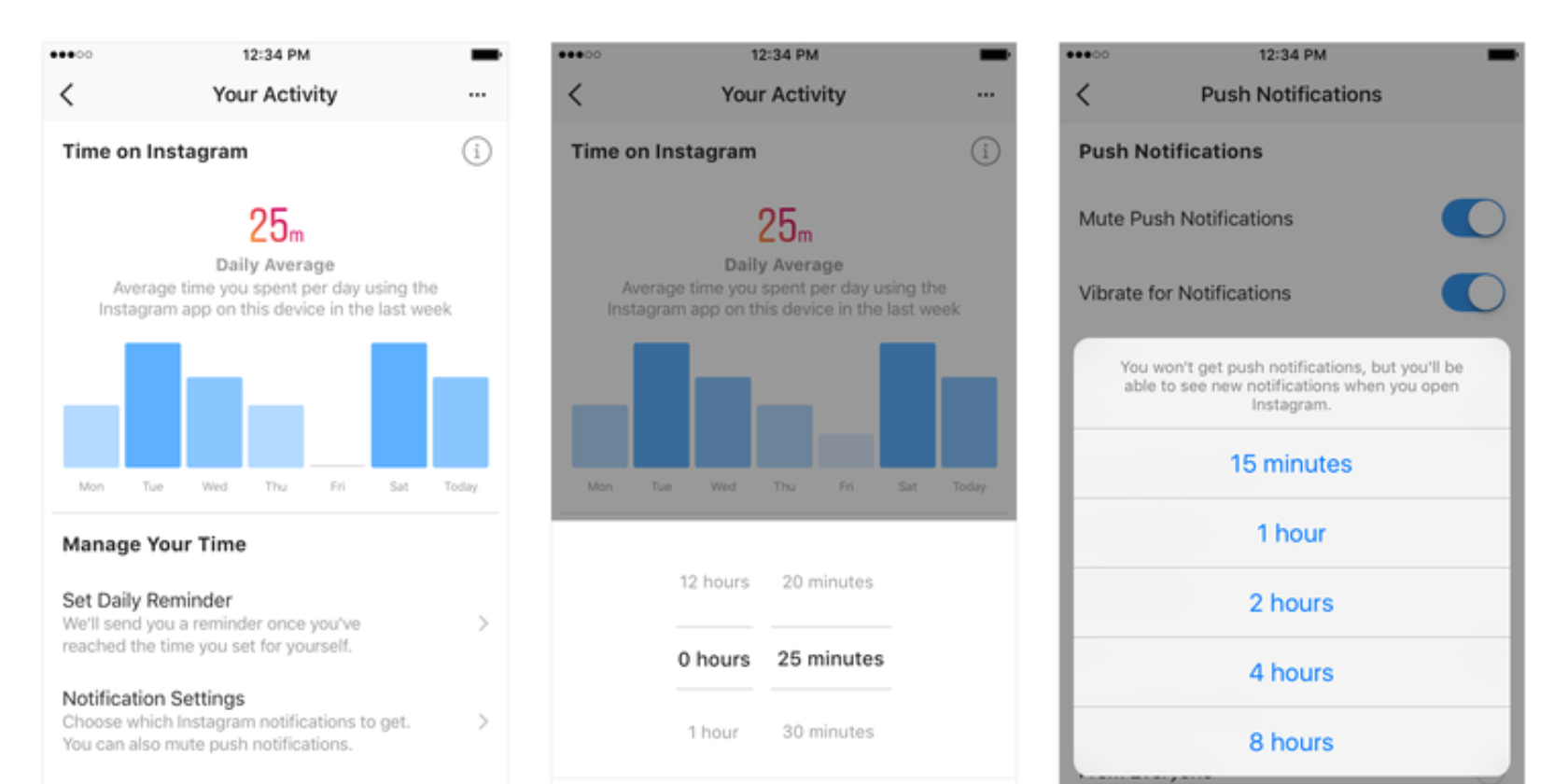
Instagram’s new activity dashboard can be found under “Your Activity”. Just click on the hamburger icon in the top right-hand corner of your profile, and then click “Your Activity”. Here, you’ll see a dashboard showing you how much time you spend using Instagram.

Thankfully, the tools aren’t just informative. You can set a daily reminder when you’ve been using the app for a period of time of your choosing. You can also change the types of notifications you get, and even mute notifications altogether for up to 8 hours.

Setting a time limit is designed to help those people who need reminding to take a break from their phone once in a while. And the option to mute notifications should prevent interruptions when you’re meant to be focusing on something more important.

Everything In Moderation, Including Social Media

In its original article announcing these new activity dashboards, Facebook said it has a “responsibility to talk openly about how time online impacts people—and we take that responsibility seriously. These new tools are an important first step”.

This is a good first step too, as there’s mounting evidence that social media is bad for you. As with most things, it’s all about moderation, and for people who are currently unaware they’re using Instagram to excess, these new tools could be a gamechanger.

Read the full article: Instagram Now Tracks How Much Time You’re Wasting on Instagram


Read Full Article
How to Log Into Facebook If You Lost Access to Code Generator


lost-facebook-key

Are you wondering how to recover Facebook without a confirmation or reset code? Fortunately, Facebook’s Code Generator is only one of many layers of Facebook security. We will show you alternative ways to receive a Facebook confirmation code and log back into your account.

Unlock the free "Facebook Security Checklist" now!

This will sign you up to our newsletter

Enter your Email

Why Do You Need a Facebook Confirmation Code?

You must have enabled Facebook’s two-factor authentication. Without two-factor authentication, you only need your username or email address and password to log into your Facebook account.

By enabling Facebook’s two-factor authentication, you’ve added an extra layer of security. Whenever you try to log into Facebook from a new location or device, Facebook will ask you for a security or confirmation code to complete the login.

Where Can You Find a Facebook Confirmation Code?

You can obtain a Facebook login code in three different ways:

  1. Facebook can text a confirmation code to a mobile number associated with your account.
  2. From an authentication app, like Duo or Google Authenticator. Moreover, the Facebook mobile app includes a Code Generator that automatically generates a fresh security code every 30 or 60 seconds.
  3. From a list of Facebook recovery codes that you downloaded as a backup.

Beyond codes, you can also create a physical 2nd-factor security key, to log into Facebook through USB or NFC.

Since two of the methods above depend on a mobile device, make sure you have at least one other method to log back into Facebook, in case you lose that device.

How to Set Up Facebook’s Two-Factor Authentication

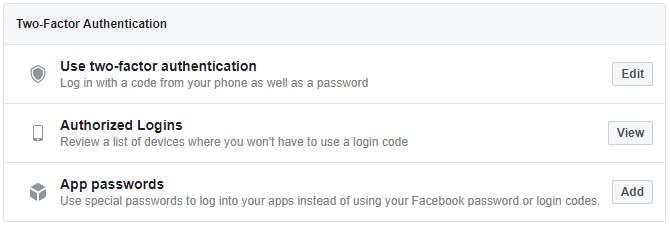
To enable two-factor authentication, open Facebook in your browser, click the arrowhead in the top right to expand the navigation menu, and go to Settings > Security and Login > Use two-factor authentication.

How to set up Facebook's two-factor authentication.

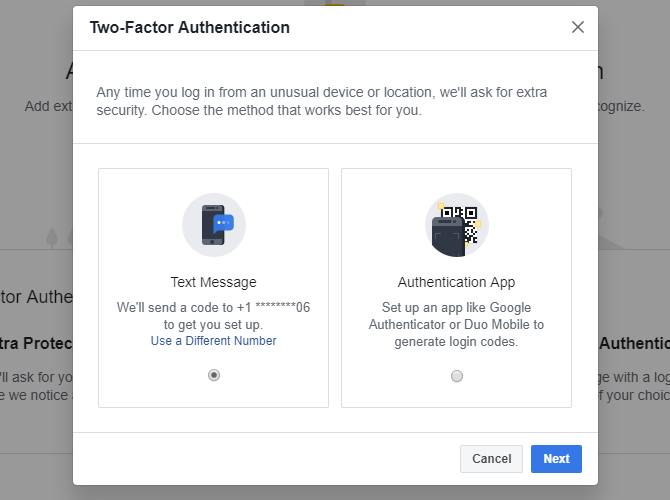
Click Edit and on the next screen, click Get Started. Then select the method you’d like to use for Facebook’s two-factor authentication. You can either proceed with the Text Message or the third-party Authentication App option. Make your selection and click Next.

Choose the method you want to use for Facebook's two-factor authentication.

We went with the Text Message option and entered the 6-digit code Facebook texted to our mobile number.

Once you’ve entered the Facebook confirmation code, click Finish to complete the initial setup. Now you can add an authentication app, save recovery codes, and create a security key. You should also assign a phone number that Facebook can use to text you a login code.

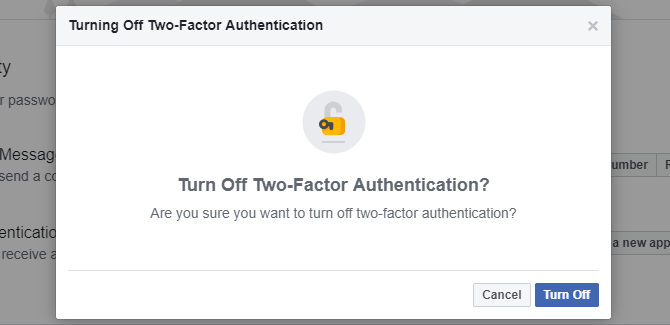
If you need to temporarily disable two-factor authentication, just click Turn Off on Facebook’s 2fa settings page and you’ll be able to log in using your basic login credentials.

Tun off Facebook two-factor authentication.

How to Access the Facebook Code Generator

Code Generator is a convenient way to access two-factor authentication codes without a mobile number. The tool will come in handy when you’re traveling or don’t have mobile reception. Code Generator is available inside the Facebook app for iOS and Android. The Windows Store app mimics the Facebook website and doesn’t include Code Generator.

To access the Facebook Code Generator from Android or iOS, open the Facebook app, click the hamburger icon in the top right, scroll down, expand the Settings & Privacy menu, and select Code Generator. Here you’ll see the tool run through new security codes every 30 or 60 seconds.

Lost Your Phone and Can’t Use Code Generator?

When you’ve set up your phone to be the key to your Facebook account, losing or breaking it could be a problem. Here’s what you can do to prepare for a Facebook disaster.

1. Let Facebook Text You a Confirmation Code

Do you still have access to the mobile phone number you defined under two-factor authentication? In that case, let Facebook text you a confirmation code. Unfortunately, Facebook can only use that one number for two-factor authentication, even if you’ve set up other phone numbers under your profile.

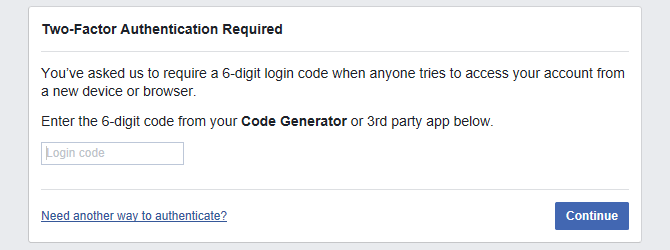
From the screen asking you for the login code, select Need another way to authenticate? in the bottom left, then click Text me a login code, and wait for the text to come in. You can also let Facebook call you.

Facebook two-factor authentication login code required.

2. Use Saved Recovery Codes

After setting up two-factor authentication, you had the chance to save a set of recovery codes as a backup. Maybe you printed the code, took a screenshot, or wrote it down and stored them in a safe location.

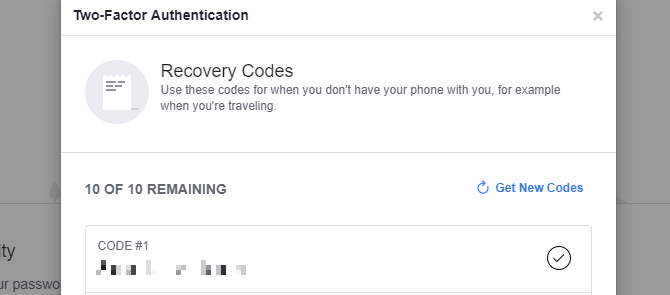
Facebook Recovery Codes

If you haven’t saved recovery codes, be sure to do it as soon as you regain access to your account. Should you ever again lose access to Code Generator, you can use one of these codes to log into Facebook from a new device or location.

3. Approve the Login From an Authorized Device

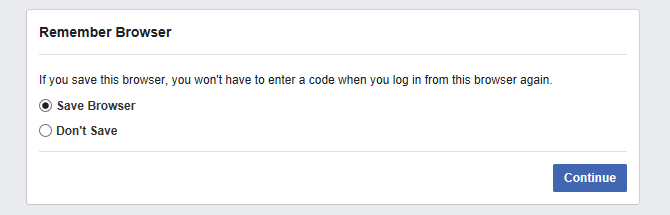
Whenever you successfully log into Facebook from a new device, application, or browser, Facebook asks you whether you would like to remember it. You won’t need a login code the next time you want to access Facebook from that authorized device and location. Now that you can’t access Code Generator, this could be your private backdoor into your Facebook account.

Facebook Remember Browser

Try to access Facebook from a browser or app you’ve used previously. Maybe you’re still logged in on an old laptop, your work computer, or your tablet. When you find a device where you can still access Facebook, you should see a notification asking you to approve the new login.

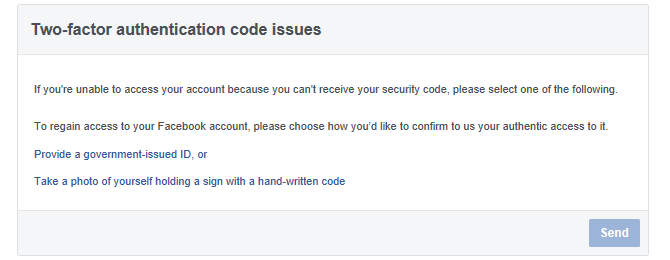
None of this worked? Submit a request to Facebook.

Facebook Two-Factor Authentication Code Issues

Did you manage to log back into Facebook? Remember to save recovery codes, set up a new authentication app, and update your other recovery options.

Did You Lose Your Mobile Device?

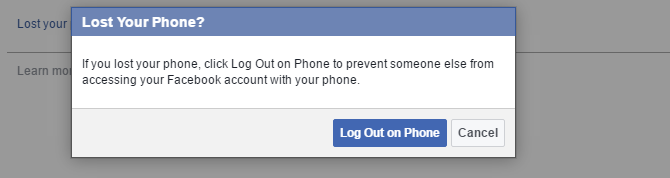
To prevent access to your Facebook account from a lost phone or laptop—in case you didn’t log out of the app—terminate the app’s Facebook session. If you registered your phone’s number, go to Facebook > Settings > Mobile > Lost your phone? and click the Log Out on Phone button.

Facebook Lost Phone

At this point, you should Remove the number of the lost phone.

If you have lost a device other than your phone or did you not set up your mobile number, here’s another way to terminate a Facebook session.

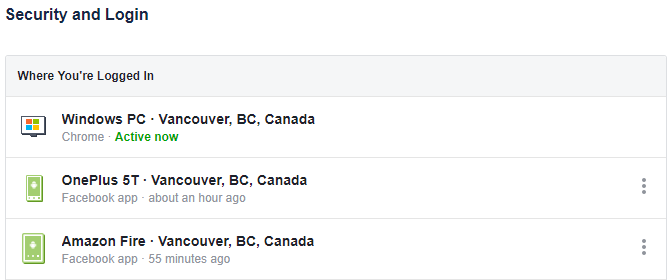
Go to Facebook (on a recognized device) > Settings > Security and Login > Where You’re Logged In, find the respective session, and Log Out. If in doubt, end multiple sessions. This will log you out of the app.

Where You're Logged Into Facebook.

Until you get your phone back or can set up Code Generator on a new phone, you can save a batch of backup codes as described above. You could also set up another third-party app to generate codes.

And in the future, always make sure at least one device, other than your laptop or phone, has an authorized login. It could be a home computer that you are unlikely to lose and sure to always have access to. Only ever let Facebook remember devices and locations that are private and safe. And frequently review your list of Authorized Logins and Remove outdated items.

To be safe, also update your Facebook password.

Keep Your Facebook Account Safe

Every day, we hear from people who have lost access to their Facebook account. Unfortunately, we can’t help most of them because they failed to set up safety options, had their passwords cracked, and the hackers changed their password and recovery options. In cases like that, you can only pray that Facebook will help you recover your account.

So, don’t let it get that far. It only takes a few minutes to enable two-factor authentication and save Facebook recovery codes. Once disaster strikes again, you will be able to recover your Facebook account when you can no longer log in.

Read the full article: How to Log Into Facebook If You Lost Access to Code Generator


Read Full Article
How to Mirror an iPhone or iPad to Your TV


Don’t get stuck watching video or playing games on a small screen—you can use your iPhone or iPad with larger displays. There are a few ways to watch iOS content on a TV, projector, or any HDMI-compliant display.

Unlock the free iPhone and iPad cheat sheet now!

This will sign you up to our newsletter

Enter your Email

There’s also a difference between mirroring and simply outputting video. You can use your iPhone or iPad to watch videos or listen to audio, while browsing social media or the web at the same time! Here’s how it works.

1. Send Video or Mirror Your Screen With AirPlay

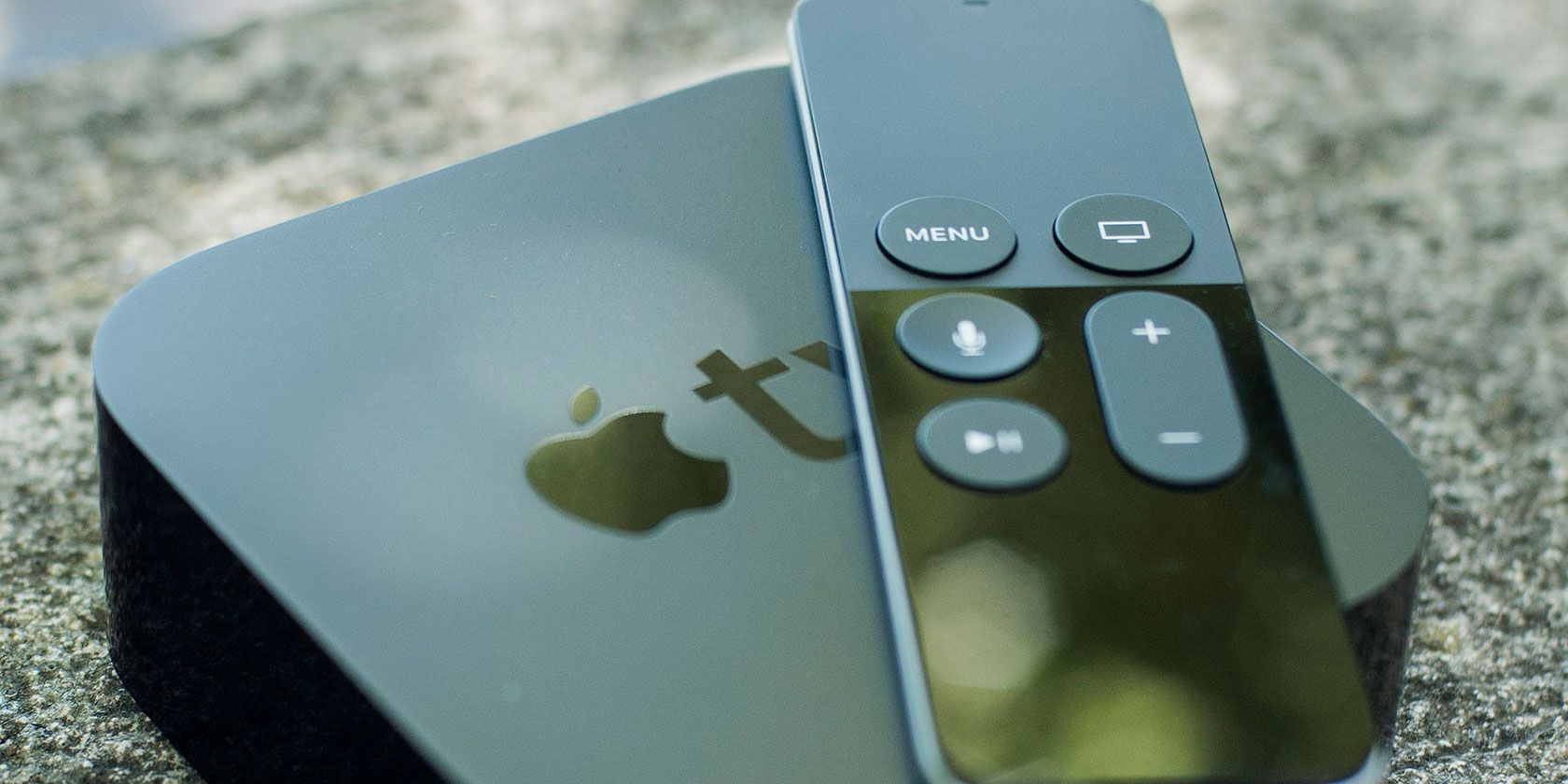
Apple TV and remote on table

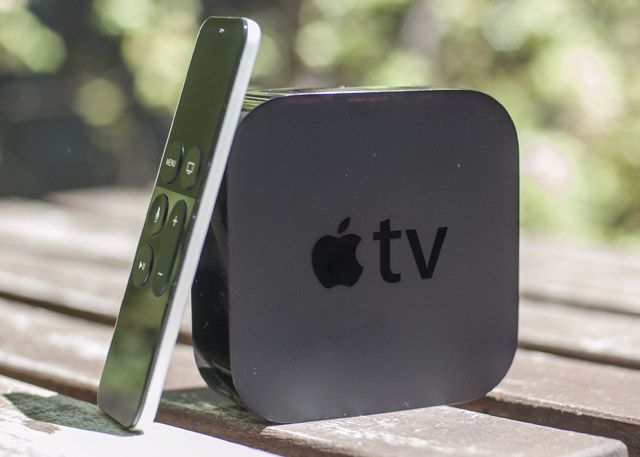
AirPlay is Apple’s proprietary wireless display technology, and it allows you to wirelessly send an image to an AirPlay receiver. In order to use AirPlay, you’ll need a compatible receiver. The most common for video is the Apple TV (from $149).

The Apple TV connects to your display via HDMI, functions as a set-top box, and has its own apps and App Store. It has other neat functions too, like displaying your recent iPhone photos and playing music from iTunes or Apple Music. Check our our guide to setting up and using your Apple TV to get started.

If you want to output to a Mac or Windows PC instead, you can do so with an app called AirServer ($20). You can also buy audio equipment compatible with AirPlay for streaming music.

Mirroring vs. Outputting

Keep in mind: You can mirror your display, which maintains your device’s screen aspect ratio (e.g. 4:3 for an iPad). Or you can output the current video or other media which only sends music, videos, and some games to the TV. In most cases, you’ll want to do the latter.

To mirror your iPhone or iPad’s screen to an AirPlay receiver:

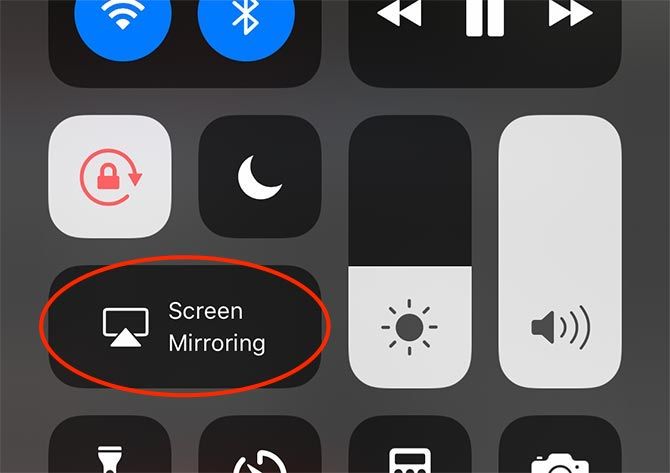
  1. Access Control Center on your device (see note below).
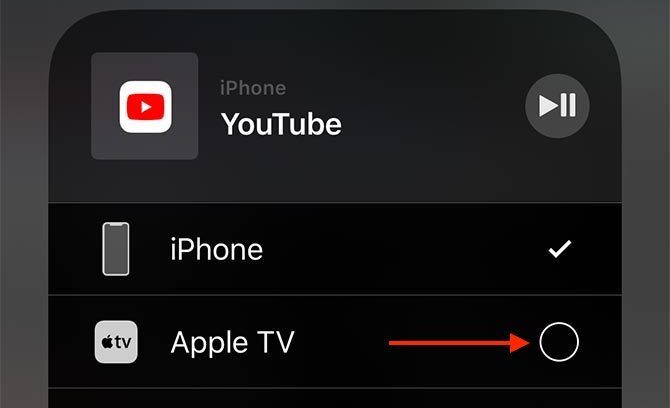
  2. Tap the Screen Mirroring button.
  3. Choose your AirPlay receiver when it appears.

AirPlay Screen Mirroring

To output the current video without mirroring the entire screen:

  1. Access Control Center on your device (see note below).
  2. Long-press or 3D Touch the media controls.
  3. Tap the AirPlay button (a triangle with a few circles) on the right-hand side.
  4. Choose your AirPlay receiver when it appears.

AirPlay External Display

Not sure how to access Control Center?

  • With an iPhone X or later, you’ll need to swipe down from the top-right corner of the screen.
  • On an iPhone 8 or earlier, swipe up from the bottom of the screen.
  • iPad users should double-tap the Home button to bring up the App Switcher.

Since AirPlay is a wireless connection, you’ll find that interference, slow Wi-Fi, older Bluetooth devices, and similar can negatively impact performance. When playing a game, you’ll likely notice a delay between input and what you see on the screen.

But for watching videos, listening to music, giving presentations, sharing a photo slideshow with family members, or even displaying a website so others can see the screen, AirPlay is a great choice.

2. Use a Wired Adapter

apple-lightning-hdmi

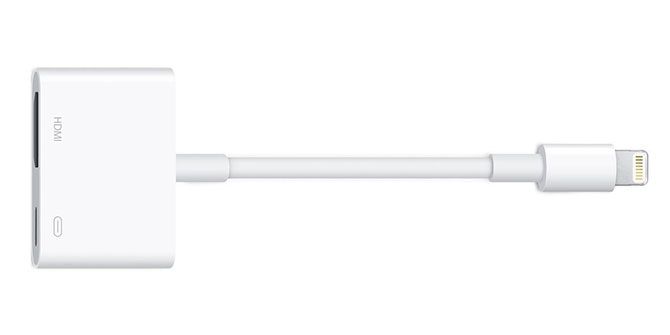
There are a few drawbacks to using a wired adapter, but the current model is better than it once was. The problem stems from the fact that the Lightning port on the iPhone and iPad is not built to output video signal. Whatever Apple’s reasoning (probably to allow for smaller devices), the functionality was moved to an adapter.

The first batch of Lightning-to-HDMI adapters had problems; they topped out at a resolution of 900p. Though the current models promise 1080p, reviews aren’t great. They mention issues like frequent black screens and sudden hardware failure. For the $49 price tag and hassle involved, an Apple TV doesn’t seem like such a bad investment comparatively.

To mirror your iPhone screen using a Lightning to HDMI adapter:

  1. Connect your adapter to the lightning port of your iPhone or iPad.
  2. Connect your display or projector via HDMI cable.
  3. Switch to the correct source on your display to see your device mirrored.

You can also get Lightning to VGA adapters, which seem to have many of the same issues and don’t support HDCP.

3. Use Google Chromecast

You can use Google’s wireless “casting” technology to watch content wirelessly from your iPhone or iPad, though it works a little differently. Chromecast is Google’s answer to the Apple TV, and for $35 (or $69 for the 4K-compatible Chromecast Ultra) it allows you to stream content from your mobile device to your TV.

It’s not possible to mirror your whole screen using Chromecast, as Apple limits the technology to its first-party products. However, many iOS apps like YouTube, Netflix, and Spotify include support for Chromecast. Check out Wikipedia’s list of supported Chromecast apps for more.

Each app handles Chromecast integration a bit differently, so there’s no single way to stream video or other media from an iOS app. Just look for the cast button in the app you’re currently using.

For more on the Chromecast, check out our comparion of the Chromecast and Apple TV, or how to set up the Chromecast Ultra.

What Do You Use to Mirror Your iPhone or iPad?

AirPlay is the best way to mirror or send media to a remote display or audio device, but it’s also the most expensive. Wired solutions are inelegant and problematic given the way the Lightning standard was designed, which is why Apple pushes wireless streaming.

If you already have a Chromecast, or feel that you can live without true mirroring and make do with the app-by-app compatibility, this is a good option. For AirPlay connectivity at Chromecast prices, check AirPlay receivers that are cheaper than the Apple TV.

Read the full article: How to Mirror an iPhone or iPad to Your TV


Read Full Article
Really Useful Podcast #7 Looks at Windows Update Bugs


windows-bug

Looking for some information about Windows Update bugs? Confused about the Facebook videophone ads littering your timeline? Uncertain why Amazon has sent you a toy catalog?

The Really Useful Podcast aims to break down recent tech news, uncover why (and whether) it matters to you, and give you a few productivity tips to help make the most out of your technology. It might be a smartphone, tablet, TV, smart home hub, or even your microwave.

We’re the tech podcast for technophobes—click play to find out more!

What we talk about this week:

This week’s show is brought to you by Christian Cawley and Gavin Phillips. You can contact them on Twitter as @thegadgetmonkey and @gavinspavin with your suggestions for future topics.

Look out for our other shows (featuring MakeUseOf contributors Ian Buckley and Ben Stegner). Head to anchor.fm/really-useful-podcast for our other shows.

Don’t forget to subscribe to The Really Useful Podcast on iTunes and YouTube (be sure to hit the bell icon to be notified of new episodes) for more tips.

Read the full article: Really Useful Podcast #7 Looks at Windows Update Bugs


Read Full Article
How to Easily Remove Bloatware From Windows 10


remove-bloatware-windows10

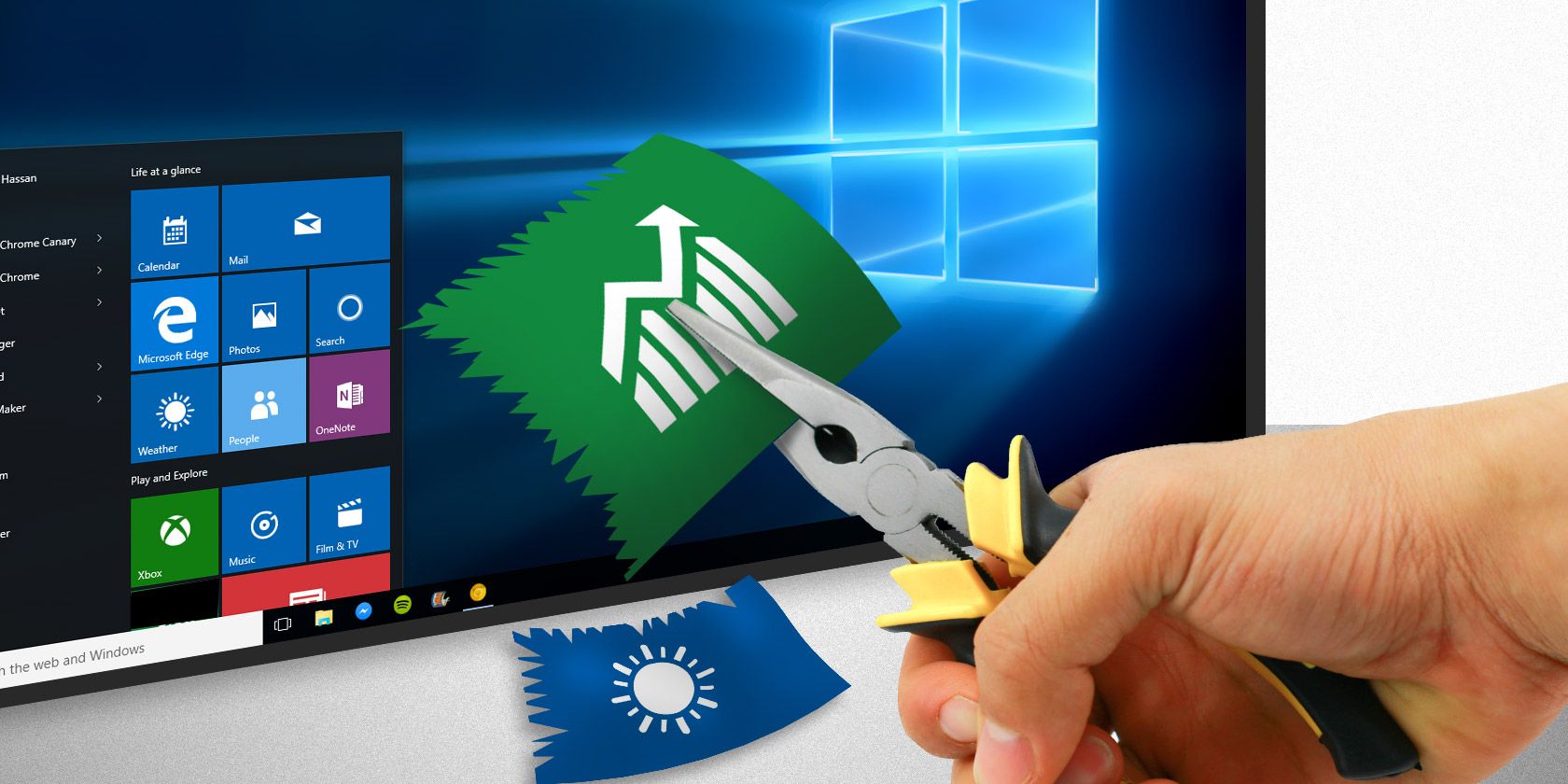
Bloatware is a scourge for technology owners. Manufacturers fill your shiny new laptop, phone, or tablet with pre-installed applications to put an extra dollar in their pocket. You are left with bundles of oft-useless programs taking up the already limited storage space.

Unlock the "Windows Keyboard Shortcuts 101" cheat sheet now!

This will sign you up to our newsletter

Enter your Email

Microsoft is no stranger to bloatware. Windows 10 might look the part, but behind the scenes, there are a plethora of programs you simply don’t need. Luckily, you can rid yourself of the bloatware. Let’s look at how to ease the pressure on that awful bloating.

How to Remove Windows 10 Bloatware

Windows 10 does come with a reasonably large amount of bloatware. In most cases, it is easy to remove. There are also a few different removal options, too: using the traditional uninstall, using PowerShell commands, and third-party installers.

Bloatware doesn’t feature within the System > Apps & Features list you would normally use to uninstall a program. Why would it? Microsoft and other manufacturers who deliver products with bloatware stand to profit from your using them, so making it easy to uninstall isn’t in their best interest.

Uninstall Windows 10 Bloatware Apps

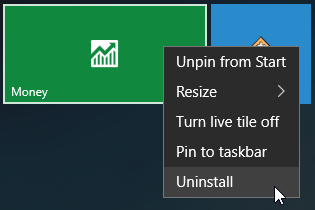
Some of the Windows 10 bloatware is easy to remove using a regular uninstall. This appears to work for several apps included in the Windows 10 installation package, such as Money, News, Sports, and a few others clogging up your Start menu. (Here are some more Windows programs you should consider uninstalling!)

Find the application you want to remove, right-click, and select Uninstall.

Windows 10 App Uninstall

Microsoft has made it simple to remove the more cosmetic items within Windows 10. But you will quickly realize that Microsoft doesn’t consider all apps equal. Indeed, those apps that Microsoft considers part of the core Windows 10 experience require you to use PowerShell commands to hide or remove, or third-party uninstaller (more on both of these below). Others, such as Cortana, simply cannot be 100% removed from your system.

Using PowerShell to Remove Bloatware

PowerShell is an important part of Windows system management. While some compare PowerShell to the Command Prompt, at their core they are different beasts. However, PowerShell is a command and scripting language that gives you greater control over your Windows installation. In this instance, you can use a series of PowerShell commands to either hide or remove Windows 10 bloatware.

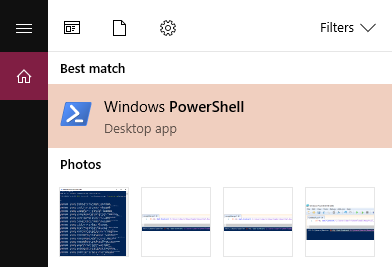
First, open the PowerShell command line. Type PowerShell into your Start menu search bar. The best match should be Windows PowerShell. Right-click and select Run as Administrator. This ensures you have control over the entire system.

Windows PowerShell

Next, you need to decide what to remove. The PowerShell commands can remove any packages ranging from the Zune Music Player to Bing Health and Fitness, to the Microsoft Windows Calculator.

Hide Apps Using the “Remove-AppxPackage” Command

Entering the following code into the PowerShell will hide each application you enter.

Get-AppxPackage -name "Microsoft.ZuneMusic" | Remove-AppxPackage
Get-AppxPackage -name "Microsoft.Music.Preview" | Remove-AppxPackage
Get-AppxPackage -name "Microsoft.XboxGameCallableUI" | Remove-AppxPackage
Get-AppxPackage -name "Microsoft.XboxIdentityProvider" | Remove-AppxPackage
Get-AppxPackage -name "Microsoft.BingTravel" | Remove-AppxPackage
Get-AppxPackage -name "Microsoft.BingHealthAndFitness" | Remove-AppxPackage
Get-AppxPackage -name "Microsoft.BingFoodAndDrink" | Remove-AppxPackage
Get-AppxPackage -name "Microsoft.People" | Remove-AppxPackage
Get-AppxPackage -name "Microsoft.BingFinance" | Remove-AppxPackage
Get-AppxPackage -name "Microsoft.3DBuilder" | Remove-AppxPackage
Get-AppxPackage -name "Microsoft.WindowsCalculator" | Remove-AppxPackage
Get-AppxPackage -name "Microsoft.BingNews" | Remove-AppxPackage
Get-AppxPackage -name "Microsoft.XboxApp" | Remove-AppxPackage
Get-AppxPackage -name "Microsoft.BingSports" | Remove-AppxPackage
Get-AppxPackage -name "Microsoft.WindowsCamera" | Remove-AppxPackage
Get-AppxPackage -name "Microsoft.Getstarted" | Remove-AppxPackage
Get-AppxPackage -name "Microsoft.Office.OneNote" | Remove-AppxPackage
Get-AppxPackage -name "Microsoft.WindowsMaps" | Remove-AppxPackage
Get-AppxPackage -name "Microsoft.MicrosoftSolitaireCollection" | Remove-AppxPackage
Get-AppxPackage -name "Microsoft.MicrosoftOfficeHub" | Remove-AppxPackage
Get-AppxPackage -name "Microsoft.BingWeather" | Remove-AppxPackage
Get-AppxPackage -name "Microsoft.BioEnrollment" | Remove-AppxPackage
Get-AppxPackage -name "Microsoft.WindowsStore" | Remove-AppxPackage
Get-AppxPackage -name "Microsoft.Windows.Photos" | Remove-AppxPackage
Get-AppxPackage -name "Microsoft.WindowsPhone" | Remove-AppxPackage

Hiding a pre-installed app has the advantage of obscuring it from your view without actually deleting it from your system. If at a later date you realize that you do require the app, you can relocate it.

Deleting Windows 10 Bloatware With DISM

Want to truly obliterate every piece of bloatware from your system using PowerShell? There’s a different command line tool for that: DISM. DISM stands for Deployment Imaging Service and Management. The DISM command is relatively powerful and can be used to service a Windows system in many different ways. In this case, we’ll use it to remove the additional apps from your system.

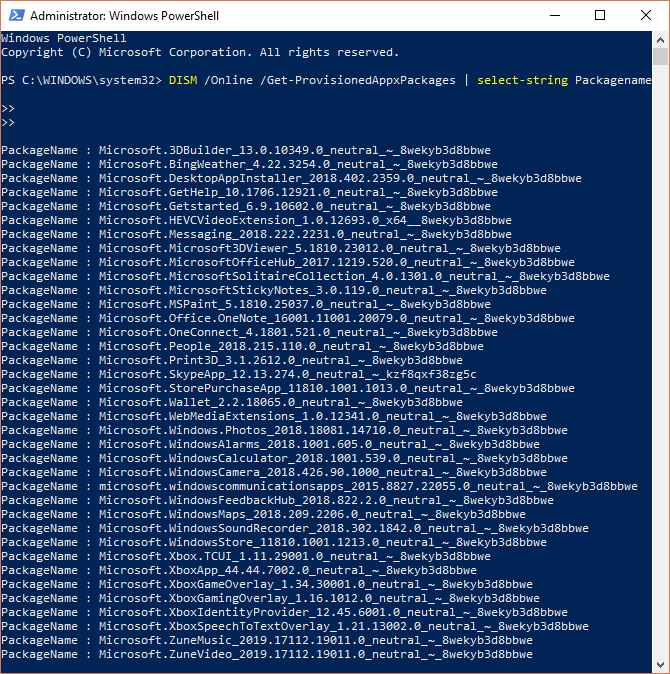
Deleting the apps works a little differently to hiding. First, check to see the entire spectrum of system bloatware using the following command:

DISM /Online /Get-ProvisionedAppxPackages | select-string Packagename

Deleting Windows 10 Bloatware with DISM

You should now see a complete list of installed apps. We can now use the package names in the list to begin removing them. To remove them, use the following command:

DISM /Online /Remove-ProvisionedAppxPackage /PackageName:PACKAGENAME

Where PACKAGENAME is taken from the list we previously generated. As you can see in the below image, I’ve chosen to remove the Microsoft Zune Video package. Once the operation completes successfully, you’ll need to restart your machine for the code to take full effect.

DISM Zune Music

Delete Using Windows10Debloater PowerShell Script

Of course, it wouldn’t be a MakeUseOf article if you didn’t learn how to automate the process. The Windows10Debloater is a PowerShell script developed by Sycnex. It removes almost every additional Windows 10 package from the operating system, stripping it bare. Within that, however, it also removes apps you might find useful, such as TuneInRadio, PowerBI, or the Windows Netflix app.

You can find the Windows10Debloater here (along with the full list of apps for deletion).

On the GitHub page, head to the top-right corner and select Clone or download. Select Download ZIP from the drop-down menu. When the archive downloads, right-click and use your favorite tool to extract the folders.

There are two versions of the main script:

  • Windows10Debloater: This version is silent and gets on with business.
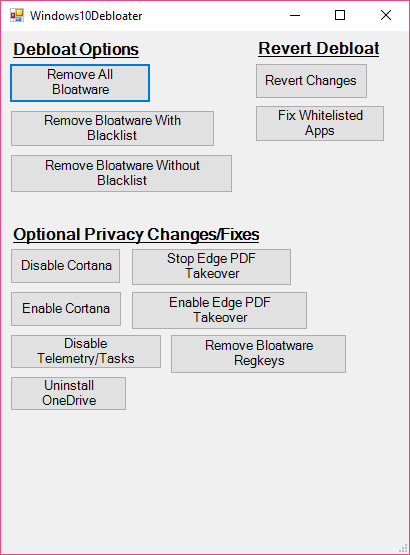
  • Windows10DebloaterGUI: This version has a basic GUI with a few removal options, as well as the Revert Changes options.

The PowerShell script automates the process you went through in the previous section. As a bonus, it also removes the associated Windows Registry entries for the bloatware apps after removal.

Windows10Bloater

Regarding the removal of apps you want to keep, you have two options. One is to head back to the prior section and manually remove the bloatware. The other is to re-enable and install any apps after running the script. Either way is slightly time-consuming, so it really is a personal preference.

Why Delete Windows 10 Bloatware Apps?

While the Windows 10 bloatware doesn’t take up much physical space, it is more about exercising control over your system. Many consider the default apps included in the installation to be “garbage” and while this author would agree in some cases, there are some others I cannot see the point of removing.

Whichever way you feel, you now have the tools to remove each piece of bloatware yourself. Happy obliterating. And if you want to get rid of OneDrive, we’ve figured that out for you, too.

Read the full article: How to Easily Remove Bloatware From Windows 10


Read Full Article
No Internet Connection? 5 Quick Troubleshooting Tips You Can Try

How Can I Find Out Who Blocked Me on Facebook?


facebook-block

What can you do if you suspect someone has blocked you on Facebook? It’s a troubling prospect; someone you thought you were good friends with has suddenly started ignoring you. Are they just busy? Or have you done something wrong?

When these things happen you’ll be left wondering, “Who blocked me on Facebook?” And while there’s no simple answer to this question, this article should help you figure things out.

Use the Facebook Search Function

The first thing you should do is try to determine whether you’ve been blocked or “merely” unfriended (yes, we know that hurts too).

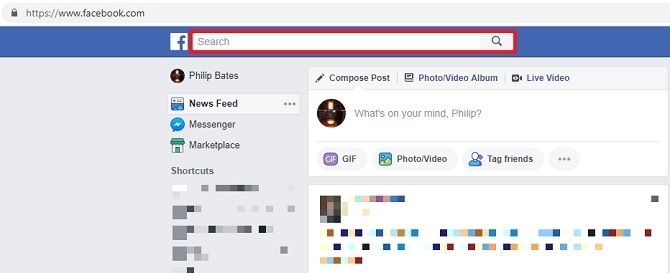
Search for your friend on Facebook. Simply sign in and you’ll see the search box at the top of the page. Similarly, it’s at the top of your feed in the Facebook app.

Search social media friends by clicking on the box at the top of the news feed

A list of profiles and pages will come up. Toggle the results by clicking on People. If you’ve been blocked, their profile won’t show up under this setting. However, if you’re searching All, there’s a chance you will see them, even in the event that they have blocked you.

If you see the display image of the person you’re looking for, click on it. You’ll be able to partially view the profile (depending on their privacy settings) if they’ve simply unfriended you. But if you’ve been blocked, you won’t be able to access anything.

You can then go looking for further indicators. The easiest way is to head to the profile of someone you and the person who has potentially blocked you both know. You’ll be able to see a brief list of their friends; click on See All. It should tell you how many contacts you have in common.

You can scroll through their contacts or just type into the field which reads “Search Friends”.

If you can see their name and profile picture, you can let out a sigh of relief, as they haven’t blocked you.

If you can’t see them, there is another potential answer for their absence. They might have deactivated their whole account. We’ll come back to that idea later.

Can You Read Previous Facebook Messages?

Here’s another trick, albeit one which relies on you having communicated with the person before. This can’t help when it comes to relative strangers. (This shouldn’t bother you too much; then again, being blocked before properly acquainting yourself can be just as damaging.)

Try to remember anything this contact has written on your profile or—if you’ve stopped others from posting on your timeline—a mutual friend’s profile. This could be a birthday message, a festive greeting, or anything incidental.

These will still be visible regardless of your friendship status. However, if you have been blocked, the other person’s profile image won’t appear, or will be replaced by a question mark. Their name might also be covered by black boxes too.

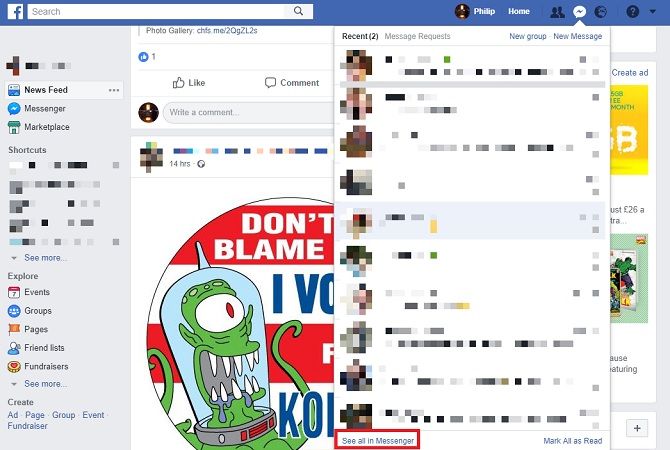
If you’ve previously spoken to this person using Facebook’s Messaging service, this is another indicator. But you must do this via the Facebook website because the app still sometimes shows blocked accounts.

Facebook Messenger chat feature

Go to the Messenger section and click on See All in Messenger in the drop-down menu. Access the conversation you had with the contact. If you’ve been blocked, their profile image won’t load and you won’t be able to click on their name to look at their profile.

You can try to send them a message too—if you’re blocked, your attempts will be unsuccessful. Facebook will tell you there’s been an error.

How can you tell they haven’t just deactivated their Facebook? In most cases, if they have deleted their account their name won’t appear at all. Instead, it will simply read “Facebook User”.

How to Be Certain You’re Blocked on Facebook

The only way you can be 100% percent certain is to ask the person directly. But you probably won’t want to do that (and it’s a little cringeworthy too). It’s better to find sneaky alternatives and infer the truth.

If you follow them on other social media apps, visit their profiles there. If they’ve blocked you elsewhere, it’s a sign that something’s up; otherwise, there might be another reason you can’t find them on Facebook. In the case of the latter, you could contact the person via direct messages on Twitter or Instagram.

Don’t challenge them head-on: you could alternatively tell them you’re worried something’s wrong with their Facebook. Be caring, not confrontational.

You could also involve someone else, although you need to tread carefully here. A mutual friend can at least tell you whether your contact’s profile has been deactivated or deleted.

What to Do If You’ve Been Blocked on Facebook

If it turns out someone has blocked you on Facebook you’ll probably be frustrated and angry, especially if you feel you’ve done nothing wrong.

Nevertheless, in most cases, it’s simply not worth worrying about. It could be something small, like a simple misunderstanding. Or it could just be a clash of personalities. The point is, it’s largely out of your hands.

Ask yourself whether it’s worth losing sleep over. Spoiler alert: it isn’t. It’s only Facebook.

Yes, you could find the person in question and ask why they’ve blocked you. You could find another route to talk to them, and tell them how you feel. Or you could just let it go. After all, why risk causing further friction?

Should You Be Worried About Being Blocked?

Social media is a wonderful thing, giving you access to people you’d otherwise drift away from. It keeps the world connected. Except it can also be a major cause for concern by feeding your worst fears.

That’s why it’s important you remember that everyone has something going on in their lives that they don’t want to share—something that keeps them busy or distracted. It doesn’t always mean they’ve forgotten about you or actively dislike you.

If using social media is making you anxious, be sure to check out these apps designed to improve your mental health.

Read the full article: How Can I Find Out Who Blocked Me on Facebook?


Read Full Article
Zuckerberg denies knowledge of Facebook’s work with GOP opposition research firm


Today in call with reporters preceded by a frantic if fairly uneventful distraction-pushing media blitz, Facebook responded to a damning New York Times story published yesterday that cited interviews with more than 50 sources privy to Facebook’s decision making.

The call kicked off with the operator’s suggestion that Facebook is “happy to take a couple of questions on yesterday’s news” but would prefer to focus on what it wants to talk about — namely anything but the New York Times story. Amidst the strategic fluff, Zuckerberg did come out strongly on one thing — denying any knowledge of or involvement in Facebook’s hiring of Definers Public Affairs, a Washington D.C.-based Republican opposition research firm.

“I learned about this reading it in the New York Times yesterday,” Zuckerberg said. “As soon as I read about this… I got on the phone with our team and we’re no longer working with this firm.”

Facebook used Definers Public Affairs to push negative stories about competitors, including plenty to TechCrunch’s own inboxes, including a report on Apple employee’s lopsided Democratic campaign donations and Google’s “lack of cooperation” with the Senate Intelligence Committee hearing. As Recode reported, Definers Public Affairs set up a Silicon Valley shop last year with the explicit goal of courting the Bay Area’s biggest companies for some lucrative “dark arts” mudslinging.

When pressed to answer to who at Facebook was aware that the company had hired the oppo research firm:

Someone on our comms team must have hired them, in general we need to go through and look at all the relations we have and see if there are more like this.”

Zuckerberg revisited the categorical denial a few times:

“I learned about this yesterday.”

“In general, this kind of firm might be normal in Washington…. but it’s not the kind of firm that Facebook should be working with.”

“This is not the type of work that i want us to be doing so we won’t be doing it.”

“The bottom line here is that as soon as we learned about this, we were no longer working with this firm.”

“As soon as I read it, I looked into if this was the type of firm we wanted to be working with.”

And finally, abdication:

“Look I feel like I’ve answered this question a bunch of times… I’m not sure I have much more to say on that here.”

The notion that the company’s founder and chief executive would be unaware of Facebook’s involvement with the company is… suspect, to put it lightly. It’s a natural assumption that Facebook’s upper echelons would have made the call to begin with, though Zuckerberg stopped just short of making it clear that is was someone else up there, just not him.  Given Sheryl Sandberg’s considerable political savvy, it’s not a stretch to assume that she initiated the contract or at least signed off on it with full knowledge.

Update: One hour and 12 minutes into the call, Zuckerberg addressed Sandberg’s implied involvement. “I want to be clear that i’ve mentioned a number of times that i was not in the loop,” he said. “Sheryl was also not involved. She learned about this at the same time that I did.”

As Facebook coalesces around its PR response, at the moment centered around denying that executives at the company interfered with its own investigation into Russian disinformation, Facebook’s leadership returns to a pattern familiar to anyone who so much as glanced at the New York Times report: Delay, Deny and Deflect, indeed.


Read Full Article
Facebook will pass off content policy appeals to a new independent oversight body


Facebook doesn’t want to be the arbiter of decency when it comes to content policy decisions, similar to how it looked to third-party fact checkers rather than becoming an arbiter of truth. Today on a press call with journalists, Mark Zuckerberg announced that a new external oversight committee would be created in 2019 to handle some of Facebook’s content policy decisions. The body will take appeals and make final decisions. The hope is that beyond the influence of Facebook’s business imperatives or the public’s skepticism about the company’s internal choices, the oversight body can come to the proper conclusions about how to handle false information, calls to violence, hate speech, harassment, and other problems that flow through Facebook’s user generate content network.

“I believe the world is better off when more people have a voice to share their experiences . . . at the same time we have a responsibility to keep people safe” Zuckerberg said. “When you connect 2 billion people, you’re going to see all the good and bad of humanity. Different cultures have different norms, not only about what content is okay, but also about who should be making those decisions in the first place.” He cites how use of a racial slur could be hate speech or condemning hate speech as the kind of decision Facebook could use help with.

Zuckerberg explained that over the past year he’s come to believe that so much power over free expression should not be concentrated solely in Facebook’s hands. That echoes his sentiment from an interview with Ezra Klein earlier this year when he suggested Facebook may need a “supreme court” to decide on controversial issues. Zuckerberg says he sees Facebook’s role as more akin to how a government is expected to reduce crime but not necessarily eliminate it entirely. “Our goal is to err on the side of giving people a voice while preventing real world harm” he writes. “These are not problems you fix, but issues where you continually improve.”

How The Independent Appeals Body Will Work

Zuckerberg describes that when someone initially reports content, Facebook’s systems will do the first level of review. If a person wants an appeal, Facebook will also handle this second level of review and scale up its systems to handle a lot of cases. Then he says “The basic approach is going to be if you’re not happy after getting your appeal answered, you can try to appeal to this broader body. It’s probably not going to review every case like some of the higher courts . . . it might be able to choose which cases it thinks are incredibly important to look at. It will certainly need to be transparent about how it’s making those decisions.

Zuckerberg said Facebook will be working to get the oversight body up and running over the next year. For now, there are plenty of unanswered questions about who will be on the committee, which of the many appeals it will review, and what ensures it’s truly independent from Facebook’s power. “One of the biggest questions we need to figure out in the next year is how to do the selection process for this body so that it’s independent . . . while giving people a voice . . . and keeping people safe. If the group ends up too tightly decided by Facebook it won’t feel like it’s independent enough.” Facebook plans to query experts and start running pilots of the next year to determine what approaches to codify.

Facebook launched an internal appeals system this year that let users request a second review when their content is taken now, and Facebook plans to expand that to allow people to appeal responses when they report other people’s content. But the new independent body will serve as the final level of escalation for appeals

[Update: Since we published this report, Zuckerberg has released a 5000-word letter describing his thoughts on Facebook policy, and the oversight body. You can read it below:]

Posted by Mark Zuckerberg on Thursday, November 15, 2018

Here’s the passage about the oversight committee:

In the next year, we’re planning to create a new way for people to appeal content decisions to an independent body, whose decisions would be transparent and binding. The purpose of this body would be to uphold the principle of giving people a voice while also recognizing the reality of keeping people safe.

I believe independence is important for a few reasons. First, it will prevent the concentration of too much decision-making within our teams. Second, it will create accountability and oversight. Third, it will provide assurance that these decisions are made in the best interests of our community and not for commercial reasons. 

This is an incredibly important undertaking — and we’re still in the early stages of defining how this will work in practice. Starting today, we’re beginning a consultation period to address the hardest questions, such as: how are members of the body selected? How do we ensure their independence from Facebook, but also their commitment to the principles they must uphold? How do people petition this body? How does the body pick which cases to hear from potentially millions of requests? As part of this consultation period, we will begin piloting these ideas in different regions of the world in the first half of 2019, with the aim of establishing this independent body by the end of the year.

Over time, I believe this body will play an important role in our overall governance. Just as our board of directors is accountable to our shareholders, this body would be focused only on our community. Both are important, and I believe will help us serve everyone better over the long term.

Avoiding Or Acknowledging The Weight Of Its Decisions?

The past year has seen Facebook criticized for how it handled calls for violence in Myanmar, harassment and fake news by conspiracy theorists like Alex Jones, election interference by Russian, Iranian, and other state actors, and more. Most recently, the New York Times published a scathing report about how Facebook tried to distract from or deflect criticism of its myriad problems, including its failure to prevent election interference ahead of the 2016 Presidential race.

The oversight committee could both help Facebook make smarter decisions that the world can agree with, and give Facebook a stronger defense to this criticism because it’s not the one making the final policy calls. The approach could be seen as Facebook shirking its responsibility, or as it understanding that the gravity of that responsibility exceeds its own capabilities.

[Update: We’ve updated this story with information from Zuckerberg’s Blueprint letter.]


Read Full Article
Google partners with MotherCoders to bring tech training to moms in New York City


Diversity and inclusion is a topic that all too often starts and ends with white women. MotherCoders, while targeting women, aims to support moms of all backgrounds — whether they be LGBTQ, single and/or people of color.

“If you look at our cohorts, they tend to be really represented,” MotherCoders founder Tina Lee told TechCrunch. “I want to make a cohort that’s truly diverse and inclusive.”

Google, an imperfect company in the realm of diversity and inclusion, has teamed up with nonprofit organization MotherCoders and New York City’s Women.NYC initiative to offer a free, nine-week tech training program for moms. The initiative was born out of the desire to help moms in New York City, Lee said.

“There’s a huge population of very educated people, but moms tend to get pushed out of the workforce,” Lee said. “There’s this ideal worker model where you have to be in all the time, but maybe they need extra time to recover and can’t do all of the things at the same time. In many cases, we end up with a lot of moms who are overeducated and underemployed. There’s no reason why moms shouldn’t be included in the diversity and inclusion initiatives going on.”

MotherCoders is geared toward moms who want to re-enter the workforce, start their own company or change careers. Through the nine-week program, moms learn HTML, CSS and JavaScript, in addition to tech trends and issues in the industry. The program also offers on-site childcare at no additional cost.

“Our vision with women.nyc is to make NYC the nation’s best city for women to succeed across sectors – including tech, where women have historically been underrepresented,” NYC Deputy Mayor Alicia Glen said in a statement to TechCrunch. “MotherCoders offers us a compelling way to address this issue by combining best-in-class training with child care, at once removing two of the major barriers to women in tech. This partnership will help us build a tech ecosystem that is truly representative of NYC.”

Since its launch in 2015 in San Francisco, MotherCoders has graduated five classes of women, who have seen an average salary increase of 68 percent. MotherCoders usually costs about $7,000 per student, but in this case, Google is footing the entire bill.

“Google has been proud to support the amazing work of MotherCoders for the last three years and we’re thrilled to now welcome them to the NYC community,” Google NYC Head of External Affairs Carley Graham Garcia said in a statement. “Creating opportunities for everyone and increasing access to CS Education is something we have in common with MotherCoders and Women.nyc and we can’t wait to see the impact this program has on women across the city.”

In order to apply, you must be at least 21 years old, have a college degree and have at least tried learning how to code. The cohort is accepting applications starting today and begins February 2019.

“Right now, we require a college degree just because they’re the easiest to onramp into tech companies,” Lee said. But as the tech industry becomes more inclusive of people without college degrees, Lee said MotherCoders will follow suit.

While MotherCoders won’t necessarily make everyone who goes through the program tech job-ready, graduates of the program have gone on to work at companies like Google, Airbnb and Code for America.


Read Full Article
What the FDA’s restriction of e-cig flavors means for Juul


FDA Commissioner Scott Gottlieb has revealed his plans to combat underage use of e-cigs and nicotine, which has grown 78 percent among high school students from 2017 to 2018.

The commissioner today announced a plan that would remove all flavored electronic nicotine delivery system products — with the exception of tobacco, mint, menthol, or non-flavored products — from any store where children under the age of 18 can see them.

So what does this mean for Juul, a company that reached a $10 billion valuation 4x faster than Facebook and currently owns more than 70 percent of the e-cig market?

One result is that Juul Labs is likely now just as desperate for minors to quit vaping as the FDA. The commissioner has made it abundantly clear that if he doesn’t see a significant decrease in underage use, he’s willing to pull the plug on the e-cig industry.

“I could take more aggressive steps,” Gottlieb said in a written statement. “I could propose eliminating any application enforcement discretion to any currently marketed ENDS product, which would result in the removal of ALL such products from the marketplace. At this time, I am not proposing this route, as I don’t want to foreclose opportunities for currently addicted adult smokers. But make no mistake. If the policy changes that we have outlined don’t reverse this epidemic, and if the manufacturers don’t do their part to help advance this cause, I’ll explore additional actions.”

Yes, it seems remarkable that we may live in a world where cigarettes, the country’s leading cause of preventable death, are available at grocery stores but e-cigarettes, which are said to be 95 percent less dangerous, are illegal. But that’s exactly what might happen if the government, e-cig manufacturers, and consumers don’t work together to end underage use of nicotine.
Though some critics would argue otherwise, Juul has maintained that it never intended to sell to minors. Which doesn’t change the fact that the company’s revenue is largely dependent on the nicotine addicted as a category.

The American economy was essentially created upon the back of Big Tobacco. And 50 years ago, the industry got away with marketing to young people and creating several generations of addicted adults to what may have been the most successful consumer product ever. To say that it was lucrative would be an understatement. It still is.

Fiscally, would Juul enjoy being the next Philip Morris? Undoubtedly. But it would rather be the next Nicoderm CQ or Nicorette than be illegal. Hell yes! Right now, the company is still hanging in there. But the only way to prevent the company from being officially banned in the U.S. is to find a way to get kids to stop vaping.

For this reason, Juul Labs is going a few steps further than the FDA’s new policy. Not only is the company removing non-tobacco flavors from convenience stores or other stores where people under 18 can shop, but it’s also removing all non-tobacco flavors from vape shops and age-restricted specialty stores. From here on out, the only place to buy Cucumber, Creme, Fruit and Mango (the most popular flavor) Juul pods is on the Juul website.

The company will also increase its secret shopper program from 500 visits/month to 2,000 visits/month at the more than 90,000 stores where Juul products are sold.

Juul’s plan, announced Tuesday, also includes removing the company’s Instagram and Facebook channels, and limiting its Twitter account to non-promotional information.

Alongside cracking down on flavored ENDS products, Gottlieb is also looking into banning combustible menthol cigarettes and all flavored cigars from the market. Mint and menthol ENDS products could also be on the chopping block.

“I’m deeply concerned about the availability of menthol-flavored cigarettes,” said Gottlieb in a written statement. “I believe these menthol-flavored products represent one of the most common and pernicious routes by which kids initiate on combustible cigarettes.”

Not only does the masking effect of menthol make combustible menthol cigarettes more attractive to youth, but Gottlieb went on to say that “they exacerbate troubling disparities in health related to race and socioeconomic status” and “disproportionately and adversely affect underserved communities.”

For these reasons, the FDA is taking a hard stance on menthol combustible cigarettes and flavored cigars, a move that will surely mobilize big tobacco in yet another battle in their decades-long war against regulators. Until restrictions can be enforced on these combustible products, however, the FDA is allowing menthol and mint flavored ENDS products to be sold in convenience stores as well as vape shops.

But Gottlieb will be keeping a close watch on it:

“I’m also aware that there are potentially important distinctions even between mint- and menthol-flavored e-cigarette products,” he wrote. “I’m particularly concerned about mint-flavored products, based on evidence showing its relative popularity, compared to menthol, among kids. So, I want to be clear that, in light of these concerns, if evidence shows that kids’ use of mint or menthol e-cigarettes isn’t declining, I’ll revisit this aspect of the current compliance policy.”

In response to the FDA’s announced plan, a Juul Labs spokesperson had this to say:

Commissioner Gottlieb has made it clear that “preventing youth initiation on nicotine is a paramount imperative.” As we said earlier in the week, the numbers tell us underage use of e-cigarette products is a problem that requires immediate action. That is why we implemented our action plan. We are committed to working with FDA, state Attorneys General, local municipalities, and community organizations as a transparent and responsible partner in this effort.

The FDA statement, which is more than 4,000 words, thoroughly explains that the agency is trying to strike a balance between ensuring adult smokers have an alternative through ENDS and protecting a generation of young people from becoming addicted to nicotine.

In light of the FDA’s opposition to menthol, Gottlieb addresses the distinction between allowing menthol/mint and tobacco flavored ENDS into convenience stores opposed to other flavors:

This distinction among flavors seeks to maintain access for adult users of these products, including adults who live in rural areas and may not have access to an age-restricted location, while evidence of their impacts continues to develop. It also recognizes that combustible cigarettes are currently available in menthol in retail locations that are not age-restricted. This approach is informed by the potential public health benefit for adult cigarette smokers who may use these ENDS products as part of a transition away from smoking.

As far as online sales go, the FDA is looking to ensure that all flavored ENDS products sold online go through a rigorous age-verification process.

Gottlieb also addressed the potential for new products to reverse the growth of underage ENDS use, and said that the agency would work to make the application review process more efficient.

“In the coming months, CTP plans to issue additional policies and procedures to further make sure that the process for reviewing these applications is efficient, science-based and transparent,” said Gottlieb. “We’ll also explore how to create a process to accelerate the development and review of products with features that can make it far less likely that kids can access an e-cigarette.”

Juul Labs has briefly discussed its vision for a next-generation e-cig, which the company has been working on for a year. The device would incorporate Bluetooth, letting users monitor and control their nicotine intake. However, Bluetooth might also allow for geofencing to prevent kids from using the product at school, as well as a smartphone-based lock that would only allow the Juul to be used by someone who has verified they’re over 21.


Read Full Article