05 November 2018

What Does Apple Know About You? Request Your Personal Data Now


what-apple-knows

Apple now makes it easy to download a copy of the data associated with your Apple ID. Once you’ve lodged your request, the company will prepare your archives of personal data and notify you when they’re ready.

The service helps you understand what data Apple is storing against your Apple ID. You can also use it to grab a copy of your iCloud data, including mail, photos, and documents.

So here’s how you request your own download, and everything you get.

What Data Can You Download From Apple?

You can choose which data associated with your account that you want to download. Apple lets you choose from the following categories:

  • App Store, iTunes Store, iBooks Store and Apple Music activity
  • Apple ID account and device information
  • Game Center activity
  • Maps issues you’ve reported
  • Marketing communications, downloads, and other activity
  • Apple Pay activity
  • Apple Online Store and Retail Store activity
  • AppleCare support history, repair requests and more
  • Other data

You can also choose the following iCloud data to be included:

  • iCloud Bookmarks and Reading List
  • iCloud Calendars and Reminders
  • iCloud Notes
  • iCloud Contacts
  • iCloud Drive files and documents
  • iCloud Mail
  • iCloud Photos

Some of this information stored by Apple for Apple’s benefit, while other categories are your own data, contacts, photos and so on.

How to Request Your Apple Data Download

Requesting your Apple data download is easy. First head to privacy.apple.com and log in with your Apple ID username (email address) and password.
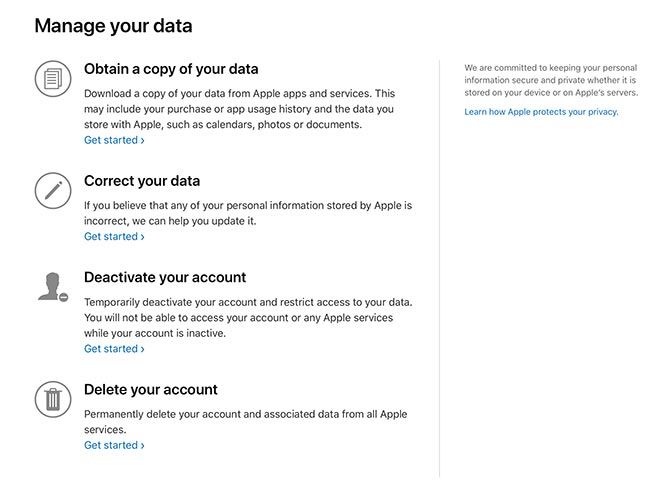
Apple Privacy Manage Your Data

Once you’ve logged in you’ll see the “Manage your data” screen, and at the top of the list will be an option to Obtain a copy of your data. Click Get started to begin.
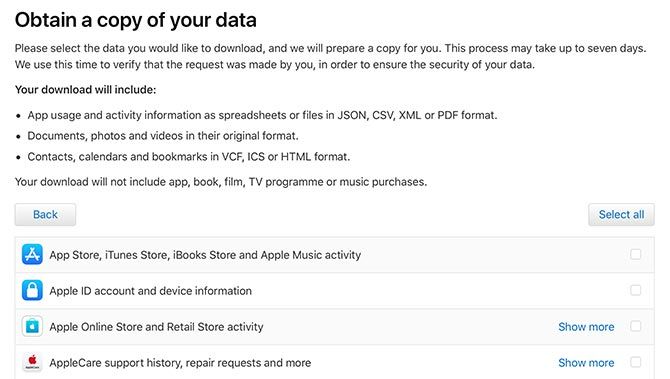
Apple Privacy Obtain Your Data

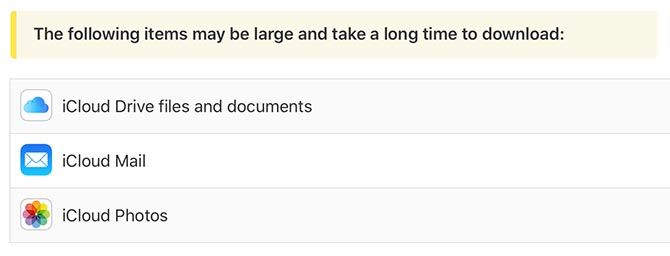
Now you’re able to specify exactly what you want to download. You can click Select all to grab a copy of everything, or just pick from the categories that interest you. Note the separate section at the bottom of the page with the warning about potentially large file sizes.

Click Continue when you’re ready.
Apple Privacy Large Download

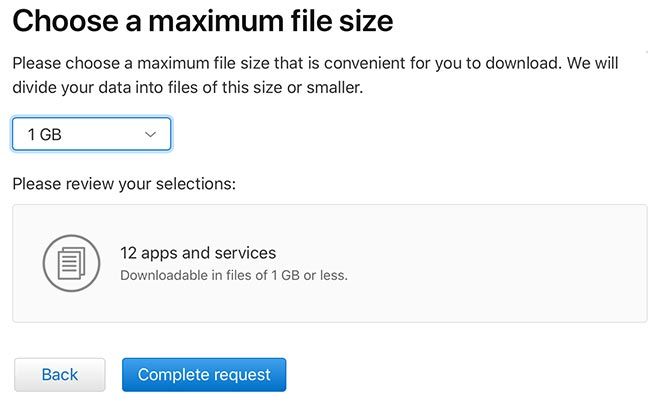
On the next screen you’ll be able to specify how large you want your files to be. Apple will split your data download into files of this size, so you can download them in smaller chunks (handy for slower, patchier connections). Click Complete request to finalize your selection and sit back.
Apple Privacy Choose File Size

Apple will then email you at the address associated with your Apple ID. You should also receive an email notifying you that your request is pending. Apple sent an email to both my Apple ID associated email address, and my iCloud email address.

How Long Does the Download Take to Prepare?

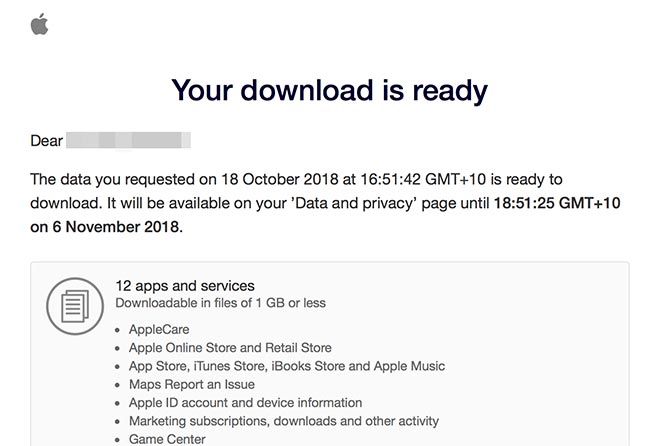
I requested my download for all items except big iCloud libraries on the 18th, and received an email on the 22nd stating that the download was ready.
Apple Privacy Data Ready

Selecting more or fewer items may impact the time it takes Apple to process your request, but expect to wait a few days at least.

What You Get in the Apple Data Download

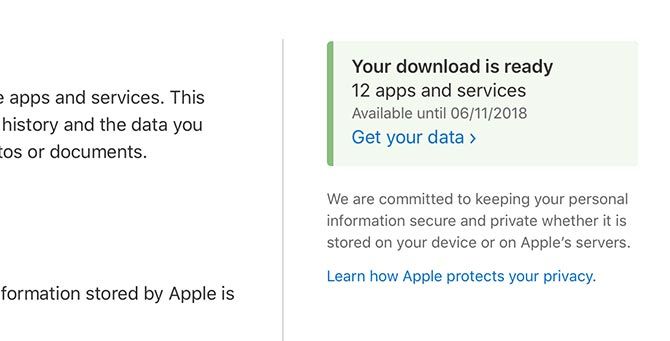
Once Apple notifies you that your download is ready, login to privacy.apple.com (or follow the link in your email). You should now see a new green notification to the right of the “Manage your data” screen. Click Get your data to see a list of items for download.
Apple Privacy Get Your Data

You can download each data category independently. Since the download will only be available for around two weeks, make sure you download what you want before it’s deleted and you have to make another request.
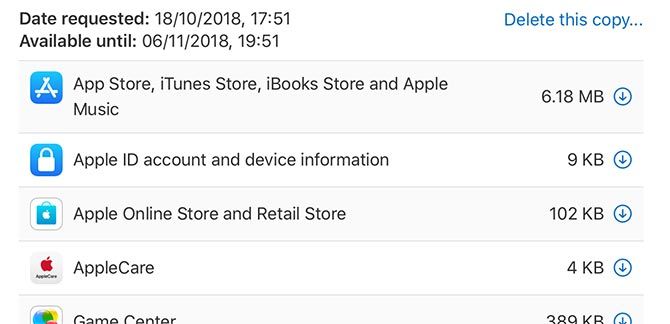
Apple Privacy Data Download

Most of the data is stored in CSV spreadsheet files (that formatted perfectly using Preview on my Mac). The contents are detailed, but unsurprising. I found a list of every song I’ve ever listened to on Apple music, my musical likes and dislikes, and both free and paid App Store purchase history.
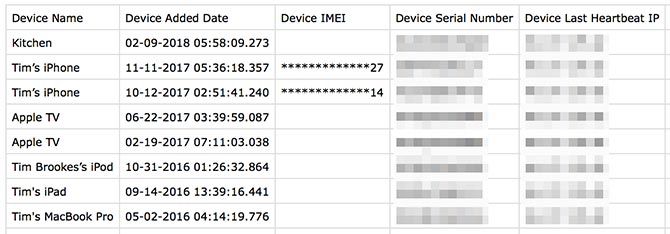
Apple Privacy iCloud Devices

There’s information about all your linked Apple devices, including names, time zones, and the last registered IP address associated with that device. I also found a folder with Apple retail store receipts, which included an invoice for a repair covered by AppleCare, but no invoice for the original MacBook Pro transaction in 2012.

I excluded mail, photos, and iCloud Drive files from my download, but included everything else. The total download size was under 100MB, with the largest download being Apple Notes on account of included attachments.
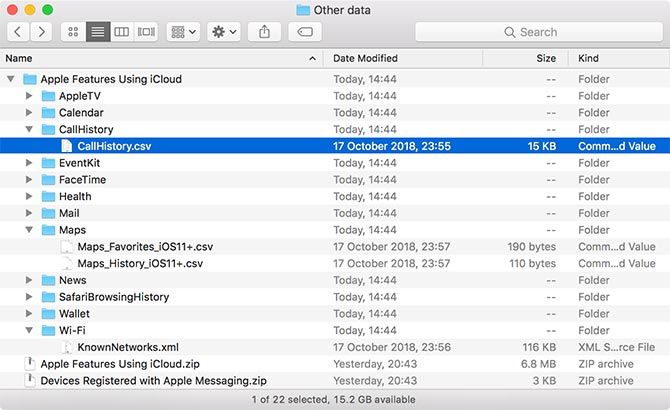
Apple Privacy "Other Data" Folder

The vaguely-titled “Other Data” download included a list of “favorite” places in Apple Maps (it was thin, and I don’t remember using the feature), my Safari browsing history, call history, a list of known Wi-Fi networks associated with my account, and a long list of iCloud usage events (adding contacts, uploading photos) and the device associated with each one.

Ultimately none of this should surprise you, since it’s all disclosed in the terms of service you agreed to when you started using your Apple ID (and the many amendments since). You did read that big long terms of service document, right? You can read about how Apple uses this data on their privacy information page.

How to Deactivate or Delete Your Apple ID

Apple’s privacy minisite also allows you to deactivate and delete your Apple ID should you no longer need it. Deactivation is a temporary measure, and will mean that you cannot use any Apple services associated with that account.
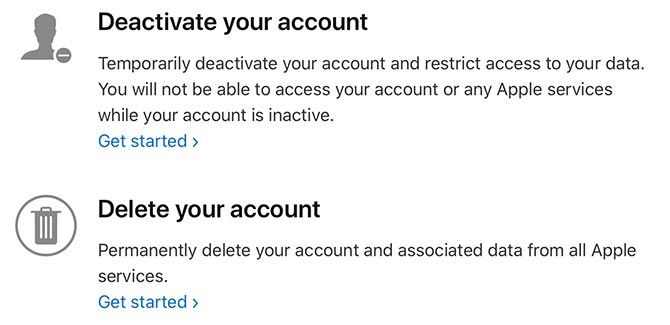
Delete or Deactivate Your AppleID

Deleting your account is permanent, but it’s also the only way to delete your data from Apple’s servers. You’ll have to register for a new account if you want to start afresh.

Stay in Control of Your Personal Data

Downloading your data will help you understand what data is held against your account. Never give someone else your Apple ID login information, since they could potentially get hold of everything in this download.

Apple isn’t the only company that makes it easy to get a copy of your data. Social media giant Facebook allows you to download your profile data too, and it generally doesn’t take as long as Apple’s download to prepare.

Read the full article: What Does Apple Know About You? Request Your Personal Data Now


Read Full Article

Korean AI startup Skelter Labs raises $10M to expand to Southeast Asia


Korean AI startup Skelter Labs is expanding to Southeast Asia after it pulled in $10 million in new funding led by Singapore-based VC firm Golden Gate Ventures.

Skelter Labs was founded in 2015 by founded by Ted Cho, the former engineering site director at Google Korea. It started out developing apps and services that made use of AI but then it pivoted to focus fully on AI tech, which it licenses out to companies and corporations that it works with. This new money is aimed at enabling it to move into Japan and parts of Southeast Asia, with Vietnam, Thailand and Malaysia specifically mentioned

The startup raised a $9 million seed round earlier this year, and those investors have returned to join Golden Gate this time around. They include KakaoBrain — the AI unit of Korean messaging giant Kakao — Kakao’s K-Cute venture arm, Stonebridge Ventures and Lotte Homeshopping, the TV and internet shopping business owned by multi-billion dollar retail giant Lotte.

More specifically, Seoul-based Skelter Labs works on AI in the context of vision and speech, conversation, and context recognition, while it goes after customers in areas that include manufacturing, customer operations, device interaction, and consumer marketing.

The startup doesn’t disclose specific customers, but it previously told TechCrunch that its vision is to bring its machine learning technology to daily life and schedules. Possible examples of that might be could include “intelligent virtual assistant technology that can be widely applied to various areas including smart speakers, smartphones, home appliances, automobiles and wearable devices.”

Golden Gate is one of Southeast Asia’s longest running tech VC firms. This deal is part of its recently announced third fund, which is $100 million in size.

In a statement, Skelter Labs CEO Cho paid tribute to the VC’s strong footprint in Southeast Asia that he said could open doors for the company. Startups in Golden Gate’s portfolio that might be of particular interest could include mobile listings startup Carousell, auto portal Carro, fashion commerce site Grana and online furnishings seller Hipvan.


Read Full Article

04 November 2018

Why we lie to ourselves, every day


Human action requires motivation, but what exactly are those motivations? Donating money to a charity might be motivated by altruism, and yet, only 1% of donations are anonymous. Donors don’t just want to be altruistic, they also want credit for that altruism plus badges to signal to others about their altruistic ways.

Worse, we aren’t even aware of our true motivations — in fact, we often strategically deceive ourselves to make our behavior appear more pure than it really is. It’s a pattern that manifests itself across all kinds of arenas, including consumption, politics, education, medicine, religion and more.

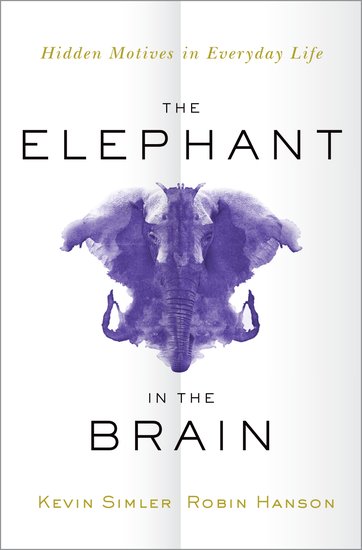
In their book Elephant in the Brain, Kevin Simler, formerly a long-time engineer at Palantir, and Robin Hanson, an associate professor of economics at George Mason University, take the most dismal parts of the dismal science of economics and weave them together into a story of humans acting badly (but believing they are great!) As the authors write in their intro, “The line between cynicism and misanthropy — between thinking ill of human motives and thinking ill of humans — is often blurry.” No kidding.

Elephant in the Brain by Kevin Simler and Robin Hanson. Oxford University Press, 2018

The eponymous elephant in the brain is essentially our self-deception and hidden motivations regarding the actions we take in everyday life. Like the proverbial elephant in the room, this elephant in the brain is visible to those who search for it, but we often avoid looking at it lest we get discouraged at our selfish behavior.

Humans care deeply about being perceived as prosocial, but we are also locked into constant competition, over status attainment, careers, and spouses. We want to signal our community spirit, but we also want to selfishly benefit from our work. We solve for this dichotomy by creating rationalizations and excuses to do both simultaneously. We give to charity for the status as well as the altruism, much as we get a college degree to learn, but also to earn a degree which signals to employers that we will be hard workers.

The key is that we self-deceive: we don’t realize we are taking advantage of the duality of our actions. We truly believe we are being altruistic, just as much as we truly believe we are in college to learn and explore the arts and humanities. That self-deception is critical, since it lowers the cost of demonstrating our prosocial bona fides: we would be heavily cognitively taxed if we had to constantly pretend as if we cared about the environment when what we really care about is being perceived as an ethical consumer.

Elephant in the Brain is a bold yet synthetic thesis. Simler and Hanson build upon a number of research advances, such as Jonathan Haidt’s work on the righteous mind and Robert Trivers work on evolutionary psychology to undergird their thesis in the first few chapters, and then they apply that thesis to a series of other fields (ten, in fact) in relatively brief and facile chapters to describe how the elephant in the brain affects us in every sphere of human activity.

Refreshingly, far from being polemicists, the authors are quite curious and investigatory about this pattern of human behavior, and they realize they are pushing at least some of their readers into uncomfortable territory. They even begin the book by stating that “we expect the typical reader to accept roughly two-thirds of our claims about human motives and institutions.”

Yet, the book is essentially making one claim, just applied in a myriad of ways. It’s unclear to me who the reader would be who accepts only parts of the book’s premise. Either you have come around to the cynical view of humans (pre or post book), or you haven’t — there doesn’t seem to me to be a middle point between those two perspectives.

Worse, even after reading the book, I am left completely unaware of what exactly to do with the thesis now that I have read it. There is something of a lukewarm conclusion in which the authors push for us to have greater situational awareness, and a short albeit excellent section on designing better institutions to account for hidden motivations. The book’s observations ultimately don’t lead to any greater project, no path toward a more enlightened society. That’s fine, but disappointing.

Indeed, for a book that arguably strives to be optimistic, I fear its results will be nothing more than cynical fodder for Silicon Valley product designers. Don’t design products for what humans say they want, but design them to punch the buttons of their hidden motivations. Viewed in this light, Elephant in the Brain is perhaps a more academic version of the Facebook product manual.

The dismal science is dismal precisely because of this cynicism: because as a project, as a set of values, it leads pretty much nowhere. Everyone is secretly selfish and obsessed with status, and they don’t even know it. As the authors conclude in their final line, “We may be competitive social animals, self-interested and self-deceived, but we cooperated our way to the god-damned moon.” Yes we did, and it is precisely that surprise from such a dreary species that we should take solace in. There is indeed an elephant in our brain, but its influence can wax and wane — and ultimately humans hold their agency in their own hands.


Read Full Article
Facebook reorganizes Oculus for AR/VR’s long-haul


Facebook is again looking to whip Oculus into shape for its 10-year journey towards making virtual reality mainstream. According to two sources, Facebook reorganized its AR and VR team this week from a divisional structure focused around products to a functional structure focused around technology areas of expertise. While no one was laid off, the change could eliminate redundancies by uniting specialists so they can iterate towards long-term progress rather than being separated into groups dedicated to particular gadgets.

Facebook confirmed the reorg to TechCrunch, with a spokesperson providing this statement: “We made some changes to the AR/VR organization earlier this week. These were internal changes and won’t impact consumers or our partners in the developer community.” Oculus CTO John Carmack and Oculus co-founder/newly-promoted Head of PC VR Nate Mitchell will remain in their leadership positions within VP of AR/VR Andrew ‘Boz’ Bosworth’s hardware wing of the company.

The shift obviously communicates that Facebook believes Oculus could be running more effectively. Organizing the company around areas of expertise rather than broader divisions is probably more appropriate for a moonshot effort that can’t afford redundancies, on the other hand, keeping expertise siloed could isolate new approaches and advancements from reaching other teams. As the company builds out its first full lineup of headsets, there seems to be significant overlap in the tech problems and products bring tackled by those working on mobile and PC products.

TechCrunch reported earlier this week that the company is planning to release a new Rift headset as early as 2019, possibly called the Rift S, which will featured upgraded displays and an inside-out tracking system. The company’s “Rift 2” project, codenamed Caspar, was left behind in the reorganization, a source tells us. We can’t confirm whether any other products or concepts have been shelved.

While an immersive virtual world that users can hang out and communicate in certainly seems to fit Facebook’s broader mission, the company has spent the better part of the past few years deciding how a costly, ambitious venture like Oculus fits into its corporate structure.

First, things went smoothly. The company and its empowered co-founders were building out a developer network and prepping for the launch of their Rift headset after creating a successful partnership with Samsung for the Gear VR. Then, the company’s good fortune turned as the Rift headset was racked by expensive delays and Oculus failed to ship the company’s Touch motion controllers at launch losing some initial ground to HTC. 

By the end of 2016, it was announced that co-founder Brendan Iribe was out as CEO and that the company would be reorganizing around divisions focused on things like PC VR, mobile and content with Xiaomi exec Hugo Barra coming aboard as VP of VR to lead the new effort working directly beneath CEO Mark Zuckerberg. An additional layer of oversight has been built in since then, with Bosworth was put in charge of the company’s consumer hardware ambitions with Oculus as a central pillar. His title is now VP of AR/VR.

The absorption of Oculus deeper into Facebook’s corporate structure was a trend that soon replicated itself as the company looked to rein in the independent teams under a more cohesive vision. The culmination of this was a major executive reshuffle earlier this year that changed the landscape for how divisions within the company were managed.

Now, they’re changing things up even more.

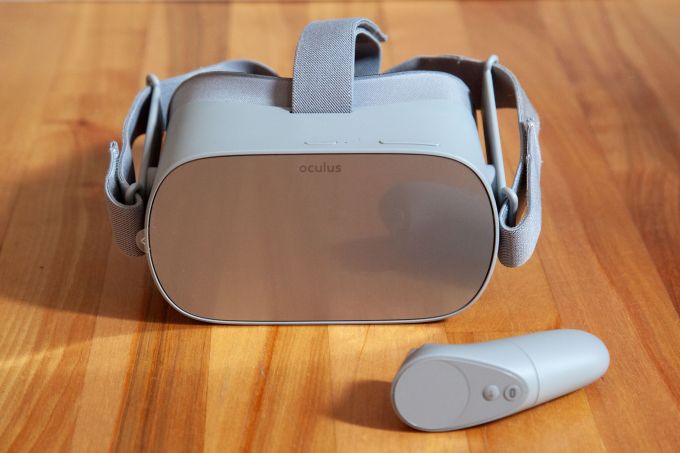
Oculus Go

The new structure sounds like it could coordinate efforts around more general lines like hardware and software allowing insights to flow more intuitively across Facebook’s planned devices.

Given the slow adoption of VR and engineering challenges of AR headsets, which at TechCrunch’s LA conference last month Facebook’s head of AR Ficus Kirkpatrick confirmed it was building, this structure could help Oculus iterate its way to long-term success rather than just getting the next product out the door.

If Facebook is going to beat companies solely focused on AR like Magic Leap, and potential incumbent invaders like Apple if it so chooses, it needs to maximize efficiency. And if it’s going to get both developers and users excited about these next-generation computing platforms, it will have to produce products that make cutting-edge technologies feel unified and accessible. That’s a lot easier when everyone’s not stepping on each other’s virtual shoes.


Read Full Article
Facebook reorganizes Oculus for AR/VR’s long-haul


Facebook is again looking to whip Oculus into shape for its 10-year journey towards making virtual reality mainstream. According to two sources, Facebook reorganized its AR and VR team this week from a divisional structure focused around products to a functional structure focused around technology areas of expertise. While no one was laid off, the change could eliminate redundancies by uniting specialists so they can iterate towards long-term progress rather than being separated into groups dedicated to particular gadgets.

Facebook confirmed the reorg to TechCrunch, with a spokesperson providing this statement: “We made some changes to the AR/VR organization earlier this week. These were internal changes and won’t impact consumers or our partners in the developer community.” Oculus CTO John Carmack and Oculus co-founder/newly-promoted Head of PC VR Nate Mitchell will remain in their leadership positions within VP of AR/VR Andrew ‘Boz’ Bosworth’s hardware wing of the company.

The shift obviously communicates that Facebook believes Oculus could be running more effectively. Organizing the company around areas of expertise rather than broader divisions is probably more appropriate for a moonshot effort that can’t afford redundancies, on the other hand, keeping expertise siloed could isolate new approaches and advancements from reaching other teams. As the company builds out its first full lineup of headsets, there seems to be significant overlap in the tech problems and products bring tackled by those working on mobile and PC products.

TechCrunch reported earlier this week that the company is planning to release a new Rift headset as early as 2019, possibly called the Rift S, which will featured upgraded displays and an inside-out tracking system. The company’s “Rift 2” project, codenamed Caspar, was left behind in the reorganization, a source tells us. We can’t confirm whether any other products or concepts have been shelved.

While an immersive virtual world that users can hang out and communicate in certainly seems to fit Facebook’s broader mission, the company has spent the better part of the past few years deciding how a costly, ambitious venture like Oculus fits into its corporate structure.

First, things went smoothly. The company and its empowered co-founders were building out a developer network and prepping for the launch of their Rift headset after creating a successful partnership with Samsung for the Gear VR. Then, the company’s good fortune turned as the Rift headset was racked by expensive delays and Oculus failed to ship the company’s Touch motion controllers at launch losing some initial ground to HTC. 

By the end of 2016, it was announced that co-founder Brendan Iribe was out as CEO and that the company would be reorganizing around divisions focused on things like PC VR, mobile and content with Xiaomi exec Hugo Barra coming aboard as VP of VR to lead the new effort working directly beneath CEO Mark Zuckerberg. An additional layer of oversight has been built in since then, with Bosworth was put in charge of the company’s consumer hardware ambitions with Oculus as a central pillar. His title is now VP of AR/VR.

The absorption of Oculus deeper into Facebook’s corporate structure was a trend that soon replicated itself as the company looked to rein in the independent teams under a more cohesive vision. The culmination of this was a major executive reshuffle earlier this year that changed the landscape for how divisions within the company were managed.

Now, they’re changing things up even more.

Oculus Go

The new structure sounds like it could coordinate efforts around more general lines like hardware and software allowing insights to flow more intuitively across Facebook’s planned devices.

Given the slow adoption of VR and engineering challenges of AR headsets, which at TechCrunch’s LA conference last month Facebook’s head of AR Ficus Kirkpatrick confirmed it was building, this structure could help Oculus iterate its way to long-term success rather than just getting the next product out the door.

If Facebook is going to beat companies solely focused on AR like Magic Leap, and potential incumbent invaders like Apple if it so chooses, it needs to maximize efficiency. And if it’s going to get both developers and users excited about these next-generation computing platforms, it will have to produce products that make cutting-edge technologies feel unified and accessible. That’s a lot easier when everyone’s not stepping on each other’s virtual shoes.


Read Full Article
03 November 2018

The iPhone is reportedly getting 5G in 2020


The first 5G phones are set to start arriving next year. Motorola plans to bring next-gen connectivity via a Mod for the Z3, and companies like LG and OnePlus have promised to deliver the tech baked into handsets at some point in 2019. iPhone users, on the other hand, may have to wait a bit longer.

The technology is, of course, an inevitability for Apple (along with everyone else, really), so it’s just a question of when. A new report from Fast Company (via the Verge) puts the timing around a year and half out.

The “source with knowledge of Apple’s plans” put the 5G iPhone’s arrival at some point in 2020, with Intel supplying the tech this time out. Apparently Apple and Intel are going through a bit of a rough patch of late, courtesy of heat/battery issues with the 8060 5G modem. Of course, things aren’t rough enough for the company to hit up Qualcomm again.

Given the on-going battle between the two companies, that’s probably a bridge too far. Instead, Apple’s holding out for Intel’s 8161 chip. 5G presents a solid opportunity for Intel to regain some of the substantial ground it ceded to Qualcomm in the mobile market the last time out.


Read Full Article

5 Food Apps and Sites to Cook Delicious and Healthy Meals for Beginners


cooking-sites-beginners

Whether you’re new in the kitchen or a practiced cook, everyone has one regular objective above all else: to cook a delicious and healthy meal. These apps and sites make that easy for anyone, especially beginners.

No matter what age you decide to start cooking, you’ll need a little guidance. You can enroll for free online cooking and baking classes, but the best way to learn is by doing it in your own kitchen with your own tools. And if a few people on the internet can help, then nothing like it, right?

Project Foodie (Web, iOS): Cook Along in Real Time With Chefs

Cooking shows and cookbooks assume that the viewer or reader has a decent set of cooking skills. They rush through things like the amount of time to boil something or the “smoking temperature of oil”, or take shortcuts like showing pre-diced veggies. It never feels like you’re cooking along with the chef.

Project Foodie reimagines this by showing you every single step of the cooking process, which you do at the same time as the chef. When this site says it takes 30 minutes to make a dish, it means you’ll see a 30 minute video where you follow each step with the chef. This “cookalong” is different from anything else you’ll see online.

Project Foodie already has a huge collection of videos on its YouTube channel and website, all of which are made by professional chefs and shot by a professional video crew. No edits, no cuts, and high-quality production make this something you want to cook along with. Try any of the recipes, you’ll be able to follow it like no other recipe before.

The mobile app adds extra features, like ordering groceries online based on the dish you want to make, as well as timers and other tools. It’s not essential though, and you can follow along to the video alone as professional chefs share recipes on YouTube.

Download: Project Foodie for iOS (Free)

The Cook’s Thesaurus (Web): Everything You Need About Any Ingredient

the cook's thesaurus suggests food substitutes

Feel like you have a dumb question about something and don’t want to ask it because it’s embarrassing? Turn to The Cook’s Thesaurus, a single site with everything you’d need to know about an ingredient, including substitutions.

Run a search on the site for what you need to look up, whether it’s a vegetable, fruit, meat, fish, dairy product, grain, liquid, or anything else. You’ll immediately find what it is made of, how it is typically used in recipes online, and tips on how to use it. Most ingredients also have a suggested substitute in case you don’t have the ingredient with you.

You can browse The Cook’s Thesaurus as well, but there seems little need to do that. This website will be most useful when you are looking for information, so the search feature is what matters. Bookmark it; you never know when you may need it in the future.

Only Eats (Web): Trending Recipes With Nutritional Information

Only Eats has the web's most popular recipes right now, with nutritional information

You’re always looking for something new and interesting to eat. So what’s trending on the web in terms of recipes, especially on a cooking site for beginners? Only Eats has that ready, along with necessary nutritional information about it.

The site is an aggregator, which means it takes links from other popular recipe sites. The list of recipes shows a picture and a name, along with the option to save it for the future if you create an account. You can always bookmark it at the source site though. And of course, you can filter the recipes based on different criteria, such as healthy, simple, diets, type of meal, and sources.

Each recipe also has an “info” button that shows you its main ingredients as well as nutritional information. Only Eats claims it calculates this nutritional information based on USDA and FDA guidelines. Use this only as a base metric though, not as an accurate reading of what you’re cooking.

Basics With Babish (Web): Learn the Basic Tools and Techniques

If you’re new in the kitchen, you need to know the basic tools and techniques that are often referenced in cookbooks and recipes. To learn those, watch this playlist of YouTube videos.

Host Andrew Rea goes through a series of topics that will have you ready to cook anything that you come across. This includes tools, sauces, steak, pasta, chicken, pantry, eggs, and more. The videos are between five and 12 minutes, and Rea has a remarkable ability to simplify concepts and techniques.

Incidentally, Binging With Babish is one of the best sites to find anything shown in movies and TV shows. Rea looks up dishes talked about on screen and recreates them with the best possible recipe to show you how to make them.

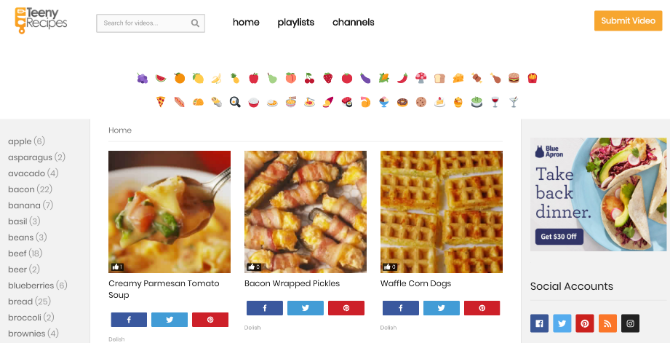
Teeny Recipes (Web): Facebook Recipe Videos, With Full Text

See all facebook food recipes at Teeny Recipes

Video recipes are better when you’re starting out, and Facebook is a treasure-trove of them. Some of the top websites share their secrets on the social network, as do bloggers and home chefs. But it’s hard to search on Facebook. So here’s something easier. If a recipe is popular on Facebook, Teeny Recipes will have it.

Teeny Recipes has a simple list of the latest recipes, as well as the most popular posts on the site. You can filter by ingredients as well, or search for something you want. Playlists and channels are two more ways to browse the site.

For a lot of the videos, Teeny Recipes also draws the full text of ingredients and cooking steps. This is vital since as good as a video is to see what you have to do, you still need that information listed somewhere in text.

Best Sites to Simplify Cooking

With these five sites, you should be able to get started with the basics of cooking, from learning techniques to cooking along with a chef so that you don’t mess up any step. But that doesn’t mean you stop at this.

There are sites that tell you the best “average” recipe based on the web’s most popular recipes for a dish. Others will help you collect recipes in one place, or mix and match multiple recipes to create your own. It’s all here in the best recipe sites and apps to simplify cooking.

Read the full article: 5 Food Apps and Sites to Cook Delicious and Healthy Meals for Beginners


Read Full Article

Palm Is Back With a Tiny Phone That’ll Keep You Off Your Phone


Before smartphones were in the pockets of just about everyone, many people used Palm devices to keep on track of their to-do list, calculations, and other day-to-day tasks. With the rise of iPhone, Android, Blackberry, and all the other always-connected devices, Palm faded into obscurity.

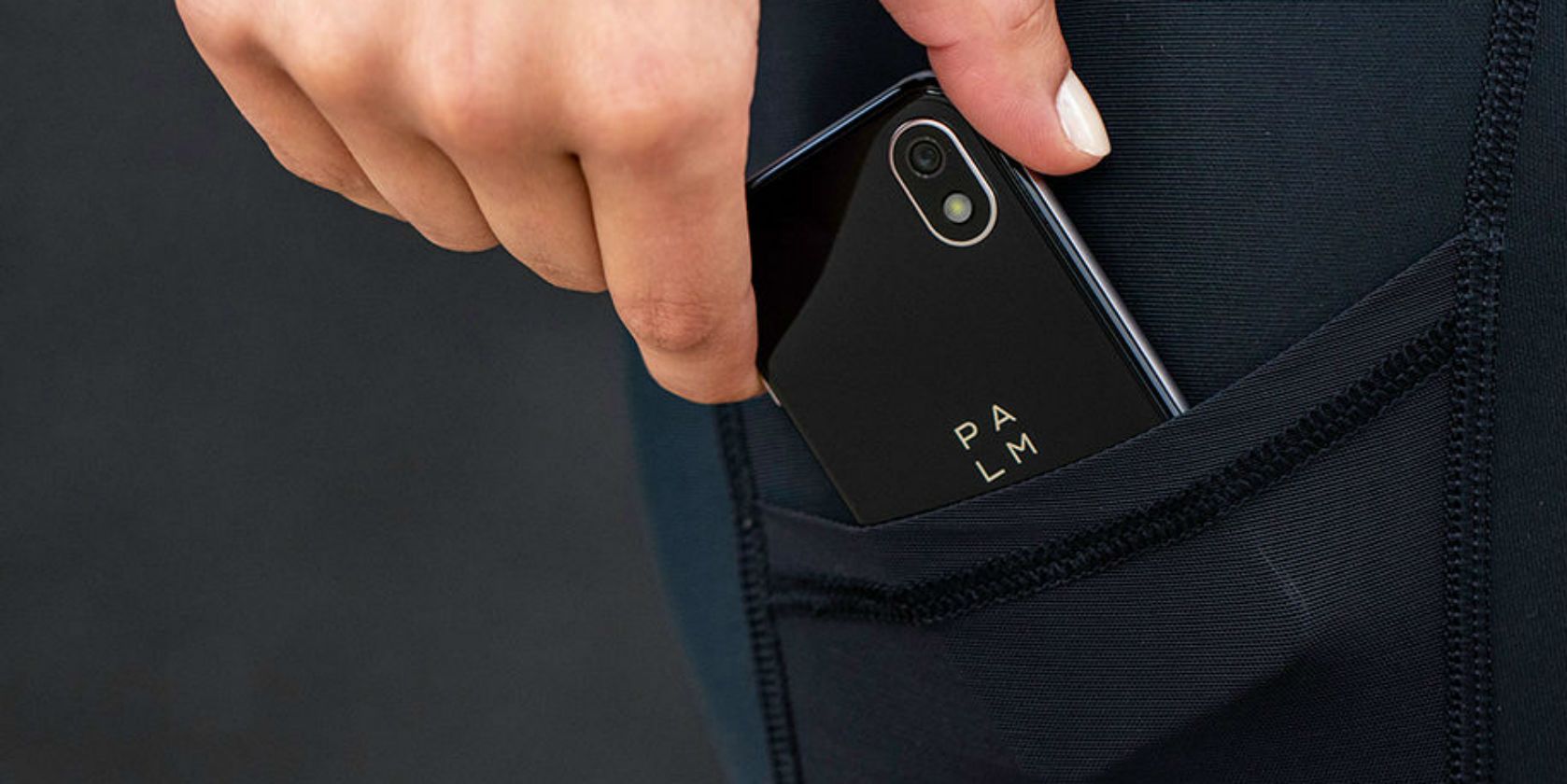
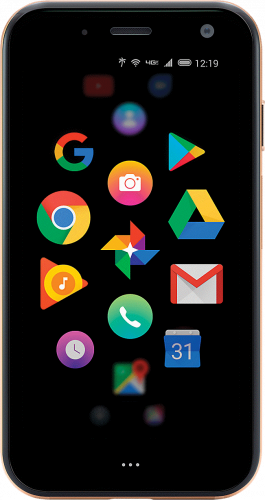
But now it’s back, at least in name. A new device sporting Palm branding, though actually made by TCL (the company that purchased the Palm name last year), is available right now for $349.99 exclusively through Verizon.

It’s not your traditional smartphone, and we’d even go as far as to say it’s quite weird.

What Is the New Palm Phone?

What’s interesting is that this isn’t a standalone phone designed to replace your current device. Instead, would-be buyers will need to add it to an existing line. Once activated, this would be the phone used when one wants to avoid the distractions offered by their larger, more feature-rich smartphones.

But it’s more confusing than that, because the phone isn’t limited in any major way other than its smaller size. It comes with Android 8.1 installed with full access to the Google Play Store and all the apps that live within.

To put it simply, it’s a little phone designed to prevent you from being distracted by your full-sized phone. It’s weird, but also quite an interesting concept.

If you’re still unsure about where this phone fits into our phone-loving world, you’re not alone. Here’s the quick pitch from Verizon:

“Ultra-portable and packed with premium features, it goes places your smartphone can’t.”

New Palm Specs

  • 7.5 hrs usage time (800mAh battery)
  • 12 MP camera
  • 720 x 1280 pixels display
  • 3.8 x 1.99 inches
  • 3 GB RAM
  • MSM8940, Octa-core 4 x 1.4GHz + 4 x 1.1GHz processor

How Do You Get One?

The Palm is available exclusively from Verizon for $349.99 (or $299.99 with a new 2-year contract). It’s out now in gold and titanium colors, and buyers can choose to have it shipped or they can pick it up from a local Verizon store.

As mentioned, it’s considered a companion phone, which means it’ll use your existing number and can’t be activated on a new line.

Smartphone addition is a very real thing, and it’s something many of suffer from. However, there are ways to curb your smartphone addiction (if you actually want to)!

Image Credit: Verizon

Read the full article: Palm Is Back With a Tiny Phone That’ll Keep You Off Your Phone


Read Full Article
6 Steps to Fix Your Windows 10 Taskbar Issues


fix-taskbar-issues-windows-10

Microsoft definitely gave the humble Taskbar some new tricks in Windows 10. But along with useful functionality, this introduced frustrating errors into the fold.

Below we’ll discuss what’s changed about the Taskbar with the advent of Windows 10, as well as offer some fixes for the most common issues that plague the Taskbar.

With these tips in tow, you should be well on your way to having a fully functional Taskbar once more.

What’s New With the Windows 10 Taskbar?

Like much of the operating system, the Taskbar was given an aesthetic and functional makeover when Windows 10 launched in 2015.

The biggest change is the addition of the search box, which doubles as a method of interacting with Microsoft’s personal assistant, Cortana. If you don’t like this bar, right-click the Taskbar and choose Cortana > Show Cortana Icon for a much less invasive icon, or Hidden to remove it entirely.

Windows 10 Search Bar

To the immediate right of the search bar is the Task View icon. This powerful functionality allows you to see all the windows you currently have open at a glance. It also offers an easy way to create virtual desktops.

Virtual desktops allow you to separate different windows and applications into individual instances. For instance, you might want to create a work desktop separate from the one you use to browse the web and listen to music on your lunch break.

Windows 10 Multiple Desktops

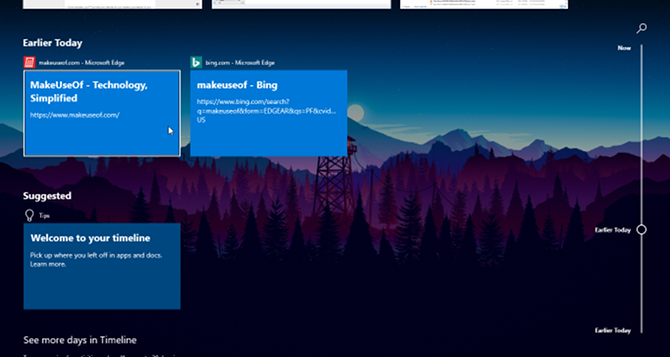
Task View also lets you access Windows 10’s Timeline feature. This provides a history of everything you’ve done recently so you can easily jump back into a previous task.

windows 10 timeline 2

Windows 10 offers a great level of control over the new Taskbar. We’re going to focus on fixing issues below, so check out our complete guide to Taskbar customization if that’s what you’re looking for.

1. Restart Windows Explorer

A quick first step when you have any Taskbar issue is to restart the explorer.exe process. This controls the Windows shell, which includes the File Explorer app as well as the Taskbar and Start Menu. Restarting it can thus clear up any minor hiccups.

To restart this process, press Ctrl + Shift + Esc to launch the Task Manager. Click More details at the bottom if you only see the simple window. Then on the Processes tab, locate Windows Explorer. Right-click it and choose Restart.

Windows Restart Windows Explorer

You’ll notice your Taskbar goes away for a minute, then comes back. This is normal, and when it returns, it will hopefully be back to normal.

If this doesn’t work, you can also try signing out and back in of your user account. Don’t forget that restarting your PC is always a good idea if you haven’t done so in a while.

2. Windows 10 Taskbar Not Hiding

When you’ve enabled the auto-hide functionality of the Taskbar, it’s annoying if it doesn’t work properly. If restarting the Explorer process doesn’t work or the issue happens frequently, you can try some other fixes.

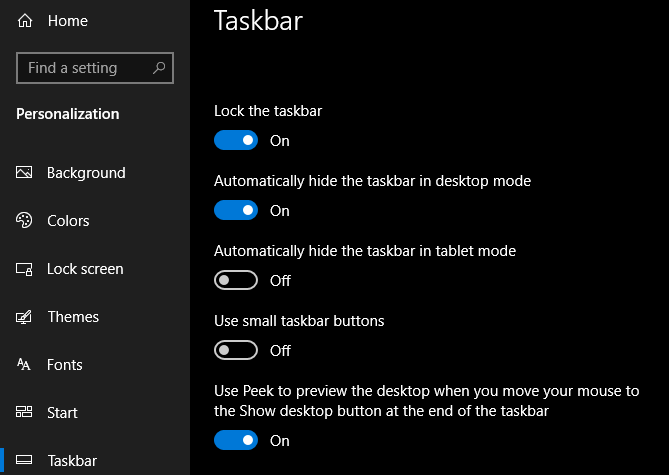
First, make sure you actually have auto-hide enabled. Head to Settings > Personalization > Taskbar and make sure Automatically hide the taskbar in desktop mode is enabled. It’s worth disabling and re-enabling this while you’re here, too.

Auto Hide Taskbar Windows

One of the most common causes for the Taskbar failing to retract automatically is an app requiring your attention. While this often comes accompanied with a glowing app icon, it’s not always obvious when this is the case.

Cycle through the apps that you have open and make sure that there are no error messages or other alerts waiting for you. Your browser can switch to this “attention” state if a website displays a notification, for example, or WhatsApp might have just received a new message.

If checking your open apps doesn’t fix this, take a look at the apps in your System Tray. One of them, running in the background, may be calling for attention.

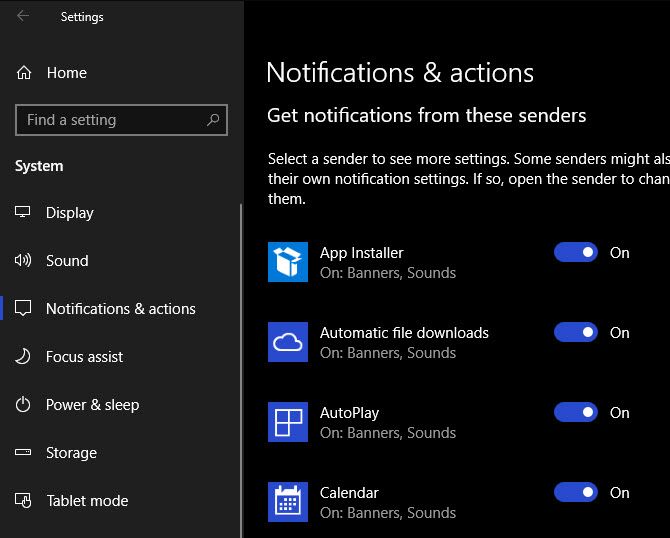
Should you run into this problem on a regular basis, try adjusting notifications for the app that keeps getting stuck—open Settings > System > Notifications & actions or check inside the app’s own settings. Failing that, reinstalling the app may fix the problem.

Windows 10 Notification Options

3. Windows 10 Taskbar Icons Missing

If your Taskbar is missing its icons and the System Tray at the bottom-right doesn’t show the clock and other functions, you might have to dip into the command line to remedy your issue. Fortunately, this isn’t as intimidating as it might sound.

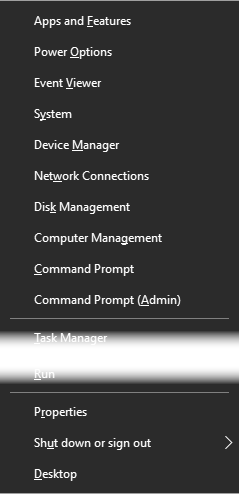
First, use the Windows + X shortcut (or right-click the Start button) to open the Power User menu. From here, you can launch a Command Prompt (Admin) or Windows PowerShell (Admin) window. From either of these, you can access a few tools that can perform the fix.

Windows Power User Menu

In the resulting prompt, you should first try an SFC command, which runs the System File Checker utility to patch up Windows issues. Use this command to do so, then reboot once it’s complete:

sfc /scannow

If this doesn’t fix the issue, you can try another utility. Enter the following command to invoke Disk Image Servicing and Management (DISM), and you should find that your Taskbar returns to its normal state after a reboot:

DISM /Online /Cleanup-Image /RestoreHealth

4. Windows 10 Taskbar Frozen

If your Taskbar is present, but you can’t click on any of the icons, you can try a few PowerShell fixes.

unclickable taskbar

There is a relatively easy process that should clear up this predicament with a non-invasive command. Type PowerShell into the Start menu, then right-click its entry and choose Run as administrator.

Enter the following command to re-register all apps:

Get-AppXPackage -AllUsers | Foreach {Add-AppxPackage -DisableDevelopmentMode -Register "$($_.InstallLocation)\AppXManifest.xml"}

After this, navigate to C:\Users\[Username]\AppData\Local. Find the TileDataLayer folder and delete it. Hopefully, after a moment, this will fix your Taskbar up.

TileDataLayer Folder Windows

There is a second, more invasive fix. Unfortunately, this one comes at a cost as it will also remove all Windows 10 apps, including the Store, from your system.

To try it, open PowerShell with admin credentials as demonstrated above. Then input this command:

Get-AppxPackage | Remove-AppxPackage
Get-AppxProvisionedPackage -Online | Remove-AppxProvisionedPackage -online

Afterwards, restart your system and hopefully, you’ll have everything fixed. Follow Winaero’s guide if you decide that you want the Windows Store back.

5. Check for Driver and Windows Updates

This is broad advice that’s applicable to many PC problems, but it’s solved Taskbar strife for some. Outdated drivers, especially display drivers, can cause all sorts of issues. Thus, updating them is worth a look if you’re still at a loss as to what’s affecting your system.

There’s a chance that Windows 10 could have caused your driver dispute. Its rollout of automatic updates carries over to drivers, but the implementation of this feature isn’t perfect. We’ve shown how to get control of your driver updates back if you’re concerned.

Of course, you’ll then need to make sure your drivers actually get updated. Follow our guide to updating Windows drivers safely and see if this clears up your issue.

While you’re at it, make sure you’ve installed all Windows updates at Settings > Update & Security > Windows Update. Sometimes the latest Windows patches can clear up issues like this.

6. Try System Restore or Create a New User Account

Tried everything above and still can’t manage to make your Taskbar behave as it should? You can try a System Restore point, if you have one, to go back in time before the issue started.

Failing this, you can create a new Windows user account to clear up the problem. Though this is fairly inconvenient, of course.

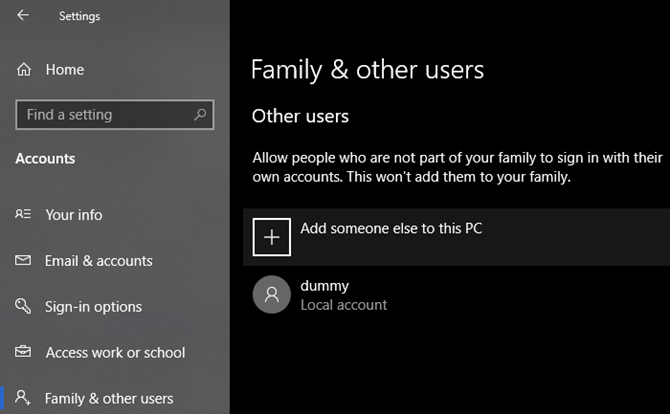
To create a new user account, open up the Settings app (Windows + I) and navigate to Accounts > Family & other Users. Under the Other Users section, select Add someone else to this PC.

Windows 10 Add New User

You can then work your way through the account creation process. If you’re replacing your own user account, you should choose the I don’t have this person’s sign-in information, then Add a user without a Microsoft account to avoid any confusion with your original login.

Long Live the Windows 10 Taskbar

Hopefully, you’ll never run into issues with your Windows 10 Taskbar (again). We hope one of these tips helped you fix any annoying problems.

For more, check out the best free tools to fix any Windows 10 problem.

Read the full article: 6 Steps to Fix Your Windows 10 Taskbar Issues


Read Full Article

Top 5 Unbiased World News Websites Free From Censorship


This is a world where money seems to have such control over journalistic integrity. Is there no place for the reader to turn for unbiased news? The short answer is an emphatic yes.

There’s still hope.

When it comes to “censorship”, news can be censored either by the over-reach of government entities or by a corporate stranglehold on the editorial processes of news organizations.

What Is Unbiased News?

It could be an angle placed on news stories about state organizations or policies that are financed by state leadership themselves. There is no better example of this than the Xinhua News Agency, the mouthpiece of the Peoples Republic of China. Or Telegraph Agency of the Soviet Union (TASS), the news agency owned by the Russian government.

However, the US isn’t innocent either. In the US, those controlling the journalists’ pens are corporate leaders rather than government leaders.

In the US, there are six corporate media giants that own 90 percent of the US media market—GE, News-Corp, Disney, Viacom, Time Warner, and CBS.

newspapers

It would be naive of anyone to believe that the people writing the paychecks for those reporting the news don’t hold some sway over what news gets reported, and how it gets reported.

This is especially apparent during every US Presidential election. Media corporate owners contribute significant campaign contributions to their favored candidates on one hand. On the other hand, they published news stories with a positive spin for their own favored candidate. CNN, Fox News, MSNBC, The New Yorker, and The Blaze are just a few examples.

So are there still any unbiased news sources? Thankfully, there are.

1. The Associated Press

associated press news

The Associated Press was founded in 1846 and remains a renowned global news organization with 52 Pulitzer Prizes under its belt. It is and has always been the epitome of clear and unbiased news journalism and reporting. It is actually where most journalists seek out their own news stories to report on.

John Daniszewski for the AP wrote a piece about fake news on social media titled “Getting the facts right.” He cited a memo sent out to AP staff by Social Media Editor Eric Carvin where Eric wrote:

“The language we use: Whenever possible, we want to emphasize specifics rather than generalizations or labels. Let’s say what we know to be true and what is false, based on our reporting.”

This is the very definition of unbiased news.

The AP doesn’t only paint rainbows for one side on any story while drawing storm clouds for the other. The language used in each report is neutral, and the focus is only on reporting the news.

2. Wall Street Journal

wall street journal

Wall Street Journal is well known for reporting the news as it is. It serves a healthy dose of reality from both sides of the political spectrum.

It isn’t likely you’ll see a Wall Street Journal White House correspondent trading blows with the President in the Press Room.

The reason for this isn’t because WSJ loves our current president. It’s because you won’t often find antagonistic stories on the front page that are lambasting either side.

They explain what’s happening, who’s doing it and why, without excessive editorializing or using emotion-ridden writing.

WSJ journalists tell it like it is, without letting their own biases (or the biases of the corporate ownership) filter down into the story.

This isn’t an easy thing to accomplish with any news organization.

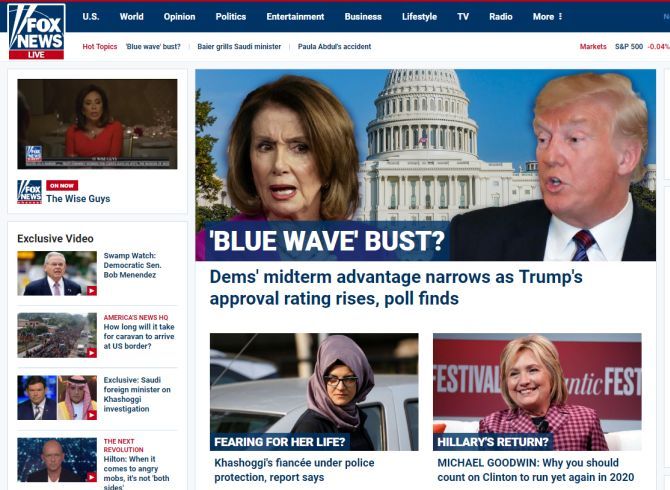
A contrast to this can be made with Fox News, the bastion of Conservative news reporting.

fox news

This isn’t just political bias in the media. Other sites that lack journalistic integrity like this are usually overtly nationalistic (overly pro-American — posting negative news headlines about other countries), or blatantly anti-American (like British news sources that produce a fresh batch of anti-gun editorials in response to every major shooting event that happens in the US—the Guardian is guilty of this quite often).

If you become a reader of the Wall Street Journal, you’ll find yourself more often better-informed, and less often offended or annoyed by the journalist’s choice of words.

3. Google News

google news

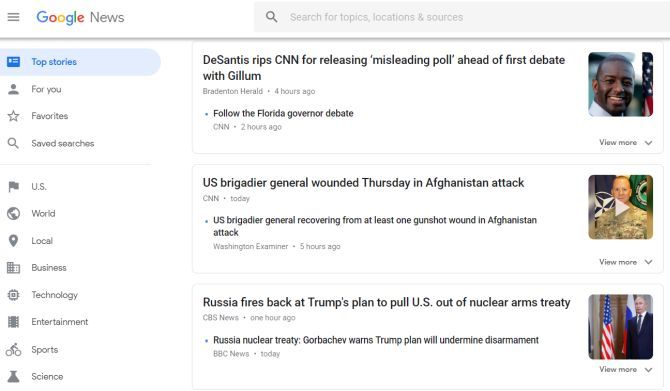
Google News isn’t so much a news organization as it is a collection of news sources generated at least partially by a news-gathering algorithm, similar to how Google runs its flagship search engine.

It is partially managed by human editors as well, but the reason Google News is listed here not because the headlines are especially unbiased. It’s listed because of how little human intervention there is in developing front page headlines.

This usually results in a listing of headlines that may not be entirely free from left or right leaning headlines. But you’ll at least discover a healthy mix of each side.

If you believe that no single news organization can be completely free of intrinsic bias, then Google News gives you a place where you can at least see the news reported from the entire spectrum. That’s a great way to get the whole picture, no matter what the news event may be.

4. BBC

bbc news

If you want to know what’s going on in the world, the BBC is the place to go. You will find better information than the same stories at a US news site.

It may seem ironic that US news organizations appear far more censored and filled with pro-government propaganda than British news organizations.

These days, US foreign policy includes so much government cooperation with corporate US news media. So, the only alternative for Americans (or anyone for that matter), is to turn to foreign news sources for the whole story.

Maybe (hopefully) this will change for the better, but for now this is the only option many Americans have.

5. Reuters

reuters

The news organization Reuters deserves honorable mention on this list for the same reasons as the BBC and more. News events on this site are written with some of the most straightforward reporting seen anywhere.

World stories on controversial hot-topics like the Israeli-Palestinian conflict, Brexit, or various government elections, don’t appear to take one side or another. Headlines cover insights from every end of the spectrum.

This is especially refreshing at a time when this kind of journalistic, unbiased news reporting is so rare.

If you want to bookmark only one news website, you should bookmark this one. You will get a fair and balanced perspective on all important matters in the world today.

Other Unbiased News Sources Worth Mentioning

There are a few additional news organizations in the world today that deserve mention. They were not included in the list above because sometimes these sites occasionally let their author’s biases get published.

C-Span and Pew Research aren’t specifically news organizations. But they deserve mention as fantastic resources to learn the deeper truth behind today’s news stories.

  • Al Jazeera: Al Jazeera is based out of Qatar. Qatar is quite different from America, where “freedom of the press” is sacrosanct. However, Al Jazeera remains impartial and fact-based regardless. It’s surprising that many Americans prefer an Arabic news source above American ones. That’s the reality of the world today.
  • C-Span: Watch government hearings and other events on your own, instead of relying on second-hand reporting. Keep your TV tuned to C-Span. You’ll actually be shocked to discover just how much those second-hand journalists twist what was actually said at those hearings. So why depend on those faulty reports when you can see for yourself?
  • NPR: NPR would have landed in the primary list of unbiased news sources above, but its coverage sometimes leans a little too far to the left. However, in the majority of cases, NPR reporting is about as impartial and factual as you could ask for from a US-based news organization.
  • Christian Science Monitor: Despite a name that would make you expect it to be a bastion of Conservative news reporting like The Blaze, CSMonitor is actually a refreshingly honest and impartial news source. You’ll find stories here that attack or support government policies from both sides of the aisle.
  • Pew Research: Interested in the facts, and only the facts? You can’t go wrong bookmarking Pew Research. Even during heated election years, you’ll find the polls, surveys, and research conducted by this organization to be accurate and truthful. It is self-described as a “nonpartisan fact tank”, and that’s exactly what it is. Don’t get your facts from Facebook. Look to Pew Research to get accurate facts before you make up your mind.

What Bias Really Means

These days, you’ll find anyone who disagrees with a news story angle calling it “biased.” Conservatives hate CNN and MSNBC. Liberals hate Fox News and The Blaze. Everyone in the middle hates them all. So how can you really call any news organization “unbiased”, when so often bias itself is subjective?

Every journalist is aware of the nine principles of journalism. The first says that a journalist’s first obligation is to the truth.

“This ‘journalistic truth’ is a process that begins with the professional discipline of assembling and verifying facts. Then journalists try to convey a fair and reliable account of their meaning, valid for now, subject to further investigation.”

The ability to set aside one’s own prejudices in order to be “neutral” is not a part of those principles. However, “the source of their credibility is still their accuracy, intellectual fairness, and ability to inform.” When journalists let personal biases hinder their objectivity, it puts the entire media organization at risk. Thankfully there are still enough media outlets left that uphold these principles.

If you’re into tech news, there are some great tech news sources to check out as well.

Read the full article: Top 5 Unbiased World News Websites Free From Censorship


Read Full Article

Twitter removes thousands of accounts that tried to dissuade Democrats from voting


Twitter has deleted thousands of automated accounts posting messages that tried to discourage and dissuade voters from casting their ballot in the upcoming election next week.

Some 10,000 accounts were removed across late September and early October after they were first flagged by staff at the Democratic Party, the company has confirmed.

“We removed a series of accounts for engaging in attempts to share disinformation in an automated fashion – a violation of our policies,” said a Twitter spokesperson in an email to TechCrunch. “We stopped this quickly and at its source.” But the company did not provide examples of the kinds of accounts it removed, or say who or what might have been behind the activity.

The accounts posed as Democrats and try to convince key demographics to stay at home and not vote, likely as an attempt to sway the results in key election battlegrounds, according to Reuters, which first reported the news.

A spokesperson for the Democratic National Committee did not return a request for comment outside its business hours.

The removals are a drop in the ocean to the wider threats that Twitter faces. Earlier this year, the social networking giant deleted 1.2 million accounts for sharing and promoting terrorist content. In May alone, the company deleted just shy of 10 million accounts each week for sending malicious, automated messages.

Twitter had 335 million monthly active users as of its latest earnings report in July.

But the company has faced criticism from lawmakers for not doing more to proactively remove content that violate its rules or spread disinformation and false news. With just days before Americans are set to vote in the U.S. midterms, this latest batch of takedowns is likely to spark further concern that Twitter did not automatically detect the malicious accounts.

Following the publication of Reuters’ report, Yoel Roth, Twitter’s head of site integrity, said in a tweet thread that public research identifying bots is often “deeply flawed” and that many are identifying bots “based on probability, not certainty,” since “nobody other than Twitter can see non-public, internal account data.”

Twitter does not have a strict policy on the spread of disinformation in the run-up to election season, unlike Facebook, which recently banned content that tried to suppress voters with false and misleading information. Instead, Twitter said last year that its “open and real-time nature” is a “powerful antidote to the spreading of all types of false information.” But researchers have been critical of that approach. Research published last month found that over 700,000 accounts that were active during the 2016 presidential election are still active to this day — pushing a million tweets each day.

A Twitter spokesperson added that for the election this year, the company has “established open lines of communication and direct, easy escalation paths for state election officials, Homeland Security, and campaign organizations from both major parties to help us enforce our policies vigorously and protect conversational health on our service.


Read Full Article
Apple, Amazon, Google and others sign letter opposing Trump’s attempt to redefine gender


A list of 50-plus companies, including some of tech’s top names, joined forces this week to pen a letter calling out the Trump administration over a reported plan to narrow gender definitions.

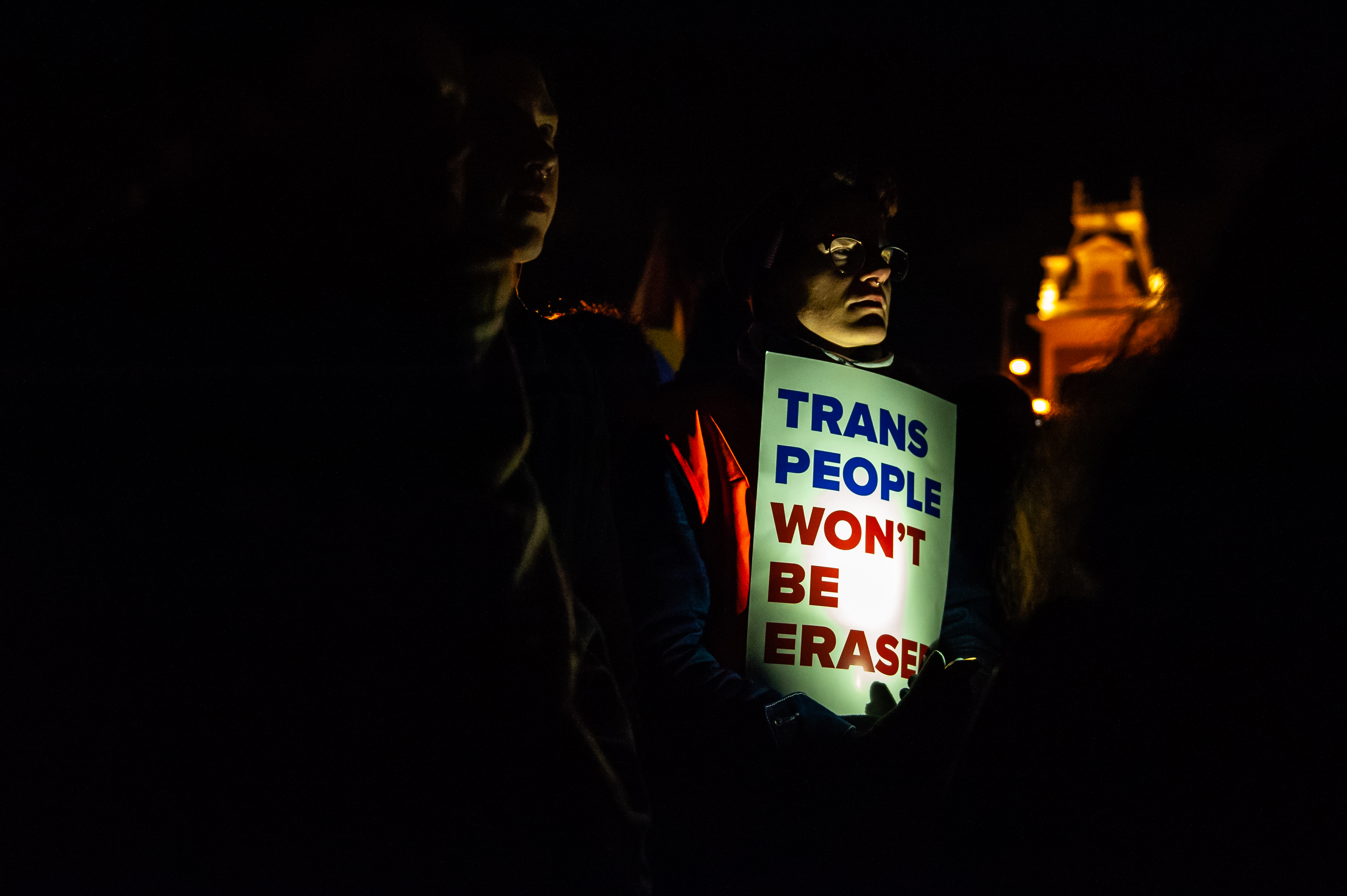
Apple, Google, Amazon, Facebook, Microsoft, Intel, Cisco and more drafted the letter (full text below) in response to a recent New York Times story about a planned federal rollback of Obama-era civil rights protections for transgender and gender non-conforming citizens. The move by the Trump administration set off a spate of protests around the world in support of transgender rights, and the response from the tech industry soon followed.  

“We oppose any administrative and legislative efforts to erase transgender protections through reinterpretation of existing laws and regulations,” the note reads. “We also fundamentally oppose any policy or regulation that violates the privacy rights of those that identify as transgender, gender nonbinary, or intersex.”

Rights groups and activists are mobilizing against a reported Trump administration plan to narrowly define gender, a move that could dramatically reduce federal protections for and recognition of transgender people on October 28th, 2018 in Amsterdam, Netherlands. In Amsterdam people gathered Sunday night during a rally which was a call-to-action to all to members and allies of the trans, LGBQIA, black and brown resistance, immigrant and social justice movements to stand side by side with trans men, trans women and non-binary & intersex people, and to send a message of resistance and strengthen around the world. (Photo by Romy Arroyo Fernandez/NurPhoto via Getty Images)

The initial Times report stems from a memo proposing that the gender of individuals be solely based on their biological traits at birth.

“Proposed Definition: Sex means a person’s status as male or female based on immutable biological traits identifiable by or before birth,” the memo reads. “The sex listed on a person’s birth certificate, as originally issued, shall constitute definitive proof of a person’s sex unless rebutted by reliable genetic evidence.”

This isn’t the first time a Trump administration LGBTQ policy has united some of the industry’s biggest competitors. In February of last year, Apple and Google among others spoke out against the administration’s plans to roll back Obama-era guidelines surrounding transgender bathroom use in public schools.

Here is the full text of the letter:

We, the undersigned businesses, stand with the millions of people in America who identify as transgender, gender nonbinary or intersex, and call for all such people to be treated with the respect and dignity everyone deserves.

We oppose any administrative and legislative efforts to erase transgender protections through reinterpretation of existing laws and regulations. We also fundamentally oppose any policy or regulation that violates the privacy rights of those that identify as transgender, gender nonbinary, or intersex.

In the last two decades, dozens of federal courts have affirmed the rights and identities of transgender people. Cognizant of growing medical and scientific consensus, courts have recognized that policies that force people into a binary gender definition determined by birth anatomy fail to reflect the complex realities of gender identity and human biology.

Recognizing that diversity and inclusion are good for business, and that discrimination imposes enormous productivity costs (and exerts undue burdens), hundreds of companies, including the undersigned, have continued to expand inclusion for transgender people across corporate America.

Currently more than 80 percent of the Fortune 500 have clear gender identity protections; two-thirds have transgender-inclusive health care coverage; hundreds have LGBTQ+ and Allies business resource groups and internal training efforts.

Transgender people are our beloved family members and friends, and our valued team members. What harms transgender people harms our companies.

We call for respect and transparency in policymaking, and for equality under the law for transgender people.


Read Full Article

Twitter hires God-is Rivera as global director of culture and community


Twitter has brought on its first-ever global director of culture and community, God-is Rivera. As global director of culture and community, Rivera will report to Global Head of Culture, Engagement and Experiential Nola Weinstein. Rivera previously led internal diversity and inclusion efforts at VMLY&R, a digital and creative agency.

“As a black woman who has worked in industries in which I have been underrepresented, I feel a great responsibility to amplify and support diverse communities, and they exist in full force on Twitter,” Rivera said in a statement. “The team has shown a passion to serve and spotlight their most active users and I am honored to step into this new role as a part of that commitment.”
For context, 26 percent of U.S. adults who identify as black use Twitter, while 24 percent of white-identified adults and 20 percent of Latinx-identified adults in the U.S. use Twitter, according to a March 2018 survey from Pew Research Center.

At Twitter, the plan is for Rivera to “better serve and engage communities” on Twitter through the company’s brand marketing, campaigns, events and other experiences. Internally, Rivera will be tasked with ensuring Twitter’s campaigns and programs are inclusive and “reflective of the communities we serve,” according to Twitter’s press release. Externally, Rivera will be responsible for developing relationships and programs with content creators, community leaders, brands and more — similar to the one with HBO’s Insecure.

Here’s the internal note Weinstein sent to Twitter employees earlier today:

Team,

I am so excited to welcome @GodisRivera to the team as Twitter’s new Global Director of Culture & Community. She captivated us at #OneTeam with her enlightening presentation on #BlackTwitter and we are thrilled that she will now be bringing her passion and perspective inside.

In this newly created role, God-is will help lead our efforts to better serve and engage the powerful voices and global communities who take to Twitter to share, discover and discuss what matters to them. This will come to life through Twitter’s brand efforts, campaigns, events and experiences. She will help ensure that our programs are connective, inclusive and reflective of the communities we serve. You can imagine more efforts that engage and excite our communities like #HereWeAre, #NBATwitter, thoughtful tweetups, etc.

God-is’ deep expertise in marketing and social strategy, cultural understanding and ability to elevate and connect communities makes for a rare and incredibly powerful combination. She was previously Director, Inclusion and Cultural Resonance at VMLY&R, where she led internal diversity efforts to fuse the importance of internal culture and representation to creative work outputs. In 2018, God-is was named an Ad Age “Woman to Watch” and Adweek “Disruptor” for continuing to fight for representation and equity in the advertising industry. She currently resides in New York, NY with her husband and daughter.

On a personal note, I have had the pleasure of spending time with God-is at #HereWeAre, #Influence, and #OneTeam and her energy, passion and positivity are infectious. I know her presence will make a difference and am excited by all that the culture & experiential team will create together.

God-is will start on November 12th and will be based in NYC reporting to me.

Please join me in welcoming her to the flock!


Read Full Article