19 September 2018

Google Home Mini was the best-selling smart speaker in Q2


Amazon’s Echo Dot may have been a bestseller on Prime Day, but Google’s Home Mini device is now the top-selling smart speaker worldwide, according to a new report out this morning from Strategy Analytics. The analyst firm says Google’s small speaker accounted for 1 in 5 smart speaker shipments in Q2 2018, edging out the Echo Dot with its 2.3 million global shipments compared to Echo Dot’s 2.2 million.

Combined, these two entry-level smart speakers – the Echo Dot and Home Mini – accounted for 38% of global shipments, the firm found.

In total, 11.7 million smart speaker devices were shipped during Q2, with 4 out of the top 5 devices coming from either Amazon or Google.

Following the Dot, was Amazon’s flagship Echo device with 1.4 million shipments, then Alibaba’s Tmail Genie (0.8m), and Google Home (0.8m).

Apple’s HomePod wasn’t ranked in the top five, but took a 6% share of the shipments in Q2.

However, HomePod’s premium focus and higher price tag allowed it to take a sizable chunk of smart speaker revenue during this period.

While the Home Mini and Echo Dot combined accounted for 17% of smart speaker revenues, Apple’s HomePod alone took a 16% share of wholesale revenues. And in terms of devices above the $200 price point, the HomePod had a 70% revenue share.

Strategy Analytics’s report also indicated this growing market is still in flux, thanks to expected new arrivals which could impact the shares held today by existing players.

“The number of smart speaker models available worldwide has grown significantly over the last twelve months as vendors look to capitalize on the explosive market growth,” said David Mercer, Vice President at Strategy Analytics, in a statement. “Heavyweight brands such as Samsung and Bose are in the process of launching their first models, adding further credibility to the segment and giving consumers more options at the premium-end of the marker,” he added.


Read Full Article

Telegram to replace iOS messaging app with Telegram X Swift rebuild


Telegram has announced it will be migrating iOS users of its messaging app to a rebuilt-from-scratch Swift version.

It’s been running two versions of its app in parallel on iOS and Android during 2018 — officially announcing Telegram X in January, when it billed it as an experiment and said the alternative app “may or may not eventually replace the existing official apps”.

Well, that maybe has now become a certainty — at least on iOS.

In a post on his Telegram channel, founder Pavel Durov says the company will be replacing the iOS app with the Swift rebuild “within the next week or two”.

“As a result, Telegram will become faster, slicker and more efficient,” he writes. “Since it will rely on an entirely new codebase, some minor bugs and glitches might occur, but we’ll make sure they are quickly — or should I say “swiftly” — fixed.”

“This change will make Telegram the most popular messaging app written fully in Swift. Some would say it’s a big risk, but I think somebody has to take such risks and be the first to implement new technologies, such as e2e [end-to-end] encryption — or Swift,” adds Durov.

At the time of writing, the original Telegram iOS app and the Telegram X rebuild are both currently still available for download in the App Store.

It’s not clear whether Telegram will also be entirely replacing the Android app with the Telegram X Android version (or not). Nor what the iOS switch will mean for Telegram users running the app on a version of Apple’s mobile OS that doesn’t support Swift apps (iOS 6 or earlier).

Telegram may well be calculating that only a very small few number of its iOS users are likely that far behind on iOS updates. (Whereas the Android ecosystem is far more fragmented.)

Also unclear: Whether or not Telegram plans to open source Telegram X code.

It has open sourced Telegram client-side code in the past but has also faced criticism for not immediately publishing the most recent versions and for not open sourcing server-side code. (Though in an FAQ it still makes the claim that: “All code will be released eventually.”)

We’ve reached out to the company with additional questions about the switch to Telegram X and will update this post with any response.

In the current App Store description for Telegram X the iOS app is billed as “an alternative Telegram client built in Swift, with higher speed, slicker animations, themes and more efficient battery use”.

The Swift rebuild, which has been available on the App Store since January, has a 4.0 (out of 5) star rating — with reviewers lauding its faster speed but also reporting a few bugs and/or complaining about some missing features.


Read Full Article

The 20 Best 80s Movies to Watch on Netflix


best-80s-movies-netflix

In many ways, 80s movies laid the foundations of the modern movie industry as we know it today. Technologies such as CGI and special effects were in their infancy, the blockbuster boom continued to grow, and previous taboos such as nudity and violence became mainstream.

If you’d like to relive a period of time that many consider to be a harbinger of what was to come, check out these awesome movies from the 1980s on Netflix!

1. E.T. the Extra-Terrestrial

The top-grossing film of the 80s was Steven Spielberg’s E.T. the Extra-Terrestrial. Indeed, it surpassed 1977’s Star Wars: A New Hope to become the top-grossing movie of all time—a record it held for 11 years until 1993’s Jurassic Park stole the crown.

2. Top Gun

Is there a more quintessentially 80s movie than Top Gun? Featuring a young Tom Cruise, Cold War connotations, and plenty of high-adrenaline action shots, the film was a huge commercial success. It ended up grossing $356 million off a budget of just $15 million.

3. Indiana Jones and the Raiders of the Lost Ark

Raiders of the Lost Ark was the movie that launched the Indiana Jones franchise. Released in 1981, “Indy” (Harrison Ford) heads off on a journey through Peru, Nepal, and Egypt in a bid to find the mythical Ark of the Covenant and prevent it from falling into the Nazis’ hands.

4. Back to the Future Part II

Back to the Future Part II was released in November 1989, making it an 80s movie by the skin of its teeth. The film didn’t win as many plaudits as the 1985 original but it was still a box office success.

5. Scarface

Scarface is arguably one of the all-time greatest crime movies. Perhaps surprisingly, it wasn’t a critical success upon release; it received just one Academy Award nomination—for sound editing. But in the following years, the movie’s popularity grew. The story of Cuban gangster Tony Montana is now a cult classic.

6. Ghostbusters

Ghostbusters is another of the decade’s greatest movies. It follows a team of parapsychologists who are tasked with combating a supernatural crisis in New York. The film gave birth to a media franchise that remains popular to this day.

7. Ghostbusters II

Hitting cinemas in 1989—five years after the first installment—Ghostbusters 2 never quite reached the same heights as its predecessor. The plot sees the team battle a mysterious slime that appears to spawn ghosts. Everything comes to a head on New Year’s Eve.

8. Full Metal Jacket

Stanley Kubrick’s Full Metal Jacket is widely thought to be one of the best Vietnam War movies ever made. And if you like this you should also watch the best World War II movies ever made. It tells the story of Joker and Cowboy, two marine recruits who will soon head to the front lines. Despite the widespread critical praise, the movie received just one Academy Award nomination.

9. Dead Poets Society

Dead Poets Society sees Robin Williams take the lead role, a performance for which he earned an Oscar nomination. The film itself won the Academy Award for best screenplay. The story follows the lives of a group of students at an elite boarding school in Vermont as their eccentric-but-inspiring English teacher sends them on a path of self-discovery.

10. Indiana Jones and the Temple of Doom

The Temple of Doom is the second installment in the original Indiana Jones trilogy, but it serves as a prequel to Raiders of the Lost Ark in the franchise’s universe. It was reportedly filmed as a prequel to avoid using Nazis as the enemy for a second time.

11. Sophie’s Choice

The first of Meryl Streep’s two Oscars for Best Actress came in 1982 when she played the role of a Polish immigrant in Sophie’s Choice (the other was for 2011’s The Iron Lady). The film takes place in New York and tells the story of the relationship between Sophie, her lover Nathan, and Stingo.

12. Star Wars: The Empire Strikes Back

All three films from the original Star Wars trilogy are on Netflix, but A New Hope was released in 1977 so doesn’t make our cut. The Empire Strikes Back is often praised as being the zenith of the entire Star Wars franchise. Indeed, people often hail it as being one of the best films of all time. Darth Vader’s “I am your father” line has become one of the most recognizable quotes in all of cinema.

13. Monty Python’s The Meaning of Life

Monty Python’s The Meaning of Life is a British musical comedy featuring the famous group of actors. Unlike the two previous films in the 1970s, The Meaning of Life doesn’t tell a coherent story and instead opts for a series of short sketches. The film marked the last time that the six original Pythons were all seen together in film before Graham Chapman’s untimely death at the age of 48 in 1989.

14. Star Trek II: The Wrath of Khan

After a disappointing public response to the first Star Trek film in 1979, The Wrath of Khan was under pressure to succeed. The film certainly delivered; it earned $97 million worldwide and set a world record for its first-day box office takings.

15. Who Framed Roger Rabbit

It’s not the plotline of Who Framed Roger Rabbit that earned it plaudits, but rather its groundbreaking animation in which humans and animated characters co-exist and seamlessly interact. The film is widely credited for reigniting interest in the golden age of American animation, thus laying the groundwork for the modern animation scene.

16. Turner and Hooch

Turner (a cop) and Hooch (a dog) are an unlikely duo. Turner’s obsessive desire for a neat and tidy home is thwarted when his new companion moves in. However, the cop soon realizes his canine friend’s capacity for crime solving, and the two quickly become an effective team. Tom Hanks plays the lead role.

17. The Untouchables

Featuring Kevin Costner, Andy GarcĂ­a, Robert De Niro, and Sean Connery, 1987 gangster movie The Untouchables offers an all-star cast. The story takes place in the era of prohibition in the United States. The group of gangsters has one aim—to bring Chicago’s Al Capone to justice.

18. Trading Places

Offering a modern interpretation of Mark Twain’s The Prince and the Pauper, Trading Places sees Dan Aykroyd and Eddie Murphy unwittingly swap roles as a commodities broker and street hustler respectively. The film was nominated for two Golden Globes and an Academy Award.

19. Star Wars: Return of the Jedi

Return of the Jedi hit theaters in 1983. It was the final installment in the original Star Wars trilogy and left fans begging for more until the disappointing The Phantom Menace was released in 1999.

20. Indiana Jones and the Last Crusade

1989’s Indiana Jones and the Last Crusade is the third and final film in the Indiana Jones series. Harrison Ford and Sean Connery take the lead roles. The plot sees Indy goes out in search for his father who has been captured by Nazis during the build-up to World War II.

More Awesome Movies to Watch on Netflix

When you’ve finished this list of movies, make sure you check out our lists of the best sci-fi movies on Netflix, the best scary movies on Netflix, and the best Disney movies on Netflix for even more awesome recommendations.

Read the full article: The 20 Best 80s Movies to Watch on Netflix


Read Full Article

Hackers stole customer credit cards in Newegg data breach


Newegg is clearing up its website after a month-long data breach.

Hackers injected 15 lines of card skimming code on the online retailer’s payments page which remained for more than a month between August 14 and September 18, Yonathan Klijnsma, a threat researcher at RiskIQ, told TechCrunch. The code siphoned off credit card data from unsuspecting customers to a server controlled by the hackers with a similar domain name — likely to avoid detection. The server even used an HTTPS certificate to blend in.

The code also worked for both desktop and mobile customers — though it’s unclear if mobile customers are affected.

The online electronics retailer removed the code on Tuesday after it was contacted by incident response firm Volexity, which first discovered the card skimming malware and reported its findings.

Newegg is one of the largest retailers in the US, making $2.65 billion in revenue in 2016. The company touts more than 45 million monthly unique visitors, but it’s not known precisely how many customers completed transactions during the period.

When reached, a Newegg spokesperson did not immediately comment.

Klijnsma called the incident “another well-disguised attack” that looked near-identical to the recent British Airways credit card breach. Like that breach, RiskIQ attributed the Newegg credit card theft to the Magecart group, a collective of hackers that carry out targeted attacks against vulnerable websites.

The code used in both skimming attacks was near identical, according to the research.

“The breach of Newegg shows the true extent of Magecart operators’ reach,” said Klijnsma. “These attacks are not confined to certain geolocations or specific industries—any organization that processes payments online is a target.”

Like previous card skimming campaigns, he said that the hackers “integrated with the victim’s payment system and blended with the infrastructure and stayed there as long as possible.”

Anyone who entered their credit card data during the period should immediately contact their banks.


Read Full Article

How to Create and Use Memoji on Your iPhone

Google will match up to $1M in donations for Hurricane Florence relief


As cities in Hurricane Florence’s path deal with its aftermath, Google will match up to $1 million in donations to help with relief efforts.

The disaster’s death toll is currently 35 people and about 343,000 people in North Carolina are without electricity. The hurricane caused widespread flooding and property damage throughout North Carolina, South Carolina and Virginia.


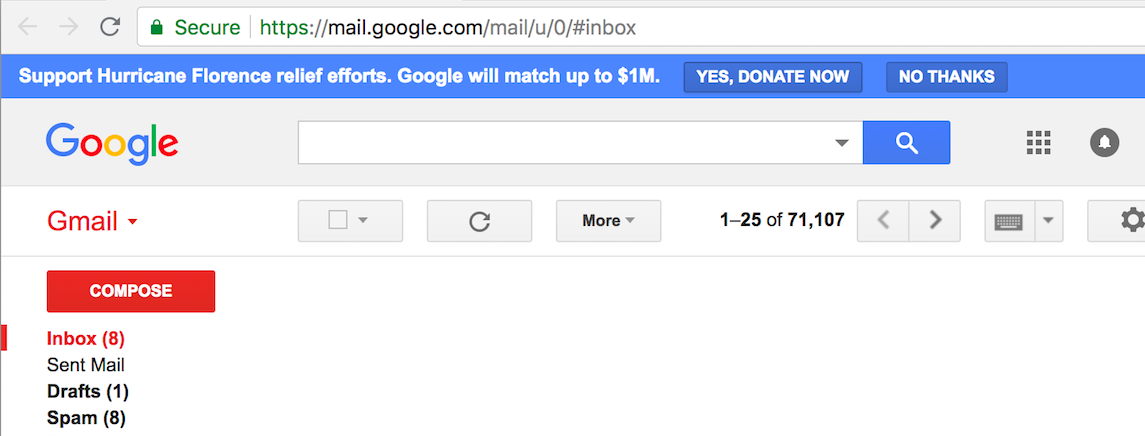
Google drew attention to its Hurricane Florence donation campaign with a banner that appeared on top of Gmail for some users. Google has matched donations for other disasters before, including Hurricane Irma and Hurricane Harvey last year. It’s also raised money for humanitarian efforts crises, like a 2015 matching program for up to $5.5 million in donations to provide aid to refugees in Europe. For that campaign, it temporarily added a “Donate” button to its search homepage.

The company is partnering with non-profit Network for God to collect and distribute funds. All donations will be directed to the American Red Cross, which Google said it chose to work with “because of their strong track record and existing response in the region.”

Other tech companies helping with Hurricane Florence relief include Amazon, which enabled Alexa users to make donations by saying “Alexa, donate to Hurricane Florence disaster relief” and sent trucks with food and donated items to affected areas, and Apple, which donated $1 million to the American Red Cross. Airbnb also offered free rooms to people fleeing the hurricane.


Read Full Article

Google’s Work Insights helps businesses better understand how they work


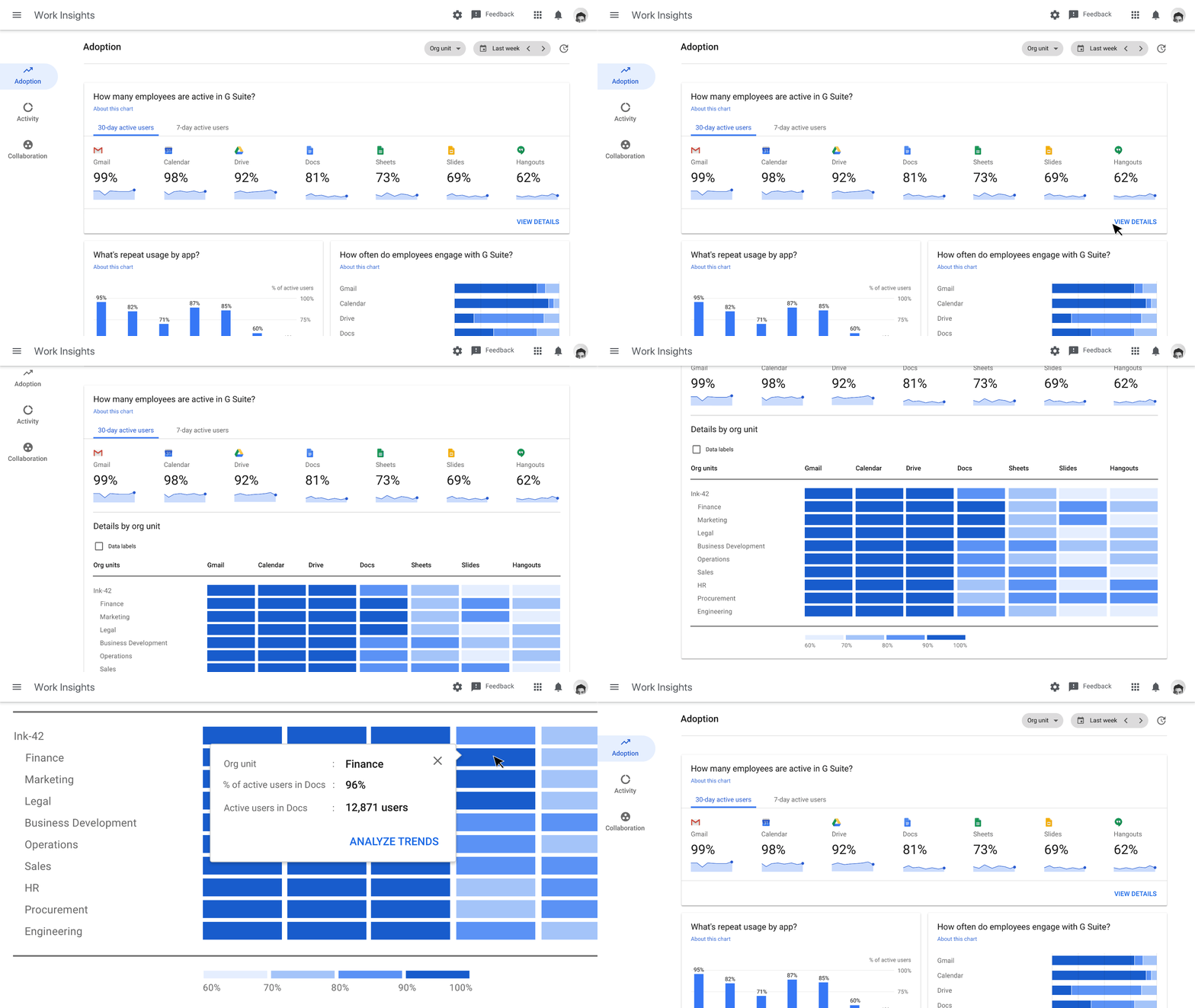
At an event in Tokyo, Google today announced the launch of Work Insights, a new tool that gives businesses more insights into how their employees use the company’s G Suite productivity tools and how teams collaborate using those tools.

In addition, Google is also launching its investigation tool for helping business better secure their data in G Suite into general availability.

“Work Insights is a tool built specifically to help businesses measure and understand the impact of digital transformation within their organizations, driven by G Suite,” Reena Nadkarni, a group product manager for G Suite, explains in today’s announcement. Data is aggregated at the team level (where a team needs to have 10 people or more) to help businesses understand how their employees are adapting G Suite apps.

As enterprises bet on one vendor or the other, there’s always a bit of a transition period and not everybody makes the move quite as quickly as others. Most of these tools, though, only really work when the whole company adopts them. That’s especially true for communication tools like Slack, Hangouts Chat/Meet or Microsoft Teams, but also for productivity tools like G Suite.

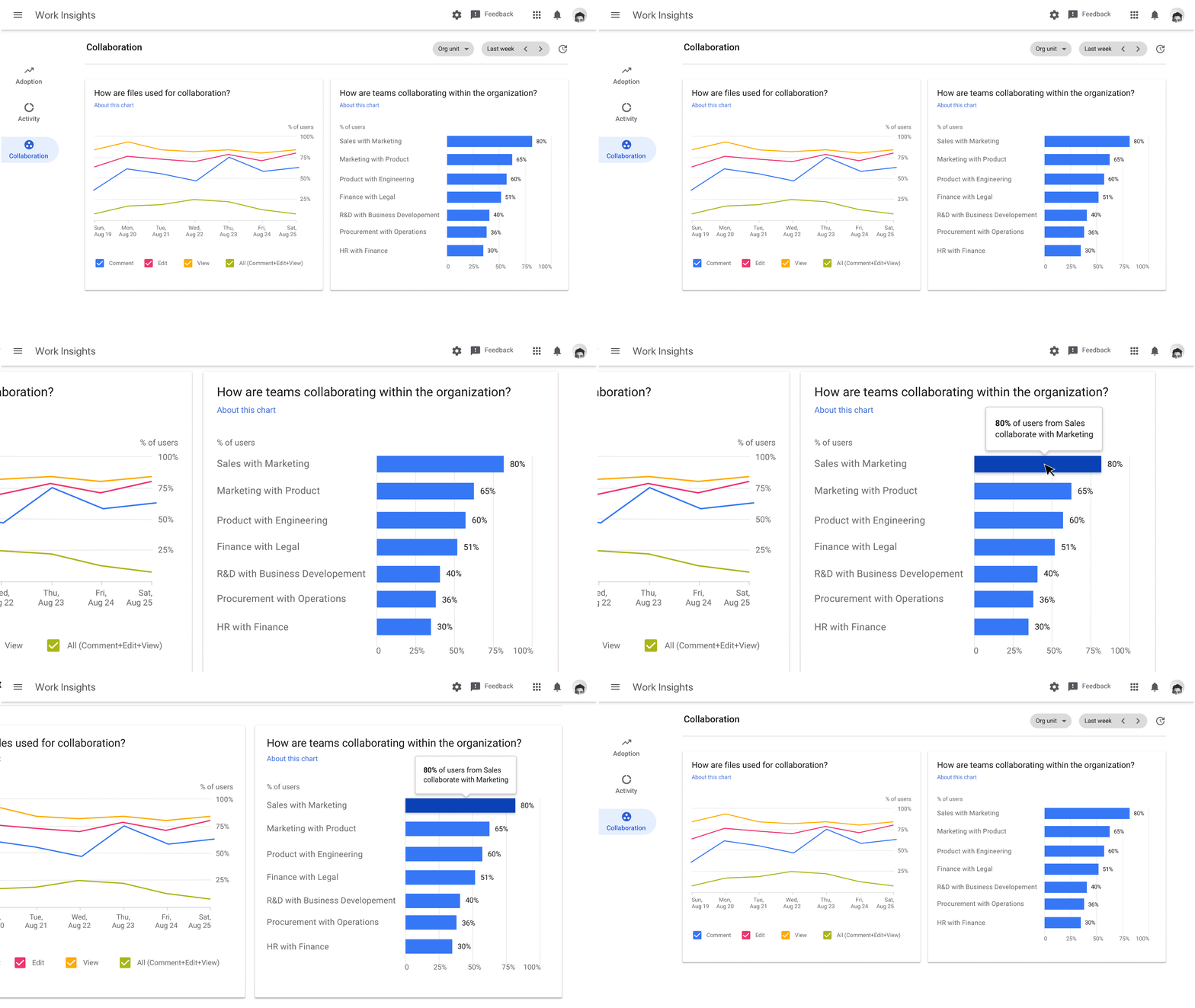
The other use cases here, though, is actually far more interesting. Work Insights will also give companies a view of how users on different teams interact with each other (think the marketing and sales teams). If they are working on documents together, then they are probably working well together, too (or just leaving acerbic comments on marketing presentations, but you get the general idea here).

“This insight can help executives identify opportunities to strengthen collaboration and reduce siloes,” Nadkarni writes. Since few executives ever say that they want less collaboration and more siloes, chances are we’ll see quite a few companies adopt these tools.


Read Full Article

Google launches new AI initiatives in Japan


It’s no surprise that Google used its Cloud Next 2018 event in Tokyo today — one of a number of international Cloud Next events that follow its flagship San Francisco conference — to announce a couple of new initiatives that specifically focus on the Japanese market.

These announcements include a couple of basic updates like translating its Machine Learning with TensorFlow on Google Cloud Platform Coursera specialization, its Associate Cloud Engineer certification and fifty of its hands-on Qwiklabs into Japanese.

In addition, Google is also launching an Advanced Solutions Lab in Tokyo as well. Previously Google opened similar labs in Dublin, Ireland, as well as Sunnyvale and New York. These labs offer a wide range of machine learning-centric training options, collaborative workspaces for teams that are part of the company’s four-week machine learning training program, and access to Google experts.

(Photo by Hitoshi Yamada/NurPhoto via Getty Images)

The company also today announced that it is working with Fast Retailing, the company behind brands like Uniqlo, to help it adopt new technologies. As its name implies, Fast Retailing would like to retail faster, so it’s looking at Google and its G Suite and machine learning tools to help it accelerate its growth. The code name for this project is ‘Ariake.’

“Making information accessible to all our employees is one of the foundations of the Ariake project, because it empowers them to use human traits like logic, judgment, and empathy to make decisions,” says Tadashi Yanai, CEO of Fast Retailing. “We write business plans every season, and we use collaborative tools like G Suite make sure they’re available to all. Our work with Google Cloud has gone well beyond demand forecasting; it’s fundamentally changed the way we work together.”


Read Full Article

The Punkt MP02 inches closer to what a minimalist phone ought to be


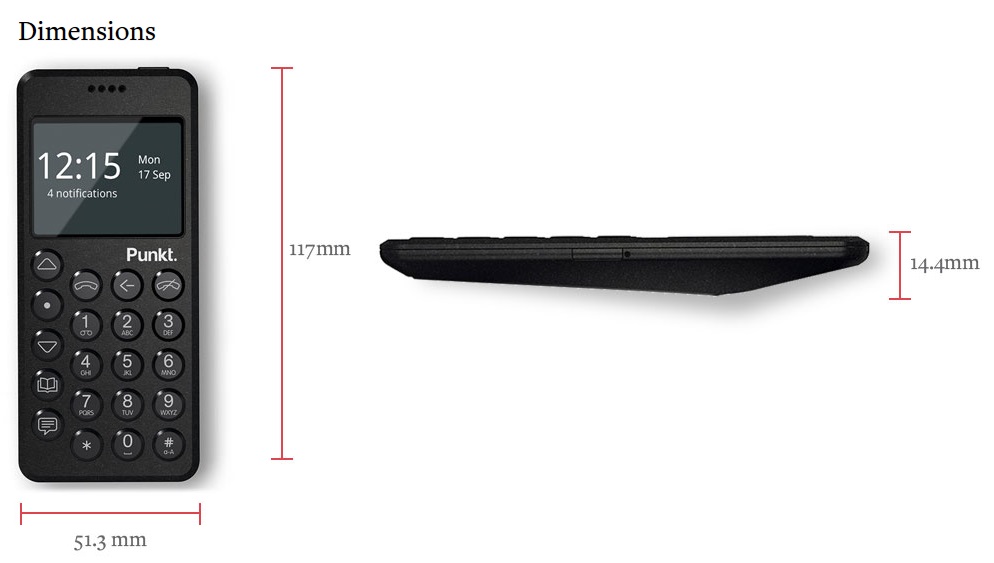
There’s an empty space in my heart for a minimalist phone with only the most basic functions. Bad for my heart, but good for a handful of companies putting out devices aiming to fill it. Punkt’s latest, the MP02, goes a little ways to making the device I desire, but it isn’t quite there yet.

Punkt’s first device included just texting and calling, which would likely have worked as intended if not for the inconvenient choice to have it connect only to 2G networks. These networks are being shut down and replaced all over the world, so you would have ended up with a phone that was even more limited than you expected.

The MP02 is the sequel, and it adds a couple useful features. It runs on 4G LTE networks, which should keep it connected for years to come, and it has gained both threaded texting (rather than a single inbox and outbox — remember those?) and Blackberry encryption for those sensitive communications.

It has nice physical buttons you can press multiple times to select a letter in ye olde T9 fashion, and also lets you take notes, consult a calendar, and calculate things. The battery has 12 days of standby, and with its tiny monochrome display and limited data options, it’ll probably stay alive for nearly that even with regular use.

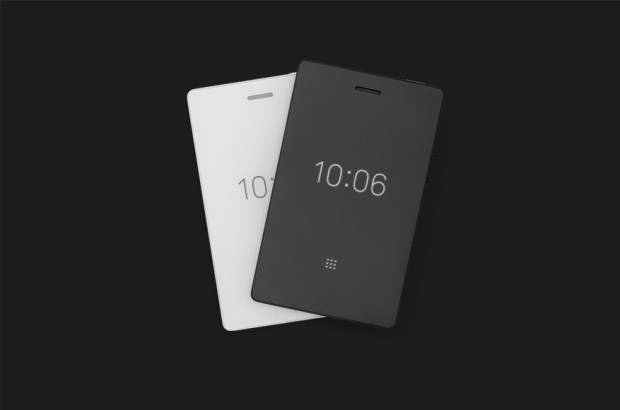
Its most immediate competition is probably the Light Phone, which also has a second iteration underway that, if I’m honest, looks considerably more practical.

Now, I like the MP02. I like its chunky design (though it is perhaps a mite too thick), I like its round buttons and layout, I like its deliberate limitations. But it and other would-be minimal phones, in my opinion, are too slavish in their imitations of devices from years past. What we want is minimalism, not (just) nostalgia. We want the most basic useful features of a phone without all the junk that comes with them.

The Light Phone 2 and its nice e-ink screen.

For me, that means including a couple things that these devices tend to eschew.

One is modern messaging. SMS is bad for a lot of reasons. Why not include a thin client to pass text to a messaging service like WhatsApp or Messenger? Of course iMessage is off limits — thanks, Apple — but we could at least get a couple of the cross-platform apps on board. It doesn’t hurt the minimalist nature of the phone, in my opinion, if it connects to a modern messaging infrastructure. No need for images or gifs or anything — just text is fine.

Two is maps. We sure as hell didn’t have maps on our featurephones back in the day, but you better believe we wanted them. Basic mapping is one of the things we rely on our phones for every day. Whatever’s on this minimal phone doesn’t have to be a full-stack affair with recommendations, live traffic, and so on — just location and streets, and maybe an address or lat/long lookup, like you’d see on an old monochrome GPS unit. I don’t need my phone to tell me where to eat — just keep me from getting lost.

Three, and this is just me, I’d like some kind of synchronizing note app or the ability to put articles from Pocket or whatever on there. The e-ink screen on the Light Phone is a great opportunity for this very specific type of consumption. Neither of the companies here seems likely to add this feature, but that doesn’t change the fact that it’s one of the few things I regularly use my phone for.

Light Phone 2 is possibly getting music, weather, and voice commands, none of which really screams “minimal” to me, nor do they seem trivial to add. Ride-share stuff is a maybe, but it’d probably be a pain.

I have no problem with my phone doing just what a pocketable device needs to do and leaving the more sophisticated stuff to another device. But that pocketable device can’t be that dumb. Fortunately I do believe we’re moving closer to days when there will be meaningfully different choices available to weird people like myself. We’re not there yet, but I can wait.


Read Full Article

An Intel drone fell on my head during a light show


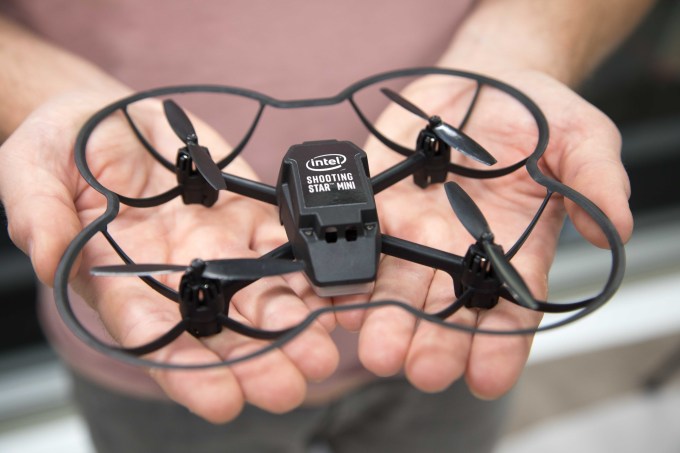
It didn’t hurt. I thought someone dropped a small cardboard box on my head. It felt sharp and light. I was sitting on the floor, along the back of the crowd and then an Intel Shooting Star Mini drone dropped on my head.

Audi put on a massive show to reveal its first EV, the e-tron. The automaker went all out, put journalists, executives and car dealers on a three-story paddle boat and sent us on a two-hour journey across San Francisco Bay. I had a beer and two dumplings. We were headed to a long-vacated Ford manufacturing plant in Richmond, CA.

By the time we reached our destination, the sun had set and Audi was ready to begin. Suddenly, in front of the boat, Intel’s Shooting Star drones put on a show that ended with Audi’s trademark four ring logo. The show continued as music pounded inside the warehouse, and just before the reveal of the e-tron, Intel’s Shooting Star Minis celebrated the occasion with a light show a couple of feet above attendees’ heads.

That’s when one hit me.

Natalie Cheung, GM of Intel Drone Light Shows, told me they knew when one drone failed to land on its zone that one went rogue. According to Cheung, the Shooting Star Mini drones were designed with safety in mind.

“The drone frame is made of flexible plastics, has prop guards, and is very small,” she said. “The drone itself can fit in the palm of your hand. In addition to safety being built into the drone, we have systems and procedures in place to promote safety. For example, we have visual observers around the space watching the drones in flight and communicating with the pilot in real-time. We have built-in software to regulate the flight paths of the drones.”

After the crash, I assumed someone from Audi or Intel would be around to collect the lost drone, but no one did, and at the end of the show, I was unable to find someone who knew where I could find the Intel staff. I notified my Intel contacts first thing the following morning and provided a local address where they could get the drone. As of publication, the drone is still on my desk.

I have covered Intel’s Shooting Star program since its first public show at Disney World in 2016. It’s a fascinating program and one of the most impressive uses of drones I’ve seen. The outdoor shows, which have been used at The Super Bowl and Olympics, are breathtaking. Hundreds of drones take to the sky and perform a seemingly impossible dance and then return home. A sophisticated program designates the route of each drone and GPS ensures each is where it’s supposed to be and it’s controlled by just one person.

Intel launched an indoor version of the Shooting Star program at CES in 2018. The concept is the same, but these drones do not use GPS to determine their location. The result is something even more magical than the outside version because with the Shooting Star Minis, the drones are often directly above the viewers. It’s an incredible experience to watch drones dance several feet overhead. It feels slightly dangerous. That’s the draw.

And that poses a safety concern.

The drone that hit me is light and mostly plastic. It weighs very little and is about 6-inches by 4-inches. A cage surrounds the bottom of the rotors though not the top. If there’s a power button, I can’t find it. The full-size drones are made out of plastic and Styrofoam.

Safety has always been baked into the Shooting Star programs but I’m not sure the current protocols are enough.

I was seated on the floor along the back of the venue. Most of the attendees where standing, taking selfies with the performing drones. It was a lovely show.

When the drone came down on my head, it tumbled onto the floor and the rotors continued to spin. A member of the catering staff was walking behind the barrier I was sitting against, reached out and touched the spinning rotors. I’m sure she’s fine, but when her finger touched the spinning rotor, she jumped in surprise. At this point, seconds after it crashed, the drone was upside down, and like an upturned beetle, continued to operate for a few seconds until the rotors shut off.

To be clear, I was not hurt. And that’s not the point. Drone swarm technology is fascinating and could lead to incredible use cases. Swarms of drones could quickly and efficiently inspect industrial equipment and survey crops. And they make for great shows in outside venues. But are they ready to be used inside, above people’s heads? I’m already going bald. I don’t need help.


Read Full Article

Committed to privacy, Snips founder wants to take on Alexa and Google, with blockchain


Earlier this year we saw the headlines of how the users of popular voice assistants like Alexa and Siri and continue to face issues when their private data is compromised, or even sent to random people. In May it was reported that Amazon’s Alexa recorded a private conversation and sent it to a random contact. Amazon insists its Echo devices aren’t always recording, but it did confirm the audio was sent.

The story could be a harbinger of things to come when voice becomes more and more ubiquitous. After all, Amazon announced the launch of Alexa for Hospitality, its Alexa system for hotels, in June. News stories like this simply reinforce the idea that voice control is seeping into our daily lives.

The French startup Snips thinks it might have an answer to the issue of security and data privacy. Its built its software to run 100% on-device, independently from the cloud. As a result, user data is processed on the device itself, acting as a potentially stronger guarantor of privacy. Unlike centralized assistants like Alexa and Google, Snips knows nothing about its users.

Its approach is convincing investors. To date, Snips has raised €22 million in funding from investors like Korelya Capital, MAIF Avenir, BPI France and Eniac Ventures. Created in 2013 by 3 PhDs, and now employing more than 60 people in Paris and New York, Snips offers its voice assistant technology as a white-labelled solution for enterprise device manufacturers.

It’s tested its theories about voice by releasing the result of a consumer poll. The survey of 410 people found that 66% of respondents said they would be apprehensive of using a voice assistant in a hotel room, because of concerns over privacy, 90% said they would like to control the ways corporations use their data, even if it meant sacrificing convenience.

“Сonsumers are increasingly aware of the privacy concerns with voice assistants that rely on cloud storage — and that these concerns will actually impact their usage,” says Dr Rand Hindi, co-founder and CEO at Snips. “However, emerging technologies like blockchain are helping us to create safer and fairer alternatives for voice assistants.”

Indeed, blockchain is very much part of Snip’s future. As Hindi told TechCrunch in May, the company will release a new set of consumer devices independent of its enterprise business. The idea is to create a consumer business that will prompt further enterprise development. At the same time, they will issue a cryptographic token via an ICO to incentivize developers to improve the Snips platform, as an alternative to using data from consumers. The theory goes that this will put it at odds with the approach used by Google and Amazon, who are constantly criticised for invading our private lives merely to improve their platforms.

As a result Hindi believes that as voice-controlled devices become an increasingly common sight in public spaces, there could be a significant shift in public opinion about how their privacy is being protected.

In an interview conducted last month with TechCrunch, Hindi told me the company’s plans for its new consumer product are well advanced, and will be designed from the beginning to be improved over time using a combination of decentralized machine learning and cryptography.

By using blockchain technology to share data, they will be able to train the network “without ever anybody sending unencrypted data anywhere,” he told me.

And ‘training the network” is where it gets interesting. By issuing a cryptographic token for developers to use, Hindi says they will incentivize devs to work on their platform and process data in a decentralized fashion. They are starting from a good place. He claims they already have 14,000 developers on the platform who will be further incentivized by a token economy.

“Otherwise people have no incentive to process that data in a decentralized fashion, right?” he says.

“We got into blockchain because we’re trying to find a way to get people to participate in decentralized machine learning. We’ve been wanting to get into consumer [devices] for a couple of years but didn’t really figure out the end goal because we had always had this missing element which was: how do you keep making it better over time.”

“This is the main argument for Google and Amazon to pretend that you need to send your data to them, to make the service better. If we can fix this [by using blockchain] then we can offer a real alternative to Alexa that guarantees Privacy by Design,” he says.

“We now have over 14000 developers building for us and that’s really completely organic growth, zero marketing, purely word of mouth, which is really nice because it shows that there’s a very big demand for decentralized voice assistance, effectively.”

It could be a high-risk strategy. Launching a voice-controlled device is one thing. Layering it with applications produced by developed supposedly incentivized by tokens, especially when crypto prices have crashed, is quite another.

It does definitely feel like a moonshot idea, however, and we’ll really only know if Snips can live up to such lofty ideals after the launch.


Read Full Article

Google’s parental control software Family Link expands to teens


Google’s parental control software for mobile devices, Family Link, will now help parents of teenagers, too. The company announced this morning the addition of new features aimed at parents of children over the age of 13. Perhaps the most controversial choice Google has made with this expansion is that teens can choose to turn off supervision via the software. While this does send an alert to parents, it’s a decidedly odd choice.

After all, if parents are planning on controlling smartphone use through Family Link – which lets them do things like manage and track screen time, view the location of the device, or control which apps are able to be installed, for example – it seems that parent and child would have already had a conversation about the topic.

And while it’s a nice gesture to ask teens to give consent to monitoring, it’s a hollow one – teens, after all, are still children, and parents likely bought them their device and are paying the phone bill. Parents at this point should have already established that using a phone is a privilege, not a right, and that there are ground rules, as well as what those rules are.

Parents should have had the conversation about how usage and location is tracked, and discussed what sort of content should or should not be viewed and shared on the teens’ phone. Allowing the kid to just “opt out” should not be how that conversation starts.

Plus, you can’t really argue that teens could somehow be surreptitiously monitored by parents, given that parents are approving their app downloads and setting screen time limits, among other things, if on Family Link. They must have some awareness there’s a control mechanism in place.

The software’s support for teens rolls out this week worldwide, Google says, as part of Family Link’s global expansion. The applicable age for a teen varies by country, but in the U.S. it’s 13. The app will also be available for Chromebook devices. And soon, parents will be able to manage Family Link devices through Google Assistant voice commands, too.


Read Full Article

Why You Should Stop Using CCleaner on Windows Right Now


ccleaner-no-more

Some Windows software has become so ingrained into PC users’ minds that we don’t think twice to recommend them. Unfortunately, this leads to major issues when a popular tool goes rogue.

That’s exactly what’s happened with CCleaner. Once everyone’s favorite Windows maintenance utility, its increasingly shady behavior means that you should now leave it in the dust.

Here’s why you can’t trust CCleaner anymore, and what to replace it with.

What’s Wrong With CCleaner?

CCleaner, once a tidy app with no history of issues, has had several major problems in less than a year. This is unfortunately not surprising after Avast purchased CCleaner developer Piriform in July 2017.

CCleaner Silently Forces Updates

The latest CCleaner controversy comes from ignoring user preferences about checking for updates. A user on Piriform’s forums noticed that CCleaner had automatically updated on his system without his permission. As it turned out, that’s exactly what happened.

A Piriform staff member responded with the following:

“Since the release of v5.46 we have updated some users to this version to meet legal requirements and give users more autonomy and transparency over their privacy settings.”

It’s a bit ironic to claim that going into a user’s system without their permission and making changes is a move based on privacy and transparency. This is especially the case when that latest version of CCleaner has data collection options enabled by default (see the section below).

Check out the below video to see the forced update happen when installing an old version of CCleaner:

If a user says they don’t want to get automatic software updates, the app should respect this.

CCleaner’s Monitoring

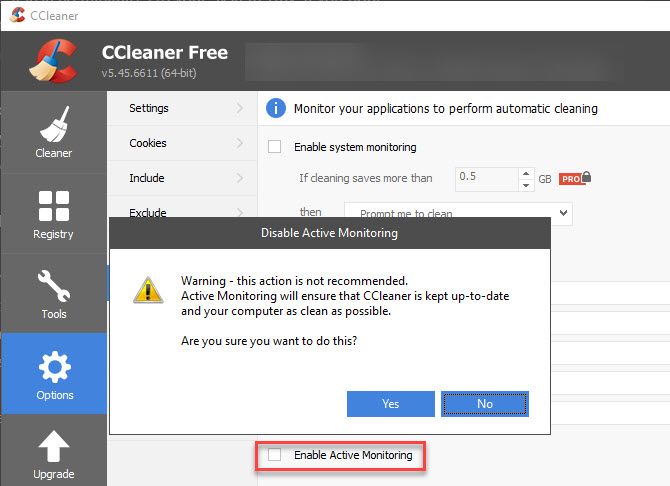
CCleaner’s biggest recent controversy came in version 5.45. This included a feature called “Active Monitoring,” a fairly standard feature that collects anonymized information about your system. You could disable it to turn the feature off—or could you?

CCleaner-Disable-Active-Monitoring

As it turns out, if you disabled Active Monitoring in CCleaner, the software automatically re-enabled it after you rebooted or reopened CCleaner. This is extremely suspicious behavior. Though Piriform has backpedaled on it by pulling version 5.45 from the main download page for a time, upset users fled in droves.

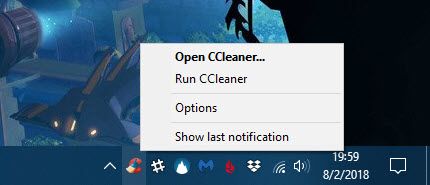
Additionally, that version of CCleaner was much harder to quit. When you clicked the X to close the software, it instead minimized to your System Tray. If you right-clicked its icon, there was no option to exit CCleaner. This means you had to close it using the Task Manager, which novice users might not know how to do.

CCleaner-No-Close-Option

Thus, CCleaner now ran constantly in the background, collecting data for Avast. This is despite most people only opening CCleaner when needed, and requesting to not have this information collected.

CCleaner Distributed Malware

Prior to this, Piriform discovered that CCleaner was hacked and distributed malware. The 32-bit version was infected with a Trojan that collected information about systems it was installed on. It also had the capability to run code on affected systems.

Thankfully, the company caught it before a widespread attack could happen. But it’s pretty embarrassing that a top-tier security company like Avast had such an embarrassing slip-up.

Since its acquisition by Avast, CCleaner also shows pop-ups harassing you to upgrade to the paid version (which has an automatic cleaning feature). And installing CCleaner sometimes shows an offer to install Avast, which you must uncheck to avoid.

With all this combined, enough is enough. If you’ve had your fill of this obnoxious and shady behavior, it’s time to say goodbye to CCleaner.

How to Uninstall CCleaner

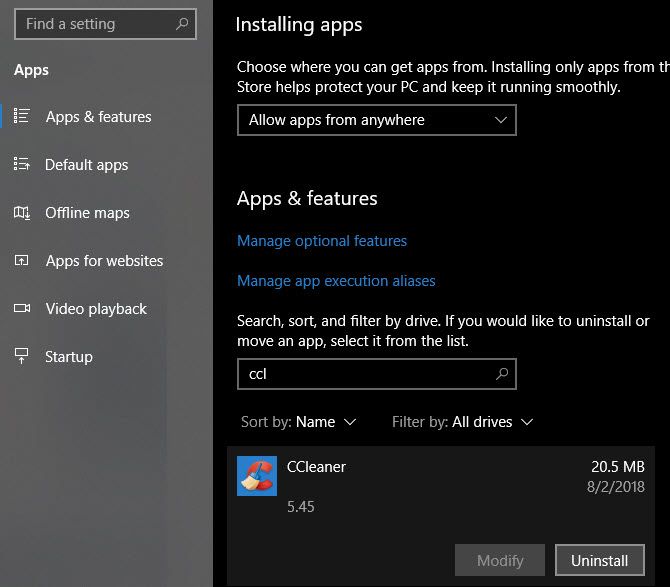
The first step is removing CCleaner from your computer. Doing so is easy. Head to Settings > Apps > Apps & features. Scroll through the list or use the search box to look for CCleaner. Click its name, then choose Uninstall.

Uninstall-CCleaner

What to Replace CCleaner With

The good news is that you actually don’t need CCleaner—Windows 10 has most of its functionality built-in, and you can install other tools for the rest.

Cleaning Junk Files

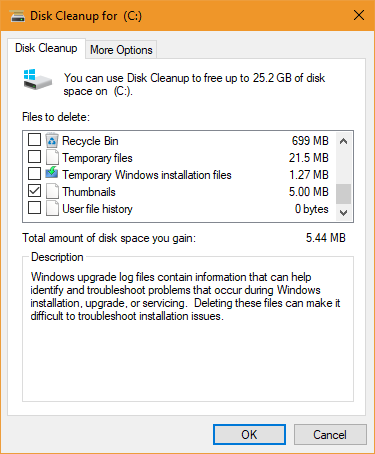
The longtime Disk Cleanup tool makes cleaning junk files off your system easy. Launch it by typing its name in the Start Menu, then choose the disk you want to scan. Check the boxes for various types of files to clean, and you’re all set.

Windows-10-Disk-Cleanup

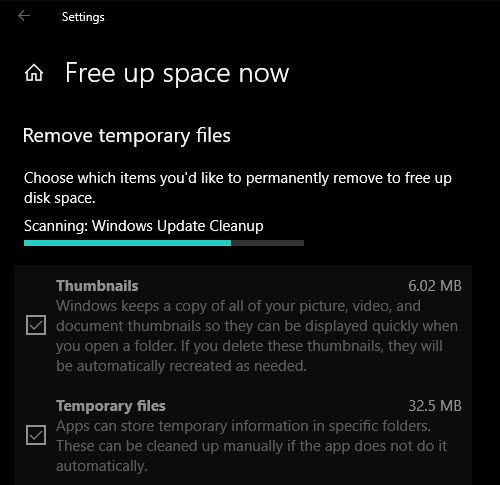
For a newer interface, you can also access the Storage Sense feature in Windows 10 at Settings > System > Storage. Click Free up space now under Storage sense to remove various types of unnecessary files.

Free-Up-Space-Windows-10

Clearing Caches

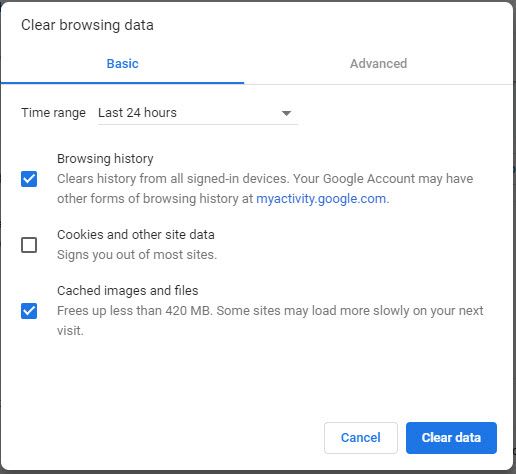
Aside from clearing unnecessary files, CCleaner also cleans the cache of your browser and other programs. However, you can clear your browser history, cache, and other information right inside it. Plus, incognito or private modes allow you to browse without saving any information in the first place.

Clearing cache to save space isn’t a long-term solution because your browser will recreate it when needed. The cache helps your browser run more efficiently, so you normally don’t need to clear it unless you run into an issue.

Chrome-Clear-Browsing-Data

Uninstall Programs and Remove Startup Items

CCleaner’s Tools section includes several functions that duplicate built-in Windows options. To uninstall software, visit the same page you did above to remove CCleaner at Settings > Apps > Apps & features.

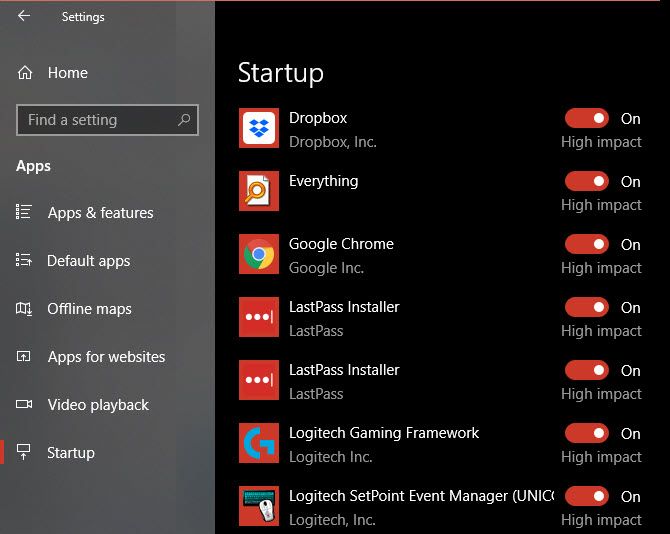
Managing startup programs is easy with the Task Manager. Press the Ctrl + Shift + Esc shortcut, or right-click the Taskbar and choose Task Manager, to open it. Switch to the Startup tab and you’ll see everything that runs when you log in. Right-click an option and hit Disable to remove it from startup.

If you prefer, you can also manage these at Settings > Apps > Startup.

Windows-10-Startup-Apps

Find What’s Taking Up Space

CCleaner has a basic disk analyzer tool that shows you the biggest space hogs on your system. Unsurprisingly, you have better options for disk analysis.

Other CCleaner Features

The above are CCleaner’s major features, but you might want replacements for the other minor functions too. In each case, you have options that aren’t obnoxious like CCleaner.

Don’t worry about the Browser Plugins tool—you can manage your browser extensions manually. And there are other duplicate file finders with more features too.

The System Restore is a duplicate of Windows’ built-in functionality, while you can use other tools to completely wipe a disk.

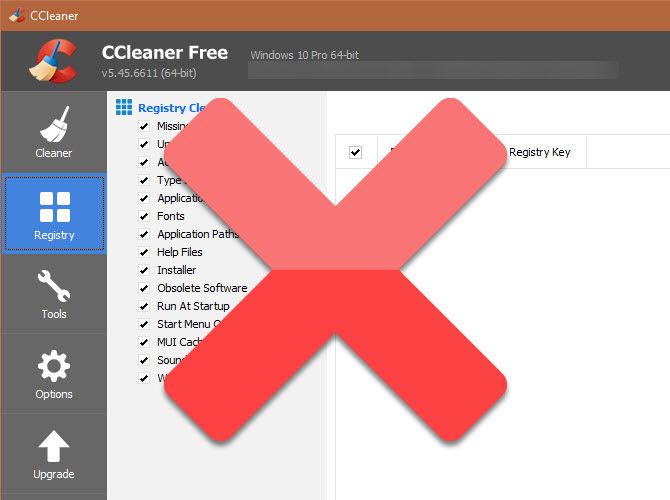
Lastly, don’t worry about losing the Registry cleaner. Registry cleaners are useless, as even removing thousands of invalid entries won’t have the smallest effect on performance. There’s a better chance you’ll break something by cleaning the Registry than fixing it, so leave them alone.

CCleaner-Registry-Cleaner-With-X

Full Replacements for CCleaner

The above Windows tools and apps should take care of everything you used CCleaner for. But in case you just can’t live without a dedicated cleaning app, we recommend alternatives like atomiccleaner or BleachBit.

Have You Dropped CCleaner Yet?

It’s a shame to see a once-revered Windows tool go so far down the drain. It once was focused on helping you clean up crap, but has turned into a crappy software itself. While Piriform has made changes to the monitoring, these are too little, too late. And the forced updates are yet another annoying behavior that’s more like malware than a helpful utility.

You should use a tool that respects your privacy and preferences and isn’t susceptible to malware. Have a look at other popular security apps you should replace for more like this.

Read the full article: Why You Should Stop Using CCleaner on Windows Right Now


Read Full Article

Pandora Copies Spotify With Curated Playlists


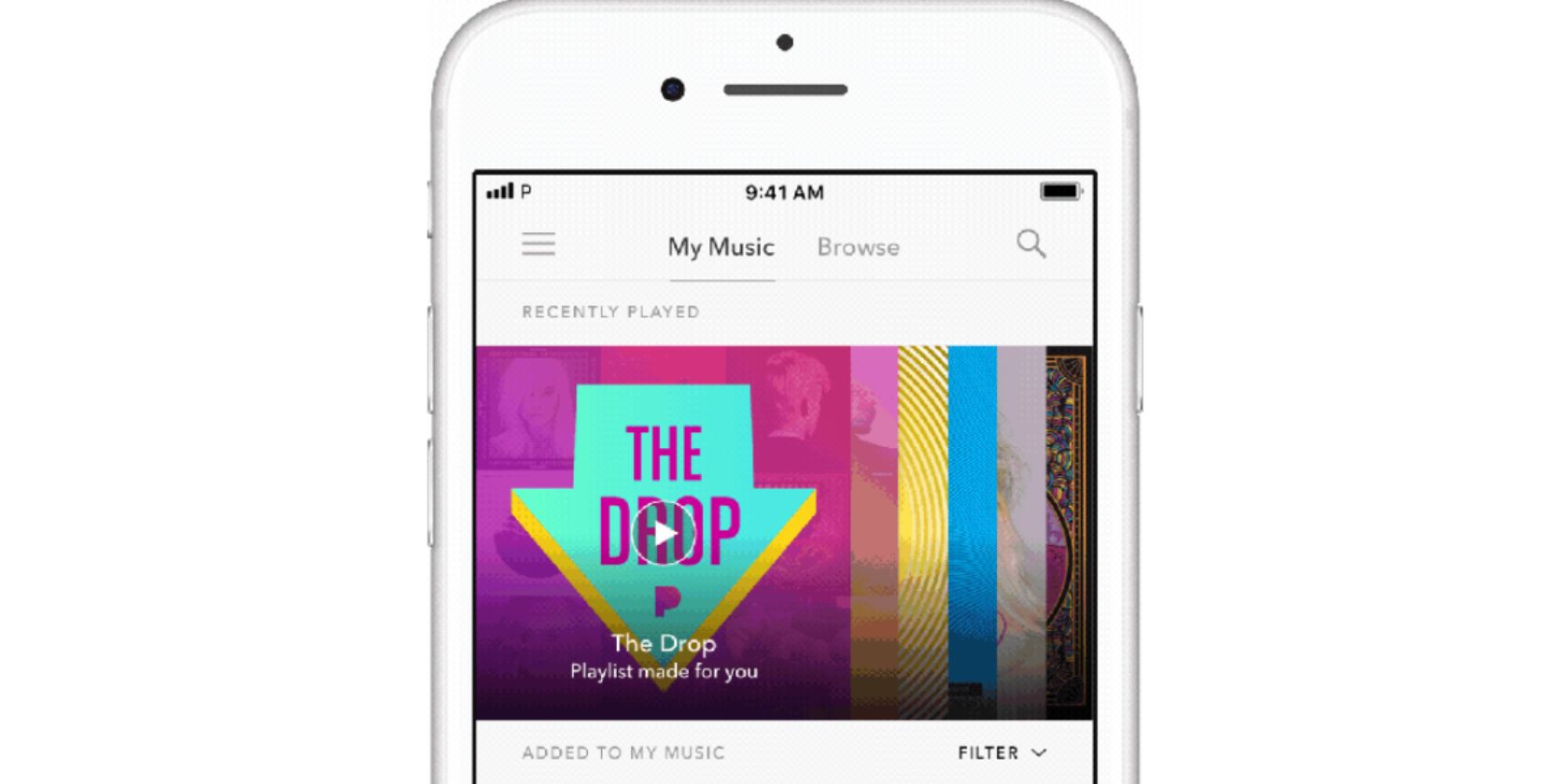
Pandora has launched a new curated playlist that works in a similar way to Spotify’s automagic playlists. Called The Drop, this playlist will automatically populate with new songs released by artists Pandora either knows you like or thinks you’ll like.

Discover New Tracks You Love

On the Pandora Blog, the music streaming service explains that it wants to help you experience that “feeling of discovering a new track you love.” These are the songs you know “you’re going to be playing on repeat over and over again.”

To that end, The Drop will be personalized based on your listening habits. Pandora will then add songs it thinks you’ll like on the day they’re released. You’ll start with 10-15 songs, but more will be added until the playlist is packed with up to 100 songs.

The songs will be listed in order, with the newest at the top. And if you find your new jam you can either add it to My Music or share it with family and friends. If you update the Pandora app you should be able to find The Drop in the Playlists section of My Music.

As with everything created by algorithms, The Drop feeds on data. So if you only occasionally use Pandora you might be disappointed. However, the more music you consume on the platform the better Pandora’s machine learning will get to know you.

Pandora Is Indebted to Spotify

Admittedly, The Drop is very similar to Spotify’s Release Radar, which is comprised of 30 songs which are replaced every week. Still, imitation is the sincerest form of flattery, and Pandora clearly thinks curated playlists will help it succeed.

The Drop is only available to Pandora Premium subscribers, or anyone trialling the service. For the uninitiated, Pandora Premium is priced at the industry standard $9.99/month, although a Family Plan for up to six people is available for $14.99/month.

Read the full article: Pandora Copies Spotify With Curated Playlists


Read Full Article

The Punkt MP02 inches closer to what a minimalist phone ought to be


There’s an empty space in my heart for a minimalist phone with only the most basic functions. Bad for my heart, but good for a handful of companies putting out devices aiming to fill it. Punkt’s latest, the MP02, goes a little ways to making the device I desire, but it isn’t quite there yet.

Punkt’s first device included just texting and calling, which would likely have worked as intended if not for the inconvenient choice to have it connect only to 2G networks. These networks are being shut down and replaced all over the world, so you would have ended up with a phone that was even more limited than you expected.

The MP02 is the sequel, and it adds a couple useful features. It runs on 4G LTE networks, which should keep it connected for years to come, and it has gained both threaded texting (rather than a single inbox and outbox — remember those?) and Blackberry encryption for those sensitive communications.

It has nice physical buttons you can press multiple times to select a letter in ye olde T9 fashion, and also lets you take notes, consult a calendar, and calculate things. The battery has 12 days of standby, and with its tiny monochrome display and limited data options, it’ll probably stay alive for nearly that even with regular use.

Its most immediate competition is probably the Light Phone, which also has a second iteration underway that, if I’m honest, looks considerably more practical.

Now, I like the MP02. I like its chunky design (though it is perhaps a mite too thick), I like its round buttons and layout, I like its deliberate limitations. But it and other would-be minimal phones, in my opinion, are too slavish in their imitations of devices from years past. What we want is minimalism, not (just) nostalgia. We want the most basic useful features of a phone without all the junk that comes with them.

The Light Phone 2 and its nice e-ink screen.

For me, that means including a couple things that these devices tend to eschew.

One is modern messaging. SMS is bad for a lot of reasons. Why not include a thin client to pass text to a messaging service like WhatsApp or Messenger? Of course iMessage is off limits — thanks, Apple — but we could at least get a couple of the cross-platform apps on board. It doesn’t hurt the minimalist nature of the phone, in my opinion, if it connects to a modern messaging infrastructure. No need for images or gifs or anything — just text is fine.

Two is maps. We sure as hell didn’t have maps on our featurephones back in the day, but you better believe we wanted them. Basic mapping is one of the things we rely on our phones for every day. Whatever’s on this minimal phone doesn’t have to be a full-stack affair with recommendations, live traffic, and so on — just location and streets, and maybe an address or lat/long lookup, like you’d see on an old monochrome GPS unit. I don’t need my phone to tell me where to eat — just keep me from getting lost.

Three, and this is just me, I’d like some kind of synchronizing note app or the ability to put articles from Pocket or whatever on there. The e-ink screen on the Light Phone is a great opportunity for this very specific type of consumption. Neither of the companies here seems likely to add this feature, but that doesn’t change the fact that it’s one of the few things I regularly use my phone for.

Light Phone 2 is possibly getting music, weather, and voice commands, none of which really screams “minimal” to me, nor do they seem trivial to add. Ride-share stuff is a maybe, but it’d probably be a pain.

I have no problem with my phone doing just what a pocketable device needs to do and leaving the more sophisticated stuff to another device. But that pocketable device can’t be that dumb. Fortunately I do believe we’re moving closer to days when there will be meaningfully different choices available to weird people like myself. We’re not there yet, but I can wait.


Read Full Article

How to Update Your iPhone: iOS, Apps, and Data Backups

How to Spot VPNFilter Malware Before It Destroys Your Router


vpn-filter-malware

Router, network device, and Internet of Things malware is increasingly common. Most focus on infecting vulnerable devices and adding them to powerful botnets. Routers and Internet of Things (IoT) devices are always powered-up, always online, and waiting for instructions. Perfect botnet fodder, then.

But not all malware is the same.

VPNFilter is a destructive malware threat to routers, IoT devices, and even some network-attached storage (NAS) devices. How do you check for a VPNFilter malware infection? And how can you clean it up? Let’s take a closer look at VPNFilter.

What Is VPNFilter?

VPNFilter is a sophisticated modular malware variant that primarily targets networking devices from a wide range of manufacturers, as well as NAS devices. VPNFilter was initially found on Linksys, MikroTik, NETGEAR and TP-Link network devices, as well as QNAP NAS devices, with around 500,000 infections in 54 countries.

The team that uncovered VPNFilter, Cisco Talos, recently updated details regarding the malware, indicating that networking equipment from manufacturers such as ASUS, D-Link, Huawei, Ubiquiti, UPVEL, and ZTE are now showing VPNFilter infections. However, at the time of writing, no Cisco network devices are affected.

The malware is unlike most other IoT-focused malware because it persists after a system reboot, making it difficult to eradicate. Devices using their default login credentials or with known zero-day vulnerabilities that have not received firmware updates are particularly vulnerable.

What Does VPNFilter Do?

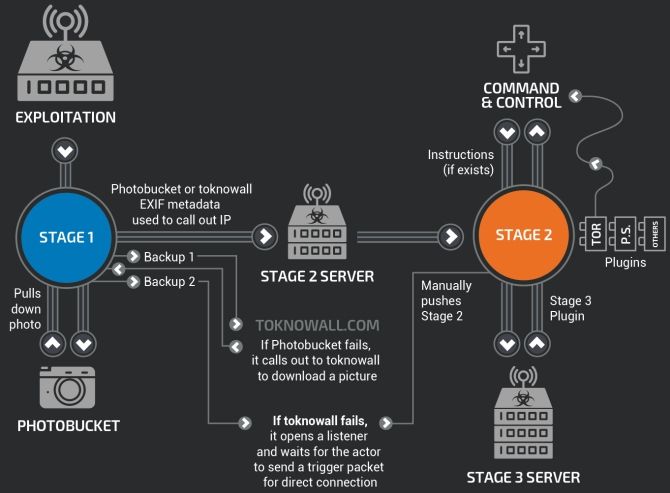
So, VPNFilter is a “multi-stage, modular platform” that can cause destructive damage to devices. Furthermore, it can also serve as a data collection threat. VPNFilter works in several stages.

Stage 1: VPNFilter Stage 1 establishes a beachhead on the device, contacting its command and control server (C&C) to download additional modules and await instructions. Stage 1 also has multiple inbuilt redundancies to locate Stage 2 C&Cs in case of infrastructure change during deployment. The Stage 1 VPNFilter malware is also able to survive a reboot, making it a robust threat.

Stage 2: VPNFilter Stage 2 does not persist through a reboot, but it does come with a wider-range of capabilities. Stage 2 can collect private data, execute commands, and interfere with device management. Also, there are different versions of Stage 2 in the wild. Some versions are equipped with a destructive module that overwrites a partition of the device firmware, then reboots to render the device unusable (the malware bricks the router, IoT, or NAS device, basically).

Stage 3: VPNFilter Stage 3 modules work like plugins for Stage 2, extending the functionality of VPNFilter. One module acts as a packet sniffer that collects incoming traffic on the device and steals credentials. Another allows the Stage 2 malware to communicate securely using Tor. Cisco Talos also found one module that injects malicious content into traffic passing through the device, meaning the hacker can deliver further exploits to other connected devices through a router, IoT, or NAS device.

In addition, VPNFilter modules “allow for the theft of website credentials and the monitoring of Modbus SCADA protocols.”

Photo Sharing Meta

Another interesting (but not newly discovered) feature of the VPNFilter malware is its use of online photo sharing services to find the IP address of its C&C server. The Talos analysis found that the malware points to a series of Photobucket URLs. The malware downloads the first image in the gallery the URL references and extracts a server IP address hidden within the image metadata.

The IP address “is extracted from six integer values for GPS latitude and longitude in the EXIF information.” If that fails, the Stage 1 malware falls back to a regular domain (toknowall.com—more on this below) to download the image and attempt the same process.
cisco talos vpnfilter malware server infastructure

Targeted Packet Sniffing

The updated Talos report revealed some interesting insights into the VPNFilter packet sniffing module. Rather than just hoovering everything up, it has a fairly strict set of rules that target specific types of traffic. Specifically, traffic from industrial control systems (SCADA) that connect using TP-Link R600 VPNs, connections to a list of pre-defined IP addresses (indicating an advanced knowledge of other networks and desirable traffic), as well as data packets of 150 bytes or larger.

Craig William, senior technology leader, and global outreach manager at Talos, told Ars, “They’re looking for very specific things. They’re not trying to gather as much traffic as they can. They’re after certain very small things like credentials and passwords. We don’t have a lot of intel on that other than it seems incredibly targeted and incredibly sophisticated. We’re still trying to figure out who they were using that on.”

Where Did VPNFilter Come From?

VPNFilter is thought to be the work of a state-sponsored hacking group. That the initial VPNFilter infection surge was predominantly felt throughout Ukraine, initial fingers pointed to Russian-backed fingerprints and the hacking group, Fancy Bear.

However, such is the sophistication of the malware there is no clear genesis and no hacking group, nation-state or otherwise, has stepped forward to claim the malware. Given the detailed malware rules and targeting of SCADA and other industrial system protocols, a nation-state actor does seem most likely.

Regardless of what I think, the FBI believes VPNFilter is a Fancy Bear creation. In May 2018, the FBI seized a domain—ToKnowAll.com—that was thought to have been used to install and command Stage 2 and Stage 3 VPNFilter malware. The domain seizure certainly helped stop the immediate spread of VPNFilter, but didn’t sever the main artery; the Ukrainian SBU took-down a VPNFilter attack on a chemical processing plant in July 2018, for one.

VPNFilter also bears similarities to the BlackEnergy malware, an APT Trojan in use against a wide-range of Ukrainian targets. Again, while this is far from complete evidence, the systemic targeting of Ukraine predominantly stems from hacking groups with Russian ties.

Am I Infected With VPNFilter?

Chances are, your router is not harboring the VPNFilter malware. But it is always better to be safe than sorry:

  1. Check this list for your router. If you’re not on the list, everything is okay.
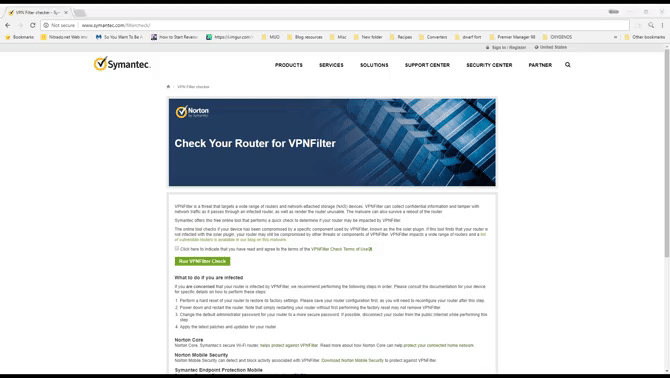
  2. You can head to the Symantec VPNFilter Check site. Check the terms and conditions box, then hit the Run VPNFilter Check button in the middle. The test completes within seconds.
vpnfilter malware symantec infection check site

I’m Infected With VPNFilter: What Do I Do?

If the Symantec VPNFilter Check confirms that your router is infected, you have a clear course of action.

  1. Reset your router, then run the VPNFilter Check again.
  2. Reset your router to factory settings.
  3. Download the latest firmware for your router, and complete a clean firmware installation, preferably without the router making an online connection during the process.

Further to this, you need to complete full system scans on each device connected to the infected router.

You should always change the default login credentials of your router, as well as any IoT or NAS devices (IoT devices don’t make this task easy) if at all possible. Also, while there is evidence that VPNFilter can evade some firewalls, having one installed and properly configured will help keep a lot of other nasty stuff out of your network.

Watch Out for Router Malware!

Router malware is increasingly common. IoT malware and vulnerabilities are everywhere, and with the number of devices coming online, will only get worse. Your router is the focal point for data in your home. Yet it doesn’t receive nearly as much security attention as other devices.

Simply put, your router isn’t secure as you think.

Read the full article: How to Spot VPNFilter Malware Before It Destroys Your Router


Read Full Article

How to Clear Cache on Your iPhone or iPad

The 5 Biggest Blockchain Issues: Security, Privacy, Regulatory, Legal, and Ethical Considerations

Twitter Brings Back the Chronological Timeline


Twitter is bringing back the chronological timeline. This change means you’ll be able to see all of the tweets from the accounts you follow delivered in reverse order. Which is, apart from an Edit button, all Twitter users have been requesting for years.

Chronological Gives Way to Algorithms

When Twitter first launched, and for many years after, tweets would be displayed in chronological order. At the top were the latest tweets from the people you followed, and as you scrolled down you would see older tweets presented in reverse order.

Then, in 2016, Twitter started messing with people’s timelines. While it was still possible to see most tweets in chronological order, Twitter’s algorithms thought it knew better. Cue certain tweets given a higher billing than others, and complaints from users.

Twitter Finally Gives Users the Option

Now, Twitter has finally listened to those complaints. In a thread of tweets from Twitter Support, the social network has indicated it’s working on a way to “switch between a timeline of Tweets that are most relevant for you and a timeline of the latest Tweets.”

In the meantime Twitter has changed the way its “Show the best Tweets first” option works. Previously, unticking this option meant you would still see recommended and missed tweets. Now, if you untick this you should just see tweets in chronological order.

While Twitter claims it has been planning this for a while, it happened to pull the trigger soon after a tweet detailing a workaround went viral. The tweet, embedded above, shows how muting certain words can force Twitter to deliver a chronological timeline.

Welcome Back, Sweet Chronological Timeline

Regardless of the timing, and Twitter’s reasoning for acting now, years after people started complaining, this is a positive move. Sure, most of us have got used to seeing random tweets inserted in our timelines, but that doesn’t mean we like it.

If you’re not already on Twitter this is as good a time as any to give it a go. So why not read our guide to using Twitter to help you get started. Or, if you’re already big into Twitter you might want to take a deep dive into Twitter Analytics instead.

Read the full article: Twitter Brings Back the Chronological Timeline


Read Full Article