17 July 2018

WonderFox Makes Ripping DVDs Easy


Though streaming media has become the standard recently, many people still have DVD collections. Since physical media can break or wear out, it’s wise to back up your DVD collection digitally to an external hard disk or other form of storage.

Whether you want to back up your movie collection or home videos on DVD, WonderFox DVD Ripper can do the job. Let’s take a look at what this tool is capable of.

Getting Started With WonderFox

Head to the WonderFox homepage to get started. You can download a free version of the software by clicking the Free Download button. It should download and install quickly, with nothing to configure during installation.

Ripping a DVD With WonderFox

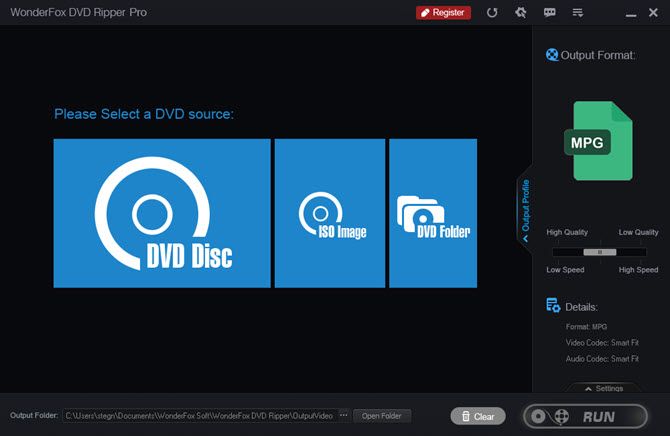
Once installed, open WonderFox DVD ripper to rip your first DVD. You’ll see its home screen:

WonderFox-DVD-Ripper-Home

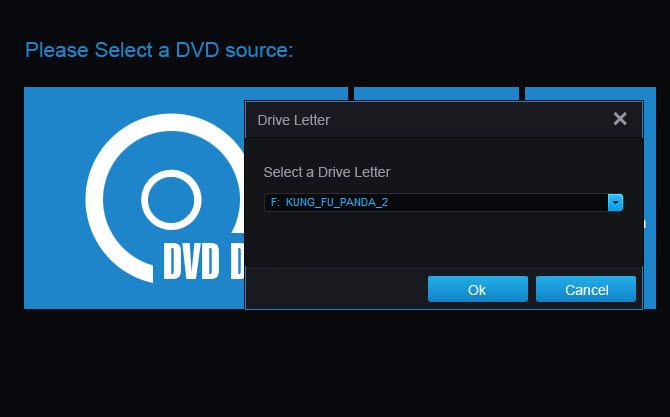
Insert the DVD you want to rip into your computer’s disc drive if you haven’t already. Once that’s ready, click the DVD Disc option in the source menu of WonderFox. Confirm that it has the correct drive letter, then click OK.

WonderFox-Drive-Letter

This will populate the background with scenes from your DVD. If you don’t want to rip a DVD, you can also use an ISO image or DVD folder from your PC.

Configure Ripping Options

Once it completes, click the Output Profile tab to expand it with more options.

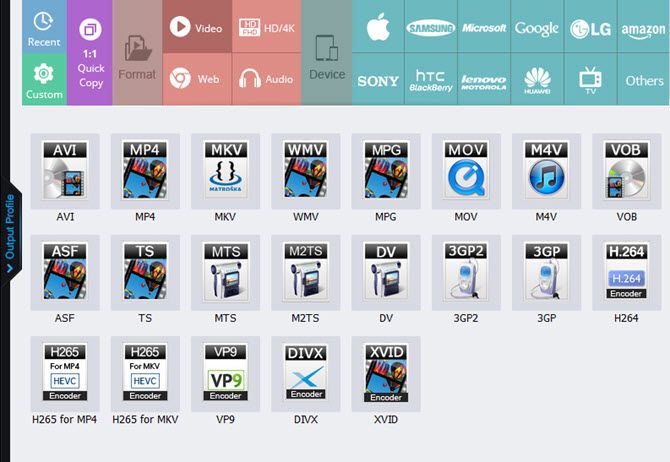
Use the tabs at the top to select the device you plan to play the video file on (such as Apple > iPhone 8 or Sony > PlayStation 4). You can also choose Video, Audio, or Web to pick a specific format like AVI, MP4, MP3, or HTML5. A common format like MP4 will work well for general use, but you can get more specific if you like.

WonderFox-Video-Formats

You can use the Output Format options on the right to configure further. Drag the Quality slider to choose your balance of quality and speed of ripping. Click the Settings tab below to adjust video options like encoder and resolution, as well as audio options like channel and sample rate.

To change where it saves the resulting video, click the button next to the Output Folder field. When you’re ready, click the Run button to start the ripping process. You’ll see a prompt about registering WonderFox to unlock all its features. Click Continue to proceed with the trial version if you’d like.

Premium Version

WonderFox packs in a lot of great features, including bypassing copyright protection, removing regional code restrictions, and making a perfect copy in little time. The free version, however, only lets you rip 15 minutes of each DVD. You also won’t get the video enhancing and speedy backups without a license.

You’ll need to purchase a license key to unlock the full version of the software. Thanks to a special offer WonderFox provided us, you can purchase it for just $29.95.

Get Ripping With WonderFox

If you need to rip DVDs, WonderFox makes it easy. Don’t risk losing your old DVDs to scratches or other damage—you can easily make 1:1 backup copies in minutes.

Read the full article: WonderFox Makes Ripping DVDs Easy


Read Full Article

Get Two Years of Online Privacy Protection for $49 with PureVPN


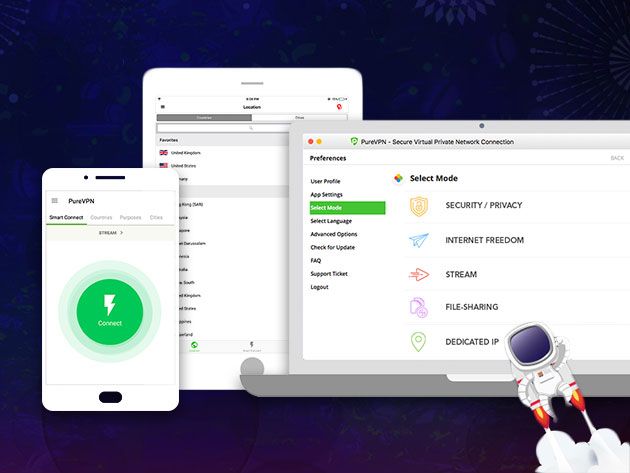
Online privacy feels pretty elusive nowadays, and cybercrime is a growing problem. The best way to defend yourself is by using a VPN. With fast connections and a strict no-logging policy, PureVPN is one of the best providers around. Right now, you can get two years of protection for just $49 via MakeUseOf Deals — and use code JULY40 for an extra 40% off.

Complete Protection

Protecting your digital privacy can be an uphill battle. Every website you visit is collecting personal data. Rogue Facebook apps want to target you with political ads, and your ISP will probably sell your browsing history to the highest bidder.

By masking your IP address and location, PureVPN stops all this nonsense. Without any identifying information, no-one can track you across the web or hack your connection. This is doubly important if you regularly use insecure public Wi-Fi networks.

PureVPN also encrypts your data using proprietary software — there are no third parties involved — and the company uses a strict no-logging policy.

With 550 servers across 141 countries, PureVPN allows you to bypass local restrictions and enjoy geo-blocked content. One subscription covers five devices, with easy-to-use apps on Windows, Mac, iOS, Android, and other platforms. The price includes 24/7 live support and unlimited bandwidth.

Two Years for $49

Two years of service with PureVPN is worth $262, but you can get your subscription now for only $49.

Read the full article: Get Two Years of Online Privacy Protection for $49 with PureVPN


Read Full Article

5 Smart Recipe Sites and Apps to Simplify and Reinvent Cooking


smart-recipe-sites-apps

The internet is a giant, free recipe book. So giant that it can be overwhelming. A few new apps and sites are solving this problem of plenty with smart ideas that reinvent how you cook or look for recipes.

Even Google has realized how complicated things get when you try to find a recipe, so it has made Google search easier for recipes. It’s also why Buzzfeed’s Tasty section has grown so popular with those quick recipe videos. The order of the day is simplifying recipes, finding the right one quickly, and saving what you like for later.

Average Cookbook (Web): Shows You What Many Recipes Agree About

Every recipe writer has their own take on how to make even the simplest thing, be it French Toast or a cup of lemonade. Average Cookbook finds the consensus of multiple recipes, to form a new recipe that everyone agrees on.

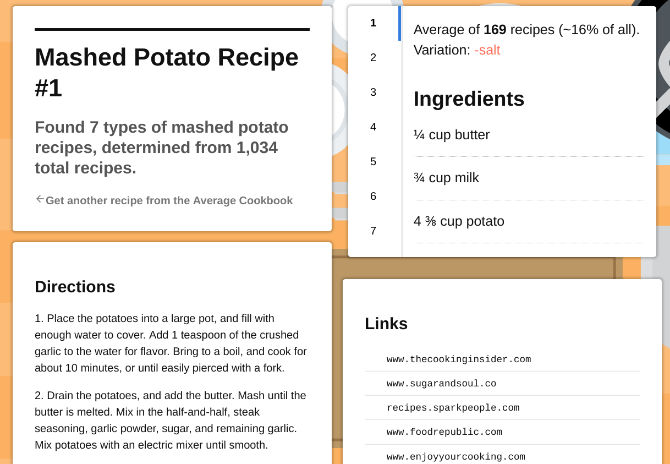
It might seem like a weird idea, but it works. Each recipe includes variations too. For example, mashed potato can be made without salt, or without milk, or by adding sour cream, or by adding garlic, and so on. Average Cookbook takes 1,034 total recipes for mashed potatoes to turn them into seven basic variations depending on the ingredients. And for each variant, it has different directions to make it.

Rather than checking a recipe on All Recipes and then comparing it to the same item on Food Network, It’s easier to search on Average Cookbook and find these aggregations that clearly state what is different in each variation. It puts the focus on cooking, not on searching the many recipe sites.

Plant Jammer (Android, iOS): AI-Generated Recipes for Vegetarians

Plant Jammer is another app that helps you find recipes based on ingredients. What’s different is that Plant Jammer actually guides you in building a healthy, well-rounded meal.

Here’s how it works. The app first asks what you’re craving to eat: pasta, pizza, stir fry, dips, risotto, stew, and so on. Depending on what you pick, it will help you “build” a dish. For example, if you pick a warm salad, it will guide you to pick four types of ingredients: a base (like couscous), a splash (like olive oil), a boost (like spring onion), and a topping (like cheese or nuts).

Each choice can be based on what you have in your pantry already, or a new item that you shop for. And once you choose the first ingredient (like mushrooms), the AI will change its recommendations for the next type (like turning olive oil into vegetable stock).

At the end of choosing ingredients, Plant Jammer spins your choices into a simple step-by-step recipe. Start cooking!

If Plant Jammer suits your lifestyle, you should also check out these other vegetarian and vegan apps.

Download: Plant Jammer for Android | iOS (Free)

Get Noodles (Web): Simplified Way to View and Collect Recipes

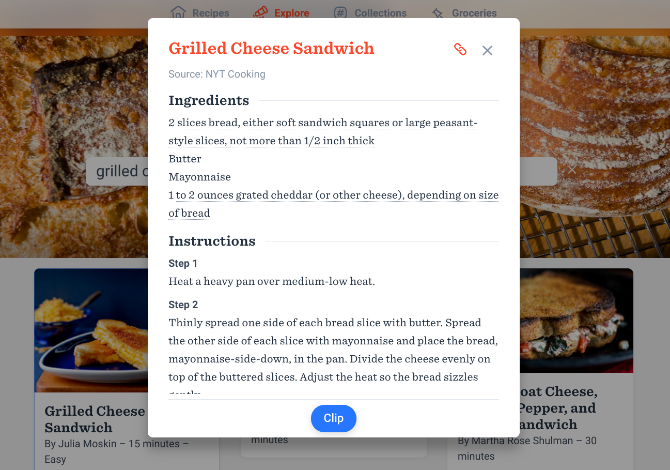
Run a Google search for anything and one of three recipe sites will dominate the results: The New York Times’ Cooking, Epicurious, or All Recipes. Each has its own format for how it displays and talks about recipes, ingredients, and so on. Get Noodles strips this formatting for a minimalistic view, and ingredients listed by your preferred units of measurement.

You’ll need to sign in to use Get Noodles. Go to the Explore section and search for a recipe. Find what you like and add it to your Recipes section. It’s a simple, standardized text format, stripped of all the photos and videos that these sites usually throw in your face. Of course, you can follow the link to the original site to see those photos or videos if you want.

Get Noodles also works with several other popular recipe websites, but those aren’t included in the search. For example, if Alton Brown has your favorite recipe for a Grilled Cheese Sandwich on the Food Network, you’ll need to manually import that link to your Recipes section.

Think of Get Noodles as your personalized Pinterest on steroids, made purely for discovering and cooking your favorite recipes.

Cinc (Web): Mix and Match Recipes to Create Your Own

Cinc calls itself the Github for cooking. Geeks, you’re going to love this one. The site is a giant database of recipes from various sites. It also supports several blogs, so you can import a recipe from your favorite food writer.

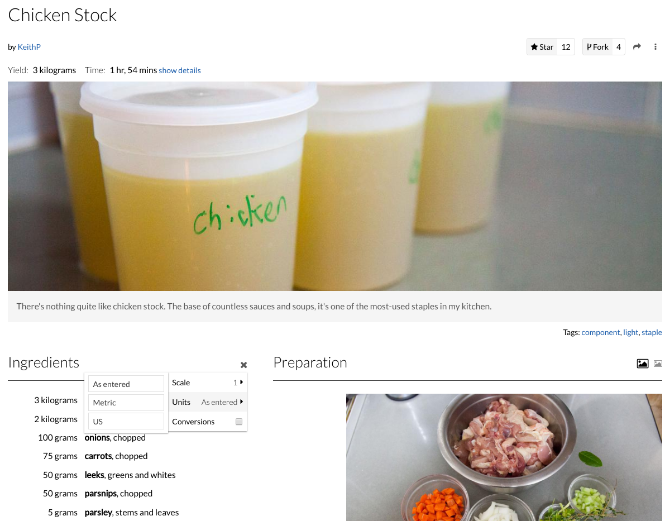
There are several things that set Cinc apart from a regular cooking site. It can automatically convert ingredients between metric, US, or cup-based calculations, and even scale them up or down so you can serve more or fewer people. Unlike Get Noodles, Cinc also imports photos from the recipe site, giving you that visual guidance you sometimes need.

But what’s the Github connection? Well, Cinc lets you “fork” recipes, which means you can take an existing user’s recipe, and “fork” it to create a variation of your own with some different ingredients or techniques.

These forks are also a wonderful way to discover new dishes. You might come across a variation of one of your favorite food items, and you can see where else this dish was used. For example, checking a recipe for the chicken stock might lead to new items among soups, broths, and stews.

Chowii (Web): Aggregator of Short Video Recipes on Facebook

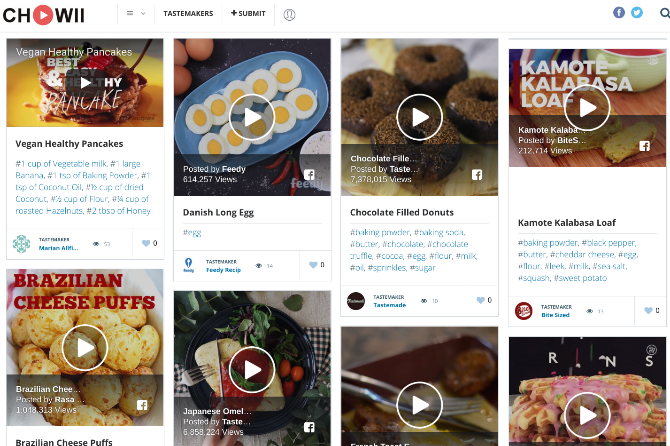
By now, you’ve definitely seen some of those super-quick recipe videos on social media. Usually shared on Facebook, these videos simplify recipes and make cooking look easier than ever with their stop-motion style. More often than not, this simplicity can inspire you to actually cook the dish than looking at a daunting, long recipe.

Several sites make these videos, like Buzzfeed’s Tasty, Feedy, Spoon University, and others. Chowii collects all of them in one place, giving you an easy way to search through such video recipes and get inspired to cook. There’s even a bit of categorization, like breakfast, desserts, drinks, salads, etc., as well as a few collections of cuisines.

Remember, you won’t get ingredient listings or any textual guidance here. It’s a short and quick recipe, made to inspire and browse. If you have lesser time than you think, then try these sites for quick meal ideas too.

Beginner Cooks, Start Here

The above sites assume you aren’t a complete beginner in the world of cooking. You’ll need to know the basics to be able to use any of the above apps effectively. In case that’s not you, you should start with our essential sites for newbies in the kitchen.

Image Credit: stockasso/Depositphotos

Read the full article: 5 Smart Recipe Sites and Apps to Simplify and Reinvent Cooking


Read Full Article

The 15 Best HBO Shows That Make HBO NOW Worth the Money


hbo-worth-money

Without a doubt, HBO is the highest-quality TV network in the world. Not only is it packed with the best shows in TV history, but it was also the first major cable network to embrace the idea of streaming its own content.

If you have HBO as part of your cable TV package, you can watch everything online with HBO GO—but these days, you don’t need cable TV to watch HBO thanks to the advent of HBO NOW. For $15 per month, you can grab a standalone HBO NOW subscription and drop cable TV for good.

Does that price sound steep? Trust me, it isn’t! While HBO has 75+ original TV series in its library, the following shows are so good that they alone can justify the cost.

1. Band of Brothers

hbo-show-band-of-brothers

Historical Drama | IMDb: 9.5

This miniseries is the incredible tale of “Easy” Company’s training and involvement throughout Europe during World War II. Obviously some parts were adapted for structure and dramatic effect, but it is based on historic people, events, and accounts.

How good is Band of Brothers? Not only does it sit atop IMDb’s Top Rated TV Shows list, but it’s been there for many years. You may not enjoy it if you specifically hate war stories, but otherwise this will likely be the best show you’ll ever watch.

2. Game of Thrones

hbo-show-game-of-thrones

Fantasy Drama | IMDb: 9.5

Game of Thrones needs no introduction. Even if you’ve never seen it before, you’ve undoubtedly heard about it. This show is everywhere and it’s hard to get away from it.

Why is it so good? Because it’s all about the characters. The plots are dark, the twists are heart-wrenching, but most of all, Game of Thrones offers some of the most sprawling and engaging stories of all time, and that’s really all that matters. The fantasy underpinnings are just icing on the cake.

3. The Wire

hbo-show-the-wire

Crime Drama | IMDb: 9.3

The Wire is a police drama unlike any other police drama in television history. It takes place in the city of Baltimore and follows a massive cast of characters that are so fleshed out that it can feel more like a documentary than a drama at times.

Each season offers a study of the various institutions of Baltimore—police, dockworkers, politicians, schools, the media—and shows how the problems of the city are intertwined, systemic, and impossible to fix even with good intentions.

For its sheer amount of dramatic depth and breadth, The Wire is my favorite TV show of all time. You can also watch it on Amazon Prime Video.

4. The Sopranos

hbo-show-the-sopranos

Crime Drama | IMDb: 9.2

The Sopranos follows an Italian mobster and his family in New Jersey, depicting the difficulties of balancing his life at home with his life as a criminal mastermind. Bridging the gap are his sessions with his therapist.

Many laud The Sopranos as the greatest TV show of all time. Not for me, but I can appreciate the show for how it impacted the landscape and future of drama TV with its quality of writing, acting, directing, and serialization.

It was, in a word, groundbreaking.

5. True Detective

hbo-show-true-detective

Crime Drama | IMDb: 9.0

The first season of True Detective is some of the best television in the past decade. Over the course of eight episodes, you’re treated to a dark and mysterious investigation that twists and turns at all the right moments.

The second season is a completely different story with different characters and a different plot. Many critics felt that it was weaker on the whole, but still solid enough to be worth watching.

6. Westworld

Science Fiction Drama | IMDb: 8.9

Westworld is a fictional amusement park for the rich, where lifelike robots play out Wild West scenarios for visitors to take part in. These robots are equipped with next-level artificial intelligence, and they’re on the brink of developing true consciousness.

This incredible show is an expertly crafted crossover of genres: drama, science fiction, mystery, suspense, thriller, romance, and more. Not many series can claim to be an experience for viewers, but Westworld certainly can. From the very first minute, you can sense that there’s something special about it.

7. Rome

hbo-show-rome

Historical Drama | IMDb: 8.8

In many ways, Rome could be seen as the precursor to Game of Thrones. Not that they’re related in any way, but Rome pioneered a lot of the narrative aspects that people love about Game of Thrones: ensemble casts, political intrigue, and a “distant past” fantastical setting.

Don’t go into this show looking for historical accuracy, though there is a good bit of that. Rather, look at it as a rich exploration of Rome’s fall and the complex characters that lived and died during that time.

8. Curb Your Enthusiasm

hbo-show-curb-your-enthusiasm

Comedy | IMDb: 8.7

From the creator of Seinfeld comes a more cynical and more absurd kind of comedy that follows a retired television writer, his family, and his friends. Like Seinfeld, Curb Your Enthusiasm feels very much like a “show about nothing.”

In addition to being awkwardly hilarious, it maintains a consistent quality over the course of its eight seasons. Is it a binge-worthy show? Probably not for most. But taken in small doses, Curb Your Enthusiasm can be, and often is, laugh-out-loud funny.

9. Deadwood

hbo-show-deadwood

Western Drama | IMDb: 8.7

Deadwood is a late-1800s period piece that takes place in the American Midwest and incorporates a lot of mythical figures like Wild Bill Hickok and Calamity Jane, but never depicts them as caricatures or legendary. These are real people in Deadwood.

That said, it is the kind of show that falls into the “love it or hate it” category. The acting is some of the best you’ll ever see, but it’s not an easy show to watch. It’s grim, it’s dark, and while it can be hilarious at times, it’s serious.

10. Silicon Valley

hbo-show-silicon-valley

Comedy Drama | IMDb: 8.6

Silicon Valley is about six young guys who make a technological breakthrough in file compression and decide to start a new company around it. What follows is a somewhat absurd-yet-strangely realistic look at the modern culture of Silicon Valley.

Obviously it’s not entirely true to life as the writers do take creative liberties for the sake of drama and comedy, but on the whole it’s rather insightful. And yes, it’s funny! Oh, so funny.

11. The Night Of

hbo-show-the-night-of

Crime Drama | IMDb: 8.6

This miniseries follows the story of a Muslim college student who ends up accused of murdering an acquaintance in New York City. The premise may sound rather run-of-the-mill, but The Night Of is one of the most suspenseful shows you’ll ever watch.

What’s to love about this show? Many things, but its commitment to realism is something that’s rare in modern television. It’s realistic, but not in a way that distracts or detracts from the drama of it all. Rather, it amplifies the stakes and makes the story that much more meaningful.

12. Boardwalk Empire

hbo-show-boardwalk-empire

Crime Drama | IMDb: 8.6

Boardwalk Empire is a period piece set in the 1920s to 1930s that takes place in Atlantic City and focuses on a historical criminal mastermind, and his gang, that lived during those times.

The show experienced a dip in quality around the third and fourth seasons, but overall it’s pretty good—if you like slow-burning plots. While the characters and dialogue are engaging, Boardwalk Empire’s greatest strength is its visual aesthetic. “Beautiful” doesn’t quite cut it.

13. The Pacific

hbo-show-the-pacific

Historical Drama | IMDb: 8.3

After the success of Band of Brothers, HBO went ahead and produced another miniseries that’s essentially a spiritual successor but not a direct continuation. Called The Pacific, it follows a different region and different characters during World War II.

Most critics agree that Band of Brothers remains the superior work, but The Pacific is still a fantastic series in its own right. If you enjoy war stories and you’re itching for something similar to Band of Brothers, you’ll probably like this show.

14. The Leftovers

hbo-show-the-leftovers

Fantasy Drama | IMDb: 8.2

Imagine you wake up one day and two percent of the world’s population has mysteriously vanished—and you weren’t one of them. What would you do? How would you feel? Your life would never be the same.

The Leftovers is a polarizing show. It’s a slow-burning story that’s heavily character driven but also philosophical and even a bit depressing. It’s extremely ambitious, it doesn’t always achieve what it strives to do, but it’s willing to go where no other show has gone before.

I recommend powering through the first season because the second and third seasons contain some of the best TV episodes of all time. The series also ends with an incredibly emotional and satisfying finale.

15. Veep

hbo-show-veep

Comedy Drama | IMDb: 8.2

Veep is political satire. You can think of it as similar in premise to Parks and Recreation, but with all the heartwarming bits replaced with an overwhelming combination of incompetence and cynicism.

Yes, Veep is funny, but it’s funny in a way that’s more “cable TV funny” than “network TV funny,” which explains why it’s on HBO. It may not be your brand of humor, but you may be surprised by how much you like it anyway.

Is HBO NOW Worth It to You?

At $15 per month, HBO NOW is honestly a bargain—especially if you don’t have cable TV. And the best part is that you can start streaming shows as soon as they start airing live on TV, meaning you can stay caught up on shows like Game of Thrones and not have to worry about spoilers the next day.

If nothing else, you can subscribe to HBO NOW while a specific show is airing (e.g. Westworld during the summer), then unsubscribe when it finishes, meaning you only need to pay for a few months every year.

Start watching today and subscribe to HBO NOW.

Note that in addition to all of these TV series, HBO NOW grants you full access to the entire HBO library, including hundreds of classic and modern movies. If you’ve been hesitant to cut the cord, this may help you pull the trigger on dropping cable TV and streaming instead.

Read the full article: The 15 Best HBO Shows That Make HBO NOW Worth the Money


Read Full Article
How to Add Borders to Photos: 9 Easy Methods Anyone Can Use

The 4 Best Online Print-on-Demand Book Services for Self-Publishers


Getting a book published used to require submitting your work to a publisher and hoping for the best. These days, on-demand book printing (which is a kind of self-publishing or indie publishing) is even easier.

This is called print-on-demand. Thanks to print-on-demand book services, you can now format, order, and print copies of your own book right from the comfort of your home. Not only that, you can sell printed copies of your books directly to readers on demand, meaning you don’t have to print a risky bulk order beforehand.

Nowadays, there are several print-on-demand services that’ll help you make your own book online. Here are the best on-demand book printing services we recommend.

1. Blurb

best print-on-demand book services online

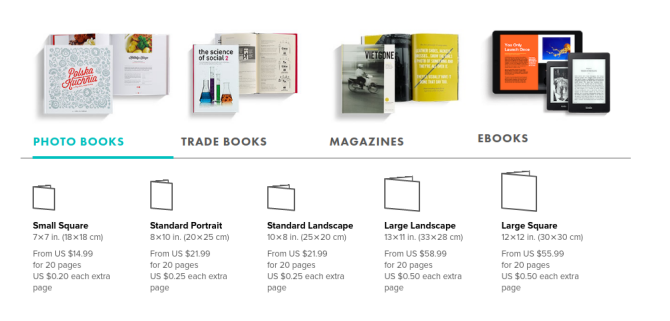
Blurb is a San Francisco-based self-publishing company that has been around since 2005. One of Blurb’s strength is the easy ability to create highly visual works using the site’s online tools. That makes Blurb great for photo books and magazines. Plus you can still turn to Blurb if you’re producing a print-only work.

Blurb lets you produce paperback or hardcover copies of your books, with the latter costing more. You can also use the service to create ebooks. If you prefer to work offline using your preferred programs, you also have the option to upload your book as a PDF.

Blurb charges you a set price for the cost of making your book. You decide for yourself how much profit you want to add on top of that figure. The resulting number is what people will pay to buy your work if you choose to sell it.

When you create a Blurb book, you can sell the finished product on Amazon without any extra hassle. However, Amazon does tack on a fee to the cost of each book.

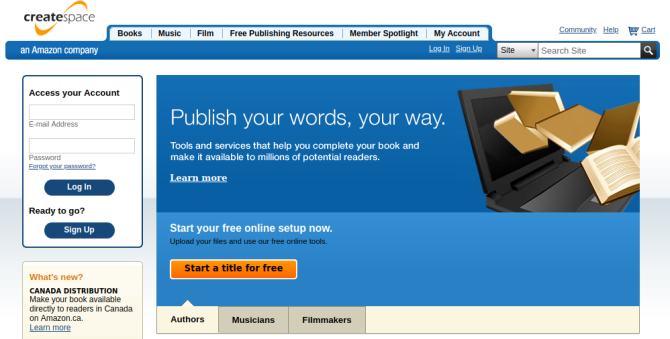
2. CreateSpace

best print-on-demand book services online

CreateSpace began as a South Carolina-based company called BookSurge back in 2000. Amazon acquired the business five years later. As a result, CreateSpace does NOT charge you extra fees to sell your work on Amazon.

CreateSpace provides you with the tools to create a cover and design the interior inside your browser. Alternatively, you can upload a PDF. Either way, there’s a limitation that you don’t face with Blurb. CreateSpace does not offer hardcover work as an option (unless you want to order copies to distribute yourself).

Amazon’s print-on-demand option provides the company with a cut of every sale, which is how you ultimately pay for the service. The money leftover is your royalty (i.e. the money you get to keep). Not having to pay an extra fee to distribute books via the world’s largest online book retailer is part of CreateSpace’s main appeal.

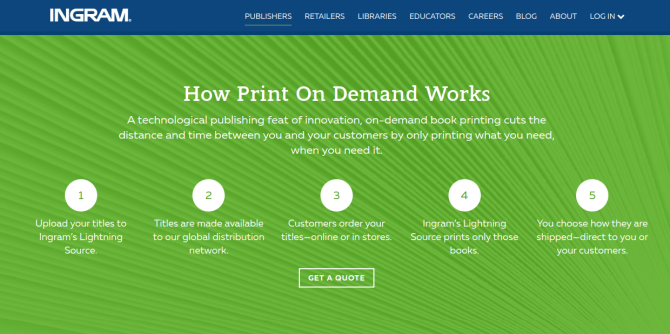
3. Lightning Source

best print-on-demand book services online

Lightning Source is one of the older options on this list. The Tennessee-based company has been around since 1996.

Today Lightning Source offers a print-on-demand service to authors and says most of its orders print and ship within 48 hours. The company claims to make your work available to over 39,000 retailers, libraries, and other points of sale.

The website offers calculators to determine: the cost of printing and shipping a book to your door, how much profit you can expect to make, how much your book will weigh, etc. Prices depend on a wide range of factors, but you can get a single copy of a 100-page paperback novel for under $10. Hardcover and color products are also options.

Lightning Source works with individual authors, small publishing companies, and larger publishers. For many prices, you may need to contact for a quote. The company is primarily a book printer, leaving you more control (but also more heavy lifting) throughout the process. You may need to look elsewhere to design your cover.

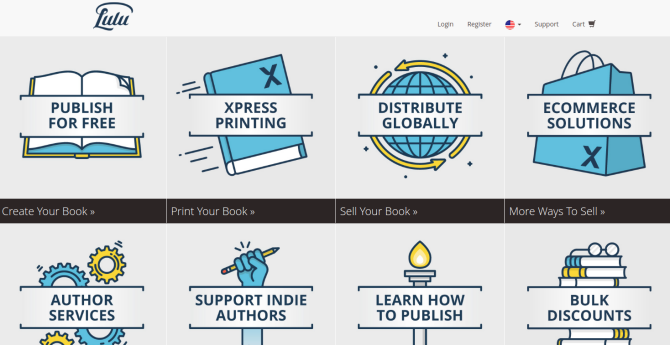
4. Lulu

best print-on-demand book services online

Lulu is a North Carolina-based company born in 2002. Its founder, Bob Young, also co-founded the largest open source company in the world—Red Hat. If you’re familiar with Linux, you may recognize Red Hat as the sponsor of Fedora Linux.

Lulu publishing targets everyone from indie authors to businesses in need of manuals and schools looking to print instructional materials. The site makes prices immediately transparent. You can produce paperbacks or hardcovers, as well as photobooks and calendars.

You will make more revenue when you sell a copy of your book through Lulu’s website. Lulu can make your book available in a wide number of retailers, including Amazon, but books sold here will also require a distribution fee that eats into your profits.

Words of Advice for Self-Publishers

With online book printing, make sure you research well and ensure a publisher good fit for you before committing your time and money or signing any agreements. Here are a few important things to look out for:

  • For non-US citizens, remember that different companies have different tax withholding requirements and that the check fees and your ability to deposit US checks may de-value your earnings somewhat.
  • Having your book formally listed with an ISBN will often require you to ensure the quality of your book. This may require you to purchase a copy of your book each and every time you make a change (this can include price or directory changes). If you sign up for an ISBN, read the fine print, be prepared to purchase if required and don’t make changes to your book after this unless it’s very important.
  • No-frills DIY publishers will endeavor to make money from added extras such as cover art, editing, and ISBNs. If you want to use these services, make sure you compare the prices between publishers and the cost of doing it yourself.

Are You Ready to Print Your Books Online?

It’s not the easiest time to make it as a writer. Consolidation has reduced the number of book publishers out there, and many are only willing to bet on similar types of work from established authors.

If you’re trying to publish your first book, self-publishing still isn’t an easy path to walk. But it does work for some people.

If you’ve used a service to print your own book, let us know about your experiences with the publishers. Which print-on-demand company did you choose and why? Were you happy with the book quality? Read about our own experience with self-publishing.

Read the full article: The 4 Best Online Print-on-Demand Book Services for Self-Publishers


Read Full Article
Netflix is falling off a cliff


Netflix didn’t add as many subscribers as a bunch of people on Wall Street that on a quarterly basis govern whether or not it’ll be more valuable than Comcast, and that is probably a bad thing since it’s one of the primary indicators of its future potential for said finance folk.

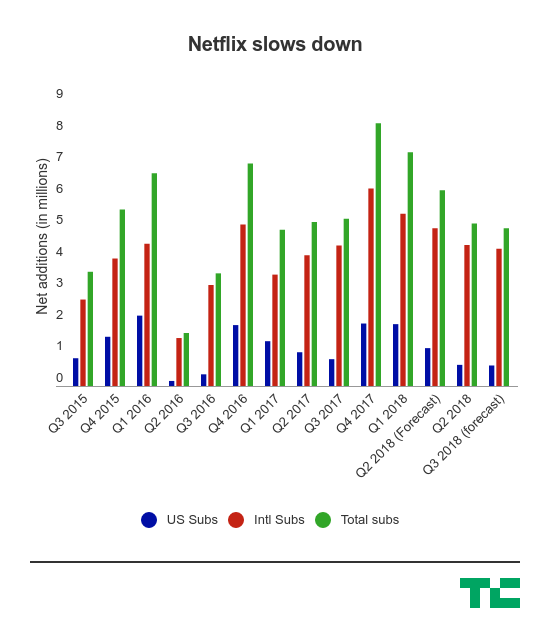
While it’s still adding subscribers (a lot of them), it fell below the forecasts it set for itself during the second quarter. This comes amid a spending spree by the company, which is looking to create a ton of original content in order to attract a wider audience and lock them into that Netflix ecosystem. That could include shows like GlowJessica Jones3%, or even feature films. But it’s still a tricky situation because it needs to be able to convert shows from that kind of crazy spend schedule into actual subscribers.

Here’s the main chart:

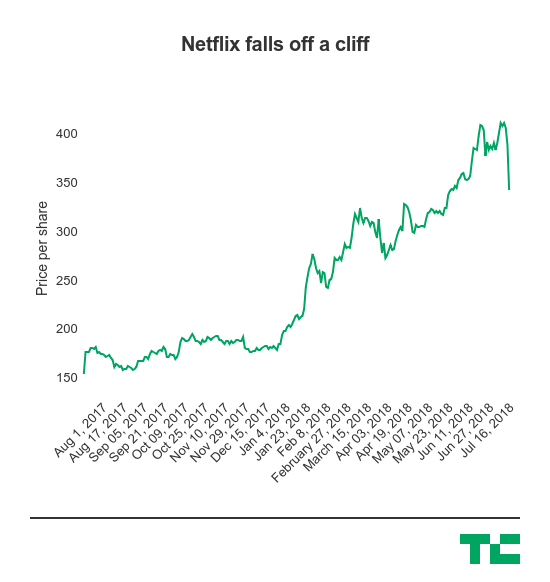
So it’s basically down across the board compared to what it set for itself. And here’s the stock chart:

CEOs and executives will normally say they’re focused on delivering long-term value to shareholders, or some variation of that wording, but Netflix is a company that’s been on an absolute tear over the course of the past year. It’s more than doubled in value, overtaking said previously mentioned cable company and signaling that it, too, could be a media consumption empire that will take decade to unseat like its predecessor. (Though, to be sure, Comcast is going to bundle in Netflix, so this whole situation is kind of weird.)

Of course, all of this is certainly not great for the company. The obvious case is that Netflix has to attract a good amount of talent, and that means offering generous compensation packages — which can include a lot of stock as part of it. But Netflix is also a company that looks to raise a lot of debt to fund the aforementioned spending spree in order to pick up additional subscribers. That’s going to require some assurance that it’ll be a pretty valuable company in the future (and still around, of course), so it may make those negotiations a little more difficult.

Everything else was pretty much in-line, but in the end, it’s that subscriber number that didn’t go as well as planned.


Read Full Article
The 3 Best Mac App Switchers for Jumping Between Apps and Windows


best-mac-app-switchers

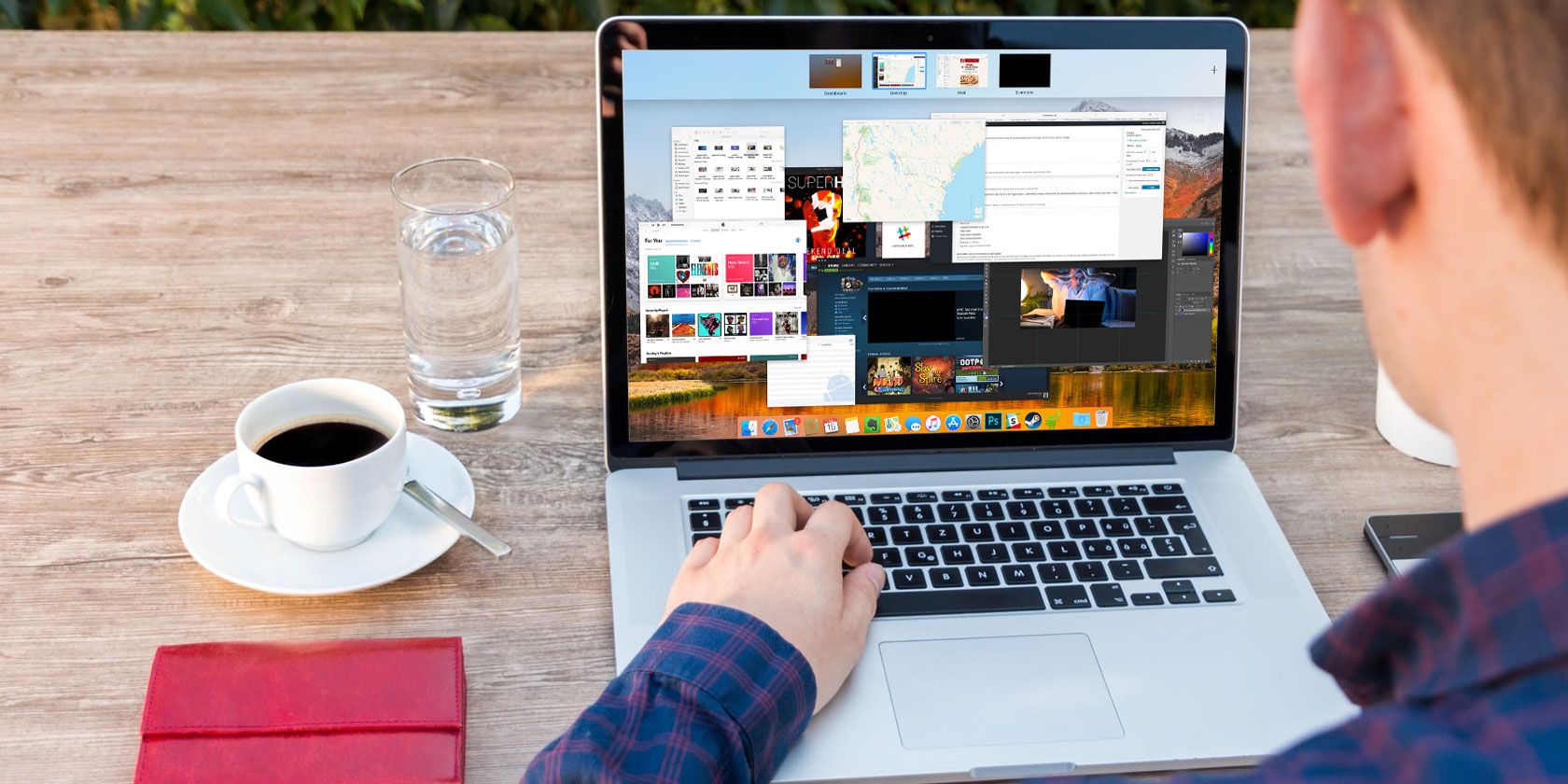
Most Mac users know that Cmd + Tab is the default way to switch applications in macOS. It lets you jump between apps without taking your hands off the keyboard.

While this works fine, it isn’t perfect. The icons appear in order of last use, not alphabetical. And you can’t switch open tabs or windows in applications. If you need an app switcher than can do this and more, you’re in luck.

We’ll show you three switcher apps for Mac that are powerful enough to replace the default tool.

1. Witch

witch-application-switcher-for-Mac

Witch provides an entirely new experience for swapping apps. It lets you quickly switch between apps, multiple windows, and their tabs. Witch is not a standalone app; it’s a preference pane application. To install it, just drag and drop the Witch.prefPane to the System Preferences window.

When you launch this app for the first time, you’ll see a dialog box asking for permission to control this computer using accessibility features. This way, it can interact with other apps through the Accessibility API and get the information about their open windows.

Setting Up Witch as Your Application Switcher

To start using this app, tick the Enable Witch checkbox in the upper-left corner of its window. Then press and hold Option + Tab to activate the window switcher. You’ll see a vertical list of application windows along with a search bar. To navigate the switcher, hold the Option key and press:

  • Tab to move the selection down and Tilde to move up. Alternatively, you can also use the up and down arrow keys.
  • Right arrow to drill down into a window that has tabs. Left arrow to move back from the tab view to the main window.

Release the Option key to switch to the highlighted app.

How to Use Witch

witch-application-panel-switcher-setup

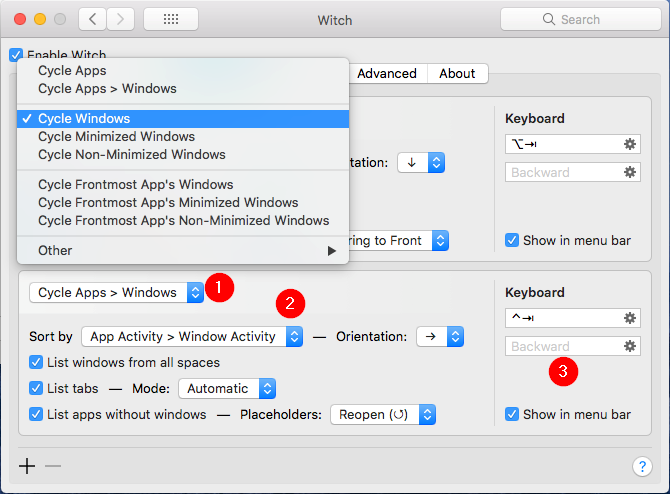
This switcher is great for switching windows and their respective tabs, if any. But the power of Witch lies in its multiple switchers, so you can make it work the way you want. Click the Plus button at the bottom-left corner of the window to add a new switcher panel, then configure it:

  1. The Cycle Windows popup menu lets you control what the switcher will display when activated. Underneath this menu, you’ll see many options.
    1. You can cycle apps, apps and their windows, minimized or non-minimized windows, and more. Explore these switcher options and see which of them works best for your needs.
  2. The Sort by popup menu lets you control the way Witch will sort the switcher panel. You can choose from: App Activity, Window Activity, App Name, Window Title, and more.
    1. Experiment with these options, as not all sorting methods work best for a switcher cycle. You can change the orientation of windows as vertical or horizontal. Or change the mode it uses to list the tabs. For example, you can treat tabs as a separate window.
  3. On the right side, you can assign a keyboard shortcut for that switcher panel. For example, to cycle windows, use Option + Tab. To cycle minimized windows, you might use Shift + Cmd + Tab.
    1. Witch doesn’t limit you to the keyboard. You can use a mouse too. Tick the Show in menu bar box to access the switcher panel from the menu bar.

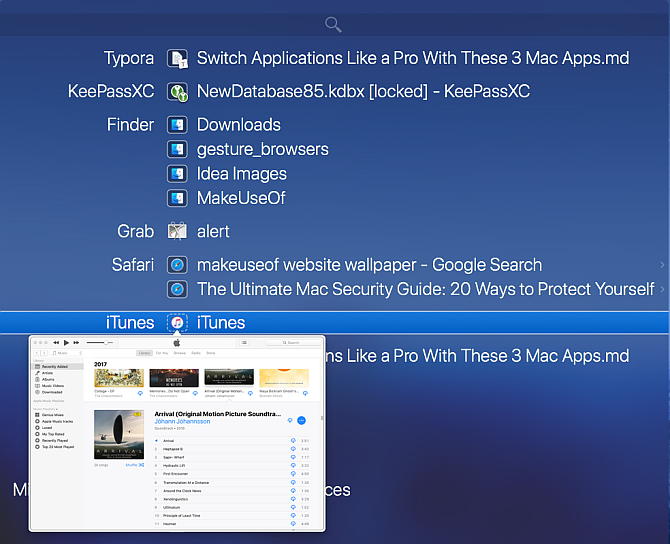
Witch is completely flexible. The app doesn’t restrict you to one method. You can utilize the modifier keys to switch between windows, or type in few characters to search the windows.

To use this, press Cmd + Tab, then the S key to switch to the search mode. The search field works just like Spotlight: type in few characters, and it’ll quickly find a matching window or tab.

Download: Witch (Free trial, $14)

2. Contexts

Contexts App Mac

Contexts is another powerful application switcher for Mac. The app gives you four different ways to switch application windows. The main panel has a built-in search to switch windows faster, and a sidebar panel to switch windows with a click. It also features a better Cmd + Tab with the support of separate window lists, and finally built-in gestures to switch windows easily.

Like Witch, you must allow this app to use accessibility features. The app will then immediately open its main panel and a sidebar.

How to Use Contexts

Contexts offers you a quick way to switch windows through built-in search. Press Ctrl + Space (or whichever shortcut you prefer) to open the main panel in search mode.

Type in few characters from the window title or app name to filter the list, then press Return to switch to the highlighted window. The search field supports non-consecutive characters, acronyms, and even a hotkey to switch windows faster.

Contexts also have an auto-hiding sidebar panel that organizes windows by Spaces. Bring the cursor to the side of the screen to activate the sidebar panel. Click on the window title to switch to that window.

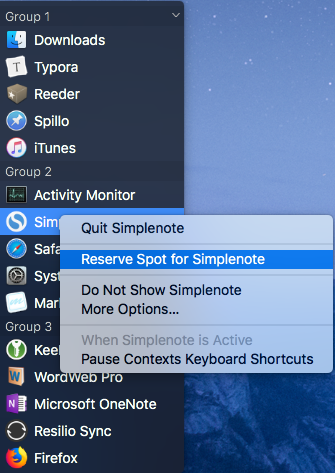
By default, Contexts groups windows by Spaces. Go to Preferences > Rules and under Group windows, choose Manually. When you do this, apps and windows will distribute across groups. You can re-order or move apps between groups and reserve spots for apps from the right-click menu. The app provides you additional options to customize the sidebar panel under Preferences > Sidebar.

You can limit the sidebar option to show windows from currently visible Spaces. By default, the position of the sidebar is towards the right side of the screen. If you work with another display, then you can change the panel position to the left side of the screen. And if the sidebar is distracting you, it allows you to hide the sidebar panel temporarily until you move the cursor to the edge of the display to make it appear again.

sidebar-panel-of-the-contexts-app

More Ways to Use Contexts

The default application switcher does not work with multiple windows, but Contexts offer better support. It shows all open application windows as a vertical list. To switch to the highlighted app, follow the same procedure for switching apps with Cmd + Tab. The app provides you additional options in the Preferences > Command-Tab to change the way app works.

By default, the app shows windows from all Spaces, whether they’re in normal, hidden, or minimized state. You can sort the windows by importance, and put minimized or hidden windows at the bottom of the list to make switching faster for frequently used windows. It also offers the usual shortcuts to quit, minimize, or hide the window just like the default application switcher.

Switching windows is also possible with built-in gestures. Go to Preferences > Gestures and activate the Gesture option. Now put two fingers on the top edge of the trackpad, and scroll down to select the window you want. Lift your fingers to switch.

Download: Contexts (Free trial, $10)

3. Command-Tab Plus

list-of-apps-in-the-command-tab-plus

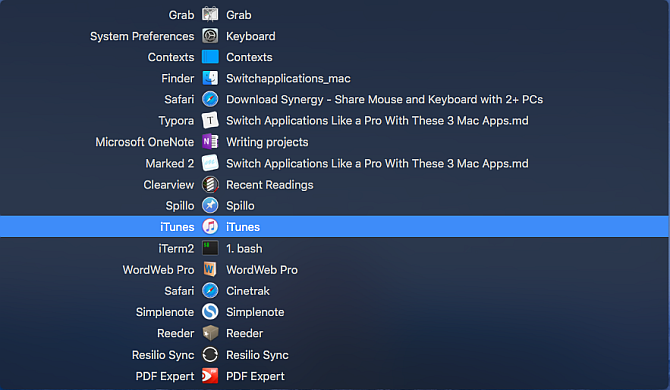
Command-Tab Plus is the most straightforward application switcher. Out of the box, it improves on the default app switcher by enhancing its basic features. The app also gives you an option to change the appearance of the switcher completely, making it more fun to use.

Using Command-Tab Plus as Your Application Switcher

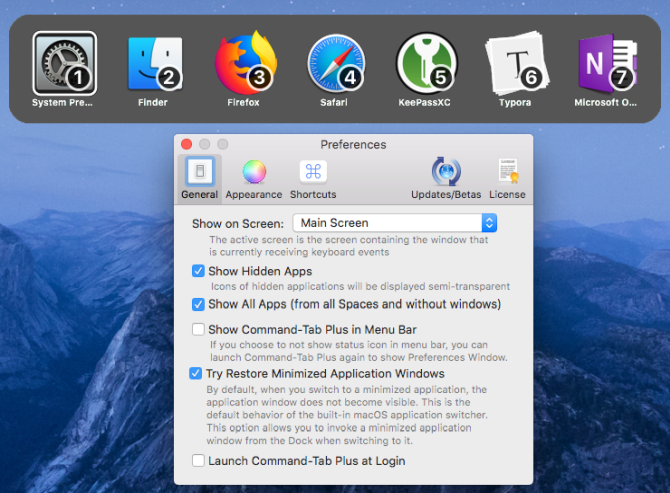
Command-Tab Plus has two modes: Cmd + Tab to switch applications, and Option + Tab to switch windows. When you press Cmd + Tab, it shows you a horizontal list of apps with a number badge. You can use these icon numbers to switch between apps. Just hold the Cmd key and press the app’s number to switch to it. This way, you don’t have to press Tab multiple times.

When you press Option + Tab, you can switch windows quickly. The app isolates the workspace; it doesn’t show you the complete list of windows from all Spaces. Go to Preferences > General and tick Show All Apps to show you a full list of windows. Also, tick the Show Hidden Apps checkbox to enable inactive windows in both the application and window switcher.

appearance-option-of-the-command-tab-plus

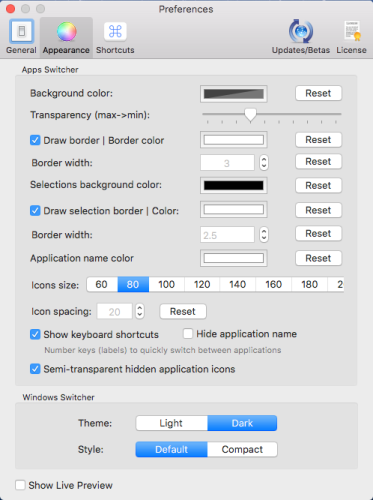
The app also lets you tweak the switcher’s appearance. Go to Preferences > Appearance, and you’ll see many options to customize its look. You can change the background color, transparency, app name color, icon size, and more.

Download: Command-Tab Plus (Free trial, $10)

Better App and Window Management on Your Mac

You probably switch apps dozens of times in a day to complete numerous tasks. But once you start using these apps, you can forget about the Dock and other slow methods. Using the keyboard to switch between apps and windows saves both time and mental energy.

Switching apps is great, but managing windows is a whole different task. If you’re facing issues with window management and desktop clutter, then take a look at the best window management tools for Mac.

Read the full article: The 3 Best Mac App Switchers for Jumping Between Apps and Windows


Read Full Article
Apple’s App Store revenue nearly double that of Google Play in first half of 2018


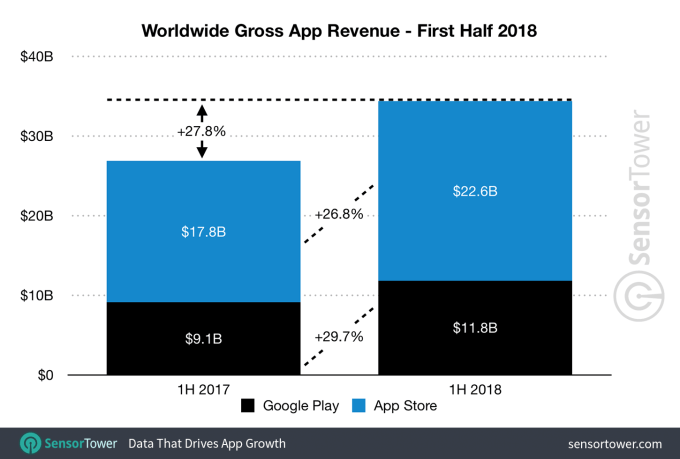
Apple’s App Store continues to outpace Google Play on revenue. In the first half of the year, the App Store generated nearly double the revenue of Google Play on half the downloads, according to a new report from Sensor Tower out today. In terms of dollars and cents, that’s $22.6 billion in worldwide gross app revenue on the App Store versus $11.8 billion for Google Play – or, 1.9 times more spent on the App Store compared with what was spent on Google Play.

This trend is not new. Apple’s iOS store has consistently generated more revenue than its Android counterpart for years due to a number of factors – including the fact that Android users historically have spent less on apps than iOS users, as well as the fact that there are other Android app stores consumer can shop – like the Amazon Appstore or Samsung Store, for example. In addition, Google Play is not available in China, but Apple’s App Store is.

Last year, consumer spending on the App Store reached $38.5 billion, again nearly double that of Google Play’s $20.1 billion.

As the new figures for the first half of 2018 indicate, consumer spending is up this year.

Sensor Tower estimates it has increased by 26.8 percent on iOS compared with the same period in 2017, and it’s up by 29.7 percent on Google Play.

The growth in spending can be partly attributed to subscription apps like Netflix, Tencent Video, and even Tinder, as has been previously reported.

Subscription-based apps are big businesses these days, having helped to boost app revenue in 2017 by 77 percent to reach $781 million, according to an earlier study. Netflix was also 2017’s top non-game app by revenue, and recently became ranked as the top (non-game) app of all-time by worldwide consumer spend, according to App Annie’s App Store retrospective.

Many of the other all-time top apps following Netflix were also subscription-based, including Spotify (#2), Pandora (#3), Tencent Video (#4), Tinder (#5), and HBO NOW (#8), for example.

And Netflix is again the top non-game app by consumer spending in the first half of 2018, notes Sensor Tower.

Game spending, however, continues to account for a huge chunk of revenue.

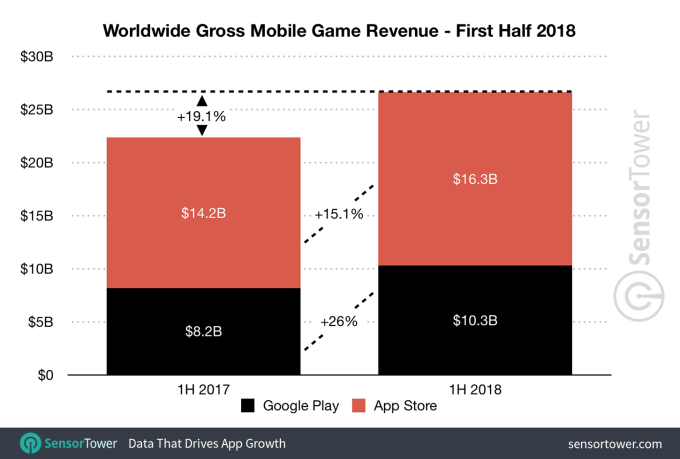
Consumer spending on games grew 19.1 percent in the first half of 2018 to $26.6 billion across both stores, representing roughly 78 percent of the total spent ($16.3 billion on the App Store and $10.3 billion on Google Play). Honor of Kings from Tencent, Monster Strike from Mixi, and Fate/Grand Order from Sony Aniplex were the top grossing games across both stores.

App downloads were also up in the first half of the year, if by a smaller percentage.

Worldwide first-time app installs grew to 51 billion in 1H18, or up 11.3 percent compared with the same time last year, when downloads were then 45.8 billion across the two app stores.

Facebook led the way on this front with WhatsApp, Messenger, Facebook and Instagram as the top four apps across both the App Store and Google Play combined. The most downloaded games were PUBG Mobile from Tencent, Helix Jump from Voodoo, and Subway Surfers from Kiloo.

Google Play app downloads were up a bit more (13.1 percent vs iOS’s 10.6 percent) year-over-year due to Android’s reach in developing markets, reaching 36 billion. That’s around 2.4 times the App Store’s 15 billion.

Despite this, Apple’s platform still earned more than double the revenue with fewer than half the downloads, which is remarkable. And it can’t all be chalked up to China. (The country contributed about 31.7 percent of the App Store revenue last quarter, or $7.1 billion, to give you an idea.)

Sensor Tower tells TechCrunch that even if China was removed from the picture, the App Store would have generated $15.4 billion gross revenue for first half of 2018, which is still about 30 percent higher than Google Play’s $11.8 billion.


Read Full Article
Apple’s App Store revenue nearly double that of Google Play in first half of 2018

Apple’s App Store continues to outpace Google Play on revenue. In the first half of the year, the App Store generated nearly double the revenue of Google Play on half the downloads, according to a new report from Sensor Tower out today. In terms of dollars and cents, that’s $22.6 billion in worldwide gross app revenue on the App Store versus $11.8 billion for Google Play – or, 1.9 times more spent on the App Store compared with what was spent on Google Play.

This trend is not new. Apple’s iOS store has consistently generated more revenue than its Android counterpart for years due to a number of factors – including the fact that Android users historically have spent less on apps than iOS users, as well as the fact that there are other Android app stores consumer can shop – like the Amazon Appstore or Samsung Store, for example. In addition, Google Play is not available in China, but Apple’s App Store is.

Last year, consumer spending on the App Store reached $38.5 billion, again nearly double that of Google Play’s $20.1 billion.

As the new figures for the first half of 2018 indicate, consumer spending is up this year.

Sensor Tower estimates it has increased by 26.8 percent on iOS compared with the same period in 2017, and it’s up by 29.7 percent on Google Play.

The growth in spending can be partly attributed to subscription apps like Netflix, Tencent Video, and even Tinder, as has been previously reported.

Subscription-based apps are big businesses these days, having helped to boost app revenue in 2017 by 77 percent to reach $781 million, according to an earlier study. Netflix was also 2017’s top non-game app by revenue, and recently became ranked as the top (non-game) app of all-time by worldwide consumer spend, according to App Annie’s App Store retrospective.

Many of the other all-time top apps following Netflix were also subscription-based, including Spotify (#2), Pandora (#3), Tencent Video (#4), Tinder (#5), and HBO NOW (#8), for example.

And Netflix is again the top non-game app by consumer spending in the first half of 2018, notes Sensor Tower.

Game spending, however, continues to account for a huge chunk of revenue.

Consumer spending on games grew 19.1 percent in the first half of 2018 to $26.6 billion across both stores, representing roughly 78 percent of the total spent ($16.3 billion on the App Store and $10.3 billion on Google Play). Honor of Kings from Tencent, Monster Strike from Mixi, and Fate/Grand Order from Sony Aniplex were the top grossing games across both stores.

App downloads were also up in the first half of the year, if by a smaller percentage.

Worldwide first-time app installs grew to 51 billion in 1H18, or up 11.3 percent compared with the same time last year, when downloads were then 45.8 billion across the two app stores.

Facebook led the way on this front with WhatsApp, Messenger, Facebook and Instagram as the top four apps across both the App Store and Google Play combined. The most downloaded games were PUBG Mobile from Tencent, Helix Jump from Voodoo, and Subway Surfers from Kiloo.

Google Play app downloads were up a bit more (13.1 percent vs iOS’s 10.6 percent) year-over-year due to Android’s reach in developing markets, reaching 36 billion. That’s around 2.4 times the App Store’s 15 billion.

Despite this, Apple’s platform still earned more than double the revenue with fewer than half the downloads, which is remarkable. And it can’t all be chalked up to China. (The country contributed about 31.7 percent of the App Store revenue last quarter, or $7.1 billion, to give you an idea.)

Sensor Tower tells TechCrunch that even if China was removed from the picture, the App Store would have generated $15.4 billion gross revenue for first half of 2018, which is still about 30 percent higher than Google Play’s $11.8 billion.


Read Full Article