12 July 2018

5 Reasons Why You Can Trust Microsoft With Your Security


trust-ms-security

Microsoft is arguably the most influential technology company in history. Nearly 30 years after its first release, Windows is still the world’s most popular operating system. As of 2018, it’s installed on 88.4 percent of computers worldwide.

But with great power comes great responsibility, and many have found Microsoft’s approach to security lacking. Maybe you’re in that group.

From Windows 10 privacy concerns to critical zero-day exploits, there has been a lot of cause for concern. But despite these woeful examples, there may still be reasons to be cheerful!

1. Windows Defender
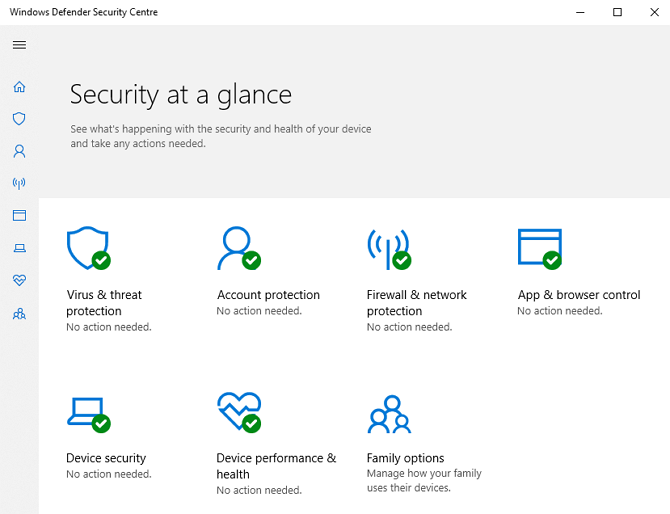
Windows Defender Screenshot

For almost two decades, Windows security has been something a joke. Around the turn of the millennium, the internet exploded into our lives, connecting computers worldwide for the first time. The phenomenal growth of the internet gave rise to a torrent of pop-ups and malware ridden downloads—issues we still struggle with today.

But with no built-in antivirus protection, Windows devices were prime targets for hackers and criminals around the world. Microsoft began righting the ship in 2009, with the release of their free antivirus software Microsoft Security Essentials (MSE).

Although it ran on Windows 7, Vista, and XP, MSE was derided for its poor virus detection and prevention. Windows 8 and 10 shipped with a re-engineered version of MSE known as Windows Defender which was turned on by default.

In December 2017, it was awarded 6/6 for protection by AV-TEST. As it requires no setup or user intervention, it is one of the most significant improvements in digital security. Microsoft estimates that Defender now protects more than 300 million devices worldwide.

2. Windows Hello

According to the website Have I Been Pwned, in the first six months of 2018 more than 100 million accounts were breached. With such high numbers, there’s a pretty good chance that one of your accounts found itself entangled in these breaches too.

These aren’t isolated events either. Data breaches are happening so frequently that it can be hard to keep up. The necessary time spent changing passwords, setting up password managers, and monitoring your accounts for suspicious activity makes them a nightmare to deal with.

Windows Hello is a biometric authentication system that comes bundled with Windows 10. Hello signals the first step in Microsoft’s four-step strategy to a password-less future. With Hello enabled, you can log in to your Windows devices with just your face or fingerprint.

Hello has integrations with some of your most popular apps like Dropbox and OneDrive. Microsoft also has plans to work with more service providers to integrate Hello. They estimate that 43 million Windows users are already using Hello, predominantly in the workplace, to improve their security.

3. Machine Learning and Social Engineering
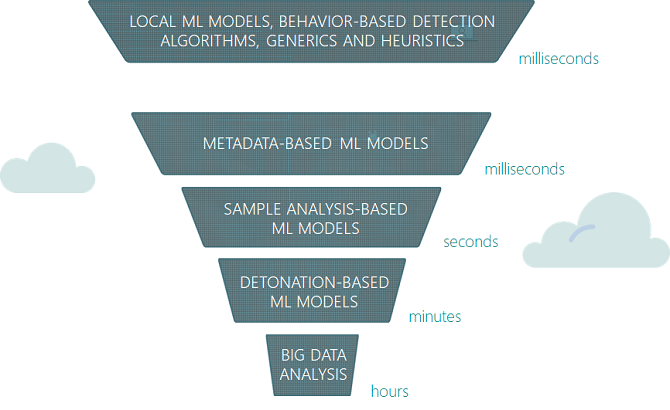
Windows Defender Machine Learning Model

Social engineering—the practice of manipulating victims into sharing confidential or sensitive information—doesn’t always happen in person.

You’ve probably seen emails purportedly from your bank, but sent from a non-official email address. It may try to trick you into trusting the email by using your bank’s logos, headers, font, and even your personal information. The emails use emotive language, often preying on fear, urgency, and empathy.

The aim of these emails is for you to download a malicious attachment, or to enter login credentials the attacker can steal.

With over 50 percent of Windows 10 devices using Defender as their default anti-virus, Microsoft has a unique position to influence how attacks spread. Their solution was to capitalize on the rise of machine learning and integrate it into Windows Defender. You may be wondering how that would prevent social engineering attacks.

Microsoft trained their models using historical examples of malicious files used in malware and phishing campaigns. Antivirus software traditionally relies upon regularly updated definitions to compare files against. Defender can now analyze and identify potential malware before its first infection.

4. Digital Crimes Unit

Cybercrime is a problem globally, not just for Microsoft. But that doesn’t mean that the Redmond giant is willing to sit on its considerable experience and resources while criminals profit at our expense.

Microsoft’s Digital Crimes Unit (DCU) is “an international team of attorneys, investigators, data scientists, engineers, analysts and business professionals based in 30 countries.”

The team regularly works with law enforcement around the world to combat cybercrime, with a focus on three main areas: malware, phishing, and images of child abuse. One of the most common phishing attacks is tech support scams. Microsoft estimates these scams cost victims more than $1.1 billion annually in the US alone.

Since 2014, the DCU has received more than 180,000 reports of support scams, which has allowed them to leverage Artificial Intelligence to locate the source of the attack. Operating in conjunction with Europol and the FBI, in 2013 the DCU disrupted the ZeroAccess botnet which was responsible for hijacking results across all major search engines.

To combat the approximately 720,000 images of child abuse uploaded each day, Microsoft developed PhotoDNA. The system creates a hash of known images to enable companies using PhotoDNA to compare images against. More than 100 organizations now use PhotoDNA including Facebook, Twitter, and law enforcement.

5. Microsoft Edge Security
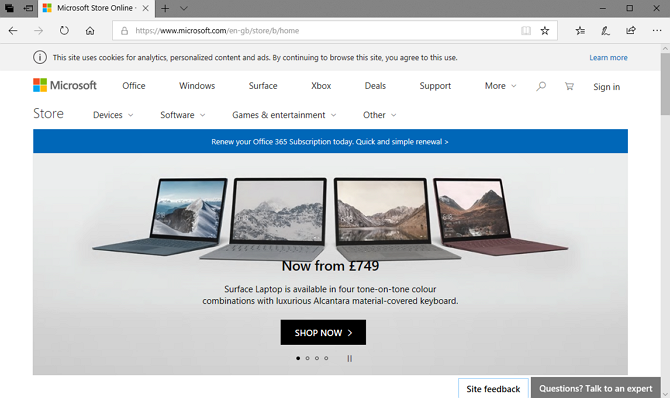
Microsoft Edge Screenshot

At this point, it’s safe to say that Internet Explorer lost the browser wars. Microsoft’s infamous default browser has just 3.12 percent market share against Chrome’s 58.94 percent. In part, this is because Internet Explorer (IE) became synonymous with malware, popups, and spam-riddled toolbars.

Microsoft didn’t help themselves either as they took longer to patch critical flaws than their competitors. Although they did eventually start taking these issues seriously around the release of Windows 7, Chrome, Firefox, and Safari had all eaten away at IE’s market share.

Windows 10 marked a new era for Microsoft, so it seemed fitting that their latest operating system would ship with a brand new default browser. Microsoft Edge shares a similar logo to IE, but that’s where the similarities end.

All legacy code was scrapped, and the browser was developed with EdgeHTML for modern web standards and interoperability. IE’s toolbars are gone too, replaced by Extensions which can be installed through the Windows Store.

Edge natively supports Hello to prevent phishing attacks. The browser even sandboxes all web browsing in Protected Mode to reduce the risk of malicious content infecting your computer.

Are You Willing to Give Microsoft Another Chance?

Windows 10 hasn’t done Microsoft’s reputation any favors. The default privacy settings and invasive digital assistant Cortana have only cemented the belief that Microsoft can’t be trusted. Some might even argue that the flaws in Microsoft’s software caused the proliferation of malware and viruses.

Whether the blame rests on their engineering or the high availability of Windows machines, Microsoft hasn’t been idle in addressing the problem.

Windows Defender may be the only antivirus software you’ll ever need. Their efforts in tackling criminal enterprises, and use of machine learning against social engineering are making us safer online. With their focus on password-less authentication systems, Microsoft clearly wants to make our future more secure too.

Read the full article: 5 Reasons Why You Can Trust Microsoft With Your Security


Read Full Article

5 Reasons Why Kindle Unlimited Isn’t Worth Your Money

How Instagram Filters Work, And Can You Tell the Difference?

When Is Amazon Prime Day 2018? And 10 More Things to Know About It


amazon-prime-day-whatis

Amazon Prime Day 2018 is almost here. It feels like Christmas, doesn’t it? We just need Jeff Bezos to turn up in a red suit.

2017’s Prime Day saw sales in excess of $1 billion. This year’s event is expected to be even bigger as Amazon is primed to offer more discounts than ever before. Keeping reading to learn about Amazon Prime Day 2018 and how to get the best Amazon Prime Day deals.

When Is Amazon Prime Day 2018?

Amazon Prime Day Banner

Amazon has officially confirmed that Amazon Prime Day 2018 will start on Monday, July 16 at 3pm ET.

In practice, Amazon Prime Day runs for more than 24 hours. It will begin at 3pm EST on July 16 and run until midnight PST on Tuesday, July 17, giving it a total duration of 39 hours.

Now that you know when Amazon Prime Day starts, here are 10 more details that’ll help you get acquainted with and prepare for Amazon Prime Day so you can get the best deals and avoid the worst ones.

1. What Is Amazon Prime Day?

Amazon Prime Day launched in 2015 as part of the company’s 20th birthday celebration. From a shopper’s standpoint, the first edition was beset with issues. Demand outstripped supply, the website slowed to a crawl, and the discounts were often on non-alluring items.

However, from a company standpoint, Prime Day 2015 was a resounding success. It sold 398 products per second and saw the company make higher revenues than on Black Friday.

By last year’s 2017 event, Amazon has smoothed out the customer issues and the day went off without a hitch. The company saw a 60 percent rise in sales compared to 2016. Amazingly, revenues eclipsed its 2016 Black Friday and Cyber Monday combined.

2. Who Can Take Advantage of Amazon Prime Day?

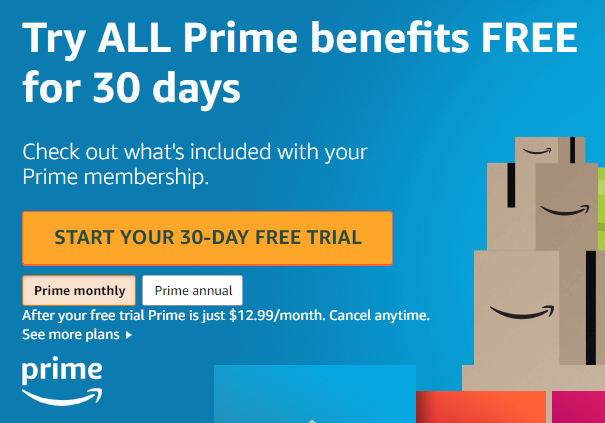
Amazon Prime Free Trial

Only Amazon Prime members can take advantage of the massive discounts.

However, if you’ve never been a Prime member before, you can cheat the system and sign up for a free 30-day Amazon Prime trial. Of course, you’d need to remember to cancel your trial before Amazon sends you a bill.

A new membership to Amazon Prime costs $12.99/mo or $119/year. In addition to Prime Day deals, you receive access to Amazon Prime Video, Amazon Prime Music, free 2-day shipping, and many more Amazon Prime benefits.

3. What Deals Can You Expect on Amazon Prime Day?

In 2017, Amazon’s own products often enjoyed the most significant discounts. The Echo speaker dropped by 50 percent as Amazon let them go for $89.99, while the smaller Echo Dot was given a $15 discount to bring the price down to $34.99. As a result, the Dot became the most-bought item of the day.

You’ll also find considerable discounts on Amazon Fire sticks, Kindle e-readers, and items in the Amazon Basics range.

But it’s not just Amazon products that see bargain prices. In 2017, the TP-Link Wi-Fi Smart Plug, the Sony PlayStation 4, the Nintendo Switch, and the OnePlus 5 phone were all big sellers. Estimates also suggest Amazon sold 3.5 million toys, 200,000 dresses, 52,000 kitchen items, and 37,000 power tools.

How to Stay on Top of Prime Day’s Best Deals

Head to Amazon’s How to Shop Prime Day guide for tips like how to access deals up to one week in advance, how to get notified when deals strike, and save money on Prime Day orders with special promos and codes.

4. Watch for Lightning Deals

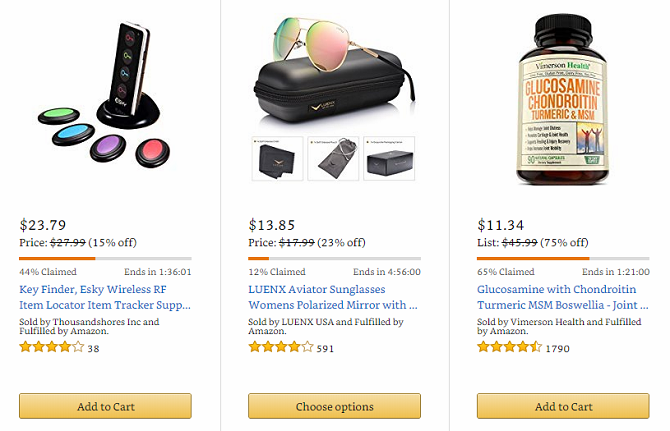
Amazon Lightning Deals

Lightning Deals are a standard part of the Amazon shopping experience for Prime members. Every day, Amazon offers a limited number of products at a massive discount. The quantity of any item is limited, and deals are only available for a short amount of time.

On Amazon Prime Day, Lightning Deals are more common, with often hundreds of deals running at any moment. If you keep your eyes open, you might find a saving above and beyond standard Prime Day discount.

And if the Lightning Deal you want sells out before you get a chance to buy it, you can join a waiting list. If the people with the item in their cart fail to complete the purchase, it will automatically be offered to you.

5. Use Amazon Alexa for a Head Start on Deals

To beat the crowds to the best deals on Prime Day, you need to shop using your voice with Amazon Alexa.

In 2017, Amazon gave voice shoppers a two-hour head start on new deals. During the last Black Friday, that increased to seven hours.

We’d expect Amazon to offer the same benefits during this year’s Prime Day. You just need to say “Alexa, what are your deals?” to enjoy the advanced notice. If you hear something you want, say “Alexa, add [item] to my cart.”

6. Use Amazon Assistant for Deal Notifications

Unbeknown to many, Amazon offers a browser extension. It’s available on Chrome, Firefox, Safari, and Microsoft Edge.

The extension—called Amazon Assistant— offers lots of benefits, including order tracking, product comparisons, and access to your various lists.

However, from an Amazon Prime Day perspective, its best feature is the watch lists. You can receive desktop notifications when any deals you’re watching go live, meaning you’ll never miss out on a purchase you want.

Download: Amazon Assistant (Free)

7. Check CamelCamelCamel for Price Histories

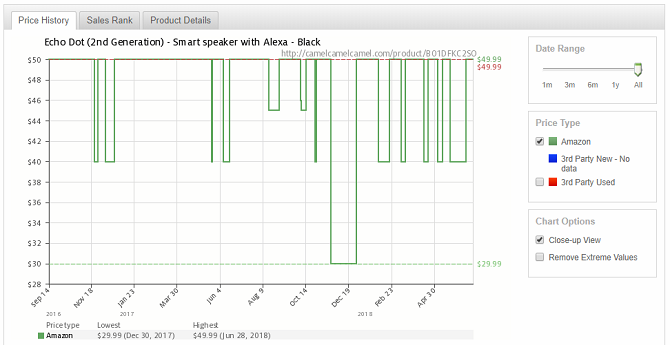
CamelCamelCamel Amazon

How do you know the price you see on Amazon represents a good deal? We all know high street shops artificially bump up prices ahead of a big sale, and some Amazon vendors are no different.

To make sure you’re not being conned, check the item’s price history on CamelCamelCamel. You can enter the Amazon item’s URL or search for keywords and see how the price has changed over time.

If you see a steady rise in the weeks building up to Prime Day, you should probably give it a wide berth.

8. Check Forums for Even More Prime Day Deals

Lastly, it’s worth hanging out in some dedicated Amazon Prime Day forums. The best subreddit will probably be /r/PrimeDay, but don’t expect to see much activity until the day itself. There’s also the dedicated /r/Amazon subreddit, which is worth keeping an eye on.

You should also check threads on the SlickDeals forums. It’s consistently one of the best sites for finding bargains on the web, and on Prime Day it goes into overdrive.

9. Singles’ Day Is Bigger Than Amazon Prime Day

Despite its impressive performances when compared to Black Friday and Cyber Monday, Amazon Prime Day is not the web’s biggest day of online shopping.

That award goes to Alibaba’s Singles’ Day sales. In 2017, it saw sales of $17.8 billion. That’s more than 17 times the amount of money spent on Prime Day.

Alibaba is yet to become a giant in Europe and the United States. But if you’re looking for cheap, unbranded electronics, it might be better to wait until Singles’ Day 2018 on November 11.

10. You Could Shop Elsewhere

Other stores have been looking enviously at Amazon piling up sales records and have started running their own concurrent sales to cash in on the buzz. Last year, we saw Macy’s, Kohl’s, Best Buy, Nordstrom, and Dell provide discounts—many of which also offered free shipping.

On Amazon Prime Day 2018, you can expect to see Google, Newegg, Office Depot, and 1-800 Flowers join the list, along with several others. Before committing to a purchase on Amazon, make sure you can’t find it cheaper on a competitor’s site.

Start Planning Your Amazon Prime Day Budget

Shopping responsibly is important. Events likes this can be full of temptation with all the awesome Prime Day deals. Many people overspend and wake up full of buyer’s remorse. To make sure you don’t overindulge, you should make a budget before the big day arrives.

Read the full article: When Is Amazon Prime Day 2018? And 10 More Things to Know About It


Read Full Article

WhatsApp Flags Messages to Stop Fake News


WhatsApp is taking the first step in trying to combat misinformation being spread via its platform. With over 1 billion people now using WhatsApp it has become the default option for spreading rumors to lots of people both quickly and efficiently.

This Message Has Been Forwarded to You

WhatsApp will now add a small “Forwarded” label to any message sent via its platform that is being forwarded on from another source. The label, which will appear at the top-left of forwarded messages, is small enough to not be intrusive but important nonetheless.

The idea is that labelling forwarded messages in this way will clue the recipients into the fact that the information contained therein may not be entirely factual. Because, sadly, people will just send messages on without actually checking the veracity of their contents.

WhatsApp has introduced this feature after being blamed for spreading misinformation. A number of people in India have been lynched and physically harmed after messages wrongly accusing them of committing crimes have been spread via WhatsApp.

This led India’s Information Technology Ministry to issue a warning saying, “WhatsApp have been advised that necessary remedial measures should be taken to prevent proliferation of these fake and at times motivated/sensational messages.”

Please Stop Spreading Misinformation!

This is a good first step which may be enough to make people think before forwarding on a message accusing someone of wrongdoing. However, unfortunately, WhatsApp may need to do more to prevent its platform being used to spread harmful misinformation.

The problem is not WhatsApp itself, but the people using it. We all need to do what we can to stop rumors and misinformation spreading, because people are getting hurt as a result. The key may be educating people how to spot fake news in the first place.

Image Credit: Aqua Mechanical/Flickr

Read the full article: WhatsApp Flags Messages to Stop Fake News


Read Full Article

How to Turn Your Steam Link Into a Kodi Media Center

Twitter lets advertisers “takeover” the Explore tab


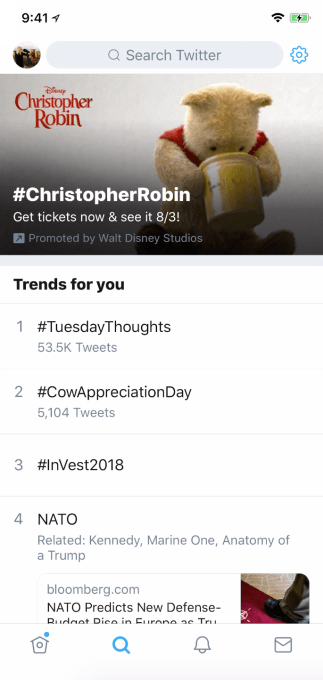
Twitter is ready to squeeze a lot more money out of its trending topics. After minimizing its mediocre Moments feature and burying it inside the renamed Explore tab, Twitter is now starting to test Promoted Trend Spotlight ads. These put a big visual banner equipped with a GIF or image background atop Explore for the first two times you visit that day before settling back into the Trends list, with the first batch coming from Disney in the US.

These powerful new ad units demote organic content in Explore, which could make it less useful for getting a grip on what’s up in the world at a glance. But they could earn Twitter  strong revenue by being much more eye-catching than the traditional Timeline ads that people often skip past. That could further fuel Twitter’s turnaround after it soundly beat revenue estimates in Q1 with $665 million. Its share price of about $44 is near its 52-week high, and almost 3X its low for the year.

“We are continuing to explore new ways to enhance our takeover offerings and give brands more high-impact opportunities to drive conversation and brand awareness on our platform” a Twitter spokesperson told TechCrunch.

The Promoted Trend Spotlight ads are bought as an add-on to the existing Promoted Trends ads that are inserted amongst the list of Twitter’s most popular topics. When tapped, they open a feed of tweets with that headline with one of the advertiser’s related tweets at the top. Back in February AdAge reported whispers of a new visual redesign for Promoted Trends. You can view a demo of the experience below.

Anthy Price, Disney’s Executive Vice President for Media provided TechCrunch with a statement, saying “The Promoted Trend Spotlight on Twitter allowed us to prominently highlight Winnie the Pooh & celebrate the launch of ticket sales for Christopher Robin while four of the characters took over major Disney handles on the platform to engage with fans.”

Historically, Twitter’s biggest problem was that people skimmed past ads. The old unfiltered Timeline trained users to pick and choose what they read, looking past anything that didn’t seem relevant including paid marketing. But with the shift to an algorithmic Timeline and bigger focus on video, Twitter has slowly retrained users to expect relevant content in every slot. Explore’s design with imagery at the top followed by a text list of Trends pulls attention to where these new Spotlight ads sit. With better monetization, Twitter will now have to concentrate on building better ways to get users to open Explore instead of just their feed, notifications, and DMs.


Read Full Article

11 July 2018

How to Split an HDMI Signal to Multiple Displays (And 3 High-Quality HDMI Splitters)

Facebook independent research commission ‘Social Science One’ will share a petabyte of user data


Back in April, Facebook announced that it would be working with a group of academics to establish an independent research commission to look into issues of social and political significance using the company’s own extensive data collection. That commission just came out of stealth; it’s called Social Science One, and its first project will have researchers analyzing about a petabyte’s worth of sharing data.

The way the commission works is basically that a group of academics is created and given full access to the processes and datasets that Facebook could potentially provide. They identify and help design interesting sets based on their experience as researchers themselves, then document them publicly — for instance, “this dataset consists of 10 million status updates taken during the week of the Brexit vote, structured in such and such a way.”

This documentation describing the set doubles as a “request for proposals” from the research community. Other researchers interested in the data propose analyses or experiments, which are evaluated by commission. These proposals are then granted (according to their merit) access to the data, funding, and other privileges. Resulting papers will be peer reviewed with help from the Social Science Research Council, and can be published without being approved (or even seen) by Facebook.

“The data collected by private companies has vast potential to help social scientists understand and solve society’s greatest challenges. But until now that data has typically been unavailable for academic research,” said Social Science One co-founder, Harvard’s Gary King, in a blog post announcing the initiative. “Social Science One has established an ethical structure for marshaling privacy preserving industry data for the greater social good while ensuring full academic publishing freedom.”

If you’re curious about the specifics of the partnership, it’s actually been described in a paper of its own, available here.

The first dataset is a juicy one: “almost all” public URLs shared and clicked by Facebook users globally, accompanied by a host of useful metadata.

It will contain “on the order of 2 million unique URLs shared in 300 million posts, per week,” reads a document describing the set. “We estimate that the data will contain on the order of 30 billion rows, translating to an effective raw size on the order of a petabyte.”

The metadata includes country, user age, device and so on, but also dozens of other items, such as “ideological affiliation bucket,” the proportion of friends vs. non-friends who viewed a post, feed position, the number of total shares, clicks, likes, hearts, flags… there’s going to be quite a lot to sort through. Naturally all this is carefully pruned to protect user privacy — this is a proper research dataset, not a Cambridge Analytica-style catch-all siphoned from the service.

In a call accompanying the announcement, King explained that the commission had much more data coming down the pipeline, with a focus on disinformation, polarization, election integrity, political advertising, and civic engagement.

“It really does get at some of the fundamental questions of social media and democracy,” King said on the call.

The other sets are in various stages of completeness or permission: post-election survey participants in Mexico and elsewhere are being asked if their responses can be connected with their Facebook profiles; the political ad archive will be formally made available; they’re working on something with CrowdTangle; there are various partnerships with other researchers and institutions around the world.

A “continuous feed of all public posts on Facebook and Instagram” and “a large random sample of Facebook newsfeeds” are also under consideration, probably encountering serious scrutiny and caveats from the company.

Of course quality research must be paid for, and it would be irresponsible not to note that Social Science One is funded not by Facebook but by a number of foundations: the Laura and John Arnold Foundation, The Democracy Fund, The William and Flora Hewlett Foundation, The John S. and James L. Knight Foundation, The Charles Koch Foundation, Omidyar Network’s Tech and Society Solutions Lab, and The Alfred P. Sloan Foundation.

You can keep up with the organization’s work here; it really is a promising endeavor and will almost certainly produce some interesting science — though not for some time. We’ll keep an eye out for any research emerging from the partnership.


Read Full Article

How to Get Portrait Mode on Android

Hold for the drop: Twitter to purge locked accounts from follower metrics


Twitter is making a major change aimed at cleaning up the spammy legacy of its platform.

This week it will globally purge accounts it has previously locked (i.e. after suspecting them of being spammy) — by removing the accounts from users’ follower metrics.

Which in plain language means Twitter users with lots of followers are likely to see their follower counts take a noticeable hit in the coming days. So hold tight for the drop.

Late last month Twitter flagged smaller changes to follower counts, also as part of a series of platform-purging anti-spam measures — warning users they might see their counts fluctuate more as counts had been switched to being displayed in near real-time (in that case to try to prevent spambots and follow scams artificially inflating account metrics).

But the global purge of locked accounts from user account metrics looks like it’s going to be a rather bigger deal, putting some major dents in certain high profile users’ follower counts — and some major dents in celeb egos.

Hence Twitter has blogged again. “Follower counts are a visible feature, and we want everyone to have confidence that the numbers are meaningful and accurate,” writes Twitter’s Vijaya Gadde, legal, policy and trust & safety lead, flagging the latest change.

It will certainly be interesting to see whether the change substantially dents Twitter follower counts of high profiles users — such as Katy Perry (109,609,073 Twitter followers at the time of writing) Donald Trump (53,379,873); Taylor Swift (85,566,010); Elon Musk (22,329,075); and Beyoncé (15,303,191), to name a few of the platform’s most followed users.

Check back in a week to see how their follower counts look.

“Most people will see a change of four followers or fewer; others with larger follower counts will experience a more significant drop,” warns Gadde, adding: “We understand this may be hard for some, but we believe accuracy and transparency make Twitter a more trusted service for public conversation.”

Twitter is also warning that while “the most significant changes” will happen in the next few days, users’ follower counts “may continue to change more regularly as part of our ongoing work to proactively identify and challenge problematic accounts”.

The company says it locks accounts if it detects sudden changes in account behavior — such as tweeting “a large volume of unsolicited replies or mentions, Tweeting misleading links, or if a large number of accounts block the account after mentioning them” — which therefore may indicate an account has been hacked/taken over by a spambot.

It says it may also lock accounts if we see email and password combinations from other services posted online and believe that information could put the security of an account at risk.

After locking an account Twitter contacts the owner to try to confirm they still have control of the account. If the owner does not reply to confirm the account stays locked — and will soon also be removed from follower counts globally.

Twitter emphasizes that locked accounts already cannot Tweet, like or Retweet, and are not served ads. But removing them from follower counts is an important additional step that it’s great to see Twitter making — albeit at long last

Twitter also specifies that locked accounts that have not reset their password in more than one month were already not included in Twitter’s MAU or DAU counts — so it today reiterates the CFO’s recent message, saying this change won’t affect its own platform usage metrics. 

The company has been going through what — this time — looks to be a serious house-cleaning process for some months now, after years and years of criticism for failing to tackle rampant spam and abuse on its platform.

In March, Twitter CEO Jack Dorsey also put out a call for ideas to help it capture, measure and evaluate healthy interactions on its platform and the health of public conversations generally — saying: “Ultimately we want to have a measurement of how it affects the broader society and public health, but also individual health, as well.”


Read Full Article

5 Ways to DIY Hack Your Old Nintendo Devices Into Something New


diy-nintendo

Whether you’re a veteran gamer, or simply love Nintendo hardware, there’s a good chance you’ve got some old bits and pieces knocking around. You could give those old consoles away… or you could hack them.

Here are five ways you can hack old Nintendo hardware into something new and useful.

1. Wii Homebrew

We’ll start with the easiest option: turning an old Nintendo Wii into a media center, capable of running media files on your network, retro games, and even DVDs.

While early hacks for this required some messing around, latterly the LetterBomb utility made things far simpler. By applying this hack, you get access to the Wii Homebrew Channel, where a vast library of free software can be found. Most of this is games, either home-made, or ported from other platforms (such as Doom, for instance).

All you need to get this hack working—and turn your Nintendo Wii into a system that meets its full potential—is a suitable SD card.

Check out our full guide to hacking your Nintendo Wii. Note that this will void the device warranty, which shouldn’t be a problem because most Wii warranties ran out years ago.

2. Wiimote

It’s not just the Nintendo Wii console you can hack. The groundbreaking Wiimote can also be reused/misused. Even if you don’t have a Wii, you can pick up these old controllers (and, preferably, the sensor) for pennies on eBay, thrift stores, yard sales, etc.

But how can you reuse a Nintendo Wiimote?

We’ve previously listed several Wiimote hacks, which include pairing one with an Arduino to steer a radio controlled car (our Arduino starter guide should help), using a Wiimote as a PC controller, as an interactive whiteboard, for finger tracking, and even desktop VR.

Note that not only does the Wiimote have an infrared transmitter and receiver, it is also Bluetooth compatible. Having the nunchuck peripheral will make a few of these Wiimote hacks (and others) easier to complete.

3. Wii Fit Board

One of the most popular peripherals shipped with early Nintendo Wiis was the Wii Balance Board. This device uses Bluetooth radio and has four pressure sensors which are designed to measure the user’s center of balance. Most commonly, the device was used with the Wii Fit game, and is capable of measuring body position (when paired with a WiiMote) and weight.

Despite support for over 150 games, the chances are that your Wii Fit Board is stashed under the bed. So, how can you hack it?

Option 1: Check Your Wii8 (Weight)

The first option is to reuse the Wii Balance Board in the manner it was intended, as a set of scales. Thanks to four AA batteries, the board (which again you can pick up for just a few dollars) should run for 60 hours. You should get quite a bit of use out of it!

Developed by Stavros Korokithakis, the DIY internet-enabled bathroom scale runs on Ubuntu, and can record your weight. It uses the software in this Github repository.

Option 2: How Many Beers?

Alternatively, you might pair a Raspberry Pi with the Wii Balance Board and use it to tell you how many beers are left in your fridge.

Admittedly, this is probably not in the spirit of the device’s initial use, but hey, it could be useful during the summer months. Follow the video above from YouTube channel John’s DIY Playground for the full tutorial.

4. Nintendo SNES Classic Mini (More Games)

Admittedly not an original Nintendo SNES console, the SNES Classic Mini is designed specifically for fans of retro gaming. Whether you owned one the first time around or you have a love of old games, these devices ship with only a limited selection of games.

But what if you wanted to add some of your favorites?

The answer is covered in this video, which explains how to use the Haxchi2 hack (available from GitHub) to import your ROM files into the SNES Classic Mini. Compatible ROMs are listed in this spreadsheet.

Remember to stay on the right side of the law, and only use ROM files for games that you already own.

5. Lego Dimensions Toy Pad (Wii U)

Admittedly not specifically Nintendo-built, the Lego Dimensions Toy Pad can be connected to a Nintendo Wii U. When used with the corresponding game, NFC tags on Lego figures (and other NFC-enabled toys) trigger LEDs (which also depend on in-game events). This pad is basically a USB device with a triple NFC reader and some LEDs built in, and bits of Lego molded to the case.

The Toy Pad can be used in various different ways. Here it is connected to a Lego Mindstorms EV3 computer:

Further details on this particular approach can be found at the EV3Dev website. This site is dedicated to exploring the EV3 computer, so you’re likely to find a lot of interest if you’re a big Lego fan.

Meanwhile, if you don’t own an EV3 computer, other options for hacking the Lego Dimensions Toy Pad exist. For instance, the base color changer app runs on Windows and lets you adjust the colors displayed by the LEDs.

Start Hacking Your Nintendo Hardware!

If you’re short of a project, and have some old gear you want to reuse, then old Nintendo hardware is a good place to start. You could soon end up with a speak-your-weight fridge, or an NFC-triggered LED notification system…

The possibilities are endless. If you’re not sure how to start with DIY, however, try these easy DIY activities and projects to ease you in.

Read the full article: 5 Ways to DIY Hack Your Old Nintendo Devices Into Something New


Read Full Article

Timehop admits that additional personal data was compromised in breach


Timehop is admitting that additional personal information was compromised in a data breach on July 4.

The company first acknowledged the breach on Sunday, saying that users’ names, email addresses and phone numbers had been compromised. Today it said it that additional information, including date of birth and gender, was also taken.

To understand what happened, and what Timehop is doing to fix things, I spoke to CEO Matt Raoul, COO Rick Webb and the security consultant that the company hired to manage its response. (The security consultant agreed to be interviewed on-the-record on the condition that they not be named.)

To be clear, Timehop isn’t saying that there was a separate breach of its data. Instead, the team has discovered that more data was taken in the already-announced incident.

Why didn’t they figure that out sooner? In an updated version of its report (which was also emailed to customers), the company put it simply: “Because we messed up.” It goes on:

In our enthusiasm to disclose all we knew, we quite simply made our announcement before we knew everything. With the benefit of staff who had been vacationing and unavailable during the first four days of the investigation, and a new senior engineering employee, as we examined the more comprehensive audit on Monday of the actual database tables that were stolen it became clear that there was more information in the tables than we had originally disclosed. This was precisely why we had stated repeatedly that the investigation was continuing and that we would update with more information as soon as it became available.

In both the email and my interviews, the Timehop team noted that the service does not have any financial information from users, nor does it perform the kinds of detailed behavioral tracking that you might expect from an ad-supported service. The team also emphasized that users’ “memories” — namely, the older social media posts that people use Timehop to rediscover — were not compromised.

How can they be sure, particularly since some of the compromised data was overlooked in the initial announcement? Well, the breach affected one specific database, while the memories are stored separately.

“That stuff is what we cared about, that stuff was protected,” Webb said. The challenge is, “We have to make a mental note to think about everything else.”

Timehop team

The breach occurred when someone accessed a database in Timehop’s cloud infrastructure that was not protected by two-factor authentication, though Raoul insisted that the company was already using two-factor quite broadly — it’s just that this “fell through the cracks.”

It’s also worth noting that while 21 million accounts were affected, Timehop had varying amounts of data about different users. For example, it says that 18.6 million email addresses were compromised (down from the “up to 21 million” addresses first reported), compared to 15.5 million dates of birth. In total, the company says 3.3 million records were compromised that included names, email addresses, phone numbers and DOBs.

None of those things may seem terribly sensitive (anyone with a copy of my business card and access to Google could probably get that information about me), but the security consultant acknowledged that in the “very, very small percentage” of cases where the records included full names, email addresses, phone numbers and DOBs, “identity theft becomes more likely,” and he suggested that users take standard steps to protect themselves, including password-protecting their phones.

Meanwhile, the company says that it worked with the social media platforms to detect activity that used the compromised authorization tokens, and it has not found anything suspicious. At this point, all of the tokens have been deauthorized (requiring users to re-authorize all of their accounts), so it shouldn’t be an ongoing issue.

As for other steps Timehop is taking to prevent future breaches, the security consultant told me the company is already in the process of ensuring that two-factor authentication is adopted across the board and encrypting its databases, as well as improving the process of deploying code to address security issues.

In addition, the company has shared the IP addresses used in the attack with law enforcement, and it will be sharing its “indicators of compromise” with partners in the security community.

Timehop screenshot

Everyone acknowledged that Timehop made real mistakes, both in its security and in the initial communication with customers. (As the consultant put it, “They made a schoolboy mistake by not doing two-factor authentication.”) However, they also suggested that their response was guided, in part, by the accelerated disclosure timeline required by Europe’s GDPR regulations.

The security consultant told me, “We haven’t had the time fine-toothed comb kinds of things we normally want to do,” like an in-depth forensic analysis. Those things will happen, he said — but thanks to GDPR, the company needed to make the announcement before it had all the information.

And overall, the consultant said he’s been impressed by Timehop’s response.

“I think it really says a lot to their integrity that they decided to go fully public the second they knew it was a breach,” he said. “I want to point out these guys responded within 24 hours with a full-on incident response and secured their environments. That’s better than so many companies.”


Read Full Article

Everything You Need to Know About Python and Object-Relational Maps


python-object-relational-maps

You may have heard of object-relational mapping (ORM). You may have even used one, but what exactly are they? And how do you use them in Python?

Here’s everything you need to know about ORMs and Python.

What Is an ORM?

Object-relational mapping (ORM) is a programming technique used to access a database. It exposes your database into a series of objects. You don’t have to write SQL commands to insert or retrieve data, you use a series of attributes and methods attached to objects.

It may sound complex and unnecessary, but they can save you a lot of time, and help to control access to your database.

Here’s an example. Say that whenever you insert a password into your database you want to hash it, as explained in website password security. This isn’t a problem for simple use cases—you do the calculation before inserting. But what if you need to insert a record in many places in the code? What if another programmer inserts into your table, and you don’t know about?

By using an ORM, you can write code to ensure that whenever and wherever any row or field in your database is accessed, your other, custom code is executed first.

This also acts as a “single source of truth”. If you want to change a custom calculation, you only have to change it in one place, not several. It’s possible to perform many of these principles with object orientated programming (OOP) in Python, but ORMs work in tandem with OOP principles to control access to a database.

There are certain things to watch out for when using an ORM, and there are circumstances where you may not want to use one, but they are generally considered to be a good thing to have, especially in a large codebase.

ORMs in Python Using SQLAlchemy

Like many tasks in Python, it’s quicker and easier to import a module than writing your own. Of course, it’s possible to write your own ORM, but why reinvent the wheel?

The following examples all use SQLAlchemy, a popular Python ORM, but many of the principles apply regardless of the implementation.

Setting Up Python for SQLAlchemy

Before jumping right in, you’re going to need to setup your machine for Python development with SQLAlchemy.

You’ll need to use Python 3.6 to follow along with these examples. While older versions will work, the code below will need some modification before it will run. Not sure on the differences? Our Python FAQ covers all the differences.

Before coding, you should set up a Python environment, which will prevent problems with other imported Python packages.

Make sure you have PIP, the Python package manager installed, which comes with most modern versions of Python.

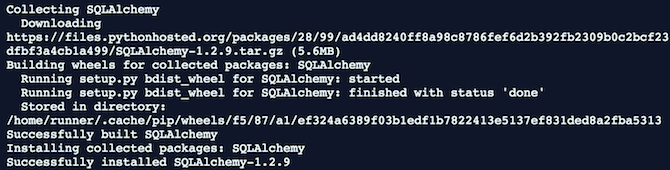
Once you’re ready to go, you can begin by getting SQLAlchemy ready. From within your Python environment in the command line, install SQLAlchemy with the pip install command:

pip install SQLAlchemy-1.2.9

The 1.2.9 is the version number. You can leave this off to get the latest package, but it’s good practice to be specific. You don’t know when a new release may break your current code.

Installing SQLAlchemy on your PC

Now you’re ready to start coding. You may need to prepare your database to accept a Python connection, but the following examples all use an SQLite database created in-memory below.

Models in SQLAlchemy

One of the key components of an ORM is a model. This is a Python class which outlines what a table should look like, and how it should work. It’s the ORM version of the CREATE TABLE statement in SQL. You need a model for each table in your database.

Open up your favorite text editor or IDE, and create a new file called test.py. Enter this starter code, save the file, and run it:

from sqlalchemy import create_engine
from sqlalchemy.ext.declarative import declarative_base

Base = declarative_base()

engine = create_engine('sqlite://') # Create the database in memory
Base.metadata.create_all(engine) # Create all the tables in the database

This code does several things. The imports are necessary so that Python understands where to find the SQLAlchemy modules it needs. Your models will use the declarative_base later on, and it configures any new models to work as expected.

The create_engine method creates a new connection to your database. If you have a database already, you’ll need to change sqlite:// to your database URI. As it is, this code will create a new database in memory only. The database is destroyed once your code finishes executing.

Finally, the create_all method creates all the tables defined in your modes in your database. As you haven’t defined any models yet, nothing will happen. Go ahead and run this code, to ensure you don’t have any problems or typos.

Let’s make a model. Add another import to the top of your file:

from sqlalchemy import Column, Integer, String

This imports the Column, Integer, and String modules from SQLAlchemy. They define how the database tables, fields, columns, and datatypes work.

Underneath the declarative_base, create your model class:

class Cars(Base):
  __tablename__ = 'cars'
  id = Column(Integer, primary_key=True)
  make = Column(String(50), nullable=False)
  color = Column(String(50), nullable=False)

This simple example uses cars, but your tables may contain any data.

Each class must inherit Base. Your database table name is defined in __tablename__. This should be the same as the class name, but this is just a recommendation, and nothing will break if they don’t match.

Finally, each column is defined as a python variable within the class. Different data types are used, and the primary_key attribute tells SQLAlchemy to create the id column as a primary key.

Go ahead and add one last import, this time for the ForeignKey module. Add this alongside your Column import:

from sqlalchemy import Column, ForeignKey, Integer, String

Now create a second model class. This class is called CarOwners, and stores owner details of specific cars stored in the Cars table:

class CarOwners(Base):
  __tablename__ = 'carowners'
  id = Column(Integer, primary_key=True)
  name = Column(String(50), nullable=False)
  age = Column(Integer, nullable=False)
  car_id = Column(Integer, ForeignKey('cars.id'))

  car = relationship(Cars)

There are several new attributes introduced here. The car_id field is defined as a foreign key. It is linked to the id in the cars table. Notice how the lower case table name is used, insted of the uppercase class name.

Finally, an attribute of car is defined as a relationship. This allows your model to access the Cars table through this variable. This is demonstrated below.

If you run this code now, you’ll see that nothing happens. This is because you haven’t told it to do anything noticeable yet.

Objects in SQLAlchemy

Now that your models are created, you can start to access the objects, and read and write data. It’s a good idea to place your logic into its own class and file, but for now, it can stay alongside the models.

Writing Data

In this example, you need to insert some data into the database before you can read it. If you’re using an existing database, you may have data already. Either way, it’s still very useful to know how to insert data.

You may be used to writing INSERT statements in SQL. SQLAlchemy handles this for you. Here’s how to insert one row into the Cars model. Start with a new import for sessionmaker:

from sqlalchemy.orm import sessionmaker

This is needed to create the session and DBSession objects, which are used to read and write data:

DBSession = sessionmaker(bind=engine)
session = DBSession()

Now put this underneath your create_all statement:

car1 = Cars(
  make="Ford",
  color="silver"
)
session.add(car1)
session.commit()

Let’s break down that code. The variable car1 is defined as an object based on the Cars model. Its make and color are set as parameters. This is like saying “make me a car, but don’t write it to the database yet”. This car exists in memory but is waiting to be written.

Add the car to the session with session.add, and then write it to the database with session.commit.

Now let’s add an owner:

owner1 = CarOwners(
  name="Joe",
  age="99",
  car_id=(car1.id)
)
session.add(owner1)
session.commit()

This code is almost identical to the previous insert for the Cars model. The main difference here is that car_id is a foreign key so needs a row id that exists in the other table. This is accessed through the car1.id property.

You don’t have to query the database or return any ids, as SQLAlchemy handles this for you (as long as you commit the data first).

Reading Data

Once you have written some data, you can begin to read it back. Here’s how to query the Cars and CarOwners tables:

result = session.query(Cars).all()

It is that simple. By using the query method found in the session, you specify the model, and then use the all method to retrieve all the results. If you know there will only be one result, then you can use the first method:

result = session.query(Cars).first()

Once you’ve queried the model, and stored your returned results in a variable, you can access the data through the object:

print(result[0].color)

This prints the color “silver”, as that record is the first row. You can loop over the result object if you want to.

A sample Python-ORM query

As you defined the relationship in your model, it’s possible to access data in related tables without specifying a join:

result = session.query(CarOwners).all()
print(result[0].name)
print(result[0].car.color)

Simple database query result using ORM

This works because your model contains details of your table structure, and the car attribute was defined as a link to the cars table.

What’s Not to Like About ORMs?

This tutorial only covered the very basics, but once you’ve got the hang of those, you can move on the advanced topics. There are some potential downsides to ORMs:

  • You have to write your model before any queries can run.
  • It’s another new syntax to learn.
  • It may be too complex for simple needs.
  • You must have a good database design to begin with.

These issues aren’t a big problem on their own, but they are things to watch out for. If you’re working with an existing database, you may get caught out.

If you’re not convinced an ORM is the right tool for you, then make sure you read about the important SQL commands programmers should know.

Read the full article: Everything You Need to Know About Python and Object-Relational Maps


Read Full Article

Opera adds a crypto wallet to its mobile browser


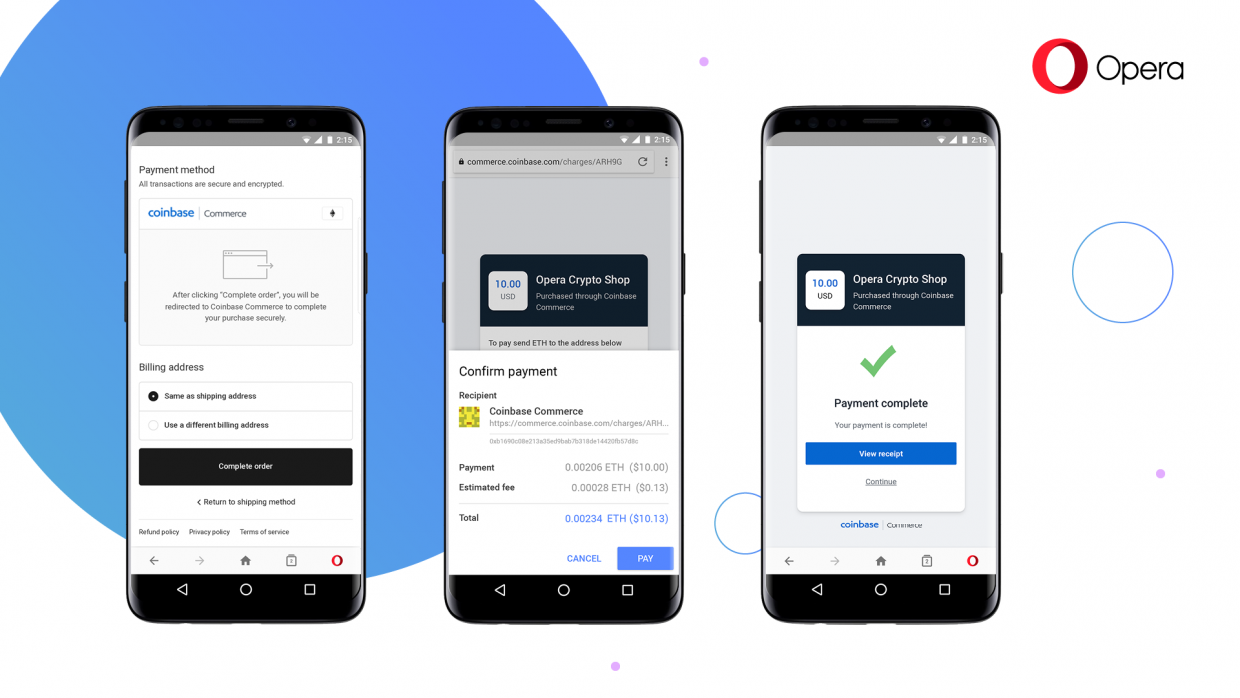
The Opera Android browser will soon be able to hold your cryptocurrencies. The system, now in beta, lets you store crypto and ERC20 tokens in your browser, send and receive crypto on the fly, and secures your wallet with your phone’s biometric security or passcode.

You can sign up to try the beta here.

The feature, called Crypto Wallet, “makes Opera the first major browser to introduce a built-in crypto wallet” according to the company. The feature could allow for micropayments in the browser and paves the way for similar features in other browsers.

From the release:

We believe the web of today will be the interface to the decentralized web of tomorrow. This is why we have chosen to use our browser to bridge the gap. We think that with a built-in crypto wallet, the browser has the potential to renew and extend its important role as a tool to access information, make transactions online and manage users’ online identity in a way that gives them more control.

In addition to being able to send money from wallet to wallet and interact with Dapps, Opera now supports online payments with cryptocurrency where merchants support exists. Users that choose to pay for their order using cryptocurrency on Coinbase Commerce-enabled merchants will be presented with a payment request dialog, asking them for their signature. The payment will then be signed and transmitted directly from the browser.

While it’s still early days for this sort of technology it’s interesting to see a mainstream browser entering the space. Don’t hold your breath on seeing crypto in Safari or Edge but Chrome and other “open source” browsers could easily add these features given enough demand.


Read Full Article

Summer road trip tech essentials and extras


Editor’s note: This post was done in partnership with Wirecutter. When readers choose to buy Wirecutter’s independently chosen editorial picks, Wirecutter and TechCrunch may earn affiliate commissions.

Gearing up for a pleasant road trip entails more than picking an exciting destination. The mode of transportation, and what you’re able to do while traveling, sometimes makes or breaks hours spent on the road.


Whether you’re taking an older car on a short solo excursion, or piling in with family and friends for a cross-country drive, your road trip gear and setup can add to the experience. We’ve gathered some of our favorite picks that cover the basics.

iPad Headrest Mount: Arkon Center Extension Car Headrest Tablet Mount

If getting comfortable in a backseat and watching a movie sounds like an ideal way to pass time, do so with the help of a tablet mount. The Arkon Center Extension Car Headrest Tablet Mount securely holds iPads and most 9- to 12-inch tablets.

It attaches to the metal rods of the front seat headrest and its holster is attached to an extendable arm that can be positioned so one or multiple backseat passengers can get a clear view.

Photo: Rik Paul

Car GPS: Garmin DriveSmart 51 LMT-S

Before the wheels start rolling, knowing where you’re going and how to get there is likely the first order of business. Using a standalone car GPS means your smartphone doesn’t have to be held hostage and you don’t have to rely on a live data connection.

The Garmin DriveSmart 51 LMT-S has maps and a database with points of interest built in so that navigation — even off of the beaten path — is straightforward. It works via Bluetooth, can display alerts or searches from a smartphone and its maps are updated over Wi-Fi. During testing, its voice-control system was the simplest to use and its audible directions were the most precise.

You’ll like that its 5-inch touchscreen displays easy-to-follow lanes and road signs, along with nearby stops and speed limits.

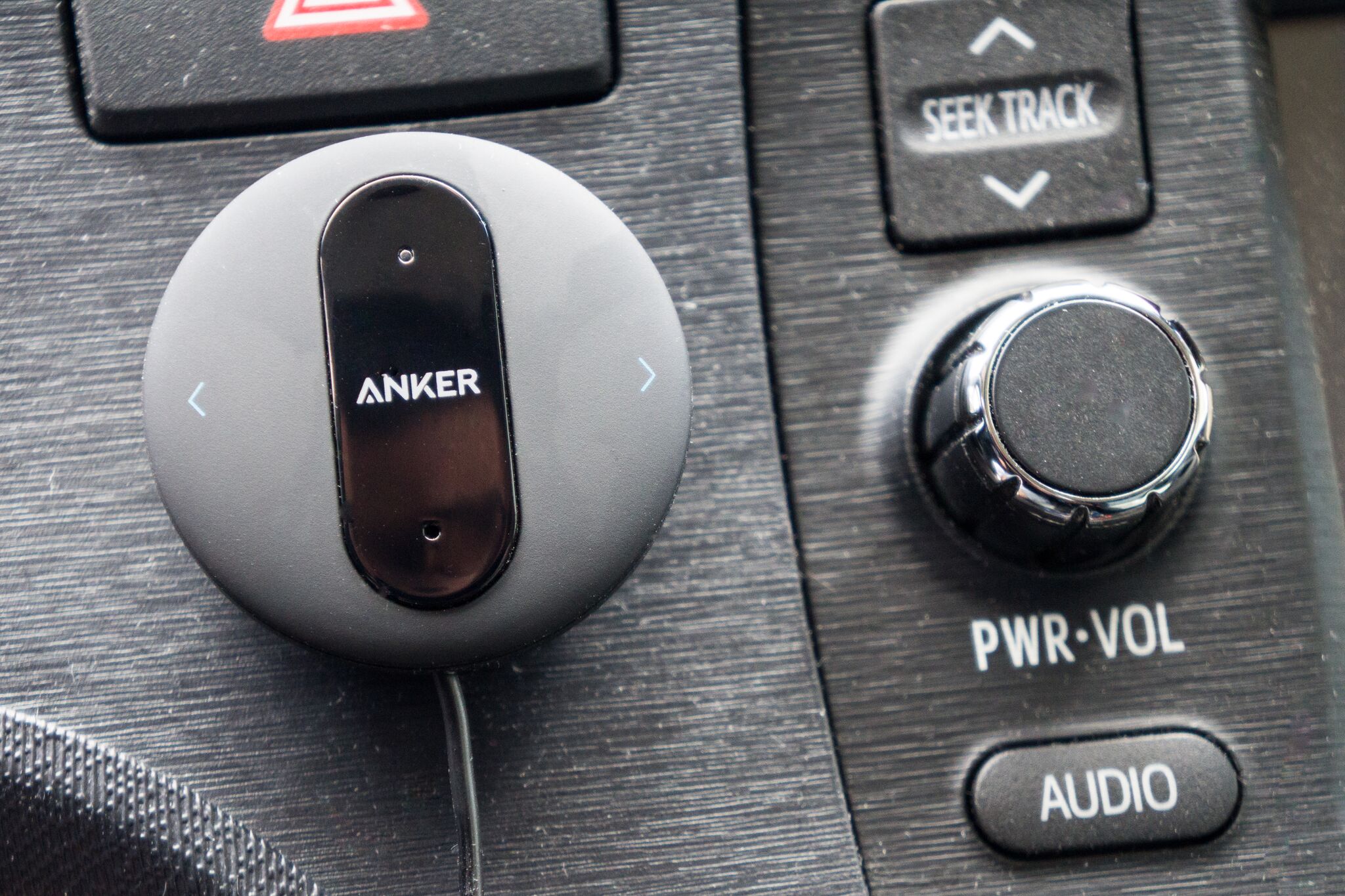
Bluetooth Kit: Anker SoundSync Drive

There’s no fun in a road trip that doesn’t include your favorite podcasts and music playlists. Older cars without built-in Bluetooth pose a problem when it comes to streaming curated entertainment from a smartphone.

Bypass installing a new stereo system and use an inexpensive Bluetooth kit instead. We recommend the Anker SoundSync Drive for cars with an aux-in port as well as other options for different setups. The SoundSync Drive will allow you to listen to music and makes hands-free calls.

It offers high-quality audio that’s on par and better than competitors we tested, and it has convenient track-control buttons. Keep it powered by plugging its USB-A charging cable into any car charger or USB power source.

Photo: Michael Hession

Car Mount: iOttie Easy One Touch 4 Air Vent Mount

For a car mount that won’t get in the way of other devices that have to be placed on a windshield or dashboard, we recommend the iOttie Easy One Touch 4 Air Vent Mount. It fits into an air vent and its grip — which is secured by long rubber-lined arms and a spring-loaded clamp — places it above similar models.

Its cradle holds firm, it can be placed on vents of all thicknesses and it’s easy to position. The Easy One Touch 4 Air Vent Mount’s build makes it easy to access and it works against weighing down vent slats.

Photo: Nick Guy 

USB Car Charger: RAVPower RP-VC006

The RAVPower RP-VC006 USB car charger is small but packs a punch (up to 2.4 amps) with two USB ports for powering smartphones or tablets. It isn’t difficult to insert or remove, and when it’s dark outside, its LED and white ports make it easy to locate.

We like that it’s compact and doesn’t stick out too far. The RAVPower RP-VC006 plugs into a 12-volt power jack and it’s capable of charging two devices — simultaneously and in little to no time. It comes with a lifetime warranty, and if you’re concerned about misplacing it or running out of juice, it’s cheap enough to buy a few.

This guide may have been updated by Wirecutter.

When readers choose to buy Wirecutter’s independently chosen editorial picks, Wirecutter and Engadget may earn affiliate commissions.


Read Full Article

You can now stream to your Sonos devices via AirPlay 2


Newer Sonos devices and “rooms” now appear as AirPlay 2-compatible devices, allowing you to stream audio to them via Apple devices. The solution is a long time coming for Sonos which promised AirPlay 2 support in October.

You can stream to Sonos One, Sonos Beam, Playbase, and Play:5 speakers and ask Siri to play music on various speakers (“Hey Siri, play some hip-hop in the kitchen.”) The feature should roll out to current speakers today.

I tried a beta version and it worked as advertised. A set of speakers including a Beam and a Sub in my family room showed up as a single speaker and a Sonos One in the kitchen showed up as another. I was able to stream music and podcasts to either one.

Given the ease with which you can now stream to nearly every device from every device it’s clear that whole-home audio is progressing rapidly. As we noted before Sonos is facing tough competition but little tricks like this one help it stay in the race.

[gallery ids="1671157,1671158"]

Read Full Article

Pinterest is adding a way for users to collaborate on boards


Pinterest is trying to further tap its popularity as a place to plan events, this time adding ways for users to collaborate across boards that are baked directly into the app.

Group boards will have their own designated feed, where users will be able to communicate with others collaborating on that board and also get updates on new member additions or added pins. There are also the other typical social structures you’d expect on an app these days, including @-mentions or liking comments. It’s another step to get people onto Pinterest and sticking around as they look to plan events, and create more ways to make the platform more and more sticky. It’s also another quality-of-life improvement that Pinterest seems to have needed for quite some time.

It’s those kinds of events — weddings, parties and others — that propelled Pinterest initially to become one of the larger social networks in the early 2010s. The company late last year said it had more than 200 million monthly active users, which while small compared to the likes of Instagram or Facebook, serves as a hub for a different kind of user behavior than you might find on those other platforms. The majority of the content on Pinterest is high-resolution products from businesses, where people will search for or save those products as they look to plan future life events.

Pinterest has tried to position itself as one of the best ways to discover new ideas, whether that’s stumbling upon something in a primary feed or finding something through searching. Over time, it’s added more and more tools to try to get people to come back more regularly, and if it continues to improve those recommendation engines, it can continue to run that feedback loop and keep users more and more attached to the platform. Adding a sort of light social pressure from friends that are sharing ideas and looking for feedback is one way to do that, in addition to it generally being useful.

All that is good for its pitch to advertisers as well. Pinterest, in addition to trying to cater to that unique kind of user behavior, is also trying to sell itself to advertisers as a platform where they can reach potential customers through ways they wouldn’t be able to with primary advertising channels like Facebook or Google. By making the platform more sticky, it can go back to those advertisers and offer them better engagement metrics and show that users stick around and are paying closer attention to content on Pinterest, which can in turn drive that additional value to advertisers.


Read Full Article

Wall Art


Wall Art

How to Protect Your Apple Account With Two-Factor Authentication