19 May 2018

zGlue launches a configurable system-on-a-chip to help developers implement customized chipsets


The complexity and cost of packing an array of sensors and power inside a small amount of space has opened the door to a wider and wider variety of use cases for internet-connected devices beyond just smart thermostats or cameras — and also exposed a hole for getting those ideas into an actual piece of hardware.

So there are some startups that are looking to address this hole by providing developers a path to creating the customized chipsets they need to power those devices. zGlue is one of those, led by former Samsung engineering director Ming Zhang and former Misfit founder Sonny Vu.  The company’s chiplets are built around the kind of system-on-a-chip approach that you’ll see in most modern devices, where everything is in a single unit that reduces some of the complexity of moving processes around a larger piece of hardware — shrinking the space constraints and allowing all these actions to happen on a device, such as a smartphone. As more and more IoT devices come online, they may all have varying form factor demands, which means companies — like zGlue and others — are emerging to address those needs.

“From the developer point of view, think of us as a system that is not different from any thing else on the market, user-interface-wise,” Zhang said. “It is just smaller in size, faster in time to market, and flexible — customizable by individuals rather than just by Apple and Qualcomms. [We’re] democratizing chip innovation so it is no longer [a] privilege of Fortune 500 companies.”

The company’s first product is called the zOrigin, a “chip-stacking” product that aims to allow developers to embed the sensors and processes necessary for their devices. Stemming from an ARM 32-bit core processor (meaning it can handle more complex and precise calculations), the first launch costs $149 and can include pieces like a Bluetooth radio, accelerometers, and other necessary features.

zGlue’s chipsets have embedded memory, which is an increasingly common approach to try to reduce the number of trips going from the actual processing power to where the information is stored. Those trips cost power, speed, and can restrict the scope of use cases for internet-connected devices. Zhang said the chiplets are packaged closer together — literally reducing the space that information has to cross — in order to speed it up, though that of course carries consequences when it comes to heat constraints these processors can have.

“That’s the price to pay for the continuation of Moore’s law, as it has in the past 40 years,” Zhang said. “Heat dissipation in our system is not going to be any worse than a conventional system. In fact, with the silicon substrate in place, it’s easier to conduct heat compared to a conventional package or board substrate.”

As a kind of templated approach, zGlue is geared toward helping developers produce a custom setup that the can implement into devices that may require a wide set of sensors. The company says it looks to help developers go from a design to a prototype in a few weeks, and then reduce the turnaround time from a prototype to production in “weeks or months,” depending on the complexity and volume.

While this is one example of trying to get a prototype chip out into the wild, there are a few others as well. Si-Five, for example, offers developers a way to prototype custom silicon for their specific niches based on the hardware and IP the startup has. The goal there is to offer both a prototype flow and the ability to graduate into a production flow, allowing developers and companies to get products out the door that require custom silicon. Si-Five hardware is based on the RISC-V architecture, an open-source instruction set for silicon, and the company most recently raised $50.4 million.

Zhang, too, said RISC-V offers some potential, especially in its own scope. “RISC-V is a great tool to build small, fast, and low power IoT applications,” he said. “The nature of open source makes it more available to more people. We welcome and embrace RISC-V to join the family of ‘MCU’ chiplets supported by our technology.”

When it comes to inference — the machine learning processes that happen on the hardware to execute some kind of action, like image recognition, based on trained models — Zhang said the chipsets would support it, but he would not comment further. There is a blossoming ecosystem around custom silicon that looks to speed up inference on devices like cars or IoT devices, which is geared toward reducing the space and power constraints of those chips while also running those processes much more quickly. Companies like Mythic have raised significant venture funding in order to build that kind of hardware.


Read Full Article

EU parliament pushes for Zuckerberg hearing to be live streamed


There’s confusion about whether a meeting between Facebook founder Mark Zuckerberg and the European Union’s parliament — which is due to take place next Tuesday — will go ahead as planned or not.

The meeting was confirmed by the EU parliament’s president this week, and is the latest stop on Zuckerberg’s contrition tour, following the Cambridge Analytics data misuse story that blew up into a major public scandal in mid March. 

However the discussion with MEPs that Facebook agreed to was due to take place behind closed doors. A private format that’s not only ripe with irony but was also unpalatable to a large number of MEPs. It even drew criticism from some in the EU’s unelected executive body, the European Commission, which further angered parliamentarians.

Now, as the FT reports, MEPs appear to have forced the parliament’s president, Antonio Tajani, to agree to livestreaming the event.

Guy Verhofstadt — the leader of the Alliance of Liberals and Democrats group of MEPs, who had said he would boycott the meeting if it took place in private — has also tweeted that a majority of the parliament’s groups have pushed for the event to be streamed online.

And a Green Group MEP, Sven Giegold, who posted an online petition calling for the meeting not to be held in secret — has also tweeted that there is now a majority among the groups wanting to change the format. At the time of writing Giegold’s petition has garnered more than 25,000 signatures.

MEP Claude Moraes, chair of the EU parliament’s Civil Liberties, Justice and Home Affairs (LIBE) committee — and one of the handful of parliamentarians set to question Zuckerberg (assuming the meeting goes ahead as planned) — told TechCrunch this morning that there were efforts afoot among political group leaders to try to open up the format. Though any changes would clearly depend on Facebook agreeing to them.

After speaking to Moraes, we asked Facebook to confirm whether it’s open to Zuckerberg’s meeting being streamed online — say, via a Facebook Live. Seven hours laters we’re still waiting for a response, including to a follow up email asking if it will accept the majority decision among MEPs for the hearing to be livestreamed.

The Libe committee had been pushing for a fully open hearing with the Facebook founder — a format which would also have meant it being open to members of the public. But that was before a small majority of the parliament’s political groups accepted the council of presidents’ (COP) decision on a closed meeting.

Although now that decision looks to have been rowed back, with a majority of the groups pushing the president to agree to the event being streamed — putting the ball back in Facebook’s court to accept the new format.

Of course democracy can be a messy process at times, something Zuckerberg surely has a pretty sharp appreciation of these days. And if the Facebook founder pulls out of meeting simply because a majority of MEPs have voted to do the equivalent of ‘Facebook Live’ the hearing, well, it’s hard to see a way for the company to salvage any face at all.

Zuckerberg has agreed to be interviewed on stage at the VivaTech conference in Paris next Thursday, and is scheduled to have lunch with French president Emmanuel Macron the same week. So pivoting to a last minute snub of the EU parliament would be a pretty high stakes game for the company to play. (Though it’s continued to deny a UK parliamentary committee any facetime with Zuckerberg for months now.)

The EU Facebook agenda

The substance of the meeting between Zuckerberg and the EU parliament — should it go ahead — will include discussion about Facebook’s impact on election processes. That was the only substance detail flagged by Tajani in the statement on Wednesday when he confirmed Zuckerberg had accepted the invitation to talk to representatives of the EU’s 500 million citizens.

Moraes says he also intends to ask Zuckerberg wider questions — relating to how its business model impacts people’s privacy. And his hope is this discussion could help unblock negotiations around an update to the EU’s rules around online tracking technologies and the privacy of digital communications.

“One of the key things is that [Zuckerberg] gets a particular flavor of the genuine concern — not just about what Facebook is doing, but potentially other tech companies — on the interference in elections. Because I think that is a genuine, big, sort of tech vs real life and politics concern,” he says, discussing the questions he wants to ask.

“And the fact is he’s not going to go before the House of Commons. He’s not going to go before the Bundestag. And he needs to answer this question about Cambridge Analytica — in a little bit more depth, if possible, than we even saw in Congress. Because he needs to get straight from us the deepest concerns about that.

“And also this issue of processing for algorithmic targeting, and for political manipulation — some in depth questions on this.

“And we need to go more in depth and more carefully about what safeguards there are — and what he’s prepared to do beyond those safeguards.

“We’re aware of how poor US data protection law is. We know that GDPR is coming in but it doesn’t impact on the Facebook business model that much. It does a little bit but not sufficiently — I mean ePrivacy probably far more — so we need to get to a point where we understand what Facebook is willing to change about the way it’s been behaving up til now.

“And we have a real locus there — which is we have more Facebook users, and we have the clout as well because we have potential legislation, and we have regulation beyond that too. So I think for those reasons he needs to answer.”

“The other things that go beyond the obvious Cambridge Analytica questions and the impact on elections, are the consequences of the business model, data-driven advertising, and how that’s going to work, and there we need to go much more in depth,” he continues.

“Facebook on the one hand, it’s complying with GDPR [the EU’s incoming General Data Protection Regulation] which is fine — but we need to think about what the further protections are. So for example, how justified we are with the ePrivacy Regulation, for example, and its elements, and I think that’s quite important.

“I think he needs to talk to us about that. Because that legislation at the moment it’s seen as controversial, it’s blocked at the moment, but clearly would have more relevance to the problems that are currently being created.”

Negotiations between the EU parliament and the European Council to update the ePrivacy Directive — which governs the use of personal telecoms data and also regulates tracking cookies — and replace it with a regulation that harmonizes the rules with the incoming GDPR and expands the remit to include Internet companies and cover both content and metadata of digital comms are effectively stalled for now, as EU Member States are still trying to reach agreement. The directive was last updated in 2009.

“When the Cambridge Analytica case happened, I was slightly concerned about people thinking GDPR is the panacea to this — it’s not,” argues Moraes. “It only affects Facebook’s business model a little bit. ePrivacy goes far more in depth — into data-driven advertising, personal comms and privacy.

“That tool was there because people were aware that this kind of thing can happen. But because of that the Privacy directive will be seen as controversial but I think people now need to look at it carefully and say look at the problems created in the Facebook situation — and not just Facebook — and then analyze whether ePrivacy has got merits. I think that’s quite an important discussion to happen.”

While Moraes believes Facebook-Cambridge Analytica could help unblock the log jam around ePrivacy, as the scandal makes some of the risks clear and underlines what’s at stake for politicians and democracies, he concedes there are still challenging barriers to getting the right legislation in place — given the fine-grained layers of complexity involved with imposing checks and balances on what are also poorly understood technologies outside their specific industry niches.

“This Facebook situation has happened when ePrivacy is more or less blocked because its proportionality is an issue. But the essence of it — which is all the problems that happened with the Facebook case, the Cambridge Analytica case, and data-driven advertising business model — that needs checks and balances… So we need to now just review the ePrivacy situation and I think it’s better that everyone opens this discussion up a bit.

“ePrivacy, future legislation on artificial intelligence, all of which is in our committee, it will challenge people because sometimes they just won’t want to look at it. And it speaks to parliamentarians without technical knowledge which is another issue in Western countries… But these are all wider issues about the understanding of these files which are going to come up.  

“This is the discussion we need to have now. We need to get that discussion right. And I think Facebook and other big companies are aware that we are legislating in these areas — and we’re legislating for more than one countries and we have the economies of scale — we have the user base, which is bigger than the US… and we have the innovoation base, and I think those companies are aware of that.”

Moraes also points out that US lawmakers raised the difference between the EU and US data protection regimes with Zuckerberg last month — arguing there’s a growing awareness that US law in this area “desperately needs to be modernized”.

So he sees an opportunity for EU regulators to press on their counterparts over the pond.

“We have international agreements that just aren’t going to work in the future and they’re the basis of a lot of economic activity, so it is becoming critical… So the Facebook debate should, if it’s pushed in the correct direction, give us a better handle on ePrivacy, on modernizing data protection standards in the US in particular. And modernizing safeguards for consumers,” he argues.

“Our parliaments across Europe are still filled with people who don’t have tech backgrounds and knowledge but we need to ensure that we get out of this mindset and start understanding exactly what the implications here are of these cases and what the opportunities are.”

In the short term, discussions are also continuing for a full meeting between the Libe committee and Facebook.

Though that’s unlikely to be Zuckerberg himself. Moraes says the committee is “aiming for Sheryl Sandberg”, though he says other names have been suggested. No firm date has been conformed yet either — he’ll only say he “hopes it will take place as soon as possible”.

Threats are not on the agenda though. Moraes is unimpressed with the strategy the DCMS committee has pursued in trying (and so far failing) to get Zuckerberg to testify in front of the UK parliament, arguing threats of a summons were counterproductive. Libe is clearly playing a longer game.

“Threatening him with a summons in UK law really was not the best approach. Because it would have been extremely important to have him in London. But I just don’t see why he would do that. And I’m sure there’s an element of him understanding that the European Union and parliament in particular is a better forum,” he suggests.

“We have more Facebook users than the US, we have the regulatory framework that is significant to Facebook — the UK is simply implementing GDPR and following Brexit it will have an adequacy agreement with the EU so I think there’s an understanding in Facebook where the regulation, the legislation and the audience is.”

“I think the quaint ways of the British House of Commons need to be thought through,” he adds. “Because I really don’t think that would have engendered much enthusiasm in [Zuckerberg] to come and really interact with the House of Commons which would have been a very positive thing. Particularly on the specifics of Cambridge Analytics, given that that company is in the UK. So that locus was quite important, but the approach… was not positive at all.”


Read Full Article

5 Famous Websites That Died (And Their Best Alternatives Today)


The rapidly changing nature of the internet means that services can fall out of favor as quickly as they explode in interest. Who knows if we’ll refer to Facebook and WhatsApp in the same sentence as MySpace and AIM in a few years?

Today we’re going to take a step back and look at once-popular web services that went extinct. We’ll see exactly why they went defunct, and provide the best alternatives to them.

Note that in this list, we’re only including old websites that are no longer available. We’ve left out services like Digg that are a shadow of their former selves but still in service.

1. ChaCha

Founded: 2006 | Defunct: 2016

Before internet access was ubiquitous on mobile phones, people had to wait to get answers for their questions when they weren’t home. If you were out with friends and wanted to know the weather across the world or some obscure piece of sports trivia, you couldn’t easily Google it on the go.

In addition, search engines of the time weren’t always good at answering questions like they are now. They could match keywords, but questions tripped them up.

That’s where ChaCha came in. It was a human-powered search engine that you interacted with via texting. Sending an SMS to 242-242 with your question would lead to a team member replying with an answer. Since it was free, and most people had access to texting, it was a great way to get quick information when you weren’t at a computer.

ChaCha paid its part-time workers a few cents per answer. And while the company had strong beginnings with an investment from Jeff Bezos, the widespread adoption of smartphones meant that its services became increasingly unnecessary.

In late 2016, ChaCha shut down completely due to a lack of funding. The company’s owner moved to Hawaii but couldn’t even pay the employees what they were due. It’s a sad case of a model that was brilliant at the time but became unnecessary as Google became more powerful and ubiquitous.

ChaCha Alternatives

Google’s free mobile apps can answer pretty much anything ChaCha could. Its recent updates have made refinements to Featured Snippets, which pull relevant info from a page so you get an answer to your question without even leaving the results page.

If you’d prefer a human answer to your questions, the Stack Exchange network of sites is a great place for questions and answers. Quora is a similar service, and you can always ask questions on Reddit and other forums too.

2. Grooveshark

Founded: 2006 | Defunct: 2015

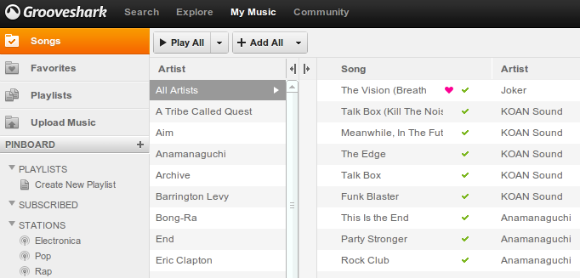
Grooveshark My Music

People have wanted to find free music online since the dawn of the internet. While downloading from old websites like LimeWire was a popular option, that came with the risk of a virus infection. Grooveshark provided music fans with a way to listen to whatever they liked in a browser for free.

Since you streamed music instead of downloading it, it was a safer alternative to other piracy services. Remember that at the time, Spotify wasn’t widely available yet and Pandora only allowed you to listen to the radio. Grooveshark letting you search for any song and create your own playlists was quite convenient.

This site allowed anyone to upload music so others could find it. While it wasn’t always a super polished experience (miscategorized and partial songs popped up often) it was good enough for a lot of people.

Though it didn’t allow users to download tracks, Grooveshark was still an illegal service. It had several bouts with the law that didn’t produce lasting results, but that changed in 2015. The site settled with the big three records companies and immediately shut down.

You can read a more detailed history of the service in our Grooveshark retrospective.

Grooveshark Alternatives

As you’re probably aware, you have lots of options for replacing Grooveshark. Spotify is probably the closest alternative, as it lets you stream millions of songs on your desktop for free. However, you’ll need to pay for a Premium subscription if you want to remove the ads.

If you don’t like Spotify, you can try one of the many other music streaming services. Most of them have a free plan that should more than fill the void Grooveshark left behind.

3. Megaupload

Founded: 2005 | Defunct: 2012

Megaupload was an extremely popular service for uploading and sharing content both legal and illegal. It seemed that nearly everyone who wanted to make a file available for others in YouTube descriptions, forum posts, or similar put it on Megaupload. In fact, when the service closed down, it held 25 petabytes of data!

One of the biggest legal problems with Megaupload was that when a user uploaded a file that matched one already on the service, the uploader asked to create another link to the file instead of adding a duplicate. Under DMCA, Megaupload only had to remove a link when the copyright holder requested it. Thus, a DMCA takedown could potentially remove just one link from the many pointing to an illegal file.

In early 2012, the US Department of Justice took control of Megaupload and shut it down. The government claimed that several behaviors on the site proved criminal intent. These included the fact that only the most popular files were kept available for download, the ad-focused revenue scheme was dependent on maximizing downloads, and more.

Megaupload was semi-reborn as Mega a year later. This version encrypts files before uploading, meaning the company can’t access them. It also doesn’t use the matching system to create multiple links to one file, so Mega should be more government-proof.

On a similar note, Rapidshare was a service much like Megaupload. Once the latter was taken down, Rapidshare changed its ways to avoid a similar fate. This killed the service’s popularity and crippled the company, resulting in its closing down in 2015.

Megaupload Alternatives

Mega is a decent alternative to Megaupload. If you don’t want to use it, any cloud storage provider like Dropbox or Google Drive works too.

Barring that, check out tons of easy ways to share files without cloud storage.

4. Orkut

Founded: 2004 | Defunct: 2014

Orkut was a wildly popular social media website before the dominance of Facebook. It was most popular in India and Brazil and was created by Orkut Büyükkökten as an independent project while he was working for Google.

At first, Orkut made networking more open by allowing anyone to visit your profile unless they were on your block list. It had standard social features like creating polls, sharing videos, and liking posts.

Nothing particularly interesting happened to cause Orkut’s demise. While it enjoyed popularity in a few regions, much of the world didn’t use it. This meant that Google’s other products like YouTube and Blogger outpaced Orkut.

Combined with the dominance of Facebook and Google+, which Google was still pushing at the time, the company cut the dead weight in late 2014.

Orkut Alternatives

You’re probably already on an alternative to Orkut. The best social network is the one that most of your friends use. Facebook is an obvious choice, while Twitter, Instagram, and Snapchat are also popular.

5. Heat.net

Founded: 1997 | Defunct: 2000

One of the lesser-known old websites, Heat was ahead of its time. Heat.net was an online gaming platform from Sega. It let you enjoy first and second-party games, along with other big games like Quake 2, online with other players. The subscription cost $10 per month and included chat lobbies.

But the service quickly ran into problems. It rewarded players with currency named “degrees” simply for staying connected to the service. It didn’t take long for players to abuse this, as they’d leave their computers connected but idle and earn degrees for doing nothing. You could spend these degrees on games, magazines, and computer hardware.

Sega reduced the value of degrees to combat this problem, but it wasn’t enough. The company closed down Heat.net in 2000 and replaced it with SegaNet, a new online service for the Dreamcast. However, the Dreamcast failed due to the hype from the upcoming PlayStation 2, resulting in Sega discontinuing the console in early 2001.

This, in turn, led to Sega exiting the video game console business entirely. It’s easy to trace modern online services like Xbox Live back to Heat.net, so it definitely had an impact.

Heat.net Alternatives

Steam is the closest modern service to Heat.net on PC, as it lets you buy and play games online with others. If you play on a console, you can subscribe to PlayStation Plus or Xbox Live to enjoy many of the same features.

Popular Old Websites That Died: Gone but Not Forgotten

You’ll note that we didn’t include any Google services here. But in fact, Google has killed off so many services that it’s hard to count them all.

These five services were all popular for some time but faded as technology advanced. But whether they were superseded by superior alternatives, forced to shut down due to illegal content, or just couldn’t keep up, none could stay afloat.

It’s fun to take a nostalgic look back to see what was popular years ago, and what we can learn. Thankfully, all these old websites have modern equivalents.

For more, check out these famous programs that no longer exist.


Read Full Article

18 May 2018

How to View and Recover Your Microsoft Outlook Password


Microsoft Outlook is one of the most popular email clients around, regularly ranking among the top clients. It’s only beaten by Apple’s integrated mail solution and Gmail for global email opens. Most people use Outlook at some time in their lives.

Given those millions of users, it is understandable that at some point, someone will forget their Outlook password. And in those moments, you need a tool that can retrieve the password while keeping your data intact.

Here are three tools to help with Outlook password recovery. But first, we need to understand the difference between PST and OST files and how they store and password-protect your mail in Outlook.

Differences Between Outlook PST and OST Files

The way Outlook stores, manages, and secures your data depends on the type of account you are using. There are two main types of Outlook data files:

  • PST: A Personal Storage Table is the storage system Outlook uses for POP and IMAP accounts. Your email is delivered to and stored on the mail server, and is only accessible while online. You can take backups of your email to work on, but this also creates a new PST file. When you move to a new computer, PST files transfer easily between systems.
  • OST: You can use an Offline Storage Table file when you want to keep an entire local backup of an email account. All the data is stored on your computer as well as the mail server. This means the entire user account email database is accessible, regardless of network connection. Changes sync when the user establishes a connection with the mail server.

There are two more vital differences between the two file types.

By and large, PST data files store vital information, such as passwords, to the local machine. This password locks unauthorized users out of the Outlook account, protecting emails and user data in the process. The OST data file also uses local storage but doesn’t contain any passwords. As such, the PST file is open for password retrieval. (Do note that OST passwords aren’t much more secure.)

The second difference is a bug in Microsoft Outlook’s password protection that relates to password storage.

The Microsoft Outlook PST Password Protection Bug

When you enter a password on a website, the site (hopefully) doesn’t store it in plaintext. Plaintext is what you’re reading now, so you can see why storing a password in this form isn’t so wise. The website takes your password and creates a hash.

A hash is a long string of alphanumeric characters that represent your password and is tied to your username. When you type your username and password combination, the database returns a positive response, and you enter your account. But if an attacker enters the database, all they see is a long list of confusing hash values.

Here’s the problem with Outlook: Instead of using a complex hashing algorithm (ideally with a salt), Microsoft appears to have cut some security corners using the basic CRC32 algorithm.

The bad news is that each CRC32 hash has a lot of matching values, meaning there’s a strong chance a password retrieval program will unlock your file. This is great if you need your PST file unlocked, but utterly terrible if you want to keep it secure.

This is where Outlook password recovery tools come in.

PST Tools for Outlook Password Recovery

There are several tools you can use to retrieve PST passwords and unlock your data file.

1. PstPassword

microsoft outlook password recovery tools

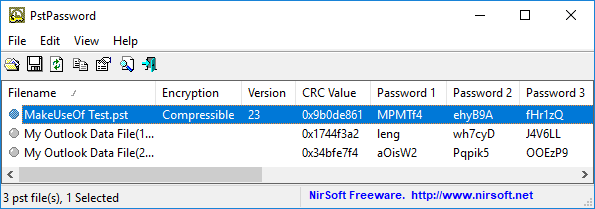
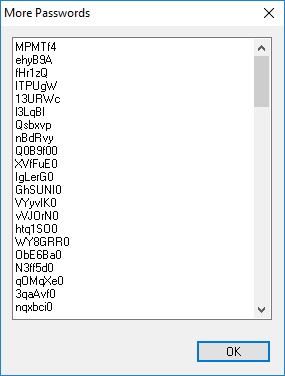
Nirsoft’s PstPassword is a great free utility that automatically retrieves PST passwords for local data files. PstPassword displays three potential passwords due to the encryption bug. If the first option fails, you have two more choices. (In fact, PstPassword generates a long list of CRC32 hashes that might unlock the data file.)

PstPassword doesn’t require installation, either. However, your system might detect it as a malicious file (as it is harvesting passwords, something that you don’t want at other times).

2. Kernel Outlook PST Password Recovery Tool

Kernel Outlook PST Password Recovery Tool is a limited free utility. The major limitation is the size of the PST file the tool will unlock. Kernel’s tool will unlock PST files up to 500MB for free. However, if your data file size surpasses that you will need to upgrade to the Home License for $39.

The tool quickly analyzes your PST files, providing a hash value for you to enter. Unlike PstPassword, Kernel only grants a single password hash to try. However, if that doesn’t work, Kernel also has the option to remove the password protection from the PST file (as well as adding a new one if you desire).

3. Recovery Toolbox for Outlook Password

Recovery Toolbox

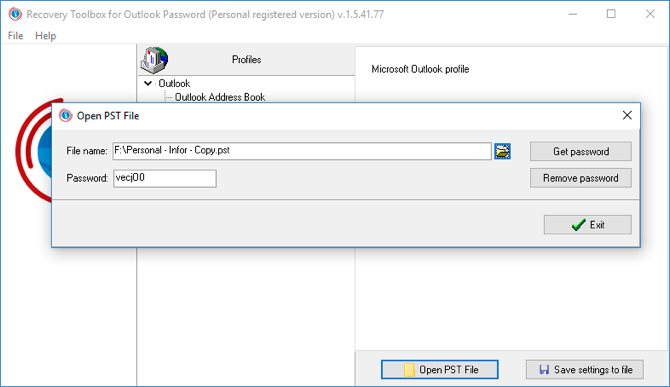
Our final tool is Recovery Toolbox for Outlook Password. Recovery Toolbox costs $19 but comes with a few more options than either free option. For example, Recovery Toolbox can:

  • Recover and show passwords for PST data files
  • Reset PST data file passwords
  • Recover and remove some passwords for OST data files

The major difference is support for OST files. The paid version of Recovery Toolbox shows and removes OST passwords, too, giving it a slight advantage. That said, other free online tools will uncover even the most secure Outlook OST data file passwords, too.

Testing the PST Password Protection Bug

You can check the password protection bug out for yourself using PstPassword.

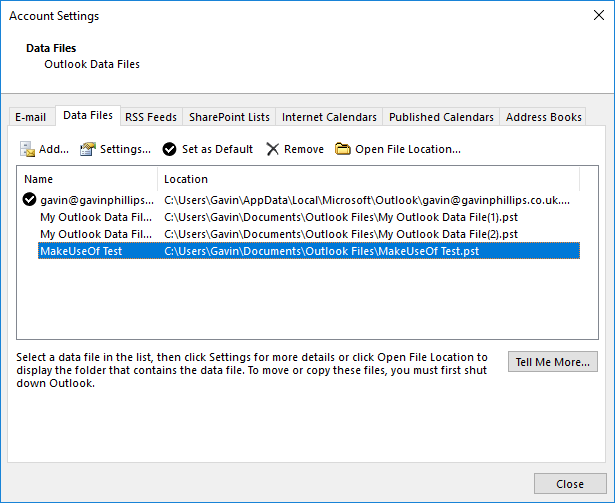
Open Outlook and head to File > Account Settings > Data Files. Press Add to create a new data file, giving it a temporary name. Next, head to Settings > Change Password. Leaving the “Old password” field empty (as it is a new data file), enter a strong new password in the “New password” and “Verify password” fields. (In fact, I’m using a Secure Password Generator to create a super-strong 16-character password.)

microsoft outlook password recovery tools

You might note that despite the 16-character password, Outlook only accepts 15-characters. Regardless, press OK, close the panel, then close Outlook.

Download, then open PstPassword. It should automatically detect your newly created PST file, as well as any existing data files, too. Now, alongside your test file, there are three potential passwords. Because the password is over a certain amount of characters, PstPassword displays the hash values.

Open Outlook again and enter one of the hash values. If it doesn’t work, try the next one. In the event the first three don’t work, right-click the test data file and select Get more passwords.

microsoft outlook password recovery tools

Mail PassView is another free password viewing and recovery tool from Nirsoft. Mail PassView uncovers OST data file passwords, rather than PST data files. However, as OST data file passwords are usually set via mail server rather than in Outlook itself, the tool cannot remove passwords or offer alternatives.

Still, Mail PassView is a useful free tool for recovering your Outlook password.

Outlook Password Recovery Complete!

One of these tools will grant you access to your Microsoft Outlook PST data file. Some Microsoft Office programs have strong integrated encryption. However, you have seen the Outlook password protection bug and how you can easily uncover a lost password.


Read Full Article

What we know about Google’s Duplex demo so far


The highlight of Google’s I/O keynote earlier this month was the reveal of Duplex, a system that can make calls to set up a salon appointment or a restaurant reservation for you by calling those places, chatting with a human and getting the job done. That demo drew lots of laughs at the keynote, but after the dust settled, plenty of ethical questions popped up because of how Duplex tries to fake being human. Over the course of the last few days, those were joined by questions about whether the demo was staged or edited after Axios asked Google a few simple questions about the demo that Google refused to answer.

We have reached out to Google with a number of very specific questions about this and have not heard back. As far as I can tell, the same is true for other outlets that have contacted the company.

If you haven’t seen the demo, take a look at this before you read on.

So did Google fudge this demo? Here is why people are asking and what we know so far:

During his keynote, Google CEO Sundar Pichai noted multiple times that we were listening to real calls and real conversations (“What you will hear is the Google Assistant actually calling a real salon.”). The company made the same claims in a blog post (“While sounding natural, these and other examples are conversations between a fully automatic computer system and real businesses.”).

Google has so far declined to disclose the name of the businesses it worked with and whether it had permission to record those calls. California is a two-consent state, so our understanding is that permission to record these calls would have been necessary (unless those calls were made to businesses in a state with different laws). So on top of the ethics questions, there are also a few legal questions here.

We have some clues, though. In the blog post, Google Duplex lead Yaniv Leviathan and engineering manager Matan Kalman posted a picture of themselves eating a meal “booked through a call from Duplex.” Thanks to the wonder of crowdsourcing and a number of intrepid sleuths, we know that this restaurant was Hongs Gourmet in Saratoga, California. We called Hongs Gourmet last night, but the person who answered the phone referred us to her manager, who she told us had left for the day. (We’ll give it another try today.)

Sadly, the rest of Google’s audio samples don’t contain any other clues as to which restaurants were called.

What prompted much of the suspicion here is that nobody who answers the calls from the Assistant in Google’s samples identifies their name or the name of the business. My best guess is that Google cut those parts from the conversations, but it’s hard to tell. Some of the audio samples do however sound as if the beginning was edited out.

Google clearly didn’t expect this project to be controversial. The keynote demo was clearly meant to dazzle — and it did so in the moment because, if it really works, this technology represents the culmination of years of work on machine learning. But the company clearly didn’t think through the consequences.

My best guess is that Google didn’t fake these calls. But it surely only presented the best examples of its tests. That’s what you do in a big keynote demo, after all, even though in hindsight, showing the system fail or trying to place a live call would have been even better (remember Steve Job’s Starbucks call?).

For now, we’ll see if we can get more answers, but so far all of our calls and emails have gone unanswered. Google could easily do away with all of those questions around Duplex by simply answering them, but so far, that’s not happening.


Read Full Article

7 Tips for Making Your Instagram Stories Stand Out


It’s hard to imagine anything easier than posting a story on Instagram. After all, it only takes a few seconds and three taps to take a photo or video and immediately share it on your profile. Especially as Stories are often seen as the unpolished antidote to many users’ curated Instagram feeds.

But there’s more to Instagram Stories than meets the eye. When used properly, they are an incredible tool for driving engagement with your followers, building connections with other users, and sharing your life with the people you care about.

When used improperly, however, Stories can quickly become annoying and over-long monologues that are confusing to anyone but their creator. Here are our best Instagram Stories tips to help your posts stand out from the crowd.

What Are Instagram Stories?

In case you’re still unfamiliar with the Stories feature (pioneered by Snapchat and quickly integrated into Facebook and Instagram), here’s what you need to know.

Essentially, an Instagram story is a sequential collection of photos and videos that is visible on your Instagram profile to any of your followers for 24 hours. After 24 hours, the story disappears.

Instagram Stories fill a variety of purposes. They can tell the behind-the-scenes story of an impressive Instagram post, provide insider information about a promotion, or can be a fun way to share an event in your life that doesn’t warrant a formal post.

Posting a story is easy: open Instagram, and tap the camera icon in the top left. Take a photo, and hit Send To, then press Share next to the contact labelled “Your Story”.

Of course, there’s a whole lot more to know, including Instagram mistakes you should avoid making.

1. Post Quality Photos and Videos

While this Instagram Story tip may seem like common sense, it’s often overlooked by Instagram users. Instagram stories are less formal than official Instagram posts, and leave some room for unedited photos or videos that sound more like a casual conversation.

However, if you are looking for social media success, everything you post needs to be worth your audience’s attention.

Here’s a quick checklist:

  • Photos and videos should be in focus and interesting
  • Simple editing (such as straightening horizons, cropping, and color correction) can go a long way
  • Text should be readable, and not overly long
  • Videos with voiceovers shouldn’t cut off at awkward times or in the middle of a sentence
  • Standard strategies for making your Instagram photos stand out still apply—you can never go wrong with a little extra editing!

Also, just because Stories gives you the freedom to post as many photos or videos as you want doesn’t mean that you should post every photo or video you take. Your complete story shouldn’t last longer than two or three minutes—and that’s an absolute maximum. Stories are designed to give people a quick and exclusive look “behind the scenes” of your social media; lengthy commentary is better suited to a blog post or YouTube video.

2. Give Context for Your Instagram Stories

One of the biggest mistakes Instagram users make is posting stories that don’t make any sense. But, you also don’t want to spend your time typing out lengthy explanations that no one will read, or offering voice overs that no one will listen to.

Instead, Instagram offers simple stickers (found in the top right of the photo-editing screen) for each image or video. Use these stickers to identify your location, provide a time stamp, tag the people you’re with, or to add a relevant hashtag.

Paired with a sentence or two on Instagram Stories’ “Type” screen (swipe all the way left after opening the Stories camera), your story will make sense to everyone who views it.

3. Be Interesting

Instagram has a ton of great features specifically for Stories. And since one of the main purposes of Instagram Stories is to show off a more personal (and fun!) side of your social media, you should take full advantage of these features whenever possible!

Great Instagram Stories features include:

  • Taking and sharing Boomerangs
  • A Focus filter that ensures your face stands out from the background
  • A “Superzoom” filter that can be paired with different sound clips (including “bounce”, “TV show”, “dramatic”, and “beats”) to help emphasize a key item or person in your story
  • Playing a video in rewind
  • A “Hands Free” mode that lets you take video clips without holding down the shutter button
  • A “Stop Motion” mode that lets you create short, looping videos out of still photos
  • Your choice of a changing selection of live filters (press and hold on someone’s face or tap on the smiley face at the bottom right of the screen) that can give you silly accessories, distort your face in funny ways, or even work some Photoshop magic
  • A huge variety of stickers, GIFs, and emojis that you can add anywhere on your image/video

Have fun exploring these Instagram Stories tricks to make your Instagram Stories stand out from the crowd.

4. Ask Questions on Instagram Stories

One easy way to get viewers invested in your Instagram Story is to ask them to share their opinion. Instagram offers two easy tools to get input from the people watching your story.

First, you can choose to create a poll. Simply select the “Poll” sticker, type in your question, and then enter two options for viewers to choose between. As people select either option the poll will constantly update its percentage.

Want something a little less polarizing? Choose the slider sticker instead. You can customize both the question you ask and the sticker you use to label the slider. Viewers can then drag the slider to the intensity of their reaction to your question.

5. Cultivate a Community on Instagram

One of the potential downsides to Instagram Stories is that your followers can’t respond publicly to your posts through comments. And while the polls and sliders shown above are fun, they don’t allow for a lot of nuance. Many successful Instagram accounts address this shortcoming by posting screenshots of thoughtful responses that have landed in their direct messages.

This strategy can be a great way to build a community around your Instagram account—but be careful to respect your followers’ privacy. It’s always best to ask before tagging someone’s username or showing identifying information in a screenshot. You can also always draw over any identifying information using the marker tool.

6. Think Outside the Box

Instagram has a ton of great features that are native to the app. But you can also add to your stories from any photos (or screenshots of photos) that you’ve saved to your phone over the last 24 hours. This feature opens up a world of possibilities , especially when paired with awesome third-party Instagram apps.

When it comes to Instagram Stories, the only limits are your creativity and your audience’s attention span. Stories offer a truly unique method of telling stories and sharing information, and third-party apps and editing features can go a long way towards helping you to achieve any effect you want.

7. Branch Out

While they may seem gimmicky at first, Instagram Stories are a powerful way of reaching followers. Whether you’re promoting a brand on Instagram, establishing a business, or just sharing what you had for breakfast, it’s important to use Instagram Stories as a way to link viewers in to your other social media accounts.

Don’t be afraid to direct viewers to other social media accounts through your Stories.

For example, after showing a behind-the-scenes interview, you can ask viewers to go view the final product on YouTube, enter a contest on your blog, or visit a specific site with a coupon code.

If you have over 10,000 followers (or are a verified account) you can even include a link directly in your story. If you have fewer followers than that, you can always use the old “link in bio” trick!

Instagram Stories are also key for promoting other accounts that you enjoy, building hype for a promotion, or helping viewers to feel more connected to you as an individual.

What’s Your Instagram Story?

Stories on platforms like Instagram and Snapchat have been one of the biggest recent shifts in social media. Their flexibility is a key component of that—the way you make your stories can be completely different than anyone else’s.

That being said, it’s important to make sure that what you are doing is working. Be sure to monitor who’s viewing your Instagram Story and adjust your strategies as needed until you reach the audience you want to reach!


Read Full Article

Bell & Ross releases a new watch for travelers


In my endless quest to get geeks interested in watches I present to you the Bell & Ross BR V2-93 GMT 24H, a new GMT watch from one of my favorite manufacturers that is a great departure from the company’s traditional designs.

The watch is a 41mm round GMT which means it has three hands to show the time in the 12-hour scale and another separate hand that shows the time in a 24 hour scale. You can use it to see timezones in two or even three places and it comes in a nice satin-brushed metal case with a rubber or metal strap.

B&R is unique because it’s one of the first companies to embrace online sales after selling primarily in watch stores for about a decade. This means the watches are slightly cheaper – this one is $3,500 – and jewelers can’t really jack up the prices in stores. Further B&R has a great legacy of making legible, usable watches and this one is no exception. It is also a fascinating addition to the line. B&R has an Instrument series which consists of large, square watches with huge numerals, and a Vintage series that hearkens back to WWII-inspired, smaller watches. This one sit firmly in the middle, taking on the clear lines of the Instrument inside of a more vintage case.

Ultimately watches like this one are nice tool watches – designed for legibility and usability above fashion. It’s a nice addition to the line and looks like something a proper geek could wear in lieu of Apple Watches and other nerd jewelry. Here’s hoping.


Read Full Article

The New Google News: 6 Striking Changes You Should Know About

5 Cool Custom Data Dashboards You Can Make With Google Sites


Google Sites is one of the most convenient ways to create and publish a website with the least amount of effort. With the tools available in Google Sites, you can actually create very useful personal dashboards that can boost your organization and productivity.

In this article, you’re going to see how you can use Google Sites to create some very cool dashboards that can:

  1. Monitor your email
  2. Analyze your website performance
  3. Create a time management system
  4. Stay informed with live news
  5. Save your favorite locations

1. Email Monitoring Dashboard

One of the most annoying things about email is that you need some kind of email client to know when a new email has arrived in your inbox.

If you have a Google email account, that might be your preferred online Gmail inbox, or any of the desktop email clients out there.

But with Google Sites, you could actually build a custom data dashboard to display all incoming emails in one place. With a single dashboard, you can just glance to see all the new incoming emails for the day.

This requires syncing Gmail to a Google Sheets and then displaying those sheets in a Google Sites page.

Display Timestamp of Latest Email

It’s possible to sync Gmail with Google Sheets using IFTTT. But with IFTTT you can only do this with one Gmail account. This is why I usually turn to Zapier to sync multiple Gmail accounts to multiple Google Sheets. However, keep in mind that Zapier isn’t free.

With Zapier, you just create a “Zap” with an input for the Gmail account you want to monitor and choose it to trigger with every new incoming email. Then choose Google Sheets as the output.

You should create a Google Sheet called “Incoming Emails” ahead of time.

cool dashboards with google sites

Zapier lets you choose the spreadsheet by name and the worksheet inside it where you want your email information to go.

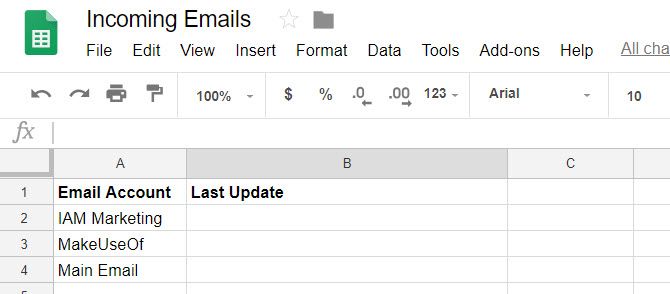
In this first example, you’ll create a widget on your dashboard that shows each account.

Something like this:
cool dashboards with google sites

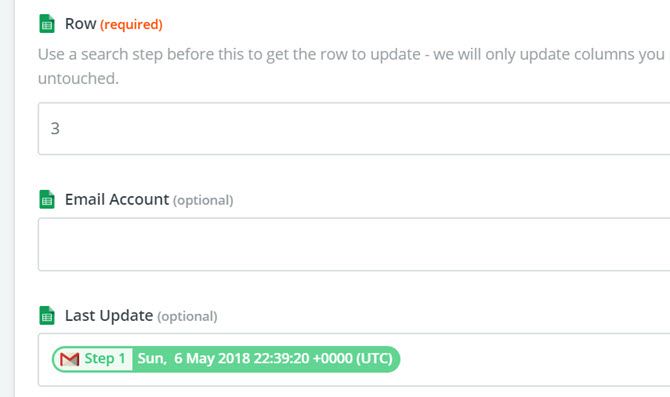
Every few minutes, the script will run and update the second column, of the row you specify.

So to update the MakeUseOf row with the timestamp of the latest email in the inbox, I’d choose row three. Then select the email data you want to import.

In this case, I’m importing the received date of the latest email.
cool dashboards with google sites

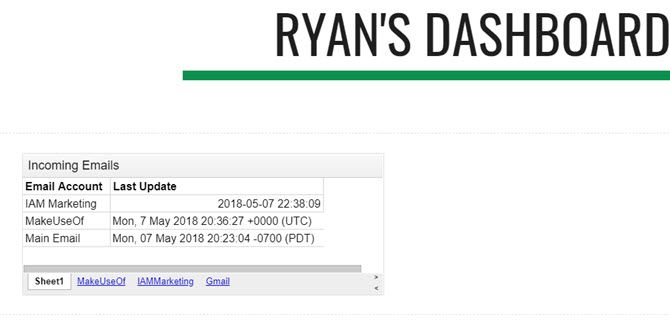
Once an individual “Zap” is created for each gmail account, the dashboard widget will look something like below.
cool dashboards with google sites

You can import this widget into your Google Sites web page (dashboard) by clicking on Sheets under the Insert menu on the right side of the page.

Display All Incoming Email

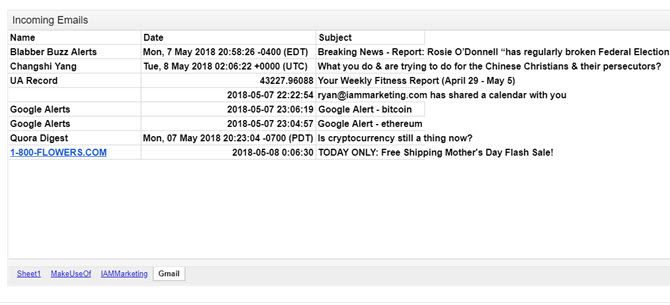
To add a widget that’ll show you all the incoming emails for the day, create the same kind of Zap. Also, create three columns in the sheet: Name, Date, and Subject.

Then, when you add the Sheet action in the Zap, you’ll choose the same workbook, but choose the sheet you created for that email account.

Then fill out the fields with the email data you want to import.

cool dashboards with google sites

This will bring all new incoming emails into your new Google Sheet. Here’s what the widget will look like when you import it into your new dashboard.
cool dashboards with google sites

Of course, you don’t want to just let this sheet keep filling up. The widget’s purpose is to show you incoming emails for the day, so you’ll want to add a Google Script to the sheet to clear out the sheets every day at midnight.

This is very easy to do. In the Google sheet, just click on the Tools menu, and select Script editor.

Paste a new function called “ClearAll” into this script editor.

function ClearAll() {
var start, end;
var sheet = SpreadsheetApp.getActive().getSheetByName('Makeuseof');
start = 2;
end = sheet.getLastRow() - 1;//Number of last row with content
      //blank rows after last row with content will not be deleted
sheet.deleteRows(start, end);
var sheet = SpreadsheetApp.getActive().getSheetByName('IAMMarketing');
start = 2;
end = sheet.getLastRow() - 1;//Number of last row with content
      //blank rows after last row with content will not be deleted
sheet.deleteRows(start, end);
var sheet = SpreadsheetApp.getActive().getSheetByName('Gmail');
start = 2;
end = sheet.getLastRow() - 1;//Number of last row with content
      //blank rows after last row with content will not be deleted

sheet.deleteRows(start, end); 
}

You’ll want to edit the “getSheetByName” section with the actual name of your sheets that contain the emails.

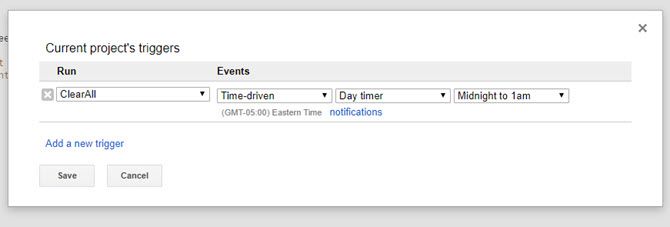
To run this script every day at midnight, in the Script Editor, save your script by clicking on File and then Save. Then click on Edit and Current project’s triggers.

Set the events to Time-driven, Day timer, and Midnight to 1am. Then click Save.
cool dashboards with google sites

This will clear all sheets at midnight, so every morning you’re dashboard will start with a fresh sheet, displaying only the latest incoming emails for the day.

2. Website Performance Dashboard

Another useful data dashboard is a performance display if you own or operate a website.

To create a dashboard that shows you data about your website performance, you’ll need that data in a location that automatically updates. Since Google Sites lets you import charts from Google Sheets, you’ll want to set up Google Sheets to automatically receive data from Google Analytics.

That’s outside of the scope of this article, but we’ve got you covered. There are two ways you can accomplish this. Either set up an IFTTT applet that sends Google Analytics data via email to Google Sheets, or build your own spreadsheet using the Google Core Reporting API.

The reporting API is much more powerful and gives you access to nearly all of the data Google Analytics collects about your website, but it has a slightly steeper learning curve.

Once your spreadsheet is receiving data and you’ve created a few charts that plot your traffic or demographics, you’re ready to build your dashboard.

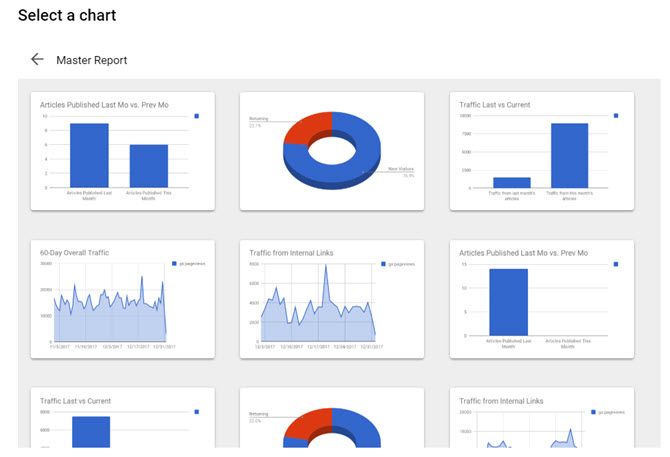
In Google Sites, just click the Insert menu and select Charts. Browse to the spreadsheet in Google Drive where you’ve saved your spreadsheet, and Google Sites will give you the option to select any of the charts that exist in that spreadsheet.
cool dashboards with google sites

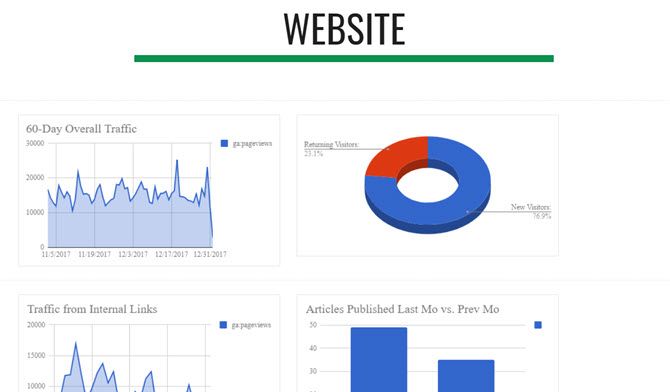
Build your website dashboard by clicking each of the charts you want to include, and place them on the page where you’d like them to go.

In just a few clicks you’ll have a beautiful web performance monitoring dashboard.
cool dashboards with google sites

You don’t need an individual Google Site for these different dashboards. You can create sub-pages on the site for each individual dashboard.

This way there’s just one URL to access everything you want to monitor.

3. Time Management Dashboard

If you have several Google Calendars, you can use a time management dashboard that displays three formats of your calendar: Agenda, The Week, and The Month.

Unlike Google Calendar where you have to flip between these views, you can create a Google Sites dashboard that displays them all at once.

Even better, you could embed all the calendars from all of your Google accounts on a single dashboard. Here’s how you do it:

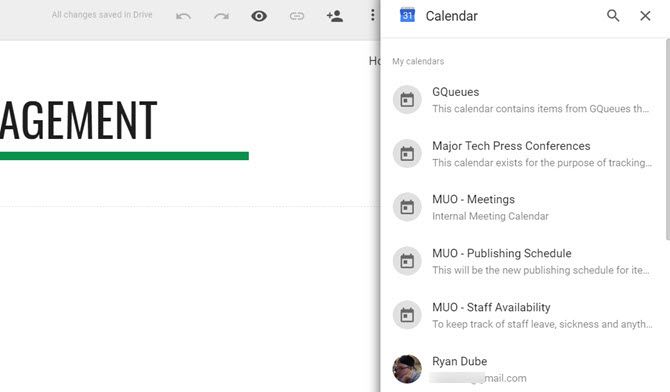
In Google Sites, under Insert, click on Calendar.

This gives you the option to select which Google Calendar you want to insert.
cool dashboards with google sites

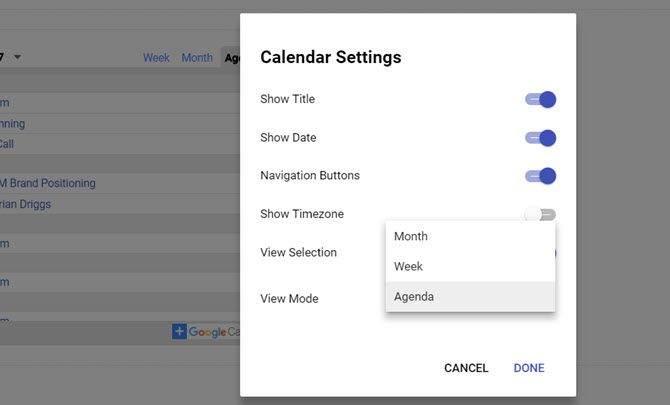
When you select the calendar you want to embed, under View Selection, you can choose from Month, Week, or Agenda.

To create a dashboard with all three, just insert one of these at a time into the dashboard.
cool dashboards with google sites

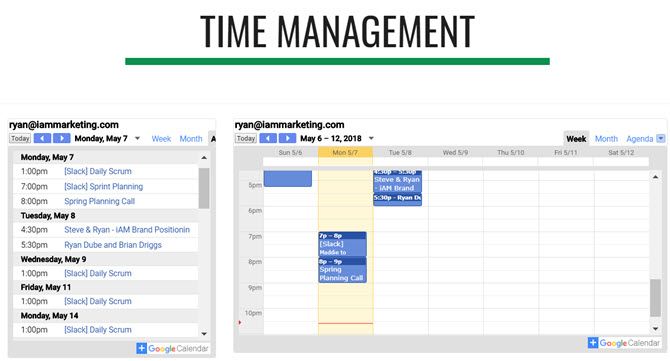
Choose a clean layout for the three formats, and you’ll have a highly functional time management dashboard.

Since the Agenda view is so narrow, you could easily fit the Weekly calendar view beside it.
cool dashboards with google sites

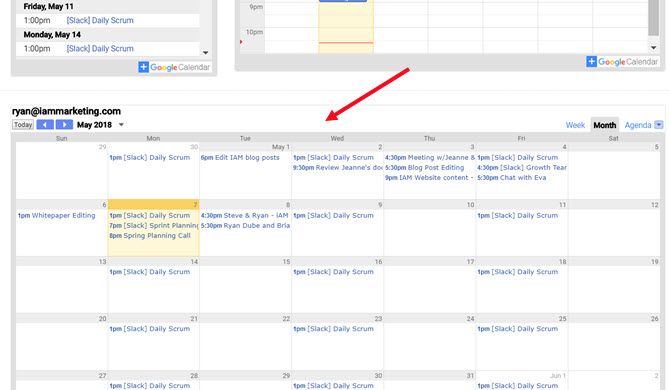
Then, add the larger Monthly calendar view underneath both of those.

Also, you can switch the display mode of each of these widgets on the live dashboard at any time. So you aren’t stuck to a static display after setting it up.
cool dashboards with google sites

If you want to include calendars from your other Google accounts on the same page, just scroll down to the bottom and start adding more. Or you can create an entirely new sub-page for each Google account.

The layout you choose for your dashboard is completely up to you!

4. Live News Dashboard

If you’ve ever wanted a “mission control” panel with a bunch of displays streaming lots of information at you all at once, Google Sites is the perfect platform to do it.

In the Insert menu, click on YouTube. This brings up a search field where you can find any video on YouTube you may want to embed on your web page.

Most YouTube videos are static though, which would be pretty boring. Luckily there are live news channels on YouTube you can embed. Just search for “live news” or “live” followed by your favorite news network, to find them.

cool dashboards with google sites

After you’ve embedded all of the live YouTube streams you want to monitor, you can click on each of them to start them playing.

All videos will stream simultaneously on the same page. It looks really cool and will make you feel like you’re sitting at a desk at mission control under Cheyenne Mountain.

5. Dashboard of Places on Google Maps

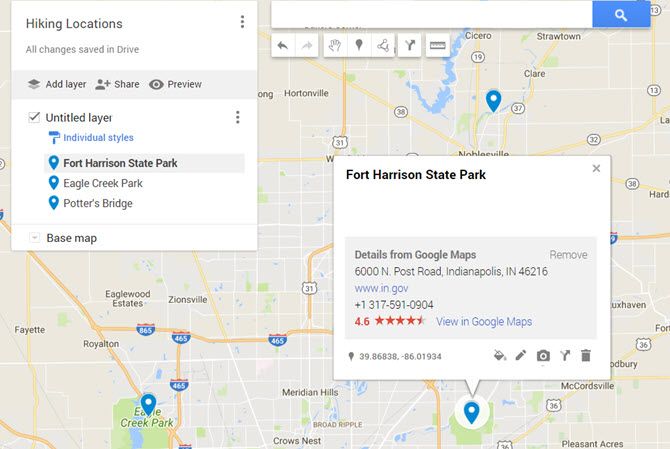
If you don’t know you can create and share lists in Google Maps, then you’ll want to explore that feature.

It’s a really useful way to keep track of all of your favorite places in organized lists.
cool dashboards with google sites

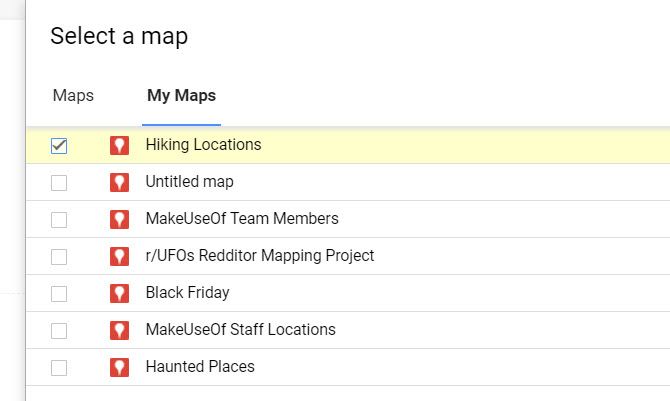
How can you use this to build a Google Sites dashboard? Easy. When you click on the Insert menu in Google Sites and click on Map, you’ll see a menu option called My Maps.

Click on that, and you’ll see all of the lists storing your favorite locations.
cool dashboards with google sites

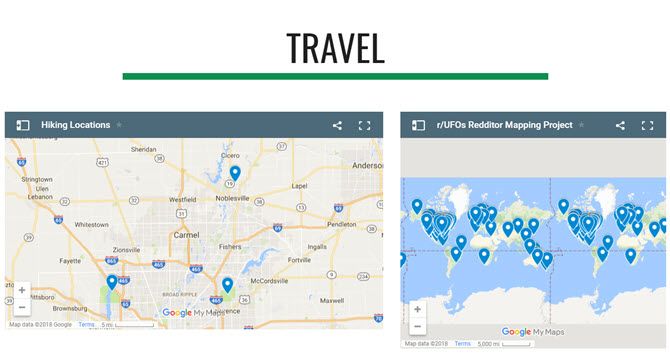
Select one of the lists, and you’ll have an embedded map on your dashboard featuring all of those saved locations.

It’s a really convenient way to store all of your favorite spots on one URL.
cool dashboards with google sites

The next time you can’t remember the location of that hiking trail you love to visit, just open up your dashboard and check out your “hiking trails” map.

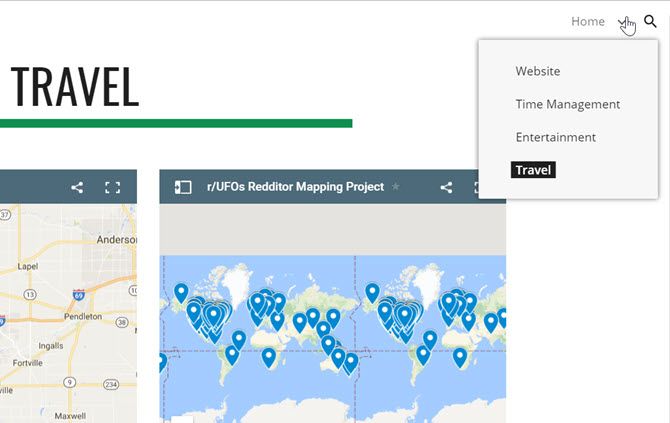
Switching between all of your dashboards is as simple as clicking the dropdown icon next to Home, and selecting the dashboard you want to see.
cool dashboards with google sites

You could even use a dashboard like this to plot out an itinerary for someone and then share the URL with them.

They could access it from any browser or phone, no matter where they are.

Start Using Google Sites Data Dashboards Today

The examples above are just the tip of the iceberg when it comes to building useful dashboards that’ll make your life a whole lot easier.

Just think of all the ways you could incorporate YouTube content, map locations, information from Google Docs or Google Sheets, and more.

Google Sites has always been an easy way to make web pages, but with the new Google Sites, you can actually make beautiful and useful dashboards like these. There’s no need for dedicated data dashboard software.


Read Full Article

A leaked look at Facebook’s influencer search engine for advertisers


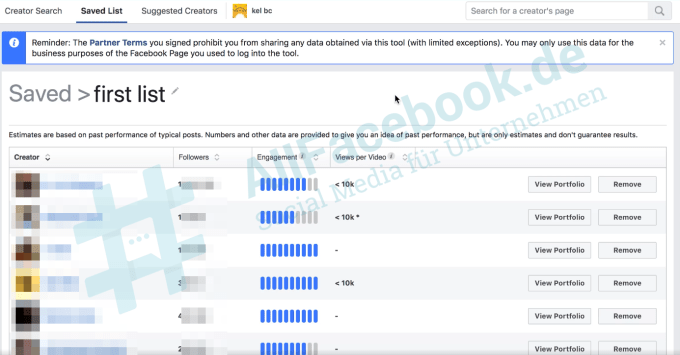
Facebook’s next money-maker could be this tool for connecting marketers to social media creators so they can team up on sponsored content Facebook ad campaigns. The Branded Content Matching search engine lets advertisers select the biographical characteristics of creators’ fans they want to reach, see stats about these audiences, and contact them to hammer out deals.

Leaked screenshots of Facebook’s promotional materials for the tool were first attained and published in german by AllFacebook.de. TechCrunch has now confirmed with Facebook the existence of the test of the search engine. Facebook first vaguely noted it would build a creator-brand tool in March, but now we know what it looks like and exactly how it works.

Even though Facebook will not actually broker or initially take a cut of the deals, the tool could equip brands with much more compelling and original marketing content. That could in turn encourage them to spend more on Facebook ads to spread that content, while also making the ads users see more entertaining and tolerable so they spend longer on the social network. By getting creators paid, even if not directly by Facebook, they’ll invest more in the quality of their content and size of their following on the app instead of with competitors.

How Facebook’s influencer marketing search engine works

A Facebook spokesperson explained the motive behind the tool like this. Facebook wants to help businesses find creators who can reach their target audience in an authentic way, while allowing creators a path to monetizing their Facebook content and fan base. Creators opt in to participating in the test and set up a portfolio showcasing their audience size and metrics plus their best branded content. Facebook is starting the program primarily with a set of lifestyle brands and creators.

Advertisers in the test can search for creators with specific audience demographics using a wide range of targeting options. Those include both general and industry-specific parameters like:

  • Top countries where they’re popular
  • Interests
  • Gender
  • Education history
  • Relationship status
  • Life events
  • Home ownership status
  • Home type

The search engine’s results page shows a list of creators with each’s audience match percentage to the search terms, percentage of their followers they reach, engagement rate, follower count, and video views. Advertisers can save their best matches to private lists, and reach out to contact the creators, though Facebook is still figuring out if it’s best to connect them through their Facebook Page or traditional contact info.

The deals for product placement or sponsored content creation and sharing are then worked out between the brand and creator without Facebook’s involvement. The platform is not taking any revenue cut during the testing phase, but longer-term will evaluate whether it should. The only thing Facebook doesn’t allow is pure re-sharing deals where influencers are paid to just post the brand’s pre-made content they didn’t help create.

The crowsourced future of advertising

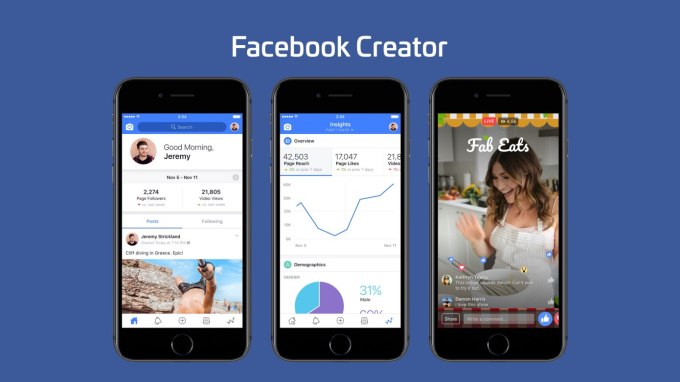
Foreshadowed the launch of its dedicated Facebook Creator app in November, this is the company’s first serious foray into influencer marketing. This emerging industry holds the potential to overhaul the way advertising content is produced. In days of old, brands couldn’t target very narrow segments of their customers since they were using broadcast mediums like TV commercials, magazine ads, and billboards, or endoresements from mainstream celebrity like movie actors. They might only make a few separate styles of marketing compaigns that would appeal to wide swaths of their target audience.

With the Internet and targeting data-rich social networks like Facebook, they can reach extremely specific subsets of their customers with marketing messages tuned to their identity. But reaching these niche audiences with corporate content that feels authentic rather than fake and smarmy is difficult. That’s where social media creators come in. Not only do they have a pre-existing and intimate relationship with their fans who’ll take their endorsements to heart. They’ve also already spent years figuring out exactly what type of content appeals to these specific people. When they team up with brands, the businesses get their products recontextualized and interpreted for that audience with content they could never come up with themselves.

Twitter realized this early, which is why it acquired creator-brand deal broker Niche for a reported $50 million back in 2015. [Disclosure: I got fascinated with this industry because my cousin Darren Lachtman is one of the co-founders of Niche] But now as Facebook seeks to attract influencers and their audiences to its social network, it’s trying to find ways to get them paid. Otherwise, they’re likely to stray to YouTube’s ad revenue shares and Patreon’s subscription payments. So far Facebook has tested tipping and subscriptions from fans, as well as letting creators host ad breaks — essentially commercials — during their videos. But brands want the creators’ help designing the content, not just distributing it.

But what about Instagram and YouTube influencers?

The Branded Content Matching search engine will help brands find those creators…but only on Facebook for now. The tool doesn’t pull in their audience sizes and metrics from other important platforms like Instagram, YouTube, Twitter, Snapchat, or Twitch. Brands don’t get a holistic view of the value and reach of a creator, who might be way more popular on another platform than Facebook.

And really, Instagram is where all these influencers spend their time and share their content. Though Facebook owns it, it says it’s not showing Instagram influencers in the tool at the moment. Adding them in, the same way advertisers can push ads to Facebook and Instagram from one interface, would make the search engine much more powerful.

There’s already a whole industry of independent creator search engines and databases for marketers like Hypr, Whalar, Fohr Card, Tap Influence, and Creator IQ. If Facebook built one with first-party data from across its properties, or even pulled stats from competing platforms, it might squash these startups. Alternatively, it might buy one to ramp up its efforts here like how Twitter bought Niche.

Facebook is running out of ad inventory in the News Feed. It needs to make each ad better and more watchable so it can grow revenue by charging more per ads rather than selling more ads. Meanwhile, yesterday it started testing ads in Facebook Stories, where brands will need help navigating the more personal, vertical video format. Awesome content made by creators could be the answer. And Facebook could finally start helping more of these artists, comedians, and storytellers to turn their passion into a profession.


Read Full Article

Fortnite is finally coming to Android this summer


Fornite is finally coming to Android…in a matter of months. After dominating the iOS gaming charts since March, the wildly popular sandbox survival game will be hitting the world’s top mobile operating system at some point this summer.

Creator Epic Games buried the news in the middle of a larger blog post titled, “The State of Mobile,” noting, vaguely, “We know many of you are excited for this release, and we promise that when we have more information to share, you’ll hear it from us first.”

That news comes amid a flurry of other Fornite related announcements this week. Earlier this morning, Epic unveiled a Battle Royale competition with a large in-game cash prize. This morning, the company also laid out plans to bring voice chat and improved gameplay and controls to the mobile side of things. Stats are coming to mobile, as well, along with a reduced install size.

Not that any of those issues have hampered the games success, of course. Earlier this year, the game was reportedly bringing in $126 million in monthly revenue — even before it arrived on iOS. With its imminent release on Android, that number’s likely to get a whole lot larger. 


Read Full Article

4 Popular Podcast Apps Compared: Which Is Best for You?

5 Ways Data Can Be Stolen From Your PC or Network

eBay Uses Your Interests to Help You Shop Online


Shopping online offers a lot of advantages over shopping in bricks-and-mortar stores. There’s the convenience of just tapping a few buttons and having a box delivered to your door, for starters. And there’s also a much larger range of products to choose from.

However, having more things to choose from isn’t always a good thing. Where do you start? How do you zero in on what you actually want to buy in that moment? Eager to help you buy more things, eBay has a solution, and it involves you revealing your “Interests”.

eBay Is Interested In You

eBay Interests is a new feature designed to help match you with the items you’ll actually want to buy. In a nutshell, you tell eBay what sort of things you’re into, and eBay will create a store unique to you, filled with items you’re going to want to buy.

The only thing you have to do is answer a short survey about your hobbies, your passions in life, and your style. eBay will then use this information, along with your purchase history, to create a storefront unique to you and your interests.

Your homepage will be transformed from a huge repository of random items into a storefront filled with items designed to appeal directly to you. This should, therefore, prevent you from having to wade through countless menus before you can start shopping.

Bradford Shellhammer of eBay said, “Our shopping experience should be as individual as each shopper on eBay. By asking people to tell us a little bit about their interests, we’re delivering a personalized store built around the things you care about most”.

Interests is available in the eBay app on Android and on iOS right now, with eBay promising to roll it out to more platforms and other markets around the world in the coming months.

A Line of Innovations

This is an interesting move by eBay. In many ways it borrows from streaming services, which recommend content based on your previous viewing/listening habits. eBay is using the same kind of approach to help draw your attention to potential purchases.

This is the latest in a line of innovations from eBay. In June 2017, eBay offered a price-match guarantee. In October 2017, eBay launched visual search tools. In March, eBay launched an Under $10 section. And in April, eBay simplified its listing process.


Read Full Article

What Is 404? 4 Common Website Errors and What They Mean


Most of the time, visiting a website is a simple affair. You type in the name of the site you’re interested in or click a browser bookmark, and you see it within a few seconds.

But what about when it goes wrong? Sometimes, you’ll see various errors alerting you to problems with visiting that website. While some of these are out of your control, you can troubleshoot others to find out what’s wrong.

Let’s quickly review some of the most common website errors. Note that errors starting with 4 (like error 451) are client-side errors (issues with your computer), while those starting with 5 are server-side (problems with the website).

1. Error 404

404 is a common error. It signifies that the page you were looking for doesn’t exist. This often occurs when you click a broken link, or if a website moves a page without redirecting it properly. But it can also happen if you mistype a URL.

When you see a 404, check to make sure that you haven’t entered the wrong address. Then try a Google search to find the right page, as it may have moved.

2. Error 401

A 401 error means that you need authentication to access the page, but don’t have it. This usually occurs when you need to log into a website to access something but haven’t done so yet.

If you see this, try visiting the main page of the site and logging in again.

3. Error 403

A 403 error signifies that you’ve made a valid request, but the server won’t complete it because you’re not allowed to access it. This is different than a 401.

A 401 tells you that you haven’t logged in and so it can’t authenticate you. But a 403 error says that it knows who you are, yet won’t let you access the page. Typically, this means you’ve stumbled across something private and need to access the website administrator for access.

4. Error 504

A 504 error signifies a gateway timeout, meaning that a server the website relies on isn’t communicating with it quickly. When this happens, you won’t be able to access the website until its administrators resolve this issue. You can try refreshing the page a few times, but you’ll likely have to wait until it’s fixed.

For some funny errors, check out ridiculous Windows error messages.


Read Full Article

How to Ensure Your Signal Messages Really Disappear for Good


These days, WhatsApp is no longer the only show in town. You have a number of high-quality instant messaging apps to choose from. And while I’m a massive fan of Telegram if you’re looking for a WhatsApp replacement, Signal continues to grow on me with every passing day.

It’s one of most secure messaging apps around. End-to-end encryption is standard, the app offers tools to verify the identity of people in chat groups and the integrity of the data channel, and it doubles as an SMS client.

Except, there’s a security problem. Or at least, there’s a security problem for Mac users.

What’s the Issue With Signal Messages?

Quite simply, messages which are supposed to disappear and leave no trace are leaving a very noticeable trace. Two traces, in fact.

One of the traces is caused by the Notification Center. By default, the Notification Center will show the content of a message along with the sender’s name. This information will persist long after Signal’s copy of the message has self-destructed.

In a worst-case scenario, a hacker could gain control of your machine and see what’s being said. It’s a nightmare if you use Signal to send sensitive data.

The second trace is a database-level copy of every self-destruction message that someone with sufficient computing knowledge could easily access. As we said, not very secure.

How to Ensure Signal Messages Really Disappear

To remedy the notification center issue, you need to tweak some settings in the Signal app.

Go to Preferences > Notifications and select Neither name nor message. Hit Save when you’ve made the changes.

The database issue is more problematic. If you’re feeling adventurous and fancy a project, you can follow Patrick Wardle’s somewhat complicated walkthrough. If that’s all a bit beyond you, you could run his script to see what data has been secretly stored.

And remember, if these revelations have soured Signal in your mind, there are plenty of other secure messaging apps out there.


Read Full Article
How to Use Trello With the New Gmail


More than 1.2 billion users have made Gmail a part of their lives. Several third-party add-ons and browser extensions have helped the humble email inbox become the core part of our everyday productivity.

Let’s take another look at the new Gmail and the “official” add-ons that fuse better with the inbox than the extensions of the past. Trello for Gmail is one of the more popular partnerships that now connect your emails to your boards.

How to Use Trello With the New Gmail

The Trello add-on for Gmail seems more baked in than its previous avatar as a browser extension. They can be specifically used in-context of the email they are connected to. For instance, you can turn one email into an actionable task in Trello and give your team a shared perspective on the work that needs to be done.

More importantly: Each add-on will work the same across the web and Android.

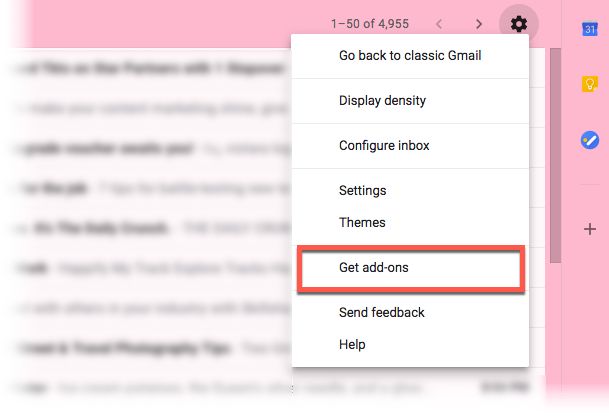
  1. Log into Gmail. Click the Settings (gear) icon and select Get add-ons.
    Install add-ons in Gmail
  2. The GSuite Marketplace opens up with a grid of 31 add-ons as of now. Choose Trello from the available list.
  3. Click Install and give your permission to make the add-on a part of your inbox.
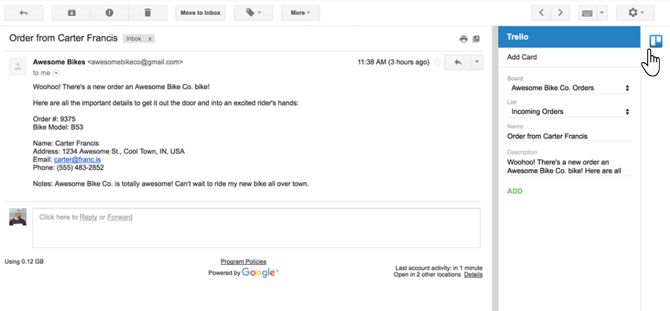
  4. Log-into Trello via the icon next to the message pane.
  5. Open any email and click the Trello icon next to it. The new Trello card will take the email subject line as the card title and the email text as the card description automatically.
    Trello in Gmail
  6. Turn any email into a task or a to-do and track all follow-up actions on the card.

You can apply all Trello features to manage your email like small projects. Due dates, reminders, and the Trello calendar can boost your efficiency right from the inbox. Do remember, with the right idea you can put Trello to many creative uses alongside your inbox.


Read Full Article
7 Ways Wi-Fi Cameras Can Make You a Better Parent

Microsoft’s Xbox Adaptive Controller is an inspiring example of inclusive design


Every gamer with a disability faces a unique challenge for many reasons, one of which is the relative dearth of accessibility-focused peripherals for consoles. Microsoft is taking a big step towards fixing this with its Xbox Adaptive Controller, a device created to address the needs of gamers for whom ordinary gamepads aren’t an option.

The XAC, revealed officially at a recent event but also leaked a few days ago, is essentially a pair of gigantic programmable buttons and an oversized directional pad. 3.5mm ports on the back let a huge variety of assistive devices like blow tubes, pedals, and Microsoft-made accessories plug in.

It’s not meant to be an all-in-one solution by any means, more like a hub that allows gamers with disabilities to easily make and adjust their own setups with a minimum of hassle. Whatever you’re capable of, whatever’s comfortable, whatever gear you already have, the XAC is meant to enable it.

I’d go into detail, but it would be impossible to do better than Microsoft’s extremely interesting and in-depth post introducing the XAC, which goes into the origins of the hardware, the personal stories of the testers and creators, and much more. Absolutely worth taking the time to read.

I look forward to hearing more about the system and how its users put it to use, and I’m glad to see inclusivity and accessibility being pursued in such a practical and carefully researched manner.


Read Full Article