14 April 2018

Elon Musk says Tesla will be profitable in Q3 and Q4


Tesla is one of the more interesting companies for Wall Street that had an interesting couple of months this year — and it seems even tweets from Elon Musk, who said that the company will be profitable in the back half of the year, may be enough to swing its stock.

The Tesla and SpaceX founder sent a tweet very early this morning that the company would be profitable and cash-flow positive in the third and fourth quarter this year. Tesla is known for setting ambitious targets and forecasts, especially as it looks to ramp up Model 3 production to around 2,500 vehicles per week. Musk said he took direct control of Model 3 production earlier this month in a note to employees, also sent out at around 3 a.m. pacific time. Tesla’s shares were up slightly, gaining around 2% in trading today.

Tesla saw a small bump in its stock throughout the day. While it could be for a variety of reasons, Musk’s data point may have offered a small amount of clarity (and optimism) around whether the company will be able to eventually turn a profit. The tweet was fired off as a response to a story by The Economist that said the company may have to raise additional capital at some point, according to banking firm Jeffries. (It was also quite snarky.)

On Tesla’s last call to discuss the company’s quarterly results with Wall Street analysts, Musk said that the company would begin generating “positive quarterly operating income on a sustained basis,” and said he was “cautiously optimistic” that the company would be GAAP profitable. Musk said the company wanted to hit a production target of 5,000 Model 3 vehicles per week at some point in 2018, though did not give a specific time frame. The tweet, while fired off as a response to a story by The Economist, appears to offer another small data point as to when it might happen.

Earlier this month, Tesla fell back behind Ford in terms of its market cap as some pressure has hit the stock. Tesla has had to address a fatal crash involving its autopilot, in addition to a voluntary recall of 123,000 Model S vehicles. There is some skepticism around whether Tesla will hit its production targets from Wall Street (making cars is hard, it seems).


Read Full Article

How to Perform Under Pressure With These 8 Wacky Productivity Apps


Pressure helps people be more productive. Whether you like them or not, deadlines probably get you to work faster. They might add stress to your life, and make you feel like you’re not getting enough done. But pressure does, generally, help.

Want to add some pressure to your life? Try one of these apps and sites that force you to work quickly.

1. The Most Dangerous Writing App

pressure productivity performance apps

There may be no other app that puts on as much pressure as this one. TMDWA forces you to keep writing, lest all of your work be lost. When you stop typing, your words start to fade and the screen goes red.

If you wait five seconds, everything is deleted and you’ll need to start over.

This is a great tool for writers who know they can get words down, but find it difficult to keep themselves focused and motivated to keep going.

You can choose a session length from three to 60 minutes or a word count. And you have the option of enabling hardcore mode, which obscures your text, making it impossible to edit while you write.

Website: The Most Dangerous Writing App (Free)

2. Flowstate

The app that came before TMDWA, Flowstate offers much of the same functionality with a nicer interface. It’s also downloadable so you don’t have to write in your browser. Browsers are inherently distracting, so using a standalone app might be easier.

Flowstate has more options for session length than TMDWA, and it also offers you a choice of font. Is it worth $5 or $10? It might be if you like nicely built apps more than browser windows.

Will it replace Pages or Word? Probably not. But it’s a great way to supplement them.

Download: Flowstate for Mac ($10)
Download: Flowstate for iOS ($5)

3. Gone

pressure productivity performance apps

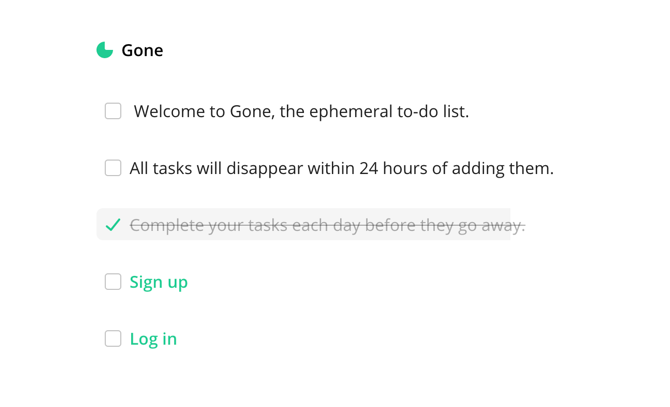
Putting an item on your to-do list should mean that you’re going to tackle it right away. But often we use our task lists as a place to store things for long periods of time or remind us how much we’re procrastinating.

Gone doesn’t let you do that. You put a task on it, and it will disappear in 24 hours. If you haven’t completed it in that time, it’s gone.

You can create an account to sign in so you can access your list from another computer or your phone, but that’s about the only feature this one has to offer.

Website: Gone (Free)

4. Tet

pressure productivity performance apps

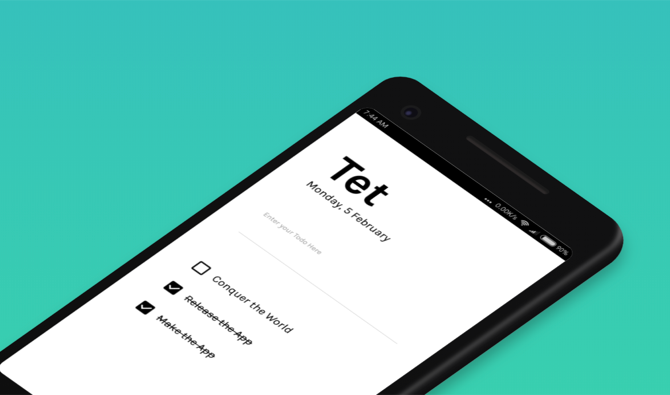
Instead of giving you 24 hours to complete your tasks, this Android app gives you until the end of the day. At the end of the day, every task that you haven’t checked off gets deleted.

And to add insult to injury, Tet keeps score. Every time you check an item off of your list, the counter in the corner of the app goes up by one. Every time one gets removed at the end of the day, it goes down by one.

You can’t pretend that you’re more productive than you are, because Tet will tell you the truth.

Download: Tet for Android (Free)

5. Forest

pressure productivity performance apps

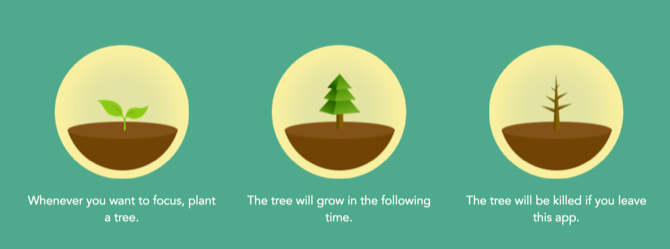
This is a great app for helping curb smartphone addiction (or just to keep you from playing Clash of Clans until you get your current project done). But growing a tree is peaceful and serene—where’s the pressure?

The app received an update that now allows you to team up with friends, and your trees will only grow if everyone has the app running and doesn’t get distracted.

Which means if you’re on your phone, everyone else’s tree will be stunted. That’s peer pressure for you.

Download: Forest for iOS | Android ($1.99)

6. Time 2

pressure productivity performance apps

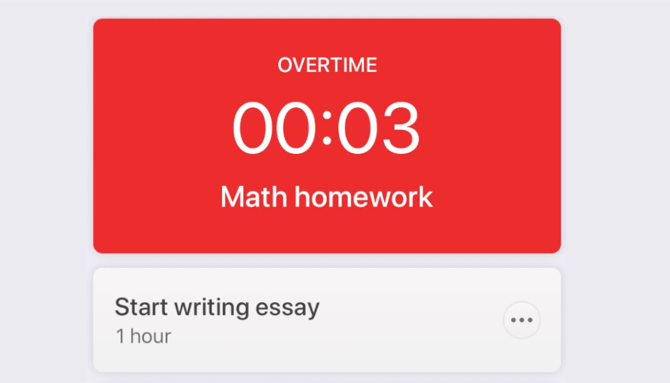
Add a task to Time and tell the app how long you think it will take you to do it. The timer counts down, and you see how much time you have left.

But if you go over that time, the app will let you know. It sounds an alarm and then starts counting up. So you know exactly how much longer it took than planned.

It’s not quite as high-pressure as some of the other apps, but it will remind you that you’re missing your deadline. Which is definitely pressure enough for many people.

Download: Time 2 for iOS (Free)

7. Tab Wrangler

pressure productivity performance apps

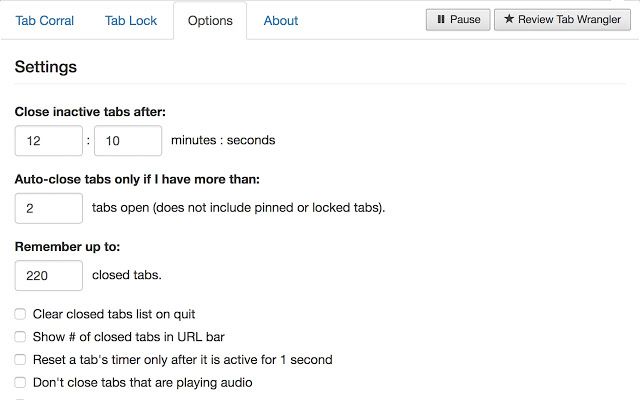
Like the ephemeral to-do lists above, you can make your browser tabs disappear after a certain amount of time. Tab Wrangler makes it easy—just set an amount of time and they’ll be gone after that much inactivity.

It’s a good idea to use Tab Wrangler even if you don’t use this feature, as it can help keep Chrome from using all your RAM.

You can always get the tabs back, but knowing that they’re going to disappear if you don’t use them can help motivate you to actually make use of the tabs that you have open.

Download: Tab Wrangler for Chrome | Firefox (Free)

8. CARROT To-Do

While Carrot doesn’t turn on the pressure as much as the time-based apps above, it will berate you when you don’t get something done, which may help you put more pressure on yourself.

Carrot is friendly when you’re productive and checking things off of the list. But she’ll get angry if you start procrastinating. And while her admonitions are very entertaining, it’s still a reminder that you’re not getting enough done.

Other Carrot apps, including Fit, Weather, and Hunger, also employ this signature sassy personality.

Download: CARROT To-Do for iOS ($2.99)

Put the Pressure On

Deadlines and pressure might stress you out, but they can be a big help when you need to get things done. And while it might seem crazy to give yourself tight deadlines when you don’t have to, you might find that it revolutionizes your productivity.

Don’t forget to try these other productivity tactics backed by science. Or try something completely different, and give your to-do list the boot.

Image Credit: stokkete/Depositphotos


Read Full Article

Facebook shouldn’t block you from finding friends on competitors


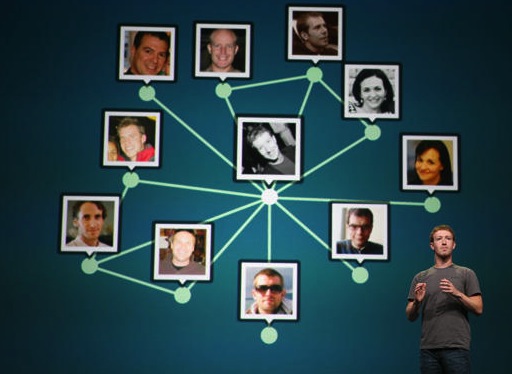
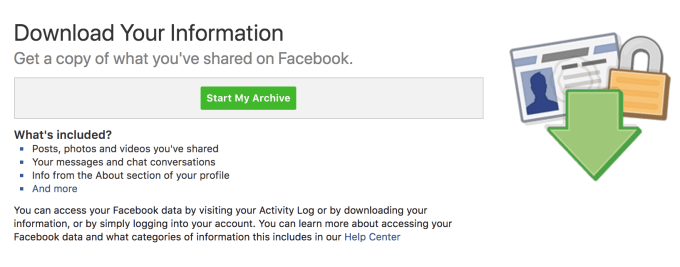
Twitter, Vine, Voxer, MessageMe. Facebook has repeatedly cut off competitors from its feature for finding your Facebook friends on their apps…after jumpstarting its own social graph by convincing people to upload their Gmail contacts. Meanwhile, Facebook’s Download Your Information tool merely exports a text list of friends’ names you can’t use elsewhere.

As congress considers potential regulation following Mark Zuckerberg’s testimonies, it should prioritize leveling the playing field for aspiring alternatives to Facebook and letting consumers choose where to social network. And as a show of good faith and argument against it abusing its monopoly, Facebook should make our friend list truly portable.

It’s time to free the social graph — to treat it as a fundamental digital possession, the way the Telecomunnications Act Of 1996 protects your right to bring your phone number with you to a new network.

The two most powerful ways to do this would be for Facebook to stop, or congress to stop it from, blocking friend finding on competitors like it’s done in the past to Twitter and more. And Facebook should change its Download Your Information tool to export our friend list in a truly interoperable format. When you friend someone on Facebook, they’re not just a name. They’re someone specific amongst often many with the same name, and Facebook should be open to us getting connected with them elsewhere.

Facebook Takes Data It Won’t Give

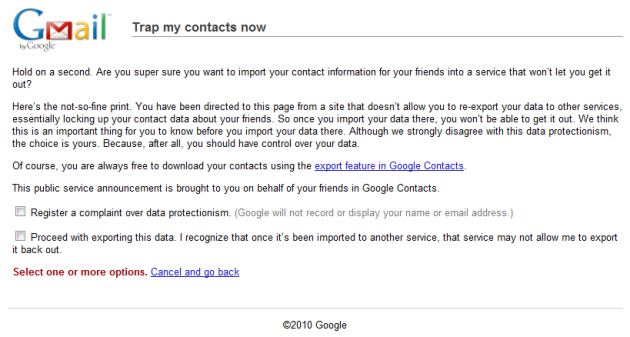
While it continues til this day, back in 2010 Facebook goaded users to import their Gmail address books so they could add them as Facebook friends. But it refused to let users export the email addresses of their friends to use elsewhere. That led Google to change its policy and require data portability reciprocity from any app using its Contacts API.

So did Facebook back off? No. It built a workaround, giving users a deep link to download their Gmail contacts from Google’s honorable export tool. Facebook then painstakingly explained to users how to upload that file so it could suggest they friend all those contacts.

Google didn’t want to stop users from legitimately exporting their contacts, so it just put up a strongly worded warning to Gmail users: “Trap my contacts now: Hold on a second. Are you super sure you want to import your contact information for your friends into a service that won’t let you get it out? . . . Although we strongly disagree with this data protectionism, the choice is yours. Because, after all, you should have control over your data.” And Google offered to let you “Register a complaint over data protectionism.”

8 years later, Facebook has grown from a scrappy upstart chasing Google to become one of the biggest, most powerful players on the Internet. And it’s still teaching users how to snatch their Gmail contacts’ email addresses while only letting you export the names of your friends unless they opt-in through an obscure setting because it considers contact info they’ve shared as their data, not yours. Whether you should be allowed to upload other people’s contact info to a social network is a bigger question. But it is blatant data portability hypocrisy for Facebook to encourage users to import that data from other apps but not export it.

In some respects, it’s good that you can’t mass-export the email addresses of all your Facebook friends. That could enable spamming, which probably isn’t what someone had in mind when they added you as friend on Facebook. They could always block, unfriend, or mute you, but they can’t get their email address back. Facebook is already enduring criticism about how it handled data privacy in the wake of the Cambridge Analytica scandal.

Yet the idea that you could find your Facebook Friends on other apps is a legitimate reason for the platform to exist. It’s one of the things that’s made Facebook Login so useful and popular. Facebook’s API lets certain apps check to see if your Facebook Friends have already signed up, so you can easily follow them or send them a connection request. But Facebook has rescinded that option when it senses true competition.

Data Protectionism

Twitter is the biggest example. Facebook didn’t and still doesn’t let you see which of your Facebook friends are on Twitter, even though it has seven times as many users. Twitter co-founder Ev Williams, frustrated in 2010, said that “They see their social graph as their core asset, and they want to make sure there’s a win-win relationship with anybody who accesses it.”

Facebook went on to establish a formal policy that said that apps that wanted to use its Find Friends tool had to abide by these rules:

  •  If you use any Facebook APIs to build personalized or social experiences, you must also enable people to easily share their experiences back with people on Facebook.

  • You may not use Facebook Platform to promote, or to export user data to, a product or service that replicates a core Facebook product or service without our permission.

Essentially, apps that piggybacked on Facebook’s social graph had to let you share back to Facebook, and couldn’t compete with it. It’s a bit ironic, given Facebook’s overarching strategy for years has been ‘replicate core functionality”. From cloning Twitter’s asymmetrical follow and Trending Topics to Snapchat’s Stories and augmented reality filters, all the way back to cribbing FriendFeed’s News Feed and Facebook’s start as a rip-off of the Winklevii’s HarvardConnection.

Restrictions against replicating core functionality aren’t unheard of in tech. Apple’s iOS won’t let you run an App Store from inside an app, for example. But Facebook’s selective enforcement of the policy is troubling. It simply ignores competing apps that never get popular. Yet if they start to grow into potential rivals, Facebook has swiftly enforced this policy and removed their Find Friends access, often inhibiting further growth and engagement.

Here are few of examples of times Facebook has cut off competitors from its graph:

  • Voxer was one of the hottest messaging apps of 2012, climbing the charts and raising a $30 million round with its walkie-talkie style functionality. In early January 2013, Facebook copied Voxer by adding voice messaging into Messenger. Two weeks later, Facebook cut off Voxer’s Find Friends access. Voxer CEO Tom Katis told me at the time that Facebook stated his app with tens of millions of users was a “competitive social network” and wasn’t sharing content back to Facebook. Katis told us he though that was hypocritical. By June, Voxer had pivoted towards business communications, tumbling down the app charts and leaving Facebook Messenger to thrive.
  • MessageMe had a well-built chat app that was growing quickly after launching in 2013, posing a threat to Facebook Messenger. Shortly before reaching 1 million users, Facebook cut off MessageMe‘s Find Friends access. The app ended up selling for a paltry double-digit millions price tag to Yahoo before disintegrating.
  • Phhhoto and its fate show how Facebook’s data protectionism encompasses Instagram. Phhhoto’s app that let you shoot animated GIFs was growing popular. But soon after it hit 1 million users, it got cut off from Instagram’s social graph in April 2015. Six months later, Instagram launched Boomerang, a blatant clone of Phhhoto. Within two years, Phhhoto shut down its app, blaming Facebook and Instagram. “We watched [Instagram CEO Kevin] Systrom and his product team quietly using PHHHOTO almost a year before Boomerang was released. So it wasn’t a surprise at all . . . I’m not sure Instagram has a creative bone in their entire body.”
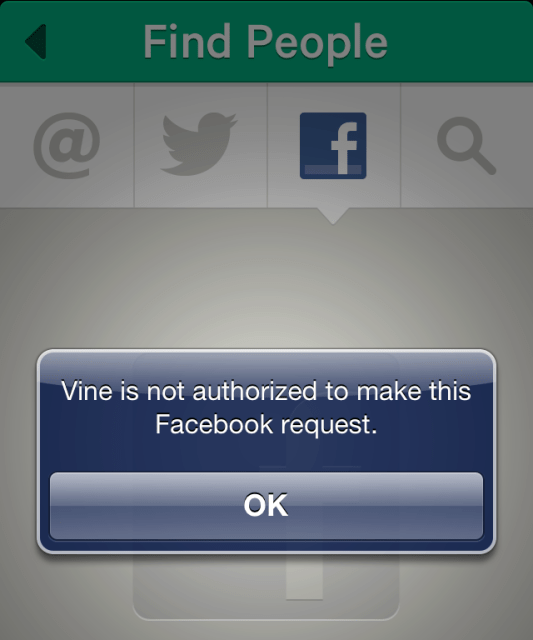
  • Vine had a real shot at being the future of short-form video. The day the Twitter-owned app launched, though, Facebook shut off Vine’s Find Friends access. Vine let you share back to Facebook, and its 6-second loops you shot in the app were a far cry from Facebook’s heavyweight video file uploader. Still, Facebook cut it off, and by late 2016, Twitter announced it was shutting down Vine.

As I wrote in 2013, “Enforcement of these policies could create a moat around Facebook. It creates a barrier to engagement, retention, and growth for competing companies.” But in 2018 amongst whispers of anti-trust action, Facebook restricting access to its social graph to protect the dominance of its News Feed seems egregiously anti-competitive.

That’s why Facebook should pledge to stop banning competitors from using its Find Friends tool. If not, congress should tell Facebook that this kind of behavior could lead to more stringent regulation.

Friends Aren’t Just Names

When Senator John Neely Kennedy asked Zuckerberg this week, “are you willing to give me the right to take my data on Facebook and move it to another social media platform?”, Zuckerberg claimed that “Senator, you can already do that. We have a Download Your Information tool where you can go get a file of all the content there, and then do whatever you want with it.”

But that’s not exactly true. You can export your photos that can be easily uploaded elsewhere. But your social graph – all those confirmed friend requests — gets reduced to a useless string of text. Download Your Information spits out merely a list of your friends’ names and the dates on which you got connected. There’s no unique username. No link to their Facebook profile. Nothing you can use to find them on another social network beyond manually typing in their names.

That’s especially problematic if your friends have common names. There are tons of John Smiths on Facebook, so finding him on another social network with just a name will require a lot of sleuthing or guess-work. Depending on where you live, locating a particular Garcia, Smirnov, or Lee could be quite difficult. Facebook even built a short-lived feature called Friendshake to help you friend someone nearby amongst everyone in their overlapping name space.

When I asked about this, Facebook told me that users can opt-in to having their email or phone number included in the Download Your Information export. But this privacy setting is buried and little-known. Just 4 percent of my friends, centered around tech savvy San Francisco, had enabled it.

As I criticized way back in 2010 when Download Your Information launched, “The data can be used as a diary, or to replace other information from a hard drive crash or stolen computer — but not necessarily to switch to a different social network.”

Given Facebook’s iron grip on the Find Friends API, users deserve decentralized data portability — a way to take their friends with them that Facebook can’t take back. That’s what Download Your Information should offer but doesn’t.

Social Graph Portability

This is why I’m calling on Facebook to improve the data portability of your friend connections. Give us the same consumer protections that make phone numbers portable.

At the very least Facebook should include your friends’ unique Facebook username and URL. But true portability would mean you could upload the list to another social network to find your friends there.

One option would be for Facebook’s export to include a privacy-safe, hashed version of your friends’ email address that they signed up with and share with you. Facebook could build a hashed email lookup tool so that if you uploaded these non-sensical strings of characters to another app, they could cross-reference them against Facebook’s database of your friends. If there’s a match, the app could surface that person as a someone you might want to reconnect with. Effectively, this would let you find friends elsewhere via email address without Facebook ever giving you or other apps a human-readable list of their contact info.

If you can’t take your social graph with you, there’s little chance for a viable alternative to Facebook to arise. It doesn’t matter if a better social network emerges, or if Facebook disrespects your privacy, because there’s nowhere to go. Opening up the social graph would require Facebook to compete on the merit of its product and policies. Trying to force the company’s hand with a variety of privacy regulations won’t solve the core issue. But the prospect of users actually being able to leave would let the market compel Facebook to treat us better.

For more on Facebook’s challenges with data privacy, check out TechCrunch’s feature stories:


Read Full Article

13 April 2018

Facebook shouldn’t block you from finding friends on competitors


Twitter, Vine, Voxer, MessageMe. Facebook has repeatedly cut off competitors from its feature for finding your Facebook friends on their apps…after jumpstarting its own social graph by convincing people to upload their Gmail contacts. Meanwhile, Facebook’s Download Your Information tool merely exports a text list of friends’ names you can’t use elsewhere.

As congress considers potential regulation following Mark Zuckerberg’s testimonies, it should prioritize leveling the playing field for aspiring alternatives to Facebook and letting consumers choose where to social network. And as a show of good faith and argument against it abusing its monopoly, Facebook should make our friend list truly portable.

It’s time to free the social graph — to treat it as a fundamental digital possession, the way the Telecomunnications Act Of 1996 protects your right to bring your phone number with you to a new network.

The two most powerful ways to do this would be for Facebook to stop, or congress to stop it from, blocking friend finding on competitors like it’s done in the past to Twitter and more. And Facebook should change its Download Your Information tool to export our friend list in a truly interoperable format. When you friend someone on Facebook, they’re not just a name. They’re someone specific amongst often many with the same name, and Facebook should be open to us getting connected with them elsewhere.

Facebook Takes Data It Won’t Give

While it continues til this day, back in 2010 Facebook goaded users to import their Gmail address books so they could add them as Facebook friends. But it refused to let users export the email addresses of their friends to use elsewhere. That led Google to change its policy and require data portability reciprocity from any app using its Contacts API.

So did Facebook back off? No. It built a workaround, giving users a deep link to download their Gmail contacts from Google’s honorable export tool. Facebook then painstakingly explained to users how to upload that file so it could suggest they friend all those contacts.

Google didn’t want to stop users from legitimately exporting their contacts, so it just put up a strongly worded warning to Gmail users: “Trap my contacts now: Hold on a second. Are you super sure you want to import your contact information for your friends into a service that won’t let you get it out? . . . Although we strongly disagree with this data protectionism, the choice is yours. Because, after all, you should have control over your data.” And Google offered to let you “Register a complaint over data protectionism.”

8 years later, Facebook has grown from a scrappy upstart chasing Google to become one of the biggest, most powerful players on the Internet. And it’s still teaching users how to snatch their Gmail contacts’ email addresses while only letting you export the names of your friends unless they opt-in through an obscure setting because it considers contact info they’ve shared as their data, not yours. Whether you should be allowed to upload other people’s contact info to a social network is a bigger question. But it is blatant data portability hypocrisy for Facebook to encourage users to import that data from other apps but not export it.

In some respects, it’s good that you can’t mass-export the email addresses of all your Facebook friends. That could enable spamming, which probably isn’t what someone had in mind when they added you as friend on Facebook. They could always block, unfriend, or mute you, but they can’t get their email address back. Facebook is already enduring criticism about how it handled data privacy in the wake of the Cambridge Analytica scandal.

Yet the idea that you could find your Facebook Friends on other apps is a legitimate reason for the platform to exist. It’s one of the things that’s made Facebook Login so useful and popular. Facebook’s API lets certain apps check to see if your Facebook Friends have already signed up, so you can easily follow them or send them a connection request. But Facebook has rescinded that option when it senses true competition.

Data Protectionism

Twitter is the biggest example. Facebook didn’t and still doesn’t let you see which of your Facebook friends are on Twitter, even though it has seven times as many users. Twitter co-founder Ev Williams, frustrated in 2010, said that “They see their social graph as their core asset, and they want to make sure there’s a win-win relationship with anybody who accesses it.”

Facebook went on to establish a formal policy that said that apps that wanted to use its Find Friends tool had to abide by these rules:

  •  If you use any Facebook APIs to build personalized or social experiences, you must also enable people to easily share their experiences back with people on Facebook.

  • You may not use Facebook Platform to promote, or to export user data to, a product or service that replicates a core Facebook product or service without our permission.

Essentially, apps that piggybacked on Facebook’s social graph had to let you share back to Facebook, and couldn’t compete with it. It’s a bit ironic, given Facebook’s overarching strategy for years has been ‘replicate core functionality”. From cloning Twitter’s asymmetrical follow and Trending Topics to Snapchat’s Stories and augmented reality filters, all the way back to cribbing FriendFeed’s News Feed and Facebook’s start as a rip-off of the Winklevii’s HarvardConnection.

Restrictions against replicating core functionality aren’t unheard of in tech. Apple’s iOS won’t let you run an App Store from inside an app, for example. But Facebook’s selective enforcement of the policy is troubling. It simply ignores competing apps that never get popular. Yet if they start to grow into potential rivals, Facebook has swiftly enforced this policy and removed their Find Friends access, often inhibiting further growth and engagement.

Here are few of examples of times Facebook has cut off competitors from its graph:

  • Voxer was one of the hottest messaging apps of 2012, climbing the charts and raising a $30 million round with its walkie-talkie style functionality. In early January 2013, Facebook copied Voxer by adding voice messaging into Messenger. Two weeks later, Facebook cut off Voxer’s Find Friends access. Voxer CEO Tom Katis told me at the time that Facebook stated his app with tens of millions of users was a “competitive social network” and wasn’t sharing content back to Facebook. Katis told us he though that was hypocritical. By June, Voxer had pivoted towards business communications, tumbling down the app charts and leaving Facebook Messenger to thrive.
  • MessageMe had a well-built chat app that was growing quickly after launching in 2013, posing a threat to Facebook Messenger. Shortly before reaching 1 million users, Facebook cut off MessageMe‘s Find Friends access. The app ended up selling for a paltry double-digit millions price tag to Yahoo before disintegrating.
  • Phhhoto and its fate show how Facebook’s data protectionism encompasses Instagram. Phhhoto’s app that let you shoot animated GIFs was growing popular. But soon after it hit 1 million users, it got cut off from Instagram’s social graph in April 2015. Six months later, Instagram launched Boomerang, a blatant clone of Phhhoto. Within two years, Phhhoto shut down its app, blaming Facebook and Instagram. “We watched [Instagram CEO Kevin] Systrom and his product team quietly using PHHHOTO almost a year before Boomerang was released. So it wasn’t a surprise at all . . . I’m not sure Instagram has a creative bone in their entire body.”
  • Vine had a real shot at being the future of short-form video. The day the Twitter-owned app launched, though, Facebook shut off Vine’s Find Friends access. Vine let you share back to Facebook, and its 6-second loops you shot in the app were a far cry from Facebook’s heavyweight video file uploader. Still, Facebook cut it off, and by late 2016, Twitter announced it was shutting down Vine.

As I wrote in 2013, “Enforcement of these policies could create a moat around Facebook. It creates a barrier to engagement, retention, and growth for competing companies.” But in 2018 amongst whispers of anti-trust action, Facebook restricting access to its social graph to protect the dominance of its News Feed seems egregiously anti-competitive.

That’s why Facebook should pledge to stop banning competitors from using its Find Friends tool. If not, congress should tell Facebook that this kind of behavior could lead to more stringent regulation.

Friends Aren’t Just Names

When Senator John Neely Kennedy asked Zuckerberg this week, “are you willing to give me the right to take my data on Facebook and move it to another social media platform?”, Zuckerberg claimed that “Senator, you can already do that. We have a Download Your Information tool where you can go get a file of all the content there, and then do whatever you want with it.”

But that’s not exactly true. You can export your photos that can be easily uploaded elsewhere. But your social graph – all those confirmed friend requests — gets reduced to a useless string of text. Download Your Information spits out merely a list of your friends’ names and the dates on which you got connected. There’s no unique username. No link to their Facebook profile. Nothing you can use to find them on another social network beyond manually typing in their names.

That’s especially problematic if your friends have common names. There are tons of John Smiths on Facebook, so finding him on another social network with just a name will require a lot of sleuthing or guess-work. Depending on where you live, locating a particular Garcia, Smirnov, or Lee could be quite difficult. Facebook even built a short-lived feature called Friendshake to help you friend someone nearby amongst everyone in their overlapping name space.

When I asked about this, Facebook told me that users can opt-in to having their email or phone number included in the Download Your Information export. But this privacy setting is buried and little-known. Just 4 percent of my friends, centered around tech savvy San Francisco, had enabled it.

As I criticized way back in 2010 when Download Your Information launched, “The data can be used as a diary, or to replace other information from a hard drive crash or stolen computer — but not necessarily to switch to a different social network.”

Given Facebook’s iron grip on the Find Friends API, users deserve decentralized data portability — a way to take their friends with them that Facebook can’t take back. That’s what Download Your Information should offer but doesn’t.

Social Graph Portability

This is why I’m calling on Facebook to improve the data portability of your friend connections. Give us the same consumer protections that make phone numbers portable.

At the very least Facebook should include your friends’ unique Facebook username and URL. But true portability would mean you could upload the list to another social network to find your friends there.

One option would be for Facebook’s export to include a privacy-safe, hashed version of your friends’ email address that they signed up with and share with you. Facebook could build a hashed email lookup tool so that if you uploaded these non-sensical strings of characters to another app, they could cross-reference them against Facebook’s database of your friends. If there’s a match, the app could surface that person as a someone you might want to reconnect with. Effectively, this would let you find friends elsewhere via email address without Facebook ever giving you or other apps a human-readable list of their contact info.

If you can’t take your social graph with you, there’s little chance for a viable alternative to Facebook to arise. It doesn’t matter if a better social network emerges, or if Facebook disrespects your privacy, because there’s nowhere to go. Opening up the social graph would require Facebook to compete on the merit of its product and policies. Trying to force the company’s hand with a variety of privacy regulations won’t solve the core issue. But the prospect of users actually being able to leave would let the market compel Facebook to treat us better.

For more on Facebook’s challenges with data privacy, check out TechCrunch’s feature stories:


Read Full Article

How Tech Lobbying Shapes Policy and Impacts Your Life


In a representative democracy, the people who put forth the most time and money tend to have the greatest impact on policy. That means companies often have the most say in the industries they compete in.

The tech sector is no different. Tech companies are spending more dollars lobbying governments than ever before, and they’re getting results. That has a direct impact on the laws and regulations in our areas, shaping our government’s approaches to privacy and civil rights.

What Is Tech Lobbying?

Lobbying is the act of trying to influence policy. While the word has a somewhat negative connotation, there’s nothing inherently wrong with lobbying. Legislators don’t know what legislation to draft, or how to draft it, without outside input. No person can be an expert in all things.

People form groups to lobby politicians around all manner of issues, such as whether to form social programs or to eliminate pollution. Industries lobby government in order to get laws more favorable to their bottom lines or their employees. Tech companies do this, too.

How Much Are Tech Companies Spending?

Among the tech giants, Alphabet (Google’s parent company) spent the most on lobbying in 2017. It spent over $18 million. Apple Amazon spent $13 million. Facebook spent over $11 million. According to This Time It’s Different, Facebook’s spending has increased 5,500 percent since 2009.

Alphabet outspent non-tech companies in 2017 as well. AT&T spent just under $17 million. Comcast spent more than $15 million. Boeing and Lockheed Martin spent over $16 million and $14 million respectively.

You can look up these numbers and more at the US House of Representatives Office of the Clerk website.

How Tech Lobbying Shapes Policy

Most of our constitutions came of age in a time before the internet and consumer tech. Laws either don’t exist or have to be interpreted in new ways in order to accommodate the issues that arise today, such as how to apply copyright law in the internet age.

Companies with stakes in the technology industry want a say in how laws take shape. Let’s look at how this plays out in a few key areas.

Net Neutrality

Net neutrality is the concept that all traffic on the internet should be treated equally. It asserts that no internet provider should be able to limit what sites you visit or prioritize some sites over others.

Who doesn’t like net neutrality? The companies that control network infrastructure. They say they want to better optimize the way they deliver content. But that’s not all. Verizon, for example, also wants to collect data about users to create an ad platform that can rival companies like Facebook and Google.

Google and Facebook, on the other hand, want “neutrality” not out of a sense of moral imperative, but because their business model gets threatened if content isn’t treated equality.

With the companies that control the pipes standing against net neutrality, swaying things the other way requires government involvement. Companies on various sides of the issue invested heavily to sway governments one way or another.

In the US, the Obama administration, which had a warm relationship with Google, Facebook, and Twitter, came down in favor of net neutrality in 2015. The Trump administration, which favors letting industries regulate themselves, undid much of what the previous administration put in place in 2017. Companies like Comcast are now lobbying the federal government to prevent states from putting in place their own net neutrality laws.

You and I may see this as an ethical issue. We can put pressure on our elected officials and sign petitions. But to companies, this is about dollars, and they’re willing to spend millions in lobbying if that means they may make millions (or billions) more in the future. As for our rights? Too often that’s for these companies to decide.

Expanding Internet Access

Want a clear example of companies determining our rights? Take the issue of expanding broadcast access to unserved, typically rural areas. Some towns are willing to pursue a community or local government-based approach to providing that infrastructure to residents.

Unfortunately, broadband providers have lobbied many state governments to make it harder, if not impossible, for localities to take matters into their own hands.

This isn’t merely an American issue. Remember when Facebook wanted to provide free internet access in India, with the caveat of limiting which sites people could visit? The company heavily lobbied the Indian government, but Indians rejected the idea on the basis of—you guessed it—net neutrality. Who was Facebook to decide what sites were accessible?

Data Encryption

Apple reportedly spent $7 million on lobbying in 2017, with encryption reportedly an area of focus. The company had a public dispute with the FBI following an act of domestic terrorism in San Bernardino in 2016, in which the deceased attacker had an encrypted iPhone. The FBI wanted in, and Apple said no. The FBI eventually found a different way in, only to find nothing of interest on the device.

This is one area where companies often want to provide encryption in order to increase security for consumers and improve the reputation of their products. Governments, particularly law enforcement, want the ability to bypass encryption in order to assist with investigations or make surveillance easier.

Some companies are more than willing to comply with government requests. Other companies even provide the tools, such as the Israeli security firm that helped the FBI break into the aforementioned phone.

Self-Driving Cars

Autonomous, or self-driving, vehicles throw a monkey wrench in existing law. Does a person riding in a self-driving car need a driver’s license? Who is at fault in the event of an accident, the owner of the vehicle, the company that sold it, or the company that programmed it? Should self-driving cars even be allowed on the road alongside human drivers?

Car and tech companies have joined ranks to create a lobby group called Self-Driving Coalition for Safer Streets, which lobbies government to create standards friendly to the various members. When Nevada became the first state to allow self-driving cars, this came after extensive lobbying from Google.

How do you feel about self-driving cars? Whether you see them as an exciting future or a serious cause for alarm, it doesn’t matter. This isn’t an issue that drives people to the ballot box or floods town halls. It’s companies that are nagging legislators about this kind of legislation, not voters.

What You Can Do About Tech Lobbying

There’s a reason why there are so many lobbyists in capitals around the world. If you take issue with any of the situations above, the solution is to become a lobbyist yourself. Sign petitions (but don’t expect them to lead to direct change), make people aware of the issues, and attend town hall meetings. You must actively inform your representatives what your preferred policy looks like and then put pressure on them to make that change.

Remember, politics is local. It doesn’t matter if thousands of people tweet at a representative in Congress if few of them live in her district. This is part of the reason internet activism often turns into noise.

When it comes to tech, turning up the pressure is particularly challenging. The nuances of encryption and internet infrastructure are hard for people to understand, let alone be passionate about.

As for tech lobbying in particular, you’re paying for their lobbyists just by using their services or products. If you don’t like the changes they’re pushing, you may want to consider signing off or using something else.


Read Full Article

Is Android Popsicle next?


Barring any sort of major shakeup at Google’s mobile division, there are two things we know for sure about the next Android’s name: it will start with the letter “P” and it will be a dessert food. That already narrows things down quite a bit — you’ve got pudding, pecan pie, peanut brittle…

Then, of course, there’s Popsicle — a fact the company might well be alluding to in its new Spring Wallpaper Collection. 9to5Google noted a colorful array of frozen confections in amongst the selections. Granted, it’s not thematically too far from the rest of the outdoor, sunshine-themed offerings.

Google’s never shied away from such cheeky suggestions — and it’s certainly teased us before, including in the lead up to Oreo. Though that could just as easily mean it’s a bit of a red herring — remember Android Pocky?

It’s worth noting that Popsicle is, in fact, still a trademarked name — like Kleenex and Xerox and Frisbee. Of course, that hasn’t stopped Google in the past. See such recent examples as Kit-Kat and Oreo. And while Popsicle-owner Unilever has flexed its muscles maintaining its ownership of the name, it’s hard to imagine a better/cheaper promotion than stamping your name across the latest build of the world’s most popular mobile operating system.

There is, of course, the issue of the fact that the Popsicle name isn’t as globally synonymous with the ice pop as it is here in the States. You may know it, perhaps, as an ice lolly, ice block or ice drop, depending on where you happen to be reading this.

Whatever the case, Google’s probably just happy that we’re talking about it at all.


Read Full Article

Google’s ‘Semantic Experiences’ let you play word games with its AI


Google does a great deal of research into natural language processing and synthesis, but not every project has to be a new Assistant feature or voice improvement. The company has a little fun now and then, when the master AI permits it, and today it has posted a few web experiments that let you engage with its word-association systems in a playful way.

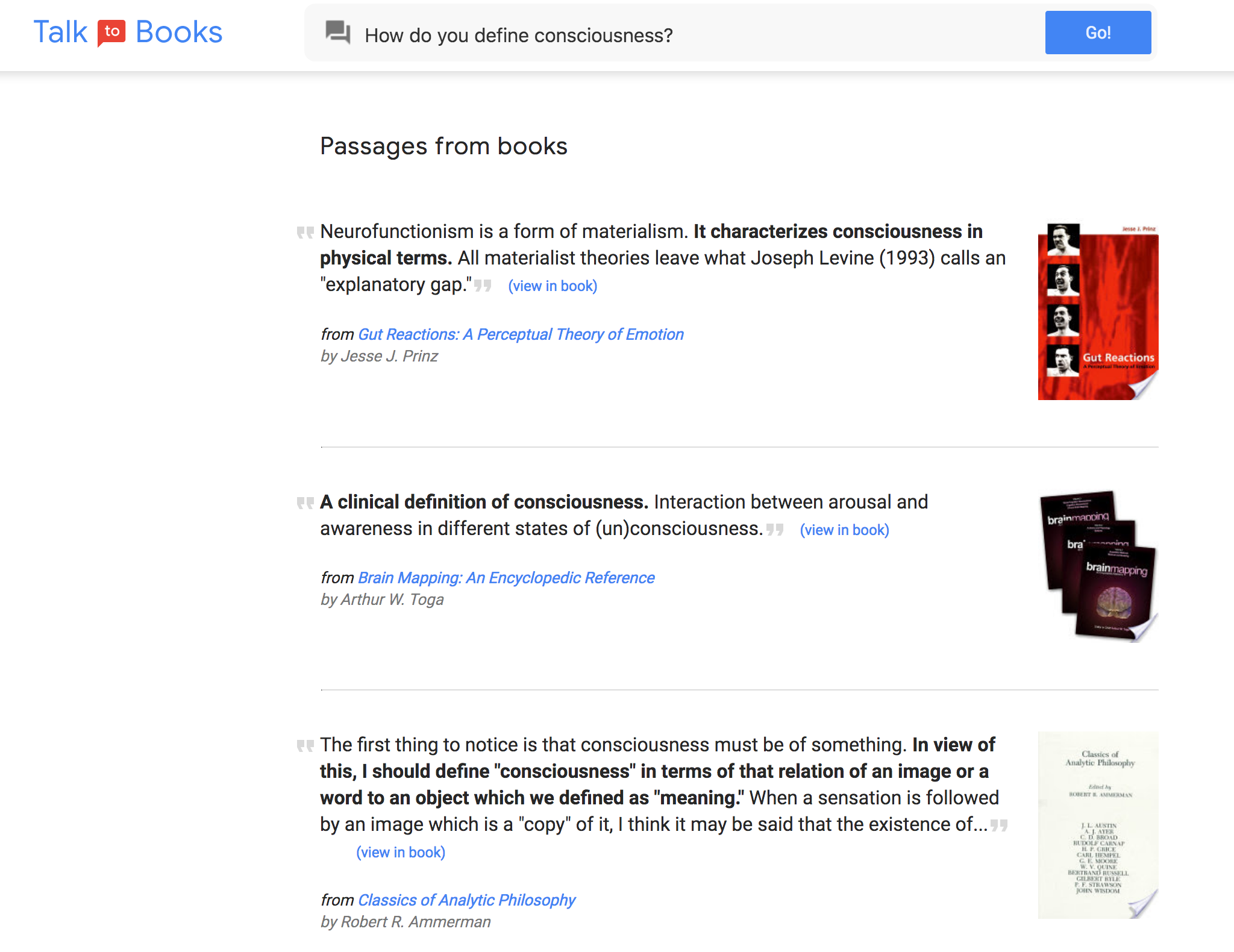
First is an interesting way of searching through Google Books, that fabulous database so rarely mentioned these days. Instead of just searching for text or title verbatim, you can ask questions like “why was Napoleon exiled?” or “What is the nature of consciousness?”

It returns passages from books that, based on their language only, are closely associated with your question, and while the results are hit and miss, they are nice and flexible. Sentences answering my questions appeared even though they were not directly adjacent to key words or particularly specific about doing so.

I found, however, it’s not a very intuitive way to interact with a body of knowledge, at least for me. When I ask a question, I generally want to receive an answer, not a competing variety of quotes that may or may not bear on your inquiry. So while I can’t really picture using this regularly, it’s an interesting way to demonstrate the flexibility of the semantic engine at work here. And it may very well expose you to some new authors, though the 100,000 books included in the database too are something of a mixed bag.

The second project Google highlights is a game it calls Semantris, though I must say it’s rather too simple to deserve the “-tris” moniker. You’re given a list of words and one in particular is highlighted. You type the word you most associate with that one, and the words will reorder with, as Google’s AI understands it, the closest matches to your word on the bottom. If you moved the target word to the bottom, it blows up a few words and adds some more.

It’s a nice little time waster, but I couldn’t help but feel I was basically just a guinea pig providing testing and training for Google’s word association agent. It was also pretty easy — I didn’t feel much of an achievement for associating “water” with “boat” — but maybe it gets harder as it goes on. I’ve asked Google if our responses are feeding into the AI’s training data.

For the coders and machine learning enthusiasts among you, Google has also provided some pre-trained TensorFlow modules and of course documented their work in a couple papers linked in the blog post.


Read Full Article

Introducing Semantic Experiences with Talk to Books and Semantris


Natural language understanding has evolved substantially in the past few years, in part due to the development of word vectors that enable algorithms to learn about the relationships between words, based on examples of actual language usage. These vector models map semantically similar phrases to nearby points based on equivalence, similarity or relatedness of ideas and language. Last year, we used hierarchical vector models of language to make improvements to Smart Reply for Gmail. More recently, we’ve been exploring other applications of these methods.

Today, we are proud to share Semantic Experiences, a website showing two examples of how these new capabilities can drive applications that weren’t possible before. Talk to Books is an entirely new way to explore books by starting at the sentence level, rather than the author or topic level. Semantris is a word association game powered by machine learning, where you type out words associated with a given prompt. We have also published “Universal Sentence Encoder”, which describes the models used for these examples in more detail. Lastly, we’ve provided a pretrained semantic TensorFlow module for the community to experiment with their own sentence and phrase encoding.

Modeling approach
Our approach extends the idea of representing language in a vector space by creating vectors for larger chunks of language such as full sentences and small paragraphs. Since language is composed of hierarchies of concepts, we create the vectors using a hierarchy of modules, each of which considers features that correspond to sequences at different temporal scales. Relatedness, synonymy, antonymy, meronymy, holonymy, and many other types of relationships may all be represented in vector space language models if we train them in the right way and then pose the right “questions”. We describe this method in our paper, “Efficient Natural Language Response for Smart Reply.”

Talk to Books
With Talk to Books, we provide an entirely new way to explore books. You make a statement or ask a question, and the tool finds sentences in books that respond, with no dependence on keyword matching. In a sense you are talking to the books, getting responses which can help you determine if you’re interested in reading them or not.
Talk to Books
The models driving this experience were trained on a billion conversation-like pairs of sentences, learning to identify what a good response might look like. Once you ask your question (or make a statement), the tools searches all the sentences in over 100,000 books to find the ones that respond to your input based on semantic meaning at the sentence level; there are no predefined rules bounding the relationship between what you put in and the results you get.

This capability is unique and can help you find interesting books that a keyword search might not surface, but there’s still room for improvement. For example, this experiment works at the sentence level (rather than at the paragraph level, as in Smart Reply for Gmail) so a “good” matching sentence can still be taken out of context. You might find books and passages that you didn’t expect, or the reason a particular passage was highlighted might not be obvious. You may also notice that being well-known does not make a book sort to the top; this experiment looks only at how well the individual sentences match up. However, one benefit of this is that the tool may help people discover unexpected authors and titles, and surface books in a way that is fresh and innovative.

Semantris
We are also providing Semantris, a word association game that is powered by this technology. When you enter a word or phrase, the game ranks all of the words on-screen, scoring them based on how well they respond to what you typed. Again, similarity, opposites and neighboring concepts are all fair-game using this semantic model. Try it out yourself to see what we mean! The time pressure in the Arcade version (shown below) will tempt you to enter in single words as prompts. The Blocks version has no time pressure, which makes it a great place to try out entering in phrases and sentences. You may enjoy exploring how obscure you can be with your hints.
Semantris Arcade
The examples we’re sharing today are just a few of the possible ways to think about experience and application design using these new tools. Other potential applications include classification, semantic similarity, semantic clustering, whitelist applications (selecting the right response from many alternatives), and semantic search (of which Talk to Books is an example). We hope you’ll come up with many more, inspired by these example applications. We look forward to seeing original and innovative uses of our TensorFlow models by the developer community.

Acknowledgements
Talk to Books was developed by Aaron Phillips, Amin Ahmad, Rachel Bernstein, Aaron Cohen, Noah Constant, Ray Kurzweil, Igor Krivokon, Vladimir Magay, Peter McKenzie, Bryan Richter, Chris Tar, and Dave Uthus. Semantris was developed by Ben Pietrzak, RJ Mical, Steve Pucci, Maria Voitovich, Mo Adeleye, Diana Huang, Catherine McCurry, Tomomi Sohn, and Connor Moore. We'd also like to acknowledge Hallie Benjamin, Eric Breck, Mario Guajardo-Céspedes, Yoni Halpern, Margaret Mitchell, Ben Packer, Andrew Smart and Lucy Vasserman.

5 Trippy Glitch Art Apps for Your iPhone


Small visual defects, known as glitches, are a common phenomena in our increasingly technology-reliant world. They generally occur as a result of a hardware problem or data corruption, but you’ll find similar effects all over the media in movies, TV shows, music videos, and advertising.

But you don’t need to data mosh your video files anymore. There now exists an entire subgenre of apps designed to distort your photos, videos, and GIFs. Many of them even work in real-time.

There are some big names attached to these apps. Musicians like Gorillaz, The Glitch Mob, and Pharrel Williams have incorporated them into their work in some way. Now it’s your turn.

Glitch Art: But… Why?

Well, why not?

The internet has been intentionally “glitching” videos and images for years now. The practice known as data moshing introduced the concept of intentional visual distortion by way of data manipulation. People intentionally remove frames from video files and see what happens.

Musicians have been embracing both digital and analog imperfections for decades. The rise of vaporwave subgenres like mallsoft plays on this same theme of low-fidelity media. It’s not uncommon for DJ sets to be accompanied by glitchy visuals or VJ sets either.

Many of these apps can export videos, stills, and animated GIFs that you can use for pretty much anything. Instagram posts, SoundCloud artwork, looping Facebook profile videos, forum avatars, iPhone backgrounds, or your next creative project are all fun applications.

They’re also exceptionally fun photography toys to play around with.

1. Hyperspektiv

Hyperspektive is a $1 premium app that sits at the forefront of the current glitch app craze. It’s a self-proclaimed “reality distortion app” which means it functions both as a real-time glitch camera and a post-processor for videos you’ve already shot.

The app uses an Instagram-like filter approach, with several adjustable parameters per preset. You can adjust the effect simply by tapping and dragging around the frame, like an XY pad on a synthesizer. If you’re recording in real-time you’re limited to 720p output, but post-processed videos export in 1080p.

The presets themselves are impressive, with traditional distortion effects, colorization, mirroring, stereoscopic 3D, and various combinations thereof. You can export your videos in 16:9 widescreen simply by turning your device to landscape, or just shoot square videos that are perfect for Instagram.

Hyperspektiv makes it easy for anyone to create unique and interesting videos, with the learning curve of an app like Instagram. It only supports videos at the time of publishing, but the developers are introducing photo import in the near future (it might be live by the time you read this).

Download: Hyperspektiv ($1)

2. Glitch Wizard
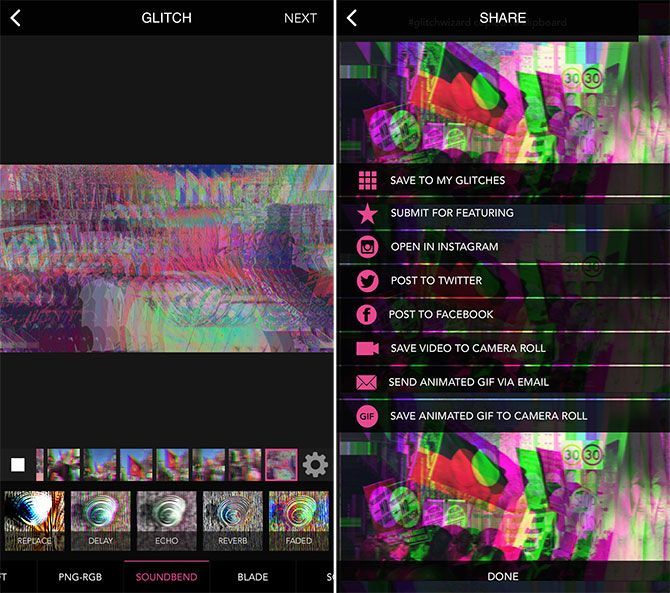
glitch art apps iphone - Glitch Wizard

Glitch Wizard takes a different approach than Hyperspektiv, with an emphasis on GIFs and granular control as opposed to ready-made filters. The other big difference is that you can’t use real-time effects to preview glitches; this is a strictly import-and-tweak affair.

When you import a video, Glitch Wizard will break it down by individual frames. You can apply different effects to each frame, or scale an effect across the entire sequence using the wizard controls at the bottom of the screen.

You can also choose to apply individual effects to each frame, or create new frames from a single photo. This allows you to create entirely unique animations, with the only limitations being your creativity and spare time.

You can then adjust the playback speed and style of your sequence. The app also features a “feed” of featured content, and the ability to export as video, GIF, or directly to an app of your choice. There are no in-app purchases to speak of; one price nets you all features.

Download: Glitch Wizard ($2)

3. Glitché

glitch art apps iphone - Glitché

While Glitché is cheap at only $1, the app is fairly limited in what it can achieve for that price. If you want to glitch videos or use real-time camera effects, you’ll need to pay $3 for each. If you want high resolution photo export, that’s another $3. That takes the total cost of Glitché to $10 with all optional purchases.

For the base $1 you get a glitch image editor, with the ability to glitch still images and export the results as a GIF. There’s a good range of effects available, with various modes and controls for each. You can’t stack effects, but you can edit each frame individually (stills get ten frames to play with).

There’s also some good built-in image editing tools, something lacking from Glitch Wizard. These allow you rotate, invert, scale, and convert your images to black and white. Any changes you make are maintained once you start applying effects over the top.

Glitché’s claim to fame is its App Store popularity and long list of celebrity endorsements: Gorillaz, Norman Reedus, Pharrel Williams, Lily Allen, Kim Kardashian, Skepta, Travis Scott, and Major Lazer to name but a few. Despite its limited offerings, if you like the way Glitché looks and behaves, you likely won’t resent spending another $3 on video filters.

Download: Glitché ($1, in-app purchases)

4. Luminancer
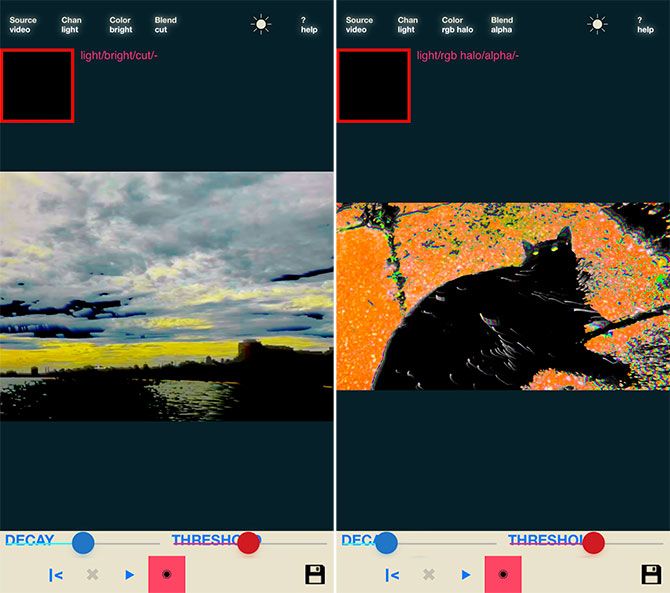
glitch art apps iphone - Luminancer

Luminancer is one of the most powerful (and most finicky) apps on this list. The developer says he’s aiming the app at “masters of lightwave sorcery” for its unique approach. Luminancer works by “overloading the luminance channel with strobing colors and video feedback” and puts a great deal of control in your hands.

As a result, there are no Instagram-like filters. You can choose to glitch your rear and front-facing cameras in real-time, or work with videos on your Camera Roll. There are two on-screen sliders: a decay filter, which decides how long the effects hang around on-screen; and a threshold filter for limiting the point at which Luminancer’s colorful effects kick in.

You can then choose between light and dark channels, and which color effect you want to employ (there are four in total). A blend mode decides how the various settings interact, and you can further destabilize your footage by dragging and twisting the screen.

You can export square and 16:9 video (in landscape mode), though the app’s main emphasis is live performance. Despite this, I had trouble getting the image to output via AirPlay, so your mileage may vary.

Download: Luminancer ($2)

5. Glitch Art
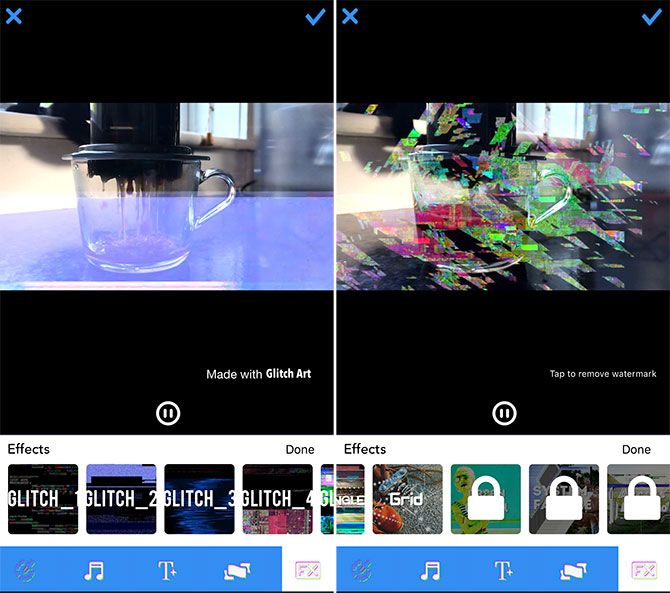
glitch art apps iphone - Glitch Art

While Glitch Art is free to download, the app really wants some money out of you. If you prefer the try-before-you-buy approach, this offers a good start with some serious limitations. Perhaps the most irksome restriction is that you can’t export videos without a watermark unless you pay for a premium subscription.

The app takes an Instagram-like approach, with about half of the included filters available for free. Many of these are passable, though it seems that the app prefers overlaying effects rather actually manipulating the video.

If you’re looking for something free to play around with, Glitch Art isn’t bad. There are some extra tools thrown in, like style filters, the ability to add text to your video, and audio controls. Ultimately, though, it comes up short compared to everything else on this list.

Download: Glitch Art (Free, in-app purchases)

Powerful Glitch Art on Your iPhone

Gone are the days when you’d need a formal training in After Effects to achieve weird and wonderful glitch art.

Don’t be put off by some of the price tags associated with these premium apps; you really do get what you pay for. The evidence for what they can achieve is all over Instagram and YouTube, and some have even been used professionally for music videos and album artwork.


Read Full Article

Users and advertisers are mostly unfazed by Facebook scandal


Facebook’s downfall has, it seems, been greatly exaggerated — at least according to Facebook. Even with the Cambridge Analytica fallout and subsequent #DeleteFacebook campaigns, the site appears to be largely unfazed. An executive confirmed as much in a recent interview with The Wall Street Journal.

A majority of users haven’t altered their settings and advertisers appear to be staying put. “We have not seen wild changes in behavior with people saying ‘I’m not going to share any data with Facebook anymore,’” Global Marketing VP Carolyn Everson told the site.

And while the company has certainly been put under a microscope by Congress and other lawmakers internationally, Everson adds that Facebook isn’t really anticipating that much will change on the legislative side of the equation, either.

The executive says the company isn’t “anticipating major changes to our overall revenue and business model” as it pertains to the potential ability for users to opt out of the targeted ad model that came under heat during this week’s hearings.

Wall Street analysts are seconding that sentiment. Like users, advertisers don’t exactly appear to be fleeing the site in droves. “It’s inexpensive for the earnings growth trajectory they have. We did a study today that showed engagement hasn’t pulled back,” analyst David Seaburg told CNBC in a recent interview. ”The engagement factor is staying still. Ad buyers are locked in. I think the earnings are going to be good. I think it’s a catalyst for the stock to go higher.”

It’s a stark contrast from the fallout for Cambridge Analytica. The firm whose data mining operations helped set this whole thing in motion has been reeling from the attention. The company has been in a constant state of damage control over social media, and the other day, it replaced a temporary CEO who had been in the role for less than a month.

Of course, Cambridge Analytica isn’t Facebook. Only Facebook is Facebook. Most of us have grown addicted for both our personal and professional needs. It’s hard to remember a time before it, and, as such, it’s difficult to imagine life without it. Besides, how long will our dwindling attention spans really remember what it was that got us all so upset in the first place?

Seaburg calls Zuckerberg “arrogant” in the aforementioned interview. Strangely, it comes off as a compliment of sorts — an indicator of a chief executive who just believes in his product. Zuckerberg might come off as arrogant, but if you were running a company that seemed poised to shrug off two days of congressional hearings, wouldn’t you be?


Read Full Article

U.S. iPhone users spent 23% more in apps in 2017, have an average of 45 apps installed


Games, dating apps and streaming services contributed to a rise in consumer spending in iPhone apps last year, according to new data from app store intelligence firm, Sensor Tower. The firm found that U.S. iPhone users spent 23 percent more on in-app purchases in 2017 than they did the year prior – or, an average of $58 per active user was spent on in-app purchases, up from $47 in 2016.

To be clear, this is only on purchases made within an app using Apple’s in-app purchase or subscription mechanisms. It’s not tracking e-commerce purchases – like things users bought in Amazon – or payments made to service providers in an app like Uber or Lyft.

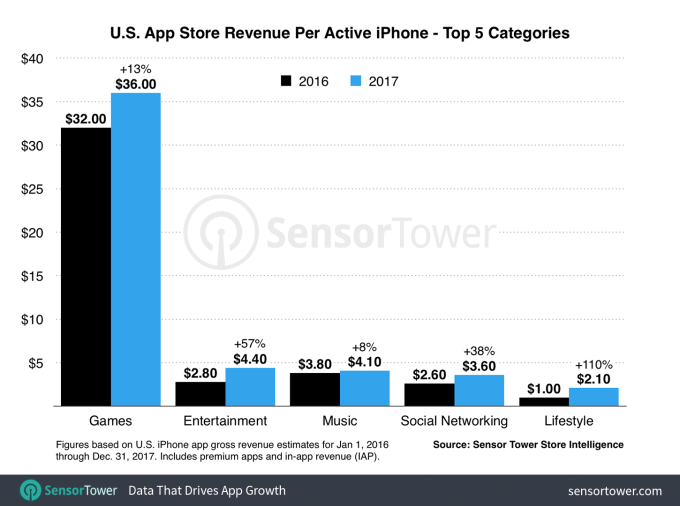
Games were the largest category of consumers spending in 2017, accounting for roughly $36 of the $58 spent per device; or 62 percent of the spending. That’s a 13 percent increase over 2016’s $32 spent.

It’s no surprise that the biggest driver of iPhone spending is games.

The category typically outweighs all others in terms of revenue, not only for paid downloads, but for the ongoing purchases of things like virtual goods, unlocking levels, in-app currency, and the other extra features that mobile games offer. And because people play some types of games for long periods of time – like MMORPGs – they have many opportunities to spend on in-game items.

So while it’s notable that in-app spending in games is up by a few dollars, year-over-year, the more interesting trend is the rise in in-app spending generated by Lifestyle apps and subscription-based streaming services.

Specifically, outside of games, Entertainment apps – which includes streaming services like Netflix, Hulu, HBO NOW, etc. – grew 57 percent year-over-year to reach $4.40 in consumer spending per device. That makes it the largest category of spending outside games.

Music is also another big category for spending, up 8 percent year-over-year to $4.10. Much of what people are paying for in a music app is a subscription for the premium tier of the service, as with Pandora or Spotify. If this category was combined with Entertainment – which is also growing thanks to subscriptions – you’d see that streaming services are now a big factor contributing to the overall rise in U.S. consumer spending in iPhone apps.

But subscriptions to other types of services are growing, too.

Lifestyle apps, led by dating apps like Tinder and Bumble, grew 110 percent from 2016 to 2017 to reach $2.10 in iPhone consumer spending per device.

Spending in social media apps was up by 38 percent, to $3.60 thanks to things like in-app tipping (e.g. Live.me, Periscope, YouTube Gaming), subscriptions (e.g. LinkedIn memberships), and other activity (e.g. call credits in Skype).

Twitch has oddly categorized itself as a “Photo & Video” app, in case you’re wondering where it fits in.

While Sensor Tower’s published report focused on iPhone consumer spending, the company tells TechCrunch that Android spending on Google Play was much lower last year.

“We estimate that for each active Android device in the U.S. last year, approximately $38 was spent on Google Play – on and in apps – so about $20 less than iOS,” said Sensor Tower’s head of mobile insights, Randy Nelson. “That tracks with the disparity in revenue generation we see between the stores outside the per-device level,” he added. “Android users generally spend less on or in apps, Google Play generated about 60 percent of the App Store’s revenue last year in the U.S.”

However, he pointed that Android users have more than one official store to buy from – like the Amazon Appstore or Samsung Store, for example. Some apps also choose not to monetize directly through Google Play, which is an option not permitted on Apple’s App Store.

The increase in consumer spending isn’t the only significant trend Sensor Tower spotted.

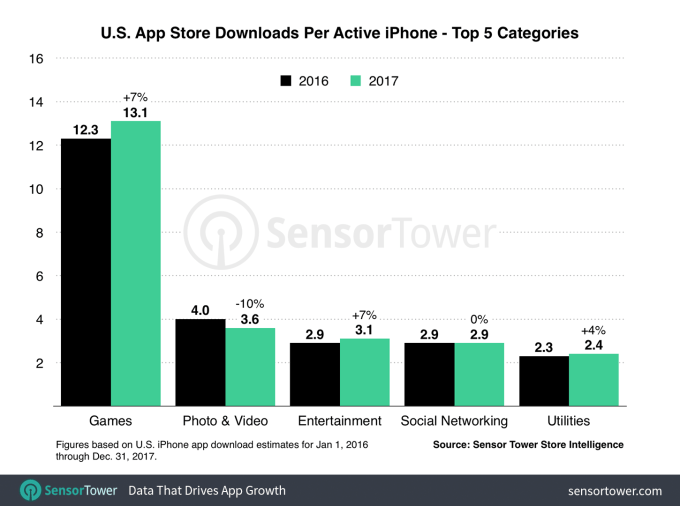
iPhone app installs in the U.S. were up nearly 10 percent from 2016 to 2017, with users installing an average of 4 more apps in 2017 compared with the prior year.

Games, again, were a big source for installs, followed by Photo & Video apps, Entertainment apps, Social Networking and Utilities.

In total, users had an average of 45 apps on their iPhone apps in 2017, the firm found.


Read Full Article

The Best iPhone Clipboard Managers


As the iPhone continues to become more powerful and add features with each new software and hardware release, many users are taking advantage of the device to tackle a wide variety of daily activities and become more productive.

You’ve probably used the iPhone clipboard more times than you can count for copying and pasting text between apps, but while the built-in clipboard is helpful, it has some limits. Most notably, it can only store one piece of information at a time.

But a number of third-party clipboard apps can step in and provide some additional features. Let’s take a look at what the iPhone’s built-in clipboard can do, and offer three great alternatives.

A Look at the iPhone Clipboard

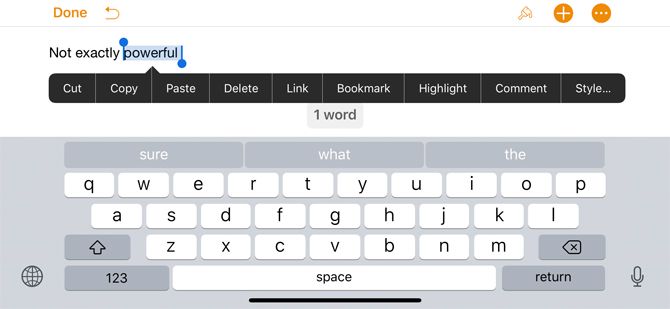
iPhone Built-in Clipboard

By itself, the iPhone clipboard isn’t exactly impressive. There’s no actual clipboard app and no real way to find what’s stored on your iPhone. That’s because iOS can store exactly one piece of information—the last snippet copied—when you hold down the cursor and select Cut.

Anytime you select Paste from the same menu, the information in the clipboard will appear wherever you can insert text.

If you ever want to completely clear the iPhone clipboard, just press down on a blank space until the text cursor appears. Then press down and pick Copy from the menu. That empty space will reside in the clipboard memory.

Since the built-in clipboard option on the iPhone is barebones, here are three apps to take your workflow up a notch.

1. Paste 2

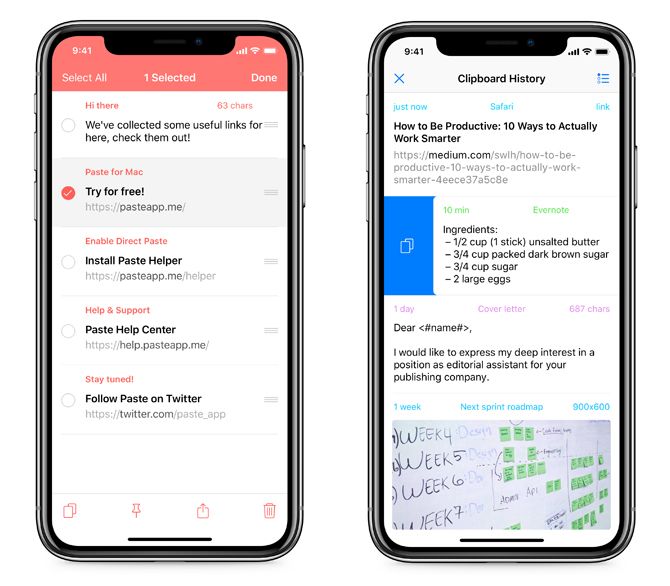
iphone clipboard managers - Paste Clipboard Manager

Our top choice for the best iPhone clipboard manager is Paste 2. The app stores everything you copy—including text, images, links, files, and more—for quick and easy access.

When it’s time to find a specific piece of content, you can browse through a visual history and then preview it to make sure it’s what you’re looking for. Searching for content is also easier thanks to intelligent filters. In the clipboard history part of the app, just swipe right to add it to iPhone’s internal system.

To help organize different types of content, you can also create and customize different pinboards. Information from the app is accessible in other apps via the Share Sheet.

As a nice touch, Paste 2 will also show you when the information was added, from where, and displays a character count on any text.

Thanks to iCloud compatibility, you can sync content access it on a Mac with the separate Paste 2 for Mac app. While there are a number of great Mac-only clipboard apps, the cross-platform nature of Paste 2 makes it something to consider for anyone who does significant work on both iOS and macOS.

An in-app purchase unlocks the app on an iPad.

Download: Paste 2 for iOS (Free)
Download: Paste 2 for Mac ($15)

2. Copied

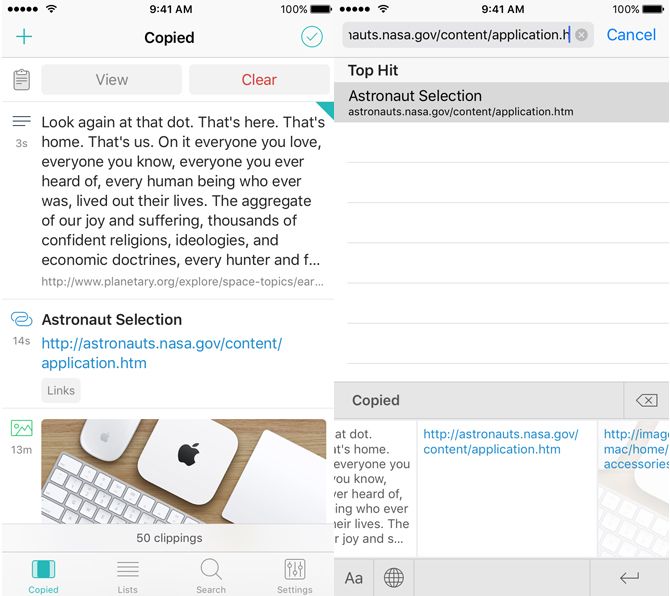
iphone clipboard managers- Copied Clipboard Manager
Another great option is Copied. The app will save any text, links, and images copied from any app as clippings. When you’re ready to use a specific clipping, just open up the app and copy it to the iPhone’s clipboard.

One of Copied’s unique features is the third-party keyboard. It provides a quick way to access all clippings when you need to input text in any app, including Messages or Safari. You can select text in any app and then reformat it without needing to open Copied. It also allows users to save text as a clipping directly from the keyboard.

Along with being able to view and edit any clippings, you can also transform the text with different formatting options. You can reformat text with a specific template; power users can even author their own formatter with JavaScript. Those formatters are available on the Copied keyboard.

A built-in browser comes in handy and saves all data copied from a site. On the Share Sheet, users can take advantage of a number of actions including save to Copied and more.

Message fans can even use images in the app and transform them into fun stickers to use during conversations.

An in-app purchase unlocks additional features including the ability to save and organize clips with lists, create different rules to further organize clippings, and iCloud sync to other iOS devices.

If you also spend any time on a Mac, the companion Copied app for macOS makes it easy to access a central clipboard both at your desk and on the go with an iPhone.

Download: Copied for iOS (Free)
Download: Copied for Mac ($8)

3. Clip+

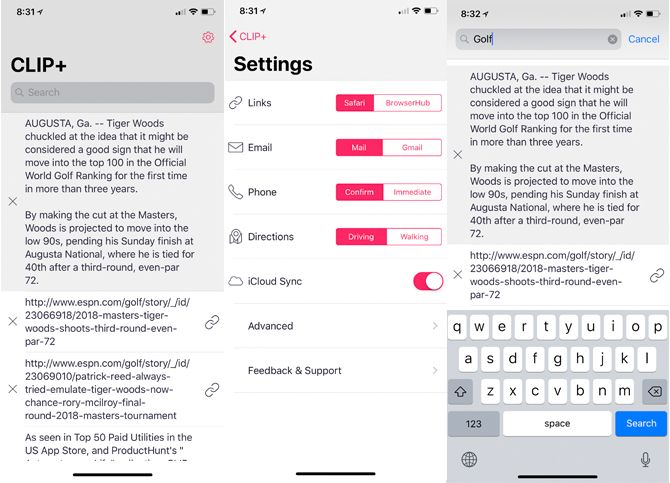
iphone clipboard managers - Clip+ Clipboard Manager
Clip+ does more than just store any information you copy. The app automatically recognizes different types of content. For example, if you grab a phone number, you can call it directly from the app. With a saved URL, just tap the icon to head to the site. Users can also customize those actions, like substituting the Gmail app for the stock Mail.

The app, which is designed for both the iPhone and iPad, uses iCloud to sync and keep the information up to date on any iOS device. Even though iCloud does have its share of issues from time to time, this makes Clip+ even more useful for anyone already entrenched in the Apple ecosystem.

All content is also viewable via Search and through Safari’s Shared Links tab. The clipboard is also available as a Notification Center widget.

And surprisingly, even Apple Watch users aren’t left out of the fun. With voice dictation on the watch, you can dictate text directly into Clip+.

Download: Clip+ ($3)

Expand Your iPhone Clipboard’s Capabilities

Even though the built-in iPhone clipboard is just a basic way to store one piece of information to share between different apps, these third-party apps can help your iPhone become more useful in your daily activities.

And if you’re looking to improve your overall iPhone knowledge, take a look at our great list of key Apple iPhone terms everyone should know.


Read Full Article