12 April 2013

Free Military-Grade Privacy For Your Files: How Bitlocker Works [Windows]


Ever heard that quote about trying to explain how a television works to an ant? I’m not calling you an ant, even though you are hard-working and enjoy the occasional sip of aphid milk. What I am saying is that I’m going to explain how Windows BitLocker works, without you having to have a degree in computer science and cryptography experience.


BitLocker is a feature of Windows 7 and 8 that is extremely useful, included in the operating system, and not nearly as many people know about it as they should. If you’re curious about what other cool stuff your Windows operating system might have, check out Christian Cawley’s, “The Top 5 Cool Hidden Features In Windows 8” and Yaara Lancet’s article, “8 Hidden Tools In Windows 7 You Still Might Not Know About“. Here, though, I’ll be focusing on Windows’ military-grade privacy tool called BitLocker.


What Is BitLocker?


Not all Windows’ operating systems have BitLocker bundled with them. At this point, it is just in the Ultimate and Enterprise editions of Vista, and Windows 7, and with Pro and Enterprise editions of Windows 8. You can also find it in Windows Server 2008, Windows Server 2008 R2, and Windows Server 2012. What BitLocker is, it’s a drive encryption tool. A drive encryption tool is something that takes all your data on any particular drive and make it completely unreadable to anyone but you. If you don’t have one of these operating systems, I suggest you take a look at TrueCrypt and our TrueCrypt User’s Guide: Secure Your Private Files.


There are two meanings for ‘drive’ in this case. One is any volume or partition on a single hard drive. You need at least two volumes on the drive to use BitLocker – a main volume that you probably will do your day to day work in, and another volume that is at least 100MB in size that will be your system’s volume. Your computer will boot from this volume. This volume can NOT be encrypted. That would make booting your computer very difficult.


The other ‘drive’ is any removable drive like your USB drive. This type of drive does NOT require a boot volume. Which is really cool, because if you encrypt your USB flash drive and you have sensitive information on it, you don’t really have to worry about anyone getting that information if you lose the drive.


How Does It Encrypt My Drive?


BitLocker takes all the data on your drive and applies a bunch of fancy math to that data. Remember, all data can be boiled down to just numbers so it can be manipulated with math. Officially, this math comes in the form of algorithms, or sets of instructions, such as AES – 128-bit or 256-bit encryption, and Diffuser.


Let’s go through a very simplified process of encrypting the word ‘USE’.


Diffuser takes those three letters and scrambles them. It could come out as ESU, SUE, SEU and so on. Then BitLocker creates the key, which is the way to unscramble that word, and holds on to it for you.


Now BitLocker applies AES. AES is the Advanced Encryption Standard adopted by the US Government as a standard in 2001 – hence the military-grade designation in the title. 128-bit or 256-bit encryption defines how many bits a single bit of your original data may be represented by. Now, a bit is just one piece of data, like a letter or a number. Then, the math makes that particular bit into a ‘combination’ or key that is either 128 or 256 bits long. It’s like slapping a combination lock with a 256-numbers-long combination on a locker holding the letter ‘U’. Think about that.


Let’s go back to encrypting the word ‘USE’. You have to open three different lockers with three different combination locks, each with a combination that is 256 numbers long. Now, you can see how this would be a pain to anybody but the most dedicated cracker.


This is where it gets military-grade, I mean tank tough! Remember AES? Well that application puts each combination lock through the math 14 times for 256-bit encryption! Now, you have to know 14 different 256-bit-long combinations to get at your letter ‘U’. Forget it. Go home, cracker. Of course, BitLocker creates a key that will unlock, or decrypt that word for you.


At the end of it, there are two keys now needed to start the process of decrypting your data. If someone doesn’t have access to both of those keys, they are going to have to be very patient, very smart, and very dedicated to get at your information.


These keys aren’t physical keys of course, and they don’t resemble passwords either. By themselves, they would look like gobledy-gook to ordinary folk like you and me. But what Windows does is allow BitLocker to use those two keys to get at your data, as long as you can prove to the computer that you are who you say you are. These keys are held by the Trusted Platform Module.


What is a Trusted Platform Module?


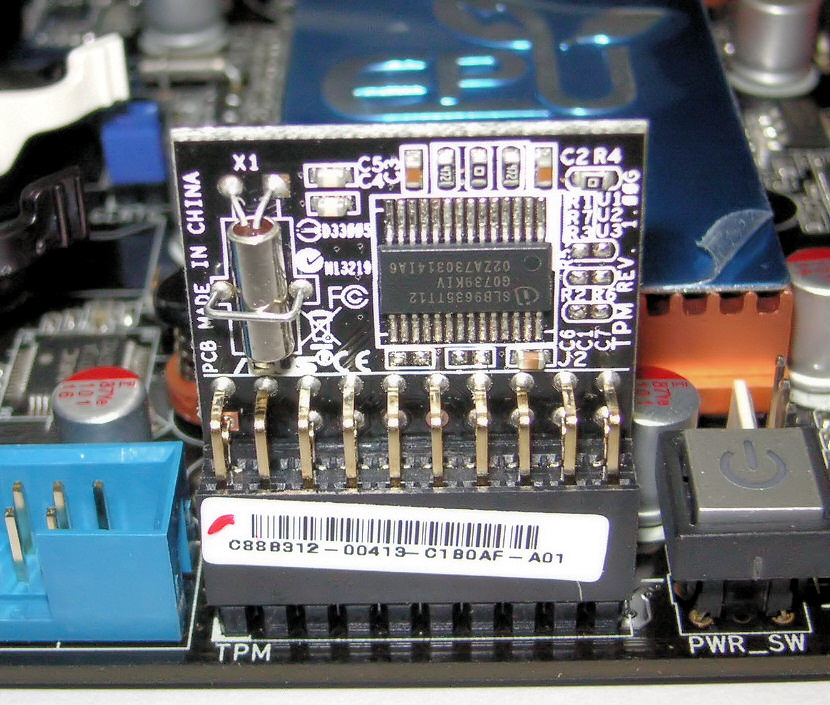
The Trusted Platform Module is another key piece in the BitLocker set of tools to protect you. This is a bit of hardware that can be found on most computers.


What it does is check out your computer each time it boots to make sure no one has been trying to mess with the start-up procedures to get around your encryption. What it also does is prevent someone from just slipping the hard drive out of your computer and popping it into their computer to get at the files.


Depending how you set up your BitLocker, your TPM may just let you log on to your computer. Or, you might set it up so that it requires a PIN number to continue to logging in. Or, you can create a USB key that has to be plugged into your computer when you boot, to get you to the login stage. Or you can go hardcore and set it up to require that you have a PIN AND a USB key. The TPM applies only to volumes that are physically on your computer. USB drives don’t need a TPM, but they may need a PIN or USB key for verification.

There are computers without TPM’s, but for most computers manufactured after 2006, the TPM module is already on the motherboard.


Is BitLocker Totally Safe?


Well, no, nothing really is. But it’s as safe as you’re going to get without having the budget of the CIA or MI-5. Speaking of government spying, the UK’s Home Office has asked Microsoft to put a backdoor in BitLocker to allow them to have easy access to your data. Microsoft has flat out refused to do so. Score one for Microsoft.


So, How Do I Use BitLocker?


It’s surprisingly easy to use if you are just going to encrypt your main volume on the hard drive in your computer. Check out this short video on how easy it is.


If you want to get into the guts of BitLocker and use it on external drives or set up the different TPM validation methods, it can get a bit more complicated. Microsoft does have a Step-By-Step Guide for BitLocker on Windows 7. I haven’t seen any real documentation on Windows 8 yet. If you have, let us know in the comments, please.


Should I Use BitLocker?


BitLocker is the best protection for your data that you are going to get just by buying a Windows computer. If you are concerned about data theft and the security of your information, why wouldn’t you make this military-grade tool a part of your computer security arsenal? It just makes sense. BitLocker is a serious tool developed for you by a company so many people think of as being evil at different times. I think this application is a redeeming quality for Microsoft and makes me feel less disgruntled about the cost of getting Windows.


What do you think? Do you currently use BitLocker? I’d like to hear about your experiences with it. Do you feel safer knowing BitLocker is out there and may be a part of your Windows computer? Let’s hear about it in the comments. No encrypting please.


Image Credit: TPM on Asus Motherboard via WikiCommons, BitLocker Icon via WikiCommons, UK Home Office via WikiCommons, Lockers via Shutterstock


The post Free Military-Grade Privacy For Your Files: How Bitlocker Works [Windows] appeared first on MakeUseOf.


Collect Little Acorns And Unlock Xbox Live Achievements On Windows Phone


If you’ve already read my earlier review of ilomilo for Windows Phone, you’ll be aware of my antipathy towards “cutesy, ditzy, cynically-designed characters with hack-written backstories that are supposed to make me ‘care’.”


Ahem.


Perhaps a little harsh, but anyone who has been gaming since the mid-1980s will probably sympathise, if not agree.


So imagine my surprise when I downloaded a copy of the Xbox Live title for Windows Phone, Little Acorns, only to discover that as platform games go, it isn’t half bad. Now, I don’t expect you to rush out and buy a $0.99/£0.79 game purely on this recommendation (although at that price it is easily one of the cheapest Xbox Live games available for Windows Phone), especially as you know nothing as yet about Mr Nibbles.


Yes, he’s cute, he’s loveable and he has a name that inspires dread.


But you’re still looking for that recommendation, so let’s move on…


What Is It?


As aims of games go, this one is pretty noble – guide Mr Nibbles through 80 different levels to collect nuts and fruit to put away for winter, thereby providing the family of squirrels with enough food. Spread across four years – with four seasons in each – this is a particularly long game for a mobile platform. Note the price too – this is value for money, based on price per minute of gameplay.


Different surfaces come into play at different times of year; for instance, Mr Nibbles becomes tough to control in the winter when he slides around on ice.


Hooks to swing on, rising and falling platforms and temporary floors that fall away are among the landscape items that can help and hinder your progress.


The real problem, however, are the other creatures in the woods who are out to stop Mr Nibbles…


Playability


Basic left, right and jump controls enable you to negotiate Mr Nibbles through the various challenges that are presented in Little Acorns, and thanks to the hooks (which can be latched onto using the jump button) there are many ways to get the squirrel through a level before the clock runs out, including some time bonuses.


Spiders and grey squirrels block Mr Nibbles’ way, but these can be overcome with speed boosts, jump powerups and a special helmet that makes the character impervious to damage for a few moments.


As platform games go, Little Acorns is extremely playable and a lot of fun. If you’re fortunate enough to complete a level before the clock runs down, there is also the opportunity to collect fruit for bonus points before you head to the level exit.


Twenty achievements can be unlocked in Little Acorns, each at 10G, resulting in an additional 200 for your Xbox Live Gamerscore – a great reason to have a Windows Phone.


Graphics and Sound


As mentioned earlier, Mr Nibbles is one of those “cute” platform characters, and this look extends to the entire game. Blending a 1950s cartoon art style with a modern smartphone results in a visually attractive game that is complemented by a suitably jazzy soundtrack.


Befitting a platform game, the actual in-game sound effects aren’t particularly impressive, but the soundtrack makes up for this – a particular bonus is you like a nice, slow jazz track with some added funky fuzz guitar.


Watch Your Little Acorns Grow!


This is the type of platform game that you really cannot go wrong with. The low price (check the game in the Windows Phone Marketplace to confirm this – prices can change!) and the cute design hide a game that can prove fiendishly difficult to complete. Some levels can be particularly tough, but the satisfaction in watching the acorns tumble into the squirrel’s tree after a level is completed is particularly warm.


Yes, I know they’re not real squirrels, but for all of his cuteness and hack back-story, I’ve grown quite fond of Mr Nibbles (so much so that Little Acorns is on MakeUseOf’s Best Windows Phone Apps list), and look forward to helping him through many more months of acorn collecting – at least until I’ve got all achievements unlocked and my 200G!


The post Collect Little Acorns And Unlock Xbox Live Achievements On Windows Phone appeared first on MakeUseOf.


11 April 2013

Your First Day On Reddit… Fixed


Reddit is emerging as a true force on the Internet, which explains its inclusion in our list of wonders of the Web. It’s a source for news and interesting factoids, the instigator of many memes, the popularizing force of many viral videos, and an all-round entertaining place to hang out online. I thoroughly recommend it to everyone, though there will inevitably be some people who decide it isn’t for them.


I’ve been a lurker at Reddit for a long time, mainly using Scroll Reddit to keep the content manageable. But I recently took the plunge and actually created a user account in order to vote content up and down, post comments, and perhaps even submit my own content for perusal.


The first day as a new Redditor is kind of like your first day at a new school or in a new job. There are a lot of people all eyeing you up suspiciously, and you’re not sure what you’re supposed to be doing. In other words, there’s a distinct learning curve. What follows are five key pieces of wisdom that should help all new Reddit users find their feet.


Edit Your Experience


Reddit is highly customizable, so everyone’s Reddit experience is unique to that individual. You’re presented with an account sporting the default settings and subreddits, but a little tinkering can transform your usage of the site in a major way. This is the first thing you should do, and something you should return to every so often.


Start by clicking on ‘Preferences’ and adjusting all of the various options to suit your own personal needs and wants. Then click on ‘Edit’ in the top right-hand corner in order to adjust which subreddits make up your front page. For now just unsubscribe from those that don’t interest you… finding subreddits that do will happen over time.


TL;DR: Make Reddit your own in order to gain more from the site.


Take Your Time


Patience has long been seen as an important virtue to possess, and that’s just as true online as it is in the real world. In terms of Reddit it’s the key to not making an epic mistake which will put you off returning to the site, or, at the very least, see you wanting to create an alternate account.


Most people will want to make their mark on Reddit as soon as possible, either by commenting on an existing post or creating their own. While there is nothing wrong with this approach it may lead to you reposting content that has already appeared on the site or otherwise blotting your copybook.


Before you do anything of note, acclimatize yourself with Reddit and the way it works. Visit the wiki, read the FAQs, and take note of the Reddiquette. Also make sure you know what the various acronyms mean and understand what the current memes represent. Then and only then should you dive right in to the action.


TL;DR: Understand what you’re doing before you do it.


Considerate Commenting


Commenting is the lifeblood of Reddit. If no one commented the site would be a dry, dull place with random content being thrown around for no good reason. The comments are where most of the action happens; where news events are discussed, images dissected, and new tangential conversations are started and finished on a whim.


Most comments on Reddit have a purpose. They will add something to the conversation, be witty enough to make someone reading it laugh, or make a serious point worth noting. Follow that lead, thinking about what you’re writing and why you’re writing it. Don’t be rude, ignorant, or otherwise trollish.


TL;DR: Don’t be that person, you know the one.


Disheartened By Downvotes


Voting is the other key component of Reddit, sitting alongside comments as the oil that keeps the wheels turning. You can hand out upvotes and downvotes to posts and comments as you see fit, and in return everything you do on the site will be subject to the same judgments.


Downvotes should be used sparingly, only being applied to posts, links, and comments you really don’t appreciate for whatever reason. In the same way that (in real life) praising people when they do well gets better results than criticizing every little thing they do wrong, upvotes are a better use of your time than downvotes.


TL;DR: Be positive rather than negative with your votes.


Ignore The Idiots


Like any online community, Reddit has its idiots. They may not think they’re idiots but they are. These are the people who insult and ridicule people they take a disliking to, who cast more downvotes than upvotes, who spend their time bitching from the sidelines rather than playing the game fairly.


The same rule applies to these people on Reddit as it does everywhere else across the InterWebs. Ignore them. They want attention, they want you to react, they want to cause arguments and aggravation. Don’t help them on their way by rising to the bait. Instead just rise above it all.


TL;DR: Trolls and troublemakers only triumph when you feed their egos.


Conclusions


This is only intended as a rough guide for those just starting out on their Reddit adventure. It should get you through the first day, but to prosper beyond that you should read the MakeUseOf guide to Reddit by Dave LeClair. You’d also do well to read 5 things you should know about Reddit, learn about the unwritten rules for posting to Reddit, and take heed of Danny’s informative suggestions on how to use Reddit like an old pro.


Are you on Reddit already? If not, what is preventing you from creating an account and immersing yourself in this world of cute cats and memorable memes? If you create an account after reading this article and find the information contained within useful, please let us know in the comments section below.


Image Credits: Laura Ritchie, B Rosen, Steven Kay, Sabertasche2, Summer


The post Your First Day On Reddit… Fixed appeared first on MakeUseOf.


How To Import iTunes Playlists To Windows 8 Xbox Music


CLICK HERE TO SEE FULL POST


Apple iTunes is a convenient music management software available for both Windows and Mac. While iPhone or iPad users with the newest version of the mobile operating system are less dependent on iTunes, a large number of computer users use iTunes to create playlists and mange iOS devices. Computer users who’re on Windows 8 probably [...]

Download Web Pages as PDFs with Chrome for iOS


You can now use the Google Chrome on your iPad and iPhone to save web pages as high-fidelity PDF documents. The PDFs can also be remotely delivered to your other mobile devices.


Tweet this Share on Facebook


Digital Inspiration @labnol This story, Download Web Pages as PDFs with Chrome for iOS, was originally published at Digital Inspiration on 10/04/2013 under Google Chrome, IPad, IPhone, PDF, Software.


Find Who is Linking to your Website with Google Analytics

Nook Launches Nook Press, A New Self-Publishing Platform For eBooks [Updates]


NOOK Media, a subsidiary of Barnes & Noble, Inc., announced yesterday the launch of NOOK Press, a new and free self-publishing platform in which authors can write, edit, collaborate, and publish high-quality e-books and distribute them to millions of readers via NOOK Books and Nook e-readers.


In their press release, Barnes & Noble says that NOOK Press builds off of the company’s original self-publishing platform, PubIt!, and indeed if you go to PubIt’s website, you’ll receive a notice that “PubIt! is now NOOK Press”.


NOOK Press allows independent publishers and authors to use its online services to write, edit and format new and existing manuscripts, collaborate with colleagues, and monitor the sales of their self-published e-books. E-books published through the platform are sold through NOOK Bookstores, and are made available on BN.com, NOOK.co.uk, NOOK devices, and the free NOOK e-reading software for Android, iPad, iPhone, Windows 8, Mac, and PC.


Similar to Apple’s iBooks Author e-book creation software, NOOK Press’s online software and services can be used free of charge. You can upload an existing manuscript file in Word, HTML, text, or ePub format, or use NOOK’s online editor to get started writing your book. The authoring site also includes free email and live chat support to provide personalized answers to questions pertaining to every stage of the publishing process.


As usual in these cases, NOOK retains a percentage of the List Price of NOOK Books sales, based on their Pricing and Payment Terms.


What do you think of such self-publishing platforms? Are they they the future of book publishing?


Source: BarnesandNobleInc.


The post Nook Launches Nook Press, A New Self-Publishing Platform For eBooks [Updates] appeared first on MakeUseOf.


10 April 2013

A More Efficient Embedding Method for YouTube Videos


The embedded YouTube video player loads several unnecessary files and increases the overall load time of your web pages. Here's a more efficient and light-weight alternative inspired by Google Plus.


Tweet this Share on Facebook


Digital Inspiration @labnol This story, A More Efficient Embedding Method for YouTube Videos, was originally published at Digital Inspiration on 10/04/2013 under Embed, YouTube, Internet.


When you cannot open Google or Gmail in Chrome, try this simple fix


If you get socket errors when trying to open Gmail or Google search in Chrome, you aren't alone. This is a known issue of Chrome but there's a simple fix available.


Tweet this Share on Facebook


Digital Inspiration @labnol This story, When you cannot open Google or Gmail in Chrome, try this simple fix, was originally published at Digital Inspiration on 09/04/2013 under GMail, Google Chrome, Internet.


Do You Love Or Hate April Fools’ Day Online? [You Told Us]


With April 2013 rapidly passing by it already feels like April Fools’ Day was an age ago. Perhaps this is because the pranks pulled by tech companies were so lame that none are memorable enough to stick with us for more than a few days. Or perhaps I’m an aging misanthrope who needs to let his hair down once in a while. It’s possible. I guess.


Real-world April Fools’ Day pranks seem to be lessening in popularity these days, but the Internet is awash with them each and every April 1. I’m personally not a fan, but we wanted to know what you, the loyal and (often lovely) MakeUseOf readership think of April Fools’ Day. Hence the discussion we enjoyed for last week’s We Ask You column.


The Results


We asked you, Do You Love Or Hate April Fools’ Day Online? The number of responses was disappointing, but as usual I have to blame myself for the poor choice of question. I obviously didn’t think it was poor when I asked it, but you fine people have shown me the error of my ways.


Those who did answer the question gave their views on April Fools’ Day and explained why they either love it, hate it, or don’t have any strong feelings either way. Shockingly — well, it shocked me at least — the MakeUseOf readership appears to be in favor of April Fools’ Day and the pranks tech companies play on the unsuspecting public across the Web.


The split was about 60/40 in favor of April Fools’ Day, with several people maintaining neutrality by sitting on the fence and not committing to either side. I guess I myself am a fence-sitter on this particular issue. I like some of the pranks, especially the well-planned, well-executed epic pranks from Google, but the number of jokes is spiraling out of control.


Even when it comes to Google there’s a part of me that wonders how much could have been achieved with the time and energy the company and its employees put into its April Fools’ Day pranks. And then there are the lesser-known April Fools’ Day jokes, many of which fail to raise even a slight titter.


Comment Of The Week


We had great input from the likes of Abhishek Rai, Graham Richardson, and Ashwin Ramesh, to name just a few. Comment Of The Week goes to ‘G W’, who, as well as the respect of myself and hopefully everybody reading this, receives 150 points to use for MakeUseOf Rewards.


I think the pranks are passe. What good is a prank when you can countdown to when they are going to be pulled?

What would happen to if a company, like Google, DIDN’T participate next year? I feel it would probably create a backlash.

I’m sure it helps foster some creativity for companies, but they’re now more of an expectation than anything. They’re almost like the quarterly business updates.


For us this comment hits the nail on the head in terms of why April Fools’ Day is losing its luster. When Google started pulling pranks on April 1 people were pleasantly surprised. Now, they expect it. It’s become so ingrained in Web culture that it’s virtually impossible to actually catch anyone out.


We will be asking a new question tomorrow, so please join us then. We Ask You is a weekly column dedicated to finding out the opinions of MakeUseOf readers. We ask you a question and you tell us what you think. The question is open-ended and is usually open to debate. Some questions will be purely opinion-based, while others will see you sharing tips and advice, or advocating tools and apps for your fellow MakeUseOf readers. This column is nothing without your input, all of which is valued.


Image Credit: Sean MacEntee


The post Do You Love Or Hate April Fools’ Day Online? [You Told Us] appeared first on MakeUseOf.


Card-Style Google Translate OneBox


After the instant results for definitions and local time, Google's translation OneBox has a new card-style interface inspired by Google Now.


To trigger this OneBox, search for "translate", followed by the text you want to translate. For example: [translate mein luftkissenfahrzeug ist voller aale]. You could also add the destination language: [translate mein luftkissenfahrzeug ist voller aale into french].


You can also search for [word in language] or [word to language]. For example: [breakfast in Spanish], [estrella to English]. This also works for short phrases and expressions.


{ Thanks, Arpit. }


Wish A Classic Film Could Have Been Better? These Fan Edit Websites Can Help


classic film fansBetter or not, every diehard fan has his own personal take on what his “favorite” movie should have been like. Especially, if it left a sour taste in the mouth, like Star Wars: Attack of The Clones for me. I definitely would have done the romantic scenes better and probably helped to preserve the “classic” tag that gets attached to Star Wars films for our generation.


One such fan was Mike J. Nichols who went to work with his scissors on Star Wars: The Phantom Menace and turned it into a more tightly spun tale in The Phantom Edit. If Wikipedia is to be believed, the fan edit even met with the unvoiced approval of George Lucas. Well, that’s what a fan edit is. In simple words, a re-interpretation of an original movie by a fan who may re-order, cut, or add new material to the original movie.


But Are Fan Edits Worth A Watch?


Watch: The Phantom Edit on Vimeo (Jack Marshall’s version)


You bet your last nickel. Serious auteurs may pooh-pooh fan edits, but there’s no denying that some even have their cult following. My own take is that if there can be good and cool full length amateur movies, why not good fan edits that give us the missing morsel to stoke our fantasies. Fan edited films do fall in the grey zone of copyright infringement and fan edits like The Clones Revealed have been on the wrong end of a notice. But we will not go there in this article.


I am revisiting this genre three years after I wrote about five really good fan films and how to keep track of upcoming fan productions. So, in this post, we will celebrate the existence of a thriving fan edit community that is showcased by some really good fan edit websites.


7 Fan Edit Websites Than Can Inspire You To Make A “Classic”


Fan edits are labors of love. Here are seven websites that can help to light the spark…


Fanedit.org


classic film fans


This site leads the pack when it comes to the community. The site features more than 500 fan edited movies from around the world. You would want to head to the Forum first, but be sure to register yourself as some of the sub-forums are locked to non-registered members. Need any technical help and the Forum is there to answer all your questions from tools to use for authoring fan edits to replacement cover art. If you make your first fan film, then this is the place to promote it.


The Resources section gives you some useful things like cover art and promotional banner templates for your first creative work. You can also take a lot of inspiration from The Gallery sub-forum which features some of the best fan edited movies and the art work they used. Finally, the Internet Fanedit Database seems to be a take-off on IMDb. But it works for its intended purpose i.e. as an online encyclopedia of rated releases.


One of the better ways to keep up with new releases is by following them on Twitter.


Original Trilogy


old movies fans


Original Trilogy and Fanedits.com (a similarly named site to the first one) have merged together into one large corpus for fan edited projects. Original Trilogy/Fanedits.com is wiki based. The aim is to be a largest single database of such films. This will also comprise traditional fan edits, film preservation efforts, custom and fan-made DVDs, and fan films and documentaries.


The site in its present form is in Beta, but lots of features are on the drawing board like – image uploads, NFO file uploads, contributor blogs etc. The site has a vibrant community and one of the nicer aspects of the site is its focus on preservation of original cuts. The forum seems to be bit Star Wars heavy. The Fan Project List could do with some multimedia touches as it now seems to be a text-heavy database of fan edits.


Fanfilmfollies


old movies fans


I haven’t spent much time on this site because I discovered it late; but it looks like a bookmark worthy one. The comparatively better design makes it stand apart from many other fan edit websites. The site is into its 11th year. Fanfilmfollies gives you podcasts, news, interviews, and of course all the dope on the fan made movies themselves. The podcasts aren’t on now (the last one was in 2011), but you can catch the archived episodes. That’s the fate of the columns too, but you can resist going back in time and reading some of them.


Fanedit.info


old movies fans


Fanedit.info is a site from where you can download fanedits. Not actually the whole movie but DLC, NZB and torrent files for users to easily download edits from other sources like Rapidshare, BitTorrent, and Usenet among others. The homepage describes the nature of these files and how you can download them. The files themselves may or may not be eventually available because file hosting sites like Rapidshare and Mediafire have become more serious about copyright infringement warnings and regularly take down files in response to any of them. You can submit your own fan edit here via the Fanedit Submission Forum.


Fanfilms


movie fan site


2381 fan films and counting. This site is a straight database of fan films found around the web. Keep yourself updated with their Twitter handle. Embedded videos or links to hosted videos are provided for many of the films. You can submit your own fan edit with the help of an online form on the site.


TheForce


movie fan site


Star Wars started the fan edit craze. So, it’s just as well that we are on this site that is all about Star Wars inspired fan edits. But what’s really valuable here is the section that all about the making of fan films. Here you will find articles on story development, script writing, filming, costume design, special FX, and more. The articles take you to many external resources also; so this could be your one stop class if you are interested in making your first fan edit. As the introduction says – So, take some time and read from those who have gone on before you and applied their skill to this new genre. And remember, do or do not. There is no try!


Digital Fanedits


classic film fans


Digital Fanedits looks like a fledgling effort at creating a new fan edit website with a new page design. But it still unfinished. It is trying to be a comprehensive site with blogs, articles, and interviews capturing the latest in the fan edit genre as well as other happenings in the movie world. The selection for now is small. I counted 50 odd films in the database. Not very impressive, but here’s hoping it grows out of the shadow cast by Fanedit.org.


Here are a few more links to take you to the far corners of this genre:


I will end by sharing a sentiment expressed by Christopher Moshier (who started Fanfilmfollies.com).


And what interests me probably the most is what a creator can do with a limited budget. Hollywood throws millions of dollars on movie making often turning out what I like to call crap. When someone can make a film for $500 and entertain me more than Hollywood it simply amazes me.


I think most of us agree with this. If you do, tell us about your favorite fan film to date and is there a particular place you go to get your entertainment fix.


Image Credit: Serious man with filmstrip via Shutterstock


The post Wish A Classic Film Could Have Been Better? These Fan Edit Websites Can Help appeared first on MakeUseOf.