16 May 2020

Enabling E-Textile Microinteractions: Gestures and Light through Helical Structures


Textiles have the potential to help technology blend into our everyday environments and objects by improving aesthetics, comfort, and ergonomics. Consumer devices have started to leverage these opportunities through fabric-covered smart speakers and braided headphone cords, while advances in materials and flexible electronics have enabled the incorporation of sensing and display into soft form factors, such as jackets, dresses, and blankets.
A scalable interactive E-textile architecture with embedded touch sensing, gesture recognition and visual feedback.
In “E-textile Microinteractions” (Proceedings of ACM CHI 2020), we bring interactivity to soft devices and demonstrate how machine learning (ML) combined with an interactive textile topology enables parallel use of discrete and continuous gestures. This work extends our previously introduced E-textile architecture (Proceedings of ACM UIST 2018). This research focuses on cords, due to their modular use as drawstrings in garments, and as wired connections for data and power across consumer devices. By exploiting techniques from textile braiding, we integrate both gesture sensing and visual feedback along the surface through a repeating matrix topology.

For insight into how this works, please see this video about E-textile microinteractions and this video about the E-textile architecture.
E-textile microinteractions combining continuous sensing with discrete motion and grasps.
The Helical Sensing Matrix (HSM)
Braiding generally refers to the diagonal interweaving of three or more material strands. While braids are traditionally used for aesthetics and structural integrity, they can also be used to enable new sensing and display capabilities.

Whereas cords can be made to detect basic touch gestures through capacitive sensing, we developed a helical sensing matrix (HSM) that enables a larger gesture space. The HSM is a braid consisting of electrically insulated conductive textile yarns and passive support yarns,where conductive yarns in opposite directions take the role of transmit and receive electrodes to enable mutual capacitive sensing. The capacitive coupling at their intersections is modulated by the user’s fingers, and these interactions can be sensed anywhere on the cord since the braided pattern repeats along the length.
Left: A Helical Sensing Matrix based on a 4×4 braid (8 conductive threads spiraled around the core). Magenta/cyan are conductive yarns, used as receive/transmit lines. Grey are passive yarns (cotton). Center: Flattened matrix, that illustrates the infinite number of 4×4 matrices (colored circles 0-F), which repeat along the length of the cord. Right: Yellow are fiber optic lines, which provide visual feedback.
Rotation Detection
A key insight is that the two axial columns in an HSM that share a common set of electrodes (and color in the diagram of the flattened matrix) are 180º opposite each other. Thus, pinching and rolling the cord activates a set of electrodes and allows us to track relative motion across these columns. Rotation detection identifies the current phase with respect to the set of time-varying sinusoidal signals that are offset by 90º. The braid allows the user to initiate rotation anywhere, and is scalable with a small set of electrodes.
Rotation is deduced from horizontal finger motion across the columns. The plots below show the relative capacitive signal strengths, which change with finger proximity.
Interaction Techniques and Design Guidelines
This e-textile architecture makes the cord touch-sensitive, but its softness and malleability limit suitable interactions compared to rigid touch surfaces. With the unique material in mind, our design guidelines emphasize:
  • Simple gestures. We design for short interactions where the user either makes a single discrete gesture or performs a continuous manipulation.

  • Closed-loop feedback. We want to help the user discover functionality and get continuous feedback on their actions. Where possible, we provide visual, tactile, and audio feedback integrated in the device.
Based on these principles, we leverage our e-textile architecture to enable interaction techniques based on our ability to sense proximity, area, contact time, roll and pressure.
Our e-textile enables interaction based on capacitive sensing of proximity, contact area, contact time, roll, and pressure.
The inclusion of fiber optic strands that can display color of varying intensity enable dynamic real-time feedback to the user.
Braided fiber optics strands create the illusion of directional motion.
Motion Gestures (Flicks and Slides) and Grasping Styles (Pinch, Grab, Pinch)
We conducted a gesture elicitation study, which showed opportunities for an expanded gesture set. Inspired by these results, we decided to investigate five motion gestures based on flicks and slides, along with single­-touch gestures (pinch, grab and pat).
Gesture elicitation study with imagined touch sensing.
We collected data from 12 new participants, which resulted in 864 gesture samples (12 participants performed eight gestures each, repeating nine times), each having 16 features linearly interpolated to 80 observations over time. Participants performed the eight gestures in their own style without feedback as we wanted to accommodate individual differences since the classification is highly dependent on user style (“contact”), preference (“how to pinch/grab”) and anatomy (e.g., hand size). Our pipeline was thus designed for user-dependent training to enable individual styles with differences across participants, such as the inconsistent use of clockwise/counterclockwise, overlap between temporal gestures (e.g., flick vs. flick and hold, and similar pinch and grab gestures.) For a user-independent system, we would need to address such differences, for example with stricter instructions for consistency, data from a larger population, and in more diverse settings. Real-time feedback during training will also help mitigate differences as the user learns to adjust their behavior.
Twelve participants (horizontal axis) performed 9 repetitions (animation) for the eight gestures (vertical axis). Each sub-image shows 16 overlaid feature vectors, interpolated to 80 observations over time.
We performed cross-validation for each user across the gestures by training on eight repetitions and testing on one, through nine permutations, and achieved a gesture recognition accuracy of ~94%. This result is encouraging, especially given the expressivity enabled by such a low-resolution sensor matrix (eight electrodes).

Notable here is that inherent relationships in the repeated sensing matrices are well-suited for machine learning classification. The ML classifier used in our research enables quick training with limited data, which makes a user-dependent interaction system reasonable. In our experience, training for a typical gesture takes less than 30s, which is comparable to the amount of time required to train a fingerprint sensor.

User-Independent, Continuous Twist: Quantifying Precision and Speed
The per-user trained gesture recognition enabled eight new discrete gestures. For continuous interactions, we also wanted to quantify how well user-independent, continuous twist performs for precision tasks. We compared our e-textile with two baselines, a capacitive multi-touch trackpad (“Scroll”) and the familiar headphone cord remote control (“Buttons”). We designed a lab study where the three devices controlled 1D movement in a targeting task.

We analysed three dependent variables for the 1800 trials, covering 12 participants and three techniques: time on task (milliseconds), total motion, and motion during end-of-trial. Participants also provided qualitative feedback through rankings and comments.

Our quantitative analysis suggests that our e-textile’s twisting is faster than existing headphone button controls and comparable in speed to a touch surface. Qualitative feedback also indicated a preference for e-textile interaction over headphone controls.
Left: Weighted average subjective feedback. We mapped the 7-point Likert scale to a score in the range [-3, 3] and multiplied by the number of times the technique received that rating, and computed an average for all the scores. Right: Mean completion times for target distances show that Buttons were consistently slower.
These results are particularly interesting given that our e-textile was more sensitive, compared to the rigid input devices. One explanation might be its expressiveness — users can twist quickly or slowly anywhere on the cord, and the actions are symmetric and reversible. Conventional buttons on headphones require users to find their location and change grips for actions, which adds a high cost to pressing the wrong button. We use a high-pass filter to limit accidental skin contact, but further work is needed to characterize robustness and evaluate long-term performance in actual contexts of use.

Gesture Prototypes: Headphones, Hoodie Drawstrings, and Speaker Cord
We developed different prototypes to demonstrate the capabilities of our e-textile architecture: e-textile USB-C headphones to control media playback on the phone, a hoodie drawstring to invisibly add music control to clothing, and an interactive cord for gesture controls of smart speakers.
Left: Tap = Play/Pause; Center: Double-tap = Next track; Right: Roll = Volume +/-
Interactive speaker cord for simultaneous use of continuous (twisting/rolling) and discrete gestures (pinch/pat) to control music playback.
Conclusions and Future Directions
We introduce an interactive e-textile architecture for embedded sensing and visual feedback, which can enable both precise small-scale and large-scale motion in a compact cord form factor. With this work, we hope to advance textile user interfaces and inspire the use of microinteractions for future wearable interfaces and smart fabrics, where eyes-free access and casual, compact and efficient input is beneficial. We hope that our e-textile will inspire others to augment physical objects with scalable techniques, while preserving industrial design and aesthetics.

Acknowledgements
This work is a collaboration across multiple teams at Google. Key contributors to the project include Alex Olwal, Thad Starner, Jon Moeller, Greg Priest-Dorman, Ben Carroll, and Gowa Mainini. We thank the Google ATAP Jacquard team for our collaboration, especially Shiho Fukuhara, Munehiko Sato, and Ivan Poupyrev. We thank Google Wearables, and Kenneth Albanowski and Karissa Sawyer, in particular. Finally, we would like to thank Mark Zarich for illustrations, Bryan Allen for videography, Frank Li for data processing, Mathieu Le Goc for valuable discussions, and Carolyn Priest-Dorman for textile advice.

Alive Or Not


Alive Or Not

(Formerly Augean) Burro is giving a helping hand to field workers


Rather than focusing on robots that will replace human workers outright, the company has created a semi-autonomous robotic cart that saves pickers a long trip.


Read Full Article

Alternatives to Duolingo: The Best Free Language Learning Apps


The language learning app Duolingo has become one of the most trusted sources for people to improve their language skills. With lessons in over 20 languages through short games and challenges, Duolingo has something to offer to all ages and language ability levels.

But it isn’t the right solution for everyone—and that’s okay! There are plenty of other completely free language learning apps out there for you to try.

So, here are the best free alternatives to Duolingo.

Why Use a Free Duolingo Alternative?

Let’s start with why you might want to use a Duolingo alternative.

Duolingo is completely free, which is amazing. Although the company experimented with using in-app purchases, such as the poorly received health bar and gems, these are now long gone. The introduction of these pay-to-progress restrictions saw many users leave Duolingo.

Now the intrusive payments are gone, why would you use a Duolingo alternative?

For one, the depth of the Duolingo courses. Duolingo claims that “34 hours of Duolingo are equivalent to a full university semester of language education,” complete with a supporting study [PDF].

The suggestion implies that Duolingo is more effective than a college language course, which would cost more, take longer, and require you to relocate.

Retired language professor Steven Sacco put the theory to the test.

Sacco studied Swedish on the Duolingo app for 300 hours (most introductory Swedish college courses require around 150 hours coursework, so he doubled that), and then took UCLA’s Elementary Swedish final exam. What happened?

Despite the 300 hours study, despite Sacco’s history of immersion with language and linguistics, he took home an F.

This is one of the main criticisms of Duolingo. It presents itself as a way of learning a language when it is a tool you should use as part of a wider learning experience.

I’m not knocking Duolingo. I use it myself. But it isn’t the only free language learning tool available.

1. Online Communities

One of the best ways to learn a new language is to surround yourself with other people who have similar goals. Online communities of language learners are fantastic resources to learn tips and tricks about effective language learning, practice speaking with native speakers, and find out about other great learning opportunities online and offline.

Fluent in 3 Months

This very active forum offers language learners a place to practice their writing skills in any language they choose, connect with language partners, post information about their language learning journey, and learn from the success of others.

/r/LanguageLearning

Like most communities on Reddit, this subreddit is a mishmash of topics and discussions. Many posts recommend resources for continued language learning, share personal accomplishments, or pose questions to the almost 100,000 community members.

The Polyglot Club

This free language exchange community focuses on getting language off of the page and into the conversation. The site offers opportunities for video chatting or in-person meetups, as well as free lessons and corrections by native speakers.

2. Rhino Spike

rhino spike language learning

If you have difficulty “hearing” the native language as you read it, this site can be a lifesaver. You can use the recordings that are already online to hear how different accents sound in your target language while reading the accompanying transcription. You can also submit your own texts for native speakers to read and record your own voice for others seeking help.

3. Mango Languages

If you do want a game-style online language learning platform, consider Mango Languages. This program is available for free through many library systems and offers language learning opportunities for over 70 languages.

The program is intuitive to use and prioritizes culturally and conversationally relevant language skills. Furthermore, Mango recognizes that you cannot make it to the library every day. Once you begin a course, you can use your library login with the Mango Languages iOS and Android apps. That way, you can continue learning at home.

4. The Yojik Website

While this site isn’t the most aesthetically pleasing option on this list, it’s hard to beat the quality of its resources. Courses in the public domain intended for training the Foreign Service Institute, the Defence Language Institute, and the Peace Corps offer PDF instructional guides in numerous languages and dialects.

estonian peace corps

With some digging, you can also access multiple audio files and training materials.

5. Memrise

Duolingo falls short in a few areas. Luckily, you can use Memrise alongside Duolingo to give your language learning a greater sphere. Guiding you through individual words and phrases using a flashcard-like system, Memrise can help expand your vocabulary alongside other language learning opportunities.

Many users say that Memrise helps you to learn and speak the language like native speakers and locals, which differs from Duolingo’s formulaic approach.

The Memrise UI is easy to navigate, and you’ll find an extensive range of languages and courses ready to learn.

6. Podcasts

If you like to learn on the go, or simply auditory learning, you should check out language learning podcasts. As you might expect, the world of podcasting has some brilliant resources for learning a new language. Here are three language learning podcasts to get you going.

Innovative Language 101 Series

Starting to learn a new language? You should check out the Innovative Language 101 Series of podcasts. The series features a comprehensive list of languages, with each podcast providing an overview of the language, learning tips, and more.

Coffee Break Languages

Coffee Break Languages aims to teach you a new language in your coffee break. Listen to a new podcast for your language each day, and you’ll learn a new word, phrase, or otherwise. The beauty of the Coffee Break Languages podcast is the length. It is short, to the point, and really does only last the length of a coffee break.

News in Slow

Linguistica 360’s News in Slow series is a great take on contextual language learning. Instead of listening to a new phrase on repeat, News in Slow talks through daily news events in Spanish, French, Italian, or German.

The idea is that you can relate to the news stories, so you’ll create a stronger connection to the language being spoken.

7. YouTube

No matter what combination of online and offline language learning resources you use, YouTube should your #1 choice. You can learn almost anything on YouTube, and a new language is no exception.

Nowhere else online do you have so much access to native speakers talking about any subject imaginable. Whether you choose to watch specific language learning videos, news, or television shows, YouTube makes it easy to practice your new language.

8. HelloTalk

Many say the best and quickest method to learn a new language is immersion. Heading to the nearest country that speaks the language you want to learn isn’t always possible. In that case, the next best thing is talking to native speakers of the language directly.

The HelloTalk app connects you to people all around the world that speak the language you want to learn. The idea is that you teach each other your native languages, helping build comprehension one conversation at a time.

With over 18 million users and over 150 languages catered for, you’ll find someone to help you learn a new language.

Should You Use a Paid Language Learning Service Instead?

The language learning resources above are all free. Some of them also offer a paid service, but you see that you can learn a substantial amount without ever dipping into your pocket.

Still, paid language learning services exist for a reason. If they didn’t provide an excellent service that also comes with results, they wouldn’t survive.

Julie Hansen, US CEO of Babbel (one of the most trusted paid language learning services currently available online) states that:

“Language apps on the surface might look similar, but they are not. Babbel teaches genuinely useful content that can be applied in real-life scenarios . . . When you consider that other language apps teach you how to say useless sentences such as ‘the penguin drinks milk,’ it is clear that Babbel is the most effective app for learning a new language in a meaningful way. None of our content is machine-generated or user-generated, with all of Babbel’s courses being created by a team of more than 150 linguists and teachers, and tailored to each combination.”

If you are a serious language learner with financial resources in place, there are a lot of great reasons to invest your money in authentic language learning experiences, whether through an app, a university course, or an immersion experience.

But for casual language learners or those without extra income, there are a lot of great options available.

Which Is the Best Duolingo Alternative?

Looking for a Duolingo alternative is perhaps not the best approach to learning a language. Sure, this article is all about the best free Duolingo alternatives. There is plenty of them, too.

But you should consider Duolingo as one aspect of your free language learning path, rather than as the focal point. For example, here are a bunch more Duolingo alternatives you can use in your language learning quest.

If you’re looking to learn more, you should check out the best mobile apps for learning and improving your English.

Image Credit: gpointstudio/Depositphotos

Read the full article: Alternatives to Duolingo: The Best Free Language Learning Apps


How will Europe’s coronavirus contacts tracing apps work across borders?


A major question mark attached to national coronavirus contacts tracing apps is whether they will function when citizens of one country travel to another. Or will people be asked to download and use multiple apps if they’re traveling across borders?

Having to use multiple apps when travelling would further complicate an unproven technology which seeks to repurpose standard smartphone components for estimating viral exposure — a task for which our mobile devices were never intended.

In Europe, where a number of countries are working on smartphone apps that use Bluetooth radios to try to automate some contacts tracing by detecting device proximity, the interoperability challenge is particularly pressing, given the region is criss-crossed with borders. Although, in normal times, European Union citizens can all but forget they exist thanks to agreements intended to facilitate the free movement of EU people in the Schengen Area.

Currently, with many EU countries still in degrees of lockdown, there’s relatively little cross border travel going on. But the European Commission has been focusing attention on supporting the tourism sector during the coronavirus crisis — proposing a tourism & transport package this week which sets out recommendations for a gradual and phased lifting of restrictions.

Once Europeans start traveling again, the effectiveness of any national contacts tracing apps could be undermined if systems aren’t able to talk to each other. In the EU, this could mean, for example, a French citizen who travels to Germany for a business trip — where they spend time with a person who subsequently tests positive for COVID — may not be warned of the exposure risk. Or indeed, vice versa.

In the UK, which remains an EU member until the end of this year (during the Brexit transition period), the issue is even more pressing — given Ireland’s decision to opt for a decentralized app architecture for its national app. Over the land border in Northern Ireland, which is part of the UK, the national app would presumably be the centralized system that’s being devised by the UK’s NHSX. And the NHSX’s CEO has admitted this technical division presents a specific challenge for the NHS COVID-19 app.

There are much broader questions over how useful (or useless) digital contacts tracing will prove to be in the fight against the coronavirus. But it’s clear that if such apps don’t interoperate smoothly in a multi-country region such as Europe there will be additional, unhelpful gaps opening up in the data.

Any lack of cross-border interoperability will, inexorably, undermine functionality — unless people given up travelling outside their own countries for good.

EU interoperability as agreed goal

EU Member States recognize this, and this week agreed to a set of interoperability guidelines for national apps — writing that: “Users should be able to rely on a single app independently of the region or Member State they are in at a certain moment.”

The full technical detail of interoperability is yet to be figured out — “to ensure the operationalisation of interoperability as soon as possible”, as they put it.

But the intent is to work together so that different apps can share a minimum of data to enable exposure notifications to keep flowing as Europeans travel around the region, as (or once) restrictions are lifted. 

Whatever the approach taken with approved apps, all Member States and the Commission consider that interoperability between these apps and between backend systems is essential for these tools to enable the tracing of cross-border infection chains,” they write. “This is particularly important for cross-border workers and neighbouring countries. Ultimately, this effort will support the gradual lifting of border controls within the EU and the restoration of freedom of movement. These tools should be integrated with other tools contemplated in the COVID-19 contact tracing strategy of each Member State.”

European users should be able to expect interoperability. But whether smooth cross-border working will happen in practice remains a major question mark. Getting multiple different health systems and apps that might be calculating risk exposure in slightly different ways to interface and share the relevant bits of data in a secure way is itself a major operational and technical challenge.

However this is made even more of a headache given ongoing differences between countries over the core choice of app architecture for their national coronavirus contacts tracing.

This boils down to a choice of either a decentralized or centralized approach — with decentralized protocols storing and processing data locally on smartphones (i.e. the matching is done on device); and centralized protocols that upload exposure data and perform matching on a central server which is controlled by a national authority, such as a health service.
While there looks to be clear paths for interoperability between different decentralized protocols — here, for example, is a detailed discussion document written by backers of different decentralized protocols on how proximity tracing systems might interoperate across regions — interoperability between decentralized and centralized protocols, which are really polar opposite approaches, looks difficult and messy to say the least.

And that’s a big problem if we want digital contacts tracing to smoothly take place across borders.

(Additionally, some might say that if Europe can’t agree on a common way forward vis-a-vis a threat that affects all the region’s citizens it does not reflect well on the wider ‘European project’; aka the Union to which many of the region’s countries belong. But health is a Member State competence, meaning the Commission has limited powers in this area.)

In the eHealth Network ‘Interoperability guidelines’ document Member States agree that interoperability should happen regardless of which app architecture a European country has chosen.

But a section on cross-border transmission chains can’t see a way forward on how exactly to do that yet [emphasis ours] — i.e. beyond general talk of the need for “trusted and secure” mechanisms:

Solutions should allow Member States’ servers to communicate and receive relevant keys between themselves using a trusted and secure mechanism.

Roaming users should upload their relevant proximity encounter information to the home country backend. The other Member State(s) should be informed about possible infected or exposed users*.

*For roaming users, the question of to which servers the relevant proximity contacts details should be sent will be further explored during technical discussions. Interoperability questions will also be explored in relation to how a users’ app should behave after confirmed as COVID-19 positive and the possible need for a confirmation of infection free.

Conversely, the 19 academics behind the proposal for interoperability of different decentralized contacts tracing protocols, do include a section at the end of the document discussing how, in theory, such systems could plug into ‘alternatives’: aka centralized systems.

But it’s thick with privacy caveats.

Privacy risks of crossing system streams

The academics warn that while interoperability between decentralized and centralized systems “is possible in principle, it introduces substantial privacy concerns” — writing that, on the one hand, decentralized systems have been designed specifically to avoid the ability of an central authority being able to recover the identity of users; and “consequently, centralized risk calculation cannot be used without severely weakening the privacy of users of the decentralized system”.

While, on the other, if decentralized risk calculation is used as the ‘bridge’ to achieve interoperability between the two philosophically opposed approaches — by having centralized systems “publish a list of all decentralized ephemeral identifiers it believes to be at risk of infection due to close proximity with positive-tested users of the centralized system” — then it would make it easier for attackers to target centralized systems with reidentification attacks of any positive-tested users. So, again, you get additional privacy risks.

“In particular, each user of the decentralized system would be able to recover the exact time and place they were exposed to the positive-tested individual by comparing their list of recorded ephemeral identifiers which they emitted with the list of ephemeral identifiers published by the server,” they write, specifying that the attack would reveal in which “15 minute” an app user was exposed to a COVID-positive person.

And while they concede there’s a similar risk of reidentification attacks against all forms of decentralized systems, they contend this is more limited — given that decentralized protocol design is being used to mitigate this risk “by only recording coarse timing information”, such as six-hour intervals.

So, basically, the argument is there’s a greater chance that you might only encounter one other person in a 15 minute interval (and therefore could easily guess who might have given you COVID) vs a six-hour window. Albeit, with populations likely to continue to be encouraged to stay at home as much as possible for the foreseeable future, there is still a chance a user of a decentralized system might only pass one other person over a larger time interval too.

As trade offs go, the argument made by backers of decentralized systems is they’re inherently focused on the risks of reidentification — and actively working on ways to mitigate and limit those risks by system design — whereas centralized systems gloss over that risk entirely by assuming trust in a central authority to properly handle and process device-linked personal data. Which is of course a very big assumption.

While such fine-grained details may seem incredibly technical for the average user to need to digest, the core associated concern for coronavirus apps generally — and interoperability specifically — is that users need to be able to trust apps to use them.

So even if a person trusts their own government to handle their sensitive health data, they may be less inclined to trust another country’s government. Which means there could be some risk that centralized systems operating within a mutli-country region such as Europe might end up polluting the ‘trust well’ for these apps more generally — depending on exactly how they’re made to interoperate with decentralized systems.

The latter are designed so users don’t have to trust an authority to oversee their personal data. The former are absolutely not. So it’s really chalk and cheese.

Ce n’est pas un problème?

At this point, momentum among EU nations has largely shifted behind decentralized protocols for coronavirus contacts tracing apps. As previously reported, there has been a major battle between different EU groups supporting opposing approaches. And — in a key shift — privacy concerns over centralized systems being associated with governmental ‘mission creep’ and/or a lack of citizen trust appear to have encouraged Germany to flip to a decentralized model.

Apple and Google’s decision to support decentralized systems for the contacts tracing API they’re jointly developing, and due to release later this month (sample code is out already), has also undoubtedly weighted the debate in favor of decentralized protocols. 

Not all EU countries are aligned at this stage, though. Most notably France remains determined to pursue a centralized system for coronavirus contacts tracing.

As noted above, the UK has also been building an app that’s designed to upload data to a central server. Although it’s reportedly investigating switching to a decentralized model in order to be able to plug into the Apple and Google API — given technical challenges on iOS associated with background Bluetooth access.

Another outlier is Norway — which has already launched a centralized app (which also collects GPS data — against Commission and Member States’ own recommendations that tracing apps should not harvest location data).

High level pressure is clearly being applied, behind the scenes and in public, for EU Member States to agree on a common approach for coronavirus contacts tracing apps. The Commission has been urging this for weeks. Even as French government ministers have preferred to talk in public about the issue as a matter of technological sovereignty — arguing national governments should not have their health policy decisions dictated to them by U.S. tech giants.

“It is for States to chose their architecture and requests were made to Apple to enable both [centralized and decentralized systems],” a French government spokesperson told us late last month.

While there may well be considerable sympathy with that point of view in Europe, there’s also plenty of pragmatism on display. And, sure, some irony — given the region markets itself regionally and globally as a champion of privacy standards. (No shortage of op-eds have been penned in recent weeks on the strange sight of tech giants seemingly schooling EU governments over privacy; while veteran EU privacy advocates have laughed nervously to find themselves fighting in the same camp as data-mining giant Google.)

Commission EVP Margrethe Vestager could also be heard on BBC radio this week suggesting she wouldn’t personally use a coronavirus contacts tracing app that wasn’t built atop a decentralized app architecture. Though the Brexit-focused UK government is unlikely to have an open ear for the views of Commission officials, even piped through establishment radio news channels.

The UK may be forced to listen to technological reality though, if it’s workaround for iOS Bluetooth background access proves as flakey as analysis suggests. And it’s telling that the NHSX is funding parallel work on an app that could plug into the Apple-Google API, per reports in the FT, which would mean abandoning the centralized architecture.

Which leaves France as the highest profile hold-out.

In recent weeks a team at Inria, the government research agency that’s been working on its centralized ROBERT coronavirus contacts tracing protocol, proposed a third way for exposure notifications — called DESIRE — which was billed as an evolution of the approach “leveraging the best of centralized and decentralized systems”.

The new idea is to add a new secret cryptographically generated key to the protocol, called Private Encounter Tokens (PETs), which would encode encounters between users — as a way to provide users with more control over which identifiers they disclose to a central server, and thereby avoid the system harvesting social graph data.

“The role of the server is merely to match PETs generated by diagnosed users with the PETs provided by requesting users. It stores minimal pseudonymous data. Finally, all data that are stored on the server are encrypted using keys that are stored on the mobile devices, protecting against data breach on the server. All these modifications improve the privacy of the scheme against malicious users and authority. However, as in the first version of ROBERT, risk scores and notifications are still managed and controlled by the server of the health authority, which provides high robustness, flexibility, and efficacy,” the Inria team wrote in the proposal. 

The DP-3T consortium, backers of an eponymous decentralized protocol that’s gained widespread backing from governments in Europe — including Germany’s, followed up with a “practical assessment” of Inria’s proposal — in which they suggest the concept makes for “a very interesting academic proposal, but not a practical solution”; given limitations in current mobile phone Bluetooth radios and, more generally, questions around scalability and feasibility. (tl;dr this sort of idea could take years to properly implement and the coronavirus crisis hardly involves the luxury of time.)

The DP-3T analysis is also heavily skeptical that DESIRE could be made to interoperate with either existing centralized or decentralized proposals — suggesting a sort of ‘worst of both words’ scenario on the cross-border functionality front. So, er…

One person familiar with EU Member States’ discussions about coronavirus tracing apps and interoperability, who briefed TechCrunch on condition of anonymity, also suggested the DESIRE proposal would not fly given its relative complexity (vs the pressing need to get apps launched soon if they are to be of any use in the current pandemic). This person also pointed to question marks over required bandwidth and impact on device battery life. For DESIRE to work they suggested it would need universal uptake by all Europe’s governments — and every EU nation agreeing to adopt a French proposal would hardly carry the torch for nation state sovereignty.

What France does with its tracing app remains a key unanswered question. (An earlier planned debate on the issue in its parliament was shelved.) It is a major EU economy and, where interoperability is concerned, simple geography makes it a vital piece of the Western European digital puzzle, given it has land borders (and train links into) a large number of other countries.

We reached out to the French government with questions about how it proposes to make its national coronavirus contacts tracing app interoperable with decentralized apps that are being developed elsewhere across the EU — but at the time of writing it had not responded to our email.

This week in a video interview with BFM Business, the president of Inria, Bruno Sportisse, was reported to have expressed hope that the app will be able to interoperate by June — but also said in an interview that if the project is unsuccessful “we will stop it”.

“We’re working on making those protocols interoperable. So it’s not something that is going to be done in a week or two,” Sportisse also told BFM (translated from French by TechCrunch’s Romain Dillet). “First, every country has to develop its own application. That’s what every country is doing with its own set of challenges to solve. But at the same time we’re working on it, and in particular as part of an initiative coordinated by the European Commission to make those protocols interoperable or to define new ones.”

One thing looks clear: Adding more complexity further raises the bar for interoperability. And development timeframes are necessarily tight.

The pressing imperatives of a pandemic crisis also makes talk of technological sovereignty sound a bit of, well, a bourgeois indulgence. So France’s ambition to single-handedly define a whole new protocol for every nation in Europe comes across as simultaneously tone-deaf and flat-footed — perhaps especially in light if Germany’s swift U-turn the other way.

In a pinch and a poke, European governments agreeing to coalesce around a common approach — and accepting a quick, universal API fix which is being made available at the smartphone platform level — would also offer a far clearer message to citizens. Which would likely help engender citizen trust in and adoption of national apps — that would, in turn, given the apps a greater chance of utility. A pan-EU common approach might also feed tracing apps’ utility by yielding fewer gaps in the data. The benefits could be big.

However, for now, Europe’s digital response to the coronavirus crisis looks messier than that — with ongoing wrinkles and questions over how smoothly different nationals apps will be able to work together as countries opt to go their own way.


Read Full Article

Facebook to acquire Giphy in a deal reportedly worth $400 million


Facebook will acquire Giphy, the web-based animated gif search engine and platform provider, Facebook confirmed today, in a deal worth around $400 million, according to a report by Axios. Facebook said it isn’t disclosing terms of the deal. Giphy has grown to be a central source for shareable, high-engagement content, and its animated response gifs are available across Facebook’s platforms, as well as through other social apps and services on the web.

Most notably, Giphy provides built-in search and sticker functions for Facebook’s Instagram, and it will continue to operate in that capacity, becoming a part of the Instagram team. Giphy will also be available to Facebook’s other apps through existing and additional integrations. People will still be able to upload their own GIFs, and Facebook intends to continue to operate Giphy under its own branding and offer integration to outside developers.

Facebook says it will invest in additional tech development for Giphy, as well as build out new relationships for it on both the content side and the endpoint developer side. The company says that fully 50% of traffic that Giphy receives already comes from Facebook’s apps, including Instagram, Messenger, the FB app itself and WhatsApp.

Giphy was founded in 2013, and was originally simply a search engine for gifs. The website’s first major product expansion was an extension that allowed sharing via Facebook, introduced later in its founding year, and it quickly added Twitter as a second integration. According to the most recent data from Crunchbase, Giphy had raised $150.9 million across five rounds, backed by funders including DFJ Growth, Lightspeed, Betaworks, GV, Lerer Hippeau and more.


Read Full Article

15 May 2020

12 Useful Telegram Features You Should Be Using


useful-telegram-features

Whatever your reasons for using Telegram, it’s a solid messaging app. It makes for a great alternative to WhatsApp and SMS messaging, and if you can persuade your friends to join, Telegram is well worth using.

However, if you haven’t moved beyond the basics, you’re missing out on a lot of the best Telegram features. So in the article we details some lesser-known features of Telegram that you may have overlooked until now.

1. Use More Than One Phone Number

Have you ever needed to change your phone number but worried about transferring all of your contacts and other information to the new number? While this can be a lot of work, Telegram does it all for you. You can easily change the phone number attached to your account without losing any of your chats or contacts.

To change the number you use with Telegram, slide out the left menu, open Settings, and tap on your phone number under Account. Then choose Change Number and follow the instructions.

This will move all messages, clients, and media to your new mobile number. Plus, Telegram will automatically add your new number for all your previous contacts.

If you want to add a second number instead of migrating, Telegram also lets you use multiple accounts at once. On the left sidebar, tap your contact info to expand the account switcher and choose Add Account. You can use this to, for example, keep your personal and professional lives separate without having to use another messenger app.

2. Upload Multiple Profile Pictures

Speaking of multiples, Telegram allows you to upload additional profile photos. While the latest photo is the profile picture your contacts will see, they can swipe to see the rest of your pictures.

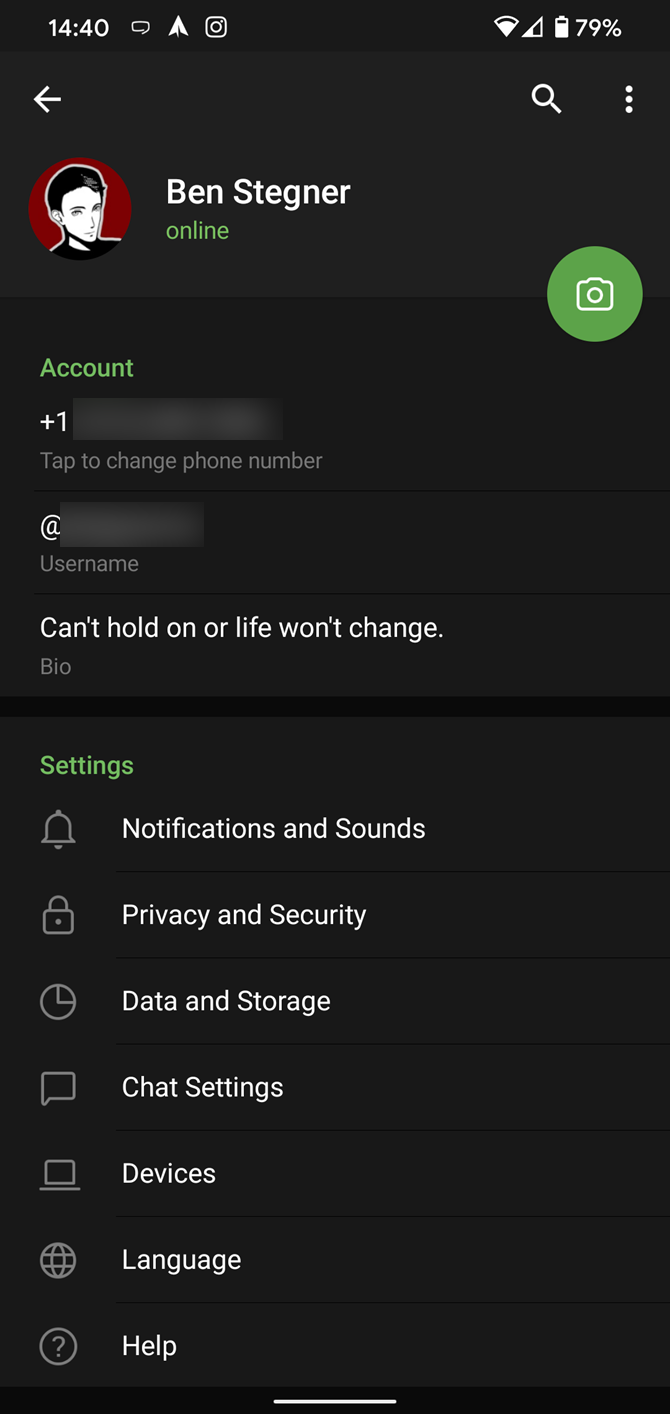
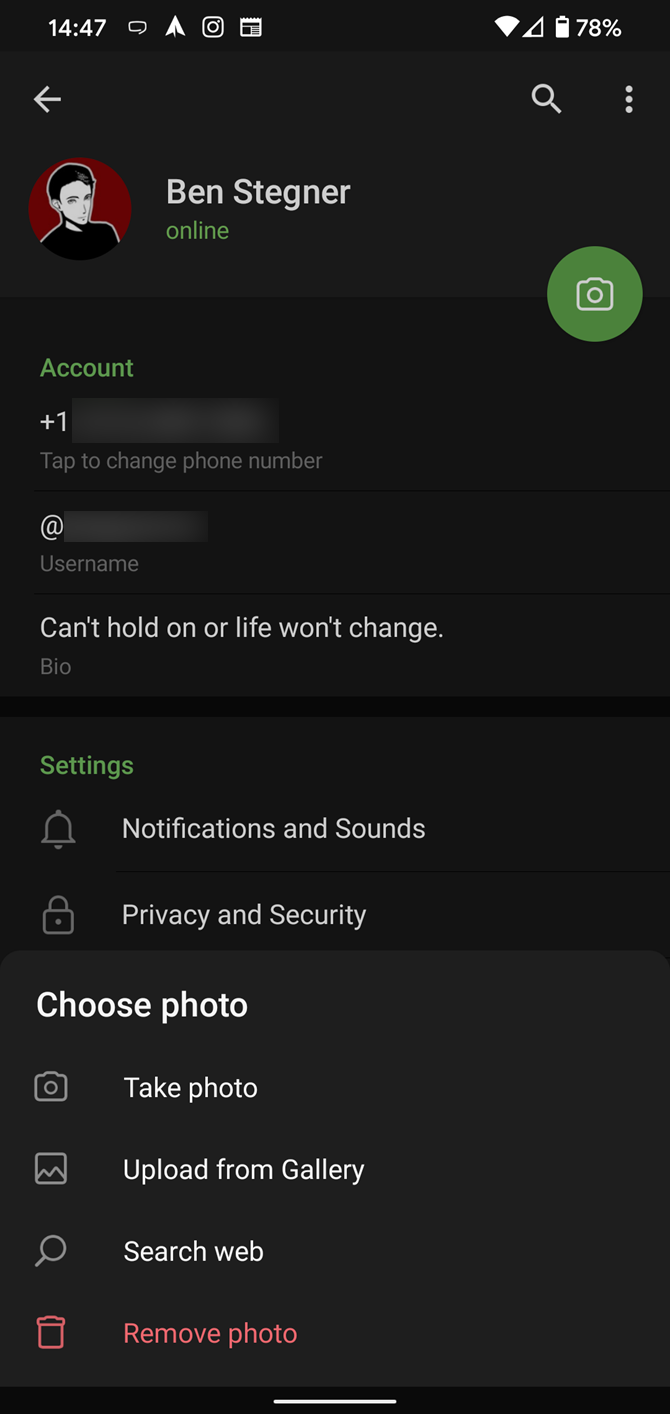
To upload new profile images, open Settings and tap on the camera icon. You can take a photo, upload an existing one, search the web for a new image, or remove your current photo. Tap your profile picture here to see everything you’ve uploaded.

3. Try Secret Chats

While all Telegram chats are encrypted, default chats are still stored on Telegram’s servers. This conveniently allows you to access your messages on multiple devices, but it might raise security concerns.

For maximum privacy, you can create secret chats that use client-to-client end encryption. These aren’t stored on Telegram’s servers, so you can only access them with your specific phone. If one party deletes a message, it disappears on both devices. And you can specify a self-destruct period for all media if you like.

Simply slide out the left menu to start a new secret chat.

4. Customize the Look of Telegram

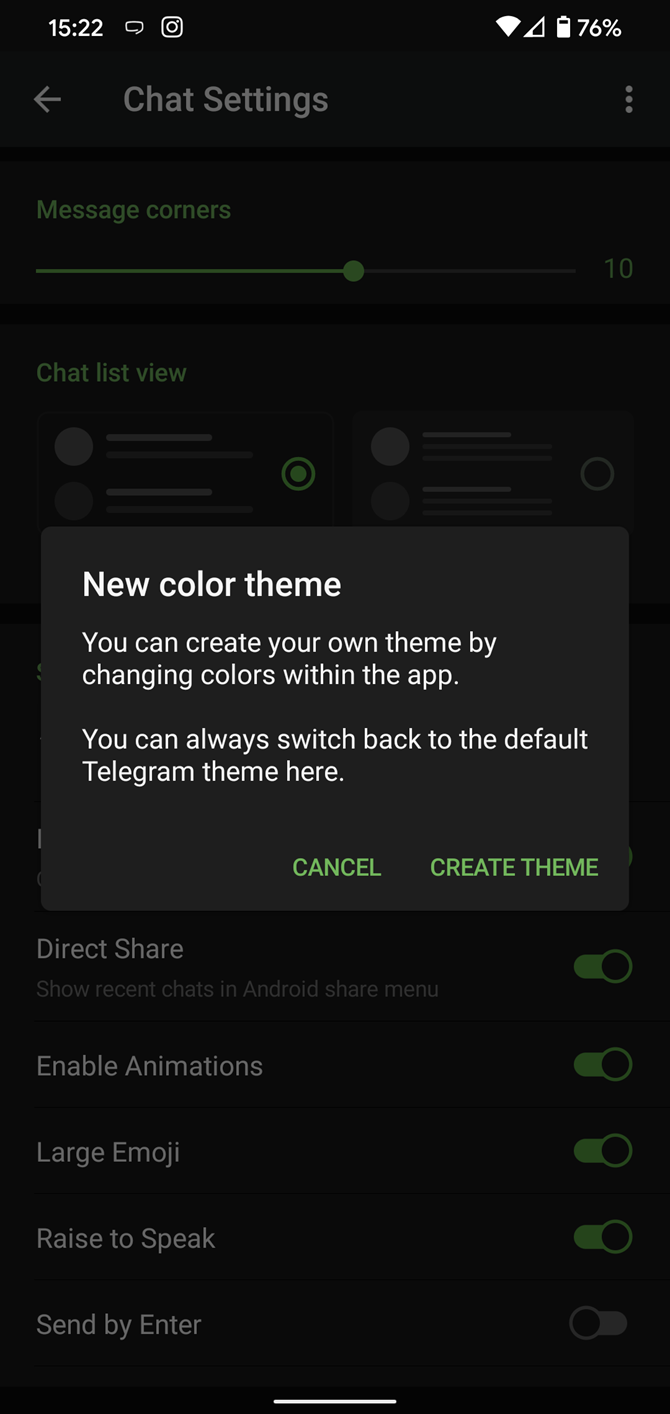
In Telegram, you can adjust the default look’s colors and background. If you like, you can even set up your own custom theme to make your Telegram look exactly the way you want it to look.

To adjust the theme, go to Settings > Chat Settings on Android, or Settings > Appearance on iOS. Here you can change the text size, bubble colors, night mode settings, and similar options. Choose Change Chat Background to set a new wallpaper for your groups.

To create your own theme, tap the three-dot (Android) or plus (iOS) button at the top-right and choose Create new theme. Here, you can create your own theme to get the perfect look. For inspiration, you can download a Telegram theme file someone else has created and import that.

To find these, Android users can try the Themes for Telegram app. If you use an iPhone, have a look at the Telegram Themes subreddit.

5. Utilize Telegram Bots

Like many forms of digital communication, Telegram includes chatbots. Bots add useful functions both on their own and into your chats; they can do everything from checking the weather to playing games.

There are thousands of bots available on Telegram. We sorted through them and picked the best Telegram bots you should be using.

6. Enable Auto-Night Mode

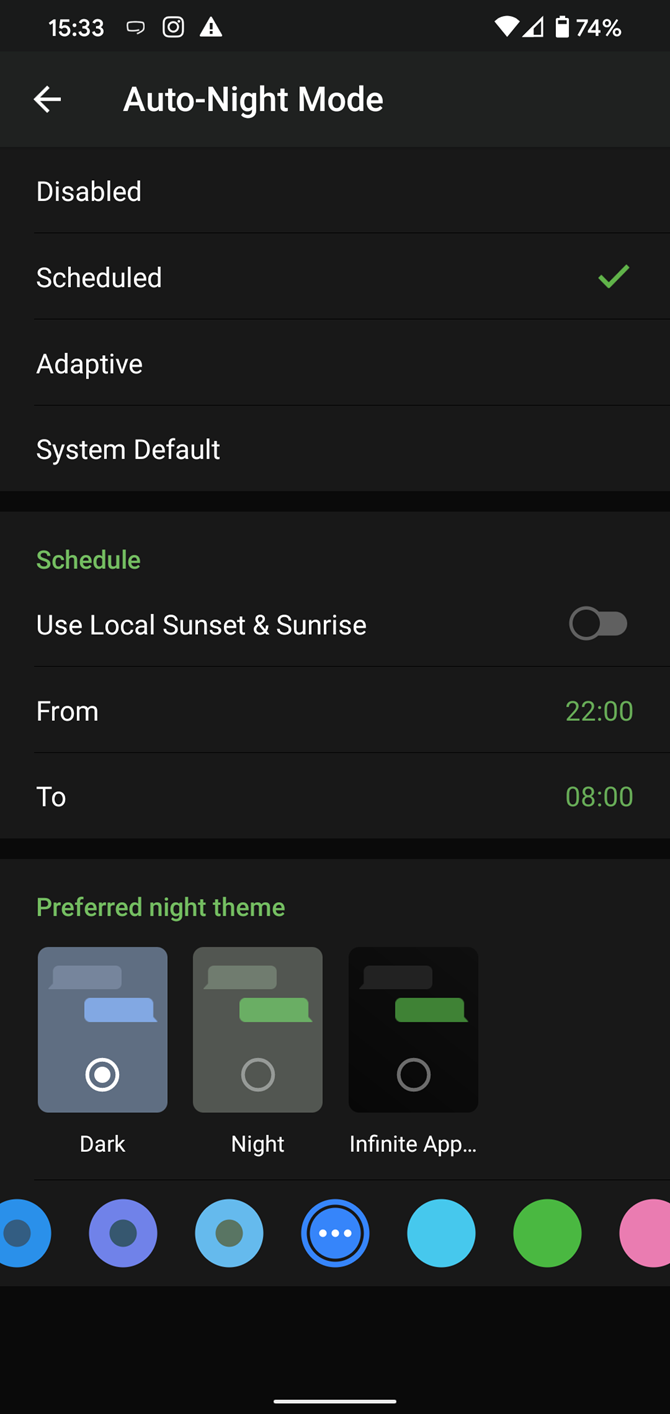
Do you enjoy using both light and dark modes? Telegram has an auto-night feature so that the app doesn’t blind you at night. To use it, go back to to Settings > Chat Settings (Android) or Settings > Appearance (iOS). Select Auto-Night Mode to choose how it works.

You’ll have three options to choose from:

  • System Default (Android) or System (iOS): Matches the theme to your operating system’s current mode.
  • Scheduled: Night mode will start when the sun goes down and turn off when the sun rises again. If you like, you can instead set your own times for it to turn off and on.
  • Adaptive (Android) or Automatic (iOS): The mode will automatically switch based on the light level around you; you can define the threshold.

7. Mute Contacts and Groups

If you’re part of many Telegram chats—maybe you read our list of the best Telegram channels and joined a few too many—they can quickly become annoying. When this happens, you can always mute a chat without leaving it. This way, you can check it on your own terms instead of getting a ping for every new message.

On Android, tap the three-dot Menu button in the top-right of any Telegram chat and choose Mute notifications. On iOS, tap the contact or group name at the top of the screen and choose Mute. Then you can choose to mute the chat for an hour, eight hours, two days, or forever.

8. Share Your Live Location

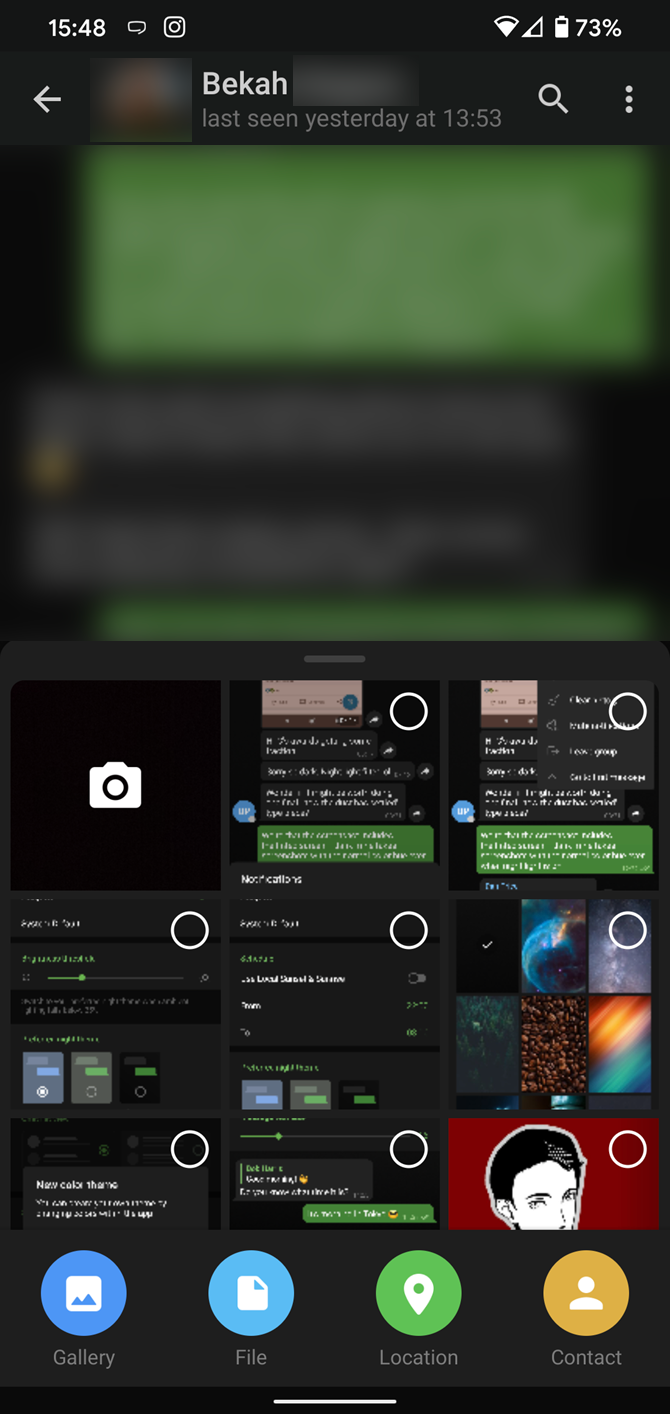
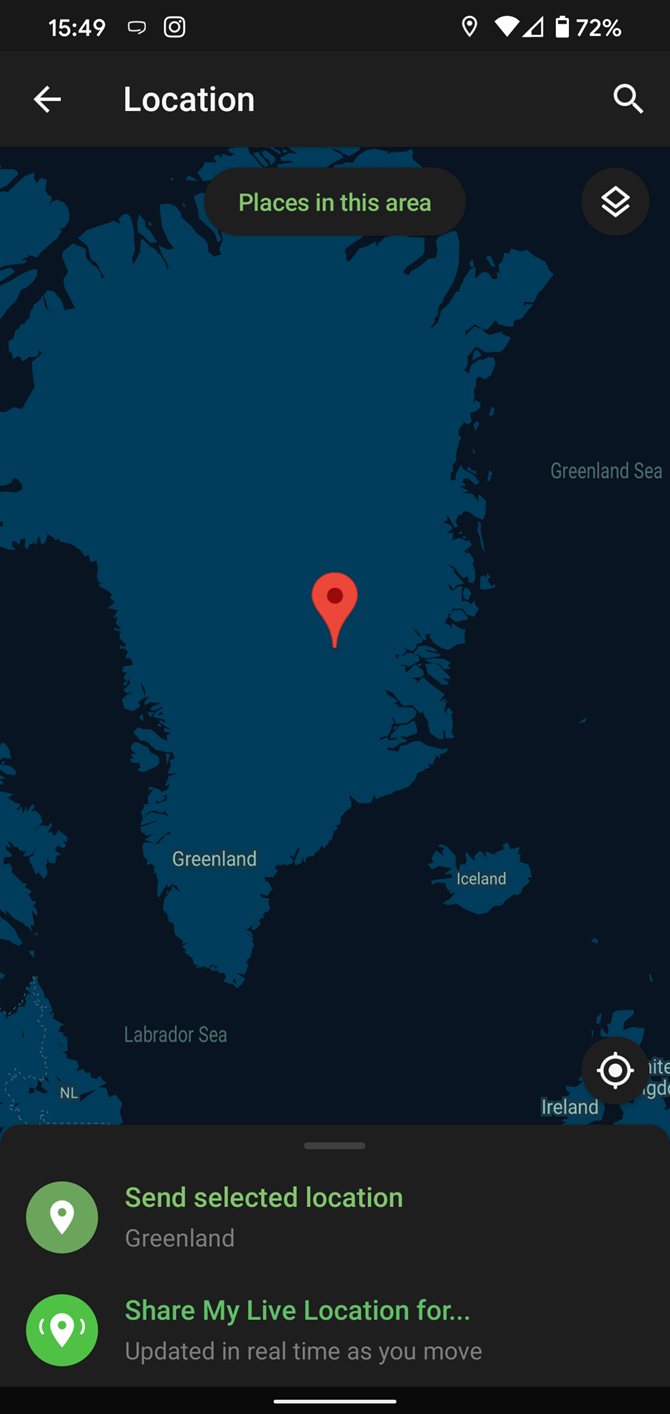
Sharing your location lets others keep an eye on your progress to a destination or look out for your safety. In Telegram, open a chat, tap the paper clip button, and choose Location to share it.

You can choose to share either your current or your live location. Tap Send selected location for a one-time update about where you are. As you can see above, the app lets you manually change this before sending, so don’t trust locations blindly.

Share My Live Location continually updates for the period you specify: 15 minutes, an hour, or eight hours.

9. Connect With a Proxy Server

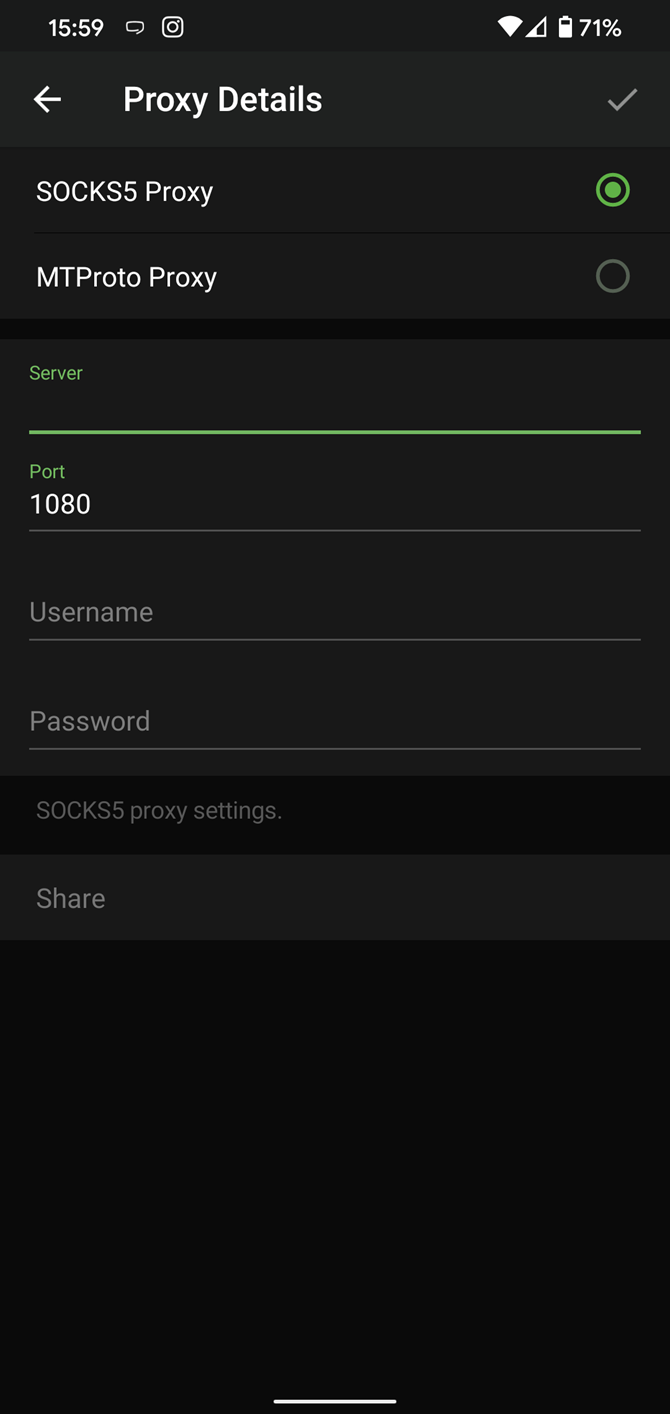
If you want to use Telegram in a region where it’s blocked, you’ll appreciate the Telegram function that allows you to connect via a proxy server. Most of the time, it’s better to use a VPN on your phone, but a proxy can still help you get around regional restrictions.

To use a proxy server in Telegram, open Settings > Data and Storage > Proxy Settings. Enable Use Proxy and you’ll need to fill in all the required information to add it. You can find server info online if needed.

10. Take Advantage of Chat Tools

Telegram offers a few other handy options in chats. You can delete any message by tapping it, then hitting the Trash icon at the top-right. The app lets you delete messages at any time—even messages that the other person sent in a chat.

Telegram also supports hashtags. If you tap a hashtag, you can search across Telegram for it. And using a hashtag lets all Telegram users find your group by searching for it.

Another great option in groups or channels is being able to pin messages. Tap a message and choose Pin to keep it at the top of the chat, where everyone can easily reference it.

There’s also a hidden menu that appears when you long-press on the Send button. Choose Schedule message to delay sending until a time in the future. You can also tap Send When Online (hidden under the three-dot menu on Android) to send the message when the other person is next active on Telegram.

Finally, if you don’t want to disturb the other person, choose Send without sound to silently deliver the message to the other party.

The cool features aren’t all so serious, though. Check out how to make your own Telegram stickers if emojis aren’t enough.

11. Take Control of Privacy and Security

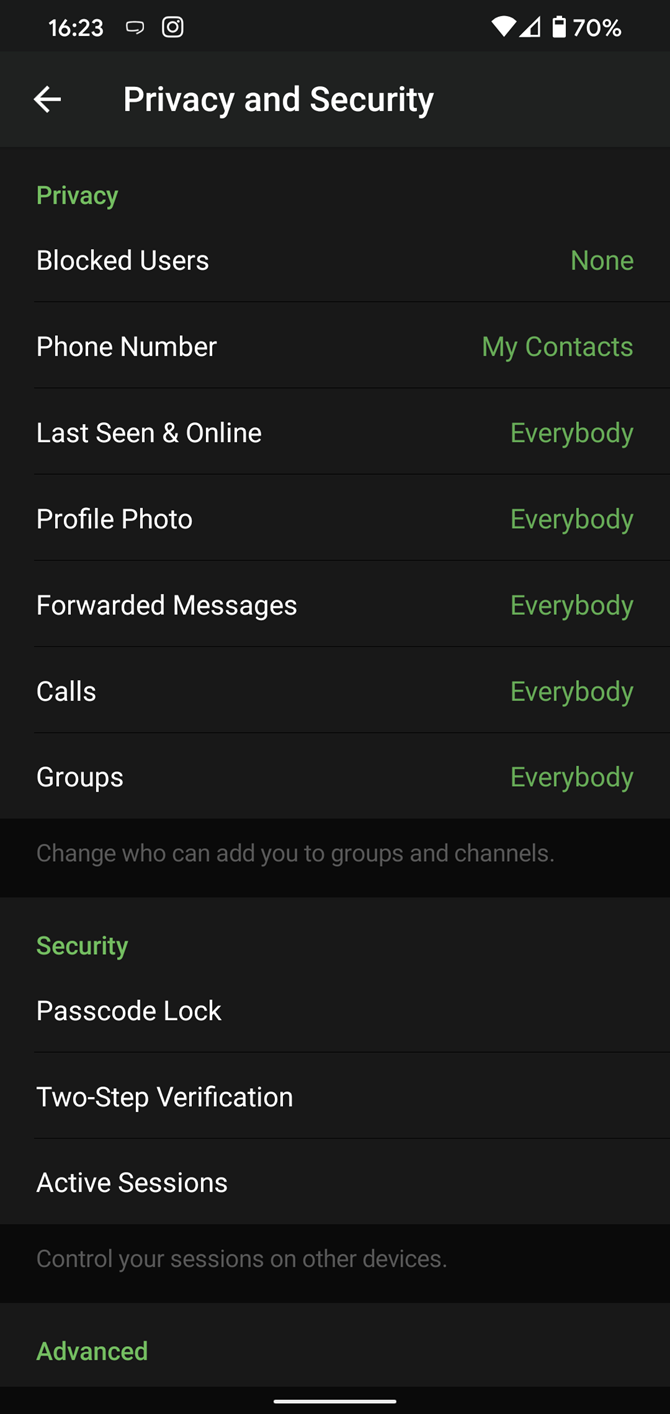
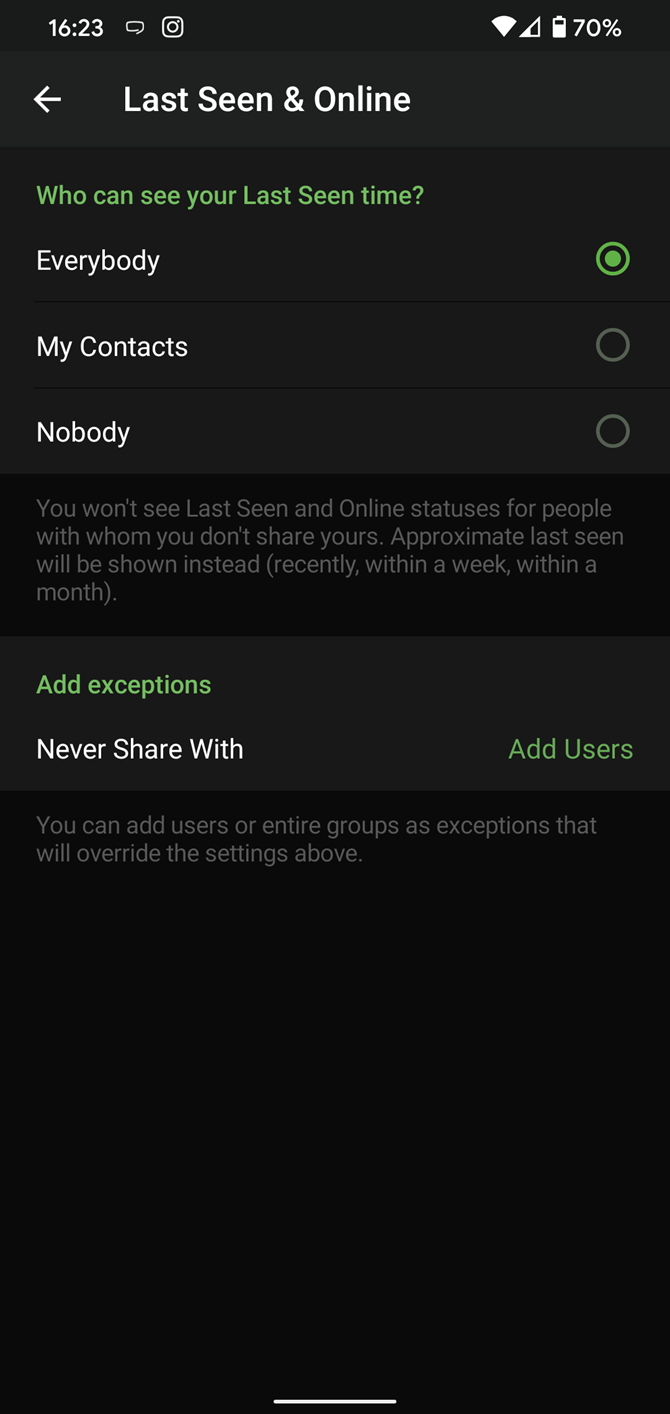
Because Telegram lets you interact with people even if you aren’t in each other’s contacts, you may wish to make your account more private. To change privacy options, head to Settings > Privacy and Security. Here, you can change who can see your phone number, active status, and more.

Telegram also includes useful security options in this menu. Use Passcode Lock to keep people from reading your chats. You can review all Active Sessions and terminate any logins that you no longer use. And under Advanced, you can change how much time must pass with no activity from you before Telegram will automatically delete your account.

12. Save Messages You Want to Access Anywhere

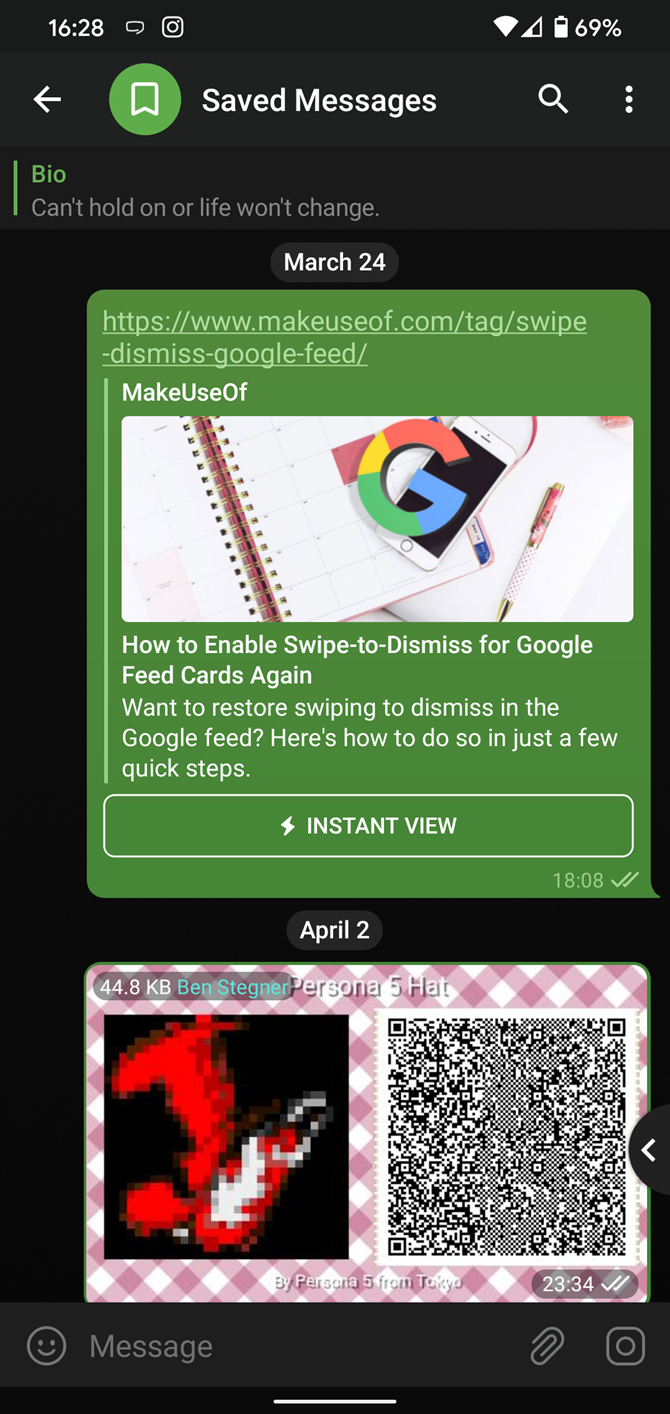
Next time you want to quickly move a piece of media from one device to another, Telegram has you covered. The Saved Messages chat is your own personal cloud scratchpad for keeping a record of information that you can access on any device where you’re logged into Telegram.

To save a message from elsewhere in Telegram, tap it, choose Forward, and select Saved Messages to add it instantly. You can also paste text, links, images, and anything else you’d like from other sources.

This is incredibly useful for keeping track of an important URL, getting an image to another device without cloud storage, or keeping a record of important information. Tap the title bar at the top to browse by media type.

Use These Telegram Features to Become a Pro!

With these features, you’re ready to become an advanced Telegram user and take full advantage of the app. Telegram is a great all-around messenger, especially when you start using its best features and know everything it’s capable of.

If you’re not convinced yet, find out what Telegram is and why people love it. And if you also use Telegram on your computer, consider using one of the best Telegram desktop clients to gain access to even more features.

Read the full article: 12 Useful Telegram Features You Should Be Using


Read Full Article

GTA V Is Now Free on the Epic Games Store


You can now get Grand Theft Auto V for free from the Epic Games Store. However, the offer is available for a limited time only, so you’ll have to be quick to grab a copy of the game. Still, even seven years after it was released, GTA V is well worth playing.

Since launching the Epic Games Store in 2018, Epic Games has given away dozens of games for free. However, none quite as big as GTA V, which is available to download for free until May 21st, 2020. And this is Grand Theft Auto V: Premium Edition, no less.

How to Get GTA V for Free

To grab a copy of GTA V for free, all you need is a Epic Games account, which is also completely free. Once you have set one up, sign in and head over to the Grand Theft Auto: Premium Edition page on the Epic Games Store, where it should be listed as Free.

Grand Theft Auto V: Premium Edition includes the Story mode, access to GTA Online, and “all existing gameplay upgrades and content including The Doomsday Heist, Gunrunning, Smuggler’s Run, Bikers.” You’ll also get the Criminal Enterprise Starter Pack.

GTA V may be seven years old (having been released on consoles in 2013) but it’s still a fantastic game. The story will take you hours to complete, while Grand Theft Auto Online adds even more ways to make money, spend money, and generally cause chaos.

The chances are most people have already played GTA V by now. However, so many people tried to grab a free copy of the game on Thursday (May 14) that the Epic Games Store suffered an eight-hour outage. Thankfully, it’s now up and running once again.

Is the Epic Games Store Better Than Steam?

For years Steam was the only digital storefront for PC gamers. However, Epic Games Store is now a serious contender, and giving away GTA V will only help it compete. With that in mind, be sure to read our article pitting Steam vs. the Epic Games Store.

Read the full article: GTA V Is Now Free on the Epic Games Store


Read Full Article

Dongles vs. Portable Hotspots: Mobile Internet Devices Explained


mobile-internet-showdown

Gone are the days when most of us connected via phone lines. Gone, too, are the days when Ethernet cables were necessary to achieve high speeds. We go online wirelessly, and we’re not limited by the range of our routers. Mobile internet devices can bring us online anywhere with a strong connection to a cellular tower.

Do you connect everything via a portable wireless hotspot or your smartphone? Should you invest in a USB dongle or a WWAN card? Each has their own pros and cons. Let’s take a look.

Portable Mobile Hotspots

Coolpad Surf portable wireless mobile hotspot
Image Credit: Coolpad

Portable mobile hotspots access the same cellular network as your smartphone. You can add them as another device on your shared data plan, or you can get one with its own data-only plan. Data plan prices tend to be similar to the amount you spend on phones.

These mobile internet devices tend to have between 10 and 20 hours of battery life. Some models serve as portable battery packs that can charge your phone or offer shared storage via a microSD card slot. Many have screens that show how much data you’ve used out of your monthly allotment. The specifics change depending on which model you buy.

With the rollout of 5G, portable wireless hotspots can better function as your home’s primary internet connection. That’s because 5G has lower latency, allowing devices to communicate more quickly with one another. This is key for gaming and VR.

Some hotspots, such as 2019’s HTC 5G Hub, can support up to 20 devices and provide enough battery life to cover a day’s usage. But since 5G networks have been slow to roll out, most areas will still rely on 4G LTE.

One downside to a portable mobile hotspot is having to lug it around in addition to your phone, tablet, or laptop. The cost of a data plan can also add up. If you’re merely adding one to your shared data plan, you may be able to get by with tethering your smartphone instead.

Pros

  • Reasonably long battery life
  • Supports more devices
  • The right unit could serve as your home’s primary source of Wi-Fi
  • Added features such as an informative display, shared storage, Ethernet port, or back-up battery power
  • If used exclusively for work, can be helpful for tracking internet usage

Cons

  • Cost
  • Having to carry around another device

Dongles

4G wireless USB dongle
Image Credit: Amazon

Like portable wireless hotspots, dongles tend to come straight from a carrier. Many look like flash drives, while some look like small modems that you plug into your computer via a USB cable. Sticking one in your laptop has the effect of giving your computer a cellular radio. It’s now able to hop online via Wi-Fi or cellular data, just like your smartphone. It can also share that connection with other devices.

4G LTE USB Modem Wireless USB Network Card 4G LTE USB Modem Wireless USB Network Card Buy Now On Amazon $22.58

One big difference between dongles and mobile hotspots is that dongles don’t take up as much space. Nor do they drain on your battery quite like smartphone tethering does. That said, you have to keep the dongle plugged in for it to work, which means giving up a USB port. This probably is not all that big a deal on most laptops, but there are many sleeker models out there that skimp on the number of ports. Some have even done away with full-sized USB ports entirely.

Dongles aren’t limited to USB ports or even PCs. Some plug into a car’s OBDII port, providing passengers with Wi-Fi on the go.

A dongle doesn’t get you out of a data plan. You still need one, and they’re not going to be cheaper than buying one for a portable wireless hotspot. Another downside: dongles often require special software. Setup can be slow or annoying. If you’re a Linux user like me, this may mean you have to jump through additional hurdles, or you may be out of luck entirely.

Pros

  • Cheap upfront cost
  • Less drain on battery
  • Takes up less space than a portable wireless hotspot

Cons

  • Typically requires a USB port
  • May need special software

Mobile Tethering

Don’t want to buy another device? That smartphone you probably have in your pocket may just be all the internet you need. Sounds great, I’m sure. Before you get too excited, the drawbacks are substantial. Here’s the situation.

Smartphones can provide internet access to other devices by turning into hotspots. Tell your phone to start sharing its data, and give the temporary network a name. Your laptop or tablet can connect the same way they would to Wi-Fi. Alternatively, you can connect your phone to a computer using a cable. Regardless of which method you choose, this is called tethering. Wherever you have your phone, you have internet.

If you can even connect a 4G phone to a 5G phone’s hotspot to experience fast speeds on both, if for someone reason you find yourself in that situation.

Doesn’t this mean everyone who buys a dedicated hotspot is being duped? No. Smartphones aren’t designed to serve as hotspots, so they don’t broadcast as far or handle as many devices as dedicated units. Plus, tethering is a huge drain on battery. If you use your phone to provide internet for a few hours, expect to need a charger before the end of the day. Also don’t be surprised if your handset becomes a little hot to the touch.

Pros

  • Convenience
  • Doesn’t need a separate bill
  • Only one device to carry around

Cons

  • Puts a strain on your smartphone
  • Often comes with a smaller monthly limit
  • Isn’t intended to support many devices at once
  • Phone calls happen, making sharing internet with others awkward

WWAN

Wireless wide area networks, or WWAN, are something you’re more likely to interact with while working than in your own time. These are wide area networks that utilize a cellular network to keep corporate computers connected. These can be employee laptops, kiosks, point of sale machines, or vehicles.

A WWAN card gives your PC the ability to connect to a wide area network using a cellular connection. This enables you to connect to a corporate network wherever you’re in range of your company’s WWAN. Typically a traditional carrier provides and manages the infrastructure.

WWAN is offered straight to businesses, not general consumers. For that reason, it’s hard to make a comparison to the options listed above. Don’t think of this as your personal solution to get online. But keep in mind that if you do want to access a wireless wide area network, you will need specific hardware, such as a WWAN card, in order to do so. Some laptops come with this functionality built in.

Which Is Better: Dongle or Hotspot?

You might not be surprised to hear that there is no single best answer. For lightweight, occasional use, smartphone tethering is just fine. Work away from home often and need to connect multiple devices? A portable wireless hotspot can come in handy. Have only limited space to work with? A USB dongle can fit in your pocket.

Or if you’re not particularly interested in another monthly bill, you could stick to Wi-Fi hotspots instead.

Read the full article: Dongles vs. Portable Hotspots: Mobile Internet Devices Explained


Read Full Article