12 May 2020

The 12 Best Online Pet Shops for Pet Supplies and Food


pet-shops

We shop for ourselves online all the time now. From sporting goods to household needs to clothing and accessories, some shop for online deals daily. Browsing and buying pet supplies should be no different.

Whether you want to get Rover a new bone, buy Fluffy a new collar, or simply find the cheapest pet food delivery option, these 12 online pet stores can give you the selections and deals you need.

Big Name Pet Stores

1. Petsmart

Petsmart Main Page

This is a well-known favorite when it comes to shopping for your furry friend. The online deals and savings can be just as good, if not better, as the in-store ones. Check out the Savings Spotlight right on the main page for deals on items you know you will need.

Petsmart also offers free shipping on select items when your cart totals at least $49 worth of merchandise. Just be sure to check products for the shipping discount message before adding them to your cart.

Petsmart also offers some great online conveniences for in-store pickups of items purchased on the website as well as bookings for their grooming salons.

2. Petco

Petco Main Page

With supplies for dogs and cats as well as birds and reptiles, Petco does have decent promotions on products. When you click to obtain more information on their free shipping for orders of $35 or more, you will get complete details.

Be sure to look through the Sale section before you begin adding items to your cart for great deals. The promotions change frequently, so check back often for discounts, gift cards, and promotional codes to use at checkout.

Petco also offers a Repeat Delivery service where you choose your items and schedule them to be delivered regularly. If you order the same items often, this can amount to terrific savings because you can get up to 35 percent off.

Smaller Online Pet Shops

3. Chewy

Chewy Main Page

Chewy.com is a good option for your dog or cat shopping needs. This store offers free 1- to 2-day shipping on orders over $49 along with AutoShip. This repeated shipping option provides five to 10 percent off on select brands and they often have discounts just for signing up.

The Today’s Deals area is full of products with wonderful savings on everything from toys to treats to grooming supplies. The shop also offers prescription medication, gift cards, and 24/7 customer support.

4. Allivet

Allivet Main Page

A site similar to Chewy.com is Allivet which also offers the AutoShip program giving 5 percent off scheduled products. They too have the free shipping on orders over $49. This store does provide products for more than just dogs or cats, however. You can shop for your fish, birds, livestock, and horse supplies as well.

Allivet does not have a large sales or clearance section like some of the other stores, but they offer some little extras. For example, they have a Refer-A-Friend program where you can win a prize, they provide live customer service Monday through Saturday, and a quick reorder feature.

5. BudgetPetCare

Budget Pet Care Main Page

This pet store is the one for some real savings when it comes to shipping. They offer free shipping on all orders within the United States. They have sections for Homeopathic, Supplements, and Hygiene products to make your search easier.

Their Special Deals section is a bit limited with the number of products offered, but they, like Allivet, also have a few bonuses on their site. BudgetPetCare has an online chat service to answer your questions and a newsletter signup for extra savings to your inbox.

6. Coupaw

Coupaw Main Page

Shop here if you enjoy giving back. Every order placed will provide six meals to rescue animals in need. This might be just enough reason for you to shop and feel good about yourself at the same time.

But if you would like a little more, the site offers free shipping on orders over $49, everyday values, and a Gift of the Month program which delivers a gift to your pet’s door for a low monthly fee and free shipping.

7. Only Natural Pet

Only Natural Pet Main Page

Only Natural Pet is a little different as they sell holistic, natural, and eco-friendly products in their line. They sell dog and cat supplies with quite a variety; from toys and gear to vitamins and supplements to grooming and cleaning supplies. All orders over $49 will be shipped for free and they have a nice weekly deals section.

Only Natural Pet also has a large area full of articles and videos called their Holistic Healthcare Library. So, if you are interested in going a healthier route for your pet, this is one site you should check out.

8. Dog.com

Dog.com Main Page

Do not be fooled by the name and skip this one if you have a cat because Dog.com caters to felines too. There is a nifty little section on the site just for cat supplies and they also link directly to their horse and ferret supply stores. Dog.com offers free shipping on orders over $69 and weighing up to 15 pounds.

Like a couple of others we have seen, this store has an “Auto Ship” program for your convenience where you can receive 20 percent off of select products. They also have a really good clearance section, sorted by category, and with options to filter your results.

Medicine-Specific Pet Stores

9. 1-800-PetMeds

1-800-PetMeds Main Page

For joint enhancers, flea and tick control, arthritis, and more, 1-800-PetMeds is a superb choice. They offer free shipping on orders over $49 and often have promotional banners at the top for extra savings.

1-800-PetMeds also provides some useful information with their Pet Education section and Vet Directory for finding a doctor for Fluffy if you are new in town. The site caters to dog, cat, and horse parents and is much easier to navigate than some of its medicine-specific competitors.

10. VetRXDirect

VetRXDirect Main Page

VetRXDirect is another good spot to shop for Spot’s medicine. Like many others, their free shipping applies to orders over $49 and their prices are competitive with 1-800-PetMeds, depending on the product.

So, it is worth a look to comparison shop and you can also sign up for their newsletter to get additional savings.

You can also check out the VetRXDirect Blog for product reviews, new product details, and other helpful posts.

11. PetCareRX

PetCareRX Main Page

PetCareRX is the third excellent option for medical products for your pet. This site offers free shipping on orders of just $48 or more. Also, PetCareRX offers a terrific savings program called PetPlus.

If you join this membership program, you can pay wholesale prices for your medications plus receive free shipping on those items with no minimum. The cost for PetPlus membership is $99 per year, so depending on the number of pets you have and the frequency with which you purchase their medications, you may save a lot of money.

Other features include discounts on other pet supplies, local pharmacy pick-up, and helpful wellness, medication, and breed guides.

One Final Online Retailer

12. Amazon

Amazon Pet Supplies Main Page

Although this is not a true “pet store” it is worth mentioning if you are a current shopper anyway. Amazon.com does have a large pet supply section and if you happen to be an Amazon Prime Member, that free 2-day shipping does apply to select pet products.

For dogs, cats, fish, birds, horses, and more, Amazon Pet Supplies has lots to offer. Their prices are comparable, and in some cases less expensive, depending on the product. The true savings do come on the Prime products and they have instant discounts per brand if you have a favorite.

Remember that you can buy all sorts of things on Amazon, aside from pet supplies. Wondering how to find the best things to buy on Amazon? We’ve got you covered with these tools:

Compare and Save With Online Pet Stores

With these great suggestions for pet supplies, it is always worth a few extra minutes to compare prices. Medicines for our pets can often cost a lot, so checking the three stores listed here for your specific medical product is your best bet.

For the rest of your pet supplies, the other stores offer good savings depending on what you are looking for. Whether you’re looking for pet food delivery or toys and treats, you can certainly save a few bucks with these online pet retailers.

Want to monitor and interact with your pet when you’re away from home? Take a look at our roundup of the best pet cameras available. If your pet is of the canine variety, you’ll also appreciate access to these free online dog training courses.

Image Credit: Ermolaev Alexander/Shutterstock

Read the full article: The 12 Best Online Pet Shops for Pet Supplies and Food


Instagram Lite shuts down in advance of a relaunch


Instagram Lite, the two-year old version of the Instagram app aimed at emerging markets, has quietly disappeared. The previously highly-ranked app vanished from the Google Play charts on April 13 in the countries where it was active, including Kenya, Mexico, Peru and the Philippines. Existing Instagram Lite users have been directed to the main Instagram app via a message that claimed “Instagram Lite is No Longer Supported.”

Android Police first reported the news of Instagram Lite’s shutdown on Monday. TechCrunch has since confirmed details of the app’s removal with Instagram parent, Facebook.

“We are rolling back the test of the Instagram Lite app, a Facebook spokesperson said. “You can start using the latest version of Instagram instead to connect with the people and things you love,” they noted.

Instagram Lite launched on Google Play in June 2018 without fanfare. Like other “Lite”-branded apps on the market, Instagram Lite’s goal was to offer a smaller download that takes up less space on a mobile device — a feature that specifically caters to users in emerging markets, where storage space is a concern. At launch, the “Lite” version of Instagram was 573 kilobytes, or roughly 1/55th the size of Instagram’s then 32 megabyte application.

Like Instagram, the slimmed-down Instagram Lite app allowed users to filter and post photos to a feed or to Stories and browse the Explore page for more content. However, it lacked the option to post videos or direct message friends upon arrival.

On June 28, 2018, Mexico was the first market to receive Instagram Lite. It also accounted for the majority — 62% — of its total installs. To date, Instagram Lite was downloaded approximately 4.4 million in Mexico, according to data from Sensor Tower, shared with TechCrunch. The second largest market was the Philippines, with 14% of installs. Kenya and Peru trailed, with 12.5% and 12% of installs, respectively.

Due to demand for “Lite” applications in these regions, Instagram Lite was able to climb to the top of Google Play’s charts. The app was ranked No. 8 in Kenya in the “Social” category on Google Play, as well as No. 12 in Peru, No. 15 in Mexico, and No. 22 in the Philippines.

On April 15, it vanished from the charts, indicating a removal in those regions, which the company has now confirmed.

While it’s unusual to pull an app entirely when an update is planned, we understand that’s what Facebook has in store for Instagram Lite.

The company — which has always characterized the app as a “test” —  is planning to take what it’s learned over these past years to develop a new version of Instagram Lite. It’s unclear how far out that launch may be, but the new version is currently being built.

Instagram Lite was one of a few “Lite” apps that Facebook offers, led by the early launch of Facebook Lite in 2015, followed by Messenger Lite in April 2018. A number of major tech companies also offer apps aimed at emerging markets, often dubbed their “Lite” version, including Uber, Tinder, Spotify, Twitter and others. Google does the same under the “Go” brand.

But unlike many of these efforts, Instagram Lite had not yet reached some of the larger emerging markets these apps tend to target, like India, Indonesia, Brazil and others. That could change in the future, however.

In the meantime, Lite users are being directed to the main Instagram app. Alternately, they can use Instagram via the web from their phone.


Read Full Article

The case for student mental health days | Hailey Hardcastle

The case for student mental health days | Hailey Hardcastle

School can be rife with stress, anxiety, panic attacks and even burnout — but there's often no formal policy for students who need to prioritize their well-being. Hailey Hardcastle explains why schools should offer mental health days and allow students time to practice emotional hygiene without stigma. Follow along to learn how she and a team of fellow teens transformed their advocacy into law.

Click the above link to download the TED talk.

When will stock market recover?

When will stock market recover?

Please click on the following link to view full post.

https://intradayguruji.blogspot.com/2020/05/when-will-stock-market-recover.html

Via http://intradayguruji.blogspot.com

Twitter to add labels and warning messages to disputed and misleading COVID-19 info


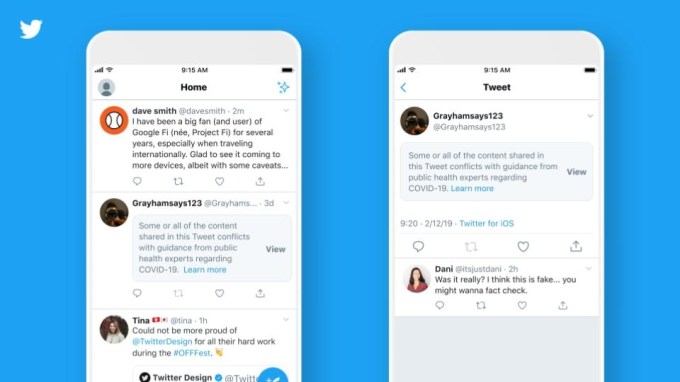
Twitter on Monday announced it will begin to add warning messages and labels to tweets spreading disputed or misleading information about COVID-19. The labels will direct users reading these tweets to a Twitter-curated page or to external resources that offer additional information and context about the claims being made in the tweet. The warnings, meanwhile, will cover the tweet — requiring an extra click to view the content.

According to the screenshots Twitter published, tweets sharing potentially harmful, misleading information will be labeled with a link that reads “Get the facts about COVID-19.” This link will be preceded by an icon of an exclamation mark in a circle in order to draw the user’s attention.

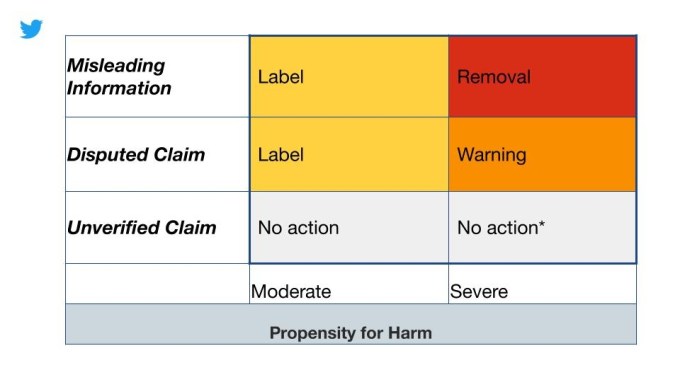
Twitter says some tweets may instead be labeled with a warning message, based on the tweet’s “propensity for harm” and the type of misleading information it presents. For example, people who are tweeting advice that directly conflicts with public health experts’ guidance may see their tweets labeled with a warning, not just an informational link.

In these cases, the tweet itself is covered up by a warning that reads:

“Some or all of the content shared in this Tweet conflicts with guidance from public health experts regarding COVID-19. Learn more.” 

Users can still opt to see these tweets by clicking the “View” button next to the warning, however.

The system of labeling tweets in this way is something Twitter had already developed for labeling tweets containing synthetic and manipulated media, like “deepfake” videos. Meanwhile, the company in March had expanded its definition of harm to include content that directly contradicts the guidance from authoritative sources of global and local health information.

That gave it permission to remove content it believed could risk people’s health and well-being as well as the ability to add the “public interest notice” to tweets posted by world leaders that would otherwise have violated its COVID-19 guidelines.

However, Twitter’s use of labels and warnings with COVID-19 disinformation seems to have been more hurriedly rolled out, following the spread of a new conspiracy video about COVID-19. The video comes from a well-known vaccine conspiracist, discredited scientist and fired researcher-turned-book author. Its high production values and tone of gravity have easily convinced some of its validity, leading to its rapid spread across social media.

On Friday, Twitter said it would assess individual clips from the video to determine if they’re in violation of its rules. It said it would add a warning label to any tweets with links that point to the full video. Twitter also clarified that it’s not taking down tweets with the links because many people are using them when disputing the content.

Today’s news indicates that Twitter is formalizing its decision around the viral video to include any other COVID-19 disinformation, as well.

Twitter didn’t fully detail how it determines how tweets are caught and labeled, but shared a chart that shows how which tweets get a label vs. a warning, or have no action taken.

“Our teams are using and improving on internal systems to proactively monitor content related to COVID-19,” the company explained in an announcement. “These systems help ensure we’re not amplifying Tweets with these warnings or labels and detecting the high-visibility content quickly. Additionally, we’ll continue to rely on trusted partners to identify content that is likely to result in offline harm. Given the dynamic situation, we will prioritize review and labeling of content that could lead to increased exposure or transmission,” said Twitter.

The system may also evolve over time with new labels being added, Twitter noted.


Read Full Article

Coronavirus Polling


Coronavirus Polling

Facebook and Instagram launch a week of grad-themed events and features


Facebook today revealed its plans to celebrate the 2020 graduates this week across both Facebook and Instagram. The series of events, starting today on May 11, will include the company’s previously announced plans to air a virtual graduation ceremony on May 15, featuring celebs like Oprah Winfrey, Awkwafina, Jennifer Garner, Lil Nas X, Simone Biles and Miley Cyrus, among others. Facebook will also now introduce a range of new graduation-themed products and programming across both Facebook and Instagram, including AR effects, chat filters, stickers, challenges, student spotlights and homages, contests, gift guides, collaborative films and more.

The events serve a dual purpose. In addition to celebrating grads, Facebook aims to extend the time students, their families and friends spend on its apps, outside of the virtual graduation ceremony itself.

To that end, it programmed a week’s worth of online activities for graduates and others to participate in.

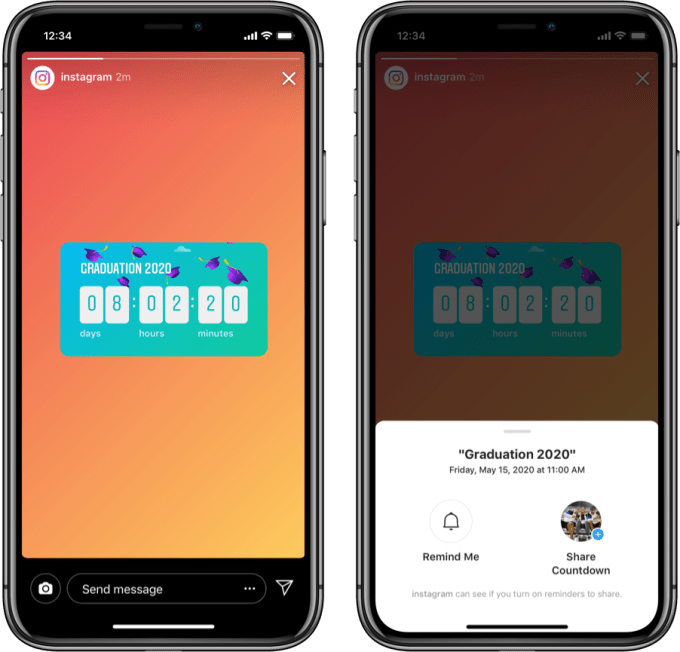
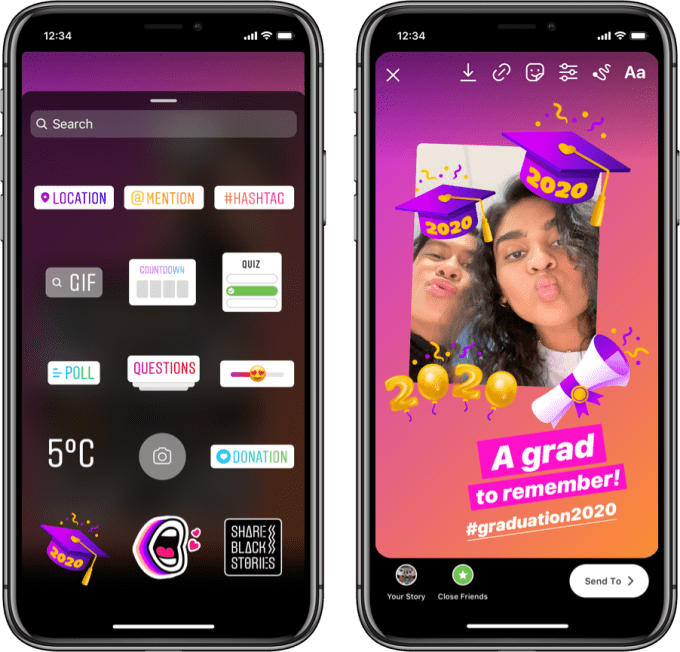
Starting today, May 11, Instagram will add a new graduation countdown sticker for Stories that will promote the May 15 graduation ceremony. Users can also re-share from the main @instagram Story and set a reminder for themselves about the event. Instagram is additionally introducing two new hashtag challenges, including a throwback #GradPhotoChallenge and #MySeniorQuote challenge to feature quotes from seniors across the U.S.

On Facebook, the company is beginning the “Student Spotlight” series that will celebrate this year’s outstanding grads.

Both platforms will also gain grad-themed AR effects. This includes Instagram’s AR graduation speech and cap filters with customizable tassels and Facebook grad cap and walk stickers on Stories. Facebook will offer profile frames, as well, in a variety of school colors.

A grad-themed video chat filter will launch on Messenger, featuring a grad cap experience in a range of styles. College-themed grad cap and gown experiences will also launch in the Effects gallery in Instagram’s Stories.

On Tuesday May 12, Instagram will host a virtual senior night focused on athletes, featuring star athletes including Sabrina Ionescu, Myles Powell, Shay Knighten and Andrew Pryts.

Wednesday, May 13 begins a virtual Instagram comedy show featuring Quinta Brunson, Cameron J. Henderson and Christine Snaps. Meme creator Daquan is also launching an exclusive graduation meme on @instagram and @daquan.
Facebook on Wednesday will begin airing a feature film by Jenn Nkiru of Iconoclast, which gives voice to this year’s graduates as they share excerpts of Marina Keegan’s “The Opposite of Loneliness” essay using imagery from their own school years.

Facebook will also on Wednesday begin to share grad walks on its Facebook app Page’s Stories section, and encourage others to do the same using the hashtag #GradWalk2020.

Thursday, May 14, starts Superlative Day on Instagram, where featured creators will share some of the best superlative from students. Instagram will also be home to an art contest co-hosted by @brooklynmuseum and @design which is asking for student portraiture which will appear in a virtual “art show” on both accounts, with support from Instagram’s own @creators, as well. Five winners will be awarded $5K grants from Instagram.

The @creators account will additionally feature Bryce Xavier, Nia Sioux and Livvy Dunne and “yearbooks on Instagram,” starting on Thursday.

Meanwhile, Instagram’s @shop will open up a graduation gift guide featuring products from a number of small businesses that can be shopped right in the app.

Friday, May 15, is the big day with the virtual ceremony, #Graduation2020, at 11 AM PT/2 PM ET via Facebook Watch within the Facebook app and on facebook.com/facebookapp. Highlights from the event will be posted to the @instagram account and on contributors’ own social media.

Facebook today announced new additions to the ceremony, which was already set to include an introduction by Sheryl Sandberg, an address by Oprah, and performance by Miley Cyrus (“The Climb.”)

It’s now adding Cardi B, DJ Khaled, La La Anthony, Kristen Bell, Selena Gomez, Sterling K. Brown, Matthew McConaughey, and Milo Ventimiglia to the event and has released a full list of other contributors who will join at some point during the broadcast.

These include:

AdamRayOkay (as Rosa), Amy Schumer, AnnaSophia Robb, Antoni Porowski, Ashley Graham, Becky Lynch, Bailey Sok, Bobby Berk, Bretman Rock, Cardi B, Charles Melton, Chiney Ogwumike, Chris Paul, Chrissy Metz, Cookie Monster & Grover, Daddy Yankee, Damian Lillard, David Dobrik, David Oyelowo, Desus & Mero, Dillon Francis, Diplo, Dixie D’amelio, DJ Khaled, Drew McIntyre, Dude Perfect, Emily Ratajkowski, Gloria Estefan, Gordon Ramsay, Hailee Steinfeld, Huda Kattan, Iliza Shlesinger, Jess & Gabriel Conte, J.J. Watt, Jonathan Van Ness, John Mayer, Joshua Bassett, Julian Edelman, Kandi Burruss, Karamo Brown, Kofi Kingston, Kristen Bell, La La Anthony, Lacy Evans, Lana Condor, Lisa Leslie, Lisa Vanderpump, Lizzy Greene, Luis Fonsi, Marlee Matlin, Marsai Martin, Marshmello, Matthew McConaughey, Milo Ventimiglia, Nick Kroll, Olivia Rodrigo, Ronny Chieng, Roman Reigns, Sasha Banks, Selena Gomez, Sterling K. Brown, Steve Aoki, Sofia Carson, Sofia Wylie, Steve Harvey, The Miz, Tim Tebow, Tori Kelly, Whitney Cummings, Wilmer Valderrama and Winnie Harlow.

Also on Friday, friends and family and other community members will be invited to share advice and well-wishes with the Class of 2020 as part of a “Dear Grads, Love Groups” initiative. These will be compiled into a film directed by Chris Wilcha and made available on the Facebook app after the commencement. Instagram’s @shop will then close the week of events with a Stories takeover from small business founders who will also share their advice with grads.

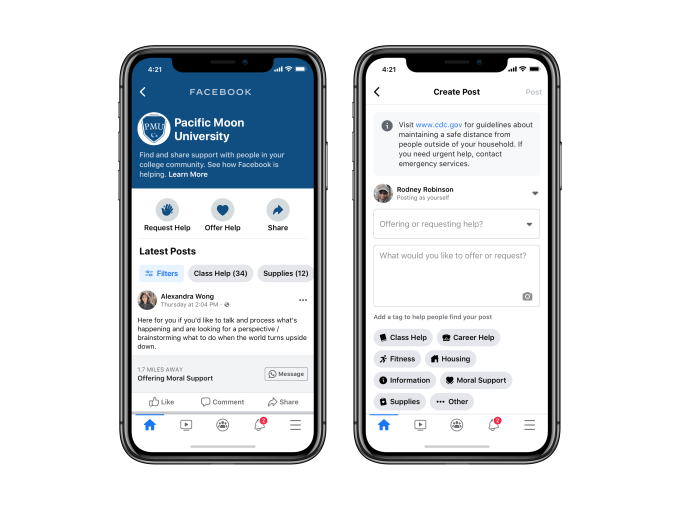
In the weeks following graduation, Facebook will begin allowing students, teachers, and alumni in the U.S. to offer and request assistance in their college communities in its Community Help feature. This will focus on categories like career help, housing, moral support, fitness, and supplies.

The week-long list of events is only one of several online graduation celebrations that students can join this week, as the COVID-19 pandemic has forced schools to cancel their planned in-person ceremonies due to the pandemic and forced lockdowns. While many schools are offering some sort of virtual experience for graduates, some students said these have been disappointing and report feeling sad, depressed and having missed the chance to celebrate an important milestone.

Along with Facebook, other online events include YouTube’s virtual gradation on June 6 featuring commencement addresses by former President Barack Obama and Michelle Obama, plus participation from BTS, Lady Gaga and former Secretary of State Condoleezza Rice. There are also a number of graduation-themed TikTok challenges, and individual schools are often promoting their own social media hashtags for their virtual celebrations.

But despite the star-studded nature of some of these virtual events, they may not address students’ feelings of loss. The pandemic has taken away many things, but students having to miss out on milestone events like prom and graduation are particularly difficult because they can’t be revisited at some later, “safer” date further down the road.


Read Full Article

11 May 2020

Facebook and Instagram add new features to help you find and support local businesses


Facebook is announcing a handful of new features that will allow users to show their support for small businesses and get the latest updates as those businesses deal with the fallout — economic and otherwise — of the COVID-19 pandemic.

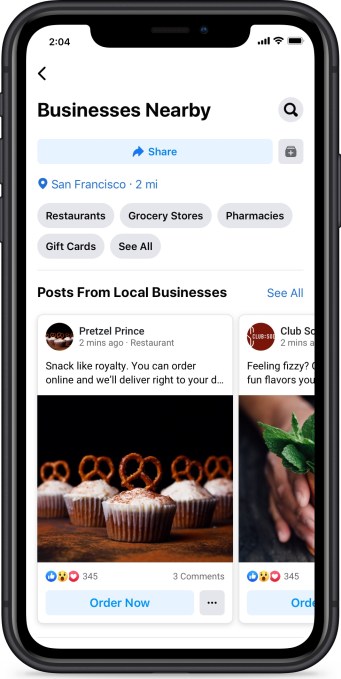
The social network is introducing a new section called Businesses Nearby, which will allow you to see the latest posts from businesses within a certain geographic radius (you can adjust it to anything from 1 mile to 500 miles), view their current hours and pickup/delivery options and make a booking or send them a message.

In a blog post, Facebook described this as a way to allow users to “more quickly find essential products and services” while also helping businesses get “more virtual foot traffic as they move online to stay open.”

Facebook Businesses Nearby

Image Credits: Facebook

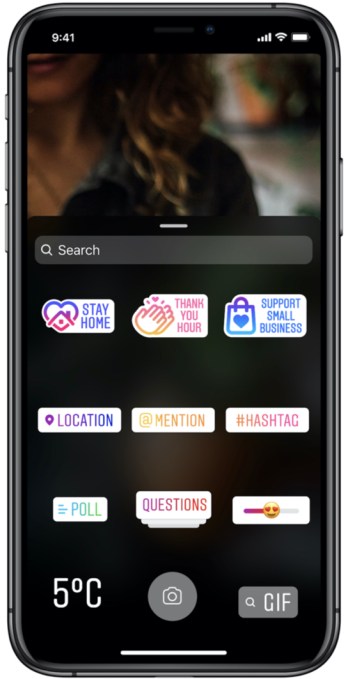
And if you want to show your support for a small business, you can also use the new Support Small Business sticker on Instagram or #SupportSmallBusiness hashtag in Facebook — any posts using the sticker will be added to a shared Instagram story highlighting similar posts from all the accounts you follow. Creators on Facebook will also be able to tag a post as being “in support of” a specific small business.

The company is also trying to make it easier for businesses to communicate with customers by adding a dedicated Business Inbox in the Messenger app — allowing them to use Messenger to answer questions sent to their Facebook Page — and by allowing businesses to tag all their COVID-19-related posts from the Page composer.

Instagram stickers

Image Credits: Facebook

In addition, Facebook said it will be posting COVID-19-related information, tools and tips for small businesses in both the Facebook and Instagram apps. Businesses can access this information through the Facebook app shortcuts or their Instagram business profile.

These changes come on top of a $100 million grant program for small businesses that Facebook announced in March, as well as other new features like the ability to share temporary service changes.


Read Full Article

A virus detection network to stop the next pandemic | Pardis Sabeti and Christian Happi

A virus detection network to stop the next pandemic | Pardis Sabeti and Christian Happi

How can we stop the next pandemic before it starts? Disease researchers Pardis Sabeti and Christian Happi introduce Sentinel, an early warning system that detects and tracks viral threats in real time -- and could help stop them before they spread. Learn more about the cutting-edge technology that powers the system and how the Sentinel team is helping scientists and health workers during the coronavirus pandemic. (This ambitious plan is a part of the Audacious Project, TED's initiative to inspire and fund global change.)

Click the above link to download the TED talk.

The Best TV Shows to Binge-Watch During Lockdown


binge-worthy-shows

Are you fed up with being stuck at home all day? Join the club. To help anyone currently locked down due to COVIID-19, we have compiled a list of the best shows to binge-watch on a range of streaming platforms.

1. ReGenesis

Let’s kick off with a virus-themed show. ReGenesis is a Canadian series that ran for four seasons in the 2000s. The story follows a scientific research lab in Toronto as it investigates bioterrorism, diseases, and environmental changes across North America.

You can grab all four seasons on The Roku Channel and Pluto TV.

2. The Office US

The Office US is always worth watching thanks to its neverending stream of comedy gold.

But more aptly, but for the millions of office workers around the world who are stuck at home during the coronavirus lockdown, the series serves as a timely reminder of what they’re missing out on (or happily avoiding!).

You can watch all nine seasons of this binge-worthy show on Netflix.

3. Porridge

A show based in a prison draws obvious parallels with the current lockdown we’re all going through.

But for fans of classic British comedy, Porridge is a must-watch. It is widely considered to be one of the greatest British sitcoms ever and stars one of the UK’s most talented comedians of all-time, the late Ronnie Barker.

The show ran for three seasons in the mid-70s. It is available to stream on Britbox.

4. The Last Dance

The Last Dance has been one of the big hits of the quarantine period. It doesn’t even matter if you’re not a basketball fan—this documentary about Michael Jordan is one of the best shows to binge-watch on Netflix right now.

It includes interviews with a litany of sports stars and celebrities; everyone from Dennis Rodman to Carmen Electra gets screen time.

Watch The Last Dance on Netflix.

5. El Chapo

This co-production between Netflix and Univision is a crime drama about the life of fallen Mexican drug lord, Joaquín “El Chapo” Guzmán.

Once the most powerful drug trafficker in the world, El Chapo now sits in a supermax federal prison in Colorado. This show tells the story of how he got there.

You can stream El Chapo on Netflix.

6. Game of Thrones

Has there ever been a more binge-worthy show than Game of Thrones? Over the course of its eight seasons between 2011 and 2019, the show grew into a cultural phenomenon. Only one season failed to earn a score of more than 90 percent on Rotten Tomatoes.

Game of Thrones is available to stream on HBO GO.

7. Pandemic: How to Prevent an Outbreak

This Netflix Original documentary, released with uncanny timing in January 2020, explores how humans could tackle a serious virus if faced with a global pandemic.

The six episodes explore influenza outbreaks, vaccines, new viruses, and more. Several leading scientists are interviewed throughout.

You can watch Pandemic on Netflix around the world.

8. Peaky Blinders

Is Peaky Blinders the best TV series to come out of the UK in the last decade? You could certainly make the case.

The show is based on the real-life story of the Peaky Blinders. They were a British street gang operating in Birmingham between 1890 and 1930.

And if you’re looking for good shows to watch and you still haven’t ticked this one off your list, stop reading the article, go and watch every episode on Netflix right now, then come back.

9. Suits

Suits is another of the best shows to binge-watch during lockdown. The drama tells the story of the relationship between college-dropout-come-legal-protégé Mike Ross and a senior partner at his law firm, Harvey Specter.

The show offers solid storylines, a healthy dose of comedy, and a motley mix of supporting characters.

You’ll need an account with Amazon Prime Video to stream all eight seasons.

10. Tiger King

Who could have predicted that a TV show about a dispute between a zookeeper and the CEO of an animal sanctuary would become one of the best series to watch during the coronavirus crisis?

35 million people tuned in within 10 days of Tiger King’s release, making this Netflix show one of the company’s most successful series to date.

You can watch Tiger King on Netflix right now.

11. Sunderland ‘Til I Die

Anyone who’s missing their fix of soccer should try watching Sunderland ‘Til I Die. The sports documentary runs for two seasons as it follows the fortunes of English football side, Sunderland FC.

The club was relegated from the English Premier League in 2017. The series has unprecedented access to the chairman and manager as they try to fight their way out of the second division at the first attempt during the 17/18 season.

Sunderland’ Til I Die is available to watch on Netflix.

12. The Simpsons

With 31 seasons, 700 episodes, and a feature film, there’s enough material in The Simpsons’ back catalog to keep you busy until Christmas.

And hey, if quarantine does last that long because of the dreaded “second wave,” what better way to spend your time than watching the longest-running American sitcom in history?

All 31 seasons are available on Disney+.

13. Breaking Bad

Many people claim Breaking Bad is the best TV show of all time. Making it a shoe-in for our list of the best shows to binge-watch.

In case you’ve been living under a rock, the story follows the life of Walter White, a terminally ill chemistry teacher who moves into the meth business to protect his family’s financial future.

The show can be streamed on Netflix.

14. Mad Men

The advertising industry of the 1960s played a prominent role in driving the cultural changes that took place across the US and Europe throughout the decade. Yet the industry itself was also in a state of flux, as old pre-war attitudes were swept away for a sexier and more sophisticated image.

Mad Men, which picked up 16 Emmys and 5 Golden Globes over its seven-season run, tells the story of the 60s through the eyes of one of the largest ad agencies on New York’s famed Madison Avenue.

You can watch Mad Men right now on Netflix.

15. Between

We end with one more show about pandemics. Between was a joint production between Netflix and Canada’s Citytv network.

The story follows a small village that’s under attack from a deadly virus, with only the young surviving. The government issues a strict quarantine around the town, leaving the inhabitants to work the rest out for themselves.

You can stream the series on Netflix right now.

More of the Best Shows to Binge-Watch

If our list of the best shows to binge-watch during lockdown has left you wanting more, be sure to also take a look at our articles listing the best science TV shows to watch on Netflix and the best food documentaries to watch on Netflix.

You should also check out the A-Z of shows to binge-watch on Netflix.

Read the full article: The Best TV Shows to Binge-Watch During Lockdown


Read Full Article

Is FaceTime Not Working? 15 Potential Fixes to Try


facetime-issues

When FaceTime works, it’s marvelous: you can video call your friends and family with perfect clarity. But when FaceTime isn’t working, there are so many potential problems that it’s difficult to know how to fix it.

We’ve pulled together all the best ways to fix FaceTime on your iPhone, iPad, or Mac. Start at the top with the most likely solution, then work your way through the list to get FaceTime working again.

We even have specific fixes for when Group FaceTime isn’t working, so keep an eye out if that’s your problem.

1. Restart Your iPhone, iPad, or Mac

One of the best troubleshooting tips for any app is to restart your device; this advice is the same for when FaceTime isn’t working. It’s best to close all your apps first to make sure you don’t lose any unsaved progress and to ensure they start fresh after restarting.

If your device doesn’t respond, find out how to force restart an iPhone or force restart a Mac instead.

2. Find Out If FaceTime Is Down for Everyone

Apple System Status website showing all green lights

Apple services sometimes experience technical issues, which means FaceTime won’t connect for anyone. When this happens, there’s nothing you can do but wait for Apple to find a solution.

Take a look at the current status of every Apple service on the Apple System Status website. This page also alerts you of scheduled FaceTime downtime.

3. Confirm If FaceTime Works in Your Country

Unfortunately, FaceTime isn’t available worldwide—although it certainly comes close. It also isn’t available with every single cell carrier.

Take a look at Apple’s carrier support page to find out if FaceTime is supposed to work in your country with your cell carrier. If FaceTime isn’t available where you live, you might be able to bypass these limitations by using a VPN on your iPhone.

4. Test the Internet Connection on Your Device

Unlike regular phone calls, FaceTime connects to other people over the internet. If FaceTime won’t connect, load a fresh webpage on your device to test the internet connection.

FaceTime works best over Wi-Fi, but you can also use it with your cellular data on an iPhone or iPad. To use FaceTime without Wi-Fi, go to Settings > Cellular and turn on the FaceTime slider to let it use cellular data.

FaceTime option in Cellular Data settings

5. Make Sure You Use the Right Contact Details

On your iPhone, you can check your own FaceTime contact details by going to Settings > FaceTime > You Can Be Reached By FaceTime At. Ask the person you’re calling to do the same to make sure you have the right details for them.

To check these details on a Mac, open the FaceTime app and go to FaceTime > Preferences from the menu bar. Find your contact details in the middle of Preferences.

6. Confirm That Your Device Works With Group FaceTime

You might not be able to get Group FaceTime chats to work if your device is too old. This could be the case even if one-to-one FaceTime conversations are okay.

For Group FaceTime chats, everyone needs one of the following devices running at least iOS 12.1.4:

  • iPhone 6S or later
  • iPad Pro, iPad Air 2, iPad mini 4, iPad (5th generation), or later
  • iPod touch (7th generation)
  • Any Mac running macOS Mojave 10.14.3 or later

7. Limit the People in Your Group FaceTime Chat

Group FaceTime chat on Mac

FaceTime lets you start a group chat with up to 32 people at a time. But having that many people makes it difficult to know who is causing FaceTime problems. Try starting a one-to-one chat, then add extra people one at a time to find out when the problems start.

If FaceTime won’t connect to anyone at all, there must be an issue with your device or internet connection. However, if FaceTime won’t connect with one person in particular, the problem probably lies at their end.

8. Update the Software on Your Device

FaceTime might run into issues if you aren’t running the latest software on your iPhone, iPad, or Mac. Update your device to the latest OS release to fix this issue. Also, make sure the person you’re trying to FaceTime updates their device as well.

On an iPhone or iPad, go to Settings > General > Software Update.

On a Mac, go to System Preferences > Software Update.

9. Set the Date and Time Automatically

Date & Time Settings with Set Automatically option in settings

Apple suggests that you set the date and time automatically if FaceTime keeps failing on your iPhone, iPad, or Mac. Most of us do this anyway, but you should make sure it’s enabled in the settings on your device.

On an iPhone or iPad, go to Settings > General > Date & Time and make sure Set Automatically is turned on.

On a Mac, go to System Preferences > Date & Time. Tick the box to Set date and time automatically and select your time zone.

10. Temporarily Disable FaceTime in Your Settings

You can turn FaceTime off and on from the FaceTime settings on your iPhone, iPad, or Mac. You might need to sign into your Apple ID account when you turn it on again.

On an iPhone or iPad, go to Settings > FaceTime. Use the toggle at the top of the page to turn FaceTime off, then tap it again to turn it back on.

FaceTime settings on iPhone

On a Mac, open the FaceTime app and go to FaceTime > Preferences from the menu bar. Uncheck the option to Enable this account to turn FaceTime off. Then check the box to turn it back on again.

11. Sign Out of FaceTime, Then Sign In Again

If FaceTime still isn’t working on your iPhone, iPad, or Mac, sign out entirely and then sign in again. Make sure you use the correct Apple ID username and password when signing back in.

On an iPhone or iPad, go to Settings > FaceTime. Tap your Apple ID and choose to Sign Out from the popup that appears. After signing out, tap Use your Apple ID for FaceTime and sign in using your Apple ID details.

On a Mac, open the FaceTime app and go to FaceTime > Preferences from the menu bar. Click Sign Out at the top of the window, then confirm you want to Sign Out. After signing out, enter your Apple ID details in the main FaceTime window to sign in again.

12. Test the Camera and Microphone on Your Device

If people can’t see or hear you on FaceTime, there might be a problem with the camera or microphones on your device. The simplest way to test this is to open the Camera app and record a short video of yourself talking into the front-facing camera. On a Mac, use the Photo Booth app for this.

Play the video back to find out if there are any problems with the audio or video you recorded. If there are, see how to fix iPhone camera issues first. Get in touch with Apple Support to repair your camera or microphone if those tips don’t work.

13. Turn On Your Camera and Microphone in FaceTime

FaceTime controls from iPhone

If people can’t see or hear you in FaceTime, it might be because you’ve disabled your camera or microphone for that FaceTime call.

During a FaceTime call, reveal more controls by swiping up on an iPhone or iPad, or hovering your mouse over the FaceTime window on a Mac. Click the Camera and Microphone icons to turn your camera or microphone on and off during the call.

14. Disable FaceTime Content Restrictions

If the FaceTime app is completely missing from your iPhone, iPad, or Mac, you might have turned on restrictions. People usually use these settings to keep young children from accessing certain features on a device.

On an iPhone or iPad, go to Settings > Screen Time > Content & Privacy Restrictions. Go into Allowed Apps and make sure FaceTime and Camera are both turned on. If prompted, enter your Screen Time passcode, which may be different from your standard passcode.

FaceTime and Camera options in Allowed Apps settings

On a Mac, go to System Preferences > Screen Time, then select Content & Privacy from the sidebar. Go to the Apps tab and check the boxes for Camera and FaceTime. If prompted, enter your Screen Time passcode.

15. Enable Certain Ports in Your Firewall

FaceTime might keep failing if your computer firewall blocks the necessary connections. This can happen with third-party firewalls that aren’t configured to work with FaceTime. You can fix these issues without disabling your firewall by opening particular ports.

Check with whoever made your firewall to find out how to unblock particular ports. Then take a look at Apple’s firewall support page to find out which ports you need to unblock for FaceTime.

Use These FaceTime Alternatives If It Still Isn’t Working

You should be able to fix almost every FaceTime problem with the troubleshooting tips above. But if they didn’t help, and FaceTime still isn’t working, you can always use an alternative app instead.

There are plenty of video conference apps to use instead of FaceTime. Most of them are free and almost all of them work across multiple platforms. That means you can start adding Android and Windows users to your group calls as well.

Read the full article: Is FaceTime Not Working? 15 Potential Fixes to Try


Read Full Article

How to Host a Facebook Watch Party to Watch Videos Together


facebook-watch-party

A Facebook Watch Party is a great way to watch Facebook videos with friends. The Watch Party happens in real time, so that everyone sees the same thing and can comment on it while watching.

In this article we show you how to create your own Facebook Watch Party. Allowing you to watch Facebook videos together with your friends online, even if they live a long way away.

What Is a Facebook Watch Party?

Facebook Watch Party overview

Facebook launched the Watch Party feature globally in 2018. Watch Party allows people to watch videos on Facebook together in sync. This makes watching videos a shared experience.

Those in a Watch Party can watch live or recorded videos on Facebook. You can add videos to the queue, invite friends to join, and comment in real time. This all appears to everyone in the Watch Party.

Whoever is hosting the Watch Party has full control of the experience. This means that if you are hosting and you fast-forward a video or skip to a new video, everyone within the Watch Party will see the same thing. It’s a unified watching experience.

It works in much the same way as the ways to watch YouTube videos together.

A Facebook Watch Party could be used to host a question and answer session, jam out to music videos together, sweat to the same exercise video, and more.

When announcing the global launch of Watch Party on Facebook Newsroom, Facebook Product Manager Erin Connolly wrote:

Imagine sitting down to watch a loved one’s graduation video with your extended family when they couldn’t be there in person, reliving a vacation by sharing videos and swapping memories, or even just hanging out with friends watching funny videos together.

If the video exists publicly on Facebook, you can watch it in a Watch Party. You can host a Watch Party for a small circle of friends or for a group with hundreds of members.

It’s easy to create a Watch Party from multiple places within Facebook. Here’s how:

1. How to Host a Facebook Watch Party

You can create a Watch Party from your timeline, a group you’re a member of, and a page you’re an admin or editor of. Normal permissions apply, unless you manually adjust them, so only those on your friends list or members of those groups will see the Watch Party.

Navigate to where you want to begin your Watch Party, click Write Post and select Watch Party.

Facebook Watch Party add videos

A window will open for you to add videos to the queue. You can search for a video using the text field at the top or switch between the tabs like Watched and Live. When you find a video you like, click Add to Queue.

Remember, you can only add public Facebook videos or those that you’ve uploaded yourself. So if you want to watch a movie with other people online, you’ll be better off using these ways to watch Netflix with friends far away.

You can click View Queue to see what you’ve added, and just click Remove on any video if you change your mind. When you’re happy with your video choices, click Done.

Facebook Watch Party post

Finally, add some descriptive text to tell people about your Watch Party. When you’re ready to begin, click Post.

2. How to Manage a Facebook Watch Party

Your Watch Party will begin immediately once posted.

You can add new videos to the Watch Party while it’s in progress. Click the Add Video button on the right-hand pane. Again, search for a video or use the tabs. When you find a video you want, hover over the thumbnail and click the Plus icon. Alternatively, use the Dropdown Arrow to choose either Play Now or Play Next.

Facebook Watch Party queue

Control the video queue at any time by clicking See All next to the Now Playing header. Hover over the video’s thumbnail, click the Dropdown Arrow, and you can choose to Play Next or Remove From Queue.

If you pause the video it will also pause for everyone else. However, changing the video quality, going full screen, or muting the audio will only apply to you.

If you want to invite specific people to a Facebook Watch Party, look for the Invite Others section on the right-hand pane and use the Search by Name field. That person will get a notification inviting them to join, which they can choose to accept or ignore. Anyone viewing will appear below the video as a thumbnail—hover over it to see their name.

Also, in this lower section, you can click an emoji reaction and it will appear above your name. This is so you can quickly show your thoughts on the video without having to comment.

Facebook Watch Party

On the right-hand side of the video is a Comments section. Anyone in the Watch Party can post here for everyone to see. You can Like or Reply to comments like you would normally. You can also Pin Comment to have it stick to the bottom of the Comments section.

As the creator of the Watch Party, you are the host. Only a host has the ability to control video playback and place videos in the queue. You can click the Add Co-host button on the right if you want other people to have these permissions too.

3. How to End a Facebook Watch Party

Ending a Facebook Watch Party will finish it for you AND everyone who is watching.

To do this, click the three horizontal dots in the top-right of the video. Click End Watch Party then End to confirm.

Facebook Watch Party replay

A replay of the Watch Party will be posted to wherever you hosted it. This will show any of the videos that were watched (excluding those that were in the queue and never seen), all of the comments, and any reactions.

This recap also includes a Create Watch Party button, which you can use to start another Watch Party with the same videos. Of course, you can add or remove videos from the queue as before.

How to Listen to Music With Friends Far Away

That’s everything you need to know about hosting a Facebook Watch Party, meaning you can now watch Facebook videos in sync with friends, even if they live far away.

And if you’re more of a fan of music than video, here’s how to listen to music with friends far away. There are multiple options to try, so you can have fun finding the one you like the most!

Read the full article: How to Host a Facebook Watch Party to Watch Videos Together


Read Full Article

Mount Sinai deploys Google Nest cameras for COVID-19 patient monitoring and communication


The ongoing global COVID-19 pandemic has sparked a lot of activity around remote care, but a new project by Mount Sinai hospital, working in collaboration with Google’s Nest, shows how even on-premise care can be made safer using remote technologies. Clinicians at Mount Sinai have begun using Google Nest Cameras in patient rooms, to provide video-based patient symptom and vital sign tracking, as well as two-way communication.

Using Nest Cameras for this helps healthcare professionals including nurses and doctors to limit their potential exposure to COVID-19, allowing them to centrally monitor and provide care while limiting person-to-person interaction to only extremely necessary contact. This lessens exposure, which is crucial as frontline healthcare workers are particularly at-risk of significant viral load, which essentially means that the more you’re in contact with individuals infected with COVID-19, the more likely your immune system won’t be able to keep up and you’ll get infected yourself.

This also helps the hospital in another key way: preserving personal protective equipment (PPE). Remote monitoring means that staff will be able to use significantly fewer masks and gloves, ensuring that stock levels aren’t depleted quite as quickly as they would have been otherwise.

Google is installing the Nest Cameras in over 100 rooms at Mount Sinai in New York, and plans to provide up to 10,000 of the devices along with custom-designed monitoring consoles to hospitals across the U.S. The system is also designed so that Google doesn’t store any footage collected, and in fact doesn’t even have access to it to begin with, to preserve patient privacy.

Even with direct care is necessary to help protect lives, remote health tech clearly has a role to play in mitigating the worst potential impacts of the pandemic. This is probably still just the beginning of how we see this kind of technology be deployed to try to buttress health infrastructure under duress as the crisis continues.


Read Full Article

Intraday Trading Calls for 12-May-2020

Intraday Trading Calls for 12-May-2020

Please click on the following link to view full post.

https://intradayguruji.blogspot.com/2020/05/intraday-trading-calls-for-12-may-2020.html

Via http://intradayguruji.blogspot.com

Intraday Trading Calls for 11-May-2020 (Morning)

Intraday Trading Calls for 11-May-2020 (Morning)

Please click on the following link to view full post.

https://intradayguruji.blogspot.com/2020/05/intraday-trading-calls-for-11-may-2020_10.html

Via http://intradayguruji.blogspot.com

Intraday NIFTY Setup for 11-May-2020

Intraday NIFTY Setup for 11-May-2020

Please click on the following link to view full post.

https://intradayguruji.blogspot.com/2020/05/intraday-nifty-setup-for-11-may-2020.html

Via http://intradayguruji.blogspot.com

09 May 2020

This Week in Apps: WWDC goes online, Android 11 delays, Facebook SDK turns into app kill switch


Welcome back to This Week in Apps, the Extra Crunch series that recaps the latest OS news, the applications they support and the money that flows through it all.

The app industry is as hot as ever, with a record 204 billion downloads and $120 billion in consumer spending in 2019. People are now spending 3 hours and 40 minutes per day using apps, rivaling TV. Apps aren’t just a way to pass idle hours — they’re a big business. In 2019, mobile-first companies had a combined $544 billion valuation, 6.5x higher than those without a mobile focus.

In this Extra Crunch series, we help you keep up with the latest news from the world of apps, delivered on a weekly basis.

This week we’re continuing to look at how the coronavirus outbreak is impacting the world of mobile applications, including the latest on countries’ various contact-tracing apps, the pandemic’s impact on gaming and fintech and more. We’re also looking at that big app crash caused by Facebook, plus new app releases from Facebook and Google, Android 11’s new timeline and Apple’s plans to move WWDC online, among other things.

Headlines

WWDC goes virtual June 22

Apple announced this week its plans for a virtual version of its Worldwide Developer Conference. The company will host its WWDC 2020 event beginning on June 22 in the Apple Developer app and on the Apple Developer website for free for all developers.

It will be interesting to see how successfully Apple is able to take its developer conference online. After all, developers could already access the sessions and keynotes through videos — but the real power of the event was in the networking and being able to talk to Apple engineers, ask questions, get hands-on help and see how other developers are using Apple technologies to innovate. Unless Apple is planning a big revamp of its developer site and app that would enable those connections, it seems this year’s event will lack some of WWDC’s magic.

The company also announced the Swift Student Challenge, an opportunity for student developers to showcase their coding by creating their own Swift playground.


Read Full Article

The Adobe Premiere Pro Keyboard Shortcuts Cheat Sheet


Adobe Premiere Pro window on iMac screen

Adobe Premiere Pro is one of Adobe’s best-known programs within the Creative Cloud package. It’s one of the longest running apps devoted to video-making. Premiere Pro also has the well-earned reputation of being one of the most versatile and easy-to-use visual editors currently on the market.

While Premiere Pro CC can seem daunting to anyone who hasn’t used it, the app is actually quite simple to understand.

First, we recommend learning how to cut a video into clips using Adobe Premiere. This will help you shorten your videos for social media. Next, learn how to edit videos faster in Premiere Pro.

And once you’re ready to level up, give your workflow a big boost with the Adobe Premiere Pro keyboard shortcuts cheat sheet we’ve shared below.

The cheat sheet covers various shortcuts to help you quickly navigate around the app on both Windows and macOS. It also lists shortcuts to help you select and edit onscreen content and use various native tools like the Pen tool.

FREE DOWNLOAD: This cheat sheet is available as a downloadable PDF from our distribution partner, TradePub. You will have to complete a short form to access it for the first time only. Download The Adobe Premiere Pro Keyboard Shortcuts Cheat Sheet.

Adobe Premiere Pro Keyboard Shortcuts for Windows and macOS

The shortcuts listed are the default shortcuts forAdobe Premiere Pro CC 2020. The cheat sheet does not reflect shortcuts that have been customized by an individual user.

Shortcut Action
WINDOWS

Application Shortcuts
F1 Open Premiere Pro Help
Ctrl + Z Undo last action
Ctrl + Shift + Z Redo last action
V Activate the Selection tool
Shift + A Activate the Track Select Backward tool
A Activate the Track Select Forward tool
B Select the Ripple Edit tool
N Select the Rolling Edit tool
P Select the Pen tool
H Select the Hand tool
Z Select the Zoom tool
T Select the Type tool
Ctrl + Q Quit Premiere Pro
File Shortcuts
Ctrl + O Open a project
Ctrl + W Close the panel window
Ctrl + Shift + W Close open project
Ctrl + S Save project
Ctrl + Shift + S Save project as
Ctrl + I Import a file or piece of media to edit
Project Shortcuts
Ctrl + X Cut a piece of content
Ctrl + C Copy a piece of content
Ctrl + V Paste a piece of content
Ctrl + Shift + / Duplicate a piece of content
Ctrl + A Select all content
Ctrl + Shift + A Deselect all content
Ctrl + F Find a file or piece of content
Program Shortcuts
Spacebar Play
Sequence and Timeline Shortcuts
= Zoom in on a track
- Zoom out on a track
Ctrl + = Increase the size of the tracks
Ctrl + - Decrease the size of the tracks
Ctrl + L Link content
Ctrl + G Group content
Ctrl + Shift + G Ungroup content
F Match a frame
Shift + R Reverse Match a frame
Ctrl + K Add Edit to a frame
Ctrl + Shift + K Add Edit to all tracks
Shift + T Trim Edit
X Mark Clip
/ Mark Selection
M Add a marker
Shift + M Go to the next marker
[ Decrease the volume of an audio track
] Increase the volume of an audio track
Shift + E Export a frame
Ctrl + M Open Export dialog box in Timeline panel
Essential Graphics Shortcuts
Backspace Clear selection
Legacy Title Panel Shortcuts
A Arc tool
E Ellipse tool
L Line tool
P Pen tool
R Rectangle tool
O Rotation tool
C Vertical Type tool
Ctrl + B Bold text
Ctrl + I Italicize text
Ctrl + U Underline text
Ctrl + Alt + Shift + C Insert the copyright symbol
macOS

Application Shortcuts
F1 Open Premiere Pro Help
Cmd + Z Undo last action
Shift + Cmd + Z Redo last action
V Activate the Selection tool
Shift + A Activate the Track Select Backward tool
A Activate the Track Select Forward tool
B Select the Ripple Edit tool
N Select the Rolling Edit tool
P Select the Pen tool
H Select the Hand tool
Z Select the Zoom tool
T Select the Type tool
Cmd + Q Quit Premiere Pro
File Shortcuts
Cmd + O Open a project
Cmd + W Close the panel window
Shift + Cmd + W Close open project
Cmd + S Save project
Shift + Cmd + S Save project as
Cmd + I Import a file or piece of media to edit
Project Shortcuts
Cmd + X Cut a piece of content
Cmd + C Copy a piece of content
Cmd + V Paste a piece of content
Shift + Cmd + / Duplicate a piece of content
Cmd + A Select all content
Shift + Cmd + A Deselect all content
Cmd + F Find a file or piece of content
Program Shortcuts
Spacebar Play
Sequence and Timeline Shortcuts
= Zoom in on a track
- Zoom out on a track
Cmd + = Increase the size of the tracks
Cmd + - Decrease the size of the tracks
Cmd + L Link content
Cmd + G Group content
Shift + Cmd + G Ungroup content
F Match a frame
Shift + R Reverse Match a frame
Cmd + K Add Edit to a frame
Shift + Cmd + K Add Edit to all tracks
Shift + T Trim Edit
X Mark Clip
/ Mark Selection
M Add a marker
Shift + M Go to the next marker
[ Decrease the volume of an audio track
] Increase the volume of an audio track
Shift + E Export a frame
Cmd + M Open Export dialog box in Timeline panel
Essential Graphics Shortcuts
Delete Clear selection
Legacy Title Panel Shortcuts
A Arc tool
E Ellipse tool
L Line tool
P Pen tool
R Rectangle tool
O Rotation tool
C Vertical Type tool
Cmd + B Bold text
Cmd + l Italicize text
Cmd + U Underline text
Cmd + Option + Shift + C Insert the copyright symbol

Explore More Adobe Premiere Pro Tips

Now that you have this cheat sheet, you can quickly reference it to fulfill all your video editing needs. Looking for other things you can do with the program? Learn how to record a voiceover in Adobe Premiere Pro or liven up your videos with a few Premiere Pro transitions.

Image Credit: Jakob Owens on Unsplash

Read the full article: The Adobe Premiere Pro Keyboard Shortcuts Cheat Sheet


Read Full Article