10 April 2020

Commercial real estate could be in trouble, even after COVID-19 is over


Commercial real estate owners, brokers and landlords have collectively made many hundreds of billions of dollars a year in recent years as the economy zipped along.

Now, they’re getting clobbered by the pandemic-fueled economic crisis. Worse, their industry may be forever changed by it.

To state the obvious, extracting rent from nearly anyone right now is problematic. According to the National Multifamily Housing Council, just 69% of U.S. households had paid their rent by April 5 compared with the 81% who’d paid by March 5 and the 82% who paid by the same time last year.

That statistic will almost assuredly look worse by May 5, given the soaring numbers of both laid-off and furloughed employees.

On the commercial side, the problem is beginning to look as dire. In addition to the countless small retail and restaurant businesses that may be forced to permanently vacate their commercial spaces because they can no long afford them, a growing number of corporate chains is also beginning to prove unwilling or able to pay their rent.

WeWork, for example, has stopped paying rent at some U.S. locations while it tries to renegotiate leases, says the WSJ, this even as the co-working company continues to charge its own tenants.

Staples, Subway and Mattress Firm have also stopped paying rent as a way to strong-arm building owners into rent reductions, lease amendments and other courses of action designed to offset the losses they are incurring because of the coronavirus.

Ch, ch, ch, changes

The question begged is what happens next. While some may look to muscle their way into distressed assets, it’s very possible the commercial real estate market will never look the same.

For one thing, while small retailers and restaurants melt away, some of their online rivals are beefing up. Amazon, despite no shortage of bad publicity, gains market share by the day. In fact, this week, it again sailed into trillion-dollar territory.

The online streetwear marketplace StockX is also booming, as we reported a few weeks ago. Its CEO, Scott Cutler, said at the time: “[W]e’ve always been a marketplace of scarcity, but now you can’t actually go into a real retail location, so you’re coming to StockX.”

The landscape may change particularly quickly in markets like San Francisco, Chicago, Boston and New York, where not only is there a density of independent shops and restaurants, but startup employees and other white collar workers are suddenly working from home and perfecting the art of distributed teamwork.

Consider Nelson Chu, the founder and CEO of Cadence, a seed-stage, 17-person securitization platform startup in New York. After recently landing $4 million in funding, Cadence signed a lease last month with a landlord who has agreed to start charging the outfit only when it is able to move into its new uptown digs.

It’s a good deal for Cadence, which doesn’t have to worry about paying for square footage it can’t use. Nevertheless, Chu notes that being forced to work remotely has awakened him to the possibility of incorporating more remote work into the startup’s processes.

“You always question whether remote work will impact business continuity,” says Chu. “But now that we’re forced to do it, we haven’t skipped a beat. There could be something to be said for having less office space and allowing the people who commute from out of state to not have to be in the office every day.”

It’s easy to imagine that, using tools like Slack, Google Sheets, and Zoom, other founders and management teams that hadn’t already joined the telecommuting trend are coming to the same conclusion.

Taking care of business

The possibility isn’t lost on real estate companies.

“Remote work is something we’re thinking a lot about right now,” says Colin Yasukochi, director of research and analysis at the commercial real estate services giant CBRE. “People are right now being forced to do it,” but “I think some will inevitably stick” to working remotely, he says. “The question of how many, and for how long, is unknown.”

Certainly, it’s not the trend CBRE or others in the real estate world were expecting this year. An “outlook” report published by CBRE last November sounded understandably rosy. “Barring any unforeseen risks,” it said at the time, “resilient economic activity, strong property fundamentals, low interest rates and the relative attractiveness of real estate as an asset class” suggested that 2020 would be a “very good year” for commercial real estate.

In the ensuing months, of course, that unforeseen risk has prompted shutdowns that have led to layoffs across nearly every sector of the economy. It has also — by the very nature of it being a viral contagion — made it highly likely that even when people are allowed to re-occupy commercial spaces, they’ll be less enthusiastic about dense workspaces.

This is doubly true if they know they can get their work done outside the office.

It could well lead to reduced demand for office space later on. It could also mean the same amount of space — or perhaps even more —  with reconfigured office layouts. No one yet knows, including commercial estate brokers.

Mark George, a San Jose, Calif.-based broker with the commercial real estate company Cresa, is currently working from home, where he shares an office with his wife, who is also working remotely for the first time. It’s nice to be home with their children, says George, but being housebound makes it harder to get a pulse on industry changes, particular in his industry.

Brokers are “somewhat isolated,” he says. “Touring activity has dried up because we can’t show space. City Hall is closed in every municipality, so you can’t pull permits. The industry is really shut down.”

George said that “deals that were at the finish line probably got signed” before the coronavirus really took hold in the U.S. But the “deals that were close and not quite there? Every deal I’ve seen has been put on ice. Everyone is in a holding pattern.”

A Cresa colleague of George in San Francisco, Brandon Leitner, echoes the sentiment, saying that “things are not moving fast.” Still, Leitner expects the firm — which handles clients as big as Twitter to Series A and even seed-stage companies — will see a deluge of activity once the city’s current stay-in-place mandate is lifted and brokers can start showing properties again.

Specifically, Leitner expects the market to come down by “at least 10% and probably 20% to 30%” from where commercial space in San Francisco has priced in several years, which is $88 per square foot, according to CBRE. Driving the expected drop is the 2 million square feet that will come onto the market in the city as soon as it’s possible — space that companies want to get off their books.

That’s a lot, particularly given that there is roughly 3.2 million square feet of commercial space available already, according to CBRE’s Yasukochi, who adds that a “good amount” came onto the market in the last six months alone.

Say it ain’t so

That’s not great for landlords, who are “hesitant right now to put a new number on the market,” says Leitner.

He offers that they are “realistic” and likely to “make as many concessions as they can” to hang on to and attract new tenants. Of course, there’s only so much they can do. They typically have debt to contend with, meaning that if there’s a sustained downturn or fewer people return to the office, they will themselves be relying on their relationships with lenders to see them through.

George, the San Jose-based broker, believes lenders will be inclined to help in order to preserve their own investments. The Federal Reserve may also give the banks the ability to defer mortgage payments, which would make it easier for property owners to put off charging rent.

Even still, whether the commercial real estate market comes all the way back after COVID-19 remains to be seen.

“This [pandemic] is something we’ve never experienced before,” notes Yasukochi. He says CBRE’s economists estimate the next two quarters will be “very tough.” At the same time, he says, the market “might see a substantial” uptick in the four quarter.

“It really depends on whether demand bounces back, and whether expansion plans will be put on hold, or permanently [shelved].”

For now, he seems optimistic about a return to business as usual, particularly within his home market of San Francisco.

It “feels like things go wrong really fast in the Bay Area,” says Yasukochi. “But typically, they come back really fast, too.”

No doubt industry players are counting on it.


Read Full Article

Report: Apple’s iOS 14 contains code that would let you sample apps before download


Apple has under development a feature that would allow iOS users to interact with a third-party app, even if the app wasn’t yet installed on your device, according to a report from 9to5Mac. The report is based on information discovered in the iOS 14 code, which is not necessarily an indication of launch plans on Apple’s part — but rather an insight into some of Apple’s work in progress.

The feature is referenced internally as the “Clips” API — not to be confused with Apple’s video editing app of the same name. Based on 9to5Mac’s analysis, the new API works in conjunction with the QR Code reader, allowing a user to scan a code linked to an app, then interact with that app from a card that appears on their screen.

Described like this, the feature sounds like a marketing tool for app publishers, as it would offer a way for users to try out new apps before they download them to get a better feel for the experience than a banner ad would allow. In addition to offering some interactivity with an app before it’s downloaded, the card could also be used to redirect users to the App Store if they choose to download the full version. The card could also be used to open the app directly to the content, in the case of apps the user already had installed.

Google’s Android, the report noted, offers a similar feature called “Slices,” launched in 2018. While Google had already introduced a way to interact with small pieces of an app in an experience called Instant Apps, the newer Slices feature was meant to drive usage of apps — like booking a ride or hotel room, for example, without having to first locate the app and launch it. On iOS, perhaps, these app “clips” could be pulled up by Siri or in Spotlight search — but that functionality wasn’t demonstrated by the code the report referenced today.

It’s unclear what Apple’s intentions are with the Clips API or how experimental its efforts are at this time.

However, the report found the feature was being tested with OpenTable, Yelp, DoorDash, Sony (the PS4 Second Screen app) and YouTube. This could indicate a plan to demo examples of the app’s functionality in a future reveal to developers.


Read Full Article
Facebook to supply free Portals to some care home residents under NHS scheme


The U.K. government is pulling in tech firms to connect family and friends with isolated residents and patients in care via video call devices and services during the COVID-19 crisis. First to join is Facebook, which is supplying up to 2,050 of its Portal video-calling devices for free to hospitals, care homes and other settings, including hospice, in-patient learning disability and autism units. The logistical rollout will be supported by Accenture.

Fifty of the devices have already been deployed to pilot sites in Surrey, with Manchester, Newcastle and London and other areas to follow.

Iain O’Neil, NHSX Digital Transformation Director, said in a statement: “Technology companies big and small continue to pledge their resources and expertise to support our NHS and social care system in these unprecedented times. We are working hard to find and develop services that meet people’s equally unprecedented needs. Technology has never been so important to providing one of life’s most essential things — the ability to communicate with the people we love regardless of where they are.”

The NHSX said it is working with “a range of technology companies to support the NHS and social care system.”

Freddy Abnousi, MD, Head of Health Technology, Facebook said in a statement: “We designed Portal to give people an easy way to connect and be more present with their loved ones…That’s why we are piloting a program with NHSX to provide Portal devices in hospitals and other care settings to support patients and help reduce social isolation.”

Additional solutions to be deployed under the scheme include enabling health and care staff to work remotely if needed; improving communication between clinical and care teams; shifting hospital outpatients to virtual appointments; and accelerating the use of online and video consultations within GP and primary care services.

Commenting, Digital Secretary Oliver Dowden said: “It is great to see Facebook giving care home residents and patients the devices they need to connect with their family and friends at such a challenging time. The technology sector is rising to the challenge at this moment of national emergency and we in government are working closely with them to help people stay home, protect the NHS and save lives.”

Facebook and NHSX have agreed that the care homes and care settings involved in the pilot will be able to keep the devices free of charge, and use as they see fit, following the pilot phase.

Where the Portal devices go will be chosen on the basis of their Wi-Fi connectivity and ability to run devices in residents’ rooms or another private location.

At the same time, NHSX said it is exploring connectivity options for care homes without Wi-Fi, including the use of 4G hotspots or data-enabled tablets.

The venues for the portals will be advised on how to set them up by the NHSX, as well as infection control and data protection. Concerns about privacy will be addressed by completing a factory reset on the portal before passing the device to a new user.

A Facebook spokesperson said: “Residents/patients will be supported by care staff to initiate calls to family/friends.” Each care home/care setting will be free to make their own decisions on how best to manage this; for example, whether to pre-arrange specific call times with families in advance. Staff will be supported with easy-to-use setup guidance, device instructions and guidance on infection control. Care homes will also be asked to assist residents who do not wish to use their own personal accounts by setting up a new, generic personal account to be used instead. Where residents or patients wish to use a personal account, the care home will complete a factory reset before passing the device to a new user.


Read Full Article
Facebook’s new ‘Quiet Mode’ option lets you turn off the app’s push notifications


Facebook today is launching a new feature called “Quiet Mode” that will allow you to minimize distractions by muting the app’s push notifications for a time frame you specify. The company announced the change as an update on its COVID Newsroom post, describing it as a way for users to set boundaries around how they spend their time on Facebook as they adjust to new routines and to working from home during the COVID-19 pandemic.

According to Facebook, you can either turn on or off Quiet Mode as needed or you can schedule to it run automatically at designated times. For example, if you work from home from 9 AM to 5 PM, you could set Quiet Mode to automatically run during your workday to reduce your temptation to waste time in the app.

If you try to launch Facebook during Quiet Mode, the app will remind you that you’ve set this time aside with the goal of limiting your time in the app, the company explains.

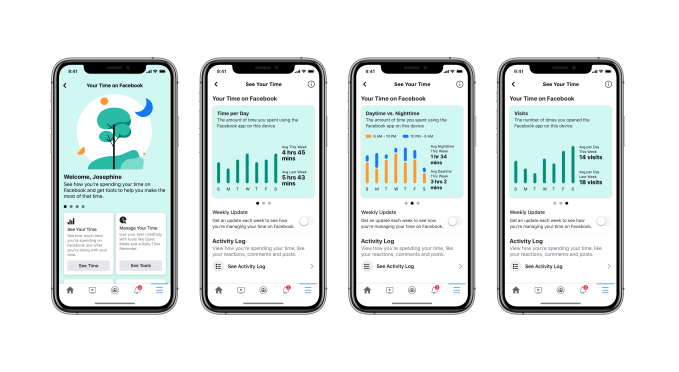
The controls for Quiet Mode will be found in a new section on Facebook where you can view other data about your time spent on Facebook’s platform. Here, you’ll be able to browse charts that show you the time you’ve spent on Facebook on a daily basis, a comparison of your daytime versus nighttime use, and another chart that lets you see how many times you opened the Facebook app each day.

Facebook introduced its first “time spent” charts back in 2018, but their appearance has changed to better match the style of this new “Your Time on Facebook” section, rolling out today. Facebook has also now added more analysis, including new week-over-week trends, the time of day charges, and the chart displaying the number of visits.

In addition, this section will include an option to enable a weekly report that will let you know how you’re managing your time. It will also link to the Activity Log of your own interactions across Facebook, including your reactions, comments and posts. And it will link out to other features that were previously buried in the Settings, including your News Feed Preferences and Notification Settings.

The former is where you designate which people you see first on your News Feed, which to Snooze, which to Unfollow and so on. The Notification Settings section, meanwhile, lets you turn on or off the push notifications and emails for specific updates from Facebook, like new comments, friend requests, tags, birthdays and more.

These aren’t new features, but they’ve been relocated here to make the new section more of a one-stop-shop for managing your time on Facebook.

Today’s changes are the latest in a series of efforts Facebook has made in recent years focused on users’ “digital well-being.”

The digital well-being movement pushes forward the idea that our smartphones and applications weren’t built with the mental health needs of their users in mind, but were rather designed to maximize the time we spend staring at screens. Users, having become aware of the addictiveness of our mobile devices, began to feel more negatively about screen time and their time-wasting apps.

Fearing backlash, tech companies — including Facebook, as well as the OS makers, Google and Apple — introduced more digital well-being features into their platforms. This includes the now built-in screen time controls that allow users to track and limit their time spent on phones and even the time spent in individual apps, like Facebook.

One iOS feature, in particular, may have posed a particular threat to Facebook: a new option introduced in iOS 12 that allowed users to more easily turn off app notifications right from the push notification itself. Apple even demoed how this could be used to silence Facebook’s notifications easily — an effort to redirect this growing negative user sentiment to specific apps on its iOS platform, rather than toward the platform that allowed apps to spam users with alerts in the first place.

Facebook’s response to this iOS feature, belatedly, is today’s launch of Quiet Mode. Instead of having its app notifications turned off entirely from the home screen of an iPhone, the option gives Facebook users more nuanced control. But it also means that Facebook retains permission to push its notifications during the hours Quiet Mode doesn’t run.

Facebook confirms Quiet Mode was in testing with a small percentage of Facebook users prior to today’s launch. It’s the same feature that reverse engineer Jane Manchun Wong had spotted in March, in fact.

The feature is now rolling out to more people globally on iOS and will continue to do so over the next month or so, Facebook says. The rollout on Android will begin with testing in May and a broader release in June.


Read Full Article
$75M weed giant Caliva ditches Eaze, launches delivery


It’s a brutal time for marijuana startups. I’m hearing some are raising at 1/5th of their 2019 valuation amidst rampant competition, tall taxes, and slow legalization. The struggles for marijuana’s best-known startup, delivery service Eaze, continue as today it’s losing one of its top partners. $75 million-funded weed brand empire Caliva has dropped Eaze in favor of launching its own delivery system.

By partnering with Hypur banking to solve the marijuana payments legality issue, Caliva will be able to accept contactless mobile payments unlike Eaze that usually requires customers pay in cash. Caliva buyers won’t have to worry about trips to the ATM, especially now during COVID-19 shelter-in-place orders, which the startup expects will boost their average order volume. Combined with verticalizing delivery in-house plus its retail and wholesale operations, Caliva hopes it can grow its margins and survive this long winter for weed startups.

“Our mission at Caliva has always been to provide safe and easy access to plant-based solutions for health, happiness and healing,” said Caliva CEO Dennis O’Malley. “Together with Hypur, we are proud to offer our customers safe, compliant and convenient cashless payment options to improve and modernize their purchasing experience.” It hasn’t been so easy for Eaze, though.

Back in January, we reported that Eaze was in trouble, having suffered unannounced layoffs and executive departures. It burned cash on billboards, and never launched the services of a startup it acquired. There were questions about data security, and weed brands dropped Eaze due to delayed payments. It was almost out of money and in danger of vaporizing. It luckily managed to secure a $15 million bridge round to keep it alive plus a $20 million Series D in February just before the COVID hit the fan, though I dread to think of the terms of that funding.

The plan for Eaze was to verticalize, buying and developing brands that it could sell through its existing delivery service to up its margins. Now it’s seeing former partner Caliva do the reverse, launching a delivery service to sell its own Fun Uncle, Deli, and Caliva brands as well as distribute other vape, edible, and flower brands like Dosist and Kiva. Its menu breadth to attract customers and in-house brands to drive profits could be a winning combo. After limited pilots in SoCal, Caliva delivery is launching in LA and the Bay Area.

Unfortunately, traditional payment processors usually refuse to work with marijuana companies for fear of legal repercussions. That’s why most delivery services can’t accept credit or debit cards, or do so through sketchy legal workarounds that have led payment providers to be sued. Others like CanPay only offer ACH transfers, while Square only works with CBD sellers. “We spent time researching and evaluating all platforms that accept cannabis payments in the U.S., and found that Hypur has the best security, compliance and consumer experience” O’Malley tells me.

400-person Caliva is now trying to raise a Series B, but may experience tough headwinds with shelter-in-place orders in effect in states where marijuana is legal. Stiff taxes on marijuana have meanwhile helped the black market continue to thrive, as California’s $3.1 billion in legal 2019 sales were overshadowed by an estimated $8.7 billion in illegal sales. Faster delivery and simpler payments could help. But enthusiasm for the industry has dwindled following the initial flood of entrants sought to exploit the end of prohibition. Is the Green Rush over?


Read Full Article

Android gets a built-in Braille keyboard


Android has received a wealth of accessibility features over the last couple of years, but one that has been left to third-party developers is a way for blind users to type using braille. That changes today with Android’s new built-in braille keyboard, which should soon be available as an option on all phones running version 5 and up of the OS.

Braille is a complex topic in the accessibility community, as in many ways it has been supplanted by voice recognition, screen readers and other tools. But many people are already familiar with it and use it regularly — and after all, one can’t always chat out loud.

Third-party braille keyboards are available, but some cost money or are no longer in development. And because the keyboard essentially has access to everything you type, there are security considerations as well. So it’s best for the keyboard you use to be an official one from a reputable company. Google will have to do!

The new keyboard, the company writes in a blog post, was created as a collaboration with various users and developers of braille software, and should be familiar to anyone who’s used something like it in the past.

The user holds the phone in landscape mode, with the screen facing away from them, and taps the regions corresponding to each of the six dots that form letters in the braille alphabet. It works with Android’s TalkBack function, which reads off words the user types or selects, so like any other writing method errors can be quickly detected and corrected. There are also some built-in gestures for quickly deleting letters and words or sending the text to the recipient or selected field.

Instructions for activating the braille keyboard are here. Right now it’s only available in English, but more languages will likely be added in the near future.


Read Full Article
Android gets a built-in Braille keyboard


Android has received a wealth of accessibility features over the last couple of years, but one that has been left to third-party developers is a way for blind users to type using braille. That changes today with Android’s new built-in braille keyboard, which should soon be available as an option on all phones running version 5 and up of the OS.

Braille is a complex topic in the accessibility community, as in many ways it has been supplanted by voice recognition, screen readers and other tools. But many people are already familiar with it and use it regularly — and after all, one can’t always chat out loud.

Third-party braille keyboards are available, but some cost money or are no longer in development. And because the keyboard essentially has access to everything you type, there are security considerations as well. So it’s best for the keyboard you use to be an official one from a reputable company. Google will have to do!

The new keyboard, the company writes in a blog post, was created as a collaboration with various users and developers of braille software, and should be familiar to anyone who’s used something like it in the past.

The user holds the phone in landscape mode, with the screen facing away from them, and taps the regions corresponding to each of the six dots that form letters in the braille alphabet. It works with Android’s TalkBack function, which reads off words the user types or selects, so like any other writing method errors can be quickly detected and corrected. There are also some built-in gestures for quickly deleting letters and words or sending the text to the recipient or selected field.

Instructions for activating the braille keyboard are here. Right now it’s only available in English, but more languages will likely be added in the near future.


Read Full Article

Quibi is the anti-TikTok (that’s a bad thing)


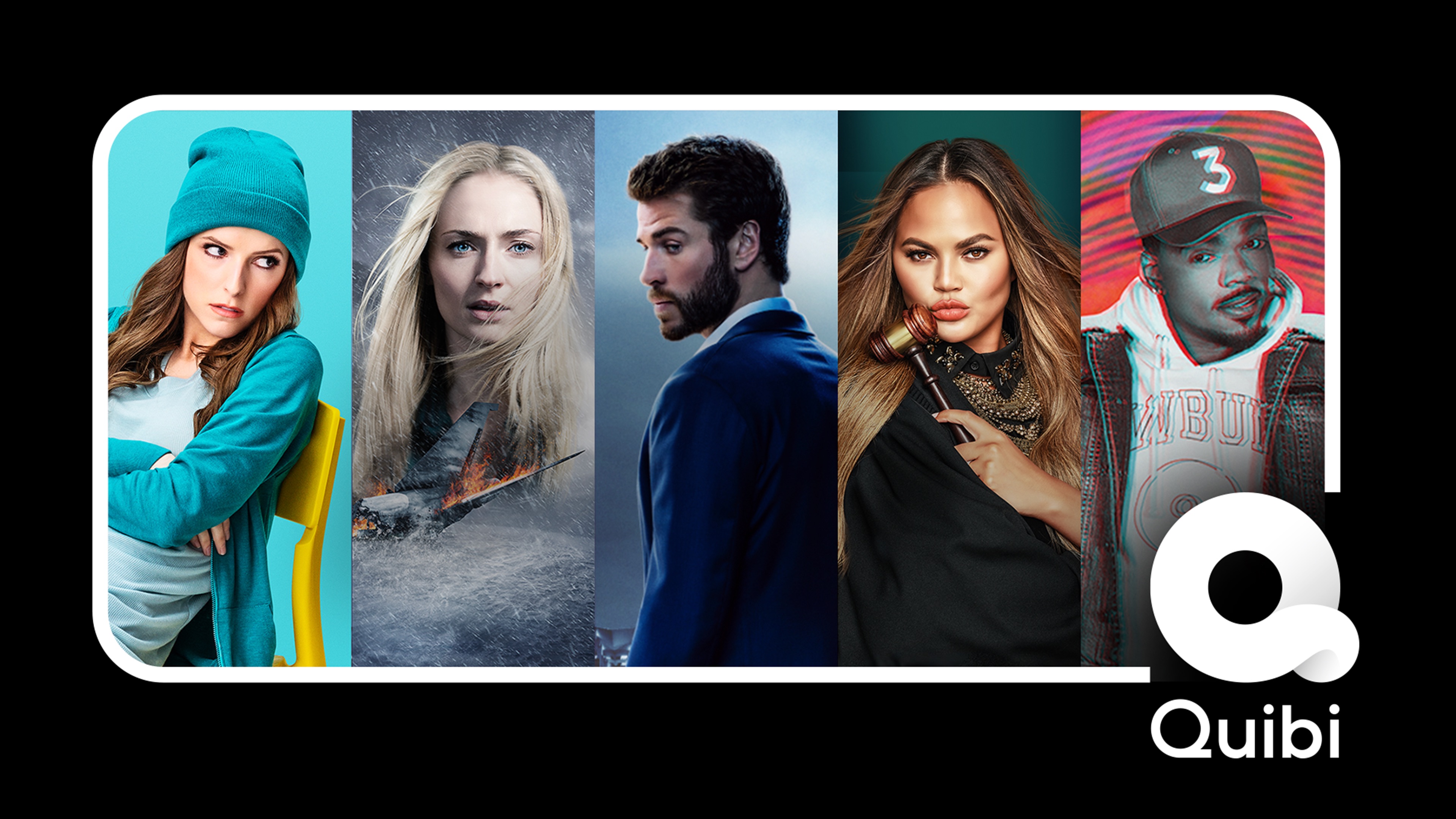
It takes either audacious self-confidence or reckless hubris to build a completely asocial video app in 2020. You can decide which best describes Quibi, Hollywood’s $1.75 billion-funded attempt at a mobile-only Netflix of 6 to 10 minutes micro-TV show episodes. Quibi manages to miss every trend and tactic that could help make it app popular. The company seems to believe it can succeed on only its content (mediocre) and marketing dollars (fewer than it needs).

I appreciate that Quibi is doing something audaciously different than most startups. Rather than iterating towards product-market fit, it spent a fortune developing its slick app and buying fancy content in secret so it could launch with a bang.

Yet Quibi’s bold business strategy is muted by a misguided allegiance to the golden age of television before the Internet permeated every entertainment medium. It’s unshareable, prescriptive, sluggish, cumbersome, and unfriendly. Quibi’s unwillingness to borrow anything from social networks makes the app feel cold and isolated, like watching reality shows in the vacuum of space.

Quibi

In that sense, Quibi is the inverse of TikTok, which feels fiercely alive. TikTok is designed to immediately immerse you in crowd-vetted content that grabs your attention and inspires you to spread your take on it to friends. That’s why TikTok has almost 2 billion downloads to date while Quibi picked up just 300,000 on the day of its big splash into market.

Here’s a breakdown of the major missteps by Quibi, why TikTok does it better, and how this new streaming app can get with the times.

What Hollywood Thinks We Want

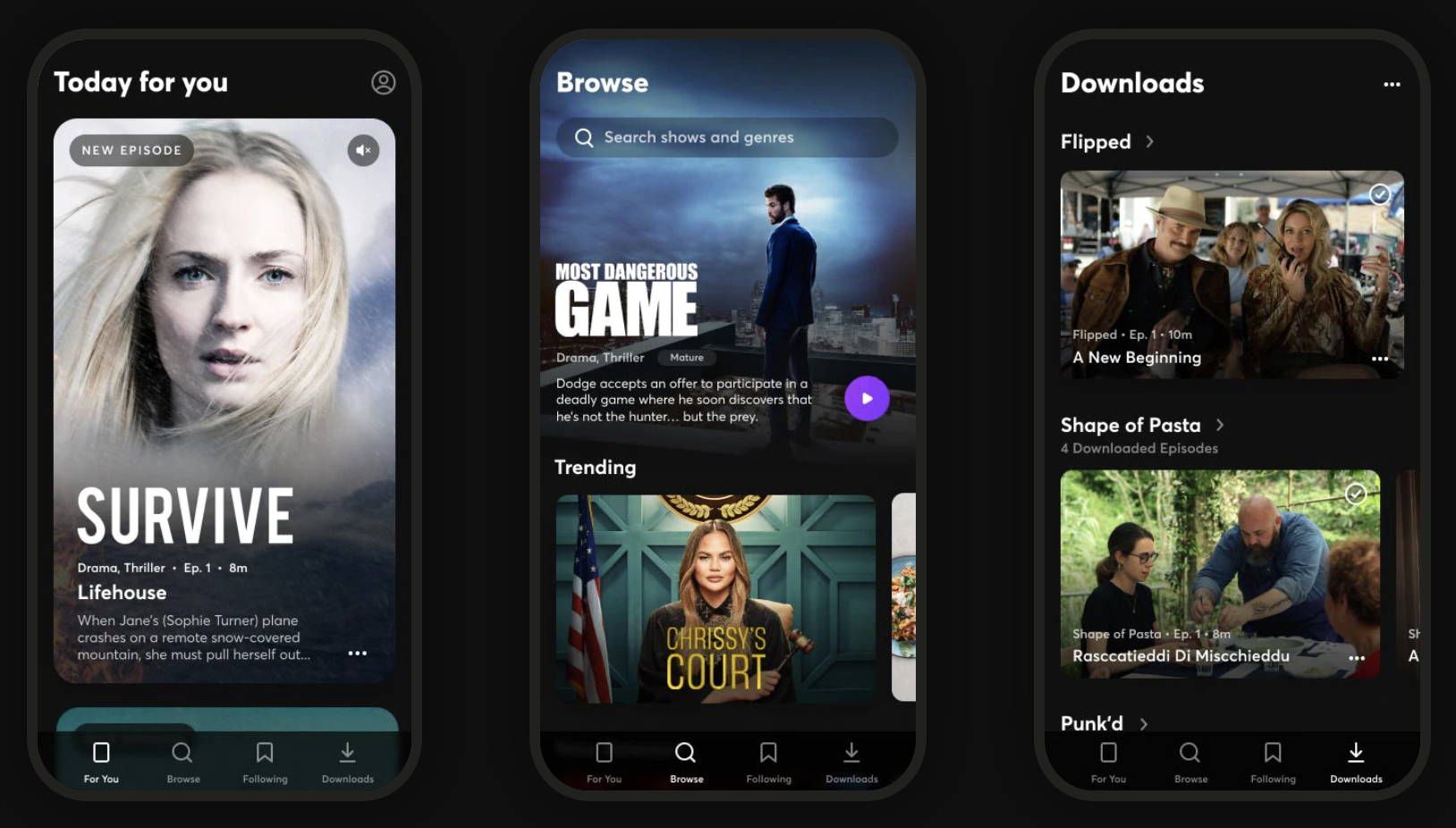
Quibi feels like some off-brand cable channel, with a mix of convoluted reality shows, scripted dramas, and news briefs. Imagine MTV at noon in the mid-2000s. Nothing seemed must-see. There’s no Game Of Thrones or Mandalorian here. While the production value is better than what you’ll find on YouTube, the show concepts feel slapdash with novelty that quickly fades. Chrissy Teigen as a small claims court judge and a cooking show where blindfolded chefs have to guess what food was just exploded in their faces…

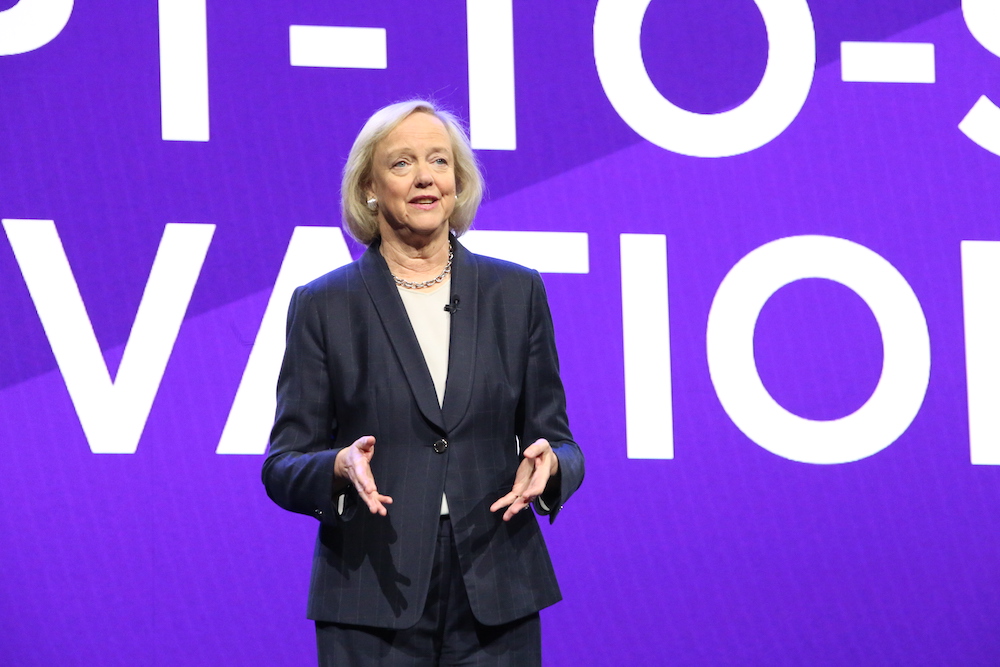
The catalog feels like the product of TV writers being told they have 10 seconds to come up with an idea. “What would those idiots watch?” The shows remind me of old VR games that are barely more than demos, or an app built in a garage without ever asking prospective users what they need. Co-founder Jeffrey Katzenberg may have produced The Lion King and Shrek, but the app’s content feels like it was greenlit by, well, Hewlett Packard Enterprise’s leader Meg Whitman who indeed is Quibi CEO.

Quibi CEO Meg Whitman

Quibi CEO Meg Whitman

Despite being built for a touch-screen interface, there’s little Bandersnatch-style interactive content so far, nor are the creators doing anything special with the 6 to 10 minute format. The shows feel more like condensed TV programs with episodes ending when there would be a commercial break. There’s no onboarding process that could ask what popular TV shows or genres you’re into. As the catalog expands, that makes it less likely you’ll find something appealing within a few taps.

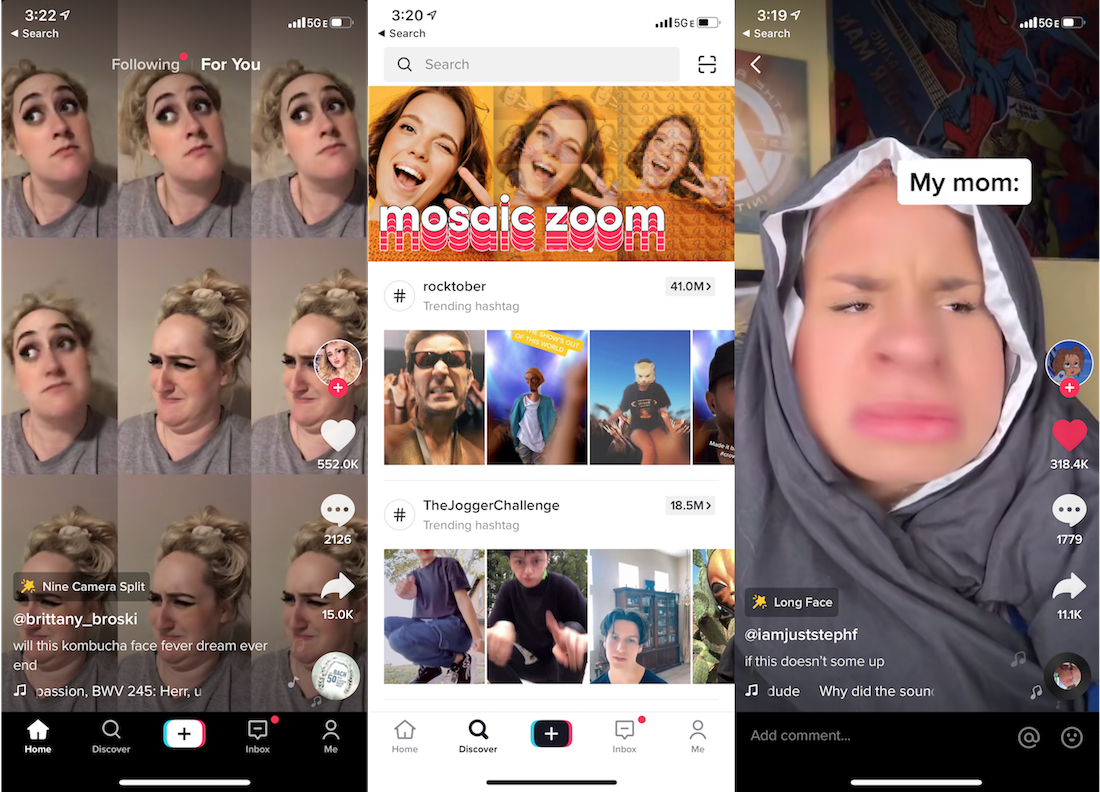
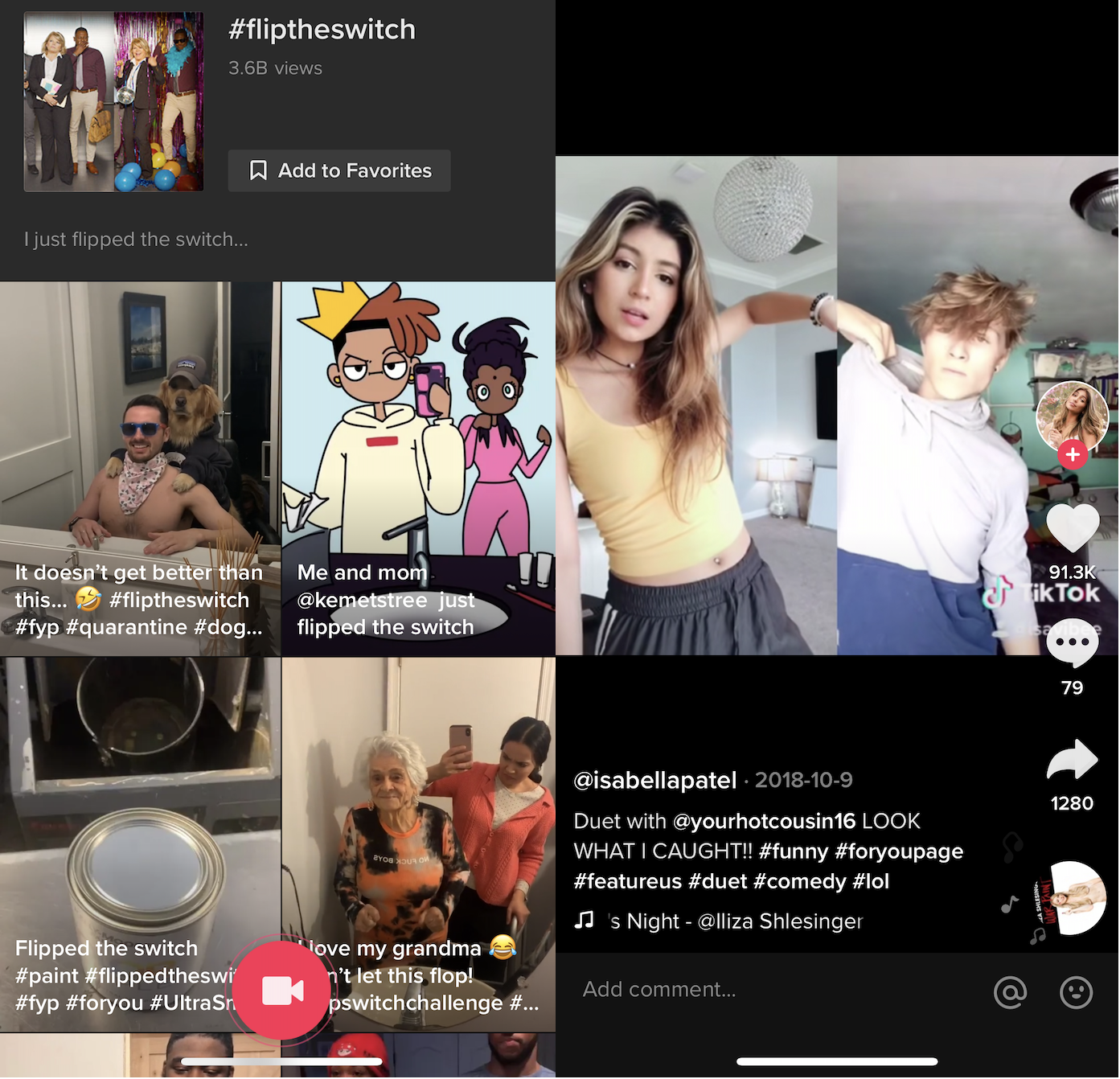
TikTok comes from the opposite direction. Instead of what Hollywood thinks we want, its content come straight from its consumers. People record what they think would make them and their friends laugh, surprised, or enticed. The result is that with low to zero production budget, random kids and influencers alike make things with millions of Likes. And as elder millenials, Gen X, and beyond get hooked, they’re creating videos for their peers as well. The algorithm monitors what you’re hovering over and rapidly adapts its recommendations to your style.

TikTok is fundamentally interactive. Each clip’s audio can borrowed to produce remixes that personalize a meme for a different demographic or subculture. And since its stars are internet natives, they’re in constant communication with their fan base to tune content to what they want. There’s something for everyone. No niche is too small.

TikTok Screenshots

The Fix: Quibi should take a hint from Brat TV, the Disney Channel for the YouTube generation that gives tween social media stars their own premium shows about being a grade school kid to create content with a built-in fan base. [Disclosure: My cousin Darren Lachtman is a Brat co-founder).

Take the Chrissy’s Court model, and shift it to stars who are 20 years younger. Give TikTok phenoms like Charli D’Amelio or Chase Hudson Quibi shows and let them help conceptualize the content, and they’ll bring their legions of fans. Double-down on choose-your-own-adventures and fan voting gameshows that leverage the phone’s interactivity. Fund creators that will differentiate Quibi by making it look like anything other than daytime TV. And ask users directly what they want to see right when they download the app.

No Screenshots

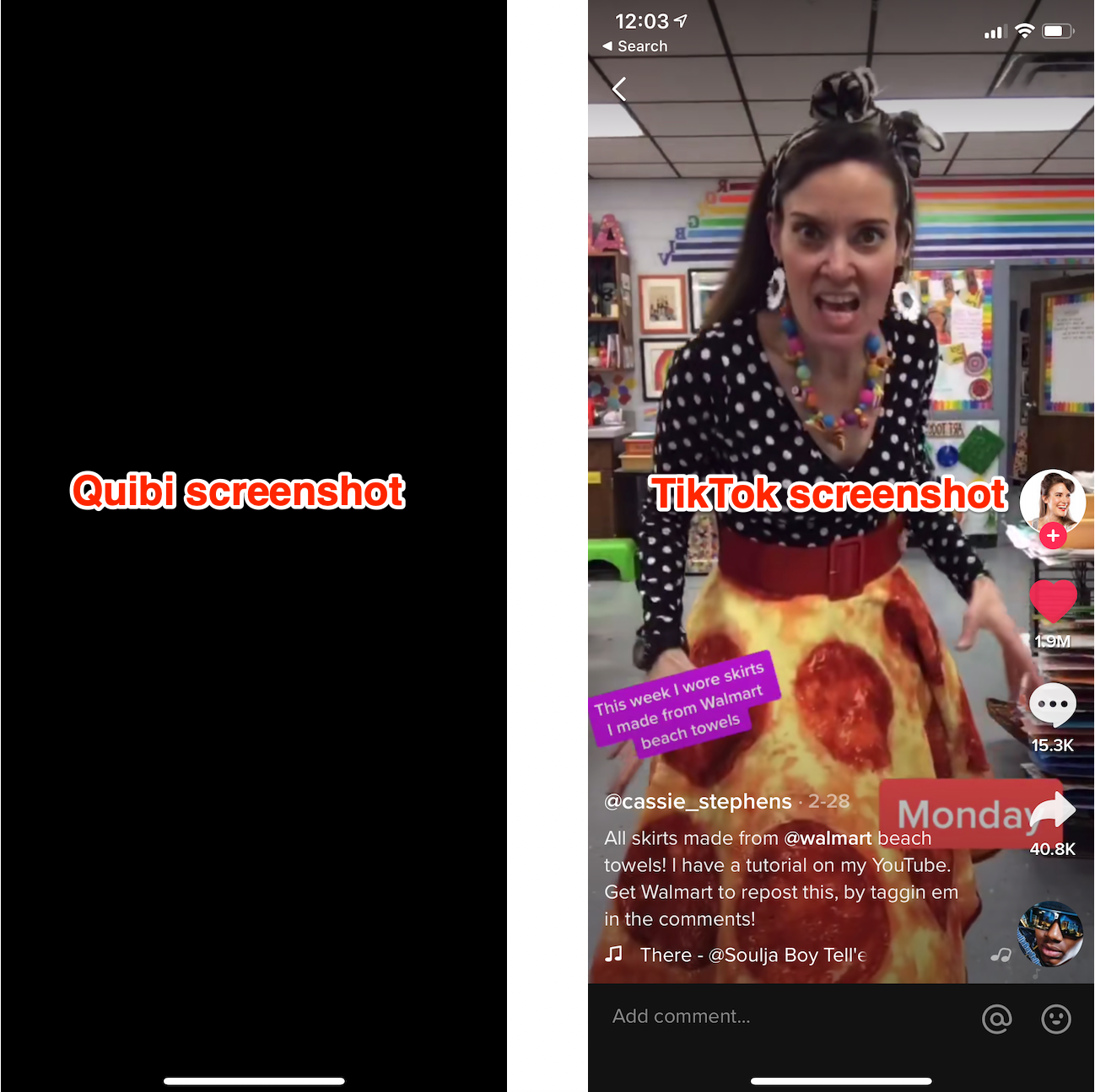
This is frankly insane. Screenshots of Quibi appear as a blank black screen. That means no memes. If people can’t turn Quibi scenes into jokes they’ll share elsewhere, its shows won’t ever become fixtures of the cultural zeitgeist like Netflix’s Tiger King has. Yes, other mobile streaming apps like Netflix and Disney+ also block screenshots, but they have web versions where you can snap and share what you want. Quibi never should have structured its deals to license content from producers in a way that prevented any way to riff on or even let friends preview its content.

TikTok on the other hand defaults to letting you download any video and share it wherever you please — with the app’s watermark attached. That’s fueled TikTok’s stellar growth as clips get posted to Twitter and Instagram, and drive viewers back to the app. It’s spawned TikTok compilations on YouTube, and a whole culture of remixing that expands and prolongs the popularity of trending jokes and dances.

The Fix: Quibi should allow screenshots. There’s little risk of spoilers or piracy. If its deals prohibit that, then it should offer pre-approved screenshots and video clips/trailers of each episode that you can download and share. Think of it like an in-app press kit. Even if we’re not allowed to set up the perfect screenshot for making a meme, at least then we could coherently discuss the shows on other social networks.

Sluggish Pacing

On mobile, you’re always just a swipe away from something more interesting. It’s like if you watched TV with your finger permanently hovering over the change channel button. Ever noticed how movie trailers now often start with a fast-forward collage of their most eye-catching scenes? Quibi seems intent on communicating prestige with its slow-building dramas like The Most Dangerous Game and Survive, which both had me bored and fast-forwarding. And that’s watching Quibi at home on the couch. While on the go where it was designed to be consumed, slow pacing could push users with a minute or two to spare to open Instagram or TikTok instead.

None of this is helped by Quibi not auto-playing a trailer or the first episode the moment you scroll past a show on the homescreen. Instead, you see a static title card for two seconds before it starts playing you an excerpt of the program. That makes it more cumbersome to discover new shows.

Where TikTok wins is in immediacy. Creators know users will swipe right past their video if it’s not immediately entertaining or obviously revving up to a big reveal. They grab you in the first second with smiles, costumes, bold captions, or crazy situations. That also makes it easy for viewers to dismiss what’s irrelevant to them and teach the TikTok algorithm what they really want. Plus, you know that you can score a dopamine hit of joy even if you only have 30 seconds. TikTok makes Quick Bites feel like an understaffed sit-down restaurant.

The Fix: Quibi needs to teach creators to hook viewers instantly by previewing why they should want to watch. Since tapping a show’s card on the Quibi homepage instantly plays it, those teasers need to be built into the first episode. Otherwise, Quibi needs to a button to view a trailer from its buried dedicated show pages to the preview card most people interact with on the homescreen. Otherwise, users may never discover what Quibi shows resonate with them and teach it what to show and make more of.

Anti-Social Video Club

Quibi neglects all its second-screen potential. No screenshotting makes it tough to discuss shows elsewhere, yet there’s no built-in comments or messaging to discuss or spread them in app. Pasting an episode link into Twitter doesn’t even display the show’s name in the preview box. Nor do shows have their own social accounts to follow to remind you to keep watching.

There’s no way for friends to follow what you’re watching or see your recommendations. No leaderboards of top shows. Certainly no time-stamped, livestream style crowd annotations. No synced-up co-watching with friends, despite a lack of TV apps preventing you from watching with anyone else in person unless you crowd around one phone.

It all feels like Quibi figured advertising would be enough. It could run contests where winners get a Cameo-esque message or chat with their favorite stars. Quibi could let you share scenes with your face swapped onto actors’ heads, Deepfake-style like Snapchat’s (confusingly named) Cameos feature. It could host in-app roundtables with the casts where users could submit questions. It’s like if web 2.0 never happened.

TikTok meanwhile harnesses every conceivable social feature. Follow, Like, comment, message, go Live, duet, remix, or download and share any video. It beckons viewers to participate in trending challenges. And even when users aren’t itching to return to TikTok, notifications from these social features will drag them back in, or watermarked clips will follow them to other networks. Every part of the app is designed to make its content the center of popular culture.

The Fix: Quibi needs to understand that just because we’re watching on mobile, doesn’t make video a solo experience. At first, it should add social content discovery options so you can see what friends opt in to share that they’re watching or view a leaderboard of the top programs. Shows, especially ones dripping out new episodes, are more fun when you have someone to chat about them with.

Eventually, Quibi should layer on in-app second screen features. Create a way to share comments at the end of each episode that people read during the credits so they feel like they’re in a viewing community.

Can Quibi Be More?

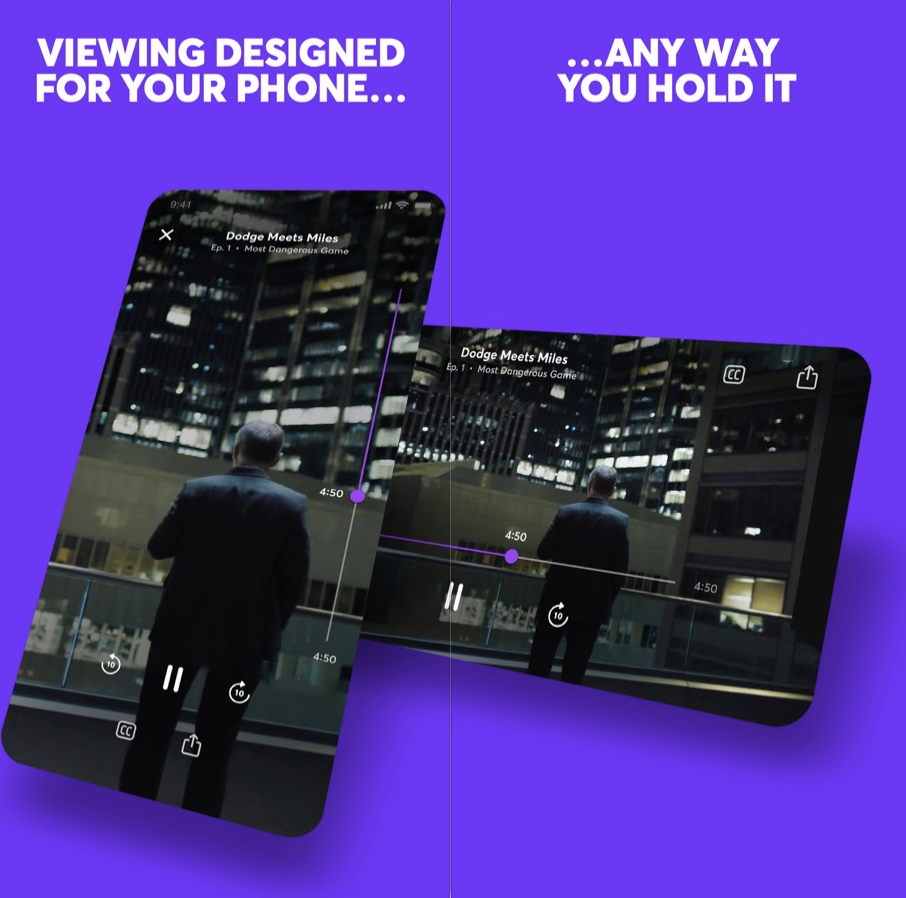
What’s most disappointing about Quibi is that it has the potential to be something fresh, merging classically produced premium content with the modern ways we use our phones. Yet beyond shows being shot in two widths so you can switch between watching in landscape or portrait mode at any time, it really is just a random cable channel shrunk down.

Youths act in front of a mobile phone camera while making a TikTok video on the terrace of their residence in Hyderabad on February 14, 2020. (Photo by NOAH SEELAM / AFP) (Photo by NOAH SEELAM/AFP via Getty Images)

One of the few redeeming opportunities for Quibi is using the daily episode release schedule to serialize content that benefits from suspense, as InternetRyan notes. Binging via traditional streaming services can burn through thrillers before they can properly build up suspense and fan theories or let late-comers catch up while a show is still in the zeitgeist. Cliffhangers with just a day instead of a week to wait could be Quibi’s killer feature.

Suspense is also one thing TikTok fails at. Within a single video, they’re actually often all about suspense, waiting through build up for a gag or non-sequitur to play out. But creators try to rope in followers by making a multi-minute video and splitting it into parts so people subscribe to them to see the next part. Yet since TikTok doesn’t always show timestamps and surfaces old videos on its homescreen, it can often be a chore to find the part two, and there’s no good way for creators to link them together. TikTok could stand to learn about multi-episode content from Quibi.

But today, Quibi feels like a minitiaturized and degraded version of what we already get for free on the web or pay for with Netflix. Quibi charging $4.99 per month with ads or $7.99 without seems like a steep ask without delivering any truly must-see shows, novel interactive experience, or memory-making social moments.

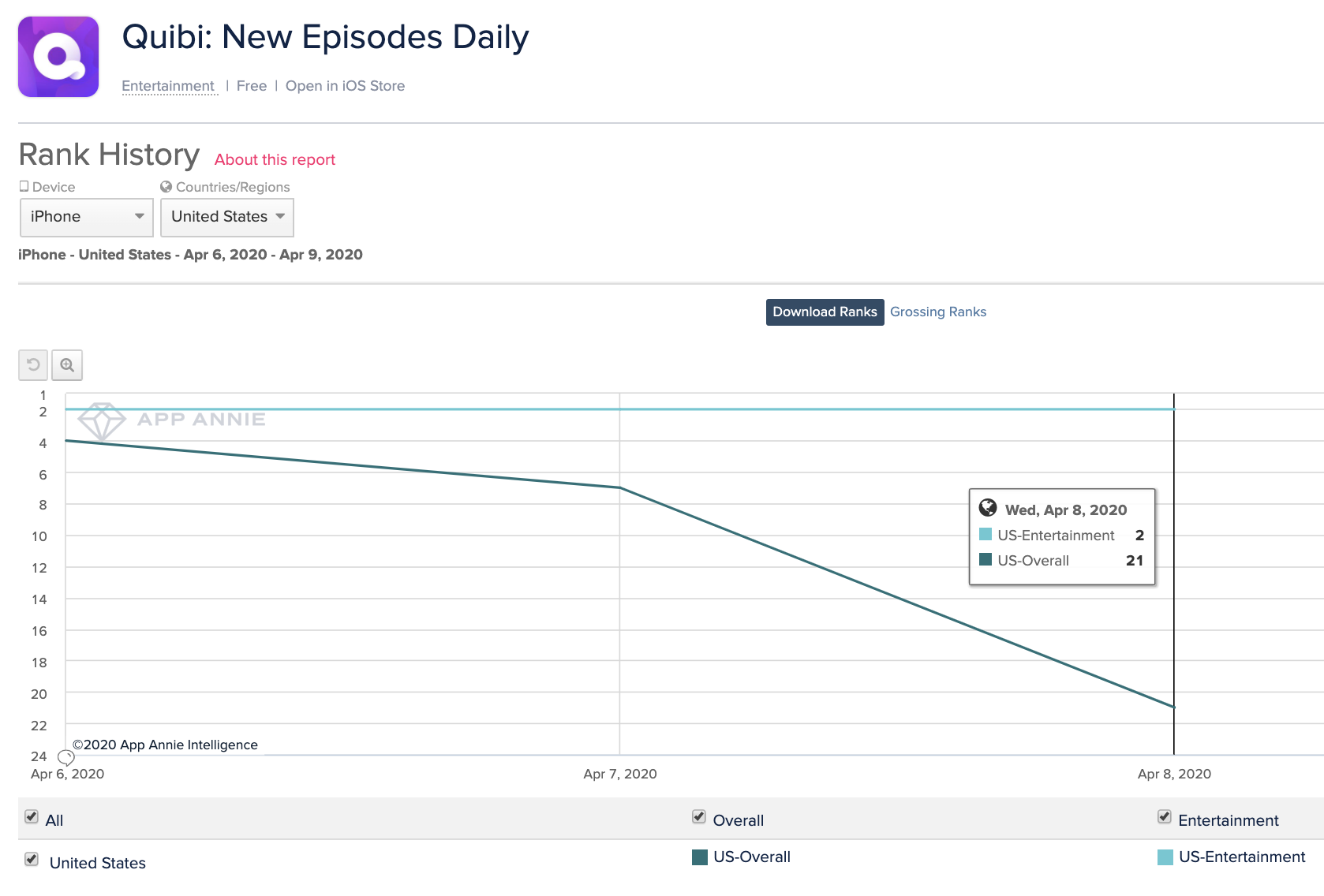
Quibi’s success may simply be a test of how bad people are at cancelling 90-day free trials (hint: they’re bad at it!). The bull case is that absent-minded subscribers amongst the 300,000 first-day downloads and some diehard fans of the celebs it’s given shows will bring Quibi enough traction to raise more cash and survive long enough to socialize its product and teach creators to exploit the format’s opportunities. But the bear case is already emerging in Quibi’s rapidly declining App Store rank, that fell from #4 overall when it launched Monday to #21 yesterday. Lackluster content and no virality means it might never become the talk of the town, leading top content producers to slink away or half-ass their contributions, leaving us to dine on short video elsewhere.


Read Full Article

09 April 2020

Quibi is the anti-TikTok (that’s a bad thing)


It takes either audacious self-confidence or reckless hubris to build a completely asocial video app in 2020. You can decide which best describes Quibi, Hollywood’s $1.75 billion-funded attempt at a mobile-only Netflix of 6 to 10 minutes micro-TV show episodes. Quibi manages to miss every trend and tactic that could help make it app popular. The company seems to believe it can succeed on only its content (mediocre) and marketing dollars (fewer than it needs).

I appreciate that Quibi is doing something audaciously different than most startups. Rather than iterating towards product-market fit, it spent a fortune developing its slick app and buying fancy content in secret so it could launch with a bang.

Yet Quibi’s bold business strategy is muted by a misguided allegiance to the golden age of television before the Internet permeated every entertainment medium. It’s unshareable, prescriptive, sluggish, cumbersome, and unfriendly. Quibi’s unwillingness to borrow anything from social networks makes the app feel cold and isolated, like watching reality shows in the vacuum of space.

Quibi

In that sense, Quibi is the inverse of TikTok, which feels fiercely alive. TikTok is designed to immediately immerse you in crowd-vetted content that grabs your attention and inspires you to spread your take on it to friends. That’s why TikTok has almost 2 billion downloads to date while Quibi picked up just 300,000 on the day of its big splash into market.

Here’s a breakdown of the major missteps by Quibi, why TikTok does it better, and how this new streaming app can get with the times.

What Hollywood Thinks We Want

Quibi feels like some off-brand cable channel, with a mix of convoluted reality shows, scripted dramas, and news briefs. Imagine MTV at noon in the mid-2000s. Nothing seemed must-see. There’s no Game Of Thrones or Mandalorian here. While the production value is better than what you’ll find on YouTube, the show concepts feel slapdash with novelty that quickly fades. Chrissy Teigen as a small claims court judge and a cooking show where blindfolded chefs have to guess what food was just exploded in their faces…

The catalog feels like the product of TV writers being told they have 10 seconds to come up with an idea. “What would those idiots watch?” The shows remind me of old VR games that are barely more than demos, or an app built in a garage without ever asking prospective users what they need. Co-founder Jeffrey Katzenberg may have produced The Lion King and Shrek, but the app’s content feels like it was greenlit by, well, Hewlett Packard Enterprise’s leader Meg Whitman who indeed is Quibi CEO.

Quibi CEO Meg Whitman

Quibi CEO Meg Whitman

Despite being built for a touch-screen interface, there’s little Bandersnatch-style interactive content so far, nor are the creators doing anything special with the 6 to 10 minute format. The shows feel more like condensed TV programs with episodes ending when there would be a commercial break. There’s no onboarding process that could ask what popular TV shows or genres you’re into. As the catalog expands, that makes it less likely you’ll find something appealing within a few taps.

TikTok comes from the opposite direction. Instead of what Hollywood thinks we want, its content come straight from its consumers. People record what they think would make them and their friends laugh, surprised, or enticed. The result is that with low to zero production budget, random kids and influencers alike make things with millions of Likes. And as elder millenials, Gen X, and beyond get hooked, they’re creating videos for their peers as well. The algorithm monitors what you’re hovering over and rapidly adapts its recommendations to your style.

TikTok is fundamentally interactive. Each clip’s audio can borrowed to produce remixes that personalize a meme for a different demographic or subculture. And since its stars are internet natives, they’re in constant communication with their fan base to tune content to what they want. There’s something for everyone. No niche is too small.

TikTok Screenshots

The Fix: Quibi should take a hint from Brat TV, the Disney Channel for the YouTube generation that gives tween social media stars their own premium shows about being a grade school kid to create content with a built-in fan base. [Disclosure: My cousin Darren Lachtman is a Brat co-founder).

Take the Chrissy’s Court model, and shift it to stars who are 20 years younger. Give TikTok phenoms like Charli D’Amelio or Chase Hudson Quibi shows and let them help conceptualize the content, and they’ll bring their legions of fans. Double-down on choose-your-own-adventures and fan voting gameshows that leverage the phone’s interactivity. Fund creators that will differentiate Quibi by making it look like anything other than daytime TV. And ask users directly what they want to see right when they download the app.

No Screenshots

This is frankly insane. Screenshots of Quibi appear as a blank black screen. That means no memes. If people can’t turn Quibi scenes into jokes they’ll share elsewhere, its shows won’t ever become fixtures of the cultural zeitgeist like Netflix’s Tiger King has. Yes, other mobile streaming apps like Netflix and Disney+ also block screenshots, but they have web versions where you can snap and share what you want. Quibi never should have structured its deals to license content from producers in a way that prevented any way to riff on or even let friends preview its content.

TikTok on the other hand defaults to letting you download any video and share it wherever you please — with the app’s watermark attached. That’s fueled TikTok’s stellar growth as clips get posted to Twitter and Instagram, and drive viewers back to the app. It’s spawned TikTok compilations on YouTube, and a whole culture of remixing that expands and prolongs the popularity of trending jokes and dances.

The Fix: Quibi should allow screenshots. There’s little risk of spoilers or piracy. If its deals prohibit that, then it should offer pre-approved screenshots and video clips/trailers of each episode that you can download and share. Think of it like an in-app press kit. Even if we’re not allowed to set up the perfect screenshot for making a meme, at least then we could coherently discuss the shows on other social networks.

Sluggish Pacing

On mobile, you’re always just a swipe away from something more interesting. It’s like if you watched TV with your finger permanently hovering over the change channel button. Ever noticed how movie trailers now often start with a fast-forward collage of their most eye-catching scenes? Quibi seems intent on communicating prestige with its slow-building dramas like The Most Dangerous Game and Survive, which both had me bored and fast-forwarding. And that’s watching Quibi at home on the couch. While on the go where it was designed to be consumed, slow pacing could push users with a minute or two to spare to open Instagram or TikTok instead.

None of this is helped by Quibi not auto-playing a trailer or the first episode the moment you scroll past a show on the homescreen. Instead, you see a static title card for two seconds before it starts playing you an excerpt of the program. That makes it more cumbersome to discover new shows.

Where TikTok wins is in immediacy. Creators know users will swipe right past their video if it’s not immediately entertaining or obviously revving up to a big reveal. They grab you in the first second with smiles, costumes, bold captions, or crazy situations. That also makes it easy for viewers to dismiss what’s irrelevant to them and teach the TikTok algorithm what they really want. Plus, you know that you can score a dopamine hit of joy even if you only have 30 seconds. TikTok makes Quick Bites feel like an understaffed sit-down restaurant.

The Fix: Quibi needs to teach creators to hook viewers instantly by previewing why they should want to watch. Since tapping a show’s card on the Quibi homepage instantly plays it, those teasers need to be built into the first episode. Otherwise, Quibi needs to a button to view a trailer from its buried dedicated show pages to the preview card most people interact with on the homescreen. Otherwise, users may never discover what Quibi shows resonate with them and teach it what to show and make more of.

Anti-Social Video Club

Quibi neglects all its second-screen potential. No screenshotting makes it tough to discuss shows elsewhere, yet there’s no built-in comments or messaging to discuss or spread them in app. Pasting an episode link into Twitter doesn’t even display the show’s name in the preview box. Nor do shows have their own social accounts to follow to remind you to keep watching.

There’s no way for friends to follow what you’re watching or see your recommendations. No leaderboards of top shows. Certainly no time-stamped, livestream style crowd annotations. No synced-up co-watching with friends, despite a lack of TV apps preventing you from watching with anyone else in person unless you crowd around one phone.

It all feels like Quibi figured advertising would be enough. It could run contests where winners get a Cameo-esque message or chat with their favorite stars. Quibi could let you share scenes with your face swapped onto actors’ heads, Deepfake-style like Snapchat’s (confusingly named) Cameos feature. It could host in-app roundtables with the casts where users could submit questions. It’s like if web 2.0 never happened.

TikTok meanwhile harnesses every conceivable social feature. Follow, Like, comment, message, go Live, duet, remix, or download and share any video. It beckons viewers to participate in trending challenges. And even when users aren’t itching to return to TikTok, notifications from these social features will drag them back in, or watermarked clips will follow them to other networks. Every part of the app is designed to make its content the center of popular culture.

The Fix: Quibi needs to understand that just because we’re watching on mobile, doesn’t make video a solo experience. At first, it should add social content discovery options so you can see what friends opt in to share that they’re watching or view a leaderboard of the top programs. Shows, especially ones dripping out new episodes, are more fun when you have someone to chat about them with.

Eventually, Quibi should layer on in-app second screen features. Create a way to share comments at the end of each episode that people read during the credits so they feel like they’re in a viewing community.

Can Quibi Be More?

What’s most disappointing about Quibi is that it has the potential to be something fresh, merging classically produced premium content with the modern ways we use our phones. Yet beyond shows being shot in two widths so you can switch between watching in landscape or portrait mode at any time, it really is just a random cable channel shrunk down.

Youths act in front of a mobile phone camera while making a TikTok video on the terrace of their residence in Hyderabad on February 14, 2020. (Photo by NOAH SEELAM / AFP) (Photo by NOAH SEELAM/AFP via Getty Images)

One of the few redeeming opportunities for Quibi is using the daily episode release schedule to serialize content that benefits from suspense, as InternetRyan notes. Binging via traditional streaming services can burn through thrillers before they can properly build up suspense and fan theories or let late-comers catch up while a show is still in the zeitgeist. Cliffhangers with just a day instead of a week to wait could be Quibi’s killer feature.

Suspense is also one thing TikTok fails at. Within a single video, they’re actually often all about suspense, waiting through build up for a gag or non-sequitur to play out. But creators try to rope in followers by making a multi-minute video and splitting it into parts so people subscribe to them to see the next part. Yet since TikTok doesn’t always show timestamps and surfaces old videos on its homescreen, it can often be a chore to find the part two, and there’s no good way for creators to link them together. TikTok could stand to learn about multi-episode content from Quibi.

But today, Quibi feels like a minitiaturized and degraded version of what we already get for free on the web or pay for with Netflix. Quibi charging $4.99 per month with ads or $7.99 without seems like a steep ask without delivering any truly must-see shows, novel interactive experience, or memory-making social moments.

Quibi’s success may simply be a test of how bad people are at cancelling 90-day free trials (hint: they’re bad at it!). The bull case is that absent-minded subscribers amongst the 300,000 first-day downloads and some diehard fans of the celebs it’s given shows will bring Quibi enough traction to raise more cash and survive long enough to socialize its product and teach creators to exploit the format’s opportunities. But the bear case is already emerging in Quibi’s rapidly declining App Store rank, that fell from #4 overall when it launched Monday to #21 yesterday. Lackluster content and no virality means it might never become the talk of the town, leading top content producers to slink away or half-ass their contributions, leaving us to dine on short video elsewhere.


Read Full Article

WhatsApp Limits Forwarding to Fight Misinformation


WhatsApp has introduced new limits on message forwarding in an attempt to stop the spread of misinformation surrounding the coronavirus outbreak. This means you can now only forward a message you’ve received onto one chat at a time.

WhatsApp Tries to Stop the Spread of Misinformation

In January 2019, WhatsApp introduced limits on how messages could be forwarded on. This was an attempt to fight fake news and prevent the spread of misinformation. Originally, messages could be forwarded onto 20 people, but this was reduced to five.

This limit were initially instituted in India after misinformation spread via WhatsApp led to lynchings. WhatsApp then rolled the limitations out worldwide to help fight fake news in general. However, the COVID-19 pandemic has led to a new wave of misinformation.

Help to Stop the Spread of COVID-19 Misinformation

In a post on the WhatsApp Blog, WhatsApp explained that due to lockdowns in place in various countries, people are relying more on messaging apps to keep in touch with family and friends than ever before. Unfortunately, that’s also helping misinformation spread.

In order to combat that spread, WhatsApp is identifying messages that have been forwarded many times (which are labelled with double arrows). It’s then “introducing a limit so that these messages can only be forwarded to one chat at a time.”

The idea is to stop people forwarding messages onto multiple chats at once, which they do without checking the veracity of said message. WhatsApp makes it clear that not all forwarding is bad, but it clearly doesn’t want to contribute to the spread of misinformation.

Sites You Can Trust for Information About Coronavirus

In a way this mirrors the way we’re all trying to stop the spread of COVID-19 itself. By only allowing you to forward a message onto one person at a time, WhatsApp hopes to slow the spread of misinformation surrounding the disease to prevent everyone from seeing it.

There will be some people reading this who think they know the truth about COVID-19. The problem is often where people get their information from. With that in mind, we compiled a list of websites you can trust for reliable information about the coronavirus.

Image Credit: Jan Persiel/Flickr

Read the full article: WhatsApp Limits Forwarding to Fight Misinformation


Read Full Article
What’s the Difference Between Podcasts and Audiobooks?


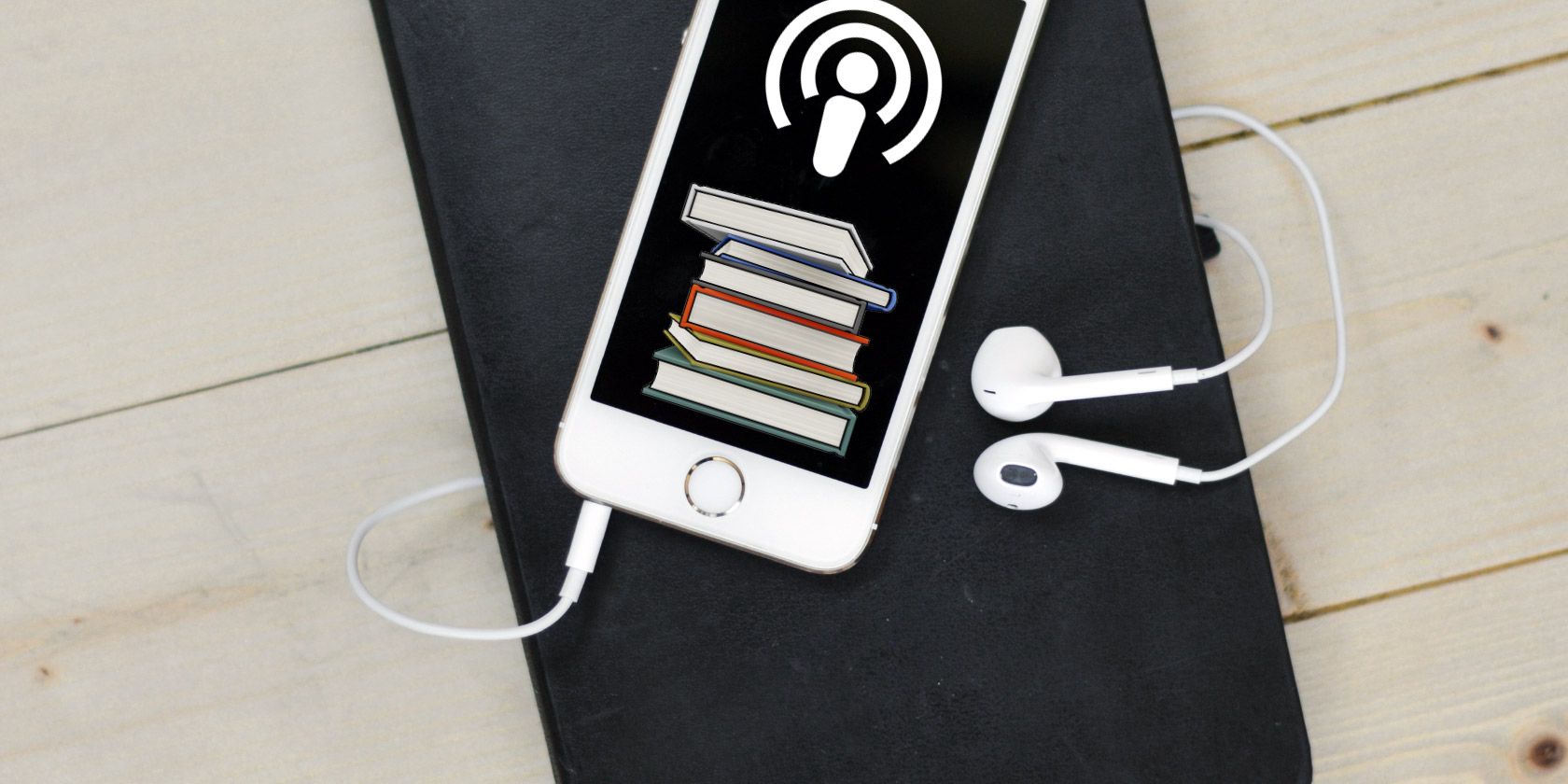
podcast-audiobook

Podcasts and audiobooks are two of the most popular forms of audio entertainment. Both are readily available on your smartphone or computer, but you might not be familiar with the differences between them.

In this article, we’ll walk you through the differences between podcasts and audiobooks. We’ll look at format, pricing, availability, and how to choose between the two formats.

Podcasts vs. Audiobooks: A General Definition

First, let’s define these two mediums before moving onto detailed comparisons. At their core, podcasts and audiobooks are both digital audio files meant for listening, but that’s oversimplifying it.

A podcast is an episodic series of audio content run by one or more hosts. It can take a variety of formats, from quick news roundups to round-table discussions and much more. Typically, podcast shows release on a regular schedule and allow subscribers to get new episodes right away.

Find awesome podcasts

An audiobook is a professional audio recording of an existing text, usually a book. The content of audiobooks almost always exists in another non-audio format, meaning that they provide an alternate way to consume the same content. Unlike podcasts, audiobooks release as a single product and are not episodic.

There can be slight overlap with these in the form of narrative podcasts, where the host tells one story in segments or reads several short stories in an episode. However, we’ll look at other differences between podcasts and audiobooks that make the distinction clear.

Audiobook and Podcast Pricing

If you don’t want to spend money on auditory entertainment, podcasts are the way to go. Most podcasts are available at no charge, and with so many available, you’ll never run out of free content to enjoy.

Of course, podcast creators have to make money somehow, so many include sponsorship ads sprinkled here and there. These are a small price to pay for otherwise free content, plus they’re easy to skip if you don’t want to hear them.

Some podcasters also charge a fee for extra content or bonus episodes, either as a one-off or through a monthly subscription on something like Patreon.

Audiobooks are a different story in terms of cost. Recording an entire book’s worth of content is not a cheap undertaking, so publishers usually charge more for an audiobook than the Kindle edition or physical copy.

For example, take a popular title like Harry Potter and the Sorcerer’s Stone. At the time of writing, the prices for its various formats on Amazon were:

  • Kindle: $8.99
  • Hardcover: $11.99
  • Paperback: $6.89
  • Audiobook: $29.99

Audiobook Price Difference

This is a drastic difference, meaning that if you listen to a lot, audiobooks can become expensive.

Saving on Audiobooks

If you’re interested in audiobooks, the chances are you’ll look at Amazon’s Audible service first (more on that later). The base Gold subscription costs $14.95/month and gives you one credit each month, which is redeemable for any audiobook on the service.

Those who listen more can look at the Platinum plan, which provides two credits per month for a price of $22.95. While Audible members also get free Audible Originals each month and a discount on audiobook credits, you should know about other ways to find audiobooks for cheap too. You can find free choices at your local library or even on Spotify.

While these likely aren’t as polished as paid audiobooks, they can hold you over until your next credit.

Podcasts vs. Audiobooks: Usability

Trying to decide between getting into podcasts and audiobooks? You might be able to make a call depending on how practical they are for your workflow.

Podcasts generally have less of a time commitment involved. While their length can vary quite a bit, many podcasts fall somewhere in the 30 to 60 minute range. This makes them easily consumable during a commute or workout session.

Audiobooks are a different story. The first Harry Potter book, which we mentioned earlier, runs to about eight hours in audiobook form. Longer works can be multiple times longer than this, requiring 20 or more hours to listen to in full.

Audible Book Length

Whether this is a pro or con depends on your listening habits. Listening to a 20-hour book in 15-minute chunks will take a long time and will likely be unsatisfying as you struggle to follow the story. Chapters make for natural stopping points, but you can’t always stop listening exactly where a new chapter begins.

However, when you have a big chunk of time, digging into an audiobook is likely more engaging than listening to a ton of podcast episodes back-to-back.

Audiobooks allow you to experience works you wouldn’t have read otherwise while you cook, drive, or perform other tasks. But podcasts are easier to sneak in when you have a few minutes without committing to a whole book.

Podcast or Audiobook? Consider Availability

In general, podcasts are easier to access than audiobooks for a few reasons.

First, many audiobooks are protected by DRM, or digital rights management. This means that you when you buy a book on Audible, you have to use the Audible app to listen to it. You can’t export the audio file and listen to it in another app of your choice.

While DRM-free audiobooks do exist, most popular retailers (which sell the books you probably want to hear) enforce some level of DRM. This isn’t a huge deal if you only buy from one retailer, but it becomes a hassle to manage DRM-protected audiobooks from multiple sources.

Audiobooks can also suffer from regional restrictions. You’re probably familiar with this if you live outside of the US, as many forms of online media for US markets are unavailable in other regions. Thus, you might not be able to access a certain book simply because the publisher doesn’t make it available in your area.

Contrast these limitations to podcasts, which have few barriers to entry. With a podcast app on your phone, computer, or even a web app, you can subscribe to and manage podcasts from multiple sources.

Google Top Podcasts

Most podcasts don’t suffer from any regional restrictions, either. Since a lot of shows are independently created, they want to reach the widest audience possible. The chances are that you can easily access any podcast you’re interested in, even if you have to check a few services for it.

How to Get Started With Audiobooks or Podcasts

Decided that you want to give one or both of these types of entertainment a try? It’s easy to start listening to both and decide if you like them.

For audiobooks, a great way to get started is by signing up for a free Audible trial. This lets you try the service for 30 days with one free audiobook that’s yours to keep. Have a look at our recommendations for audiobooks to grab during your free Audible trial for some ideas.

If you don’t like the Audible experience or find it too expensive, it’s easy to cancel your Audible subscription before it renews without paying anything.

To get started with podcasts, you’ll need a podcast manager and some shows to try. If you use Spotify, you’ll be pleased to know that it’s home to a ton of podcasts in addition to music. Check out the best podcasts on Spotify for a good starting point.

Don’t want to use Spotify? Have a look at our guide to getting started with podcasts for more ways to listen.

Podcasts and Audiobooks: Friends Forever

We’ve taken a dive into what makes podcasts and audiobooks different. No matter which you gravitate toward, it’s easy to see that the two are not at odds with each other.

Whether you prefer the easy-to-digest format of podcasts or the longform value of “reading” audiobooks, you can enjoy a ton of great audio content anywhere. Speaking of which, we’ve rounded up the best free audiobooks you need to hear.

Read the full article: What’s the Difference Between Podcasts and Audiobooks?


Read Full Article