18 March 2020

Beware of “ZoomBombing”: screensharing filth to video calls


The world is vulnerable to a new type of trolling as people turn to Zoom video calls to feel connected amidst quarantines. Jerks are using Zoom’s screensharing feature to blast other viewers with the most awful videos from across the internet, from violence to shocking pornography.

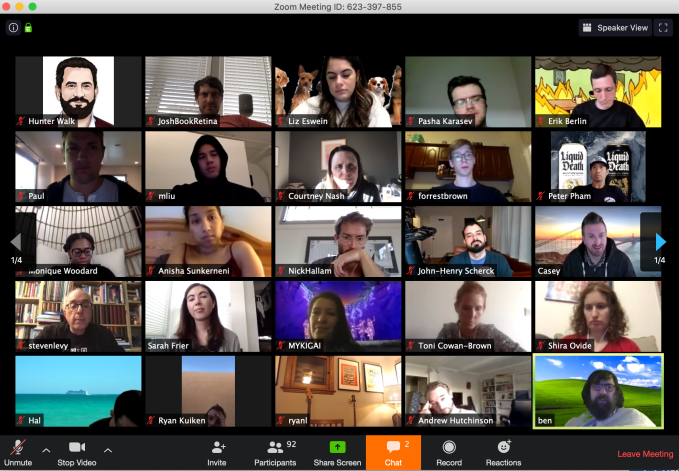
That’s just what happened today on the WFH Happy Hour, a popular daily public Zoom call hosted by The Verge reporter Casey Newton and investor Hunter Walk. Suddenly, dozens of attendees were bombarded with disturbing imagery. A troll entered the call and screenshared Two Girls, One Cup and other horrifying sexual videos. Attempts to block the attack were thwarted as the perpetrator simply re-entered the call under a new name and screenshared more gross-out clips. The hosts ended the call rather than subject viewers to the assault until they could stop it.

The problem stems from Zoom’s policy that “The host does not need to grant screen share access for another participant to share their screen.” However, hosts can disable this option in their settings or the Admin controls of a call. You can either change this in your pre-meeting Settings, or in the in-call admin settings for Share Screen -> Advanced Sharing Settings.

Anyone publicly sharing Zoom links where they could be discovered by trolls, like on Twitter, should be sure to change screensharing to “Host Only” before a call starts or as soon as they see the feature being abused. Some tips from entrepreneur Alex Miller for other ways to protect your Zoom calls include:

  • Disable “Join Before Host” so people can’t cause trouble before you arrive
  • Enabling “Co-Host” so you can assign others to help moderate
  • Disable “File Transfer” so there’s no digital virus sharing
  • Disable “Allow Removed Participants to Rejoin” so booted attendees can’t slip back in

Just imagine the most frightened look on all these people’s faces. That’s what happened.

“I want to apologize to all our attendees — including my parents, Jim and Sally, who joined #WFHappyHour today for the first time. Today we all learned an important lesson about disabling screen sharing and saw once again the importance of good content moderation” Newton tells me. When asked if he had any photographic evidence of the attack, he told me “lol I was not taking screenshots! I was screaming!”

This is just one of the many new vectors for abuse we’re experiencing in the coronavirus age. We’ve seen phishing attacks purporting to offer health screenings, scams claiming people’s electricity would be shut off during quarantine if they don’t pay, and fake COVID-19 testing kits on sale. There’s always someone willing to exploit a tragedy for money or just to see the world burn, so it’s more important than ever to stay vigilant and keep that “block” button handy.


Read Full Article

Facebook is wrongly blocking some links, including coronavirus info


Facebook is suffering from a massive bug in its News Feed spam filter, causing URLs to legitimate websites including Medium, Buzzfeed, and USA Today to be blocked from being shared as posts or comments. The issue is blocking shares of some but not all coronavirus-related content, while some unrelated links are allowed through and others are not. It’s not clear what exactly is or isn’t tripping the filter. Facebook has been trying to fight back against misinformation related to the outbreak, but may have gotten overzealous or experienced a technical error.

A source tipped us off and provided numerous examples of blocked links. We reached out to Facebook for comment and a company spokesperson told us “We’re looking into this right now and working as quickly as possible to share information. [I] can confirm at this point that we’re looking into the matter, can’t confirm what might be happening just yet.”

Facebook’s Guy Rosen later tweeted that “We’re on this – this is a bug in an anti-spam system, unrelated to any changes in our content moderator workforce. We’re in the process of fixing and bringing all these posts back. More soon.” Facebook sent home its content moderators this week and announced it would be relying more on its artificial intelligence systems, warning it could make “more mistakes”.

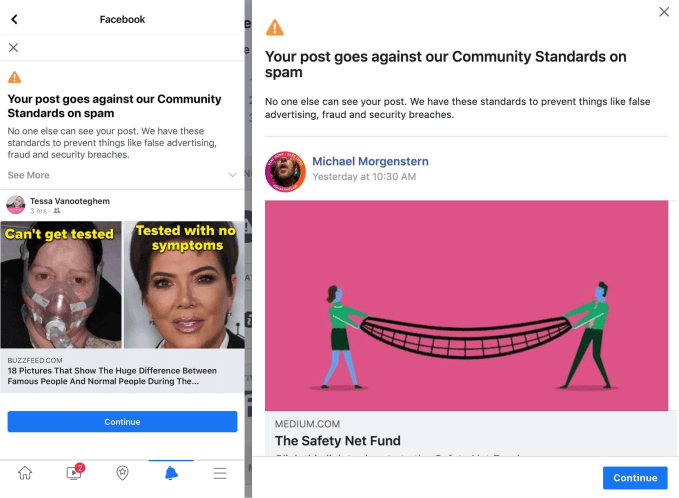
Upon sharing certain links, users are seeing a warning from Facebook stating “Your post goes against our Community Standards on spam”. It goes on to explain that “No one else can see your post. We have these standards to prevent things like false advertising, fraud and security breaches.”

Earlier this month, Facebook banned ads for protective face masks in an effort to prevent price gouging during the outbreak. Facebook has also been sharing contagion prevention tips atop Instagram’s home screen, sending misinformation to fact-checkers for review, and providing data to researchers.

Facebook has grown into a fundamental communications utility, holding special importance during the COVID-19 crisis. News organizations are sharing life saving tips while non-profits are raising money for artists and businesses impacted by widespread quarantine orders. That means it’s more critical than ever that Facebook keep information flowing properly.


Read Full Article

Revolut launches Revolut Junior to help you manage allowance


Revolut is introducing a new product specifically targeted toward kids aged 7-17 years old — Revolut Junior. Revolut Junior is a new app and service that integrates directly with the main Revolut app on the parent’s side.

Parents or legal gardians who are also Revolut users can create a Revolut Junior account for their kid. After that, your kid can download the Revolut Junior app and get a Revolut Junior card.

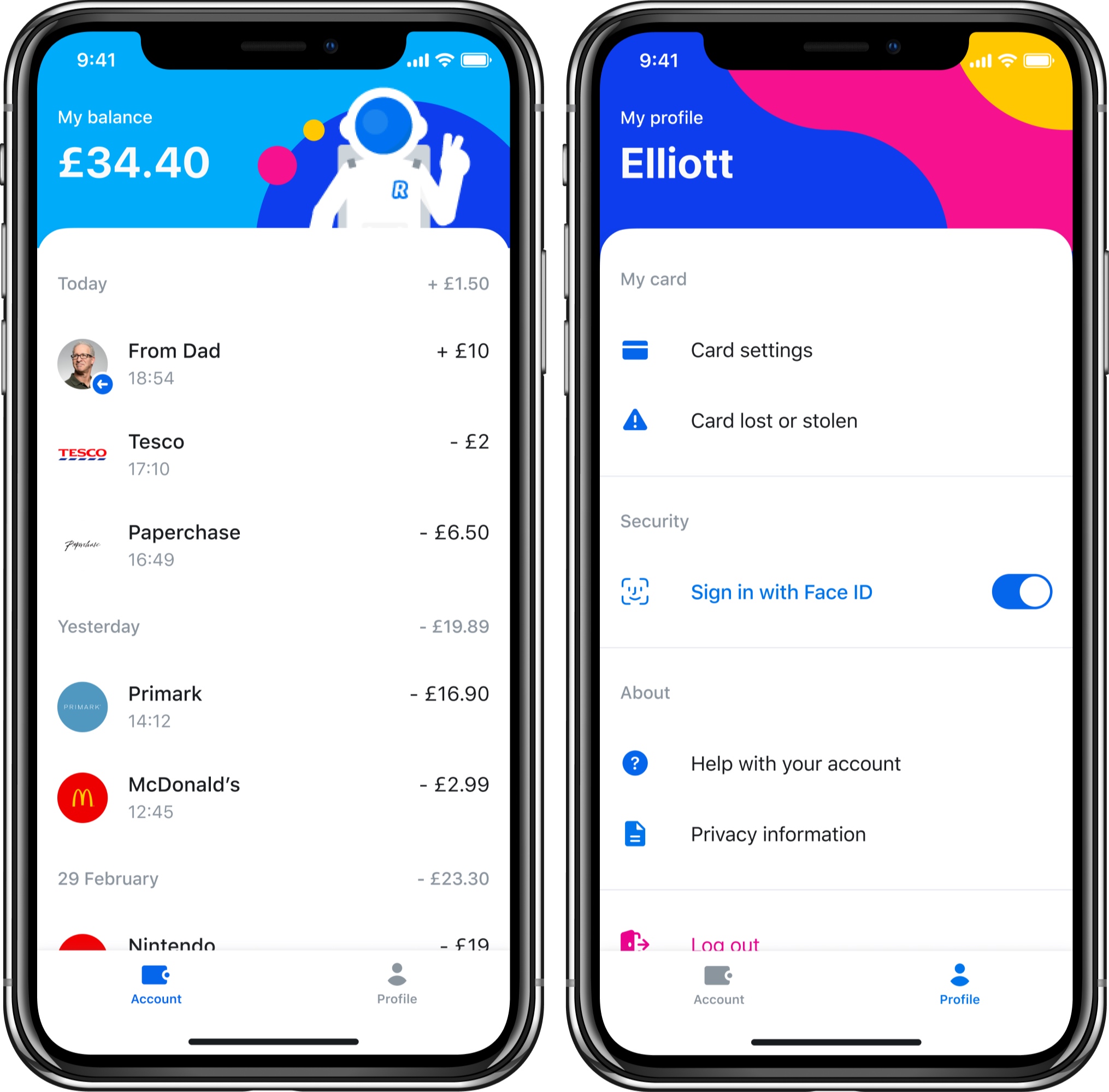
The new app offers a limited set of features with an interface divided in two tabs — Account and Profile. Kids can see a list of transactions in real time in the Account tab. They can configure card settings in the Profile tab. And that’s about it.

On the other end, parents can control their kids’ spending from Revolut. They can transfer money to a Revolut Junior account instantly. Parents can also access balances and transactions as well as disable some card features, such as online payments. They can also choose to receive notifications when a child is using their card.

The reason why Revolut Junior can attract a ton of users is that Revolut itself already has over 10 million users. It’s going to be easier to convince existing Revolut customers to use Revolut Junior over a custom-made challenger bank for teens, such as Kard or Step. Arguably, the biggest competitor of challenger banks for teens is still cash.

As kids grow up, chances are they’ll switch to a full-fledged Revolut account if they’ve been using Revolut Junior for years. Revolut Junior represents a great acquisition funnel as well.

Revolut Junior is only available to Premium and Metal customers in the U.K. for now. The company will eventually roll it out to more users and more countries.

Revolut plans to add more features to Revolut Junior in the future. For instance, parents will be able to set a regular allowance and financial goals. Kids will get savings options, spending reports, spending limits and more.


Read Full Article

17 March 2020

Android app reviews may slow to over a week due to COVID-19 impacts, Google warns developers


Google this week warned Android developers that Play Store app review times will be much longer than normal due to the impacts of the COVID-19 crisis. Developers should expect app reviews to take up to a week or even longer, the company informed its community by way of an alert on the Google Play Console.

This slowdown in moderation efforts isn’t something that’s just impacting Google Play.

Yesterday, YouTube announced it would more heavily rely on its automated systems during this time, which meant more videos will likely be taken down by machine learning-powered systems before they received a review from a human moderator.

In both cases, the slowdowns are related to the reduced in-office staffing levels — a result of the COVID-19 pandemic, which is impacting employee scheduling at Google and elsewhere.

Up until now, Google Play had a fairly quick app review process.

For years, the company differentiated its Play Store from Apple’s App Store by allowing developers to publish without a lengthy review. This, of course, led to issues as the store was over-filled with low-quality and sometimes even malicious apps. In 2015, Google revealed it had begun to utilize an internal team of reviewers to analyze apps for policy violations prior to publication.

Despite the change in process, apps were being approved within hours instead of days, Google said at the time.

That changed last year, however, as the company implemented a more stringent review. It then began to advise developers to plan for review times of at least three days between submission and the app going live. But the length was reduced for established, trusted developers who continued to see faster reviews, Google had noted.

Review times of a week or even longer are unprecedented, much like the COVID-19 crisis itself.

News of the increased app reviews was first reported by Android Police.

A Google spokesperson confirmed the delay to TechCrunch, saying: “Due to adjusted work schedules at this time, we are currently experiencing longer than usual review times. While the situation is currently evolving, app review times may fluctuate, and may take 7 days or longer.”

The delay is also confirmed in the Play Console’s Help documentation.


Read Full Article

Android app reviews may slow to over a week due to COVID-19 impacts, Google warns developers


Google this week warned Android developers that Play Store app review times will be much longer than normal due to the impacts of the COVID-19 crisis. Developers should expect app reviews to take up to a week or even longer, the company informed its community by way of an alert on the Google Play Console.

This slowdown in moderation efforts isn’t something that’s just impacting Google Play.

Yesterday, YouTube announced it would more heavily rely on its automated systems during this time, which meant more videos will likely be taken down by machine learning-powered systems before they received a review from a human moderator.

In both cases, the slowdowns are related to the reduced in-office staffing levels — a result of the COVID-19 pandemic, which is impacting employee scheduling at Google and elsewhere.

Up until now, Google Play had a fairly quick app review process.

For years, the company differentiated its Play Store from Apple’s App Store by allowing developers to publish without a lengthy review. This, of course, led to issues as the store was over-filled with low-quality and sometimes even malicious apps. In 2015, Google revealed it had begun to utilize an internal team of reviewers to analyze apps for policy violations prior to publication.

Despite the change in process, apps were being approved within hours instead of days, Google said at the time.

That changed last year, however, as the company implemented a more stringent review. It then began to advise developers to plan for review times of at least three days between submission and the app going live. But the length was reduced for established, trusted developers who continued to see faster reviews, Google had noted.

Review times of a week or even longer are unprecedented, much like the COVID-19 crisis itself.

News of the increased app reviews was first reported by Android Police.

A Google spokesperson confirmed the delay to TechCrunch, saying: “Due to adjusted work schedules at this time, we are currently experiencing longer than usual review times. While the situation is currently evolving, app review times may fluctuate, and may take 7 days or longer.”

The delay is also confirmed in the Play Console’s Help documentation.


Read Full Article

Google postpones the online version of Cloud Next until further notice


A few weeks ago, Google canceled the in-person version of Cloud Next, its largest conference of the year, amid a flurry of similar coronavirus-related cancellations of major events. Originally, Cloud Next was scheduled to run from April 6 to 8. Like other companies, Google at the time said it would hold an online version of the show, but as the company announced today, it is now also postponing that. The company did not announce a new date.

“Right now, the most important thing we can do is focus our attention on supporting our customers, partners, and each other,” Alison Wagonfeld, Google Cloud’s Chief Marketing Officer, writes. “Please know that we are fully committed to bringing Google Cloud Next ‘20: Digital Connect to life, but will hold the event when the timing is right. We will share the new date when we have a better sense of the evolving situation. ”

Chances are we will see a few more of these announcements in the coming weeks. As companies move to remote work, states enact curfews and social distancing has become a word everybody suddenly knows, even putting on a streamed keynote is getting harder. From a more cynical point of view, it’s also worth noting that tech companies are also now facing a world where there isn’t all that much interest in their announcements during a relentless news cycle that prioritizes other topics. Over the last few days, we’ve seen a number of companies postpone their pre-planned announcements, most of which weren’t public yet, and more are sure to come.


Read Full Article

Apple now says its retail stores are closed “until further notice”


Apple appears to be expecting a longer disruption to shopping at its physical retail stores as a result of the public health crisis posed by the COVID-19 pandemic.

Earlier this week, in a press release, the iPhone maker said it would be closing retails stores outside China until March 27. A note on its website now says the shut down is open ended. Apple writes that the bricks-and-mortar stores “are closed until further notice” — so at very least it’s signalling to customers to expect ongoing disruption to its retail business as usual.

Those looking to buy Apple products are told to shop on the website. Service and support is also offered online or via telephone.

We’ve reached out to Apple to ask for confirmation on a policy change.

In its March 13 missive, the company wrote that it is committed to paying all its hourly workers as if the stores remained open, and also said it was expanding its leave policies to “accommodate personal or family health circumstances created by COVID-19”.

Late yesterday six Bay Area countries issued a ‘shelter in place’ order to restrict potential spread of the novel coronavirus. Additional measures seem likely in the coming days.

Multiple countries in European Union have already ordered the closure of non-essential shops — instructing residents to stay at home unless they need to venture out to obtain essential supplies or are required to work and cannot work from home.


Read Full Article

Oura raises $28 million for its health and sleep tracking ring


Smart rings are still a relatively young category in the wearable hardware world, but the Oura Ring seems to be a standout in terms of early success. The Oura Ring hardware is sleek and packed with sensors, allowing it to measure a user’s sleep patterns, take your body temperature and track activity, and now Oura has raised $28 million in Series B funding to bring on new key hires and product updates.

In a Medium post announcing the raise, Oura CEO Harpreet Singh Rai revealed that to date, the company has sold over 150,000 of its rings since launch (which was in early 2018) and that its team has grown to over 100 people globally. The Series B funding comes from Forerunner Ventures, which has a strong track record when it comes to direct-to-consumer product company investments, as well as from Gradient Ventures and Square.

Along with the investment, Oura gains two new board members, and one new board observer all with expertise in different aspects of the startup’s business: Forerunner’s Eurie Kim and Square’s hardware lead Jesse Dorogusker are the new board members, and Gradient partner (and former VP of engineering at Google) Anna Patterson joins as the observer.

Oura will be revamping its website and adding a new web-based portal for Oura Ring users that offers “actionable insights,” the company says, and it’s going to be doing more in terms of collaborating with academic researchers on ensuring its products measurements and guidance remain as accurate and useful as possible.

Oura prioritizes the role of sleep in terms of its contribution to health, and has also recently ventured into the realm of meditation, but it acts as a general fitness tracking device as well. It has attracted a number of fans among the plugged-in tech elite, too, including Twitter and Square CEO Jack Dorsey. The company deserves kudos for delivering a solid, attractive and feature-rich gadget in a category that seemed like a tough sell in the early offing, and this new funding is a good vote of confidence.


Read Full Article

Oura raises $28 million for its health and sleep tracking ring


Smart rings are still a relatively young category in the wearable hardware world, but the Oura Ring seems to be a standout in terms of early success. The Oura Ring hardware is sleek and packed with sensors, allowing it to measure a user’s sleep patterns, take your body temperature and track activity, and now Oura has raised $28 million in Series B funding to bring on new key hires and product updates.

In a Medium post announcing the raise, Oura CEO Harpreet Singh Rai revealed that to date, the company has sold over 150,000 of its rings since launch (which was in early 2018) and that its team has grown to over 100 people globally. The Series B funding comes from Forerunner Ventures, which has a strong track record when it comes to direct-to-consumer product company investments, as well as from Gradient Ventures and Square.

Along with the investment, Oura gains two new board members, and one new board observer all with expertise in different aspects of the startup’s business: Forerunner’s Eurie Kim and Square’s hardware lead Jesse Dorogusker are the new board members, and Gradient partner (and former VP of engineering at Google) Anna Patterson joins as the observer.

Oura will be revamping its website and adding a new web-based portal for Oura Ring users that offers “actionable insights,” the company says, and it’s going to be doing more in terms of collaborating with academic researchers on ensuring its products measurements and guidance remain as accurate and useful as possible.

Oura prioritizes the role of sleep in terms of its contribution to health, and has also recently ventured into the realm of meditation, but it acts as a general fitness tracking device as well. It has attracted a number of fans among the plugged-in tech elite, too, including Twitter and Square CEO Jack Dorsey. The company deserves kudos for delivering a solid, attractive and feature-rich gadget in a category that seemed like a tough sell in the early offing, and this new funding is a good vote of confidence.


Read Full Article

A fascinating time capsule of human feelings toward AI | Lucy Farey-Jones

A fascinating time capsule of human feelings toward AI | Lucy Farey-Jones

How comfortable are you with robots taking over your life? Covering a wide range of potential applications -- from the mundane (robot house cleaner) to the mischievous (robot sex partner) to the downright macabre (uploading your brain to live on after death) -- technology strategist Lucy Farey-Jones shares data-backed evidence of how our willingness to accept AI may be radically changing.

Click the above link to download the TED talk.

ReMarkable’s redesigned e-paper tablet is more powerful and more papery


It’s no secret I’m a fan of the reMarkable, a tablet with a paper-like display that’s focused on text and sketching rather than rich media and games. The sequel to the original, announced today, looks to make a good thing even better.

Designed for the creation and consumption of monochromatic content like long documents, ebooks, notes and sketches, the reMarkable set itself apart as a more minimalist alternative (or complement) to the likes of the iPad or Surface. The device was crowdfunded and has sold more than 100,000 units; meanwhile the company has grown and attracted a $15 million A round. One sees in retrospect that the money helped launch this successor.

The most obvious change is to the design. It has a bold asymmetrical look with a chrome band along the left side, indicating the tablet’s main use as an alternative to a paper notebook: Hold it with your left hand and write with your right. Sorry, lefties.

The new tablet is just 4.7 mm (0.19 in) thick, thinner than the iPad Pro and Sony’s competing Digital Paper tablets, both of which are 5.9 mm. Let’s be honest — at these levels of thinness it’s getting hard to tell the difference, but it’s an accomplishment nevertheless.

Probably the best thing about the original reMarkable, however, was how good it felt to write and draw on, and the company has spent the last few years improving that wherever they can. For one thing, the already very small delay of about 40 ms between touching the screen with the stylus and a line appearing has been nearly cut in half.

That’s an area where every milli-unit counts. The lag on a real pen and paper is zero, of course, and while the reMarkable was good, there was still a very slight lag, especially when making large gestures or lines. As ?????? explained to me:

The hardware to further push the latency down further did not exist, so we decided to invent the technology ourselves. We redesigned both the hardware and software architecture that controls the display through a completely new display controller that changes how the display itself is electrically controlled, down to the voltages and electrical currents applied in complex waveforms to each individual pixel, millions at a time. The result is a 20ms latency, smoother ink flow with less jitter, and a completely uncontested digital writing experience perfected.

I intend to investigate this myself once I get my hands on one of the new devices. The company worked with E Ink, the main manufacturer and investor in e-paper type displays, to accomplish the new display, which has the same specs as the previous one otherwise: 10.3 inches, monochrome, 1872×1404 resolution for 226 DPI.

Here’s the inevitable, yet well-executed, aspirational promo video:

The software running on the reMarkable has received several major updates since the product made its debut, adding things like handwriting recognition, a new interface, better performance and so on. But one of the most requested features is finally coming with the new device: saving articles from the web.

Unfortunately they didn’t answer my specific request of adding Pocket integration, deciding instead to roll their own with a Chrome plugin that sends a reformatted webpage to the device. Unfortunately I use Firefox, but I can make an exception for this.

The company is claiming a 3x boost to battery life, using the same 3000 mAh battery, based on performance improvements throughout and a more efficient (but more powerful) dual-core ARM processor. That means two weeks of use and 90 days of standby. This is welcome news, because frankly the battery life and power management on the last one were not great.

Lastly, the “Marker” itself is getting an upgrade I’ve desperately wanted since the first day I tried the tablet: an eraser. You could always erase by selecting that tool, of course, but now one of the tips of the stylus will activate it automatically, a feature borrowed from Wacom and accomplished in collaboration with them. Of course, the eraser-enabled “Marker Plus” costs $99, $50 more than the plain one. They both stick onto the tablet via magnet, though.

“We’ve worked closely with Wacom the last two years to create Marker Plus, the most beautiful pen we have ever made,” reMarkable co-founder and CEO Magnus Wanberg told TechCrunch. “In addition to premium materials and design, it features an end-cap eraser that works seamlessly with the reMarkable software. We’ve fined-tuned the eraser sensor in collaboration with Wacom’s engineering team to make sure it looks and feels like just a real eraser on paper.”

But overall you’re looking at a much cheaper package. The reMarkable, for all its merits, was not cheap at $700. The reMarkable 2 will sell for $399 if you pre-order, and comes with a Marker and a nice folio case. For anyone who was on the fence about the first one, the sequel may prove irresistible.


Read Full Article

Master the Fundamentals of Video Editing With This $15 Final Cut Course


Whether you want to become the next Spielberg or create something for YouTube, knowing how to edit video is essential. As a complete beginner, professional software can seem pretty daunting. But with the Complete Final Cut Pro X Course, you get four hours of expert guidance. Designed to take you from beginner to intermediate, this training is the perfect introduction for aspiring content creators. You can get it now for just $14.99 at MakeUseOf Deals.

Master the Fundamentals

From No Country for Old Men to The Social Network, many of the best movies of the past 20 years have been edited using Final Cut. Likewise, many top YouTubers and professional creatives utilize the software.

Rated at 4.4 stars on Udemy, this course helps you come to grips with Final Cut Pro X. Through 38 tutorials, you discover how to put together slick reports, presentations, films, and more.

Delivered by top-rated instructor Joe Parys, the training starts with a tour of Final Cut Pro X before diving into key techniques. Along the way, you discover how to import and trim footage, insert transitions, and add audio including voiceovers.

The advanced videos look at color grading, from adjusting exposure to choosing your hues. You also discover how to work with LUTs and masks, and add cool effects.

Lifetime Access for $14.99

This course is normally priced at $200, but you can grab it now for just $14.99 with lifetime access included

Read the full article: Master the Fundamentals of Video Editing With This $15 Final Cut Course


Read Full Article

5 Email-Cleaning Ways to Organize and Manage Your Inbox


clean-email

Is email taking up more time than it should? There are better ways to organize and tame your inbox so that you have more energy and space for other things.

Gmail is the world’s biggest email service today, and that’s why most of the methods and apps in this article focus on Gmail users. However, the tricks here can easily be applied in other email apps, and most tools have a how-to for that on their website.

1. You vs. Your Inbox (Web): 4 Strategies for Inbox Management

You vs. Your Inbox series talks about the best methods to organize your email

Everyone has their own cool trick to get control of their inbox. Forge magazine started an insightful series called You vs. Your Inbox to highlight some of the best strategies. Currently, there are four articles with different ideas about tackling inbox overload. Read them all, they offer different perspectives on dealing with email.

One article talks about how the secret is sending better emails. If you compose emails that make it clear what the response should be, there will be less confusion and fewer ambiguous messages sent back and forth. Another talks about how you should check email in sessions, and have a purpose assigned to each session.

The third email management system is about triaging your inbox with labels, making it easier to sort and filter the messages. And finally, one strategy talks about how it’s not important to have inbox zero, which has one of the best pieces of advice: “It’s important to remember that email itself isn’t work.”

2. Instaclean (Android, iOS): Find Senders and Subscriptions You Don’t Open

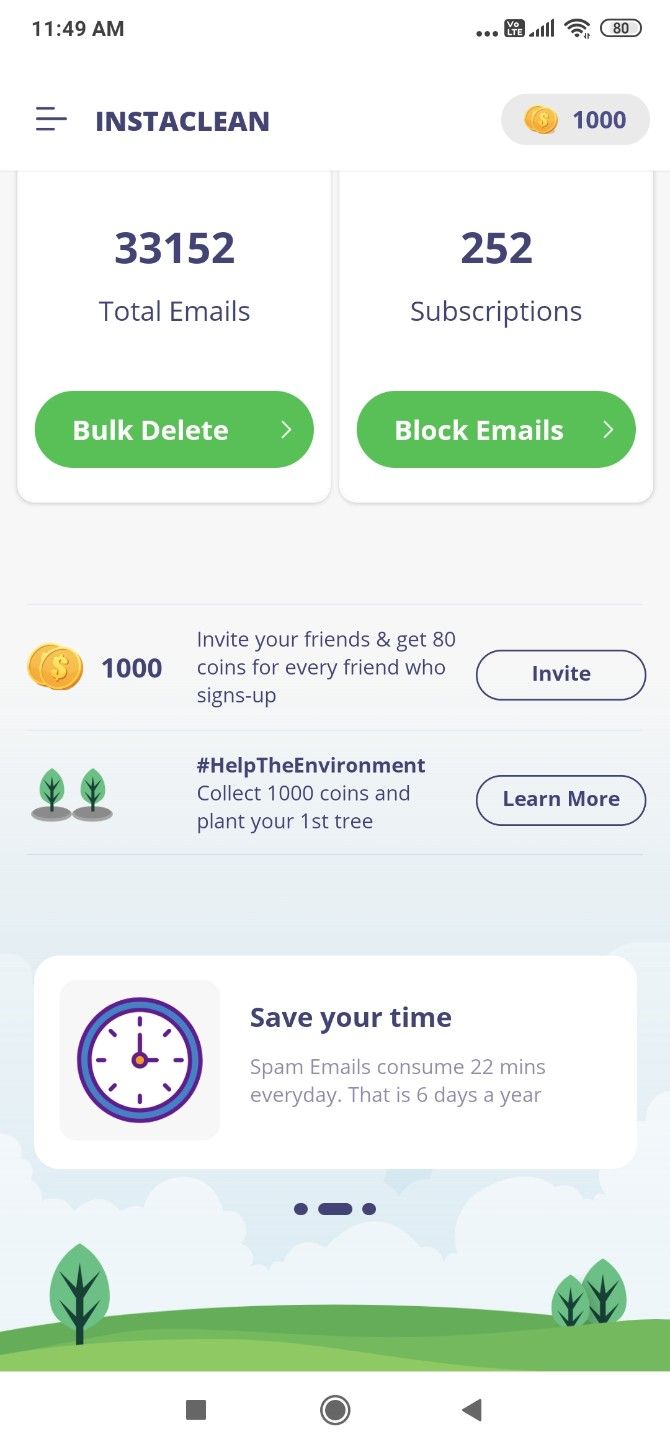
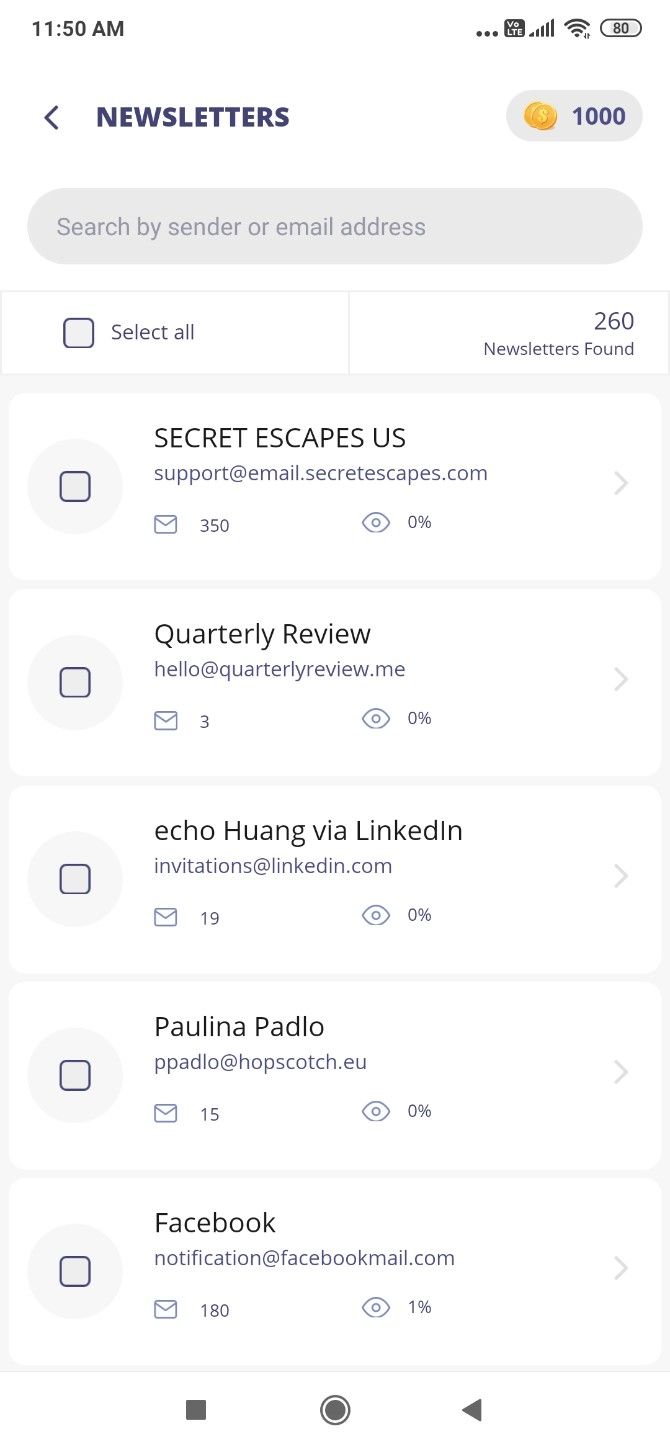
Instaclean is one of the best free apps to manage your inbox. It lets you delete and block unwanted newsletters. And it shows you senders who are clogging up your inbox when you don’t even read their messages.

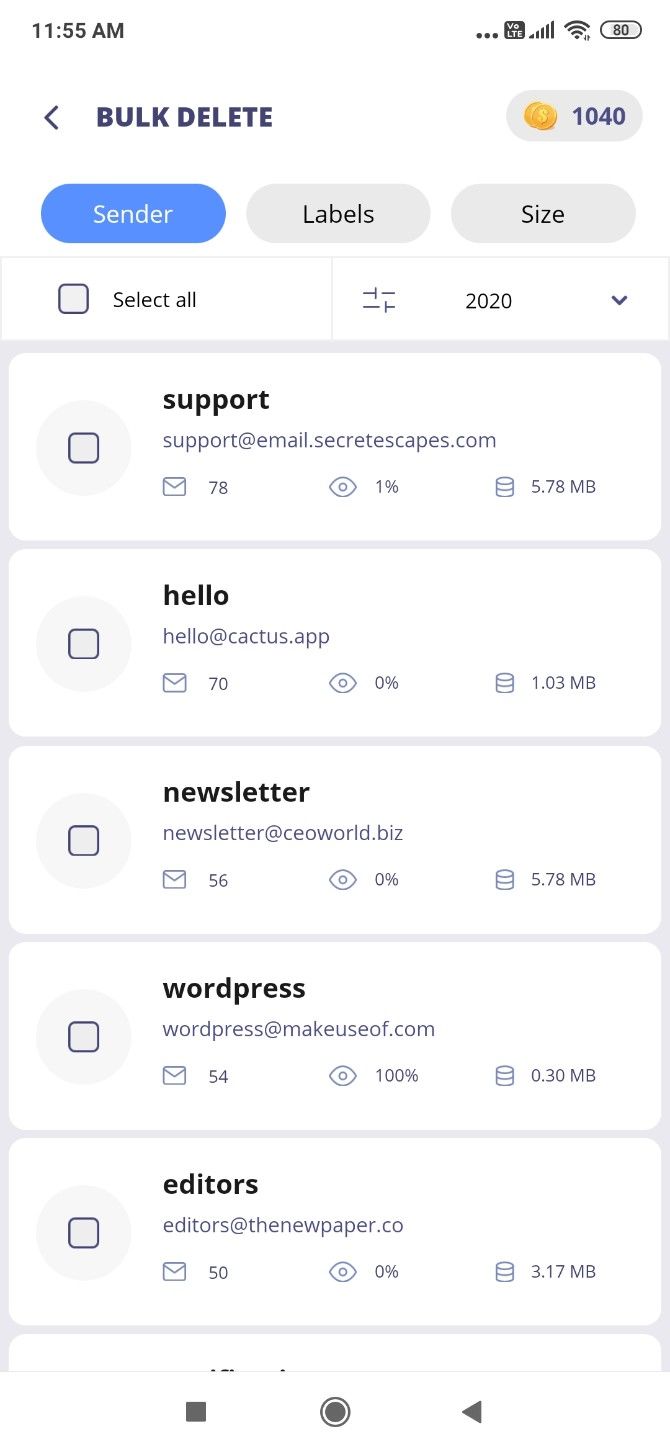
Bulk Delete sorts emails by sender, showing you how many of their messages are in your inbox and how many of them you have ever opened. If someone is sending you many emails and you open 0-1% of them, you might want to block that sender and delete all their messages still in your inbox. Emails can be sorted by sender or size.

The app also finds all the subscriptions you are getting emails from, which aren’t being sent to spam. In a few taps, you can block all such emails you no longer want to receive. It doesn’t delete all subscriptions, and you’ll have to do multiple passes. In a way, that’s good because you don’t want to accidentally remove something you like.

Each action (delete or block) rewards you with coins. Once you collect 1000 coins, you can use them for a good cause by asking Instaclean to plant a tree on your behalf. You can also earn coins by referring the app to friends.

Download: Instaclean for Android | iOS (Free)

3. Paced Email (Web): Get Frequent Emails as Batches and Summaries

Paced Email gives you an email alias to batch newsletters

Not every newsletter is unwanted, but it might be coming to you too often. Similarly, even if a colleague is trigger-happy with sending bulk emails on the office chain, you can’t ignore them. Paced Email lets you turn frequent messages into batches, so they land in your inbox when you want.

Register at the website to get your personal email alias, for example, john.doe@daily.paced.email. Then go to the newsletter, chain, or service that is mailing too often, and change your email address to this alias. Paced will then batch all emails from it and send it as a daily digest. If you want an email sooner, login to the website and trigger an immediate digest.

You also can also specify how often you want to receive emails from that service. By default, it’s daily as the email alias indicates, but you can change it to “weekly” or “monthly”. Paced will then send batches according to your preferences.

4. Slimbox (Web): Batch All Newsletters in Gmail

Slimbox finds newsletters in your inbox to turn them into a batch email

More than anything else, email newsletters are probably clogging up your inbox. Slimbox is an easy way to turn them into a single batched message, without having to unsubscribe or delete them.

There are a few reasons that make Slimbox better than the average app for batching. First, it’s verified by Google, so you can sign in to your Gmail or Google Apps inbox with the assurance that your data is safe. Second, Slimbox doesn’t make you change your email address in other services like Paced requires.

Once you’re logged in, the app will scan all your messages and prepare a list of frequent newsletters. You can choose to continue having them sent to your inbox or to put them into the daily Slimbox blast. Slimbox will send that email once a day (you can set your timezone), which hosts all the other emails you missed. It doesn’t affect your existing Gmail filters.

You can check your Slimbox at any time by signing into the site, change which senders go to the inbox or Slimbox, and so on. The service is free for a month to test it out, after which it costs $1 per month.

5. gfeed (Android, iOS): Scrolling Feed for a Faster Inbox

Try out gfeed and you’ll wonder why Gmail doesn’t have this option already. The app turns your inbox into a continuous scrolling feed of messages, like any social network. Images show up in preview, with the first few lines of the message below it.

To expand a message, tap the image, subject, or “more” link. There, you can reply to (or reply all) and forward that message through gfeed itself. This is good for basic text replies, but you’re mostly better off replying through the official Gmail app.

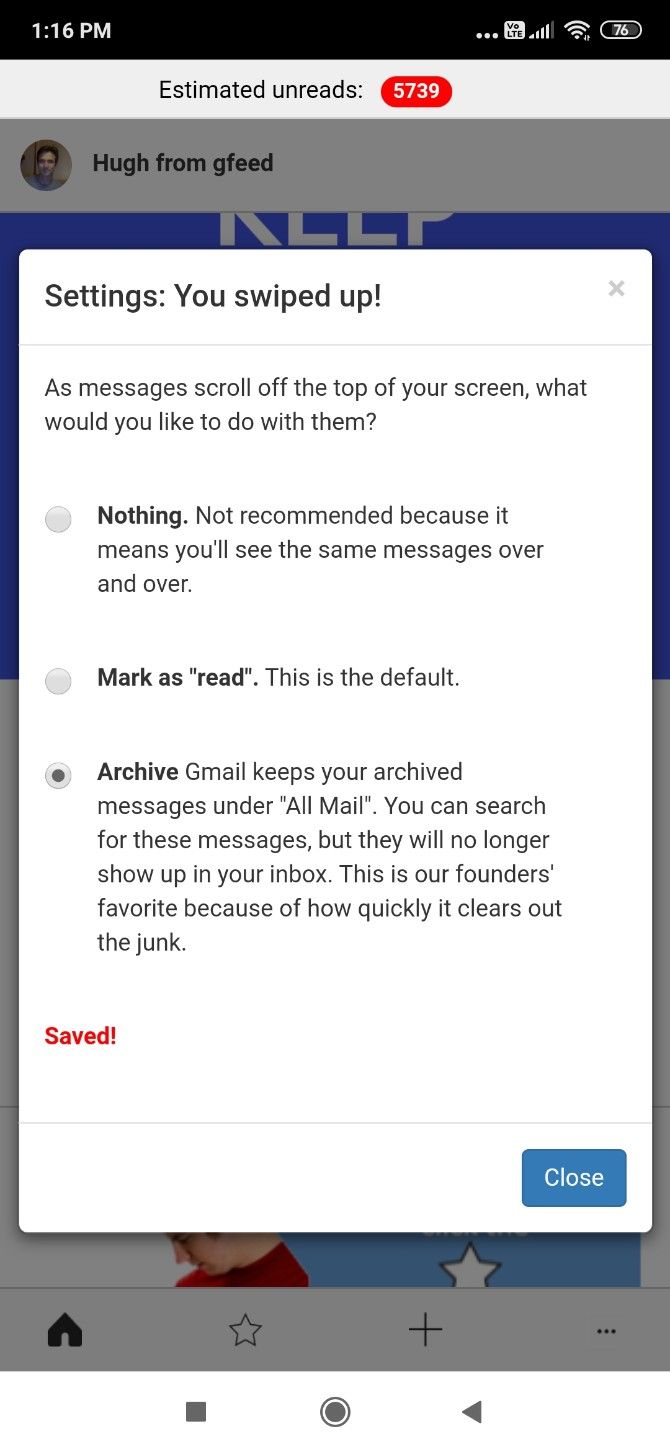
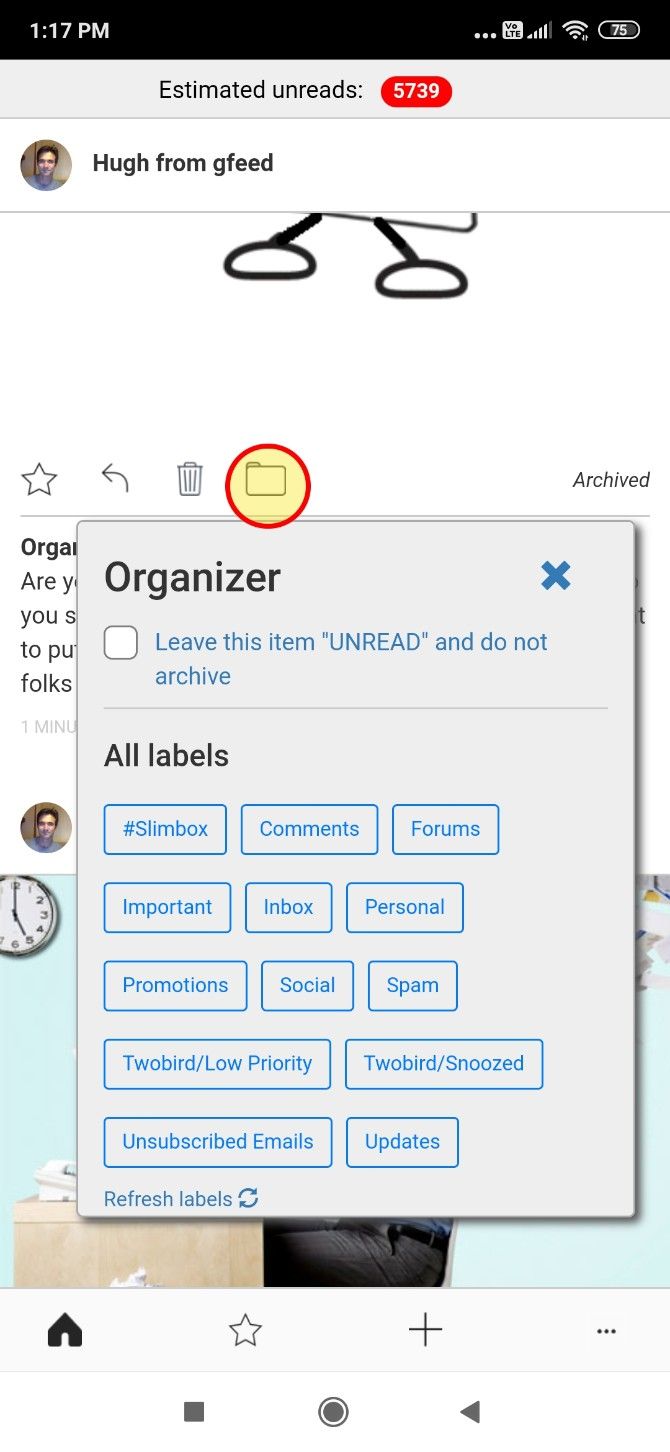
Every time you scroll past a message, gfeed will automatically mark it as read or archive it, depending on your settings. You can also star a message, or tag it with a label to add a filter. When you open Gmail, you can see those messages under that filter.

If you spend too much time going through your inbox, gfeed is among the best apps to speed up how you organize email.

Download: gfeed for Android | iOS (Free)

Archive Old Emails for Inbox Zero

Through one of these apps or a combination of multiple methods, that cluttered mess of emails should finally become much more manageable. Whether you’re aiming for inbox zero or a more organized inbox, don’t forget to check out the tools already available.

For example, the most overlooked feature is the “Archive” button in email apps. It’s an excellent way to free up your inbox while still keeping emails available for search later. Here’s how you can archive old mails and reach inbox zero.

Read the full article: 5 Email-Cleaning Ways to Organize and Manage Your Inbox


Read Full Article

The Best Online Tools To Know Everything About a Website


How do I contact the owner of a website? Where is a particular website hosted? What other websites are hosted on that same server? Is the site using WordPress or Gatsby? Which ad networks are they using to monetize a site? Is my site accessible from China?

Here are some of the most useful online tools that will help you know every single detail of any website.

Also see: The Essentials Tools for Programmers

  • just-ping.com — Use Just Ping to determine if a particular website is accessible from other countries. Just Ping has monitoring servers across the world including Turkey, Egypt, and China so if the ping results say 100% Packet Loss, most likely the site is inaccessible from that region.
  • who.is — If you like to know the contact address, email and phone number of the website owner, this free whois lookup service will help. This is a universal lookup service meaning it can simultaneously query the whois database of all popular domain registrars.
  • whoishostingthis.com — Enter the URL of any website and this online service will show you the name of the company where that website is hosted. This may come handy if you need the contact information of the web hosting provider for writing a DMCA Notice or if you are looking to switch web hosts.
  • chillingeffects.org — When there’s a copyright-related complaint against a website, a copy of that letter is archived in the Chilling Effects database. Anyone can query this public database to know about all the copyright infringement complaints against a particular website.
  • myip.ms — MyIP.ms offers a comprehensive report of any website or I.P. Address. You get to know about the hosting provider, the physical location of a website, the IP Address change history of a website and the DNS information. Netcraft also offers similar reports.
  • reversewhois.com — The reverse whois lookup will help you determine other websites of someone. You can search the whois database by the email address or name of the domain registrant.
  • builtwith.com — Use BuiltWith to know the technology stack of any website. It helps you figure out the mail service provider of a domain, the advertising partners, the tracking widgets that are installed on a website and whether the site is using any CDN like Amazon S3 or Google Cloud. See example.
  • ssllabs.com - The certificate diagnostics tool will verify your site’s SSL certificate and ensure that it is correctly installed, trusted and does not show errors to any of your site visitors.
  • semrush.com — If you wish to analyze your competitor’s website, this is the tool to go with. SEM Rush will help you figure what organic keywords are people using to find a website, what is the site’s traffic and which are the competing websites.
  • dnsmap.io — When you buy a new domain or switch from one host to another, the DNS records for the domain changes and it may take a while to propagate these changes worldwide. The tool checks the DNS records from various geographic locations and it can check your domain’s A, CNAME, TXT and MX records. whatsmydns.net is also a good alternative.
  • toolbox.googleapps.com — If email messages, including those sent via Mail Merge, from your domain are not reaching the recipient’s mailbox, use this Google tool to confirm that DMARC, DKIM and SPF records are properly configured for your domain.
  • browserstack.com - Check your website’s responsive design on multiple desktops, tables, iOS and Android phones running different versions of operating systems.
  • screenshot.guru - If a website is inaccessible, use Screenshot Guru, hosted on the Google Cloud, to confirm if the website is down or not.
  • thinkwithgoogle.com - A mobile speed tool developed by Google that will help you determine how fast your websites will load on mobile phones on 3G and 4G network. You can also compare your mobile speed score with other websites.
  • testmysite.io - A simple site testing tool from Netlify that will measure and rank your site’s loading time from different regions around the world.
  • developers.google.com — Find the Page Speed score of any website on both desktop and mobile devices. The higher this number, the better. The Google tool also offers suggestions on how the score can be improved.
  • httparchive.org — The HTTP Archive is a repository of all performance-related metrics for a website. It keeps a record of the size of pages, their average load time and the number of failed requests (missing resources) over time.
  • Website Monitor - Use this open-source Google Sheets based website monitoring tool to get alerts when your domain goes down or is inaccessible.
  • Flush DNS - Use this tool to flush the Google DNS cache for a domain. If you changed the DNS servers for your domain, by changing registrars or DNS hosting in the last few days, flush your main domain name first before you flush any subdomains. OpenDNS also has a web tool for refreshing the DNS cache.
  • DomainTools - The tool monitors one or more web domains and sends email alerts when the domain is expiring, the domain gets renewed, the nameservers change or when the registrant information is updated for the domain.

Also see: 101 Most Useful Websites


Facebook, Reddit, Google, LinkedIn, Microsoft, Twitter and YouTube issue joint statement on misinformation


In an unprecedented move to reassure customers and flag the potential for misinformation about COVID-19 on their platforms, all of the major social media companies and their parent corporations issued a joint statement on their efforts.

“We invite other companies to join us as we work to keep our communities healthy and safe,” the statement read.

Last week, U.S Chief Technology Officer Michael Michael Kratsios held a remote meeting with representatives from major tech companies on how to coordinate various efforts related to COVID-19, including fighting disnformation. The Washington Post and Politico reported that the White House asked Google, Facebook, Amazon, Microsoft, Apple, IBM, Cisco and Twitter for help.

The World Health Organization’s director-general said last month that disinformation is as dangerous as COVID-19. During an address at the Munich Security conference on Feb. 15, almost a month before the WHO officially declared COVID-19 a pandemic, Tedros Adhanom Ghebreyesus said “We’re not just fighting an epidemic; we’re fighting an infodemic. Fake news spreads faster and more easily than this virus, and is just as dangerous.”

But tech companies aren’t just battling the spread of questionable posts by the public. They also have to contend with misleading information in several of President Donald Trump’s public statements on COVID-19, including his tweets and Facebook posts.

TechCrunch has contacted each of the companies in the joint statement for more details, and will update this post as we hear back from them.

In response to an email, a LinkedIn spokesperson directed TechCrunch to a post published by the company on March 13, with links to information about finding trustworthy news sources and working remotely.

Facebook’s efforts to fight disinformation about COVID-19 have included information cards on Instagram and Facebook, that redirect to sources like the World Health Organization or local health authorities.


Read Full Article

TransferWise partners with Alipay for international money transfers


TransferWise, the London-headquartered international money transfer service most recently valued by investors at $3.5 billion, has partnered with China’s Aliplay for international transfers.

The launch enables TransferWise’s now 7 million-plus users to be able to send Chinese yuan from 17 currencies to users of Alipay, which serves more than 1.2 billion people worldwide including via its local e-wallet partners.
Promising “instant” money transfers — under 20 seconds, apparently — TransferWise users simply need the recipient’s name and Alipay ID to initiate a money transfer. The money will then be sent to the bank account linked to the recipient’s Alipay profile.

It could be a potentially smart bit of business by TransferWise, which has sometimes struggled to secure the kind of partnerships that can accelerate its customer base and increase transaction volume. According to a 2019 report, the fintech is citing, China is projected to be one of the top remittance recipient countries in the world, with £54bn expected to be sent back home by Chinese expats and migrants living abroad.

“The partnership is a major expansion for TransferWise as it reaches a new, additional market of people managing their money via the Alipay platform,” says the company.

With that said, Alipay is the second meaningful partnership that TransferWise has announced in the last few months. In November, it joined forces with GoCardless, the London fintech that lets customers pay via recurring bank payments (known as Direct Debits in the U.K.). GoCardless is used by more than 50,000 businesses worldwide, spanning multinational corporations to SMBs, and the partnership sees its own FX functionality powered by TransferWise.


Read Full Article