11 March 2020

All the startups threatened by iOS 14’s new features


Fitness, wallpaper, and lost item-finding startups could have a big new competitor baked into everyone’s iPhones. Leaks of the code from iOS 14 that Apple is expected to reveal in June signal several new features and devices are on the way. Startups could be at risk due to Apple’s ability to integrate these additions at the iOS level, instantly gain an enormous install base and offer them for free or cheap, as long as they boost sales of its main money maker, the iPhone.

It’s unclear if all of these fresh finds will actually get official unveiling in June versus further down the line. But here’s a breakdown of what the iOS 14 code obtained by 9To5Mac’s Chance Miller shows and which startups could be impacted by Apple barging into their businesses:

Fitness – Codename: Seymour

Apple appears to be preparing a workout guide app for iOS, WatchOS and Apple TV that would let users download instructional video clips for doing different exercises. The app could potentially be called Fit or Fitness, according to MacRumors‘ Juli Clover, and offer help with stretching, core training, strength training, running, cycling, rowing, outdoor walking, dance and yoga. The Apple Watch appears to help track your progress through the workout routines.

Icons for Apple’s fitness feature from the iOS 14 code

The iOS Health app is already a popular way to track steps and other fitness goals. By using Health to personalize or promote a new Fitness feature, Apple has an easy path to a huge user base. Many people are afraid of weight and strength training because there’s a lot to learn about having proper form to avoid injury or embarrassment. Visual guides with videos shot from multiple angles could make sure you’re doing those pushups or bicep curls correctly.

Apple’s entrance into fitness could endanger startups like Future, which offer customized workout routines with video clips demonstrating how to do each exercise. The $11.5 million-funded Future actually sends you an Apple Watch with its $150 per month service to track your progress while using visuals, sounds and vibrations to tell you when to switch exercises without having to look at your phone. By removing Future’s human personal trainers that text to nag you if you don’t work out, Apple could offer a simplified version of this startup’s app for free.
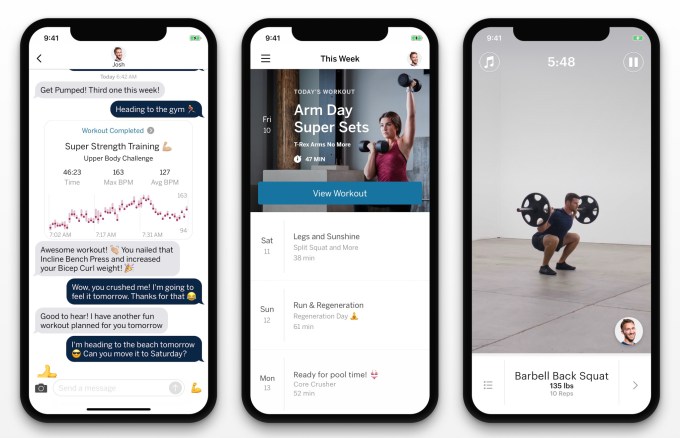
Apple Fitness could be even more trouble for less premium apps like Sweat and Sworkit that provide basic visual guidance for workouts, or Aaptiv that’s restricted to just audio cues. Hardware startups like Peloton, which offers off-bike Beyond the Ride workouts with live or on-demand class, and Tempo’s giant 3D-sensing in-home screen for weight lifting, could also find casual customers picked off by a free or cheap alternative from Apple.

There’s no code indicating a payment mechanism, so Apple Fitness could be free. But it’s also easy to imagine Apple layering on a premium feature like remote personal training assistance from human experts or a wider array of exercises for a fee, tying into its increasing focus on services revenue.

Wallpapers – access for third-parties
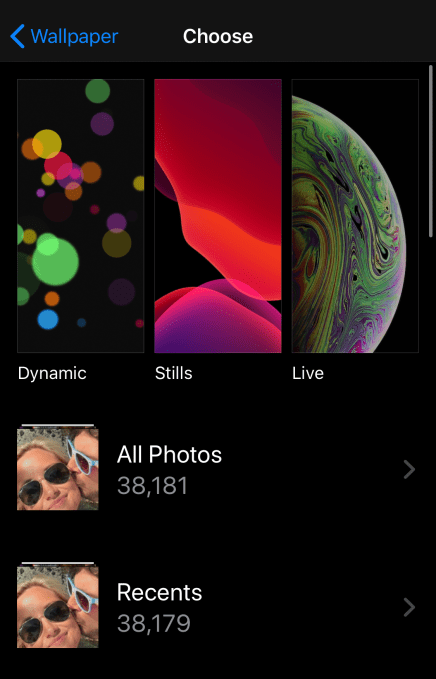
The iPhone’s current wallpaper selector

In iOS 14, it appears that Apple will offer new categorizations for wallpapers beyond the existing Dynamic (slowly shifting), Still and Live (move when touched) options. Apple’s always only offered a few native wallpapers plus the option to pull one from your camera roll. But the iOS 14 code suggests Apple may open this up to third-party providers.

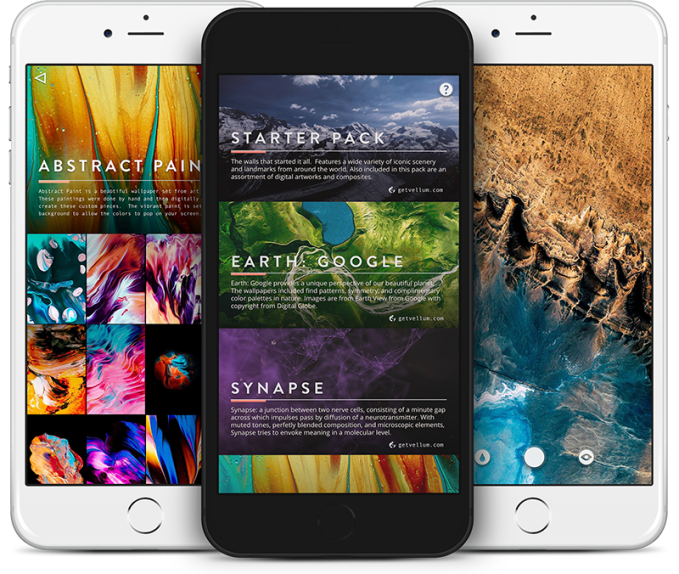
A wallpaper “store” could be both a blessing and a curse for entrepreneurs in the space. It could endanger sites and apps like Vellum, Unsplash, Clarity, WLPPR and Walli that aggregate wallpapers for browsing, purchase or download. Instead, Apple could make itself the ultimate aggregator by being built directly into the wallpaper settings. But for creators of beautiful wallpaper images, iOS 14 could potentially offer a new distribution method where their collections could be available straight from where users install their phone backgrounds.

The big question will be whether Apple merely works with a few providers to add wallpaper packs for free, does financially backed deals to bring in providers or creates a full-blown marketplace for wallpapers where creators can sell their imagery like developers do apps. By turning this formerly free feature into a marketplace, Apple could also start earning a cut of sales to add to its services revenue.
AirTags – find your stuff

Apple appears to be getting closer to launching its long-awaited AirTags, based on iOS 14 code snippets. These small tracking tags could be attached to your wallet, keys, gadgets or other important or easily lost items, and then located using the iOS Find My app. AirTags may be powered by removable coin-shaped batteries, according to MacRumors.

Native integration with iOS could make AirTags super-easy to set up. They also could benefit from the ubiquity of Apple devices, as the company could let the crowd help find your stuff by allowing AirTags to piggyback on the connectivity of any of its phones, tablets or laptops to send you the missing item’s coordinates.

Most obviously, AirTags could become a powerful competitor to the vertical’s long-standing frontrunner, Tile. The $104 million-funded startup sells $20 to $35 tracking tags that locate devices from 150 to 400 feet away. It also sells a $30 per year subscription for free battery replacements and 30-day location history. Other players in the space include Chipolo, Orbit and MYNT.
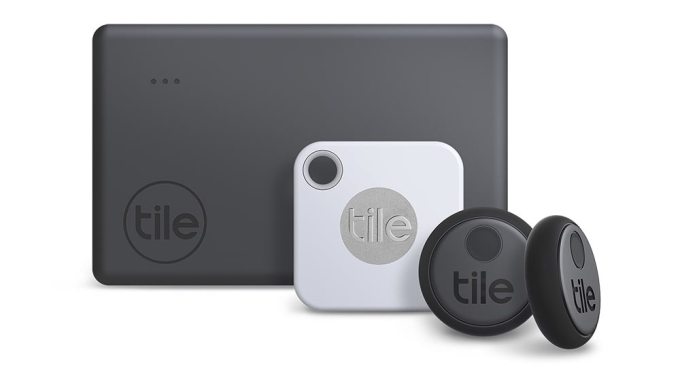
But as we saw with the launch of AirPods, Apple’s design expertise and native iOS integrations can allow its products to leapfrog what’s in the market. If AirTags get proprietary access to the iPhone’s Bluetooth and other connectivity hardware, and if they’re quicker to set up, Apple fans might jump from startups to these new devices. Apple also could develop a similar premium subscription for battery or full AirTag replacements, as well as bonus tracking features.

Augmented reality scanning – Codename: Gobi

iOS 14 includes code for a new augmented reality feature that lets users scan places or potentially items in the real world to pull up helpful information. The code indicates Apple is testing the feature, codenamed Gobi, at Apple Stores and Starbucks to let users see product, pricing and comparison info, according to 9To5Mac’s Benjamin Mayo. Gobi can recognize QR-style codes for specific locations like a certain shop, triggering a companion augmented reality experience.

It appears that an SDK would allow partners to build their own AR offerings and generate the QR codes that initiate them. Eventually, these capabilities could be extended from Apple’s mobile devices to the AR headset it’s working on so you’d instantly get a heads-up display of information when you entered the right place.

Apple moving to power lighter-weight AR experiences rather than just offering the AR Kit infrastructure for developers to build full-fledged apps could create competition for a range of startups and other tech giants. The whole point of augmented reality is that it’s convenient to explore hidden experiences in the real world, which is defeated if users have to know to download and then wait to install a different app for every place or product. Creating a central AR app for simpler experiences that load instantly could speed up adoption.
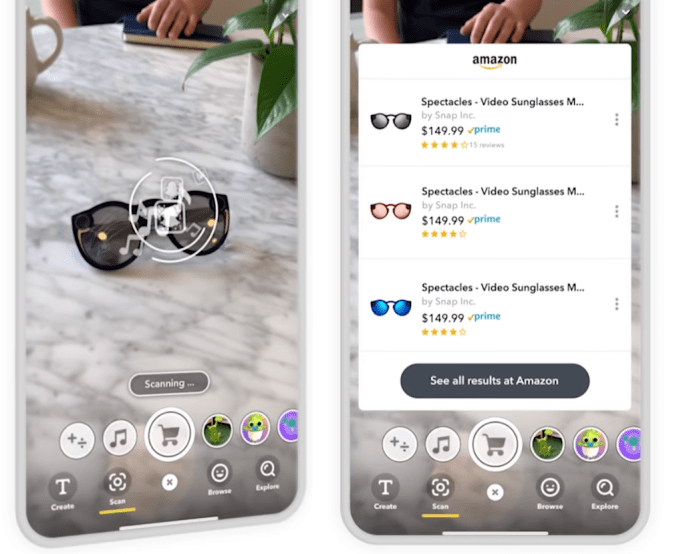
Snapchat’s Scan AR platform

Startups like Blippar have been working on AR scanning for years in hopes of making consumer packaged goods or retail locations come alive. But again, the need to download a separate app and remember to use it has kept these experiences out of the mainstream. Snapchat’s Scan platform can similarly trigger AR effects based on specific items from a more popular app. And teasers of Facebook and Google’s eventual augmented reality hardware and software hinge on adding utility to every day life.

If Apple can build this technology into everyone’s iPhone cameras, it could surmount one of AR’s biggest distribution challenges. That might help it build out a developer ecosystem and train customers to seek out AR so they’re all ready when its AR glasses finally arrive.


Read Full Article

Matternet’s new drone landing station looks like a sci-fi movie prop


Drones making deliveries is of course the hot new hyperlocal tech play, but where are these futuristic aircraft supposed to land? On the lawn? Matternet has built a landing station for its cargo drones that looks less like a piece of infrastructure and more like a death ray from a ’60s sci-fi movie.

Far from the free-form delivery network envisioned by Prime Air or the like, Matternet’s drone deployments have been fixed point-to-point affairs focused on quickly connecting a handful of locations that frequently trade time-sensitive deliveries: hospitals.

The company has performed pilot tests in Switzerland and North Carolina, and just started a new one in San Diego, in which medical facilities are able to send blood samples, medications and (soon, one hopes) vaccines and other supplies back and forth without worrying about traffic or other complications on the ground.

But there’s the problem of where exactly the drones land, and what happens afterwards. Does someone have to swap out the battery? Who says when it’s safe to approach the drone, and how to detach its payload? Whatever the process is, it could probably be easier and more automated, and that’s what the station aims to accomplish.

With its techno-organic curves and flower-like hatch on top, the 10-foot-tall station seems to channel the likes of “Star Trek: The Original Series” and “Lost in Space,” and no doubt it’s intended to be eye-catching as well as functional.

When the drone arrives, the top opens and the drone lands right in the center, where it is enclosed and grasped by the station’s machinery, unburdened of its payload, and given a fresh battery. The payload is contained in the tower until it is called for by an authorized person, who scans a dongle to receive their package.

If there’s just the one drone, it can live in the top part, the bulb or whatever you’d call it, until it’s needed again. If there are multiple deliveries or drones, however, the one inside will leave and enter a holding pattern about 60 feet above, in an “imaginary donut.”

The station will get its first installation in the second quarter of this year, at one of Matternet’s existing customer hospitals. Presumably it will roll out more widely once this shakeout period ends.

You can see the full operation in the dramatization below:


Read Full Article

Google expands work from home recommendation to all North American employees, establishes ‘COVID-19 fund’


Last week, Google sent out a memo to staff recommending that Washington State-based employees work remotely, in order to mitigate the potential spread of COVID-19. Today, the suggestion has been dramatically expanded, in line with the spread of the virus. A new note from the company recommends similar action for employees across North America.

A spokesperson for the company confirmed earlier reports with TechCrunch that employees across the continent are being recommended to work from home, if their positions allow for it. The company confirmed that other regions have been given similar guidance, as well. Europe, for example, is mostly recommended to work from home at present. Different regions are subject to different guidance, based on a variety of local requirements.

Last week’s precautions followed initial reports of the coronavirus strain’s spread in the Pacific Northwest, including King County, in which Google’s largest offices in the state — Seattle and Kirkland — are based. Instances of COVID-19 have spread quickly across the country. At last count, the Centers for Disease Control and Prevention has cases listed at 647 nationally, with 25 deaths. New York State has jumped to the top spot, with more than 170 cases reported.

Google is one of a rapidly growing list of tech companies taking similar action to avoid the spread of the virus. Microsoft, Box, Lyft and others have addressed concerns with employees, either recommending or requiring staff to work from home, and, in some cases, maintaining wages in spite of reduced hours. Google’s annual spring time developer conference I/O was among the major tech shows that are taking the year off over health precautions.

The software giant has also announced the establishment of a COVID-19 fund for temporary staff and vendors across the world.

“As we’re in a transition period in the U.S.—and to cover any gaps elsewhere in the world—Google is establishing a COVID-19 fund that will enable all our temporary staff and vendors, globally, to take paid sick leave if they have potential symptoms of COVID-19, or can’t come into work because they’re quarantined,” Google’s Director, Workplace Services Adrienne Crowther writes. “Working with our partners, this fund will mean that members of our extended workforce will be compensated for their normal working hours if they can’t come into work for these reasons. We are carefully monitoring the situation and will continue to assess any adjustments needed over the coming months.”


Read Full Article

R&D Roundup: Smart chips, dream logic and crowdsourcing space


I see far more research articles than I could possibly write up. This column collects the most interesting of those papers and advances, along with notes on why they may prove important in the world of tech and startups.

This week: crowdsourcing in space, vision on a chip, robots underground and under the skin and other developments.

The eye is the brain

Computer vision is a challenging problem, but the perennial insult added to this difficulty is the fact that humans process visual information as well as we do. Part of that is because in computers, the “eye” — a photosensitive sensor — merely collects information and relays it to a “brain” or processing unit. In the human visual system, the eye itself does rudimentary processing before images are even sent to the brain, and when they do arrive, the task of breaking them down is split apart and parallelized in an amazingly effective manner.

The chip, divided into several sub-areas, which specialize in detecting different shapes

Researchers at the Vienna University of Technology (TU Wien) integrate neural network logic directly into the sensor, grouping pixels and subpixels into tiny pattern recognition engines by individually tuning their sensitivity and carefully analyzing their output. In one demonstration described in Nature, the sensor was set up so that images of simplified letters falling on it would be recognized in nanoseconds because of their distinctive voltage response. That’s way, way faster than sending it off to a distant chip for analysis.


Read Full Article

Your VPN or ad-blocker app could be collecting your data


The underpinnings of how app store analytics platforms operate were exposed this week by BuzzFeed, which uncovered the network of mobile apps used by a popular analytics firm Sensor Tower to amass app data. The company had operated at least 20 apps, including VPNs and ad blockers, whose main purpose was to collect app usage data from end users in order to make estimations about app trends and revenues. Unfortunately, these sorts of data collection apps are not new — nor unique to Sensor Tower’s operation.

Sensor Tower was found to operate apps such as Luna VPN, for example, as well as Free and Unlimited VPN, Mobile Data, and Adblock Focus, among others. After BuzzFeed reached out, Apple removed Adblock Focus and Google removed Mobile Data. Others are still being investigated, the report said.

Apps’ collection of usage data has been an ongoing issue across the app stores.

Facebook and Google have both operated such apps, not always transparently, and Sensor Tower’s key rival App Annie continues to do the same today.

Facebook

For Facebook, its 2013 acquisition of VPN app maker Onavo for years served as a competitive advantage. The traffic through the app gave Facebook insight into what other social applications were growing in popularity — so Facebook could either clone their features or acquire them outright. When Apple finally booted Onavo from the App Store half a decade later, Facebook simply brought back the same code in a new wrapper — then called the Facebook Research app. This time, it was a bit more transparent about its data collection, as the Research app was actually paying for the data.

But Apple kicked that app out, too. So Facebook last year launched Study and Viewpoints to further its market research and data collection efforts. These apps are still live today.

Google

Google was also caught doing something similar by way of its Screenwise Meter app, which invited users 18 and up (or 13 if part of a family group) to download the app and participate in the panel. The app’s users allowed Google to collect their app and web usage in exchange for gift cards. But like Facebook, Google’s app used Apple’s Enterprise Certificate program to work — a violation of Apple policy that saw the app removed, again following media coverage. Screenwise Meter returned to the App Store last year and continues to track app usage, among other things, with panelists’ consent.

App Annie

App Annie, a firm that directly competes with Sensor Tower, has acquired mobile data companies and now operates its own set of apps to track app usage under those brands.

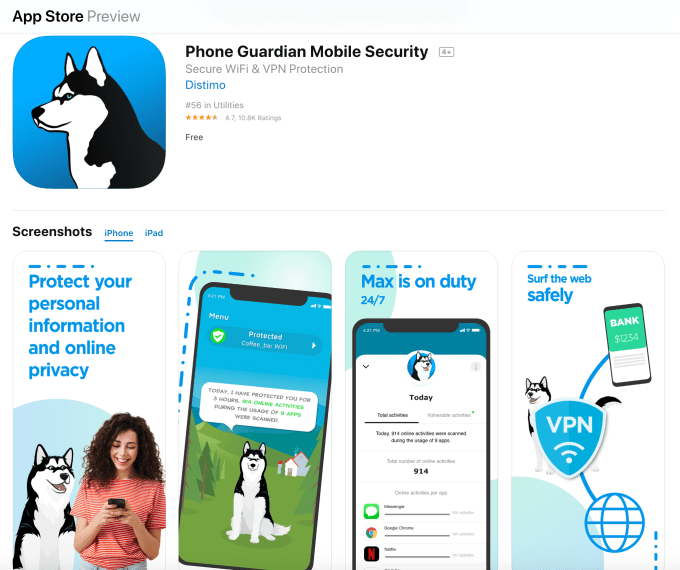
In 2014, App Annie bought Distimo, and as of 2016 has run Phone Guardian, a “secure Wi-Fi and VPN” app, under the Distimo brand.

The app discloses its relationship with App Annie in its App Store description, but remains vague about its true purpose:

“Trusted by more than 1 million users, App Annie is the leading global provider of mobile performance estimates. In short, we help app developers build better apps. We build our mobile performance estimates by learning how people use their devices. We do this with the help of this app.”

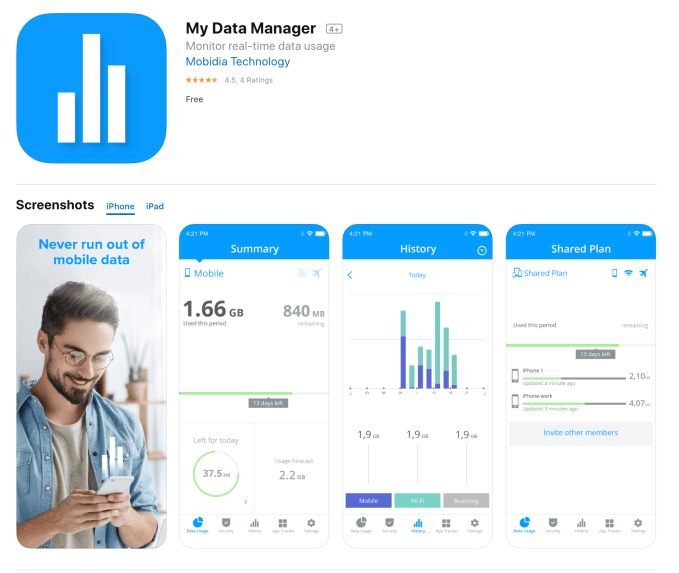
In 2015, App Annie acquired Mobidia. Since 2017, it has operated a real-time data usage monitor My Data Manager under that brand, as well. The App Store description only offers the same vague disclosure, which means users aren’t likely aware of what they’re agreeing to.

Disclosure?

The problem with apps like App Annie’s and Sensor Tower’s is that they’re marketed as offering a particular function, when their real purpose for existing is entirely another.

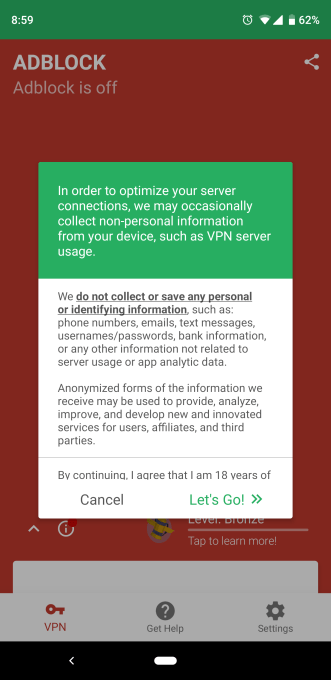
The app companies’ defense is that they do disclose and require consent during onboarding. For example, Sensor Tower apps explicitly tell users what is collected and what is not:


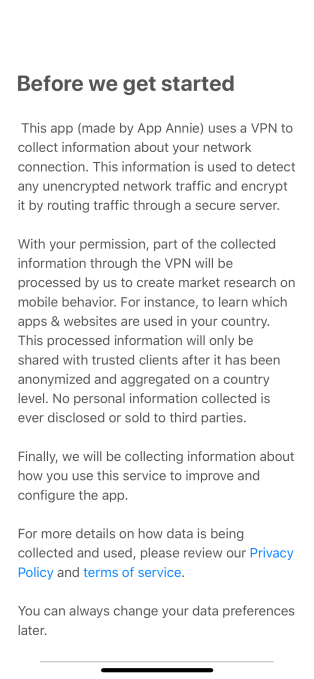
App Annie’s app offers a similar disclosure, and takes the extra step of identifying the parent company by name:

App Annie also says its apps can continue to be used even if data-sharing is turned off.

Despite these opt-ins, end users may still not understand that their VPN app is actually tied to a much larger data collection operation. After all, App Annie and Sensor Tower aren’t household names (unless you’re an app publisher or marketer.)

Apple and Google’s responsibility 

Apple and Google, let’s be fair, are also culpable here.

Of course, Google is more pro-data collection because of the nature of its own business as an advertising-powered company. (It even tracks users in the real-world via the Google Maps app.)

Apple, meanwhile, markets itself as a privacy-focused company, so is deserving of increased scrutiny.

It seems unfathomable that, following the Onavo scandal, Apple wouldn’t have taken a closer look into the VPN app category to ensure its apps were compliant with its rules and transparent about the nature of their businesses. In particular, it seems Apple would have paid close attention to apps operated by companies in the app store intelligence business, like App Annie and its subsidiaries.

Apple is surely aware of how these companies acquire data — it’s common industry knowledge. Plus, App Annie’s acquisitions were publicly disclosed.

But Apple is conflicted. It wants to protect app usage and user data (and be known for protecting such data) by not providing any broader app store metrics of its own. However, it also knows that app publishers need such data to operate competitively on the App Store. So instead of being proactive about sweeping the App Store for data collection utilities, it remains reactive by pulling select apps when the media puts them on blast, as BuzzFeed’s report has since done. That allows Apple to maintain a veil of innocence.

But pulling user data directly covertly is only one way to operate. As Facebook and Google have since realized, it’s easier to run these sorts of operations on the App Store if the apps just say, basically, “this is a data collection app,” and/or offer payment for participation — as do many marketing research panels. This is a more transparent relationship from a consumer’s perspective too, as they know they’re agreeing to sell their data.

Meanwhile, Sensor Tower and App Annie competitor Apptopia says it tested then scrapped its own an ad blocker app around six years ago, but claims it never collected data with it. It now favors getting its data directly from its app developer customers.

“We can confidently state that 100% of the proprietary data we collect is from shared App Analytics Accounts where app developers proactively and explicitly share their data with us, and give us the right to use it for modeling,” stated Apptopia Co-founder and COO, Jonathan Kay. “We do not collect any data from mobile panels, third-party apps, or even at the user/device level.”

This system (which is used by the others as well) isn’t necessarily better for end users, as it further obscures the data collection and sharing process. Consumers don’t know which app developers are sharing this data, what data is being shared, or how it’s being utilized. (Fortunately for those who do care, Apple allows users to disable the sharing of diagnostic and usage data from within iOS Settings.)

Data collection done by app analytics firms is only one of many, many ways that apps leak data, however.

In fact, many apps collect personal data — including data that’s far more sensitive than anonymized app usage trends — by way of their included SDKs (software development kits). These tools allow apps to share data with numerous technology companies including ad networks, data brokers, and aggregators, both large and small. It’s not illegal and mainstream users probably don’t know about this either.

Instead, user awareness seems to crop up through conspiracy theories, like “Facebook is listening through the microphone,” without realizing that Facebook collects so much data it doesn’t really need to do so. (Well, except when it does).

In the wake of BuzzFeed’s reporting, Sensor Tower says it’s “taking immediate steps to make Sensor Tower’s connection to our apps perfectly clear, and adding even more visibility around the data their users share with us.”

Apple, Google, and App Annie have been asked for comment. Google isn’t providing an official comment. Apple didn’t respond.

Sensor Tower’s full statement is below:

Our business model is predicated on high-level, macro app trends. As such, we do not collect or store any personally identifiable information (PII) about users on our servers or elsewhere. In fact, based on the way our apps are designed, such data is separated before we could possibly view or interact with it, and all we see are ad creatives being served to users. What we do store is extremely high level, aggregated advertising data that may demonstrate trends that we share with customers.

Our privacy policy follows best practices and makes our data use clear. We want to reiterate that our apps do not collect any PII, and therefore it cannot be shared with any other entity, Sensor Tower or otherwise. We’ve made this very clear in our privacy policy, which users actively opt into during the apps’ onboarding processes after being shown an unambiguous disclaimer detailing what data is shared with us. As a routine matter, and as our business evolves, we’ll always take a privacy-centric approach to new features to help ensure that any PII remains uncollected and is fully safeguarded.

Based on the feedback we’ve received, we’re taking immediate steps to make Sensor Tower’s connection to our apps perfectly clear, and adding even more visibility around the data their users share with us.

App Annie shared the following:

App Annie does not use root certificates at any point in its data collection process.

App Annie discloses that when users opt into data collection (and data sharing is not mandatory to use our apps), data will be shared with App Annie for the purposes of creating market research. We only collect data after users expressly consent to this collection within our apps. We are very transparent, both on the app stores and in the apps themselves and clearly connect App Annie to our mobile apps.


Read Full Article

Your VPN or ad-blocker app could be collecting your data


The underpinnings of how app store analytics platforms operate were exposed this week by BuzzFeed, which uncovered the network of mobile apps used by a popular analytics firm Sensor Tower to amass app data. The company had operated at least 20 apps, including VPNs and ad blockers, whose main purpose was to collect app usage data from end users in order to make estimations about app trends and revenues. Unfortunately, these sorts of data collection apps are not new — nor unique to Sensor Tower’s operation.

Sensor Tower was found to operate apps such as Luna VPN, for example, as well as Free and Unlimited VPN, Mobile Data, and Adblock Focus, among others. After BuzzFeed reached out, Apple removed Adblock Focus and Google removed Mobile Data. Others are still being investigated, the report said.

Apps’ collection of usage data has been an ongoing issue across the app stores.

Facebook and Google have both operated such apps, not always transparently, and Sensor Tower’s key rival App Annie continues to do the same today.

Facebook

For Facebook, its 2013 acquisition of VPN app maker Onavo for years served as a competitive advantage. The traffic through the app gave Facebook insight into what other social applications were growing in popularity — so Facebook could either clone their features or acquire them outright. When Apple finally booted Onavo from the App Store half a decade later, Facebook simply brought back the same code in a new wrapper — then called the Facebook Research app. This time, it was a bit more transparent about its data collection, as the Research app was actually paying for the data.

But Apple kicked that app out, too. So Facebook last year launched Study and Viewpoints to further its market research and data collection efforts. These apps are still live today.

Google

Google was also caught doing something similar by way of its Screenwise Meter app, which invited users 18 and up (or 13 if part of a family group) to download the app and participate in the panel. The app’s users allowed Google to collect their app and web usage in exchange for gift cards. But like Facebook, Google’s app used Apple’s Enterprise Certificate program to work — a violation of Apple policy that saw the app removed, again following media coverage. Screenwise Meter returned to the App Store last year and continues to track app usage, among other things, with panelists’ consent.

App Annie

App Annie, a firm that directly competes with Sensor Tower, has acquired mobile data companies and now operates its own set of apps to track app usage under those brands.

In 2014, App Annie bought Distimo, and as of 2016 has run Phone Guardian, a “secure Wi-Fi and VPN” app, under the Distimo brand.

The app discloses its relationship with App Annie in its App Store description, but remains vague about its true purpose:

“Trusted by more than 1 million users, App Annie is the leading global provider of mobile performance estimates. In short, we help app developers build better apps. We build our mobile performance estimates by learning how people use their devices. We do this with the help of this app.”

In 2015, App Annie acquired Mobidia. Since 2017, it has operated a real-time data usage monitor My Data Manager under that brand, as well. The App Store description only offers the same vague disclosure, which means users aren’t likely aware of what they’re agreeing to.

Disclosure?

The problem with apps like App Annie’s and Sensor Tower’s is that they’re marketed as offering a particular function, when their real purpose for existing is entirely another.

The app companies’ defense is that they do disclose and require consent during onboarding. For example, Sensor Tower apps explicitly tell users what is collected and what is not:


App Annie’s app offers a similar disclosure, and takes the extra step of identifying the parent company by name:

App Annie also says its apps can continue to be used even if data-sharing is turned off.

Despite these opt-ins, end users may still not understand that their VPN app is actually tied to a much larger data collection operation. After all, App Annie and Sensor Tower aren’t household names (unless you’re an app publisher or marketer.)

Apple and Google’s responsibility 

Apple and Google, let’s be fair, are also culpable here.

Of course, Google is more pro-data collection because of the nature of its own business as an advertising-powered company. (It even tracks users in the real-world via the Google Maps app.)

Apple, meanwhile, markets itself as a privacy-focused company, so is deserving of increased scrutiny.

It seems unfathomable that, following the Onavo scandal, Apple wouldn’t have taken a closer look into the VPN app category to ensure its apps were compliant with its rules and transparent about the nature of their businesses. In particular, it seems Apple would have paid close attention to apps operated by companies in the app store intelligence business, like App Annie and its subsidiaries.

Apple is surely aware of how these companies acquire data — it’s common industry knowledge. Plus, App Annie’s acquisitions were publicly disclosed.

But Apple is conflicted. It wants to protect app usage and user data (and be known for protecting such data) by not providing any broader app store metrics of its own. However, it also knows that app publishers need such data to operate competitively on the App Store. So instead of being proactive about sweeping the App Store for data collection utilities, it remains reactive by pulling select apps when the media puts them on blast, as BuzzFeed’s report has since done. That allows Apple to maintain a veil of innocence.

But pulling user data directly covertly is only one way to operate. As Facebook and Google have since realized, it’s easier to run these sorts of operations on the App Store if the apps just say, basically, “this is a data collection app,” and/or offer payment for participation — as do many marketing research panels. This is a more transparent relationship from a consumer’s perspective too, as they know they’re agreeing to sell their data.

Meanwhile, Sensor Tower and App Annie competitor Apptopia says it tested then scrapped its own an ad blocker app around six years ago, but claims it never collected data with it. It now favors getting its data directly from its app developer customers.

“We can confidently state that 100% of the proprietary data we collect is from shared App Analytics Accounts where app developers proactively and explicitly share their data with us, and give us the right to use it for modeling,” stated Apptopia Co-founder and COO, Jonathan Kay. “We do not collect any data from mobile panels, third-party apps, or even at the user/device level.”

This system (which is used by the others as well) isn’t necessarily better for end users, as it further obscures the data collection and sharing process. Consumers don’t know which app developers are sharing this data, what data is being shared, or how it’s being utilized. (Fortunately for those who do care, Apple allows users to disable the sharing of diagnostic and usage data from within iOS Settings.)

Data collection done by app analytics firms is only one of many, many ways that apps leak data, however.

In fact, many apps collect personal data — including data that’s far more sensitive than anonymized app usage trends — by way of their included SDKs (software development kits). These tools allow apps to share data with numerous technology companies including ad networks, data brokers, and aggregators, both large and small. It’s not illegal and mainstream users probably don’t know about this either.

Instead, user awareness seems to crop up through conspiracy theories, like “Facebook is listening through the microphone,” without realizing that Facebook collects so much data it doesn’t really need to do so. (Well, except when it does).

In the wake of BuzzFeed’s reporting, Sensor Tower says it’s “taking immediate steps to make Sensor Tower’s connection to our apps perfectly clear, and adding even more visibility around the data their users share with us.”

Apple, Google, and App Annie have been asked for comment. Google isn’t providing an official comment. Apple didn’t respond.

Sensor Tower’s full statement is below:

Our business model is predicated on high-level, macro app trends. As such, we do not collect or store any personally identifiable information (PII) about users on our servers or elsewhere. In fact, based on the way our apps are designed, such data is separated before we could possibly view or interact with it, and all we see are ad creatives being served to users. What we do store is extremely high level, aggregated advertising data that may demonstrate trends that we share with customers.

Our privacy policy follows best practices and makes our data use clear. We want to reiterate that our apps do not collect any PII, and therefore it cannot be shared with any other entity, Sensor Tower or otherwise. We’ve made this very clear in our privacy policy, which users actively opt into during the apps’ onboarding processes after being shown an unambiguous disclaimer detailing what data is shared with us. As a routine matter, and as our business evolves, we’ll always take a privacy-centric approach to new features to help ensure that any PII remains uncollected and is fully safeguarded.

Based on the feedback we’ve received, we’re taking immediate steps to make Sensor Tower’s connection to our apps perfectly clear, and adding even more visibility around the data their users share with us.

App Annie shared the following:

App Annie does not use root certificates at any point in its data collection process.

App Annie discloses that when users opt into data collection (and data sharing is not mandatory to use our apps), data will be shared with App Annie for the purposes of creating market research. We only collect data after users expressly consent to this collection within our apps. We are very transparent, both on the app stores and in the apps themselves and clearly connect App Annie to our mobile apps.


Read Full Article

Graphite brings unicorn product background to growth marketing


Graphite is part of a new wave of growth marketing consultancies launched by former product leaders at successful startups. With a specialization in SEO, and a client list that has included Masterclass, Thumbtack, Honey, Personal Capital, and more, its goal is to help make the difference for an ambitious company with product-market fit.

“Ethan and his team did excellent work helping Thumbtack build our SEO landing page strategy and our technical SEO infrastructure. Unlike most other agencies, they get deep in the details and help with execution, which was critical in our early days / initial growth stage.” Sander Daniels, Cofounder, Thumbtack

As founder Ethan Smith relates below, the remote-first team also has a vision to change the relationship between growth marketers and companies. Rather than being treated as relatively interchangeable employees who provide similar incremental value, growth marketers can be the main difference for a company that has a few rounds of funding and big unrealized dreams. So, why settle for a small piece of a big cap table? “In order to maximize the impact we can have on the world,” says founder Ethan Smith diplomatically, “we should work with many companies rather than only one.”

Graphite’s growth-stage focus

One of the most important metrics we look at is retention and whether a company has product market fit. Companies that are pre-product market fit should not focus on growth, they should focus on getting their product right. Once the product has fit, they’re ready to grow. We usually work with companies post Series B up to public companies because we believe we can create the most impact.

Why SEO?

SEO is one of our core foci, and it is shocking how little supply there is of SEO talent relative to the size of this channel. For many companies, SEO is not only the largest channel of growth, it is larger than all other channels combined.

Below, you’ll find the rest of the founder reviews, the full interview, and more details about how it works. This profile is part of our ongoing series covering startup growth marketing agencies with whom founders love to work, based on this survey and our own research. The survey is open indefinitely, so please fill it out if you haven’t already. 


Read Full Article

Twitter rewrites Developer Policy to better support academic research and use of ‘good’ bots


Twitter today updated its Developer Policy to clarify rules around data usage, including in academic research, as well as its position on bots, among other things. The policy has also been entirely rewritten in an effort to simplify the language used and make it more conversational, Twitter says. The new policy has been shortened from eight sections to four, and the accompanying Twitter Developer Agreement has been updated to align with the Policy changes, as well.

One of the more notable updates to the new policy is a change to the rules to better support non-commercial research.

Twitter data is used to study topics like spam, abuse, and other areas related to conversation health, the company noted, and it wants these efforts to continue. The revised policy now allows the use of the Twitter API for academic research purposes. In addition, Twitter is simplifying its rules around the redistribution of Twitter data to aid researchers. Now, researchers will be able to share an unlimited number of Tweet IDs and/or User IDs, if they’re doing so on behalf of an academic institution and for the sole purpose of non-commercial research, such as peer review, says Twitter.

The company is also revising rules to clarify how developers are to proceed when the use cases for Twitter data change. In the new policy, developers are informed that they must notify the company of any “substantive” modification to their use case and receive approval before using Twitter content for that purpose. Not doing so will result in suspension and termination of their API and data access, Twitter warns.

The policy additionally outlines when and where “off-Twitter matching” is permitted, meaning when a Twitter account is being associated with a profile built using other data. Either the developer will need to obtain opt-in consent from the user in question, or they can only proceed if the information was provided by the person or is based on publicly available data.

The above changes are focused on ensuring Twitter data is accessible when being used for something of merit, like academic research, and that it’s protected from more questionable use cases.

Finally, the revamped policy clarifies that not all bots are bad. Some even enhance the Twitter experience, the company says, or provide useful information. As examples of good bots, Twitter pointed to the fun account @everycolorbot and informative @earthquakesSF.

Twitter identifies a bot as any account where behaviors like “creating, publishing, and interacting with Tweets or Direct Messages are automated in some way through our API.”

Going forward, developers must specify if they’re operating a bot account, what the account is, and who is behind it. This way, explains Twitter, “it’s easier for everyone on Twitter to know what’s a bot – and what’s not.”

Of course, those operating bots for more nefarious purposes — like spreading propaganda or disinformation — will likely just ignore this policy and hope not to be found. This particular change follows the recent finding that a quarter of all tweets about climate change were coming from bots posting messages of climate change denialism. In addition, it was recently discovered that Trump supporters and QAnon conspiracists were using an app called Power10 to turn their Twitter accounts into bots.

Twitter says since it introduced a new developer review process in July 2018, it’s reviewed over a million developer applications and approved 75%. It also suspended over 144,000 apps from bad actors in the last six months and revamped its developer application to be easier to use. It’s now working on the next generation of the Twitter API and is continuing to explore new products, including through its testing program, Twitter Developer Labs.


Read Full Article

Quibi and Eko are in a legal battle over video tech


Two video startups are making dueling legal claims against the other.

The Wall Street Journal broke the news yesterday that interactive video company Eko is accusing Quibi of infringing on its patented technology.

At around the same time, The Hollywood Reporter noted  that Quibi (which is launching its short-form mobile video service next month) has filed a complaint in California federal court claiming that Eko has engaged in “a campaign of threats and harassment.”

At the heart of the dispute is Quibi’s Turnstyle technology, which allows viewers to seamlessly switch between landscape- and portrait-mode viewing.

Both companies seem to agree that Eko CEO Yoni Bloch met with Jeffrey Katzenberg in March 2017 (before Katzenberg had even founded Quibi) about a possible investment in Eko, and that there was at least one follow-up meeting between Quibi and Eko employees in 2019.

Eko claims that it provided Quibi employees — both while they were working at Quibi and before then, when they were previously at Snap — with details and code behind its technology. Then, after Katzenberg and Quibi CEO Meg Whitman showed off Turnstyle at CES this year, Eko sent a letter to Quibi claiming that the feature infringed on its intellectual property. (According to the Journal’s story, Eko’s lawyers have sent a letter to Quibi but have not filed a lawsuit.)

“Our Turnstyle technology was developed internally at Quibi by our talented engineers and we have, in fact, received a patent for it,” Quibi said in a statement. “These claims have absolutely no merit and we will vigorously defend ourselves against them in court.”

Meanwhile, in a statement, Eko described Quibi’s technology as “a near-identical copy of its own,” and said the company’s legal motion is “nothing more than a PR stunt”:

It is telling that Quibi filed the motion only after learning the Wall Street Journal was going to publish an article exposing allegations of Quibi’s theft of Eko’s technology … Eko will take the legal actions necessary to defend its intellectual property and looks forward to demonstrating its patent rights to the court.

You can read Quibi’s full complaint below.

Quibi complaint by TechCrunch on Scribd


Read Full Article

10 March 2020

10 Game Servers You Can Run on a Raspberry Pi


raspberry-pi-zero-retro-game

Gaming on the Raspberry Pi is surprisingly multi-faceted, supporting both native and emulated games.

But what if you wanted something more impressive, yet game-related, from the device?

Well, how about setting it up as a game server? Just imagine, hosting LAN parties wherever you are, thanks to the pocket-sized Raspberry Pi! All you need to do is ensure you have an Ethernet cable, a suitable power adapter and game server software.

Here are 10 games that you can host on your Raspberry Pi game server.

1. Host QuakeWorld LAN Parties on Your Raspberry Pi

You may be familiar with Quake, the awesome multiplayer deathmatch game from id Software released in 1996. QuakeWorld is the internet multiplayer version (as opposed to NetQuake, the LAN-based multiplayer release).

The source code was released under the GPL license in 1999 and is available to install on your Raspberry Pi. QuakeWorld supports local network (LAN) multiplayer action and is not intended for use on a public server.

While compatible with a Model B Raspberry Pi, the best results can be enjoyed with a Raspberry Pi 2 or later. QuakeWorld uses less than 32MB of RAM, ensuring optimum performance. It supports up to 16 players, but the optimum experience can be enjoyed with 6-8 players.

For the best results, ensure the Pi is connected to your router via Ethernet, rather than wireless.

2. AssaultCube Server

For more online shooting action, take a look at AssaultCube. This free online multiplayer FPS game plays out in realistic environments, with efficient bandwidth usage ideal for the Raspberry Pi. With its low latency, AssaultCube can even be run over a 56Kbps connection!

If you don’t have anyone to play against, AssaultCube also has a single player “bot” mode. You’ll find several multiplayer modes, meanwhile. These include Deathmatch, Survivor, Pistol Frenzy, Last Swiss Standing, Capture the Flag, Hunt the Flag, and One-Shot One-Kill. Each of these has a team version, too.

Many maps are included in the game—an in-game map editor is also available.

Head to the assault.cubers.net website for full details of the game. You can download the code from GitHub and compile the game server on your Pi in just a few minutes.

3. Host a Minecraft Server on Your Raspberry Pi

Minecraft and the Raspberry Pi are perfect bedfellows. After all, Minecraft Pi Edition is included in Raspbian. But what about a Minecraft game server?

The results are best enjoyed on a Raspberry Pi 3 or later, but a Raspberry Pi 2 should also work. You’ll find the best results from this Minecraft server will be enjoyed on your home network. It’s not suitable for hosting Minecraft environments on the public internet.

However, within your home network, you’ll have a Minecraft world ready to be built and rebuilt at your convenience! This can be accessed via the Minecraft games installed on a Windows PC, Android or iOS device.

To get started, check our guide to setting up a Minecraft server on Raspberry Pi.

4. Host Civilization Multiplayer With FreeCiv

Based on Sid Meier’s Civilization, FreeCiv is open source and available in client and server flavors. FreeCiv draws from CivNet and Civilization II, as well as elements from the many other versions of Civilization.

Installation is as simple as:

sudo apt install -y freeciv-server freeciv-client-gtk

You can then start the server with:

freeciv-server

The game server will then be available to connect to from any other device running the FreeCiv game client. Given how long games of Civilization can take, having a server to keep the game running on makes perfect sense!

Check the Server Manual at the FreeCiv wiki for configuration details.

5. Host Doom Multiplayer on Raspberry Pi

Quake has a network multiplayer option for the Raspberry Pi—so what about Doom?

Thanks to the Quake On LAN team (also behind QuakeWorld for the Pi), Doom On LAN is now an option. This uses the Zandronum port as a game client, which supports up to an immense 64 players. Several gameplay modes are available, and there’s support for many mods.

There’s also the addition of jumping and free looking (both unavailable in the original), as well as custom key bindings. As ever, the game will work best with a direct Ethernet connection to your router. Now all you have to do is find 63 other people to play with.

6. Set Sail With a Windward Game Server

A fascinating, ship-based game about trade and pirates, Windward is a rarity in this list. It is one of just two titles that aren’t open source. You’ll find it available from Steam for just under $10, and the game plays in both single and multiplayer modes.

Setting up is a little time-intensive; you’ll need to install Mono (the open-source implementation of Microsoft .NET) on your Pi.

Once installed you’ll find the Windward server in the Lobby screen of the game client. Note that this set up installs copying some data from the game folder on your PC. Time to set sail!

7. Terraria Server for Raspberry Pi

This 2D adventure sandbox was first released on Windows in 2011 but has since been ported to Linux and macOS. If you own Terraria, then you’ll be able to host a game on your Raspberry Pi.

Using a Raspberry Pi 2 or later, you can setup the Terraria server on Raspbian, again installing Mono as a prerequisite. Next, you’ll use TShock, the Terraria game server, which is available from GitHub. Once up and running, anyone who wants to play will find the Terraria server in their version of the game. Although connecting to the server from a local network is best, Terraria can also be played over the internet.

8. Crossfire

Host an online game with your Raspberry Pi game server

A multiplayer arcade adventure game, Crossfire is reminiscent of Gauntlet and rogue-like games. With 3,000 maps, an elaborate magic system, and 150 monster types, Crossfire’s world is suitable for individual or team play.

Client and server software are available for Crossfire, both available from the website. Once the server is set up on your Raspberry Pi, gamers on any of the other client platforms can join.

Beware, Crossfire is massive, engaging… and fun! There’s a lot to learn, like a traditional dungeon game—check the website for help with the magic system.

9. The Battle for Wesnoth

A massive open-source turn-based strategy game with a fantasy theme, The Battle for Wesnoth has been around since 2003. You’ll find versions for popular desktop systems Linux, Microsoft Windows, and Macintosh (up to and including macOS).

Clients for iOS and Android are also available—fans of BeOS and AmigaOS can even play. There’s a browser option, too!

LAN and internet multiplayer options are available, and the game features 46 multiplayer maps. Like many games in this list, The Battle for Wesnoth has a built-in game server. All you need to do is install the game on your Pi, then set it to host a game. You can invite players from within the game.

Look out for a load of player-made content, such as campaigns, new factions, and original multiplayer maps.

10. OpenTTD Game Server

We’ll finish with this great favorite of the desktop strategist. OpenTTD is an open source version of the 1995 game Transport Tycoon Deluxe. Expanded beyond the limits of the original, OpenTTD can be configured as a dedicated game server on the Raspberry Pi.

Like FreeCiv, OpenTTD takes a while to play; you’re probably going to be playing a particular map for a while. Installation and setup is straightforward. Begin with the standard OpenTTD installation:

sudo apt install openttd

Once this done, run the server with:

openttd -D

Game clients on Windows, Linux, macOS, other Pis and mobile devices should then be able to connect to the game server. Connect using device name or IP address. Note that you can also use the launch option:

openttd -f

This will run OpenTTD in the background, with output sent to the openttd.log file. Tips for server setup can be found in the OpenTTD wiki.

Can You Use Raspberry Pi 4 as a Game Server?

Different models of Raspberry Pi are suited to different tasks. For example, you could run a print server with the original Raspberry Pi—it wasn’t as suited to multiplayer gaming.

While game servers will run on a Raspberry Pi 2 or 3, the Raspberry Pi 4 is far more powerful. This opens a whole host of new game server options for the Raspberry Pi. At the time of writing, the 11 Raspberry Pi gaming servers listed here are all that are available.

However, there is every chance that the Raspberry Pi 4 could run a World of Warcraft (classic) server. It might even be suited to running an ARK server. As with everything else in this list, it depends as much on the generosity of the game developers as it does the Raspberry Pi 4’s hardware.

Set Up a Raspberry Pi Gaming Server Today

It’s amazing, but the low-power Raspberry Pi—considerably less powerful than your desktop PC—can host online gaming sessions! Sure, modern games are not available, but the choice of 10 games is reason enough to investigate further.

Want more Raspberry Pi gaming ideas? Here’s how to play almost any game on your Raspberry Pi.

Read the full article: 10 Game Servers You Can Run on a Raspberry Pi


Read Full Article

Colorblind Windows Users: Try This Trick to Better Distinguish Colors


Windows 10 offers a bundle of accessibility features that make the OS easier to use for people with various kinds of disabilities. One of these is the Windows 10 colorblind mode, which allows you to adjust the on-screen colors for several different types of color blindness.

If you have deuteranopia or protanopia (the two types of red-green color blindness) or tritanopia (blue-yellow color blindness), here’s how to enable a colorblind mode in Windows 10 and make colors easier to distinguish.

How to Enable the Colorblind Filter in Windows 10

To turn on the colorblind filter modes in Windows 10:

  1. Go to Settings > Ease of Access.
  2. On the left sidebar, select Color filters under the Vision section.
  3. Enable the Turn on color filters slider.Windows 10 Color Filters
  4. Depending on what kind of color blindness you have, select from the following:
    1. Red-green (Deuteranopia)
    2. Red-green (Protanopia)
    3. Blue-yellow (Tritanopia)
  5. As you change the filter, you can use the colors on the below wheel to make sure they all look distinct.

Windows 10 Colorblind Filter Wheel

If you check the Allow the shortcut key to toggle filter on or off button, you can press Win + Ctrl + C to turn the color blind filter on or off at any time.

You’ll notice that this changes all the colors on your computer, not just Windows UI elements. You thus won’t need any further dedicated color blind monitor settings unless you have a different kind of color blindness.

Other Windows Resources for Colorblind People

Unfortunately, there’s no equivalent Windows 7 color blind mode. If you still use that OS, you can use high-contrast mode, which helps you differentiate on-screen items. If the Alt + Left Shift + Print Screen shortcut doesn’t work, head to Control Panel > Ease of Access Center > Make the computer easier to see.

Here, make sure that the High Contrast shortcut is enabled, then click Choose a High Contrast theme to change it if you’d like. As another option, you can also install the Colorblind—Dalton Chrome extension to enable colorblind filters in Chrome.

If a color blind screen filter isn’t what you needed, have a look at our overview of the accessibility options in Windows 10.

Read the full article: Colorblind Windows Users: Try This Trick to Better Distinguish Colors


Read Full Article

The 7 Best Imgur Alternatives for Uploading and Sharing Images


If you’ve ever used Reddit (what is Reddit and how does it work?), you will have heard of Imgur. The image sharing site was developed in 2009 by Alan Schaaf and was initially designed to be a gift to the Reddit community.

Imgur became instantly popular, racking up 1,000 hits per day in the first weeks and blossoming to one million hits within the first five months. Today, it is a Top-100 website, according to Alexa.

However, Imgur is not without its drawbacks. So, if you’re fed up with some of the site’s restrictions, here are some Imgur alternatives for uploading and sharing images.

1. Postimage

postimage homescreen

Postimage is a free service that’s primarily aimed at people who want to post images on forums. It also allows you to create permanent links for Facebook, Twitter, and more.

Anonymous uploaders and free accounts have file sizes restricted. Your picture cannot exceed 12MB or 10,000 x 10,000 pixels. If you pay for a premium account, the limit is raised to 24MB. You can upload images individually or in bulk. Bulk uploads are limited to 1,000 at a time.

Best of all, there’s no limit to the number of images you can upload to your account. However, Postimage does reserve the right to levy a charge if you host tens of thousands of images on the site but never use your content in a way that allows Postimage to earn advertising revenue (for example, images embedded into links leading back to the site).

2. Kek.gg

kek homepage

If you’re looking for bells and whistles, Kek.gg is not the site for you. The interface is basic; the homepage is nothing more than a glorified uploading tool.

However, if you value privacy, Kek.gg could be the site you’re looking for. You don’t need to create an account to upload content.

The site is also committed to free speech; there are virtually no restrictions on the types of images you can store on its servers. As long as the image is legal in the United States, it will be accepted. As such, if you need to post NSFW content, it’s an excellent choice.

Kek.gg is ad-free. Uploads are limited to 5MB.

3. UltraIMG

ultraimg homepage

UltraIMG supports uploading multiple images at once with a maximum size of 10MB-per-file. The site supports JPEG, GIF, BMP, and PNG files, and there is no time limit on how long UltraIMG will store your files for.

If you create an account, you get access to additional features. They include URL shortening tools, marking your uploads as NSFW, and dynamically resizing your images.

After a successful upload, you’re given a choice of short URLs, direct links, HTML, or BBcodes for the file. Clicking on a thumbnail of an image will show its filename, size, and dimensions.

UltraIMG also offers extensions for Chrome and Firefox.

4. ImgBox

imgbox homepage

ImgBox has some key benefits, including unlimited storage space and infinite storage time. It also supports hotlinking and is faster than some of the other sites we’ve included in this list.

Like all the sites, ImgBox enforces a maximum file size—in this case, it’s 10MB. JPEG, GIF, and PNG files are supported. Once you have finished uploading your content, you can organize it into galleries. Each gallery can contain a maximum of 50 items.

ImgBox is also an excellent TinyPic alternative. The once-popular but now-defunct site used to provide a video uploading service. ImgBox provides the same functionality.

Finally, if you wish, you can upload content without creating an account. Just click on the Upload Images button and choose the file in the popup window.

5. Unsee

unsee homepage

Unsee is unique among the sites on the site. It allows the uploader to add an expiration date to the image. You can make the image automatically delete itself after the first viewing, in 10 minutes, in 30 minutes, in one hour, or in one day. Just make your selection from the drop-down menu on the homescreen.

To further enhance the security, the IP address of everyone who views the file is watermarked into the image. It means the uploader can check who has seen it, and it is less likely to be reshared.

Each image also has its own unique QR code. It contains the image’s unique ID, an upload timestamp, and an encrypted IP of the image uploader. Unsee has access to the AES encryption private key.

6. PicPastePlus

picpasteplus homepage

A great Unsee alternative is PicPastePlus; it operates in a similar way to the previously discussed tool.

It is slightly more flexible than its rival. You can individually set both the number of times the image can be viewed (one, two, three, four, five, 10, 20, 50, 100, 1,000, unlimited) and the amount of time for which the image is viewable (one minute, 10, 20, 30 minutes, one hour, six hours, one day, two weeks, one month, one year, unlimited).

And there’s even an auto-lock feature. Use it to keep the image on the servers but prevent more people from looking at it. The settings available are 30 seconds, one minute, 10 minutes, one hour, and never.

7. ImgPile

imgpile homepage

The final site on our list is ImgPile. It offers free hosting and unlimited storage, meaning the site is an ideal alternative to Imgur for people who want to share images on Reddit, Facebook, Twitter, etc. using permanent links.

ImgPile supports hotlinking and lets you upload images up to 100MB in size. The service supports uploads from your computer and via URL. You do not have to create an account to use the service, but if you do, you will be able to access your upload history and a few other useful features.

Learn More About Sites Like Imgur

The Imgur alternatives we’ve covered in this article can be split into two types: the general sharing sites and the privacy-focused services. The best service for you will depend on the nature of the content you are uploading.

Of course, these are far from being the only ways to upload photos and images to the web. You could also use a service like Google Drive or OneDrive. If you would like to learn more, read our analysis of Google Photos vs OneDrive as the best photo backup tool.

Read the full article: The 7 Best Imgur Alternatives for Uploading and Sharing Images


Read Full Article