19 December 2019

Gift Guide: 10 gadgets for a smarter smart home


Welcome to TechCrunch’s 2019 Holiday Gift Guide! Need help with gift ideas? We’re here to help! We’ll be rolling out gift guides from now through the end of December. You can find our other guides right here.

When it comes to smart home stuff, once you start, it’s hard to stop. As soon as you’ve got one light that you can turn on and off from your phone, you’ll want five.

As such, smart home gear can make great gifts for anyone who’s already started making their way down that rabbit hole.

Alas, there’s a lot of bad smart home hardware out there — mystery devices from brands no one has heard of, with apps that hardly work out of the box and will probably just silently stop working altogether the next time there’s a big iOS or Android update.

Looking to help someone make their already smart home a little smarter? Here’s some of the stuff we liked this year:

This article contains links to affiliate partners where available. When you buy through these links, TechCrunch may earn an affiliate commission.

TP-Link Kasa Plug
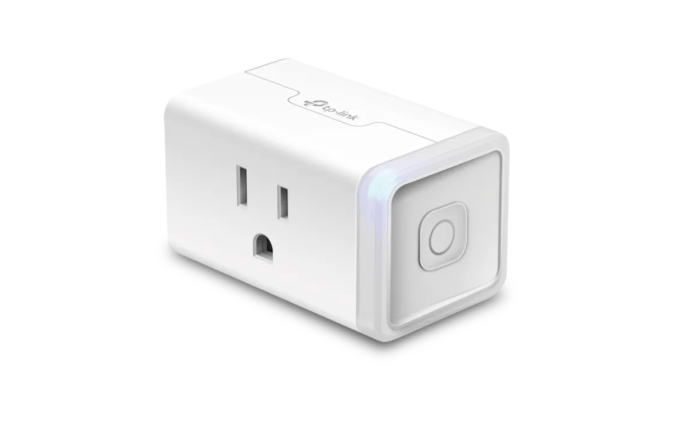
Smart plugs are a great way to introduce a person to the connected home. The TP-Link Kasa plugs are inexpensive but work with every popular voice assistant and smart phone. Smart plugs let you turn a basic lamp or coffee maker into a smart device without replacing anything.

Price: $28 for a two-pack on Amazon

Wyze Cam Pan

The Wyze Cam Pan packs a lot of features for the price. At $35, the small 1080p camera pans, tilts and zooms, and sports a low-light mode. Best of all, the Wyze cam works with Amazon Alexa and Google Assistant for things like “Alexa, show me a view of the living room on my office TV.” It’s by far the best smart home camera for the price.

(If you don’t need it to tilt/pan/etc. on command, there’s also a $25 version without all that.)

Price: $35 on Amazon

Echo Dot with Clock
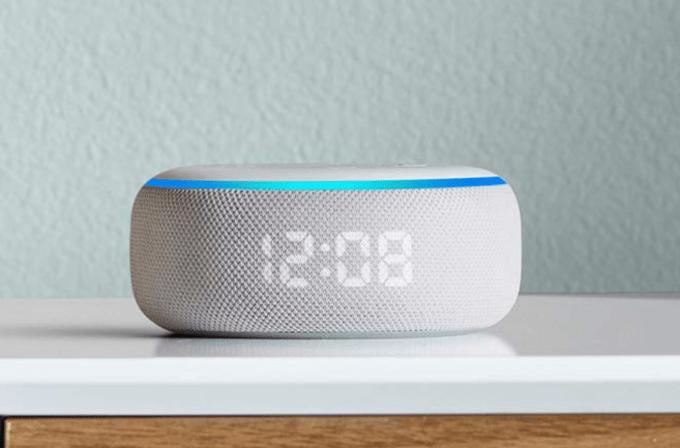
The Echo Dot with Clock is part of the Amazon Alexa family. It’s slightly more expensive than the ubiquitous Echo Dot… but it has a built-in clock! The clock makes this thing way more useful when you’re not actually talking to it — and, fortunately, unlike the Echo Spot, there’s no built-in camera to make it extra weird to put on your bedside table. One catch: these keep going in and out of stock, so they might be a pain to get this late in the game.

Price: $35 on Amazon

Nanoleaf Canvas
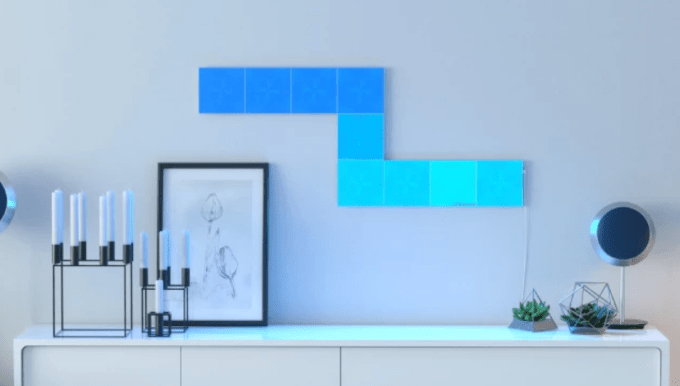
The Nanoleaf Canvas is a new type of wall art. It’s an interactive, fun way to splash a wall with light and design. The panels snap together, allowing the owner to create and recreate designs to fit their life and space.

Price: $180 for a starter kit of 9 tiles

Ember

The Ember is a smart coffee mug. No, really. The Ember uses an internal heater to keep the drink at an ideal temperature as set by the user via a companion app. If the coffee drinker in your life is more of an all-day coffee sipper, the Ember should bring joy to their life.

Price: $100 on Amazon

Dewplanter

Some people love plants but hate watering. That’s where the Dewplanter comes in by capturing and filtering water in the air. It works as a dehumidifier — but instead of dumping excess water into a bin, it waters a plant. A control panel allows the owner to set the desired water amount. Set it and forget it and get a green thumb without any skill. Low-maintenance plants like evergreens, ferns, violets and aloe plants work best.

Price: $50 

Furbo

It’d be nice if we could all be home with our dogs 100% of the time — but for most people, that’s just not the case. Furbo is part web cam and part treat dispenser. Using a smartphone app, dog owners can monitor and interact with their pets, remotely tossing out treats when your pup does something good. Dog-friendly color signals and sounds are designed to get attention, while real-time updates and a camera let owners gain insight in their pet’s life from afar. Need to know when Mr. Boots starts barking so the neighbors don’t complain? Furbo can listen for barking and send you notifications accordingly.

Price: $134

iGrill
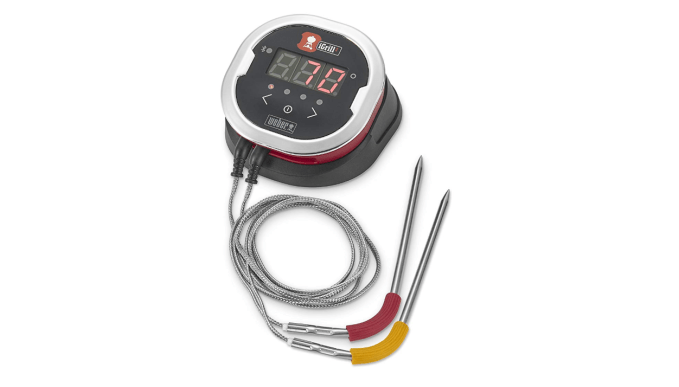
The Weber iGrill is a fantastic thermometer designed for grilling. Wireless connectivity brings the grill into the modern era, allowing the user to check the meat’s temperature from a smartphone and without opening the grill. A magnetic base sticks the control unit to the side of the grill and the probes are designed to withstand searing heat.

The iGrill Mini is around $50 and includes Bluetooth connectivity. The slightly more expensive iGrill 2 adds a LED display to the base unit and an extra probe, while the priciest model, iGrill 3, has more battery life and the extra probe but is only designed to be permanently mounted directly on the side of specific Weber grills.

Price: iGrill Mini, $45 on Amazon | iGrill 2, $65 on Amazon | iGrill 3, $80 on Amazon

Casper Glow Light

The Casper Glow Light makes going to bed and waking up a bit easier. The light is warm, and gradually dims to assist in falling asleep. Likewise, there’s an alarm function that slowly turns on to help knock the sleeper out of a deep slumber. The $129 Casper stands apart from other light-alarm clocks in several ways. One, it works as a lantern, allowing the owner to carry it throughout the home, and recharges using a bed-side dock. The Glow Light’s design is simple and durable; it can likely survive a fall off a table. Most importantly, the clock is managed with a smartphone app, eliminating the need to use clunky, on-device controls.

Price: $129 

Sonos Move
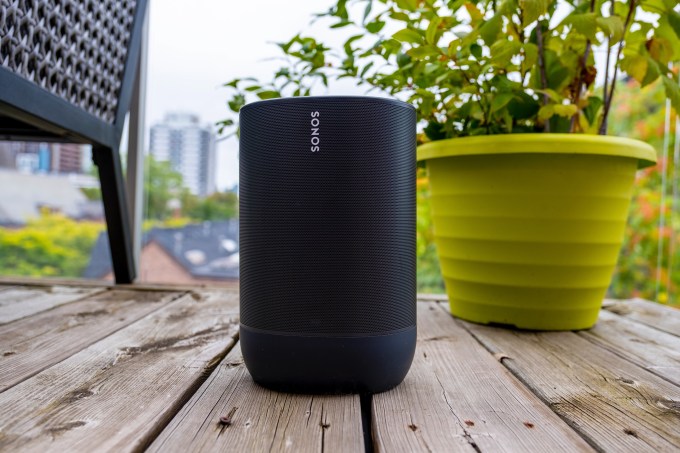
Sonos Move 11

For the Sonos lover in your life, the Move speaker fills a massive hole that existed in Sonos’ lineup for far too long: portable speakers. The Move brings all of Sonos’ features to a speaker designed to move around the owner’s house. And it sounds great, too, with full, expansive sound able to fill any room. At $399 the Move is more expensive than competitors, but for someone who has already embraced the Sonos concept, the connectivity and ecosystem is worth the price of admission.

Price: $399 on Amazon


Read Full Article

Amazon will establish a new headquarters for its Kuiper satellite broadband project


Amazon is ramping operations for its Kuiper project, its forthcoming high-speed satellite internet product, with a new HQ and R&D facility. Kuiper will provide internet connectivity from a small satellite constellation operating in low Earth Orbit to underserved communities – and in some cases, to people without any access at all.

If that tune sounds familiar, it’s because it’s a common enough goal these days – SpaceX is already launching satellites that will make up its Starlink constellation to provide similar service, first in North America and then eventually globally. OneWeb is launching satellites to provide global coverage, and is hoping to get started deploying its constellation in January. Google (or rather Alphabet, but they’re looking more like the same company than ever before these days) is looking to provide similar connectivity services in hard to reach areas through its Loon high-atmosphere ballon project, too.

Amazon’s approach involves launching thousands of satellites to low Earth orbit, over the course of multiple launches spanning multiple years. Using multiple, smaller satellites instead of large, single or small volume geostationary satellites as has been the primary approach for satellite internet in past means you can potentially offer better service, with wider reach, and at a lower ultimate cost.

Kuiper doesn’t yet have a timeline around deployment or availability for customers, but Amazon is clearly investing in the project with this new dedicated facility, which will be located in Redmond, WA, near Amazon’s overall home base in Seattle. All told, the new facility will cover 219,000 square feet across two separate buildings, and it’ll house R&D labs, office space and even prototype manufacturing for onsite satellite hardware production. Amazon anticipates Kuiper team members will start moving into the new site sometime next year.


Read Full Article

Star Wars Spoiler Generator


Star Wars Spoiler Generator

The On-Device Machine Learning Behind Recorder


Over the past two decades, Google has made information widely accessible through search — from textual information, photos and videos, to maps and jobs. But much of the world’s information is conveyed through speech. Yet even though many people use audio recording devices to capture important information in conversations, interviews, lectures and more, it can be very difficult to later parse through hours of recordings to identify and extract information of interest. But what if there was the ability to automatically transcribe and tag long recordings in real-time, enabling you to intuitively find the relevant information you need, when you need it?

For this reason, we launched Recorder, a new kind of audio recording app for Pixel phones that leverages recent developments in on-device machine learning (ML) to transcribe conversations, to detect and identify the type of audio recorded (from broad categories like music or speech to particular sounds, such as applause, laughter and whistling), and to index recordings so users can quickly find and extract segments of interest. All of these features run entirely on-device, without the need for an internet connection.
Transcription
Recorder transcribes speech in real-time using an on-device automatic speech recognition model based on improvements announced earlier this year. Being a key component to many of Recorder’s smart features, we made sure that this model can transcribe long audio recordings (a few hours) reliably, while also indexing conversation by mapping words to timestamps as computed by the speech recognition model. This enables the user to click on a word in the transcription and initiate playback starting from that point in the recording, or to search for a word and jump to the exact point in the recording where it was being said.
Recording Content Visualization via Sound Classification
While presenting a transcript for a recording is useful and allows one to search for specific words, sometimes (especially for very long recordings) it’s more useful to visually search for sections of a recording based on specific moments or sounds. To enable this, Recorder additionally represents audio visually as a colored waveform where each color is associated with a different sound category. This is done by combining research into using CNNs to classify audio sounds (e.g., identifying a dog barking or a musical instrument playing) with previously published datasets for audio event detection to classify apparent sound events in individual audio frames.

Of course, in most situations many sounds can appear at the same time. In order to visualize the audio in a very clear way, we decided to color each waveform bar in a single color that represents the most dominant sound in a given time frame (in our case, 50ms bars). The colorized waveform lets users understand what type of content was captured in a specific recording and navigate along an ever-growing audio library more easily. This brings a visual representation of the audio recordings to the users, and also enables them to search over audio events in their recordings.
Recorder implements a sliding window capability that processes partially overlapping 960ms audio frames at 50ms intervals and outputs a sigmoid scores vector, representing the probability for each supported audio class within the frame. We apply a linearization process on the sigmoid scores in combination with a thresholding mechanism, in order to maximize the system precision and report the correct sound classification. This process of analyzing the content of the 960ms window with small 50ms offsets makes it possible to pinpoint exact start and end times in a manner that is less prone to mistakes than analyzing consecutive large 960ms window slices on their own.
Since the model analyzes each audio frame independently, it can be prone to quick jittering between audio classes. This is solved with an adaptive-size median filtering technique applied to the most recent model audio class outputs, thus providing a smoothed consecutive output. The process runs continuously in real-time, requiring it to meet very strict power consumption limitations.

Suggesting Tags for Titles
Once a recording is done, Recorder suggests three tags that the app deems to represent the most memorable content, enabling the user to quickly compose a meaningful title.
To be able to suggest these tags immediately when the recording ends, Recorder analyzes the content of the recording as it is being transcribed. First, Recorder counts term occurrences as well as their grammatical role in the sentence. The terms identified as entities are capitalized. Then, we utilize an on-device part-of-speech-tagger — a model that labels each word in the sentence according to its grammatical role — to detect common nouns and proper nouns, which appear to be more memorable by users. Recorder utilizes a prior scores table supporting both unigram and bigram terms extraction. To generate the scores, we trained a boosted decision tree with conversational data and utilized textual features like document words frequency and specificity. Last, filtering of stop words and swear words is applied and the top tags are outputted.
Tags extraction pipeline architecture
Conclusion
Recorder galvanized some of our most recent on-device ML research efforts into helpful features, running models on-device to ensure user privacy. The positive feedback loop between machine learning investigations and user needs revealed exciting opportunities to make our software even more useful. We’re excited for future research that will make everyone’s ideas and conversations even more easily accessible and searchable.

Acknowledgments
Special thanks to Dror Ayalon who played a key role in developing and forming the above features and without whom this blog post wouldn’t have been possible. We would also want to thank all our team members and collaborators who worked on this project with us: Amit Pitaru, Kelsie Van Deman, Isaac Blankensmith, Teo Soares, John Watkinson, Matt Hall, Josh Deitel, Benny Schlesinger, Yoni Tsafir, Michelle Tadmor Ramanovich, Danielle Cohen, Sushant Prakash, Renat Aksitov, Ed West, Max Gubin, Tiantian Zhang, Aaron Cohen, Yunhsuan Sung, Chung-Ching Chang, Nathan Dass, Amin Ahmad, Tiago Camolesi, Guilherme Santos‎, Julio da Silva, Dan Ellis, Qiao Liang, Arun Narayanan‎, Rohit Prabhavalkar, Benyah Shaparenko‎, Alex Salcianu, Mike Tsao, Shenaz Zak, Sherry Lin, James Lemieux, Jason Cho, Thomas Hall‎, Brian Chen, Allen Su, Vincent Peng‎, Richard Chou‎, Henry Liu‎, Edward Chen, Yitong Lin, Tracy Wu, Yvonne Yang‎.

This tiny, soft robo-bug scoots with smarts and survives swats


Nature is a good source of inspiration for roboticists, but it’s rare that nature’s elegance and genius can be replicated in any real way. Still, we’re getting closer. This tiny insect-like robot is made of soft materials and weighs less than a gram, yet can move quickly and with some intelligence — and is robust enough to survive a pounding from a fly swatter.

For the most part tiny robots like this are compromises. For instance, they can move quickly, but only with external power. Or they can navigate intelligently, but only by being controlled remotely. Or they’re power efficient, but unable to move quickly or intelligently.


The DEAnsect, so called for being made of “dielectric elastomer actuators,” is an attempt to create a robot that combines locomotion, intelligence, and efficiency into a single package — even if it’s only a little bit of each.

It moves with three little legs, each of which advances ever so slightly when an electric current changes the shape of the elastomer they’re made of, pulling the robot forward a tiny bit. This happens many times per second, too fast for us to see, and giving the impression that the robot is sort of gliding forward at a rate of 0.3 body lengths per second. That’s not much compared to a cockroach or spider, but it’s pretty good compared to other self-powered small robots.

The efficiency and sturdiness of these parts is a new record for soft robotics, and the DEAnsect is strong enough to carry around not just a battery but a bit of onboard electronics (amounting to some five times its own 190 milligram weight) that let it operate with some rudimentary logic. For example, by attaching a tiny optical sensor the robot can be made to follow a black line and not stray onto a white surface.

It’s also able to withstand a bit of abuse, fittingly in the form of a fly swatter, as you see in the gif at top. Of course, it needs to be scraped off the floor there first, but it’s very much to the robot’s credit that it can scoot again with no delay afterwards.

Naturally there isn’t much a robot like this can do right now, but it’s a promising accomplishment nevertheless, showing a number of interesting ways forward in the soft robotics field.

DEAnsect was created by Xiaobin Ji and Matthias Imboden at EPFL’s Soft Transducers Laboratory and the rest of their team there. The robot is described in a paper published today in the journal Science Robotics.


Read Full Article

Spotify prototypes Tastebuds to revive social music discovery


Spotify is prototyping a new way to see what friends have been listening to, called “Tastebuds”. Despite how discovering music is inherently social, Spotify has no features for directly interacting with friends within its mobile app after axing its own inbox in 2017 and keeping its Friend Activity ticker restricted to desktop.

It seemed like Spotify was purposefully restricting social features to force users to rely on the company’s own playlists and discovery surfaces. This gave Spotify the power to play king-maker, massively influencing which artists got featured and rose to stardom. This in turn gave it leverage in its combative negotiations with record labels, which worried their artists might get left off playlists if they don’t play nice with Spotify in terms of sustainable royalty rates and access to exclusives.

That strategy seems to have paid off with Spotify improving its licensing deals and becoming a critical promotional partner for the labels, paving the way to its IPO. Spotify’s shares sit around $152, up from its direct listing price of $132 though down from its first day pop that saw it rise to $165. More comfortable in its position, now Spotify seems ready to relinquish more control of discovery and enable users to be better inspired by what friends are playing.

Tastebuds is designed to let users explore the music taste profiles of their friends. Tastebuds lives as a navigation option alongside your Library and Home/Browse sections. Anyone can access an non-functioning landing page for the feature at https://open.spotify.com/tastebuds. The feature explains itself with text noting “What’s Tastebuds? Now you can discover music through friends whose taste you trust.

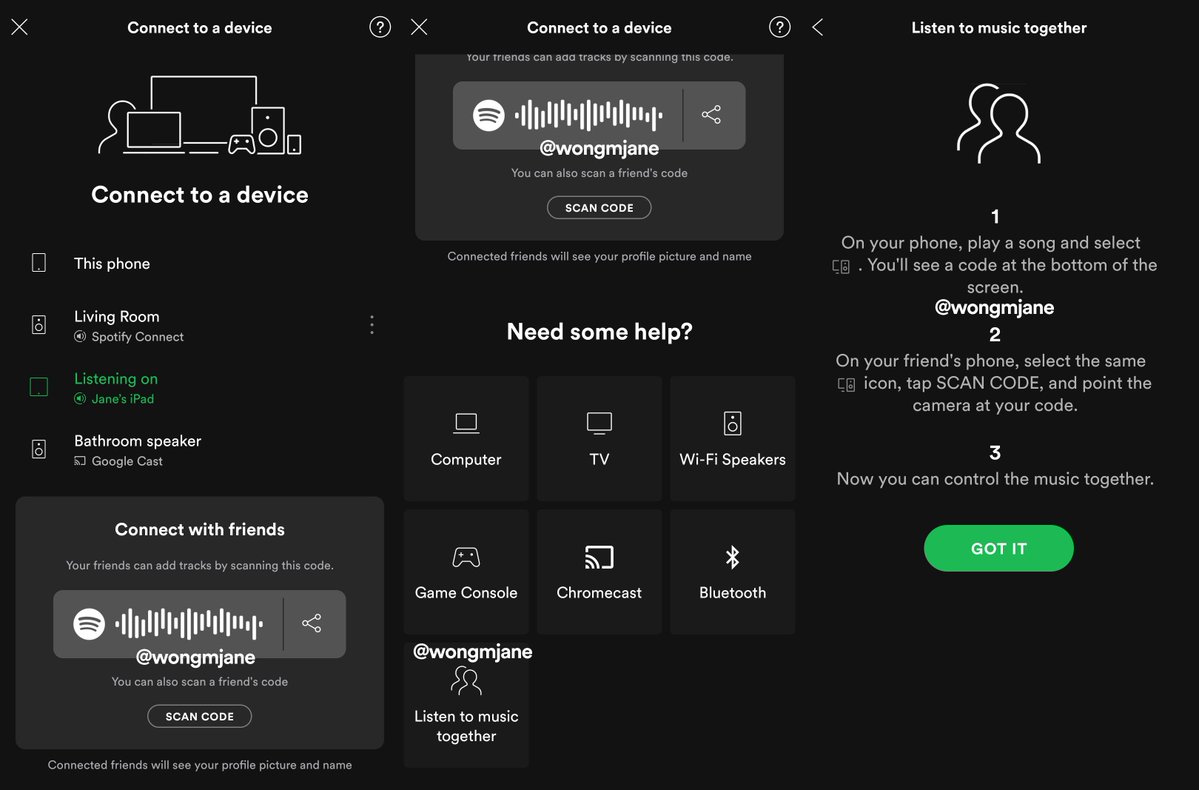
The prototype feature was discovered in the web version of Spotify by reverse engineering sorceress and frequent TechCrunch tipster Jane Manchun Wong, who gave us some more details on how it works. Users tap the pen icon to “search the people you follow”. From there they can view information about what users have been playing most and easily listen along or add songs to their own library.

Without Tastebuds, there are only a few buried ways to interact socially on Spotify. You can message friends a piece of music through buttons for SMS, Facebook Messenger, and more or post songs to your Instagram or Snapchat Story. Spotify used to have an in-app inbox for trading songs but removed it in favor of shuttling users to more popular messagin apps. On the desktop app but not mobile or web, you can view a Friend Activty ticker of songs your Facebook friends are currently listening to. Or you can search for specific users and follow them or view playlists they’ve made public, though Spotify doesn’t promote user search much.

Spotify has a few other social features it’s experimented with but never launched. Those include a Friends Weekly playlist spotted last year by The Verge’s Dani Deahl. Then this May, we reported Wong had spotted a shared-queue Social Listening feature that let you and friends play songs simultaneously while apart. Back in 2014, I wrote that Spotify should move beyond blog-esque browsing to create a “PlayFeed” playlist that would dynamically update with algorithmic recommendations, new releases from your top artists, and friends’ top listens. It’s since launched Discovery Weekly and Release Radar, and Tastebuds could finally bring in that final social piece.

Spotify’s simultaneous social listening prototype

The result is that you can only see either a myopic snapshot of friends’ current song, the few and often outdated playlists they manually made public, or you message them songs elsewhere. There was no great way to get a holistic view of what a friend has been jamming to lately or their music preferences overall.

We’ve reached out to Spotify seeking more information about how Tastebuds works, how privacy functions around who can see what, and if and when the feature might launch. We’re also interested to see if Spotify has any deal in place with a music dating startup called Tastebuds which launched way back in 2010 to help people connect and flirt through song sharing. Neither of the companies responded to requests for comment.

Social is a huge but undertapped opportunity for Spotify. Not only could social recommendations get users listening to Spotify for longer, thereby hearing more ads or becoming less likely to cancel their subscription. It also helps Spotify lock in users with a social graph they can’t find elsewhere. While competitors like Apple Music or YouTube might offer similar music catalogs, users won’t stray from Spotify if they become addicted to social discovery through Tastebuds.


Read Full Article

Spotify prototypes Tastebuds to revive social music discovery


Spotify is prototyping a new way to see what friends have been listening to, called “Tastebuds”. Despite how discovering music is inherently social, Spotify has no features for directly interacting with friends within its mobile app after axing its own inbox in 2017 and keeping its Friend Activity ticker restricted to desktop.

It seemed like Spotify was purposefully restricting social features to force users to rely on the company’s own playlists and discovery surfaces. This gave Spotify the power to play king-maker, massively influencing which artists got featured and rose to stardom. This in turn gave it leverage in its combative negotiations with record labels, which worried their artists might get left off playlists if they don’t play nice with Spotify in terms of sustainable royalty rates and access to exclusives.

That strategy seems to have paid off with Spotify improving its licensing deals and becoming a critical promotional partner for the labels, paving the way to its IPO. Spotify’s shares sit around $152, up from its direct listing price of $132 though down from its first day pop that saw it rise to $165. More comfortable in its position, now Spotify seems ready to relinquish more control of discovery and enable users to be better inspired by what friends are playing.

Tastebuds is designed to let users explore the music taste profiles of their friends. Tastebuds lives as a navigation option alongside your Library and Home/Browse sections. Anyone can access an non-functioning landing page for the feature at https://open.spotify.com/tastebuds. The feature explains itself with text noting “What’s Tastebuds? Now you can discover music through friends whose taste you trust.

The prototype feature was discovered in the web version of Spotify by reverse engineering sorceress and frequent TechCrunch tipster Jane Manchun Wong, who gave us some more details on how it works. Users tap the pen icon to “search the people you follow”. From there they can view information about what users have been playing most and easily listen along or add songs to their own library.

Without Tastebuds, there are only a few buried ways to interact socially on Spotify. You can message friends a piece of music through buttons for SMS, Facebook Messenger, and more or post songs to your Instagram or Snapchat Story. Spotify used to have an in-app inbox for trading songs but removed it in favor of shuttling users to more popular messagin apps. On the desktop app but not mobile or web, you can view a Friend Activty ticker of songs your Facebook friends are currently listening to. Or you can search for specific users and follow them or view playlists they’ve made public, though Spotify doesn’t promote user search much.

Spotify has a few other social features it’s experimented with but never launched. Those include a Friends Weekly playlist spotted last year by The Verge’s Dani Deahl. Then this May, we reported Wong had spotted a shared-queue Social Listening feature that let you and friends play songs simultaneously while apart. Back in 2014, I wrote that Spotify should move beyond blog-esque browsing to create a “PlayFeed” playlist that would dynamically update with algorithmic recommendations, new releases from your top artists, and friends’ top listens. It’s since launched Discovery Weekly and Release Radar, and Tastebuds could finally bring in that final social piece.

Spotify’s simultaneous social listening prototype

The result is that you can only see either a myopic snapshot of friends’ current song, the few and often outdated playlists they manually made public, or you message them songs elsewhere. There was no great way to get a holistic view of what a friend has been jamming to lately or their music preferences overall.

We’ve reached out to Spotify seeking more information about how Tastebuds works, how privacy functions around who can see what, and if and when the feature might launch. We’re also interested to see if Spotify has any deal in place with a music dating startup called Tastebuds which launched way back in 2010 to help people connect and flirt through song sharing. Neither of the companies responded to requests for comment.

Social is a huge but undertapped opportunity for Spotify. Not only could social recommendations get users listening to Spotify for longer, thereby hearing more ads or becoming less likely to cancel their subscription. It also helps Spotify lock in users with a social graph they can’t find elsewhere. While competitors like Apple Music or YouTube might offer similar music catalogs, users won’t stray from Spotify if they become addicted to social discovery through Tastebuds.


Read Full Article

18 December 2019

Cloud flaws expose millions of child tracking smartwatches


Parents buy their children GPS-enabled smartwatches to keep track of them, but security flaws mean they’re not the only ones who can.

This year alone, researchers have found several vulnerabilities in a number of child-tracking smartwatches. But new findings out today show that nearly all were harboring a far greater, more damaging flaw in a common shared cloud platform used to power millions of cellular-enabled smartwatches.

The cloud platform is developed by Chinese white-label electronics maker Thinkrace, one of the largest manufacturers of location-tracking devices. The platform works as a backend system for Thinkrace-made devices, storing and retrieving locations and other device data. Not only does Thinkrace sell its own child-tracking watches to parents who want to keep tabs on their children, the electronics maker also sells its tracking devices to third-party businesses, which then repackage and relabel the devices with their own branding to be sold on to consumers.

All of the devices made or resold use the same cloud platform, guaranteeing that any white-label device made by Thinkrace and sold by one of its customers is vulnerable.

Ken Munro, founder of Pen Test Partners, shared the findings exclusively with TechCrunch. Their research found at least 47 million vulnerable devices.

“It’s only the tip of the iceberg,” he told TechCrunch.

Smartwatches leaking location data

Munro and his team found that Thinkrace made more than 360 devices, mostly watches and other trackers. Because of relabeling and reselling, many Thinkrace devices are branded differently

“Often the brand owner doesn’t even realize the devices they are selling are on a Thinkrace platform,” said Munro.

Each tracking device sold interacts with the cloud platform either directly or via an endpoint hosted on a web domain operated by the reseller. The researchers traced the commands all the way back to Thinkrace’s cloud platform, which the researchers described as a common point of failure.

The researchers said that most of the commands that control the devices do not require authorization and the commands are well documented, allowing anyone with basic knowledge to gain access and track a device. And because there is no randomization of account numbers, the researchers found they could access devices in bulk simply by increasing each account number by one.

The flaws aren’t just putting children at risk, but also others who use the devices.

In one case, Thinkrace provided 10,000 smartwatches to athletes participating in the Special Olympics. But the vulnerabilities meant that every athlete could have their location monitored, the researchers said.

Child voice recordings found exposed

One device maker bought the rights to resell one of Thinkrace’s smartwatches. Like many other resellers, this brand owner allowed parents to track the whereabouts of their children and raise an alarm if they leave a geographical area set by the parent.

The researchers said they could track the location of any child wearing one of these watches by enumerating easy-to-guess account numbers.

The smartwatch also allows parents and children to talk to each other, just like a walkie-talkie. But the researchers found that the voice messages were recorded and stored in the insecure cloud, allowing anyone to download files.

A recording of a child’s voice from a vulnerable server of a smartwatch reseller. (We’ve removed the audio to protect the child’s privacy.)

TechCrunch listened to several recordings picked at random and could hear children talking to their parents through the app.

The researchers likened the findings to CloudPets, an internet-connected teddy bear-like toy, which, in 2017, left their cloud servers unprotected, exposing two million child voice recordings.

Some five million children and parents use the smartwatch sold by the reseller.

Disclosure whack-a-mole

The researchers disclosed the vulnerabilities to several white-label electronics makers in 2015 and 2017, including Thinkrace.

Some of the resellers fixed their vulnerable endpoints. In some cases, the fixes put in place to protect vulnerable endpoints later became undone. But many companies simply ignored the warnings, prompting the researchers to go public with their findings.

Rick Tang, a spokesperson for Thinkrace, did not respond to a request for comment.

Munro said that while the vulnerabilities are not believed to have been widely exploited, device makers like Thinkrace “need to get better” at building more secure systems. Until then, Munro said owners should stop using these devices.


Read Full Article

UK’s competition regulator asks for views on breaking up Google


The UK’s competition regulator has raised concerns about the market power of digital ad platform giants Google and Facebook in an interim report published today, opening up a consultation on a range of potential inventions — from breaking up platform giants, to limiting their ability to set self-serving defaults, and enforcing data sharing and/or feature interoperability to help rivals compete.

Breaking up Google by forcing it to separate its ad server arm from the rest of the business is one of a number of possible interventions it’s eyeing, along with enforcing choice screens for search engines and browsers that use non-monetary criteria to allocate slots — vs Google’s plan for a pay-to-play offering for EU Android users (which rivals argue does not offer relief for the antitrust abuse the European Commission sanctioned last year).

The UK regulator is also considering whether to require Facebook to interoperate specific features of its current network so they can be accessed by competitors — as a fix for what it describes as “strong network effects” which work against “new entrant and challenger social media platforms”.

The Competition and Markets Authority (CMA) launched the market study in July — a couple of weeks after the UK’s data watchdog published its own damning report setting out major privacy and other concerns around programmatic advertising.

It is due to issue a final report next summer — which will set out conclusions and recommendations for interventions — and is now consulting on suggestions in its interim report, inviting contributions before February 12.

Since beginning the study the CMA says it has received several requests to open a full-blown market investigation, which means it has a statutory duty to consult on making such a reference.

Based on initial findings from the study it says there are “reasonable grounds” for suspecting serious impediments to competition in the online platforms and digital advertising market.

The report specifically flags three areas where it suspects harm — namely:

  • the open display advertising market — with a focus on “the conflicts of interest Google faces at several parts of its vertically integrated chain of intermediaries”;
  • general search and search advertising — with a focus on “Google’s market power and the barriers to expansion faced by rival search engines”;
  • social media and display advertising — with a focus on “Facebook’s market power and the lack of interoperability between Facebook and rival services”;

Other concerns raised in the report include problems flowing from a lack of transparency in the digital advertising market; and the difficulty or lack of choice for consumers to opt out of behavioral advertising.

However the regulator is not making a market investigation reference at this stage — a step which would open access to the order making powers which could be used to enforce the sorts of interventions discussed in the report. Instead, the CMA says it is favors making recommendations to government to feed into a planned “comprehensive regulatory framework” to govern the behaviour of online platforms.

Earlier this year the UK government set out a wide-ranging proposal to regulate a range of online harms. Although it remains to be seen how much of that program prime minister Boris Johnson’s newly elected Conservative government will now push ahead with.

“Although it is a finely balanced judgement, we remain of the view that a comprehensive suite of recommendations to government is currently the best way forward and are therefore consulting on not making a market investigation reference at this stage,” the CMA writes, saying it feels it has further investigation work to do and also does not wish to “cut across” the government’s plans around regulating platforms.

“The concerns we have identified regarding online platforms such as Google and Facebook are a truly global antitrust challenge facing governments and regulators. Therefore, in relation to some of the potential interventions we may consider in a market investigation, and in particular any significant structural remedies such as those involving ownership separation, we need to be pragmatic about what changes could efficiently be pursued unilaterally by the UK,” it adds, saying it will “continue to work as closely as we can with our international counterparts to develop a coordinated position on these issues in the second half of the study”.

Antitrust regulators in a number of countries have been turning their attention on platform giants in recent years — including Australia and the US.

The new European Commission has also talked tough on platform power, suggesting it will further dial up scrutiny of tech giants and seek to accelerate its own interventions where it finds competitive harms.

Responding to the CMA report in a statement, Ronan Harris, VP, Google UK and Ireland, told us:

The digital advertising industry helps British businesses of all sizes find customers in the UK and across the world, and supports the websites that people know and love with revenue and reach. We’ve built easy-to-use controls that enable people to manage their data in Google’s services — such as the ability to turn off personalised advertising and to automatically delete their search history.  We’ll continue to work constructively with the CMA and the government on these important areas so that everyone can make the most of the web.

A Facebook spokesperson also sent us this statement:

We are fully committed to engaging in the consultation process around the CMA’s preliminary report, and continuing to deliver the benefits of technology and relevant advertising to the millions of people and small businesses in the UK who use our services.

We agree with the CMA that people should have control over their data and transparency around how it is used. In fact, for every ad we show, we give people the option to find out why they are seeing that ad and an option to turn off ads from that advertiser entirely.  We also provide industry-leading tools to help people control their data, like “Off Facebook Activity”, and to transfer it to other services through our Data Transfer tools.  We look forward to further engagement with the CMA on these topics.


Read Full Article

UK’s competition regulator asks for views on breaking up Google


The UK’s competition regulator has raised concerns about the market power of digital ad platform giants Google and Facebook in an interim report published today, opening up a consultation on a range of potential inventions — from breaking up platform giants, to limiting their ability to set self-serving defaults, and enforcing data sharing and/or feature interoperability to help rivals compete.

Breaking up Google by forcing it to separate its ad server arm from the rest of the business is one of a number of possible interventions it’s eyeing, along with enforcing choice screens for search engines and browsers that use non-monetary criteria to allocate slots — vs Google’s plan for a pay-to-play offering for EU Android users (which rivals argue does not offer relief for the antitrust abuse the European Commission sanctioned last year).

The UK regulator is also considering whether to require Facebook to interoperate specific features of its current network so they can be accessed by competitors — as a fix for what it describes as “strong network effects” which work against “new entrant and challenger social media platforms”.

The Competition and Markets Authority (CMA) launched the market study in July — a couple of weeks after the UK’s data watchdog published its own damning report setting out major privacy and other concerns around programmatic advertising.

It is due to issue a final report next summer — which will set out conclusions and recommendations for interventions — and is now consulting on suggestions in its interim report, inviting contributions before February 12.

Since beginning the study the CMA says it has received several requests to open a full-blown market investigation, which means it has a statutory duty to consult on making such a reference.

Based on initial findings from the study it says there are “reasonable grounds” for suspecting serious impediments to competition in the online platforms and digital advertising market.

The report specifically flags three areas where it suspects harm — namely:

  • the open display advertising market — with a focus on “the conflicts of interest Google faces at several parts of its vertically integrated chain of intermediaries”;
  • general search and search advertising — with a focus on “Google’s market power and the barriers to expansion faced by rival search engines”;
  • social media and display advertising — with a focus on “Facebook’s market power and the lack of interoperability between Facebook and rival services”;

Other concerns raised in the report include problems flowing from a lack of transparency in the digital advertising market; and the difficulty or lack of choice for consumers to opt out of behavioral advertising.

However the regulator is not making a market investigation reference at this stage — a step which would open access to the order making powers which could be used to enforce the sorts of interventions discussed in the report. Instead, the CMA says it is favors making recommendations to government to feed into a planned “comprehensive regulatory framework” to govern the behaviour of online platforms.

Earlier this year the UK government set out a wide-ranging proposal to regulate a range of online harms. Although it remains to be seen how much of that program prime minister Boris Johnson’s newly elected Conservative government will now push ahead with.

“Although it is a finely balanced judgement, we remain of the view that a comprehensive suite of recommendations to government is currently the best way forward and are therefore consulting on not making a market investigation reference at this stage,” the CMA writes, saying it feels it has further investigation work to do and also does not wish to “cut across” the government’s plans around regulating platforms.

“The concerns we have identified regarding online platforms such as Google and Facebook are a truly global antitrust challenge facing governments and regulators. Therefore, in relation to some of the potential interventions we may consider in a market investigation, and in particular any significant structural remedies such as those involving ownership separation, we need to be pragmatic about what changes could efficiently be pursued unilaterally by the UK,” it adds, saying it will “continue to work as closely as we can with our international counterparts to develop a coordinated position on these issues in the second half of the study”.

Antitrust regulators in a number of countries have been turning their attention on platform giants in recent years — including Australia and the US.

The new European Commission has also talked tough on platform power, suggesting it will further dial up scrutiny of tech giants and seek to accelerate its own interventions where it finds competitive harms.

Responding to the CMA report in a statement, Ronan Harris, VP, Google UK and Ireland, told us:

The digital advertising industry helps British businesses of all sizes find customers in the UK and across the world, and supports the websites that people know and love with revenue and reach. We’ve built easy-to-use controls that enable people to manage their data in Google’s services — such as the ability to turn off personalised advertising and to automatically delete their search history.  We’ll continue to work constructively with the CMA and the government on these important areas so that everyone can make the most of the web.

A Facebook spokesperson also sent us this statement:

We are fully committed to engaging in the consultation process around the CMA’s preliminary report, and continuing to deliver the benefits of technology and relevant advertising to the millions of people and small businesses in the UK who use our services.

We agree with the CMA that people should have control over their data and transparency around how it is used. In fact, for every ad we show, we give people the option to find out why they are seeing that ad and an option to turn off ads from that advertiser entirely.  We also provide industry-leading tools to help people control their data, like “Off Facebook Activity”, and to transfer it to other services through our Data Transfer tools.  We look forward to further engagement with the CMA on these topics.


Read Full Article

What we're getting wrong in the fight to end hunger | Jasmine Crowe

What we're getting wrong in the fight to end hunger | Jasmine Crowe

In a world that's wasting more food than ever before, why do one in nine people still go to bed hungry each night? Social entrepreneur Jasmine Crowe calls for a radical transformation to our fight to end global hunger -- challenging us to rethink our routine approaches to addressing food insecurity and sharing how we can use technology to gather unused food and deliver it directly to people in need.

Click the above link to download the TED talk.

How Much Energy Does Your PC Use? (And 8 Ways to Cut It Down)


computer-power-usage

As people become more aware of the impact of their actions on the environment, one issue to consider is how much electricity is being used by your computer. And as you have to pay for electricity use, you might be concerned about how much your PC use is costing you as well.

But how much power does a PC really use? And how can you cut this power use down?

How Much Power Does a PC Use?

free-pc-games

The power usage of a PC depends both upon its hardware and on how often it is used. A PC that is always on and is constantly mining for cryptocurrency, for example, will use far more power than a PC which is turned on once a day and used for a few hours for checking email or browsing the internet. And leaving a computer on overnight will use energy just as much as using it during the day.

A study by the Energy Saving Trust found that computers and their peripherals accounted for around 8 percent of all home electricity usage in the UK, with a further 25 percent being used by other consumer electronics. That works out to an annual cost of around £35 per person spent on electricity for a PC, which is equivalent to nearly $50 per year in US dollars.

The report also shows that a PC uses much more energy than a laptop—almost six times as much—because laptops are optimized for battery life in a way PCs are not.

One common use for PCs is gaming, and the energy consumption of a gaming PC is different from that of other PCs because of the more advanced hardware. A 2019 report by the Berkeley Lab looked at 26 different systems running 37 games, to see how much power different platforms used.

They found that there was a large range of power usage between gaming systems, with them using anywhere between 5 kilowatt-hours per year all the way up to 1200 kilowatt-hours per year. In general, PCs drew more power than consoles like Xbox One or PS4.

But the biggest factor in the amount of energy used was not the format of the gaming system, but rather its GPU. More powerful GPUs use considerably more electricity.

What Are the Different PC Power Modes?

Manage Windows 10 power options to determine power consumption

PCs do come with functions to help reduce power consumption. You may not want to turn your PC off when you’re done with it, for example because you don’t want to wait for it to boot next time you need it. In this case, you can use the Sleep or Hibernate functions.

Sleep mode, also known as suspend, puts the computer in a low-power use state. The computer will use the RAM to save your current open documents and application data, so you won’t lose anything when you enter sleep mode. The computer can also wake up again quickly. But power will be cut to components not being used like the display, storage, and peripherals.

Hibernate mode is a little different, as it cuts power to the RAM as well as the other components. Instead of the data about current states being saved on the RAM, it’s saved to the storage instead. That means that the computer is using essentially no power, as if it were turned off. But it will still remember what you were last doing when you turn it on again.

Sleep mode is useful when you are taking a short break from using your computer. Hibernate is better if you plan to leave your computer overnight. Windows 10 doesn’t show an option to hibernate by default, but you can add hibernate to the start menu yourself.

Which PC Parts Use the Most Power?

Some PC parts use more power than others

The exact amount of power used by a computer varies depending on what parts are inside. Some machines, like high-end gaming desktops with multiple graphics cards (GPUs), will use much more power than a low-wattage machine with fewer components.

However, it’s not the case that newer, better hardware necessarily uses more power than older, less good hardware. In fact, one big issue for hardware manufacturers is power efficiency. Manufacturers work to make their components more efficient. So if you have an older processor, for example, it may actually use more power than a newer processor would.

In general, it is the processor and graphics card(s) which use the most power. The motherboard and power supply do draw power, but they pass on this power to other components so you needn’t concern yourself with their power consumption.

Other components like RAM, hard disk drives, solid state drives, fans, case lighting, and optical drives also use some power, but not a large amount. The power use of peripherals like keyboards and mice is generally below 0.5W so it’s not worth worrying about.

As a rough guide, here are approximate ranges of how much power is used by each component:

  • CPU: 55 to 150W
  • GPU: 25 to 350W
  • Optical Drive: 15 to 27W
  • HDD: 0.7 to 9W
  • RAM: 2 to 5.5W
  • Case fans: 0.6 to 6W
  • SSD: 0.6 to 3W
  • Other hardware components: N/A

And here’s the power draw of the components which pass power on to other parts:

  • Power Supply (PSU): 130 to 600+W
  • Motherboard: 25 to 100W

For reference, an oven uses around 1000W, a vacuum cleaner uses between 500 and 1200W, and a games console uses between 45 and 90W, according to the Centre for Sustainable Energy.

How Can You Reduce the Power Used by Your PC?

If you’re concerned about power usage, there are several things you can do to lessen the amount of power your computer uses.

Choose Power-Efficient Hardware

cooling-systems-pc

  1. Upgrade older mechanical hard drives to solid state drives. They are both faster and more efficient with power consumption.
  2. Unless you’re doing something that requires the extra power like gaming or video editing, stick with onboard graphics adapters. If you have to install a video card, get something with less power. Remember, the more cooling a component requires, the more electricity it’s going to need.
  3. Replace your hardware, period. If you have the opportunity, upgrade to newer components to boost performance and efficiency.
  4. If you don’t need a powerful computer, try swapping to a low-wattage version. Look at a small HTPC or media device, or even an HDMI stick PC.

Change the Way You Use Your PC

hibernate-windows-10

  1. Turn off your computer when you’re not using it (such as in the evening or on the weekends). If you’d rather have it boot faster, you can use Sleep or Hibernate instead of shutting it down completely.
  2. Either turn your monitor off completely when you’re not using it, or have it enter a suspend mode. While in suspend, the screen will be completely black, but as soon as you move your mouse or press a button on the keyboard it will spring back to life. Screensavers do not save power, so there’s no point in using them unless you like the look.
  3. If you have an older machine, in the BIOS check the “ACPI Suspend Type” option and make sure it’s set to S3 as opposed to S1 or S2. This will prevent the computer from powering the CPU, RAM, and several other components when it’s in sleep mode.
  4. In Windows 10, under System > Power & sleep, you can change several power saving settings including how and when your computer sleeps. This will allow you to automate the low power modes.

Reduce Your PC’s Power Usage

With these tips, you can reduce the power used by your PC. That’s good for the environment and for your wallet.

To learn more about this topic and how much power is used by different components, see our guide to how much power your PC needs.

Read the full article: How Much Energy Does Your PC Use? (And 8 Ways to Cut It Down)


Read Full Article