07 December 2019

Will the 2020s be online advertising’s holistic decade?


With less than two months left in the decade, advertising is again entering a new phase of rapid expansion with customer experience front and center.

The explosion of data and identity management, combined with technical advancements in real-time signal detection and machine learning, present new opportunities to respond to consumers, but mastering this ability enables marketers to create “magic moments” — instances of hyper-relevant content, delivered at the perfect time and place. 

We’ll see evolutions on the back end in terms of delivery and measurement — as well as on the consumer-facing end — through new creative deployments that enhance the brick-and-mortar shopping trip. Marketers will be held to a higher standard, both by clients demanding world-class performance and proof, as well as consumers who want relevancy, helpfulness and privacy from their brand relationships. 

Achieving this balance won’t be an easy task, but the most progressive marketers will succeed in driving this industry toward a more customer-centric future because they took steps to evolve before it was too late. With that in mind, here are five ways we expect advertising to become more holistic in the 2020s: 

Smart data will take priority over big data

Most marketers have heard the adage, “garbage in, garbage out.” For too long, the industry relied on sheer quantity of data with no quality metrics for making key audience assumptions. This mentality has had a detrimental effect on our industry, creating an ecosystem where people simply hate ads and brands focus on viewability over ROI.

To truly understand our audiences, we must first turn data from multi-channel interactions into smart, actionable insights. This involves not only understanding who the customer is, but what motivates them. 

Progressive marketers will continue to invest heavily in identity graphs to tie critical data and behaviors to individual profiles across channels. Using data science and machine learning, marketers will then be able to advance their knowledge about consumers to new levels, employing new messaging tactics based not only on value, but also on what inspires action. Key nuances, like distinguishing a deal-seeker from a value-seeker, will lead to more engaging personalized experiences and ultimately better ROI for advertisers.

We’ll see a flurry of investment in real-time engagement

We live in a world where our technology predicts where we are going, what we are seeking and how long it will take to get there by recognizing our patterns and everyday behaviors. The benefits in terms of convenience and knowledge are addictive. Look no further than email, social and Alexa to see how real-time awareness and time savings from these interactions impact our everyday lives.  

For marketers, capturing this lightning in a bottle has always been elusive — until now. The rise of real-time advertising, customer data platforms (CDPs), data science and machine learning have created the ability to detect purchases as well as online and real world location signals in real-time. This enables marketers to not only predict the next shopping trip, but what a consumer is likely to buy, when it matters most.

These sense-and-respond capabilities will enable progressive marketers to create experiences of enormous value at the moments that matter, such as triggering an offer of relevance upon entering a store or delivering a tailored experience at a specific time and location. The new decade will bring about massive investments into these technologies given their immediate ability to influence consumers during the actual purchase process. We’ll see budgets being specifically carved out to support real-time advertising and technologies as marketers optimize and convert users with greater effectiveness.  

For consumers, it means that the in-store experience will continue to become more interactive, with mobile devices as the connecting point between e-commerce and brick and mortar. Brands that thrive in this environment will win by delivering meaningful creative that connects both online and offline worlds in a helpful and relevant way.

Cutting-edge tech will create new ad experiences

Daily Crunch: Uber reveals sexual assault numbers


The Daily Crunch is TechCrunch’s roundup of our biggest and most important stories. If you’d like to get this delivered to your inbox every day at around 9am Pacific, you can subscribe here.

1. Uber reveals thousands of sexual assault reports last year

Uber just released its first-ever safety report, stating that it received 2,936 reports pertaining to sexual assault in 2017, which went up to 3,045 in 2018 (these are U.S.-specific numbers). At the same time, Uber says there was a 16% decrease in the average incident rate.

While traditional taxis also have their safety risks, those numbers are still quite troubling. It’s worth noting, though, that the company has implemented some safety measures designed to help prevent sexual assault.

2. Niantic is working with Qualcomm on augmented reality glasses

To be clear, you’re not going to be booting up Pokémon GO on a pair of Qualcomm/Niantic AR glasses this Christmas. Moving forward, though, Niantic will be working with Qualcomm to flesh out the reference hardware for augmented reality glasses.

3. Netflix earmarks $420M to fight Disney in India

“This year and next year, we plan to spend about Rs 3,000 crores developing and licensing content and you will start to see a lot of stuff hit the screens,” said CEO Reed Hastings at a conference in New Delhi.

4. Airbnb officially bans all open-invite parties and events

The new policy seeks to prevent certain guests from hosting events not approved by hosts — such as a recent Halloween party hosted at a California Airbnb rental in which five people were killed.

5. Inside VSCO, a Gen Z-approved photo-sharing app, with CEO Joel Flory

Known to many only because of this year’s “VSCO girl” meme explosion, the company has long been coaxing the creative community to its freemium platform. Turns out, if you can provide the disillusioned teens of Gen Z respite from the horrors of social media — they’ll pay money for it.

6. This Lego Cybertruck is one even Elon can love

While Lego’s take on the Tesla Cybertruck design seemed to be purely for the LOLs, a remarkably faithful representation has been submitted to the official Lego Ideas crowdsourcing website.

7. Scammers peddling Islamophobic clickbait is business as usual at Facebook

A network of scammers used a ring of established right-wing Facebook pages to stoke Islamophobia and make a quick buck in the process, according to a new report from The Guardian. But Devin Coldewey argues that this is less a vast international conspiracy and simply more evidence that Facebook is unable to police its platform to prevent even the most elementary scams. (Extra Crunch membership required.)


Read Full Article

Understanding Transfer Learning for Medical Imaging


As deep neural networks are applied to an increasingly diverse set of domains, transfer learning has emerged as a highly popular technique in developing deep learning models. In transfer learning, the neural network is trained in two stages: 1) pretraining, where the network is generally trained on a large-scale benchmark dataset representing a wide diversity of labels/categories (e.g., ImageNet); and 2) fine-tuning, where the pretrained network is further trained on the specific target task of interest, which may have fewer labeled examples than the pretraining dataset. The pretraining step helps the network learn general features that can be reused on the target task.

This kind of two-stage paradigm has become extremely popular in many settings, and particularly so in medical imaging. In the context of transfer learning, standard architectures designed for ImageNet with corresponding pretrained weights are fine-tuned on medical tasks ranging from interpreting chest x-rays and identifying eye diseases, to early detection of Alzheimer’s disease. Despite its widespread use, however, the precise effects of transfer learning are not yet well understood. While recent work challenges many common assumptions, including the effects on performance improvement, contribution of the underlying architecture and impact of pretraining dataset type and size, these results are all in the natural image setting, and leave many questions open for specialized domains, such as medical images.

In our NeurIPS 2019 paper, “Transfusion: Understanding Transfer Learning for Medical Imaging,” we investigate these central questions for transfer learning in medical imaging tasks. Through both a detailed performance evaluation and analysis of neural network hidden representations, we uncover many surprising conclusions, such as the limited benefits of transfer learning for performance on the tested medical imaging tasks, a detailed characterization of how representations evolve through the training process across different models and hidden layers, and feature independent benefits of transfer learning for convergence speed.

Performance Evaluation
We first performed a thorough study on the effect of transfer learning on model performance. We compared models trained from random initialization and applied directly on tasks to those pretrained on ImageNet that leverage transfer learning for the same tasks. We looked at two large scale medical imaging tasks — diagnosing diabetic retinopathy from fundus photographs and identifying five different diseases from chest x-rays. We evaluated various neural network architectures including both standard architectures popularly used for medical imaging (ResNet50, Inception-v3) as well as a family of simple, lightweight convolutional neural networks that consist of four or five layers of the standard convolution-batchnorm-ReLU progression, or CBRs.

The results from evaluating all of these models on the different tasks with and without transfer learning give us four main takeaways:
  • Surprisingly, transfer learning does not significantly affect performance on medical imaging tasks, with models trained from scratch performing nearly as well as standard ImageNet transferred models.
  • On the medical imaging tasks, the much smaller CBR models perform at a level comparable to the standard ImageNet architectures.
  • As the CBR models are much smaller and shallower than the standard ImageNet models, they perform much worse on ImageNet classification, highlighting that ImageNet performance is not indicative of performance on medical tasks.
  • The two medical tasks are much smaller in size than ImageNet (~200k vs ~1.2m training images), but in the very small data regime, there may only be a few thousand training examples. We evaluated transfer learning in this very small data regime, finding that while there was a larger gap in performance between transfer and training from scratch for large models (ResNet) this was not true for smaller models (CBRs), suggesting that the large models designed for ImageNet might be too overparameterized for the very small data regime.
Representation Analysis
We next study the degree to which transfer learning affects the kinds of features and representations learned by the neural networks. Given the similar performance, does transfer learning result in different representations from random initialization? Is knowledge from the pretraining step reused, and if so, where? To find answers to these questions, this study analyzes and compares the hidden representations (i.e., representations learned in the latent layers of the network) in the different neural networks trained to solve these tasks. This quantitative analysis can be challenging, due to the complexity and lack of alignment in different hidden layers. But a recent method, singular vector canonical correlation analysis (SVCCA; code and tutorials), based on canonical correlation analysis (CCA), helps overcome these challenges, and can be used to calculate a similarity score between a pair of hidden representations.

Similarity scores are computed for some of the hidden representations from the top latent layers of the networks (closer to the output) between networks trained from random initialization and networks trained from pretrained ImageNet weights. As a baseline, we also compute similarity scores of representations learned from different random initializations. For large models, representations learned from random initialization are much more similar to each other than those learned from transfer learning. For smaller models, there is greater overlap between representation similarity scores.
Representation similarity scores between networks trained from random initialization and networks trained from pretrained ImageNet weights (orange), and baseline similarity scores of representations trained from two different random initializations (blue). Higher values indicate greater similarity. For larger models, representations learned from random initialization are much more similar to each other than those learned through transfer. This is not the case for smaller models.
The reason for this difference between large and small models becomes clear with further investigation into the hidden representations. Large models change less through training, even from random initialization. We perform multiple experiments that illustrate this, from simple filter visualizations to tracking changes between different layers through fine-tuning.

When we combine the results of all the experiments from the paper, we can assemble a table summarizing how much representations change through training on the medical task across (i) transfer learning, (ii) model size and (iii) lower/higher layers.
Effects on Convergence: Feature Independent Benefits and Hybrid Approaches
One consistent effect of transfer learning was a significant speedup in the time taken for the model to converge. But having seen the mixed results for feature reuse from our representational study, we looked into whether there were other properties of the pretrained weights that might contribute to this speedup. Surprisingly, we found a feature independent benefit of pretraining — the weight scaling.

We initialized the weights of the neural network as independent and identically distributed (iid), just like random initialization, but using the mean and variance of the pretrained weights. We called this initialization the Mean Var Init, which keeps the pretrained weight scaling but destroys all the features. This Mean Var Init offered significant speedups over random initialization across model architectures and tasks, suggesting that the pretraining process of transfer learning also helps with good weight conditioning.
Filter visualization of weights initialized according to pretrained ImageNet weights, Random Init, and Mean Var Init. Only the ImageNet Init filters have pretrained (Gabor-like) structure, as Rand Init and Mean Var weights are iid.
Recall that our earlier experiments suggested that feature reuse primarily occurs in the lowest layers. To understand this, we performed weight transfusion experiments, where only a subset of the pretrained weights (corresponding to a contiguous set of layers) are transferred, with the remainder of weights being randomly initialized. Comparing convergence speeds of these transfused networks with full transfer learning further supports the conclusion that feature reuse is primarily happening in the lowest layers.
Learning curves comparing the convergence speed with AUC on the test set. Using only the scaling of the pretrained weights (Mean Var Init) helps with convergence speed. The figures compare the standard transfer learning and the Mean Var initialization scheme to training from random initialization.
This suggests hybrid approaches to transfer learning, where instead of reusing the full neural network architecture, we can recycle its lowest layers and redesign the upper layers to better suit the target task. This gives us most of the benefits of transfer learning while further enabling flexible model design. In the Figure below, we show the effect of reusing pretrained weights up to Block2 in Resnet50, halving the remainder of the channels, initializing those layers randomly, and then training end-to-end. This matches the performance and convergence of full transfer learning.
Hybrid approaches to transfer learning on Resnet50 (left) and CBR models (right) — reusing a subset of the weights and slimming the remainder of the network (Slim), and using mathematically synthesized Gabors for conv1 (Synthetic Gabor).
The figure above also shows the results of an extreme version of this partial reuse, transferring only the very first convolutional layer with mathematically synthesized Gabor filters (pictured below). Using just these (synthetic) weights offers significant speedups, and hints at many other creative hybrid approaches.
Synthetic Gabor filters used to initialize the first layer if neural networks in some of the experiments in this paper. The Gabor filters are generated as grayscale images and repeated across the RGB channels. Left: Low frequencies. Right: High frequencies.
Conclusion and Open Questions
Transfer learning is a central technique for many domains. In this paper we provide insights on some of its fundamental properties in the medical imaging context, studying performance, feature reuse, the effect of different architectures, convergence and hybrid approaches. Many interesting open questions remain: How much of the original task has the model forgotten? Why do large models change less? Can we get further gains matching higher order moments of pretrained weight statistics? Are the results similar for other tasks, such as segmentation? We look forward to tackling these questions in future work!

Acknowledgements
Special thanks to Samy Bengio and Jon Kleinberg, who are co-authors on this work. Thanks also to Geoffrey Hinton for helpful feedback.

Daily Crunch: Facebook announces photo transfer tool


The Daily Crunch is TechCrunch’s roundup of our biggest and most important stories. If you’d like to get this delivered to your inbox every day at around 9am Pacific, you can subscribe here.

1. Facebook launches a photo portability tool, starting in Ireland

Facebook says it will make it easier for users to get their photos off the social network and onto another service — a step toward addressing the concerns of lawmakers and antitrust regulators.

The company is starting off with a way for users in Ireland to move pictures into Google Photos via encrypted transfer, but it says the feature will be available worldwide in the first half of 2020 and will eventually include integrations with additional services.

2. In ’60 Minutes’ appearance, YouTube’s CEO offers a master class in moral equivalency

YouTube’s Susan Wojcicki told “60 Minutes” reporter Lesley Stahl that the company has drawn a line at taking down videos that cause “harm,” as opposed to videos that might spread merely hatred and disinformation. In response, Connie Loizos argues that the distinction is, in a word, laughable.

3. Ikea is helping to redesign simulated Mars habitats

Ikea has been working with an Earth-based research facility that is meant to mimic what a Mars habitat would be like. Originally, Ikea sent a designer to the station to seek inspiration for creating functional furniture for small apartments — but it quickly became a two-way street, which could mean the Swedish home furnishing company has a say in how future human colonists live on other planets.

4. Accel closes new $550M fund for India

This is a significant amount of capital for Accel’s efforts in the country, where it began investing 15 years ago and has deployed roughly $1 billion through all its previous funds.

5. Here’s the math behind Tesla’s dumb Cybertruck vs F-150 tow test

During the unveiling of the Cybertruck, Tesla included a butt-to-butt pull-off. Besides being a silly test, this particular demo was flawed in multiple ways, giving the Tesla a major advantage.

6. Will the future of work be ethical? Founder perspectives

Following up on Greg Epstein’s column about whether the future of work will be ethical, we’ve published a number of other perspectives on the topic — including this one, in which he speaks to Andrea Thomaz of Diligent Robotics and Prayag Narula of LeadGenius. (Extra Crunch membership required.)

7. This week’s TechCrunch podcasts

This week’s Equity looks at Cocoon, a Y Combinator-backed startup that wants to help users stay in touch with close friends. (Also: I was relieved that even though Alex Wilhelm is leaving his role at Crunchbase, he’ll be sticking around to co-host the podcast.) And we’ve got a Thanksgiving edition of Original Content that focuses on what we’re thankful for in the streaming world.


Read Full Article

06 December 2019

The profound power of an authentic apology | Eve Ensler

The profound power of an authentic apology | Eve Ensler

Genuine apology goes beyond remorse, says legendary playwright Eve Ensler. In this frank, wrenching talk, she shares how she transformed her own experience of abuse into wisdom on what wrongdoers can do and say to truly repent -- and offers a four-step roadmap to help begin the process. (This talk contains mature content.)

Click the above link to download the TED talk.

How to Remove False Personal Information on the Internet


Almost everyone has some harmless piece of personal information floating around on the internet. Now, it’s almost unavoidable. But it’s a completely different story when someone writes something libelous about you or exposes a sensitive piece of information.

If you find false or private data on the web, you need to learn how to remove information from the internet. Follow along to find out what you need to do to act.

What Is Libel?

In the United States and in many countries around the world, truthful statements about another person are safe to publish. However, publishing outright lies with the intent to defame or injure the reputation of others is illegal.

In the U.S., the victim of libel has the right to bring a civil lawsuit against the defamer. Such lawsuits are usually very expensive and not worth the effort for most people. If you find that someone has published untrue information about you online, there are less expensive and more effective ways to remove that false, libelous information from the web. That’s why it’s important to know how to remove your address from the internet, along with other sensitive information that websites know about you.

Contact the Website Owner

Before you do anything else, swallow your pride and contact the person who published the information. Locate the contact details on the website if you can. Then, send a friendly email pointing out why what they wrote is untrue.

Don’t call them a liar, just ask them if they wouldn’t mind entering a friendly dialog with you regarding the issues that were published. You’d be surprised how many of these situations arise out of a gross misunderstanding.

Communicating with the other person can immediately clear up any disagreements you may have had, and you may discover that the author is willing to remove the hurtful page. Kindness can often go a very long way to getting what you want.

Unfortunately, the odds are pretty good that you may be dealing with an unstable or unreasonable individual. They may get obnoxious and refuse to cooperate. That’s when it’s time to step it up a notch.

How to Report a Website for Slander and Remove Personal Information From the Internet

When the owner of the website won’t cooperate, you need to get serious. The following steps will help you remove your information from the internet. While this guide doesn’t tell you how to remove your name from the internet completely, it’ll give you a surefire way to get your private information off the web.

To prevent any of these situations happening in the future, you might want to think about improving your online privacy as well.

1. Find Contact Information

Before you conduct full-fledged warfare against the offending website, you’ll need to do a little bit of investigating. The first step is to identify the name and contact information for the person who registered the site that hosts the libelous material.

For this, try the DomainTools Whois Lookup. This site gives you detailed information about the website you’re searching for. All you need to do is enter the site’s URL into the search bar.

Whois Lookup Facebook Site Example

To view the site’s full writeup, you’ll need to scroll to the bottom of the page and verify yourself with a CAPTCHA. You’ll see a contact email under “Registrant Email” or “Administrative Contact.” You can use these emails to try to get in touch with the owner of the site.

Whois Lookup Facebook Host Information

At the top of the page, DomainTools also provides information regarding the site’s host under the “Registrar” section. Once you know the name of the web hosting company, visit the website and obtain their contact information, as well as a list of the host’s Terms and Conditions. Make a list of those terms that the offending webmaster has broken on their website.

2. Report All Terms and Conditions Violations to the Host

If you’ve contacted the webmaster and they are unwilling to cooperate, then the first part of this battle is to fire off as many abuse violation reports as needed. Your first order of business is to report a violation to their web host. It’s important that you find a violation on the web page that goes against the terms and conditions of the host. Most web hosts do not allow the posting of personal information or any form of libel.

GoDaddy Abuse Report Form

For example, GoDaddy, a popular web host, provides a form that allows you to file any abuse complaints. Simply find the place on the offending website where the author makes use of your name and other personal information without your permission and use it as your evidence.

3. Report Privacy or Copyright Infringement To Google

Another approach is to remove information from Google and get that web page delisted from the search engines. Google is the powerhouse of online information, so getting delisted from Google will virtually destroy any chance the offending website will have of getting visibility.

If you’re wondering how to remove yourself from Google search entirely, you might not get the answer you’re looking for. There are only some scenarios where Google will remove specific results. Those situations include when any of the following are published on a web page:

  • Your social security or government ID number
  • Your bank account or credit card number
  • An image of your handwritten signature
  • Your name or business published on an adult content site
  • Infringement of copyrighted content like text or images

In most cases, you can use this form to submit your request to remove content from Google.

Remove Content From Google Form

4. Report Any Other Abuse to Google

If the website that’s posted libel about you hasn’t broken any privacy rules, you still have a chance of removing their site from Google if you can find a case of abuse related to Google’s Terms and Conditions. Search the website and try to find examples of any of the following:

  • The site is just spam
  • It buys or sells links
  • You find malware or malicious software on the site
  • The site contains phishing schemes

If you can identify any of the above activities on the website, submit a report to Google using the Spam Report Tool.

Don’t Give Up Trying to Remove Online Information

Now that you know how to remove your information from the internet, as well as how to report a website for slander, you can feel a little more at ease. If you don’t get a response from the website owner or host on the first try, don’t give up. As a last resort, you can turn to Google to take care of any personal information posted on the web.

You might also notice your personal information lingering on websites that list directories. To get rid of that information, take these steps to delete your personal data from public records websites.

Read the full article: How to Remove False Personal Information on the Internet


Read Full Article

What Is JavaScript and How Does It Work?


JavaScript has become a staple in modern web development. This powerful language has evolved into an essential tool for any web developer to understand.

JavaScript has special features that make it different from traditional programming languages. We’re going to dig into what it is, how it works, and what you can do with it. Let’s break it down.

What Is JavaScript?

JavaScript is a scripting language for the web. It is an interpreted language, which means it does not need a compiler to translate its code like C or C++. JavaScript code runs directly in a web browser.

The latest version of the language is ECMAScript 2018 which was released in June 2018.

JavaScript works with HTML and CSS to build web apps or web pages. JavaScript is supported by most modern web browsers like Google Chrome, Firefox, Safari, Microsoft Edge, Opera, etc. Most mobile browsers for Android and iPhone now support JavaScript as well.

JavaScript controls the dynamic elements of web pages. It works in web browsers and, more recently, on web servers as well. Application Programming Interfaces (API) are also supported by JavaScript, giving you more functionality.

Understanding all the ways JavaScript works is a little easier when you understand how web programming works, so let’s learn more.

Web App Building Blocks

There are three components that build websites and apps: Hypertext Markup Language (HTML), Cascading Style Sheets (CSS), and JavaScript. Each one has a role in creating a web app.

  • HTML is a markup language that creates the skeleton of the web page. All the paragraphs, sections, images, headings and text are written in HTML. The content appears on the website in the order they are written in HTML.
  • CSS controls the style and the additional aspects of the layout. CSS is used to create the design of the website creating the colors, fonts, columns, borders, etc. It takes the website from plain text elements to colorful designs.
  • The third element is JavaScript. HTML and CSS create the structure, but they don’t do anything from there. JavaScript creates dynamic activity on your app. Scripting in JavaScript is what controls functions when buttons are clicked, how password forms are authenticated, how media is controlled.

All three parts work in harmony with each other to create full-scale apps. It would be a good idea to learn more about HTML and CSS if you’re not entirely comfortable with them.

How Does JavaScript Work?

Before writing JavaScript it’s important to know how it works under the hood. There are two important pieces to learn about: How the web browser works, and the Document Object Model (DOM).

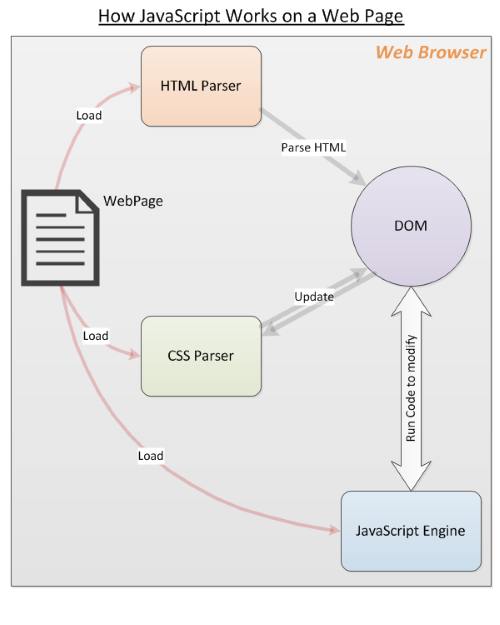
How JavaScript works

The web browser loads a web page, parses the HTML, and creates what is known as a Document Object Model (DOM) from the contents. The DOM presents a live view of the web page to your JavaScript code.

The browser will then grab everything linked to the HTML, like images and CSS files. The CSS information comes from the CSS parser.

The HTML and CSS are put together by the DOM to create the web page first. Then, the browsers’ JavaScript engine loads JavaScript files and inline code but does not run the code immediately. It waits for the HTML and CSS to finish loading.

Once this is done, the JavaScript is executed in the order the code is written. This results in the DOM being updated by JavaScript code and rendered by the browser.

The order here is important. If the JavaScript did not wait for the HTML and CSS to finish, it would not be able to change the DOM elements.

What Can I Do With JavaScript?

JavaScript is a full-fledged programming language that can do most things a regular language like Python can do. These include:

  • Declaring variables.
  • Storing and retrieving values.
  • Defining and invoking functions.
  • Defining JavaScript objects and classes.
  • Loading and using external modules.
  • Writing event handlers that respond to click events.
  • Writing server code.
  • And much more.

Warning: Since JavaScript is such a powerful language, it is also possible to write malware, viruses, and browser hacks to inflict them on the users. These range from stealing browser cookies, passwords, credit cards to downloading viruses onto your computer.

Using JavaScript

Let’s look at some JavaScript basics with code examples.

Declaring variables

JavaScript is dynamically typed, which means you do not have to declare the type of your variables in your code.

let num = 5;
let myString = "Hello";
var interestRate = 0.25;

Operators

Addition

12 + 5
>> 17

Subtraction

20 - 8
>> 12

Multiplication

5 * 2
>> 10

Division

50 / 2
>> 25

Modulus

45 % 4
>> 1

Arrays

let myArray = [1,2,4,5];
let stringArray = ["hello","world"];

Functions

JavaScript can write functions, here’s a simple function that adds numbers.

function addNumbers(num1,num2){
return num1 + num2;
}
>> addNumbers(10,5);
>> 15

Loops

JavaScript can perform loops for iteration, loops like for loops and while loops.

for(let i = 0; i < 3; i++){ 
console.log("echo!"); 
} 
>> echo!
>> echo!
>> echo!

let i = 0;
while(i < 3) { 
console.log("echo!");
i++; 
} 
>> echo!
>> echo!
>> echo!

Comments

// Writing a comment
/*Writing a multi-line comment
You can use as many lines as you like
to break up text and make comments more readable
*/

In a Web Page

The most common way to load JavaScript in a web page is to use the script HTML tag. Depending on your requirements, you can use one of the following methods.

  • Load an external JavaScript file into a web page as follows:
    <script type="text/javascript" src="/path/to/javascript"></script>
    
  • You can specify the complete URL if the javascript is from a different domain from the web page as follows:
    <script type="text/javascript" src="https://code.jquery.com/jquery-3.2.1.min.js"></script>
    
  • JavaScript can be directly embedded in the HTML. Here is an
    <script type="text/javascript">
    alert("Page is loaded");
    </script>
    

Other than these methods there are ways of loading JavaScript code on demand. In fact, there are frameworks dedicated to loading and running JavaScript modules with proper dependencies resolved at run time.

Those are more advanced topics, right now you’re learning the basics.

Sample JavaScript Code Snippets

Here are some simple JavaScript code samples to illustrate how it is used on web pages. These are examples of code that work with the DOM.

  • The following selects all bold elements in the document and sets the color of the first to red.
    var elems = document.getElementsByTagName('b');
    elems[0].style.color = 'red';
    
  • Want to change the image in an img tag? The following associates an event handler for the click event of a button.
    <img id="myImg" src="prev-image.png">
    <button onclick="document.getElementById('myImg').src='new-image.png'">Change Image</button>
    
  • Update the text content of a paragraph (p) element? Set the innerHTML property of the element as shown:
    <p id="first-para">Hello World</p>
    <button onclick="document.getElementById('first-para').innerHTML = "Welcome to JavaScript!"'>Click me</button>
    

These code samples offer just a glimpse into what you can do using JavaScript on your web page. There are plenty of tutorials that can teach you how to code to get you started. You can try it out on any web page, even this one! Open up your console and try out some JavaScript code.

Now You Know What JavaScript Does

Hopefully, this introduction has brought some insights into JavaScript and gets you excited about web programming. There is much more to learn about JavaScript. Once you feel more comfortable why not try to learn how to use the Document Object Model?

Read the full article: What Is JavaScript and How Does It Work?


Read Full Article

How to Install and Dual Boot Linux on Your Mac


linux-macbook-pro-retina

Whether you need a customizable operating system or a better environment for software development, you can get it by installing Linux on your Mac. Linux is incredibly versatile (it’s used to run everything from smartphones to supercomputers), and you can install it on your MacBook Pro, iMac, or even your Mac mini.

Apple adding Boot Camp to macOS made it easy for people to dual boot Windows, but installing Linux is another matter entirely. Follow the steps below to learn how to do this.

Why Install Linux on a Mac or MacBook Pro?

Your Mac offers excellent performance, superb battery life, and long durability. The hardware on a Mac is difficult to match, which makes it an incredibly powerful machine for running Linux.

What’s more, Linux breathes life into old Macs that are no longer eligible for macOS updates. Rather than letting your old MacBook Pro turn into an expensive paperweight, install the latest version of Linux and keep it going for years to come.

Ubuntu Is Our Linux Distribution of Choice

There are many different versions of Linux available, but for the purposes of this tutorial, we suggest installing Ubuntu on your Mac. Ubuntu is the most popular Linux distribution, which means there are lots of active support communities available if you ever need help.

We even wrote an extensive beginner’s guide to Ubuntu you can use to get started with it.

To Dual Boot or Not to Dual Boot

With a dual boot system, both macOS and Linux are installed on your Mac. Hold Option while your computer boots up to choose which operating system to use. The main difference between a dual boot system and a virtual machine is that you can only use one OS at a time while dual-booting, but you get better performance.

If you don’t plan to ever use macOS again, you might want to completely replace it with Linux instead. That way, none of your storage is used up by its system files.

However, if you ever change your mind, it’s difficult and time-consuming to restore macOS again in the future. This is especially true since Linux writes over the macOS Recovery partition.

For that reason, we recommend you dual boot Linux on your Mac. If you’re really certain you don’t want to do that, just skip the Partition step in the instructions below.

Step 1: Prepare Your Mac for Installing Linux

To install Linux on your Mac, you need a USB flash drive with at least 2GB of storage. You’ll erase the flash drive in a future step to put an Ubuntu installer on it, so make sure you’ve backed up any important files first.

Use an Ethernet adapter to connect your Mac to the internet. This is important, because your Wi-Fi may not work in Ubuntu without third-party drivers. Similarly, iMac users should get hold of a USB keyboard or mouse, in case Bluetooth doesn’t work.

If you plan to dual boot your Mac with Linux, you also need to make sure you have enough free storage. Go to Apple menu > About This Mac > Storage to check that you have at least 25GB free (but preferably more).

Mac Storage info

Finally, make a backup of your Mac. You shouldn’t lose any data by installing Linux in a dual boot partition. However, if something goes wrong, you may need to erase your entire Mac to fix it.

If you plan to replace macOS with Linux, rather than creating a dual-boot system, use Carbon Copy Cloner to back up your macOS Recovery partition. This makes it far easier to revert back to macOS again in the future.

Step 2: Create a Partition on Your Mac Drive

Disk Utility window showing Linux and Swap partitions for Dual Boot on Mac

For a dual boot system (which we strongly recommend), you need to create a Linux partition on your Mac’s hard drive. If you don’t want to create a dual boot system, skip ahead to the next step.

In fact, to dual boot Linux on a Mac, you need two extra partitions: one for Linux and a second for swap space. The swap partition must be as big as the amount of RAM your Mac has. Check this by going to Apple menu > About This Mac.

Use Disk Utility to create new partitions on your Mac:

  1. Open Disk Utility from the Utilities folder in your Applications, or search for it via Spotlight.
  2. In the top-left corner, select View > Show All Devices.
  3. Select the highest-level drive for your Mac hard disk, then click Partition.
  4. Use the Plus button to create a new partition. Name it UBUNTU and set the format to MS-DOS (FAT). Give it as much space as you want to use for Linux.Ubuntu partition information in Disk Utility
  5. Click Apply to create the partition.
  6. Repeat the steps above to create another partition. Name this partition SWAP and set the format to MS-DOS (FAT) again. Make the size match the amount of RAM in your Mac. This might be 4GB or 8GB, for instance.
  7. Click Apply to create the partition.

If you can’t create new partitions, it could be because FileVault is encrypting your hard drive. Go to System Preferences > Security & Privacy > FileVault to turn it off.

Install rEFInd for Better Boot Options

Boot EFI option from rEFInd boot manager

The standard boot manager on your Mac doesn’t always work with Ubuntu. This means you need to install a third-party boot manager instead, which will let you easily choose between macOS or Linux when you start up your computer.

Thus, your next step is to download rEFInd, which is the boot manager we recommend. To install rEFInd, you need to temporarily disable System Integrity Protection. This is an important security feature for macOS, so make sure you enable it again afterward.

To install the rEFInd boot manager:

  1. With SIP disabled, open Terminal from the Utilities folder in Applications (or search for it using Spotlight).
  2. Open Finder in a separate window and navigate to the rEFInd download.
  3. Drag the refind-install file into your Terminal window and press Enter.
  4. When prompted, enter your administrator password and press Enter again.
  5. After the installation, remember to enable SIP again.

Dropping refind-install file into Terminal window, with the code that appears

Next time you restart your Mac, the rEFInd menu should appear automatically. If it doesn’t, hold Option while booting up to load your boot manager.

Step 3: Create an Ubuntu USB Installer

Download the latest version of Ubuntu as a disk image from the Ubuntu website. You need to use a third-party app to create a USB installer from the Ubuntu disk image. One of the simplest apps for this is balenaEtcher, but you can use anything you like.

To create an Ubuntu USB installer:

  1. Open balenaEtcher and click Select Image.
  2. Navigate to the Ubuntu disk image you downloaded and click Open.
  3. Insert your USB flash drive and balenaEtcher should automatically select it. If it doesn’t, click Select Target or Change to select the flash drive yourself.
  4. Make sure the correct drive is selected, since the next step erases it.
  5. Click Flash and enter your administrator password to erase the USB flash drive and create an Ubuntu USB installer.
  6. When it’s finished, macOS prompts you to Eject the flash drive.

balenaEtcher window ready to create an Ubuntu USB installer

Step 4: Boot Ubuntu From Your USB Installer

Restart your Mac while holding Option and reinsert the USB flash drive directly into your computer. When the boot loader appears, use the arrow keys to select the Boot EFI option and hit Enter.

An Ubuntu loading screen appears, followed by the Ubuntu desktop.

Ubuntu desktop showing Install Ubuntu disk image

Use this opportunity to test Ubuntu on your Mac. Keep in mind that because it’s running from your USB flash drive, it may be slow. Since Ubuntu can’t use your Mac’s Wi-Fi by default, use an Ethernet adapter to connect to the internet.

Disable Secure Boot on Macs With the T2 Security Chip

In 2018, Apple introduced the T2 security chip to new Macs. This advancement might stop you from booting other operating systems on your machine. If you experience any boot issues, follow Apple’s instructions to disable the T2 chip.

Step 5: Install Ubuntu on Your Mac

When you’re ready, double-click the Install Ubuntu item on the desktop.

Follow the on-screen prompts to choose your language and keyboard layout. Choose a Normal installation and select the option to Install third-party software. You need to connect your Mac to the internet using an Ethernet cable to install this software, which makes functions like Wi-Fi and Bluetooth work. Then click Continue.

Normal Ubuntu installation with third-party software selected

If prompted, choose to keep your partitions mounted.

Option 1: Dual Boot Ubuntu With macOS

From the Installation type screen, select Something Else and click Continue.

On the next screen, you need to identify and select the UBUNTU partition you created. Unfortunately, there are no recognizable partition names, so look for a device with fat32 in the name that matches the partition size, measured in MB.

Ubuntu Installation Type window selecting fat32 partitions

Double-click to select it and choose Use as: Ext4 journaling file system. Set the Mount point to / and check the box to Format the partition. Click OK. In the popup alert, click Continue to write previous changes to the disk.

Now identify your SWAP partition, which should also have fat32 in the name. Double-click it and choose to Use as: swap area, then click OK.

Open the Device for boot loader installation dropdown menu and select your UBUNTU partition again. The name should match what you selected for it from the table above.

Take a moment to ensure you selected the correct partitions, then click Install Now. Click Continue in the popup alert to confirm you want to write changes to those disks.

Finally, follow the on-screen prompts to choose your time zone and create a user account, then wait for the installation to complete.

Option 2: Replace macOS With Ubuntu

From the Installation type screen, select Erase disk and install Ubuntu.

Be warned: this erases everything from your Mac, including the operating system and the Recovery partition!

Erase disk and install Ubuntu option

When you’re ready, click Install Now and select your hard disk.

Follow the on-screen prompts to set the correct time zone and create a user account, then wait for the installation to complete.

Make Using Linux on Mac Even Easier

Congratulations! You successfully installed Linux on your MacBook Pro, iMac, or Mac mini! If you chose to dual boot Linux on your Mac, hold Option while booting up to choose between macOS and Ubuntu.

Next, take a look at some tips to make your switch from macOS to Linux easier. By adding some familiar macOS features to Ubuntu, you’ll make the most of Linux on your Mac in no time!

Read the full article: How to Install and Dual Boot Linux on Your Mac


Read Full Article

10 Great Gifts for Gamers You Can Give This Year


gifts-gamers

Whether it’s Christmas or someone’s birthday, it can be tough to figure out the best gifts for gamers. After all, everyone is different.

You could get them extra controllers, gift cards, or subscriptions to various gaming services. But there are also more creative options out there.

So what are some good gifts for gamers? From PC gamers to console gamers, here are a few great gifts to choose from.

For the New Gamer:
PlayStation 4 Slim – Only On PlayStation Bundle

PlayStation 4 Slim - Only On PlayStation Bundle PlayStation 4 Slim - Only On PlayStation Bundle Buy Now On Amazon $238.98

So you’ve got a young gamer or a newbie that has recently started dipping their toes into the gaming world. Help them take the plunge by giving them one of the best presents possible: a console bundle. If they’ve already shown interest in Sony’s console, consider the PlayStation 4 Slim – Only On PlayStation Bundle.

You could technically get them a gaming gift card, but this can feel a bit impersonal. That’s why this is a great option. Not only does it provide a powerful console with 1TB of storage, but it also packs in three of the console-exclusive hits that have made the PS4 so popular.

Gift for PS4 Gamers:
Seagate Game Drive for PS4

Seagate Game Drive for PS4 Seagate Game Drive for PS4 Buy Now On Amazon $91.79

While the PlayStation 4 comes with ample storage, a few games and video captures can quickly fill up the console’s drive. PS4 owners can update their console by adding extra storage with an SSD, but this requires a bit of technical knowledge to get inside the device.

The plug-and-play capabilities of the Seagate Game Drive for PS4, however, make it easy for anyone to upgrade their PS4 console storage. The drive is compatible with the standard PS4, the PS4 Slim, and the PS4 Pro. You don’t need to format it, and Seagate ensures compatibility. All you need to do is plug it in and follow the instructions of the built-in software.

Gift for Xbox One Gamers:
Energizer Xbox One Controller Charging Station

Energizer Xbox One Controller Charging Station Energizer Xbox One Controller Charging Station Buy Now On Amazon $27.34

Microsoft’s Xbox One doesn’t come with integrated charging options for their controllers. However, the Energizer Xbox One Controller Charging Station removes the need for disposable AA batteries and provides a handy way of keeping your controllers charged.

The charger includes its own battery packs, which can be recharged using the dock. It is also compatible with both Standard and Xbox Elite controllers, giving you both convenience and flexibility. Fortunately, the charging station can support up to two controllers at the same time.

PC Gamer Gift Idea:
SteelSeries Rival 710 Gaming Mouse

SteelSeries Rival 710 Gaming Mouse SteelSeries Rival 710 Gaming Mouse Buy Now On Amazon $73.99

PC gamers are a selective bunch. This means buying them hardware might be tricky if you don’t know their brand preferences. However, a capable mouse makes a great gift.

The SteelSeries Rival 710 Gaming Mouse provides a simple but powerful design that includes tactile alerts and a customizable OLED display. The mouse also features swappable parts so that you can change components according to personal preferences.

For the Social Gamer:
Corsair Void Pro Gaming Headset

Corsair Void Pro Gaming Headset Corsair Void Pro Gaming Headset Buy Now On Amazon $72.99

With so many multiplayer games out there, gaming is more social than ever. For the gamer who loves voice chat, the Corsair Void Pro Gaming Headset is a perfect way to interact with friends and other gamers online. The wired headset is compatible with PCs and consoles alike, and even suppors the Nintendo Switch.

In fact, if your smartphone has a headphone jack, you can even use it with the Discord app mobile and other smartphone voice clients. With Dolby Surround functionality and a quality microphone, the headset has great audio output and voice input.

Gift for Mobile Gamers:
Beboncool Mobile Game Controller

Beboncool Mobile Game Controller Beboncool Mobile Game Controller Buy Now On Amazon $39.95

If you know a serious mobile gamer with a diverse library of games, you could vastly improve their experience with the right controller. Controllers for mobile games are more in-demand than ever, thanks to mobile ports of major games such as PUBG and Fortnite.

The Beboncool Mobile Game Controller has a telescopic design that places the phone between the controller buttons. This makes it perfect for comfortable gaming and an intuitive feel. The controller is compatible with both Android and iOS, making it a perfect gift for mobile gamers.

For the Nintendo Switch Gamer:
Nintendo Switch Accessories Kit

Nintendo Switch Accessories Kit Nintendo Switch Accessories Kit Buy Now On Amazon $53.99

The EOVOLA Nintendo Switch Accessories Kit is a highly rated collection that contains 17 accessories for the console. This includes a carrying case, various Joy-Con grips, a game cartridge case, a screen protector, and more.

With great inclusions like a charging stand for Joy-Con controllers and steering wheels, the bundle offers excellent value for Switch owners. Each accessory is a useful addition to a Nintendo Switch setup, making this an ideal gift for Switch users.

For the Dedicated Gamer:
J+S Vision Blue Light Shield Gaming Glasses

J+S Vision Blue Light Shield Gaming Glasses J+S Vision Blue Light Shield Gaming Glasses Buy Now On Amazon $24.99

For some, gaming is an all-consuming hobby and possibly even a job. But long-time gamers are unfortunately at a high risk of eye strain. A new monitor can reduce eye strain, but the most cost-effective and portable solution is simply getting glasses that mitigate the problem.

J+S Vision’s Blue Light Shield Gaming Glasses are a great option. Not only do these glasses cut down blue light from screens, but they also have minimal tint and distortion compared to some other brands. This helps reduce the adverse effects of blue light, while still allowing you to appreciate the colors and definition of game visuals.

Best for Nostalgic Gaming:
Nintendo Super NES Classic

Games console makers have really been leaning into the nostalgia factor in recent years, releasing a variety of retro gaming consoles that emulate the classics. While some haven’t been well-received, the Nintendo Super NES Classic is a hit among many gamers.

It’s loaded with 21 classic games, and the two included controllers mean that gamers can enjoy the console with their friends. This makes it the perfect retro gaming gift. The console closely resembles the original but, fortunately, is smaller and more portable.

For Virtual Reality Gamers:
Oculus Quest

Oculus Quest Oculus Quest Buy Now On Amazon $499.00

Virtual reality gaming continues to grow, with an increasing number of games supporting virtual reality features. Sadly, the high cost of entry keeps most people from trying out VR devices. However, the Oculus Quest offers flexibility and affordability in a single package.

Since VR gaming is not quite mainstream (yet), it’s also a good gift for the gamer that seemingly has everything. The Quest is an all-in-one VR gaming system that comes with a headset and controllers. There’s no need for a PC or even connecting wires.

Gifts for Gamers Who Have Everything

While these items are some awesome gifts to get the gamer in your life, you can also expand your scope to other tech devices. Often, gamers also have an interest in wearables, AI technology, robotics, or other exciting tech.

If this applies to your favorite student gamer, check out the best tech gifts for college students for more inspiration.

Read the full article: 10 Great Gifts for Gamers You Can Give This Year


Read Full Article

Netflix earmarks $420M to fight Disney in India


Netflix may still not have a million subscribers in India, but it continues to invest big bucks in the nation, where Disney’s Hotstar currently dominates the video streaming market.

Reed Hastings, the chief executive of Netflix, said on Friday that the company is on track to spend 30,000 million Indian rupees, or $420.5 million, on producing and licensing content in India this year and the next.

“This year and next year, we plan to spend about Rs 3,000 crores developing and licensing content and you will start to see a lot of stuff hit the screens,” he said at a conference in New Delhi.

The rare revelation today has quickly become the talk of the town. “This is significantly higher than what we have invested in content over the past years,” an executive at one of the top five rival services told TechCrunch. Another industry source said that no streaming service in India is spending anything close to that figure on just content.

While it remains unclear exactly how much capital other streaming services are spending on content, a recent KPMG report suggested that Hotstar was spending about $17 million on producing seven original shows this year, while Eros Now had pumped about $50 million to create 100 new original shows. (The report does not talk about licensing content expenses.)

Netflix, which entered India as part of its global expansion to more than 200 nations and territories in early 2016, has so far produced more than two dozen original shows and movies in India.

Hastings said several of the shows that the company has produced in India, including A-listed cast-starrer “Sacred Games” and “Mightly Little Bheem” have “travelled around the world.” More than 27 million households outside of India, said Hastings, have started to watch “Mighty Little Bheem,” an animated series aimed at children.

India has emerged as one of the last great growth markets for technology and entertainment firms. About half of the nation’s 1.3 billion population is now online and a growing number of people are beginning to transact online.

To broaden its reach in the nation, Netflix earlier this year introduced a new monthly price tier — $2.8 — that allows users in India to watch the streaming service in standard quality on a mobile device. (The company has since expanded this offering to Malaysia.)

Netflix competes with more than three dozen on-demand video streaming services in India. Chief among its competitors in the nation is Disney’s Hotstar. Hotstar’s content bouquet includes live TV channels, streaming of sports events, and thousands of movies and shows, many syndicated from global networks and studios such as HBO and Showtime. The ad–supported service offers more than 80% of its catalog at no charge to users and charges 999 Indian rupees ($14) a year for its premium offering.

More to follow…


Read Full Article
YouTube Rewind 2019 Shows What’s Popular


YouTube Rewind 2019 has landed, and YouTube has played it safe this year. YouTube Rewind 2019 focuses on what’s popular, featuring the creators and videos that people have actually watched this year. This is all about views, likes, and subscribers.


What Happened With YouTube Rewind 2018?

Every year, YouTube publishes a video representing the past 12 months on YouTube. It generally features the biggest YouTubers, viral videos, music videos, and cultural moments that define the year. However, things took a turn for the worse in 2018.

YouTube Rewind 2018 changed things. There was no mention of YouTubers such as PewDiePie and Shane Dawson. Instead, Will Smith and Ninja set the tone for a trawl through mainstream fare. Which is why everybody hated YouTube Rewind 2018.

YouTube Changes Tact With YouTube Rewind 2019

YouTube Rewind 2019 is a direct response to the hate aimed at YouTube Rewind 2018. So much so that the video opens with the line, “In 2018, we made something you didn’t like. For Rewind 2019, let’s see what you DID like.” Which is exactly what the video delivers.

YouTube bills YouTube Rewind 2019 as “Celebrating the creators, music and moments that mattered most to you in 2019.” Hence the lists of most-subscribed creators, most-viewed videos, and most-liked music videos. All of which is based on statistical facts.

In order to avoid any accusation of bias, YouTube has even revealed how the top lists were generated. Which involved YouTube delving into data from November 1st, 2019. So if you’re angry about who and what made the cut, blame your fellow YouTube viewers.

Should YouTube Just Kill Rewind Altogether?

YouTube has played it safe here, and that’s fine. What else could it do after the backlash to YouTube Rewind 2018? Unfortunately, the dislikes are racking up already, so we suspect YouTube is damned whatever it chooses to do with Rewind. Unless it kills it altogether.

Read the full article: YouTube Rewind 2019 Shows What’s Popular


Read Full Article