29 November 2019

Pixpay is a challenger bank for teens focused on pocket money


Meet Pixpay, a French startup that wants to replace cash when you’re handing out pocket money to your kids. Anybody who is older than 10 years old can create a Pixpay account, get a debit card and manage pocket money.

Challenger banks are nothing new, but they’re still mostly targeted towards adults. If you want to create an N26 or Revolut account, you need to be at least 18 years old. You can create a Lydia account if you’re at least 14 years old with parental consent.

Pixpay, like Kard, wants to fill that gap and offer modern payment methods to teens so that you can ditch cash altogether. Parents and kids both download the Pixpay app to interact with the service.

A few days after creating an account, your child receives a Mastercard. It offers the same features that you’d expect from a challenger bank — you can customize the PIN code, lock it and unlock it, receive a notification with each transaction and restrict some features, such as limits, ATM withdrawals, online payments and payments abroad. Pixpay also lets you generate virtual cards for online payments.

In addition to some spending analytics, users can create projects and set money aside to buy an expensive thing after months of savings. Parents can also define an interest rate on a vault account to teach children how to save money. In the future, Pixpay wants to let teens collect money after a babysitting job for instance.

As for parents, they can send money instantly from the Pixpay app. You can top up your Pixpay account with your favorite debit card and send money on a regular basis (€4 per week for instance) or for one-off payment (here’s €15 for your movie ticket and fast food).

Parents can see an overview of multiple accounts in case you have multiple children using Pixpay. Eventually, the startup wants to let multiple parents manage the account of their child, which could be useful for separated couples.

Pixpay costs €2.99 per month per card. Payments and ATM withdrawals in the Eurozone are free. Transactions in foreign currencies cost 2% in foreign exchange and ATM withdrawals outside of the Eurozone cost €2.

The startup has raised $3.4 million (€3.1 million) from Global Founders Capital. The company partners with Treezor, a banking-as-a-service platform that lets you generate cards and e-wallet accounts using an API.


Read Full Article

Concerning 5G Security Risks You Need to Know About


5g-security-risks

5G phones and other devices have already begun to appear in stores. And soon the super-fast 5G will become the new standard for cellular technologies. With a 5G connection you’ll be able to stream high-quality video and play online games on your mobile device more easily.

However, as with any new technology, 5G comes with certain security concerns. Here we’ll explain some of the security risks of 5G so you can be more informed when you purchase or use 5G devices.

1. Optional Security Features in 5G

5G security risks - optional security

Concerns about 5G have been around for some time. US Senator Ron Wyden even wrote to the chairman of the Federal Communications Commission (FCC) in November 2019 to discuss some of these worries.

A major issue Senator Wyden raised in his letter was that some cybersecurity protections against known vulnerabilities are optional in 5G (what is 5G?). This includes features like encryption and authentication.

As these are not mandatory, each individual wireless carrier must decide whether to turn on these protections themselves. We can hope that most carriers will choose to do so. However, carriers are not obligated to use these protections.

“For decades, wireless carriers have ignored known cybersecurity vulnerabilities that foreign governments were and are still actively exploiting to target Americans,” Wyden wrote. “The market has failed to incentivize cybersecurity, in part because consumers have no way of comparing the cybersecurity practices of phone companies.”

This is a worry not only for 5G users whose carrier doesn’t take security seriously. It can impact others too. For example, if user A’s carrier is not secure and they send and receive messages from user B, then both users’ data is vulnerable.

In his letter, Senator Wyden raises the issue of foreign governments using these vulnerabilities to target Americans. But users are at risk from spying from their own governments as well.

2. Risks to 5G Hardware and Infrastructure

5G security risks - 5G hardware

A 2019 report by the US’s Cybersecurity and Infrastructure Security Agency (CISA) raises more concerns about 5G. It looked at the security risks currently present in 4G technology. The agency then considered how these risks could apply to 5G.

In particular, the report considers how hardware manufactured by untrustworthy company could compromise security. This is clearly a reference to Chinese companies like Huawei, which has been accused of spying on Americans.

“Even if US networks are secure, US data that travels overseas through untrusted telecommunication networks is potentially at risk of interception, manipulation, disruption, and destruction,” the report warns.

There is also the issue of the sheer number of components used in 5G, which is higher than previous wireless technologies. Much 5G support will require new physical architecture. That means carriers will need to build more cellular towers as well as more small cells or micro cells. The problem with this is that the more components present in a system, the more ways there are to attack it.

This is especially concerning when you think of the technologies which will be using 5G, such as autonomous cars, remote medical procedures, and Internet of Things devices. These are all vulnerable to cyberattacks and a successful attack could have very serious consequences.

3. A Vulnerability in 5G Authentication Protocol

5G security risks - authentication

As well as these more general threats, researchers have identified specific security issues in 5G. Researchers from SINTEF Digital Norway and the Technical University of Berlin described a vulnerability in the Authentication and Key Agreement (AKA) protocol that 5G uses in a 2019 paper.

The AKA protocol is what devices uses to communicate with the 5G network. A similar protocol is used in 3G and 4G networks too. The AKA protocol generates a one-time password so that devices and cellular networks can send data back and forth, and be sure that the data is not being interfered with.

The new, 5G version of the AKA protocol was designed to be more secure and to protect against a type of attack called a fake base station attack.

However, the new AKA protocol has introduced a weakness of its own. The researchers uncovered a logical vulnerability, which means a problem in the way the system operates as opposed to a weakness in any underlying code. The protocol is supposed to use randomized encryption to protect data. But the researchers were able to get around this. They created a new class of attack which they named an activity monitoring attack.

This means that hackers could steal steal information which is carried over 5G. The researchers have suggested a fix for the vulnerability, but the fix has yet to be adopted.

4. 5G Is Not Safe from IMSI Catchers

5G security risks - IMSI catchers

There’s also a way that governments can spy on users through 5G. Considerable attention has been focused on a security issue raised in 2018. The US Department of Homeland Security announced it had discovered electronic surveillance devices called International Mobile Subscriber Identity (IMSI) catchers in Washington, D.C.

IMSI catchers are devices which pretend to be cell towers, so devices like mobile phones connect to them. But when a device is connected, the owner of the IMSI catcher can intercept phone calls and messages. The FBI has been using similar technology called Stingray devices in order to track cell phone communications since the mid-1990s.

Despite public outcry about Stingray in the last five years, the FBI continues to use the technology. Law enforcement in Canada and the UK also use the devices.

5G was supposed to protect users against IMSI catchers. However, it appears that there are a number of ways attackers can get around the protections in 5G.

One way is using the vulnerability in the AKA protocol described above. Another is an attack called Torpedo. This takes advantage of a weakness in the paging protocol which notifies a phone to be ready when a call or message is about to arrive. Hackers could use Torpedo to spoof Amber alerts or to block incoming messages altogether.

If hackers deployed Torpedo, they could then follow this with a pair of followup attacks called Piercer and IMSI-Cracking. Together, these can access IMSI data on both 4G and 5G networks.

So 5G is not protected against IMSI catchers after all.

Security Issues in 5G

5G technology will bring faster internet speeds and enable new functions like streaming games on mobile devices. However, this new technology will carry some security risks with it as well. Before you jump into 5G, you should consider your devices’ security. And you should consider whether devices could be compromised by being connected to a 5G network.

To learn more about security for your connected devices, check out our list of best security and privacy apps for smartphones and tablets.

Image Credit: fotokitas/Depositphotos

Read the full article: Concerning 5G Security Risks You Need to Know About


Read Full Article

How to Transfer Files Between a Virtual Machine Guest and Host PC


transfer-files-vm

Using a virtual machine can improve your productivity considerably. But there’s often a sticking point: copying text or files from the host PC to the guest, or vice-versa.

The thing is, it’s not as difficult as it initially seems. Here’s how to transfer files between your VM guest operating system and host PC, using VirtualBox or VMware.

How You Can Share Data Between Your Host PC and a Virtual Machine

Share data with USB on a virtual machine

A virtual machine is a software environment that emulates the hardware required to install an operating system (OS). In very general terms, this lets you install an operating system on an existing OS much like an app.

Our guide to virtual machines explains this in more detail.

You won’t be surprised by the options for sharing data between a host PC an any guest operating system running in a virtual machine. What may surprise you is how tricky they can be to set up. Your options are:

  • Copy and paste
  • USB drive
  • Network share

Clearly, each option is best for a specific type of data. For example, copy and paste is best for sharing text and small files, such as copying code from a browser on your host PC into a terminal session in the guest OS.

Below, we’ll look at sharing data using these three methods on virtual machines running on Oracle VirtualBox and VMware Workstation Player.

Copy and Paste Data

The simplest option is to copy the data from your host PC and paste it into the window of the guest VM. Or copy from the guest VM and into an open file browser on the host. But is it as simple as it sounds?

Thankfully, yes, it is.

Copy and Paste Data in VirtualBox

If you’re using VirtualBox, with your virtual machine running, select Devices > Drag and Drop. Here, you can choose from Host to Guest, Guest to Host, and Bidirectional. There’s also the default option, Disabled. For the best results, use Bidirectional.

That’s all there is to it.

How to Copy and Paste Data in VMware

For VMware users, you’ll need to first install the VMware Tools package, which brings additional features. You can commence this via VM > Install VMware Tools. If you haven’t already downloaded VMware Tools, instructions for doing so will be given.

You can then enable copy and paste in VM > Settings > Options. Select Guest Isolation, then Enable copy and paste and confirm with OK.

Sharing data between the guest and host operating systems in this way is best suited for smaller files. You might also share text strings, URLs, that sort of thing. Steer clear of large files though—you have other options for those.

USB Stick

Using a USB stick to transfer data between two physical machines is a time-honored tradition. USB flash drives essentially replaced 3.5-inch floppy disks in the early 2000s.

But how can you use a USB drive to share data between a virtual machine and your host PC?

Share Files From a USB Stick in VirtualBox

To be able to access USB devices from within VirtualBox, you’ll need to enable USB access. For this, the VirtualBox Extension Pack is required from www.virtualbox.org/wiki/Downloads.

Once you’ve done that, insert the USB device you wish to use. Next, open VirtualBox and click File > Preferences, then Extensions and click +. Browse to the downloaded Extension Pack, click Open, then when prompted, Install. Follow the prompts to complete the process. You can then check to confirm USB is enabled in Settings > USB.

Check USB support in VirtualBox

With the USB support added, you’ll need to enable it. In the main VirtualBox window, right click the VM you want to use and select Settings > USB. Click + then browse for the USB device. It will be available when you launch the VM. Additional drives can be added in the same way.

Copy Files from USB in VMware

With VMware, when a USB device is connected and the VM is the active window, the device is detected. However, it will not be detected by the host PC in this scenario. For this to happen, remove the drive, minimize the VM, then reconnect.

It’s simple but can get messy if you forget which operating system the USB stick is connected to.

This option is best for large files. Of course, you’re limited by the capacity of the USB device, so keep that in mind. Whatever VM software you use, safe ejection of USB devices is recommended on both host and guest virtual machines.

Create a Shared Drive

Your third option is to set up a network share on your host PC that the guest VM can access. This means designating a portion of your PC’s hard disk drive as accessible over the local network. With this set up, the VM can then connect to the network and access the drive.

Although physically all on the same computer, this adds higher capacity to your virtual machine data sharing.

Create a Share in VirtualBox

You should have already downloaded VirtualBox Guest Additions. This should be installed via Devices > Install Guest Additions, where you should browse for the appropriate EXE file. Follow the steps to the end, choosing the default options, then Finish.

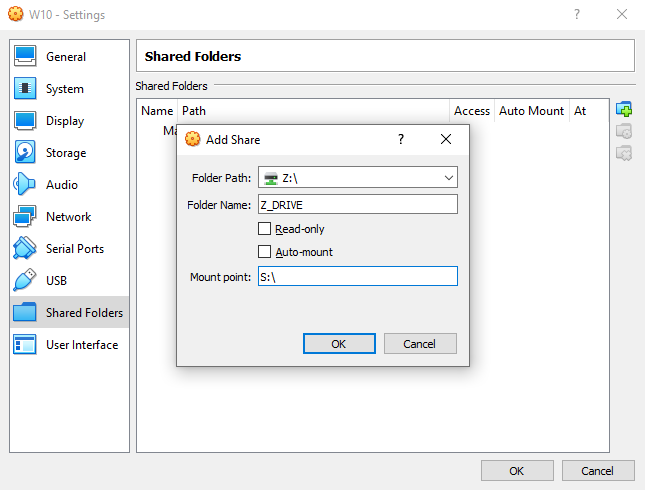
Launch VirtualBox and open Devices > Shared Folders > Shared Folders Settings. Click +, then in Folder Path click the arrow and select Other. Browse (the host OS) for the folder you’re using as a share, highlight it, then Select Folder.

Share folders between host OS and guest virtual machines

In the Add Share window, give the share a name (keeping the same name in the guest OS as in the host OS is wise). Check Auto-mount and Make permanent, then OK.

From the guest OS you’ll find the share set up in the usual location for network shares. For example in Windows 10, this will be under Network Locations in Windows Explorer.

Share a Network Drive in VMWare

Sharing data via a drive is enabled by default in VMware. All you need to do is follow the usual OS-specific steps to set up a network share. For example, if you were running Windows as a host and Linux as a guest OS, follow these steps to share files between Windows and Linux.

This will work for Windows, Linux, and BSD.

Note that folder sharing is not available in the free VMware Player.

While this is the most complicated option to set up, you will be able to effortlessly share larger files. These might include installers, disk image files, and hi-res videos.

Share Data to Maximize Virtual Machine Productivity

Not everyone needs to use a virtual machine, but those of us who do almost always need to share data. If you’re not copying files from the host to the guest OS, there’s reason to copy data from the VM. This is typically when you’re about to destroy the VM and want to back up your data.

Learning how to share data between a VM and host OS will help super-charge your VM use. These tips to improve virtual machine performance will also help.

Read the full article: How to Transfer Files Between a Virtual Machine Guest and Host PC


Read Full Article

Amazon Alexa Can Now Express More Emotions


Alexa is getting more emotional, with Amazon enabling its virtual assistant to express more emotions. Going forward, Alexa will be able to use different speaking styles, and express both excitement and disappointment, depending on the context.

Virtual Assistants Don’t Have to Sound Robotic

We have got used to hearing virtual assistants speaking with robotic voices. After all, that seemed an obvious starting point for the likes of Siri, Cortana, and Alexa. However, there’s no reason why virtual assistants shouldn’t express more emotions.

So, with that in mind, Amazon is giving Alexa the ability to express emotions and to speak in more naturalistic styles. As outlined in a post on the Alexa Skills Kit Blog, this will “help create a more natural and intuitive voice experience for […] customers.”

Amazon Launches Alexa Emotions and Speaking Styles

Alexa’s new capabilities can be split in two: Alexa Emotions and Speaking Styles.

Alexa Emotions

Alexa can now sound either disappointed or excited, depending on the type of response. These two emotions can also be employed at three different levels of intensity: Low, Medium, and High. And this is made possible by Amazon’s text-to-speech technology.

Amazon cites examples of when an excited or disappointed tone would be appropriate. If a user answers a trivia question correctly, Alexa could adopt an excited tone. Alternatively, she’ll adopt a disappointed tone when reporting that your sports team has lost.

Speaking Styles

Alexa can also now adopt a couple of different speaking styles, labelled News and Music. News is designed to mimic the style of a news anchor, while Music is designed to mimic the style of a radio DJ. These also use Amazon’s text-to-speech technology.

Both styles change the intonation, emphasis, and pausing to tailor responses to the information being delivered. And in blind tests conducted by Amazon, both new speaking styles were perceived to be more natural than Alexa’s standard voice.

Give Alexa the Smarts to Handle Her Emotions

Amazon is making the new emotions and speaking styles available to developers in the US. There’s also “an Australia-specific news speaking style” available in Australia. The rest of the world is sure to follow, though it may take some time to filter through to users.

While you’re waiting for Alexa to get more emotional, why don’t you help Amazon make Alexa smarter? Amazon has added an element of gamification, which means you can earn points every time Alexa uses an answer you have provided for her.

Read the full article: Amazon Alexa Can Now Express More Emotions


Read Full Article

What Does a Forensic Analyst Do? Is This Job for You?


forensic-analyst

A computer forensics analyst sounds like a job out of a TV crime show, but is the real-life career as exciting as it sounds? What does a forensic analyst do in the real world, and is it the right career path for you?

Let’s explore the definition of “computer forensics,” and how to get a job analyzing it.

What Is Computer Forensics?

If regular forensics involves checking crime scenes for evidence, computer forensics takes this skill into the digital world. With cybercrime on the rise, businesses and individuals turn to computer forensics analysts to keep their data safe.

A computer forensics analyst specializes in cybercrime. They know how criminals can access systems and what they do with the contents within.

As such, they can play one of two roles; first, they can act as an advisor for clients concerned about their security. Second, they can investigate the damage done after a hacker successfully enters a system and find the culprit.

Because of their ability to do their job either before or after a hack occurs, computer forensics analysts find themselves in different workplaces. They may work with clients to prevent an attack, or with the law to analyze an attack that previously occurred.

Some employers will also use the term “computer forensics investigator” for this job. There’s no difference between an analyst and an investigator, so be sure to search for both terms when researching.

What Does a Computer Forensics Analyst Do?

The role of the analyst depends on what they’ve been hired to do. If the analyst were brought in to stop hackers, they’d check the system for any weak spots. They’ll check for flaws from external attacks (hackers) and internal agents (espionage and theft). They’ll inform the client about their investigation, and tell them how to fix the problems they found.

If the analyst is working with the law to investigate crimes, they’ll use their knowledge to piece together a story. As UCAS states, the analyst may recover deleted files, go through phone logs, and find evidence that someone has doctored an image that’s crucial for the case.

Once the analyst has found evidence, they then type up their findings in a report. They may even appear in a court of law to present testimony for the judge!

Whichever path the analyst takes, they require the same skillset. They need in-depth knowledge of how a criminal works, and the methods they use to get into a system.

What Are Computer Forensics Salaries Like?

According to PayScale, computer forensics jobs pay between $48k-$116k. This figure is before taxes or bonuses, but it gives a good idea of what to expect. While a starting analyst won’t strike riches from day 1, it’s a career that can grow to become a great way to make a living.

How Do You Become a Computer Forensics Analyst?

To become a computer forensics analyst, it’s worth having a degree under your belt. Criminal Justice Degree Schools say that keen future analysts should get a Bachelor’s degree in computer forensics. A degree will give you a foot in the door when applying to companies.

Study says you can also get a Computer Science degree with a criminal justice background. As such, if you can’t find a university near you that teaches cyber forensics, try Computer Science instead. Computer Science is a core subject in IT academia, so you’ll have better luck finding courses teaching it than cyber forensics.

You can also try climbing the job ladder to reach the analyst role. The National Careers Service for the UK recommends beginning as an IT support technician. From there, you can put in the years and go up the ladder until you finally land yourself in a forensics job.

Is a Computer Forensics Analyst Career Right for You?

If you’re interested in this career, you should have a deep passion for cybersecurity and digital forensics. You want to learn how criminals break into systems, and how to defend against them.

A good analyst will know how to recover after an attack. They’ll know that a deleted file can linger on a file system, and how drives never securely erase data unless cleaned by a third-party tool. They’ll know how to check system logs to find unauthorized entry and find how the hacker got in.

To be an efficient forensic computer analyst, you need to “be a thief to catch a thief.” You’ll need to learn hacking techniques so that you can advise companies on how to defend themselves properly. Your expertise could make or break catching a criminal, so you’ll have to be confident in your abilities!

Fortunately, there are legal ways you can test your hacking skills. If you want to learn more, try a website that you can hack legally and take on their challenges.

Where To Learn More About Cyber Forensics

If you made it to this point and you’re eager to become a computer forensics analyst, why not take the first step? These days, you can download resources and attend online courses to see if a career is right for you. These will teach you what computer forensics is, and what would be expected of you as an analyst.

For one, there’s the Guide to Computer Forensics and Investigations textbook. While it’s quite expensive, it’s the best way to learn more about the career and what’s needed. Unlike a full course, you can take it at your own pace with zero commitment.

If you want to commit a little more, you can try looking for local colleges and universities that offer a course. If you’re not sure you can invest the time, try Udemy online courses. You can do Udemy courses in your spare time, and each course awards you a certificate that proves you completed it.

The Computer Forensics Fundamentals course is an affordable and quick way of learning the basics. Once you graduate from that, you can step up your game with the Digital Forensic Series: Computer Forensics course, which contains over 13 hours of video content at the time of writing!

Finding the Right Tech Job for You

The world of tech jobs is vast, and with it comes a variety of different roles. Digital forensics jobs are one such niche and require in-depth knowledge of how hackers operate. If this sounds exciting, try a course or a textbook and see how it fits you.

If you’re looking for an IT job but don’t know your C# from your Java, why not try the tech jobs you can get that doesn’t require coding?

Read the full article: What Does a Forensic Analyst Do? Is This Job for You?


Read Full Article

How to Save Money Over the Christmas Holidays: 6 Apps and Sites


save-money-christmas

Christmas is an incredibly expensive time of year. You’ve got lots of friends and family you need to buy gifts for, decorations to put up, and meals to prep. If your budget is already tight, you might be feeling some financial strain.

Fortunately, there are ways to make the most out of the holidays, even if it’s with limited cash. Here are the best tech tools, websites, and apps to help you get through Christmas on a budget.

1. Get Sale Alerts From Your Local Grocery Store

Holiday Sales Alert Grocery Store Near Me

A really easy thing that you can do to save money over the holidays is to use an app or email notification service that gives you daily updates on holiday-themed sales at your local grocery store.

This not only helps you cut back on your own food costs but allows you to budget for holiday guests, too.

If you’re looking for sales from your grocery store, you can still grab one of the printed flyers in-store, which will give you a roundup on what will be available next week.

However, downloading a grocery store app will often give you access to additional benefits. The apps that you need to use will vary, depending on which region you live in and what stores you go to.

For example: My app would be “Safeway Deals & Rewards,” available for Android and iOS.

To find your own app, either go to your app store directly or type your grocery store name into Google. Next, add your phone type (iOS or Android), plus the word “app.” Google should pull up the app associated with your grocery store of choice.

2. Shop on Black Friday, Cyber Monday, or Another Winter Sale

Buy Steam Gift Card for Friend Christmas

It should go without saying, but shopping on Black Friday or Cyber Monday has become somewhat of a tradition in North America. If you want to find a good gift deal for your friends or family, it’s a great time to go shopping.

If you miss Black Friday or Cyber Monday, no worries. There are often rolling sales for retail goods all throughout the month of December.

Amazon is an obvious choice for sales. We have a handy list of Amazon features and services, too—so you know which service to use for sales and when. But Amazon is not the only online retailer that will have multiple sales leading up to the holidays.

Another option for on-sale Christmas gift ideas is Steam. Through this service, you can either give a “Steam Gift” to another player, buy a discounted game during a sale, or send a gift card to someone. It’s the perfect choice for your gaming friend or family member.

3. Use Finance or Budget-Tracking Apps

Personal Budget Tracker Christmas

Finance or budget-tracking apps are a good thing to use year round, but they’re especially useful when you need to track down what you’re spending and where during expense-heavy months like December.

The idea behind a budget app is that if you know where your money is going, the better equipped you’ll be to stretch your budget further.

Mint: Budget Tracker & Planner and Goodbudget Budget Planner are great choices for budget-tracking apps. Both of them are available on iOS and Android.

On these apps, you can calculate how much you have to spend each month in total, along with how much money you can allot to specific tasks or categories, like gift-giving. They can also help you keep track of hidden or often-overlooked daily expenses that might be cutting into your holiday plans.

Download: Mint Budget Tracker & Planner for Android | iOS (Free)
Download: Goodbudget Budget Planner for Android | iOS (Free, in-app purchases available)

4. Use DIY Blogs to Make Christmas Gifts

DIY Christmas Gifts

So let’s say you’ve been tracking your budget, and you’ve learned that even if you manage your finances, a lot of these pre-bought gifts are still out of your price range.

Or let’s say the person you’re buying a gift for really loves unique items, to begin with. Maybe they want you to add a personal touch.

Another way that you can save money over the holidays is by making your own gifts from scratch. This “DIY” approach requires that you have time to make these gifts, of course, along with the skills. Fortunately, there are tons of DIY blogs out there that will give you Christmas gift ideas that work well on a budget.

A great place to start? The DIY Network’s Holidays and Occasions section, which talks about different homemade creations that you can make.

Another way that you can find great gift ideas is by searching “DIY gifts” on Pinterest. If you’ve never visited the site before, here’s a good rundown on what Pinterest is and how to use it.

5. Use Secret Santa Games to Keep Everyone Happy

Secret Santa Name Generator

Sometimes, even with all this budgeting and DIY gifts, you’ll find you’re still too stretched for time or cash. Maybe there are just too many people to make gifts for, and because your friend circle is so large, other people are struggling, too.

When it comes to situations like these—and everyone’s struggling—sometimes it’s best to institute a Secret Santa game, to keep gift-giving manageable.

Secret Santa is a game where everyone gives one another a gift, but the gift-giver remains anonymous. It’s a gift-giving technique that is popular in workplace settings when you want to keep your budget low.

If you need some help trying this idea out, there are a lot of Secret Santa name generators out there. Elfster is one of the top-rated. It also has an accompanying app.

Download: Elfster on Android | iOS (Free)

6. Find a Good Deal on a Christmas Tree

Christmas Tree Sale Amazon

Lastly, one of the biggest worries for Christmas is the Christmas trees itself.

What are you going to do about the Christmas tree, if you don’t have one yet and you’re on a budget? Even worse, how do you decorate a Christmas tree on a budget?

While real Christmas trees are beautiful, they might not be feasible for you and your family because of allergies. To combat this, artificial Christmas trees can be a good alternative, but they can also get expensive.

The same goes for Christmas tree decorations, which take time to collect if you don’t want to spend a ton of money all at once.

Amazon has lots of Christmas tree options. If you’re looking for a tree or Christmas decorations on a budget—and you don’t want to shop at Amazon—Wayfair is another easy, affordable option, too.

Lastly, while most Christmas decorations will not go on sale until after Christmas, you can find moderately priced ones if you hunt for them. Amazon and Wayfair are once again good sites to find Christmas decorations on a budget.

You might also be able to find brick-and-mortar stores in your area that sell discounted items, too.

Have a Merry, Stress-Free Christmas

These tech tools, websites, and apps will not necessarily guarantee that you’ll have no extra expenses over the holidays. It might not be feasible for you to implement all these budget-saving tips at once, too.

However, even if you use just a couple of these suggestions, you might be able to cut down on your costs. Looking for other ways that you can make the winter holidays magical? Here are the best sites for genuinely unique Christmas gifts.

Read the full article: How to Save Money Over the Christmas Holidays: 6 Apps and Sites


Read Full Article

28 November 2019

Peak Design’s Everyday Backpack Zip and Everyday Backpack V2 are top-notch photo and travel bags


Peak Design has evolved from a crowdfunded upstart into a trusted accessory brand for photographers everywhere, and this week it introduced updates to its ‘Everyday’ line of backpacks and bags. These new and improved designs offer stuff that impresses anyone who was previously a fan of Peak’s work, and should also win the company brand new fans, based on my testing of the all-new Everyday Backpack Zip 20L and the updated Everyday Backpack V2 30L.

Everyday Backpack Zip 20L

The Everyday Backpack Zip is a brand new product for Peak, taking a lot of inspiration from the Everyday backpack but opting for a full zip closure in place of the MagLatch that it created and introduced on the Everyday line. Opting to go with a zipper instead of the MagLatch means that the Zip backpack doesn’t have the same capacity expandability to allow you to stuff more… stuff… in the top compartment, but it also offers its own benefits depending on your needs.

First, there’s price: The Backpack Zip 20L I reviewed will cost you $219.95, which is $40 less than the equivalent Everyday Backpack with the magnetic closure. It’s not a huge gap, but if you’re looking to save a few dollars it’s a good value for what you get. The Zip also comes in a smaller 15L capacity, the smallest size for any of the Everyday Backpacks, and that’s a nice compact bag for anyone with a smaller frame or looking to carry less gear.

The zipper enclosure is also interesting in its own right, allowing you to fully open the back of the bag if you want. By default, there are rigid dividers in the backpack to effectively give it shelves, but should you want to remove these, this makes this the most easily packable Peak backpack in this daypack size range. It’s therefore a great choice for those looking for a backpack to use for purposes other than as a camera bag.

The Everyday Zip also still packs a ton of connection points for you to hook gear to, as well as improved zippers vs. Peak’s original packs. There’s a dedicated laptop sleeve with a tablet pocket that can fit 15″ laptops on the 20L and 13″ laptops on the 15L. The 20L also features the all-new adjustable laptop pocket design that Peak introduced on this generation, which includes an adjustable shelf that lets it more easily hold smaller laptops without them falling all the way to the bottom. It’s also on the standard Backpack V2, and it’s an awesome and easy-to-use quality of life improvement.

Like the Everyday Backpack, the Zip also features a pass-through luggage strap for putting it on a roller while you’re making your way through an airport, and interlocking zipper pulls that can help prevent anyone from quickly tugging open the bag to try to manage a quick pass-by theft. The durable, ripstop fabric exterior is also great for lifetime sustainability.

In terms of capacity, this is a smaller bag but it can still fit a lot of gear – I was able to pack my Sony 70-200 f/2.8 GM, Sony 100-400 f/2.8 GM and my Sony A7R IV with the 24-70 f/2.8 GM attached for instance, though fitting all that in with the requisite accessories is probably too tight a fit and merits moving up to the bigger sizes of the V2.


Everyday Backpack V2 30L

The improved Everyday Backpack V2 brings back the MagLatch, with a new design that Peak says is “more ergonomic and sleek.” It definitely stands out less than before, and does seem to be more intuitive to use, which is good news. The sides are again accessible via two zippered compartments (all the zippers are improved and designed for more durability) and the interior is divided by three included velcro, flexible dividers.

The overall look of the Everyday Backpack V2 has been tweaked – and for the better. It was already one of the better looking photo backpacks you could buy, but Peak has made it more rounded this generation, and improved the look of all the seams for a look that just generally projects more quality and attention to detail.

Peak sent the 30L version for me to review, and the capacity difference between it and the 20L Zip allows for packing in way more stuff, including all the various accessories like extra batteries and chargers, mics and more you’re likely to want with you on a dedicated photo or video shoot. I could easily pack the same lens+body combo mentioned above, plus a Mavic Mini and a second Sony A7III body in the 30L.

That height-adjustable laptop sleeve is again present, and makes an even bigger difference on the 30L, since the pocket is deeper to begin with. On my existing V1 Everyday, chasing down the company-issue 13″ MacBook Pro in that cavernous pocket was always a bit like diving deep to pull a rabbit out of a hat, but here it’s really easy and far less likely to give your fingers rug burn.

The shoulder straps on the Everyday V2 are also improved, and they do feel more comfortable based on initial testing. They also now have embedded magnets that connect to the back of the bag when you’re not wearing it, which is actually wonderful for when you’re stowing the bag in an airplane overhead compartment, or putting it through the scanner at the airport security checkpoint. It’s a small detail, but then again Peak’s whole rep is built on it including small details, like the various stowable straps, that remain out of the way until needed and then really deliver awesome convenience.

Bottom Line

Just like the originals, Peak has delivered what are likely the most thoughtful, carefully designed photography backpacks available on the market with their V2 range. The fact that Peak as a company is now also focused on ensuring they can build and deliver their products in a way that has a neutral impact on the climate is just an added benefit of its ability to engineer and deliver high-quality, functional gear.

Peak’s stuff is not for everyone – you can definitely get totally fine photo gear for less money. But it’s a category-leading choice for anyone with the means and a great value if you’re looking for a long-term, modular solution that you can go everywhere with.


Read Full Article

European parliament’s NationBuilder contract under investigation by data regulator


Europe’s lead data regulator has issued its first ever sanction of an EU institution — taking enforcement action against the European parliament over its use of US-based digital campaign company, NationBuilder, to process citizens’ voter data ahead of the spring elections.

NationBuilder is a veteran of the digital campaign space — indeed, we first covered the company back in 2011— which has become nearly ubiquitous for digital campaigns in some markets.

But in recent years European privacy regulators have raised questions over whether all its data processing activities comply with regional data protection rules, responding to growing concern about election integrity and data-fuelled online manipulation.

The European parliament had used NationBuilder as a data processor for a public engagement campaign to promote voting in the spring election, which was run via a website called thistimeimvoting.eu.

The website collected personal data from more than 329,000 people interested in the EU election campaign — data that was processed on behalf of the parliament by NationBuilder.

The European Data Protection Supervisor (EDPS), which started an investigation in February 2019, acting on its own initiative — and “taking into account previous controversy surrounding this company” as its press release puts it — found the parliament had contravened regulations governing how EU institutions can use personal data related to the selection and approval of sub-processors used by NationBuilder.

The sub-processors in question are not named. (We’ve asked for more details.)

The parliament received a second reprimand from the EDPS after it failed to publish a compliant Privacy Policy for the thistimeimvoting website within the deadline set by the EDPS. Although the regulator says it acted in line with its recommendations in the case of both sanctions.

The EDPS also has an ongoing investigation into whether the Parliament’s use of the voter mobilization website, and related processing operations of personal data, were in accordance with rules applicable to EU institutions (as set out in Regulation (EU) 2018/1725).

The enforcement actions had not been made public until a hearing earlier this week — when assistant data protection supervisor, Wojciech Wiewiórowski, mentioned the matter during a Q&A session in front of MEPs.

He referred to the investigation as “one of the most important cases we did this year”, without naming the data processor. “Parliament was not able to create the real auditing actions at the processor,” he told MEPs. “Neither control the way the contract has been done.”

“Fortunately nothing bad happened with the data but we had to make this contract terminated the data being erased,” he added.

When TechCrunch asked the EDPS for more details about this case on Tuesday a spokesperson told us the matter is “still ongoing” and “being finalized” and that it would communicate about it soon.

Today’s press release looks to be the upshot.

Provided canned commentary in the release Wiewiórowski writes:

The EU parliamentary elections came in the wake of a series of electoral controversies, both within the EU Member States and abroad, which centred on the the threat posed by online manipulation. Strong data protection rules are essential for democracy, especially in the digital age. They help to foster trust in our institutions and the democratic process, through promoting the responsible use of personal data and respect for individual rights. With this in mind, starting in February 2019, the EDPS acted proactively and decisively in the interest of all individuals in the EU to ensure that the European Parliament upholds the highest of standards when collecting and using personal data. It has been encouraging to see a good level of cooperation developing between the EDPS and the European Parliament over the course of this investigation.

One question that arises is why no firmer sanction has been issued to the European parliament — beyond a (now public) reprimand, some nine months after the investigation began.

Another question is why the matter was not more transparently communicated to EU citizens.

The EDPS’ PR emphasizes that its actions “are not limited to reprimands”, without explaining why the two enforcements thus far didn’t merit tougher action. (At the time of writing the EDPS had not responded to questions about why no fines have so far been issued.)

There may be more to come, though.

The regulator says it will “continue to check the parliament’s data protection processes” — revealing that the European Parliament has finished informing individuals of a revised intention to retain personal data collected by the thistimeimvoting website until 2024.

“The outcome of these checks could lead to additional findings,” it warns, adding that it intends to finalise the investigation by the end of this year.

Asked about the case, a spokeswoman for the European parliament told us that the thistimeimvoting campaign had been intended to motivate EU citizens to participate in the democratic process, and that it used a mix of digital tools and traditional campaigning techniques in order to try to reach as many potential voters as possible. 

She said NationBuilder had been used as a customer relations management platform to support staying in touch with potential voters — via an offer to interested citizens to sign up to receive information from the parliament about the elections (including events and general info).

Subscribers were also asked about their interests — which allowed the parliament to send personalized information to people who had signed up.

Some of the regulatory concerns around NationBuilder have centered on how it allows campaigns to match data held in their databases (from people who have signed up) with social media data that’s publicly available, such as an unlocked Twitter account or public Facebook profile.

In 2017 in France, after an intervention by the national data watchdog, NationBuilder suspended this data matching tool in the market.

The same feature has attracted attention from the UK’s Information Commissioner — which warned last year that political parties should be providing a privacy notice to individuals whose data is collected from public sources such as social media and matched. Yet aren’t.

“The ICO is concerned about political parties using this functionality without adequate information being provided to the people affected,” the ICO said in the report, while stopping short of ordering a ban on the use of the matching feature.

Its investigation confirmed that up to 200 political parties or campaign groups used NationBuilder during the 2017 UK general election.


Read Full Article

The 9 Best Fighting Games on Android and iPhone


fighting-games-mobile

There are some brilliant fighting games available to play on your mobile, and in this article we list the best fighting games on Android and iOS.

These fighting games are a lot of fun to play, with decent graphics and a high replayability factor. So, don your boxing gloves and get gaming.

1. Shadow Fight 2

One of the best parts of Shadow Fight 2 is its beautiful art style. Shadow Fight 2’s graphics make everything look mystic, silhouetted, and dark. Thanks to this timeless style, it still looks absolutely gorgeous despite being released in 2013.

However, Shadow Fight 2 isn’t just a pretty looking game—there is lots more to admire. It’s a fighting-meets-RPG adventure that challenges you greatly and demands real skill if you want to move forward. You travel from world to world taking down every fighter in your way, and your ultimate goal is to take down the demons to restore the Gates of Shadows.

Can you step up to the challenge and fight an ancient evil?

Download: Shadow Fight 2 for iOS | Android (Free, with in-app purchases)

2. Mortal Kombat

All these years after its introduction in 1992, Mortal Kombat has finally made its way to mobile. Mortal Kombat for Android and iOS takes elements from Mortal Kombat 11 for console and builds upon them in an epic and gory mobile fighting adventure. And it features an array of iconic fighters, like Sub Zero, Scorpion, Cassie Cage, and more.

Don’t know how to play Mortal Kombat? No problem. There’s no controller needed—intuitive, easy-to-learn touch controls let you score multiple fatalities against enemies. This mobile iteration of Mortal Kombat also boasts incredible, console-quality graphics and multiple online modes.

On the whole, Mortal Kombat for iOS and Android allows you to become the ultimate Kombatant straight from your smartphone.

Download: Mortal Kombat for iOS | Android (Free, with in-app purchases)

3. Street Fighter IV CE

Another classic franchise that has made its way to iOS and Android is Street Fighter. It’s widely known as a less gory alternative to Mortal Kombat, but it’s just as action-packed.

Street Fighter IV CE is a wonderful port of Street Fighter IV, released in 2008 for consoles. It has nice graphics, on par with its console counterpart, and functions just like the console game but with touch controls. It’s a great choice if you like competitive fighting games.

On top of that, there’s a wide variety of legendary fighters, like Ryu, Ken, and Chun-Li. And there’s online play filled with fierce fighters from all around the world. So if you want to Hadouken through all your enemies on the go, this game is for you.

Download: Street Fighter IV CE for iOS | Android ($4.99)

4. DRAGON BALL LEGENDS

Dragon Ball Legends is the Dragon Ball game for mobile gamers. It features an epic 3D fighting game style, similar in gameplay to the Dragon Ball Xenoverse series of games for home consoles. But it has its own unique, mobile twist with a touch of RPG elements. Speaking of touch, the controls of this game are really simple, fun, and easy to learn.

You can choose to play as heroes like Goku and Gohan, or baddies like Broly and Frieza. And there’s even a new, original Saiyan character designed by Dragon Ball creator Akira Toriyama himself.

Overall, Dragon Ball Legends is a perfect option for gamers who want an anime-inspired brawler featuring the legendary heroes of Dragon Ball Z.

Download: Dragon Ball Legends for iOS | Android (Free, with in-app purchases)

5. Super Brawl Universe

Nickelodeon and Playsoft’s Super Brawl Universe game is a stark contrast from all the other games on this list. Why? Well, for one, it features a wacky array of Nickelodeon characters.

All of your favorite Nickelodeon characters team up in this light-hearted, family-friendly fighting game. Tons of fighters, from Cosmo and Wanda to Squidward and Aang, are fired up and ready to brawl.

Super Brawl Universe isn’t just a quirky game filled with funny characters from your favorite cartoons—it’s a real fighting game you can play on the go, and a solid one at that.

Download: Super Brawl Universe for iOS | Android (Free, with in-app purchases)

6. Injustice 2

Injustice 2 Mobile, based on Injustice 2, is a gritty, realistic take on the world of DC superheroes. It features a dark and brooding superheroic storyline that directly follows the events of 2013’s Injustice: Gods Among Us.

You can fight as Batman, Superman, and The Joker in this game of epic proportions and breathtaking graphics that would look at home on a console. Not to mention, the touch controls are great in this game and are really easy to master.

Injustice 2 Mobile is, essentially, the superhero version of Mortal Kombat. And it makes sense, as both franchises are developed by the same team, NetherRealm Studios.

Download: Injustice 2 for iOS | Android (Free, with in-app purchases)

7. Skullgirls

Not only is Skullgirls one of the most intriguing looking games on mobile, it’s also an extremely impressive and fun fighting-RPG hybrid. It features beautiful anime-style graphics and lots of lively and quirky characters. And of course, the fighting mechanics and gameplay are both great.

Skullgirls has a very inspired storyline… You live in the Canopy Kingdom, where lots of people are looking for a mythical object called the Skull Heart. The Skull Heart is a tool that grants any woman’s wish, but if the wrong woman uses it, she’s turned into an evil force known as a Skullgirl, hence the name of the game.

All in all, this super-fun 2D game with an intriguing story is a steal.

Download:: Skullgirls for iOS | Android ($9.99)

8. EA SPORTS UFC

If you want a little more realism in your fighting games, you should try out EA Sports UFC.

Unlike the rest of the games on this list, EA Sports UFC is based on a real-life professional sport. It features tons of action-packed UFC action and features over 70 MMA fighters. This game is truly like no other sports simulator; its realism is unmatched. You can just feel an adrenaline rush as you take down your enemies.

If you’re eager to step into the Octagon and take on the burliest of MMA fighters, give this game a try.

Download: EA Sports UFC for iOS | Android (Free, with in-app purchases)

9. Shadow Fight 3

The sequel to Shadow Fight 2 does away with the mystical art direction of its predecessor, and instead opts for a more gritty, realistic style in line with more traditional fighters like Mortal Kombat. But the gameplay is as good as ever.

In Shadow Fight 3, you can customize your fighter in many new ways. And now, there are new styles of battle—you can fight like a blade-equipped knight, a tactical ninja, or a master of dark energy. There are also a variety of offline and online game modes to choose from.

Shadow Fight 3 is a better option than its predecessor if you’re looking for something more traditional and robust, although Shadow Fight 2 is the better option for gamers looking for something simpler.

Download: Shadow Fight 3 for iOS | Android (Free, with in-app purchases)

More Mobile Games Worth Playing

And there you have it; these are the best fighting games you can play on your smartphone. These will scratch that itch, whether you want to play something wacky, like Super Brawl Universe, or something gory, like Mortal Kombat.

If you’re looking for games that you can play offline and on the go, here’s our list of fun mobile games that don’t need an internet connection.

And if you want to play something more mentally challenging, here are the best brain exercise games for Android and iOS.

Image Credit: viteethumb/Depositphotos

Read the full article: The 9 Best Fighting Games on Android and iPhone


Read Full Article

Google’s ReCAPTCHAs Also Capture Your Private Information


recaptcha-private-info

CAPTCHAs are great for security, but terrible for your privacy.

Interesting fact: you actually rarely encounter an original CAPTCHA. They’ve largely been supplanted by reCAPTCHAs, a system owned by search engine giant, Google. And in an effort to stop spambots, reCAPTCHAs have evolved so much, they’re now a threat to your privacy.

What Are reCAPTCHAs?

A Completely Automated Public Turing Test to Tell Computers and Humans Apart (CAPTCHA) was a useful tool in stopping bots from spamming forms. Traditional CAPTCHAs skewed text in an effort to make it unreadable for malicious software. Humans could decipher it, however, so these acted as filters.

Spambots got smarter. CAPTCHAs had to evolve. They changed into reCAPTCHAs, developed by the same team who originally came up with the tests. Google acquired the project in 2009. This raised some eyebrows because many users are doubtful of its intentions.

ReCAPTCHAs were nonetheless used for great effect. They advanced machine learning. Instead of random letters, a reCAPTCHA comprised of words Google’s bots couldn’t decipher. Knowledge gained from these upgraded tests meant automated digitization of much classic literature for its Google Books service.

Then algorithms overtook humans. ReCAPTCHAs became redundant. Which is why Google introduced NoCAPTCHA reCAPTCHA.

What Is NoCAPTCHA reCAPTCHA?

Have you ever clicked on the “I’m not a robot” button and been approved without having to insert any additional information? That’s because the site uses reCAPTCHA v2 or later.

With its second version, Google introduced verification based on other metrics—namely, if the user’s other activities on the site are indicative of a human or bot. CAPTCHAs are only presented if that fails.

Then along came reCAPTCHAs v3. This update eliminated the “I’m not a robot” checkbox. It’s also designed to streamline the process, so the user experience is a much nicer one.

This uses the same foundation as version 2, in that it assesses activity across the site. It goes further than that, though, by digging deeper into your online movements.

It further cuts the risk of CAPTCHA farmers (people employed to break traditional CAPTCHAs) making it through the security measure. With v3, their task would essentially be to guess how normal users interact with the site; but due to v3’s wider scope, a more comprehensive online profile must be in place too.

4.5 million sites use reCAPTCHA already (including a quarter of the top-ranking 10,000). More than 650,000 of these have reCAPTCHA v3 installed.

You’ll find different versions of reCAPTCHAs across the internet because website admins could still use outdated plug-ins. ReCAPTCHAs v1 (basic CAPTCHAs) are bad for a site’s security, but better for your privacy.

Why reCAPTCHA Is Bad for Your Privacy

How does reCAPCTHA v3 work and why is that a negative thing for your privacy?

One of the ways v3 checks validity is through examining whether you already have a Google cookie installed on your browser. Cookies are stored data about your interactions with a site, generally so elements can load again faster. Sign into a Google account, and reCAPTCHAs like you already.

The rationale is sound: anyone with a Google account is more likely to be a real human, not a bot.

Admins are encouraged to embed the reCAPTCHA code on all web pages (protected through changing encryption keys), so the service can more accurately gauge typical activity. Which raises questions about the data collected and what Google does with it.

Based on these, reCAPTCHA assigns visitors a score, marking them low or high risk. 1.0 means you’re definitely human. 0.0 means you’re almost certainly a spambot. Generally, low-risk users won’t need to go through any further validation.

It also means anyone using a Virtual Private Network (VPN) is automatically flagged as a high risk. And yet many—including MakeUseOf—recommend you use a VPN to enhance your online privacy. Activity data isn’t captured because visitors are anonymized. VPNs beat region locks and censorship. They can save you cash. And they’re a barrier against cybercriminals.

In fact, there are loads of reasons you should use a VPN. It’s a considerable setback for reCAPTCHA to penalize those who use one. It’s not a major shock, however: Google relies on information about its users for revenue.

What Does Google Do With Personal Information?

How does Google use the data collected?

The service gathers software and hardware information about site visitors, like IP address, browser plug-ins, and the device you’re using.

Google assures users that anything collected through the reCAPTCHA API isn’t used to ascertain your interests. It’s not used for ads—which might surprise you. The company says:

“The information collected in connection with your use of the service will be used for improving reCAPTCHA and for general security purposes. It will not be used for personalized advertising by Google.”

Of course, Google isn’t the only company that tracks you. Look at social media plug-ins, used to share articles on Facebook, Twitter, and the like. Some of these widgets collect visitor information too—meaning it doesn’t matter if you’ve got a profile: Facebook can still track you.

There’s nothing about reCAPTCHA v3 in Google’s Terms of Service. This is despite reCAPTCHAs linking to these policies. It means we just have to take their word for it.

What Does the Future Hold for CAPTCHA?

The core issue, aside from privacy concerns, is that even reCAPTCHA v3 isn’t good enough. A research team found that artificial intelligence still had a 90 percent success rate.

There’s added pressure now because we’re aware of potential privacy violations.

The problem is that human diversity means finding common solutions is difficult. Image-based CAPTCHAs typically ask you to look for road signs, but a trial tested whether deciphering facial expressions could also work. As you can imagine, it didn’t.

Game-based tests seem a good option. These could be simply moving puzzle pieces into the right slots and would require rotating elements. Without instructions, bots could struggle with making such connections. However, the system would rely on human logic—which isn’t exactly reliable.

Amazon patented an interesting, if seemingly flawed, notion in 2017. It posited that human fallibility is the key. The “Turing Test via Failure” would present challenges most people would find too difficult to complete, especially in a short timeframe. Humans do it wrong and get verified. Bots always give the correct answers (or that’s the theory).

Increasing Google’s Monopoly?

Luis von Ahn, CAPTCHAs’ co-creator who worked with a team at Carnegie Mellon University, argues reCAPTCHAs’ acquisition by Google is fair because many already assumed the internet behemoth owned the service. Version 3 makes it clear that reCAPTCHAs favor Google users. Is this another way the company is getting a stranglehold on the internet?

Or are its intentions true?

Either way, if you feel at odds with Google, you could switch browser to a more private option. Nonetheless, in our assessment of mainstream browser security, Chrome came out on top…

Read the full article: Google’s ReCAPTCHAs Also Capture Your Private Information


Read Full Article

10 YouTube Channels to Analyze and Understand Film


understand-films

Whether you’re a budding filmmaker or just interested in the craft of filmmaking, these YouTube channels will help you analyze and understand film.

Instead of focussing on trivial criticisms, they unravel the mysteries of why a movie does or doesn’t work, to give you a better appreciation the craft.

So, sit back, relax, and prepare to learn everything you need to know about film and filmmaking.

1. Lessons From the Screenplay

Michael Tucker and the team behind Lessons From the Screenplay offer insightful analysis on what makes a well-written movie. They do such a good job that there are tales of studio executives referencing these videos during blockbuster productions.

Each video takes a quote or “lesson” from screenwriting textbooks and applies it to popular films. Michael’s calm narration and clear graphics make it easy to understand, and you come out of it applying what you learned to everything else you watch.

2. Patrick (H) Willems

This walking, talking, IMDb machine loves movies and wants you to love them too. Patrick started his YouTube career making short comedy films before turning his hand to video essays as well.

Now, he combines the two, making some of the most dynamic and entertaining movie analysis videos you’re likely to find on YouTube. Patrick’s in-depth investigations, unfettered praise, or ingenious rewrites range from 15 to 40 minutes long, but the longest ones are often the best.

3. Lindsay Ellis

How would you like a deep-dive excursion into the different schools of film theory? Auteur, feminist, genre, etc. It sounds a little heavy, but Lindsay makes it fun by looking at each theory through the lens of Michael Bay’s Transformers franchise.

Besides that, Lindsay adds an academic slant to video essays by explaining the historical, political, and social context behind enormous blockbuster movies. Learn how The Hobbit hobbled New Zealand’s film industry or discover the turbulent production behind certain Disney classics.

4. Now You See It

Now You See It highlights patterns and trends across different movies, explaining the meaning behind them and why they’re so effective. The fast-paced narration packs a lot of information into short videos, which you come away from with a totally fresh perspective.

Each video presents a new idea, supported by logical arguments, quotes, or evidential footage. You might learn about the meaning of stripes in film, physical injuries to characters, dutch angle framing, or even drinking milk on camera.

And you’ll never look any of those things the same way again.

5. Just Write

As you may have guessed from the name, Just Write focuses on the writing techniques used in film and TV. The writer, Sage Hyden, manages to pinpoint exactly what does and doesn’t work in popular media, taking a good look at why that might be the case.

Some of his best videos focus on Game of Thrones, offering both praise and criticism, depending on the season at hand. But Just Write also highlights the power of puns, satire, or effective action by referencing everything from Arrested Development to Westworld.

6. The Royal Ocean Film Society

The Royal Ocean Film Society takes a look at industry trends and the effects they have on films or marketing. It’s a great resource if you’re interested in how CGI animation works, what goes into poster designs, or the even emergence of clickbait trailers.

One of the best videos from The Royal Ocean Film Society explores the influential animation of Richard Williams, arguing that movement is more important in animation than realism.

The animation on display is so captivating it’s impossible to disagree.

7. Wisecrack

For a philosophical analysis of your favorite films, TV shows, and video games, look no further than Wisecrack. This insightful YouTube channel puts media under the microscope to discover what it’s trying to say. Then Wisecrack dissects that subtextual message in relation to famous philosophers.

Sometimes Wisecrack highlights the inherent contradictions within a film. Other times it debunks “deep” messages as little more than dumb rhetoric. But the best videos show how a great story is heightened by the philosophy underpinning its ideas.

8. KaptainKristian

KaptainKristian unveils the secrets behind your favorite filmmakers, TV shows, movies, and even production companies. Sleek animations and astonishing facts make these videos a joy to watch as you learn more about what goes into the production of a film.

Did you know there are more special effects shots in The Social Network than there are in Godzilla? Probably not. That’s because David Fincher is a master of subtlety, and KaptainKristian explains exactly how he does it.

9. Nando v Movies

Have you ever watched a bad movie thinking you could have written it better yourself? Well, that’s what Nando v Movies is all about. This channel is overflowing with alternate versions of all the biggest cinematic disappointments, from Ant-Man to X-Men.

Nando v Movies carefully walks you through each act of his rewrites, using existing footage to fill in the gaps. It’s amazing how a few small changes can transform a terrible misfire into a surefire success.

I’m still sad that we’ll never get to watch his Justice League rewrite.

10. Every Frame a Painting

This is the YouTube channel that started it all. A lot of the other YouTubers on this list credit Every Frame a Painting as their inspiration for getting started. This channel includes the best movie breakdowns on the web, but sadly they stopped making new videos in 2017.

That doesn’t mean you shouldn’t give them a watch. Every Frame a Painting dissects classic movies from Kurosawa, Spielberg, and the Coen brothers, explaining exactly what makes these masterpieces so special.

A particular favorite video of mine reveals why Jackie Chan’s action-comedy fight sequences are so engaging. And why they get butchered by American productions.

Don’t Let YouTube Ads Slow You Down

Every serious movie fan should subscribe to these YouTube channels. Each one of them has so much to teach you about filmmaking, whether it’s the secret to crafting emotional character arcs or the magic behind Jackie Chan’s fight sequences.

And with all these new channels to watch, you’ll be spending a lot of time watching YouTube. But for each awesome video you’ll see, you’ll have to sit through a couple of YouTube adverts as well.

Thankfully, there is a way of removing the ads from YouTube, but you’ll have to pay for the privilege. So, is YouTube Premium worth the money? Read our detailed look at YouTube Premium to find out.

Read the full article: 10 YouTube Channels to Analyze and Understand Film


Read Full Article

5 JavaScript Array Methods You Should Master Today


javascript-array-methods

Web developers of all skill levels, from rookie programmers to coding experts, come to see the importance of JavaScript in developing modern websites. JavaScript is so dominant that it is an essential skill to know if you’re going to create apps.

One of the most powerful building blocks built-in to the JavaScript language is arrays. Arrays are commonly found in many programming languages and are useful for storing data.

JavaScript uses arrays but adds useful features known as array methods. There are five you should take a close look at to grow your skills as a developer.

What Are Array Methods?

Array methods are functions built-in to JavaScript that you can apply to your arrays. Each method has a unique function that performs a change or calculation to your array, saving you from needing to code common functions from scratch.

Array methods in JavaScript are ran using a dot-notation attached to your array variable. Since they are just JavaScript functions, they always end with parenthesis which can hold optional arguments. Here is a method attached to a simple array called myArray.

var myArray = [1,2,3];
myArray.pop();

This code would apply a method called pop to the array.

Example Array

For each example let’s use a sample array that we will call myArray, to perform the methods on. Feel free to pull up your console and code along as we go.

var myArray = [2,4,5,7,9,12,14];

These examples will assume you know the foundation of what JavaScript is and how it works. If you don’t that’s okay, we’re all here to learn and grow.

Let’s dig into five powerful methods!

1. Array.push()

What it does: push() takes your array and adds one or more elements to the end of the array, then returns the new length of the array. This method will modify your existing array.

Let’s add the number 20 to the array by running push(), using 20 as an argument.

var myArray = [2,4,5,7,9,12,14];
myArray.push(20);

Let’s see if it worked

console.log(myArray);
[2,4,5,7,9,12,14,20]

Running the push() method on myArray added the value given in the argument into the array. In this case, 20. When you check myArray in the console, you will see the value is now added to the end of the array.

2. Array.concat()

What is does: concat() can merge two or more arrays together into a new array. It does not modify the existing arrays but creates a new one.

Let’s take myArray and merge an array called newArray into it.

var myArray = [2,4,5,7,9,12,14];
var newArray = [1,2,3];
var result = myArray.concat(newArray);
console.log(result);
[2,4,5,7,9,12,14,1,2,3]

This method works wonders when dealing with multiple arrays or values you need to combine, all in one pretty simple step when using variables.

3. Array.join()

What it does: join() takes an array and concatenates the contents of the array, separated by a comma. The result is placed in a string. You can specify a separator if you want to use an alternative to a comma.

Let’s take a look at how this works using myArray. First using the default method with no separator argument, which will use a comma.

var myArray = [2,4,5,7,9,12,14];
myArray.join();
"2,4,5,7,9,12,14"

JavaScript will output a string, with each value in the array separated by a comma. You can use an argument in the function to change the separator. Let’s see it with two arguments: a single space, and a string.

myArray.join(' ');
"2 4 5 7 9 12 14"
myArray.join(' and ');
"2 and 4 and 5 and 7 and 9 and 12 and 14"

The first example is a space, making a string you can easily read.

The second example uses (‘ and ‘), and there are two things to know here.

First, we’re using the word ‘and’ to separate the values. Secondly, there is a space on both sides of the word ‘and’. This is an important thing to keep in mind when using join(). JavaScript reads arguments literally so if this space is left out, everything will be scrunched together (ie. “2and4and5…” etc.) Not a very readable output!

4. Array.forEach()

What it does: forEach() (case sensitive!) performs a function on each item in your array. This function is any function you create, similar to using a “for” loop to apply a function to an array but with much less work to code.

There is a little bit more to forEach() so let’s look at the syntax, then perform a simple function to demonstrate.


myArray.forEach(function(item){
//code
});

We’re using myArray, forEach() is applied with the dot notation. You place the function you wish to use inside of the argument parenthesis, which is function(item) in the example.

Let’s talk about function(item). This is the function executed inside of forEach(), and it has its own argument. We’re calling the argument item. There are two things to know about this argument:

  • When forEach() loops over your array, it applies the code to this argument. Think of it as a temporary variable that holds the current element.
  • You choose the name of the argument, it can be named anything you want. Typically this would be named something that makes it easier to understand, like “item” or “element”.

With those two things in mind, let’s see a simple example. Let’s add 15 to every value, and have the console show the result.


myArray.forEach(function(item){
    console.log(item + 15);
});

We’re using item in this example as the variable, so the function is written to add 15 to each value via item. The console then prints the results. Here’s what it looks like in a Google Chrome console.

forEach Function Applied to Array in JavaScript Console

The result is every number in the array, but with 15 added to it!

5. Array.map()

What it does: map() performs a function on every element in your array and places the result in a new array.

Running a function on every element sounds like forEach(). The difference here is map() creates a new array when ran. ForEach() does not create a new array automatically, you would have to code a specific function to do so.

Let’s use map() to double the value of every element in myArray, and place them in a new array. You will see the same function(item) syntax for a little more practice.

var myArray = [2,4,5,7,9,12,14];
var doubleArray = myArray.map(function(item){
return item * 2;
});

Let’s check the results in the console.

console.log(doubleArray);
[4,8,10,14,18,24,28]

myArray is unchanged:

console.log(myArray);
[2,4,5,7,9,12,14]

Next Steps in Your JavaScript Journey

Arrays are a powerful part of the JavaScript language, which is why there are so many methods built-in to make your life easier as a developer. The best way to master these five methods is to practice.

As you continue to learn JavaScript, MDN is a great resource for detailed documentation. Get comfortable in the console, then take your skills up a notch with the best JavaScript editors for programmers. Happy coding!

Read the full article: 5 JavaScript Array Methods You Should Master Today


Read Full Article