26 November 2019

Sim Shagaya’s uLesson African edtech startup raises $3.1M


Nigerian founder Sim Shagaya is back with a new startup —  uLesson — that has raised a $3.1 million seed round led by TLcom Capital.

The venture is integrating mobile platforms, SD cards, culture-specific curriculum and a network of tutors to bridge educational gaps for secondary school students in Nigeria and broader Africa.

Founded in 2019 by Shagaya — who also founded Nigerian e-commerce startup Konga and ad venture E-Motion — uLesson is headquartered in Lagos with a production studio in Jos.

The startup has been in development phase and plans to go to market in February 2020 in Nigeria, Ghana, Sierra Leone, and Gambia — Shagaya told TechCrunch on a call.

“We’re targeting Anglophone West Africa…for a market of effectively 300 million people,” he said.

On product demand, Shagaya notes the priority placed on education across West African households vs. structural deficiencies — such as student teacher ratios as high as 1:70 in countries such as Nigeria.

“We have this massive gap…We’re adding more babies in this country nominally than all of Western Europe…Even if the [Nigerian] government was super efficient, it couldn’t catch up with the educational needs of the young people that are coming up,” Shagaya said.
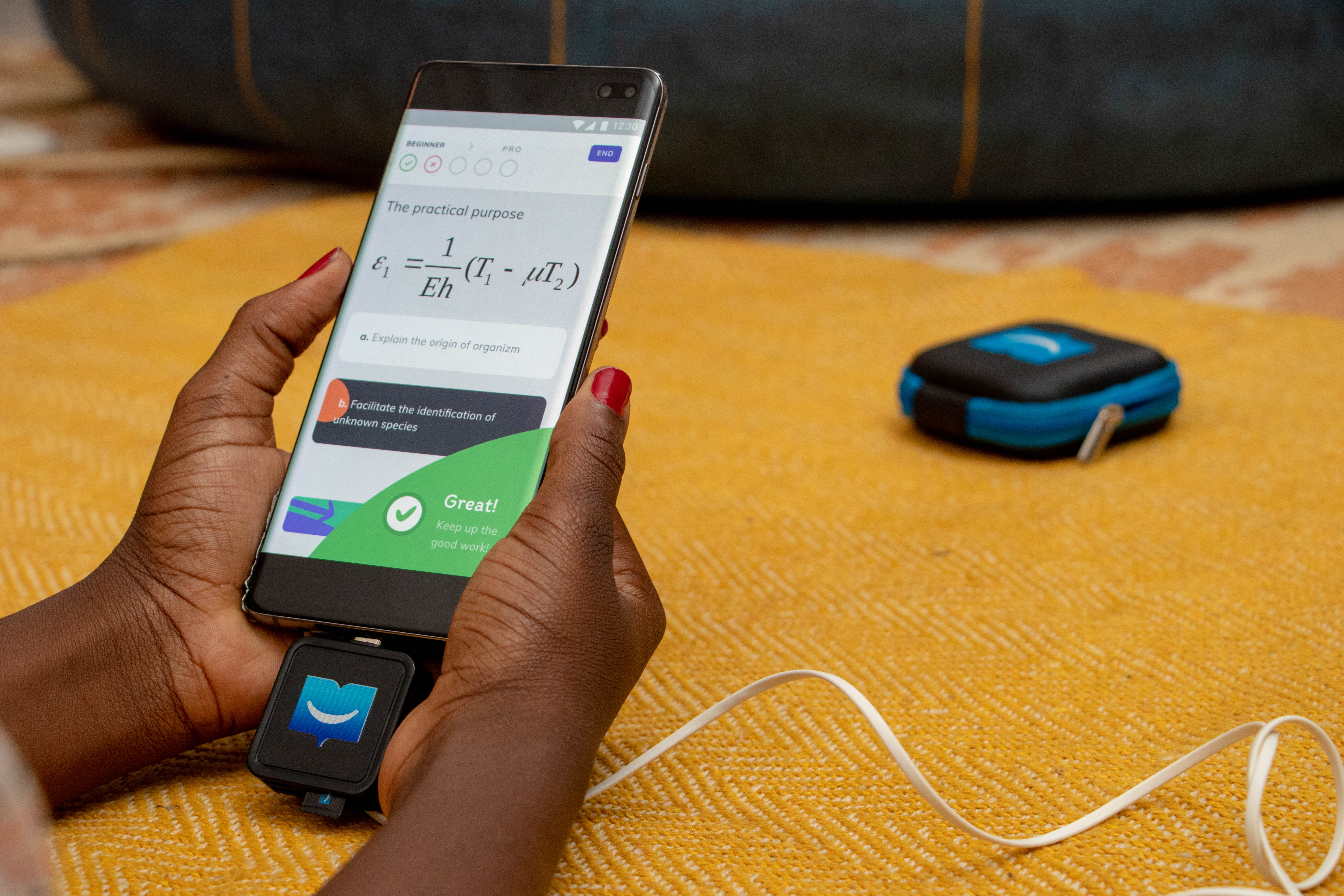
To address this, uLesson will offer an app-based home education kit for students with an up-front yearly subscription price of around $70 and the option to pay as you go. The startup’s product pack will contain a dongle, SD card, and a set of headphones to connect to Android devices.

Curriculum on the uLesson program will include practice tests and tailored content around math, physics, chemistry, and biology. The venture has already created 3000 animated videos for core subjects, according to Shagaya.

To leverage high android mobile penetration in Africa — and minimize data-streaming costs — uLesson content and performance assessment will come via a combination of streaming and SD cards.

Parents and students can connect online temporarily to update the app and sync curriculum and results, while operating off-line for the bulk of lessons.

Shagaya likened the use of SD cards to the old Netflix model of sending and returning DVD’s by mail, prior to faster and more affordable internet service in the U.S.

The uLesson program will also package a human component. The startup plans to deploy a network of counselors in major distribution areas to instruct on how to use app and follow lesson plans.

uLesson is to be a supplement to secondary school education and a more affordable and effective alternative to private tutors, explained Shagaya.

After taking uLesson to market in Africa’s most populous nation — Nigeria — and other countries in the region, Shagaya and team plan to adapt the product for a future East Africa launch.

In both Nigeria and Kenya uLesson will face competition from existing ventures. Edtech in Africa doesn’t have as many companies (or as much VC funding) as leading startup sectors fintech and e-commerce, but there are a number of players.

Source: Briter Bridges

Nigeria has online edu startups, such as Tuteria. Feature phone based student learning company Eneza Education has scaled in Kenya and expanded to Ghana.

uLesson could count having Shagaya as CEO as one of its advantages in the edtech space. The venture marks the founder’s return to the startup scene after a hiatus. Shagaya earned a Harvard MBA and worked for Google before repatriating to Nigeria to found several digital companies.

His best known venture, Konga, went head to head with online retailer Jumia in pioneering e-commerce for Nigeria and Africa. Konga was sold in a distressed acquisition in 2018.

Shagaya successfully exited his digital advertising venture E-Motion this year, after it was purchased by Loatsad Promedia.

The Nigerian tech entrepreneur confirmed he’s redirected some of that windfall into uLesson’s $3.1 million seed-round.  As part of TLcom’s lead on the investment, partners Omobola Johnson and Ido Sum will join uLesson’s board, Sum confirmed to TechCrunch.

For his part, Sim Shagaya underscores the for-profit status of his new startup, while noting it carries greater meaning for him than past commercial endeavors.

“If you drill down to it all, all our problems in Africa are tied this problem of education…If we do this right, our impact will be huge. For me this is probably the most important work I’ll do,” he said.


Read Full Article

New smartphone figures highlight continued struggles to grow market


In some corners, the smartphone market is showing its first signs of life in some time.

Recent figures from Canalys indicate a small but notable uptick in the European market as shipments grew 3%, year-over-year in Q3.

The analyst firm put global growth at 1% globally in another recent report. Generally, such numbers wouldn’t warrant much celebration, but the way the market has been going, most manufacturers will take what they can get.

New numbers out this morning from Gartner paint a less rosy picture, with sales numbers declining 0.4%. It’s not a huge discrepancy between shipping and sales figures, but it’s the difference between being in the red and being in the black for the quarter.


Read Full Article

You Can Now Create Virtual Tours Using Google Earth


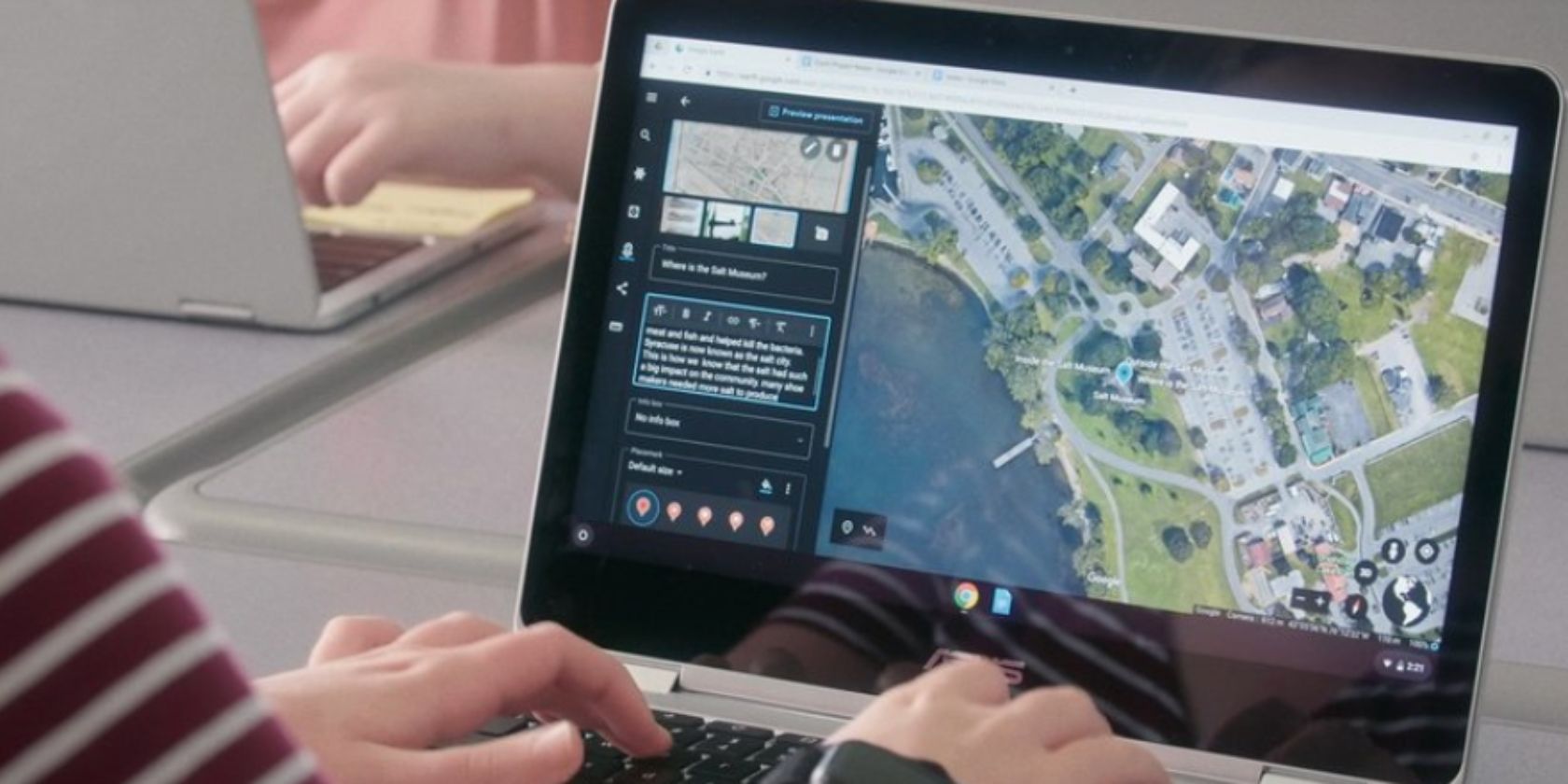
Google has added a set of creation tools to Google Earth. These allow you to create virtual tours using Google Earth, letting you tell stories using the power of Google’s satellite imagery. You can then share these stories with other people.

In 2017, Google launched a new version of Google Earth. This update introduced Voyager, which is used to showcase interactive guided tours. Storytellers were invited to create these tours, and Voyager is now packed to the brim with stories from around the world.

How to Use Google Earth’s Creation Tools

Now, Google is opening up its creation tools to everyone. As explained in a post on The Keyword, you can “draw your own placemarks, lines and shapes, then attach your own custom text, images, and videos to these locations.”

You can also “organize your story into a narrative and collaborate with others.” And “when you’ve finished your story, you can share it with others.” You can also let your audience “fly from place to place in your custom-made Google Earth narrative.”

The Creation tools are available in Google Earth on the web. Just open Google Earth in your browser, then click Projects in the left-hand sidebar. You can then choose either New Project or Open from Drive. You can also choose to watch the tutorial.

Once you have used Google Earth on the web to create your virtual tour, you can view them on your mobile devices using the Android and iOS apps. You can share your stories with other people, as well as invite others to collaborate or co-author stories with you.

Download: Google Earth on Android | iOS

Another Great Way of Planning Group Vacations

Anyone can use the Google Earth creation tools, and they’re surprisingly intuitive. So much so that we can imagine individuals using them to share stories with family and friends. And it would be great for planning group vacations or road trips.

Read the full article: You Can Now Create Virtual Tours Using Google Earth


Read Full Article

The Best and Cheapest VPN Deals for Black Friday 2019


best-vpn-torrent

Want to know what the best cheap VPN deal is for you right now? Some of the top VPN services are cutting prices temporarily and giving new customers some great deals, and we’ve rounded up some of the best available right now.

Awesome Black Friday VPN Deal From CyberGhost!

This Black Friday VPN provider CyberGhost is giving MakeUseOf readers an exclusive offer. It’s a huge discount that will reduce the cost of your VPN use—basically, there’s no reason not to have a VPN.

Incredibly, the discount works out at just $2.75 a month for a one year CyberGhost VPN plan, a remarkable 79 percent saving.

CyberGhost offers apps for Windows, macOS, iPhone and iPad, Android, Amazon Fire TV, and most other platforms you can name. Whether you’re planning to simply stay private online or plan to unblock Netflix, CyberGhost is a number one VPN choice

CyberGhost offers anonymous browsing, torrenting, and video streaming, all of which we tested in our CyberGhost review.

Declaring it a “top VPN for beginners” was no mistake. CyberGhost features a simple setup, with easy to use apps on every platform. And while some VPNs risk their customers’ privacy with a flawed logging policy, CyberGhost has adopted a “confident no-logging policy… CyberGhost is a secure, fast VPN.”

Don’t miss CyberGhost’s awesome Black Friday VPN deal.

Massive Savings With ProtonVPN‘s Black Friday Discounts

A special deal for MakeUseOf readers has been announced by ProtonVPN, complete with a 30-day money back guarantee if you’re unhappy.

You can enjoy up to 50 percent off the excellent ProtonVPN service, which offers secure video streaming, P2P (Bittorrent) support, and the ability to safely access the Tor network. With 500+ servers in 40+ countries, you’re guaranteed to feel safe and secure online, enhanced by ProtonVPN’s no logging policy.

These deals are all for buying a subscription for 12 months or more. So, to get a rate of $6.67 a month and save 33 percent, you’re billed at $79.99, rather than $120. To save 40 percent, ProtonVPN offer a two-year subscription for just $6 a month, billed at $144 (down from $240).

ProtonVPN is a sister product of ProtonMail. As such, you can get a double bundle of ProtonMail and ProtonVPN, for two years, for just $7.50, billed as $180, a 50 percent discount of the standard $360 price for that package.

These are all great deals so try ProtonVPN today.

Discount From VPN Unlimited

VPN Unlimited is dropping prices this week, with savings on its 12 month and 36 month deals.

With support for five devices, you can get VPN access from $5 a month if you pay $59.99 up front (which includes three months free). Alternatively, pay for three years at just $99.99 to gain a 75 percent discount, which works out at a very affordable $2.78 per month.

With 7-day money back option and 24/7 support, VPN Unlimited has access to over 400 in 70+ locations, with the expected OpenVPN, L2TP/IPSec, IKEv2, KeepSolid Wise, and PPTP protocols. VPN Unlimited provides clients for Windows, Linux, macOS, iOS, Android, Windows Phone and even browser extensions for Firefox and Chrome. We’ve looked at other Chrome VPNs, speaking of which.

With so many options to keep your browsing safe and private, and a top deals, VPN Unlimited have you covered.

Want an alternative discount? Try VPN Unlimited.

ExpressVPN‘s Latest Deals

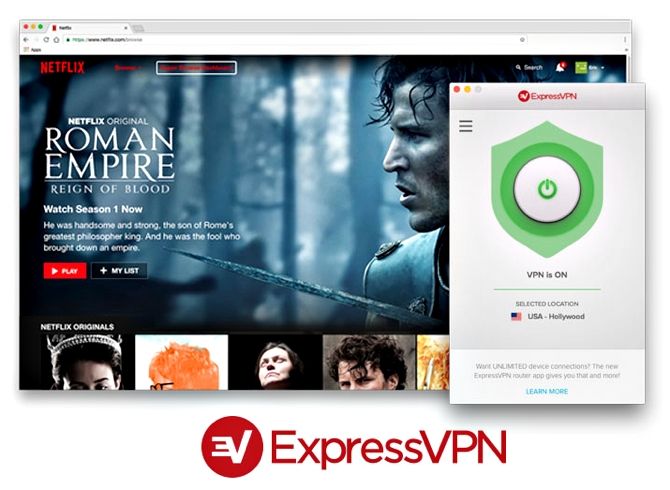
One of the most popular VPN services out there, ExpressVPN currently offers a 15-month deal with three months free, exclusive to MakeUseOf readers. This costs just $99.95, which works out at $6.67 a month. A flat monthly subscription is $12.95, so you’re looking at a 49 percent savings on our recommended VPN.

Watch Netflix in any country with ExpressVPN

Based in the British Virgin Islands, ExpressVPN is not bound by any data retention laws, so your online activity is not logged. With support for defeating geo-location, torrenting, Tor access, and gaming, ExpressVPN has over 1,000 servers across 87 countries worldwide. It’s fast, too.

While not the cheapest VPN option, ExpressVPN’s reputation is solid, offering apps for every desktop and mobile platform, and support for routers. You’ll even browser plugins for Chrome, Firefox, and Safari. Keen to protect your privacy, ExpressVPN accepts payment Bitcoin, along with credit card, PayPal, and various other methods.

On reviewing ExpressVPN, we declared it “…a solid, secure, speedy VPN service, with a good bunch of features available along a standard price band […] multi-platform support and logless servers.”

It certainly makes sense to consider ExpressVPN.

Cheap VPN Deals From HotSpot Shield

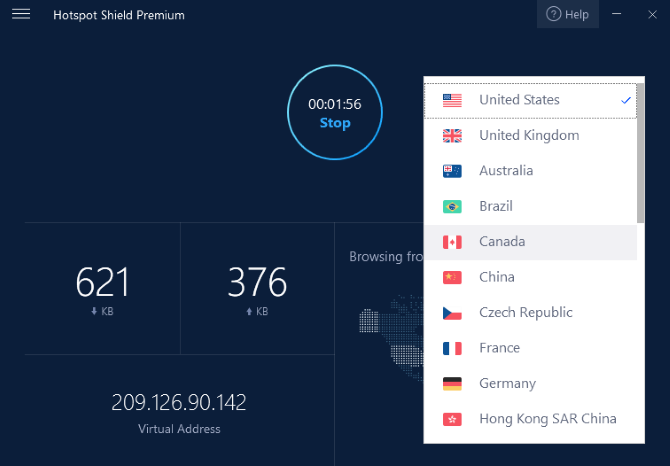
HotSpot Shield on Windows

VPN deals are fantastic, as they really make it easy for you to get started with keeping your online activity private from hackers and trackers. What also helps is easy to use apps, and HotSpot Shield certainly keeps things simple.

Ideal for overcoming Netfix geo-location restrictions, with high speeds, logless usage, and torrent support, HotSpot Shield has apps for Windows, macOS, Android, iOS, and the Chrome browser.

Subscriptions for HotSpot Shield start at $12.99 a month, but by paying upfront you can save an immense 76 percent over two years. This offer of $71.76 is HotSpot Shield’s best offer and boils down to a tiny $2.99 a month. Better still, you get to keep this price when the account is rebilled after 24 months.

Our review of HotSpot Shield concluded that its “simple user interface is also a massive benefit, making it so easy to switch between VPN servers.”

Need an easy-to-use VPN? Check this one out.

How Much Does TunnelBear Cost?

TunnelBear services in Europe

If you’ve been looking for a VPN, you’ve probably heard of TunnelBear. While some VPN services are a little difficult to use, TunnelBear is easy to set up and use. But what is it, and how much does it cost?

Available for Windows, macOS, iPhone, and Android, TunnelBear has a simple privacy policy and does not collect usage logs. This will help enhance your privacy further while connecting to the web via a VPN.

While the VPN can be used to circumvent geo-blocking, TunnelBear sadly does not offer support for torrenters.

While Tunnelbear has a useful free option, it is limited to 500MB of data per month. Right now, it has a 58 percent discount on offer, so if you pay $49.99 per year, Tunnelbear’s service works out at just $4.17 a month. There’s also a $9.99 monthly package if you prefer not to sign up long-term.

As noted in our review, “TunnelBear’s approach […] brings easy, affordable privacy and peace-of-mind to users around the world.”

Is Private Internet Access a Cheap VPN Service?

Looking for a cheap VPN service?

A torrent-friendly VPN service, Private Internet Access offers a good $6.95 basic monthly deal, but if you want to pay even less, you can get an amazing 58 percent discount! Simply use the two-year option and pay $69.95 up front—this equates to a tiny $2.91 a month.

Private Internet Access offers support for five simultaneous device connections, blocks trackers and malware, and no traffic logs are retained, thus enhancing your privacy online.

Get a Fast VPN From Buffered VPN

One of the fastest VPNs available, Buffered has all of the expected features (256-bit encryption, geo-restriction bypass, multiple device support) and is based in Gibraltar, which places it beyond the “14 Eyes” alliance of international surveillance.

Buffered is speedier than other VPNs thanks to 45 superfast servers positioned around the globe. This is significant as many VPNs can slow down your online access.

With apps for Windows, Linux, Mac, iOS, and Android, and with support for routers, Buffered’s best payment plan works out at just $7.62 a month for 13 months with a $99 up-front payment. That’s a 41 percent saving, on the basic $12.99 monthly plan!

8 Great Low-Cost VPN Deals!

VPN providers regularly offer great deals to entice new customers, so it can be difficult to judge which services to use. We’re confident that you’ll be impressed with the VPNs and deals listed here:

  1. CyberGhost
  2. ProtonVPN
  3. VPN Unlimited
  4. ExpressVPN
  5. HotSpot Shield
  6. TunnelBear
  7. Private Internet Access
  8. Buffered VPN

We’re certain that you’ll find a VPN that matches your requirements and budgets. If not, try looking further afield. Our top list of the best VPN services is a good place to start.

Read the full article: The Best and Cheapest VPN Deals for Black Friday 2019


Read Full Article

12 Creative Uses for Smart Plugs That’ll Make You Want One


smart-plugs-use

Smart plugs come in all shapes and sizes and at prices to suit all budgets. They’re also the most basic element of any smart home.

Forget internet connectivity, home networks and gadgets enabling remote management—smart plugs are where it starts.

Here’s everything you need to know about smart plugs and how they can help improve your smart home experience.

What Is a Smart Plug?

Smart plugs sit between an electrical outlet and the device you’re plugging in. Available in a variety of shapes, sizes, and specifications, they all possess a shared quality: remote control. This is typically achieved via Wi-Fi connectivity, although older devices use timers.

This enables you to set a plug to switch on or off, whenever you like.

Wi-Fi smart plugs (such as the Kasa Smart Plug range from TP-Link) can be accessed remotely via an app, or indirectly using IFTTT recipes, creating an app-controlled outlet. Smart plugs are also compatible with Alexa (and Google Assistant) for added connectivity, making them ideal for any smart home project.

1. Wake Up to Smart Plugs

What is the first thing you do in the morning? Perhaps you like to listen to the radio, or enjoy a cup of coffee? You might heat up a croissant with butter and jam on it, starting your day off with all three.

Instead of out of bed and risking barely-conscious accident, why not employ smart plugs to switch these on for you?

With less to concern you in the morning, you’ll be able to focus on getting yourself dressed and looking presentable. The benefits are multiplied if you have a family!

2. Enjoy Pre-Heated Hair Irons

Need to style your hair before stepping out? Why not preset your smart plugs to switch on at the optimum time?

A timer or time-based app can be used to remotely switch on the plug, letting your hair irons heat up.

It might take a couple of days to get right, but you should find those hair irons are ready to use when you pick them up.

3. Fool Opportunistic Burglars

A large proportion of burglaries are opportunistic crimes, committed by thieves too lazy to even bother committing to planning something.

But what can a smart plug do to help?

If you’re out or away from home for a few hours and concerned about crime in your area, why not employ smart plugs to control your lights?

Either a timer or an app can be used here. All you need to do to create the illusion of activity in your house is to tap a button on your smartphone to switch on a light! Similarly, you could switch on your TV as well.

Used in conjunction with a wireless home security camera system, your property should be well protected.

4. Cook Dinner While You’re at Work

What other smart plug uses might you take advantage of while at work? How about getting dinner ready?

I’d personally recommend that you rely on a crock pot for a healthier and tastier result than a microwave. Just add the ingredients before you head to work. You can activate the crock pot remotely to ensure you have a very tasty meal to come home to.

Budget won’t stretch to a smart plug with Wi-Fi? Simply program your smart plug to switch on so that the meal will be ready when you get home.

5. Feed Your Pet While Working Late

Think you’re not going to be home on time to feed your cat or dog? It’s always hard leaving pets all day, but you wouldn’t want them to go hungry. While programmable, timed feeders are available, a pressure trigger feeder with a Wi-Fi smart plug is a good alternative.

After all, most nights you’re home to feed Fido. Having an automatic feeder connected to a Wi-Fi smart plug is a sensible backup.

6. Switch Off Your Tumble Dryer Overnight

Control your tumble dryer remotely with a smart plug

Tumble dryers have been proven to cause many house fires over the years. To avoid this, employ a smart plug programmed to switch off the tumble dryer after, say midnight.

You might even purchase a Nest Protect, using an IFTTT recipe to kill the dryer if any smoke is detected. This has the advantage of putting a stop to a potential fire before it ever ignites.

Alternatively, you might program the smart plug to switch on the tumble dryer only when electricity is cheaper to use.

7. Control Your Kids’ Consoles and TVs

The modern family household often features a children’s bedroom or playroom complete with a TV and game consoles. You might even have a PC too, preferably with family safety software installed. But what about the TV and console?

Well, smart plugs come to the rescue once again. Simply place between the appliance and the power outlet, setting the timer to shut down the devices when agreed.

Consider also opting for a smart plug app to manage time earned by your hardworking children on their game console. This creates an app-controlled outlet to remotely control the console. Just avoid shutting down before their game has been saved!

8. Remotely Recharge Device Batteries

Smart Plugs can charge your garden tools in readiness for use

You’re at work, and you notice what a stunning day it is outside. While, there is little you can do to enjoy it from the office, a smart plug can help.

By leaving it connected to your garden trimmer’s rechargeable battery, you could top it up mid-afternoon. By the time you pull into your driveway, it’s ready to use!

Similarly, you could use a Wi-Fi connected smart plug to charge your vacuum cleaner. This might prove useful if you discover that your family are dropping in, and you need to quickly tidy up. Or ensure your electric drill is charged up before you get home to build that IKEA wardrobe.

9. Keep Your Space Warm in Winter

Your den, man-cave, office, or private study area… Whatever you call your chill out space may get quite cold in the winter. This is especially true if your space is a shed, or an attic.

What you need is a way to heat it up before you get there. Why not plug an electric radiator into a smart plug, and remotely activate it to warm the room in advance? If the radiator isn’t set too high and you don’t leave it alone for too long, you should find yourself stepping into a nice, warm, and cozy space.

10. Save Money on Your Next Electronic Purchase

How much do your electrical appliances cost to run? One of the big draws about smart plugs is the ability to connect them to smart meters.

These devices can tell what is in use, and how often they’re active.

Smart meters can measure how much it costs to recharge a phone, tablet, or laptop. You can use this information to judge your electricity bill and choose a potentially more efficient device in the future!

And speaking of saving money with a smart product, you might want to consider investing in one of these smart sprinkler systems.

11. Warm Your Bed Up Before Bedtime

Whatever the season, if there’s a cold spell or you live in cooler climes, an electric blanket is wise. It’s doubly important if you’re older and feel the cold more than you used to.

Electric blankets are clearly not the greenest devices, which is why it’s sensible to use a smart plug. With a timer or timed app program, you can instruct the electric blanket to switch on and heat the bed. Similarly, you can time the blanket to switch off before you make the journey to your bedroom.

After all, you don’t want your bed to be too warm!

12. Switch Everything Off When You Fall Asleep

We’ve already looked at the pitfalls of having appliances running while you’re asleep. But how can we ensure that they are switched off? What if we forget one of them?

Using a smartwatch or a fitness band is the way forward here. The Jawbone Up integrates with IFTTT and integrating this with a smart plug lets you shut down appliances automatically.

Your tumble dryer, TV, Blu-ray player, whatever—when you shut down for the night, they will too! You might also consider complementing them with some Wi-Fi light switches.

12 Smart Plug Uses You Should Try!

By now you should have recognized the advantages of smart plugs. They’re multipurpose and can be used with almost any hardware.

To recap, we’ve looked at 12 creative ways to use smart plugs in your home:

  1. Prompt your tech to wake you up
  2. Pre-heat hair style devices
  3. Prevent burglars
  4. Start dinner while you’re at work
  5. Feed your pet while working late
  6. Switch off your tumble dryer
  7. Control children’s TV and console time
  8. Remotely recharge batteries
  9. Manage home heating
  10. Save money on purchases
  11. Warm your bed up
  12. Switch off appliances at night

Want more reasons to try smart plugs? Here’s how using smart plugs can make your life easier and safer.

Read the full article: 12 Creative Uses for Smart Plugs That’ll Make You Want One


Read Full Article

Inside the Instagram AI that fills Explore with fresh, juicy content


Instagram has posted an article describing the behind-the-scenes machinery that fills the Explore tab in Instagram with new, interesting stuff every time you open it. It’s a bit technical, so here are five takeaways.

Even Instagram and Facebook have limited resources

Unlike the feed, which some still would prefer was simply chronological, the Explore tab needs to be algorithmically driven. But understanding what’s happening on an image-based social network and recommending new content to people is a problem that’s exactly as hard as you make it.

If these companies had infinite processing power and time, they’d probably come at the question of Explore a bit differently. But as it is they need to serve hundreds of millions of people on short notice and with merely enormous computing resources. I think they put this at the top of the post so people don’t wonder why they’re cutting corners.

It’s also easier to experiment and iterate when you can change stuff and see results quickly, they point out.

It’s all about the account, not the post

So much is posted to Instagram that it would be pretty much impossible to keep track of every photo individually, for recommendation purposes anyway. It’s simpler and more efficient to track accounts, since accounts tend to have themes or topics, from a broader one like “travel” to something highly specific, like especially round seals.

While liking one post from an account doesn’t necessarily mean you’ll like everything else from that account, it is a good indicator that you’re at least interested in the theme of that account. Even if it was this particular post of this particular cat that you wanted to heart because it reminds you of old Mittens, if you’re liking pictures from an account that mostly posts cats, that’s valuable information.

Complex habits inform the algorithm

Notably it isn’t just image features that Instagram uses to figure out what accounts are topically linked, though of course that kind of thing can be detected too. They also use your behavior.

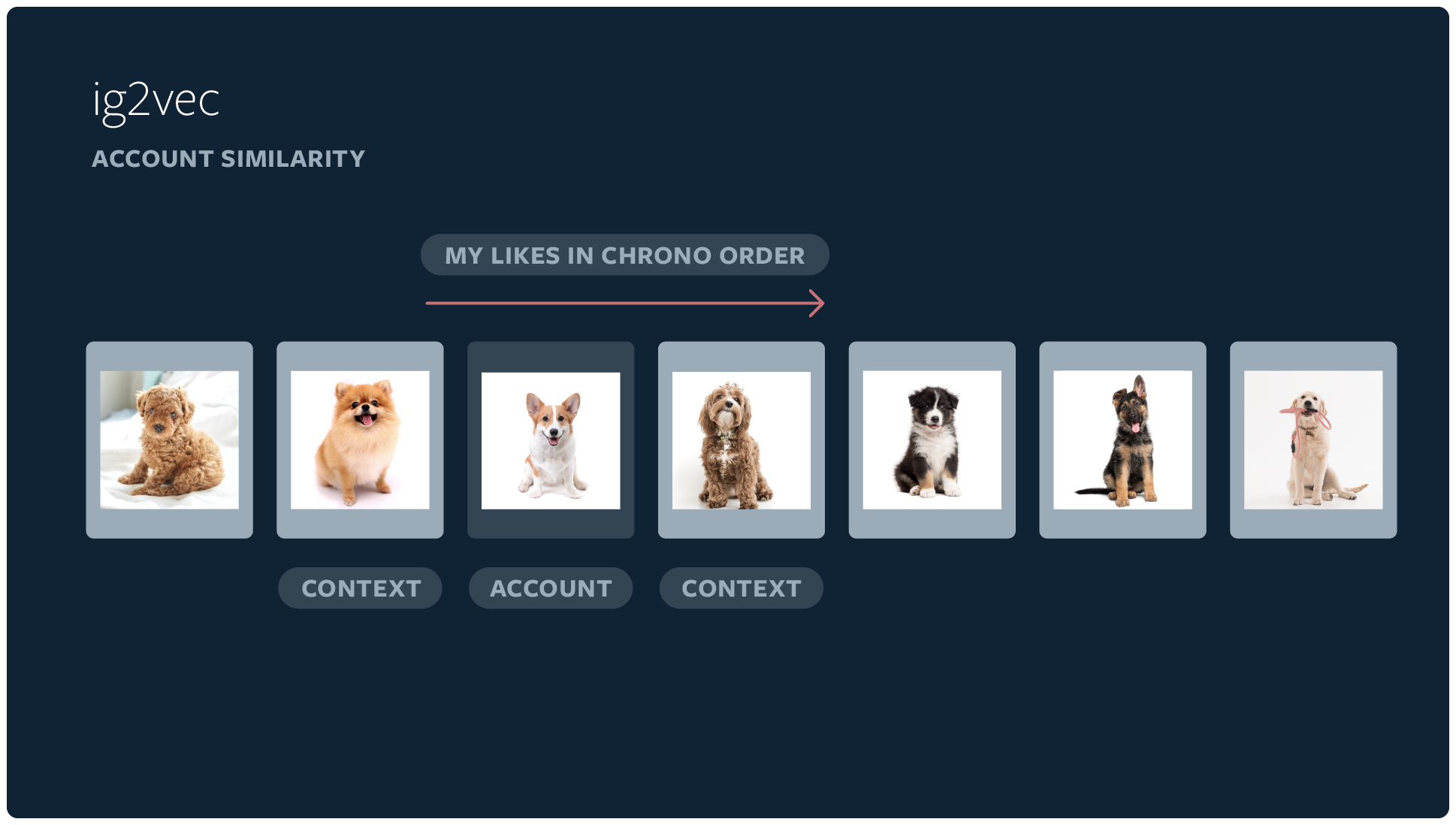
For instance, when you like several posts in a row, they’re more likely to be linked in some way even if Instagram’s algorithms can’t quite see it:

If an individual interacts with a sequence of accounts in the same session, it’s more likely to be topically coherent compared with a random sequence of accounts from the diverse range of Instagram accounts. This helps us identify topically similar accounts.

People just tend to look into stuff that way, going from one travel-focused account to the next, or focusing on animals because they need a pick-me up. All that information gets sucked up by the algorithm and inspected for relevance. Of course deliberate actions like “see fewer posts like this” and blocking accounts has a lot of weight as well.

From “seed accounts” to a top 25

The process of getting from a couple billion posts to just two dozen can be pretty difficult, but you can cut the problem down to manageable size by limiting the Explore tab to accounts linked in some way to accounts the user has already liked or saved posts from. These are called “seed accounts” because everything else in the process really grows out of them.

Because of how the machine learning system represents accounts and their topics inside itself, it’s super easy for it to find a couple hundred similar accounts.

Imagine if you know someone likes a particular reddish-orange marble and you need to find some more like it. If you just dip your hand into a sack of marbles you’re unlikely to find one quickly. Even if you pour them out on the floor you’ll still have to hunt around for a bit. But if you’ve already organized them by color, all you have to do is reach into the general vicinity of the marble they like and you’re almost guaranteed to pick a winner.

The machine learning model does that by giving all these accounts a sort of location in a virtual space, and the closer two are in that space, the closer they are topically.

So the really hard part of paring down a set of billions to a set of hundreds is basically already accomplished by the way the accounts are classified.

From there Instagram does three passes with neural networks of increasing complexity.

First, slightly confusingly, is a simpler, combined version of the next two processes, which takes it from 500 to 150 accounts. This is a little weird, but think about it this way: This neural network has seen steps 2 and 3 happen many times and has a pretty good idea of what they do. Sort of like if you’d seen cookies get made enough times that you could guess at a recipe. You’d probably get close, but you also wouldn’t want to publish it to like a hundred million people. So this step just gets the obvious stuff right.

Second is a computationally cheap neural network that uses way more signals than the simple topical similarity mentioned above. Here’s where your individual likes come into play, as well as the deeper data about accounts. You like travel, sure, but in particular you like couples traveling — both things the marble-sorting algorithm above can help with. Other parameters, like a post’s general popularity, or actually its being different from the other posts in the mix, figure in as well. That skims another 100 off the top, leaving 50.

Third is a computationally expensive version of the above, which does another pass on those 50 and cuts them in half, basically by looking closer and taking the time to include, perhaps, a thousand data points each rather than a hundred.

I guess that was kind of long for a “takeaway.” Don’t worry, the next one is quick.

And of course, no 🍑

“We want to make sure the content we recommend is both safe and appropriate for a global community of many ages on Explore,” they write. “Using a variety of signals, we filter out content we can identify as not being eligible to be recommended.”

So now you know why you don’t get any of that in Explore.


Read Full Article

Aurora Meaning


Aurora Meaning

NASA’s space pallet concept could land rovers on the moon cheaply and simply


Establishing an enduring presence on the Moon will mean making a lot of landings — and NASA researchers want to make those landings as reliable and cheap as possible. This robotic “pallet lander” concept would be a dead simple (as lunar landers go) way to put up to 300 kilograms of rover and payload onto the Moon’s surface.

Detailed in a technical paper published today, the lander is a sort of space pallet: a strong, basic framework that could be a unit in many a future mission. It’s still a concept and doesn’t really have a name, so space pallet will do for now.

It’s an evolution of a design that emerged in studies surrounding the VIPER mission that was intended to “minimized cost and schedule” and just get the rover to the surface safely. In a rare admission of (at least theoretically) putting cost over performance, the paper’s introduction reads:

The design of the lander was based on a minimum set of level 1 requirements where traditional risk, mass, and performance trade parameters were weighed lower than cost. In other words, the team did not sacrifice ‘good enough’ for ‘better’ or ‘best.’

It should be noted, of course, that “good enough” hardly implies a slapdash job in the context of lunar landers. It just means that getting 5 percent more tensile strength from a material that costs 50 times more wasn’t considered a worthwhile trade-off. Same reason we don’t use ebony or elm for regular pallets. Instead they’re using the space travel equivalent of solid pine boards that have been tested into the ground. (The team does admit to extrapolating a little but emphasizes that this is first and foremost a realistic approach.)

The space pallet would go up aboard a commercial launch vehicle, such as a Dragon atop a Falcon 9 rocket. The vehicle would get the pallet and its rover payload into a trans-lunar injection trajectory, and a few days later the space pallet would perform the necessary landing maneuvers: attitude control, landing site selection, braking, and a soft touchdown with the rover’s solar panels facing the sun.

Once on the surface, the rover would go on its merry way at some point in the next couple hours. The lander would take a few surface images and characterize its surroundings for the team on Earth, then shut down permanently after 8 hours or so.

Yes, unfortunately the space pallet is not intended to survive the lunar night, the researchers point out. Though any presence on the moon’s surface is a powerful resource, it’s expensive to provide the kind of power and heating infrastructure that would let the lander live through the freezing, airless cold of the Moon’s weeks-long night.

Still, it’s possible that the craft could be equipped with some low-key, self-sustaining science experiments or hardware that could be of use to others later — a passive beacon for navigation, perhaps, or an intermittent seismic sensor that detect nearby meteorite impacts.

I’ve asked for a bit more information on the possibilities of science instruments onboard, and what the alternatives might be should the space pallet not be pursued further than concept stage. But even if that were to be the case, the team writes in the paper, “it is important to note that these and other derived technologies are extensible to other lander designs and missions.”


Read Full Article

Google employee activist says she’s been fired


Google has terminated Rebecca Rivers, an employee activist the company put on indefinite administrative leave this month, Rivers tweeted this afternoon.

Earlier this month, Google put Rivers and Laurence Berland on leave for allegedly violating company policies. At the time, Google said one had searched for and shared confidential documents that were not pertinent to their job, and one had looked at the individual calendars of some staffers.

Protestors on Friday, however, said Google was punishing Berland and Rivers for speaking out against the company. The rally, where both Berland and Rivers spoke, was in protest of their administrative leaves.

Ahead of the rally, organizers said the “attack” on Rivers and Berland “is an attack on all people who care about transparency and accountability for tech.” Organizers pointed to how Rivers helped create the petition to demand Google end its contract with U.S. Customs and Border Protection, and how Berland has participated in a number of worker-organized campaigns, including the one resisting YouTube’s role in facilitating hate speech.

Since the massive employee-led walkout last November, organizers say Google has tried to undermine further attempts to organize. In July, walkout co-organizer Meredith Whittaker left the company following reports of retaliation in April. Organizers of the rally say both Rivers and Berland were put on leave for “simply looking at openly shared internal information.”

This comes shortly after The New York Times reported Google hired an anti-union firm, ISI Consultants. Google employees, who the Times kept anonymous, discovered Google’s relationship with ISI via internal calendar entries.

I’ve reached out to Google and will update this story if I hear back.


Read Full Article
7 beliefs that can silence women -- and how to unlearn them | Deepa Narayan

7 beliefs that can silence women -- and how to unlearn them | Deepa Narayan

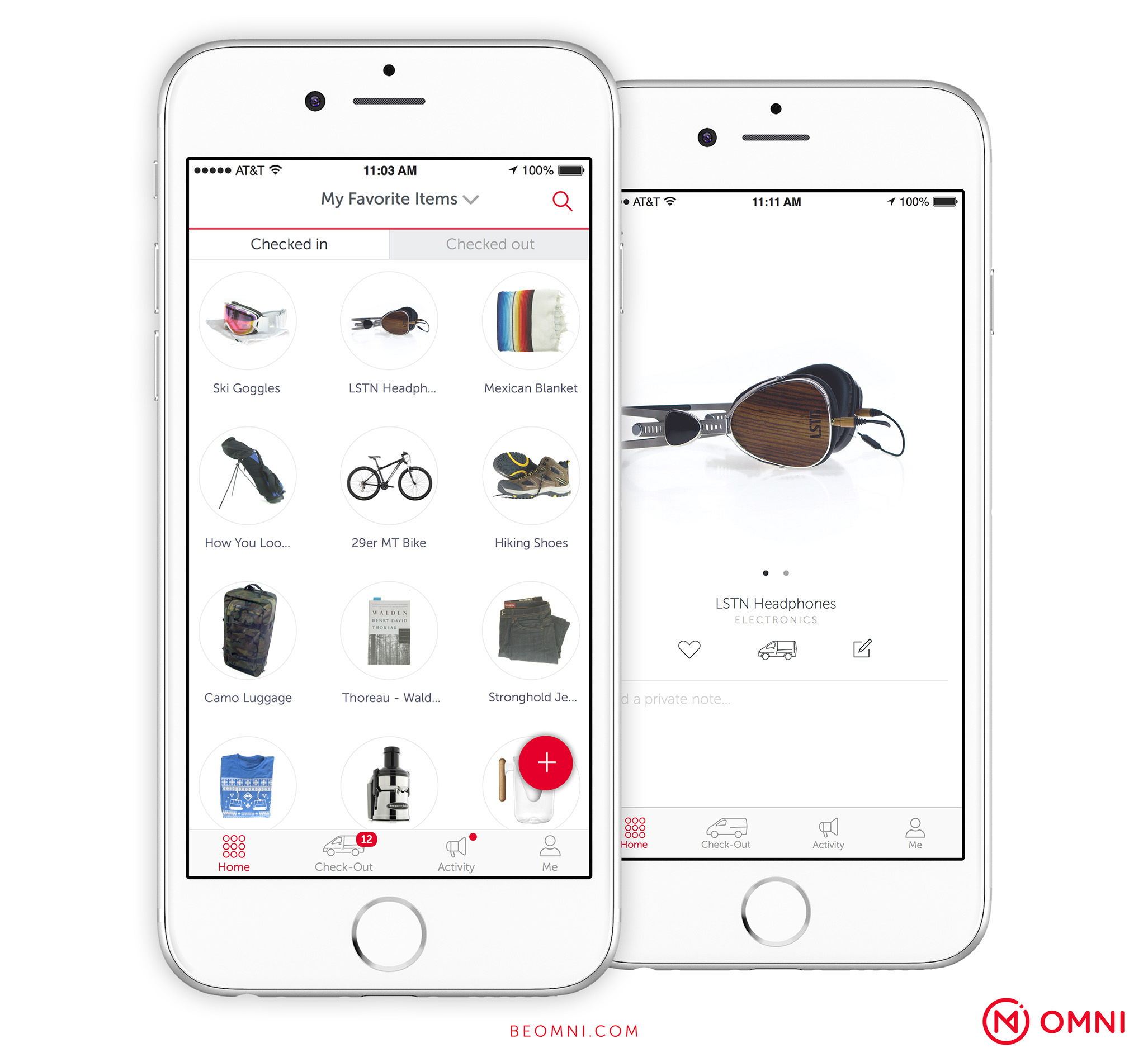
In India (and many other countries), girls and women still find themselves silenced by traditional rules of politeness and restraint, says social scientist Deepa Narayan. In this frank talk, she identifies seven deeply entrenched norms that reinforce inequality -- and calls on men to help usher in change.

Click the above link to download the TED talk.

Apple releases holiday ad


Apple has released its annual holiday ad, just in time for Thanksgiving. Named “The Surprise,” the ad focuses on two young girls who spend a lot of time playing with an iPad.

The ad focuses on a family that travels across the country to visit the mother’s father. Like many families, the parents hand them an iPad when their daughters start to fight…

When they arrive at the grandfather’s house, we realize that the grandfather’s wife recently passed away. Both the grandfather and the mother are still mourning.

While their parents tell the kids to watch something on the iPad, they end up using the iPad to build a touching slideshow using old family photos.


Read Full Article
Omni storage & rentals fails, shutters, sells engineers to Coinbase


$35 million-funded Omni is packing up and shutting down after struggling to make the economics of equipment rentals and physical on-demand storage work out. It’s another victim of a venture capital-subsidized business offering a convenient service at an unsustainable price.

The startup fought for a second wind after selling off its physical storage operations to competitor Clutter in May. Then sources tell me it tried to build a whitelabel software platform for letting brick-and-mortar merchants rent stuff like drills or tents as well as sell them so Omni could get out of hands-on logistics. But now the whole company is folding, with Coinbase hiring roughly 10 of Omni’s engineers.

“They realized that the core business was just challenging as architected” a source close to Omni tells TechCrunch. “The service was really great for the consumer but when they looked at what it would take to scale, that would be difficult and expensive.” Another source says Omni’s peak headcount was around 70.

The news follows TechCrunch’s report in October that Omni had laid off operations teams members and was in talks to sell its engineering team to Coinbase. Omni had internally discussed informing its retail rental partners ahead of time that it would be shutting down. Meanwhile, it frantically worked to stop team members from contacting the press about the startup’s internal troubles.

We’ll be winding down operations at Omni and closing the platform by the end of this year. We are proud of what we built and incredibly thankful for everyone who supported our vision over the past five and a half years” an Omni spokesperson says. Omni CEO Tom McLeod did not respond to multiple requests for comment.

Coinbase has reached an agreement with Omni to hire members of its engineering team. We’re always looking for top-tier engineering talent and look forward to welcoming these new team members to Coinbase” a Coinbase spokesperson tells us. The team was looking for more highly skilled engineers they could efficiently hire as a group, though it’s too early to say what they’ll be working on.

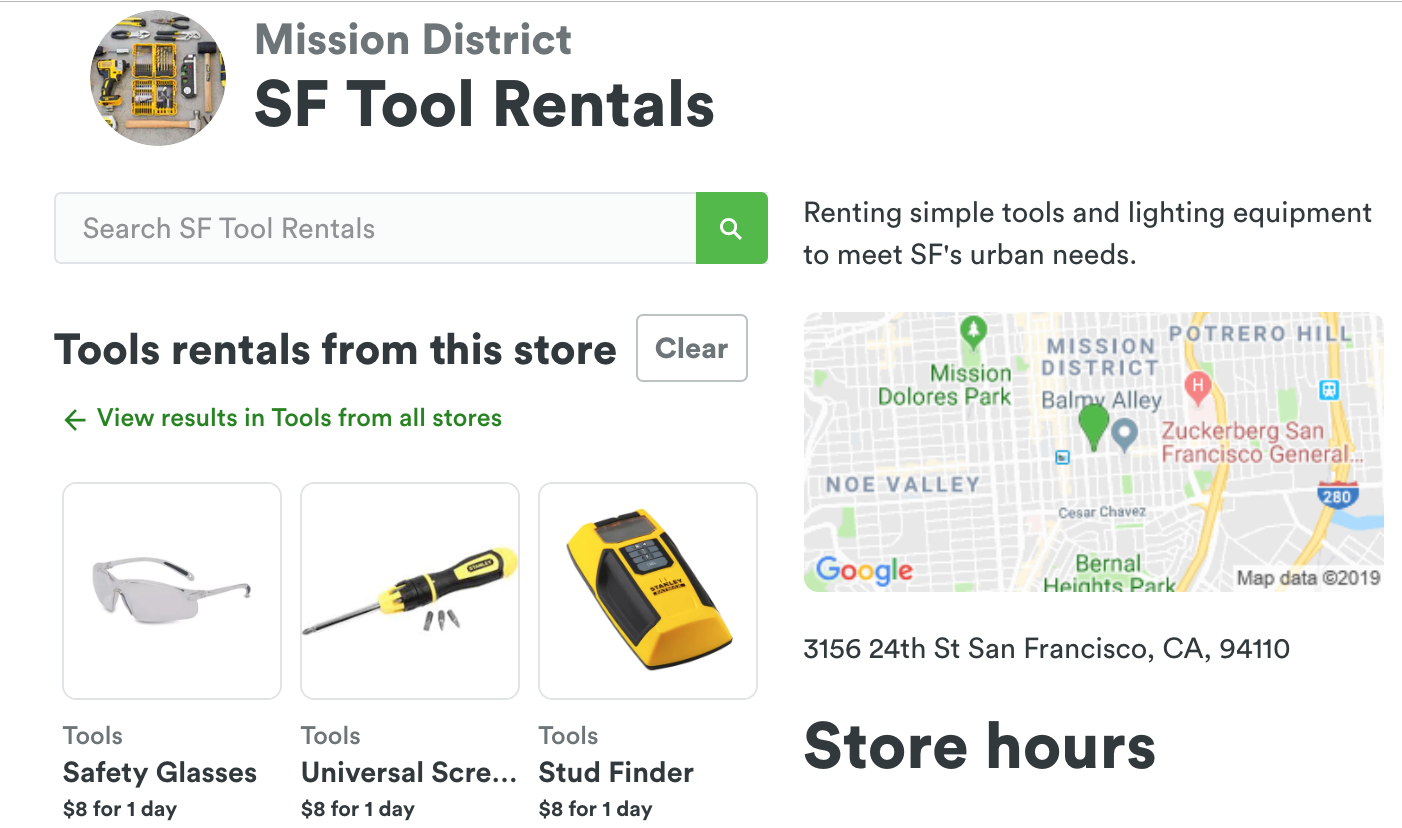
Omni originaly launched in 2015, offering to send a van to your house to pick up and index any of your possession, drive them to a nearby warehouse, store them, and bring them back to you whenever you needed for just a few dollars per month. It seemed too good to be true and ended up being just that.

Eventually Omni pivoted towards letting you rent out what you were storing so you and it could earn some extra cash in 2017. Sensing a better business model there, it sold its storage business to Softbank-funded Clutter and moved to helping retail stores run rental programs. But that simply required too big of a shift in behavior for merchants and users, while also relying on slim margins.

Omni Rentals

One major question is whether investors will get any cash back. Omni raised $25 million from cryptocurrency company Ripple in early 2018. Major investors include Flybridge, Highland, Allen & Company, and Founders Fund, plus a slew of angels.

The implosion of Omni comes as investors are re-examining business fundamentals of startups in the wake of Uber’s valuation getting cut in half in the public markets and the chaos at WeWork ahead of its planned IPO. VCs and their LPs want growth, but not at the cost of burning endless sums of money to subsidize prices just to lure customers to a platform.

It’s one thing if the value of the service is so high that people will stick with a startup as prices rise to sustainable levels, as many have with ride hailing. But for Omni, ballooning storage prices pissed off users as on-demand became less afforable than a traditional storage unit. Rentals were a hassle, especially considering users had to pick-up and return items themselves when they could just buy the items and get instant delivery from Amazon.

Startups that need a ton of cash for operations and marketing but don’t have a clear path to ultra-high lifetime value they can earn from customers may find their streams of capital running dry.


Read Full Article

25 November 2019


Devialet partners with Huawei for new speaker


Huawei and Devialet have unveiled a new speaker specifically designed for the Chinese market, the Huawei Sound X. French startup Devialet has been looking at ways to license its technology and patents to consumer electronics manufacturers, such as Sky, Iliad, Altice USA and Renault.

While Devialet only sells very premium speakers under its own brand, such as the $1,000 Phantom Reactor, the Huawei Sound X is much more affordable. You’ll be able to buy a pair of speakers for RMB 1,999, the equivalent of $285. Unfortunately, those speakers will only be available in China for now.

The pill-shaped design is reminiscent of the Apple HomePod or the most recent Amazon Echo. It features a 60W double subwoofer and 360-degree sound. You can either use the pair of speakers in different rooms or pair them to create a stereo sound system.

The Huawei Sound X has six microphones so that you can control it with your voice. You can also control the speaker with capacitive touch buttons at the top of the speaker.

If you have a Huawei phone, you can tap it on the top of the speaker to hand off music to the speaker. It also integrates with Huawei HiLink, the company’s framework to control your connected objects around your home.

Devialet has been slowly expanding to China with a distribution partnership, two Devialet stores in Beijing and Shanghai and retail stores partnerships. According to the company, China is now the second market for Devialet.


Read Full Article

What Can Photoshop Do That GIMP Can’t?


photoshop-gimp

The GNU Image Manipulation Program (or GIMP for short) is a popular open source image editing application that’s been around for awhile. While GIMP is considered a free Photoshop competitor, and there’s a lot it can do, there are some areas where it still falls short.

If you’re torn between the two programs, here’s a list of pros and cons for GIMP vs. Photoshop. What can Photoshop do that GIMP can’t? Quite a lot, as it turns out.

Note: This article isn’t a hit piece on GIMP! Plenty of us still use GIMP on a daily basis. It’s just an honest look at where Photoshop’s massive budget and team of developers have given it an edge.

1. Photoshop Has CMYK Color Mode

Does Photoshop Have CMYK Color Mode

There are two dominant color modes that professional designers use: RGB and CMYK. RGB comes from red, green, and blue pixels that are used to display images on a screen.

CMYK is a more in-depth color range that uses cyan, magenta, yellow and black inks to create a picture. It’s used by commercial printers to print high quality photos.

Any color can be described by these two systems, but unfortunately GIMP doesn’t offer CMYK mode.

Photoshop does.

If you’re working on something that needs to be displayed accurately while in physical format, then you need to work with CMYK for best results. For designers, no CMYK can be a deal breaker. This is especially true if you’re planning on printing your work. So in the battle between Photoshop vs. GIMP, Photoshop clearly comes out on top.

For more information on working with colors, we suggest reading how to create a custom gradient in Photoshop.

2. Easier, Non-Destructive Editing

Edit Image Layers in Photoshop

One of the most powerful Photoshop innovations over the last decade is how much easier it has become to make non-destructive edits through selections and layers. Rather than changing the original file, you can use a wide array of tools to modify things in a reversible way.

This constant “undo” button is a huge reason why I personally enjoy the program.

But is GIMP good for this too?

While GIMP has improved a lot in recent years, non-destructive editing is one area where it still can’t quite compete with Photoshop. If you’re making simple adjustments to your image, that’s no problem. If you’re trying to do crazy Photoshop composites, however, it makes your work harder.

3. Better Support and Constant Development

Adobe Photoshop Help Center

Photoshop is made by a multi-billion dollar company. GIMP is made by a team of dedicated volunteers.

While this hasn’t stopped GIMP from creating a respectable program, it does have a lot of knock-on effects that are unavoidable when you’re faced with such an insurmountable hurdle.

So is GIMP as good as Photoshop when it comes to customer support?

Not even close.

Due to its large budget, Adobe has an entire team dedicated to helping you with every problem. As long as you have your Adobe ID on hand, you can simply speak or chat to technical support staff.

With GIMP, you’re stuck trawling through open source forums by yourself. It’s fun to be the one to implement a cool new feature, but volunteering to answer tech support calls? Not a hope.

By the same token, Adobe is able to keep development going constantly. GIMP is reliant on volunteers’ free time. Because of this, it can take longer for a GIMP developer to get around to fixing things, let alone implementing new features.

These are just a couple examples of how a bigger budget and team can help you.

4. Photoshop Has More Powerful Tools

Adobe Photoshop Healing Brush Tools

All this extra development, resources, time, and money mean that Photoshop has more powerful tools. Both Photoshop and GIMP offer basic functions like levels, curves, and masks, but when it comes to real pixel manipulation, Photoshop leaves GIMP behind.

For example, Photoshop has four separate healing tools, each with an array of controls that let you determine how they operate. GIMP just has one.

For removing the odd spot, this single tool is fine, but for serious editing work it’s not enough. This same situation repeats itself with many other features that the two applications share.

GIMP tools are great, but they’re a few years behind what Photoshop currently offers.

5. Photoshop Is Compatible With Other Apps

Adobe Creative Suite App Compatibility

Photoshop is part of a larger ecosystem. There are programs like Lightroom and Illustrator, where you can open up Photoshop files to work on them, along with additional Creative Cloud apps.

For example, I use Bridge to keep my files organized. I also use Illustrator for drawing line art. Then I take that lineart over to Photoshop, where I finish the coloring and digital edits.

In Adobe’s Creative Cloud, there’s a program for every job, and each of these programs speak to each other. Unfortunately, GIMP is on its own.

GIMP is a single image editing app. There’s no Bridge to organize things; no Illustrator to create crisp logos and art.

For people who just want to use an image editing app for basic items, GIMP is wonderful. But if you’re creating multiple, complex designs every week, Photoshop playing nice with other Creative Cloud apps is essential.

6. Photoshop Handles Camera Raw and PSD Files

Photoshop Camera Raw Files

Modern cameras can shoot in RAW or JPEG file formats. RAW formats contain a lot more information, and if you want to improve your photographs, you should be using them.

Thanks to Camera Raw, Photoshop can also handle RAW files from every major camera manufacturer. Periodic updates add support for new files.

GIMP on the other hand? It can’t do this. You need to use a RAW processor to convert the file to a JPEG or another GIMP-readable file format before you can edit it in the program.

Thanks to Adobe’s dominance, its proprietary PSD file format has also become widely used. GIMP can open PSD files, but there’s a chance that it will fail to render things correctly.

If you need to convert the file, this creates a real problem if you’re working collaboratively. The file you look at with GIMP won’t be the same one as the file they created in Photoshop.

So in this case, can GIMP do everything that Photoshop can? Unfortunately, no.

7. Photoshop Is Easier to Learn

Creative Cloud YouTube Channel

The question of whether or not Photoshop’s interface is more intuitive is debatable. It’s very complex, and there’s a lot to learn. What is not up for debate? The fact that Photoshop is easier to learn, thanks to countless awesome tutorials that are currently available.

These tutorials range from Adobe’s in-house videos, to our own articles on the subject matter. It turns out that if a lot of people need to use a service, then there will be a lot resources devoted to it.

While there are some tutorials for GIMP, there are not nearly as many. GIMP also leaves you very much on your own when you’re first starting out.

Photoshop Is a Powerful Tool Compared to GIMP

GIMP, Photoshop, and other mainstream image editing apps are great resources that a lot of people can use. We also want to stress that in the case of GIMP, the program is perfectly acceptable for making simple changes to your image.

When it comes to heavy duty graphics work, however, Photoshop more than justifies the price tag.

If you want to learn about the program’s many features, here’s a rundown of some of the things you can do with Adobe Photoshop.

Read the full article: What Can Photoshop Do That GIMP Can’t?


Read Full Article
Should You Still Buy an MP3 Player?


Does anyone buy MP3 players anymore? At one time, everyone owned an MP3 player. However, now, everyone just listens to music using their smartphone.

The thing is, MP3 players are still a thing, and still serve their original function of playing music. So, is it still worth buying an MP3 player?

In this article, we examine the pros and cons of using MP3 players and help you decide whether it’s worth buying an MP3 player.

A Brief History of MP3 Players

Before discussing the pros and cons of using an MP3 player in detail, it helps to understand the history of these humble devices. The story of MP3 players—both the rise and fall—focuses on making music accessible.

While there were MP3 players before Apple showed their hand, the launch of the iPod in 2001 saw the format take off in a big way.

During the heyday in the early 21st century, the portability and ability to hold an extensive number of songs changed the way people listened to music. People no longer had to haul a piece of hardware along with their music collection spread across multiple CDs (or cassette tapes or vinyl records).

A woman listening to an iPod
Image Credit: Tim Reckmann/Flickr

As with most technology, MP3 players reigned only for a short time. Their appeal diminished with the increased affordability and accessibility of smartphones. Suddenly, there were devices capable of playing your music and doing so much more besides. Rendering MP3 players pretty much obsolete.

However, you can still buy MP3 players today. The only question is, should you?

The Benefits of MP3 Players

Despite their inability to complete directly in all features with smartphones, MP3 players still boast some benefits. MP3 players focus solely on playing music, which may be beneficial to some people. Owning a dedicated MP3 player can also free your smartphone up for other tasks.

The Simpler Technology Means More Portability

When you think of a smartphone and what you need it for, the list can get big fast. Due to the variety of everyone’s needs, certain design features cannot change drastically on smartphones. Designers of smartphones have to anticipate a very broad use case for the everyday users of the device.

For example, you need a certain screen size on your phones to take advantage of video or mobile gaming. Conscious design decisions make sure they’re able to support a certain size-ratio for software. If you’ve ever gamed on a non-standard size TV, you’ll have experienced clipping issues where things meant to be on-screen aren’t there.

Because of situations like these, the need for comparable features across smartphones can limit a company from taking any risky ventures. On the opposite end, MP3 players have become more of a specialized device. Due to their ability to diversify more, MP3 players can come in a variety of sizes.

A size comparison between an MP3 player and a coin
Image Credit: Mark Longair/Flickr

A great example of this comes in the form of wearable MP3 players. As a fusion between earbuds and MP3 players, the devices fulfill their niche well while also not taking on excess space. While you have more limited space for songs due to their size, it takes away common travel complaints.

The design isn’t bulky, and it takes up as much space as any standard earbud would, which makes it a great choice for working out. If you’ve ever jogged with a smartphone in your coat or pants pocket, you can feel the weight of a bigger device. If you need to look at some other design options for comparison, look at some of the best standalone MP3 players.

MP3 Players Boast Great Battery Life

Besides more fluid design options, MP3 players have the benefit of their own battery life. For those with smartphones, you most likely have dealt with portable batteries, charge stations, or car charger concerns just to keep up with your busy life. If you feel the need to reduce the time your smartphone is plugged into the mains, you could benefit from removing at least one task from your smartphone.

A family listening to MP3s
Image Credit: Moodboard/Flickr

You Have an FM Tuner On-Demand

For any fan of listening to radio, it helps to have more devices that support additional access points. While you can always access online radio on your smartphone or tablet, owning an MP3 player with an FM player included allows you to listen to radio without data or Wi-Fi.

The Downsides of MP3 Players

When it comes to the downsides of owning an MP3 player, there are various reasons to not own one. However, they mostly boil down to two simple reasons.

You Have to Own Yet Another Device

Compared to the technology of the past, the trend of all-in-one alleviates a lot of needs. Smartphones put most of what you need in your pocket. They let you call and message friends, listen to music, watch movies, and even work.

If you aren’t actively avoiding a smartphone’s other features, it’s hard to justify buying an MP3 player.

Streaming Services Are Better

As nice as it is to watch local content, streaming services have a lot to offer. If you subscribe to a streaming service such as Spotify or Pandora you can easily find any music you want to listen to.

Anyone who tried to maintain a music library will know that you always had to update your devices with new song releases. There was also manual transfers, song syncing, device updates, and other nuances to contend with. Whereas streaming services have fixed all of these issues.

The Final Verdict on MP3 Players

So, should you still buy an MP3 player? In a word, no. Unless you have a specific need for a standalone device to play your local music. Or, for whatever reason, you don’t own a smartphone.

However, for the majority of people, smartphones are the best option. And you can then spend the money you’ve saved not purchasing an MP3 player in one of the best gaming smartphones.

Read the full article: Should You Still Buy an MP3 Player?


Read Full Article