
53 Cards
Despite early-stage virtual reality market and augmented reality market valuations softening in a transitional period, total global AR/VR startup valuations are now at $45 billion globally — include non-pure play AR/VR startups discussed below, and that amount exceeds $67 billion. More than $8 billion has been returned to investors through M&A already, with the remaining augmented and virtual reality startups carrying more than $36 billion valuations on paper. Only time will tell how much of this value gets realized for investors.
(Note: this analysis is of AR/VR startup valuations only, excluding internal investment by large corporates like Facebook. Again, this analysis is of valuation, not revenue.)
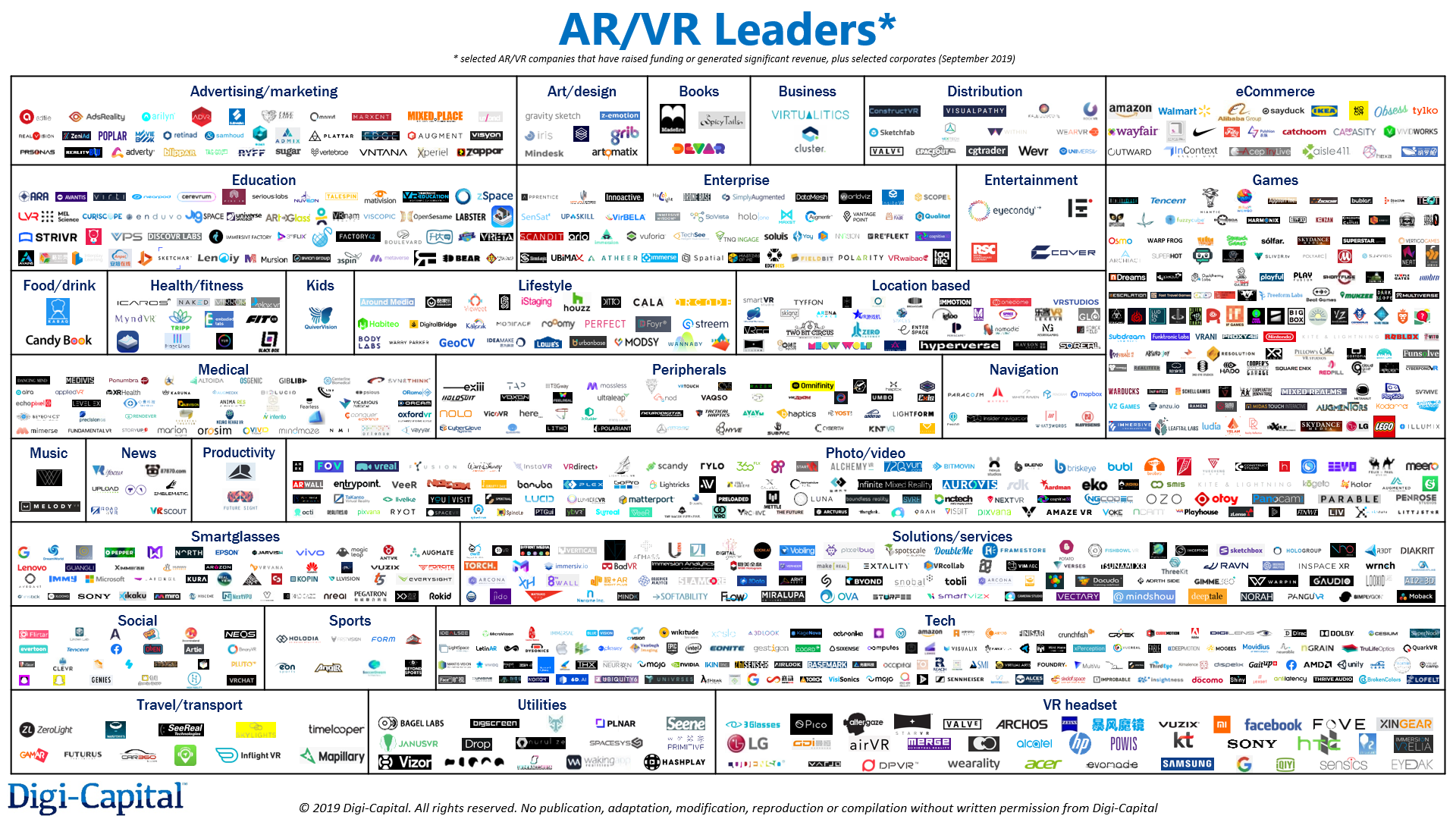
Selected AR/VR companies that have raised funding or generated significant revenue, plus selected corporates as of September 2019.
There is significant value concentration, with just 18 AR/VR pure plays accounting for half of the $45 billion global figure. Some of the large valuations are for Magic Leap (well over $6 billion), Niantic (nearly $4 billion), Oculus ($3 billion from exit to Facebook), Beijing Moviebook Technology ($1 billion+) and Lightricks ($1 billion). While there are unicorns, the market hasn’t seen an AR/VR decacorn yet.
Across all industries — not just AR/VR — around 60% of VC-backed startups fail, not 90% as often quoted. That doesn’t mean this many startups crash and burn, but that 60% of startups deliver less than 1x return on investment (ROI) to investors (i.e. investors get less back than they put in). To better understand what’s happening in AR/VR, let’s analyze the thousands of startup valuations in Digi-Capital’s AR/VR Analytics Platform to see where the smart money is by sector, stage and country.


Tilting Point announced yesterday that it has acquired Gondola, a company that aims to increase to improve game monetization by optimizing in-game offers and video ads.
Tilting Point CEO Kevin Segalla described his company’s model as “progressive publishing” — usually, mobile game developers starting working with Tilting Point because they need help with user acquisition, and then develop a deeper publishing relationship over time.
“With a select group of our development partners, we’ll acquire an IP, and we’ll … have them take the engine that they already have and create a whole new game,” Segalla said. “It’s really a dual effort between us and the developer.”
To accomplish all this, the company has built artificial intelligence tools to improve user acquisition. But the other side of that equation, in Segalla’s view, is increasing the lifetime value of the users acquired.
“At the end of the day, scaling a game boils down to two simple things, [cost per install] and LTV,” he said. “Strong developers are working to improve the LTV of their players, but there’s a lot of low-hanging fruit that with the right toolset you can use to improve the lifetime values. That’s what Gondola is about … We’ve been following for years, and we said, ‘Let’s bring this in-house.'”
Gondola currently offers four modules: Target Optimization (choosing the best offer for a player), Rewarded Video Ad Optimization (choosing the right amount of virtual currency to reward a player for watching a video ad), Store Optimization (choosing the right store items to show a player) and Currency Optimization (choosing the best virtual currency amounts for offers and promotions).
The financial terms of the acquisition — Tilting Point’s first — were not disclosed. As part of the deal, Gondola CTO André Cohen is joining Tilting Point as its head of data science, while his co-founder and CEO Niklas Herriger remains involved as an executive advisor.


The Daily Crunch is TechCrunch’s roundup of our biggest and most important stories. If you’d like to get this delivered to your inbox every day at around 9am Pacific, you can subscribe here.
1. Zuckerberg on Chinese censorship: Is that the internet we want?
The Facebook CEO spoke yesterday at Georgetown University, sharing his thoughts on speech and “how we might address the challenges that more voice and the internet introduce, and the major threats to free expression around the world.”
Among his arguments: China is exporting its social values, political ads are an important part of free expression and the definition of dangerous speech must be kept in check.
2. Atlassian acquires Code Barrel, makers of Automation for Jira
Sydney-based Code Barrel was founded by two of the first engineers who built Jira at Atlassian, Nick Menere and Andreas Knecht. With this acquisition, they are returning to Atlassian after four years in startup land.
3. Swarm gets green light from FCC for its 150-satellite constellation
Swarm Technologies aims to connect smart devices around the world with a low-bandwidth but ever-present network provided by satellites — and it just got approval from the FCC to do so. Apparently the agency is no longer worried that Swarm’s sandwich-sized satellites are too small to be tracked.
4. Nintendo Switch hits another sales milestone
Nintendo’s North American Switch unit sales have already surpassed the lifetime worldwide unit sales of the Wii U. The company announced Thursday that they had sold 15 million units of the popular handheld console in North America.
5. HBO Max scores all 21 Studio Ghibli films
WarnerMedia has been on a shopping spree for its HBO Max service. It bought the rights to “Friends” and “The Big Bang Theory,” and now it’s using its outsized checkbook to bring beloved Japanese animation group Studio Ghibli’s films onto the web exclusively on its platform for U.S. subscribers.
6. Volvo creates a dedicated business for autonomous industrial and commercial transport
The vehicle-maker has already been active in putting autonomous technology to work in various industries, with self-driving projects at quarries and mines, and in the busy port located at Gothenburg, Sweden.
7. How Unity built the world’s most popular game engine
Unity’s growth is a case study of Clayton Christensen’s theory of disruptive innovation. While other game engines targeted the big AAA game makers at the top of the console and PC markets, Unity went after independent developers with a less robust product that was better suited to their needs and budget. (Extra Crunch membership required.)


Are you looking to curl up on the couch, switch off the lights, and scare yourself with some of the best horror movies ever made? With our help you won’t even have to think about what to watch. Just open Netflix and pick any of the films on this list.
Note: These movies are available on Netflix US. If you’re not located in the US you can watch them using one of these VPNs that still work with Netflix.
The Conjuring is one of the best horror movies released in the 2010s, as director James Wan hits all the right notes in this classic plot. It’s about a family that buys a remote house disconnected from their neighbors, and strange things start happening in it. The family asks for help from two paranormal detectives (Patrick Wilson and Vera Farmiga).
Together, they must all somehow survive the vengeance of the family who lived there before them, and especially the little girl who still holds a strong grudge. The Conjuring is a perfect execution of mood-building, day-time horror. It’s also one of those nightmarish movies full of jump scares.
After Saw and before The Conjuring, James Wan directed Insidious. If you like the other two movies, you will enjoy this one just as much. Once again, we have the tale of a family that moves into a new house, and discovers an evil spirit is trapped in their comatose son’s body.
Wan gets more creative with the plot and ideas of this film than his other offerings, delving more into the fantasy world. It’s a glorious mixture of jump scares, creepy installations, and disturbing images. Leading the film is Wan’s frequent collaborator Patrick Wilson, putting in as fine a performance as any.
A Netflix original horror movie starring Sandra Bullock, Bird Box is an easy recommendation for anyone around the world wanting some Halloween frights. It has an interesting concept to hook seasoned horror buffs, while how it plays out is going to appeal more to horror newbies.
A mysterious entity has the ability to take the form of anyone’s worst fears. If you see it, you’ll die. One place in the whole world is safe from this force. Bullock and her two children must now go on a dangerous adventure to reach that place, completely blindfolded.
Gareth Evans, director of The Raid, takes his unique style and vision into the horror realm with this Netflix exclusive. Set in the early 1900s, Apostle is the story of a man who has to rescue his sister from a religious cult.
This isn’t a movie to interest those looking for glorious acting performances or an intricate plot. The script chugs along and your disbelief needs huge leaps of suspension, but that’s not what you’re here for. Apostle is about gore, and Evans is unafraid (perhaps thrilled) to get dark and bloody.
You won’t expect much with the done-to-death plot of The Ritual. It’s about four estranged friends who reunite for a hiking trip, and are forced to go off the trail for a shortcut when one of them is injured. As you’d expect, there’s something evil lurking in the woods.
However, the setting makes a difference here. Director David Bruckner sets the movie in Sweden, whose dreary skies and chilling winters add a lot of atmosphere. And it also lets Bruckner explore a new type of evil… Scandinavian mythology.
At this point, you’ve probably watched The Sixth Sense, or at least heard about its big plot twist at the end. So, should you still watch it? The answer is a resounding Yes. Director M. Night Shyamalan’s story about a boy who can talk to ghosts, and the therapist trying to help him, is a classic.
The film still has plenty of scenes designed to give you the heebie-jeebies, and there are jump scares and chills in equal measure. Haley Joel Osment gives the performance of a lifetime as the boy who sees dead people, and The Sixth Sense is worth watching over and over.
The Witch, stylized on the posters as “The VVitch” to add intrigue, is a slow-builder but definitely worth the wait. The Witch is a period horror film set in 1630s New England. Debutant writer-director Robert Eggers is one to watch out for.
A family is banished by their village to live near the spooky woods, and strange things start happening. One of the daughters goes missing, and the family thinks the teenage daughter Thomasin is a witch who is responsible for everything. Without resorting to too many jump scares, the slow-building horror and creepy atmosphere will make you turn on the lights before the end.
Green Room is that rare horror movie which delivers exactly what it promises. A desperate punk rock band has to play at a Nazi bar. The gig barely goes okay, when one of them discovers a dead body. The Nazis turn on them and lock them in the Green Room. Can the band escape, and how far are they willing to go for it?
Anton Yelchin, Imogen Poots, and Alia Shawkat deliver entertaining performances in this violence-filled caper. With no supernatural elements, this is human vs. human horror at its most predictable and enjoyable best. Oh, and you might recognize the leader of the Nazi skinheads… Sir Patrick Stewart.
Can there really be a list of horror films without a Stephen King adaptation? Gerald’s Game is among the master author’s less celebrated novels, but it is one of his finest psychological thriller-horror pieces. And the makers of the movie don’t waver from the book in this adaptation.
Jessie (played by Carla Gugino) and her husband take a weekend getaway to spice up their love life. While she’s handcuffed to the bed, her husband suffers a heart attack. How is Jessie going to get out of this bind? And is this remote, getaway house really remote or is there someone lurking in the shadows?
Korean cinema is full of classic thrillers, but Train to Busan is the first mega-hit zombie survival movie from the country. Even if you usually don’t watch films with subtitles, you can make an exception for this one, which offers more action than dialog. Plus, there is a dubbed version.
After a zombie virus takes over the country, a father and his daughter board the train to Busan, the only safe city in South Korea. Of course, there are zombies and the infected on the train, and people are getting suspicious. It’s among the more claustrophobic zombie films you’ll see, and has enough twists and turns in the story to keep it entertaining to the end.
If you’re okay with non-English movies, check out this list of the best foreign horror films on Netflix.
You can use this list any way you want. You could pick a film based on the IMDb rating or the Rotten Tomatoes rating, watch them in order of release date, or just pick one at random. And if you’ve seen all of these movies already, Netflix has plenty of other fare for horror buffs.
We’re in the age of binge-watching TV series, so why restrict yourself to films? Whether you use Netflix or another streaming service, here are the scariest TV shows to watch over Halloween.
Read the full article: The 10 Best Horror Movies to Watch on Netflix
An often overlooked, but important, part of any PC build is the power supply. The power supply unit, or PSU, is what feeds electricity to all the other components in the system. It’s, therefore, essential to pick the right wattage and features for the best performance.
Let’s take a look at at the options, and help you choose the best PSU based on your system’s requirements.
If you’re building a system with minimal power requirements, you can try a PSU like the Seasonic S12III 500W. Power supplies, even low wattage ones, need to be of high quality. This is because they can destroy other components in your system if they go wrong.
This is a good-quality 500W PSU from a reputable brand so you can be confident in your system’s longevity. It comes with all the cables you’ll need for installation, as well as a five year warranty.
If you’re an system builder looking for a mid-range PSU, try the Corsair RM 750x. This 750W power supply is gold certified in terms of efficiency, so it won’t cost you on your electricity bill. The RMx is fully modular and comes with a variety of cables in black so you can neatly arrange the layout within your case.
It also offers a quiet fan tuned for low noise operations. It even has an option whereby the fan is switched off entirely under light loads, keeping your system quiet.
When you’re building a high-end gaming PC using parts such as two graphics cards, you need lots of power as provided by a PSU like the Asus ROG 1200W. This 1200W beast of a power supply has platinum certification, meaning it achieves a very high level of efficiency, and it has a wing-blade fan to keep components cool while still operating quietly.
Fun extra features on this gaming-focused PSU include an integrated OLED panel that shows real-time information about power draw and RGB lighting that can be controlled with Asus Aura Sync to add a little color to your system.
Those who are looking for an affordable, but decent quality PSU should consider the EVGA 600 BR. This 600W PSU has the essential features you need, like bronze certification. This means that it’s not the most efficient, but it’s not terrible either. It also offers solid performance without too much noise.
The PSU is non-modular, so you can’t remove cables you don’t need. However, the cables it does come with are sleeved in black for a sleeker look. If you’re building on a budget, this component comes with a three-year warranty so you can buy with confidence, too.
For some builds, such as micro ATX or mini ITX systems, you may not have a lot of room in your case for a PSU. In these cases, you can use a small form factor PSU like the Corsair SF Series 750W. This SFX PSU fits into tighter cases than a standard PSU.
Fortunately, it also comes with an STX to ATX bracket so it can fit into larger cases too. It offers 750W, platinum certification, an option to disable the fan at low loads, and fully modular cables to save even more space.
Whether you want a sleeker aesthetic for your build, or you want to save space and help airflow, you should opt for a modular PSU like the EVGA SuperNOVA 750 G1+. Modular PSUs come with removable cables, so you only need to plug in the ones you want to use. For example, most modern motherboards provide additional power to the CPU using an eight-pin ATX cable, but some use four-pin EPS cables instead.
Most power supplies will typically come with both ATX and EPS cables. In a modular power supply, you can simply remove the cable that you don’t need to save space. This particular PSU comes with one ATX cable, two EPS cables, four PCIe cables, three SATA cables, two four-pin peripheral cables, a floppy adapter, and an AC power cable.
That’s almost every type of power cable you could possibly need! It’s also gold certified, offers 750W of power, and is a slightly shorter length than standard PSUs to make it even more compact.
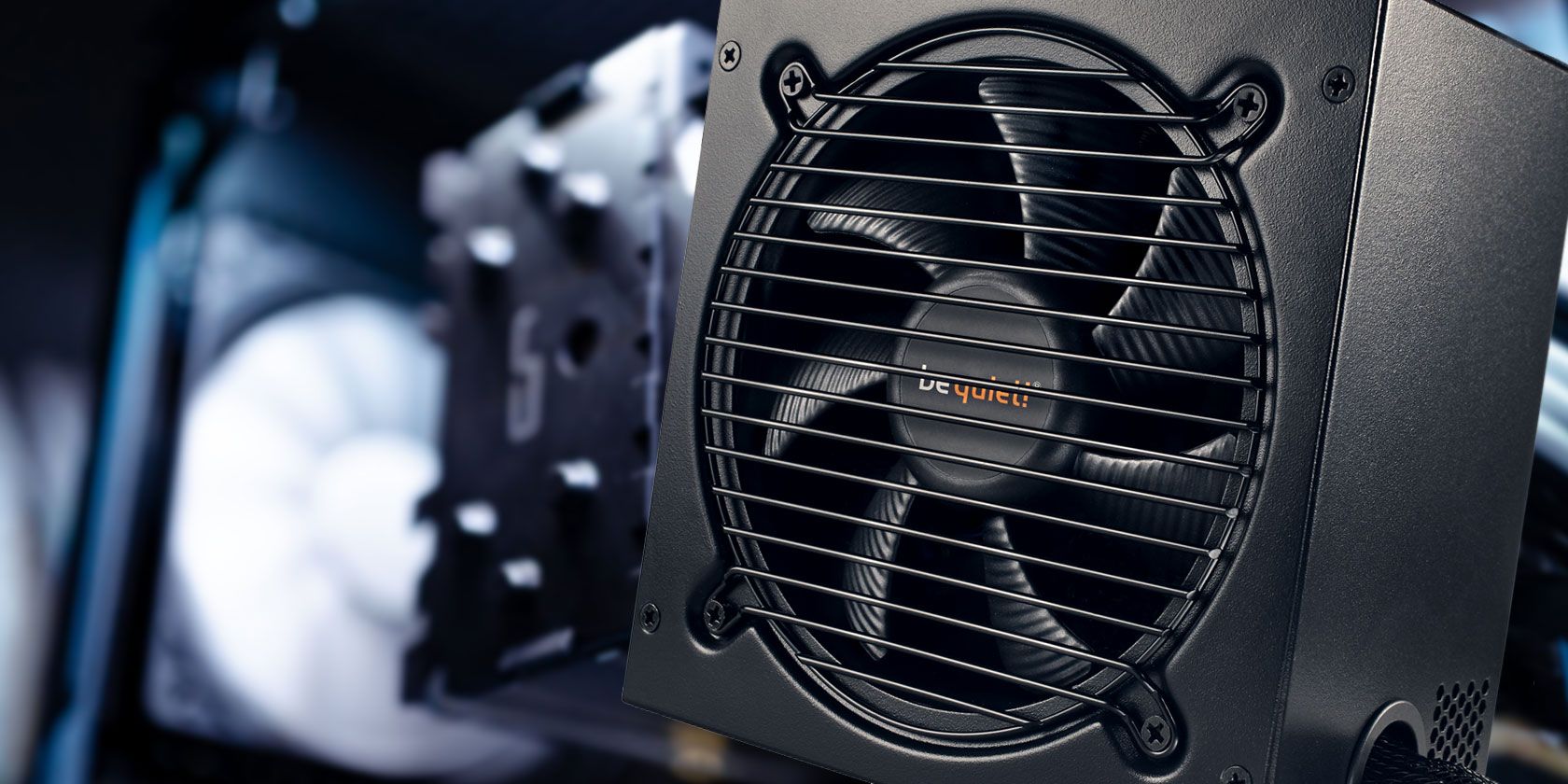
Users trying to build a silent PC should look for a quiet PSU, so they’re not disturbed by excessive fan noise. The be quiet! Pure Power 11 is a 600W power supply that has gold efficiency, modular cables, and quiet operation.
The PSU is optimized for low noise through its use of a silence-optimized be quiet! 120mm fan. This brand is well-known for its quiet fans and cases and has applied the same standards to its PSUs as well.
Another option for a supremely quiet build is a fanless power supply like the Seasonic Prime Titanium Fanless 600W. This is a passively cooled PSU, meaning that there are no spinning fans to make noise. Instead, it is designed to produce very little heat. This way, the heat it does produce can be removed using only the heatsink, so that the PSU does not require a fan.
You’ll also notice that Seasonic Prime Titanium PSU has perforated sides instead of solid metal, allowing even more heat dissipation. These PSUs are rather more technically complex to design and build than PSUs with fans, so they’re not cheap. But for your money, you’ll get a 600W, titanium certified PSU which should operate in almost perfect silence.
There’s a lot to consider when buying a PSU. Many first-time builders opt for a cheap power supply, but they later regret it when the component dies and maybe even takes other parts of their system with it. To avoid this situation, make sure you’re buying a decent quality power supply from a reputable brand.
Also, consider other features you might need. These include efficiency ratings, modular cables, and compact size. You can also look into options for keeping your PSU quiet, like good quality fans, a silent operation mode under low load, or even a fanless PSU.
To learn more about picking the right power supply for your build, see our guide to the things you should know when buying a power supply unit.
Read the full article: The 8 Best PSUs for PC Builders in 2019
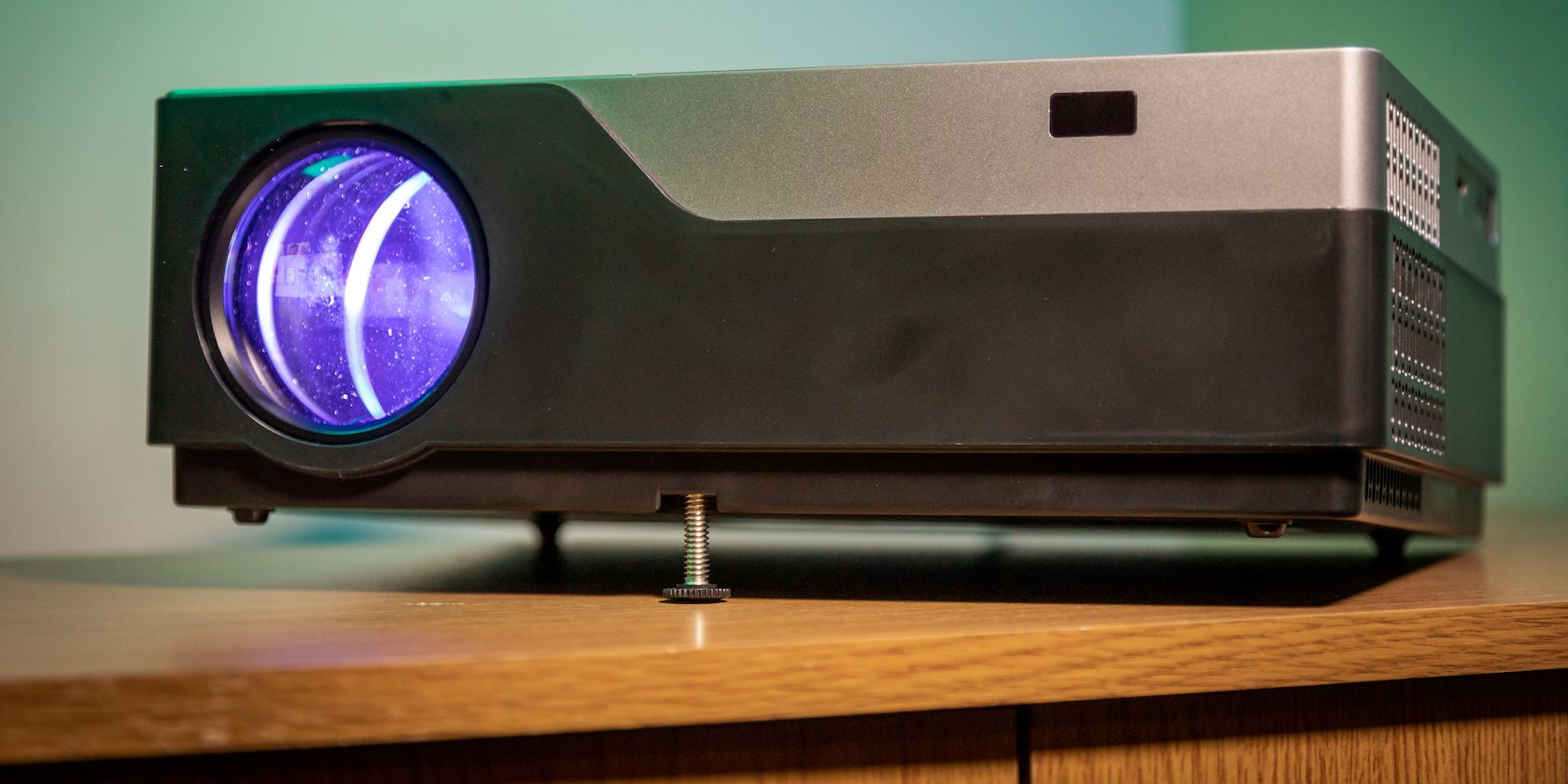
Vankyo may not be the first name you think of when it comes to high-performance projectors, but the V600 is a very solid performer for a reasonable price. This projector is bright and produces a very sharp image at a native full HD, 1080P resolution. It makes some sacrifices to meet this price point–but are they enough to stop you buying this projector? Read on to find out.
If you’d like to build your own home-cinema, then don’t forget to enter our giveaway contest at the end of this review, where we are giving away a Vankyo V600 performance projector.

The Vankyo V600 is a “performance” projector. In theory, this should set it apart from other projectors in its image quality, brightness, and feature set. Performance and budget don’t often work well together, but the V600 retails for $249.99. For this modest price you get:
While it’s not 4K, the native 1080P resolution is excellent. It’s better to have a good 1080P resolution than a sub-standard 4K resolution. The 6,000:1 contrast ratio is excellent, as is the 300-inch maximum screen size. The maximum brightness of 5,500 lumens is outstanding, and many projectors such as the BenQ TK800 struggle to match this at six times the price.
But take that figure with a grain of salt. The gold standard of projector brightness is ANSI lumens. These set the benchmark of how to measure projector brightness, and ensure that every manufacturer is measuring output brightness by the same standards. Projectors that do not quote ANSI lumens are free to measure brightness any way they choose, including in ways favorable to their cause. We suspect that the Vankyo is taking liberties with these brightness measurements, given they are not quoted in ANSI lumens.

That said, the V600 is brilliantly bright, and you won’t be disappointed with its output level, even if it doesn’t match up to its quoted figures. Thanks to the LED bulb you can expect to achieve more than 50,000 hours of use.
The built-in speaker delivers average sound quality. There’s only one, so it’s not capable of reproducing stereo audio, and as it operates at 5 Watts, it can only just rise above the projector fan speed. Despite this, you don’t buy projectors for their sound quality, and so this tiny speaker is more than adequate to handle basic audio duties in an emergency. Any serious media consumers should consider purchasing an external audio system to pair with this projector.

The choice of I/O on this projector is confusing. There are two full-size HDMI inputs (no mention of their HDCP status), one VGA input for those still running computers with analog outputs, and an AV input if you want to connect an ancient video camera. While more ports are always better, you can’t help but wonder if Vankyo is recycling old parts to save money.
The MicroSD and USB inputs are welcome additions, but these are not as useable as you’d think. It’s possible to play media off an external drive, but you may become frustrated by the limitations. You need to format your drives in a very specific format (we had success with NTFS). After this, only certain video formats will play at all. We’re not sure on the definitive list of what is and is not supported, but some modern codecs will refuse to play. Any media player should be able to handle a variety of formats, and this projector falls short here.

The V600 measures roughly 11.8 x 9 x 4 inches (30 x 23 x 10 cm). The cooling system is excellent at maintaining a steady operating temperature, but it does produce a lot of excessive noise. This isn’t unusual for a projector, but it will drown out the built-in speaker. The front contains a small adjustable foot to fine-tune the projector height, and on the top, you’ll find a series of buttons to control the projector, alongside the included remote control. You’ll need to supply your own batteries, however. The manual focus ring is smooth and offers plenty of room for fine-tuning the focus. You have to unwind the focus to use the included lens cap, however, which is frustrating if you don’t often move the projector.

The V600 is easy to use, but the software interface is basic. It looks dated, and as discussed above, is incapable of playing many types of video. A healthy amount of vertical keystone can be corrected, and this projector provides settings for both rear and upside-down installation options. You can adjust the color temperature, keystone correction, brightness, power-up options, and more from the simple (but ancient-looking) menu. Choosing different input sources happens through a secondary source menu, which lets you choose inputs quickly.

Various buttons on the top of the unit allow navigate menus easy enough, but outside of this their use is limited. For example, there’s no way to play or pause a video. To use this projector in any capacity, you have to use the included remote control. Quite why so many buttons are present, yet such limited control is possible from the projector itself is baffling, but the controller is easy enough to use and has a reasonable range.
This projector is unbelievably bright. Thanks to the LED bulb, it is outstanding. It can project a bright and clear image with lights on or ambient daylight filtering into the room, although like any projector it will suffer significantly when competing with bright sunlight streaming into your room or directly in the path of the beam. Colors look bright and vivid, even when projecting onto a plain white wall instead of a dedicated projector screen.

The image quality is outstanding, especially when you consider the price. This projector blows away the competition at this price, especially when compared to any travel projector or budget models. Image quality is the main feature of any projector and the V600 is worthy of its performance moniker.

Films look stunning, and video games benefit from the super immersive experience offered by this projector. While I don’t have space to project a 300-inch image (which requires a throw distance of around 32 feet), I did experiment with several smaller screen sizes. While the brightness does reduce slightly at the large end of these screen sizes, it’s more than useable at any sensible screen size (that is, screens less than 100 inches diagonal).
This projector is quite simply stunning. Its insane output level and stunning image quality place it in a class of its own, and it far exceeds expectations for a budget projector. It represents outstanding value for money.

While the software interface is clunky and limited at times, the core feature of image quality blows away the competition. We can highly recommend this projector, but it’s not for everyone—and that’s ok.
If you’re looking for a portable projector, or one with a little more attention to detail (such as the software interface, or the lens cap), then this projector isn’t for you. Equally, if you must have extensive software control options, or you need to use a variety of different media formats or USB drives, then you may want to skip this model.

If you’re looking for a stunning projector without too many bells and whistles to distract from the image quality, then the V600 performance projector is perfect for you. It can get the job done for a very respectable $249.99. If you need something portable, then take a look at the Nebula Capsule 2. While it can’t compete with the V600, it is smaller and comes with a built-in battery.
If you’d like to own a Vankyo V600 projector, but can’t afford the modest $249.99, then make sure you enter our giveaway contest below for a chance to win one.
Read the full article: Vankyo V600: Budget Priced Projector That’s Brilliant and Bright

Telegram is well known for its privacy features, bots, and community building. However, its user interface leaves a lot to be desired. Luckily, there are plenty of Telegram desktop client apps you can use instead.
In this article we list the best Telegram desktop client apps for Windows, macOS, and Linux. All of which are solid Telegram alternatives.
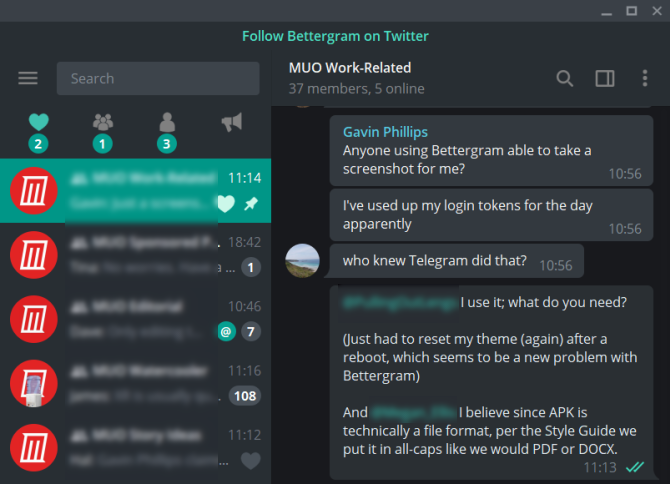
Bettergram is one of the most popular third-party Telegram desktop clients. It is easy to see why, too. First up, you can use Bettergram on Windows, macOS, and Linux.
The cross-platform option is handy when so many Telegram desktop client alternatives focus on a single platform. Telegram’s cross-platform compatability is just one of the reasons Telegram is the only messaging app you need.
Bettergram addresses some of the major issues holding the official Telegram app back. Namely:
Bettergram is open source and available on GitHub, meaning you can check out the code to make sure it is secure. However, this leads to the major downside of Bettergram: development stopped in 2018.
The pinned message on the official Bettergram Telegram channel states, “We have paused the development for all platforms at the moment. We will write here when we resume it.” Hopefully development will resume soon, including the now-defunct Android and iOS apps.
Download: Bettergram for Windows | macOS | Linux
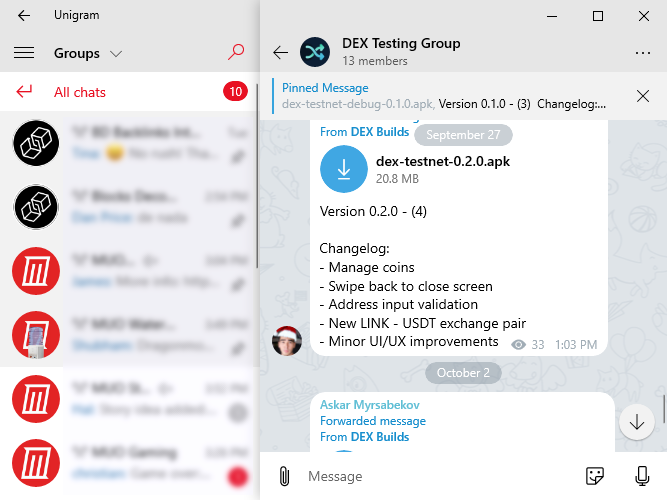
Next up is the Windows 10-only Telegram desktop client alternative, Unigram.
Unigram introduces a few quality-of-life options that make it easier for Telegram users. For instance, you can use the F1 to F5 keys to display different chat groups. Selecting F1 switches to All Chats, F2 switches to User Chats, F3 switches to Bots, and so on. F6 shows your unread chats. It also offers multi-account support.
Unigram integrates nicely with Windows 10, including the Windows 10 People desktop integration. Windows 10 People allows you to add a personal contact to your taskbar and chat to them from there, rather than opening the full application.
The chat switching options are handy, and the Windows 10 integrations are useful. But Unigram doesn’t add heaps of additional functionality to Telegram.
Download: Unigram for Windows 10 (Free)
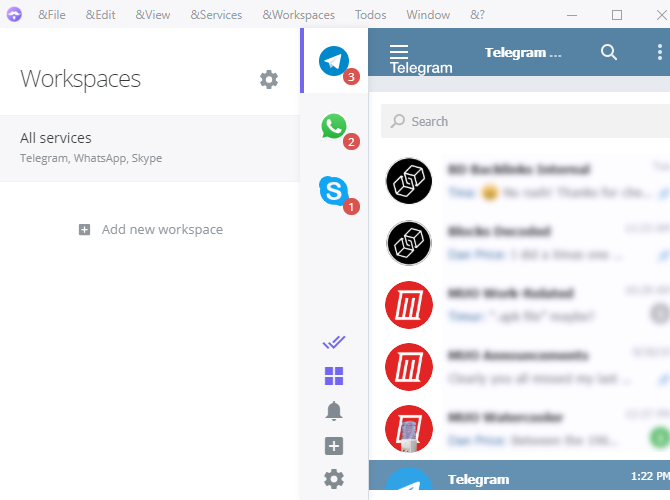
Ferdi is a different take on Telegram desktop client alternatives. Instead of a single Telegram replacement, Ferdi is a messaging browser application. You can concentrate all of your messaging applications in a single messaging browser, instead of having numerous taskbar and system tray icons.
One of Ferdi’s best features is separated workspaces. You can use the workspaces feature to group together personal, business, and other workspaces across multiple messengers.
For instance, if you have a bunch of cryptocurrency-focused Telegram and Slack channels, bunch them up into a specific workspace. Family and friend chats? Do the same. It is easy to add additional messenger services, too, including Facebook Messenger, Slack, WhatsApp, Gmail, and more.
That said, for all of Ferdi’s additional messenger functionality, it doesn’t necessarily extend the functionality of the Telegram desktop client. That isn’t a slight on Ferdi, just a fact.
Ferdi is open source and available on GitHub as a hard fork of the now-defunct Franz messaging browser. It is available for Windows, macOS, and Linux, but there are no mobile apps. It’s handy bringing all of your communications into one app, so here are some more multi-messenger apps for Windows, macOS, and Linux.
Download: Ferdi for Windows | macOS | Linux App Image | Linux (.deb)
Webogram isn’t strictly a Telegram desktop client alternative. It is the regular Telegram client accessed through your browser.
The app itself doesn’t offer any extension on the base Telegram client options. It is, however, a handy extra option for accessing Telegram on the go. Using Webogram allows you a standard Telegram experience no matter the host operating system.

Your final third-party Telegram client for consideration is Station, another combination messenger app. Like Ferdi, Station brings your messenger applications all under one roof, including Telegram. Station also includes a host of productivity, search, and account management tools.
For example, you can use Station’s Quick-Switch to search through your documents and chats rapidly. It has a Smart Dock to keep track of your frequent chats and tabs, and we really like the single Do Not Disturb button that makes the entire app silent with a single click. Station also has integrations for over 650 apps so that you can tailor the workspace to your requirements.
Station doesn’t extend Telegram’s functionality specifically. Overall, Station is a slick multi-messenger application with bundles of options. In that, it doesn’t necessarily matter that Telegram isn’t the sole focus of its productivity and search tools, because they integrate well regardless.
Download: Station for Windows | macOS | Linux
One of the biggest reasons to use a third-party is to add additional functionality missing from Telegram. Some third-party Telegram apps expand the base options to turn Telegram into a more rounded chat client.
For many Telegram users, the simple addition of more chat pins would make a massive amount of difference, hence why Bettergram remains so popular despite development ceasing in late-2018.
Multi-messenger applications such as Ferdi and Station provide an extra option for Telegram users. Combining multiple chat applications into a single app isn’t new (think Pidgin or Trillian), but both of these options come with a range of extra tools. In particular, Station’s search and productivity tools give Telegram users a lot of new options.
It isn’t all clean sailing, though. The Telegram client is secure. Using a third-party Telegram client adds another potential security vulnerability, as you are relying on the third-party client developer to maintain security and privacy features. If they fail, your privacy could disappear with it.
Is Telegram your go-to chat app? Then you should know all about these awesome Telegram features you should be using.
Read the full article: The 5 Best Telegram Desktop Client Apps

Over the past few years, Amazon has been manufacturing an increasingly impressive range of entertainment devices. It doesn’t matter whether you want to watch movies, read books, or browse the web; the company has something to meet your needs.
Here are the seven best Amazon entertainment devices available right now.
The best Amazon Kindle device is the all-new Kindle Oasis. It was released in July 2019. Indeed, the Oasis is probably the best eReader available from any manufacturer. It has a seven-inch display with a resolution of 300 pixels per inch (PPI), e-ink technology, and physical page turn buttons.
The latest model also has an adaptable backlight; you can make it display warmer colors for reading in bed or late at night. Finally, the Oasis is waterproof. You can read your ebooks in the bath without worrying. The device has an IPX8 rating, meaning it can withstand two meters of water for one hour.
The Amazon Fire HD Tablet 10 received an upgrade in October 2019. The new release is 30 percent faster than its predecessor. The tablet comes with a 10.1-inch screen, 1080p resolution, a 2.0 GHz octa-core processor, and 2GB of RAM. It has a front and rear camera, both of which can take 2MP photos. The tablet supports Amazon’s digital assistant Alexa too.
You can pick up the Amazon Fire HD Tablet 10 in either a 32GB or 64GB version. You’ll also need to decide whether you’re willing to pay a little extra to remove Amazon’s “special offers” (i.e. ads) from the lock screen. The device’s battery lasts for 12 hours. You need to use a USB-C cable to recharge it.
The Amazon Echo is a smart speaker with integrated Alexa capabilities. You can use an Echo to play music from all the mainstream music streaming services. However, thanks to Alexa, you can also set timers and alarms, create reminders, listen to the news and weather, add events to your calendar, make phone calls, and a whole lot more.
An Amazon Echo speaker will work as a voice-controlled standalone device, but you can hook it up to your other speakers using a 3.5mm stereo cable. You can also connect to the speaker using Bluetooth.
Under the hood, the Echo has an array of seven microphones, a 2.5-inch woofer, and a 0.6-inch tweeter. There are physical control buttons on the top of the speaker for the times when you cannot use your voice.
If you want to add streaming capabilities to your TV, you will struggle to find a better device than the Amazon Fire TV Stick 4K. Unlike a Google Chromecast, it has a user interface for easy navigation. There’s also support for Alexa, streaming at 60FPS, HDR 10+ video, Dolby Atmos audio, a quad-core processor, and 8GB of storage.
And remember, although it doesn’t look like it, the Fire TV operating system is a highly modified version of Android TV. That means you can sideload any app from the Google Play Store and it will work, even if there’s not an official version in Amazon’s own app store.
The new Echo Show 8 is a screen to accompany Alexa. Providing Alexa with a display adds a new dimension to the personal assistant’s capabilities. For instance, you can use it to watch content from Amazon Prime Video and catch up on movie trailers. More impressively, however, if you have multiple Echo Show devices in your home, you can make video calls between them. You could even use the device as a digital photo frame.
An Echo Show also provides you with more control over your smart home devices. You can see real-time feedback—such as the temperature or live security camera footage—and thus make more informed decisions about your systems.
The Amazon Fire TV Stick is a superb device for adding extra functionality to your television. But, if you really want to take your cord-cutting to the next level, you need a Fire TV Cube. The latest version of the device was released in October 2019. Like the Amazon Fire HD Tablet 10, it brings notable improvements over the previous version.
From a usability standpoint, the big difference between the Fire TV Stick and the Cube is the far-field voice control; you can control your TV using any Alexa device in your home. Similarly, you can use the Cube to control your Alexa devices in other rooms. Specs-wise, there’s a built-in speaker, a hexa-core processor, and 16GB of storage.
Amazon’s Echo Dot has been available for a few years as a smaller, less powerful version of the main Echo speaker. More recently, however, Amazon has also unveiled the Echo Dot Kids Edition. As you’d expect, it comes with some specific features so parents can have peace of mind. For example, kids can only call pre-approved family and friends, and parents can set daily usage limits and review all their kids’ activity. Alexa will also automatically filter profanities and explicit versions of songs.
The Echo Dot Kids Edition speakers come with a 12-month subscription to FreeTime. This service provides children with access to thousands of kids’ books, movies, TV shows, educational apps, and games. The regular price is $2.99/month. The Echo Dot Kids Edition is available in two colors—blue and “rainbow.”
The seven devices we’ve looked at in this article are the best Amazon entertainment devices across a number of categories. But, Amazon makes dozens of different devices that didn’t make our list. For people operating within different budgets and with different usage requirements, some of them might be more suitable than our picks. Make sure you check out all the options before you make your decision.
Amazon also produces its own range of affordable electronics, known as AmazonBasics. If you’re interested, check out our list of the best AmazonBasics products available today.
Read the full article: The 7 Best Amazon Entertainment Devices for Your Home

We’ve written about how to remove yourself off social media and the draining effects of constant social media use, but that doesn’t mean social media as a whole lacks value.
This guide is aimed at those who still wish to keep social media in their lives while managing their time and energy better. From apps that help direct your time to following healthier social media content, we have a few tricks to keep you positive and ready for every day.

While other ideas on this list will be about finding specific means to limit social media use, the best tip is often to take a day off of social media. Whether once a week or once a month, putting aside time where you don’t even check social media helps keep you from becoming dependent.
Few strategies work as well as time off, as your need for constant interaction and gratification will wane. And if you’re feeling a bit daring, even try daily downtime after a certain hour. It turns out, the more time you have before bed away from a bright screen, the easier it is to sleep!
Check out our article on how to do a social media detox.

If you find your eyes are glued to your phone for hours on end, perhaps add a few hobbies to your daily routine.
From books to more social outings, each activity that you add to your metaphorical plate is time away from your phone. There is nothing more exciting than finding a new passion, such as bowling or fishing!
And if this wasn’t already obvious, try to keep your attention on your friends instead of your phone when hanging out. Not only will your time be better rewarded, but your friends will respect the time set aside for them.


One of the best recent features in iOS 12 is Screen Time. Found under the Settings app, Screen Time touts two major social media usages: Tracking and Limiting.
Each day (or week), you can get notifications that give you an average on the amount of time you’ve spent on your screen. This is great for those who aren’t looking for total social media limitations but instead want to see how much time they are spending as a whole.
On the other side, the App Limits feature is a blessing for those who aren’t able to put down social media. Each day you allot how much time you want to spend on social media or other apps. After that time is reached, it’s game over.
Tired of seeing everyone around you living a life you wanted? Well, it turns out that most people only show their best selves on social media. A healthy alternative is to find content that is both enjoyable and uplifting. We see enough chaos in the world around us, wouldn’t a few more lighthearted accounts be a better follow?
Great examples of enjoyable content would be funny and cute images, such as the cutest animals on Instagram. Sometimes the best medicine is a smile that gets you away from the stress of how “perfect” everyone looks on social media. Content that fulfills is more beneficial than content that teaches us to envy.
Following enjoyable and honest content is much healthier for your brain. If your off time is spent doing something you find yourself coming back to, why not make it a positive experience?
The second type of positive content to follow is that of honest content. Are you following workout professionals? Find ones that show you realistic bodies—how they look after eating, not flexing, etc. Following millionaires? Start to follow a few humble people who talk about their struggles and hopes equally.
If we idolize those with millions of follows, we really are only seeing a small piece of their lives and saying: “Yes this is a perfect life.” By allowing our social media feed to be lightened and full of honest individuals who enjoy life, you allow yourself to be part of an honest experience.

It is ridiculously easy to get trapped into wanting the most activity on your social media. From Instagram to Facebook, getting someone to like or comment on your photo releases endorphins through your brain. We get excited at the thought of someone else liking or following us. It becomes a drug.
A solution to that is to either turn off notifications or better yet, stop caring about the numbers. The number of friends or followers on your account should never be more important than your actual life—once you realize this and run away from the instant gratification, you’re a step towards better social media usage.
In fact, there is nothing wrong with wanting to make your Instagram stories more popular—as long as you don’t become obsessed. Enjoying the beauty and fun of social media without worrying about your “rank” is a relief.

Setting up a prize system might make you feel like a pet, but it actually works. A great method to use is that of rewarding positive behaviors: complete items on your to-do list that have been pushed off, and then you can browse social media. It becomes a game. Do the dishes, add 3 minutes to your social media time. Each opportunity and social media craving will link back to productive work ethics. Once you’ve hit your stride, lessen the amount of time each task rewards.
Constant consumption of social media is unhealthy, regardless of the person. Whether you try one or all of our tricks, make sure to stay positive and keep a strong mental image of yourself.
Still on the line as to whether social media needs to be cut out of your life? Then check out our article on the positive effects of social media.
Read the full article: 7 Tips to Help You Waste Less Time on Social Media
