Thousands of employees around the world took part in the massive walkout last November to protest how Google handles sexual harassment and misconduct allegations. They asked the company to implement several measures against harassment and discrimination, including an end to forced arbitration, a publicly disclosed sexual harassment transparency report and a safe and anonymous process to report sexual misconduct.
Over the past year, Google employees have also protested Project Dragonfly, the company’s censored search engine for China, and its contract with the Pentagon for the use of its AI tech to analyze drone videos. Google announced in June it would not renew the contract.
Whittaker, who is co-director of AI Now, an ethics committee affiliated with New York University, tweeted at the time that she was “incredibly happy about this decision, and have a deep respect for the many people who worked and risked to make it happen. Google should not be in the business of war.”
AllBright, the London-based women’s membership club backed by private real estate investment firm Cain International, has raised $18.8 million to expand into the U.S.
The company’s new round was led by Cain International and was designed to take AllBright into three U.S. locations — Los Angeles, New York, and Washington.
The company said that the new facilities would be opening in the coming months.
Coupled with the launch of a new networking application called AllBright Connect and the company’s AllBright Magazine, the women’s networking organization is on a full-on media blitz.
Other investors in the round include Allan Leighton, who serves as the company’s non-executive chairman; Gail Mandel, who acquired Love Home Swap (a company founded by AllBright’s co-founder Debbie Wosskow); Stephanie Daily Smith, a former finance director to Hillary Clinton; and Darren Throop the founder, president and chief executive of Entertainment One.
A spokesperson for the company said that the new financing would value the company at roughly $100 million.
The club’s current members include actors, members of the House of Lords, and other fancy pants, high-falutin folks from the worlds of politics, business, and entertainment.
The club’s first American location will be in West Hollywood, and is slated to open in September 2019. The largest club, in Mayfair has five floors boasts over 12,000 square feet and features rooftop terraces, a dedicated space for coaching and mentoring a small restaurant and bar.
Is Facebook preparing to launch a serious competitor to TikTok? If so, the company just picked up some key talent to make that happen. Last week, Facebook announced plans for a new division, called the NPE Team, which will build experimental consumer-focused apps where it will try different ideas and features, then see how people react. Now, Facebook has picked up former Vine GM Jason Toff to join the NPE team as a Product Management Director.
Now that we've moved to CA, I suppose it's a good time to share what I'm up to next! In two weeks, I'll be joining Facebook as a PM Director starting up a new initiative under the recently formed NPE team (https://t.co/HzK6Bjqzqx)
Toff’s experience also includes time spent at Google, most notably as a Product Lead for YouTube before exiting to Vine in 2014. At the short-form video app maker, Toff worked as Head of Product for a year, then became Vine’s General Manager.
Vine, of course, was later snatched up by Twitter — and there, Toff moved up to Director of Product Management before boomeranging back to Google, where his initial focus was on AR and VR projects.
Most recently, Toff worked as a Partner at Google’s Area 120, Google’s in-house incubator where employees work on experimental projects.
That’s not all that different from what Facebook appears to have in store with its own NPE Team ambitions. Similar to Area 120 or Microsoft Garage, for example, the NPE Team plans to deliver apps that will “change very rapidly” in response to consumer feedback. It will also be quick to close down experiments that aren’t useful to people in fairly short order.
Many of these efforts were fairly high-profile at launch, which made their eventual shut down more problematic for Facebook’s image. With NPE Team — as with Area 120 or Microsoft Garage — there’s a layer of separation between the test apps and the larger company. Many of the apps that the NPE Team puts out will bomb, and that’s the point — it wants to get the failures out of the way faster so others can find success.
While Toff can’t yet say what he’ll be working on at Facebook, there’s a lot of speculation that NPE Team will try to come up with some sort of answer to TikTok, the Beijing-based short-form video app that sucked up Musical.ly in 2018 and now is a Gen Z social networking hit with some 500 million-plus monthly users. Toff’s background with Vine could certainly be helpful if that were the case.
Toff says he’s hiring for NPE Team, including both UX designers and engineers.
I can't talk project specifics but can share that I'll be HIRING. I'm looking to assemble a diverse and mighty 2-pizza dream team full of creative can-doers, so if you're a UX designer or engineer (or both) and thrive in zero-to-one environments, HMU!
When you’re searching for a lightweight Linux desktop environment to speed up your PC, one name is beginning to pop up more often. LXQt is the spiritual successor to LXDE, an interface using so few resources it makes a Raspberry Pi feel like a full-featured PC. What is LXQt, and what makes it different?
What Is LXQt? A Linux Desktop Environment
A desktop environment is what you see on your screen. It’s the panel across the bottom. It’s what arranges your apps into windows and lets you move them around.
Windows and macOS each come with one desktop environment. On Linux, there are many. You can completely alter how your desktop looks and feels while still using the same apps, the same background libraries, and the same Linux kernel underneath.
Most Linux-based operating systems choose a desktop environment to use by default (some let you pick your favorite, while others don’t come with one at all). There’s a variant of Ubuntu, the most popular version of desktop Linux, called Lubuntu that provides LXQt. There’s also a LXQt edition of Fedora.
If you use a different Linux-based OS, you will likely have to install LXQt yourself. Instructions are available on the LXQt website.
LXQt’s History
To understand the difference between LXDE and LXQt, we must first talk about toolkits. Toolkits provide a way to draw app interfaces in a consistent way. Without toolkits, developers would have to design and program toolbar buttons and drop-down menus from scratch for each app. In Linux, two toolkits dominate the landscape: GTK+ and Qt.
LXDE uses GTK+ 2, which is very old code. GTK+ 3 has been around since 2011. LXDE maintainer Hong Jen Yee took issue with some of the changes in GTK+ 3, so he released a port based on Qt in 2013. Shortly after, the Qt version of LXDE and a separate desktop interface known as Razor-qt merged to form LXQt. Hong Jen Yee planned to eventually focus his efforts on LXQt going forward. Since then, LXQt has formally become a separate project.
How LXQt Works
LXQt defaults to a layout familiar to anyone who has used Windows. An app launcher sits in the bottom left. A system tray sits in the bottom right. Open windows appear in a row between the two.
The app launcher contains the essentials and nothing more. Categories containing your installed apps appear at the top, then you have system preferences, user session controls, and a search bar.
The interface is highly configurable. You can change desktop, app, and icon themes. The panel can go to any side of the screen, and you can rearrange the elements however you like. There’s no reason to keep a Windows-like layout if that’s not your cup of sea.
LXQt refers to every component of the panel as a widget. Default widgets provide the ability to save favorite apps to the panel, switch between multiple workspaces, and hide windows to show the desktop. A few additional widgets come included, such as a CPU monitor and a color picker.
Part of LXQt’s appeal is the lack of dependencies (background services that must be installed for a program to run) and the use of interchangeable components. For example, LXQt uses the Openbox window manager. You can use any Openbox-compatible themes to change the look of your window titlebars. You can also tweak the order of buttons in the titlebar and which buttons appear.
In a way, LXQt takes its role as a desktop environment very literally. It manages the desktop. It is not trying to control the entirety of the experience from boot up to shut down. Linux is modular, and LXQt embraces this.
Downsides to LXQt
LXQt lacks some features you may expect from a modern desktop. By default, LXQt does not draw shadows around windows, nor are there animations for opening or maximizing windows. The animation for minimizing a window is present but somewhat choppy. You can change this by enabling or installing a separate compositor. Lubuntu provides one by default known as Compton X.
Recall the search bar in the app launcher? It’s very basic. You must search for an app’s exact name, not what it does. Don’t expect to find files and folders unless you install additional software, because such features can slow a desktop down.
LXQt also does very little hand holding. You are expected to know the names of apps and what they do. If you don’t, you will need to learn. The app launcher doesn’t tell you what is the preinstalled text editor, image viewer, or web browser. You will have to figure this out on your own.
That’s not to say that LXQt is hard to use. I don’t think so. But I also have a certain familiarity with how Linux desktops tend to work. If you know your way around Xfce or MATE, LXQt will take you only a few moments to figure out. Most things are where you expect them to be. The implementation is just different.
Who Should Use LXQt?
There are a few main reasons to consider LXQt:
LXQt is lightweight. If you want a simple desktop interface that uses relatively few system resources, put LXQt on your list.
LXQt is based on Qt. Frankly, there are aren’t that many desktop environments based on Qt compared to GTK+. If you prefer Qt apps but aren’t a fan of the KDE Plasma Desktop, LXQt is one of your few alternatives.
LXQt is modular. If you don’t want a desktop environment that tries to do all the things, then LXQt may make you smile.
LXQt doesn’t get as much attention as other desktop environments. That doesn’t mean it isn’t just as good. But if you want to get an idea what other options are available to you, here are over a dozen of the most lightweight Linux distributions you can find.
The Raspberry Pi isn’t just for DIY projects. You can use it as a desktop computer or send it into space. It can be configured as an inspiring digital picture frame, or even a smart mirror.
But did you know that the credit card-sized computer will also run games? We’re not talking about emulation here; actual games can be installed on the Raspberry Pi.
Install Games on Your Raspberry Pi
The Raspberry Pi is incredibly useful and versatile. It will even run retro games in emulators for many classic platforms. But if you don’t want to mess around with emulators, retro gaming on the Raspberry Pi is possible.
The developers of the following games have all released them for community use. Some are the originals, others are clones, but you can run them all on a Raspberry Pi. We recommend a Raspberry Pi 3 or later, although some may run on a Pi 2.
1. Doom
You can install 1993’s Doom on your Raspberry Pi. Above you can see it running on a Raspberry Pi 2 mounted on an official Raspberry Pi 7-inch Touchscreen Display.
Doom is one of many games with publicly available source code for fans to reuse. The source code has been ported to Linux and ARM devices since being released in 1997.
You can enjoy single-player games and Deathmatch, just like the old days. However, this may differ depending on which version of Doom you install. Several are available for the Raspberry Pi. Get started with our guide to installing Doom on the Raspberry Pi.
2. Duke Nukem 3D
“It’s time to kick ass and chew bubble gum… and I’m all outta bubble gum!”
So declared the eponymous hero of the slightly adult-oriented Duke Nukem 3D back in 1996. A release of the source for the game in the late 1990s allowed the game to run on non-Windows platforms. This included AmigaOS as well as Linux.
Although you could play Duke Nukem 3D in an emulator, this isn’t necessary. Just grab the EDUKE_32 software (released as a semi-official branch of the game in 2000) and follow the full steps for installation.
3. Beneath a Steel Sky
Set in a futuristic Australian dystopian future (like Mad Max but with cities), Beneath a Steel Sky is a point-and-click adventure. While rare these days, back in the 1990s this was a popular approach to the story-focused adventure game.
Beneath a Steel Sky was collaboration between video game designer Charles Cecil and British comic book legend Dave Gibbon. The game’s serious tone (save Union City, and ultimately overcome the ecological disaster) is mixed with some off-the-cuff humor.
Installing Beneath a Steel Sky on the Raspberry Pi is straightforward. However, it is advisable to run the game from the desktop, rather than the command line. A bug in some versions make it impossible to restart your computer otherwise.
Beneath a Steel Sky runs on modern computers thanks to the ScummVM. You can install it on your Pi with:
sudo apt install beneath-a-steel-sky
Note that this will also include the ScummVM (Script Creation Utility for Maniac Mansion Virtual Machine) game engine. Happily, other ScummVM titles will run on the Raspberry Pi too, such as Flight of the Amazon Queen. Find them at ScummVM’s website.
4. Wolfenstein 3D
In the days before Doom, id Software released Wolfenstein 3D, a Nazi/World War II-themed castle-based shooter. You may have played one of its sequels, Return to Castle Wolfenstein or Wolfenstein: The New Order.
Following its 1992 release, the game’s source code was released in 1995. Eventually, a port was developed, Wolf4SDL, which you can now install on the Raspberry Pi. As with some of the other games in this list, Wolfenstein 3D will run under the RetroPie games emulator. But why would you bother with the additional resource overhead of an emulator when you can just install it directly?
As with any software that needs compiling, Wolfenstein 3D will take a while to prepare on your Raspberry Pi. Once done, however, you’ll be ready to start blasting Nazis and uncover their terrible secrets in the maze-like castle.
5. Quake III
The third installment of the Quake series is the most exciting and it runs on your Raspberry Pi!
Using the ioquake3 source code, this runs better on a Raspberry Pi 3 than on the previous model. However, it should even run on the Raspberry Pi Zero, although it can be slow to install, so remain patient.
As with its previous games, id Software released the source code for Quake III Arena in 2005. Not only has this led to the ioquake3 port, but also to various standalone games. Will these work on the Raspberry Pi? Well, OpenArena certainly will.
One of the greatest Star Wars games of all time was Jedi Outcast, in which you guide lapsed Jedi Kyle Katarn through a series of missions. Originally released in 2002, the source code was briefly released in 2013. During this time, an open source fork, OpenJK, launched and was ported to Linux and macOS.
Getting the game running on the Raspberry Pi is reasonably straightforward, and within a few minutes you’ll be engaged in force-pushing, saber-throwing, space-based dueling action.
I’m a huge fan of the original Turrican, first released back in 1990 on the Commodore 64 and Amiga computers. While both machines can be emulated on the Raspberry Pi, you can try the freeware clone Hurrican.
Featuring beautiful new graphics, Hurrican is the most successful fan-produced clone of the game, coming second in the 2008 Indie Game Showcase. Source code for Hurrican was released in 2012, leading to ports to other platforms. You can find instructions and a download link at MisApuntesDe.
8. PiFox
It’s Star Fox! On the Raspberry Pi! One of the most awesome space adventure games of all time can be installed on the Pi… well, a clone of it, at least.
Developed by first-year students at Imperial College, London, this faithful recreation even features filled 3D polygon graphics like the original 1993 SNES game. For the technical among you, PiFox is written in 5,900 lines of assembly language, and you’ll find the data available to download at GitHub. You’ll also find instructions for wiring a Super Nintendo controller to the Raspberry Pi’s GPIO.
9. Overlord
One other Raspberry Pi-compatible game to consider should look at is Overlord. A game inspired by classic space shooters, it was originally released on the Acorn Archimedes back in the 1990s. To run Overlord on a Raspberry Pi, you’ll need to RISC OS instead of Raspbian.
While it looks different to the latest Civilization game, FreeCiv is an open-source clone compatible with the Raspberry Pi.
Simply use this command to install it:
sudo apt install freeciv-client-sdl
First released in 1996, FreeCiv is available on every desktop operating system you can think of. The game experience is the closest you’ll get to Civilization II without playing the original. While the original is considered iconic, FreeCiv has developed some strong variations from the source material over the years.
FreeCiv even has multiplayer support. Imagine that: multiplayer Civ-style action on a Raspberry Pi!
11. Micropolis
Originally designed by the legendary Will Wright, SimCity first came along in 1989. As such, there was no Linux version. Thanks to the SimHacker team, however, the game has been cloned for Linux, including ARM devices like the Raspberry Pi.
As you’ll see, Micropolis is largely indistinguishable from the very first SimCity, and certainly as playable.
You should find Micropolis in the default packages. Install it with:
These 11 Raspberry Pi games (and their various spin-offs and sequels) are just the tip of the iceberg. More importantly, they should prove that gaming on the Raspberry Pi is more than just a bit of retro action. You can truly game on a Raspberry Pi without the addition of emulators.
Getting stuck in a video game and having to figure out how to progress is a normal part of gaming. However, sometimes you’ll come up against a roadblock that totally stops your progress.
If you have reached wit’s end, a video game walkthrough can help you figure out how to progress. Here are the best sites for clear and helpful video game guides.
GameFAQs is a longtime resource for video game fans. In addition to user-submitted reviews, lists of cheat codes, and message boards, the site hosts walkthroughs for pretty much any game imaginable.
Simply search for the title you’re playing using the bar at the top to find its game page. Along the top, you’ll see several tabs, one of which is FAQs. There’s a good chance you’ll find at least one walkthrough for the game.
Most walkthroughs on the site are text-based full guides on how to complete the game. In addition, a lot of them contain explanations of basic mechanics, tips, and lists of secrets. This makes them useful even if you’re not stuck in a particular section of the game. For easy navigation, they often include a table of contents so you can use Ctrl + F to jump to where you are in the game.
For titles with multiple FAQs, you’ll see the most-recommended guides represented by a star next to their name. In addition to standard walkthroughs, many games have specialized FAQs. For example, Star Fox 64 has in-depth guides to earning a high score.
If you don’t mind the old-school text-based guides, you’ll see why GameFAQs is one of the most trusted sources for game guides.
In contrast to the above, GamePressure offers fully illustrated guides for modern titles. You can use the sidebar to jump across the guide’s sections to find just what you’re looking for.
For linear games, the walkthroughs contain a wealth of screenshots to help you make sure you’re on the right path. In open-world games like Assassin’s Creed, you’ll find an outline for the main story missions, in addition to maps of various locations and guides to sidequests. Considering how much content a game like Assassin’s Creed Odyssey has, the level of detail here is often staggering.
Whether you need help progressing through a specific chapter or want a handy list to make sure you’ve completed all the sidequests, you’ll find it on GamePressure. However, it’s limited to well-known modern games. Thus, you won’t find guides for retro titles or small-time indie games here.
Instead of user-submitted guides or ones provided by website staff, StrategyWiki uses a wiki format. This lets anyone with experience on a topic add information, which works well with game guides.
You’ll find guides for over 6,000 games across a variety of genres and systems. These tend to lean towards Nintendo titles, but you’ll find video game guides for other systems as well. Because of the open nature, not every guide is 100% complete. If you stumble upon an unfinished page for a game you like, why not contribute?
We particularly like this site for walkthroughs of visual novel games, such as Ace Attorney and Danganronpa. It makes the instructions clear for these titles, so it’s easy to see what to do next without revealing too far ahead.
As you’re probably aware, YouTube is home to heaps of gaming content, such as these channels for video game reviews. Walkthroughs and guides are no exception to this, making YouTube a great place to help you get through specific parts of a game. This is especially true if you’re more visual and struggle with text guides.
Chances are if you’re having trouble at a specific point in a game, you’ll find a YouTube video explaining the solution. Don’t see that particular section illustrated in a dedicated video? Look around for a Let’s Play or longplay video that covers it at some point.
After you’ve seen (and maybe even heard someone explain) how to get through what you’re stuck on, you should be in a better position to get past it. It shouldn’t take much searching if you’re playing a well-known game.
If you haven’t found the games you enjoy playing on any of the above sites, take a look at JayIsGames. Compared to the mainstream-focused resources above, this one features indie, mobile, and Flash games.
You’ll find hundreds of walkthroughs on its page for them, or by searching. Due to the nature of these titles, the quality and depth of the guides varies. But if you just can’t figure out something in a free online game, JayIsGames might provide you with the push you need.
If you like the wiki format offered by StrategyWiki but can’t find your game there, give IGN’s Wikis resource a try.
The most popular games (such as the Grand Theft Auto series, Minecraft, Skyrim, etc.) have loads of content to explore. You’ll find walkthroughs for quests, tips on getting started, interactive maps, list of weapons and vehicles, and much more.
Whether you need help on a particular mission or want to utilize the map to get all the collectibles, the resources at IGN Wikis should prove useful.
Don’t Forget About Google
You never know what corner of the web holds an answer to your gaming question. Depending on the game you’re playing, you might not be able to find a reliable walkthrough or a guide to the part that you’re stuck on. In those times, don’t limit yourself to only the above resources.
There are all sorts of other sites online that offer game guides and tips for specific sections. Googling “[game name] walkthrough” or your specific question could turn up answers on gaming forums like Reddit. Or try asking your question on Arqade, the Stack Exchange site for video game questions and answers.
Use Video Game Guides Wisely
With these sites in mind, you should never get stuck for too long in a game again. Beyond your initial playthrough, they’re also a great resource for discovering secrets and side content you may have missed the first time.
Used in moderation, game walkthroughs can help you out when you get stuck. They keep your game moving at a smooth pace. But you shouldn’t rely on them too much. Looking everything up spoils the experience of playing the game for yourself, so try to only consult a guide when you get really stuck.
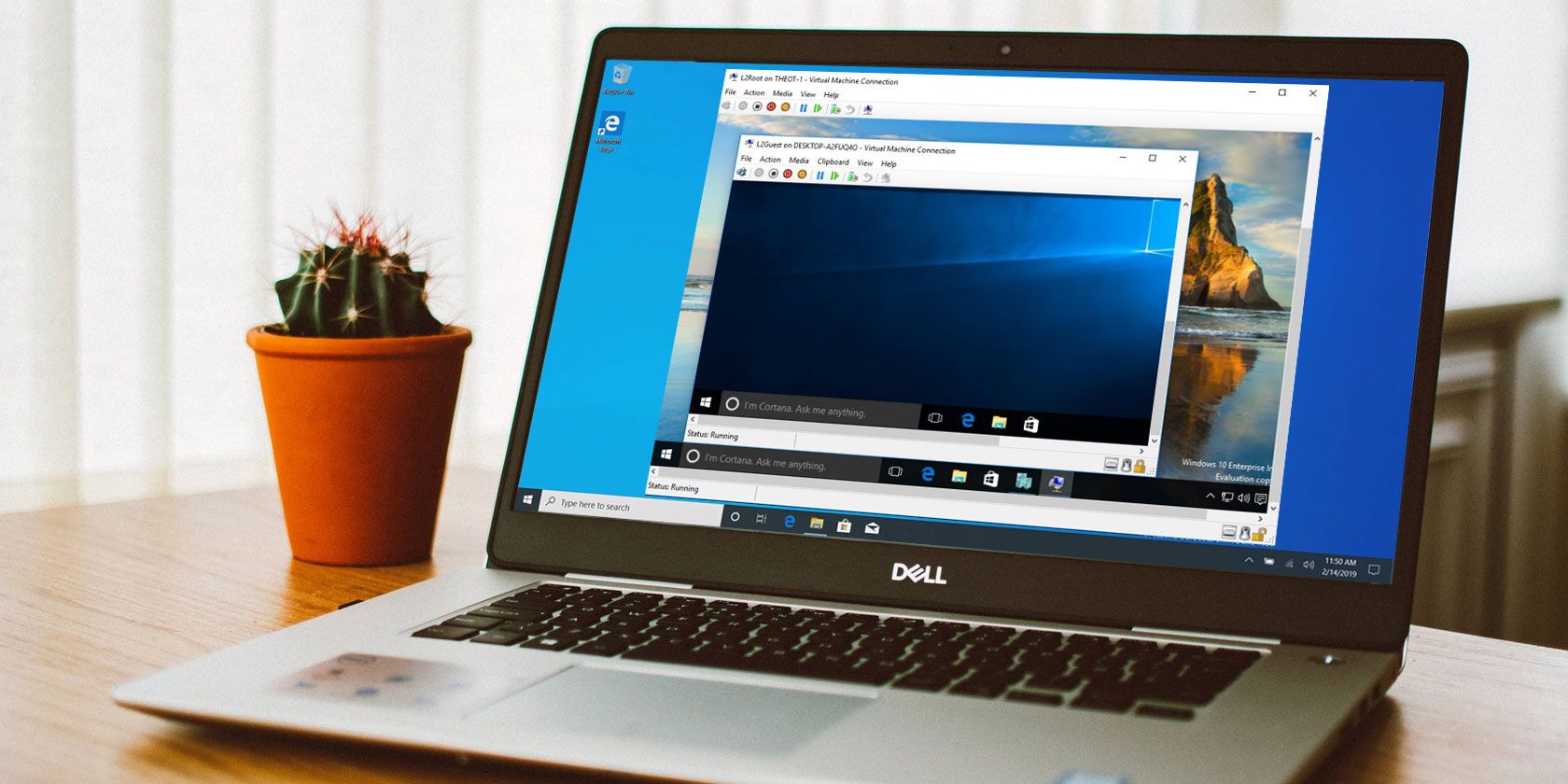
Did you know that Windows 10 has an integrated tool for creating virtual machines? Microsoft Hyper-V is a Windows native hypervisor. You can use Hyper-V to create virtual machines on Windows 10 Pro, Enterprise, and Education 64-bit editions, all without installing any third-party software.
Here’s how you create a virtual machine in Windows 10 using Hyper-V.
What Is Hyper-V?
Hyper-V was originally a Windows Server-only feature. However, it made the jump to Windows 10, bringing an integrated hypervisor to the Windows desktop. Hyper-V is only available on 64-bit versions of Windows. Furthermore, Hyper-V is not available on the Windows 10 Home edition (at least, not out of the box).
Hyper-V runs each virtual machine in an isolated environment. You can run more than one Hyper-V virtual machine concurrently, so long as your system hardware can cope with the demands. In that, you should check your system requirements before continuing with the tutorial.
You need at least 2GB RAM, if not more. Your CPU must support virtualization using either Intel VT-x or AMD-V. Unsure how to find that out?
Right-click the Taskbar and select Task Manager. Open the Performance tab. Under the graph, check the Virtualization status.
If it says Enabled, it means virtualization is currently switched on in your BIOS.
However, if you do not see the option, it means your CPU does not support virtualization.
How to Install Hyper-V on Windows 10
After turning on CPU virtualization, you need to install Hyper-V.
The easiest way to make sure Hyper-V installs correctly is using PowerShell. (What’s the difference between PowerShell and the Command Prompt?) There is also an option to install Hyper-V using Windows Features, but this doesn’t always work properly.
Type powershell in your Start Menu search bar, right-click the Best Match and select Run as Administrator. Now, input the following command:
After the command completes successfully, save any work you have open, then restart your system. Once your system reboots, you will find options for Hyper-V in the Start Menu.
How to Create a Virtual Machine Using Hyper-V on Windows 10
Type hyper v in your Start Menu search bar and select the Hyper-V Manager.
Under the Actions list, select New > Virtual Machine > Next.
Give your virtual machine a name, then select Next.
Choose Hyper-V Generation
Now you must choose the Hyper-V Generation for your virtual machine.
Generation 1 supports 32-bit and 64-bit guest operating systems, providing virtual hardware compatible with previous Hyper-V versions.
Generation 2 supports 64-bit guest operating systems only, has UEFI-based firmware, and other newer virtualization features.
If you’re attempting to use a 32-bit operating system, choose Generation 1. Similarly, if you are considering moving the virtual machine to a different host machine, choose Generation 1. Otherwise, choose Generation 2.
Generation 2 virtual machines boot faster, can use larger maximum RAM amount, more virtual CPU cores, and more.
Once you create the virtual machine, you cannot change its Hyper-V generation.
Assign Memory, Network, and Virtual Hard Disk Type
Next, specify the amount of memory you want to allocate your virtual machine. More memory will give you a faster virtual machine experience. But it also depends on the guest operating system, as well as the hardware of the host machine.
If you are unsure how much RAM to assign, check the minimum requirements for the guest operating system, then assign some extra memory on top if you can.
You can also use Hyper-V dynamic memory. The dynamic memory option allows Hyper-V to manage RAM consumption flexibly without constraining the host machine.
Once assigned, continue to Configure Networking, and select the Default Switch.
Now, you can select the size of the virtual machine storage.
I would suggest setting the virtual machine storage size to the minimum specification for the guest operating system, plus a little extra. The VHDX virtual storage disk dynamically expands, so you don’t have to create a massive drive straight away. Of course, if you need to, add as much storage as you want.
Finally, choose whether to install an operating system now or later.
To install now (as in, when you first boot the virtual machine), select Install an operating system from a bootable CD/DVD-ROM. Then browse to the operating system image file (.ISO) that you want to install.
Check the Summary, and Finish.
Adjust the Hyper-V Virtual Machine Settings
When you hit Finish, you will be taken back to the Hyper-V Manager. Right-click the name of the virtual machine and select Settings.
The Settings menu offers finer control over the virtual machine settings.
For instance, you can use the Processor tab to assign more processor cores to the virtual machine or tweak the Network Adapter settings to change the virtual machine switch or otherwise.
Boot Your Hyper-V Virtual Machine
The time has come. Double-click your virtual machine to start it up. You will have to install the guest operating system, but then you can use it as you please.
Use Hyper-V Quick Create to Deploy a Virtual Machine
After installing Hyper-V, you also have the option to use Hyper-V Quick Create.
Hyper-V Quick Create rapidly creates a virtual machine.
Type hyper v in your Start Menu search bar and select Hyper-V Quick Create. Select Local Installation Source, browse to the guest operating system installation disc (or .ISO), and select Create Virtual Machine. The process only takes a few seconds, and you can adjust the virtual machine settings afterward.
Although the second method is much faster, it is worth knowing how to access and use the Hyper-V Manager.
What’s the Best Virtual Machine?
All virtual machines have pros and cons. Hyper-V integrates well with Windows 10, is easy to use, and is completely free. It isn’t the only option, of course. The other major virtual machine tools for you to consider are VirtualBox and VMWare Player. Here’s how VirtualBox and VMWare stack up against each other.
Private equity firm Blackstone just announced that it has reached an agreement to acquire mobile advertising company Vungle.
The companies aren’t disclosing the financial terms, but as part of the transaction, Vungle has also reached a settlement with founder Zain Jaffer, who filed a wrongful termination lawsuit against the company earlier this year.
“As a best-in-class performance marketing platform, Vungle represents a key growth engine for the mobile app ecosystem,” said Blackstone principal Sachin Bavishi in a statement. “Our investment will help deliver on the company’s tremendous growth potential and we look forward to partnering with management to extend Vungle’s strength across mobile gaming and other performance brands.”
Meanwhile, CEO Rick Tallman said the deal will allow the company to “further accelerate Vungle’s mission to be the trusted guide for growth and engagement, transforming how users discover and experience mobile apps.”
Vungle was founded back in 2011, and according to the acquisition release, it’s currently working with 60,000 mobile apps worldwide, serving more than 4 billion video views per month and working with publishers like Rovio, Zynga, Pandora, Microsoft and Scopely.
Jaffer led Vungle as CEO until October 2017, when he was arrested on charges including performing a lewd act upon a child and assault with a deadly weapon. The charges were ultimately dropped, with the San Mateo County District Attorney’s office stating that it “not believe that there was any sexual conduct by Mr. Jaffer that evening,” while “the injuries were the result of Mr. Jaffer being in a state of unconsciousness caused by prescription medication.”
In his lawsuit, Jaffer alleged that after the charges were dropped, “Vungle unfairly and unlawfully sought to destroy my career, blocked my efforts to sell my own shares or transfer shares to family members, and tried to prevent me from purchasing shares in the Company.”
In a statement today, Jaffer said, he is “pleased with the terms of the settlement, which are confidential.” He also commented on the acquisition:
It is extremely gratifying for me to see our early vision, execution and the hard work of so many talented people rewarded like this. From Day 1, Vungle has been at the forefront of the changing advertising landscape. Today, companies of all sizes, and in all industries, are utilizing in-app video ads as an integral part of their customer acquisition strategies.
The acquisition is expected to close later this year. According to Crunchbase, Vungle previously raised more than $25 million from Crosslink Capital, Thomvest Ventures and others.
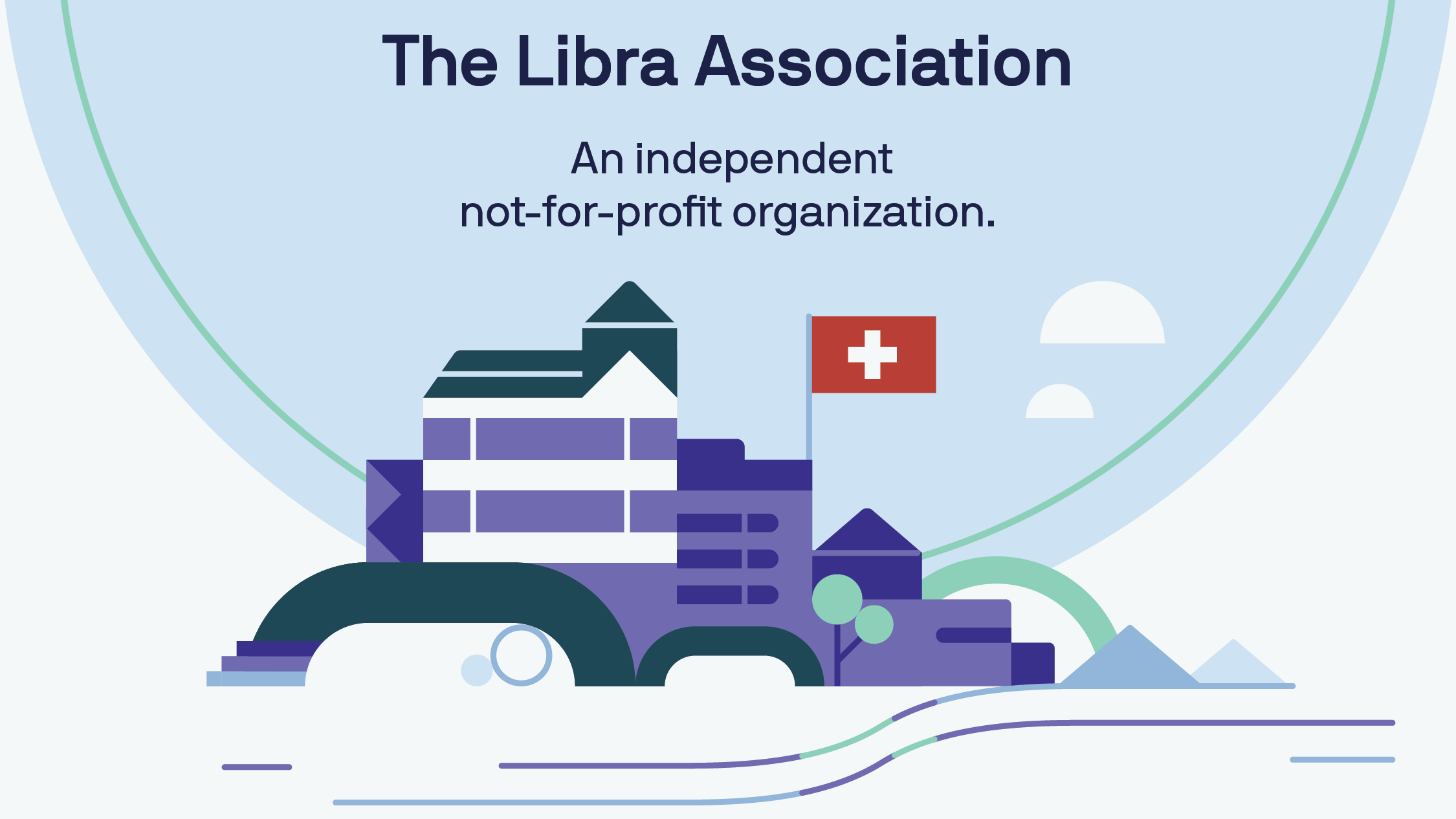
The head of Facebook’s blockchain subsidiary Calibra David Marcus has released his prepared testimony before congress for tomorrow and Wednesday, explaining that the Libra Association will be regulated by the Swiss government since that’s where it’s headquartered. Meanwhile, he says the Libra Association and Facebook’s Calibra wallet intend to comply will all US tax, anti-money laundering, and anti-fraud laws.
“The Libra Association expects that it will be licensed, regulated, and subject to supervisory oversight. Because the Association is headquartered in Geneva, it will be supervised by the Swiss Financial Markets Supervisory Authority (FINMA)” Marcus writes. “We have had preliminary discussions with FINMA and expect to engage with them on an appropriate regulatory framework for the Libra Association. The Association also intends to register with FinCEN [The U.S. Treasury Department’s Financial Crimes Enforcement Network] as a money services business.”
Marcus will be defending Libra before the Senate Banking Committee on July 16th and the House Financial Services Committees on July 17th. The House subcomittee’s Rep Maxine Waters has already issued a letter to Facebook and the Libra Association requesting that it halt development and plans to launch Libra in early 2020 “until regulators and Congress have an opportunity to examine these issues and take action.”
The big question is whether Congress is savvy enough to understand Libra to the extent that it can coherently regulate it. Facebook CEO Mark Zuckerberg’s testimonies before Congress last year were rife with lawmakers dispensing clueless or off-topic questions.
Sen. Orin Hatch infamously demanded to know “how do you sustain a business model in which users don’t pay for your service?”, to which Zuckerberg smirked, “Senator, we run ads.” If that concept trips up Congress, it’s hard to imagine it grasping a semi-decentralized stablecoin cryptocurrency that took us 4000 words to properly explain, and a 6-minute video just to summarize.
Attempting to assuage a core concern that Libra is trying to replace the dollar or meddle in financial policy, Marcus writes that “The Libra Association, which will manage the Reserve, has no intention of competing with any sovereign currencies or entering the monetary policy arena. It will work with the Federal Reserve and other central banks to make sure Libra does not compete with sovereign currencies or interfere with monetary policy. Monetary policy is properly the province of central banks
Marcus’ testimony comes days after President Donald Trump tweeted Friday to condemn Libra, claiming thaat “Unregulated Crypto Assets can facilitate unlawful behavior, including drug trade and other illegal activity. Similarly, Facebook Libra’s ‘virtual currency’ will have little standing or dependability. If Facebook and other companies want to become a bank, they must seek a new Banking Charter and become subject to all Banking Regulations, just like other Banks, both National and International.”
TechCrunch asked Facebook for a response Friday, which it declined to provide. However, a Facebook spokesperson noted that the Libra association won’t interact with consumers or operate as a bank, and that Libra is meant to be a complement to the existing financial system.
Regarding how Libra will comply with US anti-money laundering (AML) and know-your-customer (KYC) laws, Marcus explains that “The Libra Association is similarly committed to supporting efforts by regulators, central banks, and lawmakers to ensure that Libra contributes to the fight against money laundering, terrorism financing, and more” Marcus explains. “The Libra Association will also maintain policies and procedures with respect to AML and the Bank Secrecy Act, combating the financing of terrorism, and other national security-related laws, with which its members will be required to comply if they choose to provide financial services on the Libra network”
He argues that “Libra should improve detection and enforcement, not set them back” because cash transactions are frequently used by criminals to avoid law enforcement. “A network that helps move more paper cash transactions—where many illicit activities happen—to a digital network that features regulated on- and off-ramps with proper know-your-customer (KYC) practices, combined with the ability for law enforcement and regulators to conduct their own analysis of on-chain activity, will present an opportunity to increase the efficacy of financial crimes monitoring and enforcement.”
As for Facebook itself, Marcus writes that “The Calibra wallet will comply with FinCEN’s rules for its AML/CFT program and the rules set by the Office of Foreign Assets Control (OFAC) . . .Similarly, Calibra will comply with the Bank Secrecy Act and will incorporate KYC and AML/CFT methodologies used around the world.”
These answers might help to calm finance legal eagles, but I expect much of the questioning from Congress will deal with the far more subjective matter of whether Facebook can be trusted after a decade of broken privacy promises, data leaks, and fake news scandals like Cambridge Analytica.
That’s why I don’t expect the following statement from Marcus about how Facebook has transformed the state of communication will play well with lawmakers that are angry about how those changes impacted society. “We have done a lot to democratize free, unlimited communications for billions of people. We want to help do the same for digital currency and financial services, but with one key difference: We will relinquish control over the network and currency we have helped create.” Congress may interpret ‘democratize’ as ‘screw up’, and not want to see the same happen to money.
Facebook and Calibra may have positive intentions to assist the unbanked who are indeed swindled by banks and money transfer services that levy huge fees against poorer families. But Facebook isn’t acting out of pure altruism here, as it stands to earn money from Libra in three big ways that aren’t mentioned in Marcus’ testimony:
It will earn a share of interest earned on the Libra Reserve of traditional currencies it holds as collateral for Libra that could mount into the billions if Libra becomes popular.
It will see Facebook ad sales grow if merchants seek to do more commerce over the Internet because they can easily and cheaply accept online payments through Libra and therefore put marketing spend into those efficiently-converting channels like Facebook and Google.
It will try to sell additional financial services through Calibra potentially including loans and credit where it could ask users to let it integrate their Facebook data to get a better rate, potentially decreasing defaults and earning Facebook larger margins than other players.
The real-world stakes are much higher here than in photo sharing, and warrant properly regulatory scrutiny. No matter how much Facebook tries to distance itself from ownership of Libra, it started, incubated, and continues to lead the project. If Congress is already convinced “big is bad”, and Libra could make Facebook bigger, that may make it difficult to separate their perceptions of Facebook and Libra in order to assess the currency on its merits and risks.
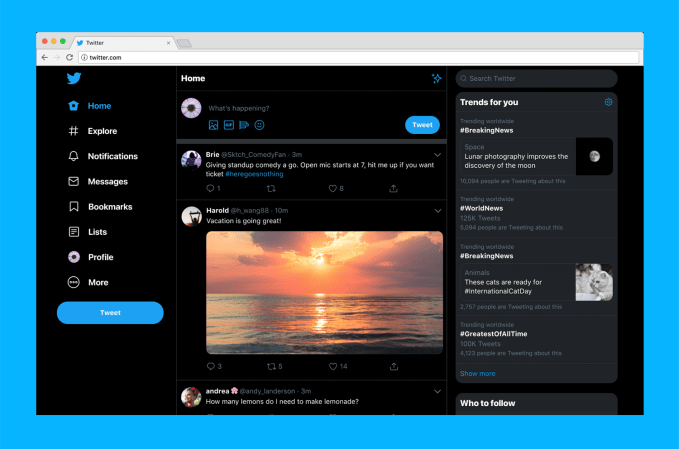
Twitter’s website is getting a major overhaul. The company has been testing a new version of its desktop website since the beginning of the year, and today the final product is rolling out to the public. The upgraded experience simplifies navigation with a new — and fairly large — left-hand sidebar that directs you to all of Twitter’s key sections, including Notifications, Direct Messages, Explore, Bookmarks, Lists, and more. The site also features an expanded, more inbox-like Direct Messages screen where you can view and respond to conversations in one place; plus easy profile switching, support for more themes, advanced search, and other features.
The popular dark modes, Dim and the very black Lights Out mode, are now supported along with more ways to personalize Twitter through different themes and color options.
But the most noticeable change is the organization and layout of the Twitter home screen itself.
Below: the old Twitter.com
Below: the new Twitter.com
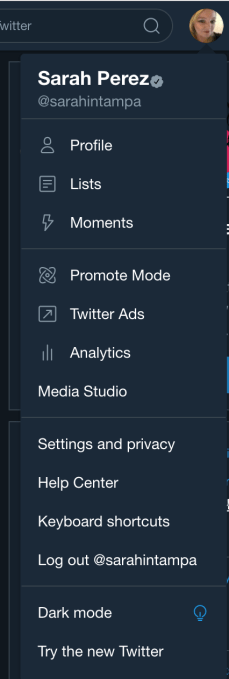
The update is designed to make it easier to move around Twitter. Before, you’d have to click on your Profile icon to access features like Lists, Themes, Settings, and other options. Meanwhile, getting to Moments was available both in this Profile dropdown menu and in the main Twitter navigation at the top of the screen, next to Notifications and Messages.
Now, Moments is being downgraded to the “More” menu in the redesign — as seen in a test running earlier this summer — and Explore instead gets the top billing. As on mobile, Explore will direct users to more live videos and personalized local moments, says Twitter. This is also where you’ll find Top Trends, while Personalized Trends will be featured on the right-hand sidebar on the home screen. (See above).
With the update, the new navigation menu includes: Home, Explore, Notifications, Messages, Bookmarks, Lists, Profile, and then More — the latter, a menu where you’ll find things like Moments, Twitter’s ad tools, Settings, and other features.
The new Compose feature has been slightly tweaked as well, with options to include a photo, GIF, poll or emoji now all in the bottom left — with the emoji button now swapping in for the location button, following Twitter’s decision to make sharing precise location less of a priority, given its lack of use.
Though the new home screen is arguably better-organized, the navigation text itself and the amount of screen real estate it takes up is overly large.
This detracts somewhat from the main content — the tweets themselves — because your eye is naturally drawn to the oversize navigation labels at first, not the posts flowing in the timeline. This can also be a jarring change to get used to for longtime Twitter.com users. (Good thing there’s a new Mac desktop app on the way.)
If you really can’t stand the navigation labels’ size, you can make the webpage smaller which then hides the text labels of the navigation items, leaving only their icons. This, unfortunately, isn’t all that useful if you like to keep Twitter open in a tab alongside all your other tabs. It works better if you pop out Twitter.com into its own window.
The navigation changes were likely a design choice Twitter made, in part, to simplify the use of its product by more casual users and newcomers.
The company has struggled with user growth throughout its history, even changing how it reports metrics to paint a better picture of its business. Now, you’d have to be almost completely web illiterate to not find your way around the new Twitter.com. But only time will tell what effect this has on growing its user base.
Not all the changes will be as controversial as the new layout, though.
For example, the now double-paned Direct Message section is more welcome as it makes using Messages feel more like the real inbox it often is — with the message list on the left and conversations on the right.
Search got an update, as well, which puts tabs for moving between “Top,” “Latest,” “People,” “Photos,” and “Videos” at the top of the screen, with Advanced Search Filters to the right.
And for those with multiple Twitter accounts, you can now switch between them from the main navigation. That’s helpful.
Twitter’s tests of the updated design had been rolling out to more people throughout the year — it even tried two different versions for a time. Throughout this process, the company incorporated some of the user feedback it received. For example, the changes to the Messaging screen and the high priority given to Bookmarks were among the requests Twitter addressed.
But generally speaking, Twitter was aiming to deliver a more consistent, seamless experience across both the phone and the web platforms with this update, a company spokesperson told us.
There’s some bad news for old school Twitter.com users — as of this public launch of the redesign, there’s no option for going back to the legacy experience, as there was during the testing period.
Twitter says the upgraded look will begin rolling out globally starting today.
The head of Facebook’s blockchain subsidiary Calibra David Marcus has released his prepared testimony before congress for tomorrow and Wednesday, explaining that the Libra Association will be regulated by the Swiss government since that’s where it’s headquartered. Meanwhile, he says the Libra Association and Facebook’s Calibra wallet intend to comply will all US tax, anti-money laundering, and anti-fraud laws.
“The Libra Association expects that it will be licensed, regulated, and subject to supervisory oversight. Because the Association is headquartered in Geneva, it will be supervised by the Swiss Financial Markets Supervisory Authority (FINMA)” Marcus writes. “We have had preliminary discussions with FINMA and expect to engage with them on an appropriate regulatory framework for the Libra Association. The Association also intends to register with FinCEN [The U.S. Treasury Department’s Financial Crimes Enforcement Network] as a money services business.”
Marcus will be defending Libra before the Senate Banking Committee on July 16th and the House Financial Services Committees on July 17th. The House subcomittee’s Rep Maxine Waters has already issued a letter to Facebook and the Libra Association requesting that it halt development and plans to launch Libra in early 2020 “until regulators and Congress have an opportunity to examine these issues and take action.”
The big question is whether Congress is savvy enough to understand Libra to the extent that it can coherently regulate it. Facebook CEO Mark Zuckerberg’s testimonies before Congress last year were rife with lawmakers dispensing clueless or off-topic questions.
Sen. Orin Hatch infamously demanded to know “how do you sustain a business model in which users don’t pay for your service?”, to which Zuckerberg smirked, “Senator, we run ads.” If that concept trips up Congress, it’s hard to imagine it grasping a semi-decentralized stablecoin cryptocurrency that took us 4000 words to properly explain, and a 6-minute video just to summarize.
Attempting to assuage a core concern that Libra is trying to replace the dollar or meddle in financial policy, Marcus writes that “The Libra Association, which will manage the Reserve, has no intention of competing with any sovereign currencies or entering the monetary policy arena. It will work with the Federal Reserve and other central banks to make sure Libra does not compete with sovereign currencies or interfere with monetary policy. Monetary policy is properly the province of central banks
Marcus’ testimony comes days after President Donald Trump tweeted Friday to condemn Libra, claiming thaat “Unregulated Crypto Assets can facilitate unlawful behavior, including drug trade and other illegal activity. Similarly, Facebook Libra’s ‘virtual currency’ will have little standing or dependability. If Facebook and other companies want to become a bank, they must seek a new Banking Charter and become subject to all Banking Regulations, just like other Banks, both National and International.”
TechCrunch asked Facebook for a response Friday, which it declined to provide. However, a Facebook spokesperson noted that the Libra association won’t interact with consumers or operate as a bank, and that Libra is meant to be a complement to the existing financial system.
Regarding how Libra will comply with US anti-money laundering (AML) and know-your-customer (KYC) laws, Marcus explains that “The Libra Association is similarly committed to supporting efforts by regulators, central banks, and lawmakers to ensure that Libra contributes to the fight against money laundering, terrorism financing, and more” Marcus explains. “The Libra Association will also maintain policies and procedures with respect to AML and the Bank Secrecy Act, combating the financing of terrorism, and other national security-related laws, with which its members will be required to comply if they choose to provide financial services on the Libra network”
He argues that “Libra should improve detection and enforcement, not set them back” because cash transactions are frequently used by criminals to avoid law enforcement. “A network that helps move more paper cash transactions—where many illicit activities happen—to a digital network that features regulated on- and off-ramps with proper know-your-customer (KYC) practices, combined with the ability for law enforcement and regulators to conduct their own analysis of on-chain activity, will present an opportunity to increase the efficacy of financial crimes monitoring and enforcement.”
As for Facebook itself, Marcus writes that “The Calibra wallet will comply with FinCEN’s rules for its AML/CFT program and the rules set by the Office of Foreign Assets Control (OFAC) . . .Similarly, Calibra will comply with the Bank Secrecy Act and will incorporate KYC and AML/CFT methodologies used around the world.”
These answers might help to calm finance legal eagles, but I expect much of the questioning from Congress will deal with the far more subjective matter of whether Facebook can be trusted after a decade of broken privacy promises, data leaks, and fake news scandals like Cambridge Analytica.
That’s why I don’t expect the following statement from Marcus about how Facebook has transformed the state of communication will play well with lawmakers that are angry about how those changes impacted society. “We have done a lot to democratize free, unlimited communications for billions of people. We want to help do the same for digital currency and financial services, but with one key difference: We will relinquish control over the network and currency we have helped create.” Congress may interpret ‘democratize’ as ‘screw up’, and not want to see the same happen to money.
Facebook and Calibra may have positive intentions to assist the unbanked who are indeed swindled by banks and money transfer services that levy huge fees against poorer families. But Facebook isn’t acting out of pure altruism here, as it stands to earn money from Libra in three big ways that aren’t mentioned in Marcus’ testimony:
It will earn a share of interest earned on the Libra Reserve of traditional currencies it holds as collateral for Libra that could mount into the billions if Libra becomes popular.
It will see Facebook ad sales grow if merchants seek to do more commerce over the Internet because they can easily and cheaply accept online payments through Libra and therefore put marketing spend into those efficiently-converting channels like Facebook and Google.
It will try to sell additional financial services through Calibra potentially including loans and credit where it could ask users to let it integrate their Facebook data to get a better rate, potentially decreasing defaults and earning Facebook larger margins than other players.
The real-world stakes are much higher here than in photo sharing, and warrant properly regulatory scrutiny. No matter how much Facebook tries to distance itself from ownership of Libra, it started, incubated, and continues to lead the project. If Congress is already convinced “big is bad”, and Libra could make Facebook bigger, that may make it difficult to separate their perceptions of Facebook and Libra in order to assess the currency on its merits and risks.
Every startupper we’ve ever met loves a great deal, and so do we. That’s why we’re celebrating Prime day with a 48-hour flash sale on tickets to TC Sessions: Enterprise 2019, which takes place September 5 at the Yerba Buena Center for the Arts in San Francisco.
We’re talking a classic BOGO — buy-one-get-one — deal that starts today and ends tomorrow, July 16, at 11:59 p.m. (PT). Buy one early-bird ticket ($249) and you get a second ticket for free. But this BOGO goes bye-bye in just 48 hours, so don’t wait. Buy your TC Sessions: Enterprise tickets now and save.
Get ready to join more than 1,000 attendees for a day-long, intensive experience exploring the enterprise colossus — a tech category that generates hundreds of new startups, along with a steady stream of multibillion-dollar acquisitions, every year.
What can you expect at TC Sessions: Enterprise? For starters, you’ll hear TechCrunch editors interview enterprise software leaders, including tech titans, rising founders and boundary-breaking VCs.
One such titan, George Brady — Capital One’s executive VP in charge of tech operations — will join us to discuss how the financial institution left legacy hardware and software behind to embrace the cloud. Quite a journey in such a highly regulated industry.
Our growing speaker roster features other enterprise heavy-hitters, including Aaron Levie, Box co-founder and CEO; Aparna Sinha, Google’s director of product management for Kubernetes and Anthos; Jim Clarke, Intel’s director of quantum hardware; and Scott Farquhar, co-founder and co-CEO of Atlassian.
Looking for in-depth information on technical enterprise topics? You’ll find them in our workshops and breakout sessions. Check out the exhibiting early-stage enterprise startups focused on disrupting, well, everything. Enjoy receptions and world-class networking with other founders, investors and technologists actively building the next generation of enterprise services.
TC Sessions: Enterprise 2019 takes place September 5, and we pack a lot of value into a single day. Double your ROI and take advantage of our 48-hour BOGO sale. Buy your ticket before July 16 at 11:59 p.m. (PT) and get another ticket free. That’s two tickets for one early-bird price. And if that’s not enough value, get this: we’ll register you for a free Expo-only pass to Disrupt SF 2019 for every TC Sessions: Enterprise ticket you purchase (mic drop).
Interested in sponsoring TC Sessions: Enterprise? Fill out this form and a member of our sales team will contact you.
Hello, weekend readers. This is Week-in-Review, where I give a heavy amount of analysis and/or rambling thoughts on one story while scouring the rest of the hundreds of stories that emerged on TechCrunch this week to surface my favorites for your reading pleasure.
Last week, I talked about how Alexa wasn’t forgetting what you requested because that data was more valuable than one might think.
Photo by Justin Sullivan/Getty Images
The big story
In thinking about what to highlight in this week’s newsletter, I was tempted to talk about Zoom and Apple and Superhuman and the idea that secure communications can get screwed up when consent is bypassed, and I’m sure that’s something I’ll dig into down the road, but what intrigued me most this week was a single factoid from Google’s self-driving unit.
Waymo’s CTO told TechCrunch this week that the company has logged 10 billion miles of autonomous driving in simulation. That means that while you might have seen a physical Waymo vehicle driving past you, the real ground work has been laid in digital spaces that are governed by the laws of game engines.
The idea of simulation-training is hardly new; it’s how we’re building plenty of computer vision-navigated machines right now — hell, plenty of self-driving projects have been built leveraging systems like the traffic patterns in games like Grand Theft Auto. These billions of logged miles are just another type of training data, but they’re also a pretty clear presentation of where self-supervised learning systems could theoretically move, creating the boundaries for a model while letting the system adjust its own rules of operation.
“I think what makes it a good simulator, and what makes it powerful is two things,” Waymo’s CTO Dmitri Dolgov told us. “One [is] fidelity. And by fidelity, I mean, not how good it looks. It’s how well it behaves, and how representative it is of what you will encounter in the real world. And then second is scale.”
Robotics and AV efforts are going to rely more and more on learning the rules of how the laws of the universe operate, but those advances are going to be accompanied by other startups’ desires to build more high visual fidelity understanding of the world
There are plenty of pressures to create copies of Earth. Apple is building more detailed maps with sensor-laden vehicles, AR startups are actively 3D-mapping cities using crowd-sourced data and game engine companies like Unity and Epic Games are building engines that replicate nature’s laws in digital spaces.
This is all to say that we’re racing to recreate our spatial world digitally, but we might just be scratching the surface of the relationship between AI and 3D worlds.
Send me feedback
on Twitter @lucasmtny or email
lucas@techcrunch.com
On to the rest of the week’s news.
(Photo: by Chip Somodevilla/Getty Images)
Trends of the week
Here are a few big news items from big companies, with green links to all the sweet, sweet added context.
Trump must unblock his Twitter critics
Twitter is a consumer product, so politicians using it might feel like it’s their own personal account, but when they use it for political announcements it becomes an official communications channel, and using features like blocking stifles national free speech. So says an NY-based appeals court this week of President Trump’s habit of blocking critics. It’s undoubtedly a ruling that’s going to have far-reaching implications for U.S. political figures that use social media. Read more here.
Nintendo switches up the Switch The Nintendo Switch arrived on the scene with the bizarre notoriety of being a handheld system that was also a home console, but it’s not enough for the Japanese game company to capture the hybrid market, it’s looking to revisit the success it had back in the peak Nintendo DS days. The company announced the Switch Lite this week, which strips away a number of features for the sake of making a smaller, simpler version of the Nintendo Switch that is handheld-only and sports a longer battery life. Read more here.
Google and Amazon bury the home-streaming hatchet At long last, one of the stranger passive aggressive fights in the smart home has come to a close. Amazon’s Prime Video is finally available on Google’s Chromecast and YouTube is now on Fire TV after a years-long turf war between the two platforms. Read more here.
AT&T maxes out its HBO ambitions
When AT&T bought HBO, via its Time Warner acquisition, execs made clear that they had acquired a premium product and planned to shift its standing in the market. The company announced this week that it will be launching a new service called HBO Max next year that will bring in new content, including “Friends.” Read more here.
GAFA Gaffes
How did the top tech companies screw up this week? This clearly needs its own section, in order of badness:
Our premium subscription service had another great week of deep dives. My colleague Zack Whittaker revisited the WannaCry ransomware that hit in 2017 with a lengthy profile and interviews with the researchers that stopped the malware dead in its tracks. After you dig into that profile, you can check out his Extra Crunch piece that digs further into how security execs and startups can learn from the saga.
“…There is a good chance that your networks are infected with WannaCry — even if your systems haven’t yet been encrypted. Hankins told TechCrunch that there were 60 million attempted “detonations” of the WannaCry ransomware in June alone. So long as there’s a connection between the infected device and the kill switch domain, affected computers will not be encrypted….”
Here are some of our other top reads this week for premium subscribers. This week, we talked a bit about the future of car ownership and “innovation banking.”













 Below: the new Twitter.com