20 March 2019

Ahead of third antitrust ruling, Google announces fresh tweaks to Android in Europe


Google is widely expected to be handed a third antitrust fine in Europe this week, with reports suggesting the European Commission’s decision in its long-running investigation of AdSense could land later today.

Right on cue the search giant has PRed another Android product tweak — which it bills as “supporting choice and competition in Europe”.

In the coming months Google says it will start prompting users of existing and new Android devices in Europe to ask which browser and search apps they would like to use.

This follows licensing changes for Android in Europe which Google announced last fall, following the Commission’s $5BN antitrust fine for anti-competitive behavior related to how it operates the dominant smartphone OS.

tl;dr competition regulation can shift policy and product.

Albeit, the devil will be in the detail of Google’s self-imposed ‘remedy’ for Android browser and search apps.

Which means how exactly the user is prompted will be key — given tech giants are well-versed in the manipulative arts of dark pattern design, enabling them to create ‘consent’ flows that deliver their desired outcome.

A ‘choice’ designed in such a way — based on wording, button/text size and color, timing of prompt and so on — to promote Google’s preferred browser and search app choice by subtly encouraging Android users to stick with its default apps may not actually end up being much of a ‘choice’.

According to Reuters the prompt will surface to Android users via the Play Store. (Though the version of Google’s blog post we read did not include that detail.)

Using the Play Store for the prompt would require an Android device to have Google’s app store pre-loaded — and licensing tweaks made to the OS in Europe last year were supposedly intended to enable OEMs to choose to unbundle Google apps from Android forks. Ergo making only the Play Store the route for enabling choice would be rather contradictory. (As well as spotlighting Google’s continued grip on Android.)

Add to that Google has the advantage of massive brand dominance here, thanks to its kingpin position in search, browsers and smartphone platforms.

So again the consumer decision is weighted in its favor. Or, to put it another way: ‘This is Google; it can afford to offer a ‘choice’.’

In its blog post getting out ahead of the Commission’s looming AdSense ruling, Google’s SVP of global affairs, Kent Walker, writes that the company has been “listening carefully to the feedback we’re getting” vis-a-vis competition.

Though the search giant is actually appealing both antitrust decisions. (The other being a $2.7BN fine it got slapped with two years ago for promoting its own shopping comparison service and demoting rivals’.)

“After the Commission’s July 2018 decision, we changed the licensing model for the Google apps we build for use on Android phones, creating new, separate licenses for Google Play, the Google Chrome browser, and for Google Search,” Walker continues. “In doing so, we maintained the freedom for phone makers to install any alternative app alongside a Google app.”

Other opinions are available on those changes too.

Such as French pro-privacy Google search rival Qwant, which last year told us how those licensing changes still make it essentially impossible for smartphone makers to profit off of devices that don’t bake in Google apps by default. (More recently Qwant’s founder condensed the situation to “it’s a joke“.)

Qwant and another European startup Jolla, which leads development of an Android alternative smartphone platform called Sailfish — and is also a competition complainant against Google in Europe — want regulators to step in and do more.

The Commission has said it is closely monitoring changes made by Google to determine whether or not the company has complied with its orders to stop anti-competitive behavior.

So the jury is still out on whether any of its tweaks sum to compliance. (Google says so but that’s as you’d expect — and certainly doesn’t mean the Commission will agree.)

In its Android decision last summer the Commission judged that Google’s practices harmed competition and “further innovation” in the wider mobile space, i.e. beyond Internet search — because it prevented other mobile browsers from competing effectively with its pre-installed Chrome browser.

So browser choice is a key component here. And ‘effective competition’ is the bar Google’s homebrew ‘remedies’ will have to meet.

Still, the company will be hoping its latest Android tweaks steer off further Commission antitrust action. Or at least generate more fuzz and fuel for its long-game legal appeal.

Current EU competition commissioner, Margrethe Vestager, has flagged for years that the division is also fielding complaints about other Google products, including travel search, image search and maps. Which suggests Google could face fresh antitrust investigations in future, even as the last of the first batch is about to wrap up.

The FT reports that Android users in the European economic area last week started seeing links to rival websites appearing above Google’s answer box for searches for products, jobs or businesses — with the rival links appearing above paid results links to Google’s own services.

The newspaper points out that tweak is similar to a change promoted by Google in 2013, when it was trying to resolve EU antitrust concerns under the prior commissioner, JoaquĆ­n Almunia.

However rivals at the time complained the tweak was insufficient. The Commission subsequently agreed — and under Vestager’s tenure went on to hit Google with antitrust fines.

Walker doesn’t mention these any of additional antitrust complaints swirling around Google’s business in Europe, choosing to focus on highlighting changes it’s made in response to the two extant Commission antitrust rulings.

“After the Commission’s July 2018 decision, we changed the licensing model for the Google apps we build for use on Android phones, creating new, separate licenses for Google Play, the Google Chrome browser, and for Google Search. In doing so, we maintained the freedom for phone makers to install any alternative app alongside a Google app,” he writes.

Nor does he make mention of a recent change Google quietly made to the lists of default search engine choices in its Chrome browser — which expanded the “choice” he claims the company offers by surfacing more rivals. (The biggest beneficiary of that tweak is privacy search rival DuckDuckGo, which suddenly got added to the Chrome search engine lists in around 60 markets. Qwant also got added as a default choice in France.)

Talking about Android specifically Walker instead takes a subtle indirect swipe at iOS maker Apple — which now finds itself the target of competition complaints in Europe, via music streaming rival Spotify, and is potentially facing a Commission probe of its own (albeit, iOS’ marketshare in Europe is tiny vs Android). So top deflecting Google.

“On Android phones, you’ve always been able to install any search engine or browser you want, irrespective of what came pre-installed on the phone when you bought it. In fact, a typical Android phone user will usually install around 50 additional apps on their phone,” Walker writes, drawing attention to the fact that Apple does not offer iOS users as much of a literal choice as Google does.

“Now we’ll also do more to ensure that Android phone owners know about the wide choice of browsers and search engines available to download to their phones,” he adds, saying: “This will involve asking users of existing and new Android devices in Europe which browser and search apps they would like to use.”

We’ve reached out to Commission for comment, and to Google with questions about the design of its incoming browser and search app prompts for Android users in Europe and will update this report with any response.


Read Full Article

Google Stadia Lets You Stream Games Anywhere


After months of speculation, Google has unveiled its new cloud gaming platform. It’s called Stadia, a name designed to conjure up images of people playing games throughout history. And Stadia will let you stream games anywhere and everywhere on multiple devices.

What Is Google Stadia and How Will It Work?

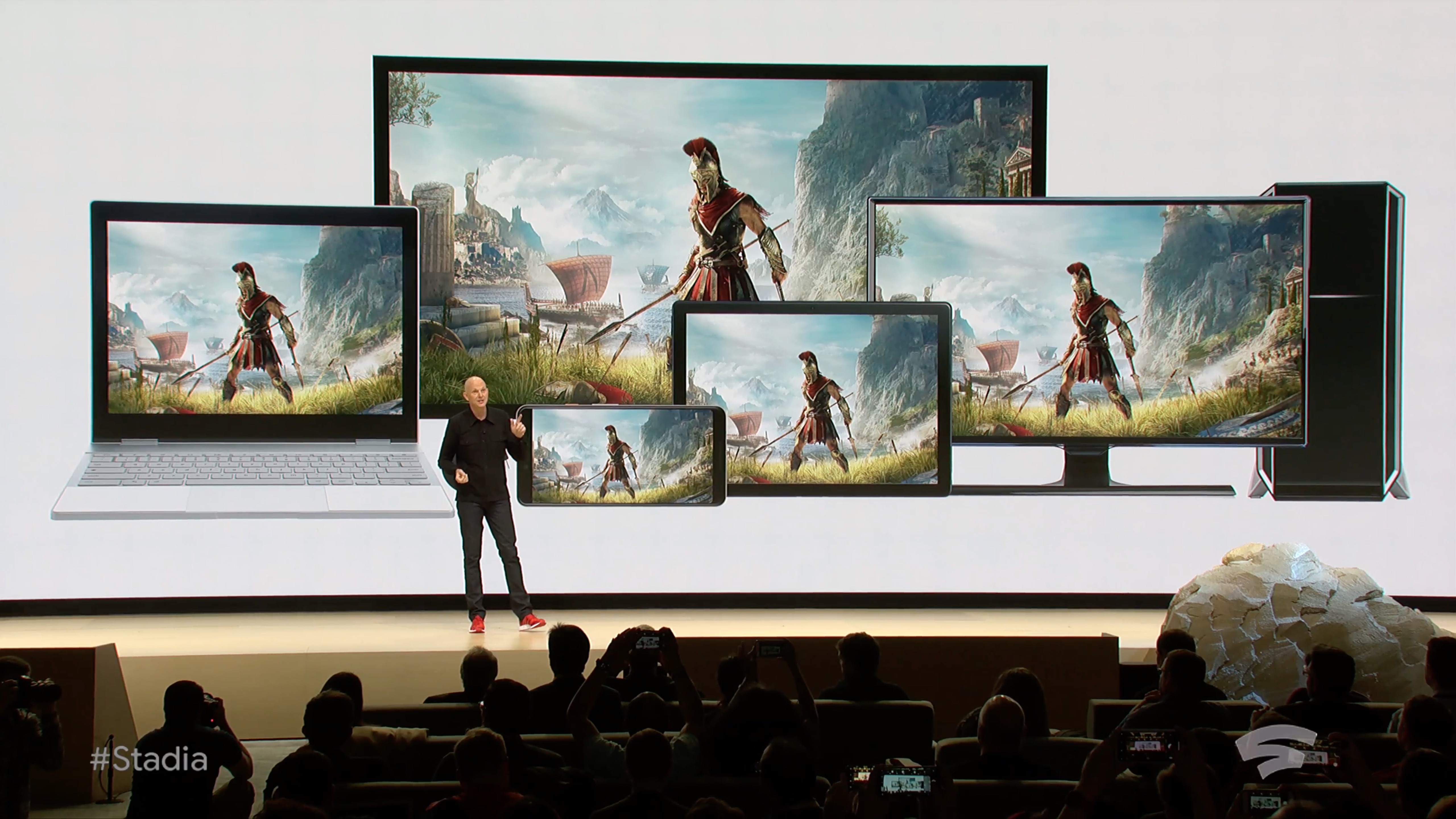
Google Stadia is a cloud-based gaming platform. This means that rather than needing to upgrade or buy new hardware, you’ll be able to play games on existing devices. This includes your PC or laptop, Chromebook, tablets, smartphones, and even smart TVs.

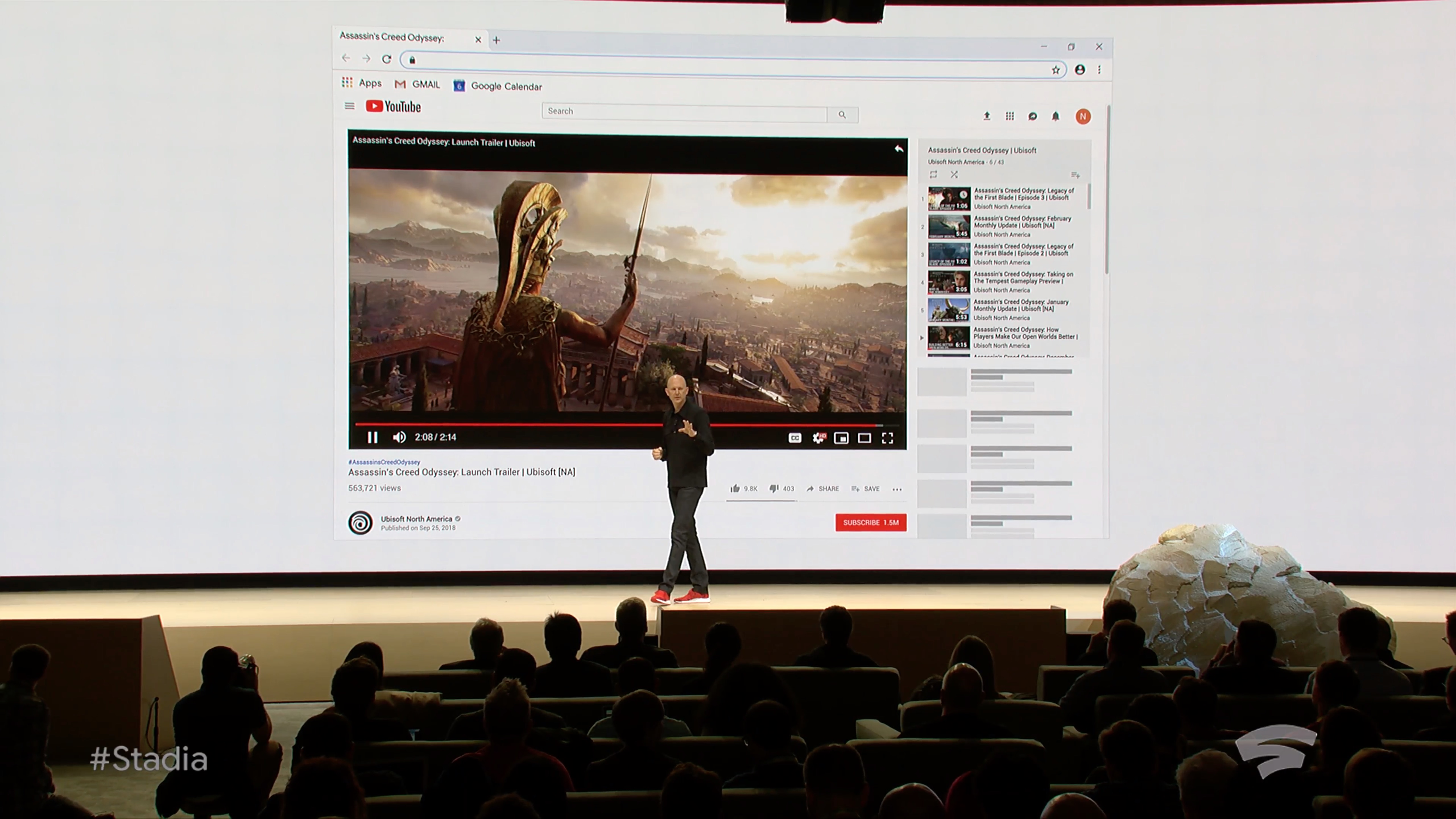
Google wants high-end, AAA games to be available on Stadia. The company tested the service using Assassin’s Creed Odyssey, and Doom Eternal has already been confirmed for launch. However, it remains to be seen how many other titles Google can secure.

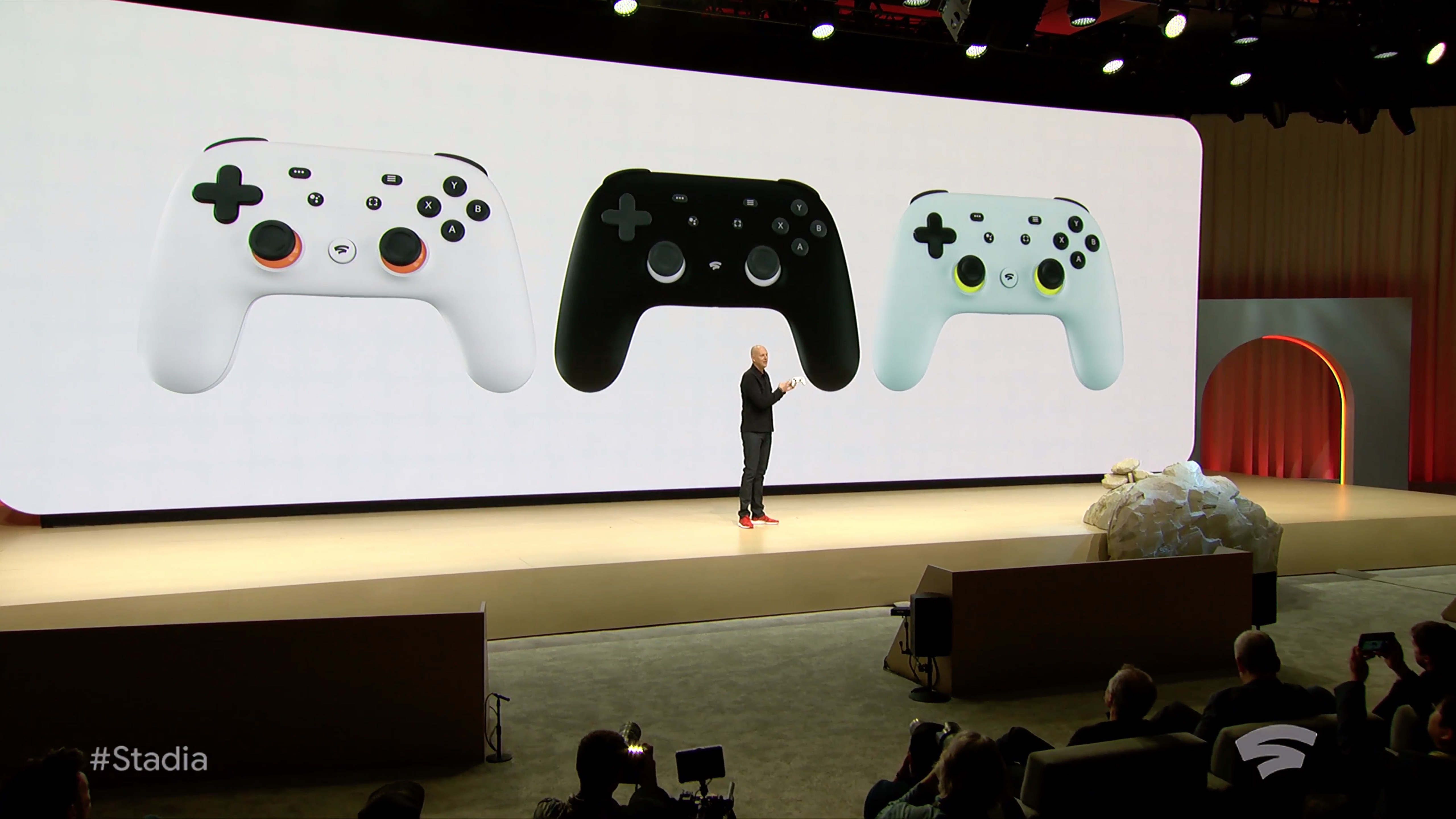
Stadia will be able to stream games in 4K HDR at 60fps. To make this possible, AMD has built Google a custom GPU more powerful than the PS4 Pro and Xbox One X. Google has also developed its own controller, but you can also use your existing controllers.

YouTube will play an integral part of Stadia, with viewers watching someone play games able to start playing for themselves just by clicking a “Play Now” button. The Stadia controller also features a share button allowing you to share footage on YouTube.

Google will be launching Stadia sometime in 2019, and has promised more details will be forthcoming this summer. We know Stadia will be launching first in the United States, Canada, the UK, and most of Europe, but there’s no word yet on pricing.

Can Google Stadia Live Up to the Hype?

Cloud gaming services such as PlayStation Now already exist. However, most have struggled with lag, preventing them from huge success. If Google has fixed this issue, and Stadia lives up to the hype from the GDC announcement, then it could be a game-changer.

Stadia is an exciting development worth keeping an eye on, and we’ll probably find out more at Google I/O 2019 in May. However, if you’re not yet ready to ditch your console, read our PS4 Pro review and our Xbox One X review to help you choose between the two.

Read the full article: Google Stadia Lets You Stream Games Anywhere


Read Full Article

Myspace Loses 12 Years of Uploaded Files


Myspace has admitted to losing the files users uploaded to the site between 2002 and 2015. Which equates to millions of audio files, as well as countless photos and videos. Which should serve as a good reminder not to use social media sites as your sole backups.

As detailed in this Reddit thread, in February 2018, users started complaining they were having trouble playing music on Myspace. The social media site acknowledged the issue, but promised it was working on a fix. That fix never arrived, and now we now why…

Myspace Admits Losing 12 Years of Files

The scale of the problem first came to light when a Reddit user complained to the site. Myspace responded with, “Due to a server migration files were corrupted and unable to be transferred over to our updated site. There is no way to recover the lost data”.

There’s now a message at the top of the homepage saying, “As a result of a server migration project, any photos, videos, and audio files you uploaded more than three years ago may no longer be available on or from Myspace. We apologize for the inconvenience.”

With Myspace launching in 2003, this means that the site has lost 12 years worth of uploaded files. And there seems to be no way of recovering them. Which is a disaster for anyone who was using Myspace as a backup for their files.

This may seem unlikely, but Myspace was once an important breeding ground for new artists. And while most will have had the foresight to keep backups, there are reports that some musicians have lost all of their old material in this incident.

Don’t Use Social Media Sites as Backups

As you can see in the tweet above from former Kickstarter CTO Andy Baio, not everyone believes this was an accident. After all, storing millions of files costs money, and Myspace isn’t exactly raking in the dollars right now.

Whether it was an accident or not, this is a good reminder not to use social media sites as backups for files. Today, it’s Myspace, but tomorrow it could be Facebook, Twitter, or any of the other social media sites you’re trusting with your files.

Image Credit: Robyn Jay/Flickr

Read the full article: Myspace Loses 12 Years of Uploaded Files


Read Full Article

How to Turn an Android Device Into a Web Server

How to Keep Your Mac From Sleeping: 5 Methods That Work


By default, your Mac is set for maximum efficiency. That means it tries to preserve energy whenever and wherever it can, especially if you’re on battery power. So when it detects that you’re no longer using your computer, it automatically goes to sleep.

While that will save you some battery life, it’s not ideal in every situation. You might, for instance, be gone only for a few minutes and want to resume instantly when you return. Or worse, if you’re waiting for an active task like a large download to complete, your computer might interrupt it by going to sleep.

Thankfully, you can manually configure your Mac to keep it from falling asleep.

1. macOS’s Built-In Energy Saver Options

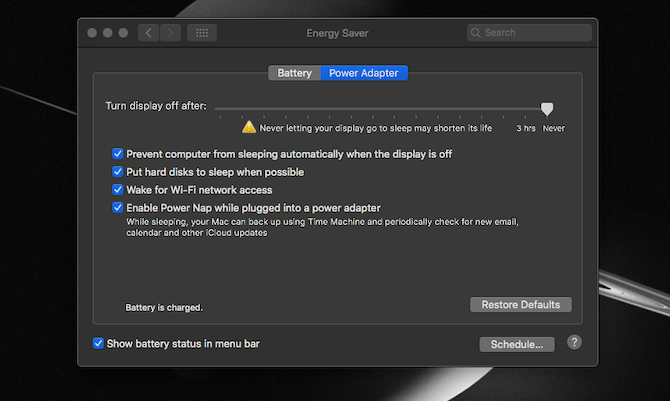
Energy Saver Mac settings

macOS has a built-in tool to customize how long your computer should wait before turning off the screen and going to sleep.

It’s present as Energy Saver in System Preferences. In there, you will find a bunch of settings for personalizing the sleep times for both when your Mac is on battery power and when it’s plugged in. You can set a minimum period of one minute and even push the slider up to Never if you want to disable the automatic behavior entirely.

Plus, Energy Saver has a couple of more handy options. You can switch on a utility called Power Nap where even in sleep mode, your Mac will periodically check for new emails, appointment alerts, and more. When it’s connected to a power adapter, your Mac can also just turn off the screen and not go to sleep.

Energy Saver even lets you schedule your Mac’s hours. By hitting the Schedule button located at the bottom of the window, you can specify the time when the computer should start up or wake and another parameter for when it should go to sleep, shut down, or restart.

Struggling to find these or other settings on your Mac? Take a look at these tips for locating preferences on macOS faster.

2. Amphetamine

Amphetamine Mac triggers

Your Mac’s native methods will be sufficient for many users. But if you’re looking for more control, you’ll have to turn to third-party alternatives. And one of the best is titled Amphetamine.

Amphetamine bills itself as a powerful and flexible keep-awake utility, and this is accurate. The app features a multitude of options and settings for establishing a session. For starters, of course Amphetamine can prevent your computer from sleeping for a particular time period or indefinitely.

But where Amphetamine truly stands out is its ability to implement triggers. Instead of a time period, the app can keep your Mac awake based on an event. So for instance, you can ask it to stay active as long as an app is running or it’s connected to a Bluetooth device.

These triggers are highly customizable, and you can bind several of them together for a more precise environment. In addition, Amphetamine comes with a host of other tools including appearance options for its menu bar dropdown.

Download: Amphetamine (Free)

3. KeepingYouAwake

KeepingYouAwake Mac demo

For people who only need a quick way to tweak their computer’s sleep times, Amphetamine can feel a bit overwhelming. A better-suited app for this set of users is an open-source tool called KeepingYouAwake.

KeepingYouAwake is a straightforward app that instantly allows you to change your Mac’s standby times from the menu bar. You can select from a bunch of duration presets, including an indefinite mode. And you can have the app launch at startup.

What’s more, the app can automatically deactivate if the battery level falls below a threshold. There’s nothing else to KeepingYouAwake, making it a suitable replacement for the now-defunct Caffeine.

Download: KeepingYouAwake (Free)

4. Anti Sleep

Anti Sleep Mac menu bar options

Anti Sleep is another handy app for blocking your Mac from falling asleep. While it is largely similar to the rest of the apps mentioned here, it does have a few unique traits. Its biggest highlight is the fact that it can keep your computer awake even when the lid is closed.

Moreover, the app houses a ton of other advanced features. For instance, it can automatically eject all your external drives before your computer goes to sleep. There are quick shortcuts for a bunch of other nifty actions, including one that fades the display.

Anti Sleep has support for triggers as well, although they’re not as flexible or sophisticated as Amphetamine. You can activate the app based on several parameters, such as Wi-Fi networks, external displays, AC power, and more.

However, Anti Sleep is not free, unlike the others. For the majority of its exclusive tools, you will have to pay. After a free one-month trial of the premium package, you’ll have to shell out a fee of one dollar per three months.

Download: Anti Sleep (Free, premium version available)

5. Owly

Owly Mac timer

Owly doesn’t have a whole lot of factors to differentiate it from the above. But there’s one feature some people might appreciate: Owly shows a countdown timer in the menu bar whenever it’s live.

Thus, if you set these times for a work session or any other activity, you can easily know how much is left on the clock. Apart from that, Owly offers the same set of tools and lets you control it from the menu bar.

Download: Owly (Free)

Monitor and Improve Your Mac’s Battery Life

It’s important your Mac stays awake whenever you’re in the middle of a task. And these apps will certainly allow you to configure standby times precisely based on your preferences.

But constantly being active can also cause your Mac’s battery life to degrade more quickly over time. To counter that drawback, try out apps designed to monitor and improve your Mac’s battery.

Read the full article: How to Keep Your Mac From Sleeping: 5 Methods That Work


Read Full Article

The 5 Best Free Alternatives to Microsoft Access


alternatives-access

Microsoft Access is a database tool, popularized through its inclusion in most Microsoft Office packages since 1992. Like many database programs, Microsoft Access is a complex tool with a steep learning curve. However, there are Microsoft Access alternatives, and here are some of the best.

Why Use a Microsoft Access Alternative?

Is Microsoft Access your go-to database tool? It is understandable. Access is a core Microsoft Office feature for both Office 365 and standalone licenses. Despite the rise in free Microsoft Office alternatives, Microsoft Access still consistently features in the top 10 database-engines ranking.

Microsoft Access splits opinions, too. Pro-Access users point to its ease of use, the massive range of online resources available for users of all abilities, as well as its powerful querying, filtering, and table tools.

Anti-Access users contest its lack of scalability, its frustrating 2GB limit, its continued use of a solitary file for the database, and potential for database corruption in multiple-user databases. For others, the price of Microsoft Access is a sticking point, too. Other free database options perform as well as, if not better than Microsoft Access.

1. LibreOffice Base

libreoffice base database create query

LibreOffice Base is a great starting point for those considering a free alternative to Microsoft Access. The open source office suite remains a strong pretender to the Microsoft Office crown, and the latest version of LibreOffice, 6.1.3, is one of the best yet.

Base remains a great all-rounder, well-suited to both home and business needs. LibreOffice Base has a range of handy features, including cross-database support for multi-user databases such as MySQL, Adabas D, Microsoft Access, and PostgreSQL.

LibreOffice Base is probably as close as you can get to a direct Microsoft Access clone. Both are front-end database management tools. You can use Base to make decent database applications or websites, as well as choose between Firebird or HSQLDB for your embedded database framework.

2. Kexi

kexi database access alternative

Calligra Suite is an office and graphic design suite developed by the KDE open source community. Kexi is the Calligra Suite answer to Microsoft Access. Kexi offers a decent mixture of database features: data entry, queries, forms, tables, reports, and more. Furthermore, you can use Kexi as the frontend for a database server such as MySQL, PostgreSQL, or Microsoft SQL Server.

Another handy feature for those users looking to make the switch is the Kexi Microsoft Access migration assistant. The wizard helps users migrate databases to the Kexi database framework, persevering data and allowing editing between the applications.

3. Axisbase

axisbase database

Axisbase was brought to life by a frustrated developer, angered at the expense of forcing his clientĆØle to pay for Microsoft Access, though development seems to have stopped in January 2011. Axisbase is slightly different from the other entries in this list in that it offers an entire database solution, with a familiar front-end interface that feels similar to Filemaker, Access or Base, but can also act as a database server like MySQL.

Note: Axisbase doesn’t support standard SQL, so be careful!

Axisbase isn’t the most accessible database program to use. You will use Axisbase “building blocks” to develop your database. A building block is “a data subset, list, graph, window, or report.” The building blocks can become incredibly complex, such is the underlying depth of Axisbase.

The best place to get started is the Axisbase Documentation Home. The developer provides an overview of how many of the systems work, how you can implement building blocks, and other vital information for the development of your database.

4. Symphytum

symphytum database access alternative

Symphytum is an open source personal visual database. The biggest difference between Symphytum and the other options on this list is the target market. Symphytum is a handy database tool for personal databases, without any need to learn any programming or complicated structures.

Don’t let that statement fool you, though. You can still use Symphytum to create a large visual database with lots of customization. It is very accessible and has some handy features, too. For instance, you can drag and drop fields with records to arrange the visual layout.

Symphytum does come with a few limitations, mind. The database cannot “handle relational data and automatic field calculations.” Also, the import CSV function leaves a lot be desired.

5. PortaBase

portabase database tool

Your final free alternative to Microsoft Access is also the most basic. In that, you probably won’t replace the extensive functionality of Access with PortaBase. However, PortaBase is free, and you can create a basic single table database without too much effort.

Because it is such a basic program, there isn’t much to learn, either. You create a new database, add the fields that you want, and start filling them in. You can import from CSV, XML, or MobileDB, and export to CSV, HTML, or XML.

One nice PortaBase feature is integrated file encryption. You have the option to encrypt your database using a Blowfish-based encryption library, meaning the encryption is good and strong. Just make sure you don’t lose your password!

Other Microsoft Access Alternatives

There are some notable absences from the Microsoft Access alternatives list.

You also have the option of using other free and open source database options such as MySQL, PostgreSQL, MS SQL, SQLite, Cassandra, MariaDB, or one of the many others. These all represent resilient, powerful database tools suited to an extensive range of database tasks.

However, for relative ease of use, especially for new users wishing to experiment or get to grips with their first database management program, these selections represent a thorough cross-section of the existing market.

Ready to step up from Microsoft Access? Here is how you install MySQL Community Server on your Windows machine.

Read the full article: The 5 Best Free Alternatives to Microsoft Access


Read Full Article

Waymo is gearing up to put a lot more self-driving cars on the road


Waymo is opening another technical service center in the Phoenix area, an expansion that will allow the autonomous vehicle technology startup to double its capacity in the area as it prepares to grow its commercial fleet.

The new 85,000-square-foot center will be located in Mesa and is expected to open sometime in the second half of the year. The company’s existing 60,000-square-foot facility in the Phoenix suburb of Chandler will remain.

The former Google self-driving project that spun out to become a business under Alphabet opened its first location in Chandler, Arizona in 2016. Since then the company has ramped up its testing, launched an early rider program, and slowly creeped towards commercial deployment. The early rider program, which launched in April 2017, had more than 400 participants the last time Waymo shared figures on the program.

In December, the company launched Waymo One, a commercial self-driving car service and accompanying app. The service isn’t widely available yet and Waymo-trained test drivers are still behind the wheel. (Waymo does have driverless vehicles on public roads in Phoenix).

This latest announcement signals that Waymo is still committed to its initial plan to eventually cover a large portion of the sprawling metropolis of Phoenix, which is about 600 square miles. Waymo currently operates in Chandler, Tempe, Gilbert and Mesa. It also means local residents will likely encounter more Waymo self-driving vehicles on public roads — an experience that hasn’t exactly sparked joy for some. (There have been several reports recounting fits of road rage directed at these autonomous vehicles.)

Waymo’s global fleet is about 600 cars, the large majority of which are in the Phoenix area. The new technical center will act as a second dispatch center as well as a place to maintain, clean and manage the fleet, according to the company.

It also means Waymo will hire more people in the months ahead. As Waymo noted in a blog posted Tuesday, this is not the first time it has grown its operations in Phoenix. Waymo expanded its full-service center in Chandler last year to 60,000 square feet, a facility that houses its operations and support teams, including fleet technicians, fleet dispatch, fleet response, and rider support.


Read Full Article
Media fragmentation is annoying consumers


Deloitte’s Technology, Media and Telecommunications division published its 13th-annual Digital Media Trends survey, focused on identifying changes in the ways US consumers engage with various types of media.

Led by an independent research firm, the survey had roughly 2,000 consumer respondents across demographics – with the report categorizing respondents based on age (Gen-Z: ages 14-21, Millenials: 22-35, Gen-X: 36-52, Boomers: 53-71, and Matures: 72+).

While already accompanied by a succinct 13-page executive summary, the report can largely be summarized in just a couple of sentences: more people are using streaming or alternative media services than ever before, largely due to more user freedom and customization, though the growing quantity and fragmentation of platforms are becoming more frustrating for users to manage.

The survey results directionally echo already well-discussed dynamics, which we’ve previously dug into such as here, here and here. Instead, the most poignant aspects of the report were not the answers or conclusions themselves, but the immense level of support many of them received.


Somewhat interesting:


Read Full Article
The 9 biggest questions about Google’s Stadia game streaming service


Google’s Stadia is an impressive piece of engineering to be sure: Delivering high definition, high framerate, low latency video to devices like tablets and phones is an accomplishment in itself. But the game streaming services faces serious challenges if it wants to compete with the likes of Xbox and PlayStation, or even plain old PCs and smartphones.

Here are our nine biggest questions about what the service will be and how it’ll work.

1. What’s the game selection like?

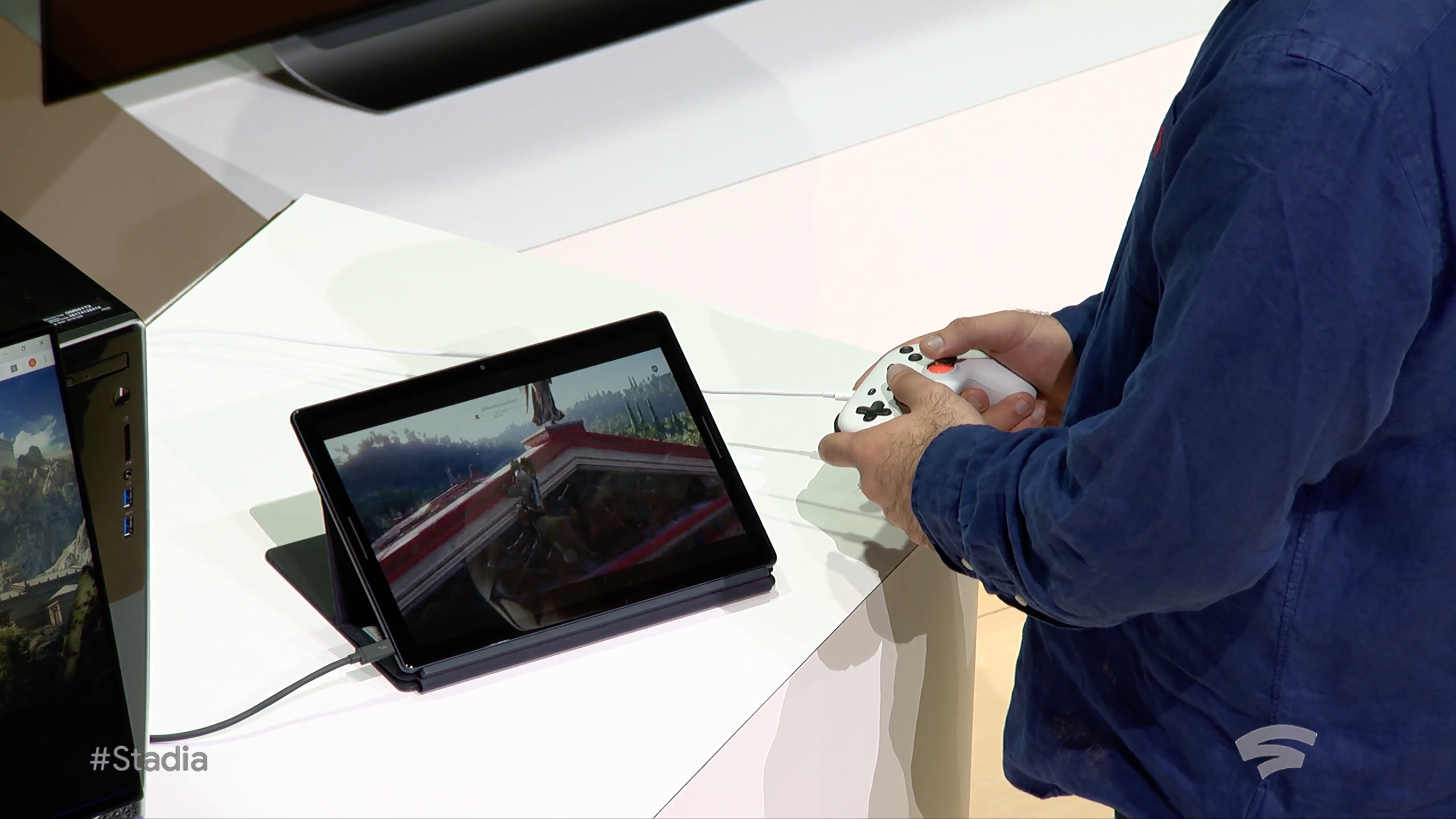
We saw Assassin’s Creed: Odyssey (a lot) and Doom: Eternal, and a few other things running on Stadia, but otherwise Google’s presentation was pretty light on details as far as what games exactly we can expect to see on there.

It’s not an easy question to answer, since this isn’t just a question of “all PC games,” or “all games from these 6 publishers.” Stadia requires a game be ported, or partly recoded to fit its new environment — in this case a Linux-powered PC. That’s not unusual, but it isn’t trivial either.

Porting is just part of the job for a major studio like Ubisoft, which regularly publishes on multiple platforms simultaneously, but for a smaller developer or a more specialized game, it’s not so straightforward. Jade Raymond will be in charge of both first-party games just for Stadia as well as developer relations; she said that the team will be “working with external developers to bring all of the bleeding edge Google technology you have seen today available to partner studios big and small.”

What that tells me is that every game that comes to Stadia will require special attention. That’s not a good sign for selection, but it does suggest that anything available on it will run well.

2. What will it cost?

Perhaps the topic Google avoided the most was what the heck the business model is for this whole thing.

Do you pay a subscription fee? Is it part of YouTube or maybe YouTube Red? Do they make money off sales of games after someone plays the instant demo? Is it free for an hour a day? Will it show ads every 15 minutes? Will publishers foot the bill as part of their normal marketing budget? No one knows!

It’s a difficult play because the most obvious way to monetize also limits the product’s exposure. Asking people to subscribe adds a lot of friction to a platform where the entire idea is to get you playing within 5 seconds.

Putting ads in is an easy way to let people jump in and have it be monetized a small amount. You could even advertise the game itself and offer a one-time 10 percent off coupon or something. Then mention that YouTube Red subscribers don’t see ads at all.

Sounds reasonable, but Google didn’t mention anything like this at all. We’ll probably hear more later this year closer to launch, but it’s hard to judge the value of the service when we have no idea what it will cost.

3. What about iOS devices?

Google and Apple are bitter rivals in a lot of ways, but it’s hard to get around the fact that iPhone owners tend to be the most lucrative mobile customers. Yet there were none in the live demo and no availability mentioned for iOS.

Depending on its business model, Google may have locked itself out of the App Store. Apple doesn’t let you essentially run a store within its store (as we have seen in cases like Amazon and Epic) and if that’s part of the Stadia offering, it’s not going to fly.

An app that just lets you play might be a possibility, but since none was mentioned, it’s possible Google is using Stadia as a platform exclusive to draw people to Pixel devices. That kind of puts a limit on the pitch that you can play on devices you already have.

4. What about games you already own?

A big draw of game streaming is to buy a game once and play it anywhere. Sometimes you want to play the big awesome story parts on your 60-inch TV in surround sound, but do a little inventory and quest management on your laptop at the cafe. That’s what systems like Steam Link offer.

Epic Games is taking on Steam with its own digital game store, which includes higher take-home revenue rates for developers.

But Google didn’t mention how its ownership system will work, or whether there would be a way to play games you already own on the service. This is a big consideration for many gamers.

It was mentioned that there would be cross platform play and perhaps even the ability to bring saves to other platforms, but how that would work was left to the imagination. Frankly I’m skeptical.

Letting people show they own a game and giving them access to it is a recipe for scamming and trouble, but not supporting it is missing out on a huge application for the service. Google’s caught between a rock and a hard place here.

5. Can you really convert viewers to players?

This is a bit more of an abstract question, but it comes from the basic idea that people specifically come to YouTube and Twitch to watch games, not play them. Mobile viewership is huge because streams are a great way to kill time on a train or bus ride, or during a break at school. These viewers often don’t want to play at those times, and couldn’t if they did want to!

So the question is, are there really enough people watching gaming content on YouTube who will actually actively switch to playing just like that?

Photo: Maskot / Getty Images

To be fair, the idea of a game trailer that lets you play what you just saw five seconds later is brilliant. I’m 100 percent on board there. But people don’t watch dozens of hours of game trailers a week — they watch famous streamers play Fortnite and PUBG and do speedruns of Dark Souls and Super Mario Bros 1. These audiences are much harder to change into players.

The potential of joining a game with a streamer, or affecting them somehow, or picking up at the spot they left off, to try fighting a boss on your own or seeing how their character controls, is a good one, but making that happen goes far, far beyond the streaming infrastructure Google has created here. It involves rewriting the rules on how games are developed and published. We saw attempts at this from Beam, later acquired by Microsoft, but it never really bloomed.

Streaming is a low-commitment, passive form of entertainment, which is kind of why it’s so popular. Turning that into an active, involved form of entertainment is far from straightforward.

6. How’s the image quality?

Games these days have mind-blowing graphics. I sure had a lot of bad things to say about Anthem, but when it came to looks that game was a showstopper. And part of what made it great were the tiny details in textures and subtle gradations of light that are only just recently possible with advances in shaders, volumetric fog, and so on. Will those details really come through in a stream?

Damn.

Don’t get me wrong. I know a 1080p stream looks decent. But the simple fact is that high-efficiency HD video compression reduces detail in a noticeable way. You just can’t perfectly recreate an image if you have to send it 60 times per second with only a few milliseconds to compress and decompress it. It’s how image compression works.

For some people this won’t be a big deal. They really might not care about the loss of some visual fidelity — the convenience factor may outweigh it by a ton. But there are others for whom it may be distracting, those who have invested in a powerful gaming console or PC that gives them better detail at higher framerates than Stadia can possibly offer.

It’s not apples to apples but Google has to consider these things, especially when the difference is noticeable enough that game developers and publishers start to note that a game is “best experienced locally” or something like that.

7. Will people really game on the go?

I don’t question whether people play games on mobile. That’s one of the biggest businesses in the world. But I’m not sure that people want to play Assassin’s Creed: Odyssey on their iPa… I mean, Pixel Slate. Let alone their smartphone.

Games on phones and tablets are frequently time-killers driven by addictive short-duration game sessions. Even the bigger, more console-like games on mobile usually aim for shorter play sessions. That may be changing in some ways for sure but it’s a consideration, and AAA console games really just aren’t designed for 5-10 minute gaming sessions.

Add to that that you have to carry around what looks like a fairly bulky controller and this becomes less of an option for things like planes, cafes, subway rides, and so on. Even if you did bring it, could you be sure you’ll get the 10 or 20 Mbps you’ll need to get that 60FPS video rate? And don’t say 5G. If anyone says 5G again after the last couple months I’m going to lose it.

Naturally the counterpoint here is Nintendo’s fabulously successful and portable Switch. But the Switch plays both sides, providing a console-like experience on the go that makes sense because of its frictionless game state saving and offline operation. Stadia doesn’t seem to offer anything like that. In some ways it could be more compelling, but it’s a hard sell right now.

8. How will multiplayer work?

Obviously multiplayer gaming is huge right now and likely will be forever, so the Stadia will for sure support multiplayer one way or another. But multiplayer is also really complicated.

It used to be that someone just picked up the second controller and played Luigi. Now you have friend codes, accounts, user IDs, automatic matchmaking, all kinds of junk. If I want to play The Division 2 with a friend via Stadia, how does that work? Can I use my existing account? How do I log in? Are there IP issues and will the whole rigmarole of the game running in some big server farm set off cheat detectors or send me a security warning email? What if two people want to play a game locally?

Many of the biggest gaming properties in the world are multiplayer focused, and without a very, very clear line on this it’s going to turn a lot of people off. The platform might be great for it — but they have some convincing to do.

9. Stadia?

Branding is hard. Launching a product that aims to reach millions and giving it a name that not only represents it well but isn’t already taken is hard. But that said… Stadia?

I guess the idea is that each player is kind of in a stadium of their own… or that they’re in a stadium where Ninja is playing, and then they can go down to join? Certainly Stadia is more distinctive than stadium and less copyright-fraught than Colosseum or the like. Arena is probably out too.

If only Google already owned something that indicated gaming but was simple, memorable, and fit with its existing “Google ___” set of consumer-focused apps, brands, and services.

Oh well!


Read Full Article

The 9 biggest questions about Google’s Stadia game streaming service


Google’s Stadia is an impressive piece of engineering to be sure: Delivering high definition, high framerate, low latency video to devices like tablets and phones is an accomplishment in itself. But the game streaming services faces serious challenges if it wants to compete with the likes of Xbox and PlayStation, or even plain old PCs and smartphones.

Here are our nine biggest questions about what the service will be and how it’ll work.

1. What’s the game selection like?

We saw Assassin’s Creed: Odyssey (a lot) and Doom: Eternal, and a few other things running on Stadia, but otherwise Google’s presentation was pretty light on details as far as what games exactly we can expect to see on there.

It’s not an easy question to answer, since this isn’t just a question of “all PC games,” or “all games from these 6 publishers.” Stadia requires a game be ported, or partly recoded to fit its new environment — in this case a Linux-powered PC. That’s not unusual, but it isn’t trivial either.

Porting is just part of the job for a major studio like Ubisoft, which regularly publishes on multiple platforms simultaneously, but for a smaller developer or a more specialized game, it’s not so straightforward. Jade Raymond will be in charge of both first-party games just for Stadia as well as developer relations; she said that the team will be “working with external developers to bring all of the bleeding edge Google technology you have seen today available to partner studios big and small.”

What that tells me is that every game that comes to Stadia will require special attention. That’s not a good sign for selection, but it does suggest that anything available on it will run well.

2. What will it cost?

Perhaps the topic Google avoided the most was what the heck the business model is for this whole thing.

Do you pay a subscription fee? Is it part of YouTube or maybe YouTube Red? Do they make money off sales of games after someone plays the instant demo? Is it free for an hour a day? Will it show ads every 15 minutes? Will publishers foot the bill as part of their normal marketing budget? No one knows!

It’s a difficult play because the most obvious way to monetize also limits the product’s exposure. Asking people to subscribe adds a lot of friction to a platform where the entire idea is to get you playing within 5 seconds.

Putting ads in is an easy way to let people jump in and have it be monetized a small amount. You could even advertise the game itself and offer a one-time 10 percent off coupon or something. Then mention that YouTube Red subscribers don’t see ads at all.

Sounds reasonable, but Google didn’t mention anything like this at all. We’ll probably hear more later this year closer to launch, but it’s hard to judge the value of the service when we have no idea what it will cost.

3. What about iOS devices?

Google and Apple are bitter rivals in a lot of ways, but it’s hard to get around the fact that iPhone owners tend to be the most lucrative mobile customers. Yet there were none in the live demo and no availability mentioned for iOS.

Depending on its business model, Google may have locked itself out of the App Store. Apple doesn’t let you essentially run a store within its store (as we have seen in cases like Amazon and Epic) and if that’s part of the Stadia offering, it’s not going to fly.

An app that just lets you play might be a possibility, but since none was mentioned, it’s possible Google is using Stadia as a platform exclusive to draw people to Pixel devices. That kind of puts a limit on the pitch that you can play on devices you already have.

4. What about games you already own?

A big draw of game streaming is to buy a game once and play it anywhere. Sometimes you want to play the big awesome story parts on your 60-inch TV in surround sound, but do a little inventory and quest management on your laptop at the cafe. That’s what systems like Steam Link offer.

Epic Games is taking on Steam with its own digital game store, which includes higher take-home revenue rates for developers.

But Google didn’t mention how its ownership system will work, or whether there would be a way to play games you already own on the service. This is a big consideration for many gamers.

It was mentioned that there would be cross platform play and perhaps even the ability to bring saves to other platforms, but how that would work was left to the imagination. Frankly I’m skeptical.

Letting people show they own a game and giving them access to it is a recipe for scamming and trouble, but not supporting it is missing out on a huge application for the service. Google’s caught between a rock and a hard place here.

5. Can you really convert viewers to players?

This is a bit more of an abstract question, but it comes from the basic idea that people specifically come to YouTube and Twitch to watch games, not play them. Mobile viewership is huge because streams are a great way to kill time on a train or bus ride, or during a break at school. These viewers often don’t want to play at those times, and couldn’t if they did want to!

So the question is, are there really enough people watching gaming content on YouTube who will actually actively switch to playing just like that?

Photo: Maskot / Getty Images

To be fair, the idea of a game trailer that lets you play what you just saw five seconds later is brilliant. I’m 100 percent on board there. But people don’t watch dozens of hours of game trailers a week — they watch famous streamers play Fortnite and PUBG and do speedruns of Dark Souls and Super Mario Bros 1. These audiences are much harder to change into players.

The potential of joining a game with a streamer, or affecting them somehow, or picking up at the spot they left off, to try fighting a boss on your own or seeing how their character controls, is a good one, but making that happen goes far, far beyond the streaming infrastructure Google has created here. It involves rewriting the rules on how games are developed and published. We saw attempts at this from Beam, later acquired by Microsoft, but it never really bloomed.

Streaming is a low-commitment, passive form of entertainment, which is kind of why it’s so popular. Turning that into an active, involved form of entertainment is far from straightforward.

6. How’s the image quality?

Games these days have mind-blowing graphics. I sure had a lot of bad things to say about Anthem, but when it came to looks that game was a showstopper. And part of what made it great were the tiny details in textures and subtle gradations of light that are only just recently possible with advances in shaders, volumetric fog, and so on. Will those details really come through in a stream?

Damn.

Don’t get me wrong. I know a 1080p stream looks decent. But the simple fact is that high-efficiency HD video compression reduces detail in a noticeable way. You just can’t perfectly recreate an image if you have to send it 60 times per second with only a few milliseconds to compress and decompress it. It’s how image compression works.

For some people this won’t be a big deal. They really might not care about the loss of some visual fidelity — the convenience factor may outweigh it by a ton. But there are others for whom it may be distracting, those who have invested in a powerful gaming console or PC that gives them better detail at higher framerates than Stadia can possibly offer.

It’s not apples to apples but Google has to consider these things, especially when the difference is noticeable enough that game developers and publishers start to note that a game is “best experienced locally” or something like that.

7. Will people really game on the go?

I don’t question whether people play games on mobile. That’s one of the biggest businesses in the world. But I’m not sure that people want to play Assassin’s Creed: Odyssey on their iPa… I mean, Pixel Slate. Let alone their smartphone.

Games on phones and tablets are frequently time-killers driven by addictive short-duration game sessions. Even the bigger, more console-like games on mobile usually aim for shorter play sessions. That may be changing in some ways for sure but it’s a consideration, and AAA console games really just aren’t designed for 5-10 minute gaming sessions.

Add to that that you have to carry around what looks like a fairly bulky controller and this becomes less of an option for things like planes, cafes, subway rides, and so on. Even if you did bring it, could you be sure you’ll get the 10 or 20 Mbps you’ll need to get that 60FPS video rate? And don’t say 5G. If anyone says 5G again after the last couple months I’m going to lose it.

Naturally the counterpoint here is Nintendo’s fabulously successful and portable Switch. But the Switch plays both sides, providing a console-like experience on the go that makes sense because of its frictionless game state saving and offline operation. Stadia doesn’t seem to offer anything like that. In some ways it could be more compelling, but it’s a hard sell right now.

8. How will multiplayer work?

Obviously multiplayer gaming is huge right now and likely will be forever, so the Stadia will for sure support multiplayer one way or another. But multiplayer is also really complicated.

It used to be that someone just picked up the second controller and played Luigi. Now you have friend codes, accounts, user IDs, automatic matchmaking, all kinds of junk. If I want to play The Division 2 with a friend via Stadia, how does that work? Can I use my existing account? How do I log in? Are there IP issues and will the whole rigmarole of the game running in some big server farm set off cheat detectors or send me a security warning email? What if two people want to play a game locally?

Many of the biggest gaming properties in the world are multiplayer focused, and without a very, very clear line on this it’s going to turn a lot of people off. The platform might be great for it — but they have some convincing to do.

9. Stadia?

Branding is hard. Launching a product that aims to reach millions and giving it a name that not only represents it well but isn’t already taken is hard. But that said… Stadia?

I guess the idea is that each player is kind of in a stadium of their own… or that they’re in a stadium where Ninja is playing, and then they can go down to join? Certainly Stadia is more distinctive than stadium and less copyright-fraught than Colosseum or the like. Arena is probably out too.

If only Google already owned something that indicated gaming but was simple, memorable, and fit with its existing “Google ___” set of consumer-focused apps, brands, and services.

Oh well!


Read Full Article

The 9 biggest questions about Google’s Stadia game streaming service


Google’s Stadia is an impressive piece of engineering to be sure: Delivering high definition, high framerate, low latency video to devices like tablets and phones is an accomplishment in itself. But the game streaming services faces serious challenges if it wants to compete with the likes of Xbox and PlayStation, or even plain old PCs and smartphones.

Here are our nine biggest questions about what the service will be and how it’ll work.

1. What’s the game selection like?

We saw Assassin’s Creed: Odyssey (a lot) and Doom: Eternal, and a few other things running on Stadia, but otherwise Google’s presentation was pretty light on details as far as what games exactly we can expect to see on there.

It’s not an easy question to answer, since this isn’t just a question of “all PC games,” or “all games from these 6 publishers.” Stadia requires a game be ported, or partly recoded to fit its new environment — in this case a Linux-powered PC. That’s not unusual, but it isn’t trivial either.

Porting is just part of the job for a major studio like Ubisoft, which regularly publishes on multiple platforms simultaneously, but for a smaller developer or a more specialized game, it’s not so straightforward. Jade Raymond will be in charge of both first-party games just for Stadia as well as developer relations; she said that the team will be “working with external developers to bring all of the bleeding edge Google technology you have seen today available to partner studios big and small.”

What that tells me is that every game that comes to Stadia will require special attention. That’s not a good sign for selection, but it does suggest that anything available on it will run well.

2. What will it cost?

Perhaps the topic Google avoided the most was what the heck the business model is for this whole thing.

Do you pay a subscription fee? Is it part of YouTube or maybe YouTube Red? Do they make money off sales of games after someone plays the instant demo? Is it free for an hour a day? Will it show ads every 15 minutes? Will publishers foot the bill as part of their normal marketing budget? No one knows!

It’s a difficult play because the most obvious way to monetize also limits the product’s exposure. Asking people to subscribe adds a lot of friction to a platform where the entire idea is to get you playing within 5 seconds.

Putting ads in is an easy way to let people jump in and have it be monetized a small amount. You could even advertise the game itself and offer a one-time 10 percent off coupon or something. Then mention that YouTube Red subscribers don’t see ads at all.

Sounds reasonable, but Google didn’t mention anything like this at all. We’ll probably hear more later this year closer to launch, but it’s hard to judge the value of the service when we have no idea what it will cost.

3. What about iOS devices?

Google and Apple are bitter rivals in a lot of ways, but it’s hard to get around the fact that iPhone owners tend to be the most lucrative mobile customers. Yet there were none in the live demo and no availability mentioned for iOS.

Depending on its business model, Google may have locked itself out of the App Store. Apple doesn’t let you essentially run a store within its store (as we have seen in cases like Amazon and Epic) and if that’s part of the Stadia offering, it’s not going to fly.

An app that just lets you play might be a possibility, but since none was mentioned, it’s possible Google is using Stadia as a platform exclusive to draw people to Pixel devices. That kind of puts a limit on the pitch that you can play on devices you already have.

4. What about games you already own?

A big draw of game streaming is to buy a game once and play it anywhere. Sometimes you want to play the big awesome story parts on your 60-inch TV in surround sound, but do a little inventory and quest management on your laptop at the cafe. That’s what systems like Steam Link offer.

Epic Games is taking on Steam with its own digital game store, which includes higher take-home revenue rates for developers.

But Google didn’t mention how its ownership system will work, or whether there would be a way to play games you already own on the service. This is a big consideration for many gamers.

It was mentioned that there would be cross platform play and perhaps even the ability to bring saves to other platforms, but how that would work was left to the imagination. Frankly I’m skeptical.

Letting people show they own a game and giving them access to it is a recipe for scamming and trouble, but not supporting it is missing out on a huge application for the service. Google’s caught between a rock and a hard place here.

5. Can you really convert viewers to players?

This is a bit more of an abstract question, but it comes from the basic idea that people specifically come to YouTube and Twitch to watch games, not play them. Mobile viewership is huge because streams are a great way to kill time on a train or bus ride, or during a break at school. These viewers often don’t want to play at those times, and couldn’t if they did want to!

So the question is, are there really enough people watching gaming content on YouTube who will actually actively switch to playing just like that?

Photo: Maskot / Getty Images

To be fair, the idea of a game trailer that lets you play what you just saw five seconds later is brilliant. I’m 100 percent on board there. But people don’t watch dozens of hours of game trailers a week — they watch famous streamers play Fortnite and PUBG and do speedruns of Dark Souls and Super Mario Bros 1. These audiences are much harder to change into players.

The potential of joining a game with a streamer, or affecting them somehow, or picking up at the spot they left off, to try fighting a boss on your own or seeing how their character controls, is a good one, but making that happen goes far, far beyond the streaming infrastructure Google has created here. It involves rewriting the rules on how games are developed and published. We saw attempts at this from Beam, later acquired by Microsoft, but it never really bloomed.

Streaming is a low-commitment, passive form of entertainment, which is kind of why it’s so popular. Turning that into an active, involved form of entertainment is far from straightforward.

6. How’s the image quality?

Games these days have mind-blowing graphics. I sure had a lot of bad things to say about Anthem, but when it came to looks that game was a showstopper. And part of what made it great were the tiny details in textures and subtle gradations of light that are only just recently possible with advances in shaders, volumetric fog, and so on. Will those details really come through in a stream?

Damn.

Don’t get me wrong. I know a 1080p stream looks decent. But the simple fact is that high-efficiency HD video compression reduces detail in a noticeable way. You just can’t perfectly recreate an image if you have to send it 60 times per second with only a few milliseconds to compress and decompress it. It’s how image compression works.

For some people this won’t be a big deal. They really might not care about the loss of some visual fidelity — the convenience factor may outweigh it by a ton. But there are others for whom it may be distracting, those who have invested in a powerful gaming console or PC that gives them better detail at higher framerates than Stadia can possibly offer.

It’s not apples to apples but Google has to consider these things, especially when the difference is noticeable enough that game developers and publishers start to note that a game is “best experienced locally” or something like that.

7. Will people really game on the go?

I don’t question whether people play games on mobile. That’s one of the biggest businesses in the world. But I’m not sure that people want to play Assassin’s Creed: Odyssey on their iPa… I mean, Pixel Slate. Let alone their smartphone.

Games on phones and tablets are frequently time-killers driven by addictive short-duration game sessions. Even the bigger, more console-like games on mobile usually aim for shorter play sessions. That may be changing in some ways for sure but it’s a consideration, and AAA console games really just aren’t designed for 5-10 minute gaming sessions.

Add to that that you have to carry around what looks like a fairly bulky controller and this becomes less of an option for things like planes, cafes, subway rides, and so on. Even if you did bring it, could you be sure you’ll get the 10 or 20 Mbps you’ll need to get that 60FPS video rate? And don’t say 5G. If anyone says 5G again after the last couple months I’m going to lose it.

Naturally the counterpoint here is Nintendo’s fabulously successful and portable Switch. But the Switch plays both sides, providing a console-like experience on the go that makes sense because of its frictionless game state saving and offline operation. Stadia doesn’t seem to offer anything like that. In some ways it could be more compelling, but it’s a hard sell right now.

8. How will multiplayer work?

Obviously multiplayer gaming is huge right now and likely will be forever, so the Stadia will for sure support multiplayer one way or another. But multiplayer is also really complicated.

It used to be that someone just picked up the second controller and played Luigi. Now you have friend codes, accounts, user IDs, automatic matchmaking, all kinds of junk. If I want to play The Division 2 with a friend via Stadia, how does that work? Can I use my existing account? How do I log in? Are there IP issues and will the whole rigmarole of the game running in some big server farm set off cheat detectors or send me a security warning email? What if two people want to play a game locally?

Many of the biggest gaming properties in the world are multiplayer focused, and without a very, very clear line on this it’s going to turn a lot of people off. The platform might be great for it — but they have some convincing to do.

9. Stadia?

Branding is hard. Launching a product that aims to reach millions and giving it a name that not only represents it well but isn’t already taken is hard. But that said… Stadia?

I guess the idea is that each player is kind of in a stadium of their own… or that they’re in a stadium where Ninja is playing, and then they can go down to join? Certainly Stadia is more distinctive than stadium and less copyright-fraught than Colosseum or the like. Arena is probably out too.

If only Google already owned something that indicated gaming but was simple, memorable, and fit with its existing “Google ___” set of consumer-focused apps, brands, and services.

Oh well!


Read Full Article