07 February 2019

Many popular iPhone apps secretly record your screen without asking


Many major companies, like Air Canada, Hollister and Expedia, are recording every tap and swipe you make on their iPhone apps. In most cases you won’t even realize it. And they don’t need to ask for permission.

You can assume that most apps are collecting data on you. Some even monetize your data without your knowledge. But TechCrunch has found several popular iPhone apps, from hoteliers, travel sites, airlines, cell phone carriers, banks and financiers, that don’t ask or make it clear — if at all — that they know exactly how you’re using their apps.

Worse, even though these apps are meant to mask certain fields, some inadvertently expose sensitive data.

Apps like Abercrombie & Fitch, Hotels.com and Singapore Airlines also use Glassbox, a customer experience analytics firm, one of a handful of companies that allows developers to embed “session replay” technology into their apps. These session replays let app developers record the screen and play them back to see how its users interacted with the app to figure out if something didn’t work or if there was an error. Every tap, button push and keyboard entry is recorded — effectively screenshotted — and sent back to the app developers.

Or, as Glassbox said in a recent tweet: “Imagine if your website or mobile app could see exactly what your customers do in real time, and why they did it?”

The App Analyst, a mobile expert who writes about his analyses of popular apps on his eponymous blog, recently found Air Canada’s iPhone app wasn’t properly masking the session replays when they were sent, exposing passport numbers and credit card data in each replay session. Just weeks earlier, Air Canada said its app had a data breach, exposing 20,000 profiles.

“This gives Air Canada employees — and anyone else capable of accessing the screenshot database — to see unencrypted credit card and password information,” he told TechCrunch.
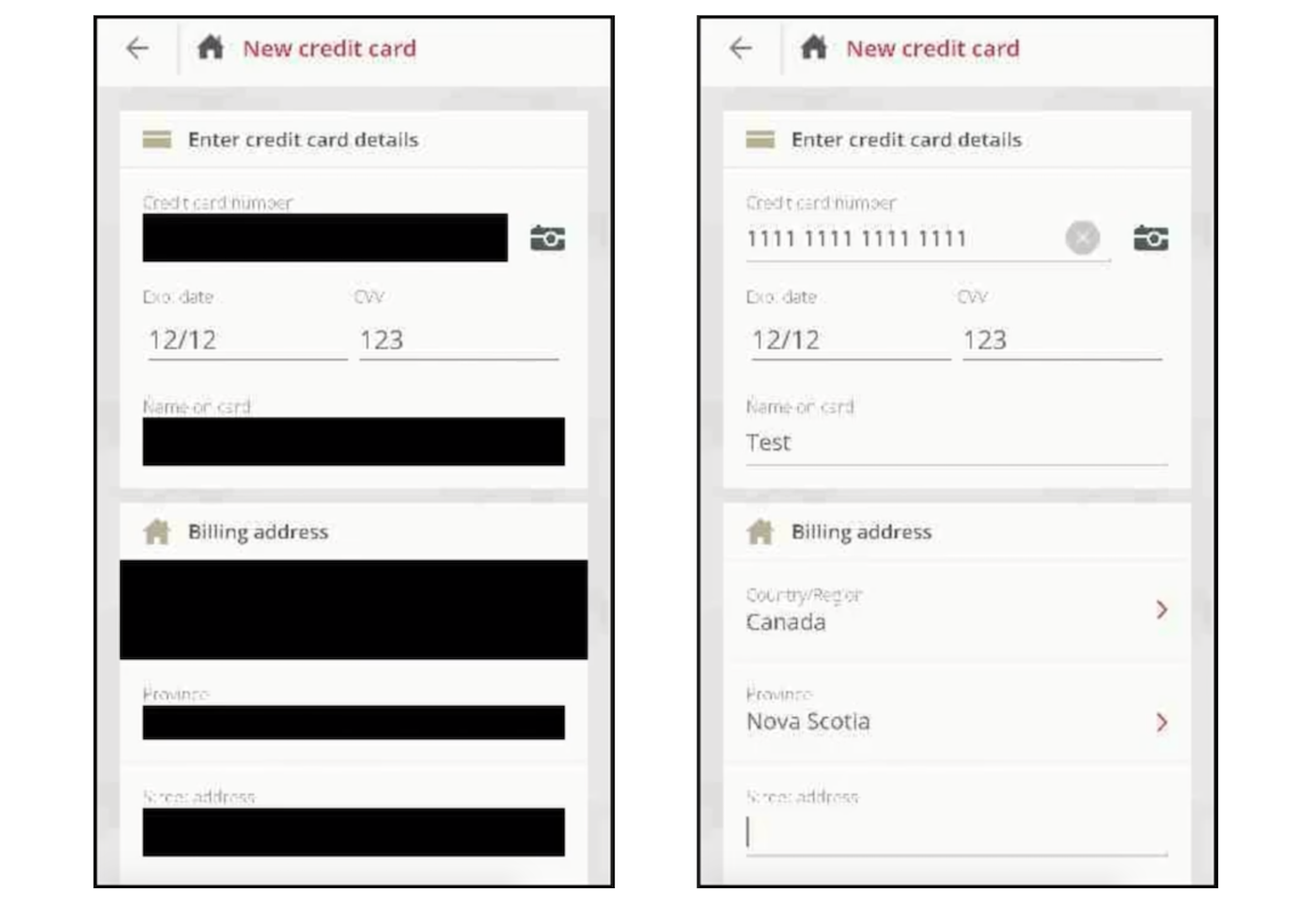
In the case of Air Canada’s app, although the fields are masked, the masking didn’t always stick (Image: The App Analyst/supplied)

We asked The App Analyst to look at a sample of apps that Glassbox had listed on its website as customers. Using Charles Proxy, a man-in-the-middle tool used to intercept the data sent from the app, the researcher could examine what data was going out of the device.

Not every app was leaking masked data; none of the apps we examined said they were recording a user’s screen — let alone sending them back to each company or directly to Glassbox’s cloud.

That could be a problem if any one of Glassbox’s customers aren’t properly masking data, he said in an email. “Since this data is often sent back to Glassbox servers I wouldn’t be shocked if they have already had instances of them capturing sensitive banking information and passwords,” he said.

The App Analyst said that while Hollister and Abercrombie & Fitch sent their session replays to Glassbox, others like Expedia and Hotels.com opted to capture and send session replay data back to a server on their own domain. He said that the data was “mostly obfuscated,” but did see in some cases email addresses and postal codes. The researcher said Singapore Airlines also collected session replay data but sent it back to Glassbox’s cloud.

Without analyzing the data for each app, it’s impossible to know if an app is recording a user’s screens of how you’re using the app. We didn’t even find it in the small print of their privacy policies.

Apps that are submitted to Apple’s App Store must have a privacy policy, but none of the apps we reviewed make it clear in their policies that they record a user’s screen. Glassbox doesn’t require any special permission from Apple or from the user, so there’s no way a user would know.

Expedia’s policy makes no mention of recording your screen, nor does Hotels.com’s policy. And in Air Canada’s case, we couldn’t spot a single line in its iOS terms and conditions or privacy policy that suggests the iPhone app sends screen data back to the airline. And in Singapore Airlines’ privacy policy, there’s no mention, either.

We asked all of the companies to point us to exactly where in its privacy policies it permits each app to capture what a user does on their phone.

Only Abercombie responded, confirming that Glassbox “helps support a seamless shopping experience, enabling us to identify and address any issues customers might encounter in their digital experience.” The spokesperson pointing to Abercrombie’s privacy policy makes no mention of session replays, neither does its sister-brand Hollister’s policy.

“I think users should take an active role in how they share their data, and the first step to this is having companies be forthright in sharing how they collect their users data and who they share it with,” said The App Analyst.

When asked, Glassbox said it doesn’t enforce its customers to mention its usage in their privacy policy.

“Glassbox has a unique capability to reconstruct the mobile application view in a visual format, which is another view of analytics, Glassbox SDK can interact with our customers native app only and technically cannot break the boundary of the app,” the spokesperson said, such as when the system keyboard covers part of the native app, “Glassbox does not have access to it,” the spokesperson said.

Glassbox is one of many session replay services on the market. Appsee actively markets its “user recording” technology that lets developers “see your app through your user’s eyes,” while UXCam says it lets developers “watch recordings of your users’ sessions, including all their gestures and triggered events.” Most went under the radar until Mixpanel sparked anger for mistakenly harvesting passwords after masking safeguards failed.

It’s not an industry that’s likely to go away any time soon — companies rely on this kind of session replay data to understand why things break, which can be costly in high-revenue situations.

But for the fact that the app developers don’t publicize it just goes to show how creepy even they know it is.


Got a tip? You can send tips securely over Signal and WhatsApp to +1 646-755–8849. You can also send PGP email with the fingerprint: 4D0E 92F2 E36A EC51 DAAE 5D97 CB8C 15FA EB6C EEA5.


Read Full Article

Facebook will reveal who uploaded your contact info for ad targeting


Facebook’s crack down on non-consensual ad targeting last year will finally produce results. In March, TechCrunch discovered Facebook planned to require advertisers pledge that they had permission to upload someone’s phone number or email address for ad targeting. That tool debuted in June, though there was no verification process and Facebook just took businesses at their word despite the financial incentive to lie. In November, Facebook launched a way for ad agencies and marketing tech developers to specify who they were buying promotions ‘on behalf of’. Soon that information will finally be revealed to users.

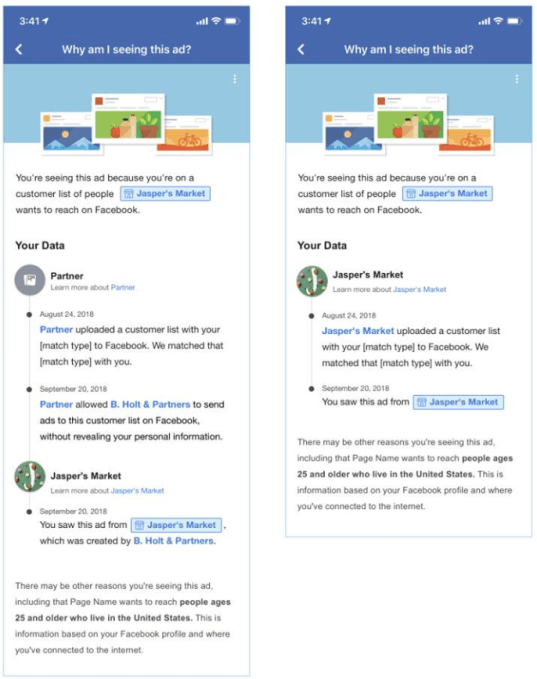
Facebook’s new Custom Audiences transparency feature shows when your contact info was uploaded by who, and if it was shared between brands and partners

Facebook previously only revealed what brand was using your contact info for targeting, not who uploaded it or when

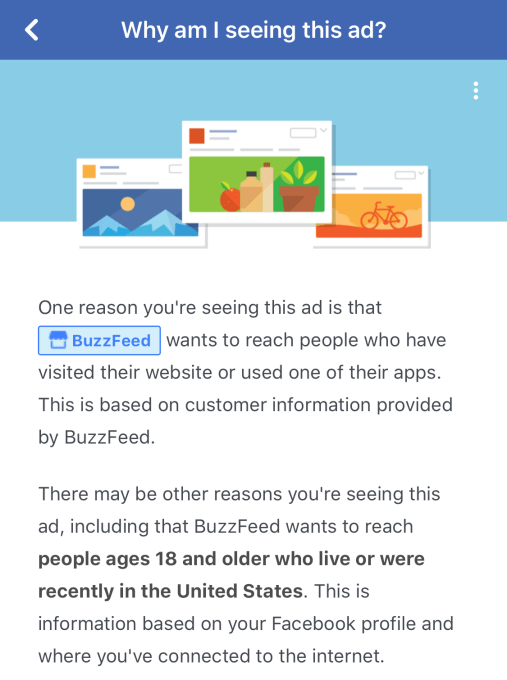
Starting February 28th, Facebook’s “Why am I seeing this?” button in the drop-down menu of feed posts will reveal more than the brand who paid for the ad, some biographical details they targeted, and if they’d uploaded your contact info. Facebook will start to show when your contact info was uploaded, if it was by the brand or one of their agency/developer partners, and when access was shared between partners. A Facebook spokesperson tells me the goal to keep giving people a better understanding of how advertisers use their information.

This new level of transparency could help users pinpoint what caused a brand to get ahold of their contact info. That might help them to change their behavior to stay more private. The system could also help Facebook zero in on agencies or partners who are constantly uploading contact info and might not have attained it legitimately. Apparently seeking not to dredge up old privacy problems, Facebook didn’t publish a blog post about the change but simply announced it in a Facebook post to the Facebook Advertiser Hub Page.

The move comes in the wake of Facebook attaching immediately visible “paid for by” labels to more political ads to defend against election interference. With so many users concerned about how Facebook exploits their data, the Custom Audiences transparency feature could provide a small boost of confidence in a time where people have little faith in the social network’s privacy practices.


Read Full Article

Why I Use FreeTaxUSA Instead of TurboTax or H&R Block to File Taxes


Unless you’re running your own business or involved in complex investments, you likely don’t need to pay a CPA just to file your taxes. All you need is the right software, and you can do it yourself in under an hour.

I’ve mainly used TaxSlayer in the past. I’ve also tried TurboTax, H&R Block, and TaxAct, but was never quite impressed and found them overly expensive.

Two years ago, I decided to try filing my taxes using the lesser-known FreeTaxUSA, and I found the experience so pleasant that I’m actually excited to do taxes now. In this article, I’ll show you exactly why I now prefer filing my taxes with FreeTaxUSA.

Pricing Comparison for Tax Software

While most tax programs offer free versions for basic 1040EZ filing, they’re only available to those who 1) aren’t high-income earners, 2) aren’t freelancers or contractors, 3) aren’t homeowners or property owners, 4) have no taxable investments, and 5) don’t want to import tax data from year to year.

FreeTaxUSA is free for ALL of those scenarios, period. Check out how it stacks up against the big names in tax software for 2018:

FreeTaxUSA

  • Everyone: $0 Federal + $12.95 per State

TurboTax

  • Deluxe: $39.99 Federal + $39.99 per State
  • Premier: $59.99 Federal + $39.99 per State
  • Self-Employed: $89.99 Federal + $39.99 per State

H&R Block

  • Deluxe: $29.99 Federal + $36.99 per State
  • Premium: $49.99 Federal + $36.99 per State
  • Self-Employed: $79.99 Federal + $36.99 per State
  • Tax Pro Review: $119.99 Federal + $36.99 per State

TaxAct

  • Basic+: $9.95 Federal + $19.95 per State
  • Deluxe+: $29.95 Federal + $39.95 per State
  • Premier+: $34.95 Federal + $39.95 per State
  • Self-Employed+: $49.95 Federal + $39.95 per State

TaxSlayer

  • Classic: $17 Federal + $29 per State
  • Premium: $37 Federal + $29 per State
  • Self-Employed: $47 Federal + $29 per State
  • Ultimate: $57 Federal + $29 per State

FreeTaxUSA is the only major online tax filing software that lets you file all federal tax forms for free. Homeowners, investors, freelancers, contractors, high-income earners—doesn’t matter who you are, federal filing is completely free.

Cheaper isn’t always better, of course, and the most important things about tax filing software are that it’s accurate and easy-to-use.

So how does FreeTaxUSA fare in usability? Let me show you a behind-the-curtains peek at how I actually filed my 2017 taxes with it, and you can decide for yourself.

Filing Taxes With FreeTaxUSA

Like most online tax filing solutions, FreeTaxUSA offers you two options:

  1. A step-by-step guided walkthrough that asks you one question at a time so you aren’t overwhelmed by too many details.
  2. A freeform experience that allows you to jump to any point in the tax filing process and fill it out in whatever order you want.

I don’t consider myself a tax newbie, but I still like to use the step-by-step guided walkthrough every year just to be sure I don’t miss anything important.

The filing process is divided into four sections:

  • Personal Information
  • Income
  • Deductions and Credits
  • Miscellaneous

At any point, you can use the top navigation bar to jump around:

file taxes with freetaxusa

You can also bookmark pages for later, which is useful when you’re waiting on a form to be mailed before filling out a certain section. Topic List is a good way to see if you’ve missed anything important, and History shows what you filled out and when.

Here’s what you can expect in each section.

Section 1: Personal Information

FreeTaxUSA starts off with basic taxpayer information, filing status, dependents, and qualifying children. This is all pretty straightforward, but if you’re ever confused about anything, you can just click on the helpful question links to get clear answers.

file taxes with freetaxusa

file taxes with freetaxusa

Section 2: Income

The Income section of FreeTaxUSA starts with an overview of all possible forms of income you can report, but lets you decide which ones to fill out so you don’t waste time clicking “This doesn’t apply to me” for a million pages:

file taxes with freetaxusa

The comparison of current year to previous year isn’t just useful for seeing whether you earned more or less, but as an anchor for each kind of income. Knowing I earned $30,000 in W-2 income last year makes it easy to see that I entered something incorrectly if my current year W-2 income is too far off.

Here’s what the walkthrough looks like for W-2 income:

file taxes with freetaxusa

Here’s what the walkthrough looks like for freelance income:

file taxes with freetaxusa

file taxes with freetaxusa

At the end of each income type, you can preview the actual form that the IRS will receive. In the case of freelance income, you can look at the Schedule C preview and catch anything that might be wrong (I haven’t seen any errors thus far).

Section 3: Deductions and Credits

While FreeTaxUSA handles every kind of deduction you’d possibly need, it starts off with the two most important kinds: retirement contributions and standard/itemized deductions.

file taxes with freetaxusa

file taxes with freetaxusa

file taxes with freetaxusa

On top of this, it’s just as easy to input whatever other deductions you qualify for, including things like health savings account contributions, college tuition payments, and student loan interest deductions.

If you owe a penalty for the Affordable Care Act, that’s also easy to handle:

file taxes with freetaxusa

file taxes with freetaxusa

And don’t forget about tax credits! You’ll want to go through each tax credit page to see if you’re eligible. There’s no way for FreeTaxUSA to know whether you’re eligible or not just from the other information you entered while filing:

file taxes with freetaxusa

Section 4: Miscellaneous

You probably don’t need the Miscellaneous section, but I do.

This is where I input the estimated tax payments I made throughout the year (very important for self-employment income) and any underpayment penalties I may have brought on (none this year, thankfully). That’s about it, though.

file taxes with freetaxusa

Why I Prefer FreeTaxUSA: It’s Easy and Truly Free!

The first year I used it, I was done in around 50 minutes. This year, with free importing of the previous year’s information, I finished in just over 10 minutes. Of course, I had all of my relevant forms and documents in front of me, so that helped.

Normally such time savings would cost a hefty premium, but FreeTaxUSA is truly free to file federal returns, even if you have self-employment income, investments, or property taxes, all of which would require paid versions of other tax software.

I filed my federal and state returns using FreeTaxUSA last year, and here’s proof that I didn’t pay a single cent over $12.95:

file taxes with freetaxusa

What would you do with an extra $50+ in your pocket? File with FreeTaxUSA this year and treat yourself to something nice with the savings!

Image Credit: elenathewise/Depositphotos

Read the full article: Why I Use FreeTaxUSA Instead of TurboTax or H&R Block to File Taxes


Read Full Article

The Best Portable Apps That Require No Installation

This Dropbox Alternative Frees Up Device Storage Without Deleting Anything

12 Reasons to Install a Custom Android ROM

The 10 Best Cyberpunk Films to Watch Online


best-cyberpunk-movies

Cyberpunk is a profound and unsettling sub-genre of science fiction, reflecting some of the bleakest predictions of a technologically advanced future.

The worlds these movies inhabit may seem beyond repair, but many of the films offer hope. The protagonists fight for freedom and a world where humans and technology peacefully co-exist.

To guide your journey into this often bleak vision of the future, we’ve rounded up the best cyberpunk films to watch online.

1. The Matrix (1999)

The Matrix is considered one of the most influential actions movies of all time, and for a good reason. Starring Keanu Reeves as the hacker Neo, and directed by the Wachowskis, the original film spawned two sequels and gave us the eye-popping visual effect known as bullet time.

The movie takes place in a dystopian future where machines rule the world and humans exist in pods, connected to a simulation known at the Matrix. When Neo learns the truth, he joins the rebellion against the machines.

Watch Now: Google Play | iTunes

2. RoboCop (1987)

In a near-future, crime-ridden Detroit, hard-working cop Alex Murphy is tortured by a gang of criminals and pronounced dead at the scene. While this would generally spell the end for most mortals, Omni Consumer Products (OCP) has been working on a prototype cyborg for crime prevention known as RoboCop. OCP implants Murphy’s brain into the machine, and RoboCop heads out onto the streets.

Watch Now: Amazon Video | Google Play | iTunes

3. Total Recall (1990)

Douglas Quaid, played by Arnold Schwarzenegger, has a recurring dream about a trip to Mars, so he heads to Rekall Inc. to buy a virtual holiday to the Red Planet. Rekall sells implanted memories, which Quaid gratefully accepts. However, the memory implant goes awry, and he has memories of being a secret agent fighting the Mars administration.

Watch Now: Amazon Video | iTunes

4. Blade Runner (1982)

Blade Runner is based on Philip K. Dick’s novel Do Androids Dream Of Electric Sheep? and features Harrison Ford as cop Rick Deckard. Replicants, which are synthetic humans created by the Tyrell Corporation, are used for off-world work. But when a rogue group of replicants escapes to Earth, it’s up to Deckard to hunt them down. Blade Runner 2049, a sequel released 35 years after the original movie, was also praised for advancing the genre.

Watch Now: Google Play | iTunes

5. A Clockwork Orange (1971)

Stanley Kubrick’s A Clockwork Orange predates much of the cyberpunk movement, but certainly sowed the seeds for the genre. The film is set in a dystopian future and based on the novel of the same name by Anthony Burgess. It follows the delinquent Alex and his gang of thugs as they commit crimes and acts of ultra-violence.

However, they are eventually apprehended. The authorities attempt to rehabilitate Alex through psychological conditioning known as the Ludovico Technique.

Watch Now: Amazon Video | Google Play | iTunes

6. The Terminator (1984)

Most people agree that T2: Judgement Day, the sequel to 1984’s The Terminator, is a superior film. This may be true, but The Terminator was the prototype for many of the cyberpunk movies that followed

The Terminator, a cyborg assassin played by Arnold Schwarzenegger, is sent back from the future to kill Sarah Connor. The film also gave us Arnie’s now legendary catchphrase, “I’ll be back.”

Watch Now: Amazon Video | Google Play | iTunes

7. I, Robot (2004)

In the year 2035, humanoid robots serve humanity, but when leading roboticist Dr. Alfred Lanning dies by apparent suicide, homicide detective Del Spooner (Will Smith) steps in to investigate. The technophobic Spooner soon uncovers the hidden agendas and secrets of the U.S. Robots and Mechanical Men (USR).

I, Robot is an original screenplay based on the work of Isaac Asimov, who created some of the best science fiction books for geeks.

Watch Now: Amazon Video | Google Play | iTunes

8. Minority Report (2002)

In the year 2054, the specialized Police department PreCrime uses three psychics known as precogs to predict crimes before they even take place. The PreCrime officers then apprehend the criminals before any crime has been committed. Starring Tom Cruise, this Steven Spielberg film examines free will and determination.

Minority Report is loosely based on Philip K. Dick’s short story The Minority Report, further cementing his contributions to the cyberpunk movement. Worryingly, we may not be as far from this privacy-invading future as you may think.

Watch Now: Amazon Video |Google Play | iTunes

9. Judge Dredd (1995)

In the year 2080, Judge Dredd is a street judge in the dystopian metropolis of Mega-City One. Dredd and the other street judges have the power to arrest, sentence, convict, and execute criminals to keep crime under control.

Judge Dredd’s roots stretch back to 1977 when the character first appeared in the comic book 2000 AD. However, it wasn’t until 1995, when Sylvester Stallone donned the Dredd outfit, that he made his bigscreen debut. Although it is considered one of Stallone’s worst films, it was widely praised for its cyberpunk stylings and action scenes.

Watch Now: Amazon Video | Google Play | iTunes

10. ABE (2013)

One of humanity’s greatest fears is that robots will one day learn to think and feel as humans do. Abe, a robot programmed to experience love and with a desire to be loved in return, believes he has found his true love. But when his love isn’t returned, the programmed robot can’t deal with the rejection. This excellent short film from Rob McLellan is available for free, in its entirety, on YouTube.

Watch Now: YouTube

A Fitting Introduction to Cyberpunk

If these films have piqued your interest, and you want to know more about this genre, then take a look at our introduction to cyberpunk.

However, if you prefer TV shows to movies, then you may want to check out Black Mirror. The anthology series, set in the near future, explores our relationship with technology and how it’s already changing our lives.

The latest installment, titled Bandersnatch—everything you need to know about Black Mirror: Bandersnatch—is a choose-your-own-adventure feature-length film well worth watching.

Read the full article: The 10 Best Cyberpunk Films to Watch Online


Read Full Article

Airtame 2: Digital Signage and Wireless Presentation, with Enterprise Class Security

7 Critical Job Application Mistakes to Avoid (Especially for New Graduates)

8 Apps and Tricks for a Safer Browsing Experience on Android

Robin’s robotic mowers now have a patented doggie door just for them


Back in 2016 we had Robin up on stage demonstrating the possibility of a robotic mower as a service rather than just something you buy. They’re still going strong, and just introduced and patented what seems in retrospect a pretty obvious idea: an automatic door for the mower to go through fences between front and back yards.

It’s pretty common, after all, to have a back yard isolated from the front lawn by a wood or chainlink fence so dogs and kids can roam freely there with only light supervision. And if you’re lucky enough to have a robot mower, it can be a pain to carry it from one side to the other. Isn’t the whole point of the thing that you don’t have to pick it up or interact with it in any way?

The solution Justin Crandall and his team at Robin came up with is simple and straightforward: an automatic mower-size door that opens only to let it through.

“In Texas over 90 percent of homes have a fenced in backyard, and even in places like Charlotte and Cleveland it’s roughly 25-30 percent, so technology like this is critical to adoption,” Crandall told me. “We generally dock the robots in the backyard for security. When it’s time to mow the front yard, the robots drive to the door we place in the fence. As it approaches the door, the robot drives over a sensor we place in the ground. That sensor unlocks the door to allow the mower access.”

Simple, right? It uses a magetometer rather than wireless or IR sensor, since those introduced possibilities of false positives. And it costs around $100-$150, easily less than a second robot or base, and probably pays for itself in goodwill around the third or fourth time you realize you didn’t have to carry your robot around.

It’s patented, but rivals (like iRobot, which recently introduced its own mower) could certainly build one if it was sufficiently different.

Robin has expanded to several states and a handful of franchises (its plan from the start) and maintains that its all-inclusive robot-as-a-service method is better than going out and buying one for yourself. Got a big yard and no teenage kids who can mow it for you? See if Robin’s available in your area.


Read Full Article

Announcing the Second Workshop and Challenge on Learned Image Compression


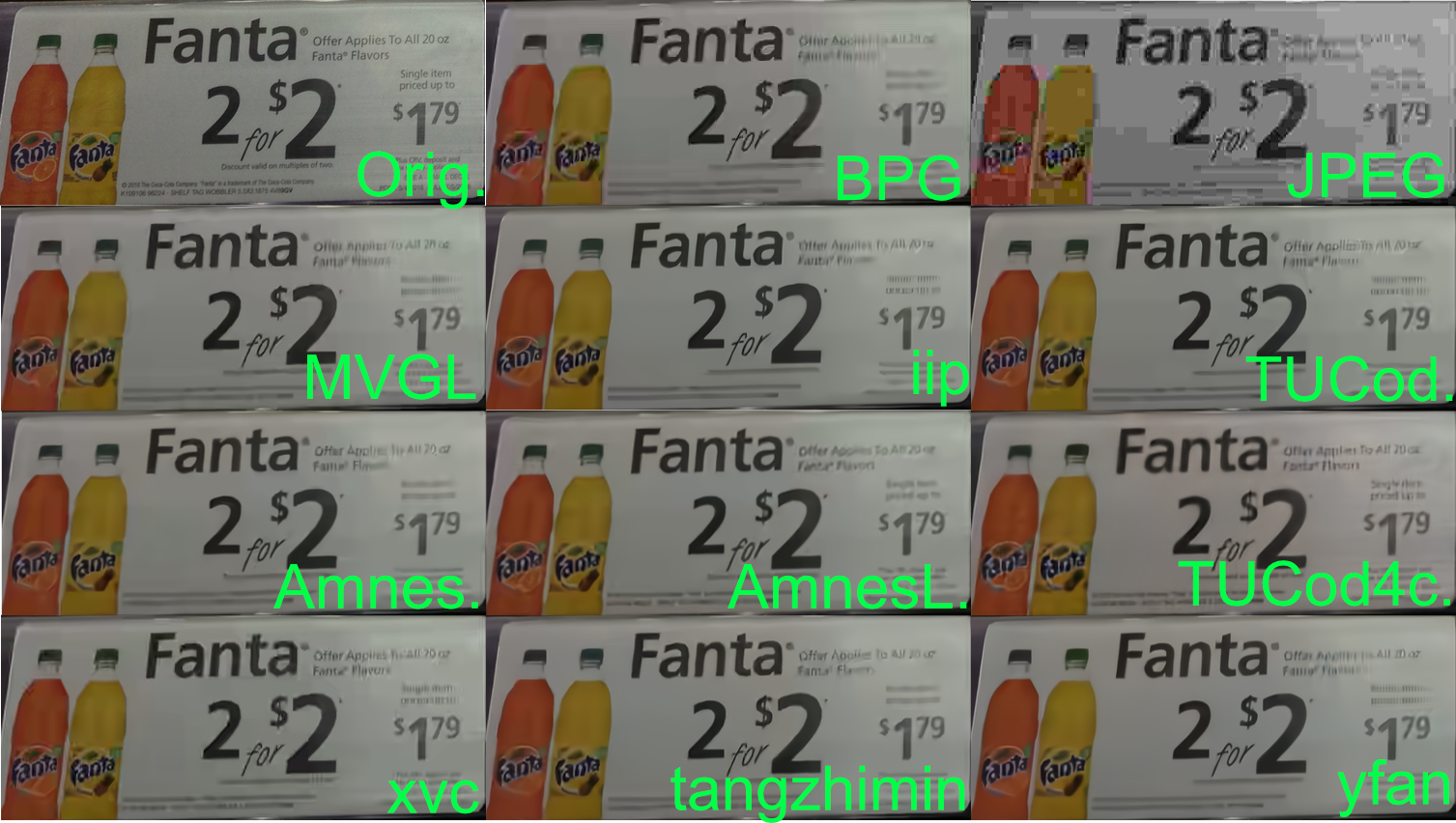
Last year, we announced the Workshop and Challenge on Learned Image Compression (CLIC), an event that aimed to advance the field of image compression with and without neural networks. Held during the 2018 Computer Vision and Pattern Recognition conference (CVPR 2018), CLIC was quite a success, with 23 accepted workshop papers, 95 authors and 41 entries into the competition. This spawned many new algorithms for image compression, domain specific applications to medical image compression and augmentations to existing methods based, with the winner Tucodec (abbreviated TUCod4c in the image below) achieving 13% better mean opinion score (MOS) than Better Portable Graphics (BPG) compression.
An example image from the 2018 test set, comparing the original image to BPG, JPEG and the results from nine competing teams. All the methods are better than JPEG in color reproduction and many of them are comparable to BPG in their ability to create legible text on the sign.
This year, we are again happy co-sponsor the second Workshop and Challenge on Learned Image Compression at CVPR 2019 in Long Beach, California.The half day workshop will feature talks from invited guests Anne Aaron (Netflix), Aaron Van Den Oord (DeepMind) and Jyrki Alakuijala (Google), along with presentations from five top performing teams in the 2019 competition, which is currently open for submissions.

This year's competition features two tracks for participants to compete in. The first track remains the same as last year, in what we're calling the "low-rate compression" track. The goal for low-rate compression is to compress an image dataset to 0.15 bits per pixel and maintaining the highest quality metrics as measured by PSNR, MS-SSIM and a human evaluated rating task.

The second track incorporates feedback from last year's workshop, in which participants expressed interest in the inverse challenge of determining the amount an image could be compressed and still look good. In this "transparent compression" challenge, we set a relatively high quality threshold for the test dataset (in both PSNR and MS-SSIM) with the goal of compressing the dataset to the smallest file sizes.

If you're doing research in the field of learned image compression, we encourage you to participate in CLIC during CVPR 2019. For more details on the competition and dates, please refer to compression.cc.

Acknowledgements
This workshop is being jointly hosted by researchers at Google, Twitter and ETH Zürich. We'd like to thank: George Toderici (Google), Michele Covell (Google), Johannes Ballé (Google), Nick Johnston (Google), Eirikur Agustsson (Google), Wenzhe Shi (Twitter), Lucas Theis (Twitter), Radu Timofte (ETH Zürich), Fabian Mentzer (ETH Zürich) for their contributions.


06 February 2019

Carbonated Beverage Language Map


Carbonated Beverage Language Map

Uber competitor Chauffeur-Privé rebrands to Kapten


French company Chauffeur-Privé is going to expand aggressively over the next couple of years. That’s why the company is changing its name to Kapten — a name that sounds less French.

“We wanted to share with you a very important piece of news,” Kapten co-founder and CEO Yan Hascoet said in a press conference. “We changed our name while keeping the same positioning.”

Kapten is one of the leading ride-sharing players in France and recently launched in Lisbon (2 million users in France, 80,000 users in Lisbon). The company is going to launch in Geneva next week and London in the coming weeks. By 2020, Kapten should be in 15 major cities.

Kapten within Intelligent Apps

As a reminder, Daimler AG acquired a majority stake in Chauffeur-Privé/Kapten back in December 2017. Daimler AG and BMW Group later merged their mobility service businesses into a single entity called Intelligent Apps.

Kapten confirmed that Intelligent Apps will become Jurbey. Intelligent Apps’ free-floating services, parking services, charging services and itinerary apps will merge to simplify the product offering.

But Intelligent Apps’ ride-sharing services (Chauffeur-Privé, mytaxi, Clever Taxi and Beat) won’t merge for now.

“It seems obvious that there will be some consolidation in five years in one way or another,” Hascoet said. “But this is not on today’s agenda.”

Hascoet thinks that the ride-sharing space is still extremely competitive and there’s room for growth. It seems smarter to keep multiple services for now to see how it plays out in the coming years. Kapten is thinking about integrating Intelligent Apps’ scooter service Hive in its app though.

A new name and some new features

Kapten is also using today’s rebranding to launch an aggressive advertising campaign. The company will spend “millions of euros.”

There will be some tweaks to the service as well. The minimum price is now €6 instead of €8 just like on Uber. Kapten will compensate that change by paying drivers the equivalent of an €8 ride for the time being. Eventually, Kapten wants drivers to generate as much revenue with €6 rides. In all cases, Kapten takes a 20 percent cut on each ride.

Drivers are also getting new features starting today. Free waiting time has been lowered from 5 minutes to 3 minutes, which should help drivers waste less time. There’s also a new feature to go back home and accept rides on the way.

The company also used this opportunity to share some numbers. Over the past 7 years, the company managed to attract 2 million clients and 200 companies who generated 20 million rides in total. In 2018 alone, Kapten handled 7.5 million rides with an average price of €17 to €18. It currently works with 22,000 drivers and 250 employees. Kapten will hire around 100 employees in 2019.

Kapten has generated $54.9 million in revenue in 2016, $113 million in 2017 and $180.8 million in 2018 (€48.6 million, €100 million, €160 million respectively). Kapten wants to multiply its revenue by 5 by 2020.

In its announcement video, Kapten also differentiated its service from Uber by saying that they’ll keep paying taxes in local markets where they operate. The company wants to be the good guy, let’s see if that’s enough to capture some market share.


Read Full Article

YouTube’s CEO says it will continue addressing monetization issues, admits Rewind 2018 was “cringey”


In an open letter to YouTube creators today, YouTube CEO Susan Wojcicki admitted that even her kids think Rewind 2018 is “cringey.” Meant as a celebratory recap, the video has garnered a record-setting 15 million dislikes so far.

“We hear you that it didn’t accurately show the year’s key moments, nor did it reflect the YouTube you know. We’ll do better to tell our story in 2019,” Wojcicki wrote.

Wojcicki also mentioned important issues like Article 13, proposed legislation in the European Union nicknamed the “meme ban” for its potentially chilling effect on user-generated content and monetization. Many creators saw their revenue hurt during “Adpocalypse” last year after YouTube introduced new policies to placate advertisers.

Intended to keep ads from running in front of videos with objectionable content, creators said the policies also resulted in the demonetization of many videos without a clear reason. But the letter is unlikely to address the concerns of creators who are still trying to recover revenue or gain a better understanding of how YouTube’s policies are enforced.

For example, Wojcicki repeated the statistic that the number of YouTube creators “earning five or six figures in the last year grew more than 40 percent,” which the platform has said since at least December 2017, when Adpocalypse began. (That month, Bloomberg published a story that said YouTube claimed channels making six figures or more in revenue had increased 40 percent over the last year).

But YouTube doesn’t provide much more detail than that and though Wojcicki said that number is proof that creators are “creating the next generation of media companies and we’re thrilled to see how much the YouTube creator economy is thriving,” researchers have found that a very thin sliver of YouTubers ever make it into that revenue bracket.

For example, a professor at Germany’s Offenburg University of Applied Sciences found last year that breaking into the top three percent of most-viewed channels on YouTube might bring in advertising revenue of about $16,800 a year. Those at the very top, or top one percent, often earn revenue through other deals like sponsorships, making it even more difficult to estimate how much of their revenue comes from advertising on YouTube.

Wojcicki also did not address the fact that YouTube has been kicking off many channels that were part of multi-channel networks (MCN), often used by creators who don’t to deal directly with YouTube AdSense.

Videos are removed because they may be at risk of violating YouTube’s terms of service, but creators and MCNs have complained about the lack of transparency into how they are enforced.

Wojcicki acknowledged the communication issues and said YouTube had taken steps to improve it. YouTube Studio, to provide more insight into how videos are performing, will be available to all creators this year. YouTube is also now more responsive on social media channels. Wojcicki said it has increased the number of its responses by 50 percent and made response times 50 percent faster.

Wojcicki also noted that monetization “remains a pain point” for many creators. “Just as a reminder, we started last year with many of our largest advertisers paused because of brand safety concerns,” she wrote.

“We worked incredibly hard to build the right systems and tools to make sure advertisers feel confident investing in YouTube, and most are now back,” she continued. “On the creator side, we’ve been improving our classifiers so that we make the right monetization decision for each video,” adding that YouTube has increased the accuracy of its monetization icon system (which gives creators details about why a video has been monetized or not) by 40 percent and made it easier for creators to appeal decisions.

But she conceded that YouTube still has more work to do. Part of that effort includes giving creators other potential revenue streams, like YouTube Music and YouTube Premium, which has expanded to 29 countries from five at the beginning of 2019. It also lowered the subscriber threshold for channel memberships, which allows viewers to purchase memberships, to 30,000 from 100,000.

The “meme ban”

YouTube creators and other people who rely on the platform as a source of revenue in the EU will have an extra set of headaches to deal with next year. Last September, the EU Parliament voted to back Article 13 of the European Union Directive on Copyright in the Digital Market. Nicknamed the “meme ban” because it would mandate sites with large amounts of user-generated content to take down content that infringes on copyright, the legislation’s vague wording has led to concerns about how it would be enforced.

For YouTube in particular, Article 13 means that it would have automatically scan and filter user uploads for copyright violations, but it is unclear if its existing Content ID system would be enough for it to comply. Although memes and parodies are protected by laws in many countries, upload filters still aren’t advanced enough to differentiate between copyright violations and memes. Article 13’s opponents worry that this can have a chilling effect. Wojcicki wrote last year that it could potentially shut down the ability of millions of people to upload to YouTube and threaten “thousands of jobs” in the EU. YouTube is campaigning for the legislation to be reworded.

In today’s letter, Wojcicki said videos about the issue have been viewed “hundreds of millions of times,” but added that policymakers “lacked an understanding of the European creator community’s impact and size.”

“I shared with legislators the huge economic benefit you all bring to your home countries,” she said. “In France alone, we have more than 190 channels with more than 1 million subscriptions, with the number of E.U. channels reaching that milestone up 70% year over year.”


Read Full Article

Two more bangers for the Switch’s NES selection: Kirby and Super Mario Bros 2


Nostalgia for the NES is high following the success of Nintendo’s classic mini consoles and the launch of its Switch Online service, which just got a couple more great additions to its selection of 8-bit games: Kirby’s Adventure and the immortally weird Super Mario Bros 2.

Kirby had just made his debut on the Game Boy, but the NES follow-up really improved things. Better controls, better graphics, still hard as hell.

Super Mario Bros 2 is remembered as a curiosity, but it deserves more than that. Sure, it’s just an asset swap for Doki Doki Panic, but that doesn’t matter. It’s a fantastic game and you should take this opportunity to play it all the way through.

As long as you’re here, I feel I should also plug the games added a couple weeks back that probably didn’t get the love they deserved, then or 30 years ago.

Blaster Master is one of my favorite games of all time and massively underplayed. It’s an early “Metroidvania,” as we call such things these days, with amazing controls both in the side-scrolling and top-down portions, and a huge, crazy world to explore. This is an absolute classic and anyone who loves the NES should play it — or, if you find the original a bit clumsy, try the recent remake, which was both faithful and added some serious upgrades.

Zelda 2 also got added two weeks ago, and while it definitely has its problems, it’s actually a really compelling game and worthy of the name. But cast aside your associations and just play it as if it’s an old gem — use a walkthrough or VGmaps to help, though, because this game is a real bastard.

So far the selections for NSO have been quite good, and they play well. The service is still extremely barebones even for its paltry asking price, but at least you can’t complain (too much anyway) about the selection of free NES titles. With a few more trickling in every month, the library will soon be quite formidable and I might even start using it instead of my hacked SNES Classic. Especially with the rumor (and near certainty) that SNES games are soon to join their 8-bit cousins.

Nintendo is definitely going through some growing pains with its online service, but I feel that in a year it’ll be up to snuff. They tend to approach everything by first establishing essentials, and then adding bit by bit. No doubt we’ll hear more at GDC and E3 later this year.


Read Full Article

You Can Now Add Guests to Periscope Live Streams


Periscope live streams no longer have to be one-way conversations. That’s because Periscope now lets streamers add guests to their broadcasts. Thankfully though, this isn’t a free-for-all, with Periscope ensuring broadcasters remain in control at all times.

First things first, yes, Periscope is still a thing. Sure, it might not be making headlines as it did at launch, but the Twitter-owned video streaming app is still a great way of broadcasting live. And now it has a new feature worth checking out…

Periscope Lets People Go Live Together

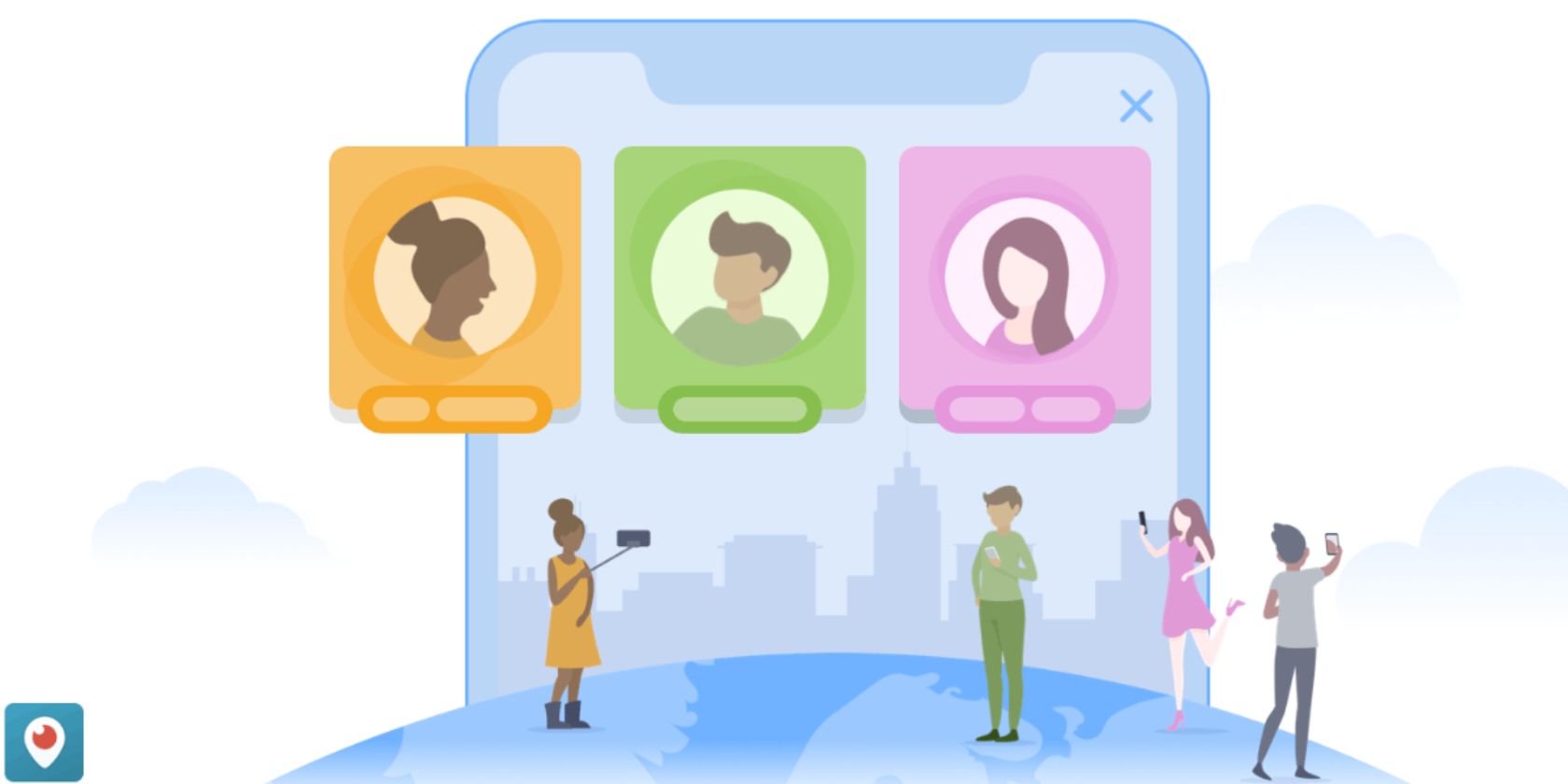
In a Medium post, Periscope explains that “so many people in our community have asked for a way to broadcast with guests”. So, Periscope is finally rolling out a way of doing so. Broadcasters can invite up to three guests at a time, and they’ll be heard by everyone.

How Periscope Broadcasters Can Add Guests

In order to add guests Periscope broadcasters must click the “Guests” icon prior to going live. Just tap the “Guests” icon followed by “Invite Guests”. Then, during a broadcast, you can click the “Guests” icon and tap the “+” next to the viewer(s) you’d like to add.

Broadcasters can remove a guest at any time by tapping the “X” on their avatar. You can also mute or block them while booting them off air. And if you no longer want to allow guests, click the “Guests” icon, select “Guest List,” and tap “Don’t Allow Guests”.

How Periscope Viewers Can Join As Guests

In order to join a live stream as a guest, viewers need to click the “Guests” icon and tap “Ask to Join”. The onus is still on the broadcaster to grant invites. Viewers will be notified if and when a broadcaster adds them, giving you time to prepare to go live.

You can get more information on going live together on the Periscope Help Center.

Periscope Eyes a Future of Going Live Together

If you have the latest version of Periscope installed, you can go live together on Android and iOS, and watch from Android, iOS, or the web. Going live together is currently limited to audio-only, but Periscope is working on a way of letting guests share video too.

If you’ve either never heard of Periscope until now, or had forgotten it existed, here are some practical tips for new Periscope users. And if you’re a veteran live streamer wondering which platform to use, here’s a look at Periscope vs. Facebook Live.

Read the full article: You Can Now Add Guests to Periscope Live Streams


Read Full Article

You Can Now Delete Messages From Facebook Messenger


Facebook has finally realized humans are fallible. As a result, the social network will now let you delete messages sent through Messenger. You will still have to be quick about it, but at least this means the most egregious typos can be erased from existence.

The Mystery of Mark Zuckerberg’s Deleted Messages

This feature hasn’t just appeared out of nowhere. Instead, it has been in the works for months after TechCrunch revealed Facebook founder and CEO Mark Zuckerberg had the power to delete messages he had sent people. Not that Facebook ever admitted as much.

Facebook claimed Zuckerberg’s messages disappeared for security reasons. Regardless, the social network then promised to develop an Unsend button for everyone. That Unsend button has been undergoing testing for the last few months, and is now ready to roll out.

How to Delete Your Facebook Messenger Messages

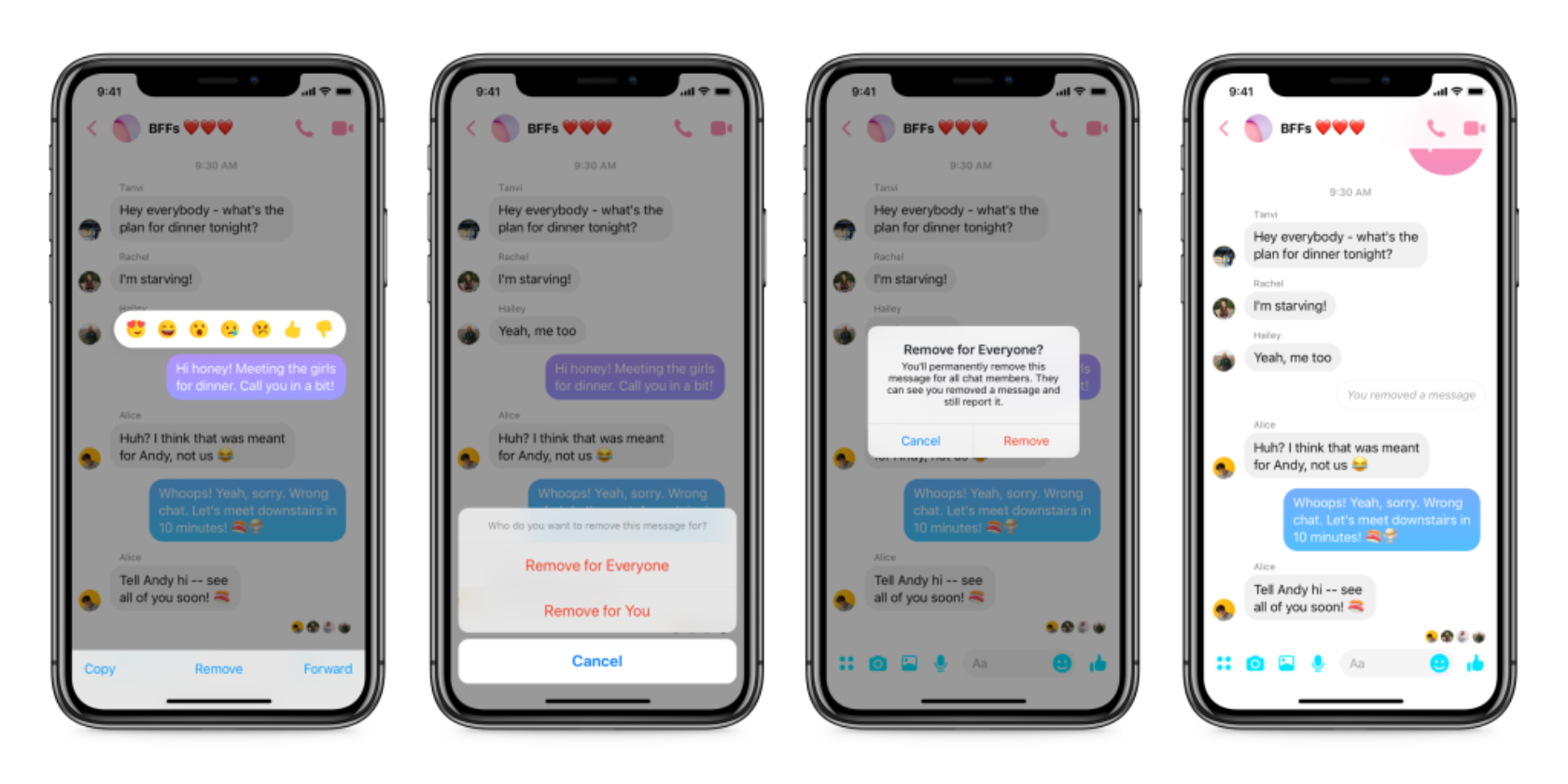
As detailed on the Facebook Messenger Blog, from now on you’ll be able to remove a message from Messenger, whether it has been sent to just one person or a group of people. The only caveat being you only have 10 minutes after you have sent it.

If you want to remove a message sent on Messenger just tap on it and select the option to “Remove for Everyone”. The message will disappear, and be replaced by a message telling everyone in the conversation you have deleted it. So you can’t delete it secretly.

Facebook previously let you delete messages from your side of the conversation, and that option remains. Just tap on the message you want to delete and select “Remove for You”. The option to “Remove for Everyone” is rolling out now on Android and iOS.

Facebook: Saving People From Regret Since 2019

Messenger’s new Unsend button isn’t going to change the world, but it may just save you the embarrassment of making a major faux pas. Whether it’s a typo or something more serious. After all, haven’t we all said something in the moment we’ve later come to regret?

Facebook is catching up with the competition here. You have been able to delete messages sent on WhatsApp since 2017, and you have been able to delete messages sent on Snapchat since 2018. Still, it’s better late than never.

Read the full article: You Can Now Delete Messages From Facebook Messenger


Read Full Article

Apple Is Selling a Refurbished iPhone X for $769


Anyone looking to pick up an iPhone without spending over $1000 has a new option, as Apple has started carrying a refurbished iPhone X starting at $769, which isn’t a bad price for a device that starts at $899 for a new one. That’s actually a $130 discount off the full price, which is a decent trade-off for a phone that isn’t technically new.

This is actually the first time Apple has carried a refurbished version of the iPhone X since the device first hit the market in November 2017. We’d expect Apple to sell out of refurbished iPhone X devices rather quickly, so if this is something that interests you, you’re going to want to jump on it soon.

Refurbished iPhone X

Apple is actually offering four different models of the iPhone X refurbished. First, there’s a silver and space gray version of the phone in 64GB. This is the model that is available at the aforementioned $769 price point.

If 64GB of space isn’t enough for you, the company is offering the X in silver and space gray with 256GB of storage, too. This model is available for $899, which is $150 cheaper than the retail price of a new one.

All four models of the refurbished iPhone X come unlocked, so they’ll work with your carrier without any issue.

If you shop around, you can almost certainly find a used iPhone X for a lower price than these refurbished models, but they wouldn’t come with the rigorous repairs Apple performs on its refurbished devices.

Apple says all refurbished phones feature the same one-year warranty as a new iPhone. The devices all receive a brand new battery and a new outer shell, so the phone will look and feel new. It’s also tested, inspected, and cleaned.

For anyone who’s used to purchasing AppleCare with their phones for the extra protection, Apple does offer the extended warranty on its refurbished devices, so you can get that protection as well.

If you’re unsure about whether the iPhone X is for you, make sure to check out our review and see if it helps you make the decision that’s best for you.

Read the full article: Apple Is Selling a Refurbished iPhone X for $769


Read Full Article
The 7 Best Note-Taking Apps for Programmers and Coders


note-taking-coders

Programming is an activity prone to frustration and difficulty—even when done as a hobby. Creating a web, mobile, or desktop app is a big undertaking, and good note-taking skills are key to staying organized and not succumbing to stress, despair, and burnout.

But most note-taking apps aren’t designed with programmers in mind, and they can be so difficult to use that they drive you to give up on notes entirely. Here are some of the best note-taking tools for programmers and coders.

1. Boostnote

programming notes app boostnote

Platforms: Windows, Mac, Linux

Pricing: Free

Boostnote is a prime example of a note-taking app for coders. It doesn’t have all the features of a modern note-taking app (e.g. it has Markdown formatting and folder-based organization but lacks web clipping or handwritten notes) but does have what all programmers love: snippets!
You can embed code blocks directly within normal notes, and you can create separate snippet-type notes that are specifically for collecting and grouping multiple code blocks in a single note. It also supports checkbox-based lists for task management.

The best part about Boostnote is that it’s free and open source, it’s cross-platform, and your notes will sync across all platforms you use Boostnote on.

2. MedleyText

programming notes app medleytext

Platforms: Windows, Mac, Linux

Pricing: $5/mo with 45-day free trial

MedleyText is very similar to Boostnote, with fewer features but a tighter focus on the features it does have: rich text formatting options, embedded code blocks within normal notes, and customizable themes and keyboard shortcuts. It’s excellent for highly-productive coders with big projects.

When you embed formatted code directly into notes, the app will automatically highlight the syntax. Or you can manually select which syntax highlighting language to apply to any given block of code. It supports over 40 programming languages as of writing this article.

While MedleyText was once free for local notes, that’s no longer an option. It’s now a premium app with a hefty free trial and worthwhile features like syncing via Dropbox and sharing notes via links.

3. Quiver

programming notes app quiver

Platform: Mac

Pricing: $10 with free trial

Quiver is yet another app like the two above: you can mix and match text (in both Markdown and LaTeX formats) with embedded code inside notes. However, Quiver has a dedicated code editor right inside the app that’s cleaner and more responsive than its competitors.

As for syntax highlighting, this app supports over 120 programming languages. Cloud storage sync is available for Dropbox, Google Drive, iCloud, and more. And because notes are stored as JSON, you can safely use version control to track changes. Shared notebooks even allow for collaboration between teammates on large projects. It even has a web clipper!

If Quiver is so great, why is it listed third? Because it’s only available on Mac. While the Mac operating system can be a wonderful programming environment, Quiver is not an option for programmers who routinely hop between other operating systems.

4. OneNote

programming notes app onenote

Platforms: Windows, Mac, Android, iOS, Web

Pricing: Free

OneNote is the best note-taking app, period—but until recently, it lacked syntax highlighting abilities which programmers so desperately need. Fortunately, thanks to a free add-on released by a GitHub user, OneNote can now do syntax highlighting for code.

The add-on is admittedly a bit clunky, but it’s nice to know you can finally use OneNote for storing code notes. Since OneNote is one of the best ways to take notes as a student, this is particularly good news for students in programming and engineering curriculums.

OneNote is also great for collaborative projects due to note sharing. And best of all? It’s completely free and available on nearly every major platform, both desktop and mobile. (Except for Linux, sorry!)

5. CherryTree

programming notes app cherrytree

Platform: Windows

Pricing: Free

CherryTree is unlike most note-taking apps in that it’s more of a personal wiki. However, since pages can be nested under each other in a hierarchy, it’s more than good enough for taking notes. What makes it a wiki? You can insert links to any other page throughout the notebook.

There are other apps like CherryTree, including wikidPad and Zim, but CherryTree supports a special page type specifically for code. Use regular notes for ideas and tasks, use the code notes for snippets. As far as the page hierarchy, both types work the exact same way.

CherryTree is very fast, making it one of the best lightweight note-taking apps.

6. Sublime Text

programming notes app sublime text

Platforms: Windows, Mac, Linux

Pricing: $80 with unlimited free evaluation version

As a programmer, you likely know about Sublime Text already. True, it’s a text editor and not a note-taking app, but it can certainly be used for taking notes: every note as a text file, and every code snippet in a separate language-appropriate file.

Sublime Text’s native features are excellent for increasing overall productivity, and the ability to split into multiple editor panes is indispensable. But for note-taking and organization, it can get even better with a few free plugins.

SideBarEnhancements is a must-install for every Sublime Text user. It adds a number of improvements to the sidebar, mostly in the menu when you right-click files. PlainTasks incorporates a task-style to-do list right inside the editor. And MarkdownEditing is nifty if you want your notes to be taken down in Markdown.

Sublime Text is pretty costly, but the free evaluation period never ends. As long as you can deal with an occasional pop-up that reminds you to purchase the full version, you can use Sublime Text for free indefinitely.

7. TickTick

programming notes app ticktick

Platforms: Windows, Mac, Android, iOS, Web

Pricing: Free, Premium version for $28/year

TickTick is a to-do list app that’s pretty similar to other apps of its kind, but it has one subtle feature that makes it good for taking notes: every list item has a “description” field that’s basically an entire notepad.

As a programmer, you can use TickTick to track all of your tasks as individual list items and store whatever notes you need for each task. There’s no syntax highlighting or rich text formatting though, so it’s better for managing ideas than storing code snippets.

Plus, you get all the benefits of a full-blown to-do list app: folder organization, subtasks, recurring tasks, reminders, priorities, etc. TickTick has a free plan with a limited number of lists, and a paid plan for $28 per year.

If you’re checking out this note-taking tool list to help the programmer in your life, TickTick is actually one of many great gifts for programmers.

Tips for Becoming a Better Programmer

If all else fails, you can always stick notes right within your code as comments. It isn’t really the best approach because it can get messy (tips for writing cleaner and better code), but it’s an option for low-level notes pertinent to certain snippets.

Either way, keep going and keep improving. Programming is tough, so check out these tips for learning to code without stress. And if you ever feel stuck, here are ways to overcome programmer’s block.

Read the full article: The 7 Best Note-Taking Apps for Programmers and Coders


Read Full Article