18 July 2018

Nest’s CEO is stepping down


Five months ago, Google decided to rein Nest in. After 4 years as a mostly independent division of the company, Nest was rolled into Google’s hardware team.

Today, more big changes: Nest CEO Marwan Fawaz is stepping down, according to a report by CNET. The reason? Employees at Nest had reportedly been pushing for a change, hoping for someone who had more leadership experience.

This news comes just a little over two years after Fawaz took over the role after the departure of co-founder Tony Fadell.

Fawaz is said to be staying on in an advisory role, with Nest pushing forward under Rishi Chandra, who’s been overseeing most of Google’s hardware efforts (Home, Chromecast, Google WiFi, etc) as VP of Home Products for over 3 years.

As they confirmed to us back in February: the Nest brand itself will continue to live on at Google, and the company isn’t expecting any layoffs.

We’ve reached out to Google and Nest for more details, and will update accordingly if we hear back.


Read Full Article

Twitter is holding off on fixing verification policy to focus on election integrity


Twitter is pausing its work on overhauling its verification process, which provides a blue checkmark to public figures, in favor of election integrity, Twitter product lead Kayvon Beykpour tweeted today. That’s because, as we approach another election season, “updating our verification program isn’t a top priority for us right now (election integrity is),” he wrote on Twitter this afternoon.

Last November, Twitter paused its account verifications as it tried to figure out a way to address confusion around what it means to be verified. That decision came shortly after people criticized Twitter for having verified the account of Jason Keller, the person who organized the deadly white supremacist rally in Charlottesville, Virginia.

Fast forward to today, and Twitter still verifies accounts “ad hoc when we think it serves the public conversation & is in line with our policy,” Beykpour wrote. “But this has led to frustration b/c our process remains opaque & inconsistent with our intented [sic] pause.”

While Twitter recognizes its job isn’t done, the company is not prioritizing the work at this time — at least for the next few weeks, he said. In an email addressed to Twitter’s health leadership team last week, Beykpour said his team simply doesn’t have the bandwidth to focus on verification “without coming at the cost of other priorities and distracting the team.”

The highest priority, Beykpour said, is election integrity. Specifically, Twitter’s team will be looking at the product “with a specific lens towards the upcoming elections and some of the ‘election integrity’ workstreams we’ve discussed.”

Once that’s done “after ~4 weeks,” he said, the product team will be in a better place to address verification.


Read Full Article

Instagram is building non-SMS 2-factor auth to thwart SIM hackers


Hackers can steal your phone number by reassigning it to a different SIM card, use it to reset your passwords, steal your Instagram and other accounts, and sell them for Bitcoin. As detailed in a harrowing Motherboard article today, Instagram accounts are especially vulnerable because the app only offers two-factor authentication through SMS that delivers a password reset or login code via text message.

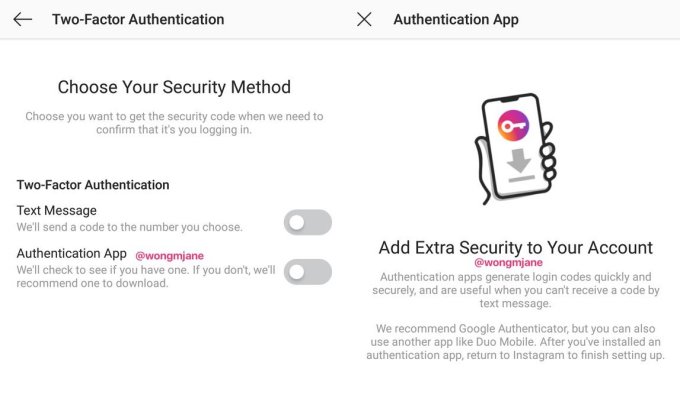
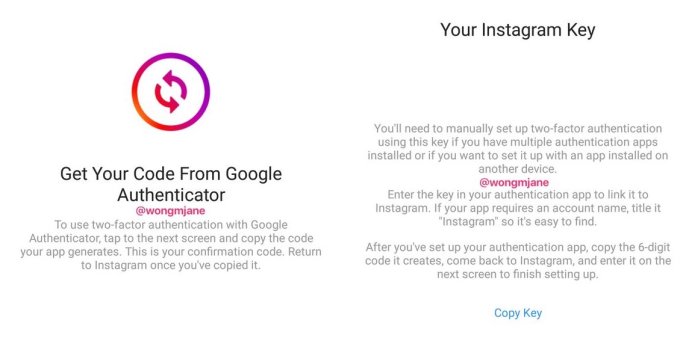
But now Instagram has confirmed to TechCrunch that it’s building non-SMS two-factor authentication system that works with security apps like Google Authenticator or Duo. They generate a special code that you need to login that can’t be generated on a different phone in case your number is ported to a hacker’s SIM card.

Buried in the Instagram Android app’s APK code is a prototype of the upgraded 2FA feature, discovered by frequent TechCrunch tipster Jane Manchun Wong. Her work has led to confirmed TechCrunch scoops on Instagram Video Calling, Usage Insights, soundtracks for Stories, and more.

When presented with the screenshots, an Instagram spokesperson told TechCrunch that yes, it is working on the non-SMS 2FA feature, saying “We’re continuing to improve the security of Instagram accounts, including strengthening 2-factor authentication.”

Instagram actually lacked any two-factor protection until 2016 when it already had 400 million users. In November 2015, I wrote a story titled “Seriously. Instagram needs two-factor authentication.” A friend and star Instagram stop-motion animation creator Rachel Ryle had been hacked, costing up a lucrative sponsorship deal. The company listened. Three months later, the app began rolling out basic SMS-based 2FA.

But since then, SIM porting has become a much more common problem. Hackers typically call a mobile carrier and use social engineering tactics to convince them they’re you, or bribe an employee to help, and then change your number to a SIM card they control. Whether they’re hoping to steal intimate photos, empty cryptocurrency wallets, or sell desireable social media handles that like @t or @Rainbow as Motherboard reported, there are plenty of incentives to try a SIM porting attack. This article outlines how you can take steps to protect your phone number.

Hopefully as knowledge of this hacking technique becomes more well known, more apps will introduce non-SMS 2FA, mobile providers will make it tougher to port numbers, and users will take more steps to safeguard their accounts. As our identities and assets increasingly go digital, its pin codes and authenticator apps, not just deadbolts and home security systems, that must become a part of our everyday lives.


Read Full Article

Instagram is building non-SMS 2-factor auth to thwart SIM hackers


Hackers can steal your phone number by reassigning it to a different SIM card, use it to reset your passwords, steal your Instagram and other accounts, and sell them for Bitcoin. As detailed in a harrowing Motherboard article today, Instagram accounts are especially vulnerable because the app only offers two-factor authentication through SMS that delivers a password reset or login code via text message.

But now Instagram has confirmed to TechCrunch that it’s building non-SMS two-factor authentication system that works with security apps like Google Authenticator or Duo. They generate a special code that you need to login that can’t be generated on a different phone in case your number is ported to a hacker’s SIM card.

Buried in the Instagram Android app’s APK code is a prototype of the upgraded 2FA feature, discovered by frequent TechCrunch tipster Jane Manchun Wong. Her work has led to confirmed TechCrunch scoops on Instagram Video Calling, Usage Insights, soundtracks for Stories, and more.

When presented with the screenshots, an Instagram spokesperson told TechCrunch that yes, it is working on the non-SMS 2FA feature, saying “We’re continuing to improve the security of Instagram accounts, including strengthening 2-factor authentication.”

Instagram actually lacked any two-factor protection until 2016 when it already had 400 million users. In November 2015, I wrote a story titled “Seriously. Instagram needs two-factor authentication.” A friend and star Instagram stop-motion animation creator Rachel Ryle had been hacked, costing up a lucrative sponsorship deal. The company listened. Three months later, the app began rolling out basic SMS-based 2FA.

But since then, SIM porting has become a much more common problem. Hackers typically call a mobile carrier and use social engineering tactics to convince them they’re you, or bribe an employee to help, and then change your number to a SIM card they control. Whether they’re hoping to steal intimate photos, empty cryptocurrency wallets, or sell desireable social media handles that like @t or @Rainbow as Motherboard reported, there are plenty of incentives to try a SIM porting attack. This article outlines how you can take steps to protect your phone number.

Hopefully as knowledge of this hacking technique becomes more well known, more apps will introduce non-SMS 2FA, mobile providers will make it tougher to port numbers, and users will take more steps to safeguard their accounts. As our identities and assets increasingly go digital, its pin codes and authenticator apps, not just deadbolts and home security systems, that must become a part of our everyday lives.


Read Full Article

How to Use WhatsApp While Maintaining Your Privacy

Sharecuts is creating a community for sharing Siri Shortcuts


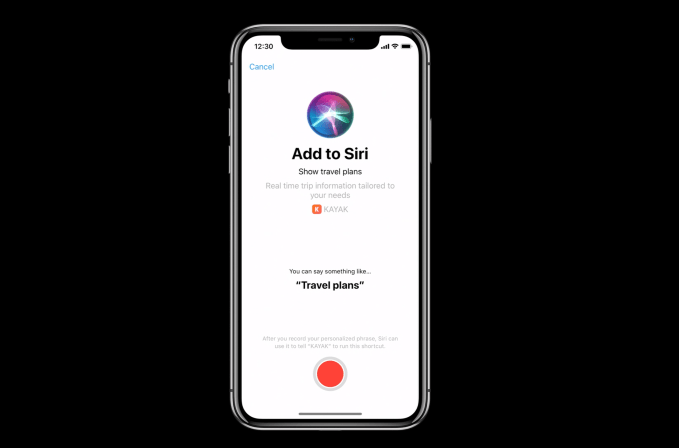
With the upcoming release of iOS 12, Apple is introducing a new app called Shortcuts that will allow users to build custom voice commands for Siri that can be used to kick off a variety of actions in apps. While some apps will directly prompt users to add a Shortcut to Siri, the new Shortcuts app will offer more shortcut suggestions to try, plus the ability to create your own shortcuts and workflows. Now, there’s a new resource for shortcut fans, too – Sharecuts, a directory of shortcuts created and shared by the community.

The site is still very much in the early stages.

Plus, iOS 12 is still in beta testing itself, and the Shortcuts app can only be installed by developers who request access via an invite.

But by the time iOS 12 releases to the public later this fall, Sharecuts’ directory will be filled out and a lot more functional.

The premise, explains Sharecuts’ creator Guilherme Rambo, was to make an easily accessible place where people could share their shortcuts with one another, discover those others have shared, and suggest improvements to existing shortcuts.

“I was talking to a friend [Patrick Balestra] about how cool shortcuts are, and how it should be easier for people to share and discover shortcuts,” says Guilherme. “He mentioned he wanted to build a website for that  – he even had the idea for the name Sharecuts – but he was on vacation without a good internet connection so I decided to just build it myself in one day,” he says.

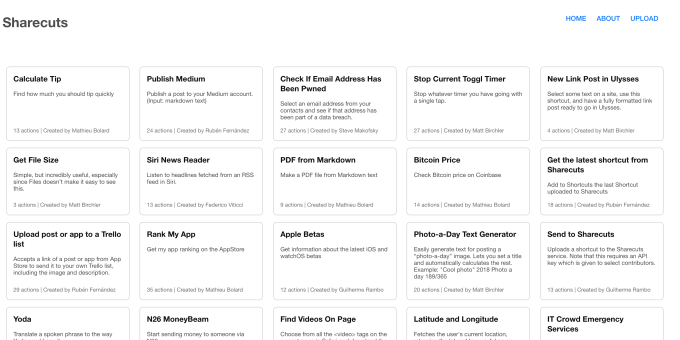
The site is currently a bare bones, black-and-white page with cards for each shortcut, but an update will bring a more colorful style (see below) and features that will allow users to filter the shortcuts by tags, vote on favorites, among other things.

Above: current site

Guilherme says while the backend is being built to support a larger number of users, only a few people have been invited to upload for the time being. But in the upcoming release, the site will offer a “featured” selection of shortcuts chosen by some well-known members of the Apple community who will serve as curators.

The uploads to the site will also be moderated in the future, to prevent malicious shortcuts and spam from being included in the directory.

The site itself isn’t a new business or startup, Guilherme says, just a side project for now.

It’s written in Swift and open-sourced on GitHub so others can contribute. The page already has a list of ideas for improvements to the Sharecuts site, including the new design, plus more ways to refine, sort, and organize the shortcuts.

It remains to be seen how popular Siri Shortcuts will be with the mainstream iPhone user base.

With iOS 12, Apple is turning its iPhone into an “A.I. phone,” but I believe the Shortcuts app and workflows will remain a power user feature for some time. Mainstream users will gradually warm up to the idea of customizing their Siri interactions by getting prompted to create voice commands by their favorite apps. (E.g. Your coffee shop’s mobile ordering app may push you to add a “Coffee time!” shortcut to Siri.)

Over time, that may lead them to iOS 12’s Shortcuts app to do even more.

But in the near-term, power users will be busy taking advantage of the new Shortcuts app and Siri features to test the powers of Shortcuts. And with Sharecuts, all the other shortcuts enthusiasts can benefit from their enthusiasm and activity, too.

If you already have the beta Shortcuts app installed, you can try out some of the shortcuts featured on Sharecuts today. A couple of the interesting picks include the Siri News Reader which will read you headlines from an RSS feed, the Bitcoin Price checkers, and an always useful tip calculator.

Above: The news reader shortcut, from Federico Viticci

Those interested in contributing to Sharecuts in the future can register here for an invite.


Read Full Article

The Best Cheap Bluetooth Speakers (Under $50)

Microsoft Launches Skype 8.0 for Desktop


Microsoft has released a new version of Skype for desktop, and this one looks and feels just like the mobile version of Skype. The only catch is that Microsoft is forcing everyone to upgrade to Skype 8.0 as all previous versions are set to stop working within weeks.

The new Skype arrived last year to mixed reviews. The new Skype, which was designed to appeal to the next generation of Skype users, landed first on Android and iOS. However, it’s now also available on other platforms, including Windows, macOS, and Linux.

Skype Version 8.0

The new version of Skype for desktop, Skype 8.0, is designed to replace Skype 7.0 (also known as Skype Classic). Microsoft is recommending everyone upgrades at their earliest convenience, as, after September 1, 2018, only Skype 8.0 will function.

Microsoft claims this is to “ensure that all customers have the best possible Skype experience, and that there are no quality or reliability issues resulting from old technology and new technology interoperating.” Which is fair reasoning.

Skype 8.0 offers free HD video and screensharing calls, @mentions for more productive messaging, a chat media gallery to help you find files in conversations, and the option to share photos, videos, and other files up to 300MB just by dragging and dropping.

On the Skype Blog, Microsoft also shared what’s coming next, including read receipts as standard in other messaging apps, private conversations, cloud-based call recording, and profile invites and group links to help you start conversations more quickly.

Free Skype Alternatives

Microsoft is doing the right thing in trying to make sure Skype users enjoy the same experience across multiple platforms. However, forcing people to upgrade to the latest version of the desktop within the next few weeks is bound to annoy some people.

Skype 8.0 is a vast improvement over previous versions of Skype for desktop. And judging by the new features Microsoft has lined up for the future this is just the beginning. But if you really don’t like the new Skype, there are plenty of free Skype alternatives.

Read the full article: Microsoft Launches Skype 8.0 for Desktop


Read Full Article

This $20 DIY kit makes your NES, SNES, or Mega Drive controller wireless


I have to hand it to 8BitDo. At first I thought they were just opportunistically hawking cheap hunks of plastic in an era of unparalleled nostalgia for retro games, but… well, who am I kidding? That’s exactly what they’re doing. But they’re doing it well. And these new DIY kits are the latest sign that they actually understand their most obsessive customers.

While you can of course purchase fully-formed controllers and adapters from the company that let your retro consoles ride the wireless wave of the future, not everyone is ready to part with their original hardware.

I, for example, have had my Super Nintendo for 25 years or so — its yellowing, cracked bulk and controllers, all over stains and teethmarks, compelling all my guests to make an early exit. I consider it part of my place’s unique charm, but more importantly I’m used to the way these controllers feel and look — they’re mine.

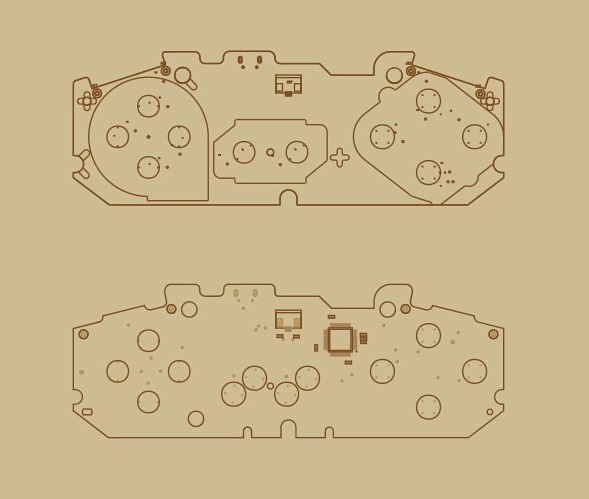
8BitDo understands me, along with the rest of the wretches out there who can’t part with the originals out of some twisted concept of loyalty or authenticity. So they’re giving us the option to replace the controllers’ aging guts with a fresh new board equipped with wireless connectivity, making it a healthy hybrid of the past and present.

If you’re the type (as I am) that worries that a modern controller will break in ways that an SNES controller would find laughable, if it could laugh, then this will likely strike your fancy. All you do is take apart your gamepad (if you can stand to do so), pull out the original PCB (and save it, of course), and pop in the new one.

You’ll be using more or less all the same parts as these famously durable controllers came with (check out this teardown). The way the buttons feel shouldn’t change at all, since the mechanical parts aren’t being replaced, just the electronics that they activate. It runs on a rechargeable battery inside that you recharge with an unfortunately proprietary cable that comes with the kit.

If you’re worried about latency… don’t be. On these old consoles, control latency is already like an order of magnitude higher than a complete wireless packet round trip, so you shouldn’t notice any lag.

You will, however, need to pick up a Bluetooth adapter if you want to use this on your original console — but if you want to use the controller with a wireless-equipped setup like your computer, it should work flawlessly.

If you buy it and don’t like it, you can just slot the original PCB back into its spot and no harm is done!

There are conversion kits for the NES and SNES, the new Classic Editions of both, and the Sega Mega Drive. At $20 each it’s hardly a big investment, and the reversible nature of the mod makes it low risk. And hey, you might learn something about that controller of yours. Or find a desiccated spider inside.


Read Full Article

Dems and GOP unite, slamming Facebook for allowing violent Pages


In a rare moment of agreement, members of the House Judiciary Committee from both major political parties agreed that Facebook needed to take down Pages that bullied shooting survivors or called for more violence. The hearing regarding social media filtering practices saw policy staffers from Facebook, Google, and Twitter answering questions, though Facebook absorbed the brunt of the ire. The hearing included Republican Representative Steve King ask “What about converting the large behemoth organizations that we’re talking about here into public utilities?”

The meatiest part of the hearing centered on whether social media platforms should delete accounts of conspiracy theorists and those inciting violence, rather than just removing the offending posts.

The issue has been a huge pain point for Facebook this week after giving vague answers for why it hasn’t deleted known faker Alex Jones’ Infowars Page, and tweeting that “We see Pages on both the left and the right pumping out what they consider opinion or analysis – but others call fake news.” Facebook’s Head of Global Policy Management Monica Bickert today reiterated that “sharing information that is false does not violate our policies.”

As I detailed in this opinion piece, I think the right solution is to quarantine the Pages of Infowars and similar fake newers, preventing their posts or shares of links to their web domain from getting any visibility in the News Feed. But that deleting the Page without instances of it directly inciting violence would make Jones a martyr and strengthen his counterfactual movement. Deletion should be reserved for those that blantantly encourage acts of violence.

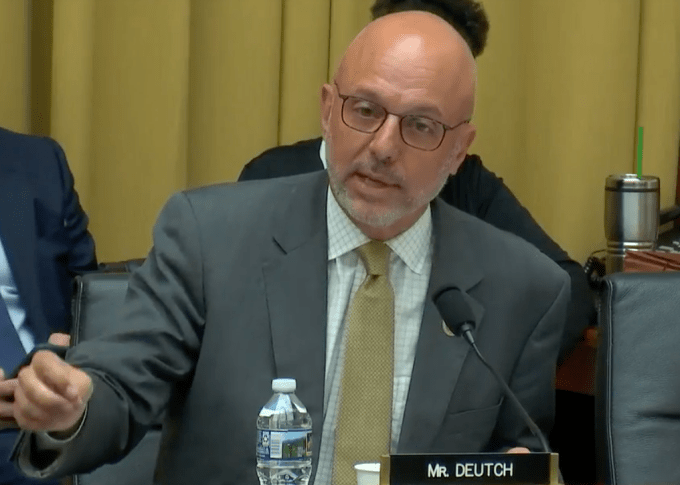
Rep Ted Deutch (D-Florida) asked about how Infowars’ claims in YouTube videos that Parkland shooting’s survivors were crisis actors squared with the company’s policy. Google’s Downs explained that “We have a specific policy that says that if you say a well documented violent attack didn’t happen and you use the name or image of the survivors or victims of that attack, that is a malicious attack and it violates our policy.” She noted that YouTube has a ‘three strikes’ policy, it is “demoting low quality content and promoting more authoritative content”, and it’s now showing boxes atop result pages for problematic searches like is the earth flat?’ with facts to dispel conspiracies.

Facebook’s answer was much less clear. Bickert told Deutch that “We do use a strikes model. What that means is that if a Page, or profile, or group is posting content and some of that violates our polices, we always remove the violating posts at a certain point” (emphasis mine). That’s where Facebook became suddenly less transparent.

“It depends on the nature of the content that is violating our policies. At a certain point we would also remove the Page, or the profile, or the group at issue” Bickert continued. Deutch then asked how many strikes conspiracy theorists get. Bickert noted that ‘crisis actors’ claims violate its policy and its removes that content. “And we would continue to remove any violations from the Infowars Page.” But regarding Page-level removals, she got wishy-washy, saying “If they posted sufficient content that it would violated our threshold, then the page would come down. The threshold varies depending on the different types of violations.”

“The Threshold Varies”

Rep Matt Gaetz (R-Florida) gave the conservatives’ side of the same argument, citing two posts by the Facebook Page “Milkshakes Against The Republican Party” that called for violence, including one that saying “Remember the shooting at the Republican baseball game? One of those should happen every week.”

While these posts had been removed, Gaetz asked why the Page hadn’t. Bickert noted that “There’s no place for any calls for violence on Facebook”. Regarding the threshold, she did reveal that “When someone posts an image of child sexual abuse imagery their account will come down right away. There are different thresholds for different violations.” But she repeatedly refused to make a judgement call about whether the Page should be removed until she could review it with her team.

Image: Bryce Durbin/TechCrunch

Showing surprising alignment in such a fractured political era, Democratic Representative Jamie Raskin of Florida said “I’m agreeing with the chairman about this and I think we arrived at the same exact same place when we were taking about at what threshold does Infowars have their Page taken down after they repeatedly denied the historical reality of massacres of children in public school.”

Facebook can’t rely on a shadowy “the threshold varies” explanation any more. It must outline exactly what types of violations incur not only post removal but strikes against their authors. Perhaps that’s something like ‘one strike for posts of child sexual abuse, three posts for inciting violence, five posts for bullying victims or denying documented tragedies occurred, and unlimited posts of less urgently dangerous false information’.

Whatever the specifics, Facebook needs to provide specifics. Until then, both liberals and conservatives will rightly claim that enforcement is haphazard and opaque.

For more from today’s hearing:


Read Full Article

Dems and GOP unite, slamming Facebook for allowing violent Pages


In a rare moment of agreement, members of the House Judiciary Committee from both major political parties agreed that Facebook needed to take down Pages that bullied shooting survivors or called for more violence. The hearing regarding social media filtering practices saw policy staffers from Facebook, Google, and Twitter answering questions, though Facebook absorbed the brunt of the ire. The hearing included Republican Representative Steve King ask “What about converting the large behemoth organizations that we’re talking about here into public utilities?”

The meatiest part of the hearing centered on whether social media platforms should delete accounts of conspiracy theorists and those inciting violence, rather than just removing the offending posts.

The issue has been a huge pain point for Facebook this week after giving vague answers for why it hasn’t deleted known faker Alex Jones’ Infowars Page, and tweeting that “We see Pages on both the left and the right pumping out what they consider opinion or analysis – but others call fake news.” Facebook’s Head of Global Policy Management Monica Bickert today reiterated that “sharing information that is false does not violate our policies.”

As I detailed in this opinion piece, I think the right solution is to quarantine the Pages of Infowars and similar fake newers, preventing their posts or shares of links to their web domain from getting any visibility in the News Feed. But that deleting the Page without instances of it directly inciting violence would make Jones a martyr and strengthen his counterfactual movement. Deletion should be reserved for those that blantantly encourage acts of violence.

Rep Ted Deutch (D-Florida) asked about how Infowars’ claims in YouTube videos that Parkland shooting’s survivors were crisis actors squared with the company’s policy. Google’s Downs explained that “We have a specific policy that says that if you say a well documented violent attack didn’t happen and you use the name or image of the survivors or victims of that attack, that is a malicious attack and it violates our policy.” She noted that YouTube has a ‘three strikes’ policy, it is “demoting low quality content and promoting more authoritative content”, and it’s now showing boxes atop result pages for problematic searches like is the earth flat?’ with facts to dispel conspiracies.

Facebook’s answer was much less clear. Bickert told Deutch that “We do use a strikes model. What that means is that if a Page, or profile, or group is posting content and some of that violates our polices, we always remove the violating posts at a certain point” (emphasis mine). That’s where Facebook became suddenly less transparent.

“It depends on the nature of the content that is violating our policies. At a certain point we would also remove the Page, or the profile, or the group at issue” Bickert continued. Deutch then asked how many strikes conspiracy theorists get. Bickert noted that ‘crisis actors’ claims violate its policy and its removes that content. “And we would continue to remove any violations from the Infowars Page.” But regarding Page-level removals, she got wishy-washy, saying “If they posted sufficient content that it would violated our threshold, then the page would come down. The threshold varies depending on the different types of violations.”

“The Threshold Varies”

Rep Matt Gaetz (R-Florida) gave the conservatives’ side of the same argument, citing two posts by the Facebook Page “Milkshakes Against The Republican Party” that called for violence, including one that saying “Remember the shooting at the Republican baseball game? One of those should happen every week.”

While these posts had been removed, Gaetz asked why the Page hadn’t. Bickert noted that “There’s no place for any calls for violence on Facebook”. Regarding the threshold, she did reveal that “When someone posts an image of child sexual abuse imagery their account will come down right away. There are different thresholds for different violations.” But she repeatedly refused to make a judgement call about whether the Page should be removed until she could review it with her team.

Image: Bryce Durbin/TechCrunch

Showing surprising alignment in such a fractured political era, Democratic Representative Jamie Raskin of Florida said “I’m agreeing with the chairman about this and I think we arrived at the same exact same place when we were taking about at what threshold does Infowars have their Page taken down after they repeatedly denied the historical reality of massacres of children in public school.”

Facebook can’t rely on a shadowy “the threshold varies” explanation any more. It must outline exactly what types of violations incur not only post removal but strikes against their authors. Perhaps that’s something like ‘one strike for posts of child sexual abuse, three posts for inciting violence, five posts for bullying victims or denying documented tragedies occurred, and unlimited posts of less urgently dangerous false information’.

Whatever the specifics, Facebook needs to provide specifics. Until then, both liberals and conservatives will rightly claim that enforcement is haphazard and opaque.

For more from today’s hearing:


Read Full Article

17 July 2018

Peelable circuits make it easy to Internet all the things


Researchers at Purdue University and the University of Virginia are now able to create “tiny, thin-film electronic circuits peelable from a surface,” the first step in creating an unobtrusive Internet-of-Things solution. The peelable stickers can sit flush to an object’s surface and be used as sensors or wireless communications systems.

The biggest difference between these stickers and traditional solutions is the removal of the silicon wafer that manufacturers use. Because the entire circuit is transferred right on the sticker there is no need for bulky packages and you can pull off and restick the circuits as needed.

“We could customize a sensor, stick it onto a drone, and send the drone to dangerous areas to detect gas leaks, for example,” said Chi Hwan Lee, Purdue assistant professor. From the release:

A ductile metal layer, such as nickel, inserted between the electronic film and the silicon wafer, makes the peeling possible in water. These thin-film electronics can then be trimmed and pasted onto any surface, granting that object electronic features.

Putting one of the stickers on a flower pot, for example, made that flower pot capable of sensing temperature changes that could affect the plant’s growth.

The system “prints” circuits by etching the circuit on a wafer and then placing the film over the traces. Then, with the help of a little water, the researchers can peel up the film and use it as a sticker. They published their findings in the Proceedings of the National Academy of Sciences.


Read Full Article

The Best External GPU for a MacBook Pro


best-external-gpu-macbook-pro

The idea of an external graphics card (eGPU) was once the talk of fantasy, but that’s no longer the case. Thanks to Thunderbolt 3 and its high-bandwidth 40Gbps transfer rate, external enclosures can now accommodate high-end graphics cards.

That means you can now supercharge the visual performance of your Mac computer, even if it’s a laptop. There are some caveats to doing this, namely a limited number of supported graphics cards and the high price of getting started (for now, anyway).

So let’s take a look at what you need to add an external GPU to your Mac or MacBook and which ones you should buy.

What You’ll Need

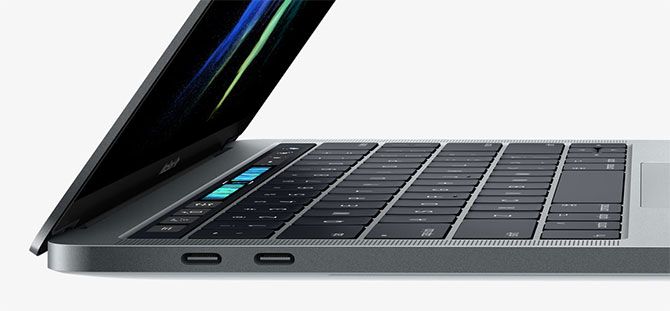
First, you’ll need a Thunderbolt 3-capable Mac or MacBook model. Thunderbolt 3 uses the USB-C connector, and appears on the following models:

  • MacBook Pro, late 2016 and newer
  • iMac, mid 2017 and newer
  • iMac with Retina Display, mid 2017 and newer
  • iMac Pro, late 2017 and newer

MacBook Pro connections and ports

In addition to owning one of these Apple computers, you’ll also need macOS High Sierra 10.13.4 or later. Finally, you’ll need to purchase two additional items, either separately or part of a bundle:

  1. A Thunderbolt 3 eGPU enclosure, into which your graphics card will slot.
  2. A macOS-compatible graphics card.

With all this in place, you should be able to put the graphics card into the enclosure, then plug the enclosure into your Mac for a significant boost in graphical fidelity. However, you may still be limited in how you can use your eGPU.

The Limitations of External GPUs on macOS

Not every application you run can take advantage of your eGPU. In many cases, you’ll need to plug an external monitor directly into the eGPU enclosure in order to see the benefit. This is the case with many 3D games and VR applications.

Some pro-level software designed to take advantage of multiple GPUs will “just work” as you’d expect. This includes 3D modeling apps and video editors, but it’s worth confirming your preferred application will see a benefit before you buy.
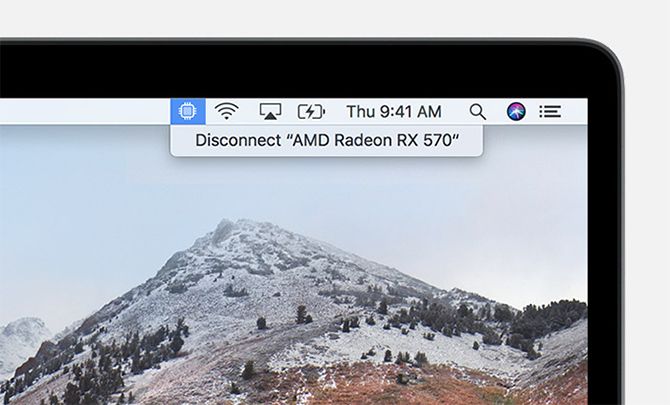
eGPU Disconnect macOS High Sierra

Some applications and games have received patches allowing you to accelerate the built-in display on your iMac or MacBook. However, this is something that developers must enable on their end, so it’s worth keeping in mind if you’re thinking of using an eGPU purely to accelerate your in-built display.

Unfortunately, it’s not possible to use your external GPU with Boot Camp to run Windows games on your Mac. But since most of these enclosures are also compatible with Windows, this might improve in the future.

Mac Compatibility With External GPUs

At present, there are only a small number of compatible graphics cards you can use as an eGPU on your Mac. These are all AMD cards, with none of the popular Nvidia cards officially supported at present.

According to Apple, these are:

  • AMD Polaris cards: Radeon RX 470, RX 480, RX 570, RX 580, and Radeon Pro WX 7100
  • AMD Vega 64 cards: Radeon RX Vega 64, Vega Frontier Edition Air, and Radeon Pro WX 9100
  • AMD Radeon RX Vega 56

Users over at the eGPU.io community have managed to get Nvidia cards working on macOS, but not without a lot of tweaking. If you already own an Nvidia card and you want to try, its forums are your friend. But I wouldn’t buy an Nvidia card with the intent of “hacking” your way to success at this stage.

Picking an eGPU Enclosure for Your Mac

The eGPU enclosure you pick for your Mac largely depends on the graphics card you’re going to use. Modern graphics cards suck up a lot of power, with the higher-end cards using significantly more power than the more affordable ones.

Power is delivered in watts, but some of that power is dedicated to powering the connected Mac. Make sure your enclosure’s GPU maximum power output doesn’t exceed that of the graphics card you intend to put inside it. This information should be available on the respective manufacturer’s specification sheets.

The size of the graphics card will count too. Your card has to physically fit inside the enclosure, so make sure the two components are compatible in this regard. If you intend on upgrading the GPU in the future, you might want to buy the best enclosure you can afford rather than the best short-term solution.

Radeon RX 560 Graphics Card

Some manufacturers aim their enclosures at the Mac market, while others create eGPU solutions with their own brand of Windows laptops. You should always ensure the enclosure you pick is compatible with macOS, though the vast majority will be.

There are other aspects to consider too. Many enclosures function as Thunderbolt 3 hubs, adding additional features like USB ports, Ethernet, SATA ports, HDMI, and similar.

Recommended eGPU Enclosures for Mac

Here are a few of the best external GPU enclosures on the market now, including those recommended by Apple. Most of these are compatible with Nvidia cards, which is handy if Apple adds support somewhere down the line.
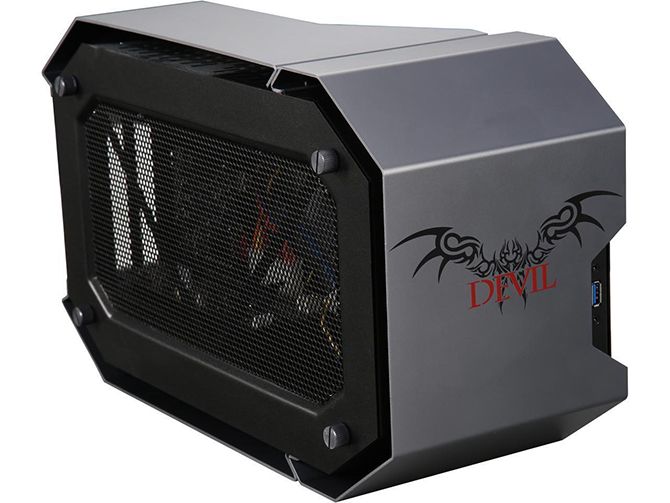
PowerColor Devil Box

PowerColor Devil Box External GPU Enclosure

Recommended by Apple for use with macOS, the Devil Box is a 500W (maximum GPU power 375W) eGPU. It includes a whopping five USB 3.0 ports, Ethernet, and a SATA port. It’s based on AMD XConnect technology, and compatible with the Radeon RX 570, RX 560, RX 550, and Nvidia’s GeForce GTX 10 series of cards (but not on Mac, yet).

For ease of use, the PowerColor Devil Box features thumbscrews so you can swap out cards without breaking out your tools.
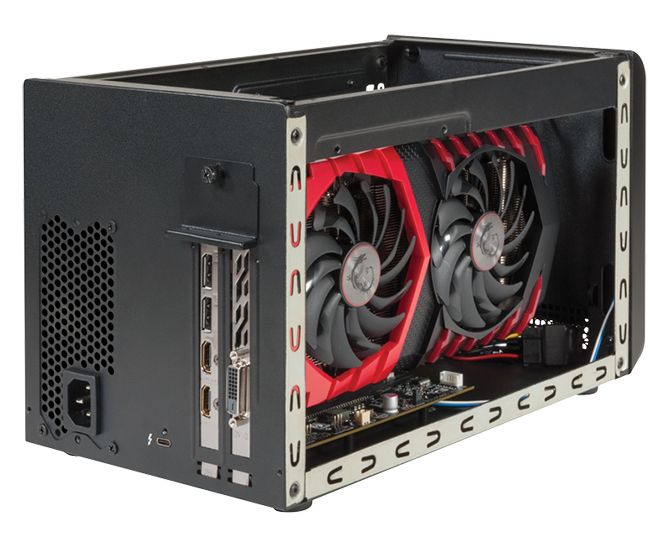
Sonnet eGFX Breakaway Box

Sonnet Breakaway Box External GPU Enclosure

Sonnet’s eGFX Breakaway Box lineup comes in a modest, powerful, and extreme variant depending on the card you’re using. This is a barebones eGPU affair, with nothing in the way of expansion ports or USB connectivity to speak of.

The more powerful variants offer laptop charging up to 87W, and the 650W model can power a 350W card with an additional 100W of peak power where required.
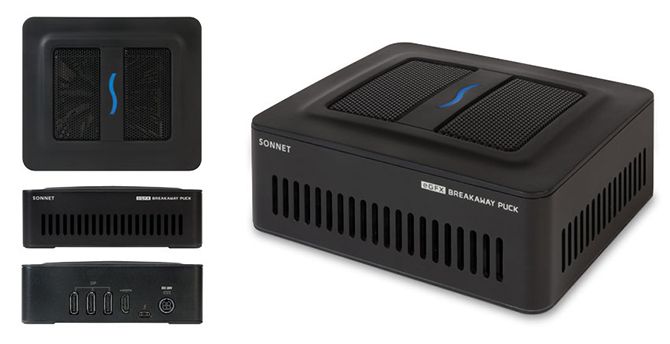
Sonnet eGFX Breakaway Puck

Sonnet Breakaway Puck External GPU Enclosure

Looking for an all-in-one solution? Sonnet also produces the Breakaway Puck, which comes with a Radeon RX 560 or 570 pre-installed.

Since the Radeon is an AMD card, it’s plug-and-play compatible with macOS, and will charge laptops up to 45W. For connectivity, you get three additional DisplayPort outputs and an HDMI output, but no extra USB ports.
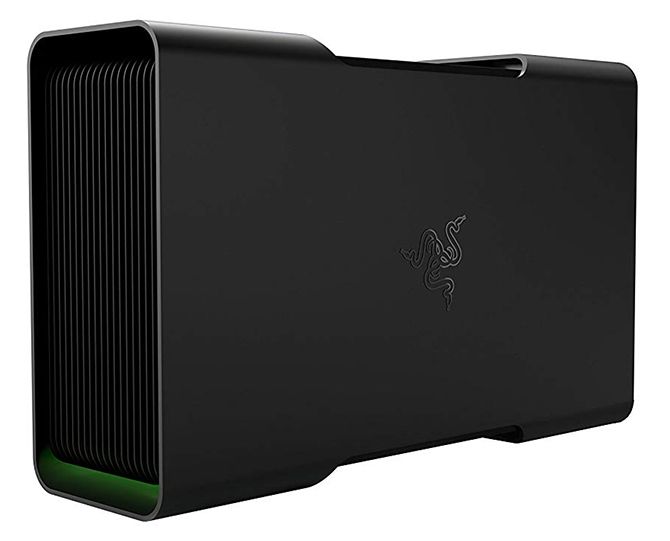
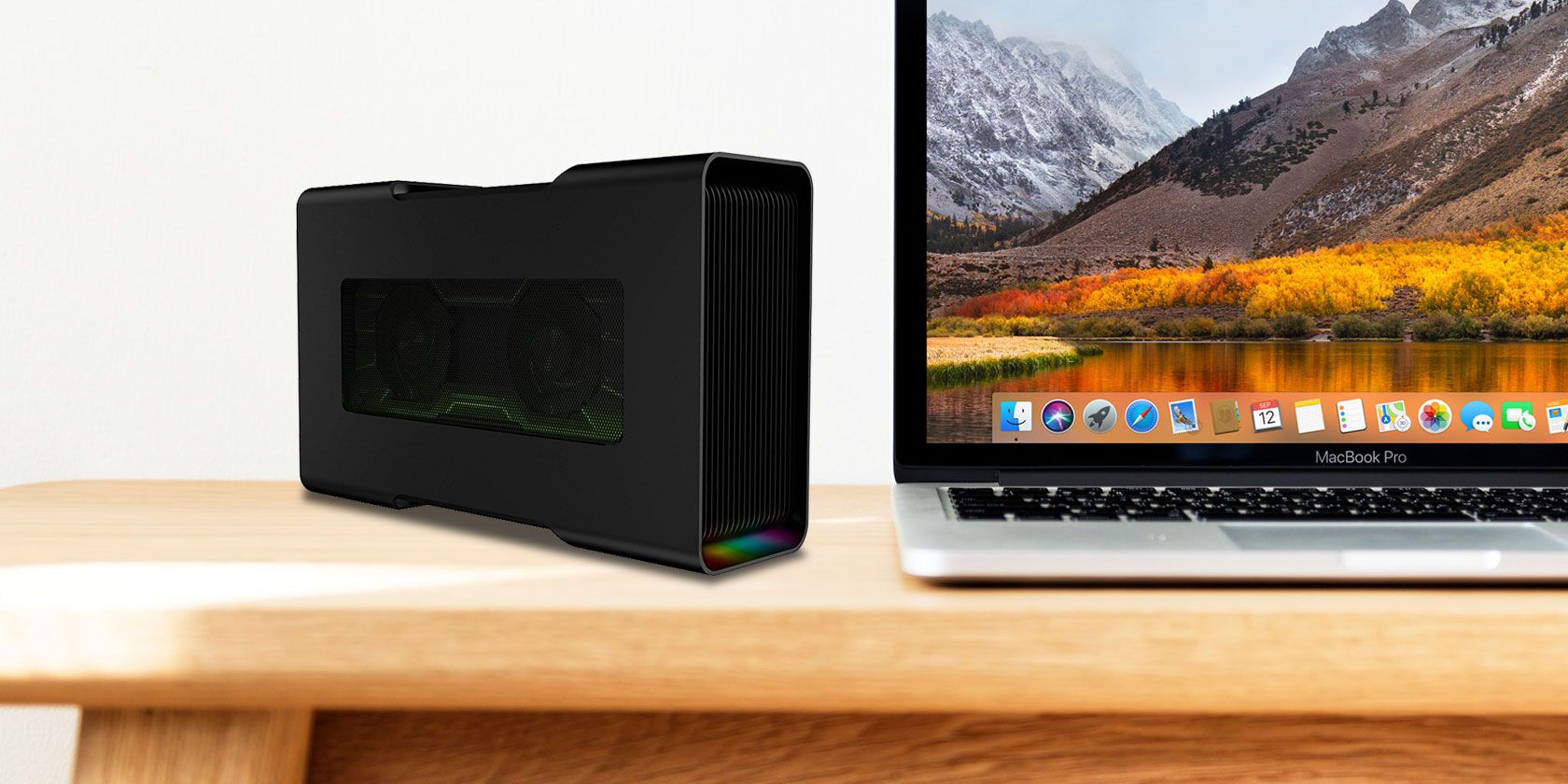
Razer Core V2

Razer Core V2 External GPU Enclosure

The Core v2 is an updated version of Razer’s previous eGPU enclosure, and it’s a premium product. Not only does it look the part, it’s compatible with AMD and Nvidia cards. This one has a 500W power supply capable of delivering a maximum GPU power output of 375W. It features fancy LEDs and four USB 3.0 ports to boot.
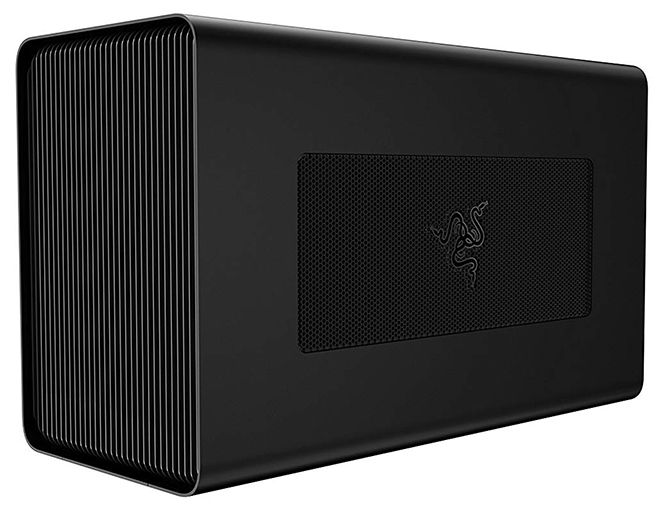
Razer Core X

Razer Core X External GPU Enclosure

The Razer Core X is both more powerful and less expensive than the Core V2, though it presents itself as a less refined product. Lacking the fancy LEDs and styling found in the V2, the Core X delivers the goods with a 650W power supply capable of driving a full-length 500W graphics card.

Compatibility includes most major cards from Nvidia and AMD, and it can charge laptops up to 100W too.

The Best External GPU Advancements Are Yet to Come

Thunderbolt 3 is fast, but it’s still only about a third as fast as plugging your graphics card into a high-end gaming motherboard. Since Apple and Intel have pretty much doubled the throughput with each iteration of the technology, the viability of the eGPU is only going to improve in future.

Check out the above eGPU units if you need the best visual performance now, but it’s not a bad idea to wait if you can help it. Either way, you may also want to read up on common mistakes that are slowing down your Mac.

Read the full article: The Best External GPU for a MacBook Pro


Read Full Article

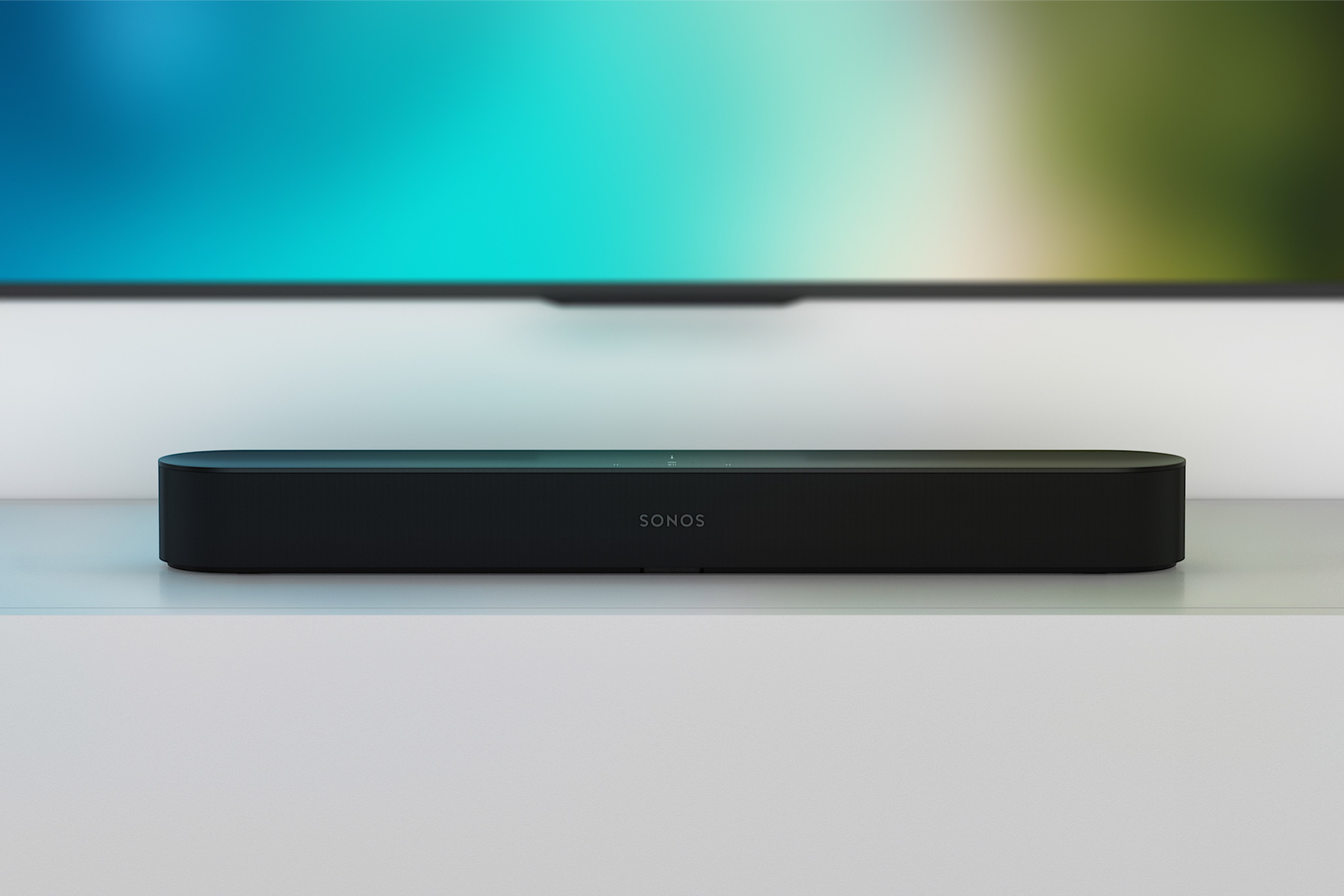
The Sonos Beam soundbar is now available


It took Sonos more than a month, but its new home theater speaker is now available. You can buy it on Sonos’ official website for $399 (or €449 if you live in Europe). It’s also available on Amazon and other retailers.

The Beam is an affordable soundbar for your TV. This isn’t the company’s first soundbar, but it’s a better one. According to our review, its slimmer design makes it more versatile in many cases. Sometimes your TV is hanging on a wall. Or maybe you want to hide the speaker in a TV shelf.

Just like recent Sonos speakers, it features Amazon Alexa. The company also promises Google Assistant support in the future. It’s a connected speaker for the home assistant generation.

More interestingly, the Beam isn’t just a TV speaker. If you’re not using your TV, you can use it like a normal Sonos. You can pair it with other Sonos speakers, stream music using the Sonos app, Spotify Connect or AirPlay 2. You can now also use the Beam to play Audible audiobooks.

And if you switch on the TV, the speaker automatically stops the music and gives the priority to what’s playing on the TV. It’s a seamless experience that greatly improves the sound quality of your TV.


Read Full Article

Google’s new ‘Grab and Go’ project helps business loan Chromebooks to their employees


At Google, the company offers a ‘Grab and Go’ program that allows employees to use self-service stations to quickly borrow and return Chromebooks without having to go through a lengthy IT approval process. Now, it’s bringing this same idea to other businesses.

Chromebooks have found their place in education and a number of larger enterprise companies are also getting on board with the idea of a centrally managed device that mostly focuses on the browser. That’s maybe no surprise, given that both schools and enterprises are pretty much looking for the same thing from these devices.

At Google, the system has seen more than 30,000 users that have completed more than 100,000 loans so far.
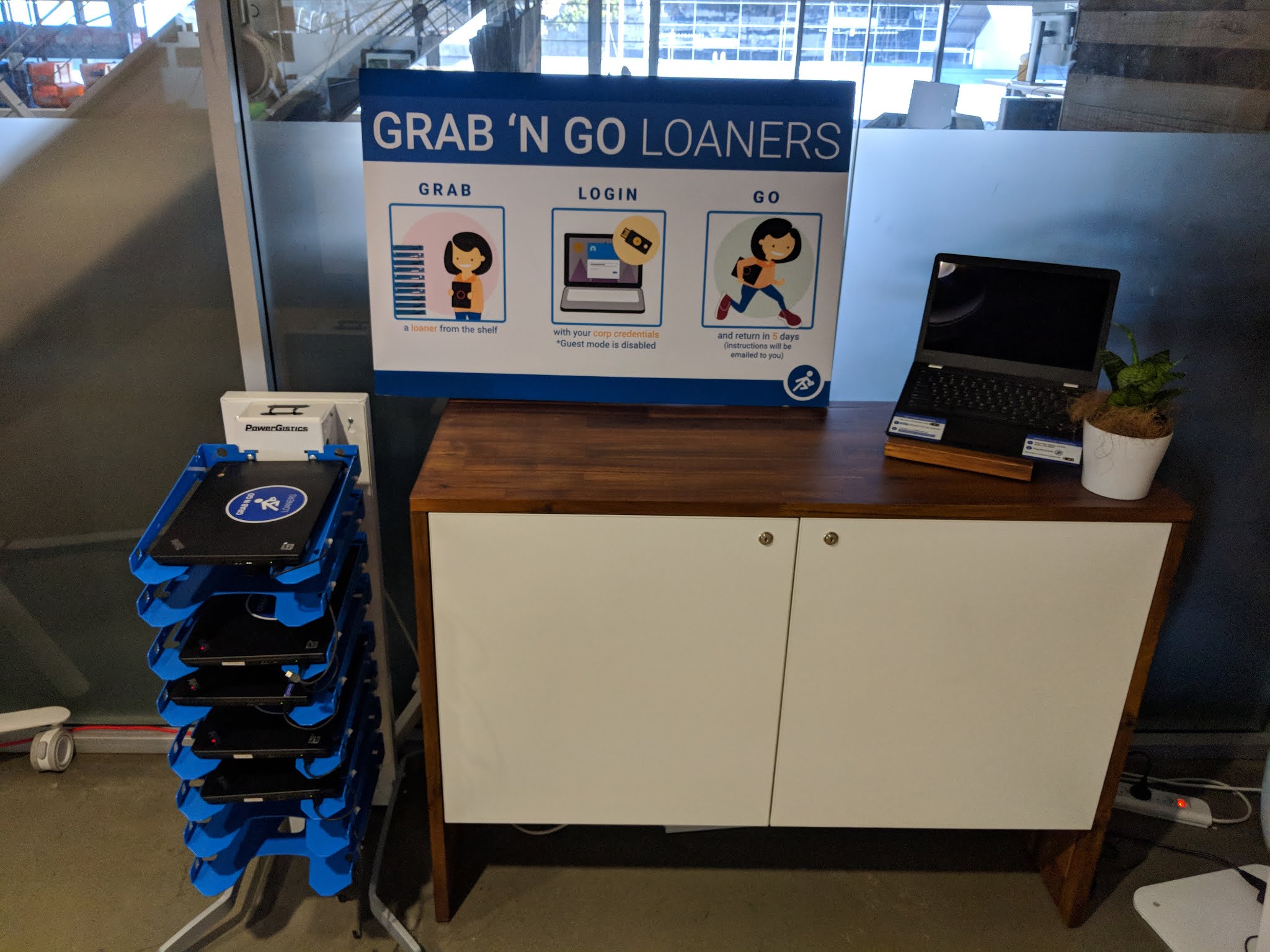
While Google wants others to run similar programs (and use more Chromebooks in the process) it’s worth noting that this is a limited preview program and that Google isn’t building and selling racks or other infrastructure for this. As a Google spokesperson told us, Google will give companies that want to try this the open source code to build this system and advise them through the setup and deployment. It will also engage with partners to help them build the hardware or set up a ‘Grab and Go’ as a service system.

Employees who want to use one of these ‘Grab and Go’ stations simply pick up a laptop, sign in and move on with their day. When they are done, they simply return the laptop. That’s it. Easy.

That’s not quite as exciting as Google building and selling racks of Chromebooks, but this project is clearly another move to bring Chromebooks to the enterprise. Specifically, Google says that this program is meant for frontline workers who only need devices for a short period of time, as well as shift workers and remote workers.


Read Full Article

The Google Assistant app will walk you through your day


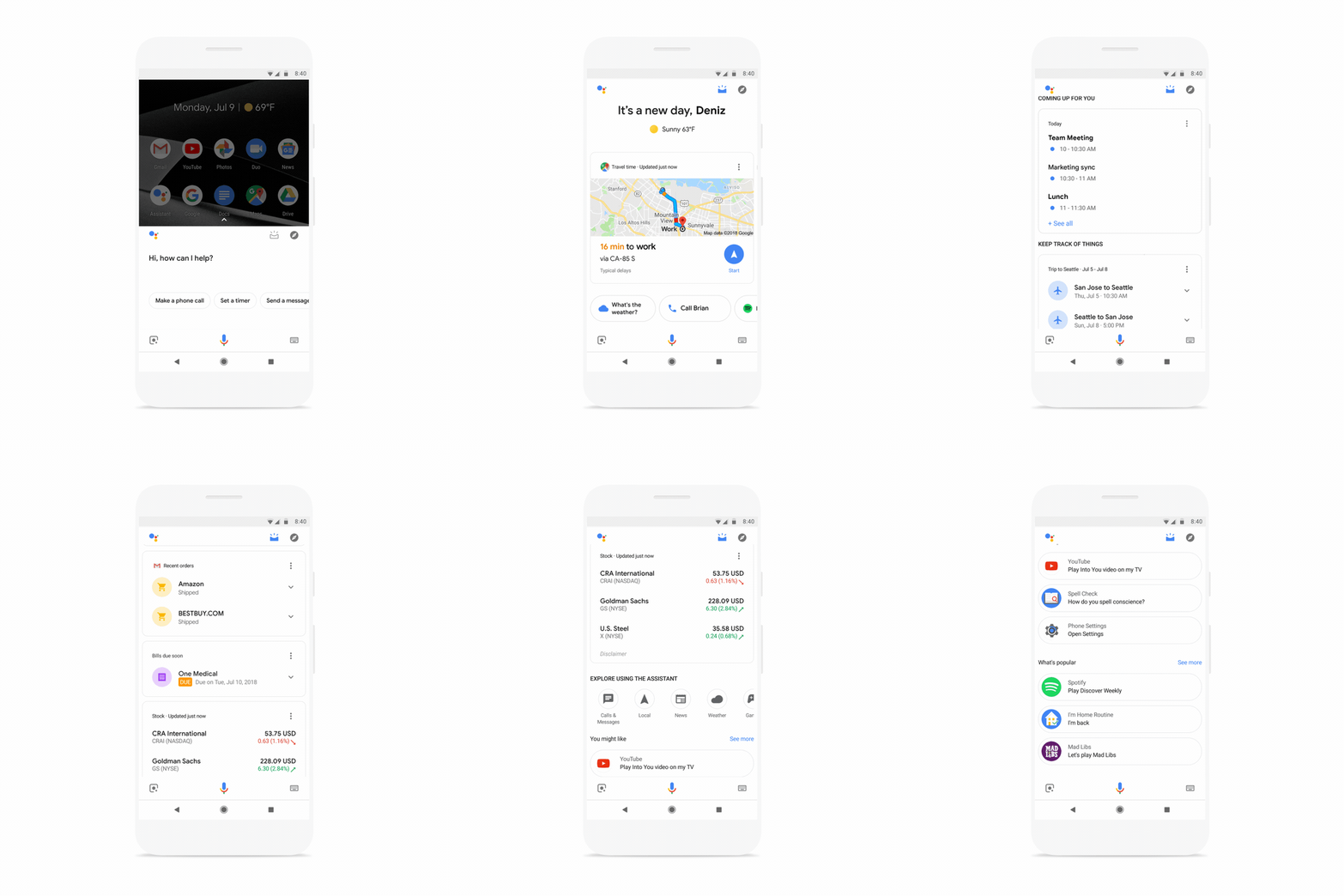
Google’s Assistant app mostly functions as a surrogate for its line of connected Home devices. But what about all of that information it’s aggregating? The company will start putting that to use, providing a “visual snapshot” of the day to come.

The new feature, rolling out to the app on Android and iOS today, pulls in a bunch of relevant information from across Google services, including calendar, reminders, stocks, package deliveries, flights, restaurant/movie reservations and suggested Actions. It also provides travel times to and from appointments to offer up a better idea of when to leave.

More features will be rolling out soon, including notes from Google Keep,  Any.do, Bring and Todoist, along with parking reminders, nearby activities and recommendations for music and podcasts. In other words, the Google Assistant app is angling to become your one stop shop for — well, basically ever single thing you do in a given day.

While Amazon’s Alexa play has been centered around commerce, it’s pretty clear that Google’s in it for the same reason as always: information. Using a voice controlled smart speaker is yet another way to gather all of that data from a user, and now it’s being out to use in a single spot.

It’s an obvious play — and an important reminder of just how much information these companies have on us at a given time.


Read Full Article