18 September 2013

How To Find Someone’s Real Email Address With Gmail


How-To-Find-Real-Email-Address-Using-Gmail-Hangouts-Rapportive

Need to email someone but don’t have their address? Whether you’re a disgruntled customer looking to lodge a complaint with someone in charge, a reporter trying to get in touch with the right person, or just attempting to get in touch with a long-lost friend, you may not have the recipient’s email id. We have told you how to verify if an email address exists, but to find one you don’t know requires a little ingenuity. Guy has previously suggested a few ways to find someone’s email address, but I have some more solutions. All you need is a Gmail...


Read the full article: How To Find Someone’s Real Email Address With Gmail


Missing Media Tools in Windows 8? Easily Burn Audio and View DVDs


dvd

Windows 8 makes it hard to burn audio and watch video DVDs thanks to hidden apps and missing licences. This is all part of the move away from optical media – fortunately, we can show you how to work around this. Times are changing, and not all Windows 8 computers ship with a DVD drive. But even if you have an external optical drive or have upgraded an old PC, burning an audio disc or watching a video DVD can be tough (data DVDs can be read regardless). Finding the software you need to perform these tasks is relatively simple,...


Read the full article: Missing Media Tools in Windows 8? Easily Burn Audio and View DVDs


From the New Tab Page to the Google Homepage


Chrome will replace the new tab page with a simplified version of the Google homepage. Sure, it doesn't have the search button and the footer, but it's the Google homepage. You'll see the app launcher grid, which replaces the black bar, you'll see the Google+ notification and share buttons, you'll see Google doodles.


Most of the features of the new tab page have been removed and replaced by a huge Google logo. Chrome apps are in the app launcher, recent tabs are in the Chrome menu.


I've never liked browser homepages, but Chrome's new tab page was really useful. It loaded quickly and had a lot of links to pages you were likely to open. Now it only shows 8 of your frequently visited pages and a fake search box that sends you to the omnibox.


When Google shows an animated doodle, the new tab page shows same the animation and you're forced to see it each and every time you open a new tab. Sometimes the doodle uses a lot of resources:


There are some great extensions that replace the new tab page, but you shouldn't have to use an extension for this. The new tab page should be fast, simple and useful.


Here's a quote from Chromium's site:


"The new tab page is the default starting point for all tabs - it is designed to get the user where they want to go, and is not meant to be an information resource like the user's home page; that is, the new tab page is not intended to be a destination, but rather a jumping-off point to other destinations - we strongly want to avoid cognitive load and distractions for the user, especially those creating new tabs for other purposes."


So it shouldn't include distractions. That's exactly what the Google homepage does and the new tab shouldn't do. Animated doodles, Google+ notifications - all of them are distractions that don't belong in a page you open so often.


For now, I'll switch to the empty new tab page.

YouTube Tests Improved Center-Aligned Interface


Now that many of the YouTube experiments are publicly available, it's time for something new. YouTube tests a new version of the center-aligned layout. The sidebar looks better, but it's still hidden by default. The YouTube homepage has two tabs for "What to watch" and "My subscriptions", while the header is now persistent.


Here's a video:


Here's how you can enable the experimental feature. If you use Chrome, Firefox, Opera, Safari or Internet Explorer 8+:


1. open youtube.com in a new tab


2. load your browser's developer console:


* Chrome or Opera 15+ - press Ctrl+Shift+J for Windows/Linux/ChromeOS or Command-Option-J for Mac


* Firefox - press Ctrl+Shift+K for Windows/Linux or Command-Option-K for Mac


* Opera 12 - press Ctrl+Shift+I for Windows/Linux or Command-Option-I for Mac, then click "Console"


* Safari - check this article


* Internet Explorer - press F12 and select the "Console" tab.


3. paste the following code which changes a YouTube cookie:


document.cookie="VISITOR_INFO1_LIVE=Gapj9bz_H8M; path=/; domain=.youtube.com";window.location.reload();


4. press Enter and close the console.


To go back to the regular interface, use the same instructions, but replace the code from step 3 with this one:


document.cookie="VISITOR_INFO1_LIVE=; path=/; domain=.youtube.com";window.location.reload();


{ Thanks, Sushubh and Rubén. }

Fargo Makes Outlining On The Web Clean And Easy


fargo

One of the best ways to get started with any type of project is to either brainstorm and outline ideas, or use some sort of mapping technique. For outlining, a new HTML5 web application written in JavaScript called Fargo, just might be one of the best tools for creating, storing, and collaborating on outline documents. Saikat has shared five outlining tools for writers and artists, and while they are very good, Fargo offers a few unique features that users may find useful. As an online application there’s no need to install the application on your computer. As a user, the...


Read the full article: Fargo Makes Outlining On The Web Clean And Easy


Google Wallet for Android - Widely Available, Still Limited


Google Wallet's Android app was available in the Play Store, but not many people could install it. The app was limited to Sprint and a few small US carriers, Nexus devices and a few other phones. Verizon, AT&T and T-Mobile blocked the app because they work on a competing payment system called Isis.


Google announced that the app is now available for any Android device in the US running Gingerbread or a more recent Android version. "The updated app helps you easily send money on the go, store all your loyalty cards, save money through offers, and view all your Google Wallet activity - all in one place."


The Google Wallet added the feature that was available in Gmail: sending money to other people in the US using their email addresses. The Gmail feature is gradually rolling out, but you can manually enable it by using the Wallet app to send money. You can also add your loyalty cards by scanning the barcode or by entering the card number.


While you can install the app on any Android 2.3+ device in the US, you need an eligible device that supports NFC to tap and pay in of the many Wallet-enabled US stores. There are only 29 devices that support this feature and they're still limited to Sprint and small carriers like MetroPCS, US Cellular, Virgin Mobile and Boost Mobile.


So not much has changed: the main functionality of the app is not available if you use 3 of the biggest US carriers, but there are some new features that don't require NFC and work on any device.


This will probably increase Google Wallet's adoption. Until now, the app has been installed less than 10 million times.


In A Nutshell, How Would You Describe MakeUseOf To A Friend? [You Told Us]


MakeUseOf is changing, as you may have noticed from the recent redesign. We’re still offering content covering the Internet, Windows, iOS, Hardware, and Social Media, to name just a few of the topics in our remit, but we’re evolving to better serve you, the loyal MakeUseOf readership. As part of this process of trying to understand what you want from the site and what we can do better as a result, we thought it would be fun to find out how you (would) recommend us to your friends. We obviously hope you have already told your friends and family of...


Read the full article: In A Nutshell, How Would You Describe MakeUseOf To A Friend? [You Told Us]


YouTube Music Cards


A few weeks ago, I posted about a YouTube experiment that adds bigger cards for music artists. Search for Röyksopp, Daft Punk or any other popular artist and you'll see a Knowledge Graph-like sidebar with a list of top tracks, albums and related artists. Click any track and you'll start a playlist with a lot of other songs from the same artist. Click an album and you'll be able to listen to all the songs from the album.


What else is there? You can also click "top tracks" to start the playlist automatically generated by YouTube. Click the artist's name to visit the topic channel created by YouTube (there's no topic channel for Röyksopp, but there's one for Daft Punk).


17 September 2013

Box Introduces Notes For Real-Time Collaborative Documents


Box-Adds-Notes-Collborative-Work-Real-Time

Cloud storage service Box — which some say is great for photo storage — has stepped into the online collaborative note-taking game with the launch of Box Notes, a new free service that lets you create documents, share them with friends and work on them in real time. Box Notes is currently in beta and you can sign up to ask for an invitation. A few users we know have already got access to the service a few hours after registering their email. Essentially, Box Notes is a blank online text field for you to start writing. The rich text...


Read the full article: Box Introduces Notes For Real-Time Collaborative Documents


Love Indie Music? Check Out MusicFellas


musicfellas

Spare a thought if you will for the hipsters amongst us, and the travails they face on a daily basis. It’s hard finding the right Urban Outfitters flannel and skinny-jeans combo to go with your finely-groomed, ironic upper lip hair. It’s hard when you rush to your nearby organic-cooperative craft ale bar only to find that their seemingly endless supply of copies of Vice Magazine have run out. Perhaps most crucially, it’s hard finding bands to talk about that your equally hip friends have never heard of. MusicFellas aims to solve the latter problem. Recently formed in India by four...


Read the full article: Love Indie Music? Check Out MusicFellas


Hack Attack: How To Keep Your Webcam Secure From Online Peeping Toms


webcam-privacy

Someone could be watching you through your webcam right now. Chances are you’re safe so don’t freak out, but you should be aware that the possibility exists. There was a time when webcam hacking wasn’t a mainstream thing, but times have changed and nowadays it’s a real threat that’s being put to the microscope thanks to spying programs like PRISM. If you have a webcam, it would behoove you to listen up. What would you do if someone had control of your webcam without your knowledge? It’s a maddening thought, really, and one that I don’t particularly enjoy dwelling on....


Read the full article: Hack Attack: How To Keep Your Webcam Secure From Online Peeping Toms


How to Blog For Search Engines Without Becoming a Content Mill


content-mill

Being a blogger is not the easiest job in the world. It requires patience, determination, and persistence. You have to be willing to write for nothing, and sometimes less than nothing, when you’re starting your own site. One of my favorite bloggers Darren Rowse – the owner of Problogger and one of the Internet’s more financially successful bloggers – once wrote, “The Internet makes money for you when you build something that is real and when it matters to people.” There are lots of web designers and Internet entrepreneurs that believe they can build a website within some popular niche,...


Read the full article: How to Blog For Search Engines Without Becoming a Content Mill


How to Blog For Search Engines Without Becoming a Content Mill


content-mill

Being a blogger is not the easiest job in the world. It requires patience, determination, and persistence. You have to be willing to write for nothing, and sometimes less than nothing, when you’re starting your own site. One of my favorite bloggers Darren Rowse – the owner of Problogger and one of the Internet’s more financially successful bloggers – once wrote, “The Internet makes money for you when you build something that is real and when it matters to people.” There are lots of web designers and Internet entrepreneurs that believe they can build a website within some popular niche,...


Read the full article: How to Blog For Search Engines Without Becoming a Content Mill


Calligra vs. LibreOffice: Which Is The More Productive Linux Office Suite?


calligra_libreoffice_intro

Is LibreOffice the only worthwhile office suite for Linux users? Possibly not, thanks to KDE’s Calligra. LibreOffice, and its predecessor OpenOffice, have long been known as the leader in free office suites available for all Linux. While it’s certainly the most popular choice among Linux users, it certainly isn’t the only full-fledged office suite available for that operating system. Calligra is another choice for a complete office package. With two very good choices at hand, which one do you go for? I compared these two office suites head-to-head on features, design, and compatibility to see which one is the best....


Read the full article: Calligra vs. LibreOffice: Which Is The More Productive Linux Office Suite?


Don’t use Google+? You can still use it for Enhancing your Photos


You can use the photo editing tools inside Google+ to quickly fix your photos and make them look awesome with a click. The online editor also offers Instagram like filters and stylized borders.


This story, Don’t use Google+? You can still use it for Enhancing your Photos, was originally published at Digital Inspiration on 17/09/2013 under Google Plus, Image Editing, Internet

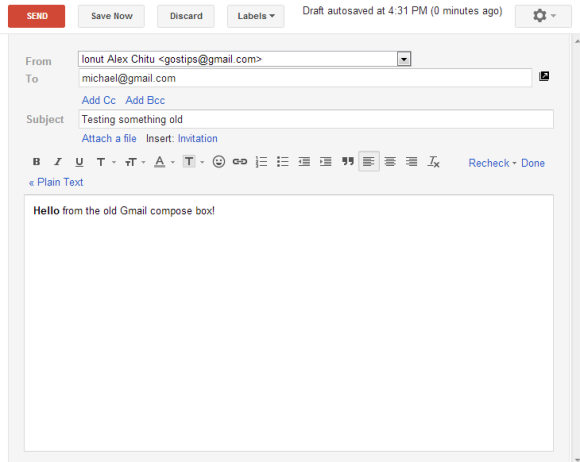
Gmail's Old Compose Interface, Still Available


A lot of people complained about Gmail's new compose interface. Google addressed some of the issues with the "full-screen" mode, but there are still people who dislike the new UI.


If you want to go back to the old interface, there's a Chrome extension that does this. I rarely recommend third-party apps that change Gmail, especially if they're not from a reliable company or developer. I checked the extension's source code and I was surprised to see how it works: it only changes your browser's user-agent to IE8's user-agent, but only when loading Gmail. I'm not sure why the extension is not restricted to mail.google.com.


Obviously, this is a temporary workaround. At some point, Google will stop supporting Internet Explorer 8 and this will no longer work. It's a better idea to get used to the new interface.

How To Find And Use The Wallpaper And Lock Screen Images In Windows 8


windows-8-start-screen-featured.jpg

Windows 8′s Start screen. You either love it or hate it. Or more likely, you’re just indifferent to it. And why shouldn’t you be? On most full Windows 8 machines, you rarely even have to look at it. But if you take a closer look, you may find some surprises. For starters, the Start screen and lock screen are more customizable than you think. You can use different backgrounds and themes for them, customize and rearrange the tiles, and use all kinds of different hacks to make things look just right. You can even make the whole thing work right...


Read the full article: How To Find And Use The Wallpaper And Lock Screen Images In Windows 8


How To Change Folder Background In Windows 8.1


CLICK HERE TO SEE FULL POST


In Windows XP, we could change the folder background colour without having to install third-party tools. In Vista and Windows 7, one could set a custom picture as folder background with the help of third-party tools such as Folder Background Changer. A quick search on the web reveals that there is no workaround or free […]

This Is What Computer Animation Looked Like In 2001 [Stuff to Watch]


In 1974, SIGGRAPH was formed by a small group of professionals who shared a common interest in an emerging trend: computer graphics. Since its conception, conferences, events, and award ceremonies have been held to promote the generation and dissemination of this relatively new artform, and thanks to the Internet Archive the entries from 2001 have been preserved in time for all to see. This is a snapshot to some 13 years ago, when Wikipedia first graced the Web and Apple released an odd-looking white box of tricks known as the iPod. That year Microsoft put the final touches to Windows...


Read the full article: This Is What Computer Animation Looked Like In 2001 [Stuff to Watch]


16 September 2013

Yahoo Answers Gets A Refresh And Climbs Out Of Neglect With New Features


question

The new Yahoo Answers is being advertised as better, faster and simpler. After many years of neglect, it looks the part. Yahoo Answers in its prime was one of the best question and answer websites. Even Google could not beat this one. Now, the sweeping winds of change around Yahoo have finally touched one of its popular assets. The new user experience starts with the color – purple. For now, the new Yahoo Answers is being rolled out first in the U.S. So, users elsewhere won’t get to enjoy the revamped interface and the new features riding with it. The...


Read the full article: Yahoo Answers Gets A Refresh And Climbs Out Of Neglect With New Features