07 July 2013

Will You Dump Your Smartphone For A Firefox OS Phone? [MakeUseOf Poll]


poll-firefox-phone.png

The first ever Firefox OS phone, the ZTE Open, was launched in Spain this week, to be followed by other countries worldwide. The Firefox OS phone might not be a match to the latest and greatest iOS, Android, or Windows Phone devices, but it has its own charms: it's open, and it's cheap. Selling for under $100 in Spain, this is an extremely affordable smartphone.

Continue reading the article


Read full article: Will You Dump Your Smartphone For A Firefox OS Phone? [MakeUseOf Poll]


Google Search by Image and Special Effects


Google Image Search has a feature that lets you find images on the web by uploading the files or pasting their URLs. It's a clever feature, but it's a lot more clever than you imagined.


It's obvious that Google finds an image if exactly the same file is embedded by a web page or there's a link to that file. Google also finds images if you resize them, crop them or apply various photo effects.


Here's an image from a Wikipedia page, after resizing it and applying the pixelate effect from Picasa. Can Google find it?


Google can't find other sizes of the image, but if you look at the "Pages that include matching images" section, you'll find the image.


What if you convert the photo to black and white? Will Google's reverse image search engine be able to find it?


You'll get the same pages that include matching images:


Let's try something more difficult - apply multiple Picasa effects: soft focus, tint, filtered black-and-white and posterize. There's no way to recognize this image, right?


Wrong.


I used IrfanView to remove EXIF data and compress the image above a lot more. Here's what I got:


To call this impressive is an understatement. It's a resilient algorithm that goes beyond matching pixels, images, shapes - it understands the structure of the image, its essence.


{ The image from this post ("a red flower in the Philippines") has been licensed as Creative Commons Attribution by bingbing. }

Top Online Education Resources for Teachers


Learning does not stop when we graduate college or finish a higher degree. It doesn’t stop even after one becomes a teacher. As a teacher, you will have to keep yourself updated of all the changes and new things being introduced in your field. Another challenge that teachers face is that they have to adapt to the new methods of teaching that are being introduced. One easy way of learning and helping the students to learn is online education.


As more and more schools are trying to include it as a part of their curriculum, it is necessary for the teachers to find a resource which gives them the lessons handy whenever they need. Teachers must be very careful when they choose the resources from which their students would learn. A resource which doesn’t have all the necessary content for the students will be ineffective.


Teachers should also take care that the resources are not too difficult for the students to understand. It is a widely known fact that the level and standard of skills and knowledge of the students depend on the source of their education. It is the responsibility of the teachers and the school to choose the right resource from which the teachers can learn from and also guide their students to. Another criteria to choose the best online education resource is the flexibility of the lessons. You must be able to flexibly use the content according to your lesson plans and syllabus. A good online education resource is always flexible. Below are three online education resources where you can brush up your knowledge and also consider the content for your classes.

PBS Learning Media


PBS learning media brings to you a whole new world of education materials in different areas. You get access to content on different subjects on PBS Learning Media. Plus, you can find resources which teach the concepts to students in a creative way they can understand. You can find materials which would be useful for your learning, too. Also, you will be able to connect with other teachers online which will give you a lot of information on how other teachers are handling their tasks. It is also a good platform for knowledge sharing for teachers. The students also have a lot of content they can benefit from. You can create class accounts using which the whole class can have a record of what they have learned. Also, the content is categorized based on the grade levels, so that you would find the right content for your class easily. With so many advantages, PBS Learning Media is definitely a go-to place for all types of online education.

Discovery Education


Discovery Education is one of the best education resources. You can find lessons explained to the minute detail and so you will be having a good time teaching them to your class. There are a lot of lessons on how to apply science to the day-to-day life. The lesson plans are clear and you can also customize them based on the way you prefer to teach your students. Another reason why Discovery Education stands out is that the content is updated regularly and so you always get access to fresh content. There are also a lot of additional resources for things the students will have to know about and those that do not come under the syllabus. Explore Discovery Education to get to learn a lot of things which the textbooks do not teach. Also you can make it interesting for the students to learn the subject using the creative ways explained in the lesson plans.

BBC


BBC is another excellent platform which gives you various lessons for different subjects. It is widely popular among teachers for its flexibility and the content. Though you might not find separate lesson plans for your location, you can still benefit from the lessons as they are mostly suitable for the curriculum followed in any location. There are a lot of resources which help the students test their knowledge and find out areas which they have to learn more. This could be more helpful to them especially before they take up exams, because they can not only learn what areas they have to improve but also quickly prepare themselves to face the exams with confidence. The lesson plans are very easy to follow and at the same time very interesting for the students to follow. BBC also provides a lot of videos which you can play for your students to make your class more interesting.

These are some of the resources which educate both the teachers and the students. Make use of them to get the right lessons for your class and engage your students in different and interesting ways of learning. As a teacher, it is your responsibility to guide your students to good learning resources. Also, you have the need to keep yourself updated. You can achieve both of these by making use of these outstanding resources.


Author Bio:The article is written by Kathryn Smith, a tech and entertainment blogger. Kathryn also contributes for distance learning history degree and shares her findings related to internet marketing, blogging, and other technical stuff.


4 Windows System Parts You Should Be Extra Careful With


Windows

I believe it was 1998 when my family invested in our first PC. Late by many's standards, but I was only a nine-year-old kid at the time. Since then, if I had to take a stab in the dark. I'd say I've been through about eight different PCs. One of the biggest learning experiences is finding out what parts of your computer are sensitive to tweaking. It's good to be cautious, but not too cautious. If you consider yourself a novice to the Windows platform, here are four areas that I recommend you stay far away from.

Continue reading the article


Read full article: 4 Windows System Parts You Should Be Extra Careful With


Pomodoro Web App Tomato.es Is Time Management Made Simple


tomatoes-300

Can't focus? Get to work, now. Tomato.es is a free Pomodoro timer you can use directly in your browser – and it's possibly the best such app I've ever used. The Pomodoro technique is simple: work for 25 minutes, non-stop, then take a five minute break. Repeat three times, then take a 15 minute break. Continue repeating until all of your daily tasks are complete – or it's time to sleep.

Continue reading the article


Read full article: Pomodoro Web App Tomato.es Is Time Management Made Simple


Google Queryless Search


There's a Google blog post from 2007 titled "searching without a query". At that time, Google provided recommendations based on your search history.


Google now has a patent for "parameterless search". It's still a search without a query, but it now relies on context and mobile devices. Here's an example:


For example, assume that a mobile computing device is moving with a user on a highway who is travelling at speed during rush hour on a workday (e.g., Monday-Friday). If the user submits a parameterless search query to the mobile computing device, the device can examine its current context (travelling on the highway during rush hour) and infer that the user would like to receive traffic information for the stretch of highway ahead. The mobile computing device can infer parameters for the search query (e.g., traffic conditions and highway number), identify results for the search query (e.g., expect to encounter stop-and-go traffic in two miles), and provide the results to the user (e.g., activate a speaker on the mobile device and audibly transmit the traffic conditions to the user).


The patent provides some other information about the context:


A current context for a mobile computing device can include a variety of information associated with the mobile computing device and/or a user of the mobile computing device, such as the time of day and date (e.g., 2:00 pm on May 29, 2010), upcoming and/or recent calendar appointments (e.g., meeting with John at 2:30 pm on May 29, 2010), a direction and rate of speed at which the device is travelling (e.g., northbound at 20 miles per hour), a current geographic location (e.g., on the corner of 10th Street and Marquette Avenue), recent device activity (e.g., emails sent to John regarding the 2:30 meeting), etc.


Google Now already combines information from various sources, including your location, your email account and your calendar, and shows traffic information and alternate routes when it's likely that you need them. It will get even smarter and show the things you need to know before you try to find them like a psychic that reads your mind and anticipates your intentions.


That's queryless search and it's one of the reasons why Google now combines information from various services. Google needs to understand language, your preferences and the context to find the right answer to almost any question.


{ via SEO by the Sea }

A Gmail Bug Changes Your Sending Address


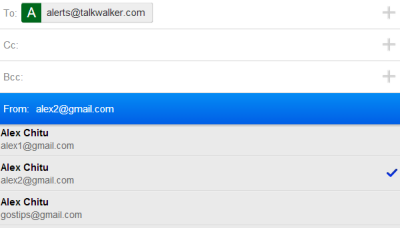
There's a very annoying bug in the mobile Gmail. You can find it in the mobile Gmail site for smartphones, the Gmail app for iOS and the iGoogle gadget for Gmail (all of them are actually the same app).


If you've added multiple sending email addresses to your account and you receive messages forwarded from other accounts, Gmail automatically picks the right "from" email addresses when you send a reply. The trouble is that the mobile Gmail web app reverts to the main "from" address after 1 minute or so. You start typing your messages and the "from" address changes. Even if you change it back, it will revert to the main address after another minute. This also happens when you compose a new message, not just when you send a reply.


Until Google fixes this issue, it's a good idea to check the "from" field before sending a message from a secondary address. After you change it, you have about 60 seconds until it reverts to the main address, so send the message quickly.


06 July 2013

When You Open Gmail's Compose Box in a New Window


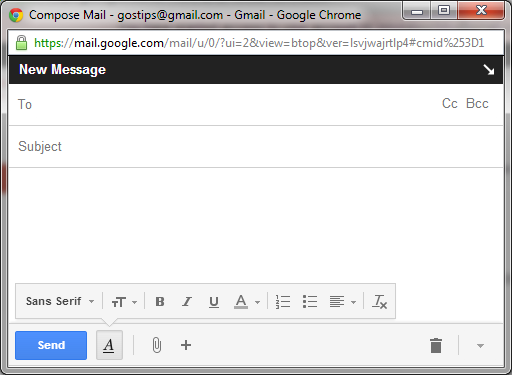
Sometimes little details matter. If you open Gmail's compose box in a new tab or a new window, the formatting options are visible by the default and you no longer have to click the formatting button.


How to open the compose box in a new tab or window? There are at least 7 ways:


Open in a new window

1. Shift+click the compose button

2. Shift+c (keyboard shortcuts need to be enabled)

3. Click the pop-out button from the compose box.


Open in a new tab

1. Ctrl+click the compose button

2. Ctrl+c (keyboard shortcuts need to be enabled)

3. d (keyboard shortcuts need to be enabled)

4. Ctrl+click the pop-out button from the compose box.


Replace Ctrl with Command if you use Mac OS.

What's The Right Answer?


Sometimes the same question can have multiple answers, even when you're looking for a simple fact. I've searched for [ny population] using Google and Bing and got two completely different answers. Google's answer is 8.245 million, while Bing's answer is 19,501,616.


It's obvious that Google replaced "ny" with "New York City", while Bing replaced it with "New York State". If you're searching for [new york], Google will show information about the city, while Bing's data refers to the state.


To disambiguate your query, you need to search for [ny city population] or [ny state population] and both search engines will return similar answers.


What if you search for [ronaldo age]? Here's what you get: 28 years (Google) and 36 years (Bing). Google mentions that the answer is for Cristiano Ronaldo, but Bing doesn't.


Both answers are OK because there are two football players known as Ronaldo: Ronaldo Luís Nazário de Lima (born 18 September 1976) and Cristiano Ronaldo dos Santos Aveiro (born born 5 February 1985). Most of the top search results from both Bing and Google are about Cristiano Ronaldo.


To sum up, it's a good idea to disambiguate your query and to check the answers provided by search engines.

Make Writing Papers Easier – 4 Websites That Help You Cite Sources


shutterstock_143396074

When the time comes to write a paper, one of the biggest pains can be citing your sources. You've spent hours and hours slaving away over your computer, perfectly crafting every word. You're cruising for an easy A, and then you have to go and spend even more time citing all those sources. Thankfully, the Internet makes this arduous part of the paper writing process a little easier.

Continue reading the article


Read full article: Make Writing Papers Easier – 4 Websites That Help You Cite Sources


Create Survey Forms With Style Using Typeform Beta


typeform_icon.jpg

I have used Google Forms to post quick surveys and collect contact information for various purposes. As part of the Google Drive suite of tools, Google Forms is convenient and pretty easy to use. There are similar online form creation services that are just as good, but none as far as I can tell are as stylish as the new Typeform form creation and data collection service, available for free at the beta level.

Continue reading the article


Read full article: Create Survey Forms With Style Using Typeform Beta


10 Tips To Get The Most Out Of BBC iPlayer


muo-bbciplayertips-intro

What is the best in British entertainment? Is it on TV or on the radio? Either way, both media are accessible with the BBC’s iPlayer service. BBC iPlayer is a browser-based service that is also available as desktop, mobile, and console apps. International viewers can also take advantage of the service, with some restrictions. With so many shows on offer and many options for playback and downloading shows (with DRM) if you’ve ever used the service it might be the case that you haven’t used BBC iPlayer to its full ability.

Continue reading the article


Read full article: 10 Tips To Get The Most Out Of BBC iPlayer


10 Tips To Get The Most Out Of BBC iPlayer


muo-bbciplayertips-intro

What is the best in British entertainment? Is it on TV or on the radio? Either way, both media are accessible with the BBC’s iPlayer service. BBC iPlayer is a browser-based service that is also available as desktop, mobile, and console apps. International viewers can also take advantage of the service, with some restrictions. With so many shows on offer and many options for playback and downloading shows (with DRM) if you’ve ever used the service it might be the case that you haven’t used BBC iPlayer to its full ability.

Continue reading the article


Read full article: 10 Tips To Get The Most Out Of BBC iPlayer


10 Tips To Get The Most Out Of BBC iPlayer


muo-bbciplayertips-intro

What is the best in British entertainment? Is it on TV or on the radio? Either way, both media are accessible with the BBC’s iPlayer service. BBC iPlayer is a browser-based service that is also available as desktop, mobile, and console apps. International viewers can also take advantage of the service, with some restrictions. With so many shows on offer and many options for playback and downloading shows (with DRM) if you’ve ever used the service it might be the case that you haven’t used BBC iPlayer to its full ability.

Continue reading the article


Read full article: 10 Tips To Get The Most Out Of BBC iPlayer


Twitter’s Tracking Your Internet Activity Now – But Will Let You Opt Out [Updates]


twitter-tracking-300

Twitter has started tracking the Internet usage of its American users, just in time for the 4th of July – but you have the freedom to opt out. Users won’t see more ads on Twitter, but they may see better ones.

Continue reading the article


Read full article: Twitter’s Tracking Your Internet Activity Now – But Will Let You Opt Out [Updates]


Pure Android


I'm sure that one of Google's OKRs is to increase the number of pure Android users. This has multiple benefits: users get the latest updates faster, Google promotes its own apps, users get to try Google's original flavor of Android, the latest version of Android gets more market share and developers are encouraged to use the latest APIs.


Here are some strategies used by Google to make pure Android (or almost-pure Android) more popular:


1. Nexus is now a family of affordable devices and Nexus 7 is the most popular Nexus device ever released. Google sells them online in a few countries and provides software updates.


2. Google Editions of the most popular Android devices: HTC One and Samsung Galaxy S4. Manufacturers provide software updates for the devices and include some of their software. Devices are still sold online via Google Play, but only in the US. Maybe other devices will follow.


3. Motorola will only release devices with stock Android. "Consumers love what the Android OS can do for them, and they want to have the most recent releases faster. From a software and UI perspective, our strategy is to embrace Android and to make it the best expression of Android and Google in the market. It will be the unadulterated version of Android, and I feel really good about our embracing Android and being the best Android experience," said Jim Wicks, Motorola's design chief.


4. A lot of stock Android apps are now in Google Play Store and many Google apps are preinstalled on devices from Samsung, HTC and more. You can now install Google's calendar app, the keyboard, Hangouts, Google Search with Voice Search and Google Now, Chrome, Google Maps, Google's music player, Gmail and much more. Some missing apps: the launcher, camera, gallery, clock, calculator, news & weather, contact manager, phone app and the messaging app.


Pure Android is not perfect and some Android flavors from Samsung, HTC and others offer support for more technologies, more features and better built-in apps. What they don't offer is a coherent experience: few developers implement their APIs and you end up with features that only work in a small number of apps, features that compete with each other (Google Voice Search vs S-Voice) and apps you can't remove.


Maybe OEMs should focus on the user experience and add their features and software on top of the pure Android. Improve Google's stock apps, develop a better camera app that takes advantage of your hardware, build a great music player and some beautiful widgets, but only include the apps that are strictly necessary. Featuritis helps create some nice demos, but you end up with software that's hard to maintain and hard to use, while slowing down devices and using more resources.

A Guide To Good Deals: How To Save Money On Everything You Buy Online


Deal

Online shopping makes it easier than ever to get a good deal. We've put together a short guide on how to get the best price on just about anything you might be looking for online. And remember, to be a conscious consumer, you also should do a little bit of research to make sure that your good deal really is a good deal.

Continue reading the article


Read full article: A Guide To Good Deals: How To Save Money On Everything You Buy Online


05 July 2013

Party Planning Made Easy: 12 Of The Best Resources


featured-cake

As summer rolls in (and out again, for the famous week long British summer), the time for garden parties is upon us. You’ve set a theme and instructed everyone to come in costume, but as the host your job is the hardest: food, decorations, perhaps activities and games. So here, my fellow party planners, are (at least) 12 sites that should be your first stop for inspirational ideas to help you pull off that perfect party.

Continue reading the article


Read full article: Party Planning Made Easy: 12 Of The Best Resources


Download Windows XP For Free and Legally, Straight From Microsoft


vintagecomputer

As the years progress and Microsoft moves on from Windows 7 into Windows 8 and beyond, it's certainly starting to feel like Windows XP is just an artifact of the past. But is it? There may be situations when you need to use XP again or you might want to take a stroll down memory lane. Well, Microsoft offers VirtualBox, a free Virtual Machine featuring a free version of Windows XP, which runs within your current OS. You can use this system for testing or running older programs that only work in Windows XP.

Continue reading the article


Read full article: Download Windows XP For Free and Legally, Straight From Microsoft


YouTube's Video Pages Will Load Faster


A few weeks ago, a reader noticed an interesting YouTube experiment that displayed a red progress bar when loading video pages. It was obvious that video pages were loaded dynamically using AJAX.


Gizmodo posted an article last week about this experiment. It turns out that YouTube will soon launch this new interface.


"Currently, when you click on a YouTube video, first the watch page loads (the webpage that the video sits on). Then the JavaScript that controls that page is downloaded, then the video player, and then the video itself starts downloading." In the new interface, everything is downloaded simultaneously. When you click a new video, YouTube only loads the new page and then the video. It's no longer necessary to download the video player and the JavaScript/CSS files.


Another change is that YouTube preloads the page and the first part of the video you're likely to watch next before you even click it, so that the video loads almost instantly. This works because the Flash player now uses adaptive streaming and downloads videos in slices. The first slice of the next video you're likely to watch is prefetched. This works well for playlists and search results (YouTube prefetches the first result), but also for video pages, where YouTube shows suggestions.