28 June 2013

2 Years of Google+


Google+ was launched 2 years ago to fix online sharing. "We'd like to bring the nuance and richness of real-life sharing to software. We want to make Google better by including you, your relationships, and your interests. And so begins the Google+ project," announced Google.


2 years later, Google+ grows faster than anticipated, brings cool new features, enables vibrant discussions, makes your photos look better and redefines the word "hangout".


There's a special Google +2 logo:


... and the jingle is now festive:


Here's the animated version:


Is Google+ an upgraded Google? Google+ brought a new consistent design for Google's services, made sharing more straightforward and search more social and personal. Google+ was a necessary tectonic shift for Google. It's now a different Google Labs, where the experiments turn into features that are used by hundreds of millions of people. From auto-enhanced photos to auto-tagged content, from video conferencing to event management, from social games to surfacing useful content, from object recognition to photo editing, Google+ is the place where you can use some of the most advanced features released by Google in the past 2 years.

YouTube's Subscription Reminder


If you watch a few videos from a channel, YouTube's homepage shows a message that recommends you to subscribe to that channel.


"Subscribe to see more videos from this channel. You've recently watched videos from [channel's name]. Subscribe to see their next videos right here on your YouTube homepage."


You can subscribe to the channel or hide the message by clicking the small "x" icon.


Now that you've subscribed to the channel, you can change your subscription preferences when you watch a video from that channel. There's a wheel icon next to the "subscribed" button that lets you enable email notifications and restrict the subscription to new uploads.


If you need more suggestions, check the "recommended channels" sidebar from YouTube's homepage or visit this page. Remove the channels you don't like to improve YouTube's future recommendations.

How to Quickly Compose a New Email Message


Learn how to quickly compose a new mail message in your default email program directly from the address bar of any web browser.


Tweet this Share on Facebook


Digital Inspiration @labnol This story, How to Quickly Compose a New Email Message, was originally published at Digital Inspiration on 28/06/2013 under GMail, Mailto, Internet.


Office Document Editor for Chromebooks


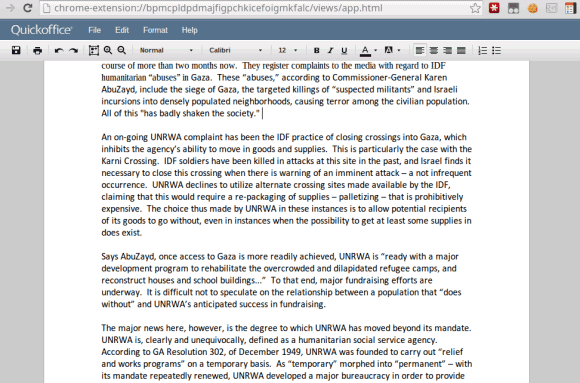
Google works on creating a Native Client app for Quickoffice, a software acquired last year. There's an Office Viewer extension for Chrome, which is bundled with Chrome OS.


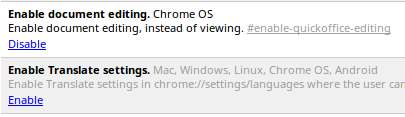
Now Google experiments with adding editing features to the Office Viewer. If you have a Chromebook, you've switched to the Dev Channel and have the latest Chrome OS version (29.0.1547.2), you can enable these features:


1. open a new tab


2. type this in the address bar: chrome://flags/ and then press Enter


3. use Ctrl+F to search for "document editing"


4. click "Enable" next to "Enable document editing"


5. click the "Restart Now" button to restart your computer and use the new flag.


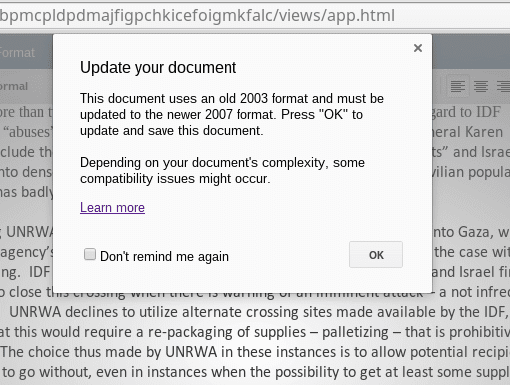
The editor is pretty basic and it only works for Microsoft Word documents and Excel spreadsheets. For some reason, the document editor only saves documents in the Office 2007 format.


{ via François Beaufort }

How to Embed Instagram Videos on your Website


Learn how to embed any Instagram video or photograph into your website with a click. You may also use the tool for downloading Instagram videos.


Tweet this Share on Facebook


Digital Inspiration @labnol This story, How to Embed Instagram Videos on your Website, was originally published at Digital Inspiration on 28/06/2013 under Embed, Html5, Instagram, Internet.


Cool Websites and Tools [June 27th 2013]


cwt logo static

Check out some of the latest MakeUseOf discoveries. Most of the listed websites are FREE or come with a decent free account option. If you want to have similar cool websites round-ups delivered to your email daily email subscribe here....

Continue reading the article


Read full article: Cool Websites and Tools [June 27th 2013]


Discover The World Through Food With Cookening: The Airbnb Of Meals


cookening-300.png

Introducing the Airbnb of food! Cookening doesn't actually have anything to do with Airbnb, but being an Airbnb veteran guest myself, I couldn't help but notice the resemblance between the two services. The only difference is that with Cookening, you don't get a place to stay, you get a home-cooked meal from a local. Or, if you're the local, you get to cook and host tourists in your house.

Continue reading the article


Read full article: Discover The World Through Food With Cookening: The Airbnb Of Meals


4 More YouTube Channels Worth Your Attention


YouTube

A little over a year ago, I hit MUO readers with a short list of lesser-known YouTube series and personalities worth checking out . This list featured video game commentary, a guy who spends his time eating cat litter and shoes, an attempt at putting an iPhone through a blender, and more. It’s about that time to come up with another batch, this time of four!

Continue reading the article


Read full article: 4 More YouTube Channels Worth Your Attention


Generate Disposable Email Addresses That Do Not Expire


With Maildrop, you can instantly create disposable email addresses that do not expire and the service requires no logins or passwords.


Tweet this Share on Facebook


Digital Inspiration @labnol This story, Generate Disposable Email Addresses That Do Not Expire, was originally published at Digital Inspiration on 27/06/2013 under Email, Spam, Websites, Internet.


So You Think You Own The Books and Games You Paid For? [Opinion]


ownership-300

I've got a shelf full of books. I love them. I read them. I even use them as a backdrop for my wife's science videos. And sometimes, I lend them to friends. It's not complicated, lending out books – you just hand your friend the book. If you're lucky, your friend brings it back (and you get to share a great conversation). If not, your friend has a book – and you no longer do. Since the dawn of human civilization, this is how lending worked.

Continue reading the article


Read full article: So You Think You Own The Books and Games You Paid For? [Opinion]


27 June 2013

Google+ Photos Trash


Did you know that Google+ Photos has a trash section? You can find it by clicking "More" and then "Trash" or you can use this link. Google says that the "items will be permanently deleted after 60 days" and shows a link for manually emptying the trash.


But there's more:


"Photos and videos you move to trash in Google+ are stored for a short period of time before they are permanently deleted. If you move an item to trash, and later want to retrieve it, you can do so by following these instructions: select Photos from the Google+ navigation menu, click More and select Trash from the dropdown, click one or many checkboxes to select photos and choose Restore to return these photos back to Google+. These photos will be restored to the same album(s) they were located prior to being moved to trash. To permanently delete photos, select the items you'd like to delete, and click Delete permanently."


Picasa Web Albums doesn't have a trash section. If you delete a photo from the Picasa Web interface, you can find it in the Google+ Photos trash. When you delete a photo from Google+ Photos, there's a message that says "your photo has been moved to trash" and links to the trash section.


For some reason, Google+ photos from the trash are automatically deleted after 60 days, Gmail's messages are deleted after 30 days, while Google Docs files are never deleted automatically. I wonder why.


{ Thanks, Fernando. }

Secure Your Online Transactions With BitDefender’s Safepay


safepayicon

Anyone who's made a purchase online has had a nightmare about identity theft. Though uncommon, the problem can cause serious financial harm, and victims sometimes don't even know they've become a target. BitDefender Safepay, currently in beta, guards against these threats by providing a secure browsing environment safe from both malware and attacks on unsecured WiFi. Anyone can download the software for free and begin using it immediately, so let's take a closer look.

Continue reading the article


Read full article: Secure Your Online Transactions With BitDefender’s Safepay


Secure Your Online Transactions With BitDefender’s Safepay


safepayicon

Anyone who's made a purchase online has had a nightmare about identity theft. Though uncommon, the problem can cause serious financial harm, and victims sometimes don't even know they've become a target. BitDefender Safepay, currently in beta, guards against these threats by providing a secure browsing environment safe from both malware and attacks on unsecured WiFi. Anyone can download the software for free and begin using it immediately, so let's take a closer look.

Continue reading the article


Read full article: Secure Your Online Transactions With BitDefender’s Safepay


Find the Number of Gmail Search Results


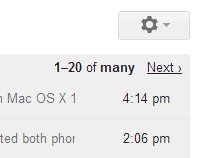
Gmail doesn't show the real number of search results. A few years ago, tweaking the URL helped you find the number of results, but this doesn't work anymore. Gmail only shows the real number if there are very few search results. Otherwise, you'll see "1-20 of many" and you'll have to keep clicking "next" or use the URL trick to skip many pages of results.


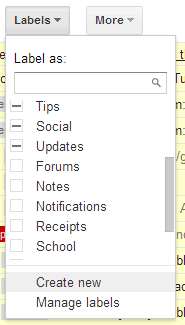
If you really need to find the number, there's a trick that still works. Gmail shows the number of messages for each label, so you can create a new label and then label all the search results.


Here are the steps:


1. enter your search query


2. click the "select" checkbox next to "Refresh" to select all the messages from the page


3. click the new link that shows up: "Select all conversations that match this search"


4. click the "Labels" dropdown, select "Create new" at the bottom of the list and enter the name of a new label. Try something like "Temp", "Temporary", "Search results". Click "Create" and then "OK". You should see a message similar to this one: "All conversations have been added to 'Search results.'"


5. find the label you've created in the left sidebar (you may need to click "More" to find it). Go to that label and you should find the number of search results.


Now you can delete the label from the Gmail sidebar. Click the arrow next to the label and select "Remove label". Obviously, this doesn't delete your messages.


{ Thanks, Eliezer. }

Troubleshoot Problems with Installing Windows 8.1


Windows 8.1 is available as a free download for Windows 8 users. If you are having issues with downloading or installing Windows 8.1, follow this guide.


Tweet this Share on Facebook


Digital Inspiration @labnol This story, Troubleshoot Problems with Installing Windows 8.1, was originally published at Digital Inspiration on 27/06/2013 under Windows 8, Software.


Get Your Start Button Back: Windows 8.1 Preview Is Now Available To The Public For Free [Updates]


windows-8.1-300.png

Windows 8.1, the much-anticipated update to Microsoft's Windows 8 OS, is now available to the public in a Preview version. Windows 8.1 users will enjoy a new and improved search interface, an updated Start screen, new customization options, a re-designed Windows Store, enhanced multi-app functionalities, and more.

Continue reading the article


Read full article: Get Your Start Button Back: Windows 8.1 Preview Is Now Available To The Public For Free [Updates]


Fix: “The Update Is Not Applicable To Your Computer” Error While Upgrading Windows 8 To Windows 8.1


CLICK HERE TO SEE FULL POST


Just a few hours back, Microsoft released Windows 8.1 Preview build (build number 9341) to the public at BUILD 2013 conference in San Francisco. While both 32-bit and 64-bit Windows 8.1 Preview ISOs are available to perform a clean install of Windows 8.1, existing Windows 8 users can update to Windows 8.1 with a few [...]

Cool Websites and Tools [June 26th 2013]


cwt logo static

Check out some of the latest MakeUseOf discoveries. Most of the listed websites are FREE or come with a decent free account option. If you want to have similar cool websites round-ups delivered to your email daily email subscribe here....

Continue reading the article


Read full article: Cool Websites and Tools [June 26th 2013]


What Are Your Views On Crowdfunding Through Sites Like Kickstarter? [We Ask You]


This week has seen the launch at retail of Ouya, a small, $100 games console designed to play indepedendent Android-style titles. It can also be used to run emulators and ROMs, and/or as a media center using XBMC or similar piece of software. However, to get to the point when Ouya is available to buy [...]

Continue reading the article


Read full article: What Are Your Views On Crowdfunding Through Sites Like Kickstarter? [We Ask You]


5 Great Free VPN Services Compared: Which Is Fastest?


VPN Services Compared Intro

Virtual private networks (VPNs) aren’t much of a mainstream service. The only ones who know about VPNs are those who are sufficiently tech-literate, and even among these folks, only few actually use VPNs. The name may sound overly technical and daunting, especially if all you do is check emails and post to Facebook, but they’re surprisingly easy to use and not much of a hassle to set up. Join me as I explain the nature of VPNs, how you can benefit from them, and where to find the fastest ones for free.

Continue reading the article


Read full article: 5 Great Free VPN Services Compared: Which Is Fastest?