14 February 2013

Most anticipated Mobile Games of 2013


This year is shaping up to be a big one for mobile games, with a number of long-anticipated titles set to be released at last and more studios than ever trying to push the capabilities of the latest devices to the limit. Everyone's got their own wish list, so here's our run-down of the mobile games we're looking forward to most - and if you don't own a current-generation mobile phone, it may be worth investing in one just to play some of these titles!

Infinity Blade: Dungeons (iOS)


The prequel to the biggest iOS franchise ever is looking great - and from the trailer, it looks set to have a more Diablo/Torchlight-esque feel to the gameplay than the previous games. Sadly the game's development is currently on hold after Impossible Studios was axed, but this is definitely one worth waiting for.

BadLand (iOS)


The lovely-looking BadLand has shades of Limbo in both its artistic and gameplay style, but interestingly it's offering multiplayer support for up to four people. Described as a side-scrolling, physics-based puzzle/racing platformer, it's packing a lot into one game, and the first multiplayer trailer promises frantic screen-tapping action.

Assassin's Creed: Utopia (iOS, Android)


If you wondered how the building-leaping action of Assassin's Creed will play out on a mobile, don't: this looks like it'll be more of a city-building game set in colonial America. There will still be plenty of battles mixed in with the Sim City-ish gameplay, though. It's an unusual direction for the series and it'll be interesting to see whether it works.

Year Walk (iOS)


In Sweden, apparently it's traditional to take a long walk on New Year's Day in the hope of divining the future. It's a strange premise for a game, but this 2D adventure is already looking as beautiful as it is mysterious, and promises a mix of adventure, horror and "interactive art". Check out the trailer for a closer look at this spooky, folklore-infused title.

Double Fine Adventure (iOS, Android)


Anything by Tim Schafer, the man behind some of the world's best-loved adventure games (Monkey Island, Grim Fandango, Day of the Tentacle) is definitely worth waiting for, and this Kickstarter project attracted over $3 million of fan backing in just a few short months. Details on the game itself are still sketchy, but it's hard not to be excited by a new Double Fine game.


Can Mobile Monitoring Be Any Simpler- I guess Not!


We have increased the pace of our loves manifold and it seems the time simply slips out of our hands and we don’t have enough time for anything. And in all this, our family and work priorities compete furiously. Technology has addressed this burning issue with the mobile monitoring technique. Why?

The Hassle of Monitoring:


Technology has come to our rescue because monitoring kids and employees in the age when everything is personal and private has become impossible. You can’t possible meet all your kids’ friends, listen to what they talk about over phone and same is the case with employees when you are out of office or when they are. So you need a sound monitoring system that can work on its own and in stealth mode.

Say Hello to Hassle-Free Monitoring:


Fortunately now it is possible, with the help of mobile monitoring apps, you can easily monitor kids and employees all the time and anytime. You only have top install it on their smartphones once and the rest it will do on its own.

Why We Recommend StealthGenie?


The reason why we recommend StealthGenie to almost all out readers is that it is safe and very easy to use. It can be installed on any of the:


  • Android

  • iPhone

  • BlackBerry phones


Exclusive Features:


The best part about StealthGenie mobile monitoring app is that it has loads of features that are fun to use and they work in full stealth mode never letting your kids or employees knowing about it. The exclusive features are:


Recording phone surroundings: this feature is a must have and you can listen to all in-room conversations in addition to recording calls. So your kids or staff will have no way of hiding stuff from you.


Trigger alerts: by defining certain words or contacts in the list, you can get alerts as any of the listed items comes in use. You can also get alerts as your target phone user changes SIM card. Thus hanky-panky is off bounds.


WhatsApp and iMessage monitoring: In addition to monitoring SMS and e-mails, you can also log WhatsApp and iMessage chats so if your kids and employees use WhatsApp or iMessage thinking you can’t know, they are mistaken.

Some Glitches:


There are slight glitches, too. I happened to use it for a long time and a few times, there was a delay in data uploading. But I complained about it to the 24/7 customer support team and they fixed my issue. StealthGenie has yet to come up with any restrictive features so until that time, I would rate it at 8/10.

Conclusion:


I guess, mobile monitoring cannot be any simpler than StealthGenie. It has understood the core concerns of parents and employees and that’s what they are basing their app on. Try StealthGenie for yourself and simplify the hassle of monitoring forever.


Google OS, Developed in 2006


It turns out that Chrome OS was developed before Google Chrome. Jeff Nelson, a former Google engineer, started working on a Google OS prototype in 2006. The goal was to make Firefox run faster, so he used this browser.


"It was a chopped down Linux distribution - as so many 'new' operating systems are, these days. I wrote the first version as early as July 2006 and showed it around to management. Instead of launching a project, the response was extremely tepid. My boss complained, 'You can't use it on an airplane.' Actually, you could as, under the covers, it was still a bare-bones Linux distribution and could execute any Linux program installed on it," Jeff explains. "The main priority when I started constructing the operating system was the need for speed - to create a super-fast operating system."


Jeff was developing web apps at Google and he had to restart the browser frequently. "Restarting the web browser was a particularly slow operation, often taking 30-45 seconds, whether IE or Firefox, Linux or Windows. However, even simple tasks such as displaying a directory in a file explorer were unreasonably slow operations, requiring several seconds for a task that should be nearly instantaneous. (...) The solution? Move the entire desktop operating system into RAM. By moving the entire operating system into RAM, that immediately took off the table the largest performance bottlenecks in the operating system: File I/O."


Most tasks were now completed almost instantly, Firefox restarted in 1 second and even the code compiled faster. The problem was that RAM is a volatile memory, so you could lose data if you didn't save it to the disk. He solved the problem by only using web apps and performing some backups to a local storage media. Web apps solved many other problems: avoiding software installation, using less storage, many apps weren't available for Linux.


"Thus, tracking down web apps to replace any and all functionality normally found on a desktop, became a priority. That's how the seeds of the webapps on the Chromium desktop, albeit originally written in HTML and running on Firefox, were planted," concludes Jeff.


Google released a lot of web apps in 2006: Google Chat, Google Page Creator, Google Calendar, Google Spreadsheets, Google Docs, Picasa Web Albums, Google Apps for Your Domain.


{ via Chrome Story}


13 February 2013

How To Turn Your Handwriting Into A Font


handwriting fontAdd the ultimate personal touch to any document: turn your handwriting into a font and use that. There’s a lot of creative potential here, and it’s a lot easier to do than you’d think thanks to MyScriptFont.


Friends don’t let friends use Comic Sans. It’s just a bad idea. If you want a font that looks handwritten, don’t mess around: create a custom handwriting font with your own writing and use that.


Once you do so the possibilities are endless. You can easily use your own handwriting for that comic you’re working on. You can add “hand-written” notes to your favorite photo. Or you could just type notes and print them, because you’re too lazy to actually write a letter but want to pretend you did.


It’s entirely up to you, and with MyScriptFont the process to create a handwriting font couldn’t be simpler. Download and print a PDF, then fill in the squares with your own handwritten letters. Scan that, upload and the site will do the rest. Let’s work through the process together right now.


Making Your Handwriting Font


To get started head to MyScriptFont.com. You’ll see the following straightforward instructions:


handwriting font


Download the PDF and print it out. Use a black, felt-tipped pen and fill in all of the letters. Yes: you have to use an actual pen and paper. Accented characters, which you’ll find at the bottom of the page, are optional but recommended. When you’re done, scan your printed document in grey-scale.


cursive handwriting font


Save your scanned file as an image and you’re ready to upload. Head back to MyScriptFont.com and upload your filled in form. You’ll need to wait a while; the processing can take a while.


cursive handwriting font


When it’s done you’ll see a preview of your new font, and be able to download it. My handwriting is terrible, so my font kind of sucks:


cursive handwriting font


Happily my wife Kathy has legible handwriting, so her font works quite well. Check it out:


handwriting font


These handwriting fonta are great for adding a personal touch to documents, so use your imagination. Your handwriting reflects your personality, so this font will as well. Sure, it’s not as flexible or emotive as your actual handwriting, but it’s a great way to quickly add a personal touch to a presentation or document.


Not sure how to install this font on your computer? Don’t worry; it’s easy. Tina outlined how to install fonts on Windows, Mac and Linux, so check that out if you’re not sure what to do with your new font file. On most systems you can simply open the font and click the “Install” button, but the above directions can help if you’re not sure what to do.


Conclusion


Of course, this isn’t the only way to make your own handwriting font: we’ve outlined tools for making your very own fonts before. If you want to try your hand at typography those tools are worth checking out, at least to start with.


Found a font on a piece of paper or online image, but aren’t sure what font it is? Rather than designing it yourself you should check out WhatFont, a site that can identify almost any font. You won’t be disappointed.


How are you going to use your custom font? Let me know in the comments below, along with links to your creations if you’re so inclined to share with the world.


The post How To Turn Your Handwriting Into A Font appeared first on MakeUseOf.


WebM and Broken Promises


Two years ago, a surprising post from Chromium's blog announced that Google Chrome will drop support for H.264 HTML5 videos. "Though H.264 plays an important role in video, as our goal is to enable open innovation, support for the codec will be removed and our resources directed towards completely open codec technologies."


Nothing happened since then, so I assume that Google changed its mind. Mostly likely, Google hoped that this announcement will increase WebM's adoption, but that was wrong. Other than YouTube, few other sites converted their videos to WebM. Why spend time and money to convert videos when they could simply use a Flash player?


After all, Adobe Flash doesn't support WebM and that's the second broken promise: "As Kevin Lynch mentioned today at Google I/O, we are excited to include the VP8 video codec in Flash Player in an upcoming release, which will help provide users with seamless access to high quality video content on all of their Internet-connected devices," announced a blog post from 2010.


Adobe didn't support the VP8 codec, so Flash is still mostly H.264-only. And so are Internet Explorer, Safari, iOS, Windows Phone. WebM is mostly non-existent in the mobile space and that's where the future lies. Even if Android 2.3+ supports WebM, there aren't many devices with hardware acceleration for WebM.


Now Firefox's Windows nightly builds allow you to play H.264 HTML5 videos using the Windows Media Foundation backend. "That means if you're using a Windows computer that already has a licensed H.264 decoder installed, you'll be able to enjoy HTML5 video that's been encoded using MPEG LA's codec."


That means in the near future the most important browsers will support H.264 videos natively and WebM will matter even less. There's a VP8 successor that's more efficient, there's WebP for images and there's the WebRTC API for native video chat apps, but H.264 will continue to dominate web video. Those broken promises just made it more obvious.


Opera Switches to WebKit


After many years of dealing with site compatibility issues, Opera found the solution: it will switch from its proprietary rendering engine (Presto) to WebKit.


"Presto is a great little engine. It's small, fast, flexible and standards compliant while at the same time handling real-world web sites. It has allowed us to port Opera to just about any platform you can imagine. And unlike what some people seem to believe, Presto was actually designed from the ground up with compatibility in mind. It was always a goal to be compatible with the real web while also supporting and promoting open standards. That turns out to be a bit of a challenge when you are faced with a web that is not as open as one might have wanted. Add to that the fact that it is constantly changing and that you don't get site compatibility for free (which some browsers are fortunate enough to do), and it ends up taking up a lot of resources - resources that could have been spent on innovation and polish instead," explains an Opera employee.


The problem with Opera is that it has a low market share on the desktop (about 1-2%) and not many web developers bother to test their sites in Opera. Google's sites have always had issues in Opera and most Google web apps don't officially support Opera (check the system requirements for Google Drive). Gmail's help center actually mentions that "We don't test Opera, but believe it works with all of Gmail's features." Probably Google doesn't want to allocate resources for testing sites in a desktop browser that's not popular, but it has a completely different rendering engine.


In a perfect world, browsers and sites would just follow the standards and everything would work well, but it takes time to create the standards and browsers implement their own version in the meanwhile. Not to mention that browsers have all kinds of quirks.


Google launched Chrome in 2008 and one of the reasons why it chose WebKit was that "we knew we didn't want to create yet another rendering engine. After all, web developers already have enough to worry about when it comes to making sure that all users can access their web pages and web applications."


WebKit started in 2001 as an Apple fork of KDE's KHTML engine, it was used to build Safari, a few years later it was open sourced and Nokia ported WebKit to Symbian. WebKit is now the most popular mobile rendering engine, since it powers Safari Mobile and all iOS browsers (other than thin clients like Opera Mini), Android's stock browser, Chrome for Android and many other mobile browsers. WebKit's combined market share is now more than 40%, according to StatCounter and Wikimedia's stats.


Download Mozilla Firefox 18.0.2 Final Version


I have discussed many times about Mozilla Firefox's importance among web browsers. It's one of the best web browser today. The Firefox developers team have introduced many new features and facilities in regular interval. I have given you Firefox version 18.0.1 review and download link few days ago. Now Firefox has updated their browser to version 18.0.2. So here I give you the download link.


Don't wait anymore, update your Firefox to the latest version for better web surfing.


Click here to Download Firefox Latest Version


Ensure Your Facebook Competition Doesn’t Shut Down Your Page [Weekly Facebook Tips]


If you run any sort of Facebook page – even a small one – you may have considered running a competition. And why not? Competitions are a great way to get people talking and interacting with your page, which is just what you want to keep things on your page active and interesting.


You should listen to a few words of caution though before you get started, as not all of your competition ideas will be approved by Facebook. There are a few important things to note about competitions that you need to adhere to. If you don’t, Facebook might shut down your page. Read on and make sure you know what’s allowed and what’s not.


Entrants Can Like, Add Apps Or Check In – That’s All!


To keep your competition in the clear with Facebook, the only actions on Facebook that you can require of your entrants is liking a page, adding an application or checking into a place. Anything else is not allowed and could get your page banned!


So, in other words, condition of entry to the competition can’t include entrants uploading photos, making a wall post, sharing a post or answering a question in a comment. They can do this for fun, but it can’t be a requirement of the competition. Sadly, many page managers don’t understand this and will ask users to do these things in order to enter a competition.


Don’t Use Facebook Tools For Competition Entry


You also need to ensure that there is another step to registration for the competition. This means you can’t have a competition where liking a page, checking in or adding an app automatically enters people to the competition. It can be a condition of entry, but not the mechanism by which they are entered.


Notify Winners Directly, Not Via Facebook


You must not notify your competition winners using Facebook tools. So, you can’t send a Facebook message, inform them via chat, or let them know on their timeline or Facebook page.


Distance Yourself From Facebook


All competitions need to ensure that it is very clear to entrants that you, not Facebook, are running the competition. This includes clearly stating that Facebook in no way endorses or administers your competition, ensuring each entrant completely releases Facebook from responsibility, and noting that any data collected for the competition is collected by your organisation and not by Facebook.


Use An App To Promote The Competition


All promotions and competitions must be conducted within Apps on Facebook. Facebook suggest using a canvas or Page app to promote the competition. As you can see, if you aren’t allowed to communicate with entrants via Facebook, it is really important to collect their contact information somehow.


Disclose All Restrictions Clearly


You must ensure when running a promotion or competition on Facebook that any limitations are clearly disclosed. This includes expiration dates, eligibility to enter (e.g. age limits or residency requirements) or any limits on redemption.


You Must Be The Merchant Or Manufacturer


For any offers on Facebook, you must be an official merchant or manufacturer of the goods on offer. If the offer can be redeemed with other merchants, it’s your responsibility to discuss terms with them before you begin your promotion or competition.


Keep It Legal


Don’t forget that many countries and states have their own rules about what is allowed in a public competition and what’s not. Do try to look up your local laws and ensure that you are on the right side of the law there too. Don’t let your competition ruin your business!


Full Facebook Page Guidelines


Facebook have a detailed page outlining the guidelines for all pages, including competition guidelines. It’s worth reading this page occasionally to ensure you’re up-to-date on the current guidelines.


The post Ensure Your Facebook Competition Doesn’t Shut Down Your Page [Weekly Facebook Tips] appeared first on MakeUseOf.


12 February 2013

Chrome's Giant Touch-Optimized Menu


Somewhere between Chrome 25 (beta) and Chrome 26 (dev), the browser's menu got bigger. It's now optimized for touch interfaces even if you're using a non-touch computer. I've checked the height of the menu and it's now 580 pixels, instead of 420 pixels. That's a 38% increase and it makes the interface more difficult to use for mouse users.


When you use Chrome's sync feature, the menu's height becomes 625 pixels. Here's how a recent Chromium build looks on my 1280x800 laptop and remember that most laptops sold right now have a 1366x768 resolution:


Chrome also changed the contextual menu:


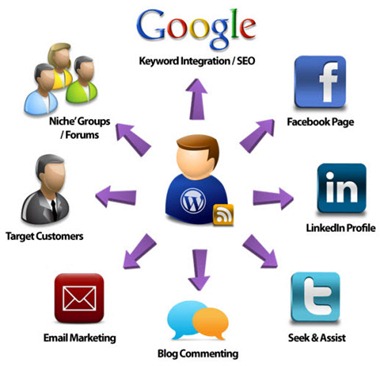
10 ways to promote your blog and its posts


The majority of traffic that comes to a blog post comes within the first day or so after it's published. You can get bumps in traffic long after a blog post is published, but more often, the bulk of the traffic to a blog post comes sooner rather than later.


promote-blog-post


With that in mind, it's important to promote your blog posts and increase traffic to them immediately after you publish them. This is particularly important for posts about timely topics but applies to all of your blog posts. Following are 15 ways you can promote your blog post immediately after you publish it to increase traffic to it quickly.


1. Tweet Your Blog Post to Your Twitter Followers

Twitter is a free micro-blogging tool that allows users to publish short messages (140 characters or less) through their computers and mobile phones. Twitter launched in 2007 and nearly 1 million people were using it within one year of its debut.


Twitter is a perfect place to share a link to your blog post as soon as you publish it. There are many tools that enable you to automatically publish a link to your latest blog post on your Twitter stream, or you can share it manually.


Know the limitations of Twitter messaging:


  1. Daily Update Limits: You can publish up to 1,000 total updates to your Twitter account per day from all devices combined (Web, cell phone, etc.).


  2. Daily Direct Message Limits: Twitter limits direct messages to 250 total per day on all devices (Web, cell phone, etc.).


  3. Follower Limits: You can follow up to 2,000 people on Twitter without any problems, but once you follow 2,001 or more people, you'll face following limits. Twitter following limits are based on the ratio of the number of people you follow to the number of people who follow you.


2. Share the Blog Post on Facebook

Given how many people use Facebook, it's highly likely that people who want to read your blog posts are on Facebook, too. Therefore, be sure to share a link to your blog post on both your Facebook Profile and Page (if you have a Facebook Page for your blog).


Tip to Facebook traffic:


  1. Complete Your Profile Strategically


  2. Find Friends


  3. Join Groups or Create Your Own Group


  4. Create a Facebook Page and Become a Fan of Other Facebook Pages


  5. Link Your Other Social Accounts to Your Facebook Profile and Page


  6. Promote Your Facebook Link


  7. Be Active in Facebook by updating regularly


  8. Acknowledge and Reciprocate - spend the majority of your Facebook time commenting on other people's statuses and conversations, sharing other people's great content, responding to direct messages, and so on.


  9. create and Place a Facebook Ad


  10. Be Human in facebook


promotrblog

3. Share the Post on Pinterest

Pinterest is a visual bookmarking website that allows you to "pin" images and videos that you find online and want to save or share with others onto virtual pinboards. It's similar to popular social bookmarking sites like Digg and StumbleUpon, but you can only pin images and videos on Pinterest


Pinterest is a visual social bookmarking sites. If you include images in your blog posts, then Pinterest is a great place to promote them.


4. Share the Post on Google+

Google+ is a powerful tool for blog post promotion, and it shouldn't be missed. Google+ is the fastest-growing social networking site. It's a perfect place to connect with people around the world, build relationships, and drive readers to your blog. To get you started, following are 10 tips to help you increase blog traffic with Google+ right now.


  1. Create a Complete Profile or Page


  2. Connect with People – stay connecting with other Google + members


  3. Create Circles - you should create circles to categorize your Google+ connections and then place people into appropriate circles.


  4. Send Targeted Messages


  5. Publish Interesting Content


  6. Create Sparks -Create sparks to track keywords related to your blog topic and jump into relevant conversations.


  7. Host Hangouts - Google+ hangouts are video chats between up to 10 Google+ members. You can host a hangout and promote it as a small virtual webinar or tuturial session.


  8. Host Huddles: Instead of holding a tweet chat on Twitter, you can hold a Google+ huddle, which is a text chat between Google+ members.


  9. Integrate and Cross-Promote : Use social media icons, Facebook social plugins, Twitter widgets, and so on to integrate your blog marketing efforts and cross-promote your content.


  10. Be Active: Update your Google+ stream frequently with new content, and make sure you spend time commenting on other members' updates as well.


5. Share the Post to Your LinkedIn Followers

If you write a blog about a business, career, or professional topic, then LinkedIn is one of the most important places to promote your blog posts.


6. Include a Link to the Post in Your Email Newsletter

If you have an email opt-in form on your blog and collect email addresses from readers in order to send email newsletters and communications to them, then those email messages are a great place to share links to your blog posts.


7. Share the Post on Social Bookmarking Sites Like StumbleUpon

Social bookmarking enables you to share your blog posts with people who are actively looking for content.


8. Share the Post in Relevant Forums that You Participate In:


Be sure to offer more useful information and comments than self-promotional links in your posts though, so you don't appear to care more about self-promotion than the members' conversations.


Tools to add a Forum to your Blog / website:


  1. vBulletin : vBulletin is one of the most popular forum tools because it is chock full of features and functionality.


  2. phpbb : phpbb is one of the most popular free forum tools because it offers a wide variety of features even though it's completely free to use.


  3. bbPress : Even though the free bbPress forum tool was created by the makers of WordPress and Akismet, you don't have to use WordPress to use the bbPress forum tool. It's a standalone tool that can be added to any blog or website.


  4. Vanilla Forums : Vanilla Forums is a free, open-source forum tool that offers some customization options but not as much as some of the other options in this list.


  5. Simple-Press :Simple-Press is a free WordPress plugin that allows you to add a customizable forum to your self-hosted WordPress.org blog or website.


9. Comment on Relevant Blogs and Include the Link to Your Blog Post

Commenting on other blogs that are about similar topics as yours or are likely to have readers who are part of your target audience is a great way to promote your blog posts.


10. Promote Your Blog Post Internally:

Internal linking within your own blog is an important part of search engine optimization and keeping people on your blog longer. Think about how your blog post fits into your internal linking strategy.


Mobile Google Contacts Alternative


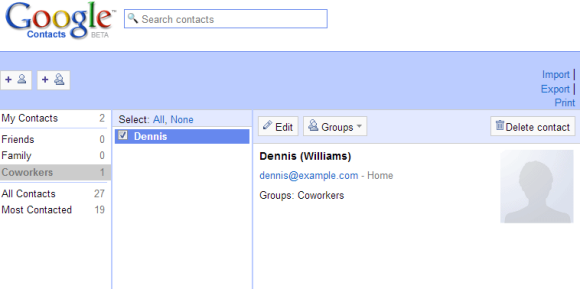
For some reason, Google doesn't offer a mobile interface for Google Contacts. Sure, you can use the autocomplete feature from Gmail to find an email address or sync your contacts using CardDav or Exchange, but there's no mobile app for Google Contacts.


I've tried to use the standard desktop interface available at google.com/contacts, but it's slow and hard to use on a mobile phone. Fortunately, Google still offers the old version of the Google Contacts site at google.com/contacts_v1 and it works a lot better on a smartphone.


Update: There's another option - https://mail.google.com/mail/h/?v=cl (thanks, Alexandre).


From Sleekbooks to Chromebooks


What happens when you take a thin and light Windows PC and transform it into a Chromebook? Here are 2 examples of laptops from HP and Lenovo that have been morphed into Chromebooks. Both replaced an Intel Core i3 CPU with a Celeron CPU, the standard HDD with a 16GB SDD and Windows with Chrome OS. HP made some additional changes and removed 2GB of RAM and replaced the 2 USB 3.0 ports with USB 2.0 ports.


The price dropped from $590 to $330 for the HP laptop and from $620 to $430 for the Lenovo laptop. The cheaper Intel CPU and the free Chrome OS license help manufacturers save about $200.