08 February 2013

Download Google Chrome Portable Version 24.0.1


Google Chrome is the best and fastest web browser among web browsers software. Most of us use Google Chrome including me as our web browser for fastest access in the web. It has more than 310+ million users worldwide. If you are really a fan of Google Chrome and if you are very much used to it, then certainly you may wish to carry it wherever you go.


Now Google Chrome has released the latest version of Google Chrome portable version 24.0.1312.57. This latest version of Chrome portable is designed simply and stylish. You can have your,

Favorite bookmarks

Saved passwords

All History and everything that you want at any time.


You can simply install Chrome Portable setup file into your USB pen drive, and start web browsing from anywhere and from any PC. Portable Chrome is having all the features which you get in a usual Chrome PC version.


The Old Image Search, Still Available


The old Google Image Search interface is still available in the OneBox result that's displayed for some Google searches like [tropical birds] or [europe map]. If you add "image", "images", "photo" or "photos" to your query, Google will show 4 times more image results. It's like a simplified image search interface inside the regular Google Search.


3 Applications To View Your Entire Internet History In One Place [Windows]


I’ve run into a bit of a problem lately. I’ve started using one browser for basic purposes, then another for everything Flash-based (such as games). Flash just feels faster in one browser, without heavy add-ons or extensions, compared to another. And then how many IM clients do we all use? I personally still use ICQ! I’ve got friends there who refuse to budge. Skype is also a necessity.


How many programs must we run, simultaneously, that ultimately do the same job? It happens. Market share is a competitive thing. Having centralized data is very important to me though, and I feel it’s a major inconvenience (and stress to your system) to constantly have multiple processes open, especially for something as intensive as a browser. Luckily, I’ve discovered a way to bring together the history of all major browser, email, and IM clients.


MiTeC Internet History Browser


MiTeC Internet History Browser brings together your history from every major browser out there:


  • Microsoft Internet Explorer

  • Google Chrome

  • Opera

  • Apple Safari

  • Mozilla Firefox


You can choose to scan for your history automatically or load your data by a file. I’d recommend you click the top option at the main interface.


Shown above is how your history is viewed using the application. Everything can be viewed in chronological order. Near the top of the interface, there is a search field.


As you can see, multiple browsers work their way into the mix. They aren’t separated by tabs or anything like that. Everything is listed 100% chronologically. Clicking on one of the entries in your history will show when it was visited, what the exact URL is, and how many times you visited that page. You can then open that page in your default browser if you’d like to.


If you’re all over the place with browsers, it can be a headache to consider which browser you used to view what. MiTeC’s Internet History Browser turns it into an experience as if you were looking at your history all in a single browser.


MiTeC’s Email History Browser


MiTeC’s Email History Browser opens up with the same interface as the the last application. It supports the following email clients:


Unlike MiTeC’s Internet History Browser, Email History Browser comes with a tabbed view. You can see the names of each supported application at the bottom-left of the interface. The highlighted application is your current view. All accounts within that view are able to be seen above that area. All folders are also shown.


MiTeC’s Email History Browser is a very interesting way to search through all of your email accounts. The only problem is that you cannot actually load the body text of your emails in this application, only the headers.


You’ll notice the above screenshot is a little empty. I don’t use Windows Live Mail often, and when I do, it’s for my Windows Live Mail account (@live.com). I believe there is a compatibility issue, with Windows 8, when it comes to loading your @live.com/@hotmail.com address using MiTeC’s Email History Browser. It works fine in every other version of Windows.


MiTeC Internet Messaging History Browser


MiTeC’s IM History Browser may be the most interesting of the bunch, just because of how useful IM history really is. It supports the following clients:


  • Skype

  • ICQ 7

  • Windows Live Messenger

  • Yahoo Messenger


With the messengers supported, some may question the usefulness of MiTeC’s IM History Browser. ICQ and Yahoo! are practically dead, MSN is being phased out soon, and AIM isn’t supported. Nonetheless, it gets the job done for these messengers. Each messenger supports every account that you’ve ever logged in from and shows your message history in a chronological, tabbed view.


This application could be greatly improved by supporting Pidgin IM logs, but it’s surely useful if you use multiple messengers individually.


The coolest thing about all of these applications are that they are completely portable and they support a network connection! You can access the history of other PCs on your local network, and that is a huge feature all on its own.


All three of these tools are worth throwing on a flash drive. What do you think of them? Let me know in the comments!


The post 3 Applications To View Your Entire Internet History In One Place [Windows] appeared first on MakeUseOf.


Make Windows 8 Suck Less With Classic Shell


classic shell for windows 8Make Windows 8 usable for people who think it’s not. Add a start menu to the desktop and tweak the way Explorer and Internet Explorer behave, all thanks to a piece of software called Classic Shell. If you like tweaking your user interface, and miss the options provided by previous versions of Windows, you’ll love this software.


To say Windows 8 is controversial would be an understatement. While many love the new security and speed of Redmond’s latest offering, some wish there was an optional way to avoid the Metro interface – including most of the MakeUseOf staff. Forcing a touch-based interface on a mouse-and-keyboard loving populace probably isn’t the smartest thing Microsoft’s ever done – even if it could help them sell a couple of phones someday.


So I’m glad there are ways to make Windows behave a little more like the operating system we know how to use properly. Classic shell gives you exactly the start menu you prefer, whether that’s the one from Windows 7, XP or even older versions of the OS. It also lets you tweak Windows Explorer, adding a customizable toolbar and letting you make other changes to the classic shell in Windows 8.


The Start Menu


Install Classic Shell and you’ll see it immediately – a start menu! The button will stick out like a sore thumb at first but you can configure it to blend in with Windows 8 quite nicely. Here’s how it looks on my computer:


classic shell for windows 8


Once you install Classic Shell, Windows automatically boots to the desktop – nice if you’d rather avoid Metro’s distractions and get right to work.


Do you want to change that, or anything else? Right-click the start menu and you’ll find a “Settings” button. From here you can change the style of start menu you want:


classic shell windows 8


You’ll find a wide variety of options; just be sure to hit the “All Settings” options so you can see all tabs. You can make your start menu work exactly the way you want, so check it out.


Explorer


Many people like the new Windows Explorer, but if you’re not one of them Classic Shell is here for you. With it you can make the file manager behave just the way you remember. When you launch it you’ll see a new toolbar in Explorer. Click the Classic Shell button on it and you can configure things, including what does and doesn’t show up in your toolbar:


classic shell for windows 8


Again, you can configure just about anything here. Explore the options and you’ll be blown away.


Conclusion


My wife – a brilliant physicist who is also very computer savvy – recently had cause to replace her computer. The new machine came with Windows 8, with which she was initially frustrated.


“I’m just not sure how I’m supposed to use this,” she said. The Metro apps, which she accurately deemed “Internet stuff”, didn’t seem that useful for most of the things she spends her time doing: crunching data, preparing presentations and taking notes while reading at the same time.


Her plan was to install Windows 7 until I pointed out Classic Shell. It provided the means to get used to Windows 8 without throwing old workflows away completely.


I think Microsoft made a mistake in not making more of their Metro features optional. People love Windows and have workflows worked out using it. Why try to change everything in one swift blow? Classic Shell helps, at least. Install it if you’re feeling the way my wife did.


If you want more help, be sure to check out Chris’ piece on resolving Windows 8 niggles or his piece on making Windows 8 faster. Or, if you want to learn more about Microsoft’s latest operating system, be sure to check out our full, free manual for Windows 8. It goes over all of the new features, teaching you how to use the Metro interface and get the most out of the new configurations.


Thoughts? Leave them below, as always. I’ll be around for the after party.


The post Make Windows 8 Suck Less With Classic Shell appeared first on MakeUseOf.


07 February 2013

How to Download / Backup your FeedBurner Email Subscribers List


One of the services offered by Google is FeedBurner, it is a good tool to manage site’s feed(s). FeedBurner is an email subscription service and it is commonly used by a lot of bloggers to serve their readers. FeedBurner offers so many features such as subscription management, email branding, customizable delivery and communication preferences, and a lot more.


It’s a good thing to back up / download FeedBurner Email subscribers list for any future use such as moving to another service like MailChimp, Feedblitz, Aweber and the rest. Follow the steps outlined below to download your FeedBurner email subscribers in excel or .csv format.


Steps to Download FeedBurner Email Subscribers List

1. Login to your FeedBurner account

2. From your FeedBurner dashboard, click on the feed you want to backup.

3. After selection, click on the ‘Publicize’ tab


backup-feed-email


4. Click on “Email Subscriptions” on Left side of the page.


backup-feedburner-email-list


5. Now Go to the bottom of the page and click on View Subscriber Details


dowmload-feed-email


6. Now click on “Export: CSV” option and save the excel file in your hard disk.


backup-feed-email-list


Now that you have downloaded your FeedBurner subscribers list, you can save it in a safe drive or upload it to cloud storage for easy retrieval whenever it is needed.


Google Drive Site Hosting


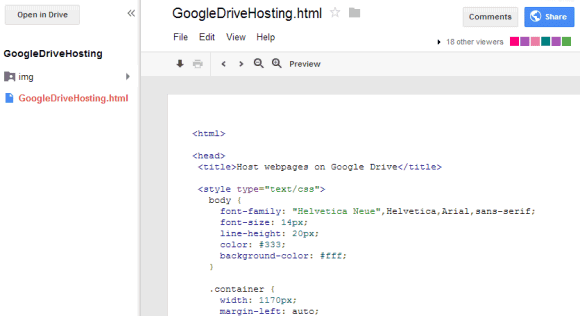
You can now create sites in Google Drive, but it's just a nice trick, not a full-fledged feature. To get started, create a new folder, right-click the folder and use the "share" feature to make the folder public. All the files of the site you want to create will be placed inside this folder.


Unfortunately, you can't create the HTML, JS and CSS files in Google Drive using the default apps, so you need install a third-party app like Drive Notepad, Neutron Drive or create these files using a native text editor or HTML editor. Make sure you have all the required files, including a file named index.html. When you upload the files to the folder you've just created, disable the conversion option.


Click the index.html file and then click the "Preview" button to see a live version of your homepage. The files are hosted at googledrive.com and have long URLs you can't customize. Here's an example.


Another downside is that you can create multiple files that have the same name, so a new version of the index.html file doesn't replace the existing file, but it adds a new file. You can always use the "manage revisions" option, but it would be nice have a traditional folder feature. For now, it's a good idea to use the Google Sync apps.


{ Thanks, Michael. }


Free Quick Start Guides for Office 2013 Now Available for Download


office 2013 technologyflow
Microsoft Office 2013 tutorial pack


With the introduction of new features and changes in the recent release of Office 2013, you may have some questions about where things are at or how to get things done. In order to make the transition easier Microsoft has just published a set of Quick Start Guides to help you get settled in with the latest edition of Office.


Here is the first page from the Quick Start Guide for Word. As you can see the guides are nicely laid out with easy to follow notes located around and across the pages.


clip_image002


You can choose from among the nine Quick Start Guides available and download only the ones you want and/or need. All guides are available in PDF format and range from 5 – 9 pages in length.


5 Unofficial Ways To Watch Twitter Vine Videos


twitter vine videoVideo sharing is not a new phenomenon, with YouTube having been with us since 2005, amazingly. There are also a host of alternatives to YouTube, but the Google-owned service must be considered the daddy of them all. However, there’s a newcomer on the scene, one which is gaining a lot of attention thanks to both its ease of use and severe limit on the length of videos.


I am, of course, talking about Twitter Vine videos, which you may well have heard of already. Vine is a standalone video-sharing app acquired by Twitter in October 2012. It enables smartphone and tablet owners to record and upload videos of no more than six seconds in length. Which really isn’t long, but should be long enough for people to offer a glimpse into their world, albeit a fleeting one.


Twitter Vine videos can be embedded directly into tweets, or shared via a separate webpage. Those using the app can also watch videos picked out by the editors, or follow other users to gain access to all of their content. But there are easier ways of gaining a voyeuristic view on Vine videos, five of which are outlined below.


NB: The stream of Vine videos these websites tap in to is unmoderated, meaning you may occasionally encounter something you’d rather not have seen. Anyone with an aversion to NSFW content may want to look away now. Having said that, while writing this article I didn’t see anything I wouldn’t show my own mother.


VinePeek


twitter vine video


Vinepeek offers a constant stream of recent Vine videos which updates in real-time. You won’t see every video uploaded through the service, but you will see a continuous set of clips lasting six seconds or less. Only one video plays at a time, in a nice rounded window which looks to owe much to Instagram.


Alongside the clip itself you get a link to the video on the Web, as well as a link to the tweet sharing the Twitter Vine video. This means you can easily find the person responsible for the video and follow them if you so desire. Kinda like a stalker would.


All Around The Vines


twitter vine


All Around The Vines offers a very similar user experience to VinePeek, with a neverending stream of recent Vine videos being delivered to your eyeballs. Instead of a small, subtle video player, All Around The Vines blows the clips up until they fill the screen. Which works infinitely better for some videos than it does for others.


Once again you get to see who is responsible for each clip, but there are no external links posted to the site. Instead the hashtags are clickable, meaning you can sift through the videos by subject matter. If your chosen tag isn’t featured on the site you should be able to just add it to the end of the URL, but every time I tried this approach the site crashed instead. #fail.


Just Vined


twitter vine


Just Vined is the least usable site on this list thanks to its insistence on playing the 20 most recent Vine videos all at the same time. This is the only one of the five resources that made my laptop fan kick in with a vengeance. Still, for those who like to be bombarded with visual randomness, Just Vined offers a veritable orgy of ultra-short video clips.


If you click on one of the videos a pop-up will load its permanent page on the Web, but beyond that there is no identifiable information revealed about its originator. Just Vined will make you feel as though you’re undergoing the aversion therapy undertaken in A Clockwork Orange, except it will wean you off videos of cats rather than a tendency towards violence.


Vines Map


twitter vine


Vines Map does exactly what you’d expect it to do, adding locations to the videos uploaded through Vine. You’re presented with a simple view of a world map, with pins sticking into various locales. Each represents a Vine video, which you’ll then get to watch one after the other in a nice little pop-up window.


You get to see the username of the person responsible for each clip, as well as the tweet which accompanied it. None are shown as links. The only option you have to influence the way the site operates is to zoom in or out of the map, but that won’t affect the order of playback.


VineRoulette


twitter vine video


VineRoulette is the most polished site on this list thanks to a variety of options and the opportunity it gives you to sample a snapshot before choosing to play a particular video. The main viewing window offers these snapshots, and when you hover your cursor over one it will pull out from the crowd and begin playing.


You can either go “Roulette Style,” which means showing a selection of all videos uploaded to Vine, or search by hashtag. The site uses Microsoft Silverlight to display the videos, but the team behind VineRoulette promise that they’re “working on an HTML5 compatible version.”


Conclusions


All of these sites offer a similar service with just a few differences between each one. What they all have in common, naturally, is their ability to expose Vine videos to the world, or at least to a larger audience. For those of us sitting at home this represents voyeurism at is finest, and with the brevity of the Twitter Vine videos on display it resembles infinite channel-hopping between a multitude of different shows. Which is a hugely entertaining pastime.


Have you recorded and uploaded a video using Vine? If so, how did you find the experience? Do these websites, which tap into the Vine feed at will, annoy you? Out of VinePeek, All Around The Vines, Just Vined, Vines Map, and VineRoulette, which of these Twitter video trackers is your favorite? Do you know of another Vine-powered site that hasn’t been mentioned. As always, please feel free to let us know your thoughts in the comments section below.


The post 5 Unofficial Ways To Watch Twitter Vine Videos appeared first on MakeUseOf.


06 February 2013

Write Mathematics Formulas in Blogger


MathJax provides an easy solution for displaying math formulas on web pages (including blogger). You can start writing blog posts with math formulas using latex syntax at blogger (blogspot) int the following two steps.


  1. At the dash board of blogger, click Layout->Add Gadget->HTML/JavaScript, and add the following code

    <script type="text/x-mathjax-config;executed=true">


    MathJax.Hub.Config({


    TeX: { equationNumbers: { autoNumber: "AMS" } }


    });


    </script>


    <script type="text/javascript" src="http://cdn.mathjax.org/mathjax/latest/MathJax.js?config=TeX-AMS-MML_HTMLorMML">


    </script>


  2. To write blog posts with math formulas, use \(..\) as delimiters for inline math symbols, and $$...$$ or \[...\] as delimiters for display style math equations.


Amazon Announces New Virtual Coin For Its Kindle Fire App Store [Updates]


Amazon has announced a brand new currency, one which will only be valid in Amazon’s Kindle Fire App Store. The new currency will launch in the US in May, and upon its launch, will be handed out for free to the Kindle Fire crowd. According to Amazon, it will be giving away tens of millions dollars worth of free Amazon Coins on launch, with each coin worth 1 cent. These coins can be used to buy apps or in-app purchases on the Kindle Fire.


How will this affect you, you’re wondering? If you’re an app developer, this is good news. For you, Amazon Coins are worth exactly the same as real money, and the free Coins will definitely make it easier for users to spend money on your app. All you have to do as a developer is have your app or update ready and submitted by April 25, so it’s ready for Amazon Coins when it launches in May.


For users, it’s somewhat harder to see the advantages. While Amazon Coins will help create a bigger app selection and more loyalty for Amazon’s App Store, users will still have to pay the same for apps they want to purchase, after their initial gift Coins are all gone. On the other hand, tying your account to a limited supply of Amazon Coins instead of a credit card can help make sure your kids don’t go on shopping sprees, spending only what you’ve allowed them to spend on apps.


As a user, all you’ll have to do is convert real money to Amazon Coins, and you’re good to go. As is customary with Amazon, Coins will only be available for US customers, at least to start with. If the experiment goes well, we might see it expand to other countries.


What do you think of Amazon’s virtual currency? Will you use it?


Source: Amazon Mobile App Distribution Blog


The post Amazon Announces New Virtual Coin For Its Kindle Fire App Store [Updates] appeared first on MakeUseOf.


How To Get Banned From Social Networks


banned from social networkThe Web has opened up lines of communication that were previously closed for the vast majority of the world. Anyone with an Internet connection can now head online and talk to someone on the other side of the world using any one of a range of different services. Social networking sites such as Facebook, Twitter, and Google+ are the obvious options.


There is unfortunately a tendency to abuse these new lines of communication, by expressing opinions that would be best kept unsaid, attacking people that may or may not deserve it, spreading salacious gossip, or posting inappropriate content. What is often and easily forgotten is that it’s entirely possible to get banned from social networks, with some rules applying across the board, and others that individual sites have put in place.


What follows is a short and simple guide on how to get banned from social networks. Not that you should try (or even want to), of course, in which case you can treat this as a short and simple guide on what to avoid doing if you want to safeguard your position on your social networking site of choice.


Facebook


Facebook is the most popular social network on the Web, at least popular in terms of the number of users, but not necessarily in terms of likability. From the feedback we’ve received about Zuckerberg’s creation it seems many people belong to the site begrudgingly. Those who no longer want to be a part of Facebook can get themselves banned quite easily.


banned from social network


Create a Profile Or Page Without Permission


If you’re not Kanye West then don’t create a profile pretending to be him. If you do then you may get chucked off the site before you can don those stupid glasses of his as some kind of disguise.


Post Copyrighted Content To Excess


You may have downloaded various pieces of content illicitly, but put them on Facebook and the resulting action is likely to be severe. Especially if you do it continuously.


Post Pornography, Nudity Or Graphic Content


You can look at pornography all you want, assuming you’re happy with the possible consequences of doing so, but if you then post it to Facebook you’ll find yourself banned.


Threaten, Bully Or Harass Other Users


There are bullies everywhere, even online. If you’re one of them, and you decide to target someone for whatever reason, then Facebook may just turn the tables and bully you off the site.


Run a Pyramid Scheme


Multi-level marketing is a nasty business, with only those at the top gaining any benefits. Until they’re thrown in jail. This isn’t merely frowned upon by Facebook, but illegal in real-life as well.


Twitter


Twitter has even more to contend with than Facebook in terms of managing its users and their interactions with each other. Anyone can follow anyone else without an invitation, which means Twitter has stringent rules in place to prevent chaos ensuing. This means, once again, that it’s a breeze to get yourself banned from the service.


social network ban


Pretend To Be Someone You’re Not


It’s Kanye again. Oh no, it isn’t.


Create Multiple, Overlapping Accounts


You are allowed to create multiple accounts on Twitter, but not if you’re doing so for nefarious purposes. Especially if they’re all being used for the same kinds of activity.


Buy & Sell Usernames


Twitter took some time to grow into the behemoth it is today, which meant all the best usernames were snapped up by geeky early-adopters. If you’re one of them you cannot now decide to make a profit by selling that username on, no matter how tempting it may be to do so.


Buy & Sell Users


It may also be tempting to buy followers using one of those companies offering ways of doing so. Don’t. They’re breaking the rules, and you would be too.


Spam Your Followers


We’re all so used to spam emails that most of us don’t even give them a second glance these days. Especially as spam filters are so good at stopping them getting through in the first place. Sadly spammers have turned elsewhere, including Twitter.


Google+


Google+ is reportedly growing at a rate of knots, mainly thanks to Google’s integration of its social network into many of its other services. Most don’t then seem to follow through by playing an active role on the site, but those who do have a strict set of rules to abide by if they want to avoid being banned.


social network ban


Create a Page That Isn’t Yours To Create


Kanye! With the glasses! Nope, it’s some random person pretending to be him.


Run a Contest Directly On Your Page


By all means link to a contest you’re running on an external site, but you’re not allowed to run the contest exclusively on Google+.


Try & Use SEO Techniques


SEO (Search Engine Optimization) is a legitimate practice when it’s done well and for the right reasons. And shameful when it’s done badly and/or for the wrong reasons. It’s heartily frowned upon on Google+.


Go Out Of Your Way To Promote Hatred Towards Minority Groups


Bullying an individual is one thing, bullying, or inciting the bullying of, a group just because they’re different in some way is quite another. Both are bad, either could get you banned.


Aggressively Add Random People To Your Circles


Google+ is all about the Circles which you use to organize your contacts. Adding numerous strangers to Circles in a short space of time will see your account potentially flagged for abuse.


LinkedIn


LinkedIn isn’t your typical social networking site, surviving while so many others have passed away by catering to professionals building online résumés and a network of like-minded individuals. If anything this means the scope for abusing the system is even larger, and there are a variety of different ways to get yourself banned.


social network ban


Connect With Strangers Without Good Reason


LinkedIn is all about networking in a legitimate way with others in the same field of business as yourself. It isn’t about gaining as many contacts as you can, and you’ll be punished for trying to do that.


Post Copyrighted Content To Excess


If you don’t own it then don’t share it. Without explicit permission from the real owner.


Insert Links In Inappropriate Places


This is a form of spamming, referring to placing a link to an external site within a field not designed to hold such information.


Introduce a Worm, Virus, Or Phishing Technique To The Site


If you’re the source of malware on LinkedIn then you can expect to be expelled from the site with short shrift.


Gain Connections Inorganically


You’re meant to build connections in an organic manner, and if you choose to bypass that time-consuming process by employing nefarious techniques you’ll pay the price by being kicked off the site.


Pinterest


Pinterest grew from nothing to become one of the largest social networks seemingly overnight. We like it so much we created a guide to Pinterest. By focusing on content rather than the people it was able to differentiate itself from the competition, and yet it still suffers from the same issues as its rivals. Most of the ways to get yourself banned are centered around the type of content you choose to post to the site.


banned from social network


Create An Account That Isn’t Yours To Create


Kanye? Pinning images to boards? Well, I never.


Get Caught Posting Copyrighted Content


It’s not yours and it’s clearly protected under copyright laws. But you do have to get caught first.


Automate & Scrape


It’s not exactly hard work to pin content onto Pinterest. Even so, some people like to bypass the manual process and automate it instead. Even though it’s against the rules. As is scraping content or personal information.


Spam Your Fellow Pinners


Spam can crop up anywhere. Even on Pinterest. It’s not big, it’s not clever, and it may get you banned for life.


Encourage Others To Engage In Illicit Activity


We’re obviously not encouraging you to do any of the above (on Pinterest or any of the other sites), just merely pointing out what kind of things will get you banned or at least strongly censured.


Conclusions


What should be immediately obvious from reading the above is how many of the same rules apply across the board. If you want to keep your place on social networks then don’t spam others, don’t post copyrighted content without permission, and don’t pretend you’re someone you’re not. These are effectively universal rules that need to be adhered to at all times. Unless you want to test the system and challenge “the man.” And likely get banned as a result.


Have you ever been banned from one of the social networks included above? If so, was it intentional on your part? And what was your alleged crime? Feel free to recount your story in the comments section below, or alternatively use the opportunity to otherwise have your say on social networks and how they govern the users they attract.


Image Credits: Steve Snodgrass


The post How To Get Banned From Social Networks appeared first on MakeUseOf.


How To Use Facebook’s Conversion Tracking Tool [Weekly Facebook Tips]


If you run any sort of business and occasionally use Facebook’s advertising campaigns, you already know that there are many ways to track the popularity of the advert and keep track of how well it’s doing. Large businesses have had access to many sophisticated tracking tools for a while now. But now, Facebook have released a couple of new tools to smaller businesses and individuals which are worth taking a closer look at.


The new conversion tracking tools will track pixels in order to record consumer actions on adverts. Actions recorded will include things such as registrations for competitions. Another new tool is the ability to optimise your advert to be targeted to the people who click or view adverts the most. With these new tools available to you, you’re sure to get more value for money when advertising on Facebook.


What Is Conversion Tracking?


Facebook’s conversion tracking allows you to keep track of your Return On Investment (ROI) from Facebook adverts by compiling a report of what people do after viewing the ads. The tracking pixels can be added to websites outside of Facebook, where the conversions happen.


Sign Up For Conversion Tracking


Head to the Adverts section of Facebook, by using the link from your home page. Then choose “Conversion Tracking” from the left menu and click on “Create Conversion Pixel“. When you’ve read and accepted the terms and conditions you can proceed with creating your own conversion pixels.


Creating Conversion Pixels


Each conversion pixel can be used to track many different actions (checkouts, registrations, leads, key page view, adds to cart, or other website conversions). You should choose which of these are important for you to record, then create a conversion pixel for each category.


You will receive a JavaScript code snippet, which needs to go in the header of a unique page where the conversions may be tracked. For instance, if you’re tracking checkout numbers, you would put the code on the page shoppers see after their purchase is confirmed. You should only track one category of conversions per page, otherwise the results will be misleading.


Start Tracking Conversions


You can track conversions of Facebook adverts by using an existing advert or by creating a new advert. Depending on which way you edit or create your advert, in the “Creative” section or “Campaign, Pricing, and Schedule” section you will see an option to “Track conversions on my website for this ad” which will allow you to choose which tracking pixels to use for this advert.


Using Optimised CPM


Whenever you create or edit an advert, you will see the option to use optimised CPM in the pricing section. You will be able to make a choice for each advert depending on your budget and goals.


Learn More About Facebook Advertising


For more great tips about advertising on Facebook, take a browse through the Facebook Business page, learn how to place an advert on Facebook and make your Facebook page more interesting. Also, take a look at some great alternatives to advertising which you may not have thought of.


Privacy Concerns With Facebook Tracking


If you are an individual trying to avoid Facebook collecting information about you with these new tracking measures, read these articles on how to stop Facebook from tracking you online and how to block most social networks from tracking you.


Are you tracking your conversions for Facebook adverts? How has it helped you?


The post How To Use Facebook’s Conversion Tracking Tool [Weekly Facebook Tips] appeared first on MakeUseOf.