18 June 2020

9 Best Self-Help Books for Improving Yourself


self-help-books

Self-help books are a dime a dozen, but not all of them are worth your time. We’ve scoured the shelves to find the most popular, highly rated, and frequently recommended self-improvement books available right now.

Whether you’re looking to improve your social skills, find purpose in your life, or balance your checkbook, you can learn how to do it all with the advice in the books below.

1. How to Win Friends and Influence People

How to Win Friends and Influence People cover

You’re unlikely to find a list of the best self-help books without this one on it somewhere. Dale Carnegie penned it way back in 1936, but it’s as valuable today as it ever was. By reading How to Win Friends and Influence People you can learn useful strategies to become more likable in all aspects of your life.

Don’t worry, it’s not about creating a fake persona. It’s actually about learning how to listen to other people, how to understand their wants and needs, and how to make them feel appreciated. Needless to say, if you internalize these lessons, you’ll find that friends, jobs, and sales are far easier to come by.

2. Think and Grow Rich

Think and Grow Rich cover

Despite its title, Think and Grow Rich is not solely about making a pile of money big enough to make Scrooge McDuck jealous. Although a portion of the book is certainly dedicated to monetary wealth, author Napoleon Hill wants you to grow rich in ideas, too.

This is another self-improvement book from the 1930s, but its also just as relevant now as it was back then. The author spent 20 years studying the most successful people of his time—including Henry Ford and Alexander Graham Bell—in research for this book.

You can use his findings to achieve what you want most in life, whether that’s a bank balance or a state of mind.

3. Man’s Search for Meaning

Man's Search for Meaning cover

During the Second World War, Viktor Frankl spent three years as a prisoner in four different Nazi concentration camps, including Auschwitz. Having survived the Holocaust, Frankl wrote about what he learned from the experiences in Man’s Search for Meaning.

Needless to say, this book paints a harrowing picture of what life was like in these torturous camps. But as a psychiatrist and neurologist, Frankl uses the opportunity to show how important it is to find meaning and a sense of purpose for your life.

He demonstrates their importance for resilience with examples of how his fellow prisoners coped through the most difficult years of their lives.

4. The Power of Positive Thinking

The Power of Positive Thinking cover

Norman Vincent Peale wrote this book in 1952, and it’s still one of the best self-help books around. The core message is simple: if you think in a positive way, you’ll start to see positive results. That’s because you’re more likely to try harder, to stretch further, and to dream bigger.

Of course, it isn’t easy to achieve a permanently optimistic attitude, but The Power of Positive Thinking endeavors to show you all the ways it can be worthwhile to do so. Thinking about what you want is a powerful motivator to get you moving toward it.

If you’re struggling to change your mindset, sit down in front of some motivational YouTube videos. Many of these are tailor-made to inspire you into action whenever you need a boost.

5. The 7 Habits of Highly Effective People

The 7 Habits of Highly Effective People cover

You’ve probably heard of this book. Released in 1989, The 7 Habits of Highly Effective People is one of the most popular personal-development books around. Stephen Covey studied the past 200 years’ worth of self-help books and discovered that many of them focused on external “Personality Ethics” rather than internal “Character Ethics.”

The problem is that good Character Ethics lead to good Personality Ethics, not the other way around. This book shows you the habits you need to internalize to become effective and successful in the most genuine way possible. It isn’t easy, but Covey includes practice exercises to make those changes happen.

6. Awaken the Giant Within

Awaken the Giant Within cover

Tony Robbins is a hugely popular self-help guru with a number of books on the topic. This might be his best. Awaken the Giant Within explores fundamental lessons of self-mastery. You will feel encouraged to discover your true purpose and take control of your life.

Robbins puts a lot of weight on consistent actions, saying that it’s what you do every day that counts, not what you do every now and then. By following the advice in his book, you can awaken the giant within you and create positive change in your life—no matter what change you want that to be.

7. The Power of Now

The Power of Now cover

While many of the self-development books on this list focus on creating a better future for yourself, The Power of Now encourages you to return your focus to the present. That’s where you’ll always find yourself, after all.

Eckhart Tolle believes that spending too much time living in either the past or the future leads to regret, anxiety, and other negative emotions. By learning to embrace the now, you can lessen this suffering, increase your emotional intelligence, and develop stronger compassion for the people around you. The Power of Now shows you how to do that.

If embracing the present sounds like something you’re interested in, you should also check out the best meditation and relaxation apps.

8. The Four Agreements

The Four Agreements cover

With his 1997 book, Don Miguel Ruiz asks you to make four agreements with yourself. By sticking to these agreements, Ruiz suggests you can start living as your authentic self, alleviate suffering, and lead a more fulfilling existence.

The first agreement is to be impeccable with your word; make it mean something. The second is to avoid taking things personally, accepting that what people say is often more telling of their own character than yours. With the third agreement, Ruiz asks you to avoid assumptions. And the fourth accepts that you can’t be perfect, but encourages you to always do your best.

9. Rich Dad Poor Dad

Rich Dad Poor Dad cover

Rich Dad Poor Dad is one of the best self-help books available if you’re hoping to improve your financial situation. Robert Kiyosaki’s book demonstrates financial principles by contrasting two characters: Rich Dad and Poor Dad. In essence, he teaches you how to gather assets while eliminating liabilities.

By following Rich Dad’s examples, you can learn the best practices to improve your own finances. Don’t let its simple language fool you. This is an excellent self-help book for people who aren’t the best with money. The author has an estimated net worth of over $80 million after all, so there must be some truth to his words.

The Best Self-Help Books as Audiobooks

All the best self-help books are available as audiobooks as well. That means you can keep working on yourself even when you’re not able to sit down and read. Make sure you don’t let yourself get too distracted though, it’s important to internalize the lessons in these books for them to make an impact on your life.

If audiobooks sound more like your thing—perhaps you like to listen to them at the gym or on a long drive—take a look at our suggestions of the best self-improvement audiobooks. There are some truly excellent audiobooks on the list that we didn’t have space to mention here.

Read the full article: 9 Best Self-Help Books for Improving Yourself


Read Full Article

The 6 Best Beginners Sim Racing Wheels for PS4, Xbox One, and PC


driving-sim-wheels

The world of sim racing wheels can seem daunting and expensive. Many sim racers who stream online appear to have incredible sim racing setups. Many do, and these can easily cost thousands of dollars.

But if you want to get started in sim racing, or even just improve your enjoyment of regular racing games, there are several beginner’s sim racing wheels you can try out.

So, here are the best beginner’s sim racing wheels for PS4 and Xbox One. These sim wheels are compatible with your PC, too.

How to Choose a Sim Racing Wheel?

The biggest question is budget. How much do you want to spend on a sim racing wheel? Although sim racing wheels start at a very low price, you definitely get what you pay for. There are a few considerations, such as the sim racing wheel turn radius, force feedback, pedal and shifter combinations, integrated buttons and gear shifters, and so on.

The entry-level sim racing wheels have a small turn radius, which affects your in-game driving precision. Similarly, a wheel lacking force feedback makes steering accurately that bit more difficult. It’ll be better than the jerky movements you get from a gamepad (in most cases), but still not completely accurate.

In that, you don’t want to break your budget. But ensuring your sim racing wheel does tick those boxes will provide much greater enjoyment. You should also note that you don’t have to buy the latest and greatest sim racing wheel to have an incredible experience. Some of the best beginner’s sim racing wheels hit the market years back but are still excellent options.

Now, onto the best sim racing wheels for beginners for the PS4, Xbox One, and PC.

1. Logitech G29

Logitech G29 Logitech G29 Buy Now On Amazon $314.99

Platforms: PS4, PS3, PC | Turn Radius: Up to 900° | Force Feedback: Yes | Clutch Pedal: Yes

The Logitech G29 is one of the most popular sim racing wheels, period. Many sim racing pros point to the Logitech G29 as their ideal beginner’s racing wheel, with many using it as the start point for their online racing career.

The Logitech G29 is popular for a few reasons. First, it has an excellent build quality that combines a leather steering wheel with anodized aluminum gear shifters and an overall solid base for a sim racing wheel. Buttons are plentiful, customizable, and easy to press.

Then there are the steel pedals, complete with a manual clutch, allowing you extra control and immersion in your sim racing world. There’s also the option of expanding your sim racing setup with a G29 stick shifter.

Another major plus for the Logitech G29 is its force feedback and drive, which uses a dual-motor system (known as helical gears) to provide a much smoother driving simulation than most other sim racing wheels in this price bracket. Oh, and the 24-way directional dial is a super handy car and race management feature, too.

Overall, the Logitech G29 remains one of the best beginner’s sim racing wheels available, providing some serious racing bang for your buck.

2. Logitech G290

Logitech G290 Logitech G290 Buy Now On Amazon $278.88

Platforms: Xbox, PC | Turn Radius: Up to 900° | Force Feedback: Yes | Clutch Pedal: Yes

The Logitech G290 is the Xbox version of the Logitech G29 racing wheel. So, that means they’re the same, right? Not quite. There are some differences between the PlayStation and the Xbox versions, which make the G290 slightly inferior to the G29.

For instance, the Logitech G290 doesn’t have as many buttons as the G29. It isn’t a massive loss, but those buttons do make for considerably easier in-car management during a race. Similarly, the G290 doesn’t have an RPM light like the G29. Again, it isn’t a huge loss, but the visual cue to change gear is handy at times.

That aside, the G290 uses the same helical gear force feedback system, comes with the same sturdy steel pedals, and uses the same aluminum gear shifters. Visually, the Logitech G290 is sleek and looks smart, giving a strong luxury sim racing cockpit vibe (it looks better than the G29, in my opinion).

You can expand your driving experience with the Logitech Driving Force Shifter, which works with both the G29 and the G290. The integrated gear shifters are perfect for sim racing beginners, but if you do want to expand your setup, this is the official shifter option.

3. Thrustmaster T150

Thrustmaster T150 Thrustmaster T150 Buy Now On Amazon $179.40

Platforms: PS4, PS3, PC | Turn Radius: Up to 1080° | Force Feedback: Yes | Clutch Pedal: No

The Thrustmaster T150 is an excellent entry-level sim racing wheel for the PS4, PS4, and PC. It comes with dual-pedals, adjustable force feedback, and a customizable turn radius up to 1080 degrees.

The sim wheel uses a combination of gears and belt-pulleys to provide force feedback, which can feel a little janky at times. However, as you can adjust this system, you can find a suitable level of feedback that enables smooth gameplay.

As a beginner’s sim racing wheel for the PS4, the build materials do feel somewhat cheap in places. Still, with the adjustable pedals, integrated PS4/PS3 buttons, and decent mount system, the Thrustmaster T150 is a great starting point for sim racing wheels.

4. Thrustmaster TMX

Thrustmaster TMX Thrustmaster TMX Buy Now On Amazon $178.31

Platforms: Xbox, PC | Turn Radius: Up to 900° | Force Feedback: Yes | Clutch Pedal: No

The Thrustmaster TMX is the Xbox equivalent of the Thrustmaster T150. You’ve probably noticed by now that each manufacturer launches hardware for each console—but one console usually ends up with slightly better hardware. In this case, the Thrustmaster T150 is a slightly better proposition as a beginner’s racing wheel.

However, the Thrustmaster TMX is a great option for Xbox users regardless. The major difference lies with the turn radius. The Thrustmaster TMX has a maximum turn radius of 900 degrees but otherwise uses the exact same internal hardware as the T150. Of course, the button configuration for the Thrustmaster TMX matches the Xbox, too.

5. HORI Overdrive

HORI Overdrive HORI Overdrive Buy Now On Amazon $78.58

Platforms: Xbox One | Turn Radius: 270° | Force Feedback: No | Clutch Pedal: No

If you’ve never used any sim racing wheel, the HORI Overdrive makes an interesting entry-level option. So, why is it interesting?

Well, for starters, the HORI Overdrive’s pedals are very soft, lacking serious resistance to help you gauge your acceleration and braking. You definitely have more precision than with a gamepad, though, so that’s a positive.

The wheel lacks force feedback, although there is a bungee cord resistance system and a rumble which provides some feedback when turning through corners or changing driving surface. Also, the Overdrive only turns through 270 degrees. However, you can mitigate the latter using in-game sensitivity settings, adjusting the wheel turning rate and the steering dead zone until you find a happy medium.

The HORI Overdrive reviews are full of positive experiences, with many users believing the HORI Overdrive is a great choice for the price, and the perfect option to try out a wheel controller without breaking the bank.

6. HORI Apex

HORI Apex HORI Apex Buy Now On Amazon $179.99

Platforms: PS3, PS4, PC | Turn Radius: 270° | Force Feedback: No | Clutch Pedal: No

Where the HORI Overdrive is for Xbox One users, the HORI Apex is for PS3, PS4, and PC users. Like the Overdrive for the Xbox One, the HORI Apex is an officially licensed sim racing wheel for the PlayStation.

This lets you know that it’ll work with PlayStation sim racing games (and heaps on the PC, too). The HORI Apex’s specs are the same as the Overdrive, albeit with PlayStation buttons rather than Xbox.

Second-Hand Beginners Sim Racing Wheel

If you don’t want a massive outlay when purchasing your first sim racing wheel, you can try the second-hand sim racing wheel market. There are always sim racing wheels for beginners available on eBay, Craigslist, Facebook Marketplace, Carousell, and the numerous other online selling sites.

Some sim racers believe beginners should buy higher-end second-hand hardware rather than lower-spec new hardware. The reasoning is that although the second-hand sim racing wheel is already used, the wider range of functionality and potential for a better experience is a better introduction to sim racing wheels for beginners.

What Is the Best Sim Racing Wheel for Beginners?

Your budget for an entry-level sim racing wheel dictates your options. If you can spring for a beginner racing wheel with more features, a larger turn radius, and so on, you should because it will absolutely impact your experience positively. But if not, don’t worry!

You can have an incredible time using almost any sim racing wheel, be that for beginners or not. I used an Xbox 360 gamepad in sim racing games for years before upgrading to a very basic sim racing wheel and had a fantastic time.

If you’re new to PC gaming, check out our list of the essential PC gaming accessories you should have!

Read the full article: The 6 Best Beginners Sim Racing Wheels for PS4, Xbox One, and PC


Read Full Article

Build a Business From Home With This “Fulfillment By Amazon” Training: Now Under $30


Given the current state of the economy, many of us are looking for ways to earn a little extra income. At the same time, local restrictions are forcing us to stay home. The solution? The Complete 2020 Fulfillment By Amazon Mastery Bundle shows you how to source and sell goods online, without having to do the packing and shipping yourself. Right now, you can pick up all four courses for just $29.99 at MakeUseOf Deals.

Amazon FBA

It’s possible to make good money from selling on Amazon. The latest figures show that over 200,000 sellers are generating $100,000 a year or more on the platform. With Fulfillment by Amazon, or FBA, you can concentrate on sales and allow the experts to handle warehousing, packing, and shipping.

This training shows you how to make money with FBA, with 18.5 hours of content. The video lessons start by showing you how to research what is selling, find a reliable supplier, and customize your product. You then learn about branding and how to drive traffic to your Amazon storefront, using search engine optimization and ads.

These tips can help you launch a successful side hustle from home that requires little ongoing maintenance. In addition, the bundle helps you get started on eBay.

Essential Knowledge for $29.99

These courses are worth $796 put together, but you can grab the bundle now for just $29.99.

Read the full article: Build a Business From Home With This “Fulfillment By Amazon” Training: Now Under $30


Read Full Article

You Can Now Play Minecraft for Free in Your Browser


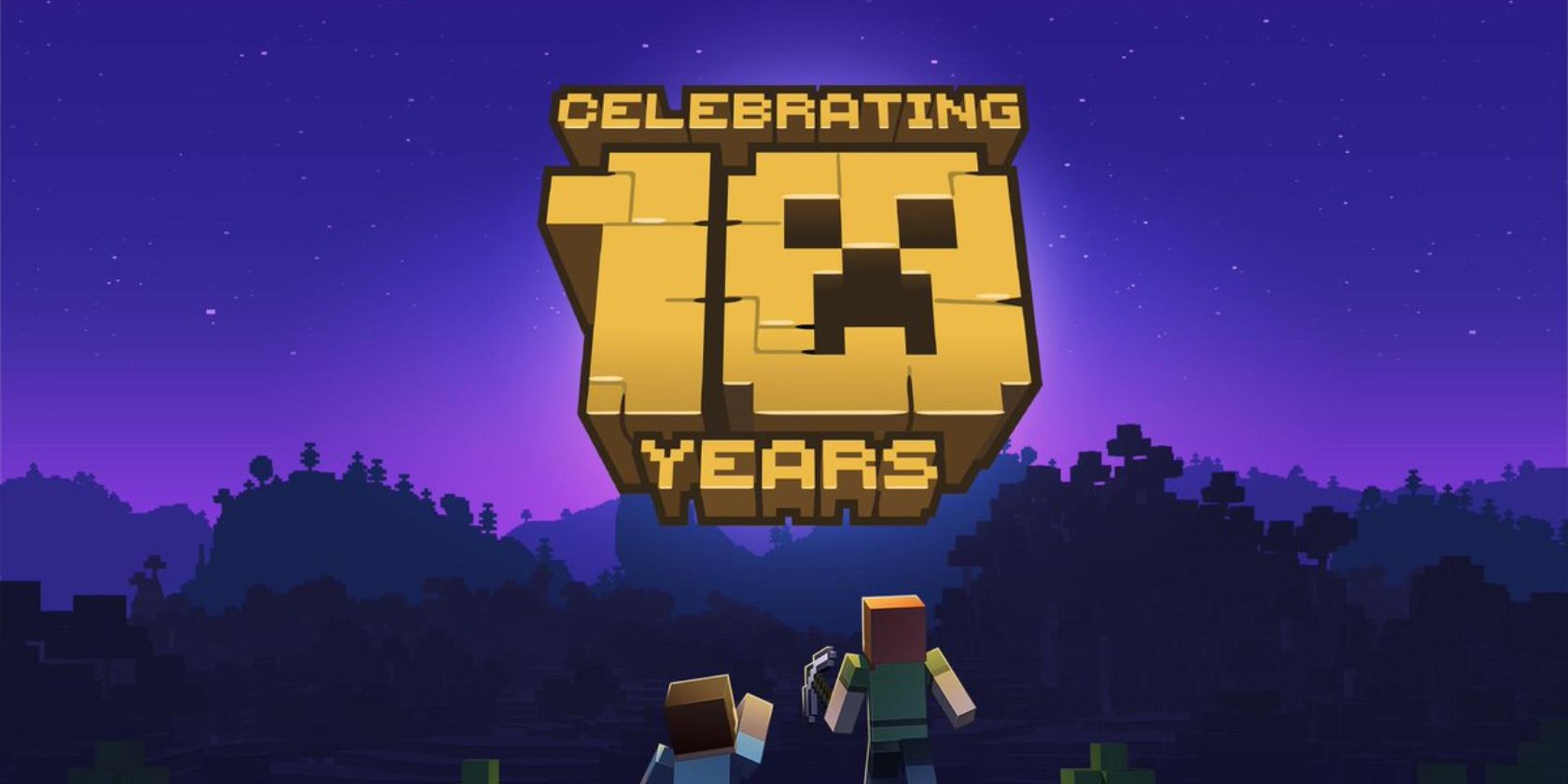
Minecraft is now over 10 years old. And to celebrate this milestone, Mojang released Minecraft Classic for the web. This means you can play Minecraft in your web browser. You don’t need to download anything, and Minecraft Classic is completely free to play.

Minecraft Classic has been available for many years. However, Minecraft Classic was previously only available on Windows, Mac, and Linux, and required Java. Now, it’s available for anyone to play for free without downloads on the Minecraft Classic website.

How to Play Minecraft for Free in Your Browser

To play Minecraft Classic, just point your web browser at the Minecraft Classic website. It will immediately start generating a level. Once your game has been generated you’ll get given a unique link which you can share with friends.

If you want to invite some friends to play with you (doing so isn’t mandatory), share that link via email or on your messaging app of choice. Then, just pick a username and click the Start button to start playing Minecraft in your browser.

The controls are simple: Just left-click on your mouse to place or mine blocks, using right-click to toggle between the two. Otherwise, it’s the usual WASD controls for moving forward, left, back, and right, as well as some other simple keyboard controls.

You can press the Escape key at any time to bring up the Game Menu. Here, you can generate a new level or copy the link to the existing one. Clicking Options lets you turn various settings on or off and remind yourself of the controls.

What You Can and Can’t Do in Minecraft Classic

As the name suggests, Minecraft Classic isn’t the Minecraft of 2019. Instead, it’s the game as it existed in 2009. This means you’ll have to put up with a clunky user interface, be stuck with just 32 blocks to build with, and more bugs than the average rainforest.

Minecraft Classic only allows you to play in Creative mode, so there’s no Survival mode with enemies to fight off. There’s also no way to save your game. Still, as mentioned above, you can invite up to nine friends to join your game. Making it more entertaining.

Minecraft Classic Is a Piece of Gaming History

Let’s not kid ourselves here; Minecraft Classic cannot compete with the current version of the game. Still, it’s free, and can be played in your web browser with no effort on your part. So you may as well take the opportunity to sample a piece of gaming history.

If you’re new to the game you should check out our beginner’s guide to Minecraft (for latecomers). If, on the other hand, you’re a veteran you may be interested in scouring the ultimate Minecraft commands cheat sheet for any you don’t yet know.

Read the full article: You Can Now Play Minecraft for Free in Your Browser


The 8 Best Free Online Music Streaming Services With No Limitations


Finding a completely unlimited music listening experience can be a real challenge. Many music streaming services offer free and paid tiers, but place restrictions on the features available in the free plan. Spotify’s free package, for example, doesn’t offer high-quality audio and only lets you listen outside the country for up to 14 days.

If you want to listen to free music without limitations, these are the music streaming services with no restrictions.

1. AccuRadio

accuradio app

AccuRadio is an online music streaming service curated entirely by humans rather than by bots and algorithms. The site has been online since 2000 and has now grown into more 1,000 curated radio channels across more than 50 different musical genres.

The stations—which have titles such as Listeners’ Top 100 and Today’s New Country—boast a litany of tracks from the top singers and bands of the moment. All of the playlists offer unlimited skips.

In theory, AccuRadio restricts the number of songs you can listen to within 24 hours. It doesn’t put a number on the amount, but does say “[the limit] is set so high that it should be extremely difficult for a listener to reach this limit, even if they listen for a long time and skip many songs.”

2. Cliggo

cliggo app

Cliggo is a great free Spotify alternative. It doesn’t have some of the premium features you get with Spotify (like offline listening), but it gives you the option to create and save playlists and listen to genre radio stations. As you navigate the website to look for additional music to add to your playlists, playback will not be interrupted.

Cliggo pulls most of its music from YouTube and then presents it in a way that makes it easier to create playlists and skip within songs.

Cliggo offers apps for Android, iOS, and Fire TV, along with a web app for your browser of choice.

3. Jango

jango app

Jango is another unlimited music streaming service that offers mobile apps and genre and artist radio stations. The service is not completely ad-free, but the developer claims you’ll only have to listen to one ad per day, so it deserves a spot on this list.

You can create new stations by searching for your favorite artists or browse suggested stations by genre or decade. There’s also a blacklist feature; you can “ban” specific songs so they don’t show up in your radio stations.

Unfortunately, you can’t skip within songs to a specific spot on the track. The app does let you search for and play specific songs, but it will show you the full YouTube video—if you’re looking for specific songs, Cliggo is a better choice.

4. Pandora

pandora web app

Like Spotify, Pandora has both a free and a paid tier. The free service is ad-supported, but offers personalized music radio stations, the ability to search and play any song on the platform (as long as you listen to one ad), and unlimited track skips. You cannot listen offline or make/share playlists on the free tier.

Pandora is only available in the US. It has mobile apps for Android and iOS.

5. Hype Machine

hypemachine music app

Hype Machine is a music discovery service which aggregates content from music blogs. Almost all of the tracks listed are available on either SoundCloud or Bandcamp, so you can listen for free.

You can use Hype Machine to find new and up-and-coming artists as well as remixes of established artists. You can select to listen to music according to genre or artist, add songs to your favorites, and create a personalized music stream. The service has accompanying free apps for both Android and iOS.

6. YouTube

YouTube is a great source for all kinds of music. You can find the latest hits, classic tracks, new music, and content from every genre under the sun. There are even Chrome extensions that make it easy to plug into the site’s endless music collection without needing to visit YouTube.com.

YouTube is not completely free of advertising. However, you’re usually able to skip ads quickly and get back to listening to music.

The site also has a leg up on services like Spotify and Apple Music, with artists happy to upload their videos for the public to watch for free. You’ll even often find artists’ top tracks and albums that are not available on other music streaming services.

NB: While it doesn’t count as a restriction, remember that it’s inadvisable to download YouTube videos.

7. StreamSquid

streamsquid app

If you are looking for music apps that are not blocked by schools, check out StreamSquid. Anecdotally, students seem to have more luck using this online music player in their colleges than almost any other. Remember however that the music apps that aren’t blocked by schools will vary on a school-by-school basis, depending on the filters being used.

StreamSquid also has very few restrictions from a useability standpoint. You can access your listening history, create playlists, search for songs, play any songs, skip unlimited tracks, and even create a library of your favorite music. The service has an Android app in the Google Play Store, but there is no iOS app.

8. Soundzabound

soundzabound

We end with Soundzabound. It is the best unrestricted music streaming service for anyone involved in education who needs music for their project, presentation, podcast, or video yearbook.

That’s because Soundzabound provides access to a huge library of royalty-free music, audio themes, and sound effects for students between the K12 and university levels. Because the music is royalty-free, you can also upload it to services like Facebook and YouTube without being censored.

Music is available across almost every musical genre and region you can think of. Some of it is free to download and use, while some of it you will need to pay for.

What’s Your Favorite Music Streaming Service?

Truly free, unlimited music streaming services are hard to come by. There’s almost always a catch. These services give you a combination of radio and playlist options, and music ranging from new and obscure artists to established chart-toppers. Let us know which is your favorite unrestricted music app in the comments below.

To learn more about free options, check out the best free alternatives to paid streaming services.

Read the full article: The 8 Best Free Online Music Streaming Services With No Limitations


You Can Now Play Minecraft for Free in Your Browser


Minecraft is now over 10 years old. And to celebrate this milestone, Mojang released Minecraft Classic for the web. This means you can play Minecraft in your web browser. You don’t need to download anything, and Minecraft Classic is completely free to play.

Minecraft Classic has been available for many years. However, Minecraft Classic was previously only available on Windows, Mac, and Linux, and required Java. Now, it’s available for anyone to play for free without downloads on the Minecraft Classic website.

How to Play Minecraft for Free in Your Browser

To play Minecraft Classic, just point your web browser at the Minecraft Classic website. It will immediately start generating a level. Once your game has been generated you’ll get given a unique link which you can share with friends.

If you want to invite some friends to play with you (doing so isn’t mandatory), share that link via email or on your messaging app of choice. Then, just pick a username and click the Start button to start playing Minecraft in your browser.

The controls are simple: Just left-click on your mouse to place or mine blocks, using right-click to toggle between the two. Otherwise, it’s the usual WASD controls for moving forward, left, back, and right, as well as some other simple keyboard controls.

You can press the Escape key at any time to bring up the Game Menu. Here, you can generate a new level or copy the link to the existing one. Clicking Options lets you turn various settings on or off and remind yourself of the controls.

What You Can and Can’t Do in Minecraft Classic

As the name suggests, Minecraft Classic isn’t the Minecraft of 2019. Instead, it’s the game as it existed in 2009. This means you’ll have to put up with a clunky user interface, be stuck with just 32 blocks to build with, and more bugs than the average rainforest.

Minecraft Classic only allows you to play in Creative mode, so there’s no Survival mode with enemies to fight off. There’s also no way to save your game. Still, as mentioned above, you can invite up to nine friends to join your game. Making it more entertaining.

Minecraft Classic Is a Piece of Gaming History

Let’s not kid ourselves here; Minecraft Classic cannot compete with the current version of the game. Still, it’s free, and can be played in your web browser with no effort on your part. So you may as well take the opportunity to sample a piece of gaming history.

If you’re new to the game you should check out our beginner’s guide to Minecraft (for latecomers). If, on the other hand, you’re a veteran you may be interested in scouring the ultimate Minecraft commands cheat sheet for any you don’t yet know.

Read the full article: You Can Now Play Minecraft for Free in Your Browser


Read Full Article

The 8 Best Free Online Music Streaming Services With No Limitations


Finding a completely unlimited music listening experience can be a real challenge. Many music streaming services offer free and paid tiers, but place restrictions on the features available in the free plan. Spotify’s free package, for example, doesn’t offer high-quality audio and only lets you listen outside the country for up to 14 days.

If you want to listen to free music without limitations, these are the music streaming services with no restrictions.

1. AccuRadio

accuradio app

AccuRadio is an online music streaming service curated entirely by humans rather than by bots and algorithms. The site has been online since 2000 and has now grown into more 1,000 curated radio channels across more than 50 different musical genres.

The stations—which have titles such as Listeners’ Top 100 and Today’s New Country—boast a litany of tracks from the top singers and bands of the moment. All of the playlists offer unlimited skips.

In theory, AccuRadio restricts the number of songs you can listen to within 24 hours. It doesn’t put a number on the amount, but does say “[the limit] is set so high that it should be extremely difficult for a listener to reach this limit, even if they listen for a long time and skip many songs.”

2. Cliggo

cliggo app

Cliggo is a great free Spotify alternative. It doesn’t have some of the premium features you get with Spotify (like offline listening), but it gives you the option to create and save playlists and listen to genre radio stations. As you navigate the website to look for additional music to add to your playlists, playback will not be interrupted.

Cliggo pulls most of its music from YouTube and then presents it in a way that makes it easier to create playlists and skip within songs.

Cliggo offers apps for Android, iOS, and Fire TV, along with a web app for your browser of choice.

3. Jango

jango app

Jango is another unlimited music streaming service that offers mobile apps and genre and artist radio stations. The service is not completely ad-free, but the developer claims you’ll only have to listen to one ad per day, so it deserves a spot on this list.

You can create new stations by searching for your favorite artists or browse suggested stations by genre or decade. There’s also a blacklist feature; you can “ban” specific songs so they don’t show up in your radio stations.

Unfortunately, you can’t skip within songs to a specific spot on the track. The app does let you search for and play specific songs, but it will show you the full YouTube video—if you’re looking for specific songs, Cliggo is a better choice.

4. Pandora

pandora web app

Like Spotify, Pandora has both a free and a paid tier. The free service is ad-supported, but offers personalized music radio stations, the ability to search and play any song on the platform (as long as you listen to one ad), and unlimited track skips. You cannot listen offline or make/share playlists on the free tier.

Pandora is only available in the US. It has mobile apps for Android and iOS.

5. Hype Machine

hypemachine music app

Hype Machine is a music discovery service which aggregates content from music blogs. Almost all of the tracks listed are available on either SoundCloud or Bandcamp, so you can listen for free.

You can use Hype Machine to find new and up-and-coming artists as well as remixes of established artists. You can select to listen to music according to genre or artist, add songs to your favorites, and create a personalized music stream. The service has accompanying free apps for both Android and iOS.

6. YouTube

YouTube is a great source for all kinds of music. You can find the latest hits, classic tracks, new music, and content from every genre under the sun. There are even Chrome extensions that make it easy to plug into the site’s endless music collection without needing to visit YouTube.com.

YouTube is not completely free of advertising. However, you’re usually able to skip ads quickly and get back to listening to music.

The site also has a leg up on services like Spotify and Apple Music, with artists happy to upload their videos for the public to watch for free. You’ll even often find artists’ top tracks and albums that are not available on other music streaming services.

NB: While it doesn’t count as a restriction, remember that it’s inadvisable to download YouTube videos.

7. StreamSquid

streamsquid app

If you are looking for music apps that are not blocked by schools, check out StreamSquid. Anecdotally, students seem to have more luck using this online music player in their colleges than almost any other. Remember however that the music apps that aren’t blocked by schools will vary on a school-by-school basis, depending on the filters being used.

StreamSquid also has very few restrictions from a useability standpoint. You can access your listening history, create playlists, search for songs, play any songs, skip unlimited tracks, and even create a library of your favorite music. The service has an Android app in the Google Play Store, but there is no iOS app.

8. Soundzabound

soundzabound

We end with Soundzabound. It is the best unrestricted music streaming service for anyone involved in education who needs music for their project, presentation, podcast, or video yearbook.

That’s because Soundzabound provides access to a huge library of royalty-free music, audio themes, and sound effects for students between the K12 and university levels. Because the music is royalty-free, you can also upload it to services like Facebook and YouTube without being censored.

Music is available across almost every musical genre and region you can think of. Some of it is free to download and use, while some of it you will need to pay for.

What’s Your Favorite Music Streaming Service?

Truly free, unlimited music streaming services are hard to come by. There’s almost always a catch. These services give you a combination of radio and playlist options, and music ranging from new and obscure artists to established chart-toppers. Let us know which is your favorite unrestricted music app in the comments below.

To learn more about free options, check out the best free alternatives to paid streaming services.

Read the full article: The 8 Best Free Online Music Streaming Services With No Limitations


Read Full Article

Triumph Motorcycles Introduces the Trekker GT Electric Bike


Triumph Motorcycles, a UK-based manufacturer, has launched its first e-bike, the Triumph Trekker GT. While e-bikes were already gaining in popularity before the pandemic, social distancing and lockdown measures have accelerated this trend.

That Triumph, one of the world’s most notable motorcycle brands, has launched an electric version of a pedal bike that shows just how competitive this market has become. But, before you hand over your hard-earned cash, let’s take a closer look at the Trekker GT.

What Is the Triumph Trekker GT?

Triumph Trekker GT electric bike

The Triumph Trekker GT is the first e-bike from famed motorcycle firm, Triumph Motorcycles. This is a marked departure from their previous output; the firm has produced only motorcycles since its inception in 1983. The company was formed from the remnants of Triumph Engineering Co., which was founded in 1885.

Back then, the business specialized in bicycles, but, as technology advanced, so did the company, opting to focus solely on motorbikes. As a result, the launch of the Trekker GT is a noticeable departure for the distinguished manufacturer.

As you’d expect for a company famous for aesthetically-pleasing two-wheeled transportation, the e-bike is a well-designed, minimalist affair. Unlike other e-bikes, the battery and motor are hidden out of sight inside in the aluminum frame. Despite the additional electronics, the Trekker GT only weighs 24kg—less than some standard bicycles.

Triumph Trekker GT Features

Triumph Trekker GT display

The Triumph Trekker GT comes equipped with a 250-watt Shimano DU-E6100 electric motor and a Shimano BT-8035 540Wh battery. The lightweight aluminum frame has internal cable routing, keeping the bike free of additional clutter. This also means that items like the charging port and electronic display are neatly integrated into the e-bike, too.

The bike has a range of 150km, and the combined electric drivetrain can boost up to 60Nm of torque. As a result, the electronic integration is seamless, allowing you to continue your journey with minimal effort. The e-bike’s display is powered by the battery and helps you keep an eye on your speed, total distance, gear selection, and battery percentage.

Where Can You Buy The Triumph Trekker GT?

Given the company’s reputation, it should be no surprise that the Trekker GT is one of the more expensive e-bikes out there. The bike will retail from £2,950 ($3,700), although it’ll only be available initially in Europe, the UK, and the US.

There’s no word yet on when the Trekker GT will be up for pre-order, but you can sign up for email updates on Triumph’s website. If you’ve not encountered electric bikes before, or are interested in learning more about the benefits, check out our guide to e-bikes.

Read the full article: Triumph Motorcycles Introduces the Trekker GT Electric Bike


Read Full Article

How to Use Apple Music With Your iTunes Music Collection


apple-music-itunes-collection

Like all the best music streaming services, Apple Music is packed with tens of millions of songs for you to add to your library. But Apple’s collection isn’t exhaustive. There are countless live albums, bootleg recordings, and independent artists missing from Apple Music. Fortunately, it’s easy to upload these tracks to your Apple Music library yourself.

If you own music missing from Apple Music or iTunes, you can add it to your music library and wirelessly sync it across all your devices. Apple used to call this service iCloud Music Library. But now you’ll find it under a simple Sync Library option instead.

Here’s how to use Apple Music to upload and sync your own music collection.

How to Add Music to Apple Music or iTunes

Although we’re in an age of streaming, it’s still common to have music files on your computer that you want to add to iTunes or the Apple Music app. You might have ripped these files from a CD, downloaded them online, or produced them yourself.

Wherever you got your music files from, all you need to do is drag and drop them into the Apple Music or iTunes window to add them to your library. Make sure you drop the songs in the Library section of the sidebar.

Importing music to Apple Music

Alternatively, go to File > Import from the menu bar and select your files in the resulting file browser. Your computer copies the files to the correct directory and adds them to your library.

You probably need to update the metadata to change the song titles, album names, and artist details for music you import. Open the Recently Added page in Apple Music or iTunes, then right-click your imported music and click Get Info to do so.

Get Info option from Recently Added music

After you update the metadata, your imported music should appear alongside existing iTunes purchases and Apple Music songs in your library.

How to Upload Your Music to Apple Music or iTunes

Importing music to iTunes or the Apple Music app is the first step, but you still need to upload your music to the cloud so you can access it on your other devices. This is only possible with an Apple Music or iTunes Match subscription.

With an Apple Music subscription, you can stream or download any of the millions of songs available from Apple. It also lets you upload your own music to the cloud so you can stream or download it from your other devices.

iTunes Match is cheaper than Apple Music. While it lets you upload and sync your personal music collection, it doesn’t let you stream or download other music from Apple. This is the best option if you already own all the music you want to listen to and don’t plan to stream or download any new songs.

Whether you go for Apple Music or iTunes Match, Apple treats your uploaded music in the same way:

  • It tries to match every song in your library with existing tracks in Apple Music or on the iTunes Store. Any songs that match Apple’s library don’t get uploaded. Instead, Apple lets you download or stream the existing version of that song from Apple Music.
  • Music that doesn’t match existing tracks in iTunes or Apple Music gets uploaded instead. Apple limits each user to 100,000 uploads, each with a 200MB file size limit.

Although Apple uploads your music to the cloud, it doesn’t back up that music. You should continue to manually back up your computer using Time Machine or similar backup software.

Upload File Quality

If Apple can’t match your song to an existing track in iTunes or Apple Music, it uploads that song from your computer in its original quality. In contrast, any music that Apple does match with iTunes or Apple Music gets converted to 256kbps quality.

In most cases, this will be an upgrade. However, if you have particularly high-quality original files, you may want to stop Apple from matching them and reducing the quality.

This is unlikely to be the case unless you intentionally keep your music in a lossless audio format such as WAV, AIFF, or FLAC.

Wav audio files

The easiest way to keep Apple from matching songs in your iTunes or Apple Music library is by changing the metadata. Right-click on the tracks you want to keep and click Get Info. Then change the song title or the album name so it won’t match what’s on Apple’s servers.

For example, you could add [HQ] to the end of an album name. That way you’ll know it’s high-quality audio and it won’t match the album name on Apple Music or iTunes.

Apple Music album with custom title

How to Sync Your Apple Music or iTunes Library

After adding music to Apple Music or iTunes, you need to sync your library to upload that music to the cloud and make it available on other devices. This is as simple as enabling a particular setting, which Apple turns on by default.

You can sync your music library across a maximum of 10 devices at once.

Sync Music From Your Computer

On a Mac, open Apple Music (or iTunes on macOS Mojave and earlier) and press Cmd + Comma to open its Preferences. At the top of the General tab, turn on the option to Sync Library, then click OK to confirm your settings.

On a Windows PC, open iTunes and go to File > Preferences from the menu bar. At the top of the General preferences, turn on the option to Sync Library, then click OK to confirm your settings.

Apple Music preferences with Sync Library option

Sync Music to Your Smartphone

You can only add your own music to iTunes or Apple Music from a computer. But after you upload this music, you can sync it to the Apple Music app on your mobile devices.

When you tell your mobile device to sync your Apple Music library, it deletes all the existing music on your device first. These files should still be available on the computer you originally synced them from. Simply add them to iTunes or Apple Music from that computer to sync them to your library and get them back on your device.

On an iPhone, iPad, or iPod touch, open the Settings app and go to Music. Turn on the option to Sync Library.

On an Android device, the Apple Music app automatically syncs your music library.

What to Do If You Can’t Sync Your Apple Music Library

Adding and uploading music to iTunes or Apple Music should be simple; most of the time you don’t need to think about it. But if you can’t sync your music library across multiple devices, you can follow these troubleshooting steps to fix it.

Step 1: Update iTunes and Apple Music

Apple has changed how you add, upload, and sync music a few times since initially introducing Apple Music. The first troubleshooting step to take is updating the software on all your devices. This makes sure they’re trying to use the same method.

On Apple products, you can update iTunes or Apple Music by updating iOS or macOS. On third-party products, you should update iTunes or Apple Music from the particular app store you downloaded it from—this might be the Microsoft Store, Google Play, or similar.

Step 2: Make Sure You Have an Active Subscription

The Sync Library feature is only available to active Apple Music or iTunes Match subscribers. Open iTunes or the Apple Music app on your computer. Then go to Account in the menu bar to make sure you’re signed in to the correct account.

Click the View My Account button and check your Subscriptions under the Settings section. If your Apple Music or iTunes Match subscription is missing, contact Apple Support to find out why.

Step 3: Wait for Your Music to Finish Uploading

If you add a lot of music to Apple Music or iTunes, it might take several hours to upload it all to the cloud. Go to File > Library > Update Cloud Library to get it started.

In Apple Music, you can track the progress of your music uploads from the bottom of the sidebar. In iTunes, you can track it from the progress circle in the top-right of the window.

Updating Cloud Music Library in Apple Music

Step 4: Turn Sync Library Off and On

If the music you added to iTunes or Apple Music doesn’t sync to other devices, try turning the Sync Library feature off and on. When you do this, your library temporarily vanishes from mobile devices. But it should become available again once the sync is complete.

Make the Most of Every Apple Music Feature

Now you know how to upload and sync your music to Apple Music, you can enjoy your entire collection across all your devices. Stream or download your own music collection alongside all the other songs on Apple Music for all the tunes you’ll ever need.

To make the most of Apple’s streaming service, check out all the best Apple Music features. These include automatic downloads, live lyrics, curated playlists, and more.

Read the full article: How to Use Apple Music With Your iTunes Music Collection


Read Full Article

The 10 Best Free MMORPGs That Require No Download


free-mmo-no-download

The big-name MMOs, such as World of Warcraft, EVE Online, Destiny 2, and Final Fantasy XIV, take up a lot of space on your hard drive. However, if you have a computer lacking hard drive storage, these mammoth installations can be a problem.

If you want to play MMOs without downloading any files, check out these free MMOs that you can play in your web browser without taking up any space on your hard drive.

1. Arcane Legends

Arcane Legends is a fast-paced action MMO you can play in your browser. Arcane Legends combines RPG elements with hack-and-slash gameplay, allowing you to create a group with your friends and plow through enemies of all kinds.

There are three classes to choose from (Warrior, Rogue, and Sorcerer), multiple pets to enhance your gameplay, and hundreds of thousands of items you can use to level up your character. Your party members can also combine their skills across classes to create powerful spells and hit for more damage.

One of the best Arcane Legends features is the cross-platform gameplay. While Arcane Legends is available as a free browser MMO, you can also play on Android and iOS devices.

2. Hordes

Hordes is a clan-based open-world browser MMO, featuring both Player vs. Player (PVP) and Player vs. Environment (PVE) gameplay. It has multiple environments for you to explore with your clanmates, as well as large bosses that you can only take down as a group (sort of like a raid, but not quite on the same scale… yet).

There are four classes to choose from, two factions, and three gigantic maps. There are also heaps of loot of varying rarity, plus a rune system that allows you to upgrade your existing weapons and armor.

Hordes is the work of a two-person team, one coding the game and the other one bringing the world to life with 3D assets. When you see how much effort has gone into producing Hordes and on such a minimal budget, you’ll see why it is worth playing.

3. Mad World

Mad World is a free browser MMO that integrates a lot of the latest browser technology to bring users an experience that could easily pass for a regular indie game.

In that, there are a few things that will remind you of larger games, too. For example, Mad World features a large talent tree for extensive player customization. You’re also bound to a weapon style that focuses your build type, rather than being bound to a specific class.

Other than that, the art style gives Mad World an almost unique aesthetic. The hand-drawn characters, items, and backdrops help Mad World stand out from a browser MMO crowd that is often happy to mimic the best performing games of the era.

If you prefer to download free games for offline play, check out our guide to the best open-source video games.

4. Command & Conquer: Tiberium Alliances

If you played real-time strategy games in the 1990s and early 2000s, you probably remember all-time classic, Command & Conquer. The Tiberium-focused C&C games take their lede from science-fiction, featuring cool futuristic technology you can deploy against your enemies.

Tiberium Alliances continues that legacy as a free-to-play browser MMO. After you start building your base, you have a week of protection where no one can attack you. After that, it is a free for all. Collect resources, build units, expand your base, and lay waste to the opposing faction.

Tiberium Alliances is free, but you have the option of purchasing funds to speed up your progress. You can easily go through the game without spending any real money, though, making this a great way to get your RTS fix.

C&C Tiberium Alliances is far from the only browsed-based RTS. Here are some of the best browser strategy games for you to delve into right now.

5. Realm of the Mad God

Do you prefer to shoot stuff instead of strategizing? You should check out Realm of the Mad God, an 8-bit pixelated bullet-hell browser MMO. There’s not much preamble to this game. You’re teleported by Oryx, the Mad God, to his realm to be consumed by his minions.

Team up with other players, let the bullets fly, and survive! If you can. Once you’ve defeated enough minions, Oryx will show up—but once you’ve killed him, there’s plenty more to do. Explore the Shatters, a super-hard dungeon experience, collect legendary loot, and try to get the highest stats.

Just don’t die: once you’re dead, that character is gone forever, and you’ll need to start over. As irritating as this is, it adds another level of difficulty and is a nice nod to the roguelike genre.

6. Urban Dead

Did you know that there are text-based MMOs? Urban Dead is a great way to get introduced to a fascinating genre. You start as a human, and you need to survive zombie attacks. If you get killed off, you’ll come back as a zombie unless someone can heal you.

Explore the city, find useful items, and stay alive as long as possible. And don’t forget that you can be killed off even after logging out, so be sure to find a safe place before you quit for the day (or before you use up your Action Points).

Urban Dead is a free browser MMO. However, If you want to give money to the developer, you can buy some UD merch.

7. Pirates: Tides of Fortune

Do you prefer the high-seas to zombies and bullet-hell madness? Try Pirates: Tides of Fortune instead.

Pirates: Tides of Fortune offers a more classic setup, where you build up a Haven, establish your pirate fleet, and plunder the seven seas for loot and infamy. Harvest lumber and gold, distil rum (very important!), pillage shipwrecks, and take on other pirate fleets to become the most fearsome pirate of them all.

You can also spend time working through an impressively large technology tree, which includes things like sword-fighting, gunpowder, mathematics, trade, and even flight. Join a brotherhood and get to it!

8. Dead Maze

In Dead Maze, you’re building a better tomorrow in a zombie-infested post-apocalyptic world. The free MMO doesn’t require you to download any files, although there is a version of Dead Maze available on Steam.

Back to the game. Dead Maze is an isometric MMORPG with a focus on survival. You must gather resources and work with your fellow survivors to create shelter. Your shelter must also withstand attack from zombies, which you’ll also battle as you work your way around the world, finding resources.

So far, so familiar, but Dead Maze is well worth a look. There are warring factions, quests, private housing for your characters, and a crafting system.

9. Intium

Intium is a free MMORPG you can play from your browser, developed by a team of Reddit users. Intium is not only an MMO but also a MUD-like (Multi-User Dungeon). MUDs were one of the first ways people played out MMORPGs on the early internet, allowing for detailed world-building through text without creating a heavy network overhead.

Intium features roguelike gameplay with permadeath (when your character dies, they’re gone forever). There is a substantial amount of loot, server-wide elite bosses, and quests. Furthermore, the Intium world economy is entirely community-driven. There are no NPCs or price-fixing for items, which places a strong emphasis on exploring and finding premium loot to sell (or to craft!).

10. Stein.World

Stein.World started as a part-time coding project but evolved into a free MMORPG for your browser. Like Dead Maze, you can play Stein.World without downloading any files, but there is also a Steam version available.

Stein.World features a 2D 16-bit art style that brings the fantasy world to life. You’re on a quest to recover a lost family heirloom in the shape of a priceless beer stein. There are hundreds of quests, dungeons, guilds, and even in-game professions to hone your character. The game world is extensive and receives frequent content updates, adding new weapons, tools, and other improvements.

Are Free MMOs Dying Out?

The era of browser-based free MMOs was curtailed as many popular internet browsers removed support for Java-based games. Java is considered an unnecessary security risk, although some browsers still allow third-party Java installations.

Many of the most popular free browser-based MMOs depended on Java to run. Without Java, some browser MMOs switched to a non-browser version requiring you to download a program to launch the game (like Runescape). Other browser MMOs decided to cease development from that moment, preserving the game in gaming history.

So, in that light, are free browser MMOs dying out?

As strange as it sounds, the answer is no.

As you’ve seen from several entries on this list, new browser MMOs are appearing all the time. The lure of MMOs that require no downloads remains strong. While the number of free MMOs might decrease slightly, the overall quality of story, gameplay, and artwork rises as creators use more advanced tools to craft their worlds.

What Are Your Favorite Free MMOs?

These games are great free MMOs that you can play in your browser. However, there are plenty more MMORPGs that don’t require downloading out there.

However, if you do have hard drive space to spare, you should check out the best free PC games you can play right now.

Read the full article: The 10 Best Free MMORPGs That Require No Download


Read Full Article
17 June 2020

Google is launching a way to buy Android app subscriptions outside of the app itself


Alongside the Android 11 beta news and updates to Android developer tools, Google has quietly rolled out a significant change in how Android app developers can market their subscriptions on the Google Play Store. The company confirmed a select set of developers are testing a new feature that allows consumers to purchase an app’s subscription outside of the app itself. That is, instead of having to click through in-app pop-ups and read the fine print inside an app, consumers can choose to buy an app’s subscription directly from its Play Store listing page — even if they don’t yet have the app installed.

Google vaguely announced the change in a blog post, but didn’t offer concrete details as to how this feature worked, instead describing it only as way for users “to discover and purchase items outside your app.”

The functionality is being made available through the Android Billing Library version 3, which Google recently introduced. The new library can power a subscription promo code redemption experience, where users can redeem free trials before the app is installed. And it allows consumers to resubscribe to subscriptions they used to pay for from the Google Play subscriptions center.

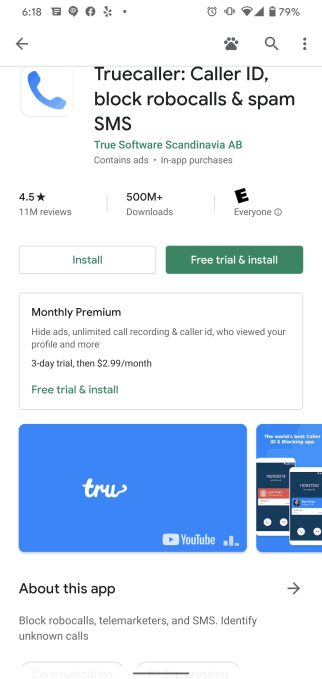
But the most notable part of the update is how it allows developers to sell subscriptions directly on their app’s details page. Now, next to the app’s “Install” button, consumers will be able to instead choose to click a separate button to purchase the app’s subscription and even its free trial.

In an example, the robocall-blocking app Truecaller shows a button next to “Install” which reads, instead, “Free trial & Install.” Beneath this, a window provides all the details about the app’s subscription, including the free trial length, the cost when the trial ends, and what the subscription offers, in terms of feature set.

This more transparent marketing option benefits consumers and developers alike.

Today, too many consumers are still being duped by tricky subscriptions that don’t play by app store guidelines. The problem isn’t unique to Android apps, unfortunately. A report from security firm Sophos found that more than 3.5 million iOS users have installed fleeceware apps from Apple’s App Store, for example.

Google, for its part, introduced a new set of Play Store policies in April with the goal of ensuring that users are able to understand the terms of the subscription offer, the free trial period, and how they can cancel the subscription, if desired. The updated policy bans things like hidden terms, unclear billing frequencies, and hidden pricing.

This new feature offering a separate button just for subscriptions could give users another way to learn about the app’s pricing and feature set before making a commitment to download the app.

This, in turn, could help reduce user churn — as fewer users would drop out of the app once they realize the features they needed were only offered as a paid option. It could also help developers attract more valuable paid subscribers by allowing potential users an easy way to compare their subscription pricing with competitors, while additionally reducing user requests for refunds.

For now, Android users can only purchase subscriptions outside the app from a limited set of developers who have been testing the feature, Google says.

The company tells us it will expand this feature to include other virtual goods in the future.

This latest change isn’t the only way Google is trying to increase transparency around subscriptions.

In a video shared with developers, the company noted it’s made improvements to its checkout cart on Google Play to add further distinctions between trial periods and regular pricing. Google also now sends out email reminders to alert users when free trials are ending and it now pops up a notification when an app is uninstalled to remind users they may also want to cancel the app’s subscription.

Google is also changing the option that lets a customer pause a subscription. Starting on November 1, 2020, this will default to “on,” and other features like Account Hold and Restore will be required for app subscription-based apps. Plus, developers will be able to pop-up a list of reasons to keep a subscription when a user hits the cancel button.

“We believe that in increasing user trust around subscriptions, you will benefit from an increase higher-quality subscribers and lower refund and chargeback rates,” says Google Play Commerce product manager, Mrinalini Loew, in the video.


Read Full Article

The 10 Best Free MMORPGs That Require No Download


free-mmo-no-download

The big-name MMOs, such as World of Warcraft, EVE Online, Destiny 2, and Final Fantasy XIV, take up a lot of space on your hard drive. However, if you have a computer lacking hard drive storage, these mammoth installations can be a problem.

If you want to play MMOs without downloading any files, check out these free MMOs that you can play in your web browser without taking up any space on your hard drive.

1. Arcane Legends

Arcane Legends is a fast-paced action MMO you can play in your browser. Arcane Legends combines RPG elements with hack-and-slash gameplay, allowing you to create a group with your friends and plow through enemies of all kinds.

There are three classes to choose from (Warrior, Rogue, and Sorcerer), multiple pets to enhance your gameplay, and hundreds of thousands of items you can use to level up your character. Your party members can also combine their skills across classes to create powerful spells and hit for more damage.

One of the best Arcane Legends features is the cross-platform gameplay. While Arcane Legends is available as a free browser MMO, you can also play on Android and iOS devices.

2. Hordes

Hordes is a clan-based open-world browser MMO, featuring both Player vs. Player (PVP) and Player vs. Environment (PVE) gameplay. It has multiple environments for you to explore with your clanmates, as well as large bosses that you can only take down as a group (sort of like a raid, but not quite on the same scale… yet).

There are four classes to choose from, two factions, and three gigantic maps. There are also heaps of loot of varying rarity, plus a rune system that allows you to upgrade your existing weapons and armor.

Hordes is the work of a two-person team, one coding the game and the other one bringing the world to life with 3D assets. When you see how much effort has gone into producing Hordes and on such a minimal budget, you’ll see why it is worth playing.

3. Mad World

Mad World is a free browser MMO that integrates a lot of the latest browser technology to bring users an experience that could easily pass for a regular indie game.

In that, there are a few things that will remind you of larger games, too. For example, Mad World features a large talent tree for extensive player customization. You’re also bound to a weapon style that focuses your build type, rather than being bound to a specific class.

Other than that, the art style gives Mad World an almost unique aesthetic. The hand-drawn characters, items, and backdrops help Mad World stand out from a browser MMO crowd that is often happy to mimic the best performing games of the era.

If you prefer to download free games for offline play, check out our guide to the best open-source video games.

4. Command & Conquer: Tiberium Alliances

If you played real-time strategy games in the 1990s and early 2000s, you probably remember all-time classic, Command & Conquer. The Tiberium-focused C&C games take their lede from science-fiction, featuring cool futuristic technology you can deploy against your enemies.

Tiberium Alliances continues that legacy as a free-to-play browser MMO. After you start building your base, you have a week of protection where no one can attack you. After that, it is a free for all. Collect resources, build units, expand your base, and lay waste to the opposing faction.

Tiberium Alliances is free, but you have the option of purchasing funds to speed up your progress. You can easily go through the game without spending any real money, though, making this a great way to get your RTS fix.

C&C Tiberium Alliances is far from the only browsed-based RTS. Here are some of the best browser strategy games for you to delve into right now.

5. Realm of the Mad God

Do you prefer to shoot stuff instead of strategizing? You should check out Realm of the Mad God, an 8-bit pixelated bullet-hell browser MMO. There’s not much preamble to this game. You’re teleported by Oryx, the Mad God, to his realm to be consumed by his minions.

Team up with other players, let the bullets fly, and survive! If you can. Once you’ve defeated enough minions, Oryx will show up—but once you’ve killed him, there’s plenty more to do. Explore the Shatters, a super-hard dungeon experience, collect legendary loot, and try to get the highest stats.

Just don’t die: once you’re dead, that character is gone forever, and you’ll need to start over. As irritating as this is, it adds another level of difficulty and is a nice nod to the roguelike genre.

6. Urban Dead

Did you know that there are text-based MMOs? Urban Dead is a great way to get introduced to a fascinating genre. You start as a human, and you need to survive zombie attacks. If you get killed off, you’ll come back as a zombie unless someone can heal you.

Explore the city, find useful items, and stay alive as long as possible. And don’t forget that you can be killed off even after logging out, so be sure to find a safe place before you quit for the day (or before you use up your Action Points).

Urban Dead is a free browser MMO. However, If you want to give money to the developer, you can buy some UD merch.

7. Pirates: Tides of Fortune

Do you prefer the high-seas to zombies and bullet-hell madness? Try Pirates: Tides of Fortune instead.

Pirates: Tides of Fortune offers a more classic setup, where you build up a Haven, establish your pirate fleet, and plunder the seven seas for loot and infamy. Harvest lumber and gold, distil rum (very important!), pillage shipwrecks, and take on other pirate fleets to become the most fearsome pirate of them all.

You can also spend time working through an impressively large technology tree, which includes things like sword-fighting, gunpowder, mathematics, trade, and even flight. Join a brotherhood and get to it!

8. Dead Maze

In Dead Maze, you’re building a better tomorrow in a zombie-infested post-apocalyptic world. The free MMO doesn’t require you to download any files, although there is a version of Dead Maze available on Steam.

Back to the game. Dead Maze is an isometric MMORPG with a focus on survival. You must gather resources and work with your fellow survivors to create shelter. Your shelter must also withstand attack from zombies, which you’ll also battle as you work your way around the world, finding resources.

So far, so familiar, but Dead Maze is well worth a look. There are warring factions, quests, private housing for your characters, and a crafting system.

9. Intium

Intium is a free MMORPG you can play from your browser, developed by a team of Reddit users. Intium is not only an MMO but also a MUD-like (Multi-User Dungeon). MUDs were one of the first ways people played out MMORPGs on the early internet, allowing for detailed world-building through text without creating a heavy network overhead.

Intium features roguelike gameplay with permadeath (when your character dies, they’re gone forever). There is a substantial amount of loot, server-wide elite bosses, and quests. Furthermore, the Intium world economy is entirely community-driven. There are no NPCs or price-fixing for items, which places a strong emphasis on exploring and finding premium loot to sell (or to craft!).

10. Stein.World

Stein.World started as a part-time coding project but evolved into a free MMORPG for your browser. Like Dead Maze, you can play Stein.World without downloading any files, but there is also a Steam version available.

Stein.World features a 2D 16-bit art style that brings the fantasy world to life. You’re on a quest to recover a lost family heirloom in the shape of a priceless beer stein. There are hundreds of quests, dungeons, guilds, and even in-game professions to hone your character. The game world is extensive and receives frequent content updates, adding new weapons, tools, and other improvements.

Are Free MMOs Dying Out?

The era of browser-based free MMOs was curtailed as many popular internet browsers removed support for Java-based games. Java is considered an unnecessary security risk, although some browsers still allow third-party Java installations.

Many of the most popular free browser-based MMOs depended on Java to run. Without Java, some browser MMOs switched to a non-browser version requiring you to download a program to launch the game (like Runescape). Other browser MMOs decided to cease development from that moment, preserving the game in gaming history.

So, in that light, are free browser MMOs dying out?

As strange as it sounds, the answer is no.

As you’ve seen from several entries on this list, new browser MMOs are appearing all the time. The lure of MMOs that require no downloads remains strong. While the number of free MMOs might decrease slightly, the overall quality of story, gameplay, and artwork rises as creators use more advanced tools to craft their worlds.

What Are Your Favorite Free MMOs?

These games are great free MMOs that you can play in your browser. However, there are plenty more MMORPGs that don’t require downloading out there.

However, if you do have hard drive space to spare, you should check out the best free PC games you can play right now.

Read the full article: The 10 Best Free MMORPGs That Require No Download