16 June 2020

5 Bookmark Apps to Organize Links, Save Social Posts, and Read It Later


bookmark-apps

As our browsing patterns change, so should the tools of a browser. Check out some of these new bookmarking apps to save links for later and organize what you’ve already saved.

The internet has a peculiar problem these days. Social media doesn’t let you easily bookmark or save links. If you tap the Heart or Like button, the world perceives it as an endorsement, even if you meant it as a way to save that post for later.

So if you want to save a tweet for later, it’s better to bookmark it and keep them organized.

1. Memex (Chrome, Firefox, Android, iOS): Sync and Manage Bookmarks Between Desktop and Mobile

Animated GIF - Find & Share on GIPHY

Memex is one of the most powerful bookmark apps to meet the needs of the modern user, who wants to save links while using a phone, tablet, or computer. Install the extension on your browser and the app on your phone. To bookmark a link on the phone, “share” any link, and from the Share Menu, choose Memex.

You can save a link and quickly move on, but it’s best to add tags or put it in a particular collection. That will make it easier to find the link later. Memex also includes built-in annotation and notes, which is a handy feature for researchers. Highlight any part of the page that’s important for you, and add notes for later too.

Memex’s full-text history search is a powerful tool to find saved links. When you don’t remember a website’s name or the saved link’s page title, this historical search should be able to find it. The advanced filters can further refine your search query by date or tag.

The free version includes all these features, but you need to manually sync data between the phone and the extension. The paid version of Memex offers automatic sync, as well as data encryption to protect your privacy.

And yes, you can easily export all previous bookmarks from a browser or another service and import them into Memex.

Download: Memex extension for Chrome | Firefox (Free)

Download: Memex for Android | iOS (Free)

2. Scrapp (Chrome, Firefox, Android, iOS): Auto-Tagging PWA and Offline Read-It-Later

Scrapp is a progressive web app (PWA) to bookmark links and sync across platforms on desktop or mobile

Scrapp is a progressive web app (PWA), which means it works offline through browsers like Chrome and Safari on phones and tablets. Once you create an account, you will get a prompt to add it to the home screen. After that, it works just like any phone app, you won’t know the difference. On a desktop browser, you can continue to use it with the extensions.

Scrapp makes organizing bookmarks as simple as possible and looks good doing it. It uses auto-tags to add labels to any new bookmarks, based on your current labels. So if a link’s URL, title, description, or text have any similar keywords to labels you’ve already created, it will be easier to find it in the future.

The app also has a “reading list” mode to add links to. Every day, it will send a notification about how many items you have in your reading list, along with a random link from it. The idea is to not let your “read it later” list pile up too much. Plus, you can read links offline by tapping the “read” button on any bookmark.

Scrapp is an excellent lightweight bookmarking service. It’s completely free, and the developer says he wants to keep it ad-free too.

Download: Scrapp for Chrome | Firefox (Free)

3. Ktab (Chrome): Save Open Tabs as Bookmarks and Close Them, Like OneTab

Ktab is like a souped-up version of OneTab, one of the best browser tab management extensions. In fact, many OneTab users might want to switch to Ktab after reading this comparison, since you are once again mass-saving links in a session, and clearing up memory.

When you have a large number of tabs open, Chrome slows down. Click the Ktab icon to get a dropdown list of all tabs, with three options for each tab: rename, close, select/unselect. And there’s a big “Save” button. Click it to save the selected tabs, unselect the tabs that you don’t want. The saved tabs are automatically closed.

Before saving, you can also add tags to these tags. This is an important step in finding those links later because Ktab doesn’t have a search function for bookmarks. When you open the Ktab dashboard, you can sort bookmarks by tags, the original website, or the period they were saved: daily, weekly, monthly, or all.

This is why tagging is important, and you might want to come up with creative tag names to save a session. Also, bear in mind that Ktab auto-selects and closes pinned tabs, tabs from other windows, and browser-based apps. It’s an annoying switch for OneTab users, and hopefully, there will be a customizable setting in future versions of this marvelous extension.

Download: Ktab for Chrome (Free)

4. PageMarker (Web): Folders and Tags, and a Newsletter of Read-It-Later Links

PageMarker is a really interesting bookmark manager and organizer because it packages the best features people want from various bookmark apps. Import your current bookmarks into it and get started.

The app has both tags and folders, letting you organize bookmarks better than ever before. The free version limits you to five tags and folders, while the premium version makes both unlimited. You can also add notes to any bookmark, in markdown. And there’s a robust search engine to quickly find any link.

PageMarker focuses on actually reading your “read it later” items. It attacks the problem in two ways.

First, it marks all links in two default folders: Read and Unread. Next, it sends a newsletter of your most recent bookmarks to your inbox, reminding you to read the links rather than letting them saturate.

In the free version, you can choose which days of the week you want the newsletter, while the paid version even lets you choose the time.

But PageMarker doesn’t yet have extensions or mobile apps, so it’s more an organizer than your main bookmarking tool. You have to visit the website and manually add links. Once extensions and apps come in, it promises to be one of the best bookmark managers out there.

5. Savory (Chrome): Fast Search and Multi Bookmark Select

Savory is a fast bookmark search engine for Chrome, and lets you select multiple links

Some apps don’t need to do a lot to be just what you’re looking for. Chrome’s bookmark manager is a bit frustrating for power users and lacks a few simple things. Savory tries to fix those limitations as a wrapper for Chrome bookmarks.

If you have years and years of unorganized bookmarks, you know that Chrome’s bookmark manager doesn’t have the best search engine. Savory is lightning fast at finding links and auto-tags the websites too. You can also add your own tags to make bookmark management easier.

Chrome also doesn’t let you select multiple links to delete them in bulk. It’s one of the most frustrating limitations, but Savory solves that too.

A note before you install it: Savory asks you to sign in before it can get to work. It’s unclear why that is, or the privacy implications of it.

Download: Savory for Chrome (Free)

There’s a Bookmark System for Everyone

Why are there so many different bookmark apps, managers, and organizers? Well, it’s mainly because different people have different browsing patterns and needs. There’s no right answer, just find one that works for you.

If the above list doesn’t work, try a Trello-like system or an auto-deleting temporary bookmark folder, or any of the other excellent bookmark managers to save links for later.

Read the full article: 5 Bookmark Apps to Organize Links, Save Social Posts, and Read It Later


Read Full Article

Intraday Trading Calls for 17-June-2020

Intraday Trading Calls for 17-June-2020

Please click on the following link to view full post.

https://marketctl.blogspot.com/2020/06/intraday-trading-calls-for-17-june-2020.html

Via https://marketctl.blogspot.com/

Live Intraday Trading on 16-June-2020 (Profit 10100)

Live Intraday Trading on 16-June-2020 (Profit 10100)

Please click on the following link to view full post.

https://marketctl.blogspot.com/2020/06/live-intraday-trading-on-16-june-2020.html

Via https://marketctl.blogspot.com/

Live Intraday Trading on 15-June-2020

Live Intraday Trading on 15-June-2020

Please click on the following link to view full post.

https://marketctl.blogspot.com/2020/06/live-intraday-trading-on-15-june-2020.html

Via https://marketctl.blogspot.com/

2 Ways To Get The Classic Start Menu In Windows 10


CLICK HERE TO SEE FULL POST

The Classic Start menu was part of many versions of the Windows operating system, including Windows 2000, Windows 2003, Windows XP, and Vista. However, Microsoft dropped the same from Windows 7 and later versions. Now, the all-new Start menu in Windows 10 is better than the Classic Start menu in most ways. It’s faster, looks […]

The post 2 Ways To Get The Classic Start Menu In Windows 10 appeared first on Into Windows. Content from IntoWindows website.


Swappie bags $40.6M to sell more secondhand iPhones across Europe


Finland-based Swappie has closed a €35.8 million ($40.6M) Series B to expand into new markets in Europe. The ecommerce business refurbishes and resells used iPhones, taking care of the entire process from testing and repairing used handsets, to selling the refurbished devices via its own marketplace, with a 12-month warranty.

Local VC and private equity firm TESI is a new investor in the Series B, along with Lifeline Ventures, Reaktor Ventures and Inventure Investors, all of whom participated in Swappie’s 2019 Series A. The total raised to date since the business was founded in 2016 is $48M.

Right now Swappie operates in Finland, Sweden, Denmark and Italy. The new financing will be used to expand across Europe, beginning with launches in Germany, Ireland, Portugal and the Netherlands this summer.

It’s also eyeing expansion beyond Europe — so will be speccing out a broader roadmap for the future.

“The main focus of this round is to become the number one player in Europe. But also to explore opportunities outside Europe as well,” says CEO and co-founder Sami Marttinen. “That’s something we will be looking into but no concrete plans to announce at this point.

“There are still opportunities for our business model everywhere in the world. So it’s a matter of just building the roadmap — where to go next.”

Swappie’s Jiri Heinonen (CMO) and Sami Marttinen (CEO) (Photo credit: Swappie)

Swappie touts growing consumer demand in the region to buy refurbished phones, saying that from 2018 to 2019 revenues grew 4x, hitting $35M+ in net revenue in 2019. It’s also seeing demand continuing to grow this year — recording a 5x increase in net revenue growth in April and May 2020 vs the same period last year, despite the ongoing COVID-19 pandemic. Indeed, the trend of consumers shifting to buying more online looks to be a help for its online marketplace.

Commenting on Swappie’s Series B in a statement, Tony Nysten, Investment Manager at TESI, said: “We believe there is a huge growth opportunity for Swappie. The smartphone market in Europe is worth over €100BN but used or refurbished phones currently make up just over 10% of that and only one in four pre-owned phones are currently re-sold. Through its rapid growth to date, Swappie has proven its ability to not just grow market share within the refurbished market, but to expand the size of the category overall. The business has enormous potential.”

Swappie’s early choice of market focus included not only familiar turf in the Nordics — but Italy, in Southern Europe. The latter was chosen deliberately on account of it being a tough market for ecommerce, per Marttinen.

“In the really early days the reason why we went to Italy was because it was one of the toughest ecommerce markets in Europe — they have a really low ecommerce maturity index. It’s very different in terms of shopping behavior. You need to build another level of trust in that market. There are lots of unique traits like cash on delivery, things like that. So we knew that in order to really conquer the market globally — and to be able to deliver on our global ambitions we would need to enter as difficult markets as early in our journey as possible.

“These days we have a much more advanced playbook and market studies across Europe.”

Swappie describes itself as a ‘scale-up’ tech business on account of addressing the whole value chain, per Marttinen.

“We’ve done a lot there on the hardware side — when it comes to actually refurbishing the devices we can make them even stronger then the original devices in many cases. So that means we can go as deep as onto the motherboard level in the repairs. Then on the software side, of course, we’re making selling and distribution and everything else scalable. Making sure that the checking processes and all the processes in the factory are according to the latest standards,” he says.

“Because of being so focused in also building the processes and focusing on the quality so much, so actually we have been able to truly change the way people consume electronics,” he adds. “If you think about it from a local player perspective they are typically mostly competing for the people who are already buying used devices — whereas we are able to deliver on this market by having full control of the entire value chain, from buying to refurbishing, to selling the phones to consumers.

“Most of our customers are buying used or refurbished devices for the first time — so actually our biggest competitors are new smartphone retailers.”

The most popular iPhone model sold on Swappie’s marketplace last year was the iPhone 8, per Marttinen.

He won’t disclosed the exact number of iPhones Swappie has refurbished and sold at this point but he says it’s a six-figure number — aka ‘hundreds of thousands’. 

The team chose to focus on iPhones to ensure they can deliver the highest quality device refurbishment, he says, while also benefiting from the relatively higher cost of Apple’s smartphone hardware vs Android devices. Though he doesn’t rule out expanding to offer another type of refurbished smartphone in future.  

“The business is now growing really rapidly but what we noticed in the early days is that the new device prices had started to rise before we started this business so we have been very lucky with the timing,” he tells TechCrunch, noting that Swappie also benefitted from the plateauing into advancements between handset models in recent years, as the technology matured.

“If you can build trust into this business, and make sure that the phones function as well as new devices — and that you’re actually making the buying process as well as safe as buying a new phone — that way you can actually accelerate the growth of the market. So that’s what we have been really successful in. It’s kind of the key to being able to grow so quickly.”

“One main point there has been that because we refurbish every device ourselves in our own factory in Finland we can deliver to customers the highest quality devices under warranty for much less than the cost of a new phone and also be more environmentally friendly,” he adds.

While, in years past, there have been instances of iPhone users’ devices bricked after a repair by an unauthorized repair shop Marttinen says Swappie is using only original iPhone parts so has avoided such problems.

He also points to recent European Commission proposals for a pan-EU ‘right to repair’ for electronics which suggests device makers selling in the region will be required to respect repairability, rather than using software updates as a way to penalize consumers who seek to extend the lifespan of their current device.

Photo credit: Swappie

Swappie’s business also slots into a wider Commission mission to transition the EU to a circular economy, as part of the green deal announced by current president, Ursula von der Leyen — so it’s skating to where the puck is headed, if you like.

“It’s really good for the environment that the right to repair legislation has come forward in the past few years. That’s one very important point for us as well which was one of the reasons why we wanted to built microscope level repairs in our factories — so we wouldn’t have to scrap as many phones as you normally would,” Marttinen adds.

What can’t it repair? The proportion of iPhones which turn out to be truly unsalvageable via its processes is “extremely small“, he says. “We can actually do any repairs that are possible to do the phones so, basically, water damaged phones which have been at the bottom of the ocean — those are of course unrepairable. Or if the phone is bent too much or if the motherboard is completely ruined. But basically all the other faults we can repair.”

On the competitive front, he says Swappie’s main rival are retailers selling new iPhones — given it’s trying to woo iOS users away from buying a brand new iPhone. On the secondhand marketplace front Marttinen mentions reBuy as one of the main rival players in refurbishing and reselling electronics, though it does not focus on iPhones — offering a full range of devices, from wearables to smartphones and tablets, laptops, consoles and cameras.


Read Full Article

US Commerce Dept. amends Huawei ban to allow for development of 5G standards


The United States Department of Commerce today issued a change to its sweeping Huawei ban. Proponents of the move note that the change in policy ought not be regarded as a softening on the government’s stance toward the embattled hardware maker, but instead is an attempt to develop more streamlined standards for 5G, along with the company, which has been one of the primary forces in its development 

According to the Department:

This action is meant to ensure Huawei’s placement on the Entity List in May 2019 does not prevent American companies from contributing to important standards-developing activities despite Huawei’s pervasive participation in standards-development organizations.

The change is designed to allow Huawei and U.S. to both play a role in hashing out the parameters for the next-generation wireless technology. “The United States will not cede leadership in global innovation. This action recognizes the importance of harnessing American ingenuity to advance and protect our economic and national security,” Commerce Secretary Wilbur Ross said in a statement. “The Department is committed to protecting U.S. national security and foreign policy interests by encouraging U.S. industry to fully engage and advocate for U.S. technologies to become international standards.”

The new  Bureau of Industry and Security (BIS) rule essentially allows companies to share information about technologies in order to develop a joint standard without requiring an export license. Beyond that, however, the DOC has no stated plans to ease up after placing Huawei on its entities list last year.

The Chinese smartphone maker was included in the blacklist over a litany of ongoing complaints, including its ties to national government, concerns over spying and alleged sanction violations with Iran. The move has had a profound impact on the company, including a severing of its ties to Google, which formed the software backbone of its mobile line through Android and a suit of included apps. Subsequent handsets, including the recently released P40 Pro+, have been shipped without the software on board.


Read Full Article

Millennium Problems


Millennium Problems

Google Stadia Now Works on Almost All Android Phones


Google is opening Stadia up to more phones. So much so that Google Stadia should now work on almost any Android phone. While an 8-year-old phone running KitKat won’t be capable of running Stadia, a 5-year-old phone running Marshmallow may well be.

Google Stadia is only officially supported on a select number of handsets. And while the number is growing, there are more phones not supported than supported. However, thanks to an experimental feature, Google Stadia should now work on a lot more phones.

How to Use Google Stadia on Any Android Phone

To use Google Stadia, first check whether your phone is on the list of supported handsets. If so, happy days. You can download the app and start playing immediately. If not, there’s still a chance. Just head to Google Play and download the Google Stadia app.

If your device is old and incompatible, you’re out of luck. However, if you can download and install the Google Stadia app, you’ll be able to stream games on Google Stadia. Just sign into the app, open the Settings, tap Experiments, then select “Play on this device”.

Google Stadia should then work on your device, even if it’s several years old. Almost any phone running Android 6.0 (Marshmallow) or later should be compatible. However, cloud gaming still requires a fast and reliable internet connection to function correctly.

Try Google Stadia to See If You Like It

This feature is still very much in development to the point that Google has labelled it as an experiment. Which means there is no guarantee Stadia will function perfectly on your particular handset. Still, there’s no harm in trying it out, right?

For more on Google Stadia, here’s how to use different controllers with Google Stadia, and the best Google Stadia games to play today. Having said all of that, Google Stadia is far from perfect, so it’s worth reading our review of Google Stadia first.

Read the full article: Google Stadia Now Works on Almost All Android Phones


Read Full Article

The Best Social Fitness Apps to Work Out With Friends


social-apps-excercising

Over and over again, research has shown that one of the best ways to stick to your workout routine is by involving other people. Having friends, family members, or complete strangers encourage you as you work out can help you meet your goals, and even exceed them.

Social fitness apps are one of the best ways to do this, but you need to find the one that works best for you. So, in this article, we’ve listed the best social fitness apps to work out with friends. You’re bound to find one that helps you achieve your fitness goals.

1. Fitbit

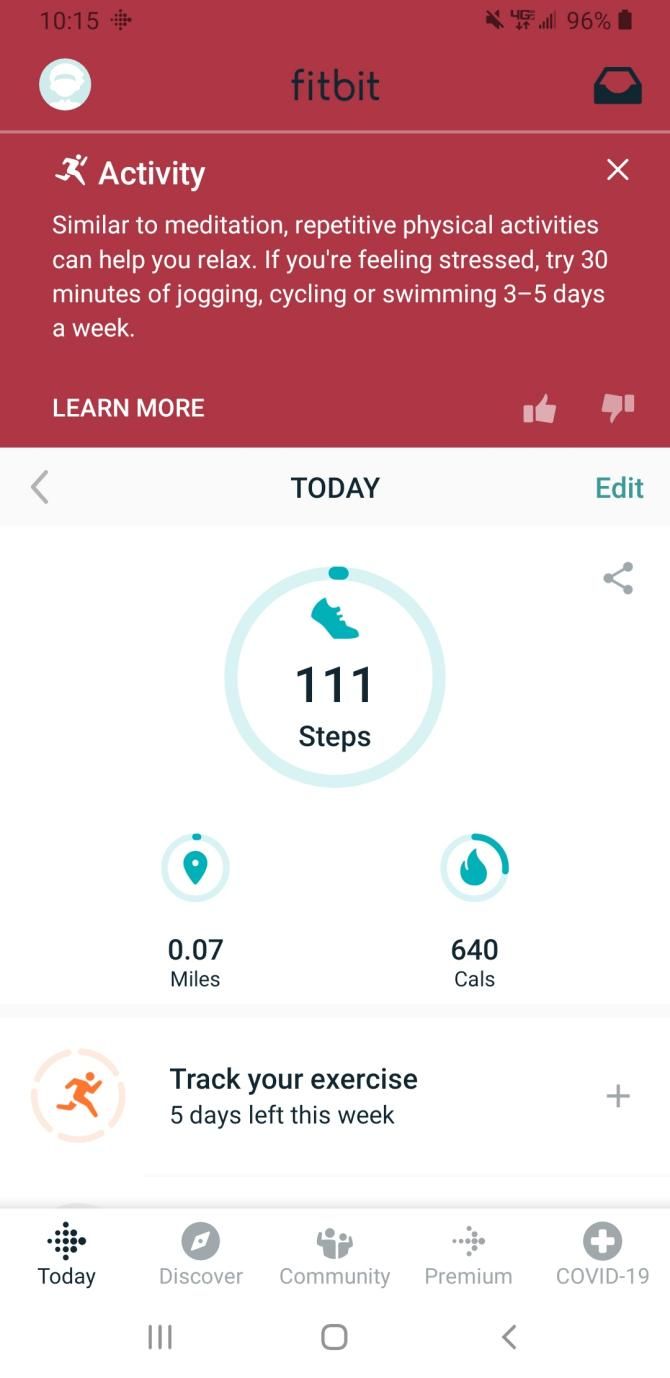
Fitbit is one of the most widely-used social fitness apps. Most users pair it with their favorite Fitbit tracker, as these trackers automatically log stats, such as steps taken, different activity levels, and stairs climbed.

However, you don’t technically have to own a Fitbit tracker to use the app, as most smartphones have a pedometer feature that Fitbit can use to track your steps. The only downside is that you’ll have to manually enter any other exercises you do.

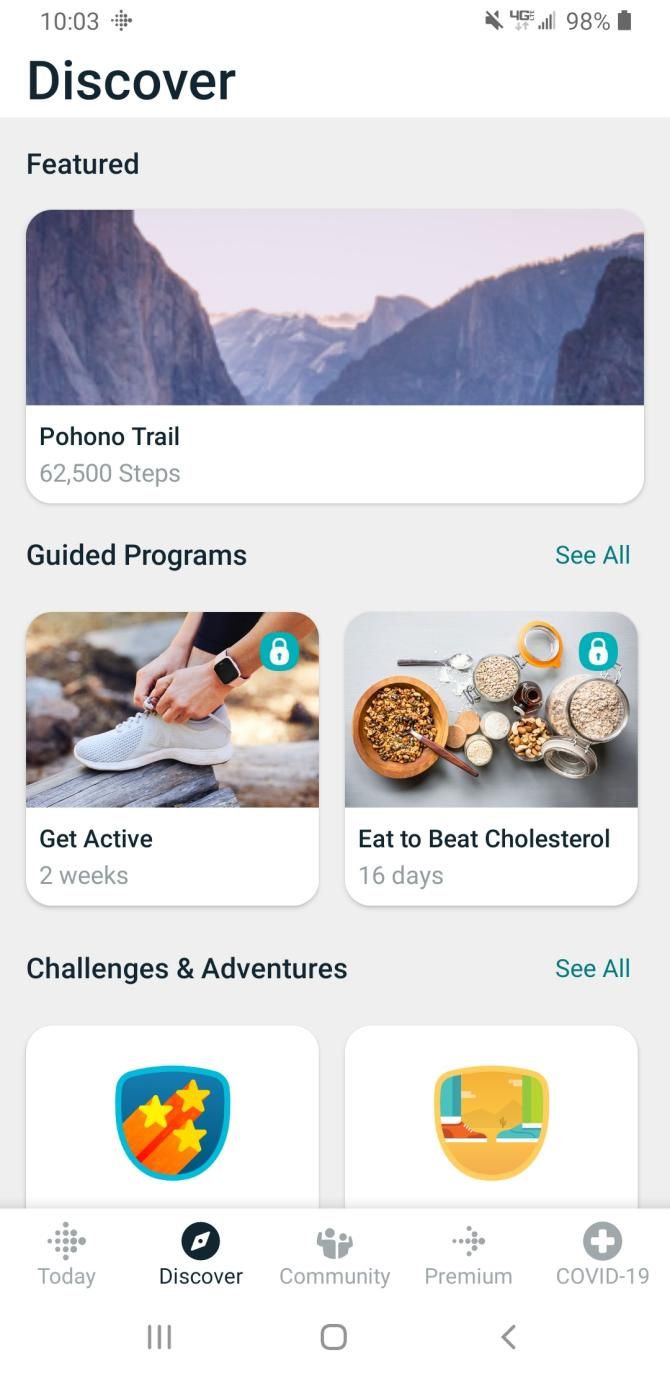
Fitbit is also a great way to improve your fitness while competing against others. Once you connect with your friends and family on the app, you can compete to have the most steps during the week. Plus, Fitbit has plenty of fitness challenges to do with friends and family that will motivate you to get fit.

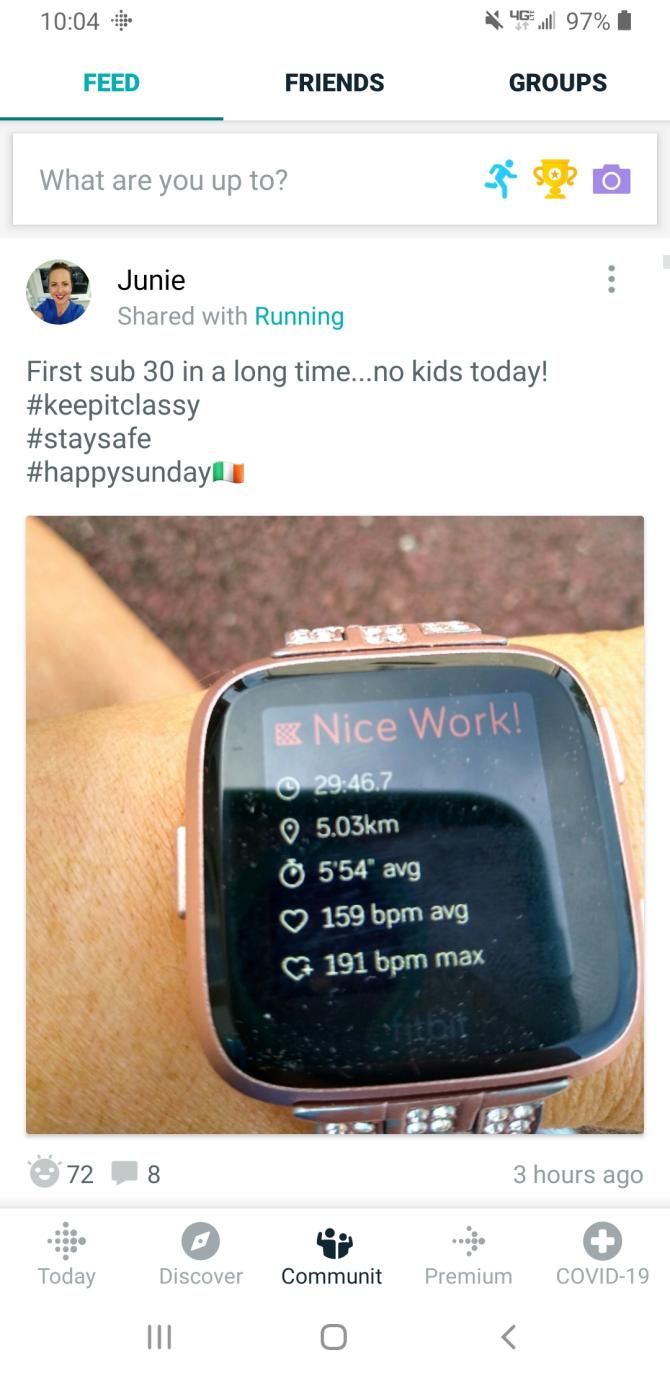
On Fitbit’s Community page, you can join fitness groups that pertain to specific activities, like running, hiking, and swimming. People from all over the world can post images of their latest workouts, which should inspire you even more.

Download: Fitbit for Android | iOS (Free, with premium version available)

2. Nike Run Club

Nike Run Club is packed with features that can improve your workout sessions. Not only does it track stats from your runs and encourage you to complete challenges, but it also has a coaching feature that leads you through a targeted program for specific race distances and running levels.

The social aspect of the Nike Run Club app is integral to its design. It allows you to share the completion of your runs to the social media network of your choice. An in-app camera also lets you share photos without leaving the app. You can even get “cheers” from your Nike Run Club friends, which triggers a cheering sound that you’ll hear through your headphones.

If you want to connect with other runners in person, you can use the app to find and partake in nearby running events. The more you exercise, the more in-app achievements you’ll get to show off.

Nike Run Club is compatible with the Apple Watch, as well as Android wearables. That said, it’s definitely one of the best fitness apps for Apple Watch, and most Android fitness devices.

Download: Nike Run Club on Android | iOS (Free)

3. PumpUp

Apps such as PumpUp are designed specifically for those who love talking about their workouts on social media. Although it’s marketed towards women, plenty of men use the app too. The app tracks your exercise, and lets you post photos with descriptions to share with your followers.

PumpUp’s interface resembles Instagram in both its appearance and functionality. You have access to the feed of people you follow, along with feeds for the latest and most popular posts. Most posts show a user’s progress, while others have to do with healthy eating. Either way, PumpUp can inspire you to get fit alongside the thousands of other users on the app.

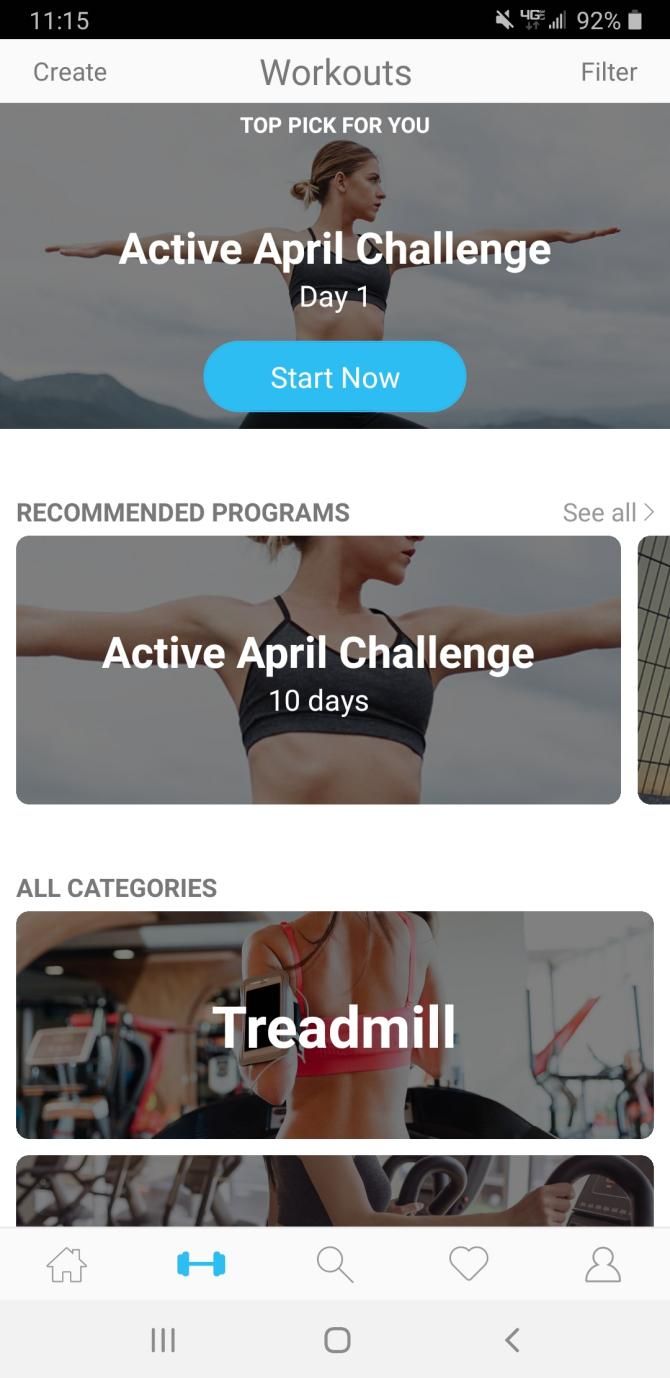
PumpUp isn’t just all about sharing your ventures in fitness. It, additionally, helps you stay active while you connect, as it comes with a variety of guided workouts that you can try. Each workout has a specific theme. With full-body, high-intensity, strength-training, abs, and treadmill workouts at your disposal, you’ll likely find a routine that works for you.

The premium version of the app gives you access to a larger selection of workouts, but it’s rather expensive. Despite this, PumpUp is still a great choice if you love using social media to connect, and are interested in sharing your fitness activities with like-minded groups.

Download: PumpUp for Android | iOS (Free, with premium version available)

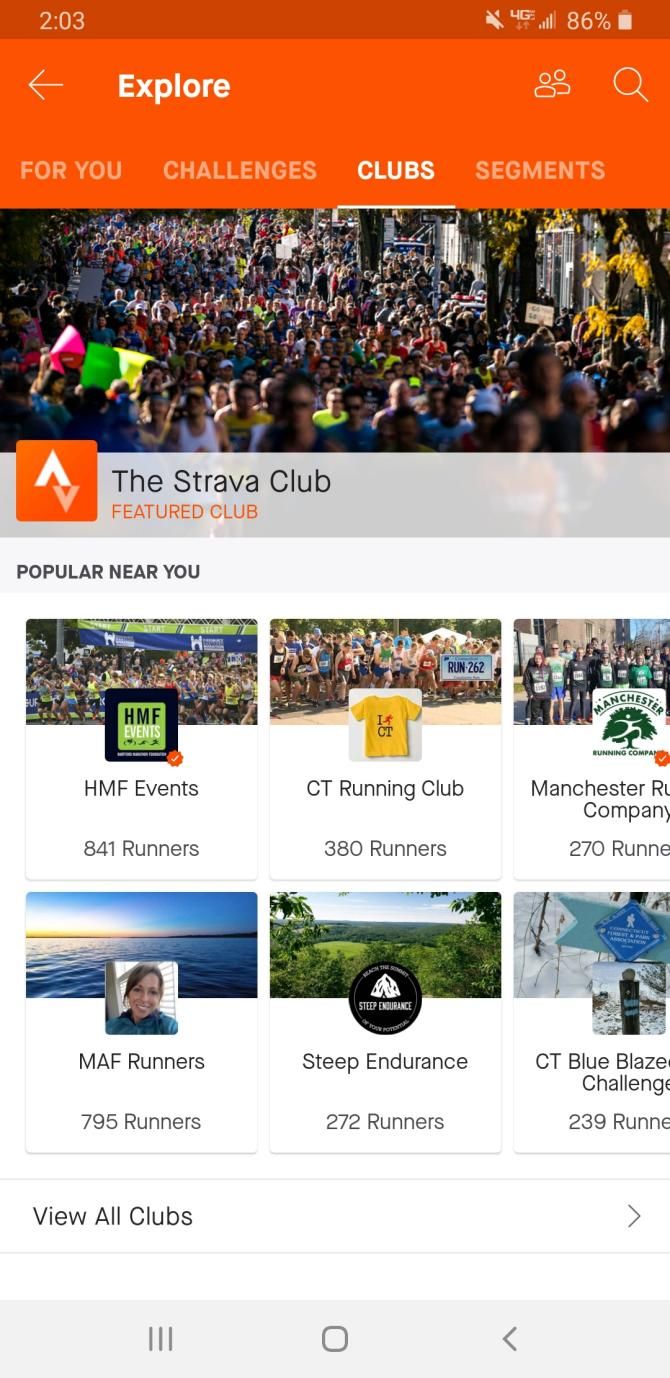
4. Strava

Strava is another fantastic fitness-sharing app. Whether you enjoy running, biking, hiking, kayaking, doing yoga, or training at the gym, this app can track all of it. Strava even records your distance, pace, speed, and calories burned.

Want to get your friends and family involved in a group fitness app? Fortunately, you can simply add them to Strava from your Facebook friends list or phone contacts. After you complete a workout, you can post your stats on the app for all of your friends to see.

Strava gives you the chance to join and compete in challenges against your friends and family. In other words, this feature makes it a viable option if you’re looking for a workout app that keeps you and your friends accountable.

One of the best parts about Strava is its emphasis on local fitness activity. You can check out nearby running or biking routes that other Strava users have used, and try them for yourself. If you subscribe to the premium version of the app, you can actually see how your time ranks compared to the other users who have used that trail.

Download: Strava for Android| iOS (Free, with premium version available)

Which of These Social Fitness Apps Do You Use?

Social fitness apps have been improving rapidly, and will likely continue to get better. Whether you want to compete with your friend, local athletes, or people from around the world, the social aspect makes working out way more fun. The app you choose should depends on the kind of social connections that best fit your lifestyle and personality.

Most of these apps come equipped with workouts that you can do from home, but you might get bored of doing the same routine. If that’s the case, change it up with these body weight exercise apps to help you get fit anywhere.

Read the full article: The Best Social Fitness Apps to Work Out With Friends


Read Full Article

The 10 Best War Documentaries to Watch on Netflix


war-documentaries-netflix

If you want to watch the best war documentaries ever made, look no further than Netflix.

Netflix has lots of great documentaries to watch. Whether you like biographies, science, music, or history, there is something for everyone. But Netflix really excels with its choice of war documentaries.

Here are the best war documentaries to watch on Netflix right now.

1. World War II in Colour

If you enjoy watching original footage rather than talking heads, World War II in Colour is the best documentary about the Second World War that you’ll find on Netflix.

This series was first released in 2009 on British TV. It combines original and digitally colorized footage, some of which had never been seen before. Robert Powell narrates the entire series.

Powell has narrated some of the other best World War II documentaries. They include Hitler’s Bodyguard, The Story of the Third Reich, and Secrets of World War II. Sadly, none of these are on Netflix.

World War II in Colour consists of 13 episodes. They cover the action on the Western Front and Eastern Front, as well as in North Africa and the Pacific.

After learning about the historical events between 1939 and 1945, you should watch the best World War II movies on Netflix.

2. The Vietnam War

The Vietnam War is a 10-part TV series directed by the famed documentary maker, Ken Burns. First broadcast on PBS in 2017, it is an epic series and is unquestionably one of the greatest war documentaries ever made; the entire series took more than 10 years to put together.

It contains original first-hand interviews with 79 witnesses (including those who fought in the war and those who protested against it). Burns also worked through 24,000 photos and 1,500 hours of video in a bid to leave no stone unturned.

The series contains 10 episodes and has a total runtime of more than 17 hours.

3. The Russian Revolution

Despite lasting for less than an hour, this British documentary about the build-up to the Russian Revolution provides a surprisingly detailed, engaging insight into the growing rivalry between the Romanov and the Ulyanov families.

The Romanovs had been the ruling house in Russia since the early 1600s, but Lenin and his followers had become dissatisfied with life under their leadership. The story culminates in the abolition of the monarchy, the execution of the most prominent Romanovs, and the rise of Lenin’s Bolshevik party.

4. The Age of Tanks

The Age of Tanks traces the history of one of the 20th century’s most revolutionary creations—the tank.

The series begins with the story of Basil Henriques. During World War I, the British soldier became the first man to drive a tank in active combat and use it to fire on enemy combatants. Over the following four episodes, the series examines the use of tanks in the German Blitzkrieg, the Cold War, and 21st-century wars.

5. Five Came Back

Five Came Back is an adaptation of the book of the same name. It tells the story of five famous American film directors (John Ford, William Wyler, John Huston, Frank Capra, and George Stevens), all of whom found themselves on the frontlines during the Second World War.

Narrated by Meryl Streep, the three-part series used more than 100 hours of archival footage to discuss the 40 documentaries and training films that the directors made to help the war effort. There’s a particular focus on Ford’s Battle of Midway, Capra’s Why We Fight, and Stevens’ life-changing experiences at Dachau.

6.  Dying to Tell

In the modern age, we wouldn’t know what was happening on the frontlines if it wasn’t for the work of brave journalists who put their own lives in danger to bring us the stories and the footage.

Dying to Tell offers a fascinating insight into the effects the job has on those war reporters’ lives. We hear the stories of reporters who have been kidnapped, shot at by tanks, and even killed. There are interviews, unseen footage, and discussions with health professionals.

Directed by Hernan Zin, the film won “Best Documentary” at the Montreal World Film Festival.

7. Medal of Honor

The “Medal of Honor” is the most prestigious personal military decoration in the United States. To date, the US military has only given 3,500 people the award, with more than half of those occurring during the American Civil War.

This TV series tells the heroic stories of eight of the recipients, with one episode dedicated to each person. The eight people represent four momentous battles in America’s history: the Second World War, the War in Afganistan, the Korean War, and the Vietnam War.

Content in the documentary is a mix of interviews, reenactments, and archive footage.

8. Behind Enemy Lines

best war documentaries - behind enemy lines

This isn’t the 2001 movie starring Owen Wilson and Gene Hackman. We’re talking about the excellent BBC documentary of the same name (also from 2001).

In 1940, the UK was in a precarious position. Western Europe had collapsed, the Battle of Britain raged in the skies, and Hitler was desperate to force Churchill into signing a peace agreement. In response, Churchill created the Commandos, a specialist unit designed to help turn the tide of the war.

This four-part documentary explores the new units’ role at four critical junctures in the progression of the conflict: Dunkirk, the St Nazaire Raid, the North African campaign, and Operation Market Garden.

9. November 13: Attack on Paris

Terrorism is a type of warfare unlike any other. The most noteworthy terrorist events in history—9/11, the Lockerbie Bombing, the 2011 Norway attacks—will be ingrained in our collective minds forever.

One such incident is the November 2015 Paris attacks. 130 people lost their lives in a series of coordinated bombings and shootings across the city. The attack became the deadliest on French soil since the Second World War.

This three-part Netflix documentary chronicles the events of the day. It includes a timeline of proceedings and dozens of interviews with survivors and eyewitnesses.

10. Nazi Concentration Camps

Of all the horrors which occurred during World War II, the Nazi concentration camps were the worst. Today, experts believe that the Nazis either killed or imprisoned between 15 million and 20 million people between 1933 and 1945.

This film, from 1945, opened the world’s eyes to the scenes that lay within. Compiled from 80,000 feet of film taken by Allied military photographers after liberation, it is a camp-by-camp analysis of the atrocities committed.

The Allies used the film as evidence in the Nuremberg trials. Ultimately, the footage proved vital in securing convictions against many of the Nazi high command, including Karl Dönitz, Hermann Göring, Rudolf Hess, Alfred Jodl, and Wilhelm Frick.

More Documentaries to Watch on Netflix

We hope you agree with our list of the best war documentaries on Netflix. And if you think we’ve missed out on a must-watch documentary, be sure to let us know in the comments.

If you would like to learn about some of the other great documentaries available, read our article listings the best travel documentaries to watch on Netflix and the best nature documentaries to watch on Netflix.

Read the full article: The 10 Best War Documentaries to Watch on Netflix


Read Full Article

The 4 Best Sites to Find Abandoned Places and Old Ghost Towns


Many people love to hunt for treasure. Some meet their needs through the practice of geocaching, while others like to visit abandoned buildings; there’s something poignant about remembering the things that have been lost to time and neglect.

However, some of us can’t visit these locations in person. This is either due to the fact that these locations are too far away, or because we just don’t know where to look. Fortunately, there’s a whole online subculture devoted to documenting derelict areas. Here’s a list of great websites on how to find abandoned places, wherever you might be.

1. Abandoned Places

Abandoned Places Website

First, let’s start off with a really old website that’s been documenting abandoned places for ages. When we say this website is old, we mean ancient. It hasn’t been updated since the early 2010s, so if you’re looking for a digital trip down memory lane, check out abandoned-places.com.

While the Abandoned Places website is old and not exactly user-friendly, it’s pretty simple to use once you figure out the main navigation wheel. Essentially, the whole website was designed to look like a mechanical contraption. You can click on different gears within the central wheel in order to learn about a new building.

The website also features locations from around the world, with each post including historical information and photos for those locations when possible. One area, called The Graffiti Place, includes a description on the size of the ghost town, along with its location along the river Scheldt. The photographs documenting it are detailed and definitely worth a look.

If you’re searching for other weird, wonderful, sometimes-very-old websites, then check out this list of the most bizarre websites you haven’t seen.

2. Abandoned America

Old Places Near Me Abandoned America

Looking for a more modern website with a distinct focus? Then you need to check out Abandoned America, a website put together by documentarian Matthew Christopher.

Over the years, Christopher has made it his mission to record the American dream in decay. On his about page, he states that he’s been fascinated with abandoned places since he was a child.

Additionally, he wants to share the stories behind these abandoned places, and bring light to the lives that were upended through historical atrocities. One such atrocity was America’s use of insane asylums in the 20th century, with ruins now scattered across the country from coast to coast.

The website also makes it very clear that some location information has been withheld, due to the fact that these abandoned buildings are on private property.

Even with that factor in play, however, this website is still one of the most comprehensive resources on this list. The attention to detail can help you satisfy that urge to “find abandoned places near me,” without having to go there in person.

3. Urbex Playground

How to Find Abandoned Places Urbex Playground

Looking for a website that combines the topic of urban exploring with the history of abandoned buildings? Then you need to check out Urbex Playground.

With twin sections devoted to urban and rural exploring, Urbex and Rurex, this website aims to document abandoned buildings in both high and low-density areas.

For each place that this website explores, the team photographs and records the history behind those buildings. They also talk about how these buildings have come to be abandoned in the present day. As such, this website is an excellent source of inspiration and knowledge for writers working on a variety of different topics.

Although Urbex admits that its documentation process sometimes involves trespassing (an activity we do not recommend), its meticulous documentation practices and its attention to detail have to be commended.

4. Freaktography

Abandoned Places Near Me on Freaktography

Looking for a website that is a little more “daring” with the ways that it photographs abandoned places? Then you need to check out Freaktography, a website run by an urban explorer.

Starting in the early 2010s, Freaktography began to record abandoned buildings and old ghost towns, and post those pictures online. The explorer who runs this website has amassed a giant collection of images on the subject.

He also talks about his exploits on the Freaktography YouTube channel.

Like the other sites on this list, Freaktography strongly urges readers to not follow the photographer’s example. If you plan to document any abandoned places or retrace the photographer’s steps either through a website or an abandoned places app, then you need to avoid trespassing on private property.

Other Abandoned Places to Check Out

Abandoned Places Blogs

While we’ve been going over websites that you can use to learn about abandoned places, there are also a variety of individual blog posts that cover the topic, too. We’ve rounded up a list of the most relevant.

Once again, all these links are really interesting to check out.

Find Abandoned Places From Your Own Home

Now that you know about this collection of websites devoted to the subject of exploring abandoned places, you can start to check out some of these websites yourself. Maybe you can even use the idea of urban exploration as a jumping point for a new project that you plan to research.

If you want to explore other places around the world, abandoned or not, then we recommend our list of Google Earth virtual torus that you’ll want to check out. It’ll allow you to venture into areas you’ve never even heard of, all from the comfort of your own home.

Read the full article: The 4 Best Sites to Find Abandoned Places and Old Ghost Towns


Read Full Article

5 Ways to Make Money Online With Your Webcam


Money With Webcam Intro

Everyone has a camera at their fingertips thanks to smartphones. You might also have a webcam that you use to video chat with people. Have you ever considered how to make money using your webcam? It will require some real effort, but it’s definitely possible.

That said, it’s very difficult to make a true living with a webcam job, so consider the approach of “making money with your webcam” as a source of bonus income.

Without further ado, here are some great ways that you can use to earn money with your webcam or smartphone camera.

1. Tutorial Videos

If you’re an expert in a field, creating tutorials and how-to videos can be a great way to build an audience. These can be in different formats, like lengthy lectures that take a deep dive on educational subjects, or more casual and fun videos for hobbies like card tricks and origami.

The best subject for these types of videos is a field that’s visual in nature—like pottery, fashion, instruments—so viewers don’t get bored. If you want to talk at them, you’ll need to have a captivating voice or personality.

How to make money: You can always upload to YouTube and hope to achieve a large enough following to make money with the YouTube Partner Program. If you’re feeling entrepreneurial, you could set up a website and sell your videos yourself. Or combine the two ideas: set up a website with ads and keep the videos free.

2. Review Videos

If you have access to a steady source of new products, you could try your hand at product reviews. Video reviews are great for prospective buyers because they can see much more compared to reading reviews or seeing static images. These reviews can be serious, humorous, or some blend of the two.

Before you go ahead with this idea, you need to know what you’re talking about. You need to be critical and analyze what makes a product good or bad and different from its competitors. Be thorough; missing key aspects of a product can destroy your credibility and enrage viewers. Finally, be engaging, because there’s nothing worse than a boring reviewer.

How to make money: If you gather a large enough audience, the YouTube Partner program is always a choice. Setting up a review website (start with our Best Web Hosting Services page) that supplements your videos with text reviews can turn into a hit, but make sure you avoid saturated markets (like most electronics). Reviews are a wonderful platform for jump-starting an affiliate marketing campaign, too.

3. Personality Videos

Since we’ve been talking about the YouTube Partner Program, we should consider one of the most popular video types that you’ll see on YouTube: the personality video. These are video series that revolve around the personality rather than the content.

For these videos, you can give advice, provide a running commentary, do comedy, news for a community, or any number of other ideas. Content is important here, but personality is just as important. Your audience will be coming back time and time again to hear what you’ve created.

How to make money: By this point, the YouTube Partner Program should be a no-brainer. However, there are alternative video sites that will pay you for successful content, like Dailymotion and Vimeo. Once you’ve built up a large community, you can create a website and make more money with ad revenue and merchandise sales.

4. Live Online Tutoring

Live tutoring is similar in concept to making tutorial videos, except instead of recording a video and uploading it to YouTube, you connect directly to one or more students and teach them in real-time. There are sites that facilitate all of this for you using their in-house software (typically a web-based platform) like Tutor.com, Chegg, and Club Z. You can also try finding your own students using Craigslist or something similar.

In order to do well with tutoring, you need to be intelligent, articulate, and knowledgeable on whichever subjects you teach. Basically, if you’d make a good offline tutor and you have a decent webcam and microphone, online tutoring could be worth it. If you’re doing this on your own, a program like Skype or an alternative could be helpful.

How to make money: If you’re employed by an online tutoring service, they’ll typically pay hourly. If you run it as a private venture, you can set your own rates.

5. Live Stream Games

If you have a propensity towards video games, one of the many ways you could make money playing video games is to stream yourself playing those games. There are free screen streaming programs and many of them include webcam picture-in-picture functionality, which is useful for connecting with your audience and talking with them. If video games aren’t your thing and you’d prefer live Dungeons and Dragons or board game sessions, that’s a possibility too.

One thing to note is that video streaming can be intensive on your computer, particularly the CPU. If you don’t have a powerful computer, you’ll need to sacrifice frames-per-second or video quality or both, which can result in a video stream that no one wants to watch.

How to make money: If you can build up a sizeable audience, Twitch has a Partner program where you can earn some ad revenue on your stream and you can enable a subscription feature for your fans. In addition, there’s always the option of putting up a donation link and having your fans donate, which can prove quite lucrative for engaging streamers with large audiences.

Make Money With Surveys Too

Don’t expect to become rich overnight. There’s very little barrier to entry, so lots of people are trying to make their mark alongside you. Consider these methods as a hobby and be passionate about them, or you will lose steam.

If you want other ways to make money online, check out these legit survey websites to earn extra cash.

Image Credits: Masterchief_Productions/Shutterstock

Read the full article: 5 Ways to Make Money Online With Your Webcam


Read Full Article

6 Creative Ways to Give Money as a Gift Online


When your friend or family member is celebrating a holiday or special event, circumstances can sometimes prevent you from celebrating with them. No matter how far you are away from your loved ones, you should still let them know you care. Fortunately, sending gift cards or money online is easier than ever.

You probably know how to send money as a gift through wire transfers, but what if you want to get a little more creative? These thoughtful money-gifting methods will put a guaranteed smile on your recipient’s face.

1. Send a Prepaid Visa Gift Card

Visa Prepaid Credit Card

If you don’t know what exactly a person wants as a gift, you can never go wrong with a prepaid credit card. On the Vanilla Gift section of Visa’s site, you can easily purchase a gift card in the $10-$500 range.

Thanks to Visa’s wide array of prepaid card designs, you can find a card for just about any occasion—birthdays, baby showers, weddings, and graduations are just some of the milestones that the cards are designed for. Plus, Visa gives you the option of writing a custom message on the card at no extra charge.

Once you pick out a design, simply choose the amount of money to put on it, enter the recipient’s email address, and check out. Visa activates the card as soon as you buy it, so your recipient can start spending as soon as possible. The only downside to these cards is that they’re only usable for merchants located within The United States.

2. Give the Gift of an Amazon eGift Card

Amazon Gift Card Online

Perhaps you don’t just want to send money, you want to send a gift that’s a little bit more personal. Maybe the person that you’re sending the gift to is a bookworm, a fashion lover, or an avid techie. Thankfully, Amazon has something for just about everyone. From video games to home goods, pet supplies, and clothes, your recipient is bound to find something they’ve been looking for.

Amazon has a large selection of gift card designs, making it one of the best ways to send money for Christmas, birthdays, weddings, graduations, and many more occasions. Better yet, some of the card designs are animated, and you can even upload your own pictures to certain cards.

You have the option of sending an eCard with money over text message, or by email. Amazon also lets you set a date for delivery. That means you can buy the card now and have Amazon send it on the date of your choice.

3. Buy a Gift Card for Local Restaurants

OpenTable Buy Gift Cards Online

Maybe your gift recipient isn’t really a shopper but loves to dine at local restaurants. In that case, the obvious choice is to buy a gift card through OpenTable.

Not only is OpenTable is a great restaurant picker app and website, but you can also use the site to buy and send digital gift cards for nearby eateries. It’s a great way to support local businesses, while also showing your recipient that you care.

When you type in a specific location, you’ll see a list of partnered restaurants. Click Buy gift card for any restaurant, and you’ll get redirected to a purchase page where you can customize and send your gift.

4. Send Money Through PayPal

Paypal Send Money As a Gift

If you have a PayPal account, you can send an eCard with money through PayPal. The only catch is that your gift recipients need to have a PayPal account as well, but creating an account is free, so it shouldn’t be a problem.

To send money as a gift, simply follow the above link and sign in to your PayPal account. You can then enter your recipient’s email or mobile number, as well as the amount of money you want to send.

As for card designs, PayPal only gives you six to choose from, so you might not find the theme for the specific occasion you’re looking for. Despite this, it’s still one of the best ways to send graduation money or cash for a birthday gift.

5. Buy Gift Cards on GiftCards.com

Giftcards.com Send Money Online

GiftCards.com has a huge library of digital gift cards. It’s packed with gift cards for major clothing stores, restaurants, airlines, department stores, online shops, and much more.

If you aren’t sure what type of gift card to send to your friend or family member, Giftcards.com is where you should start your search. As you browse, you’ll see small icons below each gift card option—the smartphone icon means the card is available as a digital gift.

You can opt to email your gift right away, or set the delivery date in the future. In addition to letting you customize a message, Giftcards.com also lets you choose a celebratory video to go along with your eCard.

6. Gift Home-Cooked Meals With Blue Apron

Blue Apron Send Money Online

You probably know Blue Apron as one of the best ways to get fresh and healthy food delivered to your home. Upon signing up, Blue Apron will send you all the ingredients you need to create a healthy and delicious meal. Anyone who enjoys cooking, or wants to learn how to cook better can benefit from a Blue Apron subscription.

On Blue Apron’s site, you can buy a digital gift card for $60, $120, $240, or a custom amount. The $60 card covers a one-week meal plan, while the $120 amount covers two weeks, and the $240 value covers four weeks.

When you purchase a Blue Apron gift card, you can send it directly to the recipient’s email. Blue Apron might not give you any fancy card design options, but at least you can still write a custom message in the email.

Learn How to Send Money as a Gift Creatively

One of the most stressful parts about holidays and special events is gift-giving. Although money isn’t the most personal gift, when you prepare it with a kind message on a digital card, it becomes a lot more meaningful.

Want to send a friend or family member a physical gift instead? You might want to check out these online shopping sites with free international shipping.

Image Credit: Kesu01/Depositphotos

Read the full article: 6 Creative Ways to Give Money as a Gift Online


Read Full Article

The 10 Best Desktop Computers for Small Businesses and Offices


A modern business needs to be flexible, offering employees options for mobile working. However, in many cases, a desktop PC is still the best option. They often come with more powerful processors and can support a range of peripherals like large monitors and ergonomic keyboards.

If you’ve just started a small business, or if you’re looking to add more computers to your existing workspace, take a look at our selection of the best business computers in 2020.

1. Dell OptiPlex 3070 Micro

Dell OptiPlex 3070 Micro Dell OptiPlex 3070 Micro Buy Now On Amazon $622.69

Don’t be deceived by the small form factor of Dell’s OptiPlex 3070 Micro; this Windows PC is suitable for a range of business activities. It has a small physical footprint—it is only as wide as a thick hardcover book—making it perfect for snug offices. This fast-performing PC couples an Intel Core i5 processor with 8GB of RAM and a 500GB SSD.

It comes with Windows 10 Pro pre-installed, and you can expand the RAM to 32GB. While the PC is quite small, it doesn’t skimp on ports. You’ll find six USB inputs, an HDMI port, an Ethernet adaptor, a DisplayPort, and a card reader.

2. Dell Inspiron

Dell Inspiron Dell Inspiron Buy Now On Amazon $1,399.00

The Dell Inspiron is an all-in-one PC that combines reliability with modern design. The 27-inch Full HD display stands out in the office thanks to its narrow bezels and silver finish. It comes equipped with an 8th-generation Intel Core i5 CPU, 8GB of RAM, a 1TB SATA hard drive, and Intel UHD Graphics 630.

Aside from the specifications, Dell has been a longtime workplace standard, thanks to the reliability of its machines and low-cost relative to its internals and finish. The Inspiron range is no different and is highly rated, making it one of the best business computers available today.

3. Acer Aspire C24

Acer Aspire C24 Acer Aspire C24 Buy Now On Amazon $859.99

The Acer Aspire C24 is a budget-friendly all-in-one business PC. It comes equipped with an Intel Core i5 CPU, 12GB of RAM, and a 1TB SATA hard drive. There is a built-in Wi-Fi adaptor, and the PC comes pre-loaded with Windows 10.

The computer features an ultra-thin design and a brushed aluminum finish. As such, it makes for a good all-in-one PC highly visible, or customer-facing areas of your business.

4. Apple iMac

Apple iMac Apple iMac Buy Now On Amazon $2,299.00

If your workplace isn’t solely tied into the Windows ecosystem, then the entry-level Apple iMac may be the best desktop computer for small business. The iMac is a flexible and attractive machine, suitable for both the boardroom and the reception. The base configuration iMac comes with a Full HD 21.5-inch screen, 2.3 GHz dual-core i5 processor, Intel Iris Plus Graphics 640, and a 1TB hard drive.

All those components come housed in a body that’s just 5mm thick. Apple’s stylish Magic Keyboard 2 and gesture-based Magic Mouse 2 are also included in the package. While all iMac PCs run macOS as standard, there is support for Windows 10 through Apple’s Boot Camp software.

5. Dell OptiPlex 7470

Dell OptiPlex 7470 Dell OptiPlex 7470 Buy Now On Amazon $1,199.99

The Dell OptiPlex 7470, with its plastic body and matte black finish, may not be the most aesthetically pleasing business computer. However, under that exterior lies a powerful core.

The OptiPlex 7470 comes with a six-core Intel Core i7 CPU, a 256GB SSD, and 16GB of DDR4 RAM. There is a 23.8-inch Full HD screen, and Intel UHD Graphics 630. It comes with Windows 10 Pro pre-installed.

6. Lenovo ThinkCentre M720

Lenovo ThinkCentre M720 Lenovo ThinkCentre M720 Buy Now On Amazon $719.95

Lenovo’s ThinkCentre M720 is a great option for businesses looking for a fast, future-proof desktop that is also compatible with existing infrastructure.

It features a hexa-core Intel Core i5 CPU, 8GB of RAM Gigabit Ethernet, and six USB ports. You also get a 250GB SSD hard drive and Windows 10 Pro pre-installed. The back of the machine has both a DisplayPort and an HDMI port.

7. Apple Mac mini

Apple Mac mini Apple Mac mini Buy Now On Amazon $759.00

The Apple Mac mini is an attractive, small computer that weighs just 2.9lbs. The Mac mini can be plugged into any monitor, and operates silently, in part thanks to its efficient SSD. It has a 3.6GHz quad-core i3 processor and an Intel UHD Graphics 630 card.

The Mac mini comes as a single unit without peripherals. As with most of the company’s products, it has still been designed with Apple’s accessories in mind. The computer runs Apple’s operating system, macOS, but can run Windows 10 using the company’s Boot Camp software.

8. HP ProDesk 400

HP ProDesk 400 HP ProDesk 400 Buy Now On Amazon $799.00

The HP ProDesk 400 is a mid-range Windows-based mini PC. HP’s offering comes equipped with an Intel Core i5 CPU, 8GB of RAM, and a 256GB SSD. It is a little heavier than the Mac mini, coming in at 11lbs, but it is still easily portable; handy when it comes to office reorganizations.

The ProDesk 400 comes with Windows 10 Professional pre-installed. There are eight USB ports to attach all your peripherals and accessories to. For those with a mind for backward compatibility, there is even a built-in DVD-writer.

9. ASUS AiO Desktop PC

ASUS AiO Desktop PC ASUS AiO Desktop PC Buy Now On Amazon

The ASUS AiO Desktop PC is an excellent example of a modern all-in-one Windows PC. It features a 23.8-inch Full HD touchscreen with a 90 percent screen-to-body ratio. It’s one of the few ultra-thin desktops to ship with an Nvidia GeForce GTX 1050 GPU and a six-core Intel Core i5 CPU.

The AiO’s display is touchscreen capable too and comes with an array of ports. The webcam, a potential security issue, is hidden as a pop-up to protect your privacy. For the complete package, it comes equipped with a keyboard and mouse included too.

10. Dell Precision 3630

Dell Precision 3630 Dell Precision 3630 Buy Now On Amazon $1,046.67

The Dell Precision 3630 is another of the best desktop computer for small businesses. It is one of the few off-the-shelf business computers designed with productivity in mind. The Precision 3630 comes with Windows 10 Pro pre-installed, an Intel 3.2GHz processor, a 256GB SSD hard drive, and 16GB of RAM.

It’s also one of the few business computers that you can buy directly from the manufacturer that has Linux pre-installed. The distro of choice is Ubuntu 18.04 LTS.

The Best Business Computer for Your Workplace

Finding the best business computer for your business will ultimately come down to your workplace’s needs. This list has a range of options that suit different budgets and uses, suitable for any number of business situations.

Once you’ve found the right computer for you or your employees, you might want to consider investing in one of the best ergonomic keyboards to improve computer comfort.

Read the full article: The 10 Best Desktop Computers for Small Businesses and Offices


Read Full Article

15 June 2020

Daily Crunch: WhatsApp launches payments


WhatsApp is adding support for in-app payments, Apple is upgrading the MacBook Pro and Mac Pro desktop and we argue about the future of startup hubs.

Here’s your Daily Crunch for June 15, 2020.

1. WhatsApp finally launches payments, starting in Brazil

After months of talks and trials, WhatsApp has finally pulled the trigger on payments. Users in Brazil will be the first to be able to send and receive money through the messaging app, using Facebook Pay.

WhatsApp says that the payments service — which currently is free for consumers to use, but comes with a 3.99% processing fee for businesses receiving payments — will work by way of a six-digit PIN or fingerprint to complete transactions.

2. Apple adds new MacBook Pro graphics option and Mac Pro SSD upgrade kit

A week before kicking off WWDC, Apple introduced a pair of upgrades to its pro-level hardware lines. Both the 16-inch MacBook Pro and the Mac Pro desktop are getting select internal upgrades, starting today.

3. 3 perspectives on the future of SF and NYC as startup hubs

Three TechCrunch writers address one of the big questions about the future: Will tech continue to centralize in hubs like San Francisco and New York City, or will remote work and all the other second-order effects lead to a more decentralized startup ecosystem? (Extra Crunch membership required.)

4. Interstellar Technologies’ privately developed MOMO-5 rocket falls short of reaching space

The company first launched a vehicle in 2017, but the launch didn’t go exactly as planned and failed to reach space. In 2019, its MOMO-3 sounding rocket did break the Karman line, though just barely, and unfortunately its MOMO-5 sounding rocket launched over the weekend did not make space, as planned.

5. Introducing The Exchange, your daily dive into the private markets

The Exchange is Alex Wilhelm’s regular dive into the financial side of the startup world, and how the public markets exert gravity (or lift) on private companies. These themes might sound familiar to Daily Crunch readers, since we’ve linked to plenty of Alex’s pieces, but now it’s an official column with an official name.

6. Tesla’s US-made Model 3 vehicles now come equipped with wireless charging and USB-C ports

Tesla Model 3 vehicles produced at its Fremont, Calif. factory will reportedly come standard with a wireless charging pad and USB-C ports, upgrades that were first spotted by Drive Tesla Canada.

7. This week’s TechCrunch podcasts

The latest full-length episode of Equity discusses Facebook’s new startup venture fund, while the Monday news roundup covers the latest problems at Quibi. Over at Original Content, we review the latest season of “Queer Eye.”

The Daily Crunch is TechCrunch’s roundup of our biggest and most important stories. If you’d like to get this delivered to your inbox every day at around 9am Pacific, you can subscribe here.


Read Full Article