06 June 2020

How to Install and Optimize Minecraft on Linux: 8 Key Steps


minecraft-linux

Minecraft is arguably one of the most popular, games available. But getting the game running right can be a challenge. For Linux users, optimizing Minecraft can be challenging if you don’t know what you’re doing.

While Minecraft usually runs well, lower spec systems can encounter occasional performance issues. Whether you have a top end gaming PC an older, modest laptop , these Minecraft optimization tips will help the game run smoother.

How Can You Make Minecraft Run Faster?

Minecraft hosted on a Raspberry Pi server

As with most modern video games, successful use of Minecraft depends on various factors. Correct video drivers, system optimizations, and more can be used to make Minecraft run more reliably and even faster.

In this guide we’re going to look at the following ways to get the best out of Minecraft on Linux.

  1. Beef your PC
  2. Prepare for gaming
  3. Install the latest drivers
  4. Update your Java runtime
  5. Add Optifine to Minecraft
  6. Use your CPUs performance mode
  7. Monitor performance with Minecraft’s debug console
  8. Optimize the game’s video settings

Let’s look at these Minecraft optimization tips in more detail.

1. Beef Your PC’s System Hardware

Minecraft should work on all but the most modest computer systems. There’s even a version for the Raspberry Pi, which gives you an idea of how flexible it can be.

So, to get your Linux PC ready for Minecraft, take a moment to assess the CPU, RAM, and graphics card. Our guide to which upgrades will improve PC performance should help you to make the right decision. (Spoiler: the best results in most cases can be enjoyed by upgrading your RAM!)

2. Prepare Your Computer for Gaming

Next, be certain that your computer is ready in other ways.

Start by upgrading your operating system. Be certain that you’re using the most recent version of Ubuntu, Arch Linux, whatever OS you rely on.

Next, before launching Minecraft, be sure that all software updates are complete, and no other apps are running. Additional activity in the background will impact game performance, so it’s best to ensure your computer is focused on Minecraft.

3. Get the Latest Graphics Drivers
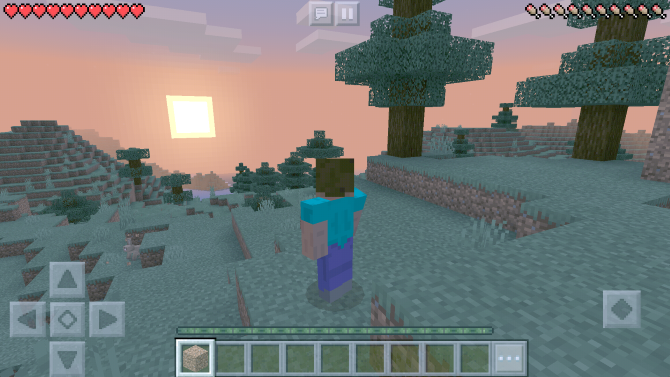
Optimize Minecraft for Linux

As with any other game, it’s also important that you ensure that you’re running the latest graphics drivers.

Graphics drivers for Linux can be installed from AMD and Nvidia, while Intel graphics drivers are also provided. If you prefer open drivers, install these using the Oibaf and X-Edgers PPA repositories.

4. Update Your Linux Kernel

To get the best performance out of Minecraft on Linux it is wise to take some time assessing the kernel. The more recent the kernel, the better the performance.

Ubuntu users can easily grab the latest from the Ubuntu Mainline Kernel repository. However, it’s smarter to upgrade the kernel only if you’re using Intel or open source drivers. Proprietary drivers from AMD and Nvidia usually take time to add support for new kernels.

As such, it’s smarter to stick with your current kernel if you’re using AMD or Nvidia graphic card drivers.

5. Grab the Latest Java Runtime Environment

While the Windows and macOS versions of Minecraft have evolved beyond Java, the Linux version has not.

As such, it’s important that you run the latest version of the Java Runtime Environment (JRE). The latest version of the JRE can be downloaded from Oracle’s Java website, While this is installed in the latest Minecraft installer, it’s wise to keep an eye on the JRE to ensure it is up to date.

See our guide to installing Minecraft on Linux for more details on how to do this.

6. How to Add the OptiFine Mod to Minecraft

Mods for Minecraft typically add to or enhance existing functionality. The OptiFine mod can be installed onto Minecraft to make various changes to the stock game. But what does Optifine actually do?

Optifine adds things like:

  • Improved FPS (frames per second)
  • High definition textures
  • Shaders and dynamic lights
  • Anti-aliasing

You’ll also find configurable animations for things like water, explosions, and more. Check the Optifine home page for full details of what the mod does. If you want to get the best out of Minecraft on Linux, you need the Optifine mod.

Download: Optifine Ultra (Free)

6. Force CPU Into “Performance” Mode

Although the difference will most likely be minimal, you can also change the CPU frequency scaling governor to “performance”.

In most cases, the frequency of your CPU is scaled down so that it saves power. However, it also takes time to scale it back up for gaming and other processor intensive tasks.

Setting the governor to “performance” forces the CPU to run at maximum frequency the entire time.

Note that this will draw much more electricity, so it’s unsuitable if you’re running Minecraft on battery power. It’s also not smart to use performance mode if you’re trying to keep your energy bill down.

To do this, all you need to do is run the following command in a terminal BEFORE launching the game:

cpupower frequency-set -g performance

Once that is done, you’ll be good to go. Once you’re done, just run the same command but replace performance with ondemand, or simply restart your computer.

Performance mode is not the same as overclocking, which makes the CPU go faster than it was designed to go. The performance governor is safe and won’t cause damage so long as your PC fans are ventilating properly.

7. Use the Debug Menu to Monitor Minecraft Performance

Minecraft features a hidden overlay that can be activated to keep tabs on performance.

If you’re experiencing issues with game play in Minecraft, hitting F3 will display the debug menu overlay. This reveals information like your position on the map, alongside used memory, how much is allocated, FPS, and chunk updates.

FPS and chunk updates are the key to keeping an eye on Minecraft’s performance. With a low FPS rate (below 30), the game will become jerky—this will worsen as the rate decreases.

The chunk update rate is based on how quickly you’re moving through the world. Chunks are 16 x 16 blocks wide and 256 blocks high. On faster computers you’ll see how the map expands quickly around you. But on a slower machine, this will be sluggish, and the field of distance much shorter—perhaps just four chunks.

As long as chunk updates are high, and the FPS is over 50 you should enjoy a smooth Minecraft session.

8. Optimize Minecraft’s Video Settings

But what if FPS and chunk rates are low? What else can you do to optimize Minecraft for your PC?

The Video Settings menu includes a bunch of options that can be used to tailor Minecraft to your hardware. During your game hit Esc > Options > Video Settings then adjust the Graphics, Smooth Lighting, Render Distance (chunks), and FPS.

Adjust these settings to find the right balance between the game looking great and playing without stuttering.

Minecraft Should Now Run Faster

By now you should have a more streamlined, efficient, and prettier version of Minecraft running.

If not, it could be because your system spec just isn’t up to the job. In this case, why not try out Minetest, a not-quite-as-good free clone of Minecraft.

More lightweight and written in C++, this is an efficient piece of software that has lower system requirements. It’s certainly worth considering if you can’t get Minecraft optimized for Linux and don’t have an alternative.

Wondering if you should let your child play Minecraft? Check out our guide to Minecraft’s age rating and how it applies to your kids.

Read the full article: How to Install and Optimize Minecraft on Linux: 8 Key Steps


Demonstrating 15 contact tracing and other tools built to mitigate the impact of COVID-19


Personal-symptom trackers, digital contact-tracing and exposure-notification tools are under development in the United States and around the world — their adoption could help healthcare workers mitigate the impact of further waves of COVID-19. These technologies also have significant privacy and security issues. The COVID Tech Task Force has a conference scheduled in 10 days to discuss the key issues related to COVID technologies.

As part of our work preparing for that conference, we collected and reviewed the leading apps in the U.S. With the goal of helping the public, and state and local governments, better understand the privacy and security features of leading applications, we’re sharing the information and demos we gathered from the teams building these applications.

We have sorted the demos into three broad categories: (1) contact-tracing/exposure-notification applications using Google/Apple API, (2) contact-tracing/exposure-notification applications not using Google/Apple API, and (3) personal-symptom-tracking applications.

We surveyed teams regarding privacy, security and commercialization of personal data. We’ve made the results of the surveys available here. We encourage you to look through the responses and share your thoughts on how different applications have approached these important issues.

The applications featured in this article were to be demoed at the Contact Tracing and Technology Conference originally scheduled for this week — in light of the significant conversations around racial injustice and police brutality against Black Americans we rescheduled it to ensure we are not taking up unnecessary space. The conference is now rescheduled or June 17th — if you RSVP’d, we look forward to seeing you there; if you haven’t, please do!

The conference will be hosted by the COVID Tech Task Force, in collaboration with TechCrunch, Harvard’s Berkman Klein Center, NYU’s Alliance for Public Interest Technology, Betaworks Studios and Hangar. The COVID Tech Task Force is composed of a group of volunteers who came together in March to help convene a forum for state and local governments and the tech community to work together to mitigate the impact of COVID-19.

If you’ve built a contact-tracing or exposure-notification application, please feel free to reach out to partners@crttf.org and fill out the survey here.

Applications using Google/Apple API

Google and Apple have collaborated to create development tools in order to provide a cross-platform way for public health agencies to notify individuals of a potential exposure.

COVID SafePaths

SafePaths is developing free, open-source, privacy-by-design tools for individuals, public health officials and larger communities to flatten the curve of COVID-19, reduce fear and prevent a surveillance-state response to the pandemic.

If you want further information, reach out to info@pathcheck.org.

CoEpi

CoEpi is an open-source project developing a decentralized, privacy-first app for anonymous Bluetooth-based exposure notification based on symptom sharing. Communities of close contacts can begin protecting themselves with CoEpi without requiring widespread adoption among the general population; there is no scale required to achieve benefit to small user groups. CoEpi helps you anonymously alert the people with whom you interact about symptoms of a contagious illness, or alert you if you might have been exposed in an interaction.

If you want further information, reach out to Dana+CoEpi@OpenAPS.org.

COVID Shield

COVID Shield is a free exposure notification solution built with privacy as its top priority. It was built by a group of volunteers, many from Shopify, in order to help Canadians and the rest of the world safely return to work.

If you want further information, reach out to press@covidshield.app.

CovidSafe

The team consists of a group of public health officials, doctors, researchers and engineers based out of the University of Washington and Microsoft who are working together to keep the public safe and to help public health systems in managing the outbreak.

If you want further information, reach out to covidsafe@uw.edu.

COVID Trace

COVID Trace is a nonprofit offering a COVID-19 exposure-notification app for iOS and Android using the Apple/Google exposure-notification APIs. People using COVID Trace can expect privacy and simplicity. With COVID Trace, health departments get an app and metrics that are an extension of their efforts. COVID Trace is ready to be used today.

If you want further information, reach out to hello@covidtrace.com.

Zero

Zero is a citizen-led nonprofit that leverages technology for pandemic response, focused on facilitating safe social behavior and peace of mind. Their goal is to stem the spread of COVID-19 and give citizens the information they need to feel safe and confident engaging with their local economy.

If you want further information, reach out to support@usezero.org.

Covid Watch

COVID Watch uses the Apple/Google GAEN protocol, which it claims its developers explained to Apple how to build based on their original TCN protocol. The Covid Watch team was founded by researchers from Stanford and Waterloo and claims to be the first in the world to invent, develop and open-source a decentralized Bluetooth exposure alert protocol in early March.

If you want further information, reach out to contact@covid-watch.org.

Applications not currently using Google/Apple API

Note that some of these organizations have indicated they might use the Google/Apple API in the future. Some of them intend to and are waiting on confirmation from Google/Apple.

NOVID

NOVID claims to be the first (and currently only) completely anonymous contact-tracing app published in the USA that uses no personal information. No GPS, no phone number, no email — it’s completely anonymous. The app utilizes ultrasound to provide extremely accurate measurements of interaction distance, overcoming the known inaccuracies of Bluetooth. The team is led by Carnegie Mellon professor and internationally renowned mathematician, Po-Shen Loh.

If you want further information, reach out to feedback@novid.org.

Healthy Together

Healthy Together is an end-to-end COVID-19 response platform that is fully integrated into public health and the enterprise. Launched in April for the State of Utah, Healthy Together’s mobile applications support self-assessment, COVID-19 testing access and results, and augmented contact tracing, as well as enterprise contact tracing, workflow tools, data integrations and visualizations. Leveraging existing technology that has scaled to millions of users and informed by public health experts, Healthy Together will soon be announcing additional states and enterprise customers that are using the platform to protect the health of residents and employees.

If you want further information, reach out to info@healthytogether.io.

Sharetrace

Sharetrace is a health passport and contact-tracing application that’s privacy-preserving by design. Built on user-owned personal data accounts, pioneering personal data privacy technology, it can safely use sensitive data without the risk of sovereign surveillance by either companies or governments. Sharetrace is a collaboration between U.K. and U.S. universities, including Case Western Reserve University in Ohio. Learn more online at sharetrace.org.

If you want further information, reach out to jonathan.holtby@dataswift.io.

Coalition Network

Coalition Network is a nonprofit whose founders and team have been building and implementing decentralized, Bluetooth-based network solutions on mobile for the past decade. Coalition’s open source Whisper Tracing Protocol has been peer reviewed by cryptographers at MIT, Stanford, USC and Oxford, and adopted by the government of Senegal.

If you want further information, reach out to micha@coalitionnetwork.org.

Safe2

Safe2 is a COVID-19 exposure warning system for smarter social distancing. The mobile app uses anonymized data from GPS and Bluetooth technology to privately share real-time exposure alerts to help prevent community spread of the virus. Safe2 was founded by Jamison D. Day, Ph.D., data scientist and expert in disaster relief, with an international team specializing in global health, technology and crisis management, with a focus on improving health, economic well-being and privacy.

If you want further information, reach out to hello@safe2.org.

VIRI

VIRI is a contact-tracing platform driven by the ethos of privacy and anonymity, on a mission to allow cross-entity contact tracing without the need to share any personal identifying information. It can be incorporated into an existing enterprise app as an API seamlessly allowing compatibility between enterprises and institutions at a global scale while letting the entities adhere to various healthcare-data regulations. VIRI deploys a hybrid back-end architecture that leverages permissive blockchain technology.

If you want further information, reach out to sumit@viri.io.

Symptom Trackers

COVID Near You

COVID Near You, a crowdsourced COVID-19 symptom tracker, was created by epidemiologists and software developers within the Innovation and Digital Health Accelerator at Boston Children’s Hospital. The Boston Children’s Hospital team has background and expertise in developing platforms in infectious disease surveillance, and provides technical capacity in building visualization-based tools for public health response efforts. The COVID Near You team aims to support public health surveillance measures of COVID-19 and conduct research using the self-reported data to better understand the impact of this disease across North America.

If you want further information, reach out to covidnearyou@healthmap.org.

How We Feel

How We Feel lets you self-report your age, sex, ZIP code and any health symptoms you experience. The app was built by an independent, nonprofit organization called The How We Feel Project. Their tech team includes Ben Silbermann, CEO of Pinterest, and a volunteer group of current and former Pinterest employees. They are working with scientists, doctors and public health professionals from leading institutions including, the Harvard T.H. Chan School of Public Health, the McGovern Institute for Brain Research at MIT, Broad Institute of MIT and Harvard, Howard Hughes Medical Institute, University of Pennsylvania, Stanford University, University of Maryland School of Medicine and the Weizmann Institute of Science.

If you want further information, reach out to info@howwefeel.org.


Read Full Article

Lidar helps uncover an ancient, kilometer-long Mayan structure


Lidar is fast becoming one of the most influential tools in archaeology, revealing things in a few hours what might have taken months of machete wielding and manual measurements otherwise. The latest such discovery is an enormous Mayan structure, more than a kilometer long, 3,000 years old, and seemingly used for astronomical observations.

Takeshi Inomata of the University of Arizona is the lead author of the paper describing the monumental artificial plateau, published in the journal Nature. This unprecedented structure — by far the largest and oldest of its type — may remind you of another such discovery, the “Mayan megalopolis” found in Guatemala two years ago.

Such huge structures, groups of foundations, and other evidence of human activity may strike you as obvious. But when you’re on the ground they’re not nearly as obvious as you’d think — usually because they’re covered by both a canopy of trees and thick undergrowth.

“I have spent thousands of hours of fieldwork walking behind a local machete-wielding man who would cut straight lines through the forest,” wrote anthropologist Patricia McAnany, who was not involved in the research, for an commentary that also appeared in Nature. “This time-consuming process has required years, often decades, of fieldwork to map a large ancient Maya city such as Tikal in Guatemala and Caracol in Belize.”

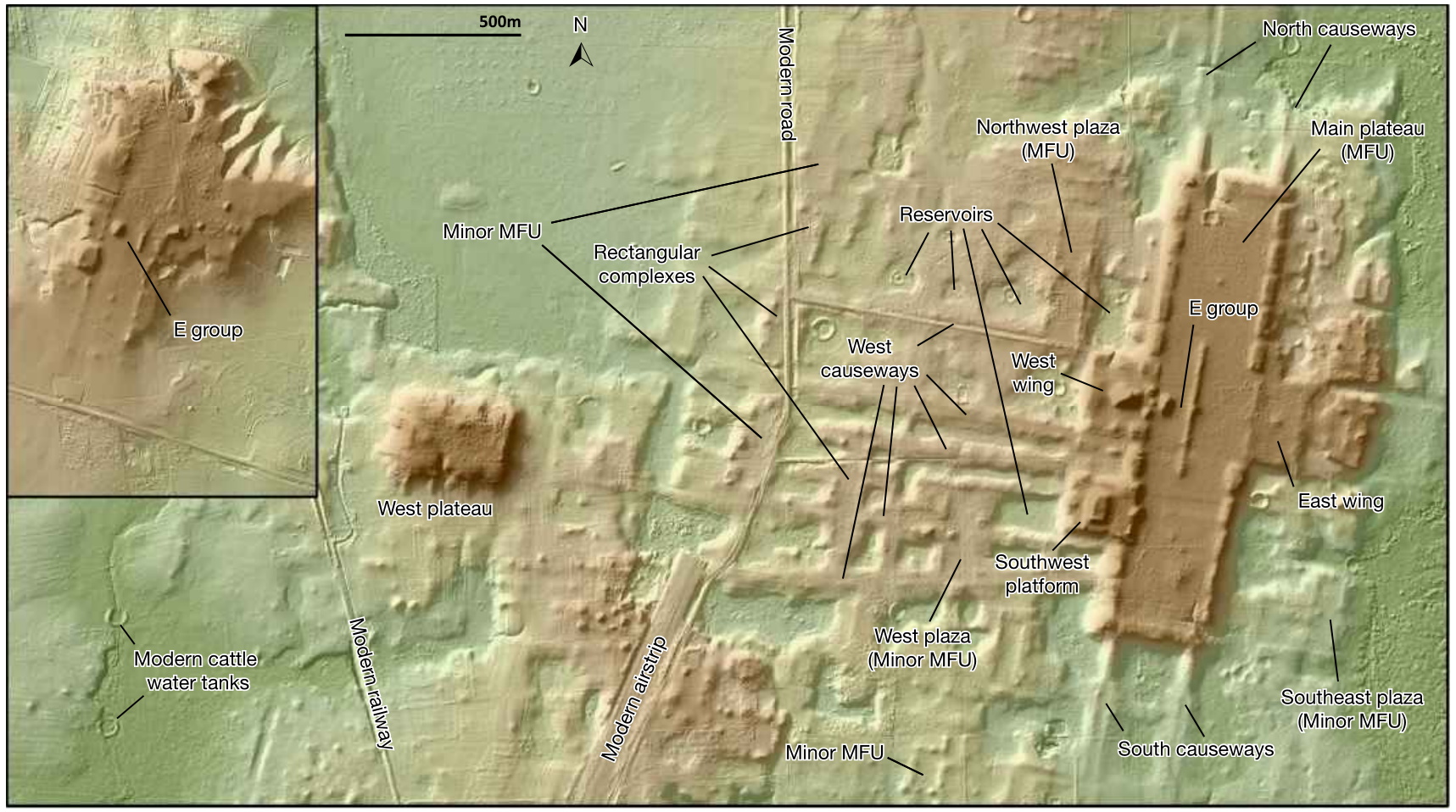
You can see an aerial view of the site below. If you didn’t know there was something there, you might not notice anything more than some slightly geometric hills.

Lidar detects the distance to objects and surfaces by bouncing lasers off them. Empowered by powerful computational techniques, it can see through the canopy and find the level of the ground beneath, producing a detailed height map of the surface.

In this case the researchers picked a large area of the Tabasco region of Mexico, on the Guatemalan border, known to have been occupied by early Mayan civilization. A large-scale, low-resolution lidar scan of the area produced some leads, and smaller areas were then scanned at higher resolution, producing the images you see here.

What emerged was an enormous ceremonial center now called Aguada Fénix, the largest feature of which is an artificial plateau more than 10 meters tall and 1.4 kilometers in length. It is theorized that these huge plateaus, of which Aguada Fénix is the oldest and largest, were used to track the movement of the sun through the seasons and perform various rites.

The high-resolution lidar map also helped accelerate other findings, such as that, owing to the lack of statues or sculptures in honor of contemporary leaders, the community that built Aguada Fénix “probably did not have marked social inequality” comparable to others in the 1,000-800 B.C. timeframe (calculated from carbon dating). That such an enormous project could have been accomplished without the backing and orders of a rich central authority — and at a time when Mayan communities were supposed to be small and not yet stationary — could upend existing doctrine regarding the development of Mayan culture.

All because of advances in laser scanning technology that most think of as a way for self-driving cars to avoid pedestrians. You can read more about Aguada Fénix in Nature and this National Geographic article.


Read Full Article

Aukey introduces an extremely compact 100w charger


Let’s talk about chargers. They are, quite possibly, the least exciting thing about a computer. Don’t get me wrong. They’re necessary, obviously. But when was the last time you got really psyched about one?

And yet, here I am, tech blogger guy telling you that today is the first day of the rest of your charger-loving life. Why? Because of three alternately cased letters: GaN. Back at CES, I wrote a piece titled “GaN chargers are still worth getting excited about.” I stand by it. And you, too, will stand by GaN.

That’s short for Gallium Nitride, by the way. The main thing you need to know about it is that it has allowed accessory manufactures to jam a lot of wattage into a surprisingly compact footprint. I’ve been pretty smitten with them since picking up Anker’s 30w PowerPort Atom the CES prior. The thing wasn’t the world’s fastest charger, but it did the trick for a 13-inch MacBook with a footprint just slightly larger than the charger that ships with the iPhone.

These days, however, I lug around a 15-inch laptop, so 30 watts really isn’t going to do much. In fact, you’ll actually watch the battery drain while plugged in. I tried out a couple of new adapters at this year’s CES, as well, but none really scratched the itch. Aukey’s $55 OMNIA 100W PD Charger, on the other hand is pretty close to my sweet spot.

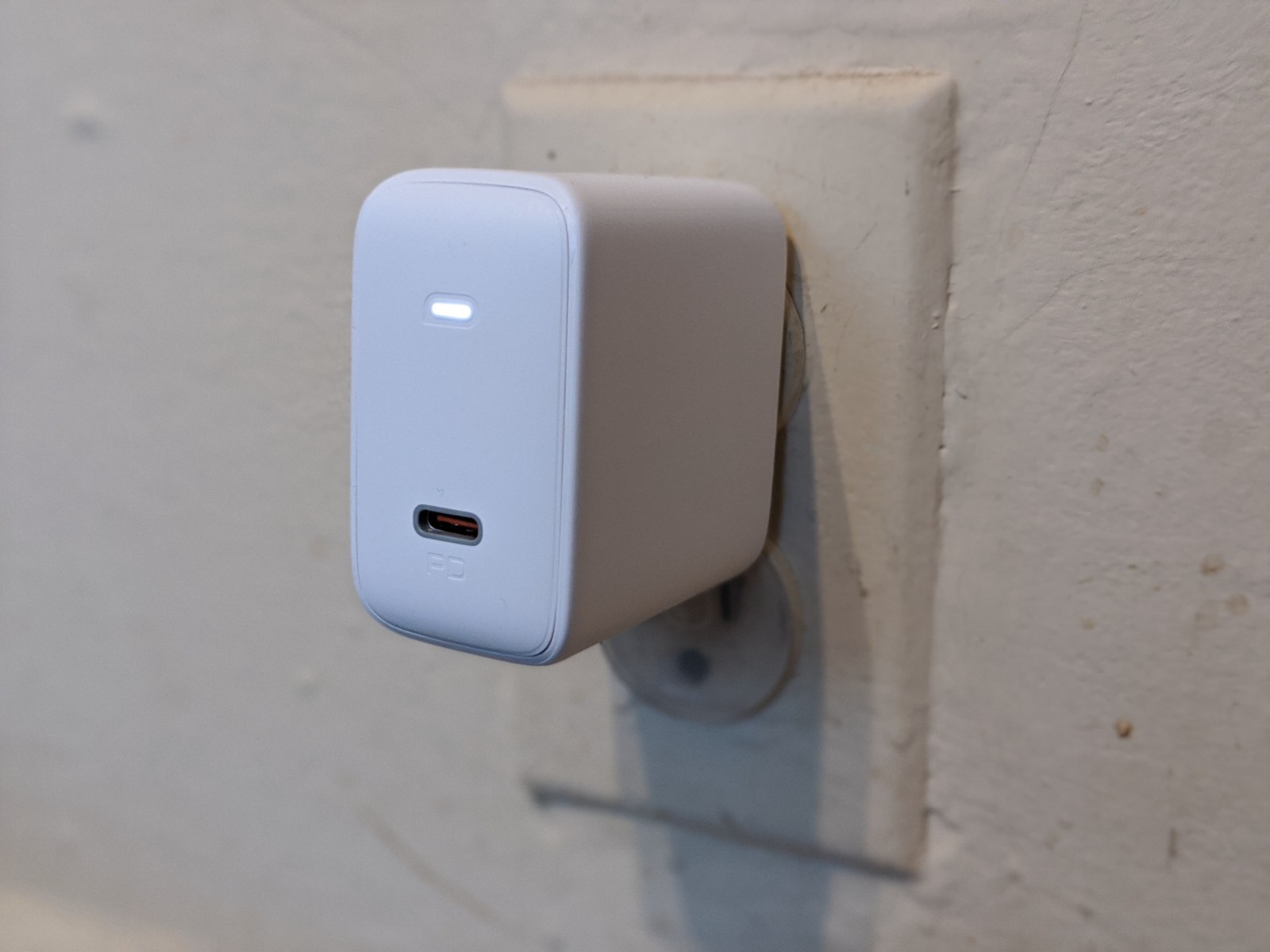
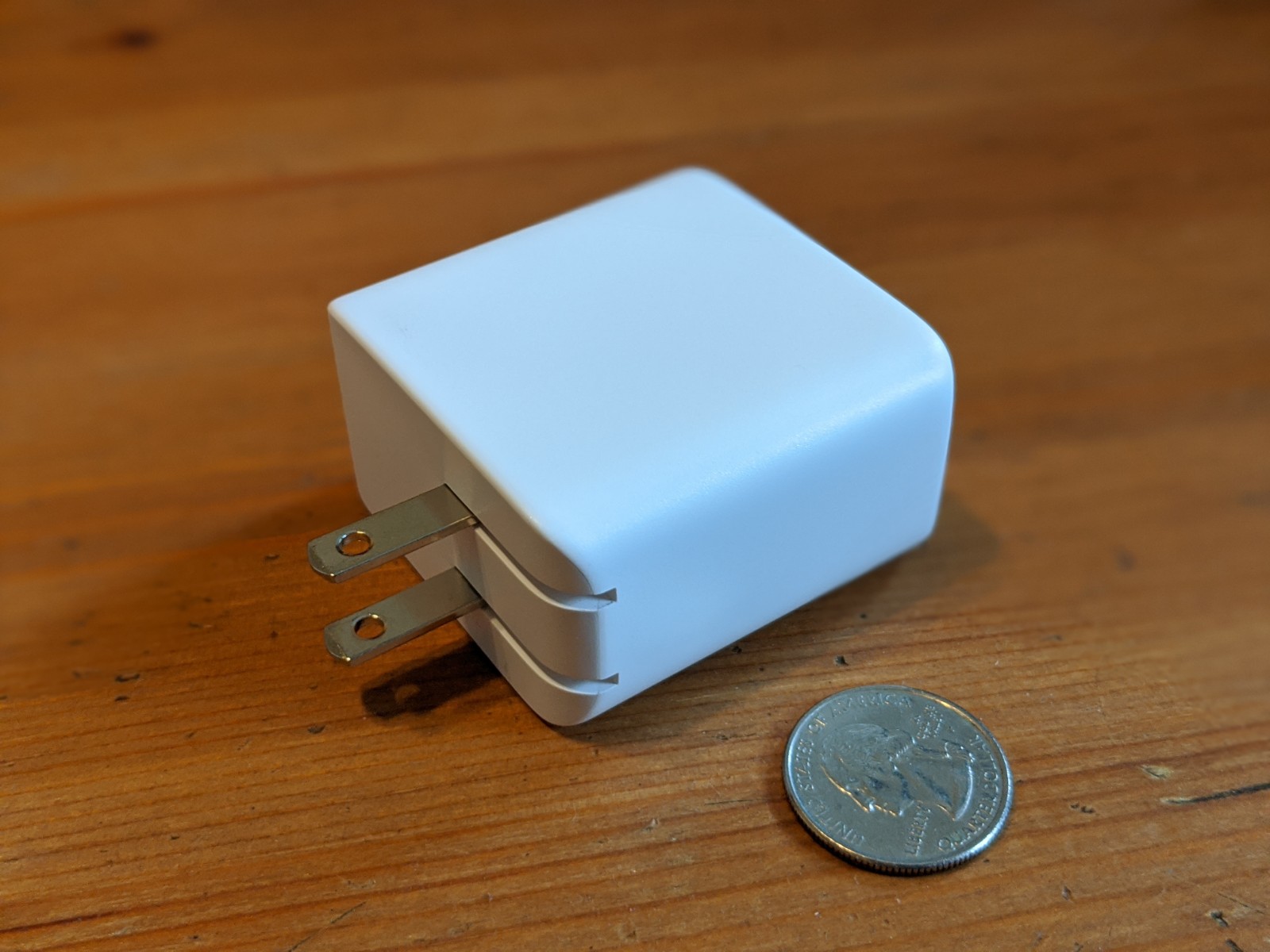
It’s half the size of Apple’s proprietary charger, sharing roughly the same footprint as the Google Pixelbook adapter I’ve been carrying around for a couple of years. But that one’s just a modest 45w. Heck, it’s even more powerful than the 96w model Apple sells for the 15 and 17-inch models.

The size is ideal, though, in part owing to the fact that Aukey didn’t attempt to stick another port on it. This is a one-device-at-a-time charger, which is perfectly fine for most of my needs, and it’s going to have a permanent spot in my bag in that far off time when I’m able to start traveling again.

I will say that it’s surprisingly heavy for its size. This is a dense little charger. It stays put in all of my wall outlets, but it’s going to be a test to see if it stays in place in Delta’s notoriously loose seat chargers. My suspicion is that it most likely won’t — making that a fairly big strike against it for my own once-frequent traveling. The good news is that these companies seem to have an even smaller model every four to six months.

In the meantime, it’s an otherwise great option if you’re looking for a lot of charge in a small footprint, at $24 less than Apple’s 96w model.


Read Full Article

Hair Growth Rate


Hair Growth Rate

Alexis Ohanian steps down from Reddit board, asks for his seat to go to a black board member


Alexis Ohanian, the founder and former CEO of Reddit, stepped down from his position on the company’s board Friday as the U.S. roils with nationwide protests against police brutality after Minneapolis police killed George Floyd, an unarmed black man.

Ohanian is calling on the company he founded to fill his position with a black board member, a high-profile step for a company with its own rocky track record around issues of race.

Many leaders within tech are calling for the industry to have its own reckoning with entrenched racism — an effort Ohanian’s decision may amplify. With the decision, Ohanian also announced that future gains of his company stock would be invested in the black community, “chiefly to curb racial hate.” That amount could total to around $50 million, according to reliable sources. His first move will be to give $1 million to Know Your Rights Camp, an organization founded by Colin Kaepernick that focuses on self-empowerment and safety for black and brown communities.

“I co-founded @reddit 15 years ago to help people find community and a sense of belonging. It is long overdue to do the right thing. I’m doing this for me, for my family, and for my country” Ohanian wrote on Twitter. “I’m saying this as a father who needs to be able to answer his black daughter when she asks: ‘What did you do?’ ”

Ohanian stepped away from his daily duties at Reddit in 2018 but kept a seat on the board at the time. His transition to being more hands-off at the company he founded has been gradual over the last few years as he spent more time on Initialized Capital, an early-stage venture fund he co-founded. In recent years, Ohanian has also become a more outspoken advocate for policies like paid family leave, calling for more equitable, flexible leave policies and citing his own experience as a father. In 2017, Ohanian had a daughter with his wife, tennis legend Serena Williams.

Reddit occupies a unique place among social media platforms. It has largely avoided the spotlight of platforms like Facebook and Twitter, but not for lack of its own systemic problems. Though it hasn’t been as high-profile, the platform has faced its own reckoning around harmful content in recent years for hosting virulently racist content on subcommunities like r/blackpeoplehate, r/The_Donald and others. Reddit has taken action against those communities over time, either banning them outright or placing them in a state of “quarantine” where they are not surfaced in search or recommendations and require a user to click through to view them.

The company’s history with diversifying its leadership has been spotty. In 2015, internal turmoil at the company and a backlash from its users led to the resignation of the company’s interim CEO, Ellen Pao. As we reported in 2016, more than a dozen senior Reddit employees, many of them women and people of color, left the company in the resulting tumult. As it continued its overdue campaign to crack down on violence and hate speech, Reddit brought in its first female board member, Porter Gale, last year.

“I believe resignation can actually be an act of leadership from people in power right now,” Ohanian said in his announcement. “To everyone fighting to fix our broken nation: do not stop.”


Read Full Article