20 March 2020

YouTube goes SD streaming by default in Europe due to COVID-19


YouTube has switched to standard definition streaming by default in Europe.

We asked the company if it planned to do this yesterday — today a spokeswoman confirmed the step. The move was reported earlier by Reuters.

It’s a temporary measure in response to calls by the European Commission for streaming platforms to help ease demand on Internet infrastructure during the coronavirus crisis.

Users can still manually adjust video quality but defaults remain a powerful tool to influence overall outcomes.

A YouTube spokesperson confirmed the switch, sending us this statement:

People are coming to YouTube to find authoritative news, learning content and make connections during these uncertain times. While we have seen only a few usage peaks, we have measures in place to automatically adjust our system to use less network capacity. We are in ongoing conversations with the regulators (including Ofcom), governments and network operators all over Europe, and are making a commitment to temporarily default all traffic in the UK and the EU to Standard Definition. We will continue our work to minimize stress on the system, while also delivering a good user experience.

Yesterday Netflix announced it would default to SD streaming in the region for 30 days for the same reason.

In recent days the EU’s internet market commissioner, Thierry Breton, has held discussions with platform executives to urge them to help reduce the load on Internet infrastructure as scores of Europeans are encouraged or required to stay at home as part of quarantine measures.

The Commission is concerned about the impact on online education and remote work if there’s a major spike in demand for digital entertainment services — and is pushing for collective action from platforms and users to manage increased load on Internet infrastructure.

Breton met with Google CEO Sundar Pichai and YouTube CEO Susan Wojcick to press the case for lowering the quality of video streams during the coronavirus crisis.

Today he welcomed YouTube’s move. “Millions of Europeans are adapting to social distancing measures thanks to digital platforms, helping them to telework, e-learn and entertain themselves. I warmly welcome the initiative that Google has taken to preserve the smooth functioning of the Internet during the COVID19 crisis by having YouTube switch all EU traffic to Standard Definition by default. I appreciate the strong responsibility that Mr Pichai and Mrs Wojcicki have demonstrated. We will closely follow the evolution of the situation together,” said Breton in a statement. 

Google’s spokeswoman told us it hasn’t seen much change in regional traffic peaks so far but said there have been changes in usage patterns from more people being at home — with usage expanding across additional hours and some lower usage peaks. (The company routinely makes traffic data available in the Google Traffic and Disruptions Transparency Report.)

YouTube, along with other major social platforms, has faced scrutiny over the risks of their tools being used to spread coronavirus-related misinformation.

Although, in the case of Google, the company appears to have taken a proactive stance in suppressing bogus content and surfacing authoritative sources of health information. YouTube’s spokeswoman noted the homepage directs users to the World Health Organization for info on COVID-19 or other locally relevant authoritative organizations, for instance.

She also noted the company is donating ad inventory to governments and NGOs to use for education and information — pointing to a blog post earlier this month in which Pichai discussed some of the measures it’s taking to shield users from misinformation that could be harmful to public health.

YouTube will be rolling out a campaign rolling across Europe that encourages people to follow health authorities’ guidance and stay home, she added.

Google’s response to the COVID-19 pandemic looks to be a far swifter and more aggressive to the threat posed to public health than its approach to other types of content that can also be harmful to people’s health — such as anti-vaccination content, which YouTube only moved to demonetize last year.


Read Full Article

Twitter Starts to Combat Coronavirus Lies


As COVID-19 spreads around the world, the misinformation about coronavirus also spreads. Some people are spreading outright lies, while others are using the pandemic to spread propaganda for political reasons or trying to make money off the back of it.

When people start spreading misinformation, we need the platforms they’re using to step up and combat the lies. Which is exactly what Twitter has committed to doing. And it has outlined the rules it has strengthened in order to combat coronavirus lies.

Twitter Cracks Down on Coronavirus Lies

On the Twitter Blog, the company gave an overview of the rules it’s employing. The company’s main weapon is a broadening of its definition of harm. This will enable Twitter to purge tweets that could “place people at a higher risk of transmitting COVID-19.”

This addresses content that goes “directly against guidance from authoritative sources of global and local public health information.” The company will “enforce this in close coordination with trusted partners, including public health authorities and governments.”

Twitter then lists some of the types of tweets it will be asking people to remove, including:

  • “Social distancing is not effective.”
  • “Use aromatherapy and essential oils to prevent COVID-19.”
  • “Drinking bleach and ingesting colloidal silver will cure COVID-19.”
  • “Coronavirus is a fraud and not real – go out and patronize your local bar!!”
  • “If you can hold your breath for 10 seconds, you do not have coronavirus.”
  • “If you have a wet cough, it’s not coronavirus – but a dry cough is.”
  • “People with dark skin are immune to COVID-19 due to melanin production.”

These tweets all contain outright lies or misinformation about coronavirus and COVID-19. And by putting them out into the world, people are obfuscating the facts and helpful advice that legitimate experts are trying to impart. Hence the need to remove them.

Don’t Believe Everything You Read Online

We would hope our readers are intelligent enough to have questioned every single one of these claims. Unfortunately, not everyone on Twitter is capable of that, and would rather believe something they’ve read online than information from a reliable source.

Choosing your sources of information now is more crucial than ever, as the middle of a pandemic isn’t the time to play with the truth. Even in jest. To help you out, we have compiled a list of unbiased news sources free from censorship.

Read the full article: Twitter Starts to Combat Coronavirus Lies


Read Full Article

Anthony Levandowski pleads guilty to one count of trade secrets theft under plea deal


Anthony Levandowski, the former Google engineer and serial entrepreneur who was at the center of a lawsuit between Uber and Waymo, has pleaded guilty to one count of stealing trade secrets while working at Google under a plea agreement reached with the U.S. District Attorney.

While Levandowski still faces a possible prison sentence of between 24 to 30 months, the outcome is much rosier than it could have been. In August, federal grand jury indicted Levandowski on 33 counts of theft and attempted theft. He was looking at a protracted legal fight and a trial that wasn’t expected to begin until 2021.

“Mr. Levandowski accepts responsibility and is looking forward to resolving this matter. Mr. Levandowski is a young man with enormous talents and much to contribute to the fast-moving world of AI and AV and we hope that this plea will allow him to move on with his life and focus his energies where they matter most,” his attorney, Miles Ehrlich said in an emailed statement.

Under the plea agreement, Levandowski admits to downloading thousands of files related to Project Chauffeur, the Google self-driving project that later spun out to become Waymo. Levandowski was an engineer and one of the founding members of Project Chauffeur, which launched in 2009. Scroll down to read the plea agreement.

He said that in 2015, prior to leaving to start his own self-driving trucking company, he downloaded 14,000 documents from an internal Google server and transferred it to his laptop. Levandowski specifically pleaded guilty to count 33 of the indictment, which is related to taking what was known as the Chauffeur Weekly Update, a spreadsheet that contained a variety of details including quarterly goals and weekly metrics, the team’s objectives and key results as well as summaries of 15 technical challenges faced by the program and notes related to previous challenges that had been overcome, according to the filing.

Levandowski said in the plea agreement that he downloaded the Chauffeur Weekly Update to his personal laptop on or about January 17, 2016, and accessed the document after his resignation from Google, which occurred about 10 days later.

“Mr. Levandowski’s guilty plea in a criminal hearing today brings to an end a seminal case for our company and the self-driving industry and underscores the value of Waymo’s intellectual property,” a Waymo spokesperson said in an emailed statement. “Through today’s development and related cases, we are successfully protecting our intellectual property as we build the world’s most experienced driver.”

Levandowski left Google and started Otto, a self-driving trucking company that was then bought by Uber. Waymo later sued Uber for trade secret theft. Waymo alleged in the suit, which went to trial and ended in a settlement, that Levandowski stole trade secrets, which were then used by Uber. Under the settlement, Uber agreed to not incorporate Waymo’s confidential information into their hardware and software. Uber also agreed to pay a financial settlement that included 0.34% of Uber equity, per its Series G-1 round $72 billion valuation. That calculated at the time to about $244.8 million in Uber equity.

The plea deal puts an end to any criminal charges. However, Levandowski still faces a civil matter. An arbitration panel ruled in December that Levandowski and Lior Ron had engaged in unfair competition and breached their contract with Google when they left the company to start a rival autonomous vehicle company focused on trucking, called Otto. Uber acquired Otto in 2017. Earlier this month, San Francisco County court confirmed the panel’s decision and order Levandowski to pay $179 million.

Ron settled in February 2019 with Google for $9.7 million. Levandowski had disputed the ruling. The San Francisco County Superior Court denied his petition, granting Google’s petition to hold Levandowski to the arbitration agreement under which he was liable. Levandowski himself may not have to pay the money personally, as this sort of liability may fall to his employer depending on his contract or other legal quirks. However, Levandowski personally filed March 4 for Chapter 11 bankruptcy, stating that the presumptive $179 million debt quite exceeds his assets, which he estimates at somewhere between $50 million and $100 million.

Anthony Levandowski plea agreement by TechCrunch on Scribd


Read Full Article

What Is Abandonware and Is It Legal?


Websites that offer formerly paid software for free do so with little to no illusion of legality. However you feel about torrents and warez sites offering paid software and media, it is clear that they are illegal in most countries.

There is one type of site that manages to avoid most scorn. Abandonware sites, like Abandonia, offer all manner of games, free to download. Many of these sites have been up and running for years, which begs the question: is abandonware legal?

What Is Abandonware?

The term “abandonware” refers to software that no longer has active support, or the copyright is no longer enforced actively. Software usually becomes abandonware because the company that owns the rights to it has gone out of business or has been sold to a new owner who’s not interested in continuing development.

abandonia download page quarantine game

With that said, some software becomes abandonware through an official announcement or by cooperation by its developers. Source code for the video game Descent, for example, was released by the game’s developers in 1997. Numerous other games have had similar treatment.

Is Abandonware Legal?

So, is abandonware legal for download?

The simple answer is no, abandonware is not legal. Even if the creator abandons a copyrighted work, it does not become public property automatically. The copyright on the work exists until the copyright expires, the duration of which varies from country to country. Typically, the copyright on a video game will last at least 70 years, and up to 125 years.

How, then, do sites like Abandonia stay up and running? Surely there is a constant stream of litigation landing on their digital doormat? Like most laws, punishment only occurs if you get caught—and the opposing side is willing and able to make the charge stick. Herein is why although abandonware is illegal, it straddles a delicate gray enforcement area.

The majority of content on abandonware sites no longer have an owner to enforce the copyright actively, so no one can sue. In other cases, the owner still exists but does not enforce the existing copyright. For example, you can find classic action-adventure game, System Shock, on heaps of abandonware sites, yet the current copyright holder, Electronic Arts, does nothing about it.

Is It Legal to Download Abandonware?

To answer that specific question, no, it is not legal to download abandonware. But are you likely to find the authorities knocking at your door? Or, end up in front of a judge for breaking copyright? That’s highly unlikely.

Despite the illegality of abandonware, there are no court cases relating to it. At least, none that I could find prosecuting someone for downloading and playing an abandonware title. Companies enforcing existing copyright tend to send a cease-and-desist letter before filing a lawsuit.

When that happens, the abandonware site takes down the offending title in response. There is little use in taking a publisher to court.

Those abandonware sites that continue to offer every abandonware title imaginable skirt international law, using hosting services in countries with a relaxed approach to piracy, copyright enforcement, and so on. For example, abandonware site Home of the Underdogs was founded in Thailand, while Abandonia is based in Sweden.

Of course, if a developer releases software for free, the story is different. Though rare, several games have been released under General Public License, Creative Commons, and other publicly available licenses. Once a game is released in this way, it can’t be reclaimed—but the developer might still hold copyright on new or altered versions of the game.

Another reason for the lack of legal precedent may be a desire for goodwill. Electronic Arts have the legal resources to remove every free copy of System Shock on the market. But what would be the point? Legal action could turn into a public relations disaster.

Similarly, on titles they do care about, like the Ultima series, you no longer find those on abandonware sites (see the section below on Good Old Games for further explanation).

Because of the obstacles laid out above, abandonware appears relatively safe from a legal standpoint. Those who distribute abandonware are unlikely to end up in court, so long as they comply with any cease-and-desist notices.

Is Abandonware Safe?

There are numerous abandonware sites, all offering a very similar list of old titles for download. With so many sites, surely downloading abandonware is safe?

The answer lies with the site you are downloading from. Major abandonware sites like MyAbandonware and Abandonia are safe, serving thousands of users every day. These sites also host almost every abandonware title, so you don’t need to head into the unknown depths of the internet looking for a title on a sketchy website.

Check out the best sites where you can safely download an old PC game for free.

Reasons For Abandonware Sites and Downloads

Abandonware is illegal. That is understood. But there are other reasons why abandonware is an overall positive.

The primary reason is preservation. Abandonware sites preserve old games for anyone to access when many would simply disappear into the digital ether.

Although there are some efforts to protect old games and their source code, such as the Internet Archive or the efforts of the British Library, these projects are selective. Having the abandonware site option keeps even the more obscure titles alive.

The other thing to consider is the wishes of the game developers.

“Is it piracy? Yeah, sure. But so what?” says Tim Schafer of Double Fine Productions (responsible for Grim Fandango, Day of the Tentacle, and many other classics).

“Most of the game makers aren’t living off the revenue from those old games anymore. Most of the creative teams behind all those games have long since left the companies that published them, so there’s no way the people who deserve to are still making royalties off them. So, go ahead—steal this game! Spread the love!”

What Is the Difference Between GOG and Other Abandonware Sites?

The interest in abandonware titles remains strong. Generations of old gamers want to boot up their favorites. Younger gamers are uncovering the old classics through abandonware sites.

But there is another site that has perhaps done more than any other in promoting and protecting abandonware titles: GOG.com.

gog.com abadonware site homepage

GOG.com was formerly known as Good Old Games but updated its branding to reflect the sale of modern titles. Under the name Good Old Games, the site sold titles previously abandoned, turning abandonware into a successful business. Rather than offering abandonware titles for free, Good Old Games worked with the copyright holders to republish the games.

In a way, the success of GOG has threatened the future of abandonware. Many titles that might have been abandoned are now sold for profit by whoever holds the rights to them. More often than not, it isn’t the original developer. The potential for profit from old games gives owners a reason to fight for their property.

GOG’s success also highlights the illegality of abandonware. The only difference between what’s on GOG and what’s on Abandonia is the threat of a lawsuit. Some justifications, like age or incompatibility with modern systems, no longer seem as strong.

Abandonware Is Illegal

But you probably won’t get into trouble for downloading an old game, firing it up in an emulator, and playing the heck out of it. If you’re unsure about how to do that, here’s a quick guide on running old games on Windows 10.

The issues and gray areas of abandonware legality won’t change because of copyright law. And where possible, you should always seek out the paid version of an old game on a site like GOG.com.

Wondering which old games still hold up today? Check out our list of the best old PC games worth playing right now!

Read the full article: What Is Abandonware and Is It Legal?


Read Full Article

The 3 Best VPNs for Torrenting: ExpressVPN vs. CyberGhost vs. Mullvad


best-vpn-torrent

VPNs are useful for hiding your browsing data away from the eyes of ISPs and governments. By extension, therefore, VPNs also make ideal companions for anyone who downloads a lot of torrents. The practice is frowned upon by many. You could face speed throttling—or worse, legal threats—if you don’t use a VPN.

But with all the choice out there, which is the best VPN for torrenting? Keep reading to find out.

How to Choose a VPN for Torrenting

If you’re looking for a VPN for torrenting, there are some specific criteria that will need to be met if you want a smooth experience.

Speed and Bandwidth

Torrent files can be massive. If you’re downloading a lengthy 4K video, its file size could reach upwards of dozens of gigabytes. Therefore, a VPN for torrenting needs to do two things:

  • Provide faster-than-average download speeds.
  • Provide unrestricted bandwidth on your connection.

Security

VPN security comes in many forms. Of course, the more secure your plan, the better. Encryption should be a standard, but people who torrent should also sign up for a plan with a kill switch and DNS leak protection.

A kill switch will protect you if you unexpectedly lose your VPN connection, while a DNS leak can reveal your identity and undermine the purpose of using a VPN in the first place.

Privacy

Ideally, you should never sign up for a VPN that logs your browsing habits. However, for torrenting, it’s especially important. A lack of logging means the VPN provider cannot be hacked, forced, or coerced into giving up your data to media companies and government authorities.

Shared IP Addresses

Using a VPN provider with shared IP addresses adds an extra layer of anonymity to your torrenting. Because you’re sharing with hundreds of other people, it is more difficult for bits of traffic to be traced back to your specific machine.

The 3 Best VPNs for Torrenting

So which VPN providers are best for torrenting?

1. ExpressVPN: Fastest VPN for Torrenting

express vpn servers

Our first pick is ExpressVPN. Let’s look at the service in light of the criteria we discussed above.

Firstly, speed. ExpressVPN is fast. Independent testing has shown that it averages more than 100Mbps on international servers in North America, Europe, and Asia. In total, the company boasts more than 3,000 servers in 160 cities across 94 countries. Just as importantly, ExpressVPN does not limit, throttle, nor restrict your bandwidth usage; it is unlimited.

Unfortunately, the company does do some minor logging, but only to record the amount of bandwidth you use and your timestamps—presumably to help with internal resource management. It does not log your traffic, DNS requests, or IP addresses in any way.

The company is based in the British Virgin Islands. The country is not directly part of the Fourteen Eyes information-sharing alliance; however, it’s a British Overseas Territory, and the UK is part of that group.

ExpressVPN offers robust security and privacy features. They include 256-bit AES encryption, DNS and IPv6 leak protection, a kill switch, and split tunneling. Split tunneling is useful for torrent users: it lets you put your torrent client on the VPN network while leaving the rest of your web traffic untouched.

MakeUseOf EXCLUSIVE: Save 49% on our recommended VPN

2. CyberGhost: A VPN With Unlimited Torrenting

cyberghost muo deal

CyberGhost’s biggest forte is its safety and security. The company is based in Romania, and Romania isn’t part of the Fourteen Eyes alliance. There isn’t even a tenuous link, as there is with ExpressVPN.

The VPN is entirely log-free. It does not keep records about your traffic, DNS requests, timestamps, bandwidth, or IP address. It even offers shared IP addresses for an extra layer of anonymity. The service comes with both a kill switch and DNS leak protection.

CyberGhost also claims to have more servers than ExpressVPN, with 7,000+ in total. It does, however, only offer 91 different locations. More locations are slowly becoming available over time.

To keep your traffic flowing as freely as possible, CyberGhost offers two of the fastest VPN protocols, L2TP and IKEV2.

With CyberGhost, you have access to unlimited, unthrottled bandwidth.

3. Mullvad: Best Torrent VPN According to Reddit

mullvad vpn homepage

There are quite a few subreddits where you can find VPN recommendations. Two of the best are /r/VPN and /r/VPNTorrents, but you can also check out /r/Piracy.

After painstakingly reading endless posts on those subreddits, our entirely unscientific methodology has determined that Reddit’s best VPN for torrenting is Mullvad. Mullvad might not boast the brand recognition that some of its more well-known competitors can, but it matches them in terms of quality.

Like CyberGhost, it does not log any data, not even for troubleshooting purposes. It is also one of the fastest VPNs. Testing saw it boast an average download speed of around 90Mbps.

Security-wise, Mullvad uses AES-256 encryption for all your web traffic. The SSL handshake uses RSA-4096 encryption. The service also offers a kill switch and DNS leak protection. The privacy mantra extends beyond the service itself. Mullvad is also one of the few VPN providers that accept payment in cryptocurrency. It accepts both Bitcoin and Bitcoin Cash.

The service has two downsides. Firstly, Mullvad is based in Sweden. Sweden is a Fourteen Eyes member. However, because the company does not keep any logs, the issue is partially mitigated.

Secondly, because the Mullvad is based in Sweden, the price is listed in Euros. If you’re based in the US or UK, the precise amount you pay each month will change with currency exchange rate fluctuations.

Bonus: The Best Free VPN for Torrenting

Before we talk about the best free VPN for torrenting, let us be clear. This is not a strategy that we recommend. Using a free VPN is fraught with possible issues, logging issues, botnets, and data leaks are all commonplace. If the content you are downloading is from The Pirate Bay or its alternatives and in a “grey area” legally, a free VPN for torrenting might not provide the security you need.

However, if for whatever reason you want to press ahead, you should check out one of the free-tier services from one of the sector’s most well-known names. Companies like Hotspot Shield, Windscribe, or ProtonVPN. They are some of the best free VPNs to protect your privacy.

And the Best Torrenting VPN Is…

For us, it’s a tossup between ExpressVPN and Mullvad. ExpressVPN has the edge thanks to its non-Fourteen Eyes jurisdiction, but Mullvad’s complete lack of logging will appeal to heavy torrent users who fear reprisals. Mullvad also wins on cost, but non-European users might not appreciate being unable to budget a fixed amount for the service every month.

If none of these three services appeals to you, you can always check out our broader list of high-quality paid VPNs.

Read the full article: The 3 Best VPNs for Torrenting: ExpressVPN vs. CyberGhost vs. Mullvad


Read Full Article

Is Popcorn Time Safe? How to Watch Safely


popcorn-safety

Popcorn Time is a revolution in the world of torrents. An app that presents movies beautifully, just like Netflix, but with one crucial difference: they’re all streamed illegally using torrent technology. Popcorn Time is just a really pretty torrent streaming client.

I’m not here to preach though. It’s obvious that streaming or downloading movies without paying for them is illegal. But since you’re going to do it anyway, I just want you to be safe.

Not sure what torrents are? Read our free guide to torrents

The Truth About Popcorn Time and Its Clones

Popcorn Time set the internet alight when it was first released. It offered a Netflix-like experience, but one key difference: all the movies and TV shows you could possibly want. And it was completely free.

The original project was shut down rather quickly, but with the code being open source numerous clones were developed.

However, some users are completely ignorant of where the content actually comes from. There is, after all, no indication in the app itself that you’re doing anything illegal (though newer clones added warnings). It looks just like a streaming service, with nice DVD covers and a great looking interface.

Even users who were aware that the files were obviously of dubious legal origin weren’t necessarily also aware of the underlying technology, believing it to work like any other streaming internet movie site.

The truth is that the app itself (and all the clones) is based entirely on torrents. When users stream media, the app downloads a torrent file, joins the swarm, and immediately seeds the file back out to everyone else.

From the perspective of anti-p2p organizations and the companies hired to monitor torrents, this is a problem. It’s no different to anyone heading over to the PirateBay and downloading it using a traditional torrent client. Popcorn Time is a just very pretty media index and torrent client in one package.

You are still downloading from a torrent. 

Is Popcorn Time safe?

Don’t be under the illusion that you’re protected simply because you’re using Popcorn Time-based apps to stream content instead of downloading in a traditional torrent client. It is exactly the same thing underneath with a pretty interface on top, so every precaution you should take when downloading a torrent still applies when using these streaming applications.

But before you even get to that point, you’ve got to make sure you download the right Popcorn Time.

Which Popcorn Time Should I Download?

The problem with a project becoming open source is that anyone can then make a copy, tweak the app name, and release it as a brand new application. But guess what: they might also have injected some nasty bonus code in the process.

In fact, they may not even have changed the app name. You might think you’re downloading Popcorn Time, but you’re actually downloading something that’s going to work the same as Popcorn Time, all the while secretly running a crypto mining script on your PC.

It’s easy: Popcorn Time isn’t a virus, but “Popcorn Time” is. That’s because you downloaded Popcorn Time from PopcornTime.xx instead of the official site.

But there is no official site anymore. The official site was shut down. The only thing left is the clones. Thankfully, one project emerged as the preferred client, and their code can be inspected and verified.

Okay—so you’ve downloaded the new official open-source client. So that’s safe to use, right? Not so fast. Remember, this is all still based on torrents. Your ISP can see exactly what you’re doing, and if a torrent monitoring company sees your IP in the swarm, it’ll get your info from your ISP and potentially lead to a lawsuit.

The solution, as with many privacy concerns, is to tunnel your traffic through a Virtual Private Network, or VPN.

Always Use a VPN with Popcorn Time

The very nature of peer-to-peer torrent technology means that everyone who attempts to download a file is given a list of everyone else doing the same: you become both the downloader, and uploader. Even if you’ve set your client to never upload, you’ll still be on the list as a peer.

It should therefore be obvious that anti-p2p organizations could do the same thing to figure out who is downloading a specific file. Companies are paid to monitor specific torrents by the copyright owners, which they do by downloading it themselves, checking the swarm, and keeping a record of every IP address they see.

Your IP address is cross-checked against a known list of ISPs. Your ISP is contacted, and they may be forced to pass on the details of the customer associated with an IP at a specific date and time, or asked to take action themselves. Fines, and possible disconnection await repeat infringers.

Using a VPN is the only safe way of having any contact with torrents, period. Tunnel your connection through a torrent-friendly VPN that won’t keep records of who was using the service and when.

This video from CyberGhost VPN explains the concepts.

Good VPNs cost money. Yes, you can find free VPNs, but they aren’t secure for doing anything. There’s a reason they’re free.

We maintain a list of best VPNs, but not all of them are friendly toward torrents. Private Internet Access is the most commonly recommended for p2p users, but even then, you’re asked to restrict your torrent usage to servers located in specific countries.

Good VPN providers are “logless”, meaning they do not keep logs of who does what. Even if local law enforcement were to subpoena them for information on a specific user, they would have no information to give.

Peerblock/Peerguardian Doesn’t Do Anything

It’s often been recommended that anyone dabbling in torrents should run Peerblock or Peerguardian. These apps work like a firewall, maintaining a list of “bad IPs” that belong to anti-p2p organizations, universities, and law enforcement agencies.

The app then prevents those from connecting to your machine. The theory goes that if they can’t connect to you, you won’t end up on their naughty list.

In reality, they don’t need to actually connect to your machine in order to see you’re in the torrent swarm and actively downloading or uploading a file. Peerblock is utterly useless.

Does Peerblock help you stay safe using Popcorn Time?

In fact, these apps often prevent useful peers from seeding a file to you because their IP is unlucky enough to be in a block owned by a certain company or university. The app provides a false sense of security and will not provide any protection when using torrents.

Use a VPN instead.

Malware Risks of Popcorn Time

It is possible to embed malware inside movie files, but it’s extremely rare, and only works on specific media players.

As long as you play standard video file types like MP4, using an up-to-date version of VLC (or through Popcorn Time) you’re safe. Windows Media Player has been exploited in the past through the Digital Rights Management extensions.

A more common attack vector is to make you think you’re downloading a movie, but actually, it’s an executable file. Never randomly double-click a downloaded file.

Or you attempt to play a movie, and it consists of a single screen that instructs you download a different player or Codec pack in order to watch it, which turns out to be a virus. The malware is almost never in the movie file itself.

Beware fake codec popups when using Popcorn Time

Software and games, on the other hand, are always executable files, and as such can easily contain executable malware code. There is no safe way to run pirated software. Instead, get software and games from legitimate sources.

I don’t condone downloading copyright materials, nor can I make any guarantee you won’t get in trouble even after following all this advice—but if you’re going to anyway, these tips are going to give you the best chance of not getting in trouble.

Just remember that those Popcorn Time videos are all courtesy of the BitTorrent network. If you’re thinking about cutting out the middle man, use these “reputable” BitTorrent websites.

Read the full article: Is Popcorn Time Safe? How to Watch Safely


Read Full Article

The 11 Best Free PC Games to Play in 2020


free-pc-games

PC gamers have never had it better. Not a day goes by without a new game hitting the market. Sounds expensive, right? But not to worry, as there are some amazing free PC games available.

In fact, there are so many free games to play, it’s difficult figuring out where to spend your time. Here are the best free PC games in 2020. And the “Genre Alternatives” are all free too.

1. Fortnite

Epic Games’ Fortnite Battle Royale took the world by storm in 2017. It hasn’t let up, attracting more players, more viewers, and launching on more video game platforms since the initial launch.

The free-to-play battle royale space is hotly contested. No matter what other development teams bring to the table, Fortnite’s combination of hectic cartoon-style action and ease of access beats the opposition out.

Also, Epic Games keeps Fortnite fresh. There is a constant stream of new content arriving in the game, luring players to find better skins for their in-game character, the weapons, and, of course, Fortnite’s trademark winning dances.

Not only that, but Epic Games is constantly evolving the Fortnite world, pushing forward the narrative of the game through changes to the map.

For example, part of the way through one season, an enormous meteor appeared in the sky above the game map. The meteor gradually approached, before crashing into an area of the map known as Dusty Depot, changing the area into Dusty Divot, and sprinkling the rest of the map with smaller craters.

Since that time, the Fortnite storyline has continued to evolve, with Epic Games receiving a constant stream of praise for its innovative storytelling techniques.

If you’re intrigued and want to get started with Fortnite, check out our Fortnite essentials cheat sheet. You could become a pro-streamer in no time!

Download: Fortnite for Windows or macOS (Free on Epic Games Launcher)

Genre Alternatives: H1Z1 Battle Royale | Darwin Project | Apex Legends

2. Dwarf Fortress

Dwarf Fortress is probably the most intriguing, enchanting, and infuriating game ever made. Developers, Bay 12 Games, continues to update Dwarf Fortress for free. So, what is it?

You can play Dwarf Fortress as a roguelike, a management sim, an exploration tale, and more. That’s because the possibilities are endless as you attempt to keep your colony of dwarves alive, happy, fed, and working.

The original graphics set is off-putting. There’s no beating about the bush. It makes the extensive (and sometimes fiddly) controls challenging to get to grips with. However, numerous wonderful community tilesets turn the original Dwarf Fortress into a colorful, more accessible proposition.

Download: Dwarf Fortress for Windows | macOS | Linux (Free)

Genre Alternatives: Brogue | Nethack

3. Path of Exile

Path of Exile is one for fans of Diablo and other dungeon-crawling RPGs. Originally released back in 2013, Path of Exile continues to receive regular updates and is now a top ranking free-to-play game.

The storyline isn’t fantastic, hitting those classic RPG tropes: washed up, lost, clothed in rags, fight to become the ultimate beast slayer. However, Path of Exile does create a unique identity with its extensive skill trees, an incredible range of loot, and the new bosses, game systems, and play styles regularly arriving.

Download: Path of Exile for Windows (Free on Steam)

Genre Alternatives: Path of Diablo | Neverwinter

4. Magic: The Gathering Arena

Magic: The Gathering Arena is the free to play digital collectible card game that brings Magic: The Gathering (MTG) to your PC.

MTG Arena is far from the first digital iteration of the phenomenally popular tabletop battle card game. It is, however, the first digital version of MTG that follows the meta of the tabletop version, allowing players to create decks that match the expansions of the physical game.

In that, MTG Arena closely resembles a physical game of MTG, too. You still play land cards to build mana, build a personal deck, and open packs to find new and rare booster cards.

While MTG Arena is free-to-play, it uses a freemium model that allows microtransactions and booster pack purchases. You might encounter someone with a premium deck every now and then, but there are huge amounts of MTA Arena players sticking to free decks, booster packs, and so on.

Furthermore, although the game closely resembles the physical game, you don’t need any experience to start playing. The game includes plenty of tutorials that explain how the various game systems work, along with some basic strategies.

One other MTG Arena feature we really like are the animations. For years, MTG was a static tabletop game. Now, MTG Arena brings your cards to life with awesome explosions and swirling summons.

Download: Magic: The Gathering Arena for Windows or macOS (Free)

Genre Alternatives: Hearthstone | Gwent | The Elder Scrolls: Legends | Legends of Runeterra

5. Destiny 2

Destiny 2 went free-to-play in 2019, opening Bungie’s online-only first-person shooter up to the masses. At the same time, developers Bungie reworked weapons, armor classes, content drops, and the power level cap to encourage players old and new to plow into the new content. As well as this, new Destiny 2 game modes appeared, as well as new interplanetary locations to explore.

The result is an expansive space-shooter, taking on three different factions, all vying to control the Destiny 2 universe. If it’s all new to you, check out our beginner’s guide to Destiny 2.

Even if you don’t dive deep into Destiny 2, it is worth exploring for the often mind-boggling landscapes and extraordinary dungeons you wind through. Oh, and the Sparrows are awesome to whizz around on, too.

Download: Destiny 2 (Free on Steam)

Genre Alternatives: Planetside 2

6. StarCraft II

In 2017, Blizzard released StarCraft II for free. Which means one of the best real-time strategy (RTS) games of all time is now free-to-play. The free-to-play offering covers the original StarCraft II: Wings of Liberty single player campaign, but not the follow-ups, Heart of the Swarm, Legacy of the Void, or Nova Covert Ops.

The free version of StarCraft II also allows you to access the ranked multiplayer league tables. We’re not sure why you would subject yourself to such a torturous ordeal, but each to their own.

Download: StarCraft II for Windows | macOS (Free on Battle.net)

Genre Alternatives: StarCraft | Total War Battles: Kingdom | OpenRA | Twisted Insurrection

7. Heroes of the Storm

From Blizzard’s all-conquering RTS to the game Blizzard doesn’t classify as a MOBA. If it isn’t a MOBA, Heroes of the Storm sure has all of the core characteristics of one: five-on-five, lanes, a massive array of heroes (taken from other Blizzard titles), and a focus on four specific roles.

Heroes of the Storm is much easier to get into than its more esteemed (or notorious) competitors, League of Legends and Dota 2. The fanbase is seemingly more open, the roles are more comfortable to learn, and the game modes bring variance to each battle to keep it fresh.

Download: Heroes of the Storm for Windows | macOS (Free on Battle.net)

Genre Alternatives: Dota 2 | League of Legends | Smite | Magic Duels

8. Planetside 2

Planetside 2 is an MMOFPS, where you battle to secure different areas across continental maps. With up to 2,000 concurrent players taking part in the battle, Planetside 2 knows a thing or two about epic scale. You can take part in a single fight for hours, log off for a few hours, then log back in to find the same battle waging.

The biggest difference players coming from Battlefield or Call of Duty will find is the time it takes to master and level up weapons and skills. It certainly takes longer to increase those specific skills. However, it isn’t a grind as the battles ebb and flow, and you are not restricted to approaching the battle from a single direction (or vehicle, for that matter).

Download: Planetside 2 (Free on Steam)

Genre Alternatives: None. Nothing touches the scale of Planetside 2 without a price tag.

9. Forza Motorsport 6: Apex

To coincide with the Windows 10 Anniversary Update back in 2016, Microsoft brought the sublime cars, circuits, and environments of Forza Motorsport 6: Apex to Windows 10. Forza Motorsport 6 was the first time Forza appeared on desktop PCs. Previously, Forza was an Xbox exclusive.

The Forza series has a strong reputation for sweeping circuit designs and fantastic car models, and Forza Motorsport 6: Apex doesn’t disappoint. There are 63 cars in total to race, across 12 different events.

Download: Forza Motorsport 6: Apex for Windows (Free on Microsoft Store)

Genre Alternatives: Track Mania: Nations Forever

10. Warframe

For a free game, Warframe packs in a substantial amount of content. Not least the hoverboard skating mode. But in terms of running and gunning (as compared to Path of Exile’s hacking and slashing), the incredible range of weapons, loadouts, and play styles, there is a lot to take in.

There are massive open world areas to explore, an extensive storyline, and the game receives regular content updates. The volume of content can actually become a little overwhelming, at least to begin with. Learning the numerous game systems takes some time, and figuring out crafting and blueprinting can also feel a bit confusing.

Thankfully, the Warframe community is one of the friendliest around, so don’t be afraid to ask a question. Someone is bound to have asked it before.

Download: Warframe for Windows (Free on Steam)

Genre Alternatives: Double Action: Boogaloo | Brink | Dirty Bomb | Team Fortress 2

11. EverQuest

Head back to one of the oldest MMOs around to build your characters through 110 levels, over 500 zones, and countless questlines. Yes, EverQuest is still going strong 20+ years on.

As a testament to the game, The Burning Lands expansion was the 25th content expansion, introducing new zones, raids, quests, and spells. It hit the market in 2018—19 years after the original game.

The graphics may look a little dated, but EverQuest holds up in so many other areas. You and a group of friends have thousands of hours of questing across Norrath ahead.

Download: EverQuest for Windows (Free on Steam)

Genre Alternatives: EverQuest II | Rift | Guild Wars 2 | Runescape | Maplestory 2

Are These the Best Free PC Games?

This is a substantial list of the best free PC games available to play in 2020. It covers a vast range of genres, and, with the alternatives offered, you have almost 50 games to consider.

We believe these are the best free PC games money can’t buy, but perhaps you want to play something a little older? If so, check out the old PC games still worth playing to this day. You might also enjoy the PC games you can play for five minutes at a time.

Read the full article: The 11 Best Free PC Games to Play in 2020


Read Full Article

Get Your IRS Tax Questions Answered at H&R Block for Free


Whenever tax season rolls around, two things usually happen. First, you start thinking about your refund amount (or if you’ll even receive one). Second, you start worrying about filing your taxes and what it entails.

Whether you’re a first-time tax filer or a long-time payer, there are always questions that need answering. These tax questions might seem daunting, but you don’t have to handle them alone. By using H&R Block, you can get all your IRS tax questions answered for free.

Test Your Financial Awareness

Before directly addressing any specific tax questions, H&R Block offers two helpful tests. Both tests check areas that can help you prepare for better financial decisions for your upcoming tax year. Neither are long and aim to improve your self-awareness and be better informed.

The financial literary quiz examines your experience across different financial scenarios. The second quiz checks whether you’re at risk for tax identity theft and then advises on ways to improve.

These are great free options to examine at the start of your fiscal year.

Get Familiar with H&R Block’s Tax Information Center

H&R block tax center icons

If you’re ready to get your tax questions answered for free by H&R Block, it all begins with visiting their tax information center. At the top of the page, you’ll notice H&R Block’s three article tags: Featured, News, and Popular. They’re a good indicator of the site’s biggest offerings.

But if you’re searching for anything specific, you can scroll down a little more. The online tax center offers two major divisions: Topics and Tools. You can check everything available by clicking on the buttons for either All topics or All tools.

You can also use the icons located below these two buttons. These serve as quick access points to the most popular topics and tools. If you continue down further, you’ll see H&R Block’s filing options.

If you’re curious, take a look at how H&R Block’s free tax filing plan provides the most value.

Check Out H&R Block’s Topics

If you selected the topic button, you’ll see the posts split up into these categories:

  • Around Block (general H&R Block information)
  • Filing
  • Income
  • IRS
  • Lifestyle
  • Small Business
  • Healthcare

While mostly self-explanatory, H&R Block offers a quick explanation of each of its topics. To help you get to your questions, it divides each of these large topics into several subsections. Each subsection comes with a description as well to help make searching a little easier.

So if you know roughly where your tax question falls, H&R Block can help you quickly find it.

As another option, you can always view all the topics under the main categories. Browse through them if you’re uncertain about what to look for so that you don’t miss any critical information.

Let H&R Block Guide You to All the Answers

H&R block tax article

Once you’ve decided to click on an article, H&R Block answers the questions very succinctly. Additionally, depending on the article type, you’ll see the writer and their professional experience noted. The articles themselves make it easy to find related information.

If you’re investigating anything and you need more information, there are two ways to quickly move forward. You can either click the sidebar’s related resources or look at related topics at the bottom of each article.

Check Out H&R Block’s Tools

If directly asking your questions and researching doesn’t help, H&R Block offers a variety of free tools to get a handle on your tax situation. By using either the website’s resources or their mobile app, you can take an active look at your tax situation.

Make Your Tax Prep Checklist Before Filing Tax

tax prep checklist

When looking for ways to help get your information together, the classic checklist remains a useful tool. H&R Block offers the option to create your own tax checklist or print the full list. If you choose to create your own, you’ll answer a short quiz to help generate your list.

Regardless of which option you choose, you’ll end up with a checklist of your personal information, your dependent(s) information (if any), sources of income, and the types of deductions. If you’re looking to self-file for the upcoming tax year, this provides a great organizational method.

Estimate Your Tax Refund
tax refund estimator

One of the most stressful points of the tax experience can be whether or not you’ll receive a refund. Using H&R Block’s free refund estimator, you can quickly get a read on your situation. Simply answer a few questions about yourself, your income, and your expenses to get your results.

In the end, you’ll get an estimate based on your taxable income, taxes owed, tax credits, and taxes paid. You can then choose to log-in and save your information, go to the tax prep checklist, or begin filing.

Use the Mobile App to Answer Your Questions While Filing

If you need help on the go, H&R Block Tap Prep and File offers an easy-to-use help tab. At any point during the filing process, you can swap over to this tab and look up your questions. As you type in the search bar, you’ll also receive suggestions to speed up your search.

All results show up in the app itself.  As such, don’t worry about having to go between H&R Block Tax Prep and File and a browser app.

Can’t find what you need? Click the magnifying glass icon to search again. You can also select the answer wasn’t helpful to bring the search bar back up.

Download: H&R Block Tax Prep and File for Android | iOS (Free)

Get Your H&R Block’s Tax Questions Answered for Free

Whether you’re utilizing H&R Block’s tax center or app, you won’t have to pay a dime. H&R Block’s detailed articles already answer all of your tax questions for free. With the added knowledge, you can file with confidence.

If you’re looking for another filing option, you can apply your new knowledge and learn how to file taxes online with TurboTax.

Also, see why FreeTaxUSA is worth using to file instead of TurboTax or H&R Block. Regardless of the company you choose, just remember H&R Block will still always offer free resources.

Read the full article: Get Your IRS Tax Questions Answered at H&R Block for Free


Read Full Article

How to Hide or Unhide Columns and Rows in Excel


excel-columns-rows

If you’re dealing with a data-heavy spreadsheet, sometimes it’s helpful to hide or unhide rows and columns to better see the information you need to analyze. Fortunately, Excel makes it easy to do this.

How to Hide Columns and Rows in Excel

Start by selecting the column(s) or row(s) you want to hide. You can do this a few different ways.

  • Select multiple adjacent columns or rows: Click the first column or row, hold the Shift key, and click the last column or row.
  • Select multiple non-adjacent columns or rows: Click the first column or row, hold the Control key (Command on Mac), and click the remaining columns or rows.
  • Use the name box: Type a cell label in the name box to the left of the formula field. For example, if you want to hide the second row, for type B2. (For more, check out our guide to the Excel name box.)

Once you make your selection(s), follow one of these two methods to hide the columns or rows.

  • Right-click the selected column or row you want to hide and choose Hide. (This method will not work if you’ve typed in the column or row identifier.)
  • Click the Home tab and in the Cells group, click Format > Hide and Unhide and pick either Hide Rows or Hide Columns.

Excel Hide Columns or Rows

The column or row will be hidden and you’ll see a thin double line indicating where the hidden column or row resides.

Excel Hidden Columns

How to Unhide Columns or Rows in Excel

There are a few ways to select and unhide columns or rows:

  • Right-click the thin double line indicating a hidden row or column and select Unhide.
  • Select the two surrounding columns or rows. On the Home tab in the Cells group, click Format > Hide and Unhide and choose either Unhide Rows or Unhide Columns.
  • To unhide all columns or all rows in your spreadsheet, select all using the keyboard shortcut Control + A (Command + A on Mac), right-click, and pick Unhide.

Excel Unhide Columns Rows

Keep in mind that while you can hide or unhide either multiple columns or multiple rows at the same time, you can’t hide or unhide both columns and rows simultaneously.

Remember, columns and rows are not the only items you can hide and unhide in Excel. And for more ways to work with your data, take a look at how to freeze and lock data in Excel.

Read the full article: How to Hide or Unhide Columns and Rows in Excel


Read Full Article

The 20 best startups from Y Combinator’s W20 Demo Day


With world events overtaking the tech world’s preferences to meet for coffees and convene at events, Y Combinator skipped its famous two-day live Demo event and went for a radical experiment: no demos at all, but instead a long list of the nearly 200 startups in its Winter 2020 batch, with links to their sites and one-page slides. We’ve done the legwork for you in giving you a full rundown of who does what, and we have also come together on a group video chat on Zoom to talk through our takeaways of the format this year (missed it? here’s the recording). Now, in no particular order, here is our shortlist of some of our overall favorites.


Read Full Article

Vaping additive blamed for outbreak produces ‘exceptionally toxic’ byproducts


The threat of vape lung seems to have receded to the distant past now that we are all facing the coronavirus, but new research has shed light on the nature of that much more limited epidemic. It turns out vitamin E acetate, the vape fluid additive until now merely associated with lung damage, converts into a toxic chemical cocktail when heated.

That vitamin E acetate is not healthy to inhale is not a surprise; The chemical, which essentially had been used to dilute THC oil in cheap aftermarket vape cartridges, was associated in several studies cited by the CDC with lung damage. But at the time it was more correlative than causative information — the oil was found in the lung tissues of those suffering from vape lung, but there was no proven mechanism for harm.

Now work from researchers at the Royal College of Surgeons, in Dublin, has shown that vitamin E acetate’s effects are not limited to sticking around in the lungs and gumming up operations there. In a paper published in the Proceedings of the National Academy of Sciences, Dan Wu and Donal O’Shea write:

A combined analytical, theoretical, and experimental study has shown that the vaping of vitamin E acetate has the potential to produce exceptionally toxic ketene gas…

Additionally, the pyrolysis [i.e. heating] of vitamin E acetate also produces carcinogen alkenes and benzene for which the negative long-term medical effects are well recognized.

In other words, heating up vitamin E acetate, on its own or in a mixture, provably produces a number of toxic and carcinogenic compounds. Other studies would have to establish the potential pathology of those compounds interacting with the lungs, bloodstream, etc, but it’s safe to say that this substance is an extremely dangerous one to be burning and inhaling.

The obvious question of why it was put into cartridges in the first place is answered by the fact that vaping is a much lower cost alternative to cigarettes and many forms of cannabis. As vaping went downmarket a race to the bottom was all but assured and unscrupulous cartridge makers cut THC oils with substances that would produce no major changes in the immediate experience of taste, mouthfeel, and so on. Vitamin E acetate was one of those substances.

There are few regulations on this sector of commerce and frankly, even if there were, it would be trivial to avoid them. Besides, marijuana has a long history of existing outside of FDA approval. People are going to smoke whatever they want. But it seems clear now that there are plenty in the industry who have no problem putting others at risk of serious injury or death to sell more of their product.

It’s difficult to say which vape product providers were using vitamin E acetate, though it seems it was mostly THC cartridges on the low end, which make sense. There’s no need to dilute your product if people are already paying a healthy premium and you have a reputation as a high-end brand.

Exactly how testing and verification should be accomplished is a matter for the FDA, the vaping industry, and individual shops which may conduct their own checks to reassure customers. But the testing must be done — or else other unknown interactions or substances may still produce the sort of long term health effects we are trying to avoid.

As Wu and O’Shea write:

The potential for unexpected chemistries to take place on individual components within a vape mixture is high. Educational programs to inform of the danger are now required, as public perception has grown that vaping is not harmful.

Until it’s been tested, it’s still a risk.


Read Full Article

19 March 2020

Facebook now lets most users opt-in to dark mode & desktop redesign


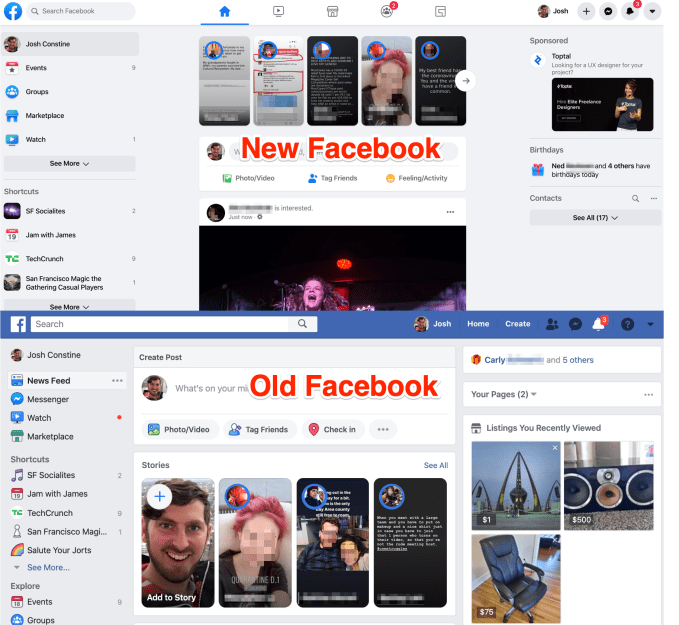
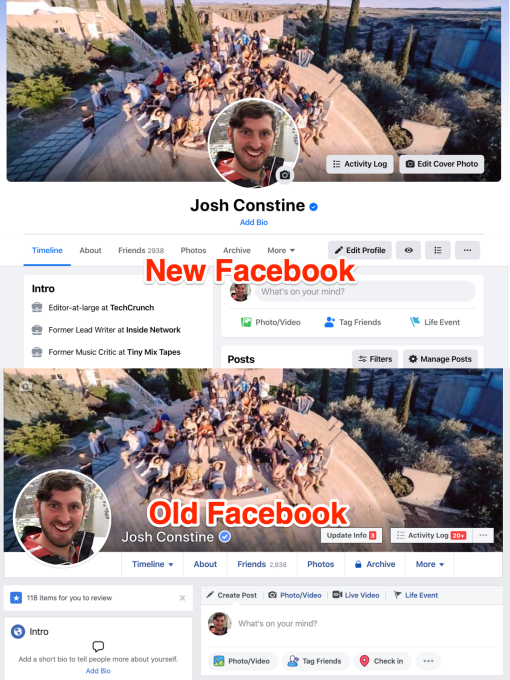
Facebook today officially rolled out its sweeping desktop redesign that offers dark mode, tabbed homescreen, and a cleaner profile. Facebook tells TechCrunch that “starting today, the majority of people on Facebook will have access to the new desktop design” which it announced at last year’s F8 conference. Users can opt-in to turn on the redesign before it becomes the default for everyone later this year.

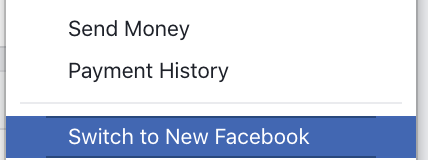
To activate the Facebook.com redesign, go to the Settings Menu -> “See New Facebook”. To disable it, users can return and hit “Switch to Classic Facebook”.

Facebook first began testing the rollout publicly in October, and it seems positive feedback led it to today’s rollout. It comes just weeks after Facebook launched a sweeping redesign of Messenger that removed its Discover tab, demoting the visibility of businesses and chatbots. The company has spent the last two years promising to simplify its apps after a decade of making them more visually complex.

The desktop redesign offers streamlined navigation through tabs for Groups, Marketplace, Watch and more atop the home screen. The home page and transitions also load more quickly. Larger fonts and more sensible layouts make getting around easier on the eyes.

Facebok is also making it faster to create Events, Pages, Groups, and ads. You’ll actually be able to see a preview of what these things look like on mobile before you share them.

Most noticibly, Facebook’s new design brings dark mode, which can be toggled on and off through a switch in the Settings drop-down menu. It’s designed to minimize screen glare while maintaining contrast so you don’t blast your eyes with a white background while in a dim room.

Facebook is in the challenging position of actually still being popular 16 years after its launch. That means the desktop site has built up a ton of cruft as the company ships features that appeal to only subsets of its users. While on mobile, most of that extra stuff is shoved in a navigation drawer, on desktop it’s all laid out and can overwhelm our senses. While most Facebooking happens on mobile now, keeping the hardcore desktop users who create tons of content for the social network happy is critical to its longevity and its ad views.


Read Full Article

Daily Crunch: Facebook and Twitter fight coronavirus misinformation


The big social networks take steps to ensure that they’re providing accurate information for public health, Charter refuses to allow employees to work from home and Microsoft Teams sees a big spike in popularity. Here’s your Daily Crunch for March 19, 2020.

1. Facebook will put a new coronavirus info center on top of the News Feed

In an effort to disseminate trustworthy health information on COVID-19, Facebook will roll out its own coronavirus information center — a central hub where the company will collect information from sources like the CDC and WHO.

Meanwhile, Twitter updated its safety policy to prohibit tweets that “could place people at a higher risk of transmitting COVID-19.” The new policy bans tweets denying expert guidance on the virus, encouraging “fake or ineffective treatments, preventions and diagnostic techniques,” as well as tweets that mislead users by pretending to be from health authorities or experts.

2. Charter staff told to report to offices despite positive coronavirus tests

The phone and internet giant, which owns the Spectrum brand, has doubled down in the past week on its policy of disallowing its 15,000 office-based employees to work from home, prompting one engineer to quit over fears he would contract the illness. Dozens of other Charter employees have contacted TechCrunch in the past few days with concerns about their current working conditions.

3. Microsoft Teams jets to 44M DAUs, announces new features as remote work booms

Microsoft’s Team product is a Slack competitor and a likely beneficiary of the COVID-19 remote work boom. The new figure represents a huge gain on the number Microsoft shared in November 2019, when the product had 20 million DAUs.

4. Home diagnostics startup Everlywell is launching an at-home coronavirus test sample kit

Everlywell’s test kit includes swab-based collection equipment, as well as shipping materials that ensure safe transport of a person’s sample, which is then tested by labs certified for COVID-19 testing under the FDA Emergency Use Authorization.

5. The 20 best startups from Y Combinator’s W20 Demo Day

With world events overtaking the tech industry’s preference for coffee meetings and in-person events, Y Combinator skipped its famous two-day live Demo Day and went for a radical experiment: no demos at all, but instead a long list of the nearly 200 startups in its Winter 2020 batch, with links to their sites and one-page slides. (Extra Crunch membership required.)

6. Ada raises $44M Series B to improve its chatbot customer service platform

“Although AI gets thrown around a lot in the enterprise, we are focused on companies offering solutions that are driving real business value, and Ada is doing exactly that,” said Accel partner Ben Fletcher. “Ada is breaking through the crowded market of chatbots to define a new category of automated customer experience that can manage far greater customer inquiry volumes while delivering some of the strongest customer satisfaction scores we’ve seen.”

7. COVID-19 updates

While the Daily Crunch has been packed with headlines about the global pandemic, there’s still plenty of news that I’m leaving out. So if you want to stay fully up-to-date, visit our hub for COVID-19 coverage.

The Daily Crunch is TechCrunch’s roundup of our biggest and most important stories. If you’d like to get this delivered to your inbox every day at around 9am Pacific, you can subscribe here.


Read Full Article

Conan O’Brien will return to TV with shows shot on iPhone and over video chat


Apple’s promise of high-quality videoshot on iPhone” is getting another real-world stress test, as late-night TV host Conan O’Brien announced on Wednesday he will return to doing full shows that will be shot using Apple’s mobile device. On Monday, March 30, new episodes of O’Brien’s show “Conan” will air on TBS, with production staff working from home, video that’s shot on iPhone, and interviews filmed over video chat.

The news was first reported by Variety and confirmed by O’Brien in the form of a tweet, where he jokes the experience “will not be pretty.”

The move to shot shows remotely is an interesting attempt at restarting daily TV production at a time when everyone’s been ordered to work from home.

Typically, late-night shows are put on with a sizable crew of writers and producers and filmed in front of a live audience. With the CDC advising people to stay at home and gather in groups of no more than ten due to the threat of the coronavirus outbreak, TV production industry-wide is being shut down.

Until now, that also included all major late-night productions, like Stephen Colbert, Jimmy Fallon, Jimmy Kimmel, and James Corden.

O’Brien’s team consists of 75 people and, like others, it went on hiatus in order to protect staff safety. But during the shut down, O’Brien continued to film short videos, which led the team to this idea of doing a full show, but in a different format.

“Conan” isn’t the only show trying to work around the shutdown. Jimmy Fallon has been filming YouTube videos that are incorporated into the evening’s rerun of the “Tonight Show.” Colbert has been filming a new monologue for “The Late Show” reruns. And Kimmel has been sharing his own “#minilogue” on social media.

However, “Conan” is promising full episodes, not just new segments.

“The quality of my work will not go down because technically that’s not possible,” O’Brien said in a statement shared by Variety.

Image credit: Kevin Mazur/Getty Images for WarnerMedia


Read Full Article