20 February 2020

How Much Data Does YouTube Use?


Unless you have an expensive unlimited data plan, you probably have to keep an eye on how much mobile data you use every month. And streaming video is probably one of the biggest culprits for sucking up your data quota.

YouTube is the world’s most popular video platform, so it’s no surprise how easy it is to blow through your data allowance with it. Let’s take a look at how much data YouTube uses, how to measure that amount, and provide tips to reduce your YouTube data usage.

Does YouTube Use Data?

Just so we’re clear before we proceed: Yes, YouTube uses data. Aside from calling and texting, almost everything you do on your smartphone uses data when you’re not connected to Wi-Fi.

That includes using messaging apps such as WhatsApp, streaming music on Spotify or other services, browsing social media sites and the web, and watching videos on YouTube. Consequently, reducing mobile data usage is a concern for many.

How Much Data Does YouTube Use? A Calculation…

YouTube’s data usage depends on the quality of video you stream. The mobile apps offer multiple levels of quality, from a low of 144p all the way to 2160p (4K quality) if your device supports it.

Estimates for how much data each of these uses vary quite a bit, so let’s run our own calculation to figure this out. NB: This is not exact and your results may vary.

YouTube’s streaming help page contains information on recommended video bitrates for various streaming quality options. We’ll use these as a baseline, though of course not every video is identical.

For 480p video (standard quality), YouTube recommends a bitrate between 500 and 2,000Kbps. Let’s average these two extremes and use 1,250Kbps.

1,250Kbps (kilobits per second) divided by 1,000 gives us 1.25Mbps (megabits per second). Since there are eight bits in one byte, 1.25Mbps divided by eight equals roughly 0.156 megabytes per second of video. Multiplying this by 60 seconds means that 480p video uses around 9.375MB of data per minute on YouTube.

9.375MB per minute times 60 minutes in an hour results in roughly 562.5MB of data per hour of YouTube streaming at 480p.

YouTube Data Consumption: Video Quality Comparison

Applying this same calculation to YouTube’s other quality options results in the following estimates for YouTube data usage per hour.

Note that for 720p quality and above, YouTube also supports videos at 60FPS (frames per second) instead of the standard 30FPS. A higher FPS results in smoother video, but also more data usage, as you’d expect.

  • 144p: No bitrate provided by YouTube.
  • 240p: 225MB per hour
  • 360p: 315MB per hour
  • 480p: 562.5MB per hour
  • 720p at 30FPS: 1237.5MB (1.24GB) per hour
  • 720p at 60FPS: 1856.25MB (1.86GB) per hour
  • 1080p at 30FPS: 2.03GB per hour
  • 1080p at 60FPS: 3.04GB per hour
  • 1440p (2K) at 30FPS: 4.28GB per hour
  • 1440p (2K) at 60FPS: 6.08GB per hour
  • 2160p (4K) at 30FPS: 10.58GB per hour
  • 2160p (4K) at 60FPS: 15.98GB per hour

For reference, 480p is considered standard definition. 1080p is “full HD,” which is common on YouTube. 4K video isn’t as widespread, but many channels do provide 4K content.

360p is tolerable if you really want to save data, but anything lower than that and you’ll likely struggle to enjoy the video.

How to Track Your Data Usage on YouTube

If you want to keep an eye on how much data you use on YouTube, both Android and iOS provide ways to do so.

Review YouTube Data Consumption on Android

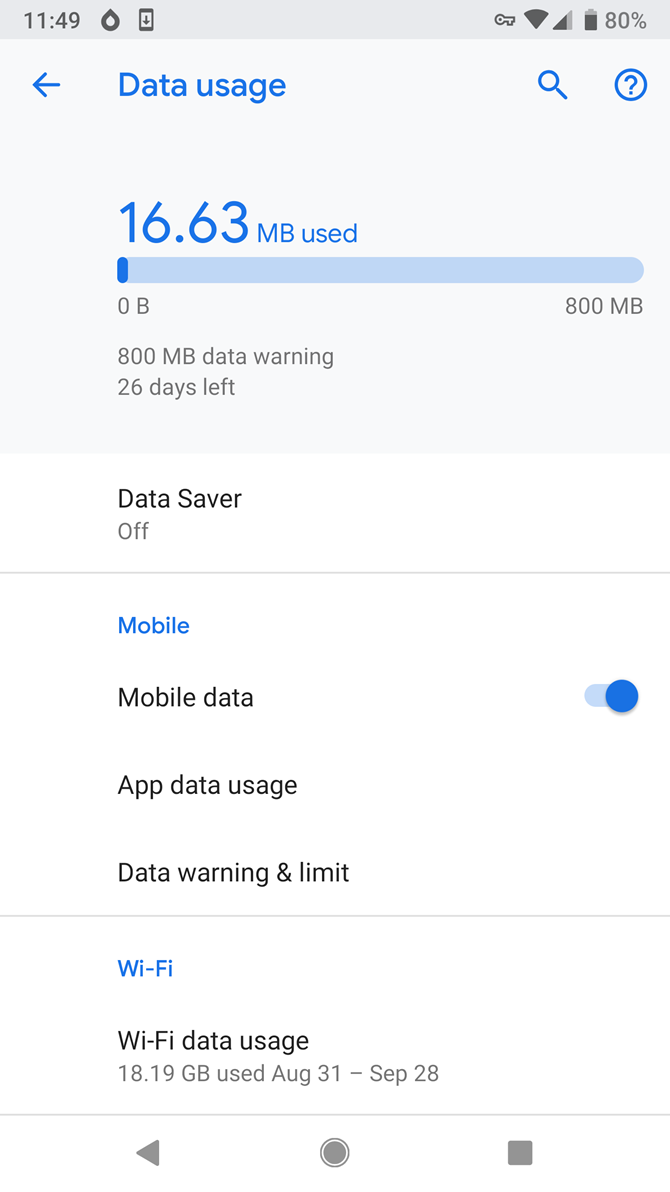
To check YouTube’s data usage on Android, head to Settings > Network & Internet > Mobile network. Here you’ll see how much data you’ve used in the current billing cycle. Tap App data usage to see a breakdown by app.

In this list, find YouTube and select it. You’ll see a breakdown of its data usage for the current cycle; tap the dates at the top to change this.

Foreground shows how much data the app used while you had it open and were actively using it. Background data shows what the app consumed while it was minimized. Disable the Background data slider to block YouTube from using your data when you don’t have it open.
How to Check YouTube’s Data Usage on iOS

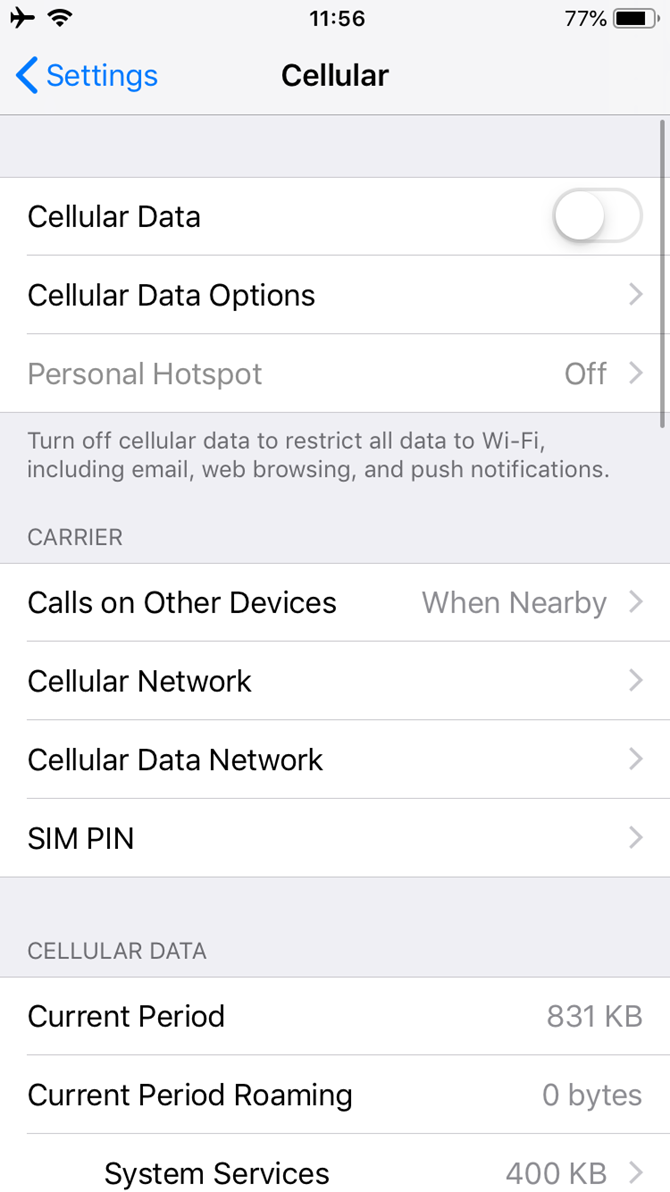
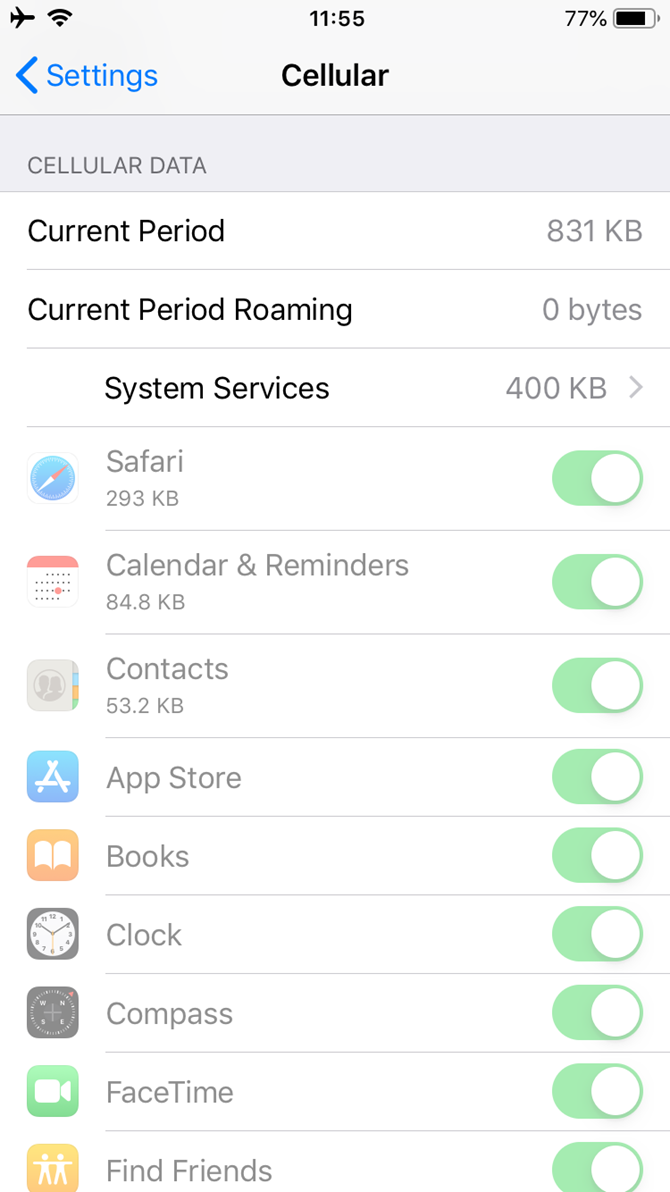
iPhone users can check how much data YouTube has used by navigating to Settings > Cellular. Find YouTube and you’ll see its data usage.

Your iPhone tracks this for the Current Period, but unfortunately it doesn’t update this automatically. You’ll need to scroll to the bottom and hit Reset Statistics to reset the period. For best results, set a reminder to do this every time your billing cycle restarts.

Meanwhile, if you want to block YouTube from using data completely, just turn off its slider here.
How to Reduce Data Usage on YouTube

You probably don’t want to turn off YouTube’s data access completely. Thankfully, there are other ways to reduce data consumption on YouTube that aren’t so drastic.

Monitor Video Quality While Watching

The most important tip is to avoid watching videos in HD while using data. While watching any video, tap the three-dot Menu button and you’ll see the current Quality. Tap that entry to change it. The available options depend what the uploader provides.
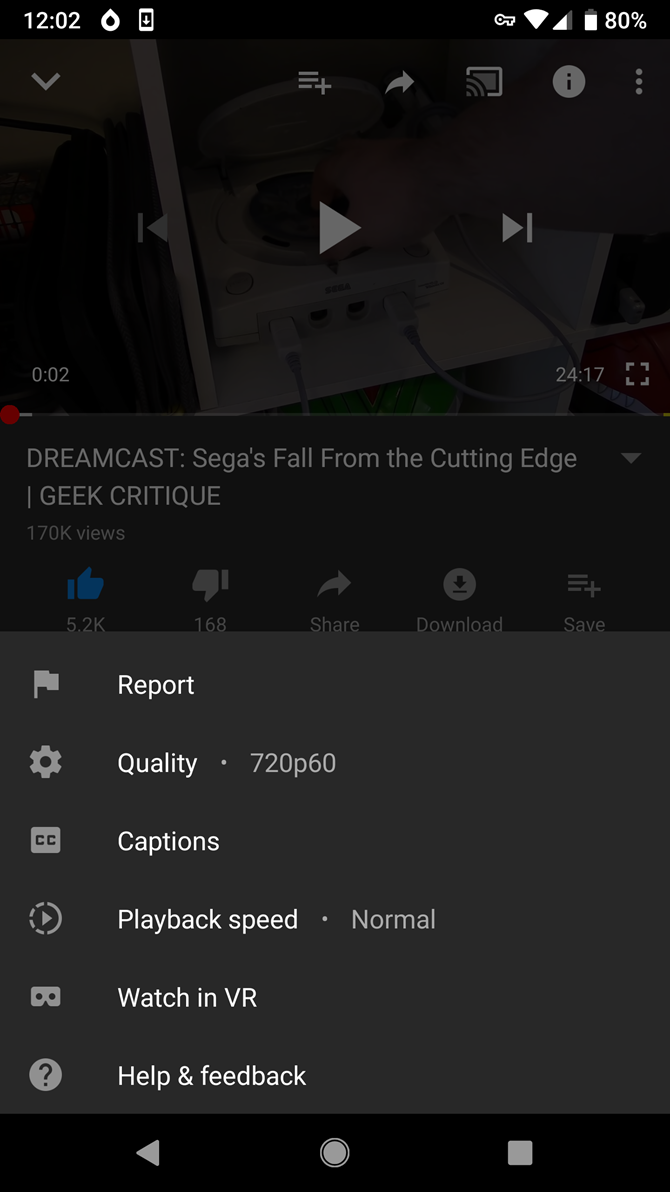
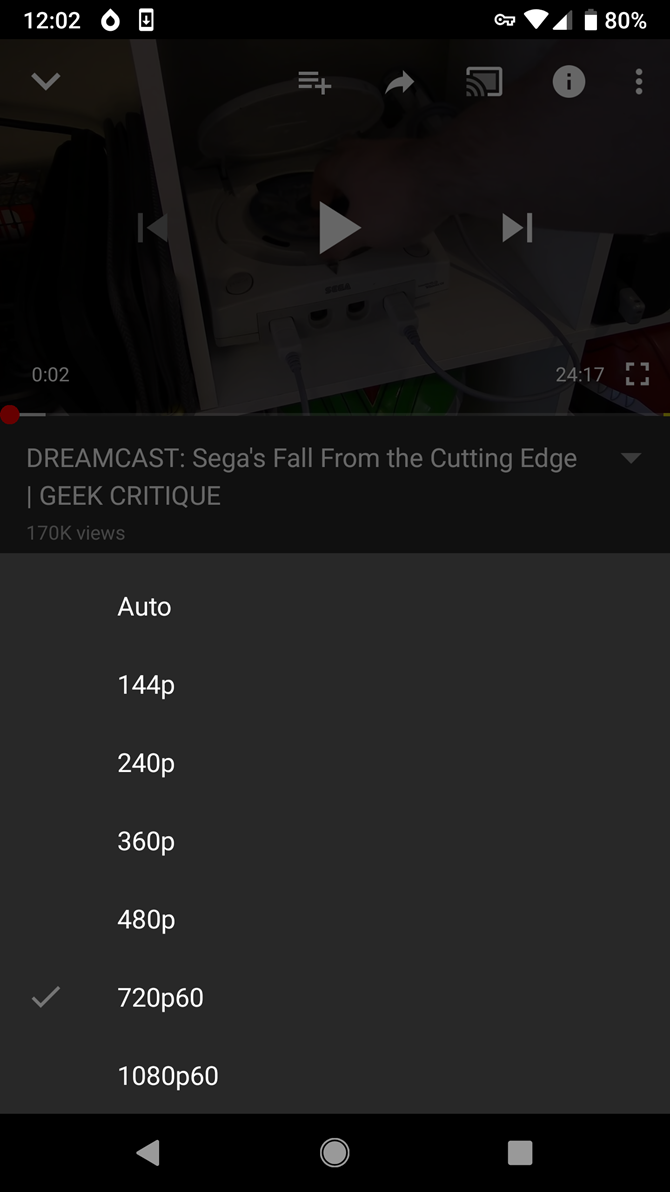
You can choose Auto to set the quality based on network speed, but if you’re trying to save data, it’s better to select it manually. Try 480p for a good balance between data usage and video quality.

Restrict HD to Wi-Fi Only

If you don’t want to change the quality on every video you watch, you can enable an option to restrict HD to Wi-Fi only.

To find this option, tap your profile picture in the top-right of YouTube and select Settings (followed by General if you’re using Android). On Android, you’ll find an option called Limit mobile data usage. This is called Play HD on Wi-Fi only on iOS.
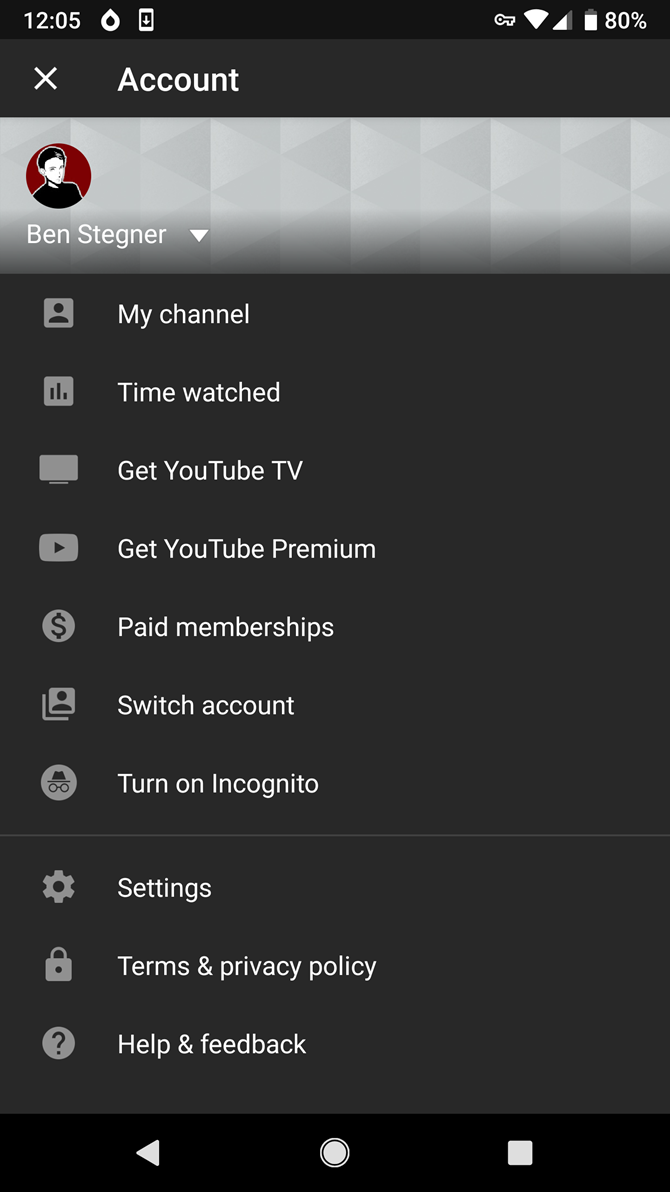
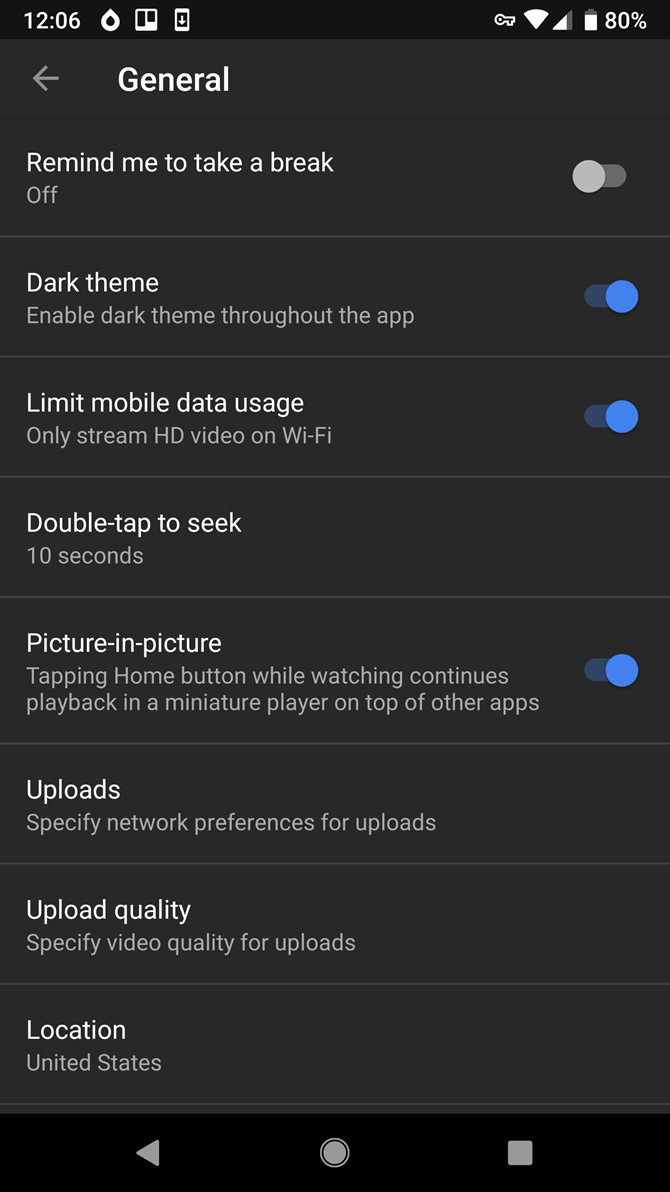
Once you have this enabled, YouTube won’t play videos any higher than 480p on mobile data. You can lower the quality further if you don’t mind the grainy experience.

Turn Off Video Autoplay

YouTube’s Autoplay feature keeps the videos coming even after you finish one. This can waste some data if it starts playing a video you didn’t want, plus it can add distractions to YouTube.

To disable Autoplay, simply find the Autoplay slider in the Up next section below any video. Disable that, and YouTube will stop loading new videos on its own.


Disable Muted Playback in YouTube Feeds

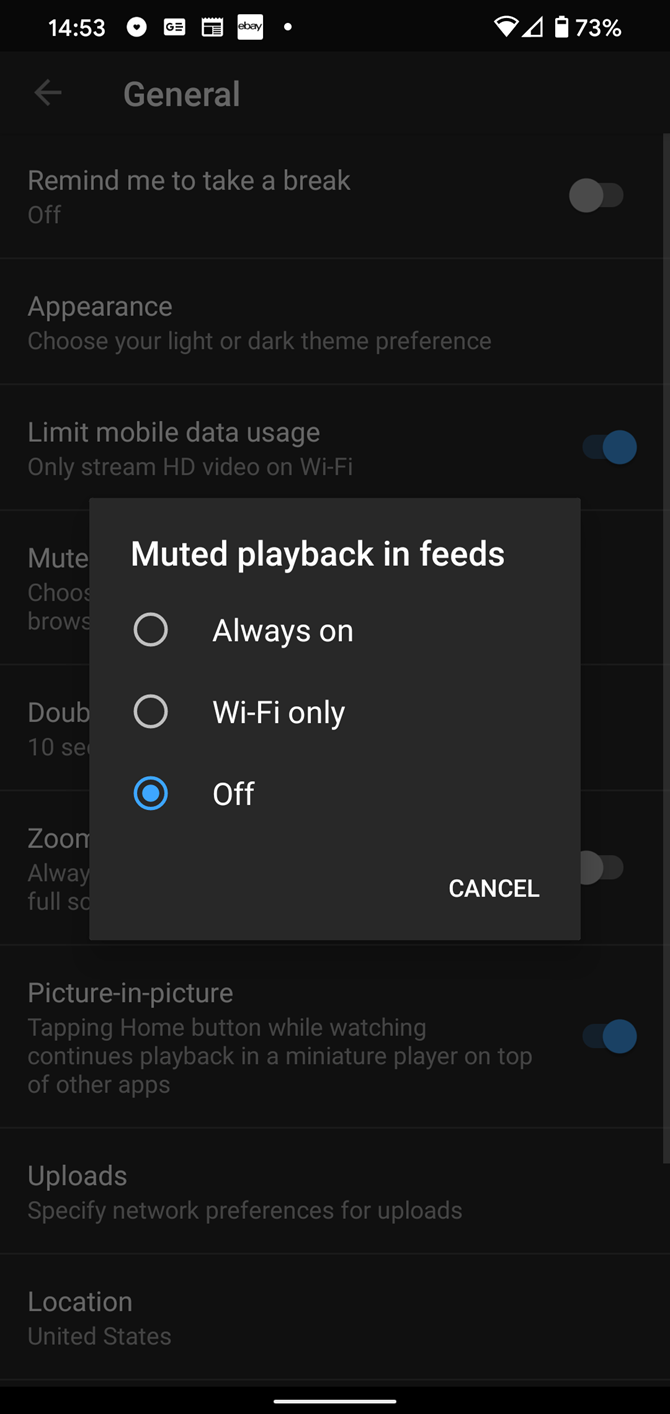
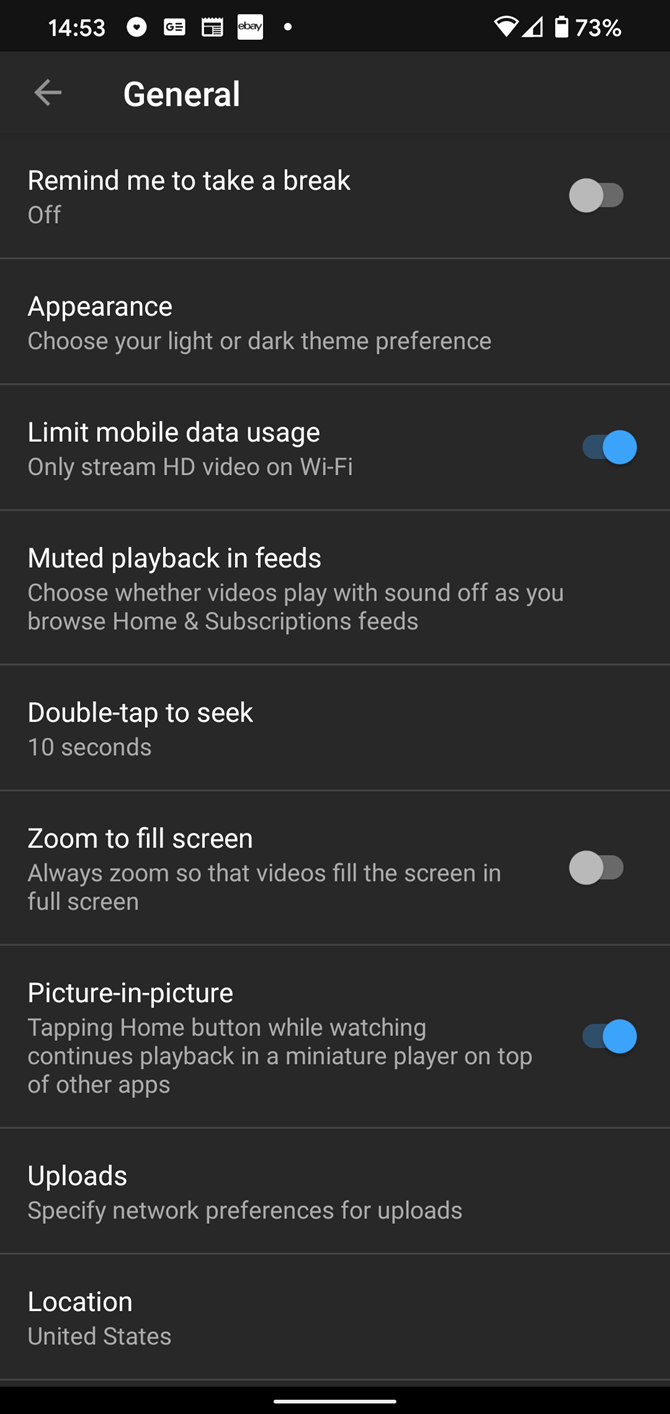
On certain pages, like Home, Subscriptions, and search results, YouTube will start playing a few seconds of the video you’re looking at. This is a waste of data that isn’t that useful, so you can disable it or set it to work on Wi-Fi only.

To change this option, tap your profile picture and go to Settings again. On Android, head to General and tap Muted playback in feeds. Change this to Off or Wi-Fi only to avoid wasting data. On iPhone, this option is at Settings > Muted playback & previews in feeds.
Try YouTube Premium

YouTube Premium (formerly YouTube Red) is YouTube’s paid subscription service. Among other benefits, such as removing ads, Premium allows you to download videos offline to your phone for viewing anywhere.

At $12/month, YouTube Premium is a little expensive. But if you watch a lot of YouTube, that outlay can pay for itself in the data charges you save. You can download a batch of videos when you’re on Wi-Fi at home, then watch them on the go without using data.

Check out our overview of YouTube Premium if you need more information.

Be Smart About Your YouTube Data Usage

Now that you know how much data watching YouTube uses, you can make informed decisions about how much to stream each month. By limiting HD viewing to Wi-Fi and disabling autoplay, you can still enjoy some YouTube on the go without sucking up too much data.

Be careful, though, as YouTube has a way of drawing you in for longer than you want. Plus, YouTube isn’t alone in using lots of data. Thankfully, you have options to reduce the data usage of many popular apps, so you can slash your monthly bill even further.

Read the full article: How Much Data Does YouTube Use?


Read Full Article

Lack of big tech GDPR decisions looms large in EU watchdog’s annual report


The lead European Union privacy regulator for most of big tech has put out its annual report which shows another major bump in complaints filed under the bloc’s updated data protection framework, underlining the ongoing appetite EU citizens have for applying their rights.

But what the report doesn’t show is any firm enforcement of EU data protection rules vis-a-vis big tech.

The report leans heavily on stats to illustrate the volume of work piling up on desks in Dublin. But it’s light on decisions on highly anticipated cross-border cases involving tech giants including Apple, Facebook, Google, LinkedIn and Twitter.

The General Data Protection Regulation (GDPR) began being applied across the EU in May 2018 — so is fast approaching its second birthday. Yet its file of enforcements where tech giants are concerned remains very light — even for companies with a global reputation for ripping away people’s privacy.

This despite Ireland having a large number of open cross-border investigations into the data practices of platform and adtech giants — some of which originated from complaints filed right at the moment GDPR came into force.

In the report the Irish Data Protection Commission (DPC) notes it opened a further six statutory inquiries in relation to “multinational technology companies’ compliance with the GDPR” — bringing the total number of major probes to 21. So its ‘big case’ file continues to stack up. (It’s added at least two more since then, with a probe of Tinder and another into Google’s location tracking opened just this month.)

The report is a lot less keen to trumpet the fact that decisions on cross-border cases to date remains a big fat zero.

Though, just last week, the DPC made a point of publicly raising “concerns” about Facebook’s approach to assessing the data protection impacts of a forthcoming product in light of GDPR requirements to do so — an intervention that resulted in a delay to the regional launch of Facebook’s Dating product.

This discrepancy (cross-border cases: 21 – Irish DPC decisions: 0), plus rising anger from civil rights groups, privacy experts, consumer protection organizations and ordinary EU citizens over the paucity of flagship enforcement around key privacy complaints is clearly piling pressure on the regulator. (Other examples of big tech GDPR enforcement do exist. Well, France’s CNIL is one.)

In its defence the DPC does have a horrifying case load. As illustrated by other stats its keen to spotlight — such as saying it received a total of 7,215 complaints in 2019; a 75% increase on the total number (4,113) received in 2018. A full 6,904 of which were dealt with under the GDPR (while 311 complaints were filed under the Data Protection Acts 1988 and 2003).

There were also 6,069 data security breaches notified to it, per the report — representing a 71% increase on the total number (3,542) recorded last year.

While a full 457 cross-border processing complaints were received in Dublin via the GDPR’s One-Stop-Shop mechanism. (This is the device the Commission came up with for the ‘lead regulator’ approach that’s baked into GDPR and which has landed Ireland in the regulatory hot seat. tl;dr other data protection agencies are passing Dublin A LOT of paperwork.)

The DPC necessarily has to do back and forth on cross border cases, as it liaises with other interested regulators. All of which, you can imagine, creates a rich opportunity for lawyered up tech giants to inject extra friction into the oversight process — by asking to review and query everything. [Insert the sound of a can being hoofed down the road]

Meanwhile the agency that’s supposed to regulate most of big tech (and plenty else) — which writes in the annual report that it increased its full time staff from 110 to 140 last year — did not get all the funding it asked for from the Irish government.

So it also has the hard cap of its own budget to reckon with (just €15.3M in 2019) vs — for example — Google’s parent Alphabet’s $46.1BN in full year 2019 revenue. So, er, do the math.

Nonetheless the pressure is firmly now on Ireland for major GDPR enforcements to flow.

One year of major enforcement inaction could be filed under ‘bedding in’; but two years in without any major decisions would not be a good look. (It has previously said the first decisions will come early this year — so seems to be hoping to have something to show for GDPR’s 2nd birthday.)

Some of the high profile complaints crying out for regulatory action include behavioral ads serviced via real-time bidding programmatic advertising (which the UK data watchdog has admitted for half a year is rampantly unlawful); cookie consent banners (which remain a Swiss Cheese of non-compliance); and adtech platforms cynically forcing consent from users by requiring they agree to being microtargeted with ads to access the (‘free’) service. (Thing is GDPR stipulates that consent as a legal basis must be freely given and can’t be bundled with other stuff, so… )

Full disclosure: TechCrunch’s parent company, Verizon Media (née Oath), is also under ongoing investigation by the DPC — which is looking at whether it meets GDPR’s transparency requirements under Articles 12-14 of the regulation.

Seeking to put a positive spin on 2019’s total lack of a big tech privacy reckoning, commissioner Helen Dixon writes in the report: “2020 is going to be an important year. We await the judgment of the CJEU in the SCCs data transfer case; the first draft decisions on big tech investigations will be brought by the DPC through the consultation process with other EU data protection authorities, and academics and the media will continue the outstanding work they are doing in shining a spotlight on poor personal data practices.”

In further remarks to the media Dixon said: “At the Data Protection Commission, we have been busy during 2019 issuing guidance to organisations, resolving individuals’ complaints, progressing larger-scale investigations, reviewing data breaches, exercising our corrective powers, cooperating with our EU and global counterparts and engaging in litigation to ensure a definitive approach to the application of the law in certain areas.

“Much more remains to be done in terms of both guiding on proportionate and correct application of this principles-based law and enforcing the law as appropriate. But a good start is half the battle and the DPC is pleased at the foundations that have been laid in 2019. We are already expanding our team of 140 to meet the demands of 2020 and beyond.”

One notable date this year also falls when GDPR turns two — because a Commission review of how the regulation is functioning is looming in May.

That’s one deadline that may help to concentrate minds on issuing decisions.

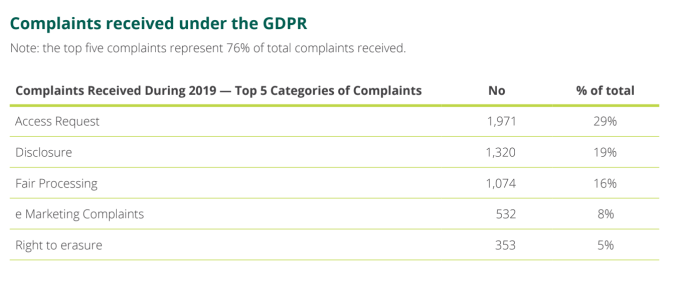
Per the DPC report, the largest category of complaints it received last year fell under ‘access request’ issues — whereby data controllers are failing to give up (all) people’s data when asked — which amounted to 29% of the total; followed by disclosure (19%); fair processing (16%); e-marketing complaints (8%); and right to erasure (5%).

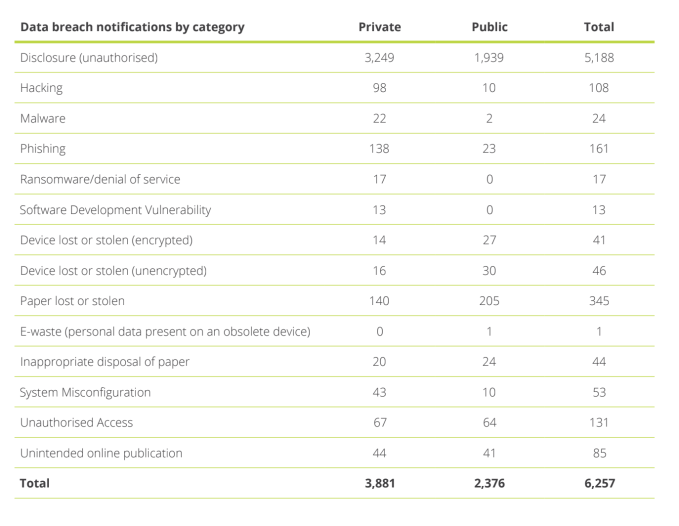
On the security front, the vast bulk of notifications received by the DPC related to unauthorised disclosure of data (aka breaches) — with a total across the private and public sector of 5,188 vs just 108 for hacking (though the second largest category was actually lost or stolen paper, with 345).

There were also 161 notification of phishing; 131 notification of unauthorized access; 24 notifications of malware; and 17 of ransomeware.


Read Full Article

Gmail finally makes it easier to search your email


Gmail’s search is getting a significant update that will allow users to more easily narrow results to help them find a specific email. Before today, users could type in search filters by hand (e.g. label:work, has:attachment, from:marketing@company.com, etc.) or use the drop-down box to perform an advanced search. But these options were less obvious, cumbersome and therefore under-utilized by many Gmail users. With the upgraded version of Gmail search, new filters — which Google calls “search chips” — will appear directly below the search box for simple, one-click access.

At launch, there are a variety of filters available, including those that will help you narrow down emails by sender, whether or not emails have an attachment, by time frame, and more. You also can use the new filters to exclude certain types of search results — like those that are calendar updates or chats, for example. And you can specify emails by attachment type, such as text, spreadsheet or PDF.

The filters can be used in combination, helping you to narrow down searches as you go. For instance, you could search an email with a colleague’s name, which included a PDF, and was sent last month, using just a few clicks on the filters.

As anyone who’s ever tried to dig up an email from their Gmail inbox knows, Google’s search system has needed improvement. Even Google acknowledged this was true, noting in an announcement that it had heard from users that searching Gmail “could be faster and more intuitive.”

Using search filters has for years felt like a power user Gmail hack, rather than something that should be accessible to everyone — including those who don’t think like engineers.

The Gmail update is rolling out starting today, February 19, to G Suite users, and may take up to 15 days to complete, Google says.

G Suite is often the first to get a new feature, but Google confirmed to TechCrunch the plan is to bring these new filters to consumer Gmail after the G Suite rollout completes. The company doesn’t have an exact ETA for the consumer launch, but doesn’t expect it to be too long after, we’re told.

Before:


After:


Read Full Article

Thomas Kurian on his first year as Google Cloud CEO


“Yes.”

That was Google Cloud CEO Thomas Kurian’s simple answer when I asked if he thought he’d achieved what he set out to do in his first year.

A year ago, he took the helm of Google’s cloud operations — which includes G Suite — and set about giving the organization a sharpened focus by expanding on a strategy his predecessor Diane Greene first set during her tenure.

It’s no secret that Kurian, with his background at Oracle, immediately put the entire Google Cloud operation on a course to focus on enterprise customers, with an emphasis on a number of key verticals.

So it’s no surprise, then, that the first highlight Kurian cited is that Google Cloud expanded its feature lineup with important capabilities that were previously missing. “When we look at what we’ve done this last year, first is maturing our products,” he said. “We’ve opened up many markets for our products because we’ve matured the core capabilities in the product. We’ve added things like compliance requirements. We’ve added support for many enterprise things like SAP and VMware and Oracle and a number of enterprise solutions.” Thanks to this, he stressed, analyst firms like Gartner and Forrester now rank Google Cloud “neck-and-neck with the other two players that everybody compares us to.”

If Google Cloud’s previous record made anything clear, though, it’s that technical know-how and great features aren’t enough. One of the first actions Kurian took was to expand the company’s sales team to resemble an organization that looked a bit more like that of a traditional enterprise company. “We were able to specialize our sales teams by industry — added talent into the sales organization and scaled up the sales force very, very significantly — and I think you’re starting to see those results. Not only did we increase the number of people, but our productivity improved as well as the sales organization, so all of that was good.”

He also cited Google’s partner business as a reason for its overall growth. Partner influence revenue increased by about 200% in 2019, and its partners brought in 13 times more new customers in 2019 when compared to the previous year.


Read Full Article
This is your brain on air pollution | María Neira

This is your brain on air pollution | María Neira

Air pollution knows no borders -- even in your own body, says public health expert María Neira. In this startling talk, she describes how the microscopic particles and chemicals you breathe affect all your major organs (including your brain) and calls on both the public and those in power to take action to stop the sources of pollution.

Click the above link to download the TED talk.

Picking Bad Stocks


Picking Bad Stocks

Google launches the first developer preview of Android 11


With the days of desert-themed releases officially behind it, Google today announced the first developer preview of Android 11, which is now available as system images for Google’s own Pixel devices, starting with the Pixel 2.

As of now, there is no way to install the updates over the air. That’s usually something the company makes available at a later stage. These first releases aren’t meant for regular users anyway. Instead, they are a way for developers to test their applications and get a head start on making use of the latest features in the operating system.

“With Android 11 we’re keeping our focus on helping users take advantage of the latest innovations, while continuing to keep privacy and security a top priority,” writes Google VP of Engineering Dave Burke. “We’ve added multiple new features to help users manage access to sensitive data and files, and we’ve hardened critical areas of the platform to keep the OS resilient and secure. For developers, Android 11 has a ton of new capabilities for your apps, like enhancements for foldables and 5G, call-screening APIs, new media and camera capabilities, machine learning, and more.”

Unlike some of Google’s previous early previews, this first version of Android 11 does actually bring quite a few new features to the table. As Burke noted, there are some obligatory 5G features like a new bandwidth estimate API, for example, as well as a new API that checks whether a connection is unmetered so apps can play higher-resolution video, for example.

With Android 11, Google is also expanding its Project Mainline lineup of updatable modules from 10 to 22. With this, Google is able to update critical parts of the operating system without having to rely on the device manufacturers to release a full OS update. Users simply install these updates through the Google Play infrastructure.

Users will be happy to see that Android 11 will feature native support for waterfall screens that cover a device’s edges, using a new API that helps developers manage interactions near those edges.

Also new are some features that developers can use to handle conversational experiences, including a dedicated conversation section in the notification shade, as well as a new chat bubbles API and the ability to insert images into replies you want to send from the notifications pane.

Unsurprisingly, Google is adding a number of new privacy and security features to Android 11, too. These include one-time permissions for sensitive types of data, as well as updates to how the OS handles data on external storage, which it first previewed last year.

As for security, Google is expanding its support for biometrics and adding different levels of granularity (strong, weak and device credential), in addition to the usual hardening of the platform you would expect from a new release.

There are plenty of other smaller updates as well, including some that are specifically meant to make running machine learning applications easier, but Google specifically highlights the fact that Android 11 will also bring a couple of new features to the OS that will help IT manage corporate devices with enhanced work profiles.

This first developer preview of Android 11 is launching about a month earlier than previous releases, so Google is giving itself a bit more time to get the OS ready for a wider launch. Currently, the release schedule calls for monthly developer preview releases until April, followed by three betas and a final release in Q3 2020.


Read Full Article

Google launches the first developer preview of Android 11


With the days of desert-themed releases officially behind it, Google today announced the first developer preview of Android 11, which is now available as system images for Google’s own Pixel devices, starting with the Pixel 2.

As of now, there is no way to install the updates over the air. That’s usually something the company makes available at a later stage. These first releases aren’t meant for regular users anyway. Instead, they are a way for developers to test their applications and get a head start on making use of the latest features in the operating system.

“With Android 11 we’re keeping our focus on helping users take advantage of the latest innovations, while continuing to keep privacy and security a top priority,” writes Google VP of Engineering Dave Burke. “We’ve added multiple new features to help users manage access to sensitive data and files, and we’ve hardened critical areas of the platform to keep the OS resilient and secure. For developers, Android 11 has a ton of new capabilities for your apps, like enhancements for foldables and 5G, call-screening APIs, new media and camera capabilities, machine learning, and more.”

Unlike some of Google’s previous early previews, this first version of Android 11 does actually bring quite a few new features to the table. As Burke noted, there are some obligatory 5G features like a new bandwidth estimate API, for example, as well as a new API that checks whether a connection is unmetered so apps can play higher-resolution video, for example.

With Android 11, Google is also expanding its Project Mainline lineup of updatable modules from 10 to 22. With this, Google is able to update critical parts of the operating system without having to rely on the device manufacturers to release a full OS update. Users simply install these updates through the Google Play infrastructure.

Users will be happy to see that Android 11 will feature native support for waterfall screens that cover a device’s edges, using a new API that helps developers manage interactions near those edges.

Also new are some features that developers can use to handle conversational experiences, including a dedicated conversation section in the notification shade, as well as a new chat bubbles API and the ability to insert images into replies you want to send from the notifications pane.

Unsurprisingly, Google is adding a number of new privacy and security features to Android 11, too. These include one-time permissions for sensitive types of data, as well as updates to how the OS handles data on external storage, which it first previewed last year.

As for security, Google is expanding its support for biometrics and adding different levels of granularity (strong, weak and device credential), in addition to the usual hardening of the platform you would expect from a new release.

There are plenty of other smaller updates as well, including some that are specifically meant to make running machine learning applications easier, but Google specifically highlights the fact that Android 11 will also bring a couple of new features to the OS that will help IT manage corporate devices with enhanced work profiles.

This first developer preview of Android 11 is launching about a month earlier than previous releases, so Google is giving itself a bit more time to get the OS ready for a wider launch. Currently, the release schedule calls for monthly developer preview releases until April, followed by three betas and a final release in Q3 2020.


Read Full Article

Generating Diverse Synthetic Medical Image Data for Training Machine Learning Models


The progress in machine learning (ML) for medical imaging that helps doctors provide better diagnoses has partially been driven by the use of large, meticulously labeled datasets. However, dataset size can be limited in real life due to privacy concerns, low patient volume at partner institutions, or by virtue of studying rare diseases. Moreover, to ensure that ML models generalize well, they need training data that span a range of subgroups, such as skin type, demographics, and imaging devices. Requiring that the size of each combinatorial subgroup (e.g., skin type A with skin condition B, taken by camera C) is also sufficiently large can quickly become impractical.

Today we are happy to share two projects aimed at both improving the diversity of ML training data, and increasing the effective amount of available training data for medical applications. The first project is a configurable method for generation of synthetic skin lesion images in order to improve coverage of rarer skin types and conditions. The second project uses synthetic images as training data to develop an ML model, that can better interpret different biological tissue types across a range of imaging devices.

Generating Diverse Images of Skin Conditions
In “DermGAN: Synthetic Generation of Clinical Skin Images with Pathology”, published in the Machine Learning for Health (ML4H) workshop at NeurIPS 2019, we address problems associated with data diversity in de-identified dermatology images taken by consumer grade cameras. This work addresses (1) the scarcity of imaging data representative of rare skin conditions, and (2) the lower frequency of data covering certain Fitzpatrick skin types. Fitzpatrick skin types range from Type I (“pale white, always burns, never tans”) to Type VI (“darkest brown, never burns”), with datasets generally containing relative few cases at the “boundaries”. In both cases, data scarcity problems are exacerbated by the low signal-to-noise ratio common in the target images, due to the lack of standardized lighting, contrast and field-of-view; variability of the background, such as furniture and clothing; and the fine details of the skin, like hair and wrinkles.

To improve diversity in the skin images, we developed a model, called DermGAN, which generates skin images that exhibit the characteristics of a given pre-specified skin condition, location, and underlying skin color. DermGAN uses an image-to-image translation approach, based on the pix2pix generative adversarial network (GAN) architecture, to learn the underlying mapping from one type of image to another.

DermGAN takes as input a real image and its corresponding, pre-generated semantic map representing the underlying characteristics of the real image (e.g., the skin condition, location of the lesion, and skin type), from which it will generate a new synthetic example with the requested characteristics. The generator is based on the U-Net architecture, but in order to mitigate checkerboard artifacts, the deconvolution layers are replaced with a resizing layer, followed by a convolution. A few customized losses are introduced to improve the quality of the synthetic images, especially within the pathological region. The discriminator component of DermGAN is solely used for training, whereas the generator is evaluated both visually and for use in augmenting the training dataset for a skin condition classifier.
Overview of the generator component of DermGAN. The model takes an RGB semantic map (red box) annotated with the skin condition's size and location (smaller orange rectangle), and outputs a realistic skin image. Colored boxes represent various neural network layers, such as convolutions and ReLU; the skip connections resemble the U-Net and enable information to be propagated at the appropriate scales.
The top row shows generated synthetic examples and the bottom row illustrates real images of basal cell carcinoma (left) and melanocytic nevus (right). More examples can be found in the paper.
In addition to generating visually realistic images, our method enables generation of images of skin conditions or skin types that are more rare and that suffer from a paucity of dermatologic images.
DermGAN can be used to generate skin images (all with melanocytic nevus in this case) with different background skin types (top, by changing the input skin color) and different-sized lesions (bottom, by changing the input lesion size). As the input skin color changes, the lesion changes appearance to match what the lesion would look like on different skin types.
Early results indicated that using the generated images as additional data to train a skin condition classifier may improve performance at detecting rare malignant conditions, such as melanoma. However, more work is needed to explore how best to utilize such generated images to improve accuracy more generally across rarer skin types and conditions.

Generating Pathology Images with Different Labels Across Diverse Scanners
The focus quality of medical images is important for accurate diagnoses. Poor focus quality can trigger both false positives and false negatives, even in otherwise accurate ML-based metastatic breast cancer detection algorithms. Determining whether or not pathology images are in-focus is difficult due to factors such as the complexity of the image acquisition process. Digitized whole-slide images could have poor focus across the entire image, but since they are essentially stitched together from thousands of smaller fields of view, they could also have subregions with different focus properties than the rest of the image. This makes manual screening for focus quality impractical and motivates the desire for an automated approach to detect poorly-focused slides and locate out-of-focus regions. Identifying regions with poor focus might enable re-scanning, or yield opportunities to improve the focusing algorithms used during the scanning process.

In our second project, presented in “Whole-slide image focus quality: Automatic assessment and impact on AI cancer detection”, published in the Journal of Pathology Informatics, we develop a method of evaluating de-identified, large gigapixel pathology images for focus quality issues. This involved training a convolutional neural network on semi-synthetic training data that represent different tissue types and slide scanner optical properties. However, a key barrier towards developing such an ML-based system was the lack of labeled data — focus quality is difficult to grade reliably and labeled datasets were not available. To exacerbate the problem, because focus quality affects minute details of the image, any data collected for a specific scanner may not be representative of other scanners, which may have differences in the physical optical systems, the stitching procedure used to recreate a large pathology image from captured image tiles, white-balance and post-processing algorithms, and more. This led us to develop a novel multi-step system for generating synthetic images that exhibit realistic out-of-focus characteristics.

We deconstructed the process of collecting training data into multiple steps. The first step was to collect images from various scanners and to label in-focus regions. This task is substantially easier than trying to determine the degree to which an image is out of focus, and can be completed by non-experts. Next, we generated synthetic out-of-focus images, inspired by the sequence of events that happen prior to a real out-of-focus image is captured: the optical blurring effect happens first, followed by those photons being collected by a sensor (a process that adds sensor noise), and finally software compression adds noise.

A sequence of images showing step-wise out-of-focus image generation. Images are shown in grayscale to accentuate the difference between steps. First, an in-focus image is collected (a) and a bokeh effect is added to produce a blurry image (b). Next, sensor noise is added to simulate a real image sensor (c), and finally JPEG compression is added to simulate the sharp edges introduced by post-acquisition software processing (d). A real out-of-focus image is shown for comparison (e).
Our study shows that modeling each step is essential for optimal results across multiple scanner types, and remarkably, enabled the detection of spectacular out-of-focus patterns in real data:
An example of a particularly interesting out-of-focus pattern across a biological tissue slice. Areas in blue were recognized by the model to be in-focus, whereas areas highlighted in yellow, orange, or red were more out of focus. The gradation in focus here (represented by concentric circles: a red/orange out-of-focus center surrounded by green/cyan mildly out-of-focus, and then a blue in-focus ring) was caused by a hard “stone” in the center that lifted the surrounding biological tissue.
Implications and Future Outlook
Though the volume of data used to develop ML systems is seen as a fundamental bottleneck, we have presented techniques for generating synthetic data that can be used to improve the diversity of training data for ML models and thereby improve the ability of ML to work well on more diverse datasets. We should caution though that these methods are not appropriate for validation data, so as to avoid bias such as an ML model performing well only on synthetic data. To ensure unbiased, statistically-rigorous evaluation, real data of sufficient volume and diversity will still be needed, though techniques such as inverse probability weighting (for example, as leveraged in our work on ML for chest X-rays) may be useful there. We continue to explore other approaches to more efficiently leverage de-identified data to improve data diversity and reduce the need for large datasets in the development of ML models for healthcare.

Acknowledgements
These projects involved the efforts of multidisciplinary teams of software engineers, researchers, clinicians and cross functional contributors. Key contributors to these projects include Timo Kohlberger, Yun Liu, Melissa Moran, Po-Hsuan Cameron Chen, Trissia Brown, Jason Hipp, Craig Mermel, Martin Stumpe, Amirata Ghorbani, Vivek Natarajan, David Coz, and Yuan Liu. The authors would also like to acknowledge Daniel Fenner, Samuel Yang, Susan Huang, Kimberly Kanada, Greg Corrado and Erica Brand for their advice, members of the Google Health dermatology and pathology teams for their support, and Ashwin Kakarla and Shivamohan Reddy Garlapati for their team for image labeling.

19 February 2020

How to Fix Common CD, DVD, and Blu-Ray Drive Errors


It can happen that your CD, DVD, or Blu-ray drive or player will go on the fritz. Perhaps it won’t read the disc, stop skipping, or the drive won’t eject.

We’re going to show you how to fix your CD, DVD, or Blu-ray player that won’t read and help you determine whether the problem is with the drive or the disc.

How to Clean Dust Inside a Drive

A CD, DVD or Blu-ray drive is enclosed, but dust still has an opportunity to invade through small openings and also while the drive is open. This depends heavily on how dusty the environment is, but it can really wreak havoc on a drive.

The type of error you’ll experience with a dusty drive can vary, but often a disc will either take a long time to read or it will experience random slowdowns.

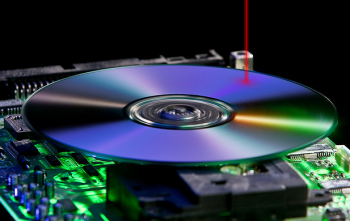
A drive’s laser reads the disc. If enough dust gets into the drive, specifically around that laser, it can block or refract light and cause errors.

If you want to clean the drive you could take it apart and use lint-free buds and an alcohol-based solution to dab the lens clean. This is tricky, though, and might void the warranty, so here are some other solutions that don’t involve taking the drive apart.

As we are on the subject of cleaning your gadgets, you might also be interested in how to clean the dust from your PS4.

Use an Air Bulb or Compressed Air

You can buy an air bulb or compressed air inexpensively. The former is the better choice if available since the latter uses excessive force and could spray liquid into your drive.

Air Bulb Air Bulb Buy Now On Amazon $7.99

Open the drive, turn your computer off, and use the bulb or compressed can to carefully blow air in the drive.

Use a Cleaning Disc

There is debate over how effective cleaning discs are. These are discs that have small brushes on them which will clean the lens when rotated. They do risk just pushing the dust around or scratching the lens. But good quality cleaning discs can prove effective too, so give it a shot.

Cleaning Disc Cleaning Disc Buy Now On Amazon $8.60

How to Fix a Drive That Won’t Eject

It can be very annoying when the drive won’t eject your disc—especially when your car CD player won’t eject. If pushing the eject button does nothing or you can hear that the drive is jammed, there are a couple of ways to fix the problem.

Use File Explorer

Close all open programs, especially any disc playback software.

  1. Press Windows key + E to open File Explorer.
  2. Click This PC from the left-hand navigation.
  3. Right click your disc drive and click Eject.

Use a Paperclip

Many disc drives, including car CD players or the drives on games consoles, have a small pinhole that acts as an emergency eject.

First, turn your system off. Then unfold a paperclip and gently push it into the hole. You may need to repeat this a few times for the mechanism to catch. The drive bay should eject enough for you to grab it with your fingernails.

Slowly pull the drive out, but don’t force it and risk physically damaging the drive.

How to Repair a Disc With Scratches

It might not be the drive that has the problem. Discs become scratched fairly easily and this can cause a lot of reading problems on the drive. The quickest way to check is:

  1. Visually inspect the disc to see if there are any scratches.
  2. Check the drive with another disc, alternatively try the disc in another drive.

Once you have confirmed the disc is scratched you can try a few things to fix the problem.

Scratched disc
Image Credit: belchonock/Depositphotos

One method is to use a wet or dry cloth to clean the disc. Use circular motions to clean it, or wipe from out-to-inside or inside-to-out. Never wipe in the direction around the tracks, as this can cause track skippage and actually make the problem worse.

Another method is to use some sort of abrasive compound, such as toothpaste (not gel) to grind out scratches.

These tips should help fix a CD player that won’t read. For more information on these methods, and some other ways to repair a disc, check out our guide on how to repair damaged CDs or DVDs.

How to Update Your Drive’s Firmware

The problem might be caused by a bug in the firmware of the drive. The firmware tells the drive how to work, when to spin, which laser to use, how fast to rotate discs, what the eject button does, and so on.

You could try updating the firmware to see if this fixes the problem. This should help fix a CD player that won’t spin.

Check the manufacturer’s website to see if there are any updates available. The process will vary depending on the manufacturer, and they should provide specific instructions, but it might involve burning a CD with the firmware and rebooting the computer with the disc.

How to Resolve a Drive Hardware Problem

If all else fails, you might have a hardware problem. This is especially likely if you’ve recently opened up or moved your system. It could be that a cable has been unseated, the motherboard connection has failed, or the drive itself is bad.

Don’t open up your computer if you’re not confident. You need to be careful not to tamper with any other components, so don’t be afraid to call on professional help if you are not sure.

Repair a disc drive
Image Credit: m.ilias1987/Depositphotos

The first step is to try a new cable and connection port on the motherboard. If it doesn’t work, try another drive that you know works—this will determine whether the problem is the drive itself or the motherboard.

If the drive is broken then you could send it for warranty repair, depending on its age, but it’s likely to be more time and cost effective to buy a new drive. Depending on how old your drive is, the new one could have faster read and write times anyway.

Replace Your Laptop’s Disc Drive for Storage

Hopefully, the advice here has helped you fix your CD, DVD or Blu-ray drive or disc. The solutions can be used for most troubleshooting efforts, whether it’s for your computer, games console, car, or something else.

If you have a laptop with a disc drive that you no longer use, why not find out how to upgrade your laptop drive for storage space instead.

Read the full article: How to Fix Common CD, DVD, and Blu-Ray Drive Errors


Read Full Article

Microsoft Launches a New Office App for Android and iOS


Microsoft has released a new, unified Office app for Android and iOS. Office brings together the core Microsoft Office apps of Word, Excel, and PowerPoint into one unified mobile app. And it’s now available for everyone to use on both Android and iOS.

Unlock the FREE "Essential Excel Formulas" cheat sheet now!

This will sign you up to our newsletter

Enter your Email

Microsoft Finally Takes Mobile Seriously

Microsoft is synonymous with PCs. This is because Windows (developed by the genius of Bill Gates) is by far the most popular desktop operating system. And Microsoft’s failure to compete with Android and iOS in the mobile sector only solidified that connection.

However, in recent years, Microsoft has made an effort to become more mobile-friendly. The company now happily releases apps for Android and iOS, including mobile versions of Word, Excel, and PowerPoint. And now it has combined all three into one unified app.

Microsoft Office Now Lives on Your Smartphone

In November 2019, Microsoft launched the Office mobile app in a public preview. The iOS app quickly hit the maximum 10,000 users, but the Android app remained up in public preview. Now, however, Microsoft Office for Android and iOS is available to everyone.

In a post on the Office Apps Blog, published at the time the public preview was launched, Microsoft billed Office as “a new vision for how people get work done on a phone” and “a new app that’s ambitious enough to simply be called Office.” Brave words indeed.

Office for mobile has been built with mobile users in mind at all times. So it’s optimized for use on mobile devices, with Microsoft “combining the existing Word, Excel, and PowerPoint mobile apps into a single app.” Which can do more than you may think.

Anyone who has already used any of these Office apps will recognize them immediately. It’s just that Microsoft has squeezed them into a single app. This means you get to enjoy an integrated experience, while also gaining some mobile-centric features.

Combining its existing apps into one “brings all of your Office documents together in one place, reduces the need to switch between multiple apps, and significantly reduces the amount of space used on your phone compared to multiple installed apps.”

How to Use Microsoft Office on Your Smartphone

Microsoft has now launched Office for mobile out of public preview. Which means the app is now available on the Google Play Store and the Apple App Store, respectively. It’s free to download and use, with in-app purchases available for Office 365.

In a new post on the Microsoft 365 Blog, Microsoft describes the new Office app as “a powerful tool that is intuitive and familiar yet still uniquely different.” The company also claims to have “made several enhancements since the public preview”.

Download: Microsoft Office for Android | iOS (Free, with in-app purchases available)

The Best Free Microsoft Office Alternatives

The new Office app is looking good, and is only likely to get better. Unfortunately, while it works well on smartphones, the app only offers limited support for tablets. However, Microsoft has committed to optimizing Office for iPads and Android tablets.

As good as Office is, because it’s Microsoft, and Microsoft is regarded as the enemy in some quarters, many people still prefer to use an alternative to Microsoft Office. So, with that in mind, here are the best free Microsoft Office alternatives.

Read the full article: Microsoft Launches a New Office App for Android and iOS


Read Full Article

The 6 Best Budget Graphics Cards for Cheap Gaming


cheap-gaming-graphics-cards

The latest and greatest games are demanding on both your wallet and your system. As specifications rise, it is difficult for gamers on a budget to keep up to date.

However, budget gaming GPUs don’t force you into a low-resolution, blurry-pixel past. Far from it, in fact. A budget graphics card is no longer a barrier to enjoying some of the best games on offer.

The Best Budget Graphics Cards

The best budget graphics cards come from a range of GPU manufacturing generations. Some of the best bang for your buck comes from the slightly older but still super powerful cards. Of course, your definition of a budget GPU depends on—wait for it—your budget.

Furthermore, it depends on what you want to play and how you want to play it. Some of the best budget graphics cards will still max out the settings on some of the latest games, while others are better suited to slightly older games. Though you won’t have to reach in your ancient back catalog of games, that’s for sure. (Though I highly encourage such activity.)

Without further ado, and in no particular order, here are the six best budget graphics cards for cheap gaming.

1. Nvidia GTX 1650 Super Overclocked-4GB

Nvidia GTX 1650 Super Overclocked Nvidia GTX 1650 Super Overclocked Buy Now On Amazon $164.99

The Nvidia GTX 1650 Super Overclocked is a 4GB GPU and an excellent budget graphics card. It features the latest Turing architecture powering the newest generation of Nvidia GPUs and has 4GB GDDR6 to help you enjoy the latest games with using the upper selection of settings.

The fantastic users over at UserBenchmark provide expedient insight into the estimated number of frames per second (FPS) the GTX 1650 Super Overclocked achieves in a range of games. Depending on the system hardware, the GTX 1650 Super Overclocked delivers an average of 111 FPS across games, including Fortnite, Overwatch, GTA V, and PUBG. (Though this figure is skewed by the extremely high FPS achieved in older games like CSGO.)

Another plus point for the Nvidia GTX 1650 Super Overclocked is its size. The GTX 1650 Super Overclocked is a single-fan design, meaning it fits into almost every system layout and case size. Furthermore, its overall power use is low, saving you some extra pennies in the long run.

2. AMD RX 580-8GB

AMD RX 580-8GB AMD RX 580-8GB Buy Now On Amazon $189.99

Fluctuations in the top-end of the GPU market means the impressive AMD RX 580-8GB video card is now a steal. It comes with two HDMI ports, one DVI-D port, and two DisplayPorts, along with the 8GB of GDDR5 RAM. While the RX 580 is an 8GB card, it is outperformed by its Nvidia equivalent, the GTX 1070.

However, the AMD RX 580 can handle most of the latest games on high to ultra-settings and should enable some 1440p gaming, too. The AMD RX 580 8GB version is well-reviewed, receiving glowing reports from users and critics alike.

It performs well in many of the most taxing games. According to UserBenchmark testing (and depending on your system hardware), the RX 580 achieves over 60 FPS in GTA V, Fortnite, PUBG, and Overwatch.

3. Nvidia GTX 1050 Ti

Nvidia GTX 1050 Ti Nvidia GTX 1050 Ti Buy Now On Amazon $145.57

The Nvidia GTX 1050 Ti is the successor to the GTX 1050, which itself is superseded by the Nvidia GTX 1650. Still, the GTX 1050 Ti is a powerful single fan GPU that competes with the similarly specced AMD RX 580-4GB (not the 8GB version above!). Despite the GTX 1050 Ti hitting the market six months after the RX 580-4GB, it is the latter that retains the edge, offering faster overall memory and memory bandwidth.

The UserBenchmark FPS estimates that the GTX 1050 Ti will achieve an average of 72 FPS, depending on the game and the hardware. Although it is a 4GB card, the 1050 Ti will struggle to play the latest games on the highest settings at a solid 60 FPS. However, 30 FPS and above should be achievable—again, depending on the rest of the system hardware.

Another plus for the Nvidia GTX 1050 Ti is the single fan design. You can fit the GTX 1050 Ti into any case and design, perfect for small builds. The GTX 1050 Ti has another advantage over the RX 580-4GB—it uses half of the power; 75W vs. 150W. You’ll save some money on your power supply unit purchase and long-term power use, too.

4. Nvidia GeForce GT 1030-2GB

Nvidia GeForce GT 1030 Nvidia GeForce GT 1030 Buy Now On Amazon $86.83

The Nvidia GeForce GT 1030-2GB is one of the cheapest GPUs around. Never heard of it? It is regularly outshined by other slightly more powerful—but more expensive—graphics cards. However, the single-fan 2GB GT 1030 will still help you power through some excellent games. You won’t max out The Witcher 3, but with the right hardware, you can certainly play your way through it.

The GT 1030-2GB has a small profile. But that’s for a good reason. The GT 1030 only draws around 30W, making it extremely efficient for low-power gaming rigs.

Word to the wise: don’t accidentally buy the Low Profile GT 1030. It comes with even less power than the full-size version, and instead of GDDR5 memory uses regular DDR4 RAM. Which means that the Low Profile version will struggle to run your favorite games.

5. Nvidia GTX 1660-6GB

Nvidia GTX 1660 Nvidia GTX 1660 Buy Now On Amazon $229.99

The Nvidia GTX 1660-6GB isn’t one of the cheapest budget GPUs. I would say it is borderline as to whether it fits into that category. However, as the next generation on from the popular Nvidia GTX 1060, the GTX 1660-6GB worth considering if you can stretch your budget a little further (or find savings elsewhere).

The UserBenchmark FPS estimates for GTX 1660-6GB version average around 111 FPS per game, depending on the rest of your hardware. You’ll find performance gains from the GTX 1660’s superfast GDDR6 RAM, and the Turing architecture that powers Nvidia’s latest generations of GPUs.

The 1660-6GB is one of the most popular Nvidia GPUs of any type. Given the FPS estimates and prospective performance, you can understand why.

6. AMD RX 570-8GB

AMD RX 570 AMD RX 570 Buy Now On Amazon

The AMD RX 570-8GB is another 8GB GPU that you can pick up for snip thanks to movements at the very top-end of the GPU marketplace. The RX 570 8GB uses AMD’s Polaris architecture, which provides a decent boost over the now-aging AMD RX 400 series GPUs but cannot really hold a candle to the vastly more powerful (and more expensive!) AMD Vega architecture.

That’s not to say the 8GB RX 570 is a slouch. It packs in 8GB GDDR5 RAM, and still provides excellent performance in games like Overwatch, Fortnite, and so on. Being an 8GB card, you should manage some 1440p gaming, too, though your frame rates might suffer depending on the rest of your hardware.

Should You Buy a Second-Hand Graphics Card?

The other option for gamers on a budget is buying a top-end card from a previous GPU generation. Within a couple of years, this will be a way to get features like real-time ray tracing or the super-powerful 12GB GPUs (and rumored 16GB GPUs) for a reasonable price.

At the time of writing, the Nvidia GTX 980 and 980 Ti, and the AMD RX 480 8GB and R9 Fury X are powerful gaming GPUs that will play most games on very high settings. The 980 Ti still outscores some of the modern GPUs on this list.

Picking up a second-hand GPU seems like a great idea. However, there are some things to consider before making your purchase. For instance, can the seller verify the GPU works, or how they used the GPU?

The other consideration is that with a new purchase, you have the guarantee of a warranty. If anything goes wrong with your new GPU, you can return it. Whereas, no such protection exists for a second-hand GPU, unless you’re buying a refurbished model.

Cryptocurrency Mining GPUs

The cryptocurrency boom of 2017 saw GPU prices skyrocket. Cryptocurrency miners rushed to buy the best graphics cards for the Bitcoin era, creating a graphics card price bubble.

Then, the cryptocurrency bubble burst. The GPU market was suddenly awash with second-hand GPUs that had been in use at full speed, 24/7, for months on end. The constant demand on the internal parts, the heat this generates, plus the heat and often poor ventilation of a crypto-mining rig can severely damage the GPU.

Luckily, the demand for crypto-mining has decreased, and GPU prices are now stable (albeit higher than before the cryptocurrency bubble). For a while, after the crypto-price bubble burst, the second-hand GPU market was awash with these ex-crypto mining GPUs, though this trend seems to have slowed for now.

What Is the Best Budget GPU?

There is always a budget gaming graphics card out there for you, even if you want to play all of the latest games on ultra settings. Figuring out what makes sense for your budget is the tricky bit, but you can check out the options on this list and take it from there.

Furthermore, it depends on the games you want to play. I didn’t buy a dedicated GPU until I was 20 years old, and I spent tens of thousands of hours playing lower resolution games (OpenTTD, anyone?).

There’s an amazing number of fun PC games that use integrated graphics, such as these indie city base builders. So, if you’re really strapped for cash, play older or less graphically intensive titles.

Read the full article: The 6 Best Budget Graphics Cards for Cheap Gaming


Read Full Article