28 January 2020

Trump’s travel ban could extend to Africa’s top tech country, Nigeria


The Trump administration is poised to add several African countries to a U.S. travel ban list, including Africa’s top tech hub, Nigeria.

Politico first reported the White House is considering Tanzania, Eritrea, Sudan and Nigeria for new travel restrictions, to coincide with the three-year anniversary of Trump’s original executive order, that targeted majority Muslim nations.

Of the possible additions, including Nigeria could prove the most problematic to U.S. commercial relations. In addition to boasting Africa’s largest population and economy, the country of 200 million has become a magnet for VC and a strategic entry point for Silicon Valley.

Why Africa, why Nigeria?

The Department of State would not comment on a TechCrunch request to confirm an extension of the travel ban to Nigeria or other African countries.

TechCrunch has an open inquiry on the matter to the National Security Council’s Senior Director for African affairs, Elizabeth Erin Walsh.

The Trump administration issued its first travel ban in 2017, which was challenged, amended, and upheld by the U.S. Supreme Court.

In its current form, as Executive Order 13780, the ban places restrictions on entry for citizens of Libya, North Korea, Syria and Yemen — predominantly Muslim countries — naming “significant terrorist presence within their territory” and “deficient” immigration screening processes.

With no comment from the Trump administration, we don’t know the motivations — stated or veiled — for the possible addition of Nigeria and other African countries to the ban.

To previously named reasons countries were listed, there are issues with Nigerian visa overstays in the U.S. and Nigeria does have a terrorist problem in its northeast with Boko Haram, though no incident related to extremist group has ever hit U.S. soil.

Reading the tea leaves may reveal other motives for placing travel restrictions on Nigeria and additional African countries. In an article in The Atlantic Monday, writer Peter Beinart suggested African immigrants may be next in the Trump administration’s pattern of restricting U.S. entry from predominantly brown-skin countries.

“For several years now, Trump has trained his nativist ire on Muslims and Latinos. The travel ban suggests he’s adding a new target, just in time for the 2020 elections: Africans,” said Beinart.

He cited recent negative reference to Nigerians and Africans in conservative circles by pundits Ann Coulter and Tucker Carlson and Trump’s now infamous reference to Nigeria as a “shithole” country, as reported in January 2018.

Trump Buhari Nigeria

Saul Loeb / AFP – Getty Images

That set the ominous tone for Nigerian President Muhammadu Buhari’s April 2018 White House visit, where Trump pressed Buhari publicly on persecution of Christians in Nigeria — a hot button issue with Trump’s evangelical base.

This could underlie motivations behind a possible U.S. Nigeria travel ban, according to Aubrey Hruby, a Senior Fellow at the Atlantic Council’s Africa Center.

“I’ve spoken to several people in government close to the matter who’ve indicated visa restrictions being discussed are also coming from concerns that Christians are being persecuted in Nigeria and within the broader context of the administration using visa rules as tools of foreign policy,” said Hruby.

“If this is the case, and they go forward with a ban, the administration could be overlooking the deep cultural and commercial ties that exist between the U.S. and Nigeria, and how much restricting travel could disrupt them,” she added.

Africa’s tech hub

Nigeria is the U.S.’s second largest African trading partner and the U.S. is the largest foreign investor in Nigeria, according to USTR and State Department briefs.

Increasingly, the nature of the business relationship between the two countries is shifting to tech.

That’s in tandem with Nigeria steadily becoming Africa’s unofficial capital for VC, startups, rising founders and the entry of Silicon Valley companies.

By 2018 numbers, depending on the study, the country ranked first or second for tech investment on the continent. And into 2019, more of that is coming from American sources.

Goldman Sachs is a major backer of Jumia, the Nigeria headquartered e-commerce venture that became the first VC funded tech company in Africa to IPO on a major exchange, the NYSE in 2019.

Goldman also led a $20 million round last year for Nigerian trucking logistics company Kobo360.

The U.S. bank’s investment in tech companies operating in Nigeria runs parallel to those by Visa, Mastercard, and SalesForce Ventures.

Nigerian tech is also home to a growing number of founders with ties to the U.S. and startups with operations in both countries. Nigerian fintech company Flutterwave, whose clients range from Uber to Cardi B, is headquartered in San Francisco with operations in Lagos. The company maintains a developer team of Africans across both countries for its B2B payments platform that helps American companies operating in Africa get paid.

MallforAfrica — a Nigerian e-commerce company that enables partners such as Macy’s, Best Buy and Auto Parts Warehouse to sell in Africa — is led by Chris Folayan, a Nigerian who studied and worked in the U.S. The company now employs Nigerians in Lagos and Americans at its Portland processing plant.

Africa’s leading VOD startup, iROKOtv maintains a New York office that lends to production of the Nigerian (aka Nollywood) content it creates and streams globally.

Andela, a tech-talent accelerator with over a $180 million in VC, was co-founded by American Jeremy Johnson and Nigerian entrepreneur Iyinoluwa Aboyeji. The company has offices in New York and Lagos and employs over 1000 engineers.

Over the last five years, Silicon Valley’s ties to Africa and Nigeria have grown. There are a number of Nigerians working in senior positions in the Bay Area, such as Ime Archibong at Facebook — the U.S. company that opened an innovation lab in Nigeria in 2018, called NG_Hub.

Possible implications

Adding Nigeria to the U.S. travel ban would be a mistake for tech development of both countries, believes Bosun Tijani, CEO of Lagos based CcHub, now Africa’s largest innovation incubator.

“Nigeria’s a strategic country for well established companies, such as Google and Facebook. Twitter’s founder visited just a few months ago,” Tijani said, referring to Twitter/Square CEO Jack Dorsey.

CcHub CEO Bosun Tijani1

CcHub CEO Bosun Tijani

On the impact of a full travel ban, “The implications would be serious for both sides. U.S. companies will suffer and Nigerian companies will suffer,” said Tijani.

He also referenced the increasing level of tech capacity fostering between the the two countries.

“With the importance of Nigeria to U.S. tech companies and the pool of talent that exists in Nigeria, there’s too much at stake to mess around with some visa ban. The embassies already do their work to vet people properly,” he said.

Adding Nigeria to the travel ban would adversely impact the work CcHub does with its American partners, which include Facebook and Google. “That’s the reason I come to the U.S. I’ve never been to the country on holiday, it’s always for business with them,” said Tijani.

Another effect of restricting entry of Nigerians into the U.S. could be to turn more of Nigeria’s techies away from U.S. partnerships and toward China. The country has been pivoting its strategic relationship with Africa to the continent’s tech scene.

In the last two quarters of 2019, more than 15 Chinese actors invested over $240 million in VC in Africa. More than $210 million of that was for startups in Nigeria.


Read Full Article

InterviewBit secures $20M to grow its advanced online computer science program in India


InterviewBit, a Bangalore-based startup that runs an advanced online computer science program for college graduates and young professional engineers, has raised $20 million in one of the largest Series A financing rounds in the education sector.

The nine-month-old startup’s Series A round was led by Sequoia India, Tiger Global and Global Founders Capital among others, it said. The startup said it is also rebranding its online coding program, earlier called InterviewBit Academy, to Scaler Academy.

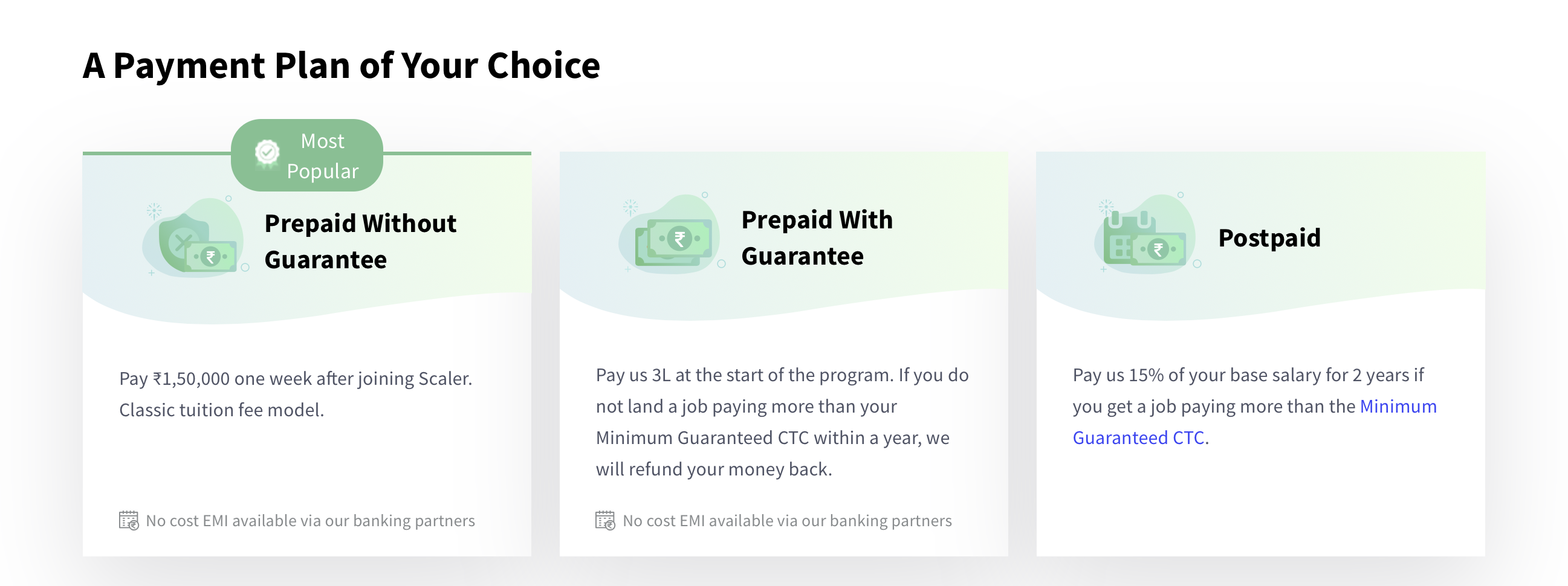
InterviewBit operates on an income-sharing model, where students have the option to pay much of the coaching fee after they have landed a job. The concept, also known as human capital contract, has been around for decades but is beginning to see some traction now.

The startup said more than 2,000 students have enrolled in its six-month program to date. It had received over 200,000 applications. And “several hundred” of those who enrolled in the program have landed jobs at tech companies such Google, Amazon, and Microsoft.

Students enrolled in Scaler Academy are mentored and taught by tech leaders and subject matter experts working with organisations including Google, Facebook, Twitter, and Netflix.

The startup, which is part of Sequoia India’s Surge accelerator program, will use the new fund to scale up its enrollment and launch in new markets. It also plans to invest in its curriculum and in live teaching product.

Indian newspaper Times of India first reported about the financing round last year, and said the round would value InterviewBit at over $100 million.

“Within a short period of time, Scaler Academy has made a huge impact on the capabilities of our students, who spend, on average 4-5 hours/day on our online and live learning platform,” said Abhimanyu Saxena, co-founder of InterviewBit.

“We are very excited that our work results in a step function change in the careers of our students — and so we have rebranded it to Scaler Academy, a platform for pursuing excellence in software programming,” he added.

A recent National Employability Report Engineers 2019 report highlighted that the employability of Indian engineers continues to be as low as 20%. “With that in mind, Scaler Academy’s meticulously structured 6-month online program effectively enhances the coding skills of professionals by creating a modern curriculum with exposure to the latest technologies,” the startup said.


Read Full Article

Byte Launches for Fans of Vine and TikTok


Dom Hofmann, the co-founder of the long-lost but never-forgotten Vine, has launched Byte. This is a new way to create and share short videos. So Byte is not only the spiritual successor to Vine, but also direct competition to TikTok, Snapchat, and Instagram.

A Brief History of Vine and Byte

In 2012, a new app called Vine burst onto the scene. This let users record short, looping videos up to six seconds long. Before it had even officially launched, Twitter acquired Vine. Vine then spent several years building an impressive userbase of 200 million users.

Unfortunately, in 2016, Twitter killed Vine for reasons that have never been fully explained. However, Vine co-founder Dom Hofmann wasn’t ready to give up on Vine, and in November 2017, he began working on Vine v2 with help from committed Vine fans.

In May 2018, Hofmann postponed the launch of Vine v2 indefinitely citing “financial and legal hurdles”. However, in November 2018, Hofmann announced Byte, “a new looping video app by the creator of Vine,” that he hoped to launch in Spring 2019.

How to Get Started Using Byte

Now, Byte has finally arrived, and, as promised, it lets you create and share short looping videos up to six seconds long. The six-second limitation leaves little room for filler, ensuring creators deliver clips designed to be short and sweet.

Byte offers the standard social media features of a profile, a feed, notifications, and the option to explore other people’s submissions. To use Byte you just need to download the app, create an account, and create a profile. You can then start making videos.

While Byte will be compared to TikTok, there are some major differences. For starters, Byte keeps things simple, without the remixes and AR filters of TikTok. Also unlike TikTok, Byte wants to help creators make money, with a partner program launching soon.

Byte is available right now on Android and iOS. However, it’s still a work in progress, with complaints about comment spam and a lack of moderation. Thankfully, Hofmann has committed to improving Byte, and is hiring staff to do just that over the coming months.

Download: Byte on Android | iOS

Other Vine Alternatives Beyond Byte

If you remember Vine and still mourn its passing then you should definitely check out Byte. And if it turns out that Byte isn’t for you then here’s our list of Vine alternatives. Then all you’ll need is some original ideas for entertaining short looping videos.

Read the full article: Byte Launches for Fans of Vine and TikTok


Read Full Article

Reaction Maps


Reaction Maps

Kidtech startup SuperAwesome raises $17M, with strategic investment from Microsoft’s M12 venture fund


Kidtech startup SuperAwesome has raised an additional $17 million in funding, which includes a new strategic investment from Microsoft’s venture fund, M12. Others participating in the round include existing investors, Mayfair Equity, Hoxton Ventures, and Ibis, along with other angels.

To date, SuperAwesome has raised $37 million in outside investment.

SuperAwesome has been tapping into the need for more kid-friendly technology on the web that’s now used just as much by younger children as it is by adults.

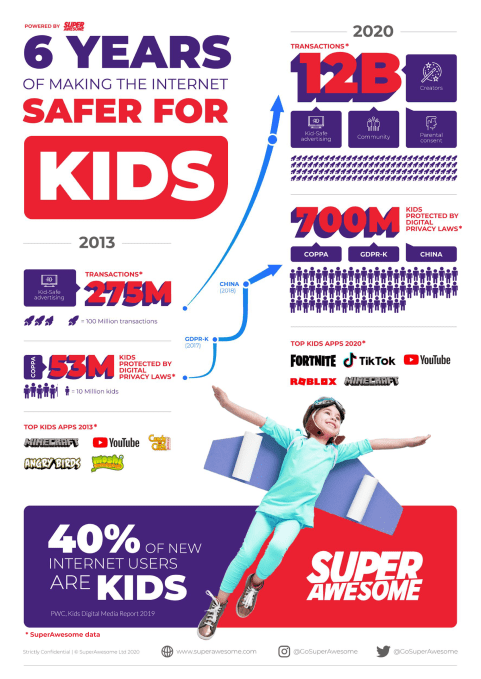
“Historically the internet was designed to be used by adults but now over 40% of new users are kids,” said SuperAwesome CEO Dylan Collins. “We’re in the middle of a structural shift in the composition of the internet that requires investment in privacy and kidtech to support children. This is as big a transition as mobile was for the desktop internet,” he noted.

The company’s platform includes products for kid-safe advertising, social engagement tools, authentication, and parental controls. The breadth of this lineup has attracted big-name kids’ brands as customers, including Activision, Hasbro, Mattel, LEGO, Cartoon Network, Spin Master, Nintendo, Bandai, WB, Shopkins maker Moose Toys, WPP, Omnicom, Dentsu, Niantic, Wildworks, among others.

Today, the company has over 300 customers in total.

SuperAwesome’s technology has arrived at a critical time for many working in the kids’ app space, as governments are newly enacting and enforcing a range of kids’ privacy laws like COPPA (the U.S. Children’s Online Privacy Protection Rule) and GDPR-K in the E.U., as well as other laws in major markets like China, Brazil, and India. In the U.S., for example, the FTC has slapped apps like Musical.ly (now TikTok) and YouTube with record fines for violations of children’s privacy regulations.

These changes have been a boon to SuperAwesome, which is now fully profitable and powering over 12 billion kids digital transactions per month. Last year, the company pulled in $55 million in revenue and is on track for $80 to $90 million in revenue in 2020, Collins told TechCrunch.

SuperAwesome and Microsoft aren’t yet talking in detail about how the two companies will be teaming up, following the strategic investment. One thing being discussed by the two, however, are the opportunities around family identity, we’re told. In addition, Microsoft today is focused on both privacy and kids across its products — for example, with its web browser as well as with its educational efforts involving Minecraft, among other things.

“After we spent time with the M12 team and folks in Microsoft, it was clear we shared the same vision of where the internet is going: more kids and more privacy,” Collins said.

“We are proud to welcome the SuperAwesome team to the M12 portfolio. Dylan has cultivated a mission-driven team dedicated to keeping the internet safer for kids—a critical priority for digital-first generations,” said Nagraj Kashyap, Microsoft Corporate Vice President and Global Head of M12, in a statement about the funding. “Given Microsoft’s footprint in the identity management space, we’re excited to explore opportunities for partnership with SuperAwesome as well,” Kashyap added.


Read Full Article

27 January 2020

Get ready to see Spotify’s looping videos on Instagram


Following Spotify’s confirmation of a new Stories feature, initially being tested by social media influencers, the company this morning announced it will now allow artists to reach their Instagram fan bases in a new way, too. However, in this case, they aren’t creating Spotify Stories they can market elsewhere on their social media, but instead are able to share their unique video art from Spotify’s Canvas feature directly to their Instagram.

Canvas launched into beta last fall, allowing artists to replace the album art that appears when a song is playing with a moving, visual experience that plays in a short loop. Canvas videos have had mixed reviews as some users find the imagery distracting while others seem to prefer it.

Starting today, the thousands of artists in the Canvas beta will be able to share their looping videos to Instagram with just a tap.

From the app’s Artists profile, each track that included a Canvas will have a “Share” icon next to it. By tapping that icon, artists can share the song and its Canvas to Instagram Stories. The post will look like a regular Spotify share with cover art and a link to play the track on Spotify. However, now their looping video will be the backdrop.

Currently, the Canvas beta is only available to those using the Spotify for Artists app on iOS. Spotify says it’s working to bring the sharing feature to Android users soon.

In addition, fans seeing the Canvas on Instagram aren’t counted in the Canvas metrics, unless they click through to Spotify, the company says.

The feature itself is intended to aid artists who are marketing their new songs to fans on Instagram as well as for highlighting updates to Canvas — like those that are updated to include clips from a new music video, new art, or live performances, for example.

One high-profile artist who’s taking advantage of Canvas is Billie Eilish — the artist who just swept last night’s Grammy Awards by winning the four biggest prizes — best new artist, record of the year, album of the year, and song of the year. Eilish has used Canvas to share animated versions of fan art, which helps her to better engage with her fan base.

Spotify claims that adding a high-quality Canvas has increased track shares by up to 200%, in addition to lifting streams, saves, and artist profile visits. By expanding Canvas to Instagram, those shares should bump up even higher, the company believes.

Despite its social media media-inspired features, like the new Stories addition or the looping videos of Canvas, Spotify doesn’t intend for its streaming app to become a new social platform. Instead, its focus is on building features that artists and listeners can leverage to better connect with social media fan bases elsewhere — either to help market themselves and their music or to improve discoverability of new music among their followers.

Artists interested in Canvas can sign up for the waiting list here.


Read Full Article

My story of magic, kindness and survival during the Holocaust | Werner Reich

My story of magic, kindness and survival during the Holocaust | Werner Reich

Holocaust survivor Werner Reich recounts his harrowing adolescence as a prisoner transported between concentration camps — and shares how a small, kind act can inspire a lifetime of compassion. "If you ever know somebody who needs help, if you know somebody who is scared, be kind to them," he says. "If you do it at the right time, it will enter their heart, and it will be with them wherever they go, forever."

Click the above link to download the TED talk.

The Top 8 GoSkills Courses to Boost Your Business Skills


goskills-courses

Getting ahead in your career can be tough, no matter where you work or what you do. And while improvement takes many different elements, sharpening your skills is one method that can certainly help. Not only can you learn new information to incorporate into your current position, but possibly open doors to additional opportunities.

Unlock the FREE "Essential Excel Formulas" cheat sheet now!

This will sign you up to our newsletter

Enter your Email

With GoSkills, you have easy access to affordable online courses. These let you enhance the skills you already possess or learn new ones—both of which can take your career to the next level. Here are several of the top business classes and options offered by GoSkills that you should check out.

1. Microsoft Excel—Basic & Advanced

GoSkills Excel Basic and Advanced

If you work in the business world, you likely need to use Microsoft Excel. GoSkills offers a Microsoft Excel—Basic & Advanced course to up your knowledge and skills a notch. Learn the basics you need and then move onto VLOOKUP, data validation, macros, and other helpful Excel tools and features.

Course Details:

  • 52 lessons with exercise files, quizzes, and reference guides.
  • Almost five hours of video.
  • A Certificate of Achievement or Certificate of Training.

The class is intended for beginner-level users, and the estimated study time is 26 hours.

GoSkills offers several additional Excel courses including the basics on its own for a nice refresher. Or you can zero in with classes on macros and VBA, pivot tables, or power query. You can also check out Excel courses specifically for Mac.

2. Photoshop for Beginners or Photoshop—Advanced

GoSkills Photoshop Advanced

Adobe Photoshop is one of the most popular image creation and editing tools. Whether you’re completely new and need to learn the basics, or have some knowledge and want to learn advanced tricks, GoSkills has a course for you.

Course Details (Photoshop for Beginners):

  • 58 lessons with exercise files, quizzes, and reference guides.
  • Nearly five hours of video.
  • A Certificate of Achievement or Certificate of Training.

The class is intended for beginner-level users and the estimated study time is 29 hours.

Course Details (Photoshop—Advanced):

  • 55 lessons with exercise files, quizzes, and reference guides.
  • Over five hours of video.
  • A Certificate of Achievement or Certificate of Training.

The class is intended for intermediate-level users and the estimated study time is 27.5 hours.

In addition to Photoshop courses, GoSkills offers both beginner and advanced classes for Adobe Illustrator. So you can move onto drawing and design for even more creative skill enhancement.

3. PMP Certification Training

GoSkills PMP Certification Training

If you’re a project manager preparing for the PMP exam, then the PMP Certification Training course is for you. The class helps you recognize the requirements for the certification and identify the processes and tools used in project management. You can also earn the required 35 contact hours needed with online training.

Course Details:

  • 47 lessons with exercise files, quizzes, and reference guides.
  • Over four hours of video.
  • A Certificate of Achievement or Certificate of Training.
  • GoSkills is a Registered Education Provider (R.E.P) with the Project Management Institute (PMI).

The class is intended for advanced-level project managers and the estimated study time is 35.5 hours.

For other topics in your field, you can check out the GoSkills courses for CAPM certification training, along with scrum and project management for business professionals and engineers.

4. Introduction to SQL

GoSkills Introduction To SQL

If you’re ready to dip your feet in the development field for enhancing your business skills, the Introduction to SQL course is a great place to start. SQL (Structured Query Language) is a commonly used programming language for database management and much more.

Course Details:

  • 33 lessons with exercise files, quizzes, and reference guides.
  • Two hours of video.
  • A Certificate of Achievement or Certificate of Training.

The class is intended for beginner-level programmers and the estimated study time is 16.5 hours.

While you’ll use Microsoft SQL Server’s T-SQL for the class, you’ll be able to use what you learn for additional database types like MySQL, PostgreSQL, and Oracle.

5. Introduction to Python

GoSkills Python

Another option in the development category is Introduction to Python. Python is a popular programming language that helps you build tools like apps for data analysis and robots with Raspberry Pi.

Course Details:

  • 41 lessons with exercise files, quizzes, and reference guides.
  • Three hours of video.
  • A Certificate of Achievement or Certificate of Training.

The class is intended for beginner-level programmers and the estimated study time is 20.5 hours.

If you’re looking for additional courses in the development area, you can also take a look at the introductions to HTML, CSS, JavaScript, and Ruby on Rails, which are excellent programming languages for beginners.

6. Leadership Training

GoSkills Leadership Training

Soft skills in business are just as important as any other. And with the GoSkills Leadership Training class, you can increase your chances of gaining a managerial or supervisory role in your company. Learn about personality types, how to motivate a team, and ways to overcome challenges in the workplace.

Course Details:

  • 21 lessons with exercise files, quizzes, and reference guides.
  • Almost two hours of video.
  • A Certificate of Achievement or Certificate of Training.

The class is intended for beginner-level individuals and the estimated study time is 10.5 hours.

Additional courses in the soft skills category include public speaking, customer service training, and press releases.

7. Financial Modeling Basics

GoSkills Financial Modeling Basics

Maybe your chosen topic for learning is finance. GoSkills offers several financial courses, one of which is Financial Modeling Basics. You’ll learn about financial modeling in Excel to build a solid foundation. Review the concepts, understand the functions, and work with examples to design your financial model.

Course Details:

  • 55 lessons with exercise files, quizzes, and reference guides.
  • Five hours of video.
  • A Certificate of Achievement or Certificate of Training.

The class is intended for beginner-level individuals and the estimated study time is 27.5 hours.

For other courses with a finance emphasis, take a look at finance for operations managers, project managers, or non-financial professionals.

8. Lean Six Sigma—Yellow Belt

GoSkills Lean Six Sigma Yellow

With the Lean Six Sigma Yellow Belt course, you’ll learn the fundamentals, practices, and principles you need to prepare for the Yellow Belt exam and become a member of the Lean Six Sigma team.

Course Details:

  • 40 lessons with exercise files, quizzes, and reference guides.
  • Nearly four hours of video.
  • Accredited by the International Association for Six Sigma Certification (IASSC).
  • A Certificate of Achievement or Certificate of Training.

The class is intended for beginner-level individuals and the estimated study time is 21.5 hours.

GoSkills offers additional Six Sigma certification classes as well, including Green Belt and Black Belt.

GoSkills Course Features

Along with the above details for each course on the list, you’ll also receive these benefits:

  • Access to all GoSkills courses
  • Personalized learning with exercise files, quizzes, and reference guides.
  • Unlimited tests and quizzes
  • Mobile learning
  • Education from the comfort of your home at your own pace

For Teams: GoSkills Learning Management System for Teams

GoSkills For Teams

Perhaps you’re looking at the courses here for your team or employees rather than yourself. If so, check out GoSkills for Teams. With the GoSkills Learning Management System (LMS), you can manage your team’s training easily.

GoSkills LMS Details:

  • Create your own or assign courses from GoSkills’ growing library of 70 courses.
  • Use gamification for an entertaining way to learn.
  • Participate in social education to see what others are learning.
  • Set up teams and assign courses to members.
  • Review reports and analytics including courses completed, time taken, and certificates earned.

If you’re ready to boost participation from the team you’re training, microlearning with these tools from GoSkills is an excellent way to do it.

With shorter, more focused lessons using videos, images, text, and gamification, your team is likely to engage. This allows you all to meet your training objectives more effectively.

GoSkills Accreditations and Awards

In addition to the accreditations mentioned above for the PMP and Six Sigma courses, GoSkills has received many awards. These include the Reimagine Education E-Learning Award for both 2018 and 2019, the EdTech Digest’s Cool Tool Award 2019, and the Gold Award for Brandon Hall’s Excellence in Learning Management Technology 2019, just to name a few.

You can check out the entire list of GoSkills accreditations and awards for all the details.

Go Learn With GoSkills

Whether it’s to master an application like Excel or Photoshop or training for the PMP exam, GoSkills has a wide variety of courses to improve your business knowledge and skills.

You might also consider giving the gift of learning! GoSkills makes a terrific gift for holidays, birthdays, or other occasions when a digital gift fits the situation.

Read the full article: The Top 8 GoSkills Courses to Boost Your Business Skills


Read Full Article

8 Gory Sites to Get Your Dose of Cheesy Horror


scariest-horror-games

Let me start this post with a fair warning—if you have a weak stomach get out while you can. We are going to enter the realms of the best gore sites on the web.

The word “cheesy” could prove to be a bit misleading. “Cheesy” is synonymous with kitschy and unnecessarily emotional. We will attempt to stay closer to gruesome and morbid because there are enough gore sites on the visible web.

The web was never sanitized. So, close the doors, draw the curtains, and click the mouse as I try giving you a dose of the gore at these eight horrific gory websites.

1. BME: Body Modification Ezine

Body Modification Ezine Homepage An Example of a Gory Website

From the streets of New York to the bylanes of Nanjing, tattoo art is pretty much a 21st Century subcultural trend. But some people can take it really far and turn their bodies into walking canvasses.

BME has curated 3.5 million photos and more than 14000 videos on how to turn your body over to pins, needles, and ink. It is a definitive tattoo, scarification, and ritualistic piercing resource.

As the site says—they are the uncommon subculture and community built by and for modified people.

The body piercings and tattoo art on the site may be tame stuff for some, but for a person who hates the sight of needles, the tattoo detailing and body modifications aren’t far from absolute gore. Some parts of the site require a subscription.

2. The Damaged Corpse

The Damaged Corpse website with a collage of dolls

Movies like Annabelle and Curse of Chucky might have ruined the innocence of dolls for you. So this site is another knife slice. The site is in French, but the images speak the universal language of “holy creeps!”

Françoise Duvivier is a wonderfully (and ghoulishly) creative artist who uses mixed media like collages, masks, and dolls to give life to her artistic expression.

Here’s a brief profile on her, but follow the title link to glimpse her unique but scary work.

3. Best Gore

Best Gore Homepage with warning

Best Gore is strictly for 18+ audiences. The site can give any other site on this list a run for its money and come out on top. The gore pages are filled with graphic images and videos of bloody, gut-wrenching, and grisly human conditions.

Take the domain name for what it means.

4. The Blood Factory

The Blood Factory homepage

Enable Flash in your browser. The first thing that makes you tingle is the background music. It’s a scare site for sure. And brought to you by none other than Danny DeVito, himself a fan of horror films.

The Blood Factory features horror shorts called Splattercuts. There are about 16 horror shorts on the site now. You can watch them in the “darkened theater” and vote for them.

The site was launched in 2009, but I am not sure how frequently it is getting updated. Maybe, it will stay on as a piece of internet memorabilia.

5. Bloody Fingernail

Bloody Fingernail is a horror messaging site

You always wanted to write on the walls with blood. Here’s your chance. You can use your mouse to stand-in for your chopped finger and write a message on the “Flash” wall.

You can then send forth the unique message via email, to whomsoever you want to spook. This is less of a horror site and more of a cheesy prank site.

6. Programming Language Inventor Or Serial Killer

Programming Language Inventor or Serial Killer Trivia Game

Turn your thirst for cheesy horror into a chance to bump up your knowledge of trivia. The above screenshot says it all. Play the quiz and find out if you know your serial hacker from your code hacker.

Don’t forget to check out More Stuff on the site for some more ways to cure your boredom online.

7. Death Date

Death Date website to predict the date of your death

The vote for the ultimate gore website can go to this one if you take it too seriously. After all, who would like to know one’s date of death!

It’s a fun site and my guess is the mechanism behind it takes into account any addictions you have to calculate your death age. The site gives your date of death in neutral, optimistic, and pessimistic modes. Take your pick and satisfy your morbid curiosity.

But if you really want to get serious about life, take the assumed date and start living your life to the fullest.

8. Scary for Kids

Scary for Kids website

As adults, it takes a lot of convincing to buy into cheesy horror. But kids are naturally drawn to them and also seem to enjoy the goosebumps. So let’s end our list with a “horror” site made just for kids.

Scary for Kids might seem like a creepy website for kids. But try to find out if any of the stories, videos, or scary pictures tingle your spine too. I couldn’t spot the gore here, so it’s safe to sit with your children in front of the monitor.

Maybe, a storytelling session at night would work better.

A Bit of the Cheesy Gore You Can Find on the Web

I decided to stop while I was ahead. These eight are just a whiff of the gore you can find on the web, and to be frank these sites are relatively tame. The dark side of the web is definitely not for the squeamish.

There are websites that wouldn’t have passed muster with the most liberal censor or our family-friendly readership.

It just opens the debate on the dangers of sickening gore being left open on the web. If your taste is still on cheesy horror and disgusting gore, then there are more than enough creepy sites on the web.

Read the full article: 8 Gory Sites to Get Your Dose of Cheesy Horror


Read Full Article

How to Deactivate Kik and Delete Your Kik Account


kik-cryptocurrency-kin

Kik is a popular messaging app for Android and iOS, but it isn’t for everyone. So, if its appeal has faded for you, it may be time to delete or deactivate your Kik account.

This may be because none of your friends use it any more, or because you’re a parent and want to delete your teenager’s account over privacy concerns.

Whatever your reasons, here’s how to delete Kik permanently or deactivate your Kik account temporarily.

How to Deactivate Kik Temporarily

If you don’t want to permanently delete your Kik account, you can take the less intensive option and deactivate it. Make sure you understand what Kik is before resorting to this, though.

As it turns out, Kik doesn’t let you deactivate or delete your account through its mobile app. You’ll need to do this through its website, though you can visit the site on your phone or using a computer, depending on your preferences.

To start, visit the Kik account deactivation help page for some information. This explains that deactivating your profile will result in the following:

  • You won’t receive any Kik messages or emails about your account.
  • People cannot search for your Kik username.
  • Your name will disappear in the contact lists of those you’ve talked to.

If you change your mind after deactivating your Kik profile, you can reactivate it by signing back in as normal. You’ll need your password to do so. If you need to reset it, you can do so as long as you have access to your email account.

To temporarily deactivate your Kik account, head to Kik’s deactivation page. You’ll need to enter the email address associated with your account. Kik will then send you a link to deactivate your profile. Follow this to complete the deactivation.

How to Deactivate Kik Account

How to Delete Your Kik Account Permanently

Like temporary deactivation, you must delete your Kik profile through the website portal. We recommend reviewing the information on Kik’s account deletion help page so you understand what this does first.

When you delete your Kik profile:

  • Your profile is no longer accessible, and you can never recover it.
  • You won’t receive any more Kik messages or emails from the team.
  • Nobody can search your username on Kik.
  • After a short time, your profile will be deleted for people you’ve talked to.

If you’re sure you want to permanently delete your Kik account, open the Kik permanent deletion page and enter your username and email address, and explain why you’re leaving. Confirm that you want to do this, and click Go to delete it.

How to Delete Kik Account

We recommend backing up any important messages before doing this, as you’ll lose them forever. Also, keep in mind that people you’ve chatted with will likely still be able to see your profile for a few days, since it’s cached on their device. This will expire before long.

New Messaging Apps to Try After Deleting Kik

Thanks to this article you should now know how to delete your Kik account. It’s not tough, but you should make sure you really want to take this step before doing so. Once you’ve deactivated or deleted Kik, simply uninstall the app from your phone to fully remove Kik from your life.

Now that you’ve left Kik, take a look at the messaging apps you can use on your phone and computer.

Read the full article: How to Deactivate Kik and Delete Your Kik Account


Read Full Article

How to Remove a Broken Headphone Plug From a Phone or Tablet


remove-broken-headphone-jack

Holding a broken headphone plug, and wondering where the end is? Pulled the earphones too quickly from your tablet or smartphone, only to discover a bit was left behind?

Sadly, earphone connectors aren’t built for regular and repeated insertion and removal. But if a headphone jack has broken off in your phone, iPad, or MP3 player, the socket can’t be used. You’ll need to remove it before you can use any replacement earphones.

These six methods should help you remove a broken headphone jack.

How to Remove a Broken Headphone Jack

All too often, the end of a broken headphone jack gets stuck in your phone or tablet. It turns out that these small metal cylinders are weak where the (usually) black plastic rings appear along the length. This is the same for any wired earphones.

Earphone jacks

It’s difficult, but several solutions have been discovered to remove a broken headphone jack:

  1. Inside of a Biro
  2. Supergluing the rest of the connector plug
  3. Thumbtack with a bent point
  4. A toothpick with hot glue
  5. A heated paperclip
  6. A dedicated tool called the GripStick

When withdrawing the broken component, make sure you’re holding your device with the earphone socket pointing downwards. Gravity always helps!

Also, before looking at these methods in more detail, note that these solutions are performed entirely at your own risk. While less invasive than repairing headphone speakers, a wrong move could result in a broken phone or tablet.

1. Can a Biro Get a Broken Headphone Jack Out?

Fun fact: the tube running up the inside of your biro is almost the same diameter as an earphone jack. With a bit of force and adjustment, this can be used to remove the broken connector from your device.

To do this, remove the inner tube of the pen. This is the piece with the ink in it and is almost always removed by pulling the nib of the pen.

At the bottom of the tube, the opposite end to the nib, you should find there is no ink. You can use this portion of the tube to remove the broken plug. Simply push it firmly into your earphone socket and remove the broken headphone jack. The tube should grip the broken part and pull it out.

If this doesn’t work first time, you have some options. The first is to slightly widen the tube with a nail, to ensure a snug fit for the plug. Alternatively, you could quickly heat the end of the tube to soften it, then push it into the socket. Leave it for a moment, then withdraw.

Have a very steady hand? Try hot glue or superglue, in a very small quantity, on the end of the tube before insertion. The video above demonstrates a similar approach, using chewing gum.

Finally, you might be missing some pressure. If you can, cut a two-inch length of the tube (or find something of a similar size, such as the tube from a can of lubricating oil), then insert into the earphone socket. Next, tap into place with something firm (like a shoe or slipper) just to ensure the lost part is gripped. When you’re happy it is held by the tube, remove from the phone.

2. Superglue the Other End of the Plug

If the pen cartridge doesn’t work, or you prefer a different approach, then the answer could be superglue. You probably know that when using superglue, you never bind two surfaces immediately after application.

Instead, you wait, until they have dried slightly and become tacky. This tackiness is key to removing the broken piece in this scenario.

Using a cocktail stick or some other narrow applicator, place a tiny blob of superglue on the remaining end of the earphone plug. That’s the piece that didn’t break off in the phone! Wait (as per the packet instructions) for it to become tacky, then slide into the socket. After pushing down for 30 seconds or so, pull. If the broken headphone jack is attached, you’ve solved the problem.

It’s important to use small amounts of glue. Otherwise, residual glue might cause problems later. To resolve this, simply apply a little rubbing alcohol to a Q-tip and swiftly clean inside the socket.

3. Remove a Broken Headphone Jack With a Thumbtack

If you want a simpler approach, a bent thumbtack or drawing pin can be used. Grab a normal tack and hammer the point to form a sort of “L” shape.

With your phone or tablet in one hand, take the thumbtack and push it into the earphone socket. Do this so that the point of the thumbtack touches the plastic part of the connector, push firmly, and twist.

The bent point should burrow slightly into the plug. When you’re confident you have enough purchase, pull the broken headphone jack out.

4. Toothpick and Hot Glue

Looking for some other object that is small enough to fit into the socket and remove a broken headphone jack?

Try a toothpick; plastic or wooden, either is fine. Just make sure it is narrow and long enough to reach into the socket and reach the broken earphone plug. Then, tab a tiny amount of hot glue onto the end and wait a moment for it to cool slightly.

Carefully insert into the earphone socket until it touches the debris. Wait for the glue to cool and dry, then remove. If all has gone according to plan, the missing broken headphone jack will be removed!

5. Heated Paperclip

No glue to hand? Heat is a good substitute, as the broken part of the connector is almost always accompanied by ring of plastic. To grab hold of this, take a paperclip, and unwind it, bending the main length out by 90 degrees.

Next, hold the paperclip with something heatproof, and heat the end of the bent piece. With your phone in your other hand, insert the heated paper clip carefully into the socket, straight down the middle. Push firmly and wait a few minutes for the plastic to cool. If all has gone well, you should soon be able to remove the broken piece of the earphone connector.

6. GripStick Broken Headphone Jack Removal Tool

If DIY fixes aren’t working for you, it might be time to consider the pro-level solution. GripStick is the result of a successful Kickstarter campaign, designed specifically for the task of removing broken off earphone plugs.

Although pricey, it’s considerably less than paying a professional to remove the lost earphone connector. Similarly, if your phone is under warranty or smartphone insurance, it will be inconvenient to send it away for repairs. Buying a GripStick will avoid this being an issue.

Use of the GripStick is simple. Slide the cylinder into the earphone socket, push it into place, and pull it out again using the ring. The broken headphone jack will be held by the GripStick.

It’s Time to Switch to Bluetooth Headphones

If for some reason you cannot get the broken earphone plug out of your device, don’t panic. It’s possible that your device volume still works, so find out. Play some audio; if the device speaker is still working, then you can consider another solution.

No audio? This is because the broken plug is telling your device that it is plugged in. As far as your phone or tablet is concerned, it is sending audio to your earphones. You’ll have a silent experience (frustrating for phone calls) until you can dislodge the offending object.

It might be inconvenient and may require you to rethink your audio options but switching to Bluetooth is the best way to avoid broken earphone connectors in the future.

While you might use one of the fixes above, buying Bluetooth earphones is the best option. Need help? Check our Bluetooth earphones buying guide.

Cheaper Earphones Are More Likely to Break

Personally speaking, I’ve found that cheaper earphones are likely to have poorly made plugs. This has a dual risk: the plug may break, but it might also damage the socket. This can happen with standard use if the connector is cheaply manufactured; the result is invariably frustration and disappointment.

If your phone is damaged in other ways, check out how to recover data if your phone has a cracked screen.

Read the full article: How to Remove a Broken Headphone Plug From a Phone or Tablet


Read Full Article

Google Calendar + Tasks Is the Only To-Do List You’ll Ever Need


In early 2018, Google migrated all users to its newest version of Google Calendar. As part of this migration, Google Tasks was integrated more thoroughly with the calendar itself.

Unlock the "Essential Google Drive Keyboard Shortcuts" cheat sheet now!

This will sign you up to our newsletter

Enter your Email

A lot of people already use external to-do apps to keep their tasks synced with Google, but keeping track of multiple apps can get annoying. Instead, why not try out the powerful, in-house combination of a Google Task list with Google Calendar? It could potentially replace any other to-do apps you might use.

In this article, we’ll show you how.

Step 1: Viewing Google Calendar Tasks

If you haven’t customized your task calendar on Google yet, the default view will look very plain. Maybe even a little boring.

Default Google Calendar

However, this boring facade can be extremely deceptive. Enabling Google Tasks in Google Calendar will add a high degree of functionality to the app that you might not otherwise expect.

Now, we understand why some people might not believe in this functionality. The Google Tasks app used to be one of the worst to-do applications online. To integrate more useful features, you actually had to install browser add-ons like GTasks.

However, the newest version of Google Tasks is much more useful. To use it alongside Google Calendar, enable the Google Tasks widget by expanding the My calendars section in the bottom left-hand corner of your desktop browser.

Check off the checkbox that says Tasks:

Turn on Google Tasks

Next, go to the right-hand side of your Google Calendar, and click on the Google Tasks icon, seen here in red:

Google Tasks Widget

When you click on it, Google will dock Google Tasks on the right-hand side of Google Calendar. Once Tasks is enabled, you’re ready to add Tasks to the calendar itself.

Add Tasks to Google Calendar

Step 2: How to Create a Google To-Do List

A lot of power from this Google Calendar combination comes from how you organize your to-do list inside of Google Tasks.

If you haven’t read up on how to combine goal apps with to-do apps, we recommend that you take some time to do so now. It’ll help you create and organize your list.

After that is done, gather your list of goals that you want to accomplish, alongside the associated list of tasks needed to complete them. Then, click on the Tasks dropdown menu at the top of the Tasks bar.

There, you will see a selection of previously created lists. You will also see the button Create new list.

Create Google Calendar Tasks

These lists will be your top-down controls in Google Calendar. You can either click Create new list—which will allow you to create a new task list for high-level goals—or you can click on one of your previously created organizational aides.

The choice for which one you use is up to you.

Inside each list, there will be a spot where you can create a Google to-do task. To create a new task, click + Add a task. Start typing.

Google To Do List

The Importance of Subtasks

Inside each individual task, there will also be the option to create subtasks. Subtasks are added as regular tasks within each of these main tasks.

Once you click on a task, you can list all of the steps you have to take in order to accomplish that goal. With Google Tasks, the process of listing subtasks is easy.

Press the Edit icon beside the main task to open up the Add subtasks option. Click on it, then type each subtask into the box.

Google Tasks Subtask List

Once that’s done, press Enter to insert the text and move onto the next subtask. You can see my own process and what that looks like, here in red:

Add Tasks to Google Calendar

It’s important to give each subtask on your Google Calendar to-do list a realistic due date. Remember, you’ll be loading all your goals into the calendar itself. So taking everything you’re planning into consideration will help you keep those dates manageable.

If you try to add a due date to a subtask, you’ll notice that you can’t add one when you first create it. You need to go back to the main list level and add from there.

Once you’re back on your main list level, click on a task to go back into your subtasks. Add the due date to the subtask by clicking on the Edit details icon next to it:

Edit Google Tasks Subtask

After this, you’ll see the due date option has been added to your subtask page.

When you click on Add date, Google will give you a pop-up calendar where you can choose a specific day to show when this task is due.

Add Due Date to Google Tasks Subtask

More Tips

  • If you use some other to-do app like Todoist or RememberTheMilk, we recommend going through this same process to manually transfer these tasks over.
  • By using the same techniques listed above, Google Tasks and Google Calendar can do everything those apps can do, plus more.

Another important thing to consider as you’re adding deadlines is that you should use an actual start date for when you want to begin working on the main tasks. Most apps will place your task in the priority to-do list based upon when they’re due.

The neat thing about Google Tasks integration, however, is that it will lay this information out in clean, chronological order on your calendar.

Step 3: How to Use Google Task Inside of Google Calendar

When you enable Tasks in your navigation menu, it will add every task’s due date to your Google Tasks calendar. If there is no specific time during the day when this task is due, you’ll see your task listed at the top of each day that you have a deadline:

Default Google Calendar

This visual display is really helpful for spotting days during the week when you’re overloaded. To avoid this, we recommend that you take a look at your upcoming tasks at the beginning of each week. Try shifting things around when necessary to level out your workload.

You can do this by clicking on any of the task items in your calendar, then clicking on the Edit icon to change the due date.

Edit Google Tasks in Google Calendar

After you change the due date, Google Calendar automatically moves that task to a new spot in the calendar. A lot of apps lack this ability to seamlessly shift tasks around on the fly, and this is the second benefit to using Google Calendar with Google Tasks.

Without it, it can be difficult to visualize your workload.

Another quick way you can change the due date for a task is by clicking and dragging it to another spot on the calendar:

Move Google Tasks on Google Calendar

Step 4: Don’t Over-Schedule Yourself With the Google Tasks App

To get into the habit of using Google Calendar, every morning you should take a look at it. Double-check your deadlines, and block off additional time during the day when you plan to work on your Google tasks.

By planning your day in the mornings, you give yourself more flexibility for your whole schedule. This way if something unexpected happens and you need to shift around the tasks later, you don’t need to rework your entire schedule to do so.

Whichever frequency you choose—either by checking your calendar daily, or weekly—this regular review follows the important 80/20 rule of time management.

Lastly, it’s important to state that with a lot of apps, your daily to-do list is laid out in a text-based format. A list might be deceptive in how you’re structuring your workload.

With Google Calendar’s visual approach, however, you’ll quickly see whether or not you actually have enough hours in the day to accomplish what you want.

Time Management Google Tasks

More Tips

  • Include the final due date in the task note. This is so you know how far you can push the tasks out if you don’t get them done right away.
  • Consider using task batching when you schedule out each day.
  • Try to keep a healthy balance between tasks for short term goals and long term goals.
  • For Google Tasks recurring in a similar fashion to an early-morning workout, make a repeating task that will automatically refresh for specific days of the week.
  • Google Calendar tasks for Android and iOS can be adjusted on your phone, so long as you have the Google Calendar app installed.

Use Google Tasks and Google Calendar for Time Management Tips

Using Google Tasks with Google Calendar keeps the most important goals in front of you every day. If you aren’t satisfied with this combination, however, no problem. You may have other productivity apps to choose from, although we recommend that you at give Google Tasks a chance.

Having a great scheduling strategy is only the first step, however. There is so much more that goes into making sure you’re focused on the most important things.

If you’re looking for more great ideas to stay productive, check out our productivity life hacks from Reddit that really work.

Read the full article: Google Calendar + Tasks Is the Only To-Do List You’ll Ever Need


Read Full Article

What Is a VPN? How Tunneling Protects Privacy


android-vpn-setup

A VPN, or Virtual Private Network, is an easy way to link two locations like they are using the same local network. Once the reserve of large organizations and businesses, people now use VPNs to protect privacy, enhance security, and access geo-locked services, such as Netflix.

Let’s go over the reasons you might want to use a VPN, the difference between a VPN tunnel and other VPN services, and why a paid VPN is always the best option.

What Is a VPN?

First things first: VPN stands for Virtual Private Network.

A VPN is a secure tunnel between two parts of the web. Think about it like this: a tunnel that goes under a mountain. Both sides link to a direct path through the mountain. In this case, the mountain is the internet.

One of the main reasons for using a VPN is privacy and security. The VPN uses encryption to protect your data in transmission. Anyone snooping on your connection will struggle to figure out what you’re doing online when you use a VPN. Encryption is a vital privacy tool for all internet users.

You can use a VPN connection for any number of reasons, including privacy, security, logging into remote services, accessing your office intranet from an external location, and watching geo-locked content from a restricted location, to name but a few.

What Is a VPN Tunnel?

A VPN tunnel is an alternative way of referring to a VPN. The phrase “VPN tunnel” isn’t used as commonly as just “VPN,” as more people became aware of and began using VPNs for regular internet activities, not just protecting privacy or logging into a remote computer network.

How Does a VPN Work?

Without a VPN, your data flows between your computer and the servers of whichever website you are visiting, like MakeUseOf. Your ISP, government, and other organizations can track and analyze the data you use and it could be vulnerable to snooping and other internet attacks.

A VPN protects your data in transit from your computer to the VPN server. The VPN provider encrypts your data, making sure that no prying eyes can intercept or read data coming from your PC, laptop, smartphone, or otherwise.

The VPN connection only protects your data as far as the VPN server. Once your data leaves the VPN server, it is back in the wild. The website server won’t know the originating IP address and therefore won’t trace you to a single location. However, as mentioned, if you connect to your Facebook account even while using a VPN, they still know that it is your Facebook account.

In the early days of VPN use, you would have to set up a VPN tunnel that forwarded all of your web traffic. Whereas, you now have a massive choice of VPN providers, most of whom provide an easy to use VPN client for your computer.

Is It Safe to Use a VPN?

Using a VPN is safe. But the legality of using a VPN depends on your locale. There are several countries around the globe where the use of a VPN is illegal specifically, or the use of encryption (for private citizens) is illegal. You should always check local laws before using a VPN in a new country, especially those with a restrictive government.

The other side of VPN safety is understanding how secure your data really is. A VPN will protect your privacy to an extent. If you log into your Facebook account while using a VPN, Facebook will still know that it is you. It’ll just appear that you’re in a different location to usual and because of that, you might encounter an extra security check.

If your Google account remains logged in, Google can still link your Google searches to your profile, and so on. Did you know that some people avoid Google search altogether? Check out one of these privacy-focused Google search alternatives to boost your privacy.

So yes, a VPN does protect your privacy. But only if you attempt to use the internet in a private manner.

Is a Free VPN Safe?

There are two types of VPN: free and paid.

Many people see the word “free” and think that a VPN is just a VPN; it does what it says on the tin. That isn’t the case though. A free VPN is free because it monetizes the service through alternative methods. In the case of a free VPN, the monetization can come from collecting your data and selling it, displaying intrusive ads, and more.

There are other issues with free VPN services, too. A free VPN might skimp on important security measures, such as the level of encryption, the type of VPN protocol, the number of available servers, and speed restrictions to name a few.

The safety of your VPN can come down to a paid-for VPN versus a free VPN. If you know that you’re paying for the service, and the VPN has no need to advertise or sell your data, that is a positive privacy and security step.

What Is the Best Paid VPN Service?

MakeUseOf always advises using a paid VPN service where possible. There are times when using a free VPN is okay, but you shouldn’t expect it to protect your privacy in the same manner as a paid VPN.

With that in mind, MakeUseOf recommends ExpressVPN. ExpressVPN protects your privacy, provides outstanding connection speed, and has servers all around the globe. MakeUseOf readers can grab an exclusive 49% discount on an ExpressVPN subscription, so give our top-ranked VPN a try.

express vpn locations

VPNs Protect Your Privacy

When you use a premium VPN, you’re giving your privacy an instant boost. A VPN isn’t perfect. It won’t protect against malware or block tracking scripts online. That isn’t what a VPN does. It can make accessing certain content easier, and it definitely makes it more difficult to pinpoint your location, which is excellent for many VPN users.

There are many VPN providers out there. ExpressVPN is one of MakeUseOf’s top recommendations, but there are lots of excellent paid VPN alternatives, too.

Read the full article: What Is a VPN? How Tunneling Protects Privacy


Read Full Article