27 January 2020

How to Reduce Haze in Photos Using Lightroom


dehaze-lightroom

Adobe Lightroom boasts a slider that helps you reduce haze in photos. You can use the Dehaze slider in Lightroom to fix those photos you discarded because they were too foggy or hazy.

Lightroom’s Dehaze slider might give these photos a second chance, even if you couldn’t save them using contrast, exposure, and tone curve edits.

So, let’s see how to reduce haze in photos using the Dehaze slider in Lightroom. We’ll show you where to find it, and how to use it to give your landscape photography a boost.

Where Is the Dehaze Tool in Adobe Lightroom?

You can find the Dehaze tool in the Basic panel in Adobe Lightroom CC Classic. Dehaze is also a feature in Lightroom CC, the Lightroom mobile apps, and Lightroom Web, plus Camera RAW and Adobe Photoshop CC.

The Dehaze tool is under Effects in all other versions. But it was moved under the Basic panel in the more powerful Lightroom CC Classic. So, let’s look at the Classic panel first.

  1. Launch Adobe Lightroom.
  2. Go to File > Import Photos and Videos. Browse to your image and click on Import.
  3. Switch to the Develop module.
  4. On the right-hand panel, go down to the Basics panel (in earlier versions, it was under Effects).
  5. In the Presence section, drag the Dehaze slider to the right to reduce haze in your photo.
  6. You can also move the Dehaze slider to the left to increase haze in your photo for a creative effect.
  7. To reset your adjustments back to the default, double-click the slider to return it to its neutral value of zero.

Highlighting the Dehaze tool in Lightroom

The Dehaze Tool in Lightroom Mobile

Lightroom Mobile is among the best tools for editing photos on mobile. In iOS and Android, locate the Dehaze option under Effects.

Dehaze tool in Lightroom for iOS

How Does Dehaze Work in Lightroom?

The Dehaze tool uses an intelligent algorithm to estimate the light that your photo has lost due to the natural scattering of light or other factors like smog. According to Adobe, “It is based on the physical model of how light is transmitted.”

In short, it analyzes the scene to determine what it would look like without the haze.

The Dehaze tool is different from the Contrast slider or even the Tone curve sliders.

Contrast increases the difference between the light and dark areas and works across the entire image. The Dehaze tool, on the other hand, is more intelligent and works on local areas where it thinks the light is weak or washed out.

Adobe also recommends that you optimize the white balance for the image before using Dehaze.

Dehaze is best suited for landscape photos where the sky has been knocked out. You can bring back the details by moving the slider to the right. In most cases, Dehaze will bring out more details in the washed out areas than other tools like Contrast, Tone Curve, or Clarity.

A before and after example of dehaze in Lightroom

This is an example of using Dehaze on the entire photo. Now, let’s use the Dehaze tool on targeted areas within the image and make local adjustments.

How to Use Dehaze With Local Adjustments

The Dehaze slider can also be found in the toolbox of the Graduated Filter, Radial Filter, and the Adjustment Brush which sit just below the Histogram in the Develop module. You can use them with the Dehaze slider to boost weak areas in your photo.

Local Adjustments in Lightroom

1. Click on the Adjustment Brush tool, the Graduated Filter tool, or the Radial Filter in the tool strip of the Develop module.

The Graduated Filter allows you to apply an effect in a linear direction and you can fade it softly in the direction you choose. It works like the graduated neutral density filter on your camera lens that tries to prevent bright areas like the sky from being washed out.

The Radial Filter helps you apply an effect in an elliptical area around any part of the image.

The Adjustment Brush tool lets you selectively apply adjustments to photos by painting the areas you want to change in the photo. After selecting the Adjustment Brush, you can down to the Brush panel and choose the options for your brush. These include:

  • Size: Set the diameter of the brush tip in pixels.
  • Feather: Set a soft transition between the brushed areas or reduce it.
  • Flow: Control the rate of application of the adjustment.
  • Auto Mask: Select this, and brush strokes will be applied to areas of similar color.
  • Density: Controls the amount of transparency in the stroke.

2. Choose the type of adjustment you want to make from the Effect pop-up menu or drag the sliders for each of the effects. Moving the slider to the right increases the effects and moving it to the left decreases it.

Choosing the Dehaze Effect from the Effect Pop-up Menu in Lightroom

3. Let’s see how the adjustments work with the photo below.

The Before view is what we start with and the After image represents the Dehaze effect that reduces the haze on the horizon.

A Before and After Split View of the Dehaze Effect in Lightroom

4. In the image above, the sky in the original photo has a lot of haze.

To limit the adjustment to the sky, I can click on the Graduated Filter tool, set the Dehaze slider to a value like 35, and from the top of the image drag a transition that covers the sky.

5. Tapping the shortcut alphabet key “o” on the keyboard displays the red mask and a better view of the gradient effect. You can press “o” to get rid of it.

Dehaze with Graduated Filter in Lightroom

6. You can keep making local adjustments by moving the Dehaze slider to the left or right as long as the filter is selected.

7. Click on the Graduated Filter again to apply the effect when you are happy with the Dehaze effect.

If there are still other areas to tweak, use the other local adjustment tools to reduce the haze.

For instance, the mountain still looks washed out because of the atmospheric haze. Follow the steps above but choose the Adjustment Brush to “paint” on the mountain peaks where you think the haze is more.

Before you save your image, compare your Lightroom edits with the Before and After views. This allows you to check if the photo looks better or you have gone a bit overboard with the Dehaze slider.

Create Dramatic Effects With the Dehaze Tool

The Dehaze tool is a slider, so you can also have a blast by moving it to the left to increase the haze. For example, you can use it with the Radial filter to back light portraits. Or, you can boost a black and white photo by adding a subtle haze to create that touch of mystery.

This is just an introduction to the Dehaze tool. So keep playing and exploring the benefits of the feature. And do remember the Dehaze tool doesn’t have to work alone. Use them with the other sliders to boost your images from the mundane to the sublime.

The best trick of all is to take perfect, noise-free photos in the first place so that you have less editing to do in Adobe Lightroom.

Read the full article: How to Reduce Haze in Photos Using Lightroom


Read Full Article

Top Sites to Find Templates for Apple Pages and Numbers


numbers-pages-templates

Using a template to create a document gives you a jumpstart. A template can include sections, formatting, images, and built-in calculations to simplify the work of creating your document.

For Apple products like Pages and Numbers, templates just aren’t as easy to find as they are for Microsoft products like Word and Excel. And what’s even harder is finding templates that are free or reasonably priced.

To help you with your search, here are five great websites that offer templates for Pages and Numbers; both free and paid.

1. Template.net

TemplateNet Pages and Numbers Templates

A terrific template resource for many applications, including Pages and Numbers, is Template.net. You can browse or search through thousands of free templates like certificates, cards, contracts, budgets, and inventory sheets.

Toward the top of the main screen, you’ll see a scrolling list of applications like Photoshop, Google Docs, Google Sheets, InDesign, and others. This makes it much easier to find templates designed for your application.

Select either Pages or Numbers and then browse through the screens of template options. You’ll notice that the free templates are clearly marked and the applications they’re available for are also displayed.

When you pick a template that interests you, you’ll see helpful details about what it includes such as the size, file format, and orientation. And at the bottom, you’ll see similar templates which is ideal for times when you need to create more than one document for your project.

If you find that you’ll be visiting the site for templates often, you can check out the Template.net pricing plans for a Pro Membership for unlimited use.

Template.net is a solid choice for Pages and Numbers templates and certainly one to bookmark.

2. iWorkCommunity.com

iWorkCommunity Pages and Numbers Templates

For some truly unique templates, take a look at iWorkCommunity.com. What’s great about this site is that the templates are created by Apple software users just like you. In fact, you can submit your own templates to help others.

When you land on the main page, pick Pages, Numbers, Keynote, or Script from the top to browse by the application. You can then narrow down the options with tags on the left or the search box at the bottom. There are templates in a variety of categories like agendas, resumes, schedules, and more.

Select a template that you like and you’ll get all of the details including a brief description, file size, and the number of downloads from others. Click the name of the file next to Download and you’re on your way.

All templates on iWorkCommunity.com are currently available for free, which makes it definitely worth your time. And remember, if you create a template of your own for Pages or Numbers that you’d like to share, hit the Submit New Template button at the top and help out your fellow document creators!

3. StockLayouts

StockLayouts Pages and Numbers Templates

If you’re in the market for a graphics-based template, then StockLayouts is the site for you. It offers free templates for Pages, Numbers, and Keynote along with InDesign, Illustrator, and Microsoft products.

The main page has a section for Free Graphic Design Templates with paid templates below it if those interest you as well. Pick a template and see the details like page size, fold type, and compatibility. Choose your file format in the dropdown box and hit the Download Now button.

Below the template details, you’ll see other free templates and those you can purchase for the same type of document.

StockLayouts also offers different pricing structures if you’re interested in paid templates. You can buy a single template for a small fee or sign up for a subscription where you can get from ten to 50 templates per month.

For flyers, brochures, newsletters, menus, datasheets, and more, there’s a nice collection of graphic design templates on StockLayouts.

4. Klariti

Klariti Pages and Numbers Templates

Klariti is another website that provides templates for Apple along with Microsoft products. Although the templates on Klariti are not available for free, there are over 250 options for Pages and Numbers plus a money-back guarantee if you’re not satisfied.

Just hit that Apple button on the top navigation, select either Pages or Numbers and then view the long list of templates. The list is neatly arranged so you can see the template name and a brief description easily.

Choose a template and you’ll see the entire template with every page, relevant sections, and some helpful FAQs at the bottom. If you’re ready to make a purchase, click the Buy Now button and follow the prompts. The site accepts major credit cards and PayPal.

You can find templates for Pages like plans and proposals and those for Numbers like requirements and guides. If you’re struggling to find the right template for you and don’t mind paying a few bucks, check out Klariti.

5. Vertext42

Vertex42 Numbers household templates

One site that’s known for its awesome Excel templates also offers Numbers templates; Vertex42. While there isn’t a ton of templates for Numbers, there are still many good options.

To navigate to the templates, go to the Browse Template Categories section on the right of the main page. At the very bottom, click Numbers Templates. When you land on that page, you can find templates in categories like home and family, personal finance, business finance, and office.

If you want to get a template, just click the Download button. Each file is formatted for Numbers. But if you’d like more details on the template or want it for Excel as well, click the link above the Download button labeled “[Template name] for Excel.”

The download page for the template will display the filename which should be in Numbers format. Click the Download button on that page to obtain the template.

The templates for Numbers on Vertext42 are currently available for free. And remember to visit the site for Excel or Word templates too!

Templates Ease the Burden of Document Creation

If you’re a Mac owner and use Pages and Numbers as your preferred applications for documents, then templates can help you concentrate on the content of those documents rather than the creation of them.

And for more help with these two apps on your Mac, check out these basics of iWork for features you may have missed or these advanced tips for Pages, Numbers, or Keynote to learn something new.

Read the full article: Top Sites to Find Templates for Apple Pages and Numbers


Read Full Article

The 12 Best Xbox One Exclusives to Play Today


xbox-one-exclusives

No matter which version of the Xbox One you own, there are loads of brilliant games for you to play. In this article, we list the best Xbox One exclusives. They’re exclusive on consoles, but most are available on Windows 10 as well.

So, whether you’re after some high-paced racing, an exciting adventure, or a blast into the past, these exclusive Xbox One games are sure to hit the spot. They’re more than a match for the best PS4 exclusives which we have previously listed.

1. Forza Horizon 4

Forza Horizon 4 is an incredible open-world racing game set in Great Britain—or, at least, a condensed version of it, featuring places like the Lake District and Edinburgh.

There are over 450 cars to race through the rain and snow, since this game also features dynamic seasons. The Forza Horizon series does kinetic energy perfectly and it’s amazing fun to roam around, let alone participate in the nail-biting races.

Forza Horizon 4 is a large game, so you may need to invest in an Xbox One external hard drive to boost storage. So here’s everything you need to know about Xbox One external hard drives.

2. Sea of Thieves

It’s a pirate’s life for you! Sea of Thieves is a charming adventure game set on the high seas. You create and customize your very own pirate, then join your friends and random people online as you set sail, battle, and search for treasure across the islands.

The best fun comes from making your own story. You can sink other ships, play instruments, defeat skeletons, and so much more. But nothing will ever top chugging some grog and throwing up in your friend’s face.

3. Sunset Overdrive

Sunset Overdrive is set in the future, where humans have turned into mutants after drinking an evil corporation’s energy drink. It’s up to you to take them all down using whatever means necessary.

Set in the fictional Sunset City, this game boasts a hilarious sense of humor and excellent colorful visuals. You must use a variety of wacky weapons while using zip-lines and grind rails to navigate through the city. It’s wonderful, chaotic fun.

4. Halo: The Master Chief Collection

Halo is a legendary Xbox franchise. It’s commonly the game that gets people buying the console. Halo: The Master Chief Collection brings together and remasters Halo: Combat Evolved Anniversary, Halo 2: Anniversary, Halo 3: ODST, Halo 4, and Halo: Reach.

The number of full-length, superb games included in this package makes it incredible value. These are some of the best first-person shooter games ever made, let alone the best Xbox One exclusives.

The Master Chief Collection is one of the many games included in the Xbox Game Pass. What’s that? Here’s everything you need to know about Xbox Game Pass.

5. Quantum Break

Quantum Break is a wonderfully interesting science fiction game. You play as Jack Joyce, a man who can manipulate time after an experiment goes wrong, and it’s up to him to stop an apocalyptic event.

The game blends live-action clips from the companion television show and also has multiple endings depending on actions the player takes. It looks amazing, plays well, and boasts a gripping story. If you like deep adventures, Quantum Break is the game for you.

6. Halo Wars 2

Halo is traditionally a first-person shooter, but this spin-off turns it into a real-time strategy game. Halo Wars 2 improved upon its predecessor with an improved control scheme and better storyline.

In the game, you must construct and control your base as you build infantry and control their movement on the battlefield. There’s a 13-level campaign to sink your teeth into, along with multiple multiplayer modes. If you like traditional Halo, but fancy something different, give Halo Wars 2 a go.

7. Gears 5

Gears 5 is a third-person shooter that moves focus to Kait Diaz, a character from previous games in the series. With the world falling apart, the Swarm has corrupted the Coalition’s robot army, and all the while, Kait is making some discoveries about herself.

You can play the campaign with your friends locally or online, along with other modes like escape and versus. You can even build your own maps to challenge others on. Gears 5 looks and feels incredible and is an excellent entry to the series.

8. Forza Motorsport 7

While the Forza Horizon series focuses on arcade racing, Forza Motorsport leans more towards real-world simulation (though is not strictly a full simulation game), with competitive closed tracks to race on.

In Forza Motorsport 7 the franchise has never been better, featuring multiple modes like drift, drag, and time attack, along with more than 700 cars from some of the world’s top brands. This car racing game is undeniably thrilling.

9. Halo 5: Guardians

The Halo story will never end, but if it maintains this quality then who cares? Master Chief’s saga continues in Halo 5: Guardians, where Fireteam Osiris are sent to find the missing leader of the Blue Team who has vanished on the hunt for Cortana.

The campaign can be played solo or with three friends. There’s also the usual excellent multiplayer that fans come to expect with Halo, featuring 24-player battles, arena, attack-and-defend, and much more.

10. Rare Replay

Rare is a legendary developer, best known for GoldenEye 007 and the Banjo-Kazooie series. This collection brings together 30 games from its history, and they’re packaged up with bonus features like developer commentaries too.

Classics like Battletoads, Perfect Dark, and Viva PiƱata are included here, spanning genres like 3D platforming, fighting, and first-person shooting, and they all stand the test of time. Take a break from the modern games and appreciate the past.

11. Forza Horizon 3

While the follow-up to Forza Horizon 3 is also featured on this list, that doesn’t mean this one isn’t worth your time. Forza Horizon 3 stands up as a brilliant, fast-paced racing game set in Australia.

There’s nothing better than racing across desert and land in this open-world racer. You will spend hours competing in all of the races, smashing the billboards, and discovering the hidden cars. Plus there’s the awesome Blizzard Mountain and Hot Wheels DLC to tackle once you’re done with all of that.

12. Crackdown 3

Crackdown 3 is a fun and frenetic sandbox that lets you become the super-powered Agent as you race through the streets and use your powers to stop a criminal empire.

You can level up various skills like agility and explosives, which in turn unlocks new maneuvers or items. It’s enjoyable just to mess around in Crackdown’s world, especially as you grow more powerful. If you’re a fan of the series, you won’t be disappointed with this.

Share the Best Xbox One Exclusives With Your Friends

The Xbox One boasts loads of amazing games, and these Xbox One exclusives should provide you with hours of entertainment. However, unfortunately, video games aren’t cheap, so here’s how to gameshare with friends on Xbox One.

Read the full article: The 12 Best Xbox One Exclusives to Play Today


Read Full Article

How to Master the Reminders App on Your iPhone or iPad


master-reminder-iphone

We all have tasks, both large and small, that we have to take care of each day. There’s just one problem—actually remembering what we need to get done. Modern technology has thankfully made that job just a bit easier.

Apple has always offered a Reminders app for the iPhone and iPad. But starting with iOS 13 and iPadOS 13, the app took a big step forward by adding many great features.

We’ll take a closer look at the Apple Reminders app and how it can act as a one-stop-shop to juggle both your busy day and long-term plans.

Adding a Reminder

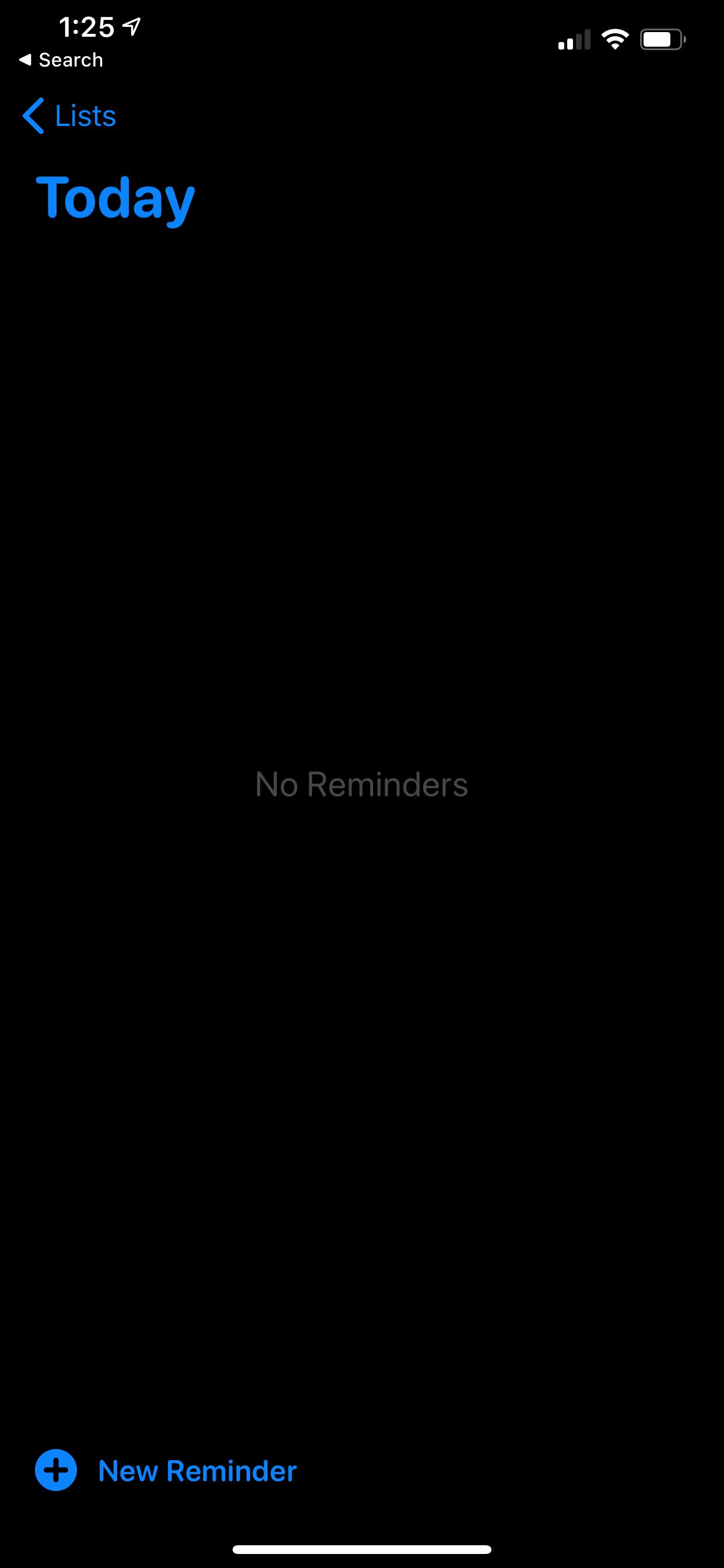
If you’ve never used the Reminders app, adding a task is simple. Just open up the app and then tap Reminders under My Lists. On that screen, select the + New Reminder at the bottom of the page.

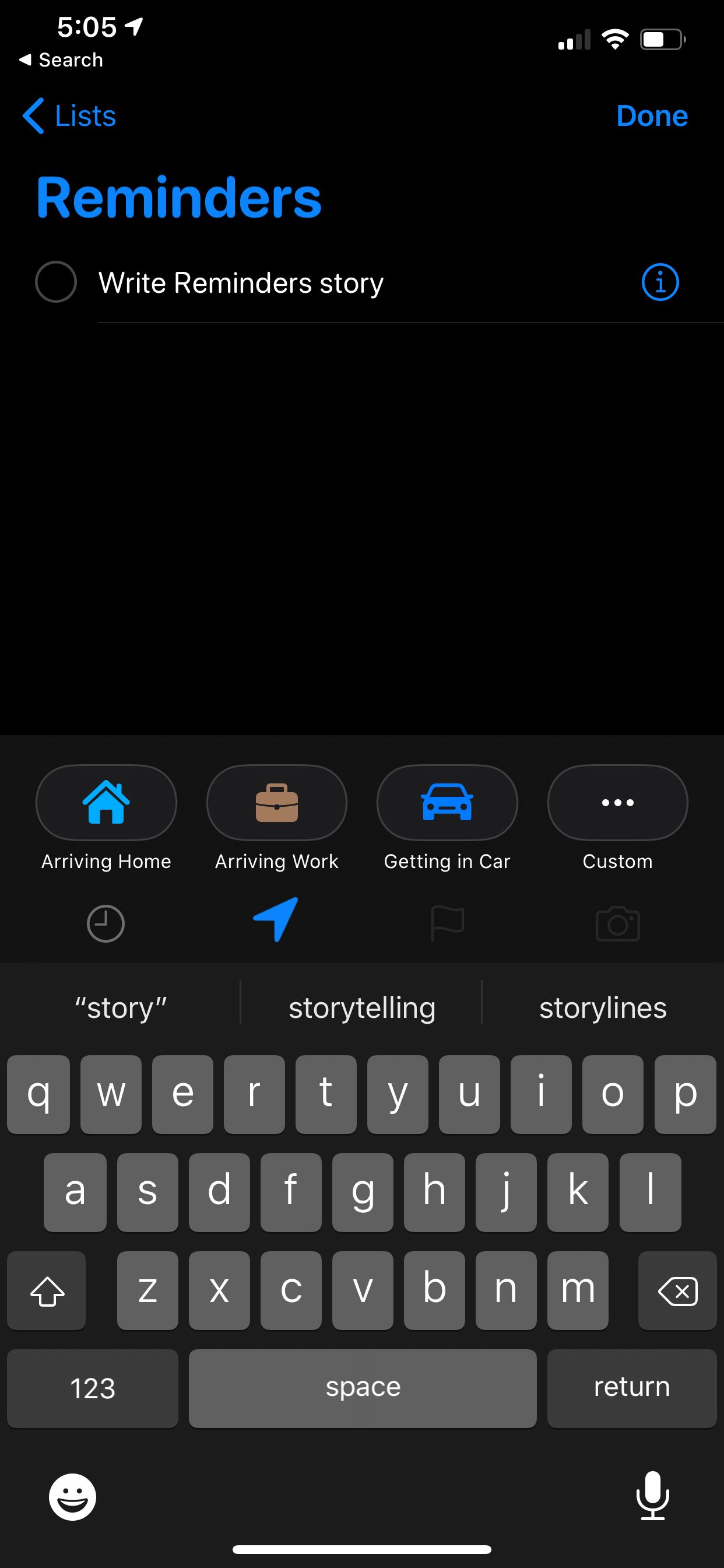
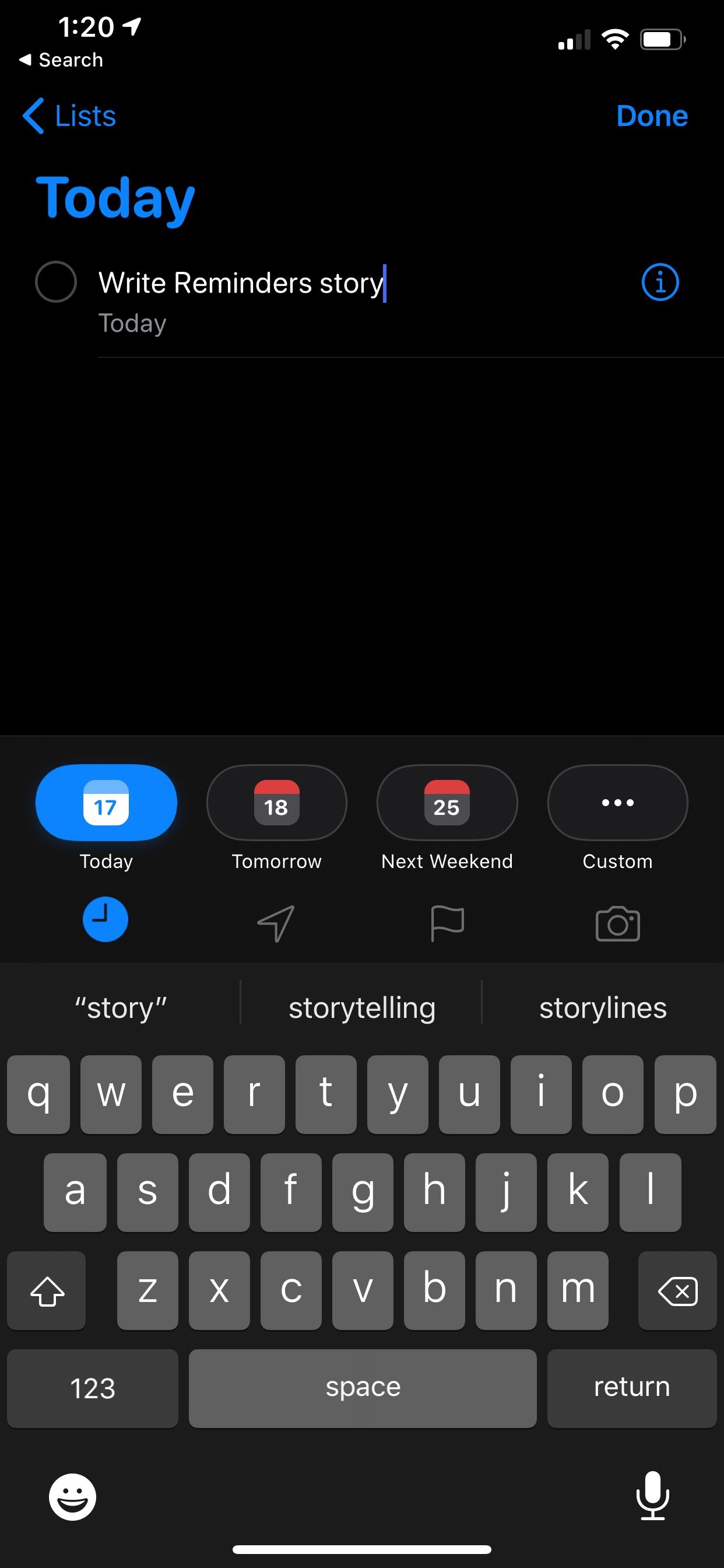
Right below the screen where you enter the reminder is a great quick toolbar that offers many different customization options.

Select the clock icon (the first option in the toolbar) to set a due date for the reminder. You can set a custom date or select relative terms like today, tomorrow, or this weekend. Using this means you’ll receive a reminder notification on your device at the time chosen.

The location icon will allow you to create a notification for wherever you are. You can define a custom location or select from the presets arriving home, arriving at work, or getting in the car. This feature opens up a wide variety of different possibilities. For example, you can select to receive a notification to buy milk whenever you arrive at the store.

For an important reminder, select the flag. It will appear in a Flagged list when opening the Reminders app.

Finally, choosing the camera icon will allow you to add a photo attachment to the reminder.

When you complete a reminder, just select the circle near the text on the left side. If necessary, you can also swipe left to quickly delete the reminder.

And you don’t even need to have the app open to add a reminder. While using another app—like Messages, Safari, or many other third-party apps—just select the Share button. Then select the Reminders icon to add in the information as a reminder in one step.

Add Even More Information to Your Reminders

Even after entering a reminder, you can go back and make further edits to add more information.

As a great feature, you can add subtasks to any reminder. That allows even more customization options, so you can save additional information like an entire shopping list. There are multiple ways to create a subtask. The easiest way is to tap and hold a reminder, then drag it onto another. The reminder you drag becomes a subtask.

To further edit a task, just select it and tap the i icon on the right side. On the Details screen, you can add any notes and even a web address to the reminder. That information will appear with a reminder on any lists.

For another handy feature, toggle on Remind me when messaging and select a specific name in your contact list. Now when you message that person, a notification will appear on the screen with the applicable reminder.

Remind me when messaging

Using Lists to Organize All of Your Reminders

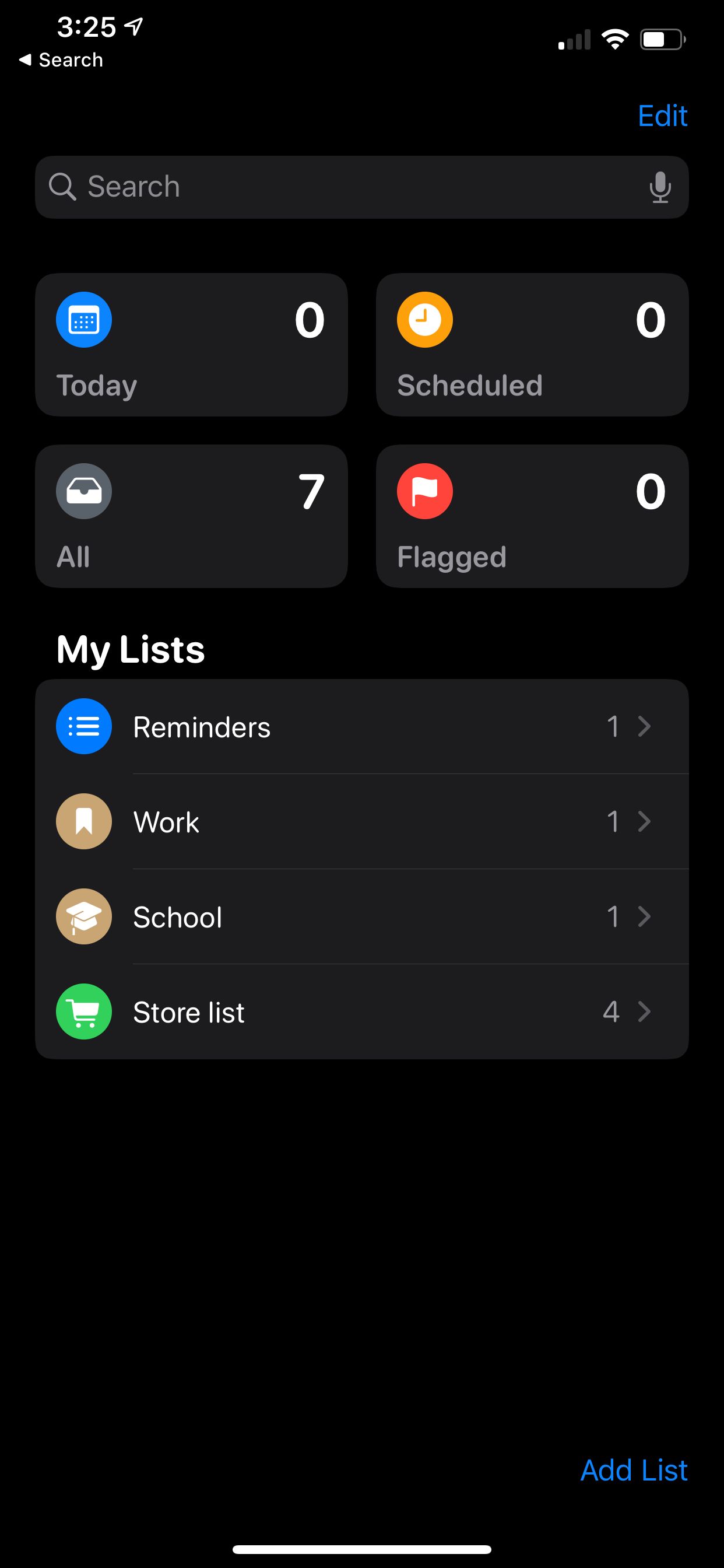
Once you get the hang of the Reminders app, creating lists provide a great way to keep track of numerous reminders. On the main page of the app, you’ll notice four default smart lists that you can’t alter: Today, Scheduled, Flagged, and All.

Today shows any reminder that you’ve taged as being due on today’s date. You’ll also see any overdue tasks. In Scheduled, you’ll see anything to which you’ve assigned a due date. Any task with a flag appears in the Flagged list. Meanwhile, the All list shows each of your unfinished reminders.

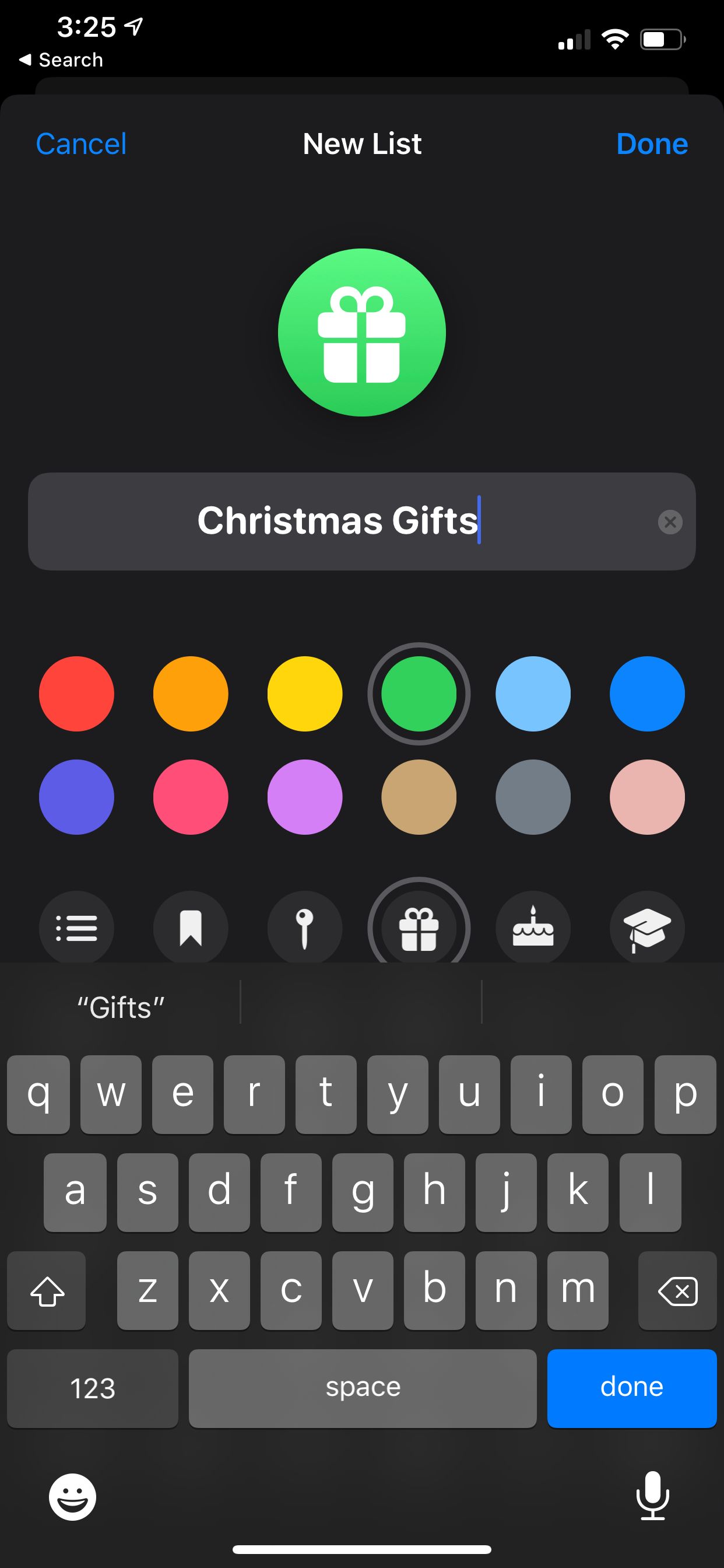
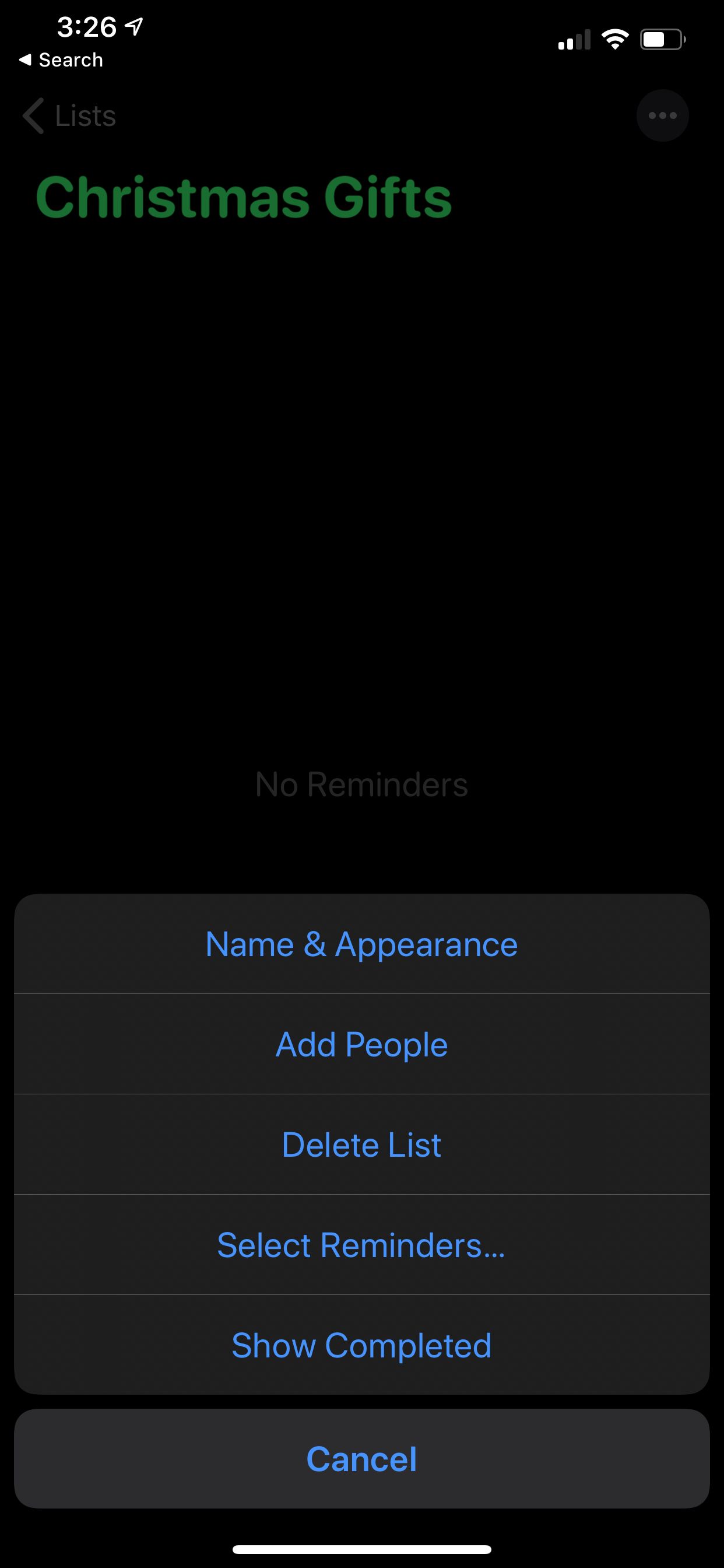
You can also create a custom list. On the main screen of the app, select Add List. Choose a name and then select a color for the list. There are also many icons to select from. You can always add or edit those after creating the list by selecting it and hitting the More button on the top-right corner.

From the same menu, you can also select Add People to share a list with friends and family. You’ll first select how the other person will receive the invitation to work on the list.

They can interact with the list by adding or deleting reminders and marking them as complete. Keep in mind that the other person needs to have iOS 13 on their iPhone or iPadOS 13 on an iPad to work on the list.

After creating many different lists, you can organize them into a group. Just tap and hold one list and drag it onto another. You’ll then need to give the group a new name.

Even with several different lists, you can still easily move reminders. In the edit menu of a reminder, select List and then pick where to move the reminder. And if you can’t find a specific reminder or list you need, just head to the search bar at the top of the app’s main screen.

Reminders on Apple Watch and Mac

Apple Watch Reminders

Even if you don’t have an iPhone or iPad handy, you can still access the Reminders app on an Apple Watch. Thanks to iCloud sync, you’ll still see the same smart and custom lists. You can view reminders and even mark them as complete.

To add a reminder on the Watch, scroll down to the end of your list and select Add Reminder. You can also just talk to Siri on your Watch. Speaking of Siri, adding a reminder with only your voice is also available on the iPhone and iPad.

There is also a Reminders complication so you can quickly see anything marked as Today. Selecting the complication on an Apple Watch face will start the app. Make sure to see how you can use the complication is some great custom Apple Watch faces.

While using a Mac, you can also access the Reminders app. This will also show all your most up-to-date reminders. Any changes you make on your Mac will then appear on your iOS/iPadOS devices and Apple Watch immediately.

Using Apple Reminders to Stay Organized

As you can see, Apple Reminders took a huge step up in iOS 13 and iPadOS 13. While it’s not perfect, the app is a great way to stay organized, keep on top of your day-to-day tasks, and clear your head.

But if you’re looking for something different, make sure to take a look at our list of iPhone task apps that are better than Apple Reminders.

Read the full article: How to Master the Reminders App on Your iPhone or iPad


Read Full Article

26 January 2020

The Ultimate JavaScript Cheat Sheet


Code displayed on a laptop screen

If you want to build dynamic webpages, you’ll have to supplement your HTML and CSS knowledge with an understanding of JavaScript. This scripting language is considered an essential in modern web development.

You can build all kinds of interesting interactive apps and websites with JavaScript, but there’s much to learn on the way. With that in mind, we have created the following JavaScript cheat sheet for you.

The cheat sheet can serve as a quick refresher on JavaScript elements any time you need one. It’s handy for newbies and experts alike.

FREE DOWNLOAD: This cheat sheet is available as a downloadable PDF from our distribution partner, TradePub. You will have to complete a short form to access it for the first time only. Download The Ultimate JavaScript Cheat Sheet.

The Ultimate JavaScript Cheat Sheet

Shortcut Action
JavaScript Arrays
concat() Join several arrays into one
copyWithin() Copy array elements within the array, to and from specified positions
indexOf() Return the primitive value of the specified object
includes() Check if an array contains the specified element
join() Combine elements of an array into a single string and return the string
entries() Return a key/value pair Array Iteration Object
every() Check if every element in an array passes a test
fill() Fill the elements in an array with a static value
filter() Create a new array with every element in an array that pass a test
find() Return the value of the first element in an array that pass a test
forEach() Call a function for each array element
from() Create an array from an object
lastIndexOf() Give the last position at which a given element appears in an array
pop() Remove the last element of an array
push() Add a new element at the end
reverse() Sort elements in descending order
reduce() Reduce the values of an array to a single value (going left-to-right)
reduceRight() Reduce the values of an array to a single value (going right-to-left)
shift() Remove the first element of an array
slice() Pull a copy of a portion of an array into a new array object
sort() Sort elements alphabetically
splice() Add elements in a specified way and position
unshift() Add a new element to the beginning
JavaScript Boolean Methods
toString() Convert a Boolean value to a string, and return the result
valueOf() Return the first position at which a given element appears in an array
toSource() Return a string representing the source code of the object
JavaScript Arithmetic Operators
+ Addition
- Subtraction
* Multiplication
/ Division
(...) Grouping operator (operations within brackets are executed earlier than those outside)
% Modulus (remainder)
++ Increment numbers
-- Decrement numbers
== Equal to
=== Equal value and equal type
!= Not equal
!== Not equal value or not equal type
> Greater than
< Lesser than
>= Greater than or equal to
<= Lesser than or equal to
? Ternary operator
Logical Operators
&& Logical AND
|| Logical OR
! Logical NOT
Bitwise Operators
& AND statement
| OR statement
~ NOT
^ XOR
<< Left shift
>> Right shift
>>> Zero fill right shift
Functions
alert() Output data in an alert box in the browser window
confirm() Open up a yes/no dialog and return true/false depending on user click
console.log() Write information to the browser console (good for debugging purposes)
document.write() Write directly to the HTML document
prompt() Create a dialog for user input
Global Functions
decodeURI() Decode a Uniform Resource Identifier (URI) created by encodeURI or similar
decodeURIComponent() Decode a URI component
encodeURI() Encode a URI into UTF-8
encodeURIComponent() Same but for URI components
eval() Evaluate JavaScript code represented as a string
isFinite() Determine whether a passed value is a finite number
isNaN() Determine whether a value is an illegal number
Number() Convert an object's value to a number
parseFloat() Parse a string and return a floating point number
parseInt() Parse a string and return an integer
JavaScript Loops
for The most common way to create a loop in JavaScript
while Set up conditions under which a loop executes
do while Similar to the while loop, however, it executes at least once and performs a check at the end to see if the condition is met to execute again
break Stop and exit the cycle if certain conditions are mets
continue Skip parts of the cycle if certain conditions are met
Escape Characters
\' Single quote
\" Double quote
\\ Backslash
\b Backspace
\f Form feed
\n New line
\r Carriage return
\t Horizontal tabulator
\v Vertical tabulator
JavaScript String Methods
charAt() Return a character at a specified position inside a string
charCodeAt() Give the unicode of character at that position
concat() Concatenate (join) two or more strings into one
fromCharCode() Return a string created from the specified sequence of UTF-16 code units
indexOf() Provide the position of the first occurrence of specified text within a string
lastIndexOf() Same as indexOf() but with the last occurrence, searching backwards
match() Retrieve the matches of a string against a search pattern
replace() Find and replace specified text in a string
search() Execute a search for a matching text and return its position
slice() Extract a section of a string and return it as a new string
split() Split a string object into an array of strings at a specified position
startsWith() Check whether a string begins with specified characters
substr() Similar to slice() but extracts a substring depended on a specified number of characters
substring() Similar to slice() but can’t accept negative indices
toLowerCase() Convert strings to lower case
toUpperCase() Convert strings to upper case
valueOf() Return the primitive value (that has no properties or methods) of a string object
REGULAR EXPRESSION SYNTAX

Pattern Modifiers
e Evaluate replacement
i Perform case-insensitive matching
g Perform global matching
m Perform multiple line matching
s Treat strings as single line
x Allow comments and whitespace in pattern
U Ungreedy pattern
Brackets
[abc] Find any of the characters in the brackets
[^abc] Find any character not in the brackets
[0-9] Find digit specified in the brackets
[A-z] Find any character from uppercase A to lowercase z
(a|b|c) Find any of the alternatives separated with |
Metacharacters
. Find a single character, except newline or line terminator
\w Word character
\W Non-word character
\d A digit
\D A non-digit character
\s Whitespace character
\S Non-whitespace character
\b Find a match at the beginning/end of a word
\B Find a match not at the beginning/end of a word
\u0000 NUL character
\n A new line character
\f Form feed character
\r Carriage return character
\t Tab character
\v Vertical tab character
\xxx Character specified by an octal number xxx
\xdd Latin character specified by a hexadecimal number dd
\udddd Unicode character specified by a hexadecimal number dddd
Quantifiers
n+ Match any string that contains at least one n
n* Any string that contains zero or more occurrences of n
n? Any string that contains zero or one occurrences of n
n{X} Any string that contains a sequence of X n’s
n{X,Y} Strings that contains a sequence of X to Y n’s
n{X,} Matches any string that contains a sequence of at least X n’s
n$ Any string with n at the end of it
^n String with n at the beginning of it
?=n Any string that is followed by a specific string n
?!n String that is not followed by a specific string n
Number Properties
MAX_VALUE Maximum numeric value representable in JavaScript
MIN_VALUE Smallest positive numeric value representable in JavaScript
NaN The “Not-a-Number” value
NEGATIVE_INFINITY Negative Infinity value
POSITIVE_INFINITY Positive Infinity value
Number Methods
toExponential() Return a string with a rounded number written as exponential notation
toFixed() Return string of a number with a specified number of decimals
toPrecision() Return string of a number written with a specified length
toString() Return a number as a string
valueOf() Return a number as a number
Math Properties
E Euler’s number
LN2 Natural logarithm of 2
LN10 Natural logarithm of 10
LOG2E Base 2 logarithm of E
LOG10E Base 10 logarithm of E
PI The number PI
SQRT1_2 Square root of 1/2
SQRT2 Square root of 2
Math Methods
abs(x) Return the absolute (positive) value of x
acos(x) Arccosine of x, in radians
asin(x) Arcsine of x, in radians
atan(x) Arctangent of x as a numeric value
atan2(y,x) Arctangent of the quotient of its arguments
ceil(x) Value of x rounded up to its nearest integer
cos(x) Cosine of x (x is in radians)
exp(x) Value of Ex
floor(x) Value of x rounded down to its nearest integer
log(x) Natural logarithm (base E) of x
max(x,y,z,...,n) Number with highest value
min(x,y,z,...,n) Number with lowest value
pow(x,y) X to the power of y
random() Random number between 0 and 1
round(x) Value of x rounded to its nearest integer
sin(x) Sine of x (x is in radians)
sqrt(x) Square root of x
tan(x) Tangent of an angle
Dates
Date() Create a new date object with the current date and time
Date(2017, 5, 21, 3, 23, 10, 0) Create a custom date object. The numbers represent year, month, day, hour, minutes, seconds, milliseconds. You can omit anything you want except for year and month.
Date(“2017-06-23”) Date declaration as a string
getDate() Get the day of the month as a number (1-31)
getDay() Get the weekday as a number (0-6)
getFullYear() Get the year as a four digit number (yyyy)
getHours() Get the hour (0-23)
getMilliseconds() Get the millisecond (0-999)
getMinutes() Get the minute (0-59)
getMonth() Get the month as a number (0-11)
getSeconds() Get the second (0-59)
getTime() Get the time (milliseconds since January 1, 1970)
getUTCDate() Day (date) of the month in the specified date according to universal time (also available for day, month, fullyear, hours, minutes etc.)
parse Parse a string representation of a date, and return the number of milliseconds since January 1, 1970
setDate() Set the day as a number (1-31)
setFullYear() Set the year (optionally month and day)
setHours() Set the hour (0-23)
setMilliseconds() Set the milliseconds (0-999)
setMinutes() Set the minutes (0-59)
setMonth() Set the month (0-11)
setSeconds() Set the seconds (0-59)
setTime() Set the time (milliseconds since January 1, 1970)
setUTCDate() Set the day of the month for a specified date according to universal time (also available for day, month, fullyear, hours, minutes etc.)
DOM MODE


Node Properties
attributes Live collection of all attributes registered to an element
baseURI Absolute base URL of an HTML element
childNodes Collection of an element’s child nodes
firstChild First child node of an element
lastChild Last child node of an element
nextSibling Next node at the same node tree level
nodeName Name of a node
nodeType Type of a node
nodeValue Value of a node
ownerDocument Top-level document object for current node
parentNode Parent node of an element
previousSibling Node immediately preceding the current one
textContent Textual content of a node and its descendants
Node Methods
appendChild() Add a new child node to an element as the last child node
cloneNode() Clone HTML element
compareDocumentPosition() Compare the document position of two elements
getFeature() Return an object which implements the APIs of a specified feature
hasAttributes() Return true if an element has any attributes, else return false
hasChildNodes() Return true if an element has any child nodes, else return false
insertBefore() Insert a new child node before a specified, existing child node
isDefaultNamespace() Return true if a specified namespaceURI is the default, else return false
isEqualNode() Check if two elements are equal
isSameNode() Check if two elements are the same node
isSupported() Return true if a specified feature is supported on the element
lookupNamespaceURI() Return the namespaceURI associated with a given node
lookupPrefix() Return a DOMString containing the prefix for a given namespaceURI, if present
normalize() Join adjacent text nodes and remove empty text nodes in an element
removeChild() Remove a child node from an element
replaceChild() Replace a child node in an element
Element Methods
getAttribute() Return the specified attribute value of an element node
getAttributeNS() Return string value of the attribute with the specified namespace and name
getAttributeNode() Get the the specified attribute node
getAttributeNodeNS() Return the attribute node for the attribute with the given namespace and name
getElementsByTagName() Provide a collection of all child elements with the specified tag name
getElementsByTagNameNS() Return a live HTML collection of elements with a certain tag name belonging to the given namespace
hasAttribute() Return true if an element has any attributes, else return false
hasAttributeNS() Provide a true/false value indicating whether the current element in a given namespace has the specified attribute
removeAttribute() Remove a specified attribute from an element
removeAttributeNS() Remove the specified attribute from an element within a certain namespace
removeAttributeNode() Take away a specified attribute node and return the removed node
setAttribute() Set or change the specified attribute to a specified value
setAttributeNS() Add a new attribute or change the value of an attribute with the given namespace and name
setAttributeNode() Set or change the specified attribute node
setAttributeNodeNS() Add a new namespaced attribute node to an element
Browser Window Properties
closed Check whether a window has been closed or not and return true or false
defaultStatus Set or return the default text in the statusbar of a window
document Return the document object for the window
frames Return all iframe elements in the current window
history Provide the History object for the window
innerHeight Inner height of a window’s content area
innerWidth Inner width of the content area
length Return the number of iframe elements in the window
location Return the location object for the window
name Set or return the name of a window
navigator Return the Navigator object for the window
opener Return a reference to the window that created the window
outerHeight Outer height of a window, including toolbars/scrollbars
outerWidth Outer width of a window, including toolbars/scrollbars
pageXOffset Number of pixels by which the document has been scrolled horizontally
pageYOffset Number of pixels by which the document has been scrolled vertically
parent Parent window of the current window
screen Return the Screen object for the window
screenLeft Horizontal coordinate of the window (relative to screen)
screenTop Vertical coordinate of the window
screenX Same as screenLeft but needed for some browsers
screenY Same as screenTop but needed for some browsers
self Return the current window
status Set or return the text in the statusbar of a window
top Return the topmost browser window
Browser Window Methods
alert() Display an alert box with a message and an OK button
blur() Remove focus from the current window
clearInterval() Clear a timer set with setInterval()
clearTimeout() Clear a timer set with setTimeout()
close() Close the current window
confirm() Display a dialog box with a message and OK and Cancel buttons
focus() Set focus to the current window
moveBy() Move a window relative to its current position
moveTo() Move a window to a specified position
open() Open a new browser window
print() Print the content of the current window
prompt() Display a dialog box that prompts the visitor for input
resizeBy() Resize the window by the specified number of pixels
resizeTo() Resize the window to a specified width and height
scrollBy() Scroll the document by a specified number of pixels
scrollTo() Scroll the document to specified coordinates
setInterval() Call a function or evaluate an expression at specified intervals
setTimeout() Call a function or evaluate an expression after a specified interval
stop() Stop the window from loading
Screen Properties
availHeight Return the height of the screen (excluding the Windows Taskbar)
availWidth Return the width of the screen (excluding the Windows Taskbar)
colorDepth Return the bit depth of the color palette for displaying images
height The total height of the screen
pixelDepth The color resolution of the screen in bits per pixel
width The total width of the screen
JAVASCRIPT EVENTS

JavaScript Mouse Events
onclick When user clicks on an element
oncontextmenu When user right-clicks on an element to open a context menu
ondblclick When user double-clicks on an element
onmousedown When user presses a mouse button over an element
onmouseenter When user moves pointer onto an element
onmouseleave When user moves pointer away from an element
onmousemove When user moves pointer while it is over an element
onmouseover When user moves pointer onto an element or one of its children
onmouseout When user moves pointer away from an element or one of its children
onmouseup When user releases a mouse button while over an element
JavaScript Keyboard Events
onkeydown When user is pressing a key down
onkeypress When user starts pressing a key
onkeyup When user releases a key
JavaScript Frame Events
onabort When loading of media is aborted
onbeforeunload Before the document is about to be unloaded
onerror When an error occurs while loading an external file
onhashchange When the anchor part of a URL has changed
onload When an object has loaded
onpagehide When user navigates away from a webpage
onpageshow When user navigates to a webpage
onresize When user resizes document view
onscroll When user is scrolling an element’s scrollbar
onunload When a page has unloaded
JavaScript Form Events
onblur When an element loses focus
onchange When the content of a form element changes (for input, select, and textarea)
onfocus When an element gets focus
onfocusin When an element is about to get focus
onfocusout When an element is about to lose focus
oninput User input on an element
oninvalid When an element is invalid
onreset When a form is reset
onsearch When a user types something in a search field (for input="search")
onselect When user selects some text (for input and textarea)
onsubmit When a form is submitted
JavaScript Drag Events
ondrag When user drags an element
ondragend When user has finished dragging the element
ondragenter When the dragged element enters a drop target
ondragleave When the dragged element leaves the drop target
ondragover When the dragged element is on top of the drop target
ondragstart When user starts to drag an element
ondrop Dragged element is dropped on the drop target
JavaScript Clipboard Events
oncopy When user copies content of an element
oncut When user cuts an element’s content
onpaste When user pastes content in an element
JavaScript Media Events
onabort When media loading is aborted
oncanplay When browser can start playing media (e.g. a file has buffered enough)
oncanplaythrough When browser can play through media without stopping
ondurationchange When duration of media changes
onended When media has reached its end
onerror When an error occurs while loading an external file
onloadeddata When media data is loaded
onloadedmetadata When metadata (like dimensions and duration) is loaded
onloadstart When browser starts looking for specified media
onpause When media is paused either by user or automatically
onplay When media has been started or is no longer paused
onplaying When media is playing after having been paused or stopped for buffering
onprogress When browser is in the process of downloading media
onratechange When playing speed of media changes
onseeked When user has finished moving/skipping to a new position in media
onseeking When user starts moving/skipping
onstalled When browser is trying to load unavailable media
onsuspend When browser is intentionally not loading media
ontimeupdate The playing position has changed (e.g. because of fast forward)
onvolumechange When media volume has changed (including mute)
onwaiting When media has paused but is expected to resume (for example, buffering)
Animation
animationend When CSS animation is complete
animationiteration When CSS animation is repeated
animationstart When CSS animation has started
Miscellaneous
transitionend When CSS transition is complete
onmessage When a message is received through the event source
onoffline When browser starts to work offline
ononline When browser starts to work online
onpopstate When the window’s history changes
onshow When a menu element is shown as a context menu
onstorage When a Web Storage area is updated
ontoggle When user opens or closes the details element
onwheel When mouse wheel rolls up or down over an element
ontouchcancel When screen touch is interrupted
ontouchend When user’s finger goes off touch screen
ontouchmove When user drags a finger across the screen

Explore JavaScript Further

We consider JavaScript one of the top programming languages to master for the future. And we recommend diving into advanced concepts like JavaScript array methods once you have a grasp of the basics of JavaScript.

Image Credit: Oskar Yildiz on Unsplash

Read the full article: The Ultimate JavaScript Cheat Sheet


Read Full Article

25 January 2020

This Week in Apps: Apple antitrust issues come to Congress, subscription apps boom, Tencent takes on TikTok


Welcome back to ThisWeek in Apps, the Extra Crunch series that recaps the latest OS news, the applications they support and the money that flows through it all.

The app industry is as hot as ever with a record 204 billion downloads in 2019 and $120 billion in consumer spending in 2019, according to App Annie’s recently released “State of Mobile” annual report. People are now spending 3 hours and 40 minutes per day using apps, rivaling TV. Apps aren’t just a way to pass idle hours — they’re a big business. In 2019, mobile-first companies had a combined $544 billion valuation, 6.5x higher than those without a mobile focus.

In this Extra Crunch series, we help you keep up with the latest news from the world of apps, delivered on a weekly basis.

This week, there was a ton of app news. We’re digging into the latest with Apple’s antitrust issues, Tencent’s plan to leverage WeChat to fend off the TikTok threat, AppsFlyer’s massive new round, the booming subscription economy, Disney’s mobile game studio sale, PokĆ©mon GO’s boost to tourism, Match Group’s latest investment and much more. And did you see the app that lets you use your phone from within a paper envelope? Or the new AR social network? It’s Weird App Week, apparently.

Headlines

5 Sites to Find Ethical Alternatives to Tech, Fashion, and Unfair Brands


ethical-alternatives-brands

It’s time to make better choices in what we buy and consume. From using eco-friendly products to buying from companies that treat their workers fairly, here’s how you can find ethical alternatives to anything.

When we talk about making an ethical choice, there are different aspects to look at. For example, how a company behaves with its employees or a firm’s carbon footprint, or even how they treat animals. Importantly, you don’t need to be strict about ethical choices either. The first step is finding out what’s out there.

1. Ethical.net (Web): List of Ethical Tech Alternatives

Ethical.net lists ethical alternatives to technology products, brands, and services

Ethical.net is one of the leading websites to find ethical alternatives to several technological brands, products, and services. It also features articles with different takes on ethical choices, such as a guide to foraging and the ethical and sustainable side of Christmas.

The Resources tab has the long list that you’re looking for. It deals with apps and tech services, such as email and search engines, broadband providers, streaming services, office tools, messaging, etc. But look closely for a few interesting choices.

For instance, it’s no secret that most major companies make smartphones in China where labor is exploited. And there are several privacy implications too.

Ethical.net suggests alternatives for smartphones that adhere to certain ethical standards, like the sustainable and ethical Shiftphone.

Apart from the readymade resources, the website also hosts an active forum where you can discuss such topics with like-minded people. You can learn from each other and find what ethical living is all about, plus get recommendations for things not on the lists.

2. Take Care (Web): Discover Companies Focusing on Sustainability and Ethics

Take Care is a catalogue of companies that focus on sustainability and ethics

Take Care is creating a platform for laypeople to discover companies that focus on sustainable methods and ethical practices. The fields range from food and health to large-scale projects like architecture or biotechnology.

There are so many ethical issues out there, and so many companies are tackling it in their own unique way.

For example, the simple toothpaste you use every day has questionable ingredients and is eventually packaged in non-recyclable plastic. So there’s a company called Bite that’s making zero waste toothpaste tablets, packaged in glass bottles.

It would be difficult to find out about a company like Bite without a platform like Take Care. There are a few featured companies on the main page but dive into the full list to discover innovative solutions to the problems we face today. You might find a simple way to make a difference with a small change.

3. Eticaly, Good On You, and r/EthicalFashion (Web): Fashion Without Ethical Compromises

Eticaly hosts a catalogue of eco-friendly, vegan, handmade, fair trade, and zero waste fashion brands

The fashion, style, and beauty industries are notorious for ethical transgressions such as mistreatment of animals, unfair trade practices, and wasteful productions. But if you thought that looking good requires that compromise, a few websites are here to dispel that notion.

Eticaly and Good On You round up ethical fashion brands, and categorize them based on their values.

Eticaly filters them by eco-friendly, vegan, handmade, fair trade, and zero waste.

Good On You categorizes brands by the type of product, and measures each company’s impact on planet, people, and animals.

Go through the list to find specific issues like organic wear or reusing deadstock fabrics. Both are simple catalogs though, stating what each brand does and linking back to the official store.

r/EthicalFashion is a subreddit to discuss fashion and style choices that take some sort of an ethical stance. The community also maintains a master list of ethical fashion brands to add to what you’ll find at Eticaly or Good On You.

Plus, if you’re unsure about any fashion choice, you could ask others to look into it. It’s a fairly supportive subreddit that tries to help rather than preach.

4. Ethical Consumer (Web): UK-Based Non-Profit Since 1989

Ethical Consumer ranks products and brands, and educates people about the ethical problems across goods

Since 1989, Ethical Consumer magazine has been tracking how companies and products affect different problems such as climate impact, sustainability, fair trade, or human rights violations.

While primarily meant for the UK, the advice on the website is generally applicable anywhere in the world.

The magazine does an excellent job of investigating, scoring, and ranking the ethical and environmental records of several common products. These product guides are largely distributed in categories like energy, fashion and clothing, food and drinks, health and beauty, home and garden, money, retailers, technology, and travel.

In each category, you can also find a cheatsheet for the major issues affecting that industry. Ethical Consumer will explain, in simple terms, the problem and how you can make a difference.

The website also maintains a Boycotts List.

Campaign groups often call for consumers to boycott a certain brand or product due to an ethical violation. Ethical Consumer lists all of them in one page, with a quick explanation of why you should avoid it.

5. Platar (Chrome): Extension to Suggest Alternatives While Shopping

Platar is a Chrome extension that suggests ethical alternatives to products while you're shopping online

You don’t need to remember every single cause you want to support or brand you want to avoid. Google Chrome extension Platar will do that for you, suggesting an ethical alternative while shopping online.

Once you activate Platar, you get to choose from a list of campaigns started by organizations like PETA, Greenpeace, Clean Sugar Campaign, and even Ethical Consumer.

Sign up for those causes you believe in, and Platar will add products from their boycott list. You can even add campaigns yourself, but they’ll have to be approved by the app.

When you’re browsing Amazon or another shopping site and come across one of those products, the Platar icon turns red. Click the icon to find out why the product or brand is recommended for a boycott.

Platar also suggests a few alternatives from brands that aren’t on its no-no list. It’s a convenient way to keep shopping while retaining your conscience.

Download: Platar for Chrome (Free)

For an Eco-Friendly Lifestyle

Being more aware of your purchase decisions is only one step in helping build a better planet. But it’s still an excellent step to take, especially for beginners. If you want to do more and go green, then check out these apps for a more eco-friendly lifestyle.

Image Credit: IgorVetushko/Depositphotos

Read the full article: 5 Sites to Find Ethical Alternatives to Tech, Fashion, and Unfair Brands


Read Full Article