26 January 2020

The Ultimate JavaScript Cheat Sheet


Code displayed on a laptop screen

If you want to build dynamic webpages, you’ll have to supplement your HTML and CSS knowledge with an understanding of JavaScript. This scripting language is considered an essential in modern web development.

You can build all kinds of interesting interactive apps and websites with JavaScript, but there’s much to learn on the way. With that in mind, we have created the following JavaScript cheat sheet for you.

The cheat sheet can serve as a quick refresher on JavaScript elements any time you need one. It’s handy for newbies and experts alike.

FREE DOWNLOAD: This cheat sheet is available as a downloadable PDF from our distribution partner, TradePub. You will have to complete a short form to access it for the first time only. Download The Ultimate JavaScript Cheat Sheet.

The Ultimate JavaScript Cheat Sheet

Shortcut Action
JavaScript Arrays
concat() Join several arrays into one
copyWithin() Copy array elements within the array, to and from specified positions
indexOf() Return the primitive value of the specified object
includes() Check if an array contains the specified element
join() Combine elements of an array into a single string and return the string
entries() Return a key/value pair Array Iteration Object
every() Check if every element in an array passes a test
fill() Fill the elements in an array with a static value
filter() Create a new array with every element in an array that pass a test
find() Return the value of the first element in an array that pass a test
forEach() Call a function for each array element
from() Create an array from an object
lastIndexOf() Give the last position at which a given element appears in an array
pop() Remove the last element of an array
push() Add a new element at the end
reverse() Sort elements in descending order
reduce() Reduce the values of an array to a single value (going left-to-right)
reduceRight() Reduce the values of an array to a single value (going right-to-left)
shift() Remove the first element of an array
slice() Pull a copy of a portion of an array into a new array object
sort() Sort elements alphabetically
splice() Add elements in a specified way and position
unshift() Add a new element to the beginning
JavaScript Boolean Methods
toString() Convert a Boolean value to a string, and return the result
valueOf() Return the first position at which a given element appears in an array
toSource() Return a string representing the source code of the object
JavaScript Arithmetic Operators
+ Addition
- Subtraction
* Multiplication
/ Division
(...) Grouping operator (operations within brackets are executed earlier than those outside)
% Modulus (remainder)
++ Increment numbers
-- Decrement numbers
== Equal to
=== Equal value and equal type
!= Not equal
!== Not equal value or not equal type
> Greater than
< Lesser than
>= Greater than or equal to
<= Lesser than or equal to
? Ternary operator
Logical Operators
&& Logical AND
|| Logical OR
! Logical NOT
Bitwise Operators
& AND statement
| OR statement
~ NOT
^ XOR
<< Left shift
>> Right shift
>>> Zero fill right shift
Functions
alert() Output data in an alert box in the browser window
confirm() Open up a yes/no dialog and return true/false depending on user click
console.log() Write information to the browser console (good for debugging purposes)
document.write() Write directly to the HTML document
prompt() Create a dialog for user input
Global Functions
decodeURI() Decode a Uniform Resource Identifier (URI) created by encodeURI or similar
decodeURIComponent() Decode a URI component
encodeURI() Encode a URI into UTF-8
encodeURIComponent() Same but for URI components
eval() Evaluate JavaScript code represented as a string
isFinite() Determine whether a passed value is a finite number
isNaN() Determine whether a value is an illegal number
Number() Convert an object's value to a number
parseFloat() Parse a string and return a floating point number
parseInt() Parse a string and return an integer
JavaScript Loops
for The most common way to create a loop in JavaScript
while Set up conditions under which a loop executes
do while Similar to the while loop, however, it executes at least once and performs a check at the end to see if the condition is met to execute again
break Stop and exit the cycle if certain conditions are mets
continue Skip parts of the cycle if certain conditions are met
Escape Characters
\' Single quote
\" Double quote
\\ Backslash
\b Backspace
\f Form feed
\n New line
\r Carriage return
\t Horizontal tabulator
\v Vertical tabulator
JavaScript String Methods
charAt() Return a character at a specified position inside a string
charCodeAt() Give the unicode of character at that position
concat() Concatenate (join) two or more strings into one
fromCharCode() Return a string created from the specified sequence of UTF-16 code units
indexOf() Provide the position of the first occurrence of specified text within a string
lastIndexOf() Same as indexOf() but with the last occurrence, searching backwards
match() Retrieve the matches of a string against a search pattern
replace() Find and replace specified text in a string
search() Execute a search for a matching text and return its position
slice() Extract a section of a string and return it as a new string
split() Split a string object into an array of strings at a specified position
startsWith() Check whether a string begins with specified characters
substr() Similar to slice() but extracts a substring depended on a specified number of characters
substring() Similar to slice() but can’t accept negative indices
toLowerCase() Convert strings to lower case
toUpperCase() Convert strings to upper case
valueOf() Return the primitive value (that has no properties or methods) of a string object
REGULAR EXPRESSION SYNTAX

Pattern Modifiers
e Evaluate replacement
i Perform case-insensitive matching
g Perform global matching
m Perform multiple line matching
s Treat strings as single line
x Allow comments and whitespace in pattern
U Ungreedy pattern
Brackets
[abc] Find any of the characters in the brackets
[^abc] Find any character not in the brackets
[0-9] Find digit specified in the brackets
[A-z] Find any character from uppercase A to lowercase z
(a|b|c) Find any of the alternatives separated with |
Metacharacters
. Find a single character, except newline or line terminator
\w Word character
\W Non-word character
\d A digit
\D A non-digit character
\s Whitespace character
\S Non-whitespace character
\b Find a match at the beginning/end of a word
\B Find a match not at the beginning/end of a word
\u0000 NUL character
\n A new line character
\f Form feed character
\r Carriage return character
\t Tab character
\v Vertical tab character
\xxx Character specified by an octal number xxx
\xdd Latin character specified by a hexadecimal number dd
\udddd Unicode character specified by a hexadecimal number dddd
Quantifiers
n+ Match any string that contains at least one n
n* Any string that contains zero or more occurrences of n
n? Any string that contains zero or one occurrences of n
n{X} Any string that contains a sequence of X n’s
n{X,Y} Strings that contains a sequence of X to Y n’s
n{X,} Matches any string that contains a sequence of at least X n’s
n$ Any string with n at the end of it
^n String with n at the beginning of it
?=n Any string that is followed by a specific string n
?!n String that is not followed by a specific string n
Number Properties
MAX_VALUE Maximum numeric value representable in JavaScript
MIN_VALUE Smallest positive numeric value representable in JavaScript
NaN The “Not-a-Number” value
NEGATIVE_INFINITY Negative Infinity value
POSITIVE_INFINITY Positive Infinity value
Number Methods
toExponential() Return a string with a rounded number written as exponential notation
toFixed() Return string of a number with a specified number of decimals
toPrecision() Return string of a number written with a specified length
toString() Return a number as a string
valueOf() Return a number as a number
Math Properties
E Euler’s number
LN2 Natural logarithm of 2
LN10 Natural logarithm of 10
LOG2E Base 2 logarithm of E
LOG10E Base 10 logarithm of E
PI The number PI
SQRT1_2 Square root of 1/2
SQRT2 Square root of 2
Math Methods
abs(x) Return the absolute (positive) value of x
acos(x) Arccosine of x, in radians
asin(x) Arcsine of x, in radians
atan(x) Arctangent of x as a numeric value
atan2(y,x) Arctangent of the quotient of its arguments
ceil(x) Value of x rounded up to its nearest integer
cos(x) Cosine of x (x is in radians)
exp(x) Value of Ex
floor(x) Value of x rounded down to its nearest integer
log(x) Natural logarithm (base E) of x
max(x,y,z,...,n) Number with highest value
min(x,y,z,...,n) Number with lowest value
pow(x,y) X to the power of y
random() Random number between 0 and 1
round(x) Value of x rounded to its nearest integer
sin(x) Sine of x (x is in radians)
sqrt(x) Square root of x
tan(x) Tangent of an angle
Dates
Date() Create a new date object with the current date and time
Date(2017, 5, 21, 3, 23, 10, 0) Create a custom date object. The numbers represent year, month, day, hour, minutes, seconds, milliseconds. You can omit anything you want except for year and month.
Date(“2017-06-23”) Date declaration as a string
getDate() Get the day of the month as a number (1-31)
getDay() Get the weekday as a number (0-6)
getFullYear() Get the year as a four digit number (yyyy)
getHours() Get the hour (0-23)
getMilliseconds() Get the millisecond (0-999)
getMinutes() Get the minute (0-59)
getMonth() Get the month as a number (0-11)
getSeconds() Get the second (0-59)
getTime() Get the time (milliseconds since January 1, 1970)
getUTCDate() Day (date) of the month in the specified date according to universal time (also available for day, month, fullyear, hours, minutes etc.)
parse Parse a string representation of a date, and return the number of milliseconds since January 1, 1970
setDate() Set the day as a number (1-31)
setFullYear() Set the year (optionally month and day)
setHours() Set the hour (0-23)
setMilliseconds() Set the milliseconds (0-999)
setMinutes() Set the minutes (0-59)
setMonth() Set the month (0-11)
setSeconds() Set the seconds (0-59)
setTime() Set the time (milliseconds since January 1, 1970)
setUTCDate() Set the day of the month for a specified date according to universal time (also available for day, month, fullyear, hours, minutes etc.)
DOM MODE


Node Properties
attributes Live collection of all attributes registered to an element
baseURI Absolute base URL of an HTML element
childNodes Collection of an element’s child nodes
firstChild First child node of an element
lastChild Last child node of an element
nextSibling Next node at the same node tree level
nodeName Name of a node
nodeType Type of a node
nodeValue Value of a node
ownerDocument Top-level document object for current node
parentNode Parent node of an element
previousSibling Node immediately preceding the current one
textContent Textual content of a node and its descendants
Node Methods
appendChild() Add a new child node to an element as the last child node
cloneNode() Clone HTML element
compareDocumentPosition() Compare the document position of two elements
getFeature() Return an object which implements the APIs of a specified feature
hasAttributes() Return true if an element has any attributes, else return false
hasChildNodes() Return true if an element has any child nodes, else return false
insertBefore() Insert a new child node before a specified, existing child node
isDefaultNamespace() Return true if a specified namespaceURI is the default, else return false
isEqualNode() Check if two elements are equal
isSameNode() Check if two elements are the same node
isSupported() Return true if a specified feature is supported on the element
lookupNamespaceURI() Return the namespaceURI associated with a given node
lookupPrefix() Return a DOMString containing the prefix for a given namespaceURI, if present
normalize() Join adjacent text nodes and remove empty text nodes in an element
removeChild() Remove a child node from an element
replaceChild() Replace a child node in an element
Element Methods
getAttribute() Return the specified attribute value of an element node
getAttributeNS() Return string value of the attribute with the specified namespace and name
getAttributeNode() Get the the specified attribute node
getAttributeNodeNS() Return the attribute node for the attribute with the given namespace and name
getElementsByTagName() Provide a collection of all child elements with the specified tag name
getElementsByTagNameNS() Return a live HTML collection of elements with a certain tag name belonging to the given namespace
hasAttribute() Return true if an element has any attributes, else return false
hasAttributeNS() Provide a true/false value indicating whether the current element in a given namespace has the specified attribute
removeAttribute() Remove a specified attribute from an element
removeAttributeNS() Remove the specified attribute from an element within a certain namespace
removeAttributeNode() Take away a specified attribute node and return the removed node
setAttribute() Set or change the specified attribute to a specified value
setAttributeNS() Add a new attribute or change the value of an attribute with the given namespace and name
setAttributeNode() Set or change the specified attribute node
setAttributeNodeNS() Add a new namespaced attribute node to an element
Browser Window Properties
closed Check whether a window has been closed or not and return true or false
defaultStatus Set or return the default text in the statusbar of a window
document Return the document object for the window
frames Return all iframe elements in the current window
history Provide the History object for the window
innerHeight Inner height of a window’s content area
innerWidth Inner width of the content area
length Return the number of iframe elements in the window
location Return the location object for the window
name Set or return the name of a window
navigator Return the Navigator object for the window
opener Return a reference to the window that created the window
outerHeight Outer height of a window, including toolbars/scrollbars
outerWidth Outer width of a window, including toolbars/scrollbars
pageXOffset Number of pixels by which the document has been scrolled horizontally
pageYOffset Number of pixels by which the document has been scrolled vertically
parent Parent window of the current window
screen Return the Screen object for the window
screenLeft Horizontal coordinate of the window (relative to screen)
screenTop Vertical coordinate of the window
screenX Same as screenLeft but needed for some browsers
screenY Same as screenTop but needed for some browsers
self Return the current window
status Set or return the text in the statusbar of a window
top Return the topmost browser window
Browser Window Methods
alert() Display an alert box with a message and an OK button
blur() Remove focus from the current window
clearInterval() Clear a timer set with setInterval()
clearTimeout() Clear a timer set with setTimeout()
close() Close the current window
confirm() Display a dialog box with a message and OK and Cancel buttons
focus() Set focus to the current window
moveBy() Move a window relative to its current position
moveTo() Move a window to a specified position
open() Open a new browser window
print() Print the content of the current window
prompt() Display a dialog box that prompts the visitor for input
resizeBy() Resize the window by the specified number of pixels
resizeTo() Resize the window to a specified width and height
scrollBy() Scroll the document by a specified number of pixels
scrollTo() Scroll the document to specified coordinates
setInterval() Call a function or evaluate an expression at specified intervals
setTimeout() Call a function or evaluate an expression after a specified interval
stop() Stop the window from loading
Screen Properties
availHeight Return the height of the screen (excluding the Windows Taskbar)
availWidth Return the width of the screen (excluding the Windows Taskbar)
colorDepth Return the bit depth of the color palette for displaying images
height The total height of the screen
pixelDepth The color resolution of the screen in bits per pixel
width The total width of the screen
JAVASCRIPT EVENTS

JavaScript Mouse Events
onclick When user clicks on an element
oncontextmenu When user right-clicks on an element to open a context menu
ondblclick When user double-clicks on an element
onmousedown When user presses a mouse button over an element
onmouseenter When user moves pointer onto an element
onmouseleave When user moves pointer away from an element
onmousemove When user moves pointer while it is over an element
onmouseover When user moves pointer onto an element or one of its children
onmouseout When user moves pointer away from an element or one of its children
onmouseup When user releases a mouse button while over an element
JavaScript Keyboard Events
onkeydown When user is pressing a key down
onkeypress When user starts pressing a key
onkeyup When user releases a key
JavaScript Frame Events
onabort When loading of media is aborted
onbeforeunload Before the document is about to be unloaded
onerror When an error occurs while loading an external file
onhashchange When the anchor part of a URL has changed
onload When an object has loaded
onpagehide When user navigates away from a webpage
onpageshow When user navigates to a webpage
onresize When user resizes document view
onscroll When user is scrolling an element’s scrollbar
onunload When a page has unloaded
JavaScript Form Events
onblur When an element loses focus
onchange When the content of a form element changes (for input, select, and textarea)
onfocus When an element gets focus
onfocusin When an element is about to get focus
onfocusout When an element is about to lose focus
oninput User input on an element
oninvalid When an element is invalid
onreset When a form is reset
onsearch When a user types something in a search field (for input="search")
onselect When user selects some text (for input and textarea)
onsubmit When a form is submitted
JavaScript Drag Events
ondrag When user drags an element
ondragend When user has finished dragging the element
ondragenter When the dragged element enters a drop target
ondragleave When the dragged element leaves the drop target
ondragover When the dragged element is on top of the drop target
ondragstart When user starts to drag an element
ondrop Dragged element is dropped on the drop target
JavaScript Clipboard Events
oncopy When user copies content of an element
oncut When user cuts an element’s content
onpaste When user pastes content in an element
JavaScript Media Events
onabort When media loading is aborted
oncanplay When browser can start playing media (e.g. a file has buffered enough)
oncanplaythrough When browser can play through media without stopping
ondurationchange When duration of media changes
onended When media has reached its end
onerror When an error occurs while loading an external file
onloadeddata When media data is loaded
onloadedmetadata When metadata (like dimensions and duration) is loaded
onloadstart When browser starts looking for specified media
onpause When media is paused either by user or automatically
onplay When media has been started or is no longer paused
onplaying When media is playing after having been paused or stopped for buffering
onprogress When browser is in the process of downloading media
onratechange When playing speed of media changes
onseeked When user has finished moving/skipping to a new position in media
onseeking When user starts moving/skipping
onstalled When browser is trying to load unavailable media
onsuspend When browser is intentionally not loading media
ontimeupdate The playing position has changed (e.g. because of fast forward)
onvolumechange When media volume has changed (including mute)
onwaiting When media has paused but is expected to resume (for example, buffering)
Animation
animationend When CSS animation is complete
animationiteration When CSS animation is repeated
animationstart When CSS animation has started
Miscellaneous
transitionend When CSS transition is complete
onmessage When a message is received through the event source
onoffline When browser starts to work offline
ononline When browser starts to work online
onpopstate When the window’s history changes
onshow When a menu element is shown as a context menu
onstorage When a Web Storage area is updated
ontoggle When user opens or closes the details element
onwheel When mouse wheel rolls up or down over an element
ontouchcancel When screen touch is interrupted
ontouchend When user’s finger goes off touch screen
ontouchmove When user drags a finger across the screen

Explore JavaScript Further

We consider JavaScript one of the top programming languages to master for the future. And we recommend diving into advanced concepts like JavaScript array methods once you have a grasp of the basics of JavaScript.

Image Credit: Oskar Yildiz on Unsplash

Read the full article: The Ultimate JavaScript Cheat Sheet


Read Full Article

25 January 2020

This Week in Apps: Apple antitrust issues come to Congress, subscription apps boom, Tencent takes on TikTok


Welcome back to ThisWeek in Apps, the Extra Crunch series that recaps the latest OS news, the applications they support and the money that flows through it all.

The app industry is as hot as ever with a record 204 billion downloads in 2019 and $120 billion in consumer spending in 2019, according to App Annie’s recently released “State of Mobile” annual report. People are now spending 3 hours and 40 minutes per day using apps, rivaling TV. Apps aren’t just a way to pass idle hours — they’re a big business. In 2019, mobile-first companies had a combined $544 billion valuation, 6.5x higher than those without a mobile focus.

In this Extra Crunch series, we help you keep up with the latest news from the world of apps, delivered on a weekly basis.

This week, there was a ton of app news. We’re digging into the latest with Apple’s antitrust issues, Tencent’s plan to leverage WeChat to fend off the TikTok threat, AppsFlyer’s massive new round, the booming subscription economy, Disney’s mobile game studio sale, Pokémon GO’s boost to tourism, Match Group’s latest investment and much more. And did you see the app that lets you use your phone from within a paper envelope? Or the new AR social network? It’s Weird App Week, apparently.

Headlines

5 Sites to Find Ethical Alternatives to Tech, Fashion, and Unfair Brands


ethical-alternatives-brands

It’s time to make better choices in what we buy and consume. From using eco-friendly products to buying from companies that treat their workers fairly, here’s how you can find ethical alternatives to anything.

When we talk about making an ethical choice, there are different aspects to look at. For example, how a company behaves with its employees or a firm’s carbon footprint, or even how they treat animals. Importantly, you don’t need to be strict about ethical choices either. The first step is finding out what’s out there.

1. Ethical.net (Web): List of Ethical Tech Alternatives

Ethical.net lists ethical alternatives to technology products, brands, and services

Ethical.net is one of the leading websites to find ethical alternatives to several technological brands, products, and services. It also features articles with different takes on ethical choices, such as a guide to foraging and the ethical and sustainable side of Christmas.

The Resources tab has the long list that you’re looking for. It deals with apps and tech services, such as email and search engines, broadband providers, streaming services, office tools, messaging, etc. But look closely for a few interesting choices.

For instance, it’s no secret that most major companies make smartphones in China where labor is exploited. And there are several privacy implications too.

Ethical.net suggests alternatives for smartphones that adhere to certain ethical standards, like the sustainable and ethical Shiftphone.

Apart from the readymade resources, the website also hosts an active forum where you can discuss such topics with like-minded people. You can learn from each other and find what ethical living is all about, plus get recommendations for things not on the lists.

2. Take Care (Web): Discover Companies Focusing on Sustainability and Ethics

Take Care is a catalogue of companies that focus on sustainability and ethics

Take Care is creating a platform for laypeople to discover companies that focus on sustainable methods and ethical practices. The fields range from food and health to large-scale projects like architecture or biotechnology.

There are so many ethical issues out there, and so many companies are tackling it in their own unique way.

For example, the simple toothpaste you use every day has questionable ingredients and is eventually packaged in non-recyclable plastic. So there’s a company called Bite that’s making zero waste toothpaste tablets, packaged in glass bottles.

It would be difficult to find out about a company like Bite without a platform like Take Care. There are a few featured companies on the main page but dive into the full list to discover innovative solutions to the problems we face today. You might find a simple way to make a difference with a small change.

3. Eticaly, Good On You, and r/EthicalFashion (Web): Fashion Without Ethical Compromises

Eticaly hosts a catalogue of eco-friendly, vegan, handmade, fair trade, and zero waste fashion brands

The fashion, style, and beauty industries are notorious for ethical transgressions such as mistreatment of animals, unfair trade practices, and wasteful productions. But if you thought that looking good requires that compromise, a few websites are here to dispel that notion.

Eticaly and Good On You round up ethical fashion brands, and categorize them based on their values.

Eticaly filters them by eco-friendly, vegan, handmade, fair trade, and zero waste.

Good On You categorizes brands by the type of product, and measures each company’s impact on planet, people, and animals.

Go through the list to find specific issues like organic wear or reusing deadstock fabrics. Both are simple catalogs though, stating what each brand does and linking back to the official store.

r/EthicalFashion is a subreddit to discuss fashion and style choices that take some sort of an ethical stance. The community also maintains a master list of ethical fashion brands to add to what you’ll find at Eticaly or Good On You.

Plus, if you’re unsure about any fashion choice, you could ask others to look into it. It’s a fairly supportive subreddit that tries to help rather than preach.

4. Ethical Consumer (Web): UK-Based Non-Profit Since 1989

Ethical Consumer ranks products and brands, and educates people about the ethical problems across goods

Since 1989, Ethical Consumer magazine has been tracking how companies and products affect different problems such as climate impact, sustainability, fair trade, or human rights violations.

While primarily meant for the UK, the advice on the website is generally applicable anywhere in the world.

The magazine does an excellent job of investigating, scoring, and ranking the ethical and environmental records of several common products. These product guides are largely distributed in categories like energy, fashion and clothing, food and drinks, health and beauty, home and garden, money, retailers, technology, and travel.

In each category, you can also find a cheatsheet for the major issues affecting that industry. Ethical Consumer will explain, in simple terms, the problem and how you can make a difference.

The website also maintains a Boycotts List.

Campaign groups often call for consumers to boycott a certain brand or product due to an ethical violation. Ethical Consumer lists all of them in one page, with a quick explanation of why you should avoid it.

5. Platar (Chrome): Extension to Suggest Alternatives While Shopping

Platar is a Chrome extension that suggests ethical alternatives to products while you're shopping online

You don’t need to remember every single cause you want to support or brand you want to avoid. Google Chrome extension Platar will do that for you, suggesting an ethical alternative while shopping online.

Once you activate Platar, you get to choose from a list of campaigns started by organizations like PETA, Greenpeace, Clean Sugar Campaign, and even Ethical Consumer.

Sign up for those causes you believe in, and Platar will add products from their boycott list. You can even add campaigns yourself, but they’ll have to be approved by the app.

When you’re browsing Amazon or another shopping site and come across one of those products, the Platar icon turns red. Click the icon to find out why the product or brand is recommended for a boycott.

Platar also suggests a few alternatives from brands that aren’t on its no-no list. It’s a convenient way to keep shopping while retaining your conscience.

Download: Platar for Chrome (Free)

For an Eco-Friendly Lifestyle

Being more aware of your purchase decisions is only one step in helping build a better planet. But it’s still an excellent step to take, especially for beginners. If you want to do more and go green, then check out these apps for a more eco-friendly lifestyle.

Image Credit: IgorVetushko/Depositphotos

Read the full article: 5 Sites to Find Ethical Alternatives to Tech, Fashion, and Unfair Brands


Read Full Article

7 Underground Torrent Sites for Getting Uncensored Content


utorrent-scandal

Everyone loves Google and Bing, but normal search engines only brush the surface of the internet. To dive into the underground internet, you need to use underground search engines.

In many cases, these search engines are tapped into what is currently termed the invisible web, also known as the dark web. It contains information available on the internet that standard search engines don’t have access to because they are buried behind query forms or directory requests.

The following specialized underground search engines let you access all those hidden areas of the internet, like a legal torrent search engine or public records. Note that none of these can get you in trouble.

1. The Best Torrent Search Engines

If you aren’t familiar with torrents, it’s essentially a shared file that other nodes (computers) on the network can download. People access these networks using torrent clients like BitTorrent or uTorrent. Downloads take place in pieces so that even if you shut down your computer in the middle of a download, you can continue your download later.

With that said, finding available torrent files isn’t easy. To help, you can use a torrent search site like the ones on the list.

However, if you use any of the following popular torrent sites, you’ll have little trouble finding what you need.

The Pirate Bay

the pirate bay torrent search engine
The Pirate Bay has been a source for searching torrents for a long time. While other torrent search sites have shut down, this one remains.

You can search for anything from music and TV shows, to games, and applications.

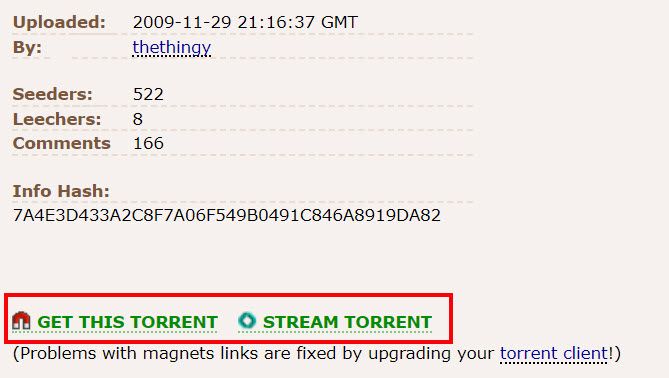
For listings, you’ll see links to launch your torrent client to download.

the pirate bay torrent listing

Limetorrents

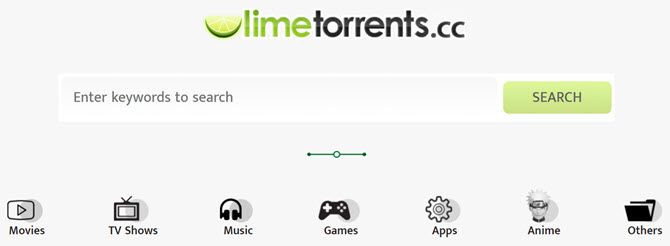
limetorrents search page

Limetorrents is another one that’s been around for many years.

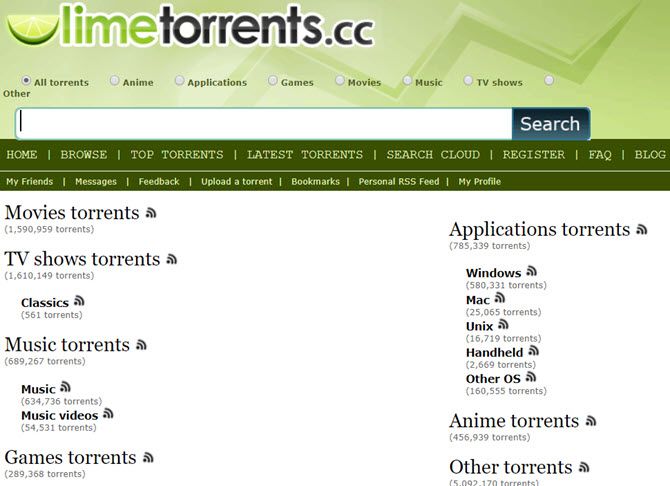
If you click on the Other or Browse links, you can sift through available torrent files (there are millions).

When you start browsing through the available torrent files, you’ll be surprised at the wide assortment of files available.

Torrent networks get a bad rap because of the illegal content you’ll find there, but you can also find useful things like free e-books, manuals, and other hard-to-find content.

limetorrents torrent search engine

There’s even an anime category!

RARBG

rarbg torrent search engine
RARBG has been a favorite among torrent fans for some time. You can click on the Torrents tab to use the torrent search engine (or browse the list of new additions).

Or you can browse specific categories by clicking any of the links along the left side of the main page. You’ll also find a frequently updated top 10 list or read any recent torrent news.

Torrentz2

torrenz2 torrent search engine
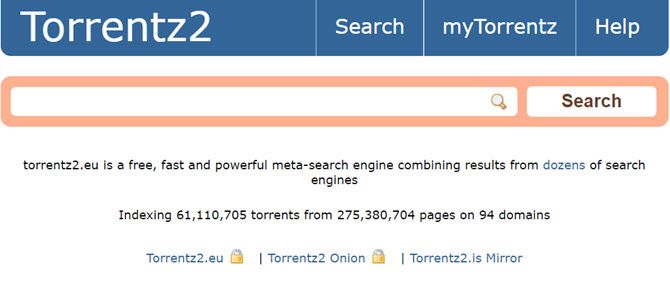
Torrentz2 has been around since around 2016 and sprung up when the original Torrentz site shut down. It’s what’s known as a “meta-search” engine, meaning that it scours through results from multiple torrent search engines so you don’t have to.

The main page touts over 61 million files in its database. So whether you’re looking to find something specific, or you’re just looking to browse, you’re likely to find what you want here.

Search results show you download size, user rating, and the estimated download time (based on the number of peers that are sharing).

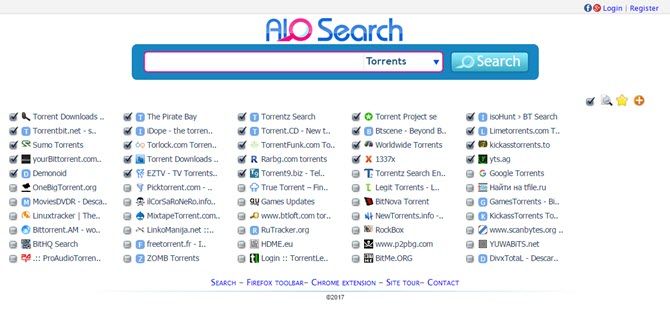
AIO Search

aio torrent search engine
AIO Search is another meta-search engine for torrent files.

What makes it unique is that you can select specific torrent search engines that you want to include.

The list of torrent sites this search engine plugs into is impressive. The results show up almost like an embedded web browser, with an individual tab showing search results from the individual torrent search engine.

You can also use it to search secret torrent search engines for images, videos, sub-titles, shared files, and even your favorite show.

Other Free Torrent Search Engines You Can Try:

2. Hidden Bargains and Deals

If you search Google for cheap laptops or other gadgets, you’re likely to see results from standard corporate entities like Amazon or eBay.

However, there are databases of extremely cheap (or free!) stuff buried inside a multitude of website directories.

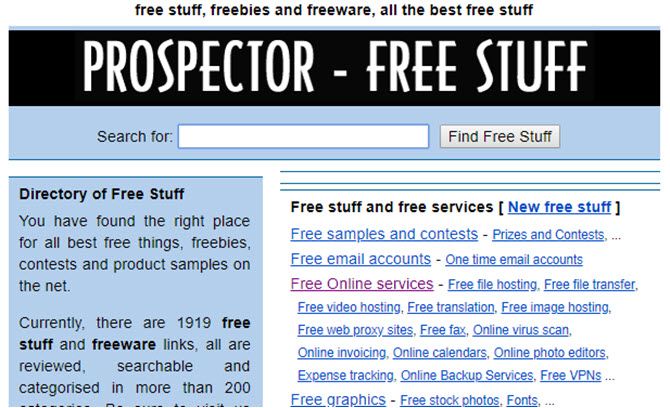
Prospector

free stuff on prospector

Prospector has been around for many years.

It’s like a massive yard sale where everyone is giving away stuff for free.

The site boasts thousands of links to websites that offer things like free file hosting, free stock photos, and free applications.

Bargains on Facebook

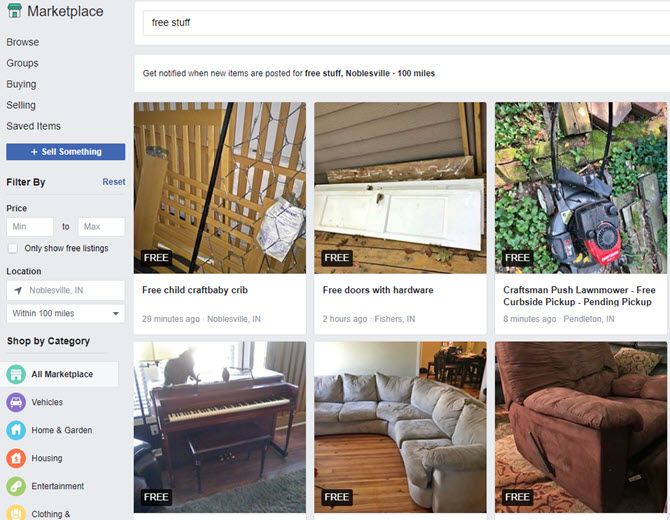
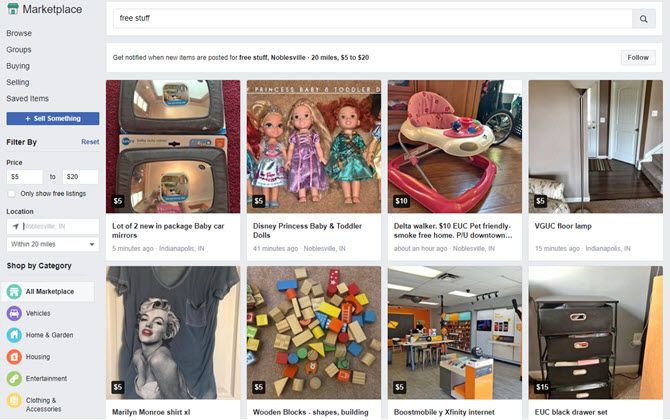
free stuff on facebook marketplace
What’s the best way to get actual free goods from your local neighbors? Since most of them are on Facebook, the answer seems obvious.

Just visit Facebook Marketplace, and search for “free stuff” to see what your neighbors are giving away.

Since Facebook already knows where you live, all the listings are in your local area. Or you can set the search area by changing the location field.

If you don’t mind paying a little bit of money for even better stuff, just adjust the price min and max fields to add a price filter.

cheap stuff on facebook marketplace

With so much waste in the world already, why let your neighbors throw away things that you need?

Free Stuff on Craigslist

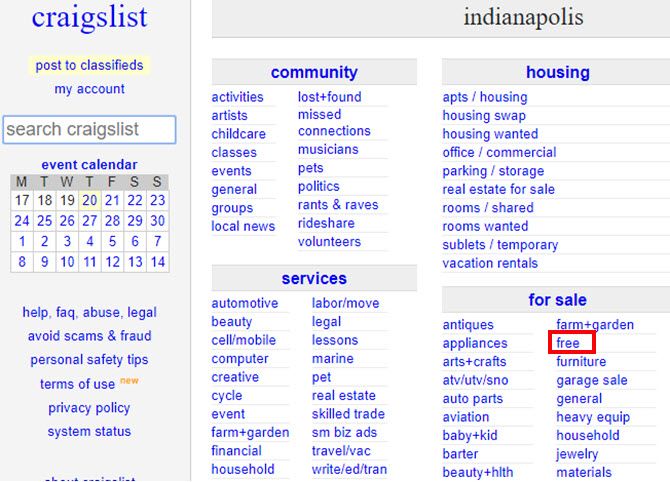
free stuff on craigslist
It would be foolish to overlook Craigslist if you’re looking for free stuff.

Nearly every community on Craigslist has a free category under the for sale section.

Instead of going to Walmart to buy something, why not check Craigslist to reuse someone else’s?

It’s better than adding even more items to the world’s growing landfills.

Other Good Freebie Sites You Can Try:

3. Search for House Sales and Foreclosures

One of the easiest ways to get into a home at a below-market price is to shop for foreclosures.

There are piles of these properties sitting in official databases throughout the web, but no easy way to find them with Google.

Foreclosure Free Search

foreclosure free search
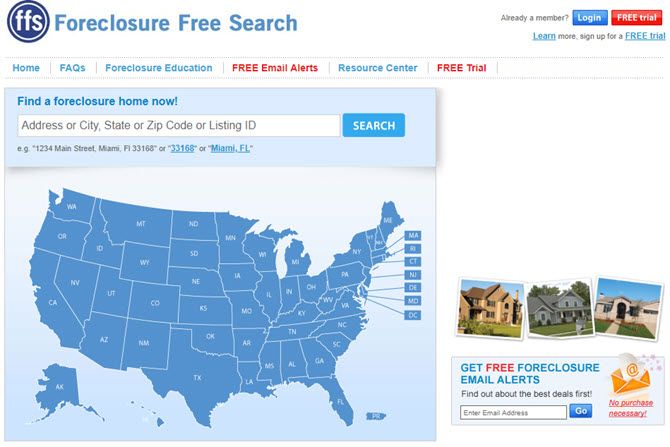
Foreclosure Free Search is a search engine that sifts through various sources of foreclosure listings from across the country (U.S. only).

Unlike the paid sites—it offers price, address, and other information about the property.

Foreclosure Free Search is one of the unsung heroes of free foreclosure search engines.

Trulia

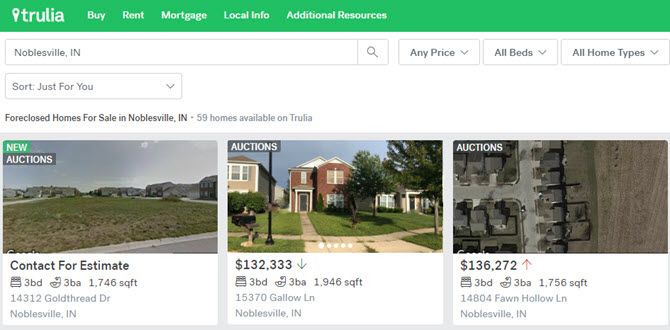
trulia property listings

Trulia has been around for many years now. It’s a real estate search engine that provides real estate information from various sources.

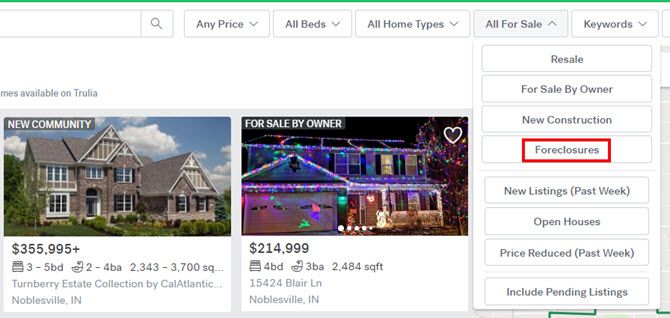
To get the best bargains, search in your desired neighborhood, and then click All For Sale from the menu. Choose Foreclosures.

trulia foreclosure listings

If you prefer to avoid foreclosures, Trulia also shows recent price fluctuations up or down. This way you can jump on a good deal the moment a seller drops their price.

4. Public Records Search Engines

Another common search that isn’t easy to find are public records. Most public records search engines are disguised commercial companies trying to sell paid public records as search results to you.

The following search engines give you access to “secret” databases where you can search public records for free.

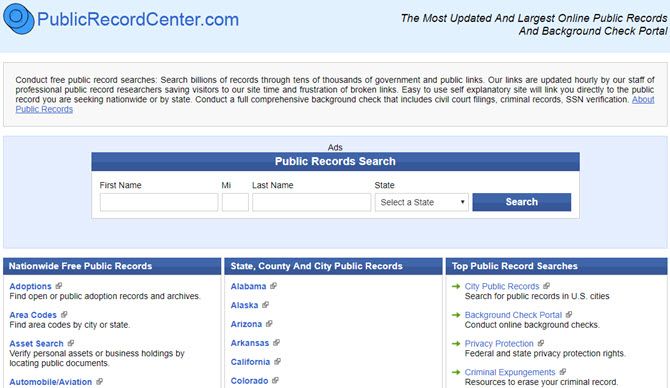
Public Record Center 

public record center

The Public Record Center is different. It’s more of an underground “portal” to government websites than a search engine.

However, it’s organized so well that it’ll save you a lot of time if you’re not sure where to go to find the public database.

Using the Public Record Center you can find government databases for court judgments and liens, conduct asset searches, and even look up copyright and trademark information.

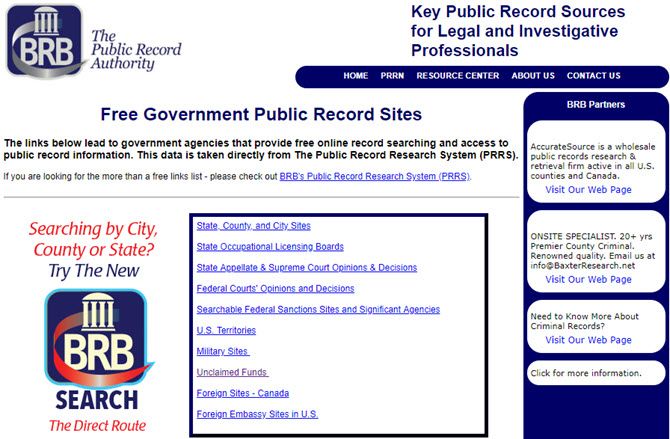
The Public Record Authority

the public record authority

Like the Public Record Center, the Public Record Authority is a trustworthy resource for links to your local and state public databases.

The site offers browsable lists of court records, federal agency databases, and unclaimed funds.

Make sure to check your state records for unclaimed funds under your name. You never know what might turn up!

Other Public Records Portals You Can Try:

5. Legal Search Engines

Ever hear of a search engine that lets you dig up legal information from the web?

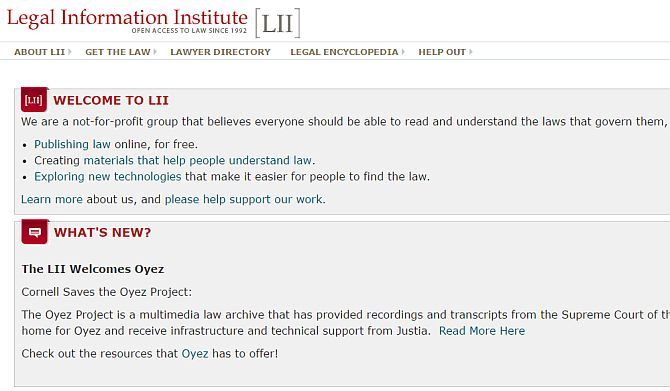
Neither did I, until I discovered Cornell’s Legal Information Institute.

This amazing little search engine digs through the institute’s extensive legal library and pulls out any information that you might need. This could include family law, criminal law, labor law and much more.

legal information institute

There are search engines buried throughout this excellent legal resource providing court opinion information, constitutional insights, and much more.

If you have any interest in law at all, take some time to check this one out.

Other Legal Search Engines You Can Try:

6. Paranormal Search Engine and UFO Sightings

If you’re into UFOs, you’ll love the amazing stories you’ll read about in all the underground databases for UFO sightings.

All the private national UFO sightings centers maintain meticulous records of everyone who calls in a report.

MUFON Case Management System

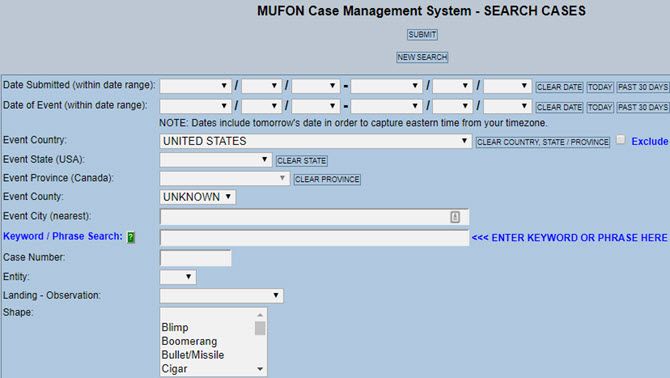
mufon ufo database
The Mutual UFO Network (MUFON) is one of the nation’s central clearinghouses for UFO sightings.

MUFON investigators receive calls about sightings and then head out on field investigations. They then enter the information they gather into their reporting database.

This database is completely open to the public and searchable only through this case search form. Google has no idea any of these stories exist.

UFO Stalker

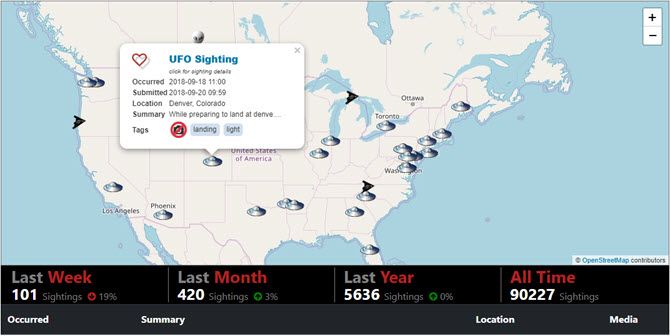
ufo stalker database

One of the most entertaining UFO databases is UFO Stalker. At this site, you’ll see an interactive map that shows most of the recent UFO sightings.

If the sighting was a UFO, it’ll have a UFO icon. If it’s a black triangle, it’ll show a stealth fighter… I mean a black triangle UFO, and so on.

When you click on any of the icons, you can click on the title to read the story.

Many of these sightings include lots of great blurry videos and photos as evidence!

Other UFO Databases You Can Try:

Searching the Underbelly of the Internet

I hope you’ve enjoyed strolling through the deep, dark, depths of the underground internet.

If you’re hungry for more, continue on by exploring our list of the best dark web websites online with TOR search engines. Just remember that once you head down the rabbit hole, there’s no turning back.

Read the full article: 7 Underground Torrent Sites for Getting Uncensored Content


Read Full Article
Vine reboot Byte officially launches


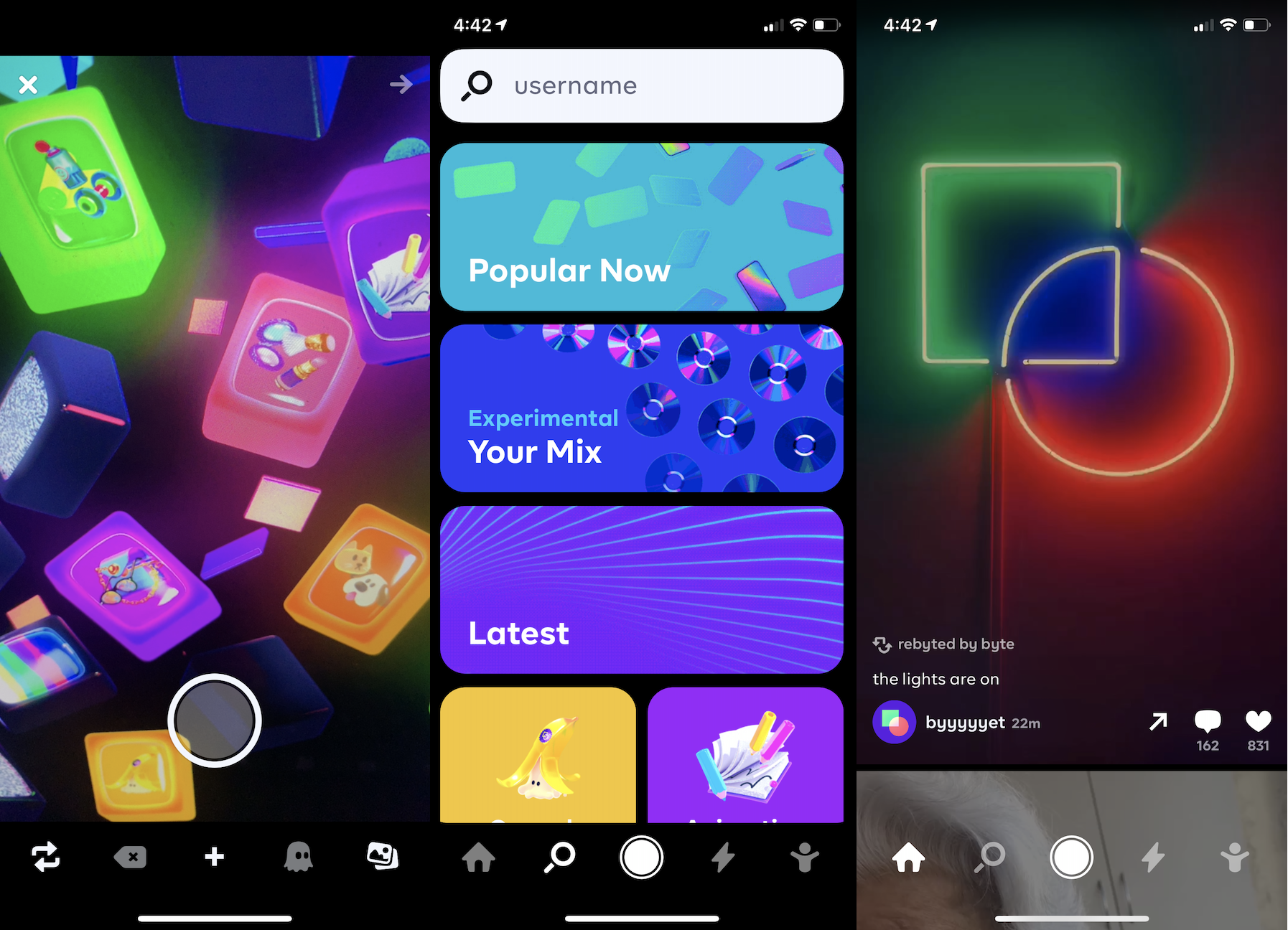
Two years after Vine’s co-founder Dom Hofmann announced he was building a successor to the short-form video app, today Byte makes its debut on iOS and Android. Byte lets you shoot or upload and then share six-second videos. The tiny time limit necessitates no-filler content that’s denser than the maximum 1-minute clips on TikTok.

Byte comes equipped with standard social features like a feed, Explore page, notifications, and profiles. For now, though Byte lacks the remixability, augmented reality filters, transition effects, and other bonus features you’ll find in apps like TikTok.

What Hofmann hopes will differentiate Byte is an early focus on helping content creators make money — something TikTok, and other micro-entertainment apps largely don’t offer. The app plans to soon launch a pilot of its partner program for offering monetization options to people proving popular on Byte. When asked if Byte would offer ad revenue sharing, tipping, or other options to partners, Hofmann told me that “We’re looking at all of those, but we’ll be starting with a revenue share + supplementing with our own funds. We’ll have more details about exactly how the pilot program will work soon.”

Many creators who’ve grown popular on apps like TikTok and Snapchat that lack direct monetization have tried to pull their audiences over to YouTube where they can earn a steady ad-share. By getting started paying early, Byte might lure some of those dancers, comedians, and pranksters over to its app and be able to retain them long-term. Former Vine stars turned TikTok stars like Chris Melberger. Joshdarnit, and Lance Stewart are already on Byte.

Staying connected with Byte’s most loyal users is another way Hofmann hopes to set his app apart. He’s been actively running a beta tester forum since the initial Byte announcement in early 2018, and sees it as a way to find out what features to build next. “It’s always a bummer when the people behind online services and the people that actually use them are disconnected from one another, so we’re trying out these forums to see if we can do a better job at that” Hofmann writes.

Byte founder Dom Hofmann

Byte is a long time coming. To rewind all the way, Hofmann co-founded Vine in June 2012 with Colin Kroll and Rus Yusupov, but it was acquired by Twitter before its launch in January 2013. By that fall, Hofmann had left the company. But 2014 and 2015 saw Vine’s popularity grow thanks to rapid-fire comedy skits and the creativity unlocked by its looping effect. Vine reached over 200 million active users. Then the unthinkable happened. Desperate to cut costs, Twitter shut down Vine’s sharing feed in late 2016 so it wouldn’t have to host any more video content. The creative web mourned.

By then, Hofmann had already built the first version of Byte, which offered more free-form creation. You could pull together photos, GIFs, drawings and more into little shareable creations. But this prototype never gained steam. Hofmann gave Vine fans hope when he announced plans to build a successor called V2 in early 2018, but cancelled it a few months later. Hofmann got more serious about the project by then end of 2018, announcing the name Byte and then beginning beta testing in April 2019.

Now the big question will be whether Byte can take off despite its late start. Between TikTok, Snapchat, Instagram, and more, do people need another short-form video app? Winning here will require seducing high quality creators who can get bigger view counts elsewhere. Considering there’s already a pile of TikTok competitors like Dubsmash, Triller, Firework, and Facebook’s Lasso available in the US, creators seeking stardom on a less competitive network already have plenty of apps to try. Hofmann may have to rely on the soft spot for Vine in people’s memories to get enough activity on Byte to recreate its predecessor’s magic.


Read Full Article
Vine reboot Byte officially launches


Two years after Vine’s co-founder Dom Hofmann announced he was building a successor to the short-form video app, today Byte makes its debut on iOS and Android. Byte lets you shoot or upload and then share six-second videos. The tiny time limit necessitates no-filler content that’s denser than the maximum 1-minute clips on TikTok.

Byte comes equipped with standard social features like a feed, Explore page, notifications, and profiles. For now, though Byte lacks the remixability, augmented reality filters, transition effects, and other bonus features you’ll find in apps like TikTok.

What Hofmann hopes will differentiate Byte is an early focus on helping content creators make money — something TikTok, and other micro-entertainment apps largely don’t offer. The app plans to soon launch a pilot of its partner program for offering monetization options to people proving popular on Byte. When asked if Byte would offer ad revenue sharing, tipping, or other options to partners, Hofmann told me that “We’re looking at all of those, but we’ll be starting with a revenue share + supplementing with our own funds. We’ll have more details about exactly how the pilot program will work soon.”

Many creators who’ve grown popular on apps like TikTok and Snapchat that lack direct monetization have tried to pull their audiences over to YouTube where they can earn a steady ad-share. By getting started paying early, Byte might lure some of those dancers, comedians, and pranksters over to its app and be able to retain them long-term. Former Vine stars turned TikTok stars like Chris Melberger. Joshdarnit, and Lance Stewart are already on Byte.

Staying connected with Byte’s most loyal users is another way Hofmann hopes to set his app apart. He’s been actively running a beta tester forum since the initial Byte announcement in early 2018, and sees it as a way to find out what features to build next. “It’s always a bummer when the people behind online services and the people that actually use them are disconnected from one another, so we’re trying out these forums to see if we can do a better job at that” Hofmann writes.

Byte founder Dom Hofmann

Byte is a long time coming. To rewind all the way, Hofmann co-founded Vine in June 2012 with Colin Kroll and Rus Yusupov, but it was acquired by Twitter before its launch in January 2013. By that fall, Hofmann had left the company. But 2014 and 2015 saw Vine’s popularity grow thanks to rapid-fire comedy skits and the creativity unlocked by its looping effect. Vine reached over 200 million active users. Then the unthinkable happened. Desperate to cut costs, Twitter shut down Vine’s sharing feed in late 2016 so it wouldn’t have to host any more video content. The creative web mourned.

By then, Hofmann had already built the first version of Byte, which offered more free-form creation. You could pull together photos, GIFs, drawings and more into little shareable creations. But this prototype never gained steam. Hofmann gave Vine fans hope when he announced plans to build a successor called V2 in early 2018, but cancelled it a few months later. Hofmann got more serious about the project by then end of 2018, announcing the name Byte and then beginning beta testing in April 2019.

Now the big question will be whether Byte can take off despite its late start. Between TikTok, Snapchat, Instagram, and more, do people need another short-form video app? Winning here will require seducing high quality creators who can get bigger view counts elsewhere. Considering there’s already a pile of TikTok competitors like Dubsmash, Triller, Firework, and Facebook’s Lasso available in the US, creators seeking stardom on a less competitive network already have plenty of apps to try. Hofmann may have to rely on the soft spot for Vine in people’s memories to get enough activity on Byte to recreate its predecessor’s magic.


Read Full Article
Google backtracks on search results design


Earlier today, Google href="https://twitter.com/searchliaison/status/1220768238490939394?s=21"> announced that it would be redesigning the redesign of its search results as a response to withering criticism from politicians, consumers, and the press over the way in which search results display were made to look like ads.

Google makes money when users of its search service click on ads. It doesn’t make money when people click on an unpaid search result. Making ads look like search results makes Google more money.

It’s also a pretty evil (or at least unethical) business decision by a company whose mantra was “Don’t be evil”(although they gave that up in 2018).

Users began noticing the changes to search results last week and at least one user flagged the changes earlier this week.

Google responded with a bit of doublespeak from its corporate account about how the redesign was intended to achieve the opposite effect of what it was actually doing.

“Last year, our search results on mobile gained a new look. That’s now rolling out to desktop results this week, presenting site domain names and brand icons prominently, along with a bolded ‘Ad’ label for ads,” the company wrote.

Virginia’s Senator Mark Warner took a break from impeachment hearings to talk to the Washington Post about just how bad the new search redesign was.

“We’ve seen multiple instances over the last few years where Google has made paid advertisements ever more indistinguishable from organic search results,” Warner told the Post. “This is yet another example of a platform exploiting its bottleneck power for commercial gain, to the detriment of both consumers and also small businesses.”

Google’s changes to its search results happened despite the fact that the company is already being investigated by every state in the country for antitrust violations.

For Google, the rationale is simple. The company’s advertising revenues aren’t growing the way they used to, and the company is looking at a slowdown in its core business. To try and juice the numbers, dark patterns present an attractive way forward.

Indeed, Google’s using the same tricks that it once battled to become the premier search service in the U.S. When the company first launched its search service, ads were clearly demarcated and separated from actual search results returned by Google’s algorithm. Over time, the separation between what was an ad and what wasn’t became increasingly blurred.

“Search results were near-instant and they were just a page of links and summaries – perfection with nothing to add or take away,” user experience expert Harry Brignull (and founder of the watchdog website darkpatterns.org) said of the original Google search results in an interview with TechCrunch.

“The back-propagation algorithm they introduced had never been used to index the web before, and it instantly left the competition in the dust. It was proof that engineers could disrupt the rules of the web without needing any suit-wearing executives. Strip out all the crap. Do one thing and do it well.”

“As Google’s ambitions changed, the tinted box started to fade. It’s completely gone now,” Brignull added.

The company acknowledged that its latest experiment might have gone too far in its latest statement and noted that it will “experiment further” on how it displays results.


Read Full Article
The Pentagon pushes back on Huawei ban in bid for ‘balance’


Huawei may have just found itself an ally in the most unexpected of places. According to a new report out of The Wall Street Journal, both the Defense and Treasury Departments are pushing back on a Commerce Department-led ban on sales from the embattled Chinese hardware giant.

That move, in turn, has reportedly led Commerce Department officials to withdraw a proposal set to make it even more difficult for U.S.-based companies to work with Huawei.

Defense Secretary Mark Esper struck a fittingly pragmatic tone while speaking with the paper, noting, “We have to be conscious of sustaining those [technology] companies’ supply chains and those innovators. That’s the balance we have to strike.”

Huawei, already under fire for allegations of flouting sanctions with other countries, has become a centerpiece of a simmering trade war between the Trump White House and China. The smartphone maker has been barred from selling 5G networking equipment due to concerns over its close ties to the Chinese government.

Last year, meanwhile, the government barred Huawei from utilizing software and components from U.S.-based companies, including Google. Huawei is also expected to be a key talking point in upcoming White House discussions, as officials weigh actions against the repercussions they’ll ultimately have for U.S. partners.

The Commerce Department has yet to offer any official announcement related to the report.


Read Full Article
The Pentagon pushes back on Huawei ban in bid for ‘balance’


Huawei may have just found itself an ally in the most unexpected of places. According to a new report out of The Wall Street Journal, both the Defense and Treasury Departments are pushing back on a Commerce Department-led ban on sales from the embattled Chinese hardware giant.

That move, in turn, has reportedly led Commerce Department officials to withdraw a proposal set to make it even more difficult for U.S.-based companies to work with Huawei.

Defense Secretary Mark Esper struck a fittingly pragmatic tone while speaking with the paper, noting, “We have to be conscious of sustaining those [technology] companies’ supply chains and those innovators. That’s the balance we have to strike.”

Huawei, already under fire for allegations of flouting sanctions with other countries, has become a centerpiece of a simmering trade war between the Trump White House and China. The smartphone maker has been barred from selling 5G networking equipment due to concerns over its close ties to the Chinese government.

Last year, meanwhile, the government barred Huawei from utilizing software and components from U.S.-based companies, including Google. Huawei is also expected to be a key talking point in upcoming White House discussions, as officials weigh actions against the repercussions they’ll ultimately have for U.S. partners.

The Commerce Department has yet to offer any official announcement related to the report.


Read Full Article