19 January 2020

TechCrunch’s Top 10 investigative reports from 2019


Facebook spying on teens, Twitter accounts hijacked by terrorists, and sexual abuse imagery found on Bing and Giphy were amongst the ugly truths revealed by TechCrunch’s investigating reporting in 2019. The tech industry needs more watchdogs than ever as its size enlargens the impact of safety failures and the abuse of power. Whether through malice, naivety, or greed, there was plenty of wrongdoing to sniff out.

Led by our security expert Zack Whittaker, TechCrunch undertook more long-form investigations this year to tackle these growing issues. Our coverage of fundraises, product launches, and glamorous exits only tell half the story. As perhaps the biggest and longest running news outlet dedicated to startups (and the giants they become), we’re responsible for keeping these companies honest and pushing for a more ethical and transparent approach to technology.

If you have a tip potentially worthy of an investigation, contact TechCrunch at tips@techcrunch.com or by using our anonymous tip line’s form.

Image: Bryce Durbin/TechCrunch

Here are our top 10 investigations from 2019, and their impact:

Facebook pays teens to spy on their data

Josh Constine’s landmark investigation discovered that Facebook was paying teens and adults $20 in gift cards per month to install a VPN that sent Facebook all their sensitive mobile data for market research purposes. The laundry list of problems with Facebook Research included not informing 187,000 users the data would go to Facebook until they signed up for “Project Atlas”, not receiving proper parental consent for over 4300 minors, and threatening legal action if a user spoke publicly about the program. The program also abused Apple’s enterprise certificate program designed only for distribution of employee-only apps within companies to avoid the App Store review process.

The fallout was enormous. Lawmakers wrote angry letters to Facebook. TechCrunch soon discovered a similar market research program from Google called Screenwise Meter that the company promptly shut down. Apple punished both Google and Facebook by shutting down all their employee-only apps for a day, causing office disruptions since Facebookers couldn’t access their shuttle schedule or lunch menu. Facebook tried to claim the program was above board, but finally succumbed to the backlash and shut down Facebook Research and all paid data collection programs for users under 18. Most importantly, the investigation led Facebook to shut down its Onavo app, which offered a VPN but in reality sucked in tons of mobile usage data to figure out which competitors to copy. Onavo helped Facebook realize it should acquire messaging rival WhatsApp for $19 billion, and it’s now at the center of anti-trust investigations into the company. TechCrunch’s reporting weakened Facebook’s exploitative market surveillance, pitted tech’s giants against each other, and raised the bar for transparency and ethics in data collection.

Protecting The WannaCry Kill Switch

Zack Whittaker’s profile of the heroes who helped save the internet from the fast-spreading WannaCry ransomware reveals the precarious nature of cybersecurity. The gripping tale documenting Marcus Hutchins’ benevolent work establishing the WannaCry kill switch may have contributed to a judge’s decision to sentence him to just one year of supervised release instead of 10 years in prison for an unrelated charge of creating malware as a teenager.

The dangers of Elon Musk’s tunnel

TechCrunch contributor Mark Harris’ investigation discovered inadequate emergency exits and more problems with Elon Musk’s plan for his Boring Company to build a Washington D.C.-to-Baltimore tunnel. Consulting fire safety and tunnel engineering experts, Harris build a strong case for why state and local governments should be suspicious of technology disrupters cutting corners in public infrastructure.

Bing image search is full of child abuse

Josh Constine’s investigation exposed how Bing’s image search results both showed child sexual abuse imagery, but also suggested search terms to innocent users that would surface this illegal material. A tip led Constine to commission a report by anti-abuse startup AntiToxin (now L1ght), forcing Microsoft to commit to UK regulators that it would make significant changes to stop this from happening. However, a follow-up investigation by the New York Times citing TechCrunch’s report revealed Bing had made little progress.

Expelled despite exculpatory data

Zack Whittaker’s investigation surfaced contradictory evidence in a case of alleged grade tampering by Tufts student Tiffany Filler who was questionably expelled. The article casts significant doubt on the accusations, and that could help the student get a fair shot at future academic or professional endeavors.

Burned by an educational laptop

Natasha Lomas’ chronicle of troubles at educational computer hardware startup pi-top, including a device malfunction that injured a U.S. student. An internal email revealed the student had suffered a “a very nasty finger burn” from a pi-top 3 laptop designed to be disassembled. Reliability issues swelled and layoffs ensued. The report highlights how startups operating in the physical world, especially around sensitive populations like students, must make safety a top priority.

Giphy fails to block child abuse imagery

Sarah Perez and Zack Whittaker teamed up with child protection startup L1ght to expose Giphy’s negligence in blocking sexual abuse imagery. The report revealed how criminals used the site to share illegal imagery, which was then accidentally indexed by search engines. TechCrunch’s investigation demonstrated that it’s not just public tech giants who need to be more vigilant about their content.

Airbnb’s weakness on anti-discrimination

Megan Rose Dickey explored a botched case of discrimination policy enforcement by Airbnb when a blind and deaf traveler’s reservation was cancelled because they have a guide dog. Airbnb tried to just “educate” the host who was accused of discrimination instead of levying any real punishment until Dickey’s reporting pushed it to suspend them for a month. The investigation reveals the lengths Airbnb goes to in order to protect its money-generating hosts, and how policy problems could mar its IPO.

Expired emails let terrorists tweet propaganda

Zack Whittaker discovered that Islamic State propaganda was being spread through hijacked Twitter accounts. His investigation revealed that if the email address associated with a Twitter account expired, attackers could re-register it to gain access and then receive password resets sent from Twitter. The article revealed the savvy but not necessarily sophisticated ways terrorist groups are exploiting big tech’s security shortcomings, and identified a dangerous loophole for all sites to close.

Porn & gambling apps slip past Apple

Josh Constine found dozens of pornography and real-money gambling apps had broken Apple’s rules but avoided App Store review by abusing its enterprise certificate program — many based in China. The report revealed the weak and easily defrauded requirements to receive an enterprise certificate. Seven months later, Apple revealed a spike in porn and gambling app takedown requests from China. The investigation could push Apple to tighten its enterprise certificate policies, and proved the company has plenty of its own problems to handle despite CEO Tim Cook’s frequent jabs at the policies of other tech giants.

Bonus: HQ Trivia employees fired for trying to remove CEO

This Game Of Thrones-worthy tale was too intriguing to leave out, even if the impact was more of a warning to all startup executives. Josh Constine’s look inside gaming startup HQ Trivia revealed a saga of employee revolt in response to its CEO’s ineptitude and inaction as the company nose-dived. Employees who organized a petition to the board to remove the CEO were fired, leading to further talent departures and stagnation. The investigation served to remind startup executives that they are responsible to their employees, who can exert power through collective action or their exodus.

If you have a tip for Josh Constine, you can reach him via encrypted Signal or text at (585)750-5674, joshc at TechCrunch dot com, or through Twitter DMs


Read Full Article

The Scrivener Keyboard Shortcuts Cheat Sheet for Mac


Person typing on a MacBook

Scrivener is one of the best environments for long-form writing. You can rely on its solid organizational features to manage research papers, novels,  manuals, plays, scripts, and more. Whether you want to dig into a specific snippet of writing or get a bird’s-eye view of everything you’ve written, Scrivener has the right set of tools to make your job easier.

If you use Scrivener on your MacBook or plan to do so, we suggest adding keyboard shortcuts to your workflow. Given that Scrivener is quite complex, learning how to navigate it with shortcuts alone can transform how you use the app.

There’s a long list of Scrivener keyboard shortcuts to pick from and you can discover the best of them in our cheat sheet below. The cheat sheet contents are applicable to Scrivener 3, the latest version of the app.

FREE DOWNLOAD: This cheat sheet is available as a downloadable PDF from our distribution partner, TradePub. You will have to complete a short form to access it for the first time only. Download The Scrivener Keyboard Shortcuts Cheat Sheet for Mac.

The Scrivener Keyboard Shortcuts Cheat Sheet for Mac

Shortcut Action
General Shortcuts
Command + , Preferences
Command + H Hide Scrivener
Option + Command + H Hide Others
Command + Q Quit Scrivener
File
Shift + Command + N New Project
Command + O Open…
Shift + Command + W Close Project
Option + Shift + Command + W Close Project and Clear Interface Settings
Command + W Close Window
Command + S Save
Option + Command + S Save and Rebuild Search Indexes
Shift + Command + S Save As…
Shift + Command + I Import > Files…
Option + Command + W Import > Web Page…
Shift + Command + E Export > Files…
Shift + Command + P Page Setup…
Command + P Print Current Document…
Option + Command + E Compile Draft…
Edit
Command + Z Undo
Shift + Command + Z Redo
Command + X Cut
Command + C Copy
Option + Shift + Command + C Copy Special > Copy without Comments and Footnotes
Command + V Paste
Option + Shift + Command + V Paste and Match Style
Command + A Select All
Option + Command + A Select Current Text
Option + Esc Complete
Control + Esc Complete Document Title
Option + Command + Return Insert > Line Break
Shift + Command + B Insert > Bookmark Annotation
Option + Shift + Command + D Insert > Current Date & Time
Command + L Scrivener Link > New Link…
Command + F Find > Find…
Command + G Find > Find Next
Shift + Command + G Find > Find Previous
Command + E Find > Use Selection for Find
Command + J Find > Jump to Selection
Control + Option + F Find > Project Search
Control + Option + Command + F Find > Find by Formatting…
Option + Shift + Command + G Find > Find Next Formatting
Control + Option + Command + G Find > Find Previous Formatting
Command + Spelling and Grammar > Show Spelling and Grammar
Command + ; Spelling and Grammar > Check Document Now
Command + \ Spelling and Grammar > Check Spelling While Typing
Option + Command + T Special Characters
View
Command + 1 Document/Scrivenings
Command + 2 Corkboard
Command + 3 Outline
Shift + Command + > Zoom > Zoom In
Shift + Command + < Zoom > Zoom Out
Option + Command + ↑ Go To > Previous Document
Option + Command + ↓ Go To > Next Document
Control + Command + R Go To > Enclosing Group
Command + 4 Go To > Editor Selection
Option + Command + B Layout > Show/Hide Binder
Option + Command + I Layout > Show/Hide Inspector
Option + Command + = Layout > Split Horizontally
Command + ” Layout > Split Vertically
Shift + Command + ) Layout > Show Layouts
Option + Command + L Editor > Lock in Place
Command + ] Editor > Forward in Document History
Command + [ Editor > Backward in Document History
Option + Command + [ Editor > Other Editor > Backward in History
Control + Option + Command + ↑ Editor > Other Editor > Scroll Up
Control + Option + Command + ↓ Editor > Other Editor > Scroll Down
Command + Return Media > Play Media File
Option + Command + } Media > Fast Forward
Option + Command + { Media > Rewind
Option + Shift + Command + P Page View > Show/Hide Page View
Control + Command + P Corkboard > Show Pins
Control + Command + S Corkboard > Show Stamps
Control + Command + K Corkboard > Show Keyword Colors
Control + ⇥ Move Focus To > (Next Pane)
Control + Option + Command + B Move Focus To > Binder
Control + Option + Command + E Move Focus To > (Left/Bottom) Editor
Control + Option + Command + R Move Focus To > Right/Top/Supporting Editor
Control + Option + Command + I Inspect > Synopsis
Control + Option + Command + H Inspect > Notes
Control + Option + Command + N Inspect > References
Control + Option + Command + J Inspect > Keywords
Control + Option + Command + M Inspect > Custom Meta-Data
Control + Option + Command + M Inspect > Snapshots
Control + Option + Command + K Inspect > Comments and Footnotes
Command + 9 Outline > Expand All
Command + 0 Outline > Collapse All
Control + Option + ↑ Outline > Previous Container
Control + Option + ↓ Outline > Next Container
Option + Command + R Reveal in Binder
Control + Command + F Enter/Exit Full Screen
Option + Command + F Enter/Exit Composition Mode
Project
Command + N New Text
Option + Command + N New Folder
Option + Shift + Command + N New From Template > (First Template Document)
Shift + Command + T Show/Hide Project Targets
Control + Option + Command + S Text Statistics
Option + Shift + Command + S Project Statistics
Option + Command + P Project Notes
Option + Shift + Command + H Show/Hide Project Keywords
Option + Command + , Meta-Data Settings…
Documents
Option + Command + O Open > in (Left/Bottom) Editor
Shift + Command + O Open > in Right/Top/Other Editor
Option + Shift + Command + O Open > With All Subdocuments > On Editor Corkboard
Control + Command + O Open > in External Editor
Command + 5 Snapshots > Take Snapshot
Shift + Command + % Snapshots > Take Snapshot With Title
Control + Command + ] Snapshots > Show Changes > Next Change
Control + Command + [ Snapshots > Show Changes > Previous Change
Command + D Duplicate > with Subdocuments and Unique Title
Shift + Command + D Duplicate > without Subdocuments
Option + Shift + Command + T Set Selection as Title
Command + Delete Move to Trash
Command + K Split > at Selection
Option + Command + K Split > with Selection as Title
Shift + Command + M Merge
Option + Command + G Group
Option + Command + U Ungroup
Control + Command + ← Move > Left
Control + Command + → Move > Right
Control + Command + ↑ Move > Up
Control + Command + ↓ Move > Down
Format
Command + T Font > Show Fonts
Command + B Font > Bold
Command + I Font > Italic
Command + U Font > Underline > Single
Shift + Command + _ Font > Strikethrough
Command + + Font > Bigger
Command + - Font > Smaller
Shift + Command + C Font > Show Colors
Option + Command + C Font > Copy Font
Option + Command + V Font > Paste Font
Command + { Text > Align Left
Command + | Text > Center
Option + Command + | Text > Justify
Command + } Text > Align Right
Control + Command + C Text > Copy Ruler
Control + Command + V Text > Paste Ruler
Option + Command + → Lists > Next List Style
Option + Command + ← Lists > Previous List Style
Control + Option + Command + C Formatting > Copy Formatting
Control + Option + Command + P Formatting > Paste Formatting
Command + 8 Scriptwriting > Script Mode
Shift + Command + Y Scriptwriting > Show Script Elements Menu
Command + R Show/Hide Ruler
Shift + Command + R Show/Hide Format Bar
Shift + Command + H Highlight > Highlight
Shift + Command + * Comment
Control + Command + 8 Footnote
Shift + Command + A Inline Annotation
Shift + Command + F Inline Footnote
Control + Command + T Options > Typewriter Scrolling
Command + Y Bibliography/Citations…
Window
Command + M Minimize
Option + Command + M Minimize All
Control + Command + - Zoom
Control + Option + Command + - Zoom All
Control + Command + = Zoom to Fit Screen
Shift + Command + ) Layouts > Manage Layouts
Control + Command + Q Float QuickReference Panels
Miscellaneous
Shift + Command + ? Help
Shift + Command + Return Open/Close Scratch Pad
Inspector
Command + 6 Document/Project Notes
Command + 6 Document/Project References

Is Scrivener Available on Windows and Linux?

Scrivener is one of the best programs for creative writers not only on macOS, but also on Windows. However, if you use a Linux distro, Scrivener is not an option. But the good news is that you’ll find nice long-form writing apps for Linux too!

Read the full article: The Scrivener Keyboard Shortcuts Cheat Sheet for Mac


Read Full Article

18 January 2020

This Week in Apps: App trends from 2019, Pinterest tops Snapchat, Disney+ hits No. 1 in Q4


Welcome back to This Week in Apps, the Extra Crunch series that recaps the latest OS news, the applications they support and the money that flows through it all.

The app industry is as hot as ever with a record 204 billion downloads in 2019 and $120 billion in consumer spending in 2019, according to App Annie’s recently released “State of Mobile” annual report. People are now spending 3 hours and 40 minutes per day using apps, rivaling TV. Apps aren’t just a way to pass idle hours — they’re a big business. In 2019, mobile-first companies had a combined $544 billion valuation, 6.5x higher than those without a mobile focus.

In this Extra Crunch series, we help you to keep up with the latest news from the world of apps, delivered on a weekly basis.

This week, we dig into App Annie’s new “State of Mobile 2019” report and other app trends. We’re also seeing big gains for TikTok in 2019 and Disney+ in Q4. Both Apple and Google announced acquisitions this week that have implications for the mobile industry, as well.


Read Full Article

Instagram drops IGTV button, but only 1% downloaded the app


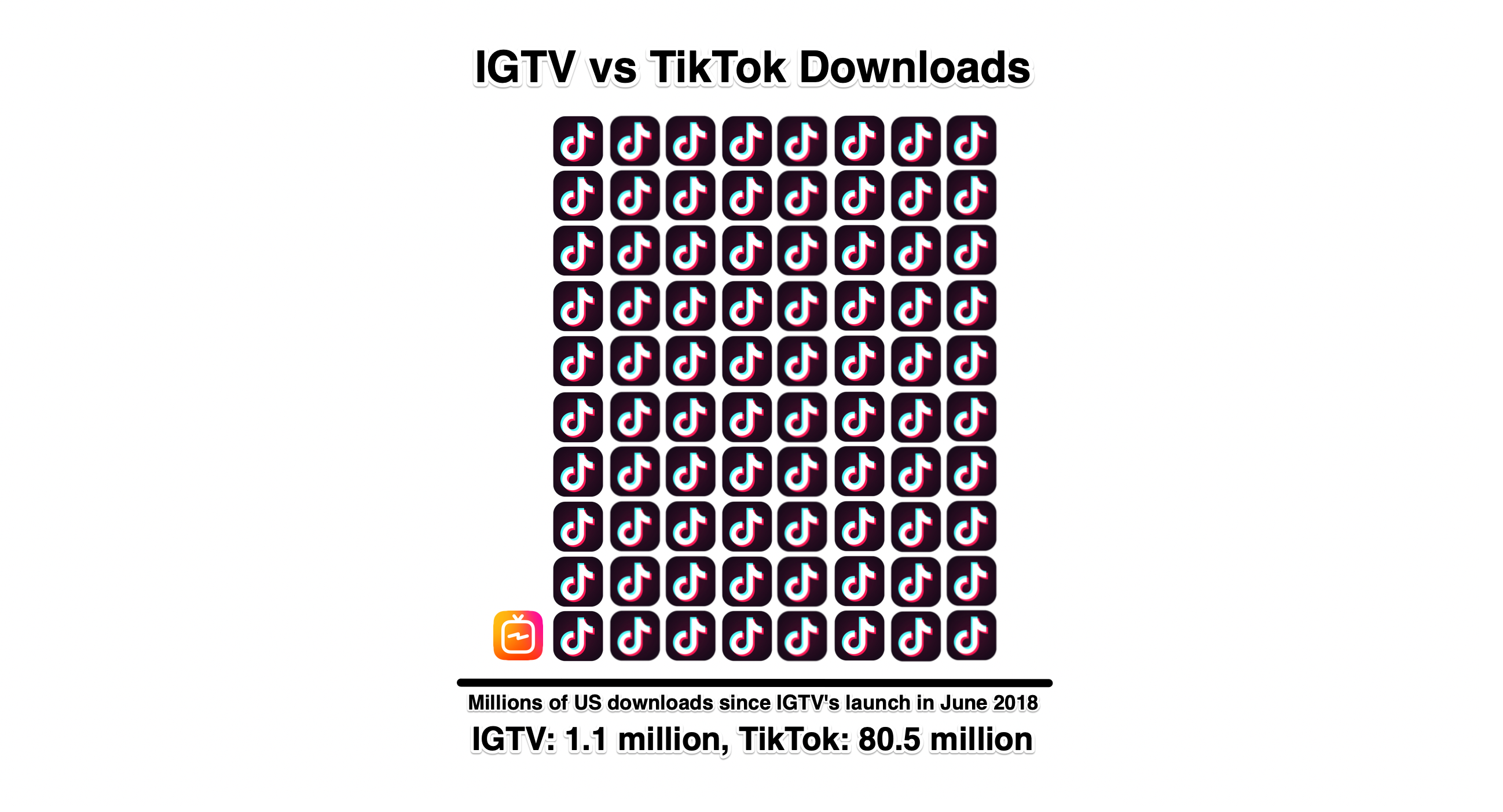
At most, 7 million of Instagram’s 1 billion-plus users have downloaded its standalone IGTV app in the 18 months since launch. And now, Instagram’s main app is removing the annoying orange IGTV button from its home page in what feels like an admission of lackluster results. For reference, TikTok received 1.15 billion downloads in the same period since IGTV launched in June 2018. In just the US, TikTok received 80.5 million downloads compared to IGTV’s 1.1 million since then, according to research commissioned by TechCrunch from Sensor Tower.

“As we’ve continued to work on making it easier for people to create and discover IGTV content, we’ve learned that most people are finding IGTV content through previews in Feed, the IGTV channel in Explore, creators’ profiles and the standalone app. Very few are clicking into the IGTV icon in the top right corner of the home screen in the Instagram app” a Facebook company spokesperson tells TechCrunch. “We always aim to keep Instagram as simple as possible, so we’re removing this icon based on these learnings and feedback from our community.”

Instagram users don’t need the separate IGTV app to watch longer videos, as the IGTV experience is embedded in the main app and can be accessed via in-feed teasers, a tab of the Explore page, promo stickers in Stories, and profile tabs. Still, the fact that it wasn’t an appealing enough destination to warrant a home page button shows IGTV hasn’t become a staple like past Instagram launches including video, Stories, augmented reality filters, or Close Friends.

One thing still missing is an open way for Instagram creators to earn money directly from their IGTV videos. Users can’t get an ad revenue share like with YouTube or Facebook Watch. They also can’t receive tips or sell exclusive content subscriptions like on Facebook, Twitch, or Patreon.

The only financial support Facebook and Instagram have offered IGTV creators is reimbursement for production costs for a few celebrities. Those contracts also require creators to avoid making content related to politics, social issues, or elections, according to Bloomberg‘s Lucas Shaw and Sarah Frier.

“In the last few years we’ve offset small production costs for video creators on our platforms and have put certain guidelines in place,” a Facebook spokesperson told Bloomberg. “We believe there’s a fundamental difference between allowing political and issue-based content on our platform and funding it ourselves.” That seems somewhat hypocritical given Facebook CEO Mark Zuckerberg’s criticism of Chinese app TikTok over censorship of political content.

Now users need to tap the IGTV tab inside Instagram Explore to view long-form videoAnother thing absent from IGTV? Large view counts. The first 20 IGTV videos I saw today in its Popular feed all had fewer than 200,000 views. BabyAriel, a creator with nearly 10 million Instagram followers that the company touted as a top IGTV creator has only post 20 of the longer videos to date with only one receiving over 500,000 views.

When the lack of monetization is combined with less than stellar view counts compared to YouTube and TikTok, it’s understandable why some creators might be hesistant to dedicate time to IGTV. Without their content keeping the feature reliably interesting, it’s no surprise users aren’t voluntarily diving in from the home page.

In another sign that Instagram is folding IGTV deeper into its app rather than providing it more breathing room of its own, and that it’s eager for more content, you can now opt to post IGTV videos right from the main Instagram feed post video uploader. AdWeek Social Pro reported this new “long video” upload option yesterday. A Facebook company spokesperson tells me “We want to keep our video upload process as simple as possible” and that “Our goal is to create a central place for video uploads”.


IGTV launched with a zealotish devotion to long-form vertical video despite the fact that little high quality content of this nature was being produced. Landscape orientation is helpful for longer clips that often require establishing shots and fitting multiple people on screen, while vertical was better for quick selfie monologues.

Yet Instagram co-founder Kevin Systrom described IGTV to me in August 2018, declaring that “What I’m most proud of is that Instagram took a stand and tried a brand new thing that is frankly hard to pull off. Full-screen vertical video that’s mobile only. That doesn’t exist anywhere else.”

Now it doesn’t exist on Instagram at all since May 2019 when IGTV retreated from its orthodoxy and began allowing landscape content. I’d recommended it do that from the beginning, or at least offer a cropping tool for helping users turn their landscape videos into coherent vertical ones, but nothing’s been launched there either.

If Instagram still cares about IGTV, it needs to attract more must-see videos by helping creators get paid for their art. Or it needs to pour investment into buying high quality programming like Snapchat Discover’s Shows. If Instagram doesn’t care, it should divert development resources to it’s TikTok clone Reels that actually looks very well made and has a shot at stealing market share in the remixable social entertainment space.

For a company that’s won by betting big and moving fast, IGTV feels half-baked and sluggish. That might have been alright when Snapchat was shrinking and TikTok was still Musically, but Instagram is heading into an era of much stiffer competition.


Read Full Article

Instagram drops IGTV button, but only 1% downloaded the app


At most, 7 million of Instagram’s 1 billion-plus users have downloaded its standalone IGTV app in the 18 months since launch. And now, Instagram’s main app is removing the annoying orange IGTV button from its home page in what feels like an admission of lackluster results. For reference, TikTok received 1.15 billion downloads in the same period since IGTV launched in June 2018. In just the US, TikTok received 80.5 million downloads compared to IGTV’s 1.1 million since then, according to research commissioned by TechCrunch from Sensor Tower.

“As we’ve continued to work on making it easier for people to create and discover IGTV content, we’ve learned that most people are finding IGTV content through previews in Feed, the IGTV channel in Explore, creators’ profiles and the standalone app. Very few are clicking into the IGTV icon in the top right corner of the home screen in the Instagram app” a Facebook company spokesperson tells TechCrunch. “We always aim to keep Instagram as simple as possible, so we’re removing this icon based on these learnings and feedback from our community.”

Instagram users don’t need the separate IGTV app to watch longer videos, as the IGTV experience is embedded in the main app and can be accessed via in-feed teasers, a tab of the Explore page, promo stickers in Stories, and profile tabs. Still, the fact that it wasn’t an appealing enough destination to warrant a home page button shows IGTV hasn’t become a staple like past Instagram launches including video, Stories, augmented reality filters, or Close Friends.

One thing still missing is an open way for Instagram creators to earn money directly from their IGTV videos. Users can’t get an ad revenue share like with YouTube or Facebook Watch. They also can’t receive tips or sell exclusive content subscriptions like on Facebook, Twitch, or Patreon.

The only financial support Facebook and Instagram have offered IGTV creators is reimbursement for production costs for a few celebrities. Those contracts also require creators to avoid making content related to politics, social issues, or elections, according to Bloomberg‘s Lucas Shaw and Sarah Frier.

“In the last few years we’ve offset small production costs for video creators on our platforms and have put certain guidelines in place,” a Facebook spokesperson told Bloomberg. “We believe there’s a fundamental difference between allowing political and issue-based content on our platform and funding it ourselves.” That seems somewhat hypocritical given Facebook CEO Mark Zuckerberg’s criticism of Chinese app TikTok over censorship of political content.

Now users need to tap the IGTV tab inside Instagram Explore to view long-form videoAnother thing absent from IGTV? Large view counts. The first 20 IGTV videos I saw today in its Popular feed all had fewer than 200,000 views. BabyAriel, a creator with nearly 10 million Instagram followers that the company touted as a top IGTV creator has only post 20 of the longer videos to date with only one receiving over 500,000 views.

When the lack of monetization is combined with less than stellar view counts compared to YouTube and TikTok, it’s understandable why some creators might be hesistant to dedicate time to IGTV. Without their content keeping the feature reliably interesting, it’s no surprise users aren’t voluntarily diving in from the home page.

In another sign that Instagram is folding IGTV deeper into its app rather than providing it more breathing room of its own, and that it’s eager for more content, you can now opt to post IGTV videos right from the main Instagram feed post video uploader. AdWeek Social Pro reported this new “long video” upload option yesterday. A Facebook company spokesperson tells me “We want to keep our video upload process as simple as possible” and that “Our goal is to create a central place for video uploads”.


IGTV launched with a zealotish devotion to long-form vertical video despite the fact that little high quality content of this nature was being produced. Landscape orientation is helpful for longer clips that often require establishing shots and fitting multiple people on screen, while vertical was better for quick selfie monologues.

Yet Instagram co-founder Kevin Systrom described IGTV to me in August 2018, declaring that “What I’m most proud of is that Instagram took a stand and tried a brand new thing that is frankly hard to pull off. Full-screen vertical video that’s mobile only. That doesn’t exist anywhere else.”

Now it doesn’t exist on Instagram at all since May 2019 when IGTV retreated from its orthodoxy and began allowing landscape content. I’d recommended it do that from the beginning, or at least offer a cropping tool for helping users turn their landscape videos into coherent vertical ones, but nothing’s been launched there either.

If Instagram still cares about IGTV, it needs to attract more must-see videos by helping creators get paid for their art. Or it needs to pour investment into buying high quality programming like Snapchat Discover’s Shows. If Instagram doesn’t care, it should divert development resources to it’s TikTok clone Reels that actually looks very well made and has a shot at stealing market share in the remixable social entertainment space.

For a company that’s won by betting big and moving fast, IGTV feels half-baked and sluggish. That might have been alright when Snapchat was shrinking and TikTok was still Musically, but Instagram is heading into an era of much stiffer competition.


Read Full Article

Searching for the Right YouTube Channel Gets Easier With These 5 Sites


Searching for the Right YouTube Channel Gets Easier With These 5 Sites

YouTube has got a lot better but it’s still tough to search for the best channels. You can find a YouTube channel without knowing the name but it’s often thanks to serendipity or recommendations. YouTube’s own algorithm that suggests videos isn’t perfect either.

So, how do you take control of your own YouTube search?

Master YouTube’s advanced search to begin with. Or, take the lazy option of using the recommendation sites below.

YouTube Trends

YouTube Trends

The page displays what’s trending on YouTube for the day. This list is updated every 15 minutes. It’s not a perfect place to find videos according to your tastes.

YouTube says that the Trends page is representative of a diverse range of interests in a region. It isn’t personalized but just aims to showcase the breadth of what’s happening on YouTube and in the world. The left bar gives you a few categories like Music, Gaming, Sports, News, and YouTube’s Fashion vertical to dive into.

But if your interests lie elsewhere in narrower niches like crafts and education then Trends doesn’t surface them here.

Channels Stack

Channel Stack curates educational YouTube channels

Searching for educational videos on YouTube? You can set up your own personal learning curriculum with the YouTube channels suggested by Channels Stack.

The hand-curated site has neat categories of channels that can teach how to code, play guitar, design a website, take up any craft, or lead a healthier lifestyle. YouTube has always been a free educational platform and with the right channel, you can dip your toes into a topic.

The curated library of educational channels is a project by Alexander Olssen. Right now, you can dig into the four broad categories of Creative, Technology, Business, and Lifestyle.

Neverthink

Screenshot of Neverthink which curates handpicked YouTube videos

Sometimes you don’t know what to watch. You may want to find a video that reflects your mood in that instant, or you just want to chill with some cursory entertainment. Neverthink gives you a few themes to click on.

Neverthink is a web app and it also has apps for Android and iOS. All videos are handpicked by the team and curated around themes. Pick a theme and just let go. The app will work like a YouTube remote that showcases the best videos on a specific theme until you stop watching.

The handpicked videos help you avoid YouTube’s algorithm and you don’t have to search and poke around. There’s a good chance that most of the selected videos are of excellent quality. And each video can lead you to the creator’s other work on YouTube.

You can watch YouTube videos without ads too.

Download: Neverthink for Android | iOS (Free)

CreatorSpot

CreatorSpot Homepage

CreatorSpot is quite like ProductHunt for creators on YouTube, Instagram, and Twitter. The site features eight new creators every day and that gives you a window to discover a fledgling YouTuber to follow.

With thousands of videos uploaded every day, it’s difficult for a new content producer to come to everyone’s attention on platforms like YouTube. The bigger names benefit from YouTube’s algorithm while the fresh creators just about try to survive. This site attempts to help them get some limelight.

The platform relies on user submissions, to begin with. The creators are evaluated on quality, originality, attention, and frequency. You can use the site to not only discover new videos and content creators behind them but also recommend photographers, YouTubers, writers, influencers, and producers you know who are doing great work.

Walnut TV

Reddit recommended YouTube videos

Social recommendations can take care of your YouTube appetites. Walnut TV combines two popular social platforms into one–YouTube and Reddit.

You can take a chance that the user community on Reddit will upvote interesting videos. Walnut TV steps in to curate those videos in a pleasing interface with a continuous scrolling playlist on the left and a player that occupies the center.

Walnut surfaces the recommended videos from the last 24 hours with the help of Reddit’s “Hot” algorithm. You can search for a topic or use the categories listed on the top to focus on science, documentaries, music, food, crafts, and more.

There’s an Android app if you like to consume them on the go.

Download: Walnut TV for Android (Free)

Bonus: A YouTube Subscription Manager

PocketTube is a neat little subscription manager that helps you slot all the videos you find into a well-organized collection. It works on Chrome, Firefox, Android and iOS.

Videos can also add to your digital hoard even though they are contained within YouTube. The earlier you start organizing your playlists, the easier it gets to search them, add to them, or delete the ones you don’t want.

PocketTube arranges your subscriptions into folders that work like “subscription groups” of channels on the same topic. You can personalize them with different icons and make your layout prettier.

Organize your subscriptions and let the tool show you the latest YouTube video on the topics you follow.

Download: PocketTube for Android | iOS (Free)

Download: PocketTube for Chrome | Firefox (Free)

Stoke Your Curiosity With Hidden Gems on YouTube

YouTube can be a cesspool of bad videos or a sinkhole of distracting ones. But with some thought, you can tap into the creative power of the YouTubers and find hidden gems. A little help from a new YouTube could make you think of a new hobby or help you study a difficult topic.

Of course, these aren’t the only tools you can grab and dig through YouTube. Discover more YouTube channels with the tools below now.

Read the full article: Searching for the Right YouTube Channel Gets Easier With These 5 Sites


Read Full Article

Count the Number of Words and Characters in a Google Document


If you were to count the nubmer of words and characters in a Google Document, open the document, go to the Tools menu and choose Word Count. That’s a good option for counting words in a single document manually but what if you have a folder of files in Google Drive, say student assignments, and wish to know the words or characters per document.

That’s where Google Apps Script can help.

Go to Tools > Script Editor and paste the code to programmatically get the word count of any document in Google Document. You can either provide the document ID to the function or it will use the currently opened document.

function getWordCount(fileId) {
  const SEPARATOR = ' ';
  const document = fileId
    ? DocumentApp.openById(fileId)
    : DocumentApp.getActiveDocument();
  const text = document.getBody().getText();
  const words = text.replace(/\s+/g, SEPARATOR).split(SEPARATOR);
  const characters = words.join('');
  Logger.log("Word Count: " + words.length);
  Logger.log("Character Length: " + characters.length);
}

A more advanced version of the function uses regular expressions and it can work with Chinese, Japanese and Korean scripts - Credit.

function getWordCountCJK(data) {
  var pattern = /[a-zA-Z0-9_\u0392-\u03c9]+|[\u4E00-\u9FFF\u3400-\u4dbf\uf900-\ufaff\u3040-\u309f\uac00-\ud7af]+/g;
  var m = data.match(pattern);
  var count = 0;
  if( m === null ) return count;
  for (var i = 0; i < m.length; i++) {
    if (m[i].charCodeAt(0) >= 0x4E00) {
      count += m[i].length;
    } else {
      count += 1;
    }
  }
  return count;
}


function getWordCount(fileId) {
  const SEPARATOR = ' ';
  const document = fileId
    ? DocumentApp.openById(fileId)
    : DocumentApp.getActiveDocument();
  const text = document.getBody().getText();
  const count = getWordCountCJK(text);
  Logger.log("Word Count: " + count);
}

You Can Now Download the Chromium-Based Microsoft Edge


Microsoft has released the new Microsoft Edge to the masses. Which means you can download the new Chromium-based Microsoft Edge on Windows and macOS right now. Or you can wait for Microsoft to update you automatically in the coming months.

What Is the New Chromium-Based Microsoft Edge?

The new Microsoft Edge has been rebuilt using Chromium, an open-source project that also powers Google Chrome. It has been in development for a year, with Windows Insiders testing the early versions for several months. And now it’s ready for general release.

Microsoft has rebuilt Edge using Chromium to foster better compatibility for all web users and reduce fragmentation for web developers. Microsoft has also committed to helping improve the Chromium engine overall in order to improve the way web browsers work.

How to Download the New Microsoft Edge

To download the new Chromium-based Microsoft Edge, go to the Microsoft Edge site, and download the installer for your device(s). The new Microsoft Edge is available for Windows 10, Windows 8.1, Windows 8, and Windows 7, plus macOS, Android, and iOS.

Run the installer, and the new Microsoft Edge will either install from scratch or overwrite the previous version of Edge. Launch the new Edge, and choose whether to import your data or start from scratch. You can also configure other settings at this time.

If you would rather not download the new Edge manually, you can wait until Microsoft upgrades you automatically. This will happen on Windows 7 through 10 (even though Microsoft no longer supports Windows 7), plus macOS, Android, and iOS.

Sign Up to the Microsoft Edge Insider Channels

While this is a stable release of the new Edge, it’s still a work in progress. Microsoft will continue improving Edge, adding some key features—such as Collections, which lets you organize information from web pages into shareable documents—not currently available.

If you download the new, Chromium-based Microsoft Edge and like what you see, you can sign up to one of the Microsoft Edge Insider Channels. Doing so will enable you to test the latest version of Edge before it’s released in the wild.

Read the full article: You Can Now Download the Chromium-Based Microsoft Edge


Read Full Article

Baraja’s unique and ingenious take on lidar shines in a crowded industry


It seems like every company making lidar has a new and clever approach, but Baraja takes the cake. Its method is not only elegant and powerful, but fundamentally avoids many issues that nag other lidar technologies. But it’ll need more than smart tech to make headway in this complex and evolving industry.

To understand how lidar works in general, consult my handy introduction to the topic. Essentially a laser emitted by a device skims across or otherwise very quickly illuminates the scene, and the time it takes for that laser’s photons to return allows it to quite precisely determine the distance of every spot it points at.

But to picture how Baraja’s lidar works, you need to picture the cover of Pink Floyd’s “Dark Side of the Moon.”

GIFs kind of choke on rainbows, but you get the idea.

Imagine a flashlight shooting through a prism like that, illuminating the scene in front of it — now imagine you could focus that flashlight by selecting which color came out of the prism, sending more light to the top part of the scene (red and orange) or middle (yellow and green). That’s what Baraja’s lidar does, except naturally it’s a bit more complicated than that.

The company has been developing its tech for years with the backing of Sequoia and Australian VC outfit Blackbird, which led a $32 million round late in 2018 — Baraja only revealed its tech the next year and was exhibiting it at CES, where I met with co-founder and CEO Federico Collarte.

“We’ve stayed in stealth for a long, long time,” he told me. “The people who needed to know already knew about us.”

The idea for the tech came out of the telecommunications industry, where Collarte and co-founder Cibby Pulikkaseril thought of a novel use for a fiber optic laser that could reconfigure itself extremely quickly.

“We thought if we could set the light free, send it through prism-like optics, then we could steer a laser beam without moving parts. The idea seemed too simple — we thought, ‘if it worked, then everybody would be doing it this way,’ ” he told me, but they quit their jobs and worked on it for a few months with a friends and family round anyway. “It turns out it does work, and the invention is very novel and hence we’ve been successful in patenting it.”

Rather than send a coherent laser at a single wavelength (1550 nanometers, well into the infrared, is the lidar standard), Baraja uses a set of fixed lenses to refract that beam into a spectrum spread vertically over its field of view. Yet it isn’t one single beam being split but a series of coded pulses, each at a slightly different wavelength that travels ever so slightly differently through the lenses. It returns the same way, the lenses bending it the opposite direction to return to its origin for detection.

It’s a bit difficult to grasp this concept, but once one does it’s hard to see it as anything but astonishingly clever. Not just because of the fascinating optics (which I’m partial to, if it isn’t obvious) but because it obviates a number of serious problems other lidars are facing or about to face.

First, there are next to no moving parts whatsoever in the entire Baraja system. Spinning lidars like the popular early devices from Velodyne are being replaced at large by ones using metamaterials, MEMS, and other methods that don’t have bearings or hinges that can wear out.

Baraja’s “head” unit, connected by fiber optic to the brain.

In Baraja’s system, there are two units, a “dumb” head and an “engine.” The head has no moving parts and no electronics; It’s all glass, just a set of lenses. The engine, which can be located nearby or a foot or two away, produces the laser and sends it to the head via a fiber-optic cable (and some kind of proprietary mechanism that rotates slowly enough that it could theoretically work for years continuously). This means it’s not only very robust physically, but its volume can be spread out wherever is convenient in the car’s body. The head itself can also be resized more or less arbitrarily without significantly altering the optical design, Collarte said.

Second, the method of diffracting the beam gives the system considerable leeway in how it covers the scene. Different wavelengths are sent out at different vertical angles; A shorter wavelength goes out towards the top of the scene and slightly longer one goes a little lower. But the band of 1550 +/- 20 nanometers allows for millions of fractional wavelengths that the system can choose between, giving it the ability to set its own vertical resolution.

It could for instance (these numbers are imaginary) send out a beam every quarter of a nanometer in wavelength, corresponding to a beam going out every quarter of a degree vertically, and by going from the bottom to the top of its frequency range cover the top to the bottom of the scene with equally spaced beams at reasonable intervals.

But why waste a bunch of beams on the sky, say, when you know most of the action is taking place in the middle part of the scene, where the street and roads are? In that case you can send out a few high frequency beams to check up there, then skip down to the middle frequencies, where you can then send out beams with intervals of a thousandth of a nanometer, emerging correspondingly close together to create a denser picture of that central region.

If this is making your brain hurt a little, don’t worry. Just think of Dark Side of the Moon and imagine if you could skip red, orange, and purple, and send out more beams in green and blue — and since you’re only using those colors, you can send out more shades of green-blue and deep blue than before.

Third, the method of creating the spectrum beam provides against interference from other lidar systems. It is an emerging concern that lidar systems of a type could inadvertently send or reflect beams into one another, producing noise and hindering normal operation. Most companies are attempting to mitigate this by some means or another, but Baraja’s method avoids the possibility altogether.

“The interference problem — they’re living with it. We solved it,” said Collarte.

The spectrum system means that for a beam to interfere with the sensor it would have to be both a perfect frequency match and come in at the precise angle at which that frequency emerges from and returns to the lens. That’s already vanishingly unlikely, but to make it astronomically so, each beam from the Baraja device is not a single pulse but a coded set of pulses that can be individually identified. The company’s core technology and secret sauce is the ability to modulate and pulse the laser millions of times per second, and it puts this to good use here.

Collarte acknowledged that competition is fierce in the lidar space, but not necessarily competition for customers. “They have not solved the autonomy problem,” he points out, “so the volumes are too small. Many are running out of money. So if you don’t differentiate, you die.” And some have.

Instead companies are competing for partners and investors, and must show that their solution is not merely a good idea technically, but that it is a sound investment and reasonable to deploy at volume. Collarte praised his investors, Sequoia and Blackbird, but also said that the company will be announcing significant partnerships soon, both in automotive and beyond.


Read Full Article