23 December 2019

4 Mistakes to Avoid When Programming Excel Macros With VBA


mistakes-excel-macros

Microsoft Excel is already a capable data analysis tool, but with the ability to automate repetitive tasks with macros by writing simple code in Visual Basic for Applications (VBA) it’s that much more powerful. Used incorrectly, however, VBA can cause problems.

Unlock the FREE "Essential Excel Formulas" cheat sheet now!

This will sign you up to our newsletter

Enter your Email

Even if you’re not a programmer, VBA offers simple functions that allow you to add impressive functionality to your spreadsheets.

It doesn’t matter if you’re a VBA guru who creates dashboards in Excel, or a newbie writing simple scripts that do basic cell calculations. Follow these simple programming techniques to learn how to write clean, bug-free code.

Getting Started With VBA

VBA can do all kinds of neat things for you. From writing macros that modify sheets to sending emails from an Excel spreadsheet using VBA scripts there are very few limits on your productivity.

If you haven’t programmed in VBA in Excel before you’ll need to enable the Developer tools in your Excel program. The good news is, enabling the Developer tools is actually pretty easy. Just go to File > Options and then Customize Ribbon. Just move the Developer tab from the left pane over to the right.

Excel Developer Tab Ribbon

Make sure the checkbox has this tab enabled, and now the Developer tab will appear in your Excel menu.

Excel Developer Tab Shortcut

The easiest way to get into the code editor window from here is just to click on the View Code button under Controls in the Developer menu.

You’re now ready to write VBA code! This tab is where you will access VBA as well as recording macros in Excel. Now that Excel is ready to work let’s go over some common mistakes to avoid, and the ways to prevent them.

1. Horrible Variable Names

Now that you’re in the code window, it’s time to start writing VBA code. The first important step in most programs, whether it’s in VBA or any other language, is defining your variables. Not properly naming variables is one of the most common programming mistakes that new developers make.

Throughout my decades of code writing, I have come across many schools of thought when it comes to variable naming conventions and learned a few rules the hard way. Here are some fast tips for creating variable names:

  • Make them as short as possible.
  • Make them as descriptive as possible.
  • Preface them with the variable type (boolean, integer, etc…).

Here’s a sample screenshot from a program that I use often to make WMIC Windows calls from Excel to gather PC information.

Excel VBA Variables

When you want to use the variables inside of a function within the module or object (I will explain this below), then you need to declare it as a “public” variable by prefacing the declaration with Public. Otherwise, variables get declared by prefacing them with the word Dim.

As you can see, if the variable is an integer it’s prefaced with int. If it’s a string, then str. This is a personal preference that helps later on while you’re programming because you’ll always know what type of data the variable holds by glancing at the name.

Also, be sure to name the sheets in your Excel workbook.

Naming Excel Sheets in VBA Code

This way, when you refer to the sheet name in your Excel VBA code, you’re referring to a name that makes sense. In the example above, I have a sheet where I pull in Network information, so I call the sheet “Network”. Any time I want to reference the Network sheet, I can do it quickly without looking up what sheet number it is.

2. Breaking Instead of Looping

One of the most common problems newer VBA programmers have when they start writing code is properly dealing with loops.

Looping is very common in Excel because often you are processing data values down an entire row or a column, so you need to loop to process all of them.

New programmers often want to just break out of a loop (VBA For loops or VBA Do While loops) instantly when a certain condition is true.

Exit Statement in Excel VBA Code

Here’s an example of this method being used to break a VBA loop.

For x = 1 To 20
 If x = 6 Then Exit For
 y = x + intRoomTemp
Next i

New programmers take this approach because it’s easy. Try and avoid explicitly breaking a loop.

More often than not, the code that comes after that “break” is important to process. A much cleaner and more professional way to handle conditions where you want to leave a loop halfway through is just to include that exit condition in something like a VBA While statement.

While (x>=1 AND x<=20 AND x<>6)
 For x = 1 To 20
 y = x + intRoomTemp
 Next i
Wend

This allows for a logical flow of your code. Now the code will loop through and stop once it reaches 6. No need to include awkward EXIT or BREAK commands mid-loop.

3. Not Using Arrays

Another interesting mistake that new VBA programmers make is trying to process everything inside of numerous nested loops that filter down through rows and columns during the calculation process.

This could also lead to major performance problems. Looping through a column and extracting the values every single time is a killer on your processor. A more efficient way to handle long lists of numbers is to utilize an array.

If you’ve never used an array before, have no fear. Imagine an array as an ice cube tray with a certain number of “cubes” you can put information into. The cubes are numbered 1 to 12, and that’s how you “put” data into them.

You can easily define an array just by typing Dim arrMyArray(12) as Integer.

This creates a “tray” with 12 slots available for you to fill up.

Here’s what a row looping code without an array might look like:

Sub Test1()
 Dim x As Integer
 intNumRows = Range("A2", Range("A2").End(xldown)).Rows.Count
 Range("A2").Select
 For x = 1 To intNumRows
 If Range("A" & str(x)).value < 100 then
 intTemp = (Range("A" & str(x)).value) * 32 - 100
 End If
 ActiveCell.Offset(1, 0).Select
 Next
End Sub

In this example, the code is processing down through every single cell in the range and performing the temperature calculation.

If you ever want to perform some other calculation on these same values the process would be clunky. You’d have to duplicate this code, process down through all of these cells, and perform your new calculation. All for one change!

Here’s a better example, using an array. First, let’s create the array.

Sub Test1()
 Dim x As Integer
 intNumRows = Range("A2", Range("A2").End(xldown)).Rows.Count
 Range("A2").Select
 For x = 1 To intNumRows
 arrMyArray(x-1) = Range("A" & str(x)).value) 
 ActiveCell.Offset(1, 0).Select
 Next
 End Sub

The x-1 for pointing to the array element is only necessary because the For loop starts at 1. Array elements need to start at 0.

Now that you have the array it’s very simple to process the contents.

Sub TempCalc()
 For x = 0 To UBound(arrMyArray)
 arrMyTemps(y) = arrMyArray(x) * 32 - 100 
 Next
End Sub

This example goes through the entire row array (UBound gives you the number of data values in the array), does the temperature calculation, and then puts it into another array called arrMyTemps.

4. Using Too Many References

Whether you’re programming in full-fledged Visual Basic or VBA, you’ll need to include “references” to access certain features.

References are sort of like “libraries” filled with functionality that you can tap into if you enable that file. You can find References in Developer view by clicking on Tools in the menu and then clicking on References.

Excel References in VBA

What you’ll find in this window are all of the currently selected references for your current VBA project.

Excel VBA references

You should check this list because unnecessary references can waste system resources. If you don’t use any XML file manipulation, then why keep Microsoft XML selected? If you don’t communicate with a database, then remove Microsoft DAO, etc.

If you’re not sure what these selected references do, press F2 and you’ll see the Object Explorer. At the top of this window, you can choose the reference library to browse.

Excel VBA object explorer

Once selected, you’ll see all of the objects and available functions, which you can click on to learn more about.

For example, when I click on the DAO library it quickly becomes clear that this is all about connecting to and communicating with databases.

Keep references low in VBA

Reducing the number of references you use in your programming project is just good sense, and will help make your overall application run more efficiently.

Programming in Excel VBA

The whole idea of actually writing code in Excel scares a lot of people, but this fear really isn’t necessary. Visual Basic for Applications is a very simple language to learn, and if you follow the basic common practices mentioned above, you’ll ensure that your code is clean, efficient, and easy to understand.

Don’t stop there though. Build a strong foundation of Excel skills with a VBA tutorial for beginners. Then keep learning about VBA and macros with resources to help you automate your spreadsheets.

Read the full article: 4 Mistakes to Avoid When Programming Excel Macros With VBA


Read Full Article

Fact or Fiction? 6 Myths About Screens and Monitors


monitors-myths

Most of us grew up in a time when anecdotal evidence was enough to prove a myth right or wrong. We didn’t need quantitative research or double-blind studies to tell us that the word of a trusted friend or family member was indeed true or false.

Nowadays, things are different. We’re a generation of skeptics—yet even so, myths and unfounded rumors abound. Let’s look at some “truths” about screens, monitors, and digital displays and cut through the fiction. How much of it stands up under scrutiny?

1. “Screen Light Reduces Sleep Quality”

Person staring at a smartphone in bed
Image Credit: Sayo Garcia/Unsplash

Is it bad to look at screens in the dark? In general, artificial light does decrease sleep quality and duration. Plus digital screens definitely produce artificial light. So in a sense, screens do impact sleep.

But using a computer in the dark isn’t the only time we encounter artificial light at night. Many other objects produce such light, too: fluorescent bulbs, street lights, etc. What’s the difference?

Our body’s natural sleep/wake cycle is called our circadian rhythm, and this rhythm is disrupted by bright artificial light—especially light that’s in the blue-to-white part of the spectrum. Warmer tones of light, such as yellow and orange, also have an effect on sleep quality, but not as much as the cooler blues.

Using bright screens in a dark room before bed disrupts your circadian rhythm by tricking your brain into believing it’s daylight. This halts the release of melatonin, the hormone that makes you sleepy and prepares you for night. That’s why turning your screen’s blue light into orange light can actually help you sleep better at night.

This works both ways. Because of the real effect, people have used artificial blue light to treat certain mood-related ailments like seasonal affective disorder.

Verdict: Fact.

2. “Screen Usage Causes Cancer”

A hospital bed
Image Credit: Martha Dominguez de Gouveia/Unsplash

This is a perfect example where causation does not equal correlation. In recent years, several empirical studies have used flawed methodologies and outright bad science in attempts to prove a link between screen usage and life-threatening diseases like cancer.

To be clear, these studies did find a correlation between people who spent more time in front of a screen and greater instances of cancer, but these studies also ignored additional factors.

For example, we’re now living in a period where cancer affects more people than at any point in history. At the same time, we’re in a period where people are using screens more than ever. However…

  1. We’re also living longer. The longer you live, the more likely you are to develop cancer.
  2. We’re more sedentary than ever. We no longer have to hunt or gather food; many of us don’t even make trips to work and back anymore.
  3. We’re eating more processed food in order to get quick meals in between work or what little recreational time we have.

There are dozens, if not hundreds, of ways we can explain increased cancer instances that don’t involve computer screens. We can’t, however, conclusively prove that screens cause an increased number of cancer diagnoses. No study has done this yet.

Verdict: Fiction.

3. “Screens Cause Diabetes & Depression”

Much like in the example above, this is yet another attempt to find a singular cause for problems brought on by sweeping lifestyle changes that happened over several decades.

People who spend a significant amount of time in front of the computer do indeed have greater instances of ailments like obesity, diabetes, and depression. However, the screen isn’t the cause. It’s a combination of the above-mentioned changes in lifestyle.

If you sit more, you’re more likely to gain weight. If you gain weight, you’re more likely to have health issues. Heavier people with health issues tend to have more problems with diabetes, depression, and anxiety-type mental conditions.

It’s not rocket science, but there are ways to improve your health even if you’re on the computer for hours every day.

Verdict: Fiction.

4. “Screens Can Damage Your Vision”

Ophthalmologists agree that too much time staring at a screen isn’t “good” for your eyes, but depending on who you ask, you’ll get different answers regarding how much damage it actually causes.

The biggest fear is that heavy screen might lead to macular degeneration, which is one of the leading causes of blindness. But is there any evidence to support this fear?

At this time, there is no compelling evidence that even suggests long-term eye damage is possible from screen usage. However, you should still exercise caution because screens can cause eye strain, which could lead to temporary issues.

Verdict: Mostly fiction.

5. “Sitting Too Close Impairs Vision”

A woman sitting in front of a computer monitor
Image Credit: Annie Spratt/Unsplash

Many think that this myth is simply the proliferation of anecdotal evidence, bad science, and old wives’ tales. But as it turns out, there is the hint of truth somewhere within.

In 1967, GE informed the public that their color televisions were releasing somewhere between 10 and 100,000 times the amount of radiation generally deemed as safe. To combat this, they suggested that television-watchers should move further away from the television to minimize the impact.

But we don’t have this problem anymore.

Sure, staring too near to a screen—whether the screen is a television, monitor, or mobile device—can cause eye strain, headaches, blurry vision, and even nausea, but more often than not these problems are actually related to the angle of your head, shoulders, and neck. The distance to the screen has no impact.

For example, if you watch a toddler as they take in their favorite cartoon on TV, you’ll notice that they tend to sit just a few feet from the TV and stare up at it. This non-ergonomic position affects the eyes more than the actual distance.

Simply put, it doesn’t matter how far you sit from a screen. Rest your eyes when they start to get tired and make sure to always assume proper ergonomics, but otherwise, sit as close or as far as you need in order to be comfortable.

Verdict: Once fact, now fiction.

6. “Darkness Causes Vision Problems”

Person using a laptop at night sitting on a bed
Image Credit: Hanny Naibaho/Unsplash

We’ve all heard that using the computer in a dark room is bad for your eyes—but this claim has absolutely no basis in scientific fact. It started as an old wives’ tale, and that’s where it should rest. Unfortunately, this unfounded myth keeps making the rounds in households and on the internet.

To be fair, viewing a bright screen in a dark room does have an impact on your eyes, but not in a way that directly affects your vision. Rather, the combination of bright-screen-dark-room causes you to blink less, and that causes your eyes to dry out. Dryness leads to irritation and aches, but your vision itself suffers no long-term effects.

If you’re worried about this, you can always switch to a darker theme.

Verdict: Fiction.

Do You Look at a Screen in the Dark Before Bed?

Using a phone or computer in the dark may be interfering with your sleep and causing eye strain, but you need not fret about causing long-term damage to your eyes. The lost sleep is more of a concern. Similarly, it doesn’t matter all that much how close you are to the screen. But how is your posture, and have you stopped blinking?

Your eyes are fine, but if you’re staring at a screen long enough to be concerned, you’ve probably been sitting for too long and could still benefit from stretching your legs.

Read the full article: Fact or Fiction? 6 Myths About Screens and Monitors


Read Full Article

Modem vs. Router: The Differences and Why You Need Both


modem-router-internet

Do you know the difference between a modem and a router? These two devices make up the backbone of our broadband experience, but not everyone understands how they fit together.

Let’s break down the differences between the modem vs. the router and how each one plays its role.

What’s the Difference Between a Modem and a Router?

In short, a modem acts as a translator. It reads the data coming down the line from your ISP and converts it into a format that your computers and devices understand.

The router acts as a distributor by taking the data from the modem and sending it to your devices. It can also receive data from said devices and send it to the modem, back to the ISP.

The majority of households with an internet connection will use the two in tandem for the best experience. The modem handles the communication between your home and the ISP, and the router handles the communication between your home and the devices within it. There are exceptions to this, but for the most part, this is how people get online.

Now we know the basic difference between a modem and a router, let’s explore each one in-depth.

What Is a Modem?

The modem sits in-between the router and the line to your ISP. Its main job is to translate the messages coming from your ISP into something your computer can understand. Likewise, it can listen for your computers sending data and convert it into something you can send to your ISP.

Computers love digital signals. This is because digital speaks via ons and offs, which plays nicely with binary—the language of computers.

As such, if a signal that isn’t digital is sent to your PC, something has to translate it before it arrives. This is the modem’s main job—converting incoming signals into the computer-friendly digital format.

Typically, houses are connected to their ISP via copper cables or phone lines. These don’t use digital signals to send data; copper cables use electricity, and phone lines use analog signals. As such, the modem needs to convert these signals to digital, and vice versa.

The act of turning digital to analog and vice-versa is called “modulating” and “demodulating.” If you look at the start of these two words, you can see where the word “modem” comes from!

What Is a Router?

A router’s specialty is transferring data, so it’s equipped to handle data channels of all kinds (how does a router work?). You can plug an Ethernet cable into the back, or connect via 2.4 or 5Ghz Wi-Fi. The router also supplies Wi-Fi channels for your devices to use, and may also automatically select the best channel for your network.

Routers are more than just couriers, however. Some routers will have firewalls running on them to keep the connections secure. Some modern-day routers allow you to feed it some VPN details, and it’ll automatically route all the connections it receives toward that VPN’s server.

If you like the sound of encrypting all your outgoing data, be sure to read up on how to set up a VPN on your router.

Modem vs. Router: Which Do You Need?

Most of the time, people will need both a modem and a router to get their homes online. However, there are some cases where you don’t need one or the other.

When You Don’t Need a Modem

Remember when we said that people are typically connected to their ISP via copper cables or phone lines? You may have raised an eyebrow at this claim, as there is the new kid on the block—fiber-optic.

If you look at how fiber-optic works, you’ll see that it sends data using light on/off pulses, much like a digital signal. So, why do you need a modem for this?

The reason why we didn’t mention fiber-optic above is that, typically, fiber-optic connections don’t go all the way into the home. They go the majority of the distance, then pass the baton to regular cables to cover the final stretch. These cables carry signals that need translating when they arrive.

If your fiber optic connection goes to a nearby utility box (Fiber-to-the-Curb, FTTC) or a neighborhood hub (Fiber-to-the-Node, FTTN), either copper or phone cables will cover the remaining distance to your home. As such, you need a modem to translate the data coming down the cable.

However, if you’re lucky enough to have a fiber-optic connection directly to your home (known as ‘Fiber-to-the-Home’, or FTTH), you should have a little box called an Optical Network Unit (ONU) somewhere. This would be installed in your home and decodes the light signals for you. As such, you don’t need a modem.

When You Don’t Need a Router

As we covered above, modems convert a signal into digital format, then pass it onto a router. But wait; what’s stopping you from directly attaching a computer to the modem? If it’s a digital signal, surely your computer can understand it without the need for a router?

In fact, there’s nothing stopping you from plugging your computer directly into the modem. You can take the modem’s Ethernet cable that usually goes to your router and plug it into a PC instead.

However, remember when we said that routers aren’t just couriers? They also play a role in keeping your computer safe from online dangers. Modems can’t do this; they just act as a translator.

As such, if you connect directly to your modem, you’re forsaking the security that a router can bring you. It’s not worth the trouble, so be sure to connect to a router instead!

But I Only Have One Device!

You may be confused, however, as to why you don’t have both a modem and a router. Instead, you have a single device that you plug directly into the line out, which also acts as a router for your Wi-Fi connections.

In this example, you’re the owner of a modem/router combo. These are becoming a popular choice, especially if you’re using a router your ISP gave you. Your one unit handles both the translation and distribution of data in one tidy package.

If you do decide to buy a router to replace it (and there are plenty of reasons to replace an ISP’s router), take a look inside your modem/router’s settings. There’s a chance it supports “modem mode,” which disables the router functionality but keeps the modem portion. You can then plug a router into it and use it as a pure modem.

Demystifying Your Wi-Fi Network

All the parts that make up a Wi-Fi network can be confusing, but it’s quite simple in practice. A modem acts as a translator between you and your ISP, while your router handles all the devices that want internet.

If your head spins when thinking about Wi-Fi technology, why not read up on the most common Wi-Fi standards and types?

Read the full article: Modem vs. Router: The Differences and Why You Need Both


Read Full Article

22 December 2019

Fintech’s next decade will look radically different


The birth and growth of financial technology developed mostly over the last ten years.

So as we look ahead, what does the next decade have in store? I believe we’re starting to see early signs: in the next ten years, fintech will become portable and ubiquitous as it moves to the background and centralizes into one place where our money is managed for us.

When I started working in fintech in 2012, I had trouble tracking competitive search terms because no one knew what our sector was called. The best-known companies in the space were Paypal and Mint.

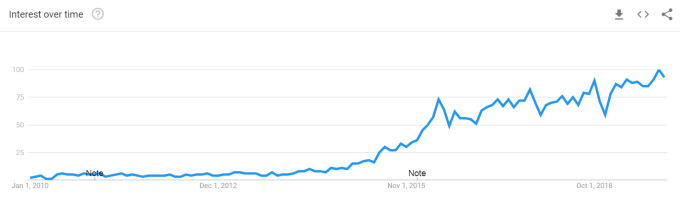
fintech search volume

Google search volume for “fintech,” 2000 – present.

Fintech has since become a household name, a shift that came with with prodigious growth in investment: from $2 billion in 2010 to over $50 billion in venture capital in 2018 (and on-pace for $30 billion+ this year).

Predictions were made along the way with mixed results — banks will go out of business, banks will catch back up. Big tech will get into consumer finance. Narrow service providers will unbundle all of consumer finance. Banks and big fintechs will gobble up startups and consolidate the sector. Startups will each become their own banks. The fintech ‘bubble’ will burst.

https://ift.tt/35PCNan

Here’s what did happen: fintechs were (and still are) heavily verticalized, recreating the offline branches of financial services by bringing them online and introducing efficiencies. The next decade will look very different. Early signs are beginning to emerge from overlooked areas which suggest that financial services in the next decade will:

  1. Be portable and interoperable: Like mobile phones, customers will be able to easily transition between ‘carriers’.
  2. Become more ubiquitous and accessible: Basic financial products will become a commodity and bring unbanked participants ‘online’.
  3. Move to the background: The users of financial tools won’t have to develop 1:1 relationships with the providers of those tools.
  4. Centralize into a few places and steer on ‘autopilot’.

Prediction 1: The open data layer

Thesis: Data will be openly portable and will no longer be a competitive moat for fintechs.

Personal data has never had a moment in the spotlight quite like 2019. The Cambridge Analytica scandal and the data breach that compromised 145 million Equifax accounts sparked today’s public consciousness around the importance of data security. Last month, the House of Representatives’ Fintech Task Force met to evaluate financial data standards and the Senate introduced the Consumer Online Privacy Rights Act.

A tired cliché in tech today is that “data is the new oil.” Other things being equal, one would expect banks to exploit their data-rich advantage to build the best fintech. But while it’s necessary, data alone is not a sufficient competitive moat: great tech companies must interpret, understand and build customer-centric products that leverage their data.

Why will this change in the next decade? Because the walls around siloed customer data in financial services are coming down. This is opening the playing field for upstart fintech innovators to compete with billion-dollar banks, and it’s happening today.

Much of this is thanks to a relatively obscure piece of legislation in Europe, PSD2. Think of it as GDPR for payment data. The UK became the first to implement PSD2 policy under its Open Banking regime in 2018. The policy requires all large banks to make consumer data available to any fintech which the consumer permissions. So if I keep my savings with Bank A but want to leverage them to underwrite a mortgage with Fintech B, as a consumer I can now leverage my own data to access more products.

Consortia like FDATA are radically changing attitudes towards open banking and gaining global support. In the U.S., five federal financial regulators recently came together with a rare joint statement on the benefits of alternative data, for the most part only accessible through open banking technology.

The data layer, when it becomes open and ubiquitous, will erode the competitive advantage of data-rich financial institutions. This will democratize the bottom of the fintech stack and open the competition to whoever can build the best products on top of that openly accessible data… but building the best products is still no trivial feat, which is why Prediction 2 is so important:

Prediction 2: The open protocol layer

Thesis: Basic financial services will become simple open-source protocols, lowering the barrier for any company to offer financial products to its customers.

Picture any investment, wealth management, trading, merchant banking, or lending system. Just to get to market, these systems have to rigorously test their core functionality to avoid legal and regulatory risk. Then, they have to eliminate edge cases, build a compliance infrastructure, contract with third-party vendors to provide much of the underlying functionality (think: Fintech Toolkit) and make these systems all work together.

The end result is that every financial services provider builds similar systems, replicated over and over and siloed by company. Or even worse, they build on legacy core banking providers, with monolith systems in outdated languages (hello, COBOL). These services don’t interoperate, and each bank and fintech is forced to become its own expert at building financial protocols ancillary to its core service.

But three trends point to how that is changing today:

First, the infrastructure and service layer to build is being disaggregates, thanks to platforms like Stripe, Marqeta, Apex, and Plaid. These ‘finance as a service’ providers make it easy to build out basic financial functionality. Infrastructure is currently a hot investment category and will be as long as more companies get into financial services — and as long as infra market leaders can maintain price control and avoid commoditization.

Second, industry groups like FINOS are spearheading the push for open-source financial solutions. Consider a Github repository for all the basic functionality that underlies fintech tools. Developers could continuously improve the underlying code. Software could become standardized across the industry. Solutions offered by different service providers could become more inter-operable if they shared their underlying infrastructure.

And third, banks and investment managers, realizing the value in their own technology, are today starting to license that technology out. Examples are BlackRock’s Aladdin risk-management system or Goldman’s Alloy data modeling program. By giving away or selling these programs to clients, banks open up another revenue stream, make it easy for the financial services industry to work together (think of it as standardizing the language they all use), and open up a customer base that will provide helpful feedback, catch bugs, and request new useful product features.

As Andreessen Horowitz partner Angela Strange notes, “what that means is, there are several different infrastructure companies that will partner with banks and package up the licensing process and some regulatory work, and all the different payment-type networks that you need. So if you want to start a financial company, instead of spending two years and millions of dollars in forming tons of partnerships, you can get all of that as a service and get going.”

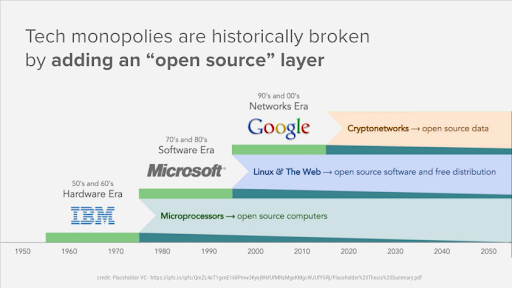
Fintech is developing in much the same way computers did: at first software and hardware came bundled, then hardware became below differentiated operating systems with ecosystem lock-in, then the internet broke open software with software-as-a-service. In that way, fintech in the next ten years will resemble the internet of the last twenty.

placeholder vc infographic

Infographic courtesy Placeholder VC

Prediction 3: Embedded fintech

Thesis: Fintech will become part of the basic functionality of non-finance products.

The concept of embedded fintech is that financial services, rather than being offered as a standalone product, will become part of the native user interface of other products, becoming embedded.

This prediction has gained supporters over the last few months, and it’s easy to see why. Bank partnerships and infrastructure software providers have inspired companies whose core competencies are not consumer finance to say “why not?” and dip their toes in fintech’s waters.

Apple debuted the Apple Card. Amazon offers its Amazon Pay and Amazon Cash products. Facebook unveiled its Libra project and, shortly afterward, launched Facebook Pay. As companies from Shopify to Target look to own their payment and purchase finance stacks, fintech will begin eating the world.

If these signals are indicative, financial services in the next decade will be a feature of the platforms with which consumers already have a direct relationship, rather than a product for which consumers need to develop a relationship with a new provider to gain access.

Matt Harris of Bain Capital Ventures summarizes in a recent set of essays (one, two) what it means for fintech to become embedded. His argument is that financial services will be the next layer of the ‘stack’ to build on top of internet, cloud, and mobile. We now have powerful tools that are constantly connected and immediately available to us through this stack, and embedded services like payments, transactions, and credit will allow us to unlock more value in them without managing our finances separately.

Fintech futurist Brett King puts it even more succinctly: technology companies and large consumer brands will become gatekeepers for financial products, which themselves will move to the background of the user experiences. Many of these companies have valuable data from providing sticky, high-affinity consumer products in other domains. That data can give them a proprietary advantage in cost-cutting or underwriting (eg: payment plans for new iPhones). The combination of first-order services (eg: making iPhones) with second-order embedded finance (eg: microloans) means that they can run either one as a loss-leader to subsidize the other, such as lowering the price of iPhones while increasing Apple’s take on transactions in the app store.

This is exciting for the consumers of fintech, who will no longer have to search for new ways to pay, invest, save, and spend. It will be a shift for any direct-to-consumer brands, who will be forced to compete on non-brand dimensions and could lose their customer relationships to aggregators.

Even so, legacy fintechs stand to gain from leveraging the audience of big tech companies to expand their reach and building off the contextual data of big tech platforms. Think of Uber rides hailed from within Google Maps: Uber made a calculated choice to list its supply on an aggregator in order to reach more customers right when they’re looking for directions.

Prediction 4: Bringing it all together

Thesis: Consumers will access financial services from one central hub.

In-line with the migration from front-end consumer brand to back-end financial plumbing, most financial services will centralize into hubs to be viewed all in one place.

For a consumer, the hub could be a smartphone. For a small business, within Quickbooks or Gmail or the cash register.

As companies like Facebook, Apple, and Amazon split their operating systems across platforms (think: Alexa + Amazon Prime + Amazon Credit Card), benefits will accrue to users who are fully committed to one ecosystem so that they can manage their finances through any platform — but these providers will make their platforms interoperable as well so that Alexa (e.g.) can still win over Android users.

As a fintech nerd, I love playing around with different financial products. But most people are not fintech nerds and prefer to interact with as few services as possible. Having to interface with multiple fintechs separately is ultimately value subtractive, not additive. And good products are designed around customer-centric intuition. In her piece, Google Maps for Money, Strange calls this ‘autonomous finance:’ your financial service products should know your own financial position better than you do so that they can make the best choices with your money and execute them in the background so you don’t have to.

And so now we see the rebundling of services. But are these the natural endpoints for fintech? As consumers become more accustomed to financial services as a natural feature of other products, they will probably interact more and more with services in the hubs from which they manage their lives. Tech companies have the natural advantage in designing the product UIs we love — do you enjoy spending more time on your bank’s website or your Instagram feed? Today, these hubs are smartphones and laptops. In the future, could they be others, like emails, cars, phones or search engines?

As the development of fintech mirrors the evolution of computers and the internet, becoming interoperable and embedded in everyday services, it will radically reshape where we manage our finances and how little we think about them anymore. One thing is certain: by the time I’m writing this article in 2029, fintech will look very little like it did today.

So which financial technology companies will be the ones to watch over the next decade? Building off these trends, we’ve picked five that will thrive in this changing environment.


Read Full Article

The Minecraft Commands Cheat Sheet


Minecraft blocks

Whether you’re trying to manage a server or you just want to give yourself a bunch of diamonds, Minecraft commands are a useful tool. You can type them into your chat, or load them into a command block for automated use.

There are plenty of commands to try. You can use the gamemode command to change the game mode to Creative, which lets you fly around anywhere. The give command allows you to give yourself any item you like. There’s a teleport command in case you die a long way away from your spawn point. You can even change your spawn point anytime, without the need for a bed!

It’s important to note that not all Minecraft commands are compatible with every platform. PC users can use “Java Edition” commands, while players on consoles or mobiles will need “Bedrock Edition” commands. Some commands work the same way on both versions, and some may have different syntaxes. The cheat sheet PDF available for download below highlights these differences and also contains example commands.

Without further ado, here’s the cheat sheet for all your Minecraft command needs.

FREE DOWNLOAD: This cheat sheet is available as a downloadable PDF from our distribution partner, TradePub. You will have to complete a short form to access it for the first time only. Download The Minecraft Commands Cheat Sheet.

The Minecraft Commands Cheat Sheet

Keep in mind that Minecraft cheats are not enabled by default. The setting for enabling cheats varies depending on the Minecraft version you’re using.

Command Name Command Syntax
Server Management
Ban Player /ban [target] [reason]
Ban IP Address /ban-ip [target/IP address] [reason]
View Banned Users /banlist players
/banlist IPs
Change Default Gamemode /defaultgamemode (survival/creative/adventure/spectator)
Remove Operator Privileges /deop [target]
Force a Chunk to Load Constantly /forceload (add/remove) (chunk coords)
/forceload remove all
/forceload query (chunk coords)
Set the Current Gamemode /gamemode (survival/creative/adventure/spectator) [target]
Set a Gamerule /gamerule [RuleName] (RuleValues)
List Players on Server /list
/list uuids
Kick Player /kick [target] [reason]
Give Operator Status /op [player]
Unban Player /pardon [player]
Unban IP Address /pardon-ip [address]
Allow LAN Users to Join a Singleplayer World /publish [port]
Save a Backup of a World /save hold
/save query
/save resume
Save a Server /save-all (flush)
Disable Automatic Server Saves /save-off
Enable Automatic Server Saves /save-on
Change Idle Kick Time /setidletimeout [minutes]
Set Maximum Player Count /setmaxplayers [amount]
Set Default Spawn Point /setworldspawn
/setworldspawn (x, y, z)
Make Spectator Follow Entity /spectate [target] [player]
Spread Players Across World /spreadplayers (center coords) [distance of spread] [maximum range] [team spread: true/false] [targets]
Shut Down Server /stop
Count an Entity /testfor [target]
Transfer to Another Server /transferserver [ip address] [port]
Modify the Server Whitelist /whitelist (add/remove) [player]
/whitelist (on/off)
/whitelist list
/whitelist reload
Enable/Disable Mob Events /mobevent [event] (true/false)
Connect to a WebSocket Server /wsserver OR /connect [ip]
Player Modification and Cheats
Clear Items from Inventory /clear [target]
/clear [target] [item]
/clear [target] [item] [amount]
Add or Remove Advancements /advancement (grant/remove) [target] everything
Grant or Remove a Status Effect For Java: /effect give [entity] [effect] (duration) (effect level) (hide particles: true/false)
For Bedrock: /effect [entity] [effect] (duration) (effect level) (hide particles: true/false)
For Java: /effect clear [entity] [effect]
For Bedrock: /effect [entity] clear
Enchant Current Weapon /enchant [target] [enchantment ID] [level]
Add or Remove Experience Points (/experience OR /xp) add [target] [amount] (points/levels)
(/experience OR /xp) set [target] [amount] (points/levels)
/experience query [target] (points/levels)
Give an Item to Someone /give [target] [item] [amount]
Kill Entity /kill
/kill [target]
Locate Structure /locate [structure]
Add or Remove Recipes /recipe (give/take) [player] [recipe name]
Set Player's Spawn Point /spawnpoint
/spawnpoint (x, y, z)
/spawnpoint [optional target] (x, y, z)
Summon an Entity /summon [entity]
/summon [entity] (x, y, z)
Teleport an Entity /teleport OR /tp (coords)
/tp [target] (coords)
/tp [target] (coords) (rotation)
/tp [target] (coords) facing (location)
/tp [target] (coords) facing [entity]
World Editing and Management
Clone a Region of Blocks /clone (beginning coord of region) (end coord of region) (destination coords)
Replace Items in Blocks /replaceitem block (block coords) [slot] [item] (amount)
Change a Block to a Different Block /setblock (x, y, z) [block]
Edit Blocks in a Region /fill (beginning region coord) (end region coord) [block type] (destroy/hollow/keep/outline/replace)
Test if a Block is Present /testforblock (x, y, z) [block name]
Test if Blocks in Two Regions Are Identical /testforblocks (beginning coord of region) (end coord of region) (comparison coords)
Add or Remove a Ticking Area /tickingarea add (beginning coord of region) (end coord of region) [name]
/tickingarea add circle (center coord) (radius) [name]
/tickingarea remove (name/all)
Adjust or See the World Time /time (add/set) [amount]
/time query (daytime/gametime/day)
Display or Edit a Title Screen /title [player] (title/subtitle/actionbar) [title]
/title [player] times [fadein time] [stay time] [fadeout time]
/title [player] clear
/title [player] reset
Turn Rain On or Off /toggledownfall
Change the Weather /weather (clear/rain/thunder) [duration]
Display the World Seed /seed
Modify the World Border /worldborder add [distance] [time]
/worldborder center (coords)
/worldborder damage (amount/buffer) [variables]
/worldborder get
/worldborder set [distance] [time]
/worldborder warning (distance/time) [variables]
Toggle World Builder Status /worldbuilder OR /wb
Communication
Display Custom Action in Chat /me [action]
Send a Private Message (/msg OR /tell OR /w) [player] [message]
Send a Message to the Server /say [message]
Send a Message to Your Team (/teammsg OR /tm) [message]
Send a JSON Message to All Players /tellraw [player] (message)
Team and Scoreboard Management
Modify Player Teams /team add [team name] [display name]
/team empty [team name]
/team join [team name] [players]
/team leave [players]
/team list [team name]
/team modify [team name] [attribute] [value]
/team remove [team name]
Modify the Scoreboard /scoreboard objectives (add/list/modify/remove/setdisplay) [variables]
/scoreboard players (add/enable/get/list/operation/remove/reset/set) [variables]
Add, Remove, or View Scoreboard Tags /tag [target] list
/tag [target] (add/remove) [tag]
Trigger a Scoreboard Objective /trigger (objective name) [add/set(number)]
Data Management
Customize Boss Health Bars /bossbar (add/get/list/remove/set) [bossbar id] [additional parameters]
Modify How Data Packs are Loaded and Unloaded /datapack disable [data pack name]
/datapack enable [data pack name] (first/last)
/datapack enable [data pack name] (before/after) [data pack]
/datapack list (available/enabled)
Enable or Disable Debugging /debug (start/stop/report)
Get Help for a Command /help [page] [command]
Play a Sound /playsound [sound] [category] [player] [source coord] [volume] [pitch] [min volume]
Stop a Sound Playing /stopsound [target]
Reload Data Packs /reload
Schedule a Function to Run /schedule function [function path] [time(d/s/t)]
Run a Function /function [function path]
Useful Target Modifiers
Target the Nearest Player @p
Target a Random Player @r
Target All Players @a
Target All Entities @e
Target a Team [team=TeamName]
Target an Entity Type [type=EntityTypeName]
Target Players With Specific EXP Levels [level=LevelNumber]
[level=FromLevel..ToLevel]
[level=AboveLevel..]
[level=..BelowLevel]
Target Players in a Specific Gamemode [gamemode=GamemodeName]
Targets Entities With a Specific Name [name=TargetName]
Reverse a Target Modifier [modifier=!target]

Minecraft With a Twist

Minecraft has many commands under its hood, but they’re not too complex. And whether you’re mass-editing a world or you want to fly around in Creative mode, there’s a command to help you.

Speaking of Minecraft commands, they include a special subset of commands called the Minecraft command block commands. You can use them to grant specific admin-level powers to players who don’t have admin privileges. And you’ll learn all about the command block commands in our Minecraft command blocks guide.

Read the full article: The Minecraft Commands Cheat Sheet


Read Full Article

21 December 2019

TikTok’s national security scrutiny tightens as U.S. Navy reportedly bans popular social app


TikTok may be the fastest-growing social network in the history of the internet, but it is also quickly becoming the fastest-growing security threat and thorn in the side of U.S. China hawks.

The latest, according to a notice published by the U.S. Navy this past week and reported on by Reuters and the South China Morning Post, is that TikTok will no longer be allowed to be installed on service members’ devices, or they may face expulsion from the military service’s intranet.

It’s just the latest example of the challenges facing the extremely popular app. Recently, Congress led by Missouri senator Josh Hawley demanded a national security review of TikTok and its Sequoia-backed parent company ByteDance, along with other tech companies that may share data with foreign governments like China. Concerns over the leaking of confidential communications recently led the U.S. government to demand the unwinding of the acquisition of gay social network app Grindr from its Chinese owner Beijing Kunlun.

The intensity of criticism on both sides of the Pacific has made it increasingly challenging to manage tech companies across the divide. As I recently discussed here on TechCrunch, Shutterstock has actively made it harder and harder to find photos deemed controversial by the Chinese government on its stock photography platform, a play to avoid losing a critical source of revenue.

We saw similar challenges with Google and its Project Dragonfly China-focused search engine as well as with the NBA.

What’s interesting here though is that companies on both sides are struggling with policy on both sides. Chinese companies like ByteDance are increasingly being targeted and stricken out of the U.S. market, while American companies have long struggled to get a foothold in the Middle Kingdom. That might be a more equal playing field than it has been in the past, but it is certainly a less free market than it could be.

While the trade fight between China and the U.S. continues, the damage will continue to fall on companies that fail to draw within the lines set by policymakers in both countries. Whether any tech company can bridge that divide in the future unfortunately remains to be seen.


Read Full Article

5 Tools to Make Wikipedia Better and Discover Interesting Articles


Wikipedia is a great place to find information about any topic you’re interested in. But it can also be a great place to discover interesting topics you didn’t even know about. These tools help you discover new Wikipedia pieces and track what you want to read.

In case you didn’t already know, Wikipedia’s homepage offers a featured article every day, as well as topics in the news. If you aren’t visiting the homepage, you’re missing one of the best places to get new information every day. You should also consider the benefits of creating a Wikipedia account, so that you can track your interests and save pages for later.

1. Wiki Good Article (Twitter): Daily Random Article Worth Reading

Wiki Good Article Bot tweets a random link based on Wikipedia's six criteria for good articles

Did you know that Wikipedia has a few criteria for what makes a good article? In fact, it made a list of these “good articles” that you can read. But of course, that would be too much in one day, so follow the Wiki Good Article bot on Twitter, which tweets one random link every day.

The six factors of a good article are that it is well written, verifiable with no original research, broad in its coverage, neutral, stable, and illustrated. There are a few disqualifying factors too, but largely, these six are enough to weed out uninteresting pieces.

Importantly, an entry loses its “good article” status if it becomes one of Wikipedia’s featured articles. So this list becomes a good way to find worthwhile articles that you’d otherwise not come across easily.

2. Copernix (Web): World Map With Wikipedia Entries

Browse the map of the world with interesting wikipedia entries on Copernix

Copernix is a mixture of Google Maps and Wikipedia. It is a fascinating way to browse the map of the world and learn new things about it. Whether it’s history, geography, or current events, this is the coolest map-based experience since Google Earth.

The map is filled with pins from interesting Wikipedia articles about any area. But it isn’t based on points of interest alone. That means you don’t need a physical structure there for Copernix to place a pin. The pin is about what’s interesting from that area, whether it’s a person, an event, or anything else.

You’ll see pins like Prophet Muhammed in Saudi Arabia, the Ethiopian Airlines Flight 302 in Ethiopia, and so on. These aren’t landmarks in the physical sense, but they are landmark events in our world’s history, making it worth reading about.

At any point, you can browse a precis of all the pins in a pane on the left. Click a pin to expand its entry and read more about it. And there’s always a link to read the full Wikipedia entry. Fair warning, spend a few minutes on Copernix and you’re bound to go down the rabbit hole.

3. Weeklypedia (Web): Weekly List of Major Changes in Wikipedia

The Weeklypedia is a newsletter digest that lists articles that got the most number of changes on Wikipedia in the past week, as well as new articles and active discussions

Wikipedia is a good indicator of important happenings. When any major event takes place in the world, editors hop on to related articles about that event and start updating it. The number of changes in an article thus points to what you need to pay attention to.

These changes are available through Wikipedia’s open-source tools. Weeklypedia tracks the changes and lists the 20 most edited articles in any week, turning them into a newsletter. It’s like a digest of what’s happening around the world, dropped into your inbox. The interesting part is that the changed articles aren’t always news-related.

Along with the 20 most edited articles, Weeklypedia also tracks other activity on Wikipedia. The top five Discussions, where editors talk about hotly debated topics and what to say or not say about them, is a great place to see all sides of an argument unfolding. And the top 10 new articles created in the week is like a little news bulletin.

There is simply no reason not to subscribe to Weeklypedia. Think of it as some leisure reading, as and when you want it.

4. WikiTweaks (Chrome): Better Looking Wikipedia and History Tracking

WikiTweaks makes Wikipedia look better and tracks recently visited links to show your journey down the rabbit hole

As amazing as Wikipedia is, its design could be far better. The amount of wasted space on any page doesn’t seem optimized for reading, especially when there are tables, charts, or images.

The Chrome extension WikiTweaks makes a few cosmetic changes to Wikipedia that use space more efficiently, making a better reading experience. It’s an old extension that also adds previews if you hover over any link, but that’s not needed now that Wikipedia has made that an official feature.

WikiTweaks also tracks your Wikipedia history, which is an invaluable tool for those who have a habit of falling down the rabbit hole. Click the extension icon and you’ll see the last Wikipedia pages you visited, instantly reminding you how you landed up on the page you’re reading.

Download: WikiTweaks for Chrome (Free)

5. EpubPress (Chrome, Firefox): Create an Ebook of Multiple Wikipedia Links

Create an offline ebook of multiple Wikipedia links with EpubPress

Once you’ve got your topics, you should be able to read them anywhere, even offline. Wikipedia offers its own tool to create and download a PDF of multiple links. But currently, the Book Creator tool is undergoing changes and you can’t get these PDFs.

EpubPress is a great alternative to Wikipedia Book Creator, and much simpler to use. Install the extension in your browser, and open browse Wikipedia as you would. At any point, click the extension to see a list of all open tabs. Choose which ones you want to add to the ebook. Give it a name and a description, and download. It takes some time for the tool to finish downloading and compiling all pages, but it’s worth the wait.

The only restriction is that your final file is in ePub format, not in PDF. But that’s not a worry as most readers will support ePub. Alternately, you can always convert the ePub to PDF or any other file format with free online tools.

Download: EpubPress for Chrome | Firefox (Free)

Wikipedia Alternatives and Improvements

Wikipedia is unquestioningly the biggest user-edited encyclopedia in the world, but it isn’t the only resource you should trust. It’s in your best interest to look at alternatives, and also try to improve it as much as possible.

For starters, check out these five Wikipedia alternatives and tools for a better encyclopedia. You should especially try out Qikipedia, which gives Wikipedia previews anywhere on the web when you select some text.

Read the full article: 5 Tools to Make Wikipedia Better and Discover Interesting Articles


Read Full Article

The Worst Passwords of 2019 Have Been Revealed


The worst passwords of 2019 have been revealed, and the list shows that some people will never learn. These are the most commonly used passwords from recent data breaches. Which makes them both really common and easily broken. So, avoid at all costs.

Are Passwords Still Effective in 2019?

Passwords are slowly but surely being revealed to be a mediocre method of securing your online accounts. There have been so many data breaches now that a lot of passwords have been exposed to hackers and cybercriminals, rendering them ineffective.

Every year, SplashData, makers of several password managers, curates a list of the worst passwords of the year. The worst passwords of 2018 saw Donald Trump, Top Gun, Star Wars, and Harley Quinn inspire new (bad) passwords. So, what has happened in 2019?

The Worst Passwords of 2019, Revealed

SplashData has compiled its list of the worst passwords of 2019. There are 100 passwords listed in all, and there’s a mix of the usual suspects as well as some new entries. You can see the full list on the TeamsID website, but here are the Top 10 to give you a flavor.

  1. 123456
  2. 123456789
  3. qwerty
  4. password
  5. 1234567
  6. 12345678
  7. 12345
  8. iloveyou
  9. 111111
  10. 123123

So far, so familiar. All of these passwords appeared in the 2018 list, and most of them near the top. Using “password” as a password is particularly dumb, so it’s heartening to see that lose the top spot. However, millions of people are clearly still using it.

The idea of using a sequence of numbers is also still prevalent, and continues all the way through the Top 100. As for interesting entries, “dragon” is new in at #23, “liverpool” appears at #31, “ginger” makes it to #51, and “trustno1” comes in at #94.

Always Enable Two-Factor Authentication

This paints a depressing picture of people’s attitudes to passwords. However, it’s important to remember that these only represent a fraction of commonly used passwords. So, we can assume that most people are taking their online security more seriously.

If you’re only now realizing how bad your passwords are, there are things you can do. For one, enable two-factor authentication wherever it’s available. You should also consider using a password manager, and here are the best password managers for every occasion.

Read the full article: The Worst Passwords of 2019 Have Been Revealed


Read Full Article

Vape lung is on the decline as CDC report fixes blame on oily additive


The CDC has issued a set of reports showing that the lung disease associated with vaping seems to be declining from peak rates, and that Vitamin E acetate seems — as speculated early on — to be the prime suspect for the epidemic. The affliction has cost at least 54 lives and affected 2,506 people across the nation.

The condition now officially known as EVALI (E-cigarette, or Vaping, Product Use-Associated Lung Injury) appeared over the summer, with hundreds of people reporting chest pains, shortness of breath and other symptoms. When state medical authorities and the CDC began comparing notes, it became clear that vaping was the common theme between the cases — especially using THC products.

Before long the CDC recommended ceasing all vape product usage and was collating reports and soliciting samples from around the country. Their medical authorities have now issued several reports on the disease. The most significant finding echoes earlier indications that Vitamin E acetate, an oily substance that was apparently being used as a cutting agent in low-quality vaping cartridges, is at the very least a major contributor to the condition:

Building upon a previous study, CDC analyzed bronchoalveolar lavage (BAL) fluid from a larger number of EVALI patients from 16 states and compared them to BAL fluid from healthy people. Vitamin E acetate, also found in product samples tested by the FDA and state laboratories, was identified in BAL fluid from 48 of 51 EVALI patients and was not found in any of the BAL fluids of healthy people.

That’s pretty clear cut, but importantly it does not exonerate any other, perhaps even worse additives that may not have been so widespread. It seems clear that vaping product producers will need to reestablish trust in the wake of this fatal blunder, and part of that will have to be transparency and regulation.

Vaping rose to prominence quickly and has proven difficult to effectively regulate. The shady companies that were selling stamped-on cartridges filled with what would prove to be a lethal adulterant have probably already picked up and moved on to the next scam.

The good news is the scale of the epidemic seems to have reached its maximum. There are still cases coming in, but the number of new patients is not rising sharply every month. Perhaps this indicates that people are taking the CDC’s advice and not vaping as much or at all, or perhaps the products using the additive have been quietly slipped off the market.


Read Full Article

ALBERT: A Lite BERT for Self-Supervised Learning of Language Representations


Ever since the advent of BERT a year ago, natural language research has embraced a new paradigm, leveraging large amounts of existing text to pretrain a model’s parameters using self-supervision, with no data annotation required. So, rather than needing to train a machine-learning model for natural language processing (NLP) from scratch, one can start from a model primed with knowledge of a language. But, in order to improve upon this new approach to NLP, one must develop an understanding of what, exactly, is contributing to language-understanding performance — the network’s height (i.e., number of layers), its width (size of the hidden layer representations), the learning criteria for self-supervision, or something else entirely?

In “ALBERT: A Lite BERT for Self-supervised Learning of Language Representations”, accepted at ICLR 2020, we present an upgrade to BERT that advances the state-of-the-art performance on 12 NLP tasks, including the competitive Stanford Question Answering Dataset (SQuAD v2.0) and the SAT-style reading comprehension RACE benchmark. ALBERT is being released as an open-source implementation on top of TensorFlow, and includes a number of ready-to-use ALBERT pre-trained language representation models.

What Contributes to NLP Performance?
Identifying the dominant driver of NLP performance is complex — some settings are more important than others, and, as our study reveals, a simple, one-at-a-time exploration of these settings would not yield the correct answers.

The key to optimizing performance, captured in the design of ALBERT, is to allocate the model’s capacity more efficiently. Input-level embeddings (words, sub-tokens, etc.) need to learn context-independent representations, a representation for the word “bank”, for example. In contrast, hidden-layer embeddings need to refine that into context-dependent representations, e.g., a representation for “bank” in the context of financial transactions, and a different representation for “bank” in the context of river-flow management.

This is achieved by factorization of the embedding parametrization — the embedding matrix is split between input-level embeddings with a relatively-low dimension (e.g., 128), while the hidden-layer embeddings use higher dimensionalities (768 as in the BERT case, or more). With this step alone, ALBERT achieves an 80% reduction in the parameters of the projection block, at the expense of only a minor drop in performance — 80.3 SQuAD2.0 score, down from 80.4; or 67.9 on RACE, down from 68.2 — with all other conditions the same as for BERT.

Another critical design decision for ALBERT stems from a different observation that examines redundancy. Transformer-based neural network architectures (such as BERT, XLNet, and RoBERTa) rely on independent layers stacked on top of each other. However, we observed that the network often learned to perform similar operations at various layers, using different parameters of the network. This possible redundancy is eliminated in ALBERT by parameter-sharing across the layers, i.e., the same layer is applied on top of each other. This approach slightly diminishes the accuracy, but the more compact size is well worth the tradeoff. Parameter sharing achieves a 90% parameter reduction for the attention-feedforward block (a 70% reduction overall), which, when applied in addition to the factorization of the embedding parameterization, incur a slight performance drop of -0.3 on SQuAD2.0 to 80.0, and a larger drop of -3.9 on RACE score to 64.0.

Implementing these two design changes together yields an ALBERT-base model that has only 12M parameters, an 89% parameter reduction compared to the BERT-base model, yet still achieves respectable performance across the benchmarks considered. But this parameter-size reduction provides the opportunity to scale up the model again. Assuming that memory size allows, one can scale up the size of the hidden-layer embeddings by 10-20x. With a hidden-size of 4096, the ALBERT-xxlarge configuration achieves both an overall 30% parameter reduction compared to the BERT-large model, and, more importantly, significant performance gains: +4.2 on SQuAD2.0 (88.1, up from 83.9), and +8.5 on RACE (82.3, up from 73.8).

These results indicate that accurate language understanding depends on developing robust, high-capacity contextual representations. The context, modeled in the hidden-layer embeddings, captures the meaning of the words, which in turn drives the overall understanding, as directly measured by model performance on standard benchmarks.

Optimized Model Performance with the RACE Dataset
To evaluate the language understanding capability of a model, one can administer a reading comprehension test (e.g., similar to the SAT Reading Test). This can be done with the RACE dataset (2017), the largest publicly available resource for this purpose. Computer performance on this reading comprehension challenge mirrors well the language modeling advances of the last few years: a model pre-trained with only context-independent word representations scores poorly on this test (45.9; left-most bar), while BERT, with context-dependent language knowledge, scores relatively well with a 72.0. Refined BERT models, such as XLNet and RoBERTa, set the bar even higher, in the 82-83 score range. The ALBERT-xxlarge configuration mentioned above yields a RACE score in the same range (82.3), when trained on the base BERT dataset (Wikipedia and Books). However, when trained on the same larger dataset as XLNet and RoBERTa, it significantly outperforms all other approaches to date, and establishes a new state-of-the-art score at 89.4.
Machine performance on the RACE challenge (SAT-like reading comprehension). A random-guess baseline score is 25.0. The maximum possible score is 95.0.
The success of ALBERT demonstrates the importance of identifying the aspects of a model that give rise to powerful contextual representations. By focusing improvement efforts on these aspects of the model architecture, it is possible to greatly improve both the model efficiency and performance on a wide range of NLP tasks. To facilitate further advances in the field of NLP, we are open-sourcing ALBERT to the research community.

Coral raises $4.3M to build an at-home manicure machine


Coral is a company that wants to “simplify the personal care space through smart automation,” and they’ve raised $4.3 million to get it done. Their first goal? An at-home, fully automated machine for painting your nails. Stick a finger in, press down, wait a few seconds and you’ve got a fully painted and dried nail. More than once in our conversations, the team referred to the idea as a “Keurig coffee machine, but for nails.”

It’s still early days for the company. While they’ve got a functional machine (pictured above), they’re quite clear about it being a prototype.

As such, they’re still staying pretty hush hush about the details, declining to say much about how it actually works. They did tell me that it paints one finger at a time, taking about 10 minutes to go from bare nails to all fingers painted and dried. To speed up drying time while ensuring a durable paint job, it’ll require Coral’s proprietary nail polish — so don’t expect to be able to pop open a bottle of nail polish and pour it in. Coral’s polish will come in pods (so the Keurig comparison is particularly fitting), which the user will be able to buy individually or get via subscription. Under the hood is a camera and some proprietary computer vision algorithms, allowing the machine to paint the nail accurately without requiring manual nail cleanup from the user after the fact.

Also still under wraps — or, more accurately, not determined yet — is the price. While Coral co-founder Ramya Venkateswaran tells me that she expects it to be a “premium device,” they haven’t nailed down an exact price just yet.

While we’ve seen all sorts of nail painting machines over the years (including ones that can do all kinds of wild art, like this one we saw at CES earlier this year), Coral says its system is the only one that works without requiring the user to first prime their nails with a base coat or clear coat it after. All you need here is a bare fingernail.

Coral’s team is currently made up of eight people — mostly mechanical, chemical and software engineers. Both co-founders, meanwhile, have backgrounds in hardware; Venkateswaran previously worked as a product strategy manager at Dolby, where she helped launch the Dolby Conference Phone. Her co-founder, Bradley Leong, raised around $800,000 on Kickstarter to ship Brydge (one of the earliest takes on a laptop-style iPad keyboard) back in 2012 before becoming a partner at the seed-stage venture fund Tandem Capital. It was during some industrial hardware research there, he tells me, when he found “the innovation that this machine is based off of.”

Vankateswaran tells me the team has raised $4.3 million to date from CrossLink Capital, Root Ventures, Tandem Capital and Y Combinator. The company is part of Y Combinator’s ongoing Winter 2020 class, so I’d expect to hear more about them as this batch’s demo day approaches in March of next year.

So what’s next? They’ll be working on turning the prototype into a consumer-ready device, and plan to spend the next few months running a small beta program (which you can sign up for here.)


Read Full Article