11 December 2019

BMW says ‘ja’ to Android Auto


BMW today announced that it is finally bringing Android Auto to its vehicles, starting in July 2020. With that, it will join Apple’s CarPlay in the company’s vehicles.

The first live demo of Android Auto in a BMW will happen at CES 2020 next month and after that, it will become available as an update to drivers in 20 countries with cars that feature the BMW OS 7.0. BMW will support Android Auto over a wireless connection, though, which somewhat limits its comparability.

Only two years ago, the company said that it wasn’t interested in supporting Android Auto. At the time, Dieter May, who was then the senior VP for Digital Services and Business Model, explicitly told me that the company wanted to focus on its first-party apps in order to retain full control over the in-car interface and that he wasn’t interested in seeing Android Auto in BMWs. May has since left the company, though it’s also worth noting that Android Auto itself has become significantly more polished over the course of the last two years.

“The Google Assistant on Android Auto makes it easy to get directions, keep in touch and stay productive. Many of our customers have pointed out the importance to them of having Android Auto inside a BMW for using a number of familiar Android smartphone features safely without being distracted from the road, in addition to BMW’s own functions and services,” said Peter Henrich, Senior Vice President Product Management BMW, in today’s announcement.

With this, BMW will also finally offer support for the Google Assistant after early bets on Alexa, Cortana and the BMW Assistant (which itself is built on top of Microsoft’s AI stack). The company has long said it wants to offer support for all popular digital assistants. For the Google Assistant, the only way to make that work, at least for the time being, Android Auto.

In BMWs, Android Auto will see integrations into the car’s digital cockpit, in addition to BMW’s Info Display and the heads-up display (for directions). That’s a pretty deep integration, which goes beyond what most car manufacturers feature today.

“We are excited to work with BMW to bring wireless Android Auto to their customers worldwide next year,” said Patrick Brady, vice president of engineering at Google. “The seamless connection from Android smartphones to BMW vehicles allows customers to hit the road faster while maintaining access to all of their favorite apps and services in a safer experience.”


Read Full Article

Wotch is building a creator-friendly video platform


The team at Wotch has created a new social video platform — but wait, don’t roll your eyes quite yet.

“Obviously, we’re very used to someone creating a new internet video-sharing platform,” said co-CEO Scott Willson. “It must be very irritating for everyone to hear that.”

And yet Willson and his co-founder/co-CEO James Sadler have attempted it anyway, and they’re competing today as part of the Startup Battlefield at Disrupt Berlin. They’re only 22 years old, but Sadler said they’ve been working together for the past few years, with past projects including the development of e-learning platforms.

They were inspired to create Wotch because of YouTube’s recent problems around issues like demonetization, where many YouTubers lost the ability to monetize their videos through advertising, and other controversies like an attempted overhaul of its verification system.

Willson said YouTube has been “leaving out creators in terms of communications,” and as the controversies grew, the pair thought, “There has to be a better way of doing this.”

The key, Sadler added, is giving video creators a bigger say in the process: “We’re very hands-on with these creators. We’re not just sending them an automated email.”

In fact, they’re giving creators an opportunity to buy equity in Wotch to get a stake in the company’s success. They’re also appointing a creator board that will be consulted on company policy.

Wotch creators will be able to make money by selling subscriptions, merchandise and ads — not the standard pre-roll or mid-roll ads (which Willson described as “irritants”), but instead partnerships where they incorporate brand products and messages in their videos.

Asked whether this might create the same tension between advertisers and creators that YouTube has been struggling with, Willson argued, “What it comes down to is correctly matching advertisers with creators.” Some advertisers don’t mind working with video-makers who are “pushing the boundaries” — they just need to know what they’re getting into.

Sadler also said that Wotch will be providing creators with more data about their viewers, like identifying their most loyal fans, their most engaged fans and their first “wotchers.”

And the site will take a different approach to content moderation, using technologies like video frame analysis to identify “risky” content, as well as relying more on community moderation. Sadler said it will be a “consensus” approach, rather than the “dictatorship” of other platforms.

“We’re rewarding users for helping to cleanse these platforms,” he added.

Wotch isn’t identifying any of the big creators who he says have signed on, but Sadler told me that the company is largely focused on emerging markets and has already recruited 25 of the top creators in Brazil (where YouTube has an enormous audience, to sometimes detrimental effect) and throughout South America. Those creators won’t be posting on Wotch alone, but they will be creating exclusive videos for the service.

Sadler said it’s those creators who will draw the viewers: “Consumers are loyal to the creators and not the platforms.” And once they’re drawn in, they’ll also experience “a more social platform — see the things your friends are ‘wotching,’ see the things that your favorite creators are ‘wotching.'”

The startup has raised funding from Dominic Smales, the CEO of influencer marketing company Gleam Futures; Bidstack co-founder Simon Mitchell; and Melody VR founder and COO Steve Hancock. Smales is also leading the creator board.

While a beta version of Wotch is already live, Sadler and Willson plan to launch a revamped version of the service early next year. You can get an early preview of the changes by using the promotional code “TECHCRUNCH.”


Read Full Article

The vast majority of US consumers aren’t spending $1,000+ on phones


Pricing in the smartphone wars has taken a sharp turn in recent years on the premium end of the spectrum. Ever since the arrival of the iPhone X, flagship devices have often arrived in excess of $1,000, as company push toward more premium components in order to remain competitive.

Likely surprising no one, most consumers aren’t spending that much on devices. According to numbers from NPD’s latest Mobile Phone Tracking study, however, the numbers are pretty stark. Less than 10% of U.S. consumers are spending that much on devices. That could foretell some bleak numbers for 5G sales, as early units routinely run around $1,200.

Not an encouraging sign as many manufacturers look toward 5G as the next major driver amid flagging global sales. One thing to consider here is that most phones are good at this point. Even mid-tier smartphones are pretty solid. While the devices have become a commodity, few if any users truly need to spend that much on a product. There’s a reason Samsung, Google and even Apple have been focused on lower cost alternatives of late.

There are, however, reasons for manufacturers to be hopeful. For one thing, the arrival of 5G is often cited as one of the primary sources of slowed sales. Many premium users are likely waiting for more network coverage and devices before purchasing their next phone. NPD says that nearly 3/4ths of consumers are at least aware that 5G is a thing.

Also notable is Qualcomm’s recent 765 announcement, which should help make 5G devices accessible for consumers are a lower price point in the coming year. 


Read Full Article

An honest look at price, innovation and who powers the economy | Mariana Mazzucato

An honest look at price, innovation and who powers the economy | Mariana Mazzucato

Where does wealth come from, who creates it and what destroys it? In this deep dive into global economics, Mariana Mazzucato explains how we lost sight of what value means and why we need to rethink our current financial systems -- so capitalism can be steered toward a bold, innovative and sustainable future that works for all of us.

Click the above link to download the TED talk.

Apple: Use only our special cloth to clean the $1,000 coating on our $5,000 Pro Display


If you thought the saga of the $7,000 Apple Pro Display XDR couldn’t get any more ridiculous, prepare yourself for the proverbial cherry on top: The company insists that you only use the single special cleaning cloth that comes with the monitor. If you lose it, you’re advised to order another.

Apple, already under fire from longtime users for the ever-increasing price of its products, attracted considerable ire and ridicule when it announced the high-end monitor in June. Of course there are many expensive displays out there — it was more the fact that Apple was selling the display for $5,000, the stand separately for $999, and an optional “nano-texture” coating for an additional grand.

Just wait till you see how much the Mac Pro that goes with it costs.


Technically it’s not actually a “coating” but an extremely small-scale etching of the surface that supposedly produces improved image quality without some of the drawbacks of a full-matte coating. “Typical matte displays have a coating added to their surface that scatters light. However, these coatings lower contrast while producing unwanted haze and sparkle,” the product description reads. Not so with nano-texture.

Unfortunately, the unique nature of the glass necessitates special care when cleaning.

“Use only the dry polishing cloth that comes with your display,” reads the support page How to clean your Apple Pro Display XDR. “Never use any other cloths to clean the nano-texture glass. If you lose the included polishing cloth, you can contact Apple to order a replacement polishing cloth.” (No price is listed, so I’ve asked Apple for more information.)

Obviously if you’re cleaning an expensive screen you don’t want to do it with Windex and wadded-up newspaper. But it’s not clear what differentiates Apple’s cloth from an ordinary microfiber wipe.

Do the nano-scale ridges shred ordinary mortal cloth and get fibers caught in their interstices? Can the nano-texture be damaged by anything of insufficient softness?

Apple seems to be presuming a certain amount of courage on the part of consumers, who must pay a great deal for something that not only provides an uncertain benefit (even Apple admits that the display without the coating is “engineered for extremely low reflectivity”) but seems susceptible to damage from even the lightest mishandling.

No doubt the Pro Display XDR is a beautiful display, and naturally only those who feel it is worth the price will buy one. But no one likes to have to baby their gadgets, and Apple’s devices have also gotten more fragile and less readily repairable. The company’s special cloth may be a small, even silly thing, but it’s part of a large and worrying trend.


Read Full Article

4 Reasons Why You Shouldn’t Buy a Smart TV


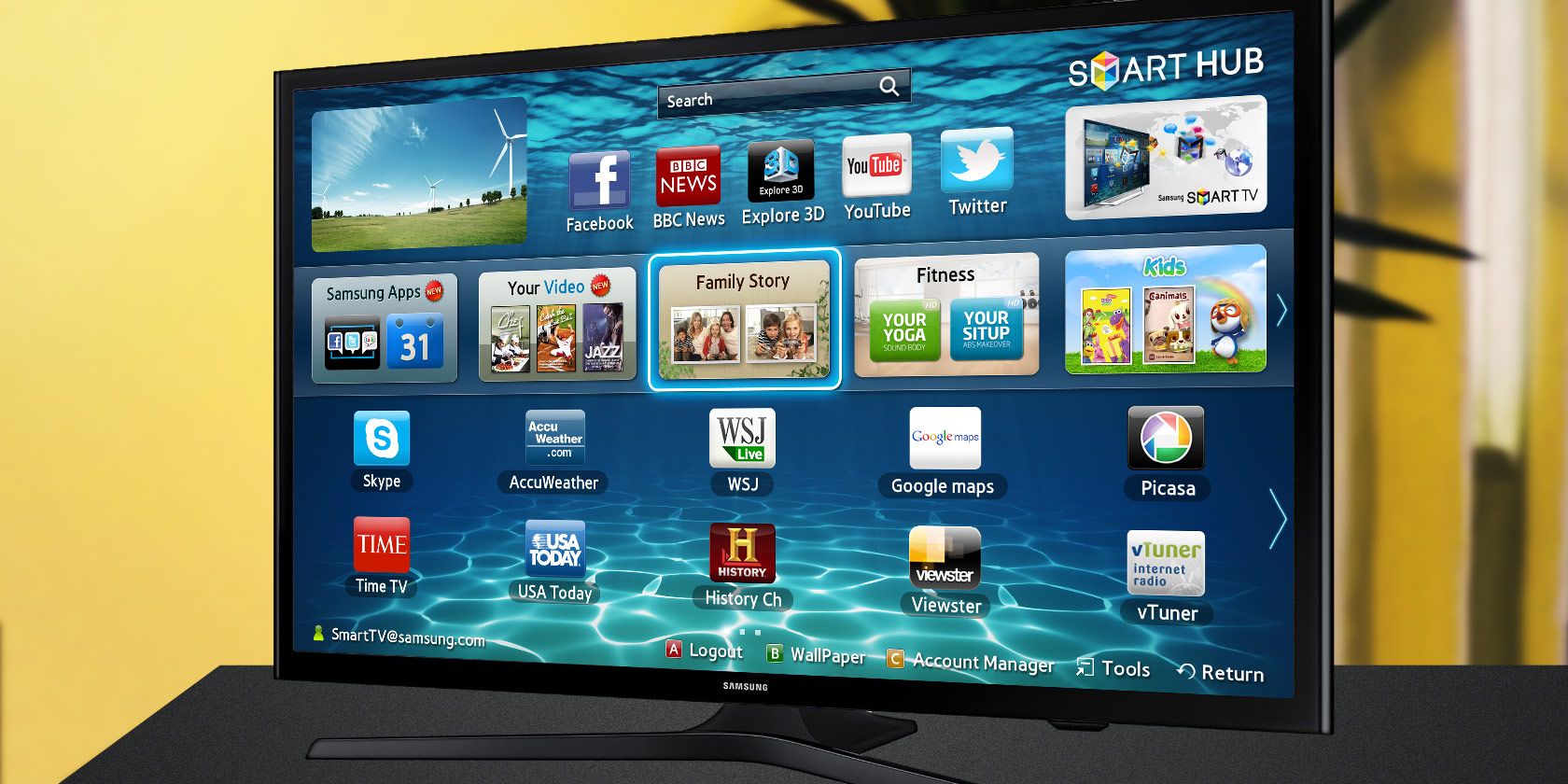
smart-tv

Smart TVs have gone from being a luxury item to the standard. When you walk into an electronics store or shop online for a new TV, there’s a good chance that you’ll find a smart TV for an affordable price.

While they have a lot of benefits, you shouldn’t buy a smart TV without thinking about it first. Let’s look at several reasons why you shouldn’t buy a smart TV…

What Is a Smart TV?

Essentially, smart TVs are regular TVs that have the built-in capability to connect to the internet. This means that your TV itself goes online, instead of having to use a connected device like a Roku box or gaming console to access online services.

Because smart TVs are connected to the internet, they usually let you download apps just like you would on your phone. Most smart TV platforms have apps for major streaming services like Netflix and YouTube, plus offerings for major TV networks and more niche services. You can also use them to browse the web and access other resources on your home network.

Having your TV online is definitely useful, and their now-affordable pricing means that you don’t have to shell out extra for these features. But we still think non-smart TVs have their place in your home. Here’s why.

1. Smart TV Security and Privacy Risks Are Real

When you consider buying any “smart” product—which is any device that has the ability to connect to the internet—security should always be a top concern. Every internet-ready device contributes to the “internet of things,” which is arguably one of the worst security nightmares of our time.

As it turns out, smart TVs are one of the worst offenders. They put your privacy and security at risk in several ways; even the FBI has warned of the risks of smart TVs.

Nearly all smart TVs use automatic content recognition (ACR) to track what you’re watching. They use this information to show you more relevant ads. While you can often limit the collection of this data, it can be difficult to find or reverse. Do you really want to share everything you watch with your TV manufacturer?

Another major security problem with smart TVs is a lack of updates. Every individual platform is dependent on its provider for app and OS updates. If you have a TV that no longer receives updates or takes a long time to receive software patches, your TV could be a vulnerable point on your network.

Finally, some smart TVs have integrated cameras, and most have a microphone. Malicious actors could take advantage of the above security vulnerabilities to spy on you through your webcam. And it isn’t just hackers abusing this: in 2015, CNN reported that Samsung’s privacy policy mentioned transmitting your conversations to a third party.

Whether from a hacker or your TV manufacturer, that’s a lot of data up for collection when you just want to watch television.

2. Other TV Devices Are Superior

The main draw of smart TVs is that you can access Netflix, Hulu, Spotify, and similar services right from your TV. While this idea is great, those services aren’t exclusive to smart TVs. And in fact, you can get a lot more from an alternative platform.

Options like Roku, Amazon Fire TV, Apple TV, or Chromecast are far better platforms. They offer less convoluted interfaces that are much easier to navigate than your smart TV. The app selection is likely far smoother than what your smart TV’s app store offers. And depending on what ecosystems you already use, these devices offer greater convenience and integration with your devices.

For example, the Amazon Fire TV has an Alexa-enabled remote control, allowing you to play your favorite shows without fumbling through menus. If you have a lot of Apple devices, the Apple TV makes it easy to share media from your iPhone or iPad. For most people, these perks are far better than suffering through what’s included on your smart TV.

In short, set-top boxes like the Apple TV and streaming sticks like the Chromecast do everything your smart TV can do, but better. They’re inexpensive and much more flexible. Since you can add them to any TV, your television set itself remains a simple display while the device handles what you’re watching.

While a smart TV may become obsolete after a few years, you can easily replace your streaming device or take it with you to a new TV. See our comparison of the best 4K streaming devices to see which is best for you.

3. Smart TVs Lack Smart Interfaces

smart TV reasons poor interface
Image Credit: Remote Closeup by Rasulov via Shutterstock

Smart functionality requires a smart interface. Smartphones and computers are great because they both support two important input methods: typing and pointing. Smart TVs are terrible at both, and this can lead to a lot of frustration.

In other words, when you want to sit down and watch something on a smart TV, it’s actually a lot more work than you’d expect. It’s not overwhelming, but makes what should be a fun experience inconvenient at best.

One major example is when you want to search for a particular TV show or movie on a service. With a regular TV remote, typing is a hair-pulling affair that could take up to a dozen button presses per letter typed. While most smart TVs have microphone support, the stock solution is often spotty.

On the other hand, most streaming boxes come with remotes that have superior voice assistants. Some of them also have mobile TV remote apps, which support typing out your searches on a smartphone or tablet.

And that’s only one issue. Many smart TVs are plagued with generally poor interfaces that take a lot of button presses to get anywhere and hide important settings where you might miss them. Even the remote control can be confusing, hiding some functions behind colors or letters that aren’t at all evident.

If you have an older smart TV that no longer receives updates, you could be stuck with these poor interfaces for a long time.

4. Smart TV Apps Are Often Unreliable

muo finance smart TV decoder

Using smart TV apps to watch content is convenient, but the apps are almost always inferior to what you use on your phone or computer. In addition to the interface issues discussed earlier, this is also because smart TVs don’t have nearly as much processing power as other devices.

Poor performance and neglect from app developers is common. Most smart TV users have experienced input lag when pressing buttons, freezes and crashes when apps try to do something intensive, and other performance-related issues. This leads to you having to kill apps and restart them, which is never fun.

Smart TVs also run into glitches. For example, the YouTube app on my TV had an issue for weeks where video titles overlapped with the one below, making them near-impossible to read. I have to re-pair my Bluetooth headphones with my TV several times per week. And when I disconnect an HDMI cable and reconnect it, the TV forgets the name I set for that input and makes me replace its shortcut icon.

These issues aren’t really a surprise. Content providers have to juggle compatibility with a lot of outlets these days, including web players, smartphone apps, tablet apps, third-party devices like the Roku and Chromecast, and smart TVs. Which one do you think has the lowest priority?

This brings up another potential issue: the usefulness of your smart TV is limited by the apps that are available for it. If content providers stop updating their smart TV apps for whatever reason, your smart TV loses a big chunk of what makes it “smart.”

In just a few years from now, your smart TV might end up becoming a dumb TV through no fault of your own. If that happens, you’ll have to rely on set-top boxes and other streaming methods anyway.

Should You Buy a Smart TV?

Smart TVs definitely have a lot of advantages, so we aren’t necessarily trying to dissuade you from buying one. However, it’s important for you to know why smart TVs aren’t always everything they’re cracked up to be.

The security and privacy issues are one of the biggest drawbacks, but clunky interfaces and glitches are hindrances too. It could be argued that smart TVs have dropped in price because they’re a ripe platform for data collection.

If, after reading all of this, you still want to buy a smart TV, go for it. It’s becoming more difficult to find a quality TV that’s not smart, so if you want to you can avoid connecting it to the internet to keep it “dumb.” You can always supplement the TV with a streaming box if you decide to go online later.

For anyone still in the market for a smart TV, take a look at the best smart TV operating systems to find which one will be best for you.

Read the full article: 4 Reasons Why You Shouldn’t Buy a Smart TV


Read Full Article

4 Things to Do Immediately When Your Facebook Account Was Hacked


facebook-secure-tricks

Another month, another Facebook scandal. What rarely makes the headlines is the silent struggle of thousands of users whose Facebook accounts got hacked. Facebook itself doesn’t offer much but a wall of silence and text. Do you know whether your account remains untouched?

Unlock the free "Facebook Security Checklist" now!

This will sign you up to our newsletter

Enter your Email

If you suspect that your Facebook password was leaked or that your account was breached, you have to act fast. Facebook hackers could lock you out of your account and hassle your friends and family. Secure your Facebook account now or get it back before it’s too late. In this article we’ll show you how.

NB: If you’re using Facebook to log into other applications, like Spotify or Instagram, those applications have been involved in previous data breaches and may be targeted again in the future. So even if you don’t care about your Facebook account, we strongly recommend changing the respective logins or tightening your Facebook security to secure these third-party accounts.

How to Know If Your Facebook Account Was Hacked

So how do you know your Facebook account was hacked if nothing obvious has changed yet? If a Facebook hacker managed to get into your account, they will leave a trace.

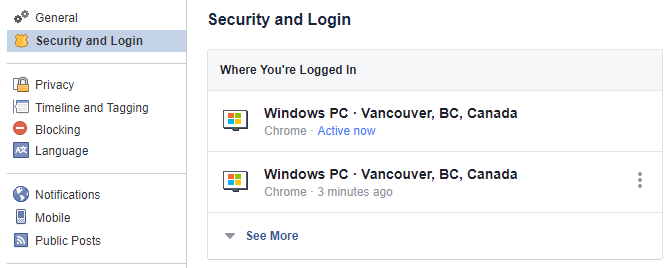
Log into your Facebook account and click the arrowhead in the top right to expand a menu. From the menu, pick Settings and go to Security and Login or just use this direct link.

At the very top, you’ll see a list of devices from which you’ve most recently logged into your Facebook account and when they were active.

Facebook Security and Login Settings

Click See More to expand that list and review older sessions.

Other signs that your account may have been hacked:

  • Your personal data, including your password, email address, or name were changed by a third party.
  • Friend requests and private messages were sent from your account without your doing.
  • Your timeline contains posts you didn’t add or permit.

If you spot any suspicious activity in your logins or have seen one or more of these other signs, below is what you need to do, in the given order

What to Do If Your Facebook Account Was Hacked

1a. Change Your Facebook Password

In case your Facebook hacker hasn’t changed your password, you got lucky! This is the time to update your password before you log out suspicious sessions (you don’t want to alert the hacker). If it’s too late, head to step 1b.

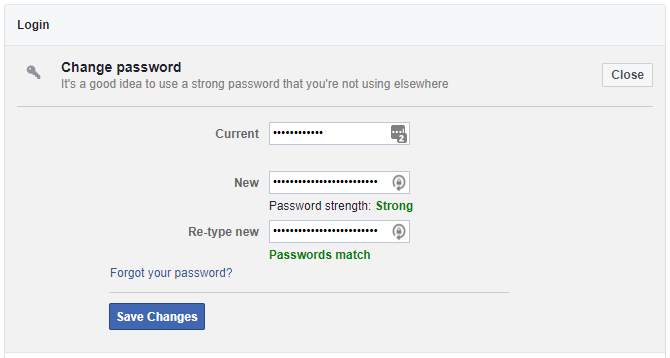
Under Settings > Security and Login, scroll down to Login and click Change password. Enter your current password, set a strong new password (possibly using a password manager like LastPass), and click Save Changes.

Facebook Change Password Screen

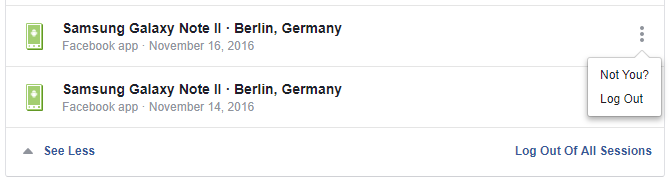
After changing your password, scroll back up to Where You’re Logged In. Either Log Out of individual sessions by clicking the three vertical dots or click the Log Out Of All Sessions option in the bottom-right after expanding the list. Do this only if you’re sure you can log back in.

Facebook Sessions

We recommend logging out completely, provided your contact details and security settings are up to date. You don’t want to jeopardize your means of logging back in. If you’re unsure, manually log out of all recent sessions that seem suspicious.

From here, proceed to Step 3 if you think that your account has been abused.

1b. Reset Your Facebook Password

If the hacker did change your password and you can no longer log into your Facebook account, act quickly. Try to regain access. There is a Forgot your password? link underneath the Facebook login:

Facebook Login window

This will let you retrieve your password in several ways. First, you’ll have to Find Your Account. You can either enter the email address you used to register with Facebook or any other secondary email address you added, as well as your phone number.

Facebook Find Your Account

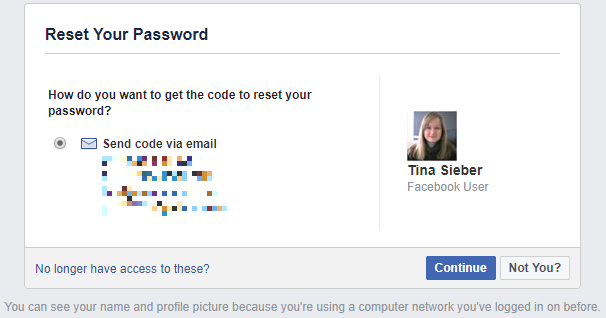
If Facebook can find your account, you can choose how to Reset Your Password.

NB: If the hacker changed your email address, you should have received a message to the original address. Find this message because it contains a special link that will let you reverse the change and secure your account.

In my case, Facebook offered to send a recovery code to any of the email addresses I added to my account. We highly recommend that you specify multiple backup email addresses. Remember that you must keep those accounts equally secure, at least by using a strong password and ideally by enabling two-factor authentication.

Facebook Reset Your Password

Use the No longer have access to these? link if that’s the case. Facebook will ask how they can reach you to verify your identity. This can take a while.

If you believe that the Facebook hacker who has access to your account has been abusing it, proceed to step 2.

2. Report the Facebook Hack

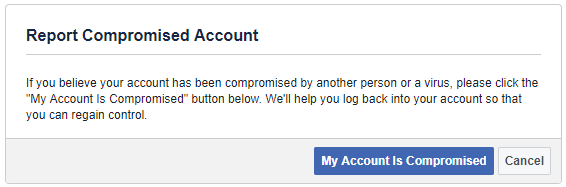
If your account wasn’t simply hacked, but is sending out ads and spam to your friends, you must report it as compromised to Facebook using Facebook.com/hacked/.

Facebook Report Compromised Account

You can also use this in case you have lost access to your account by means of a hacking attack. Facebook will help you recover access to your account.

3. Remove Suspicious Applications

Oftentimes, it’s not an evil person that randomly hacked your account. You may just have granted access to a malicious Facebook application which subsequently hijacked your account.

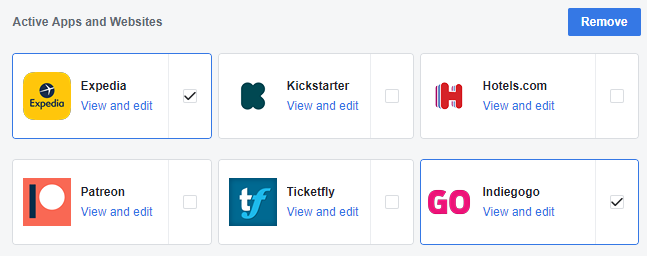
To remove suspicious applications, go to Settings > Apps and Websites and go through the list. Click Show All on all Active Apps and Websites, set a checkmark on apps or websites you’d like to remove, click the Remove button in the top-right, and confirm whether you’d also like to “delete all posts, photos and videos on Facebook” from these sources.

Facebook Apps and Websites Settings

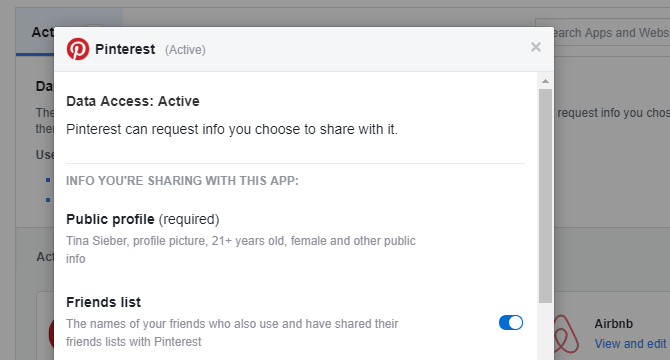
Alternatively, click the View and Edit link and change the app’s permissions, which includes options like app visibility, access to your personal information, and actions it can take.

Edit Facebook Apps and Websites Permissions

4. Engage Damage Control

After doing everything you can to regain control over your hacked Facebook account and preventing further damage, inform your friends and family about what is going on.

This is a precautionary step in case the hacker has been abusing your account. If you presently can’t access your account, contact your Facebook friends through other social networks, by email, or have a mutual friend inform them via Facebook.

Improving Facebook’s Privacy and Security Settings

Once you’re back in control, we highly recommend that you review your Facebook settings.

  • Under Settings > General, update your contact details, add additional email addresses or mobile phone numbers you have access to. Likewise, remove those you no longer have access to.
  • Head to Settings > Security and Login to set up extra security measures, including alerts about unrecognized logins, two-factor authentication, and choose three to five trusted friends who can help you to recover your account should you get locked out.
  • Under Settings > Privacy, choose the privacy settings you’re comfortable with. We recommend letting only friends see your future posts and retroactively limiting visibility of past posts.

Note that the single most important security feature you can enable on any of your accounts is two-factor authentication (what is two-factor authentication?). We strongly recommend that you lock down all social accounts that offer this feature.

How Do You Keep Your Facebook Account Safe?

Once you get hacked, you’re forced to learn about all the mistakes you made. And hopefully, you’ll never make them again. This is the time to learn how hackers can attack your privacy and how to protect yourself against them. Hackers never stop evolving, so your knowledge of their tactics needs to keep up.

Are you concerned that your Instagram account has been hacked as well? Then follow our guide explaining what to do if your Instagram account has been hacked.

Read the full article: 4 Things to Do Immediately When Your Facebook Account Was Hacked


Read Full Article

Scaled Robotics keeps an autonomous eye on busy construction sites


Buildings under construction are a maze of half-completed structures, gantries, stacked materials, and busy workers — tracking what’s going on can be a nightmare. Scaled Robotics has designed a robot that can navigate this chaos and produce 3D progress maps in minutes, precise enough to detect that a beam is just a centimeter or two off.

Bottlenecks in construction aren’t limited to manpower and materials. Understanding exactly what’s been done and what needs doing is a critical part of completing a project in good time, but it’s the kind of painstaking work that requires special training and equipment. Or, as Scaled Robotics showed today at TC Disrupt Berlin 2019, specially trained equipment.

The team has created a robot that trundles autonomously around construction sites, using a 360-degree camera and custom lidar system to systematically document its surroundings. An object recognition system allows it to tell the difference between a constructed wall and a piece of sheet rock leaned against it, between a staircase and temporary stairs for electric work, and so on.

By comparing this to a source CAD model of the building, it can paint a very precise picture of the progress being made. They’ve built a special computer vision model that’s suited to the task of sorting obstructions from the constructions and identifying everything in between.

All this information goes into a software backend where the supervisors can check things like which pieces are in place on which floor, whether they have been placed within the required tolerances, or if there are safety issues like too much detritus on the ground in work areas. But it’s not all about making the suits happy.

“It’s not just about getting management to buy in, you need the guy who’s going to use it every day to buy in. So we’ve made a conscious effort to fit seamlessly into what they do, and they love that aspect of it,” explained co-founder Bharath Sankaran. “You don’t need a computer scientist in the room. Issues get flagged in the morning, and that’s a coffee conversation – here’s the problem, bam, let’s go take a look at it.”

Scaled Robotics

The robot can make its rounds faster than a couple humans with measuring tapes and clipboards, certainly, but also someone equipped with a stationary laser ranging device that they carry from room to room. An advantage of simultaneous location and ranging (SLAM) tech is that it measures from multiple points of view over time, building a highly accurate and rich model of the environment.

The data is assembled automatically but the robot can be either autonomous or manually controlled — in developing it, they’ve brought the weight down from about 70 kilograms to 20, meaning it can be carried easily from floor to floor if necessary (or take the elevator); and simple joystick controls mean anyone can drive it.

A trio of pilot projects concluded this year and have resulted in paid pilots next year, which is of course a promising development.

Interestingly, the team found that construction companies were using outdated information and often more or less assumed they had done everything in the meantime correctly.

“Right now decisions are being made on data that’s maybe a month old,” said co-founder Stuart Maggs. “We can probably cover 2000 square meters in 40 minutes. One of the first times we took data on a site, they were completely convinced everything they’d done was perfect. We put the data in front of them and they found out there was a structural wall just missing, and it had been missing for 4 weeks.”

The company uses a service-based business model, providing the robot and software on a monthly basis, with prices rising with square footage. That saves the construction company the trouble of actually buying, certifying, and maintaining an unfamiliar new robotic system.

Scaled Robotics

But the founders emphasized that tracking progress is only the first hint of what can be done with this kind of accurate, timely data.

“The big picture version of where this is going is that this is the visual wiki for everything related to your construction site. You just click and you see everything that’s relevant,” said Sankaran. “Then you can provide other ancillary products, like health and safety stuff, where is storage space on site, predicting whether the project is on schedule.”

“At the moment, what you’re seeing is about looking at one moment in time and diagnosing it as quickly as possible,” said Maggs. “But it will also be about tracking that over time: We can find patterns within that construction process. That data feeds that back into their processes, so it goes from a reactive workflow to a proactive one.”

“As the product evolves you start unwrapping, like an onion, the different layers of functionality,” said Sankaran.

The company has come this far on $1 million of seed funding, but is hot on the track of more. Perhaps more importantly, its partnerships with construction giant PERI and Autodesk, which has helped push digital construction tools, may make it a familiar presence at building sites around the world soon.


Read Full Article

Larry Page’s secret war on the flu


Now that Larry Page has stepped down as CEO of Google’s parent company Alphabet, he could be following in Bill Gates’s footsteps and tackling global health challenges.

According to charity and business documents obtained by TechCrunch, the billionaire co-founder of Google has been quietly waging a war on the flu.

Thousands of children and teachers in San Francisco’s Bay Area will receive free flu shots at their schools this year from Shoo The Flu, which describes itself as a “community-based initiative.” In fact, it is wholly funded by a for-profit company controlled by Page. Another of his companies, Flu Lab, is supporting multi-million dollar efforts to develop a universal flu vaccine. Neither effort makes public Page’s role in them.


Read Full Article

How to Use Incognito Mode on Google Maps for iOS


Google has launched an Incognito mode on Google Maps for iOS. This works in the same way as the Incognito mode on the Android app. Incognito mode arrived on Google Maps for Android in November 2019, but it has taken a little longer to make it to the iOS app.

How to Use Incognito Mode on Google Maps

Google has announced that Incognito mode is now available on Google Maps for iOS on The Keyword. This is the latest in a long line of efforts designed to make it easier to “control, manage and delete your Location History information.”

Enabling Incognito mode means that “the places you search for or navigate to won’t be saved to your Google Account”. It also means your Location History will not be updated. So the places that you visit will not be saved to your Timeline.

The downside to this is that “you won’t see personalized features within Maps, like restaurant recommendations based on dining spots you’ve been to previously.” So don’t enable Incognito mode if you like getting recommendations personalized for you.

If you’re not bothered about getting recommendations on Google Maps and would prefer to preserve your privacy, it’s easy to enable Incognito mode on Google Maps. Just open Google Maps, click on your profile picture, and click “Turn on Incognito mode”.

Bulk Delete Your Google Maps Location History

As well as introducing Incognito mode on iOS, Google announced a new feature coming to the Android app. Bulk Delete will let you “find and delete multiple places from your Timeline and Location History all at once.” Bulk Delete will be available from January 2020.

If you’re interested in drilling down into the inner workings of Google Maps, we have previously explained how Google Maps works. This explores how and when Google Maps launched, and how the wealth of information it holds was collected.

Read the full article: How to Use Incognito Mode on Google Maps for iOS


Read Full Article

You Can Now Send Messages on Google Photos


Google has added private messaging to Google Photos. This means you can now message family and friends (or random contacts) without ever leaving Google Photos. Which makes it a lot easier to share photos and videos through Google Photos.

An Infinite Number of Ways to Communicate Online

There are now so many ways to communicate with other people online it’s difficult to keep track of them all. There are all manner of different messaging apps which allow you to chat to people, and lots of other platforms have messaging built in too.

That list now includes Google Photos, which has gained a simple messaging feature. Google’s idea, as detailed on The Keyword, is to simply make it easier to share your photos and videos with other people, but it also adds a social element to Google Photos.

How to Send Messages Through Google Photos

To send a message to someone on Google Photos, open Google Photos and click on the photo or video you want to share with someone. Click the Share icon in the bottom-right, and find the name of the person you want to send it to.

You can do this by either scrolling through your contacts or by clicking the Magnifying Glass and searching by name, phone number, or email. You can also create a New Group. Once selected, add a message to the photo and hit Send.

This starts a conversation thread. The recipient can respond with their own message, send a photo back to you, or like the photo you sent. You can write additional messages, add more photos to the thread, or click the Heart icon to express approval.

Everyone Should Be Using Google Photos

This definitely makes it easier to send and receive photos and videos through Google Photos. And giving people the opportunity to talk about what they have sent or been sent makes perfect sense. Especially as over 1 billion people now use Google Photos.

The ability to send and receive messages means we will have to update our list of amazing Google Photos features. And to be frank, Google Photos is so good that we can even list reasons to use Google Photos over iCloud Photos.

Read the full article: You Can Now Send Messages on Google Photos


Read Full Article

How to Build a Linux Web Server With an Old Computer


ubuntu-server-desktop

Interested in building a home web server? The simplest way is to install Linux on a spare computer.  Thanks to the simplicity of Linux, this is straightforward, giving you an affordable way to host a website or blog.

Here’s how to set up a Linux web server.

How to Make Your Own Web Server With Linux

To build a Linux web server that can be run from home, you’ll need the hardware and an operating system. In addition, web server software should be installed, and a means of accessing the server from the internet se up.

We can break that down into four easy steps you can follow to build your own Linux webserver.

  1. Find an old/unwanted computer
  2. Install a Linux operating system
  3. Set up the application web server software (Apache, PHP, MySQL)
  4. Reach the server from the internet

Let’s get started.

1. Find an Old Computer for Your Linux Web Server

Before choosing a computer to use as a web server, you’ll need to know the minimum requirements of the OS. While Ubuntu is popular, it isn’t lightweight enough. Instead, Lubuntu 19.04 is a stronger option. This is a lighter alternative to Ubuntu, built on the same code.

Download: Lubuntu 19.04

Lubuntu System Requirements

Lubuntu 19.04 has a minimum requirement of:

  • 512MHz dual core processor or better (1GHz recommended, as opposed to 2GHz for Ubuntu)
  • 4GB system memory
  • 25GB of free hard drive space
  • Choice of 32-bit (for older PCs) and 64-bit versions

You might have a suitable old PC at the back of a drawer or picked one up at a thrift store. It’s worth noting that you can install a Linux web server on a Raspberry Pi. This little computer costs under $30 and is a smart option if you run into trouble with old hardware.

Also, don’t be limited to old Windows PCs. Apple Macs and MacBooks from the pre-2006 era with PowerPC processors can run Linux.

Like Ubuntu, Lubuntu supports a wide variety of video cards, hard drives, and other hardware. To check if the distro will work on your chosen hardware, run the Live CD.

If you plan on running the server 24/7, make sure it is in a well-ventilated area. It is better to place it in an air-conditioned room during the summer when heat will be your server’s enemy.

2. Install a Linux Operating System

Set up a Linux web server with Lubuntu

Installing Lubuntu is straightforward. Simply grab the ISO file and write it to DVD or a USB flash device, to begin.

Download: Lubuntu

These disk images have the latest versions of software, so only a small upgrade should be required after installation. Use the 64-bit version if your computer supports it or the 32-bit version otherwise.

When you’re ready, insert the installation media in your computer and reboot. If you need to change the BIOS settings to boot from the optical drive or USB, then do so. In some cases, a boot media selection menu can be opened.

With the installation media booted, select Install Lubuntu. When prompted, select Download updates while installing and Install 3rd Party Software and then Erase and Use the Entire Disk.

Note that this will erase any other operating systems you have on this computer. Follow through the other options per your desired settings. Encrypting your home folder isn’t wise for a web server project. Reboot after the installation is complete.

Upon reboot, check for updates. Go to System > Administration > Update Manager > Install Updates. You may need to reboot after installing any updates it has found.

3. Install Linux Web Server Software

While alteratives are available, most websites run on a combination of Apache, MySQL, and PHP (known as LAMP). This is similar to what we recommended installing on Windows.

All three tools can be installed via the Software Center. Launch this via System > Administration > Synaptic Package Manager. This is where we install the software we need.

Search for and install the following package names, each of which will include various prerequisites: apache2, php5, php5-mysql, and mysql-server. Apply the changes to install the packages.

The packages will download and install shortly. The installer will prompt you for the MySQL “root” password. No reboot is necessary.

You can alternatively install these tools in the command line. Open a Terminal then:

sudo apt install lamp-server^ -y

Set up a Linux web server on an old PC

Test Your Web Server!

You can test the installation by opening the Firefox browser on your server and heading to the URL http://127.0.0.1/. Alternatively, input http://localhost/.

You should see an “It works!” message meaning that your web server is running! Both Apache and MySQL will be running in the background and will start on bootup. With the web server now working you can edit the files in /var/www. Simply refresh the browser to see the changes live on your website.

Finding the Server’s Local IP Address

While the server is functional, it needs to be visible to the outside world. As such, it is important to keep the server up to date with all regular patches.

First, find the server’s local IP address and set it to something you will later be able to reference. You’ll find the current IP address—assigned by your router—in the Network Information box.

Find this by clicking on your network connection, then selecting Connection Information. This will pop up a box with your current IP address, network adapter card, broadcast address, gateway, and DNS server. Make a note of the IP address.

Next, edit your connection information to give you a static IP address on your local network. Right click again, but this time go to Edit Connections. Select the appropriate adapter name (e.g. eth1) and edit those settings.

Select the IPv4 tab and switch the Method to Manual. Click Add then enter the information from your connection settings. Note, however, the IP address will need to be entered differently. Retain the first three octets (the numbers between the dots) but change the last to a high number under 254.

It is important that the manually assigned IP address is not already in use on your network. If you are unsure, pick a high IP address like 250. This will be your static, local IP address.

Sharing the Web Folder

Several options are available to access and upload files onto your server. To illustrate the importance of folder permissions, consider sharing the web folder as an option.

It is important to only use this method if your server is on a private network. Be certain no one can connect to it and access your shared folder.

Start by relaxing permissions on the web folder. Open a terminal by pressing Ctrl + Alt + T, then enter:

sudo chmod 777 /var/www

You will be prompted your for your password. If correct, the permissions will be updated.

Now go to the file browser and find /var/. Right click the www folder and then select Sharing options and uncheck it. For security options, you can share it with or without a password. Select Guest access to share the folder without requiring a username and password.

Now, you or anyone else will be able to access the files without a password. For this reason, sharing with a password is recommended for security purposes. Also take a moment to check Allow others to create and delete files in this folder. This allows write access from the shared directory.

To view your files, go to the network location //localhost/www.

Set up a Linux web server

It will either prompt for your password or allow you access straight to your files, depending on your security settings. These are the same files accessible in your web browser via http://localhost/ (or whatever static IP address you set).

Get Your Linux Server Online With Port Forwarding

Now you have an IP address, an important concept to understand is port forwarding. Every single person connected to the internet is behind an IP address. For most home connections (and many business connections) your computer’s IP is not actually exposed to the internet. –

So how do visitors to your website contact your server? We do this with port forwarding.

Ports on a server are like doors or windows on a house and as such have security implications. Each port will give you access to a different service running on the server. Web servers use port 80 by default.

To enable this, you’ll need to log into your router’s administrator page. Check the device’s documentation for details of this (some routers have the IP address printed on the back). Here, you should find a section called Port Forwarding, or Applications which will allow you to forward ports properly.

Forward TCP port 80 to inside your network to the static IP address you set earlier. Each router is different, so refer to your router’s operations manual on how to set this up properly.

Give Your Linux Web Server a Static Hostname

Most home routers connect to an ISP via what is called a dynamic IP. This means the public-facing IP address for your router will change after a set period, usually a week or so.

A way around this is the fantastic DynDNS server which lets you set a DynDNS URL for your site. Thanks to a client app, whenever your public IP address changes, the URL will still point to your Linux server.

So, visitors should be able to visit your web server from the outside world by going to https://ift.tt/38rUfUb. Some ISPs will block port 80 to your router. In this case, forward something like port 8080 to port 80. This will allow you to visit your website by going to https://ift.tt/36pG2Fz.

You Built a Linux Web Server!

Now that your web server is set up, you can focus on programming or installing your own software!

Perhaps you’ll run blog software or host a forum or bulletin board. You might be more interested in hosting a social network like Mastodon, a portfolio, whatever. It’s up to you.

These days, you can host a website on just about anything. Here’s how to turn your Android device into a web server to prove it.

Read the full article: How to Build a Linux Web Server With an Old Computer


Read Full Article

How to make inefficiency work for us | Edward Tenner

How to make inefficiency work for us | Edward Tenner

Is our obsession with efficiency actually making us less efficient? In this revelatory talk, writer and historian Edward Tenner discusses the promises and dangers of our drive to get things done as quickly as possible -- and suggests seven ways we can use "inspired inefficiency" to be more productive.

Click the above link to download the TED talk.

Google Assistant gets a customized alarm, based on weather and time


Alarm clocks were one of the most obvious implementations since the introduction of the smart screen. Devices like Lenovo’s Smart Clock and the Amazon Echo Show 5 have demonstrated some interesting features in the bedside display form factor, and Google has worked with the former to refine the experience.

This morning, the company introduced a handful of features to refine the experience. “Impromptu” is an interesting new addition to the portfolio that constructs a customized alarm based on a series of factors, including weather and time of day.

Here’s what a 50-degree, early-morning wake-up sounds like:

Not a bad thing to wake up to. A little Gershwin-esque, perhaps. 

Per a blog post that went up this morning, the alarm ringtone is based on the company’s open-source project, Magenta. Google AI describes it thusly:

Magenta was started by researchers and engineers from the Google Brain team, but many others have contributed significantly to the project. We develop new deep learning and reinforcement learning algorithms for generating songs, images, drawings, and other materials. But it’s also an exploration in building smart tools and interfaces that allow artists and musicians to extend their processes using these models. We use TensorFlow and release our models and tools in open source on our GitHub.

The new feature rolls out today.


Read Full Article

Lessons Learned from Developing ML for Healthcare


Machine learning (ML) methods are not new in medicine -- traditional techniques, such as decision trees and logistic regression, were commonly used to derive established clinical decision rules (for example, the TIMI Risk Score for estimating patient risk after a coronary event). In recent years, however, there has been a tremendous surge in leveraging ML for a variety of medical applications, such as predicting adverse events from complex medical records, and improving the accuracy of genomic sequencing. In addition to detecting known diseases, ML models can tease out previously unknown signals, such as cardiovascular risk factors and refractive error from retinal fundus photographs.

Beyond developing these models, it’s important to understand how they can be incorporated into medical workflows. Previous research indicates that doctors assisted by ML models can be more accurate than either doctors or models alone in grading diabetic eye disease and diagnosing metastatic breast cancer. Similarly, doctors are able to leverage ML-based tools in an interactive fashion to search for similar medical images, providing further evidence that doctors can work effectively with ML-based assistive tools.

In an effort to improve guidance for research at the intersection of ML and healthcare, we have written a pair of articles, published in Nature Materials and the Journal of the American Medical Association (JAMA). The first is for ML practitioners to better understand how to develop ML solutions for healthcare, and the other is for doctors who desire a better understanding of whether ML could help improve their clinical work.

How to Develop Machine Learning Models for Healthcare
In “How to develop machine learning models for healthcare” (pdf), published in Nature Materials, we discuss the importance of ensuring that the needs specific to the healthcare environment inform the development of ML models for that setting. This should be done throughout the process of developing technologies for healthcare applications, from problem selection, data collection and ML model development to validation and assessment, deployment and monitoring.

The first consideration is how to identify a healthcare problem for which there is both an urgent clinical need and for which predictions based on ML models will provide actionable insight. For example, ML for detecting diabetic eye disease can help alleviate the screening workload in parts of the world where diabetes is prevalent and the number of medical specialists is insufficient. Once the problem has been identified, one must be careful with data curation to ensure that the ground truth labels, or “reference standard”, applied to the data are reliable and accurate. This can be accomplished by validating labels via comparison to expert interpretation of the same data, such as retinal fundus photographs, or through an orthogonal procedure, such as a biopsy to confirm radiologic findings. This is particularly important since a high-quality reference standard is essential both for training useful models and for accurately measuring model performance. Therefore, it is critical that ML practitioners work closely with clinical experts to ensure the rigor of the reference standard used for training and evaluation.

Validation of model performance is also substantially different in healthcare, because the problem of distributional shift can be pronounced. In contrast to typical ML studies where a single random test split is common, the medical field values validation using multiple independent evaluation datasets, each with different patient populations that may exhibit differences in demographics or disease subtypes. Because the specifics depend on the problem, ML practitioners should work closely with clinical experts to design the study, with particular care in ensuring that the model validation and performance metrics are appropriate for the clinical setting.

Integration of the resulting assistive tools also requires thoughtful design to ensure seamless workflow integration, with consideration for measurement of the impact of these tools on diagnostic accuracy and workflow efficiency. Importantly, there is substantial value in prospective study of these tools in real patient care to better understand their real-world impact.

Finally, even after validation and workflow integration, the journey towards deployment is just beginning: regulatory approval and continued monitoring for unexpected error modes or adverse events in real use remains ahead.
Two examples of the translational process of developing, validating, and implementing ML models for healthcare based on our work in detecting diabetic eye disease and metastatic breast cancer.
Empowering Doctors to Better Understand Machine Learning for Healthcare
In “Users’ Guide to the Medical Literature: How to Read Articles that use Machine Learning,” published in JAMA, we summarize key ML concepts to help doctors evaluate ML studies for suitability of inclusion in their workflow. The goal of this article is to demystify ML, to assist doctors who need to use ML systems to understand their basic functionality, when to trust them, and their potential limitations.

The central questions doctors ask when evaluating any study, whether ML or not, remain: Was the reference standard reliable? Was the evaluation unbiased, such as assessing for both false positives and false negatives, and performing a fair comparison with clinicians? Does the evaluation apply to the patient population that I see? How does the ML model help me in taking care of my patients?

In addition to these questions, ML models should also be scrutinized to determine whether the hyperparameters used in their development were tuned on a dataset independent of that used for final model evaluation. This is particularly important, since inappropriate tuning can lead to substantial overestimation of performance, e.g., a sufficiently sophisticated model can be trained to completely memorize the training dataset and generalize poorly to new data. Ensuring that tuning was done appropriately requires being mindful of ambiguities in dataset naming, and in particular, using the terminology with which the audience is most familiar:
The intersection of two fields: ML and healthcare creates ambiguity in the term “validation dataset”. An ML validation set is typically used to refer to the dataset used for hyperparameter tuning, whereas a “clinical” validation set is typically used for final evaluation. To reduce confusion, we have opted to refer to the (ML) validation set as the “tuning” set.
Future outlook
It is an exciting time to work on AI for healthcare. The “bench-to-bedside” path is a long one that requires researchers and experts from multiple disciplines to work together in this translational process. We hope that these two articles will promote mutual understanding of what is important for ML practitioners developing models for healthcare and what is emphasized by doctors evaluating these models, thus driving further collaborations between the fields and towards eventual positive impact on patient care.

Acknowledgements
Key contributors to these projects include Yun Liu, Po-Hsuan Cameron Chen, Jonathan Krause, and Lily Peng. The authors would like to acknowledge Greg Corrado and Avinash Varadarajan for their advice, and the Google Health team for their support.

‘Plundervolt’ attack breaches chip security with a shock to the system


Today’s devices have been secured against innumerable software attacks, but a new exploit called Plundervolt uses distinctly physical means to compromise a chip’s security. By fiddling with the actual amount of electricity being fed to the chip, an attacker can trick it into giving up its innermost secrets.

It should be noted at the outset that while this is not a flaw on the scale of Meltdown or Spectre, it is a powerful and unique one and may lead to changes in how chips are designed.

There are two important things to know in order to understand how Plundervolt works.

The first is simply that chips these days have very precise and complex rules as to how much power they draw at any given time. They don’t just run at full power 24/7; that would drain your battery and produce a lot of heat. So part of designing an efficient chip is making sure that for a given task, the processor is given exactly the amount of power it needs — no more, no less.

The second is that Intel’s chips, like many others now, have what’s called a secure enclave, a special quarantined area of the chip where important things like cryptographic processes take place. The enclave (here called SGX) is inaccessible to normal processes, so even if the computer is thoroughly hacked, the attacker can’t access the data inside.

The creators of Plundervolt were intrigued by recent work by curious security researchers who had, through reverse engineering, discovered the hidden channels by which Intel chips manage their own power.

Hidden, but not inaccessible, it turns out. If you have control over the operating system, which many attacks exist to provide, you can get at these “Model-Specific Registers,” which control chip voltage, and can tweak them to your heart’s content.

Modern processors are so carefully tuned, however, that such tweak will generally just cause the chip to malfunction. The trick is to tweak it just enough to cause the exact kind of malfunction you expect. And because the entire process takes place within the chip itself, protections against outside influence are ineffective.

The Plundervolt attack does just this, using the hidden registers to very slightly change the voltage going to the chip at the exact moment that the secure enclave is executing an important task. By doing so they can induce predictable faults inside SGX, and by means of these carefully controlled failures cause it and related processes to expose privileged information. It can even be performed remotely, though of course full access to the OS is a prerequisite.

In a way it’s a very primitive attack, essentially giving the chip a whack at the right time to make it spit out something good, like it’s a gumball machine. But of course it’s actually quite sophisticated, since the whack is an electrical manipulation on the scale of millivolts, which needs to be applied at exactly the right microsecond.

The researchers explain that this can be mitigated by Intel, but only through updates at the BIOS and microcode level — the kind of thing that many users will never bother to go through with. Fortunately for important systems there will be a way to verify that the exploit has been patched when establishing a trusted connection with another device.

Intel, for its part, downplayed the seriousness of the attack. “We are aware of publications by various academic researchers that have come up with some interesting names for this class of issues, including “VoltJockey” and “Plundervolt,” it wrote in a blog post acknowledging the existence of the exploit. “We are not aware of any of these issues being used in the wild, but as always, we recommend installing security updates as soon as possible.”

Plundervolt is one of a variety of attacks that have emerged recently taking advantage of the ways that computing hardware has evolved over the last few years. Increased efficiency usually means increased complexity, which means increased surface area for non-traditional attacks like this.

The researchers who discovered and documented Plundervolt hail from the UK’s University of Birmingham, Graz University of Technology in Austria, and KU Leuven in Belgium. They are presenting their paper at IEEE S&P 2020.


Read Full Article