28 November 2019

Google Stadia Review: Console Free Gaming at a Price – Your Sanity!


Google Stadia controllers on a park swing
Our verdict of the Google Stadia:
A promising cloud gaming experience hampered by unreliable setup, a limited launch library, and missing features. With the right games, this could be awesome, but while early adopters might keep faith, it's unlikely there's a subscription market for casual gamers.
610

Announced to an unsurprised world in mid-2019, Google Stadia is a cloud gaming platform that does away with hardware. Launching in November 2019, both a week earlier and with more problems than planned, it has caused a bit of a storm.

The consensus is that Stadia is far from awesome.

But does it work, should you get one, and will it be worth the time and effort setting it up? To find out, we bought one, plugged it in, and… waited.

A Games Console Experience Without the Console

Stadia lets you play games through your TV, and ships with a game controller. There’s an impressive (if small) selection of premium games available, with 5.1 surround sound, 4K resolution, HDR, and 60FPS. These include (with more on the way):

  • Assassin’s Creed Odyssey
  • Attack on Titan 2
  • Destiny 2
  • Farming Simulator 19
  • Final Fantasy XV
  • Football Manager 2020
  • Metro Exodus
  • Red Dead Redemption 2
  • Samurai Shodown
  • Tomb Raider (2013)
  • Wolfenstein: Youngblood

But Stadia isn’t a games console. So, what on earth is it?

In short, it’s a completely new approach to gaming: a game console experience on any device. This is made possible thanks to some impressively powerful cloud game servers, utilizing a specialized graphics chip developed with AMD.

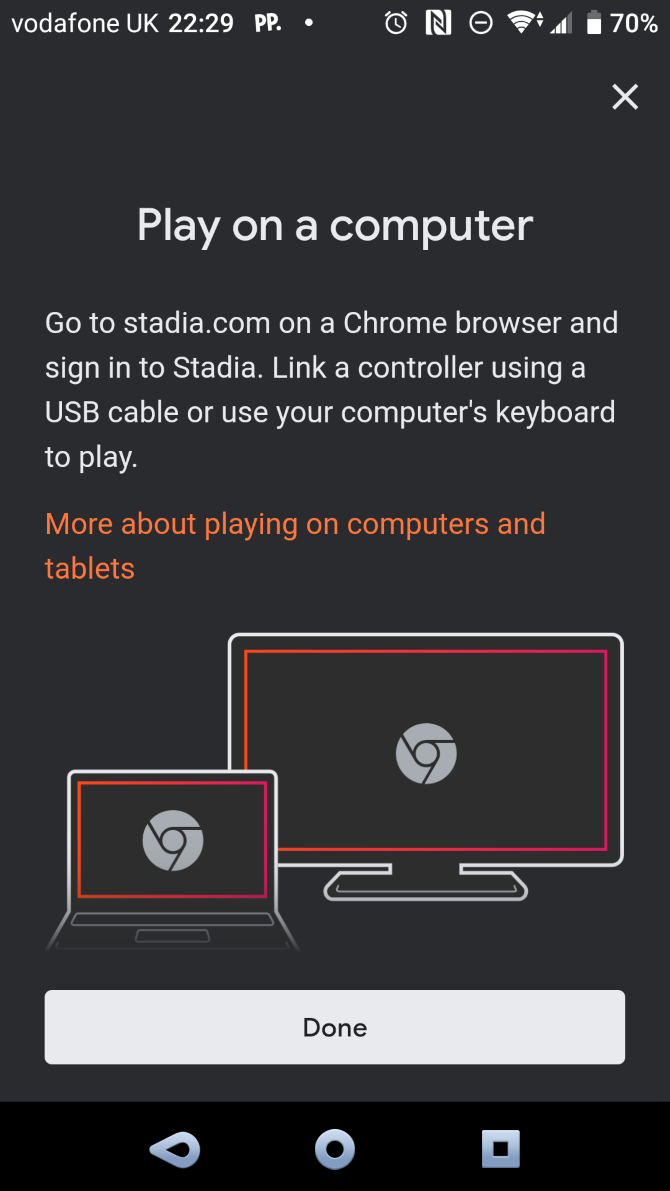
Cloud gaming is streamed over the internet, which means, in theory, you can play Stadia titles on a phone, PC, even an iPad.

The main Stadia gaming experience is via a TV, however, and to get started you’ll need the Stadia app. It’s available on Android and iOS and is needed to provide access to your Stadia account, games library, and to sync the dedicated controllers.

Cloud gaming comes will all manner of shortcomings, not least latency. To deal with this, the controller connects via Wi-Fi directly to the cloud game server.

What’s In the Box: A Chromecast and a Controller

We ordered a Stadia Founder’s Edition box at the $129.99 launch price back in July, in advance of the November 28th launch. Pre-ordering meant getting a few useful bonuses, such as a free game and early username selection.

Google Stadia relies on Chromecast Ultra for streaming

The next phase is Stadia Premiere Edition, $129.99 with free shipping, which is available to order now. Whatever your edition, Stadia comes with a choice of packages.

A monthly subscription to the Stadia Pro package is $9.99, which gives you improved streaming performance over the non-subscription access. This means the full frame rate and resolution, HDR, and 5.1 surround-sound. You also get to enjoy a free game on a regular release cycle.

Without the subscription, the streaming quality is reduced. However, Stadia Base isn’t available until 2020, delivering 1080p resolution and standard stereo sound. Unsurprisingly, there’s no free game.

Of course, a fast internet connection is required for streamed gaming. The recommended minimum speed is a 10Mbps connection, with the best results at around 35Mbps or more. (We tested the service using a 45Mbps link.)

Games can be bought, and permanently (or for as long as Stadia exists) added to your library. Access to the games is managed via the mobile app.

Unboxing Google Stadia

When the box arrived, it came a week early. It’s a smart piece of packaging, striking futuristic white, metallic print, and hard edges. Inside, there’s more white, along with a 4.13-inch by 6.4-inch Wi-Fi controller, and a Chromecast Ultra.

Along with chargers and USB Type-C cables, and a few quick start guides, that’s all there is. For multiplayer testing purposes, we also grabbed a second controller, which came in its own box. These retail for a further $69.99 which is standard these days for a branded controller.

That’s basically it. As you should have realized, what you get in the box just helps you to access Stadia. It’s not a console, it’s a service.

Hooking Up Stadia

With Chromecast Ultra, game controller, and mobile app to hand, I set about connecting the Stadia. I put aside 15 minutes—after all, how hard could it be?

Google Stadia controllers

First, I plugged in the power adaptor for the Chromecast and an Ethernet cable to the router. This caused some problems, due to the placement of the Ethernet port on the Chromecast Ultra’s adaptor. Thankfully, it was easily solved with some rearrangement of plugs.

Next, the Chromecast Ultra is connected to the TV, the power cable connected, and the TV switched on. With the Stadia app running on my smartphone, I commenced setup.

At this point, you’re perhaps thinking: “all those other reviews said Stadia was awful!” But bear in mind, at this point, I don’t know how good or bad it is. I haven’t set it up yet.

And as it happened, I wouldn’t be able to for several hours. Having spent two months checking my emails and spam folder every day, I had not received the Stadia activation code. Without it, there would be no cigar.

It seems that the code arrives after the device is connected to your network and payment is taken. However, it’s not clear what triggers this. Perhaps the receipt of the box triggers payment or syncing the Chromecast Ultra with the Stadia app does. Either way, I had a three-hour wait for the activation code to arrive.

Stadia’s Bad Reputation

Following its public unveiling in June 2019, Stadia’s reputation has slowly, but surely, declined as more facts have been revealed. A narrow game library was bolstered in early November; a Reddit AMA revealed key features would be missing at launch. (This includes Buddy Pass, a way of sharing the subscription with a friend for three months.)

It’s not cheap, either. The Founder’s Edition (reviewed here) affords three free months of Stadia access and two free games. But once the free period is up, other games must be bought—it’s not a free, Netflix-like library.

Since launch, Stadia has been haunted by several issues. There are the missing activation codes; missing “join a game via YouTube” feature; overheating Chromecast Ultras (and dismissive Google responses); streaming issues; an inability to launch games.

Setting up the Stadia controllers requires the mobile app. This is used to sync the controller to your Wi-Fi network and establish a connection with the game server. The Chromecast Ultra then streams the action to you as the game plays.

That is, of course, if you can get Stadia to launch the game…

The Stadia Game Wouldn’t Launch

Another problem encountered setting up Stadia was an inability to get the game to launch via the app or Chromecast. Instead, the user is caught in a cycle of “refresh the app” to fix the issue… which doesn’t fix anything.

Advice on this issue wasn’t easy to find at the time, although a Reddit user had tracked down the relevant support page.

The solution here is to register the Stadia account on the Chromecast using a linking code. With that done, it was finally possible to launch a game…

Finally, We’re Gaming With Stadia

Boom! That bit of technical help launched the first of the free games, the rebooted Samurai Shodown. Having heard horror stories of latency and lag, I was apprehensive to say the least; the issues activating and launching games earlier hadn’t helped.

Yet I was pleasantly surprised. Crisp graphics, good sound quality and responsive actions made for a tip-top gaming experience. The second controller was set up via the app and a two-player game initiated. Another good result.

Two days later, those complaints about the Founders Edition being a glorified beta seem self-indulgent.

Samurai Shodown on Stadia

Stadia clearly works. It’s not perfect, of course, but then what is?

For example, access to Stadia is also available through other devices, notably a PC with the Chrome browser. Gameplay here is slightly different. The Ethernet connection on the Chromecast Ultra plays a huge part in delivering a stable gaming environment to a TV.

Ethernet is recommended for PC play, as otherwise you’re limited by audio/video lag and latency. Sadly, the Stadia controllers cannot be used wirelessly via a computer. Instead, you’ll need to connect using USB, grab a previously set up game controller, or rely on the keyboard.

PC play is certainly an area where Stadia needs to improve. As there have been murmurs of family/household multiplayer, it makes sense to perfect it.

Secrets of the Stadia Controller

You can do more with the Stadia Wi-Fi controller than simply play games.

The controller uses Wi-Fi to connect to your Stadia account and launch and control games. It features the standard layout of dual thumbpads, a D-pad, a diamond of four buttons, two shoulder buttons, and two triggers. A USB Type-C port is on the rear of the controller for charging and cabled connection.

Google Stadia controller headset port

Facing the player is a headphone port (Bluetooth support is planned), and under this a microphone. The controller also features five other buttons:

  • Stadia button to power on, also used in Wi-Fi connections
  • An Options button
  • Google Assistant (disabled at the time of writing)
  • Menu button
  • Capture button (quick tap for screenshots, long press for last 30 seconds of video)

Capture syncs directly to your app, but it’s almost impossible to share the footage. No doubt that’s just another feature waiting to be fixed, but the current method is to use Google Takeout to download Stadia data to your Google Drive account and retrieve your captures, which are frustratingly stored in WEBM format. That’s particularly clunky when everyone wants to share gaming footage.

Whatever happens with Stadia long-term, controllers are almost certainly going to be the target of hackers. The question is, will it be someone trying to install Linux, or will the devices turn into security risks.

Stadia Is for Gamers, But Do They Want It?

The Stadia controllers are perhaps the highlight of the entire experience. While getting a Chromecast Ultra into the bargain is a good deal, the 4K is largely wasted without the right display and top-quality broadband speeds.

Stadia is positioned in the market as being a platform-agnostic experience for gamers. But it’s a crowded market and one that’s already divided by platform, which dedicated gamers tend to be loyal to. Although the monthly subscription of $9.99 might seem steep, there is something here. The question is, can Google overcome the lack of expected launch features and gain critical mass?

I’ve enjoyed using Stadia, but overall there is a good chance that Google has just got this whole thing wrong. Gaming isn’t just about the games. It’s also about the hardware, including the controller, and the type of games that are available on it. While physical sales have dropped, AAA titles continue to do well.

Google Stadia controllers

And those AAA games are the ones you’ll find on Stadia. The problem is, you’ve probably already got them on Xbox Live, PlayStation Network, Steam, whatever. You almost certainly don’t want to buy the games again, and probably not without a physical copy if you didn’t already have one.

Has Google inadvertently launched a premium gaming service for casual gamers? If it has, Stadia isn’t going to last long without a quick rethink about its subscription model. They might even consider delivering a physical product (a box, limited edition artwork, etc.) for deluxe editions.

Overall though, Stadia works as a gaming service. With a good library of games, it can only get better, although Google might consider something closer to Xbox’s Games with Gold or Game Pass long-term.

If Stadia lasts that long.

Enter the Competition!

Google Stadia Giveaway

Read the full article: Google Stadia Review: Console Free Gaming at a Price – Your Sanity!


Read Full Article

Getting Your First Gaming PC? Follow These 6 Tips


first-gaming-pc

Consoles might be the most popular gaming platform these days, but there are still many advantages to playing games on a PC.

If you’ve been thinking about getting your first gaming PC, here are six things to consider before you make any purchases.

1. Build Your Own Computer vs. Buying a Pre-Built

Tips for gaming PC - pre-built versus build your own

The first thing to decide is whether you’d like to build your own PC or whether you’d prefer to buy a pre-built system. If you’ve never built a PC before, it can seem intimidating, but these days it’s a relatively simple procedure.

The advantage of building your own system is that you can configure it to your specific needs and to the games that you play. Building your own system will also give you confidence when upgrading parts or diagnosing hardware issues. The downside is that you’ll need to spend more time researching parts and checking that everything in your build is compatible.

Pre-built systems are easier to get started with. And in addition, because system integrators buy parts in bulk, they can offer cheap prices so you can sometimes get hardware for less money than if you bought the same components yourself.

2. The Most Important Components for Gaming

Whether you’re buying or building, the most important components for gaming are the processor and the graphics card. The processor is the brain of the PC and performs calculations, so it’s important for open world and strategy games like Civilization 6 or Grand Theft Auto 5.

The graphics card is what creates the on-screen graphics, so it’s important for visually detailed games like The Witcher 3 or Rise of the Tomb Raider.

Most games will require a mix of processing power and graphics power, so for the best gaming experience you should get the best processor and graphics card you can afford. Typically the graphics card will be the most expensive component in a gaming PC.

The processor could be Intel or AMD, with AMD processors generally being a bit cheaper than their Intel equivalents. And the graphics card could be Nvidia or AMD, with AMD once again usually being the more affordable option.

3. Checking How Good a Part Is

But how do you know how good a part is? Both graphics card and processors can have confusing names, and it’s not obvious to first-time buyers whether an Nvidia GeForce GTX 1660 is better than an AMD Radeon RX 560, for example.

To see a comparison of different graphics cards from both the major manufacturers, you can use what’s called a GPU hierarchy table. These tables, like the one from Tom’s Hardware, show you the names of the different graphics cards, what their basic features are, and assign each one a score out of 100.

To see whether one card is better than another, you simply search for the product names in the table and compare them. You can also find similar tables for processors.

If you’re wondering how your hardware will perform in real-world gaming, you can look up some benchmarks. These are where users describe what hardware they have and submit information on how many frames per second they see on various games. One site where you can find this kind of information is UserBenchmark.

4. Gaming Considerations When Choosing Hardware

Tips for gaming PC - choosing hardware

Before you settle on your hardware, you should consider what your gameplay requirements are. Some games are far more demanding than others. If you play relatively resource-light games like Fortnite or Minecraft, for example, you can get away with mid-range or budget hardware.

But if you want to play the latest AAA games at the best settings, you’ll need to spend more.

Two big factors in how resource demanding a game is are the resolution at which it’s played and the graphics settings you choose. The resolution could be as low as 720p, though most people will prefer 1080p and above, and it could be as high as 4K. The higher the resolution you play at, the more powerful hardware you’ll need.

When it comes to graphics settings, playing games on high or ultra settings will be much more demanding than running them at medium or low settings.

5. Other Considerations When Choosing Hardware

You might want to consider users for your PC other than gaming. For example, maybe you are a YouTube creator and you want to use your PC to edit videos. Or maybe you want to stream your games to Twitch or another platform.

For these uses, you’ll need a slightly different approach to hardware.

Video editing requires lots of memory, so while a pure gaming PC can get away with just 8GB of RAM, a content creator would ideally want 32GB or even more RAM. And streaming requires a lot of processing power, so you’ll need a better processor relative to your graphics card if you want to stream as well as play.

In addition, most people will want to use their PCs for general productivity tasks like browsing the internet, sending emails, and watching videos. None of these tasks is particularly demanding so you’ll be able to easily do any of these on a gaming PC.

However, if you want to do more advanced productivity tasks, you might consider getting a better processor which will be able to open programs more quickly and switch between multiple tasks more easily.

6. Planning for the Future

Tips for gaming PC - plan for the future

A final issue to consider before making a purchase is what your plans are for the future. Lots of hardware companies will talk about making your PC “future-proof,” but really it’s impossible to know what requirements might come along in the future. However, you can make some plans to ensure your system lasts longer before you need to replace it.

Firstly, think about how you’ll upgrade your system down the road. If you get a PC with a good processor and motherboard but not such a good graphics card, you can buy a new graphics card later and install it relatively simply. You can also easily add more RAM to your build in the future.

But if you need to upgrade your processor, you’ll usually need to upgrade your motherboard too, and then you’ll often end up replacing the whole system.

That’s why, if you’re looking for longevity, you should prioritize your processor and motherboard. Although different types of motherboard probably won’t have much impact on gaming performance, they will offer different features such as support for M.2 SSDs.

Even if you’re not using an M.2 drive now, you might want one in the future. So you’d need to have a motherboard which supports that.

Another factor in how long a system lasts is how reliable the components are. First-time buyers often opt for a cheap power supply unit because it doesn’t seem important. But a cheap PSU can die and take other components in your system with it. A more expensive but more reliable PSU will keep your system running for longer.

Issues to Consider When Buying a Gaming PC

These tips can help you when buying your first gaming PC, whether you opt to purchase a pre-built computer or to build your own. And once you’ve made your purchase and got your gaming PC up and running, don’t forget to check out these vital tweaks to optimize your PC for gaming.

Read the full article: Getting Your First Gaming PC? Follow These 6 Tips


Read Full Article
How to Use Your iPad as a Second Mac Monitor With Sidecar


ipad-second-monitor

Due to its size and portability, the iPad makes a perfect companion to a MacBook. You can use it on its own, but for years, third-party apps and even dongles have allowed you to turn your iPad into an impromptu second monitor.

While these third-party solutions were handy, many users wondered why Apple didn’t implement this into the operating systems natively. But as of macOS 10.15 Catalina, it finally has. The feature is called Sidecar, and it lets your iPad pull double duty as a monitor much more easily than before.

What Is Sidecar?

In a nutshell, Sidecar lets you use your iPad as a second monitor for your Mac, either via a wired connection or wirelessly. You can set it to the left or right of your main display and use it as you would any other monitor, but that’s not all it can do.

Sidecar in action

Notably, Sidecar takes advantage of the iPad’s touchscreen. It even supports the Apple Pencil, which makes it a great addition if you’re an artist looking to expand your creative options. If you’re jealous of the touchscreen on Windows computers, this doesn’t get you all the way there, but it’s a step closer.

What You Need to Use Sidecar

To get started using Sidecar, you’ll need have the right software on both your Mac and iPad. On the Mac side, you need macOS 10.15 Catalina or later. However, not all Macs that can run Catalina will work with Sidecar.

For Mac laptops, MacBook and MacBook Pro models from 2016 forward are supported. If you have a MacBook Air, only the newer models from 2018 and onward work with Sidecar.

On the desktop side, the 2015 27-inch 5K iMac is supported, as are iMacs from 2017 and onward as well as the iMac Pro. Finally, the Mac mini introduced in 2018 and the 2019 Mac Pro are also supported.

Your iPad must have iPadOS 13 or later installed, but again, not all compatible models support Sidecar. You’ll need at least an iPad mini 5 or iPad Air 3 if you have one of those lines. In the main iPad line the sixth generation and newer will work, as will any iPad Pro.

Because of Apple’s confusing iPad naming scheme, figuring out what iPad you have can be difficult. If you’re in doubt, check Apple’s Sidecar system requirements.

Setting Up Sidecar

Unless you’re low on battery, you’ll probably want to use Sidecar wirelessly. To get started, just click the AirPlay icon in the menu bar of your Mac, then choose the option to connect to your iPad.

As long as the Mac and iPad are within 30 feet of each other, this should be all you need. If you can’t connect, see the troubleshooting section below.

Connecting to the iPad as a display

You can also use Sidecar over USB. To do this, simply plug your iPad into your Mac with the right cable. Make sure your iPad is set to trust your Mac. Otherwise, you won’t be able to connect.

Keep in mind that you can use Sidecar wirelessly and still plug the iPad into your Mac to charge it. This is generally simpler than using the USB option.

Once you connect, you can choose to either mirror your screen or extend it. Most people will probably want to use the extend option for extra screen real estate. To change which side of your Mac the iPad appears on for proper mouse movement, open System Preferences, then go to the Displays menu.

Here, switch to the Arrangement tab and drag the iPad to whichever side of your Mac display you’ve physically placed it.

Arranging the iPad in Display settings

How to Use Sidecar

Once you’ve connected your iPad via Sidecar, you can use it as you would any other second monitor. To move a window from your main screen to the iPad, you have a few options. You can drag it, or you can hover over the green full-screen button in the top-left of a window, then choose Move to iPad.

By default, the iPad will show a sidebar with common controls like Command, Shift, and other modifier keys. These let you more easily interact with your Mac via the touchscreen. You also get a Touch Bar at the bottom of the screen, which works just like the Touch Bar on MacBook Pro computers.

You can toggle both of these options by opening Preferences and going to the Sidecar menu.

Sidecar options

While using Sidecar, you can still use your iPad as you normally would by switching apps. Once you’ve switched, you’ll notice a new Sidecar app icon on your home screen. Simply tap this icon to return to using your iPad as a monitor.

Troubleshooting Sidecar Issues

Apple has gone a long way toward making Sidecar easy to use, but you might still run into trouble. Fortunately, getting Sidecar working usually only takes a simple fix.

If you’re using Sidecar with a wired connection to your iPad, check the cable. Lightning cables are often finicky, so even if the cable seems fine, you still might want to try swapping it out for another.

For both wired and wireless connections, check that your iPad isn’t sharing its cellular connection (assuming it has one). Similarly, you’ll need to make sure your Mac isn’t sharing its internet connection.

The Sidecar sidebar

For wireless connections, the first area to check is whether your iPad and Mac are on the same Wi-Fi connection. This is one of the biggest problems people have run into, and it’s especially likely if you’re running a dual-band router. Make sure to check that you’ve signed into iCloud on both devices with the same Apple ID.

If the above tips didn’t help, double-check that you have Bluetooth enabled on both your iPad and Mac. In case your problem is on the Mac side, take a look at our collection of fixes for Bluetooth issues on your Mac.

Still having trouble? Try signing out of your Apple ID and back in on both devices. If nothing else works, you can try going to Settings > General > Reset on your iPad and choosing Reset All Settings. This will change all options back to their defaults, but can sometimes fix strange problems like this.

Sidecar Alternatives for Older macOS/iOS Versions

Sidecar is incredibly useful, assuming you can actually run it. But what if you can’t? There are plenty of people that either can’t or don’t want to run macOS Catalina. The same goes for iPadOS 13, which leaves older iPads out of the running.

If you’re looking for Sidecar-style functionality in software form, the Duet Display app costs $9.99 and can turn any device running iOS 10 or later into a second monitor. Even better, it works with a Windows PC as well as Macs. Luna Display is another option. This comes as a USB-C or Mini DisplayPort dongle that costs $79.99 and can work with either an iPad or even another Mac as a secondary display.

Though it’s one of the biggest additions, Sidecar isn’t the only new feature in macOS Catalina. If you’re looking to try some of these features but don’t want to install Catalina, we’ve put together a list of features in macOS Catalina you can get without updating your Mac.

Read the full article: How to Use Your iPad as a Second Mac Monitor With Sidecar


Read Full Article

The 13 Best Gifts for LEGO Fans


lego-gift-ideas

Are you looking for a great gift for Christmas or birthdays? LEGO is always a welcome present.

Whatever the model, they encourage you to take time away from the stresses of everyday life and focus on a hobby. And there are LEGO kits for every generation, for all interests, and all skill-sets.

Here are the best gifts for LEGO fans available today.

1. LEGO BOOST Robot Building Set

LEGO BOOST Robot Building Set LEGO BOOST Robot Building Set Buy Now On Amazon $159.95

Trying to get children into coding? The LEGO BOOST Robot Building Set is an ideal launchpad for such an interest. STEM (that’s Science, Technology, Engineering, and Mathematics) subjects are often taught in schools, and coding is an exciting field filled with possibilities.

This LEGO kit is a solid foundation for those lessons, but it’s so fun, kids won’t feel like it’s homework. The award-winning set can be rebuilt into five different models, including Vernie the robot, a guitar, and Frankie the cat.

2. LEGO NASA Saturn V

LEGO NASA Saturn V LEGO NASA Saturn V Buy Now On Amazon $99.99

LEGO Ideas’ NASA Saturn V model is based on the rocket used between 1967 and 1973. As part of the crewed Apollo missions to the moon, it’s an iconic Heavy Lift Vehicle. This kit (appropriately comprised of 1,969 pieces) is an accurate recreation of the sleek astronomical behemoth.

It features numerous removable rocket stages, including the launch escape system and command and service module. It comes with astronaut mini-figures, splashdown unit, and Lunar Lander, making it a comprehensive set for space enthusiasts.

3. LEGO Architecture: Empire State Building

LEGO Architecture: Empire State Building LEGO Architecture: Empire State Building Buy Now On Amazon $111.45

You can find plenty of wonders on Earth, too. Anyone who has wandered around New York City can attest to that. The LEGO Architecture: Empire State Building captures the renowned skyscraper found on Fifth Avenue, between West 33rd and 34th Streets.

It’s an essential purchase for lovers of the Big Apple. It will certainly bring back lovely memories for those who vacationed there. Once complete, the 1,760-piece model stands at 21 inches tall and seven inches wide.

4. LEGO Harry Potter Hogwarts Castle

LEGO Harry Potter Hogwarts Castle LEGO Harry Potter Hogwarts Castle Buy Now On Amazon $399.95

For a different type of impressive structure, choose the LEGO Harry Potter Hogwarts Castle; a massive replica of the fictional UK home of wizardry. LEGO’s attention to detail is always fabulous, but it attains new heights in this 6,020-piece kit.

Build the turrets and halls of Hogwarts. Then, marvel at the clever additions like the Chamber of Secrets, Whomping Willow, and Hagrid’s Hut. There’s also four mini-figures—Godric Gryffindor, Helga Hufflepuff, Salazar Slytherin, and Rowena Ravenclaw—and 27 micro-figures.

5. LEGO Cinderella’s Dream Castle

LEGO Cinderella's Dream Castle LEGO Cinderella's Dream Castle Buy Now On Amazon $48.99

The LEGO Cinderella’s Dream Castle is very different from Hogwarts, yet just as magical. Part of the Disney Princess line, the set makes up a three-story castle, with Cinderella and Prince Charming mini-doll figures.

The compact build is beautifully devised and includes secret hiding places and a balcony with a revolving dance floor. Plus, it’s compatible with all other Disney LEGO construction sets, so add-ons are perfect gifts for the future.

6. LEGO Women of NASA

LEGO Women of NASA LEGO Women of NASA Buy Now On Amazon $29.99

This delightful LEGO Women of NASA kit celebrates four STEM pioneers. It includes mini-figures of the first female astronaut in space, Sally Ride; computer scientist Margaret Hamilton; astronomer Nancy Grace Roman; and astronaut Mae Jemison, the first black woman to travel to space.

They’re paired with their areas of expertise. Ride and Jemison have a launchpad and Space Shuttle Challenger; Hamilton, the Apollo Guidance Computer (AGC) source-code books; and Roman, the Hubble Space Telescope. There’s not much to build here, but it is an inspirational set, all the same.

7. LEGO Technic Porsche 911 RSR

LEGO Technic Porsche 911 RSR LEGO Technic Porsche 911 RSR Buy Now On Amazon $149.95

The LEGO Technic Porsche 911 RSR is a complex machine. The Technic range incorporates unusual LEGO pieces to create technically challenging models. This is a prime example of what can be achieved.

It’s a fascinating project for car enthusiasts, but is also apt for youngsters with an interest in STEM. The Technic Porsche 911 RSR kit demands a lot of your time—it has 1,580 pieces—-but is worth every second.

8. LEGO DUPLO Steam Train

LEGO DUPLO Steam Train LEGO DUPLO Steam Train Buy Now On Amazon $47.99

It doesn’t matter what experience level you’re buying for; there’s something for everyone. The LEGO DUPLO Steam Train is made to be a child’s first train set. And it’s definitely a fun one to start off a lifetime love of LEGO.

The train has a push-and-go motor, while the tracks include special bricks that make sounds and activate lights. Parents can download an optional free app to control the circuit remotely, too.

9. LEGO Friends Central Perk

LEGO Friends Central Perk LEGO Friends Central Perk Buy Now On Amazon $109.97

Celebrate the 25th anniversary of a classic sitcom with the LEGO Friends Central Perk set. Children of the 1990s will experience a warm, nostalgic glow washing over them as they hum along to Smelly Cat.

The construction includes the leading players, plus Gunther, in their favorite coffee store. Ross and Chandler’s faces are particularly hilarious. The recipient can also remake the opening title sequence using the removable couch. Could it be any more perfect?

10. LEGO Iron Man Hall of Armor

LEGO Iron Man Hall of Armor LEGO Iron Man Hall of Armor Buy Now On Amazon $47.99

Though sporting Avengers: Endgame branding, the LEGO Iron Man Hall of Armor was primarily featured in Marvel’s Iron Man 3. You can put together the Igor MK XXXVIII suit from that film, great for fighting Infinity War and Endgame’s Outriders.

Mini-figures include the Iron Man MK I (built in the caves with Ho Yinsen); MK V, used while battling Whiplash; MK XLI (aka. the Iron Legion’s “Bones”); and MK L, from the latest Avengers installments. Suit up in any of these using the Tony Stark face and hair elements.

11. LEGO Simpsons Kwik-E-Mart

LEGO Simpsons Kwik-E-Mart LEGO Simpsons Kwik-E-Mart Buy Now On Amazon $371.99

LEGO’s Simpsons Kwik-E-Mart is a perfectly recreated construction. It comes with Marge, Homer, Bart, Apu, Chief Wiggum, and Snake mini-figures, making for a premium set, dude. The store opens up to reveal loads of wonderful minutiae dedicated fans will love.

It even has Apu’s secret vegetable garden (albeit without Paul and Linda McCarthy). Our favorite detail? The monkey card that says, “You’re A-Peeling.” Who needs LEGO’s Simpsons Kwik-E-Mart set? I dooooooo…

12. LEGO R2-D2 STEM Droid Set

LEGO R2-D2 STEM Droid Set LEGO R2-D2 STEM Droid Set Buy Now On Amazon $199.95

The LEGO R2-D2 STEM Droid Set is another construction from the BOOST range that encourages people to engage with STEM topics. And because Star Wars is so embedded in our culture right now, it’s sure to be a popular item.

The 1,177 pieces can be used to build R2-D2, a GNK Gonk power droid, and MSE-6-series Mouse repair Droid. They’re cool models, made even better with the downloadable app. Play with the LEGO builds in over 40 missions via the Bluetooth-controlled Move Hub and simple drag-and-drop coding.

13. LEGO BrickHeadz Mr. and Mrs. Claus

LEGO BrickHeadz Mr. and Mrs. Claus LEGO BrickHeadz Mr. and Mrs. Claus Buy Now On Amazon $13.99

Still not sure what to buy as a Christmas present? The LEGO BrickHeadz Mr. and Mrs. Claus pair are a safe bet for the festivities. They can even become a regular part of the recipient’s festive traditions!

The two are great on display, especially standing on their plinths. These each feature calendars with 25th December marked down, plus respective accessories like a wreath, cookies, and a small Christmas tree. BrickHeadz aren’t to everybody’s tastes, but, fortunately, Mr. and Mrs. Claus are charming.

The Best Gifts for LEGO Fans

LEGO kits come in all shapes and sizes and cover many popular franchises. These include Marvel, Ninjago, and Jurassic World. So, while LEGO does discontinue sets from time to time, there are always plenty more available.

If you’re looking to cater for a particular interest, there’s probably a related kit. A prime example of this is the range of LEGO Star Wars sets actually worth buying, all of which make for excellent gifts.

Read the full article: The 13 Best Gifts for LEGO Fans


Read Full Article

This robot scientist has conducted 100,000 experiments in a year


Science is exciting in theory, but it can also be dreadfully dull. Some experiments require hundreds or thousands of repetitions or trials — an excellent opportunity to automate. That’s just what MIT scientists have done, creating a robot that performs a certain experiment, observes the results, and plans a follow-up… and has now done so 100,000 times in the year it’s been operating.

The field of fluid dynamics involves a lot of complex and unpredictable forces, and sometimes the best way to understand them is to repeat things over and over until patterns emerge. (Well, it’s a little more complex than that, but this is neither the time nor the place to delve into the general mysteries of fluid dynamics.)

One of the observations that needs to be performed is of “vortex-induced vibration,” a kind of disturbance that matters a lot to designing ships that travel through water efficiently. It involves close observation of an object moving through water… over, and over, and over.

Turns out it’s also a perfect duty for a robot to take over. But the Intelligent Tow Tank, as they call this robotic experimentation platform, is designed not just to do the mechanical work of dragging something through the water, but to intelligently observe the results, change the setup accordingly to pursue further information, and continue doing that until it has something worth reporting.

“The ITT has already conducted about 100,000 experiments, essentially completing the equivalent of all of a Ph.D. student’s experiments every 2 weeks,” say the researchers in their paper, published today in Science Robotics.

The hard part, of course, was not designing the robot (though that was undoubtedly difficult as well) but the logic that lets it understand, at a surface level so to speak, the currents and flows of the fluid system and conduct follow-up experiments that produce useful results.

Normally a human (probably a grad student) would have to observe every trial — the parameters of which may be essentially random — and decide how to move forward. But this is rote work — not the kind of thing an ambitious researcher would like to spend their time doing.

So it’s a blessing that this robot, and others like it, could soon take over the grunt work while humans focus on high-level concepts and ideas. The paper notes other robots at CMU and elsewhere that have demonstrated how automation of such work could proceed.

“This constitutes a potential paradigm shift in conducting experimental research, where robots, computers, and humans collaborate to accelerate discovery and to search expeditiously and effectively large parametric spaces that are impracticable with the traditional approach,” the team writes.

You can read the paper describing the Intelligent Tow Tank here.


Read Full Article

How To Deliver Christmas Presents


How To Deliver Christmas Presents

27 November 2019

Fabric’s new app helps parents with the hard stuff, including wills, life insurance & shared finances


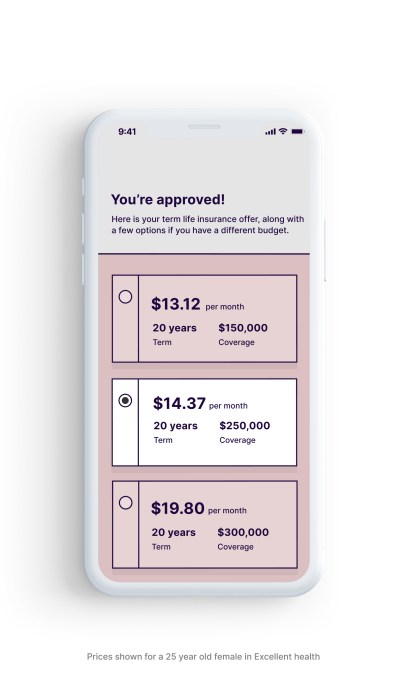
A new app called Fabric aims to make it simpler for parents to plan for their family’s long-term financial well-being. The goal is to offer parents a one-stop-shop that includes the ability to ability for term life insurance from their phone, create a free will in about five minutes, and collaborate with a spouse or partner to organize key financial accounts or other important documents. In addition, parents are able to coordinate with beneficiaries, children’s guardians, attorneys, financial advisors, and others right from the app.

Fabric was originally founded in 2015 by Adam Erlebacher, previously the COO at online bank Simple, and Steven Surgnier, previously the Director of Data at Simple. The company last year raised a $10 million Series A led by Bessemer Venture Partners, after having sold life insurance coverage to thousands of families.

Since launch, Fabric has expanded beyond life insurance to offer other services, like easy will creation and the addition of tools that help families organize their financial and legal information in one place. The idea, the company explained at the time, was to offer today’s busy parents a better alternative to meetings with agents to discuss complicated life insurance products. Instead, the company offers a simple, 10-minute life insurance application and the option to connect with a licensed team if they need additional help, as well as a similarly simplified will creation workflow.

As with the founders’ earlier company, Simple, which offered a better front-end to banking while actual bank accounts were held elsewhere, Fabric’s life insurance policies are issued by “A” rated insurer, Vantis Life, not Fabric itself.

However, until now, Fabric’s suite of services were only available on the web. They’re now offered in an app for added convenience. The app is initially available on iOS with an Android version in the works.

“Money can be especially stressful when you’re trying to build a family and a career,” said Fabric co-founder and CEO Adam Erlebacher. “In one survey by Everyday Health, 52% of respondents said financial issues regularly stress them out, and people between the ages of 38 to 53 were the most stressed out financially. Parents want to have more control over their families’ long-term financial well-being and today’s dusty old products and tools are failing them,” he added.

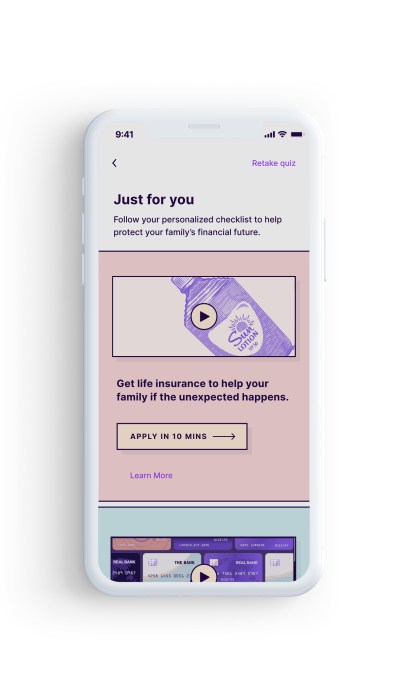
Using the Fabric app, parents can take advantage of any of its offerings, including the option to apply for life insurance from the phone and get immediate approval. The app also makes it possible to share the policy information with beneficiaries, so it doesn’t get lost.

Another feature lets you create your will for free, and share that information with key people as well, including the witnesses you need to coordinate with in order to finalize the will, for example. And a spouse can choose to mirror your will, which speeds up the process of creating a second one with the same set of choices.

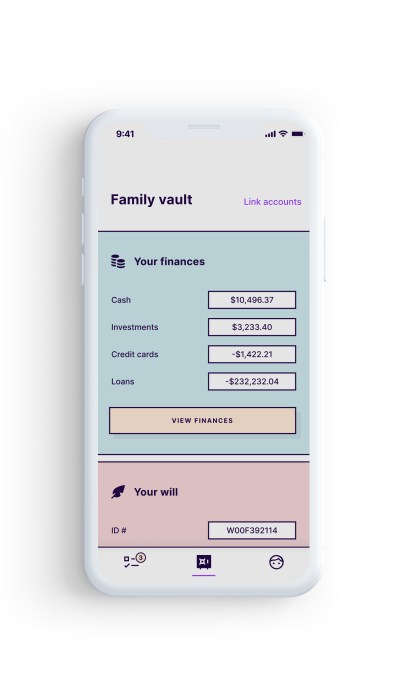
Fabric also helps to address an issue that often only comes up after it’s too late or in other emergency situations — organizing both parents’ finances in a single place. Many working adults today have not just a bank account, but also have investment accounts, 401Ks, IRAs, and credit cards, or a combination of those. But their partner may not know where to find this information or where the accounts are held.

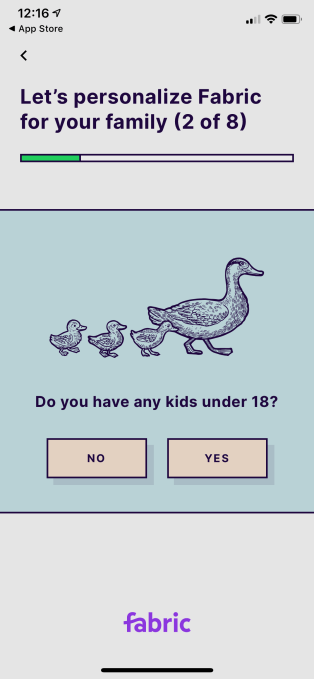
The app, which we put through its paces (but didn’t purchase life insurance through), is very easy to use. It starts off with a short quiz to get a handle on your financial picture. It then delivers you to a personalized homescreen with a checklist of suggestions of what to do next. Naturally, this includes the life insurance application, as this is where Fabric’s revenue lies. And if you’re lacking a will and have other fiances to organize, these are featured, too.

The online forms are easy to fill out, despite the smartphone’s reduced screen space compared with a web browser, and Fabric has taken the time to get the small touches right — like when you enter a phone number, the numeric keypad appears, for example, or the integration of address lookup so you can just tap on the match and have the rest autofill. It also saves your work in progress, so you can finish later in case you get interrupted — as parents often do. And it explains terms, like “executor,” so you know what sort of rights you’re assigning.

Given its focus, Fabric protects user information with bank-grade security, including 256-bit encryption, two-factor authentication, automatic lockouts, biometrics, and other adaptive security features.

Fabric isn’t alone in helping parents and others financially plan wills and more from their iPhone. Other apps exist in this space, including will planning apps from Tomorrow, LegalZoom, Qwill, and others. Plus many insurers offer a mobile experience. Fabric is unique because it puts wills, insurance, and other tools into a single destination, without complicating the user interface.

Fabric’s app is a free download on the App Store. 


Read Full Article

How smartphones really work | Cathy Mulzer

How smartphones really work | Cathy Mulzer

Ever wondered how your smartphone works? Take a journey down to the atomic level with scientist Cathy Mulzer, who reveals how almost every component of our high-powered devices exists thanks to chemists -- and not the Silicon Valley entrepreneurs that come to most people's minds. As she puts it: "Chemistry is the hero of electronic communications."

Click the above link to download the TED talk.

Xiaomi’s Q3 earnings report shows slowing growth


Xiaomi, the world’s fourth largest smartphone vendor, on Wednesday reported a 3.3% revenue growth (QoQ) in the quarter that ended in September. While the results fell largely in line with analysts’ expectations, a drastic drop in the company’s growth underscores some of the struggles that handset makers are facing as they shift to services to make up for dwindling smartphone purchases globally.

The Chinese electronics firm posted Q3 revenue of 53.7 billion yuan, or $7.65 billion, an increase compared to 51.95 billion yuan ($7.39 billion) revenue it reported in Q2 and up 5.5% from the same period last year.

This is largely in line with analysts’ estimated revenue of 53.74 billion yuan, per Refinitiv figures, but growth is slowing. As a point of comparison, in Q2, Xiaomi reported QoQ growth of 18.7% and YoY of 14.8%.

Xiaomi said its adjusted profit in the aforementioned quarter was 3.5 billion yuan ($500 million), up from about 2.5 billion yuan a year ago. Gross profit during the period was 8.2 billion yuan ($1.17 billion), up 25.2% year-over-year.

The company said its smartphone business revenue during Q3 stood at 32.3 billion yuan ($4.6 billion), down 7.8% year-over-year. The company, which shipped 32.1 million smartphone units during the period, blamed “downturn” in China’s smartphone market for the decline.

Marketing research firm Canalys reported this month that China’s smartphone market shrank by 3% during Q3. Despite the slowdown, Xiaomi said its gross profit margin of smartphones segment had reached 9% — up from 8.1% and 3.3% in the previous quarters.

Other than Huawei, which leads the handsets market in China, every other smartphone vendor has suffered a drop in their shipment volumes in the country, according to research firm Counterpoint.

But for Xiaomi, this should technically not be a problem. Long before the company listed publicly last year, it has been boasting about its business model: how it makes little money from hardware and more and more from delivering ads and selling internet services.

That internet services business is not growing fast enough, however, to be an engine for the overall company. It grew by 12.3% year-on-year to 5.3 billion yuan ($750 million) and 15% since last quarter. Either way, it accounts for only a fraction of smartphone business’ contribution to the bottomline.

Xiaomi said two years ago that it will only ever make 5% profit from its hardware, something its executives told TechCrunch has been engraved in the company’s “constitution.” But the slow shift to making money off of internet services, while making less money from selling hardware, is one of the chief reasons why the company had an underwhelming IPO.

Meanwhile, the user base of Xiaomi’s Android-based MIUI software is growing. It had 292 million monthly active users as of September this year, up from 278.7 in June.

In more promising signs, Xiaomi said its smart TV and Mi Box platforms had more than 3.2 million paid subscribers and revenue from its fintech business, a territory it entered only in recent quarters, had already reached 1 billion yuan ($140 million).

But it’s hardware that continues to make up the biggest proportion of its revenues. The company, which is increasingly moving its gadgets and services beyond Chinese shores, said revenue from its international business grew 17.2 year-over-year to 26.1 billion yuan ($3.7 billion) in the third quarter — accounting for 48.7% of total revenue.

In a statement, Xiaomi founder and chairman Lei Jun said the company is hopeful that it will be able to further grow its revenues when 5G devices start to get traction. The company has plans to launch at least 10 5G-enabled smartphone models next year, he said. No word from him on what the company intends to do about its services ecosystem.


Read Full Article

Brexit ad blitz data firm paid by Vote Leave broke privacy laws, watchdogs find


joint investigation by watchdogs in Canada and British Columbia has found that Cambridge Analytica-linked data firm, Aggregate IQ, broke privacy laws in Facebook ad-targeting work it undertook for the official Vote Leave Brexit campaign in the UK’s 2016 EU referendum.

A quick reminder: Vote Leave was the official leave campaign in the referendum on the UK’s membership of the European Union. While Cambridge Analytica is the (now defunct) firm at the center of a massive Facebook data misuse scandal which has dented the company’s fortunes and continues to tarnish its reputation.

Vote Leave’s campaign director, Dominic Cummings — now a special advisor to the UK prime minister — wrote in 2017 that the winning recipe for the leave campaign was data science. And, more specifically, spending 98% of its marketing budget on “nearly a billion targeted digital adverts”.

Targeted at Facebook users.

The problem is, per the Canadian watchdogs’ conclusions, AIQ did not have proper legal consents from UK voters for disclosing their personal information to Facebook for the Brexit ad blitz which Cummings ordered.

Either for “the purpose of advertising to those individuals (via ‘custom audiences’) or for the purpose of analyzing their traits and characteristics in order to locate and target others like them (via ‘lookalike audiences’)”.

Oops.

Last year the UK’s Electoral Commission also concluded that Vote Leave breached election campaign spending limits by channeling money to AIQ to run the targeting political ads on Facebook’s platform, via undeclared joint working with another Brexit campaign, BeLeave. So there’s a full sandwich of legal wrongdoings stuck to the brexit mess that UK society remains mired in, more than three years later.

Meanwhile, the current UK General Election is now a digital petri dish for data scientists and democracy hackers to run wild experiments in microtargeted manipulation — given election laws haven’t been updated to take account of the outgrowth of the adtech industry’s tracking and targeting infrastructure, despite multiple warnings from watchdogs and parliamentarians.

Data really is helluva a drug.

The Canadian investigation cleared AIQ of any wrongdoing in its use of phone numbers to send SMS messages for another pro-Brexit campaign, BeLeave; a purpose the watchdogs found had been authorized by the consent provided by individuals who gave their information to that youth-focused campaign.

But they did find consent problems with work AIQ undertook for various US campaigns on behalf of Cambridge Analytica affiliate, SCL Elections — including for a political action committee, a presidential primary campaign and various campaigns in the 2014 midterm elections.

And, again — as we know — Facebook is squarely in the frame here too.

“The investigation finds that the personal information provided to and used by AIQ comes from disparate sources. This includes psychographic profiles derived from personal information Facebook disclosed to Dr. Aleksandr Kogan, and onward to Cambridge Analytica,” the watchdogs write.

“In the case of their work for US campaigns… AIQ did not attempt to determine whether there was consent it could rely on for its use and disclosure of personal information.”

The investigation also looked at AIQ’s work for multiple Canadian campaigns — finding fewer issues related to consent. Though the report states that in: “certain cases, the purposes for which individuals are informed, or could reasonably assume their personal information is being collected, do not extend to social media advertising and analytics”.

AIQ also gets told off for failing to properly secure the data it misused.

This element of the probe resulted from a data breach reported by UpGuard after it found AIQ running an unsecured GitLab repository — holding what the report dubs “substantial personal information”, as well as encryption keys and login credentials which it says put the personal information of 35 million+ people at risk.

Double oops.

“The investigation determined that AIQ failed to take reasonable security measures to ensure that personal information under its control was secure from unauthorized access or disclosure,” is the inexorable conclusion.

Turns out if an entity doesn’t have a proper legal right to people’s information in the first place it may not be majorly concerned about where else the data might end up.

The report flows from an investigation into allegations of unauthorized access and use of Facebook user profiles which was started by the Office of the Information and Privacy Commissioner for BC in late 2017. A separate probe was opened by the Office of the Privacy Commissioner of Canada last year. The two watchdogs subsequently combined their efforts.

The upshot for AIQ from the joint investigation’s finding of multiple privacy and security violations is a series of, er, “recommendations”.

On the data use front it is suggested the company take “reasonable measures” to ensure any third-party consent it relies on for collection, use or disclosure of personal information on behalf of clients is “adequate” under the relevant Canadian and BC privacy laws.

“These measures should include both contractual measures and other measures, such as reviewing the consent language used by the client,” the watchdogs suggest. “Where the information is sensitive, as with political opinions, AIQ should ensure there is express consent, rather than implied.”

On security, the recommendations are similarly for it to “adopt and maintain reasonable security measures to protect personal information, and that it delete personal information that is no longer necessary for business or legal purposes”.

“During the investigation, AIQ took steps to remedy its security breach. AIQ has agreed to implement the Offices’ recommendations,” the report adds.

The upshot of political ‘data science’ for Western democracies? That’s still tbc. Buckle up.


Read Full Article

Google Stadia, Black Friday Shopping Tips, Tricks, Deals, and Scams


In our final show of 2019, the Really Useful Podcast helps you navigate the deals, risks, tricks, and scams of Black Friday. Don’t click on that Black Friday bargain until you’re sure it’s the tip-top deal you think it is. Plus, we take a brief look at Google Stadia, the new console-standard cloud gaming platform from Google.

Really Useful Podcast Season 4 Episode 13 Shownotes

James Frew and Christian Cawley bring you a wealth of Black Friday topics and tricks this week:

A review on iTunes can help us reach more listeners, so please take a moment to leave your thoughts. You can also share the Really Useful Podcast via email and social media. We’re available wherever you can listen to podcasts, including:

Happy holidays—we’ll be back in 2019!

Read the full article: Google Stadia, Black Friday Shopping Tips, Tricks, Deals, and Scams


Read Full Article

Apple’s Holiday Commercial Will Make You Cry


Apple has released its commercial for the 2019 holidays. And it’s a commercial designed to make you cry. Hard. However, the ad also shows how technology can be used for good rather than bad. Which is a message all geeks and nerds should support.

Apple has an annual tradition of posting its longer-form TV commercials online. And many have won awards for the way they show how technology can snugly fit into family life. And this year’s entry, titled The Surprise, may be the best Apple ad yet.

Apple Sells iPads Using the Power of Pixar

The Surprise shows a family embarking on a trip across the US. And, as is typical with most families, the kids are obsessed by their mobile devices. In this case, an iPad. Using it in the car and on the plane. So far, so unsurprising. But do stick with it.

The family then arrives at grandpa’s house, where we learn that he’s recently lost his wife. The kids are still obsessed with their iPad, and even wrap it up for Christmas. Grandpa unwraps it, and we discover what they’ve spent their time doing.

It turns out they’ve been using their iPad to make the perfect Christmas gift. The ad is accompanied by “Married Life” by Michael Giacchino, a song from the movie Up. And it’s the perfect soundtrack to this touching story of love and loss. And iPads.

Apple Hopes to Trigger an Emotional Response

Apple is clearly seeking to trigger an emotional response here. And I wouldn’t be surprised if this ad makes you cry. Especially if it touches a nerve with you personally. However, it’s also designed to show how technology can be used for good.

It’s a cracking commercial which works on multiple levels. And while the main point is that the iPad can be used to create as well as consume, it’s a defense of technology as a whole. So be sure to read our luddite’s guide to modern technology over the holidays.

Read the full article: Apple’s Holiday Commercial Will Make You Cry


Read Full Article