05 November 2019

The Xbox Elite Wireless Controller Series 2 is a truly great game controller


Microsoft’s original Xbox Elite controller was a major step-up for gamers, with customizable buttons, changeable physical controls and adjustable sensitivity for serious personalization. The new Xbox Elite Controller Series 2 has just landed, and it offers similar features, but with new and improved features that add even more customization options, along with key hardware improvements that take what was one of the best gaming controllers available, and make it that much better.

USB-C

This might seem like a weird place to start, but the fact that the new Xbox Elite 2 comes with USB-C for charging and wired connections is actually a big deal, especially given that just about every other gadget in our lives has moved on to adapting this standard. Micro USB is looking decidedly long in the tooth, and if you’re like me, one of the only reasons you still have those cables around at all is to charging your game controllers.
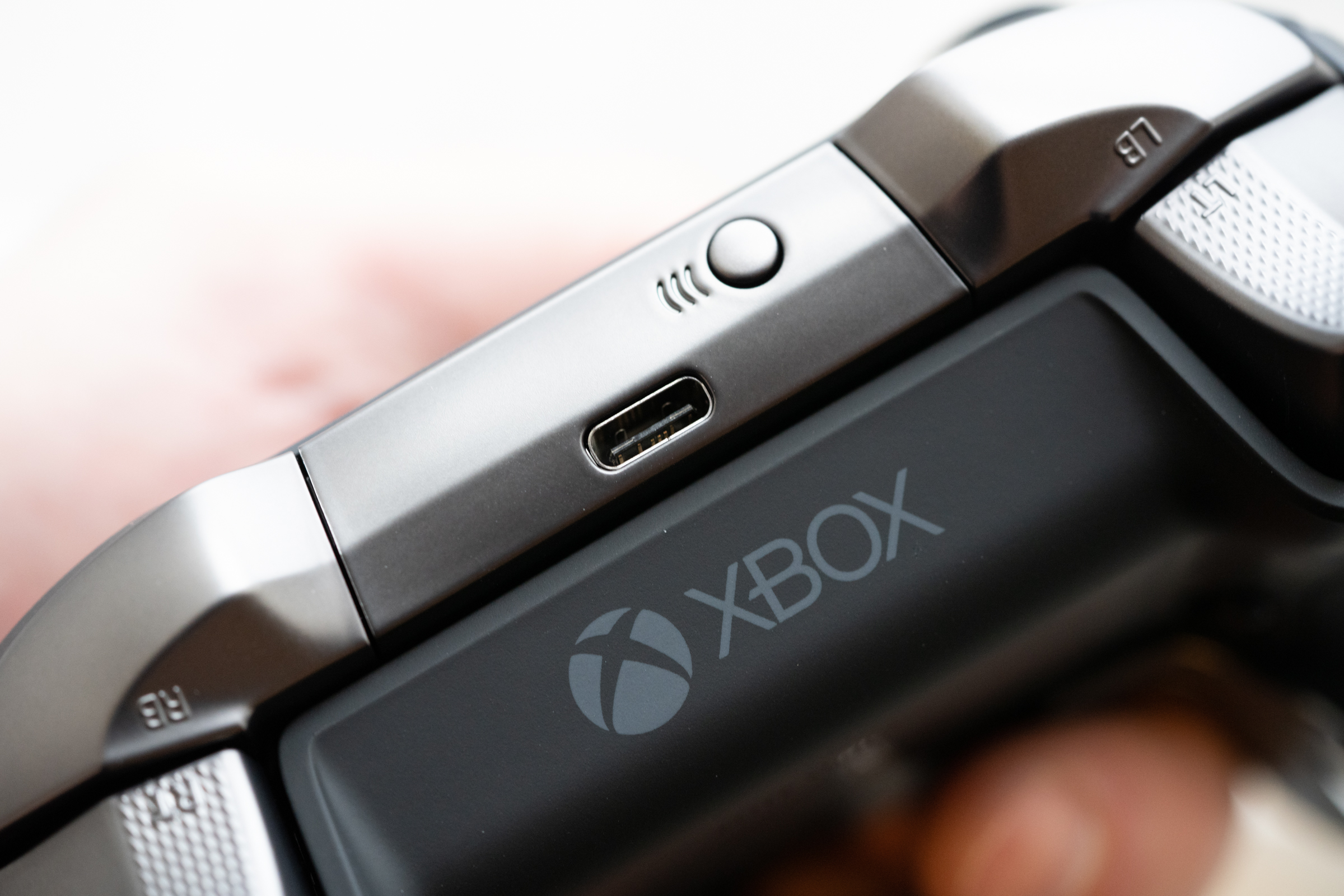
In the box, you get a braided USB-A to USB-C charging cable, which is plenty long enough to reach from your console to your couch at nine feet. Of course, you can also use your phone, tablet, MacBook or any other USB-C charger and cable combo to power up the Elite 2, which is why it’s such a nice upgrade.

This is big for one other key reason: Apple recently added Xbox controller compatibility to its iPad lineup, which also charges via USB-C. That’s what makes this the perfect controller for anyone looking to turn their tablets into a portable gaming powerhouse, since it reduces the amount of kit you need to pack when you want to grab the controller and have a good option for digging into some iPad gaming.

Adjustable everything

Probably the main reason to own the Elite 2 is that it offers amazing customization options. New to this generation, you can even adjust the resistance of the thumbsticks, which is immensely useful if you’re a frequent player of first-person shooter (FPS) games, for instance. This lets you tune the sensitivity of the sticks to help ensure you’re able to find the right balance of sensitivity vs. resistance for accurate aiming, and it should help pros and enthusiasts make the most of their own individual play style.

The shoulder triggers also now have even shorter hair trigger locks, which mean you can fire quicker with shorter squeezes in-game. And in the case, you’ll find other thumbsticks that you can swap out for the ones that are pre-installed, as well as a d-pad you can use to place the multi-directional pad.

On top of the hardware customization, you can also tweak everything about the controller in software on Windows 10 and Xbox One, using Microsoft’s Accessories app. You can even assign a button to act as a ‘Shift’ key to provide even more custom options, so that you can set up key combos to run even more inputs. Once you find a configuration you like, you can save it as a profile to the controller and switch quickly between them using a physical button on the controller’s front face.

Even if you’re not a hardcore multiplayer competitive gamer, these customization options can come in handy. I often use profiles that assign thumbstick clicks to the rear paddle buttons, for instance, which makes playing a lot of single-player games much more comfortable, especially during long sessions.

Dock and case included

The Xbox Elite 2 includes a travel case, just like the first generation, but this iteration is improved, too. It has a removable charging dock, which is a quality accessory in its own right. The dock offers pass-through charging even while the controller is inside the case, too, thanks to a USB-C cut-through that you can also seal with a rubberized flap when it’s not in use.
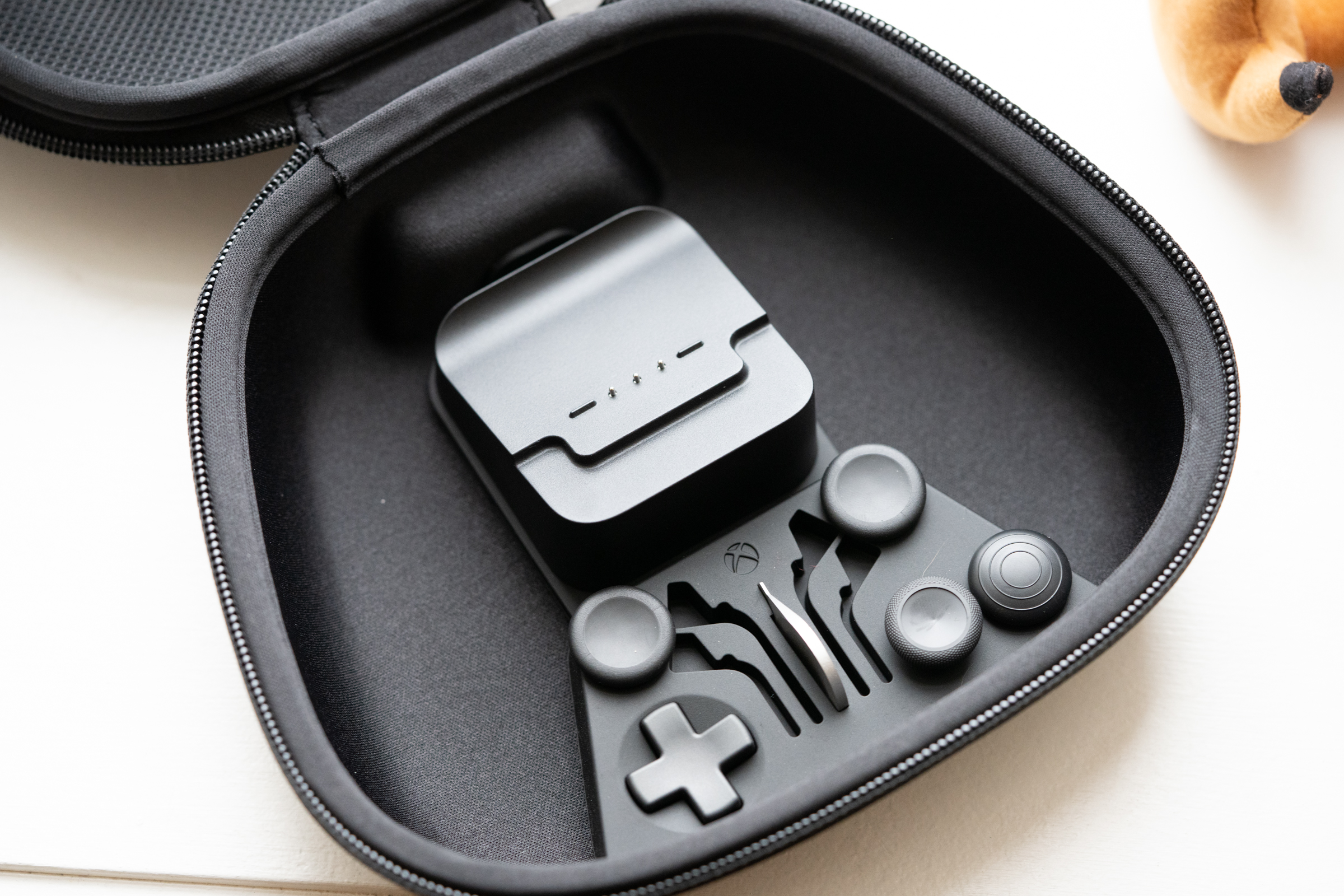
In addition to housing the charger and controller, the case can hold the additional sticks and D-pad, as well as the paddles when those aren’t in use. It’s got a mesh pocket for holding charging cables and other small accessories, and the exterior is a molded hard plastic wrapped in fabric that feels super durable, and yet doesn’t take up much more room than the controller itself when packed in a bag.

The case is actually a huge help in justifying that $179.99 price tag, since all of this would be a significant premium as an after-market add-on accessory for a standard controller.

Bottom line

Microsoft took its time with a successor to the original Xbox Elite Wireless Controller, and while at first glance you might think that not much has changed, there’s actually a lot of significant improvements here. The controller’s look and feel also feel better, with more satisfying button, pad and the stick response, and a better grip thanks to the new semi-textured finish on the front of the controller.

[gallery ids="1908338,1908336,1908334,1908333"]

USB-C and more customization options might be good enough reason even for existing Elite Controller owners to upgrade, but anyone on the fence about getting an Elite to begin with should definitely find this a very worthwhile upgrade over a standard Xbox One controller.


Read Full Article

Friended is a new social network that wants to get real


Though the social media landscape is dominated by a few major players, consumers still seem to want something new and different. Just look at TikTok.

Today, a new social app is launching called Friended, which is taking an altogether different strategy when it comes to connecting people online. Friended was started by Thumb cofounder and CEO Dan Kurani, Friended wants to give users a deeper and more meaningful connection to one another, which the company believes they crave.

On Friended, users can post to the community about what they’re thinking or feeling. But rather than catalyze a ‘town hall’-style group conversation, members of the community can respond privately to that post, offering their insights, anecdotes, or advice.

The idea is to give people a chance to share how they really feel in a vulnerable, one-to-one setting. In playing around with the app, I had conversations with people about how to make friends in NYC and why it sometimes feel like others don’t care about us as much as we care about them.

Anyone can respond to a thread, and comments on threads can be liked by the poster or respondent, but from the moment a response comes through, that conversation is one-on-one and private.

“People feel more lonely now than ever before,” said Kurani. “Part of the blame is the social media algorithms that only promote people’s highlights for more ad impressions. It’s isolating to see everyone’s happy moments, and, then get silence when you share something vulnerable. But, it’s also just plain hard to open up and share your feelings because of the pressure to be perfect.”

Because Friended wants to be a place where you always have someone to talk to, the company has eliminated ads as a possible revenue stream. Instead, the company is working to implement a premium tier.

Right now, users can only post a conversation starter every eight hours. The premium tier, which costs $4.99/week, allows users to post as frequently as they want, and also includes a few other premium features like the ability to talk to people in your location.

Friended has raised a $500K seed round from investors such as Jonah Goodhart, Dr. Lara Otte, Jared Fliesler, and Bobby Goodlatte. Though the company won’t disclose monthly active user numbers, it did say that it has 500,000 registered users with an average of 11 sessions per day per active user during its beta. More than 2.5 million messages were sent last month.


Read Full Article

ZenHub adds roadmapping to its GitHub project management tool


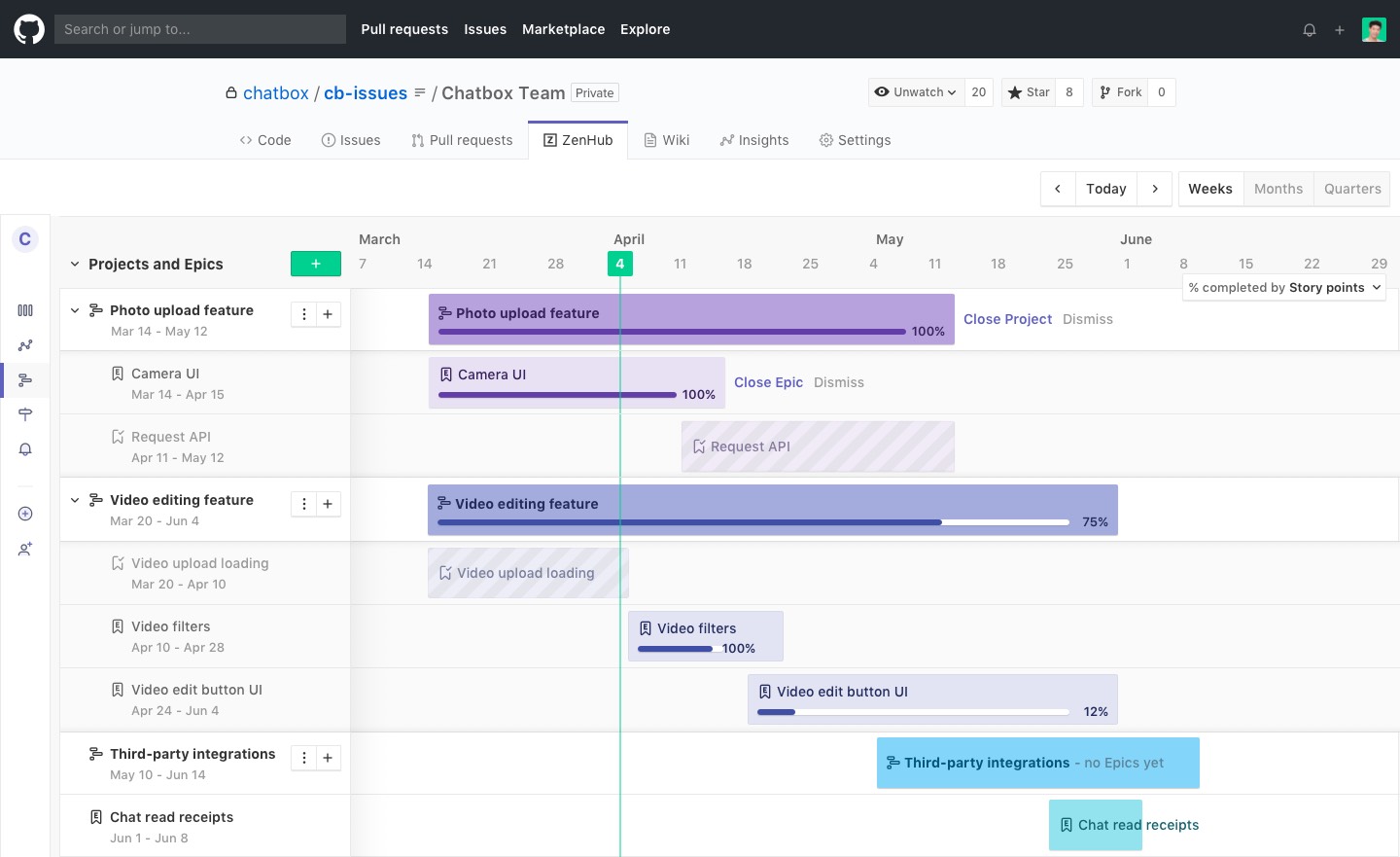
ZenHub, the popular project management tool that integrates right into GitHub, today announced the launch of Roadmaps. As you can guess from the name, this is a roadmapping feature that allows teams to better plan their projects ahead of time and visualize their status — all from within GitHub.

“We’re diving into a brand new category which is super exciting and we’re really starting to think not only about how forward-thinking software teams are managing their software projects but how they’re actually planning ahead,” ZenHub CEO and co-founder Aaron Upright told me. “And we’re really using this as an opportunity to really evolve the product and really introduce now a new kind of entrant into the space for product roadmapping.”

The product itself is indeed pretty straightforward. By default, it takes existing projects and epics a team has already defined and visualizes those on a timeline — including data about how many open issues still remain. In its current iteration, the tool is still pretty basic, but going forward ZenHub will add more advanced features like blocking. As Upright noted, that’s just fine, though, because while the main goal here is to help teams plans, ZenHub also wants to give other stakeholders a kind of 30,000-foot overview of the state of a project without having to click around every issue in GitHub or Jira.

Upright also argues that existing solutions tend to fall short of what teams really need. “Smaller organizations — teams that are 10, 15 or 25 people — they can’t afford these tools. They’re really expensive. They’re cost-prohibitive,” he said. “And so oftentimes what they do is they turn to Excel files or Google spreadsheets in order to keep track of their roadmap. And keeping the spreadsheets up to date really becomes a complex and really a full-time job.” Yet those tools that are affordable often don’t offer a way to sync data back and forth between GitHub and their platforms, which results in the product team not getting those updates in GitHub, for example. Since ZenHub lives inside of GitHub, that’s obviously not a problem.

ZenHub Roadmaps is now available to all users.


Read Full Article
Google launches OpenTitan, an open-source secure chip design project


Google has partnered with several tech companies to develop and build OpenTitan, a new, collaborative open-source secure chip design project.

The aim of the new coalition is to build trustworthy chip designs for use in datacenters, storage, and computer peripherals, which are both open and transparent, allowing anyone to inspect the hardware for security vulnerabilities and backdoors.

It comes at a time where tech giants and governments alike are increasingly aware that hostile nation states are trying to infiltrate and compromise supply chains in an effort to carry out long-term surveillance or espionage.

OpenTitan builds off the success of Google’s own custom-built chip, Titan, which it uses in its multi-factor security keys and its own-brand Android phones. Critical to the chip’s success is its root-of-trust technology, which cryptographically ensures that the chip hasn’t been tampered with. Root-of-trust provides a solid foundation for the operating system and applications running on the chip.

Google said OpenTitan will be run by LowRisc, a non-profit community, and will rely on partnerships with ETH Zurich, G+D Mobile Security, Nuvoton Technology, and Western Digital to support the project.

OpenTitan will also be platform agnostic and can be adapted to almost any device or software, Google said.

It’s not the first project dedicated to building secure chip designs. The Open Compute Project, supported by Facebook, Intel and Google, was created to open-source designs for its core infrastructure servers as part of an effort to gain better efficiencies from datacenter operations.

Apple also has its own secure — albeit proprietary — custom silicon, the Apple T2, found in its latest MacBooks, which it uses to control a device’s security functions and store the user’s passwords and encryption keys.


Read Full Article
UK drone register takes off


A UK drone registration scheme has opened ahead of the deadline for owners to register their devices coming into force at the end of this month.

The UK government announced its intention to introduce a drone registration scheme two years ago.

The rules apply to drones or model aircraft weighting between 250g and 20kg.

Owners of drones wanting to fly the device themselves must also take and pass a theory test to gain a flyer ID by November 30. Anyone who wishes to fly a drone owned by someone else must also first obtain a flyer ID by passing the theory test.

UK ministers have come in for serious criticism for lagging on drone regulations in recent years after a spate of drone sightings at the country’s busiest airport grounded flights last December, disrupting thousands of travellers. In January flights were also briefly halted at Heathrow airport after another unidentified drone sighting.

This fall the police investigation into the Gatwick drone shutdown found that at least two drones had been involved. In September police also said they had been unable to identify any suspects — ruling out 96 people of interest.

Following the Gatwick disruption the government tightened existing laws around drone flights near airports — extending a no-fly zone from 1km to 5km. But a full drone bill, originally slated for introduction this year, has yet to take off.

As well as introducing a legal requirement for drone owners to register their craft via the Civil Aviation Authority’s website by November 30, the new stop-gap rules require organizations that use drones to register for an operator ID too, also at a cost of £9 per year.

All drones must also be labeled with the operator ID. This must be clearly visible on the main body of the craft, and easy to read when it’s on the ground, written in block capital letters taller than 3mm high.

The registered person who obtains the operator ID must be aged 18 or older and is accountable for managing drones to ensure only individuals with a flyer ID fly them.

Individuals must be aged 13 or older to obtain a flyer ID.

The online test for obtaining the flyer ID involves answering 20 multiple choice questions. The pass mark for the test is set at 16. There’s no limit on how many times the test can be taken.

The Civil Aviation Authority says everything needed to pass the test can be found in The Drone and Model Aircraft Code. There’s no charge for taking the test or obtaining the flyer ID.


Read Full Article

Xiaomi unveils Mi Watch, its $185 Apple Watch clone


Xiaomi, which competes with Apple for the top position in the wearable market, today made the competition a little more interesting. The Chinese electronics giant has launched its first smartwatch called the Mi Watch that looks strikingly similar to the Apple Watch in its home market.

The Mi Watch, like the Apple Watch, has a square body with a crown and a button. It sports a 1.78-inch AMOLED display (326 ppi) that offers the always-on capability and runs MIUI for Watch, the company’s homegrown wearable operating system based on Google’s Wear OS.

Inside the metal housing — aluminum alloy with a matte finish — are microphones on two sides for recording audio and taking calls, and a loudspeaker on the left to listen to music or incoming calls. The Mi Watch, which comes in one size — 44mm — has a ceramic back, which is where the charging pins and a heart rate sensor are also placed.

The Mi Watch is powered by Qualcomm’s Snapdragon Wear 3100 4G chipset with four Cortex A7 cores clocked at 1.2GHz, coupled with 1GB of RAM and 8GB storage. The company says its first smartwatch supports cellular connectivity (through an eSIM), Wi-Fi, GPS, Bluetooth, and NFC for payments. The Mi Watch should last for 36 hours on a single charge on cellular mode, the company claimed.

The Mi Watch will also help users track their sleep, performance while swimming, cycling and running, and also measure their heart rate.

Over 40 popular Chinese apps such as TikTok and QQ Messenger are available for the Mi Watch on day one. The company’s own XiaoAI assistant is the default virtual digital assistant on the watch.

The Mi Watch is priced at CNY 1,299 ($185) and will go on sale in the country next week. There’s no word on international availability just yet, but if the past is any indication, Xiaomi will likely bring the device to India, Singapore, Indonesia and other markets in coming quarters.

The company says a variant of the Mi Watch that sports a sapphire glass and stainless steel will go on sale next month in China. It is priced at CNY 1,999 ($285).


Read Full Article

Code Anything on Any Device With Codeanywhere, the Cloud-Based IDE


Many of the apps we use every day are based in the cloud. Yet most developers still rely on outdated desktop software. If you want to work across multiple devices and speed up your workflow, you might want to try Codeanywhere. This powerful cloud-based development environment lets you collaborate in real-time, connect with Git repositories, and run terminal commands on desktop and mobile. Right now, you can pick up a one-year Freelancer subscription for just $49.99 at MakeUseOf Deals.

Code Anywhere

As the name implies, Codeanywhere has been designed for complete flexibility. Instead of being tied to your desktop workflow, you can use this platform to write code on your laptop, your tablet, and even your phone.

No matter which device you choose, you can code in over 75 languages with full autocomplete. The platform also offers a large selection of dev stacks, and you can easily connect your code via FTP, SFTP, Dropbox, Google Drive, Git, and other platforms. Meanwhile, you can choose to run commands on your own container or on remote servers via SSH.

Codeanywhere also allows you to collaborate with your colleagues and browse through previous versions of your code.

One Year of Cloud Coding for $49.99

If you would like to start coding in the cloud, you can currently get a one-year Codeanywhere subscription for $49.99 on the Freelancer plan, worth $120.

Read the full article: Code Anything on Any Device With Codeanywhere, the Cloud-Based IDE


Read Full Article

5 Self-Improvement Challenges to Boost Your Mental and Physical Health 


self-improvement-challenges

This time of the year makes people challenge themselves, whether it’s NaNoWriMo, Movember, or other disciplines. Here are a few more self-improvement challenges, both short-term and long-term, to make a better version of yourself.

Challenges are a nice way to start doing something that you keep putting off. They usually give you guidelines or suggestions on how to achieve your goal, which is the main obstacle most of us face.

We give up goals because we don’t break them down into smaller, achievable tasks. But challenges already do that for us, making the larger objective that much more realistic.

1. 21 Days Challenge (Android, iOS): Micro Challenges to Change Habits

There’s a belief on the internet that you can form a new habit by doing it continuously for 21 days. It’s a misinterpretation of Dr. Maxwell Maltz’s theory, but without getting into that, it serves as a good personal challenge for betterment.

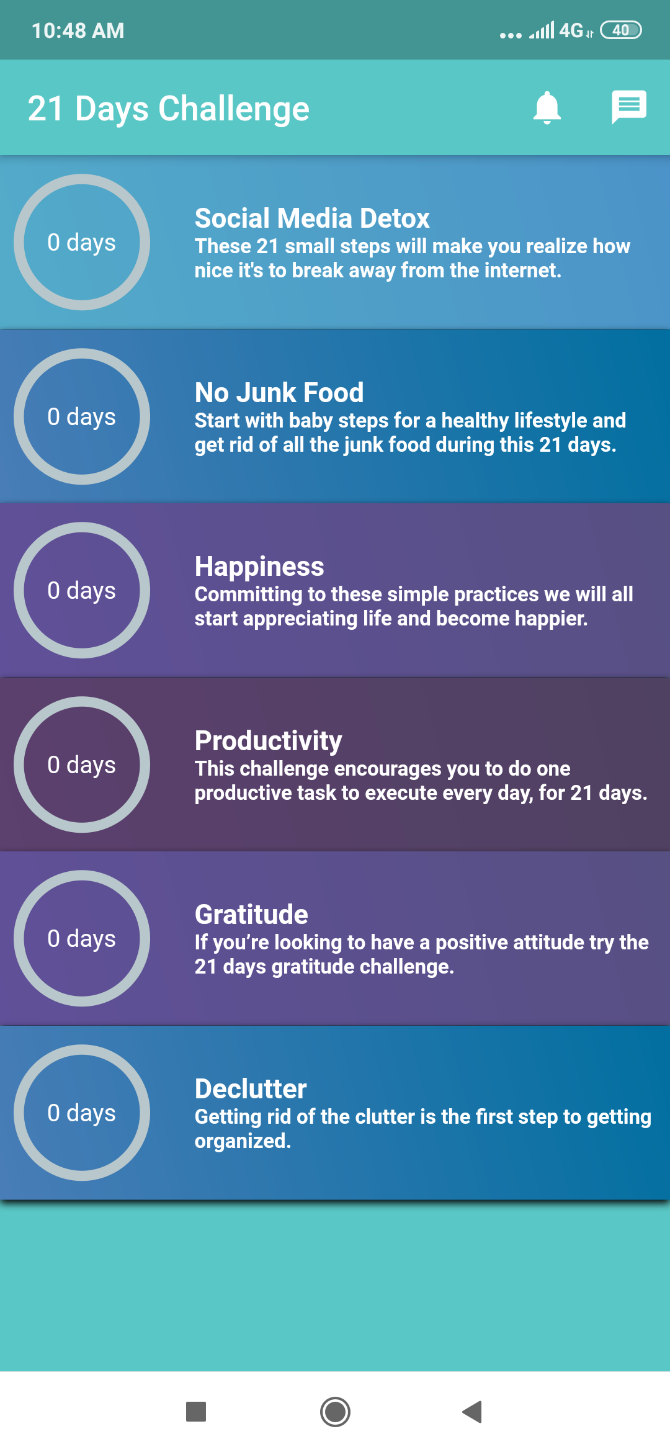
The idea is to do (or quit doing) some action for 21 days repeatedly. The 21 Days Challenge app has a few challenges you can try: social media detox, no junk food, happiness, productivity, gratitude, and declutter.

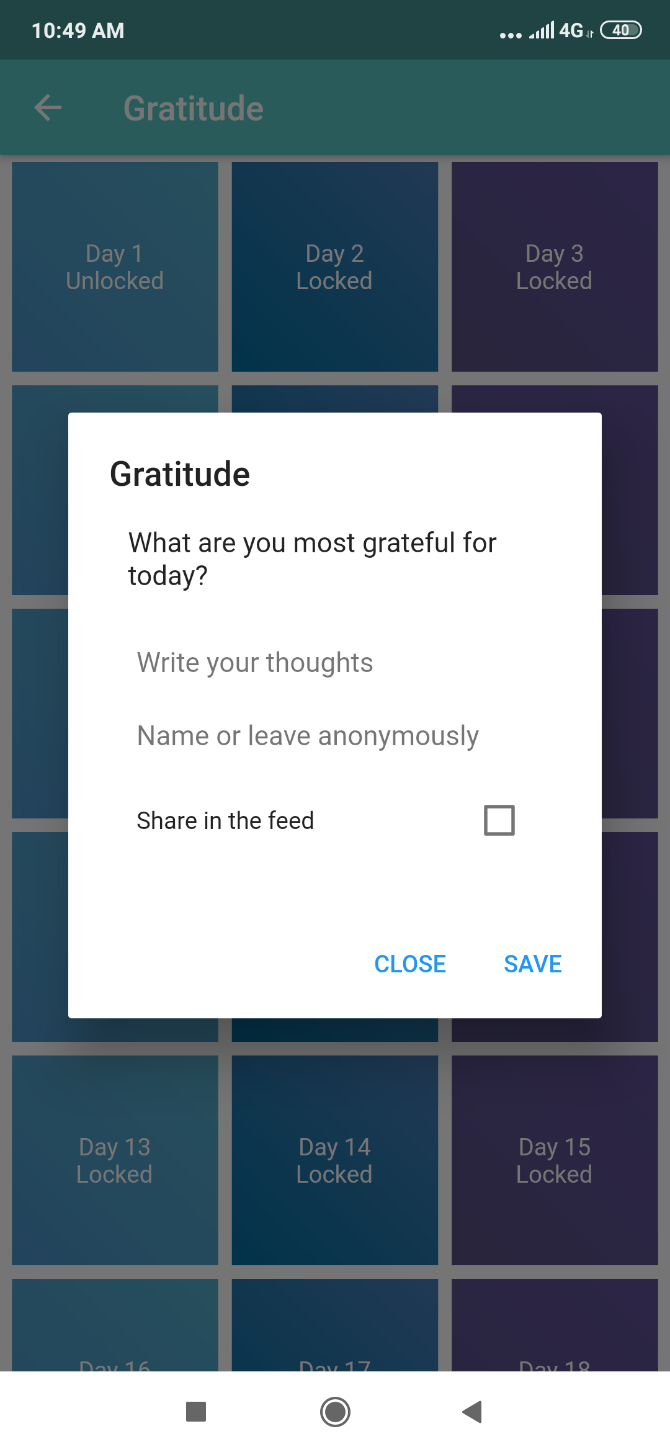
Each day, the challenge unlocks a new task. For example, if you’re working on the happiness challenge, you’ll be asked to listen to your favorite song on the first day, and given a different task on the second day. Keep checking in every day for a new unlock.

The concept is similar to the idea of creating life-altering habits with micro challenges. The 21 days limit is less pressure than a long-term commitment. It’s just three weeks, you can do it, right?

Download: 21 Days Challenge for Android | iOS (Free)

2. Ever Better Challenge (Web): Evernote’s Free 30-Day Program

Evernote's 30-day Ever Better Challenge with four weeks of templates

Evernote, one of the best note-taking apps today, created a small 30-day challenge for you to test yourself. While originally intended as a way to achieve your new year’s resolution, you can start it on any date.

You can make it anything you want to be, like working on your passion project or quitting sugar for a month. The challenge wants to make it easy to achieve that goal by showing you how to break it down. At the start, you’ll have to use a template to write your goal, the obstacles, and setbacks you expect, the person you’ll rely on and be accountable to, and even your eventual rewards.

By making this plan early, you are giving yourself a better chance of following through. The plan forces you to think more realistically about the goal, with actionable steps. As you progress, each week will give you a new template to keep you on the path to success.

3. 50 Day Confidence Challenge (Ebook): Mel Robbins’ Guide to Confidence

Mel Robbins' 50-day confidence challenge

Mel Robbins is a best-selling author, motivational speaker, and talk show host who specializes in being more confident. She advocates mind hacks to gain more self-belief, like the 5-second rule, which says that when you have the impulse to act on an idea, you need to physically move within five seconds or the human brain kills that impulse.

Robbins also says that you can gain confidence by pushing yourself out of your comfort zone. The more often you do something different, the more you learn about yourself. With that in mind, she created a series of 50 Confidence Challenges, available as a free ebook. Download and print it out.

Every day, you will have a new challenge. Write when you’re going to do it, and the biggest obstacle in your path to doing it. After you finish, come back and write about your experience. It’s almost like maintaining a journal.

As the days fly, Robbins says you will find yourself being more daring in how and when you take those challenges. By the end of the 50 days, be prepared to meet a more confident version of yourself in the mirror.

Download: 50 Day Confidence Challenge (PDF)

4. Mental Reset Challenge (Web): 4 Weeks to Clean Up Mental Space

The 4-Week Mental Reset Challenge to clear up stress

The mind, like anything else, can get cluttered up. Dealing with the rigmarole of daily life, we lose focus on what matters. Blogger Blissfully Brunette crafted a four-week “mental reset challenge” which gives you one simple task every day, leading to a better mental space.

At the start of each week, you’ll see the list’s seven tasks, one for each day. These aren’t particularly difficult. Challenges include practicing box breathing for five minutes, donating a bag of clothes to goodwill, having a date night with yourself, etc.

Each week, the challenge encourages you to chronicle how you did. You could use tips from other challenges and write a “before” and “after” for each task, saying what you expected and how it turned out. The Mental Reset Challenge isn’t going to magically give you better mental health, but it will help in bringing some clarity.

Start with Blissfully Brunette’s first post on the challenge, and browse all Mental Reset Challenge posts for more.

5. 30 Day Meal Prep Challenge (Web): Be Healthier, Save Money

Shape's 30 Day Meal Prep Challenge to prep meals in advance

Two of the most common personal goals and New Year’s resolutions are to be healthier, fitter, and to save money. You can knock off both at the same time by cooking and prepping your meals in advance. Shape magazine’s 30-day Meal Prep Challenge shows you how to go about achieving it.

Shape teamed up with YouTube meal-prep pro Alyssa Gagarin to break down everything you need to know about preparing meals in advance. For example, she teaches how to separate items you need to do now from those you need to do later. You should hard-boil eggs in advance (to save time later) and freeze them. But you can make smoothies later in a jiffy, as long as you pack all the ingredients into single-serving Ziplock bags.

Over the four-week challenge, you will learn how to chart meal-prepping into pre-prep days, cook days, eat days, and mid-week cook days. By distributing your effort, you are more likely to stick to eating healthier food regularly.

More Self-Improvement Challenges!

The above challenges focus on self-improvement goals, boosting either mental health or physical fitness. But such micro-challenges don’t need to always be so productive. You can even make them about fun.

Check out these other 30-day learning challenges. You will learn how to play the guitar, code in Python, or even set up an online business.

Read the full article: 5 Self-Improvement Challenges to Boost Your Mental and Physical Health 


Read Full Article

You Can Now Download Adobe Photoshop for iPad


Adobe has finally released Photoshop for iPad. It may have taken a while to arrive, but Photoshop is finally available on iPadOS a year after it was first announced. Which means you can now download Adobe Photoshop onto your iPad.

In October 2018, Adobe showed off a preview of Photoshop for iPad. The company promised a new UI designed just for tablets, and most of the same features beloved by users of the desktop version. And now, in November 2019, Photoshop for iPad has arrived.

What to Expect From Adobe Photoshop for iPad

Adobe announced the release of Photoshop for iPad in a post on the Adobe Blog. Adobe has labelled this Photoshop for iPad Version 1.0, stating that “this is just the beginning of our journey to expand Photoshop to devices”.

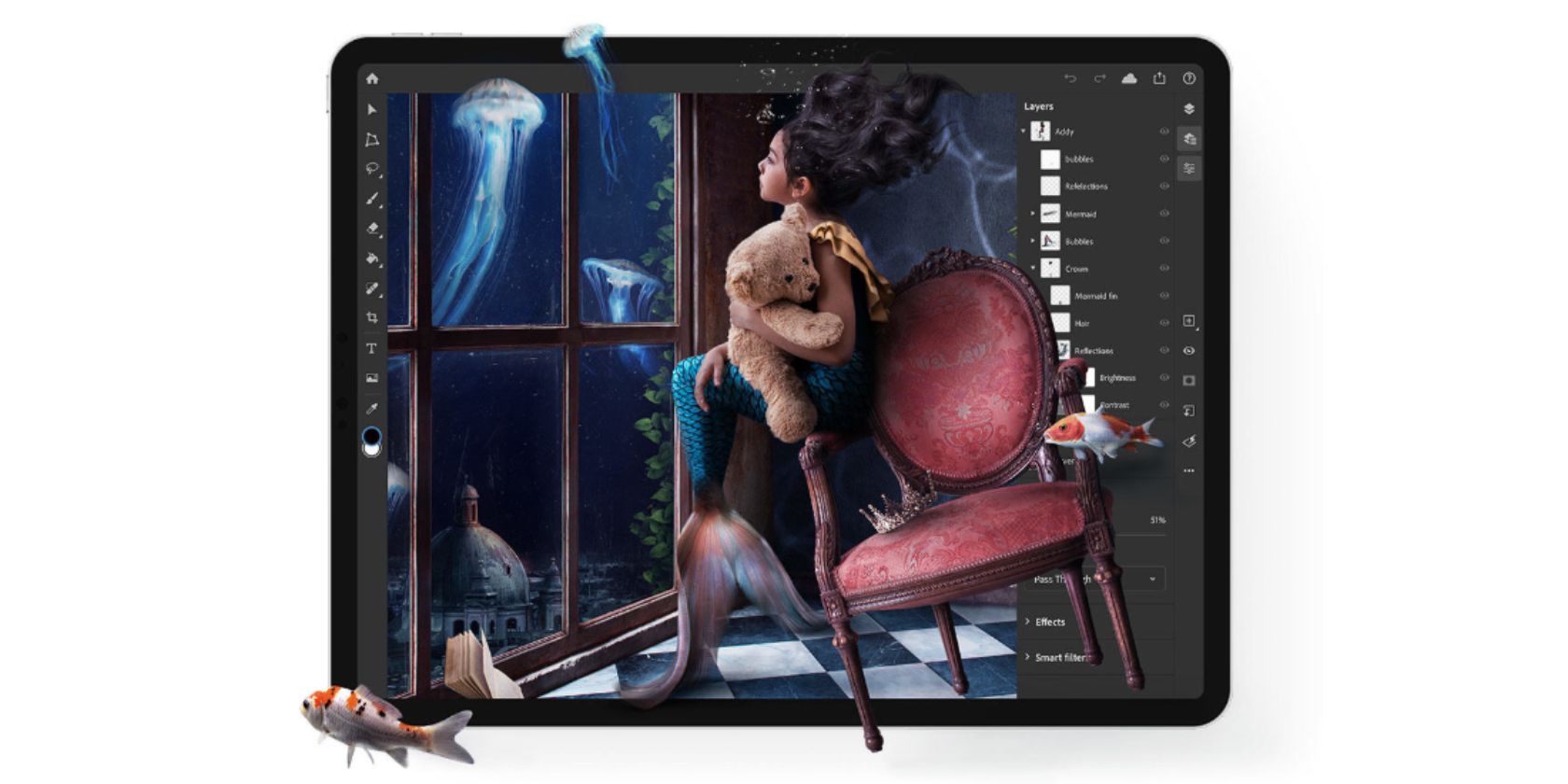
At launch, Photoshop for iPad is “focused on compositing, basic retouching, and masking, common tasks and workflows that we know will be useful for most Photoshop users.” The new cloud documents system lets you “open and edit your PSDs anytime, anywhere.”

Photoshop for iPad is “built using the same code base as Photoshop on the desktop.” However, it has been “optimized for pencil and touch on a smaller screen.” The toolbar is on the left, layers are on the right, and everything is automatically saved to the cloud.

This is clearly just a starting point, with Adobe promising to “add more capabilities and workflows as we learn more about how customers use Photoshop on a mobile device.” Features such as rotate canvas, select subject, and refine edge are already on their way.

Download: Adobe Photoshop on iPadOS

Desktop Users Need Photoshop Keyboard Shortcuts

Photoshop for iPad should prove useful for everyone who uses an iPad regularly. And if you already have a Creative Cloud subscription it’s a no-brainer. If you’re more likely to use photoshop on desktop, check out our Adobe Photoshop keyboard shortcuts 101.

Read the full article: You Can Now Download Adobe Photoshop for iPad


Read Full Article

7 Essential LinkedIn Profile Tips to Guarantee Success


linkedin-profile-tips

Professionals turn to LinkedIn to make connections and search for new opportunities. Knowing how to make your profile stand out is the key to getting noticed. So, if you’re struggling to get noticed, these LinkedIn profile tips should help you attract recruiters.

1. Make Your Headline Specific

With millions of people on LinkedIn, you need to stand out from the crowd. So the first of our LinkedIn profile tips concerns headlines. When you show up in a search, a recruiter will immediately see your headline underneath your name. It’s the sole deciding factor in whether someone will click on you.

If you’re a writer, you won’t want your headline to say: “Freelance Writer.” That’s way too vague. Instead, go with a more detailed headline that clearly states what you do. Use a descriptive headline like “SEO Marketing Copywriter with experience increasing web traffic” would make a recruiter more likely to click on your profile.

2. Get LinkedIn Recommendations

LinkedIn recommendations are a great way to show that you’re a reliable worker. If you don’t know what recommendations are, they’re a positive remark that a coworker, boss, or client writes about you. It gets displayed on your profile for other companies and potential clients to see.

To get a LinkedIn recommendation, you have to request it. It’s best to request recommendations from your current boss, or from a previous manager who you got along well with.

When sending a recommendation request, provide context for the request. Let your manager know that you want to keep your profile updated, and you’d like them to leave feedback on a recent accomplishment or project. Make it your goal to have at least three recommendations on your LinkedIn profile.

3. Join Groups Related to Your Field

One of the best ways to connect with other professionals in your field is through LinkedIn Groups. Joining a Group gives you access to experts and even potential clients.

To search for a Group, head to the LinkedIn search bar. Enter the term you’d like to use to find a Group, and the site will redirect you to the search results page. You’ll want to filter these results by Groups only, so head to the dropdown menu that says More and then click Groups.

LinkedIn Groups Search Results

Once you join, you can get advice from other experts, find new connections, and establish your expertise in your field. In addition to joining Groups, you should also follow these popular companies on LinkedIn to stay updated on some of the biggest influencers.

4. Tell a Story

Your LinkedIn profile shouldn’t look bland. Simply listing your experience and a brief description isn’t enough. LinkedIn leaves lots of room for other details about yourself, and you should definitely take advantage of that.

First, take a look at your profile summary. Use your summary to let your personality and character shine through. Include your biggest achievement, and don’t hesitate to add some creativity.

You should also fill in your list of accomplishments, skills, and try to get some endorsements. Make sure to continually add to these sections as you learn new skills or accomplish big feats. You could also use LinkedIn Skill Assessments to showcase your abilities.

Have any volunteer experience or know another language? Add those in too. The goal is to make your profile as thorough as possible. That way, a recruiter can really get to know you and your story.

5. Add Publications, Videos, and Pictures

On LinkedIn, you aren’t limited to expressing yourself via text. You can add presentations, videos, and pictures to your profile as well. Visual media attracts recruiters to your profile and makes it more memorable. Opt to include an introduction video or a quick clip of your latest presentation.

LinkedIn Publications List Example

You can also choose to link to articles, academic journals, or blog posts that you’ve written. Not only does this help increase the views on those articles, but it also helps prove your proficiency. If you don’t have any articles to link to, you can always write and share a helpful article on LinkedIn itself.

6. Use the Right Keywords

Keywords are the words or phrases that recruiters use to search for potential employees. To find the right keywords for your profile, pretend you’re a recruiter that’s searching for someone in your field. What words would you use to find someone that does what you do?

LinkedIn's keywords your searchers used view

Let’s say you’re a graphic designer who specializes in creating product labels. For this example, you’ll want to include “graphic designer” and “product labeling specialist” as your keywords. You can find even more relevant keywords by searching for a position you would qualify for, and adding some of the words that these posts incorporate.

Sprinkling keywords throughout your headline, projects, publications, summary, and positions can help boost your placement in search results. Just remember not to include too many keywords in your LinkedIn profile. An excessive number of keywords is obvious to recruiters and sounds very unnatural.

After you start adding keywords, you should slowly start getting more views on your profile. You can see who has viewed your LinkedIn profile to find out if the right people are clicking on you.

7. Stay Active on LinkedIn

By liking, sharing, and commenting on posts, you’ll get your name out there even more. Other LinkedIn users will see that you commented on their post, which can spark a new conversation and a connection.

LinkedIn Post Activity

You can also improve your visibility by frequently making posts. These posts obviously have to remain related to your profession—posts about promotions, recent publications, and sharing relevant articles are most appropriate.

LinkedIn Profile Tips to Help You Get Noticed

LinkedIn is more than just a social media site—it’s a method of recruitment. By following the above steps, you’ll see an increased number of potential clients and recruiters flocking to your LinkedIn profile. It’s a great way to start your networking journey.

Do you want to take your LinkedIn use to the next level? Here are some reasons why LinkedIn Premium is worth paying for.

Read the full article: 7 Essential LinkedIn Profile Tips to Guarantee Success


Read Full Article

6 Apps for a Virtual Makeover


Way back in the day, if you wanted a makeover, you usually had to go to a brick-and-mortar store and visit a cosmetic booth. In the early 2010s, clunky websites where you could upload a picture of yourself to get a free virtual makeover appeared. They were fun, but not particularly high-quality.

These days, however, trying out new looks is easy. It’s made even simpler by the dozens upon dozens of selfie tools for Android and iOS.

Here are several amazing apps that will give you a virtual makeover.

1. Hairstyle Makeover

Years ago, we covered an early makeover site called taaz.com. Taaz was a brilliant online virtual makeover site that let you add a number of enhancements to uploaded profile photos with one click of the mouse.

The ease of uploading photos made it an attractive tool, and the website was free to use: all it required was registration. Unfortunately, Taaz is no longer available, but similar apps have arisen in its place. One of those apps is Hairstyle Makeover.

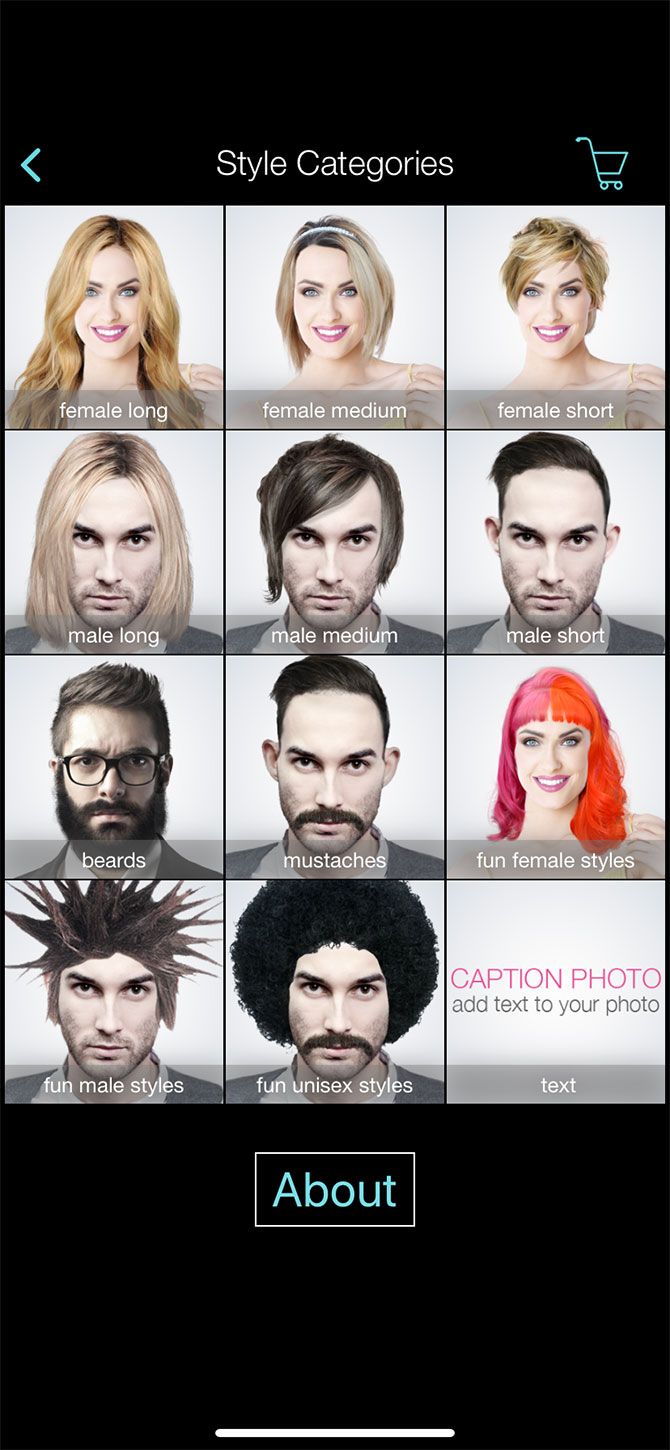
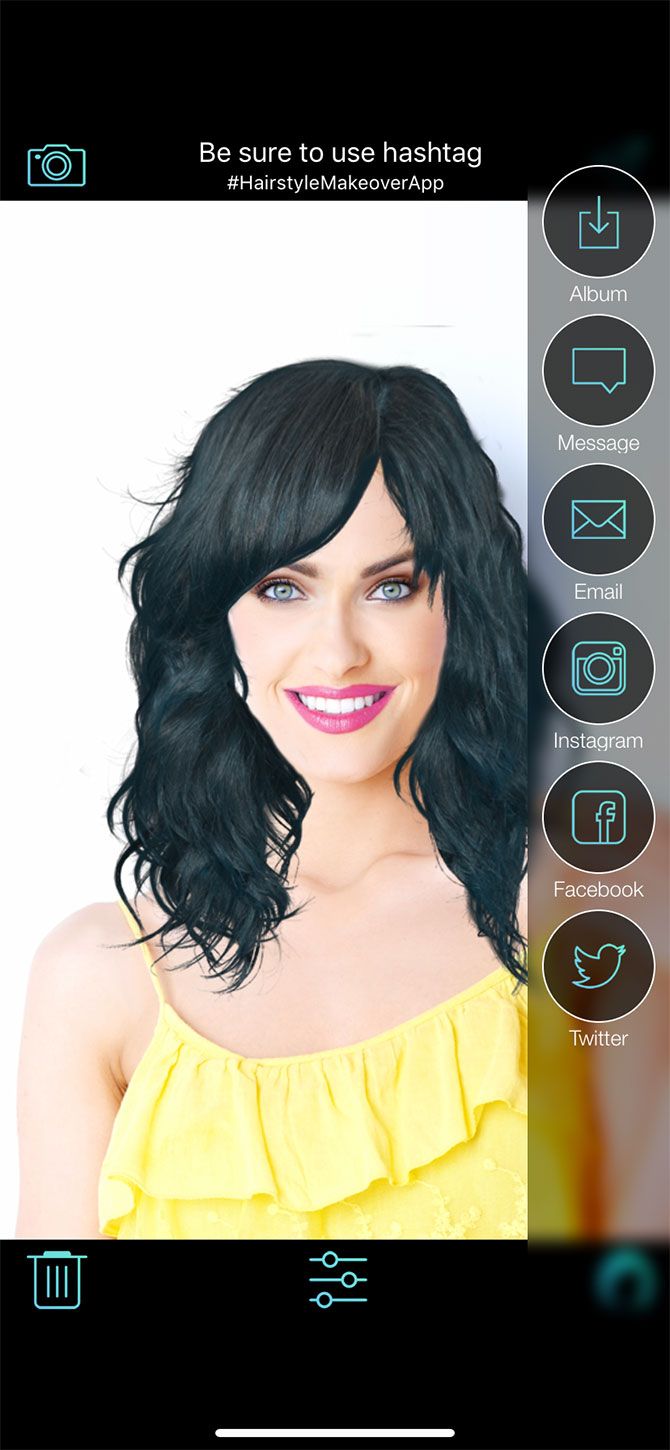
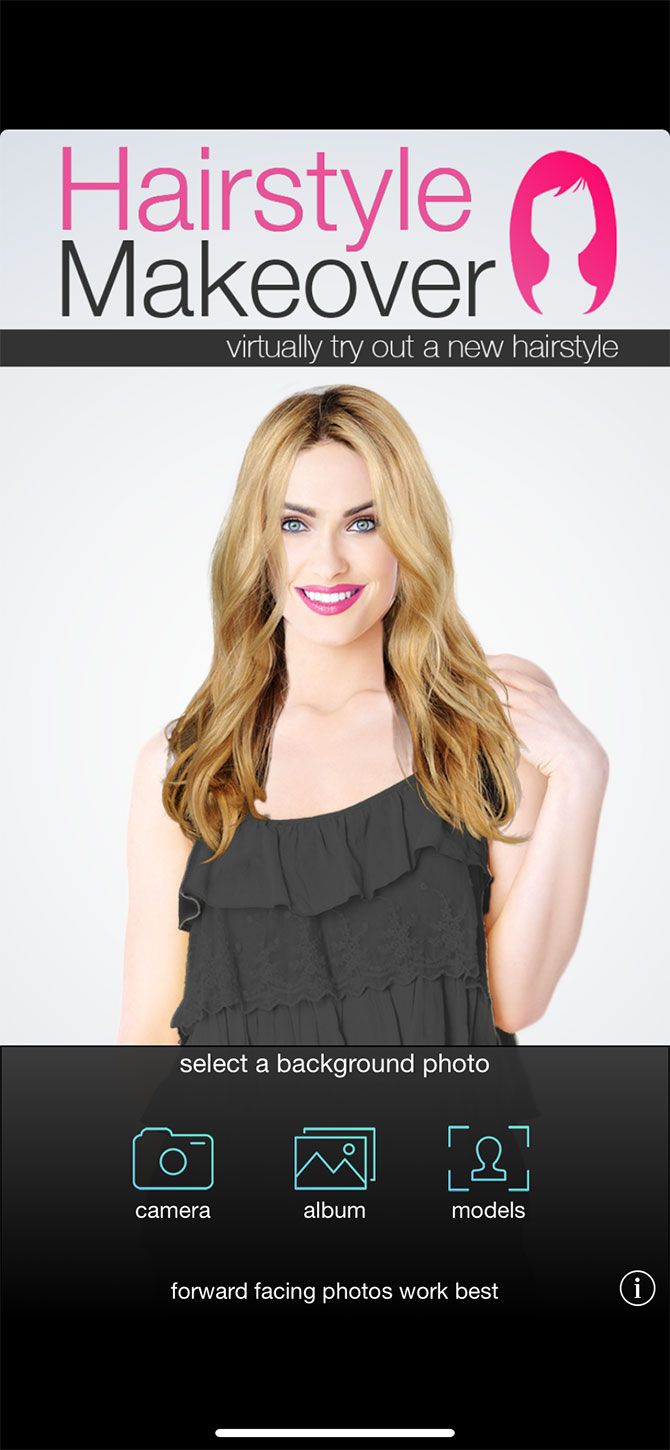
Hairstyle Makeover is a free virtual makeover app that allows you to try on new hairstyles. You can test out these hairstyles with one of the in-app models, or try out a new look on a photo of yourself.

Hairstyle Makeover is similar to Tazz’s makeover system, and it’s good for trying out basic colors and cuts. That said, the app is definitely barebones compared to a lot of the other tools available. It’s also only available for iOS.

Download: Hairstyle Makeover for iOS (Free, in-app purchases available)

2. Mary Kay Virtual Makeover

Mary Kay Virtual Makeover is an incredibly fun and fairly advanced app. It’s also one of the best virtual makeover experiences because of how useful it is.

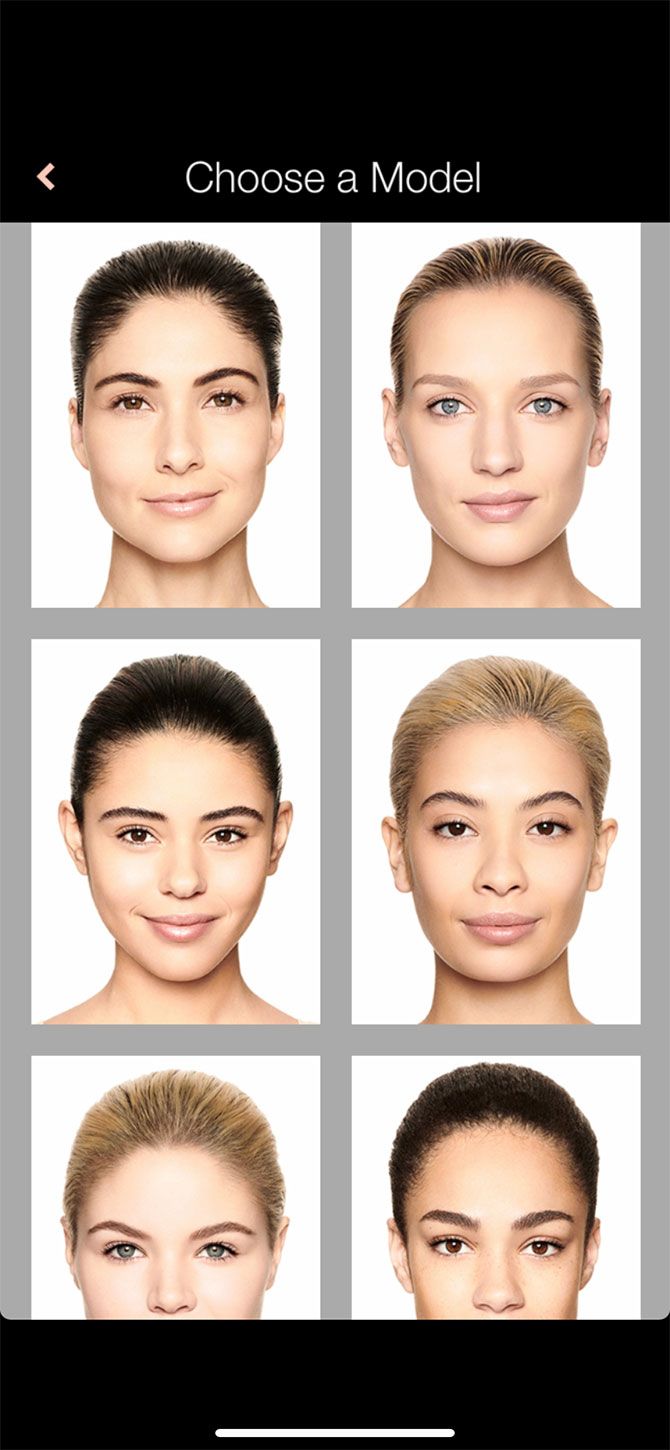
Through the app, you can try out a wide array of cosmetics using a large selection of in-app models. You can also use your own face to try out new virtual makeover hairstyles and looks.

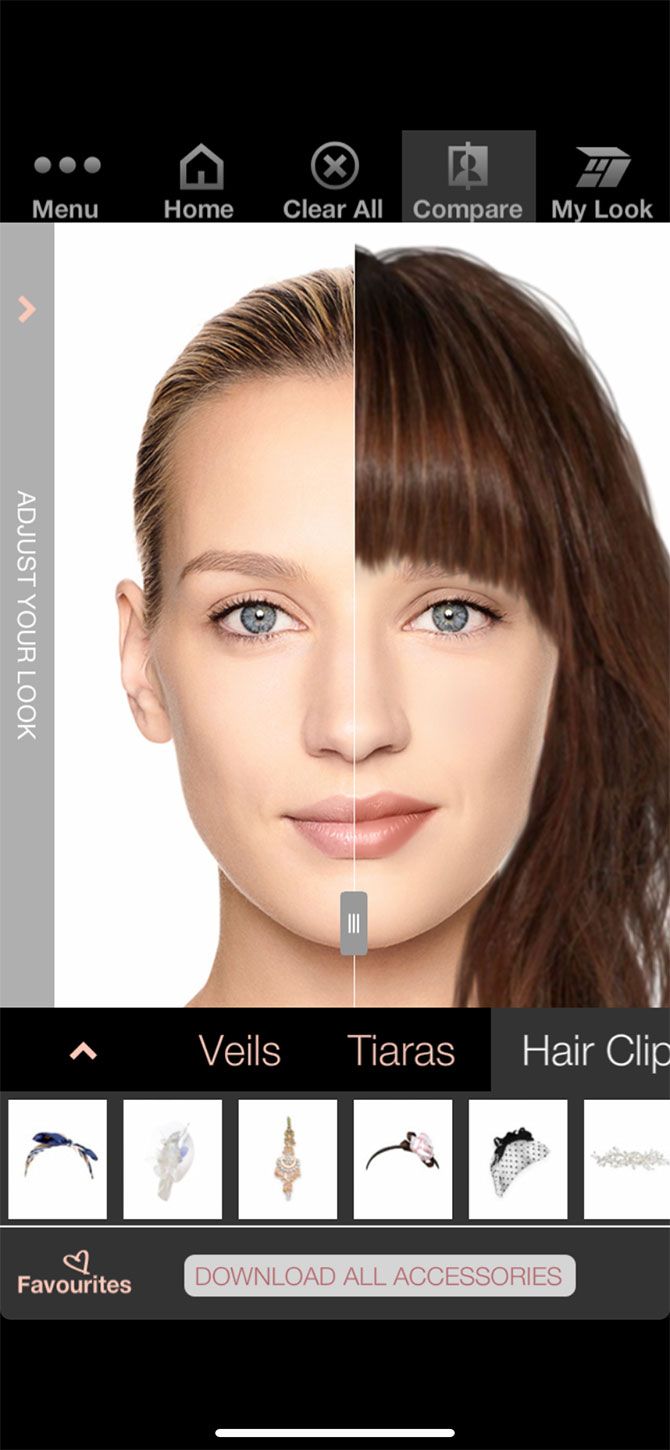
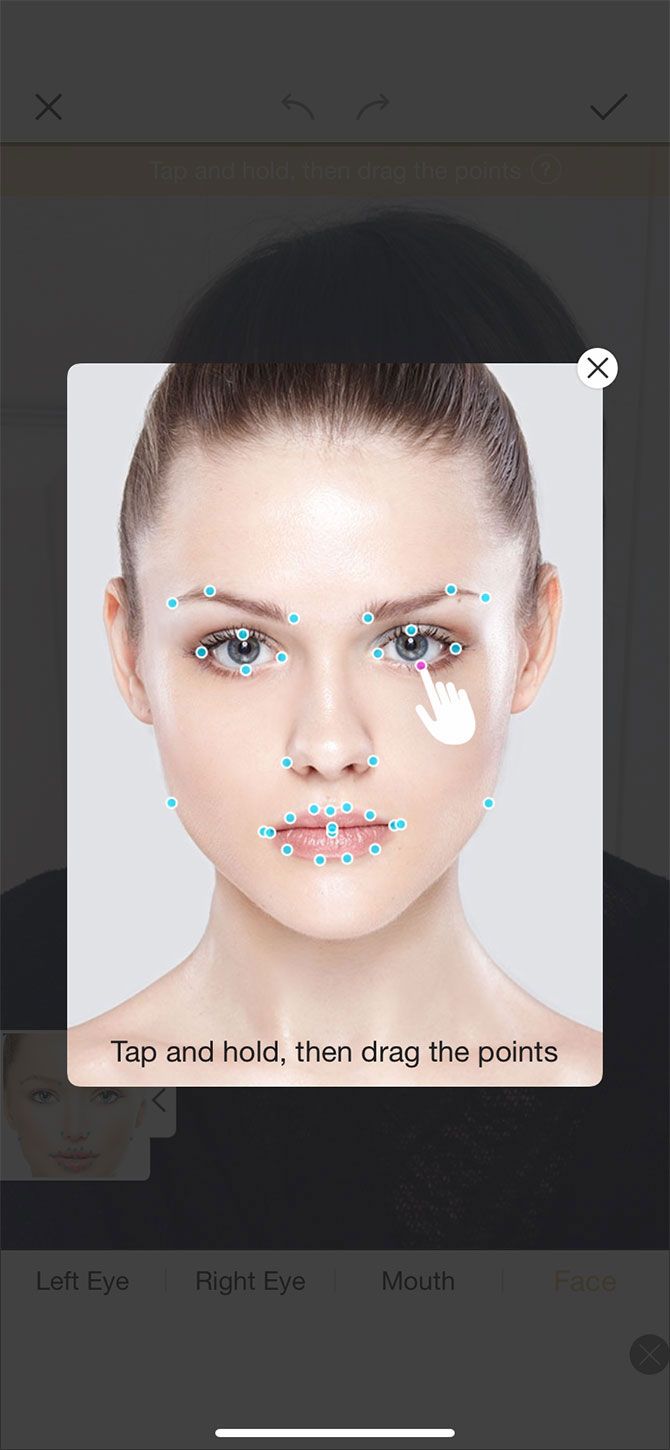
If you use your own face, Mary Kay maps out your features with reference points so it knows where to apply makeup. Then you can choose different products to try out.

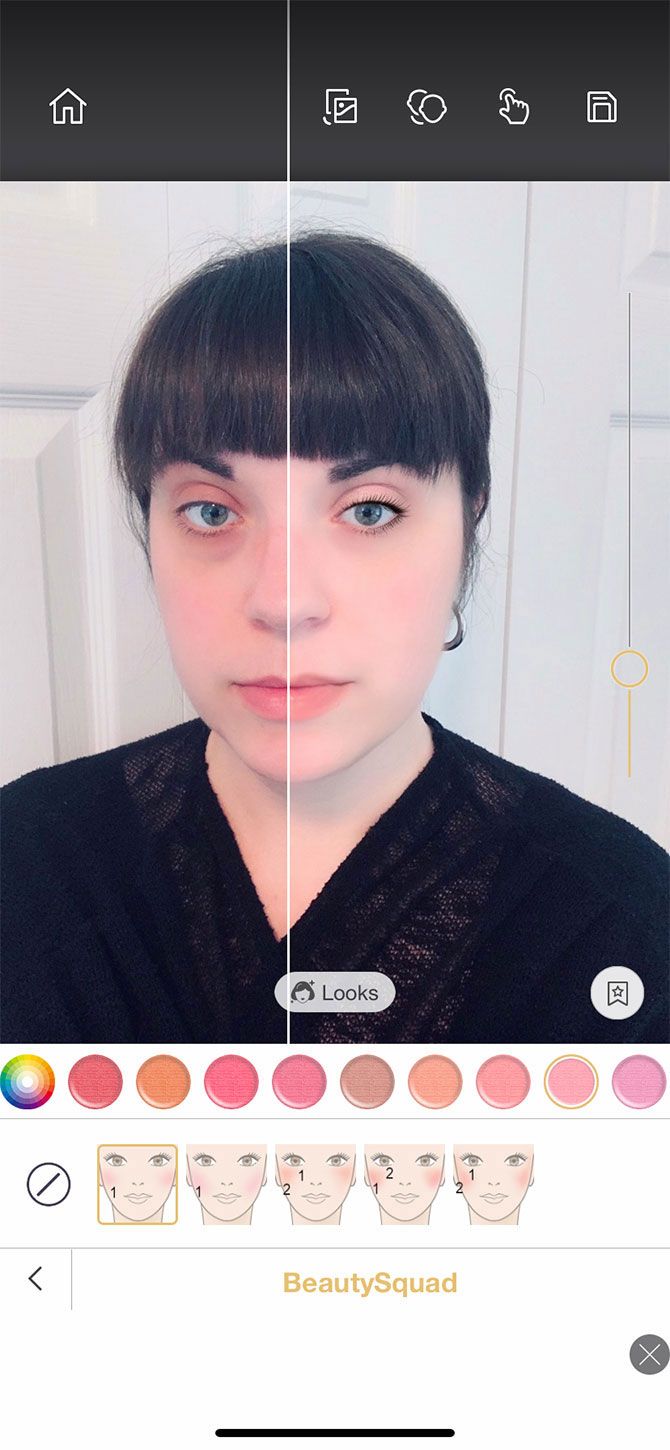
Once you’re done, you can click on the Compare button to see what your face looks like before and after your makeover. You can also tap on the My Look button, which lists all the products you’ve used, along with their price.

Download: Mary Kay Virtual Makeover for Android | iOS (Free)

3. Perfect365

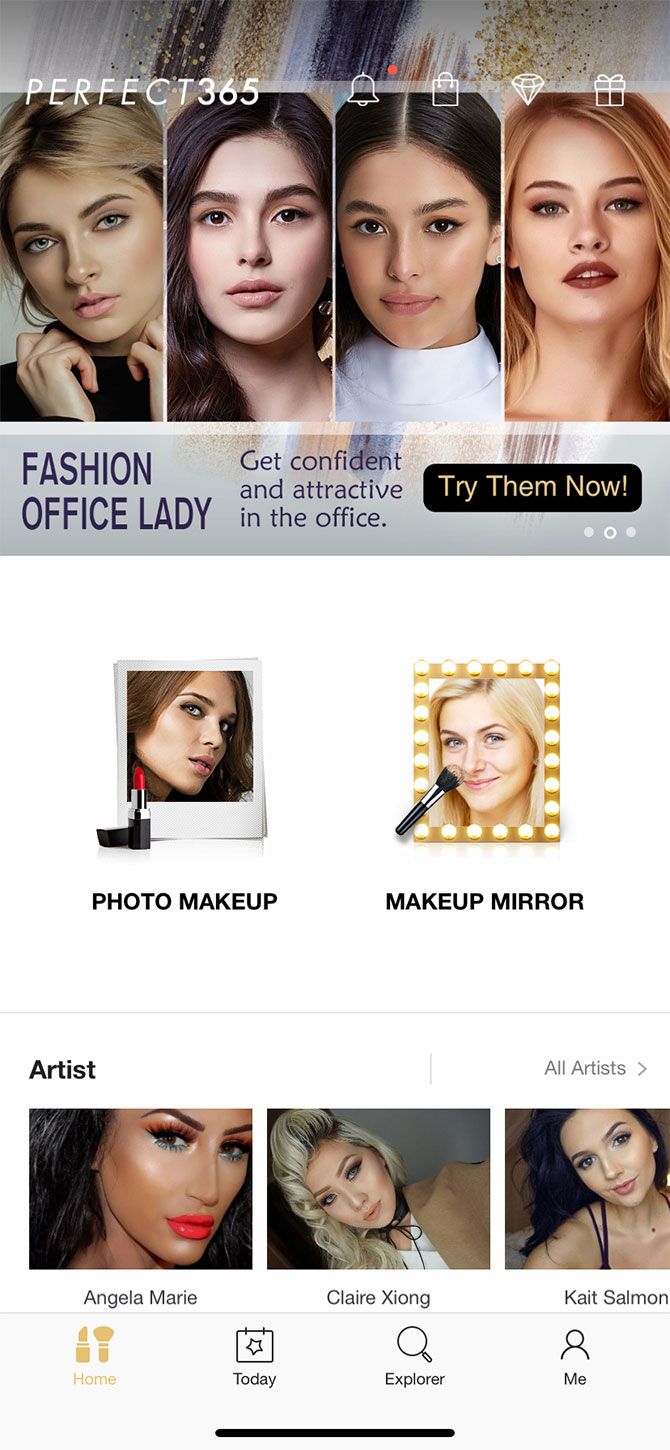
Perfect365 is one of the best virtual makeover apps you can use. After trying it out, I was incredibly impressed by its face-mapping capabilities.

Unlike the Mary Kay Virtual Makeover app—where you have to manually tell it to map out your face—Perfect365 automatically maps your features the moment you upload your photo. It does this with a shocking degree of accuracy.

If your face didn’t map correctly, Perfect365 allows you to manually readjust the points by tapping and holding. Once your face is mapped, you can choose from a selection of pre-made looks. The app also lets you design your own looks from scratch.

After you’re finished, you can tap on the screen to see your face before and after you apply the virtual makeover. There are so many different looks that you can try for free.

The only downside? You can download the edited pictures to your phone, but the photos are low-resolution. If you want to download a higher resolution, you’ll need to do one of the following:

  • Pay for the full app to save unlimited photos.
  • Get the higher resolution photos free for 60 days by completing a survey.
  • Download the image for free (one-time) by watching a video.

There’s also the option for a Perfect365 PLUS subscription, which unlocks every feature in the app and reduces ads.

Download: Perfect365 for Android | iOS (Free, in-app purchases available)

4. YouCam Makeup

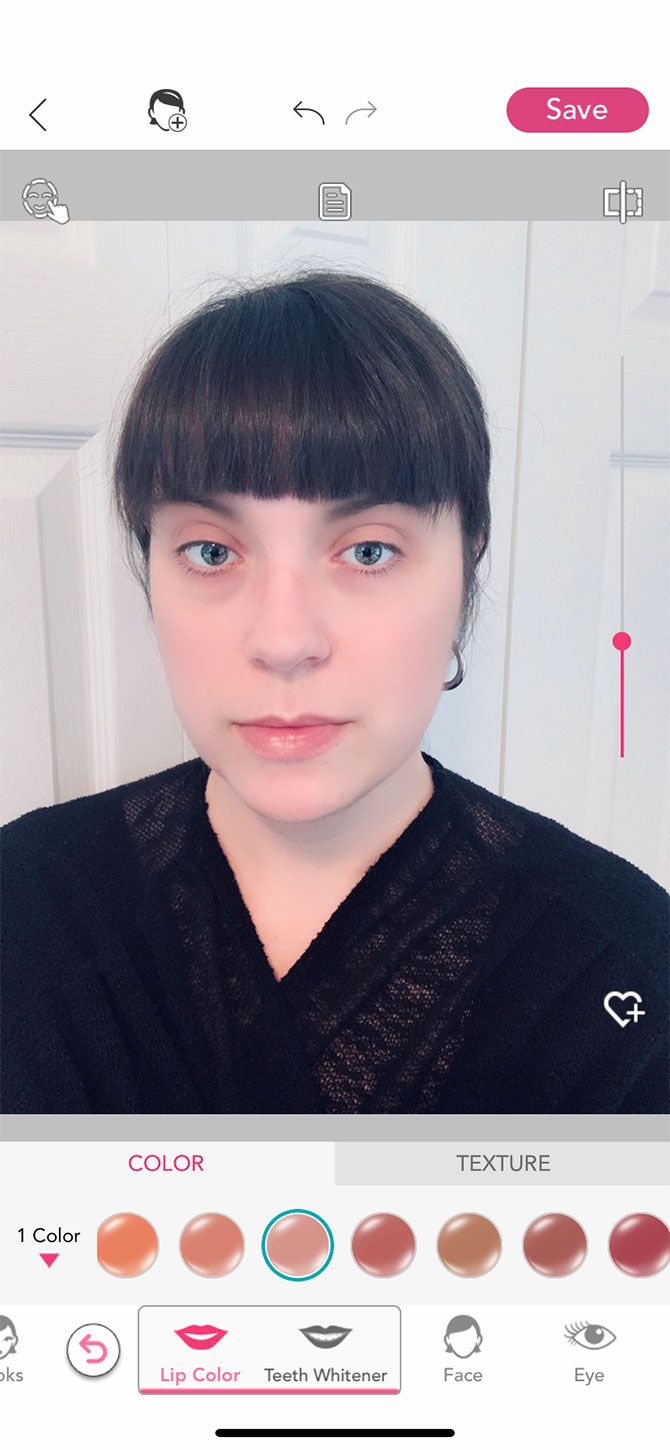
YouCam Makeup is a virtual makeover app that’s so similar to Perfect365 that at first we thought it was a clone. Like Perfect365, YouCam Makeup is incredibly advanced when it comes to its face-mapping. It’s also very intuitive and easy to use.

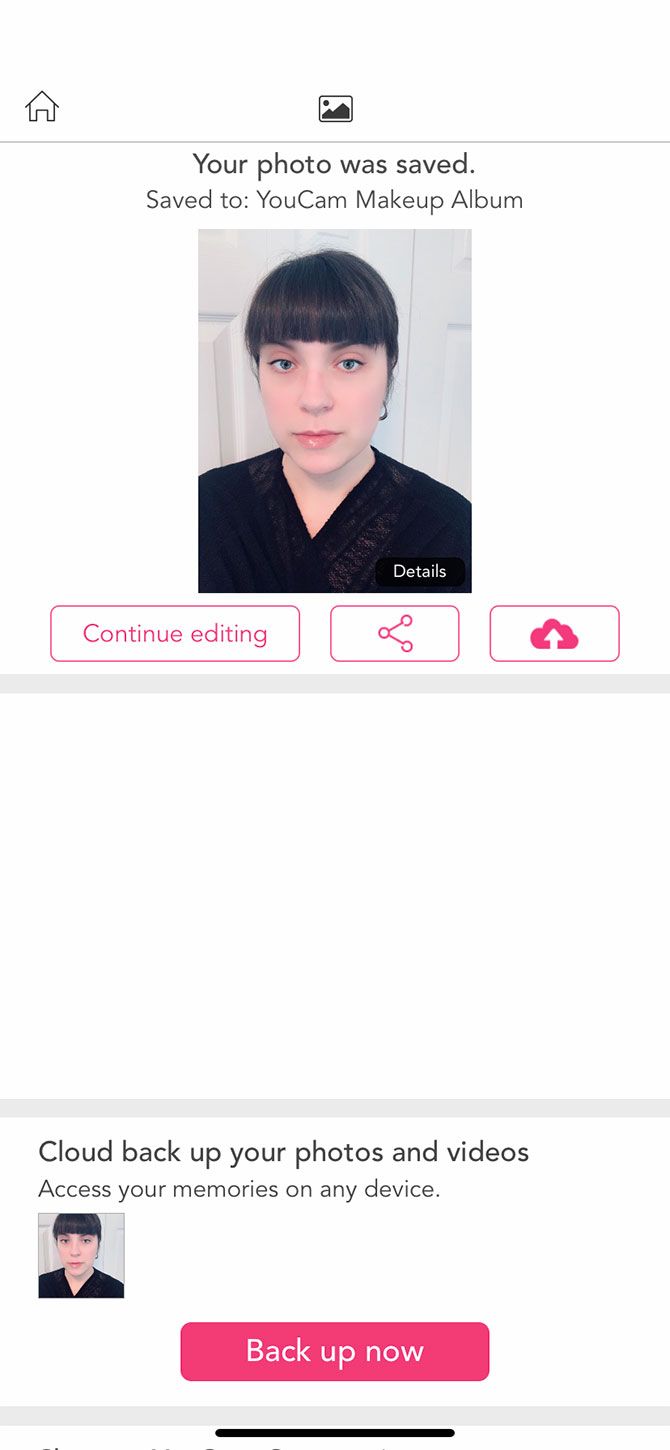
After you upload your photo, you can choose from a list of pre-built looks, or build your own look step-by-step. You can also download your photos, but if you want to back up your photos to your phone, you’ll need to sign up for a full account using your email address or Facebook.

There’s also a premium version of the app which unlocks all features using a subscription-based model. However, there are so many free looks and tools that you can easily use the app without it.

Download: YouCam Makeup for Android | iOS (Free, in-app purchases available)

5. Facetune2

Facetune2 is one of the best-known virtual makeover apps. It has some excellent photo-retouching capabilities, and it’s less devoted to virtual makeovers and more to overall photo editing, specifically selfies.

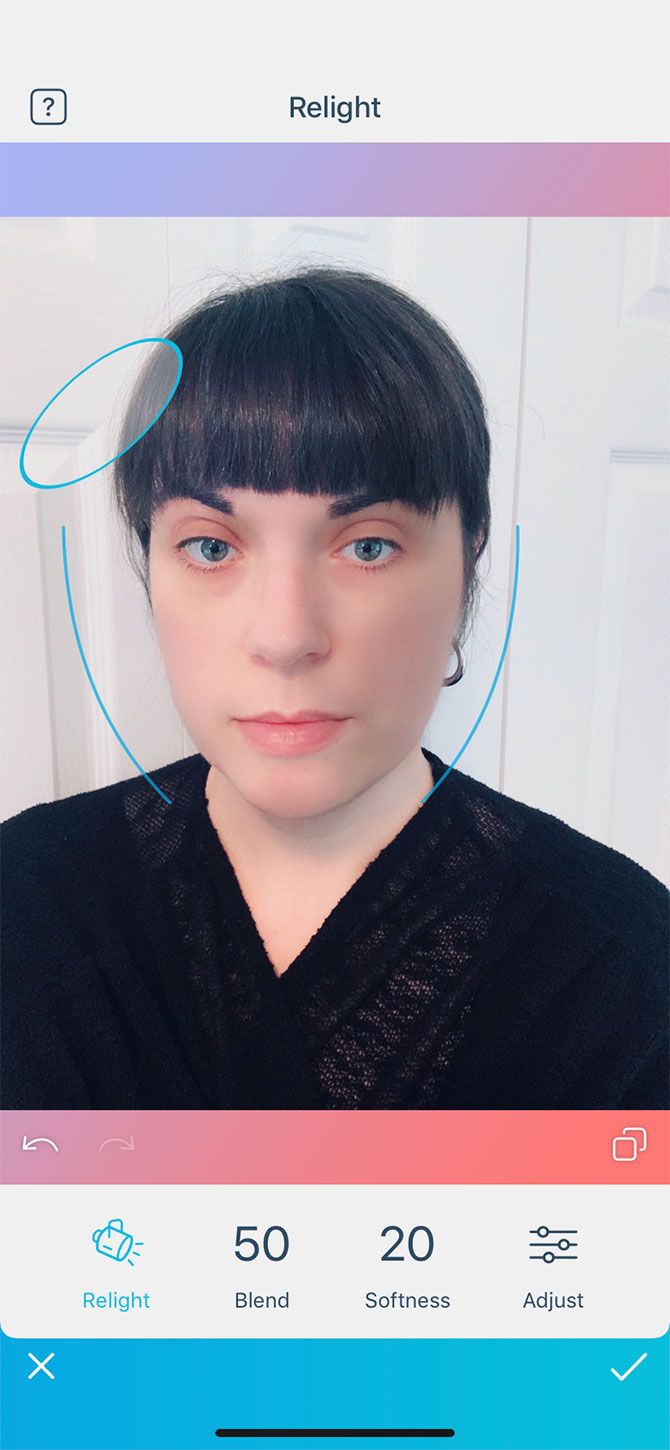
Facetune2 has an awesome Relight feature that allows you to adjust the overall angle of light in your photo. Its face-mapping abilities are also great.

While some of Facetune2’s features are free, the app heavily pushes you towards its subscription by advertising its VIP features each time you log in. However, you can bypass these ads by tapping the X in the top-left corner of your screen.

Download: Facetune2 for Android | iOS (Free, in-app purchases available)

6. Camera360

A final choice is the free virtual makeover app Camera360, which is a personal favorite of mine.

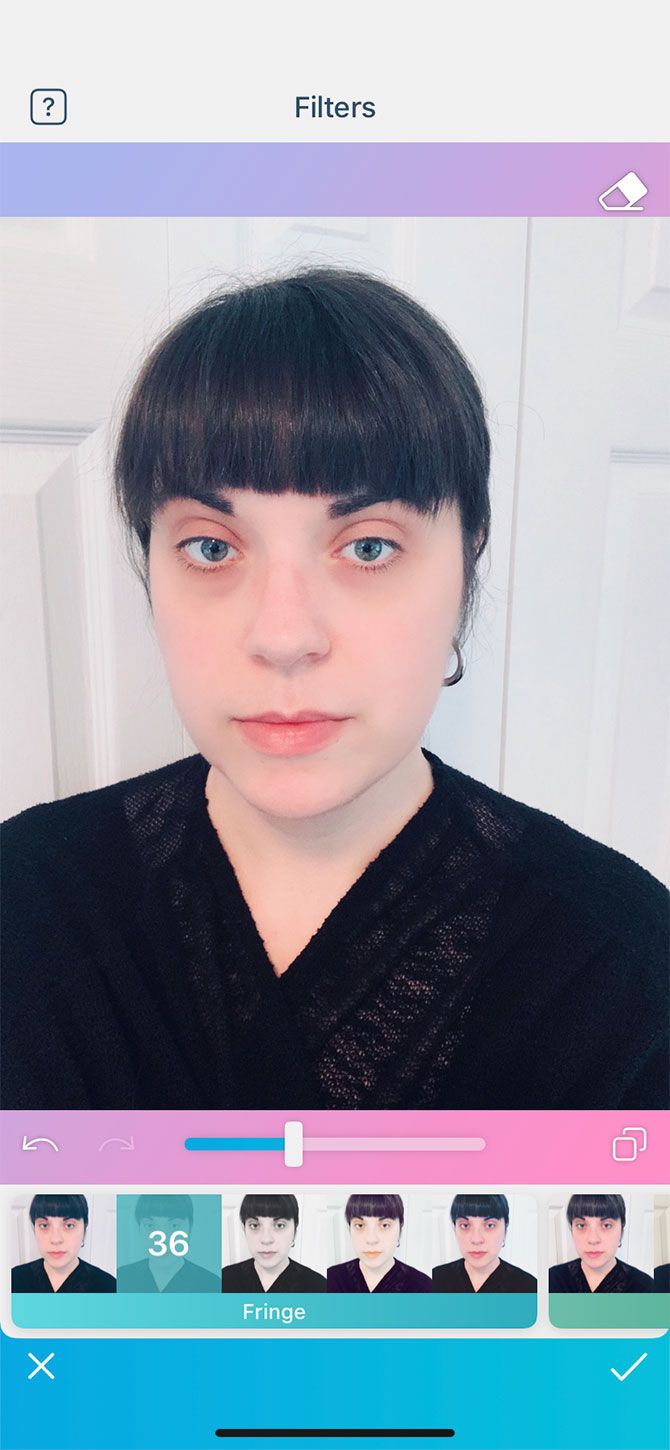
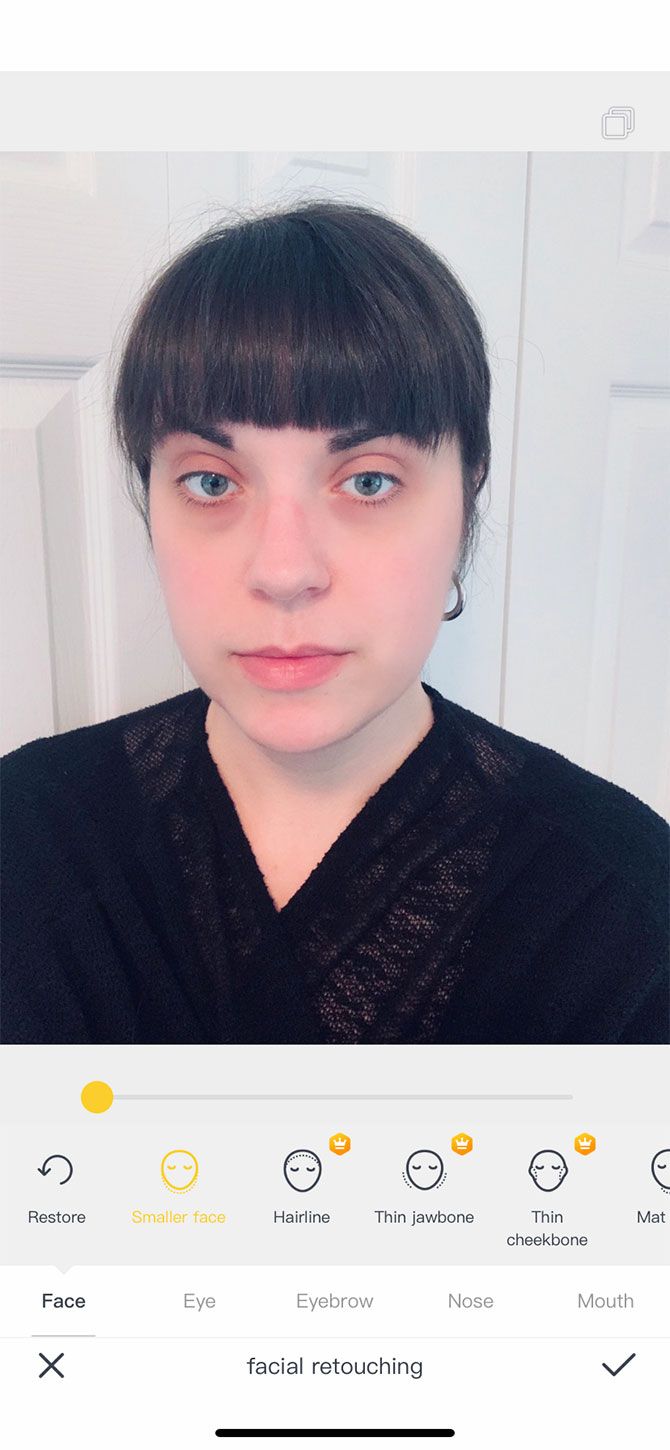
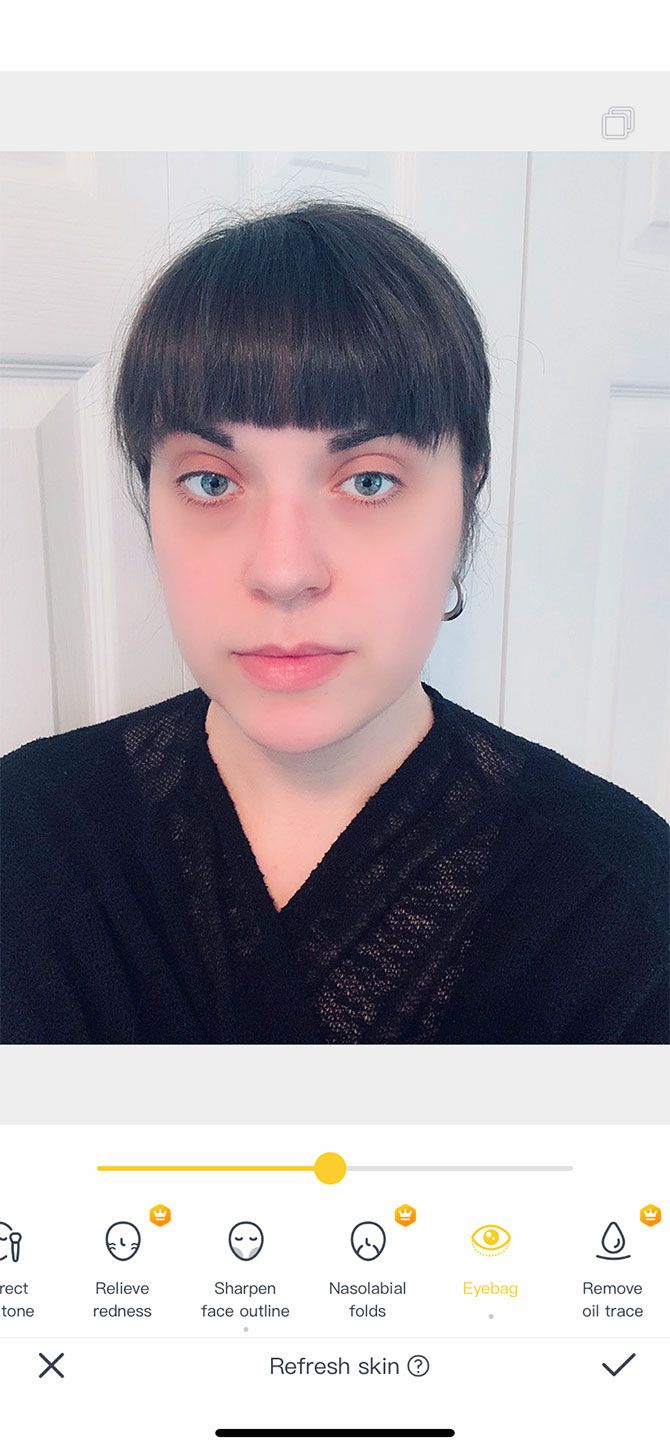
Camera360 has really advanced photo-editing capabilities that work great for selfies. We love it for its fine-tuned ability to accurately retouch blemishes without going overboard or making your face look unnatural. It’s also great for its wide array of filters.

Camera360 is a really solid and reliable app if you want to make your selfies look beautiful. While it does offer a premium upgrade, I’ve used the free version for many years and have never run into any issues or noticeable limitations.

Download: Camera360 for Android | iOS (Free, in-app purchases available)

Make Your Face Look Its Best With a Virtual Makeover

There are a lot of apps to choose from for free virtual makeovers. Editing your photos has become commonplace, and in fact it’s so common that it’s almost expected nowadays. Everyone does it, and decorating your own face can be kind of fun.

Are you looking for other ways to create the perfect profile picture? Considering purchased one of the best ring lights for selfies and videos.

Read the full article: 6 Apps for a Virtual Makeover


Read Full Article
The 10 Best Budget Gaming Headsets for Under $25


gaming-headphones

If you play games often, there are several reasons you may want to purchase a headset. They reduce noise, come with a microphone for online gaming, and create a more immersive gaming environment.

There are plenty of high-end headsets available, but if you’re on a tight budget, don’t despair. Here are the best gaming headsets for under $25.

1. Logitech USB Headset H390

The Logitech USB Headset H390 has features like a noise-cancelling microphone to make your voice sound crisper and clearer. The mic can be swiveled down when you want to use it and up when you don’t. There are also inline volume and mute controls. This means you can quickly turn the sound off if you need to have a conversation with someone in the room.

This headset is a popular choice for people who want an affordable option for work in addition to gaming. USB support makes it compatible with Windows, macOS, and ChromeOS as well.

2. Beexcellent Gaming Headset GM-1

Beexcellent Gaming Headset GM-1 Beexcellent Gaming Headset GM-1 Buy Now On Amazon $17.99

The Beexcellent Gaming Headset GM-1 has a great gamer look without breaking the bank, and comes in either blue or orange. It has a lightweight design, so it’s comfortable to wear for long periods. This is helped by padding on the headband and earcups too. There’s a noise-cancelling microphone that rotates 120 degrees as well.

The headphones can be bent, twisted, and stretched, and they should retain their shape. They have a standard 3.5 mm audio input, so are compatible with a huge range of devices. And they have funky LED lighting to add to the gamer style.

3. Mpow USB Headset (All-Platform Edition)

Mpow USB Headset (All-Platform Edition) Mpow USB Headset (All-Platform Edition) Buy Now On Amazon $21.99

The Mpow USB Headset (All-Platform Edition) is a simple headset with an understated look that performs all the basic functions you need. It has a unidirectional microphone and an inline control for turning the mic and the speaker on and off, as well as adjusting the volume up and down.

The headset supports USB input, or you can use the inline control to plug in a 3.5 mm jack. It’s compatible with a wide range of devices, including Windows, macOS, Android, and tablets. It comes in black, blue, pink, and white.

4. Mpow EG3 Pro Gaming Headset

Mpow EG3 Pro Gaming Headset Mpow EG3 Pro Gaming Headset Buy Now On Amazon $22.99

Another great choice from Mpow is the EG3 Pro Gaming Headset, which has a more traditional gaming-style look. The chunky headset comes in gold, black, or purple metallic finishes. It is constructed from an aluminum frame for low weight and high strength.

There’s a microphone that reduces background noise when you speak and inline audio controls to adjust the volume and turn the microphone on or off. The headset is compatible with Windows computers, PlayStation 4, Xbox One, and Nintendo Switch as well as mobile devices.

5. Sades SA902

Sades SA902 Sades SA902 Buy Now On Amazon $22.99

The Sades SA902 has brightly colored red elements which stand out against the black, and it has shining LEDs to add to the bling factor. It also offers comfortable ear cushions that reduce outside noise and a padded headband.

The manufacturer says it delivers 7.1 virtual surround sound with separately adjustable levels so you can tweak the sound profile to your liking. This product is compatible with desktop or laptop PCs and Macs. Note, however, that it won’t work with consoles like the PlayStation 4 or the Xbox One.

6. BENGOO V-4

BENGOO V-4 BENGOO V-4 Buy Now On Amazon $15.89

The BENGOO V-4 is a uniquely styled headset with a chunky, metal look and unusual pentagon ear cups. These offer a heavy bass sound for people who also want to listen to music. And the noise isolating and adjustable microphone allows easy chatting with fellow players.

The USB cable comes with inline controls to adjust the volume or to mute the microphone, and at 49 inches long, it allows you can to away from your desk and still stay connected. The impressive compatibility of the headset includes support for PlayStation 4, Xbox One, PC, Nintendo 3DS, PSP, iMac, mobiles, tablets, and Windows PCs.

7. NUBWO Wired Gaming Headphones

NUBWO Wired Gaming Headphones NUBWO Wired Gaming Headphones Buy Now On Amazon $16.99

The NUBWO Wired Gaming Headphones looks like a much more expensive headset than it is. It has features like a lightweight band with fabric support, logos inlaid into the ear cups, and a directional microphone, which can be adjusted as required. It has a noise-reduction chip to help make your voice clearer and lessen ambient noise.

The double metal suspension head beam means the headset can be twisted and distorted and still return to its original shape. And the included PC extension cable means it is compatible with PCs, laptops, and Macs, as well as Xbox One, PlayStation 4, Nintendo Switch, PSP, and mobiles or tablets.

8. RUNMUS Gaming Headset

RUNMUS Gaming Headset RUNMUS Gaming Headset Buy Now On Amazon $25.85

The RUNMUS Gaming Headset comes in three color options; black with blue, black with red, or a funky camo green. It is designed to be comfortable with a padded headband and soft memory foam ear cups. The use of plastics means it is also lightweight, so it shouldn’t cause discomfort over long gaming sessions.

The noise-cancelling microphone enables clear communication and can be adjusted as needed. There’s also anti-static technology to prevent annoying static sounds. The headset is compatible with PlayStation 4, PSP, Xbox One, Nintendo Switch, Windows PC, Mac, iOS devices, and Android devices.

9. Creative 70GH032000000

Creative 70GH032000000 Creative 70GH032000000 Buy Now On Amazon $29.45

The Creative 70GH032000000 is an affordable option from well-known brand Creative. It has a detachable noise-cancelling microphone, so you can remove it when you aren’t using it. The headset also comes with precision-tuned drivers for a high-quality sound experience.

There’s an inline control available for adjusting the volume or muting the microphone. The headset is well padded and lightweight, and the 3.5mm audio input means it can be used with a wide range of devices.

10. SENICC 3.5mm Stereo Headset

SENICC 3.5mm Stereo Headset SENICC 3.5mm Stereo Headset Buy Now On Amazon $12.79

The slick SENICC 3.5mm Stereo Headset is very affordable and has essentials like a noise-reducing microphone, comfortable headband, and soft earcups. The microphone can be rotated by up to 120 degrees, and the large earcups should block out some background noise.

The headset’s real strength is in its compatibility, as it supports Windows and Mac computers and laptops in addition to PlayStation 4, Xbox One, PSP, mobiles, and tablets. To use the headphone and microphone features simultaneously on a PC, you can use the included splitter cable.

The Best Budget Gaming Headset for You

These headsets show that you don’t have to spend a lot to get a great audio experience when gaming. However, if you are willing to spend a bit more, then you can get features like Bluetooth connectivity and higher quality sound.

If it’s a wireless experience you’re after, check out the best wireless gaming headsets.

Read the full article: The 10 Best Budget Gaming Headsets for Under $25


Read Full Article