Personalization technology can lead to better experiences as it allows apps to customize their content for each individual user. But it can also chip away at user privacy. A company called Canopy wants to change that. It has developed a personalization engine that works without requiring users to log in or even provide an email. Instead, it uses a combination of on-device machine learning and differential privacy to offer a personalized experience to an app’s users. Now it’s demonstrating how this works with the launch of the news reader app, Tonic.
The new app is designed to be completely private, while also learning what you like over time, in order to offer a customized experience. But unlike other personalization engines, all the raw interaction and behavioral data stays on your own device. That means the company itself never see it, nor does any content provider or partner it works with, it says.
What we instead send over an encrypted connection to our server is a differentially private version of your personal interaction and behavior model. The local model of you that goes to Canopy never has a direct connection to the things you’ve interacted with, but instead represents an aggregate set of preferences of people like you. It’s a crucial difference for our approach: even in the worst case of the encryption failing, or our servers being hacked, no one could ever do anything with the private models because they do not represent any individual.
Another big differentiator is that Tonic puts you in control over your own personalization settings. This is not typical. If you’ve ever used an app powered by personalization technology, there’s probably been a point where you were recommended a song, video, or a news article, for example, that seemed to be entirely wrong and not representative of something you’d actually like. But you may have been at a loss as to why it was recommended, because most apps don’t detail this sort of information.
Tonic, on the other hand, lets you view, change and even reset your personalization settings whenever you want.
While Tonic is mainly meant to demonstrate of its engine in action — Canopy’s larger goal is to license the technology — the app itself has several other features that make it worth a look.
The company employs a human editorial team to help select the app’s news content, to ensure that it’s not offering a bunch of noise, like clickbait or “hate-reads.” It also avoids breaking news and “hot takes,” it says, as it’s not designed to be an app you use to track the latest news with urgency.
Instead, Tonic pulls from a diversity of sources with its core focus on bringing you a curated, personalized selection of daily reads to inform and inspire. And in the spirit of digital well-being, it’s a finite list of articles — not an endless news feed.
“We made Tonic because we were tired of having to give up our digital selves to get great recommendations, and because we wanted to build an alternative to endless feeds optimized for maximum engagement, breaking news, and outrage,” the company explains in its announcement of the app’s launch.
The technology’s arrival comes at a time when big tech is being investigated for carelessness with user data, and there’s increased attention on user privacy in general. Apple, for example, has made its respect for user privacy a key selling point for its hardware and software.
The New York-based startup was founded by Brian Whitman, formerly the founder of The Echo Nest and a former principal scientist at Spotify. The team also includes several ex-Spotify, Instagram, Google and New York Times execs. It’s seed-funded by Matrix Partners, and other investors from Spotify, WeWork, Splice, MIT Media Lab, Keybase, and more to the tune of $4.5 million dollars.
In a mesmerizing performance, multi-instrumentalist and singer-songwriter Richard Bona weaves beautiful vocal loops into a mesh of sound, powered by his "magic voodoo machine."
We need to track the world's water like we track the weather | Sonaar Luthra
We need a global weather service for water, says entrepreneur and TED Fellow Sonaar Luthra. In a talk about environmental accountability, Luthra shows how we could forecast water shortages and risks with a global data collection effort -- just like we monitor the movement of storms -- and better listen to what the earth is telling us.
Google announced today that it was investing 3 billion euro (approximately $3.3 billion USD) to expand its data center presence in Europe. What’s more, the company pledged the data centers would be environmentally friendly.
This new investment is in addition to the $7 billion the company has invested since 2007 in the EU, but today’s announcement was focused on Google’s commitment to building data centers running on clean energy, as much as the data centers themselves.
In a blog post announcing the new investment, CEO Sundar Pichai, made it clear that the company was focusing on running these data centers on carbon-free fuels, pointing out that he was in Finland today to discuss building sustainable economic development in conjunction with a carbon-free future with prime minister Antti Rinne.
Of the 3 billion Euros, the company plans to spend, it will invest 600 million to expand its presence in Hamina, Finland, which he wrote “serves as a model of sustainability and energy efficiency for all of our data centers.” Further, the company already announced 18 new renewable energy deals earlier this week, which encompass a total of 1,600-megawatts in the US, South America and Europe.
In the blog post, Pichai outlined how the new data center projects in Europe would include some of these previously announced projects:
Today I’m announcing that nearly half of the megawatts produced will be here in Europe, through the launch of 10 renewable energy projects. These agreements will spur the construction of more than 1 billion euros in new energy infrastructure in the EU, ranging from a new offshore wind project in Belgium, to five solar energy projects in Denmark, and two wind energy projects in Sweden. In Finland, we are committing to two new wind energy projects that will more than double our renewable energy capacity in the country, and ensure we continue to match almost all of the electricity consumption at our Finnish data center with local carbon-free sources, even as we grow our operations.
The company is also helping by investing in new skills training, so people can have the tools to be able to handle the new types of jobs these data centers and other high tech jobs will require. The company claims it has previously trained 5 million people in Europe for free in crucial digital skills, and recently opened a Google skills hub in Helsinki.
It’s obviously not a coincidence that company is making an announcement related to clean energy on Global Climate Strike Day, a day when people from around the world are walking out of schools and off their jobs to encourage world leaders and businesses to take action on the climate crisis. Google is attempting to answer the call with these announcements.
Twitter’s ongoing, and possibly Sisyphean, effort of policing and removing nefarious content disseminated on its platform is taking another step forward today. The company’s safety team has disclosed the removal of another 10,112 accounts across six countries that were found to be actively spreading misinformation and encouraging unrest in politically sensitive climates.
The accounts noted today follow the same fault lines of unrest that you will find in the news at the moment: they include more than 4,000 each in United Arab Emirates and China, over 1,000 in Equador, and 259 in Spain. The full trove is being posted for researchers and others to parse and you can find it, and the wider archive — now numbering in the millions of Tweets and with one terabyte of media — here.
Today’s removals mark nearly one year of Twitter’s efforts to identify and remove accounts that are spreading political misinformation for the purposes of changing public sentiment — something that has wide-ranging impact beyond simply being annoyed on social media, including not least democratic processes like voting in elections or referendums. Today’s list is on par with some of the other notable disclosures Twitter has made every few months in the last year, such as its first removals process last October covering some 4,500 accounts out of Russia; but they are a far cry from its biggest removal effort to date, identifying and suspending some 200,000 accounts in China aimed at sowing discord in Hong Kong this past August.
Given that, if anything, Twitter is trying to make it easier, not harder, to open accounts and start using the service, one could argue that trying to police the bad guys is a never-ending, and possibly impossible effort, since like the universe itself, Twitter just keeps expanding.
But on the other hand, it’s a necessary process, one that can help us learn about how social media is being misused (Twitter says that ‘thousands’ of researchers have accessed the data to date).
Those who are able can try to figure out ways to fix it, and we the public become smarter about spotting and passing over the bad stuff. Plus, in a climate where social networks are now getting increasingly scrutinised by governments for their role in aiding and abetting the bad actors, it also helps Twitter (and others that also identify and remove accounts, like Facebook) demonstrate that it is self-policing, making an effort and producing results, before states step in and do the policing for them. (Related sidenote: Just yesterday, Colin Crowell, Twitter’s VP of public policy for the last eight years, who had a big role in interfacing with the powers that be by overseeing lobbying efforts, announced yesterday that he would be stepping down.)
More details on the list announced today:
United Arab Emirates & Egypt: Twitter said it removed 267 accounts originating in the United Arab Emirates (UAE) and Egypt. “These accounts were interconnected in their goals and tactics: a multi-faceted information operation primarily targeting Qatar, and other countries such as Iran. It also amplified messaging supportive of the Saudi government,” Twitter notes. Additionally, it identified that all these accounts came from one tech company called DotDev, which has also been permanently suspended (along with other accounts associated with it).
A separate group of 4,258 accounts operating from the UAE, mainly directed at Qatar and Yemen, were also removed. “These accounts were often employing false personae and tweeting about regional issues, such as the Yemeni Civil War and the Houthi Movement.”
Saudi Arabia: Just six accounts linked to Saudi Arabia’s state-run media apparatus were found to be “engaged in coordinated efforts to amplify messaging that was beneficial to the Saudi government.” The accounts presented themselves as journalists and media outlets.
Twitter also singled out the account of Saud al-Qahtani, a former media advisor to the King, for violations of its platform manipulation policies. (The account is not included in the archives disclosed today.)
Spain: Partido Popular — the Spanish political party founded by a former Franco minister that has been tied up in corruption scandals — was identified as operating some 259 accounts that were falsely boosting public sentiment online in Spain. The accounts were active for only a short time, Twitter notes.
Ecuador: There were 1,019 accounts removed this summer affiliated with the PAIS Alliance political party. The network of primarily fake accounts “was primarily engaged in spreading content about President Moreno’s administration, focusing on issues concerning Ecuadorian laws on freedom of speech, government censorship, and technology.”
China (PRC)/Hong Kong: It’s not 200,000 accounts as in August but still, another 4,302 accounts have been identified in helping to “sow discord about the protest movement in Hong Kong.”
As with previous datasets that Twitter has disclosed, the company notes that this is an ongoing effort that will see further announcements in the months ahead as more accounts are identified. But the question you have to ask is whether the company has been trying to figure out if there is a way of preventing these accounts from coming on to the platform in the first place.
We’ve known this day would come for a long time now. Over the past several months, however, it feels like it has arrived in slow motion. Seemingly legitimate concerns over security and sanction violations have been muddled by chest-puffing and braggadocio and large-headed leaders promising to do deals. Executives were arrested in Canada and the company was added to a trade blacklist, only to be given a temporary reprieve.
This morning, in spite of it all, Huawei unveiled its latest flagship. The Mate 30 Pro is a beast of a smartphone, as we’ve come to expect from the Chinese electronics powerhouse. It has a quartet of cameras aligned in a ring up top. On the flip side, a 6.53-inch flexible OLED hugs the corners of the handset, boasting an always-on functionality — the long-awaited new feature that served as the central selling point for Apple’s latest wearable.
From a 100-foot view, however, it seems inevitable that no one will remember the handset for its screen or cameras or beefy 4,500mAh. It’s what’s missing that’s the most notable. The Mate 30 and Mate 30 Pro don’t use full Android, but rather an open-source version of the operating system based on it. More importantly, they are missing Google’s fundamental apps like Gmail, Maps and Chrome, a central part of the Android experience. Worse yet, there’s no Google Play Store to download them.
The solutions for now are mostly stop-gap. There’s a Huawei-branded browser that lets you download apps through a Huawei-branded channel. There are 45,000 or so. Not bad, but nowhere near the 2.7 million you’ll find via Google Play. There will be better solutions to these, but they take a lot of time and money. Huawei’s got plenty of the latter, though the former has been the cause for some debate amongst those following the company.
We’ve known this day would come for a long time now. Over the past several months, however, it feels like it has arrived in slow motion. Seemingly legitimate concerns over security and sanction violations have been muddled by chest-puffing and braggadocio and large-headed leaders promising to do deals. Executives were arrested in Canada and the company was added to a trade blacklist, only to be given a temporary reprieve.
This morning, in spite of it all, Huawei unveiled its latest flagship. The Mate 30 Pro is a beast of a smartphone, as we’ve come to expect from the Chinese electronics powerhouse. It has a quartet of cameras aligned in a ring up top. On the flip side, a 6.53-inch flexible OLED hugs the corners of the handset, boasting an always-on functionality — the long-awaited new feature that served as the central selling point for Apple’s latest wearable.
From a 100-foot view, however, it seems inevitable that no one will remember the handset for its screen or cameras or beefy 4,500mAh. It’s what’s missing that’s the most notable. The Mate 30 and Mate 30 Pro don’t use full Android, but rather an open-source version of the operating system based on it. More importantly, they are missing Google’s fundamental apps like Gmail, Maps and Chrome, a central part of the Android experience. Worse yet, there’s no Google Play Store to download them.
The solutions for now are mostly stop-gap. There’s a Huawei-branded browser that lets you download apps through a Huawei-branded channel. There are 45,000 or so. Not bad, but nowhere near the 2.7 million you’ll find via Google Play. There will be better solutions to these, but they take a lot of time and money. Huawei’s got plenty of the latter, though the former has been the cause for some debate amongst those following the company.
Your iPhone or iPad is a hard-working computer, even though it’s small enough to fit in your pocket or a bag. But unlike desktop or laptop computers, it doesn’t have a heat sink or a fan to regulate its temperature and keep everything cool. When you put any device under stress, it will generate heat.
But there’s a difference between a device that’s warm to the touch and overheating. We’ll discuss why your iPhone or iPad is getting hot, along with how to diagnose and fix the problem.
Why Your iPhone or iPad Gets Hot
When you use a device for any length of time, it’ll get warm. That’s perfectly normal and should not concern you.
There are many reasons why your device might feel warm at times:
Charging and using your device at the same time.
Streaming a high-quality video for an extended period.
Using GPS and real-time navigation controls in older devices.
Setting up your device for the first time or restoring it from a backup.
Using processor-intensive apps like a synthesizer, digital audio workstation, or video editor.
The two main hardware components that produce heat are the system on a chip (SoC) and battery. The metal housing on your phone acts like one giant heatsink. When your device feels warm to the touch, it’s trying to dissipate the heat to keep it cool.
Apple uses ARM processors for powering mobile and tablet devices. They’re based on reduced instruction set computing (RISC) architecture that typically requires fewer transistors than x86 processors. Because of this design, they need less power and produce less heat. Also, they don’t need big heat sinks and fans to cool the device.
With the continuous advancement in chip technology, every iteration increases the clock speed with powerful yet energy-efficient cores. The powerful cores come in handy for performance-intensive tasks, while the energy-efficient cores can handle simple work like web browsing and email.
When Your iPhone Gets Too Hot
There’s a difference between warm and hot, which is even more significant when you compare noticeable heat and too hot to hold. Your iPhone or iPad works best when used between 32 and 95 degrees Fahrenheit (0 to 35 degrees Celsius). Low or high-temperature conditions can result in specific behavioral changes.
You may notice shorter battery life—or worse, reduced battery health. Certain activities that expose your device to a lot of heat will affect performance and behavior. They include:
Leaving the device in a car on a hot day.
Keeping your device in direct sunlight for an extended period.
Using certain features in hot conditions, such as GPS tracking or navigation in your car.
Symptoms
How do you know when your phone has reached the point of being too hot? These are some of the common signs:
Charging slows or stops.
The display dims or goes black intermittently.
Cellular radios enter a low-power state. The call quality may become poor during this time.
The camera flash gets temporarily disabled.
Graphic-intensive apps stop working properly, or even crash repeatedly.
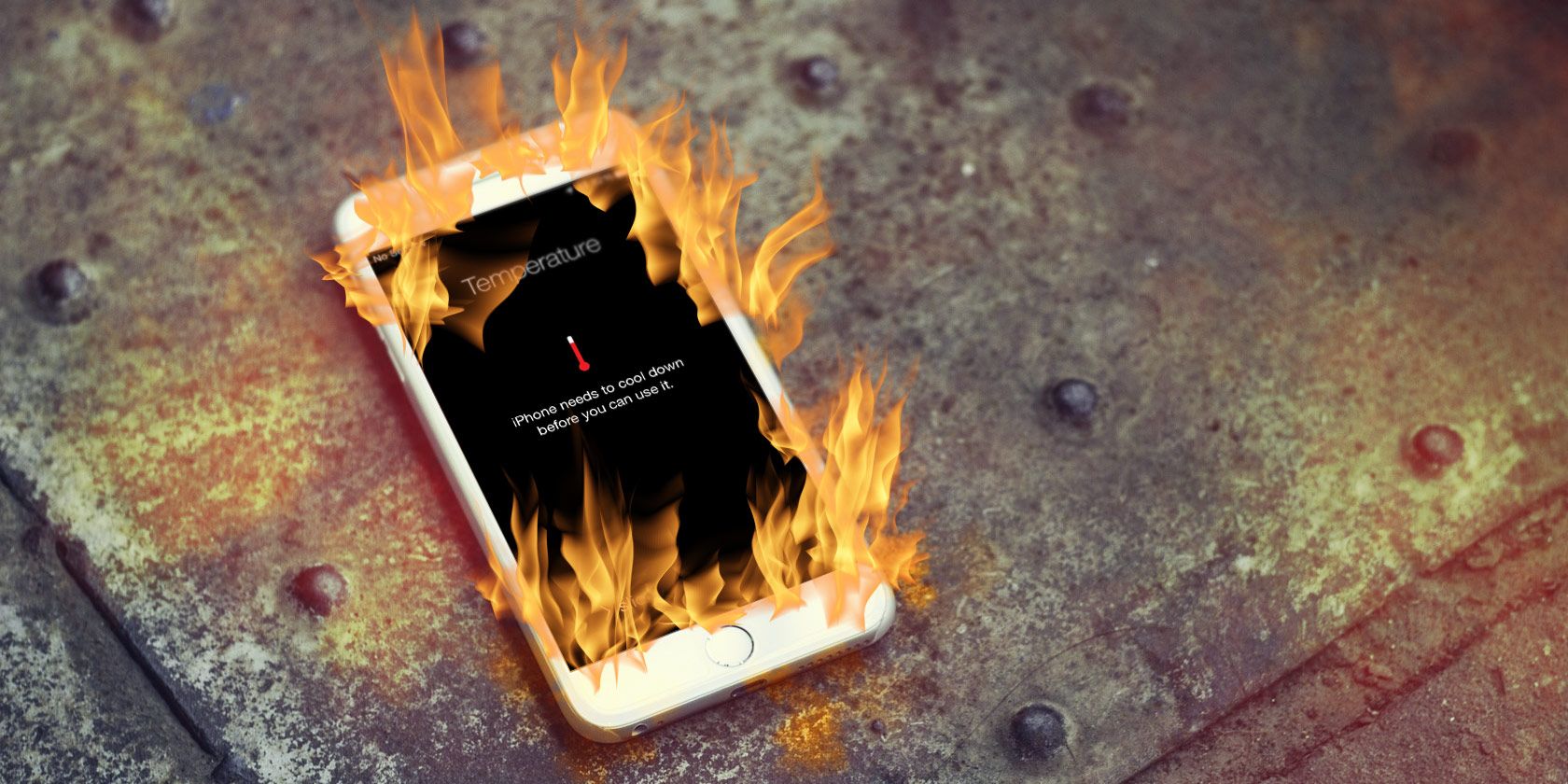
If your device exceeds a certain temperature threshold, you’ll see a temperature warning message saying “iPhone needs to cool down before you can use it.”
Fixing the Problem
When your iPhone gets too hot, you should take action to prevent damage to it. This includes:
Stop charging your device.
Turn it off and allow the heat to dissipate.
Remove the case from your device, if applicable.
Take the device out of direct sunlight, into the shade.
The lithium-ion batteries in today’s devices go through rigorous testing and are thus relatively safe. But when you expose them to extreme heat for extended periods, there’s a chance that your battery could explode or otherwise cause harm.
To quickly reduce overheating, many people recommend putting your iPhone in the fridge. But you should never do this.
Sudden changes in temperature like this can cause condensation, which could cause water damage to your iPhone’s internal components. Let your device cool off gradually, and avoid direct airflow from air conditioners on hot days.
If Your iPhone or iPad Gets Hot All the Time
If your device stays hot most or all the time, it may indicate a problem with either iOS or third-party apps. Try these troubleshooting steps to solve the problem.
Turn Off Background App Refresh
Background app refresh allows your apps to check for new information all the time. It happens automatically, consuming battery and CPU without you thinking about it. Your device may eventually stay hot if it’s constantly updating in the background. However, completely turning off this feature is overkill.
To figure out which app is the culprit, open the Settings app. Tap Battery and examine the battery usage of your apps. Look at the overall percentage, as well as total time onscreen and in the background of individual apps. This should help you figure out what apps consume battery when you’re not using them.
Then, tap General > Background App Refresh. Toggle off apps that consume significant resources in the background.
Unstable Apps
Apps installed on your device can crash in the background while they work. Although it may not be visible, your iPhone will stay warm or overheat from this in some cases.
If you have this problem, open the Settings app. Tap Privacy > Analytics > Analytics Data. Check the analytics data of apps you’ve used recently. Once you find the rogue app, quit it and check for any updates. You may also want to send an email to the developer for further investigation.
Reduce the Brightness
If your screen brightness is above 50 percent or so, your device has a greater chance of staying warm all the time. You should reduce this to decrease heat.
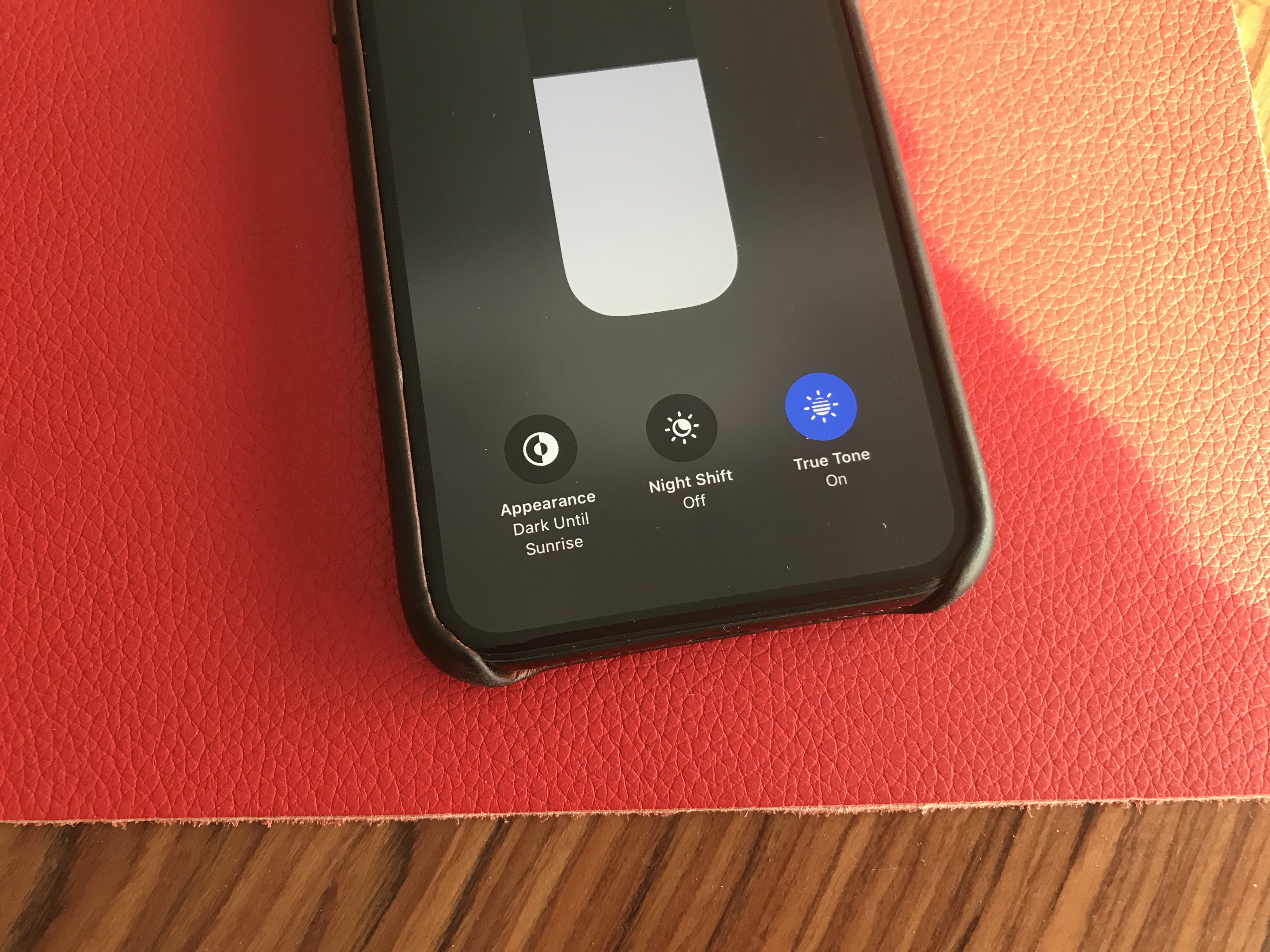
On an iPhone X or later, or iPad, swipe down from the top-right corner of the screen to bring up Control Center. If you have an iPhone 8 or earlier, swipe up from the bottom of the screen instead. Then drag the slider with the sun icon to decrease the brightness.
Network Connection
Sometimes, a bad network reception can heat up your device while it’s searching for a signal. This most often happens in areas with poor network connectivity.
Until you leave the area, you should switch to airplane mode to prevent battery drain and unnecessary heat generation. You’ll find a shortcut in Control Center, as detailed above.
In Case Your Heat Problem Still Persists
If the heating issue won’t go away after trying these fixes, ask yourself a few questions:
Is your wall adapter working properly?
Has your charging cable been damaged?
Have you recently purchased the charged you’re using from an online retailer?
Try charging your device with a different cable, preferably the one that came with your iPhone. Third-party chargers purchased from non-certified sources can cause problems.
If you don’t have an official charger made by Apple, use a quality third-party Lightning cable that comes with the “Made for iPhone (MFi)” badge. Uncertified and fraying chargers can damage your device and create other problems.
Assuming that you’ve checked the charger and all the troubleshooting steps, we recommend making an appointment with the Genius Bar to let them investigate your device. If you have an AppleCare+ warranty, you likely won’t owe anything for the visit.
More iPhone Troubleshooting Tips
Your device will feel warm to touch after prolonged use, which is normal. If your iPhone is getting excessively hot, try to refrain yourself from using intensive features or exposing your device to extreme temperature conditions. With these tips discussed above, you’ll know when and how to take steps to keep your iPhone at an acceptable temperature.
Twitter’s controversial “Hide Replies” feature, aimed at civilizing conversations on its platform, is launching today in the U.S. and Japan after earlier tests in Canada. The addition is one of the more radical changes to Twitter to date. It puts people back in control of a conversation they’ve started by giving them the ability to hide those contributions they think are unworthy.
These replies, which may range from the irrelevant to the outright offensive, aren’t actually deleted from Twitter. They’re just put behind an extra click.
That means people who come into a conversation to cause drama, make inappropriate remarks, or bully and abuse others won’t have their voices heard by the majority of the conversation’s participants. Only those who choose to view the hidden replies will see those posts.
Other social media platforms don’t give so much power to commenters to disrupt conversations. On Facebook and Instagram, for example, you can delete any replies to your own posts.
But Twitter has a different vibe. It’s meant to be a public town square, where everyone has a right to speak (within reason.)
Unfortunately, Twitter’s open nature also led to bullying and abuse. Before today, the only options Twitter offered were to mute, block and report users. Blocking and muting, however, only impact your own Twitter experience. You may no longer see posts from those users, but others still could. Reporting a tweet is also a complicated process that takes time. It’s not an immediate solution for a conversation rapidly spinning out of control.
While “Hide Replies” will help to address these problems, it ships with challenges of its own, too. It could be used as a way to silence dissenting opinions, including those expressed thoughtfully, or even fact-checked clarifications.
Twitter believes the feature will ultimately encourage people to better behave when posting to its platform.
“We already see people trying to keep their conversations healthy by using block, mute, and report, but these tools don’t always address the issue. Block and mute only change the experience of the blocker, and report only works for the content that violates our policies,” explained Twitter’s PM of Health Michelle Yasmeen Haq earlier this year.
Since launching in Canada in July, Twitter said that people mostly used the feature to hide replies they found were irrelevant, abusive or unintelligible. User feedback was positive, as well, as those who used the tool said they found it was a helpful way to control what they saw, similar to keyword muting.
In a survey, 27% of those who had their tweets hidden said they would reconsider how they interact with others in the future, Twitter said. That’s not a large majority but it’s enough to make a dent. However, it’s unclear how representative this survey was. Twitter declined to say how many people used the feature or how many were surveyed about its impacts.
The system will now also ask users who hide replies if they also want to block the account, as means of clarifying that “hiding” is a different function.
“These are positive and heartening results: the feature helped people have better conversations, and was a useful tool against replies that deterred from the person’s original intent,” explained Twitter in a blog post, shared today. “We’re interested to see if these trends continue, and if new ones emerge, as we expand our test to Japan and the U.S. People in these markets use Twitter in many unique ways, and we’re excited to see how they might use this new tool,” the post read.
Despite the expansion, Twitter says “Hide Replies” is still considered a test as the company is continuing to evaluate the system, and it’s not available to Twitter’s global user base.
The new feature will start rolling out at 2 PM PT in both the U.S. and Japan and will be available across mobile and web clients.
Ricoh has a well-earned good reputation when it comes to building smart, technically excellent photographic equipment – including the almost legendary Ricoh GR series of pocketable APS-C cameras, which are a favorite among street photographers everywhere. Earlier this year, the company released the Ricoh Theta Z1, which builds on its success with its pioneering Theta line of 360-degree cameras and delivers a step-up in terms of image quality and build that will feel at home in the hands of enthusiast and pro photographers.
The Theta Z1 is what happens when you push the limits of what’s possible in a portable form factor 360 camera, both in terms of build materials and what’s going on on the inside. Like its more affordable, older sibling the Theta V, it shoots both stills and video in 360 degrees – but unlike the V, it does so using two 1-inch sensors – unprecedented for a 360 camera in this category. Sony’s celebrated RX100 series was pushing boundaries with its own 1-inch sensor in a traditional compact camera, and the Ricoh is similarly expanding the boundaries of 360 photography by including not just one, but two such sensors in its Z1. That translates to unmatched image quality for 360 photographers – provided you’re willing to pay a premium price to get it.
Design and build
The Ricoh Theta Z1 feels a lot like previous iterations of the Theta line – it’s essentially a handle with two big lenses on top, which is a pretty optimal design overall for a device you’re mostly going to be using to hold up and take 360 photos and video. It’s a bit bulkier than previous generations, and heavier, too, but it’s still a very portable device despite the increased size.
With the bulkier build, you also get a magnesium outer case, which is textured and which feels fantastic when held. If you’ve ever held a pro DSLR or mirrorless camera, then the feel will be familiar, and that says a lot about Ricoh’s target audience with this $1,000 device. The magnesium alloy shell isn’t only for making it feel like it’s worth what it costs, however; you also get big durability benefits, which is important on a device that you’re probably going to want to use in remote locales and off the beaten path.
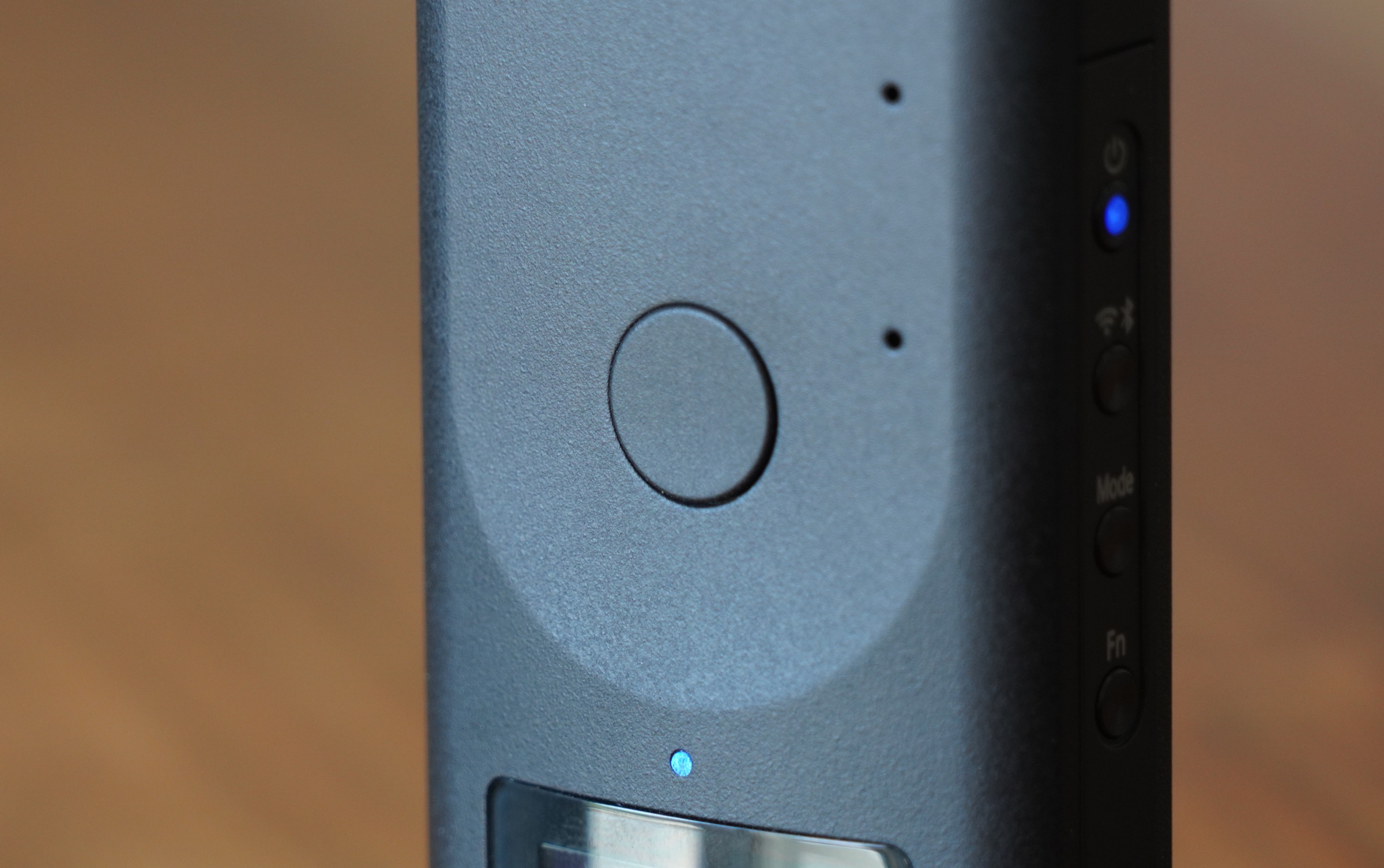
The build quality also feels incredibly solid, and the button layout is simple and easy to understand. There’s a single shutter button on the front of the camera, just above an OLED display that provided basic info about remaining space for images or video, battery life and connection status. A single LED indicates both mode and capture status information, and four buttons on the side control power on/off, Wifi and Bluetooth connections, photo and video mode switching and enabling basic functions like a shutter countdown timer.
[gallery ids="1884065,1884067,1884066"]
Using the hardware buttons to control the Theta Z1 independent of your smartphone, where you can remotely control all aspects of the camera when connected via WiFi and using the app, is intuitive and easy, and probably the way you’ll use the Z1 more often than not when you’re actually out and about. There’s little to worry about when it comes to framing, for instance, because it captures a full 360 image, and since you can handle all of that after the fact with Ricoh’s editing tools prior to sharing.
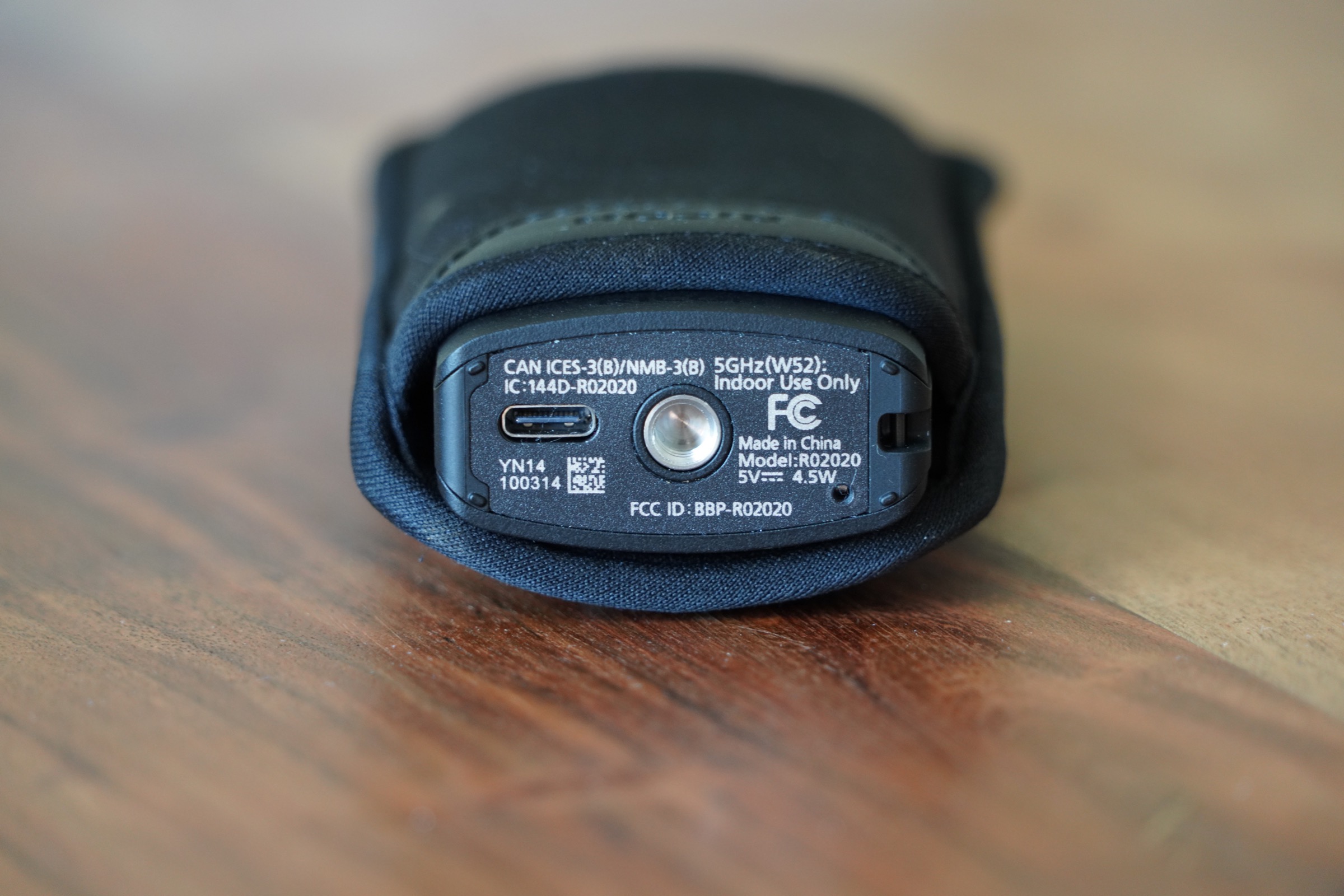
On the bottom, there’s a USB-C port for charging and wired data transfer, and a 1/4″ standard tripod mount for attaching the Z1 to tripods or other accessories. This is useful, because if you use a small handle you’ll get a better overall image, since the Z1’s software automatically edits out the camera, and, to some extent, the thing that’s supporting it. There’s also a small lug for attaching a wrist strap, but what you won’t find is a flap or door for a micro SD card – the Theta Z1 relies entirely on built-in storage, and offers just under 20GB of usable storage.
Still images
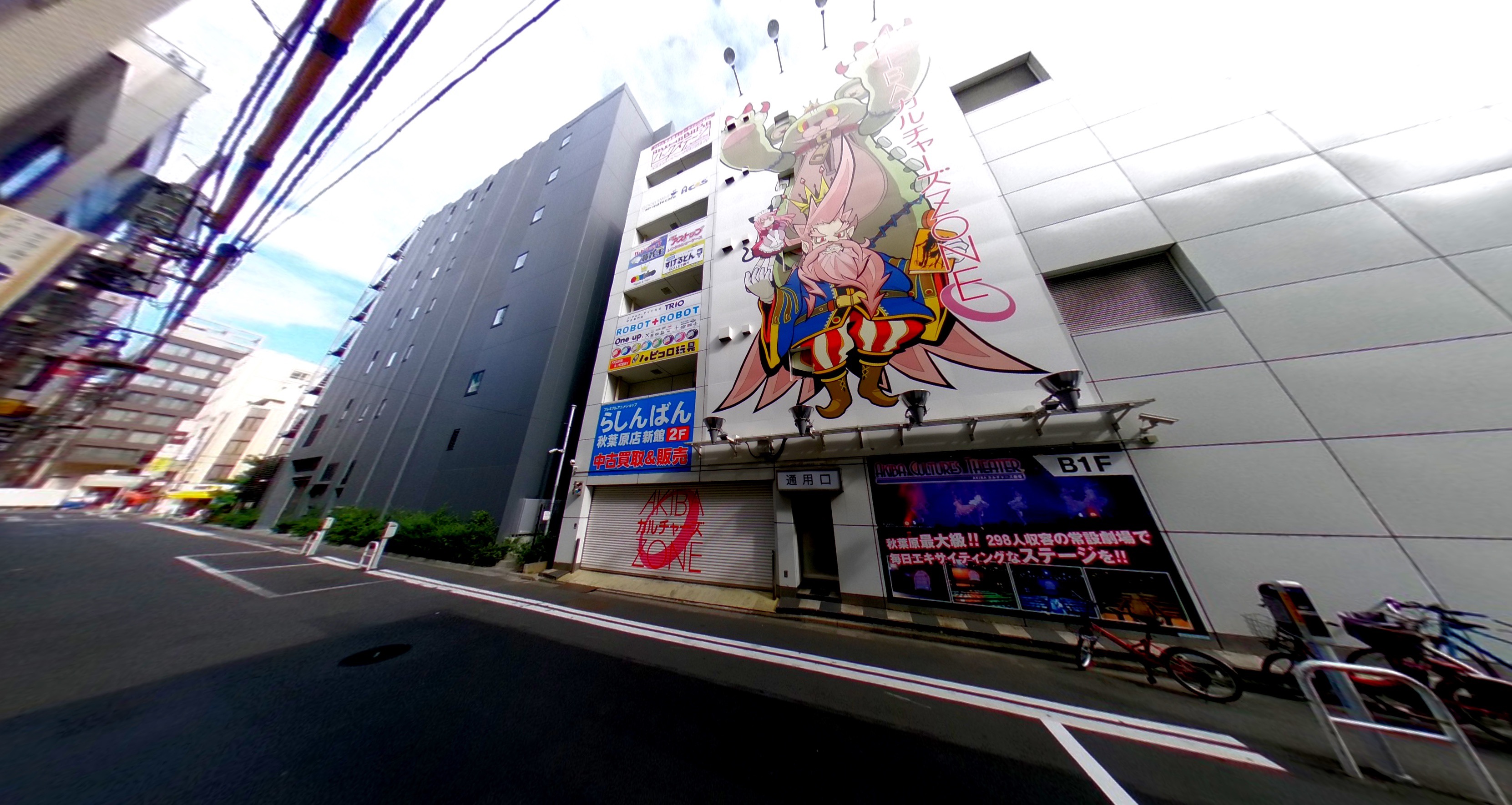
Ricoh’s Theta Z1 has two 1-inch sensors on board, as mentioned, and those combine to provide an image resolution of 670×3360. The camera caputres two 180-degree fields of view from each lens, and automatically stitches them together in software to produce the final image. The result is the sharpest, most color-accurate still photos I’ve ever seen from a 360-degree camera, short of the kind of content shot by professionals on equipment costing at least 10x more.
The resulting images do incredibly well when viewed through VR headsets, for instance, or when you use Theta’s own 360 viewer for web in full-screen mode on high-resolution displays. They also make it possible to export flat images that still look sharp, which you can crop and edit in the Theta+ app. You can create some truly amazing images with interesting perspective that would be hard to get using a traditional camera.
Indoors in low light situations, the Ricoh Theta Z1 still performs pretty well, especially compared to its competitors, thanks to those big 1-inch sensors. Especially in well-lit indoor environments, like in the restaurant example below, details are sharp and crisp across the frame and colors come out great.
In settings where a lot of the frame is dark or unevenly lit, as in the example at the Robot Restaurant in Tokyo below, the results aren’t nearly as good when operating in full automatic mode. You can see that there is some blur in the parts of the scene with motion, and there’s more grain apparent in parts of the frame, too. Overall though, the audience is pretty well captured and the colors still look accurate and good despite the many different tones from different sources.
The Ricoh Theta Z1 still does its best work in bright outdoor settings, however – which is true for any camera, but especially for cameras with sensors smaller than full-frame or APS-C. It’s still definitely capable enough to capture images you can work with, and that provide a great way to revisit great events or memories in a more immersive way than standard 2D images can accomplish.
You can adjust settings including aperture to optimize your photo capture, including choosing between f/2.1, f/3.5 and f/5.6, with higher apertures offering higher resolution images. The built-in lens has been designed to reduce ghosting, purple fringe artifacts and flare, and it does an outstanding job at this. RAW capture allows you to edit DNG files using Lightroom, and it works amazingly well with Lightroom mobile for advanced tweaks right on the same device.
Video
The Ricoh Theta Z1 does video, too – though the specs for the video it produces are essentially unchanged from the Theta V on paper. It can capture 4K video at 30 fps/56 mbps or 2K video at 30fps/16mbps, and live stream in both 4K and 2K. There’s a four-channel built in microphone for immersive audio recording, and it can record as much as 40 minutes of 4K or 130 minutes of 2K footage, though each individual recording session is capped at 5 minutes and 25 minutes for 4K and 2K respectively.
Ricoh has tougher competition when it comes to video in the 360 camera game – Insta 360’s One X has been a clear winner in this category, and has led to this camera even finding some fans when compared to action cameras like the GoPro Hero 7 and the DJI Osmo Action, thanks in large part to its fantastic built-in image stabilization.
The Ricoh Theta Z1 just frankly doesn’t impress in this regard. The sensors do allow for potentially better image quality overall, but the image stabilization is definitely lacking, as you can see below, and overall quality just isn’t there when measured against the Insta360 One X. For a fixed installation for real-time live-streaming, the Ricoh probably makes more sense, but video isn’t the device’s strength, and it’s a little disappointing given its still shooting prowess.
Features and sharing
The range of editing options available either via Theta+ or using the DNG files in both mobile and desktop phot editing software for the Theta Z1 is outstanding. You can really create and compose images in a wide variety of ways, including applying stickers and text that stick to the frame as a viewer navigates around the image. Sharing from the Theta app directly works with a number of platforms, including YouTube, Twitter, Facebook and theta360.com, where you can get embeddable 360 images like those found in this post above.
Ricoh has done a great job making sure you can not only capture the best possible 360 images with this camera, but also share them with others. It’s also leading the pack when it comes to the range of options you have for getting creative with slicing up those 7K spherical images in a variety of ways for traditional flat image output, which is not surprising given the company’s heritage.
Bottom line
Simply put, the Ricoh Theta Z1 is the best 360 camera for still photos that you can buy for under $1000 – even if just squeaks under that line. It’s the best still photo 360 camera you can pick up for considerably more than that, too, given its sensor arrangement and other technical aspects of the device including its selectable aperture settings and RAW output.
The $999.95 asking price is definitely on the high end for this category – the Theta V retails for less than half that, as does the Insta360 One X. But I mentioned the Sony RX100 above, and the pricing is similar: You can get a compact camera for much less money, including very good ones, but the latest RX100 always commands a premium price, which people are willing to pay for the very best in-class device.
If want you want is the best still photography 360 camera on the market, than the Ricoh Theta Z1 is easily it, and if that’s the specific thing you’re looking for, than Ricoh has packed a lot of cutting edge tech into a small package with the Z1.
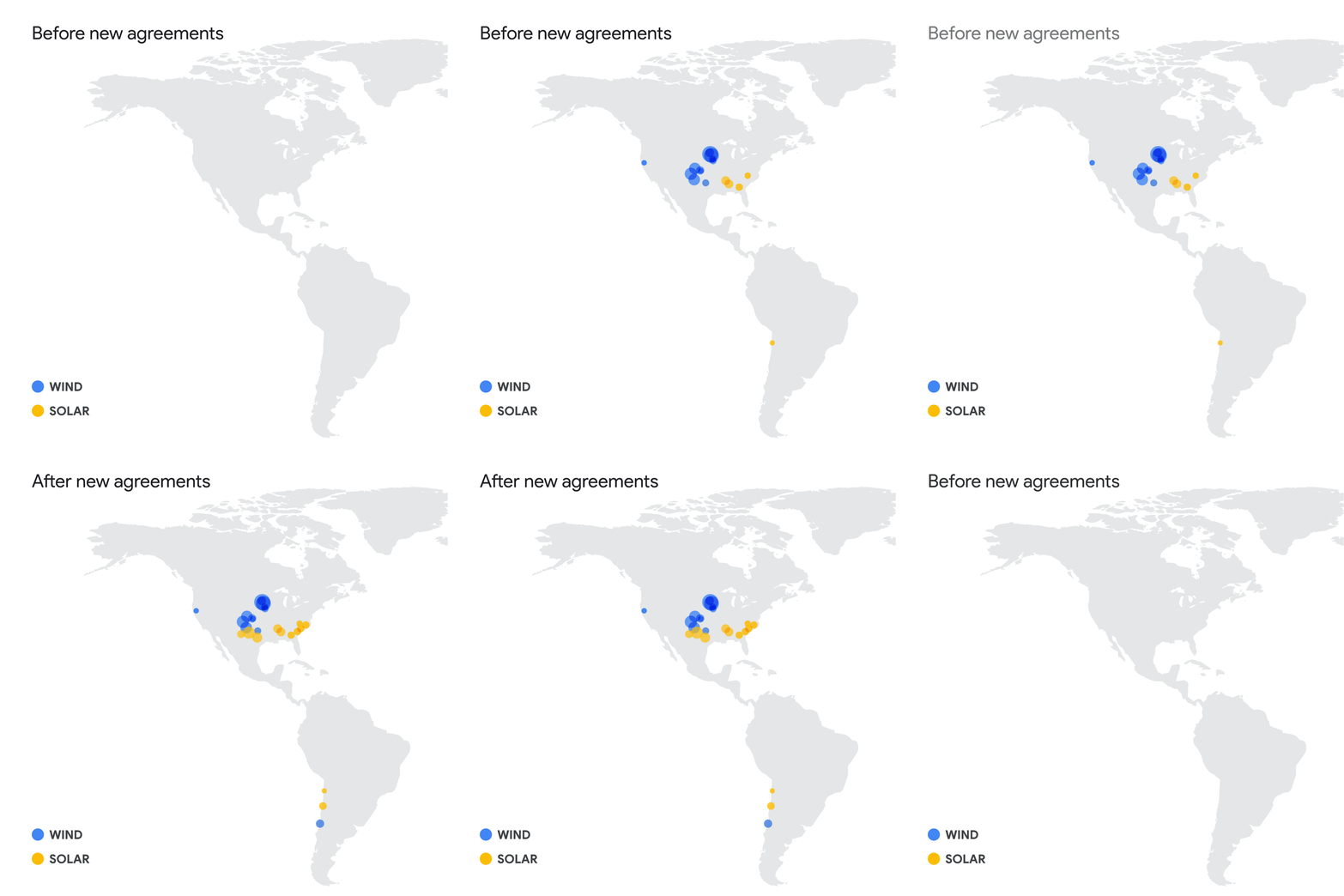
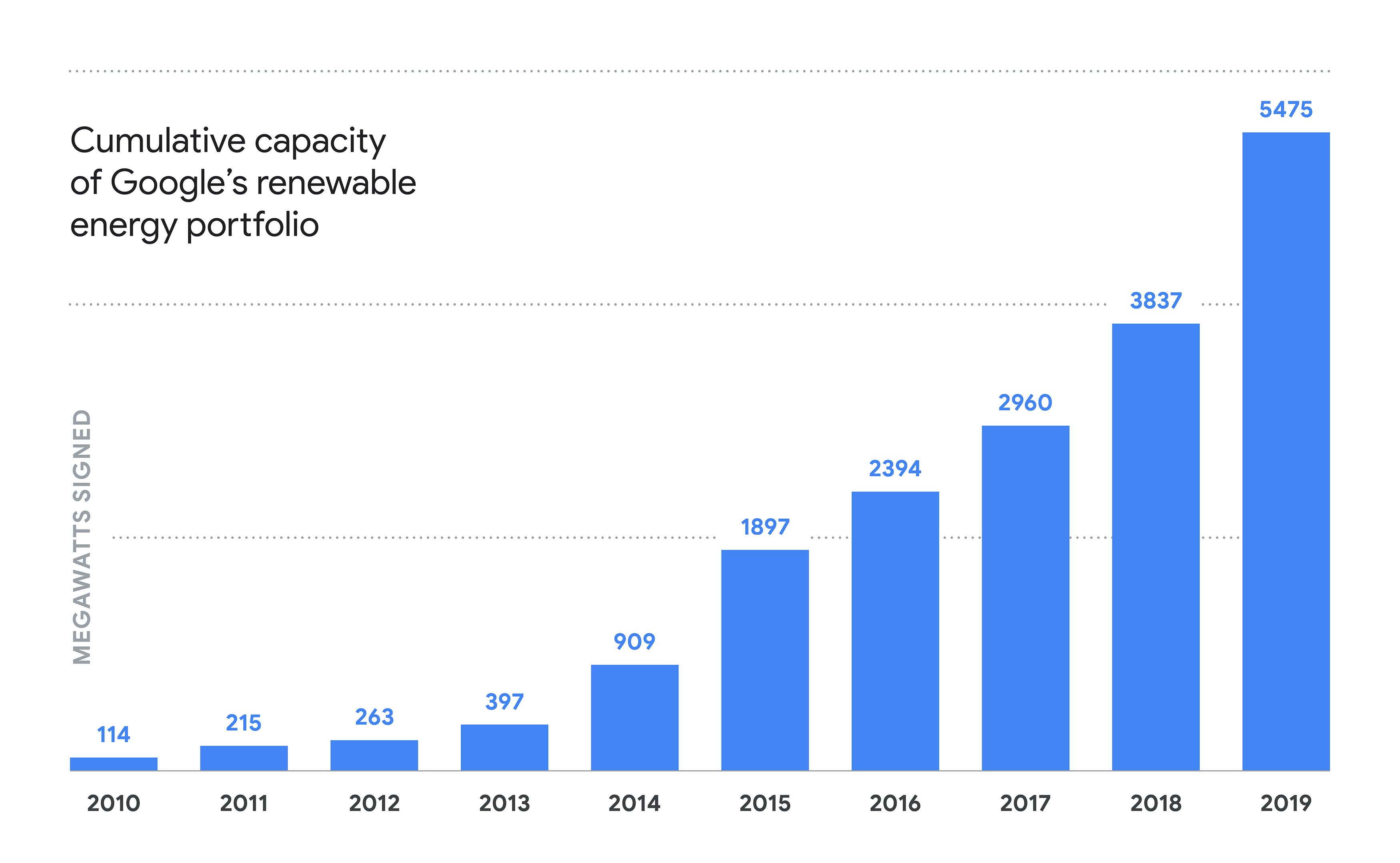
Google today announced its largest package of renewable energy deals yet. Worth a total of 1,600-megawatts, the package includes 18 deals in the U.S., Chile and Europe. This brings Google’s current set of wind and solar agreements to about 5,500 megawatts (MW) and the company’s number of total renewables projects it’s involved in to 52. Google argues that these new projects it announced today will drive about $2 billion in investments in new energy infrastructure.
In the U.S., Google says it’ll purchase a total of 720 MW from solar farms in North Carolina, South Carolina and Texas. In Chile, it’s buying an additional 125 MW to power its data center there. For reasons only known to Google PR, the company will only announce details of its plans for Europe tomorrow, at an event in Finland, where Google CEO Sundar Pichai will be present.
In today’s announcement, Pichai notes that many of Google’s earlier investments were in wind energy. Its new investments in the U.S. are mostly in solar, though. The reason for that, he notes, is the declining cost of solar. In Chile, the company is investing in a hybrid solar and wind deal for the first time. “Because the wind often blows at different times than the sun shines, pairing them will allow us to match our Chilean data center with carbon-free electricity for a larger portion of each day,” Pichai writes.
Google’s announcements follow Amazon’s pledge to run its business on 100% renewable energy by 2030 and buy 100,000 electric vans earlier today.
ApplereleasediOS 13, the new major version of iOS. This isn’t a groundbreaking release that is going to change the way you use your phone. But Apple has done some tremendous work across the board to improve some low-level features as well as most Apple apps.
In many ways, iOS 13 feels like a quality-of-life update. In developer lingo, quality-of-life updates are all about refining things that already work. It helps you save a second here, do something more easily there.
I’m going to talk about many of those small refinements, but I want to focus on two things that are going to matter more than the rest — Dark Mode and Apple’s focus on privacy.
Dark Mode is here
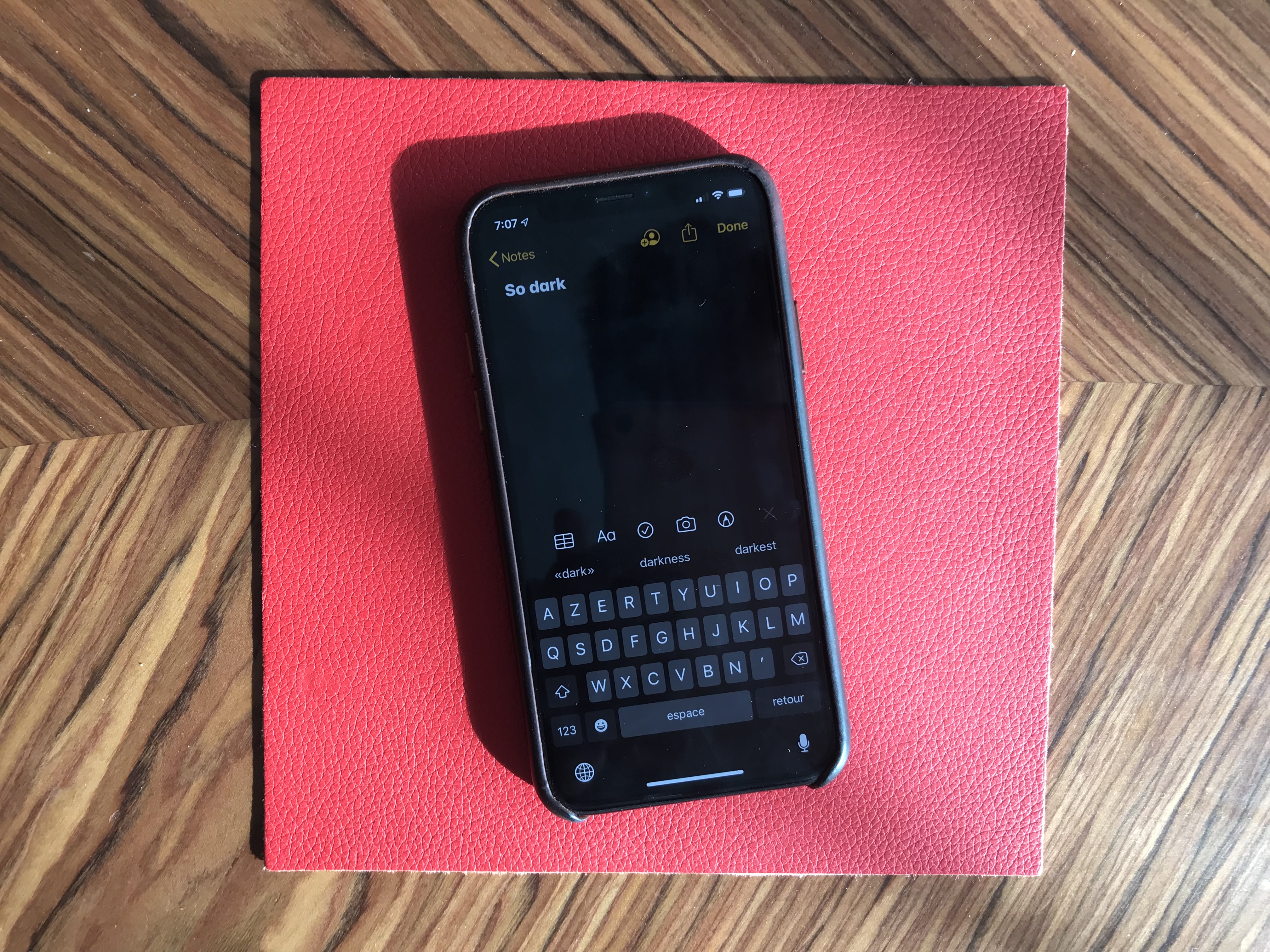
At some point, smartphone manufacturers started making bigger phones. And if you don’t want to become blind at night, Dark Mode is a must. It took a while, but it is finally here and it looks great.
Dark Mode on iOS 13 is a system-wide trigger. You can activate it from the Settings app or by opening up the Control Center panel and long-pressing on the brightness indicator. And it completely transforms the look and feel of your iPhone.
While some third-party apps have been updated, many developers still have to release updates to make their apps work with this new setting. I hope in six months, you’ll be able to turn on Dark Mode and jump from one app to another without any white interface.
I would recommend turning on the automated mode in the settings. iOS uses your current location to time the change with sunset and sunrise — your iPhone goes dark at night and it lights up in the morning.
Dark Mode doesn’t just affect apps. Widgets, notifications and other buttons in the user interface become dark. Apple uses pure black, which looks great on OLED displays. And you can optionally dim your custom wallpapers at night.
The privacy hammer
Many geeks have tried iOS 13 over the summer. But it’s going to be a completely different story when tens of millions of people download it this fall. iOS 13 brings some much-needed changes on the privacy front, and it’s going to be nasty for some companies.
Apple is adding more ways to control your personal information. If an app needs your location for something, you can now grant access to your location just once. The app will have to ask for your permission the next time.
Similarly, iOS 13 can tell you when an app has been silently tracking your location in the background with a map of those data points.
Apple is shaming app developers directly by saying “This app has used 40 locations in the background in the past 2 days” and showing you a map. You can turn off location tracking directly in the popup. Facebook is already freaking out and wrote a blog post last week to tell you that it cares about your privacy.
iOS 13 also blocks Bluetooth scanning by default in all apps. Many apps scan for nearby Bluetooth accessories and compare that with a database of Bluetooth devices around the world. In other words, it’s a way to get your location even if you’re not sharing your location with this app.
You now get a standard permission popup for apps that actually need to scan for Bluetooth devices. Some apps actually need Bluetooth to communicated with connected devices, initiate peer-to-peer payments with nearby users, etc.
But the vast majority of them have been abusing Bluetooth scanning. To be clear, you can disable Bluetooth scanning and still use Bluetooth headphones. Audio will still be routed to your headphones just fine.
I hope many app developers will review the third-party SDKs that they use. Many ad-supported apps embed code from adtech companies. But they don’t always that those SDKs are hostile to your privacy.
Finally, Apple is adding “Sign In with Apple”. It is an alternative to “Sign In with Google” or “Sign In with Facebook”. Customers can choose whether or not to share their email address and developers get little personal data. It’s going to be interesting to see if it takes off.
There are a few changes at the operating system level. First, in addition to optimizations, animations have been slightly sped up. Swiping, opening and closing apps feels faster.
Second, the keyboard now supports swipe-to-type. If you’ve used Android phones or third-party keyboards in the past, you already know how it works. You can move your finger across the display from one letter to another without lifting it. It feels like magic.
Third, the share sheet has been updated. It is now separated in three areas: a top row with suggested contacts to send photos, links and more depending on your most important contacts.
Under that row of contacts, you get the usual row of app icons to open something in another app. If you scroll down, you access a long list of actions that vary from one app to another.
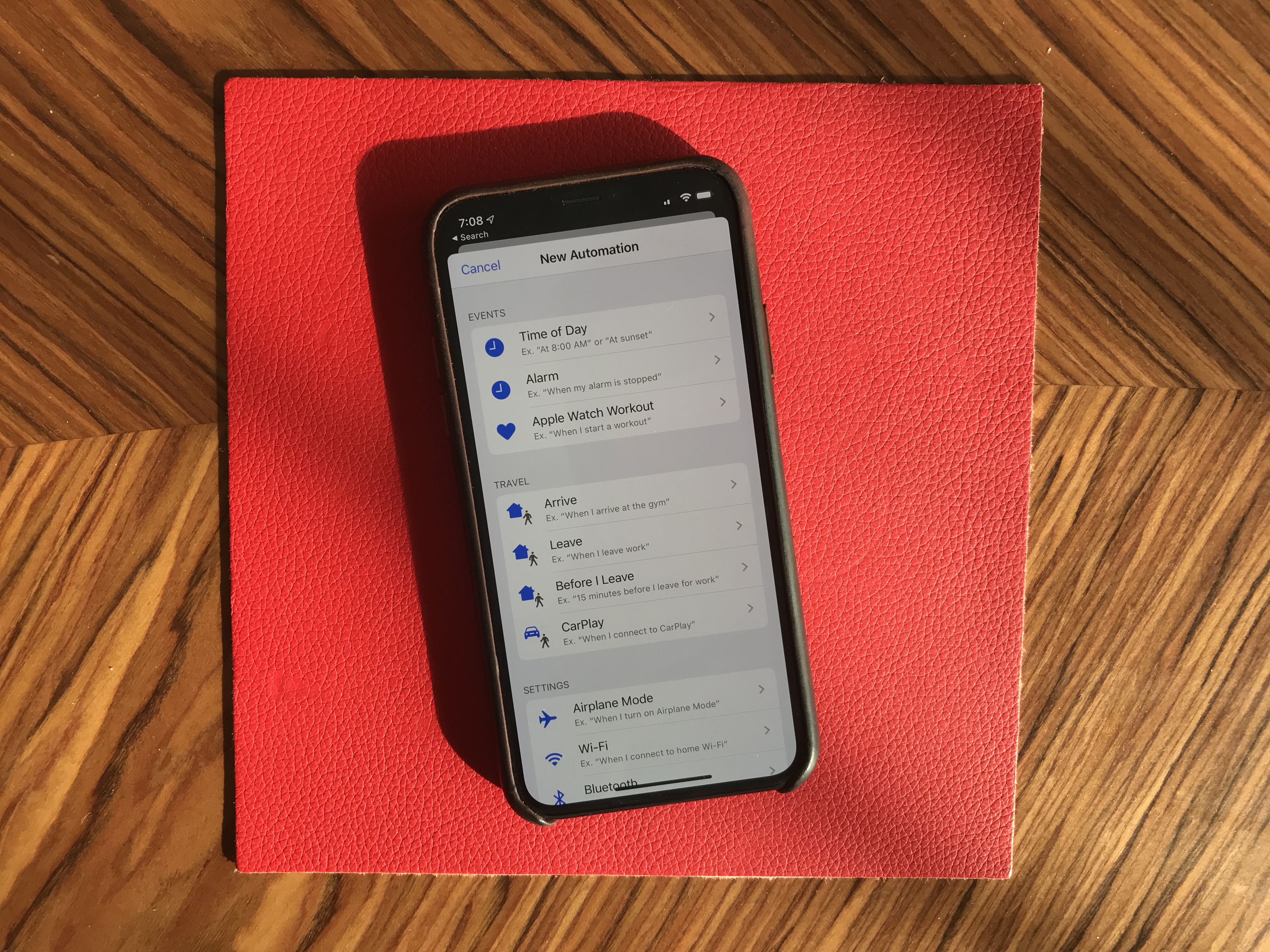
When it comes to automation, the Shortcuts is installed by default with iOS 13. Many people are going to discover Shortcuts for the first time by opening the app. Voice-activated Siri Shortcuts are now also available in the Shortcuts app.
More interestingly, you can now create automated triggers to launch a shortcut. For instance, you can create scenarios related to CarPlay, a location or even a cheap NFC tag. Here are some examples:
Launch a music playlist when I connect my phone to CarPlay or to my car using Bluetooth.
Dim my screen and turn on low power mode when I activate airplane mode.
Turn off my Philips Hue lights when I put my phone on an NFC sticker on my nightstand.
New app features
I’m going to go through some of the major changes in Apple’s apps.
Apple Arcade is here. You have to download iOS 13 to access it. I’ll let you read our first impressions in our separate article.
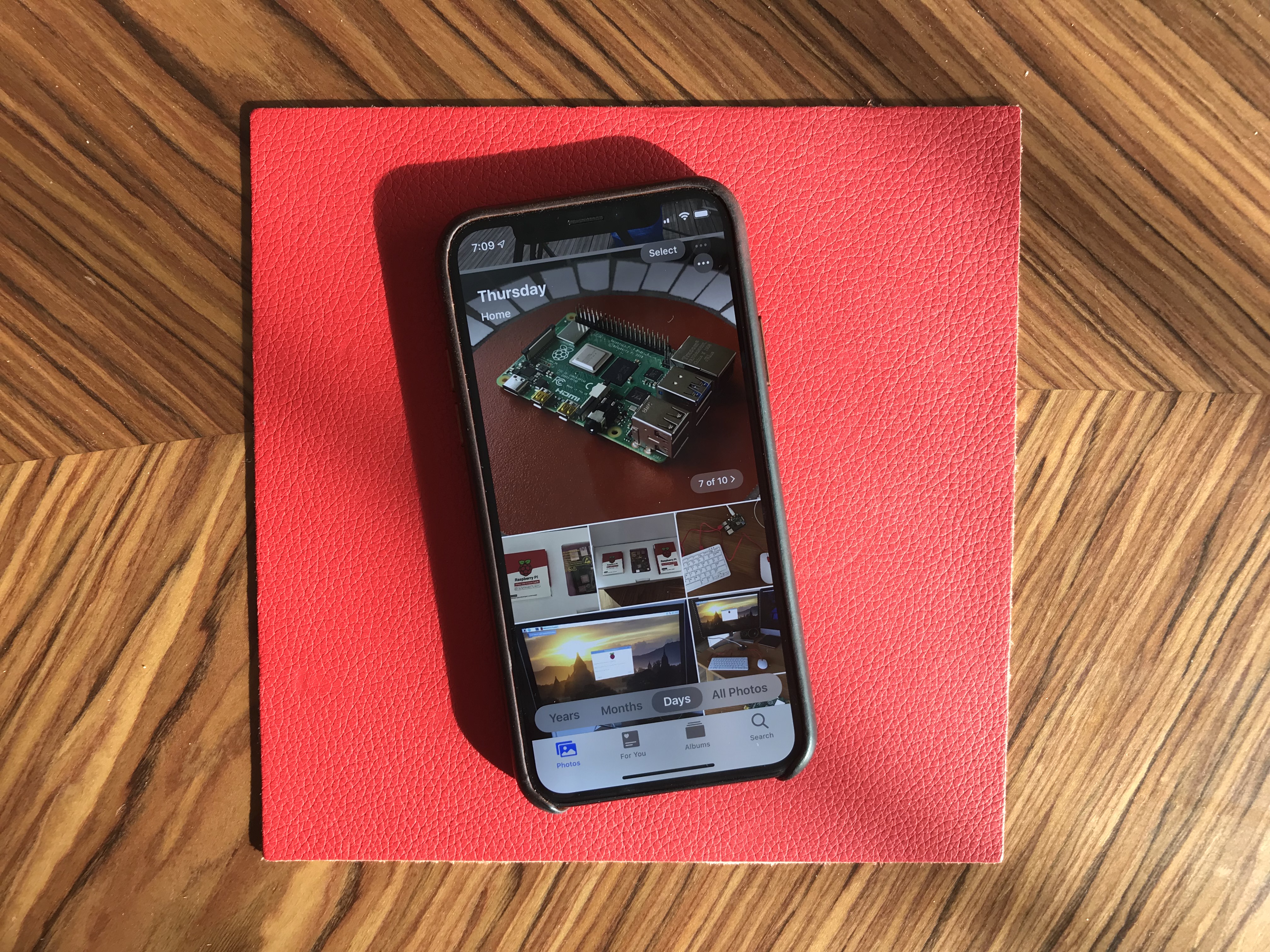
Photos has received some of the biggest improvements. The main tab has been completely redesigned. You now get four sub-tabs that lets you see a curated photo library.
In addition to ‘All Photos’, you can tap on ‘Years’ to jump straight to a specific year, ‘Months’ to see some smart albums based on dates and locations. You can then open those events. It’ll jump to the ‘Days’ tab and show you the best photos.
I’m not sure I like the wording of those sub-tabs, but it’s definitely a lot more efficient if you’re looking for an old photo from a few years.
Photo editing is also much better on iOS 13. It feels like you can do pretty much all the basic editing you’d do with a third-party app.
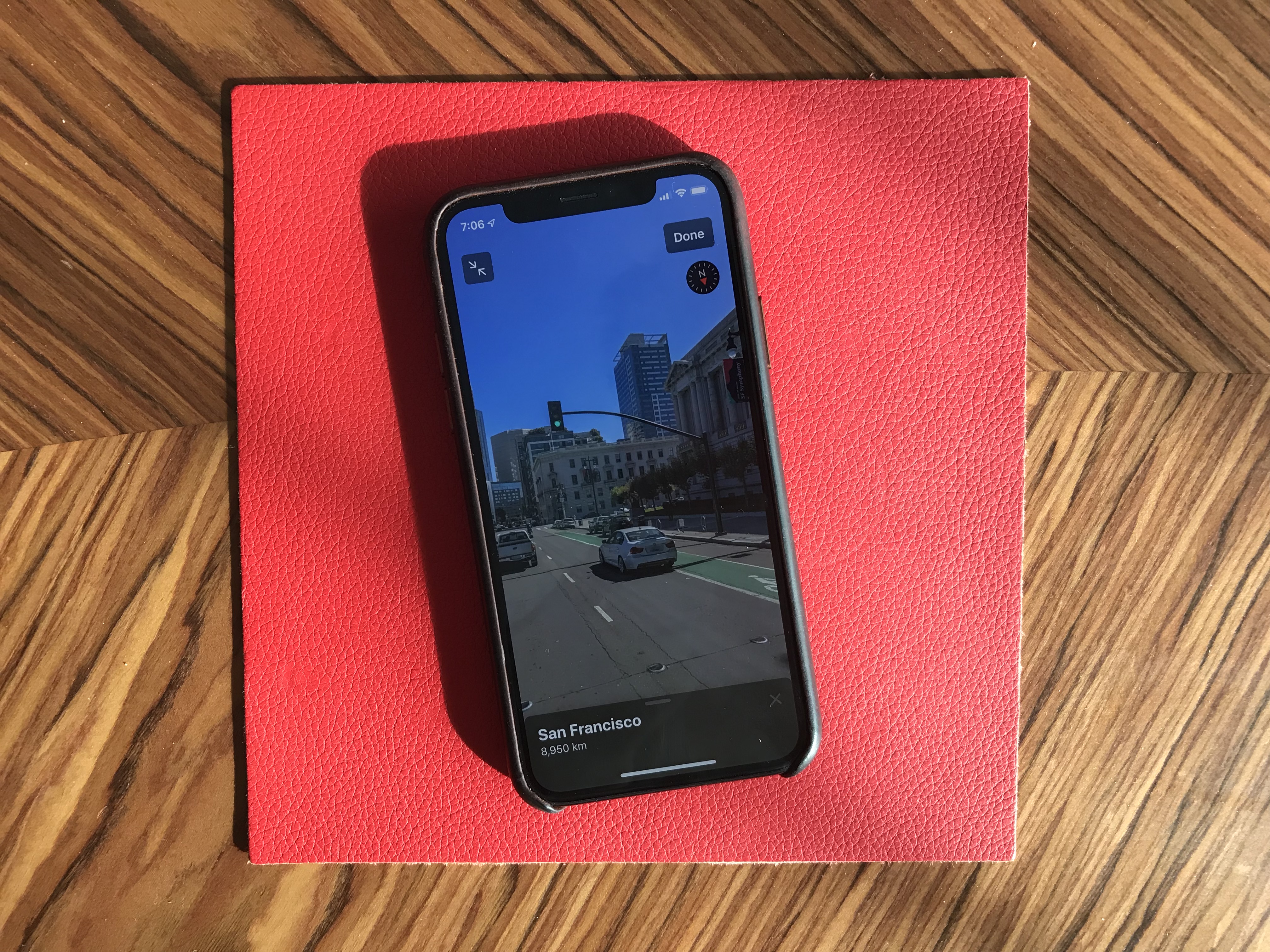
Maps is an interesting app. While Apple has been working on improved mapping data, it’s going to be hard to notice if you don’t live in California. But Look Around, a feature that works pretty much like Google Street View, is quite impressive. This isn’t just 360 photo shots — those are 3D representations of streets with foregrounds and backgrounds. I’d recommend finding a street in San Francisco and opening Look Around.
Messages now works a bit more like WhatsApp. By that, I mean that you can pick a profile name and picture and share those with your friends and family. Apple also tells you to use Memoji, but you can pick any photo. Search in Messages is also much better.
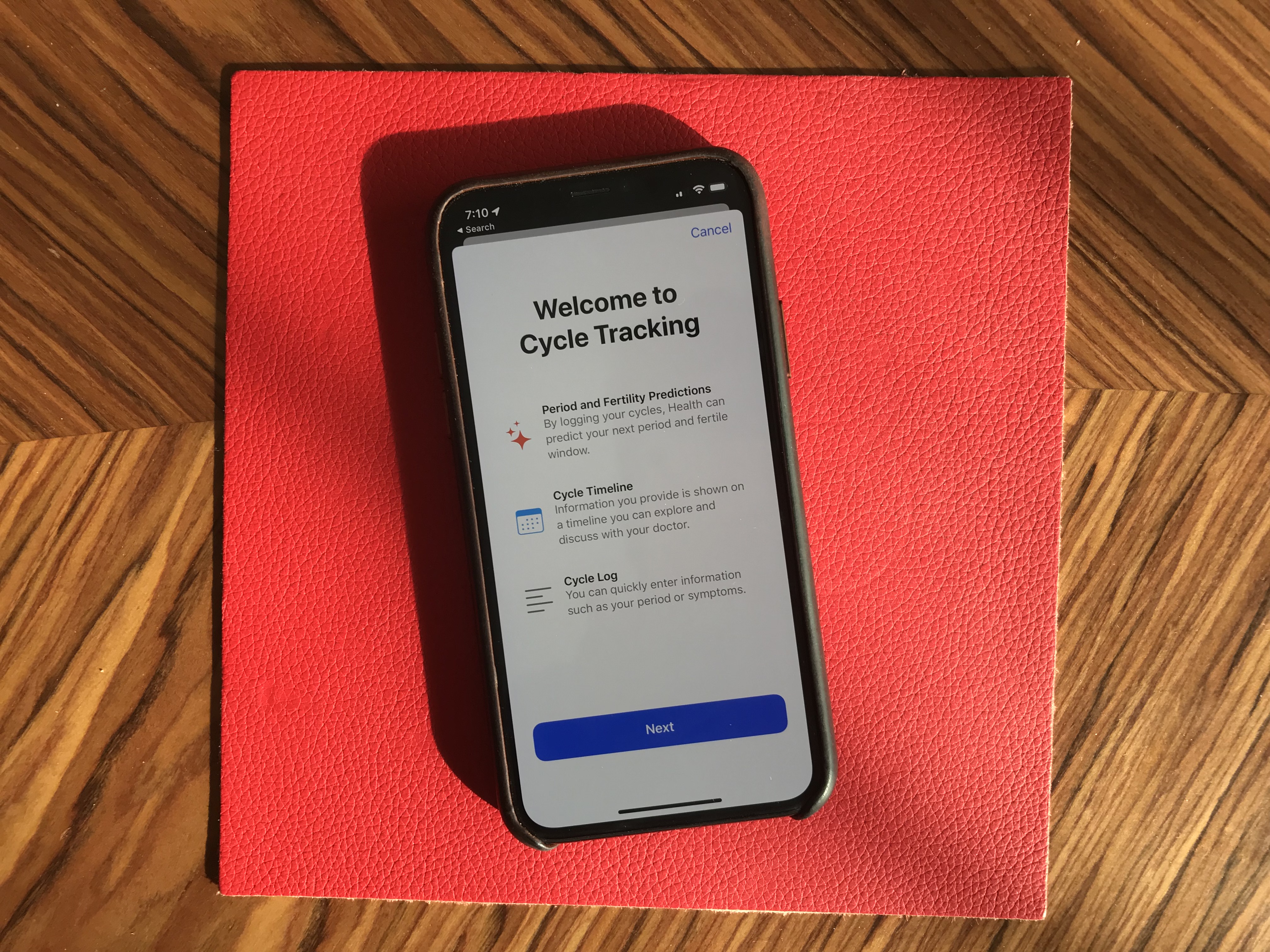
Health has been slightly redesigned. But the big addition is that you can track your menstrual cycles in the Health app. You don’t need to install any third-party app.
Reminders has gained some new features. There’s a quick toolbar to add times, dates, locations and more. You can indent items, create smart lists and more. To-do apps are highly personal, but I’m sure some people will like it.
Find My is the new name for Find My Phone and Find My Friends. Maybe you’ll be able to find your objects soon when Apple launches Tile-like trackers?
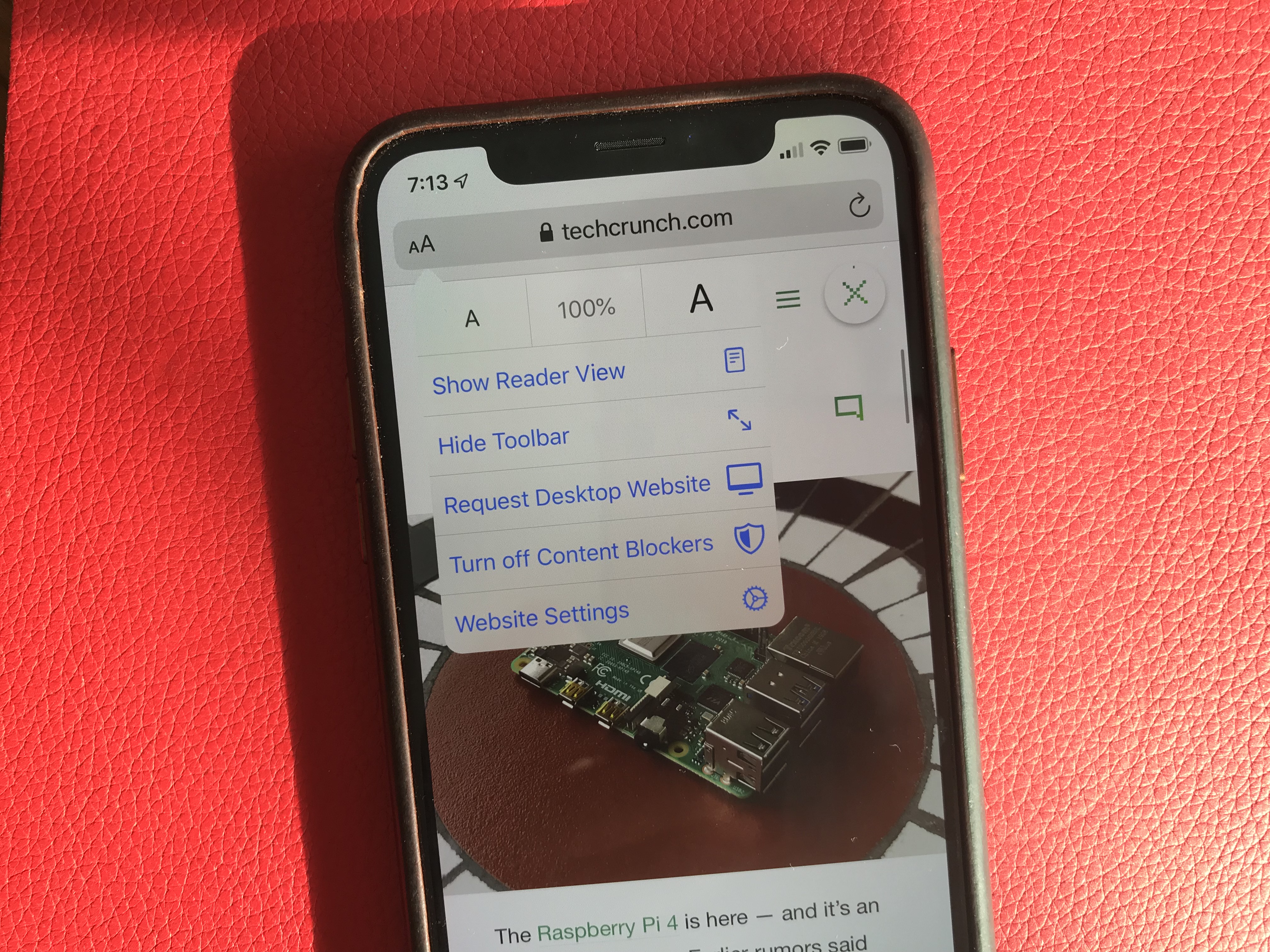
Mail, Notes and Safari received small improvements, such as rich-text editing in Mail, a gallery view in Notes, a new site settings popup in Safari to request the desktop site, disable a content blocker or enable reader view.
Files works with Samba file servers and you can zip/unzip files directly in the app — no shortcut needed. You can also install custom fonts.
As you can see, there are a lot of big and tiny improvements across the board with iOS 13. Sure, this version feels buggy at times. It’s an ambitious update with Apple telling everyone that they’re not ready to slow down the pace of iOS releases. And Apple is making some welcome progress on the privacy front.
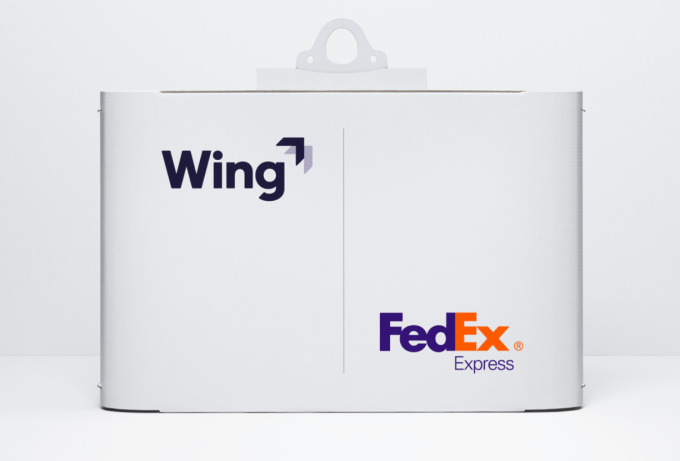
Wing, the drone delivery company that started its life within the Google X lab before spinning out into its own thing under the Alphabet umbrella, is prepping for takeoff.
The company announced this morning that it’s launching a test program in Virginia with Walgreens,FedEx, and local retailer Sugar Magnolia.
As part of the program, Wing will be able to deliver kids snacks (goldfish, water, gummy bears, and yogurt were mentioned as examples) and over-the-counter meds (like Tylenol or cough drops) from Walgreens, select packages from FedEx Express, and sweets and stationary from Sugar Magnolia.
Alas, unless you’re one of the roughly 22,000 people in Christiansburg, Virginia and happen to be in a neighborhood they’ve deemed eligible, you’re not going to be able to check it out just yet. Wing says the pilot program is limited to the small Montgomery County town for now as they work with locals to figure out what works and what doesn’t. The company declined to give any sort of timeline for when the program might expand to other parts of the US.
So how does it work?
When the customer places an order, one of Wing’s delivery drones heads for a pickup location. As Wing’s drones are only allowed to take-off or land in specific locations, pickups and deliveries are handled via a tether, with the drone itself hovering about 20 feet in the air. Once at the pickup location, a tether is lowered and a human operator hooks the package onto the line. The drone winches the package into the air, secures it, and heads for its destination.
Once in flight, Wing says its drone cruises at about 60-70mph, with a range of about 6 miles each way. Once the drone arrives at the delivery location, the same tether line lowers the package. When the drone detects that the package has reached the ground, the package is released and the drone heads back home. All in all, Wing estimates that they can make a delivery within about 10 minutes of a customer finalizing their order.
And if the tether gets stuck on something, or someone tries to grab it and tug it down? The drone is designed to detect the resistance and release the tether, dropping the line to the ground.
Wing says its drone can currently handle a payload of about 3 lbs, with the drone itself weighing roughly 10 lbs.
Wing won’t charge pilot program customers for delivery; customers will pay the store’s sticker price, and delivery during this test phase will be free.
Wing says the first deliveries should start next month.
YouTube’s verification program is getting a massive overhaul, the company announced today, which will likely result in a number of less prominent creators losing their verification status. Previously, YouTube allowed any channel that reached 100,000 subscribers to request verification. That limit is being removed, with a change to the verification program that rolls out in late October. Going forward, YouTube will focus its efforts on verifying channels that have more of a need to prove their authenticity — like those belonging to a brand, public figure, artist or another creator who might be subject to impersonation, for example.
YouTube says the earlier verification system was established when the site was smaller, but its ecosystem has since grown and “become more complex.”
Instead of looking at a number of subscribers — a metric than can be gamed by bots — the new system will have more murky requirements. YouTube says it’s about “prominence,” which it defines in a number of ways.
For starters, YouTube will determine if the channel represents a “well-known or highly searched for creator, artist, public figure or company.” It will also consider if the channel is widely recognized outside of YouTube and has a strong online presence, or if it’s a channel that has a very similar name to many other channels.
We understand YouTube will use a combination of human curation and algorithmic signals to make these determinations. When asked, the company declined to discuss the specifics, however.
There were several reasons YouTube wanted to change its system, beyond raising the threshold for verification.
The company had run into a similar problem that Twitter once faced — people mistook the verification badge as an endorsement. On Twitter, that issue reached a tipping point when it was discovered that Twitter had verified the Charlottesville rally organizer. Twitter stopped verifying accounts shortly afterward. Its system today is still being fixed, but the project has been put on the back burner.
Similarly, YouTube’s research found that over 30% of users misunderstood the verification badge’s meaning, believing the checkmark indicted “endorsement of content,” not “identity.”
There were other issues with the prior system, as well.
Some creators would fake their verification status, for instance. Before the changes, a verified channel would display a checkmark next to its channel name. This could be easily forged by simply adding a checkmark to the end of a channel name.
Plus, the checkmark itself only really worked when people viewed the channel’s main watch page on desktop or mobile. It didn’t translate as well to interactions in live chats, on community posts or in stories.
By revamping the verification system, YouTube is clarifying that the verification isn’t an endorsement — it’s a neutral statement of fact. It’s also less difficult to forge, and works everywhere the creator interacts with fans.
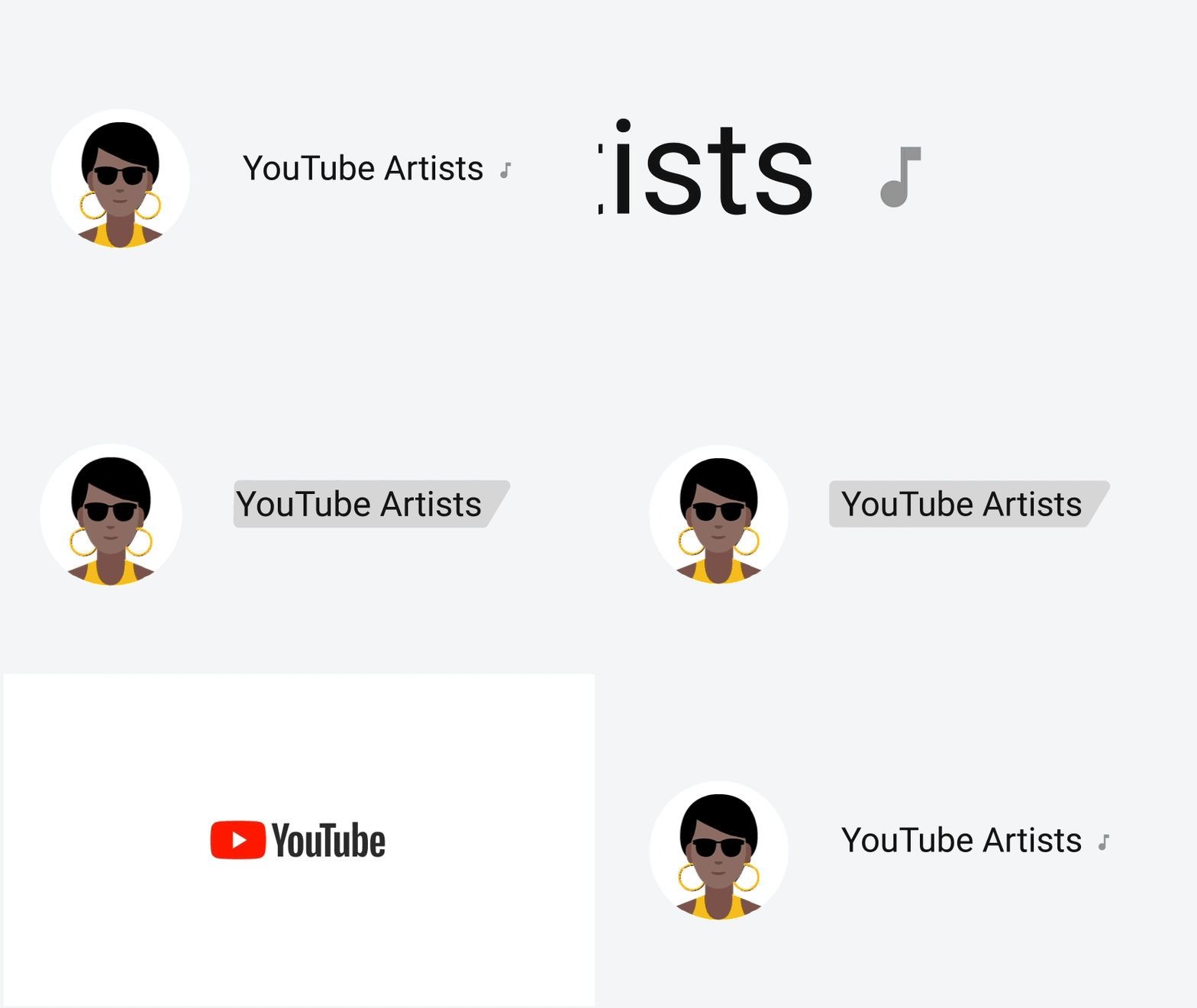
The updated verification system drops the checkmark in favor of a gray swipe across the channel name (see above).
This applies to both channels and artists. With regards to the latter, it will replace the music note.
The system will roll out in late October, and the new criteria will apply for all channels.
Those who meet the new requirements won’t need to apply — they’ll automatically receive the new verified treatment. Others who didn’t qualify for re-verification will be notified today and will have the option to appeal the decision before the changes take place.
Apple has just released the final version of iOS 13. This update brings many much needed quality-of-life improvements — and there are also a bunch of new features. The update is currently rolling out and is available both over-the-air in the Settings app, and by plugging your device into iTunes for a wired update.
Many people try to download these major updates at the same time. Apple usually implements a queue system to ensure speedy downloads once you’re at the front of the queue.
iOS 13 is compatible with the iPhone 6s or later, the iPhone SE or the 7th-generation iPod touch. If you have an iPad and you are looking for iPadOS 13, it’ll be available on September 30 with the release of iOS and iPadOS 13.1.
But first, backup your device. Make sure your iCloud backup is up to date by opening the Settings app on your iPhone or iPad and tapping on your account information at the top and then on your device name. Additionally, you can also plug your iOS device to your computer to do a manual backup in iTunes (or do both, really).
Don’t forget to encrypt your backup in iTunes. It is much safer if somebody hacks your computer. And encrypted backups include saved passwords and health data. This way, you don’t have to reconnect to all your online accounts.
Once this is done, you should go to the Settings app as soon as possible to get in the queue. Navigate to ‘Settings,’ then ‘General’ and then ‘Software Update.’ Then you should see ‘Update Requested…” It will then automatically start downloading once the download is available.
Here’s a quick rundown of what’s new in iOS 13. This year, in addition to dark mode, it feels like every single app has been improved with some quality-of-life updates. The Photos app features a brand new gallery view with autoplaying live photos and videos, smart curation and a more immersive design.
This version has a big emphasis on privacy as well thanks to a new signup option called “Sign in with Apple” and a bunch of privacy popups for Bluetooth and Wi-Fi consent, background location tracking. Apple Maps now features an impressive Google Street View-like feature called Look Around. It’s only available in a handful of cities, but I recommend… looking around as everything is in 3D.
Many apps have been updated, such as Reminders with a brand new version, Messages with the ability to set a profile picture shared with your contacts, Mail with better text formatting options, Health with menstrual cycle tracking, Files with desktop-like features, Safari with a new website settings menu, etc.