23 August 2019

Google Ditches Desserts: Android Q Is Android 10


Google is changing the way it names different versions of Android. The company is ditching desserts and sweet treats in favor of numbers. Which are obviously simpler and universally understood. Which means Android Q is officially Android 10.

Android’s Sweet Naming Convention

Android has been with us since 2007, and made its debut on the HTC Dream in 2008. And aside from the alpha and beta, all versions since have been named after desserts or sweet treats. We’ve had Cupcake, Eclair, Gingerbread, KitKat, Lollipop, and Oreo, amongst others.

Google has been working its way through the alphabet, and the most recent stable release was Android Pie. However, all versions of Android have also been numbered, and Android Pie is officially known as Android 9.0. Which leads us nicely onto…

Android Q Is Android 10

During development, the next version of Android has been known as Android Q. And there has been much speculation over what dessert Google was going to use as the name. After all, there aren’t many sweet treats whose names begin with Q.

So, as explained on The Keyword, Google has decided to call Android Q “Android 10”. There’s no amusing nickname, it’s just Android 10. And this signals the end of Google naming Android after desserts and sweet treats, so the next version will be Android 11.

Google’s reasoning for this is that the names don’t always translate well. While everyone who speaks English will understand what Lollipop means and how to pronounce it, in other languages Lollipop may be unpronounceable or unfathomable.

Google has also tweaked the Android branding. The name has changed color, from green to black, and the letters are slimmer and easier to read. The name will also now be accompanied by the Android robot, but just the head, with the body removed.

How to Speed Up Your Old Android

So, Android Q is Android 10, and it will be numbers all the way from now on. And while it’s a shame to lose the fun names, numbering the new versions of Android should make it easier for users to know what version of Android their phone is running.

The way Google names or numbers the different versions of Android obviously doesn’t make much difference to users. However, how well your phone is operating does make a difference, so here are some ways to speed up an older Android device.

Read the full article: Google Ditches Desserts: Android Q Is Android 10


Read Full Article

10 Best Websites to Find Volunteer Work That’s Right for You


websites-volunteer-jobs

Giving back to the community makes yourself and others feel great. Thanks to the internet, volunteer opportunities have never been easier to find. Whether you want to help animals, the environment, or people in need, volunteer websites can match you with specific opportunities.

Ready to lend a helping hand? Check out these best websites to find volunteer work.

1. VolunteerMatch

Volunteer Match is a volunteer work website

VolunteerMatch has matched millions of people with wonderful volunteer opportunities. When you type your location in the search bar, VolunteerMatch lists all the work possibilities near you.

You can sort several possibilities by cause—animals, children, seniors, women, and the arts are just some of the filters you can use to find the right volunteer work for you.

Since we live in an age where smartphone apps can help someone, VolunteerMatch also allows you to check out virtual opportunities. This lets you do volunteer work from the comfort of your home. Once you find work that you want, sign up to the site and let the organization know that you want to help.

2. All for Good

All For Good Volunteer Website

All for Good uses your location to find opportunities near you. Simply click Find Ways to Volunteer on the top menu bar to search for local organizations. All for Good provides you with thousands of results for you to choose from.

Hit See more search options to type in a keyword that filters the opportunities by your special interests. The site also lets you filter the results by remote projects, date, and family-friendly projects.

3. JustServe

JustServe Volunteer Work Website

JustServe makes signing up for volunteer work a breeze. Once you find an opportunity, simply sign up for an account on the website, and just show up at the event when the day comes.

Type in the location of your choice to view opportunities. Filter the events by age group, volunteer skills, and your own interests. JustServe not only displays one-time events, but it’ll show you ongoing opportunities as well.

4. United Way

United Way Volunteer Work Website

If you ever volunteered, you’ve probably heard of United Way. This nonprofit organization specializes in giving back to the community, especially in the form of education, healthcare, and fundraising.

United Way connects you with a wide range of opportunities that involve supporting children, gardening, construction, therapy, disaster services, and even working at a food bank. The huge variety of work makes it simple to use your preexisting skills to help your community.

When you search for opportunities, you’ll find that most events are sponsored by United Way in your area. To get involved in volunteer work overseas, make sure to contact your local United Way.

5. Do Something

Do Something Volunteer Work Website

Do Something empowers young people to get involved in their community and fight for social change. The entire organization helped register over 100,000 new voters in 2018 and even cleaned up a total of 3.7 million cigarette butts. Do Something’s movements directly affect the community and make an immediate difference.

You don’t have to live in a specific area to get involved in its events. Most movements simply ask you to do your part to help the cause and give you guidance on how to do so. Some events might ask you to clean up litter around you, while others instruct you to collect food for the needy.

6. Habitat for Humanity

Habitat for Humanity Volunteer Work Website

Do you have a knack for construction, or have an interest in learning about interior design? In either case, you should definitely check out the opportunities at Habitat for Humanity. This organization specializes in building houses for underprivileged people across the United States and around the world.

When you search for opportunities, Habitat for Humanity lists its offices in your area. From here, you can select the branch closest to you, and sign up for any current or future activities. On the other hand, you can also search for global opportunities, which enables you to build shelters around the world.

To volunteer at Habitat for Humanity, you don’t have to know anything about construction to get involved. It encourages women, children, and veterans to join in as well.

7. GivePulse

Give Pulse Volunteer Work Website

GivePulse offers a whole database of volunteer opportunities. Simply type in your location, and scroll through a list of valuable volunteer work. As you spend your time helping others, it can turn into an educational experience for both you and the people in need. Work as a volunteer yoga instructor, or even become a caregiver for children with special needs.

If you need to keep track of your volunteer hours, GivePulse can help you with that too. GivePulse shows the amount of time you’ve worked, verifies your hours, and even calculates your volunteer statistics.

8. AARP Create the Good

AARP Create the Good Volunteer Website

AARP is one of the United States’ biggest nonprofit associations. It aids Americans age 50 or older by helping them feel more comfortable and confident during the aging process.

AARP allows you to volunteer with people from all walks of life. Become a senior companion, tutor young children, or even assist veterans. As you uncover the secrets of generosity, you’ll get addicted to the satisfaction of volunteering your time.

9. Feeding America

Feeding America Volunteer Website

Connect with your local food bank through Feeding America. Since most food banks actually rely on volunteers to do most of the work, this organization can really use your help. By spending a small amount of time sorting through and stocking food, you can help the hungry families in your city.

10. American Red Cross

Red Cross Volunteer Work Website

The American Red Cross specializes in providing emergency services and disaster relief to those affected by medical conditions or natural disasters. When you sign up for the Red Cross, you can choose from a variety of roles.

Opt to take a short quiz that places you in a specific position, or choose to browse through opportunities by category. While some roles have to do with finances, education, and IT, other roles allow you to help people face-to-face.

It’s Time to Make a Difference

Nothing beats the amazing feeling that comes along with volunteering. By taking a couple of hours out of your day, you can help improve your community or your environment. In the end, volunteering is always worth it.

When you’re not volunteering, you should think about donating your gently used clothes and items to the needy. Check out our article on NeedHave, an app that promotes goodwill donations in your area.

Read the full article: 10 Best Websites to Find Volunteer Work That’s Right for You


Read Full Article

11 Premium Mac Apps That Make a SetApp Subscription Worthwhile


premium-mac-apps

App developers are increasingly moving away from one-time purchases and towards a subscription model. It makes sense for them, since it guarantees a future income stream as long as they keep apps updated. But for the consumer, it makes us wonder if we want to pay for yet another subscription.

SetApp aims to solve that problem by charging one monthly fee of $10 for an entire suite of apps. There are so many of them, however, that you might not know where to start. Here are some of the most valuable players currently in the SetApp library.

1. 2Do

2do task management app

Many popular to-do apps have subscription models of their own. 2Do doesn’t usually opt for this business model, instead charging separate fees for its Mac, iOS, and Android apps. A single license for 2Do will cost you $49 if you buy the app, which is only slightly less than half the price of an annual SetApp subscription.

2Do offers quick entry, even when the app isn’t running, which helps to capture new tasks as you think of them. It also features smart scheduling, automatic backups, and more features than we could possibly list here.

Download: 2Do

2. Ulysses

A SetApp subscription gets you Ulysses on both macOS and iOS

If you write on your Mac, there’s a good chance that Ulysses can help you do it better. It lets you write in a slightly customized version of Markdown that can export in any number of different formats. This separates the presentation of the text from the content and helps you focus on the actual words.

On its own, Ulysses normally costs $4.99 per month or $39.99 per year. That makes it one of the best bargains of a SetApp subscription. We’ve looked at alternatives to Ulysses in the past, but topping its feature set is a tough nut to crack.

Download: Ulysses

3. CleanMyMac X

CleanMyMac X does more than remove files

Like any other operating system, macOS tends to accumulate a layer of clutter over time. You can clean up some of this clutter on your Mac by manually deleting files or emptying the Trash. When you’ve already done that and still need to reclaim space, it’s time to try CleanMyMac X.

Despite the name, CleanMyMac X does more than just clean your Mac. It will help clear cookies, scan for malware, and help you keep your privacy in check. The app costs $34.95 for a one-year subscription for one computer, so it’s a valuable addition to your SetApp library.

Download: CleanMyMac X

4. MacPilot

MacPilot settings in action

You might have gone through all the available options in the Settings app on your Mac, but that’s far from everything you can adjust. MacPilot exposes hidden macOS options and lets you tweak them without having to dive into Terminal tricks.

Of course, having access to all these settings means you could potentially mess up your system. Still, if you want to tweak every aspect of your Mac, this is a great way to do so. Even without SetApp, MacPilot requires a subscription, though it starts at $2.50 per month.

Download: MacPilot

5. iStat Menus

Examples of iStat Menus notifications

Do you frequently find yourself running the Activity Monitor app to see what your system is doing? Wouldn’t it be easier just to click an icon in the menu bar instead of launching an app? That’s exactly what iStat Menus is for.

While iStat Menus can simply serve as a quick way to view your CPU activity or detailed battery stats, it can do much more. The app can detail the weather, notify you when your CPU is working hard, and more. While a single license for the app is only $9.99, that only gets you six months of weather data, which is included in the SetApp subscription version.

Download: iStat Menus

6. One Switch

Examples of One Switch settings

There are plenty of reasons you might have to open System Preferences a few times per day. Maybe you want to toggle Dark Mode on, then off again, or perhaps you need to connect a Bluetooth device. No matter what you use it for, One Switch can make this easier.

One Switch lets you configure a list of settings you want available in the menu bar, up to seven at a time. It can also hide and show desktop icons, which is perfect if you want to look more organized than you really are.

Download: One Switch

7. Bartender

Bartender menu bar app

If you’re reading this on your Mac, pause for a moment and look at your menu bar. How many icons are there? If you needed to take longer than a few seconds to count, you need to install Bartender right now.

Bartender is a simple app with one purpose: to keep your menu bar in tip-top shape. You can reorder icons, plus you can hide and show them as needed. If you have too many menu bar icons, you can even search to find the one you need right away.

Download: Bartender

8. BetterTouchTool

BetterTouchTool installed via SetApp

There are some apps that make you wonder why the functionality they offer isn’t just built into macOS. BetterTouchTool, the ultimate Mac productivity utility, is absolutely one of those apps. The app lets you customize nearly everything about not only your touchpad, but your Magic Trackpad or even the MacBook Pro Touch Bar.

You can tie multi-touch gestures to certain actions, but that’s just the start. BetterTouchTool can target specific apps, letting you link controls to them. It also features a built-in clipboard manager, Siri integration, and more.

Download: BetterTouchTool

9. DCommander

DCommander file manager

If you fondly remember the days of Norton Commander and other dual-pane file managers, you’ll love DCommander. Even if you don’t come to the app for nostalgia, you may find that you prefer this way of working with files to the built-in macOS Finder.

Instead of using two separate windows or tabs, you get a view of one directory on the left and one on the right. This makes dragging and dropping and similar operations much easier. DCommander also brings batch operations and other powerful features to the table.

Download: DCommander

10. Mosaic

Mosaic offers multiple ways to organize windows on macOS

Window management isn’t perfected, despite how long computers have used this system. Yes, you can resize and move them manually, but once you use an app like Mosaic, you’ll realize how much more efficiently you can manipulate windows with the right tools.

Mosaic sits in your menu bar, doing effectively nothing until you start to move a window. Move the window you’re dragging up near the top of the screen and you’ll see several icons appear. Drag your mouse pointer over them and you can position windows in several different ways.

Add in keyboard shortcuts and you’ve got almost any possible window layout available in seconds.

Download: Mosaic

11. Workspaces

Screenshot of the Workspaces app in action

Doing any serious work on your computer rarely involves just one app. Whether you’re writing, coding, or doing design work, chances are you’ll have a few windows open. You probably move them to familiar locations as well to keep them within easy reach. Workspaces handles all that for you, and that’s just the beginning.

Workspace lets you set up task groups. For example, you might open a certain document in one app while pulling up notes in another. Workspaces handles this, but can also pull in emails, webpages, and more. When you don’t need a certain file or other piece of data anymore, just remove it from the Resources list and it’s gone.

Download: Workspaces

What If You Hate Subscriptions?

Part of the problem with subscription-based apps is feeling like money is constantly leaking out of your pockets. SetApp’s “one subscription for everything” model can help, and as we’ve seen, it definitely provides a good value. But that doesn’t do you any good if you hate subscriptions, period.

Fortunately, there are still developers that opt for the one-time purchase model instead of subscriptions. If you feel like everything has gone the way of Netflix, take a look at our favorite alternatives to subscription-based apps.

Read the full article: 11 Premium Mac Apps That Make a SetApp Subscription Worthwhile


Read Full Article

You Can Now Get Spotify Premium Free for 3 Months


Spotify is extending its free trial for Spotify Premium from one month to three months. Which means that anyone who hasn’t yet tried Premium can try it free for three months. Putting Spotify on a par with Apple Music, which also offers a three-month free trial.

Spotify and Apple Music Fight for Subscribers

Spotify now boasts more than 100 million subscribers. That’s the number of people who actually pay for the privilege of streaming music, with many more listening for free. However, Spotify wants more subscribers, especially with Apple Music growing as a threat.

Apple Music launched in 2015. Unlike Spotify, Apple Music doesn’t offer a free tier, so all of the 60 million users and counting pay for the privilege. But not before enjoying a free trial lasting three months. Which is two months longer than Spotify offers.

Spotify Extends Its Free Trial to Three Months

So, as a way of enticing people into subscribing to Spotify Premium, Spotify is extending its free trial from one month to three months. Putting it on a par with Apple Music. Which seems to be a sensible way of countering the growing threat posed by Apple Music.

Spotify announced this change in a post on the Spotify Blog talking up the benefits of a Spotify Premium subscription. Which includes the lack of ads, the option to download music and podcasts, and the ability to play music on demand across devices.

The three-month free trial is available from today (August 22) and will apply to all eligible users who sign up to Spotify Premium. This is available for individual and student plans, but only for people who “haven’t already tried Premium”.

Is Spotify Premium Worth the Asking Price?

If you’ve clicked on this article and read this far down, you’re probably keen to try Spotify Premium. So, once you have signed up for the free trial and tested it to an inch of its life, we recommend our article asking whether Spotify Premium is worth the money?

Read the full article: You Can Now Get Spotify Premium Free for 3 Months


Read Full Article

YouTube Kills Its Direct Messaging Feature


YouTube is killing its native messaging feature, which means you’ll no longer be able to send direct messages on YouTube. However, the chances are you’ve never actually messaged anyone on YouTube and weren’t even aware that YouTube Messages existed.

In August 2017, YouTube introduced in-app messaging on Android and iOS. Then, later on, the same messaging feature was added to the YouTube website. In a nutshell, Messages, as it was named, allowed you to share videos and chat with people.

YouTube Removes Its Direct Messaging Option

Now, two years on, YouTube is killing Messages. Google revealed the decision in a post on YouTube Help (as first spotted by 9to5Google). YouTube will be removing the ability to message people directly on September 18, 2019.

The reasons for retiring YouTube’s direct messaging feature are unclear. However, we suspect it simply wasn’t popular enough. YouTube claims it’s “constantly reevaluating our priorities” and has decided to “focus on improving public conversations”.

Most people are unlikely to be upset at this move. Firstly, because YouTube messaging has never been particular popular, and secondly, because there are so many other messaging apps available. So you can just grab the URL of the video and share it elsewhere.

However, having native messaging on YouTube did bring some benefits, such as integrated search and access to your viewing history, so for those who did use YouTube Messages, this could be a wrench. Hence the complaints posted on that support page.

YouTube Is Focusing on Public Conversations

YouTube says that since launching its direct messaging feature it has also “focused on public conversations with updates to comments, posts, and stories.” And these are the areas YouTube is likely to focus on improving moving forward.

If you’re one of the minority who will miss YouTube Messages, consider trying one of these strange and unusual messaging apps. Or, if you’re all about the content, check out our YouTube starter kit full of YouTubers worth watching.

Image Credit: Rego Korosi/Flickr

Read the full article: YouTube Kills Its Direct Messaging Feature


Read Full Article

What Are Supercookies? Here’s How to Remove Them Properly


supercookies

In March 2016, the FCC hit Verizon with a $1.35 million fine for tracking customers with a unique identifier header (UIDH), also known as a “supercookie.” It was big news when the FCC forced Verizon to allow customers to opt-out of the tracking. But what is a supercookie? Why is a supercookie worse than a regular cookie?

Here’s what you need to know about supercookies—and how to remove them.

What Is a Cookie?

To understand supercookies, you need to understand what regular cookies are. An HTTP cookie, usually just known as a cookie, is a small piece of code that’s downloaded to a user’s browser when they visit a website. The cookie stores small pieces of information useful to the website, the user, and interactions between the two.

For example, when you put items in your Amazon shopping cart, those items store in a cookie. If you leave Amazon, when you return, your items remain in your cart. The cookie sends that information back to Amazon when you return to the site.

cookie-interaction

Regular cookies serve other functions too, like telling a website you are already logged in, so you don’t have to log in again when you return. More controversially, third-party tracking cookies follow you around the internet, reporting back to marketing and other companies about what you’re up to online.

What Is a Supercookie?

A supercookie is a tracking cookie but has a more sinister use. Supercookies also have different functionality to a regular cookie, too.

With a regular cookie, if you don’t want it to follow you around the internet, you can clear your browsing data, your cookies, and more. You can block cookies and third-party cookies from your browser, and auto-delete cookies after your browser session ends. You have to log into each site again, and your shopping cart items won’t store, but it also means tracking cookies are tracking you anymore.

A supercookie is different. Clearing your browsing data doesn’t help. This is because a supercookie isn’t really a cookie; it is not stored in your browser.

Instead, an ISP inserts a piece of information unique to a user’s connection into the HTTP header. The information uniquely identifies any device. In the case of Verizon, it allowed the tracking of every website visited.

Because the ISP injects the supercookie between the device and the server it is connecting too, there’s nothing the user can do about it. You cannot delete it, because it isn’t stored on your device. Ad and script blocking software cannot stop it, because it happens after the request leaves the device.

The Dangers of Supercookies

The potential for privacy violation here should be obvious — in most cases, cookies are tied to a single website, and can’t be shared with another site. The UIDH can be revealed to any website and contains a potentially vast amount of information on a user’s habits and history. Verizon was advertising this capability to its partners, too. It is highly likely this specific use of a supercookie intended to capture a lot of data to sell it.

The Electronic Frontier Foundation (EFF) also notes that a supercookie can be used by advertisers to essentially resurrect deleted cookies from a user’s device and link them to new ones, circumventing the strategies that users might take to prevent tracking:

[S]uppose an ad network assigned you a cookie with the unique value “cookie1,” and Verizon assigned you the X-UIDH header “old_uid.” When Verizon changes your X-UIDH header to a new value, say “new_uid,” the ad network can connect “new_uid” and “old_uid” to the same cookie value “cookie1” and see that they all three values represent the same person. Similarly, if you subsequently clear cookies, the ad network will assign a new cookie value “cookie2.” Since your X-UIDH value is the same (say, “new_uid”) before and after clearing cookies, the ad network can connect “cookie1” and “cookie2” to the same X-UIDH value “new_uid.” The back-and-forth bootstrapping of identity makes it impossible to truly clear your tracking history while the X-UIDH header is enabled.

In the same blog post, the EFF also notes that a UIDH can also apply to data sent from apps, which isn’t as easy to track otherwise. The combination allows the creation of a fine-grain picture of a user’s internet usage. Verizon also bypasses the “Limit ad tracking” settings on iOS and Android. Skirting this limit compounds the potential privacy violations that supercookies perpetrate.

What Data Does a Supercookie Send?

A supercookie includes information on the request made by a user, like the website that they’re trying to visit and the time that the request was made. This is known as metadata (and is very similar to the metadata collected by the NSA from cell phone records). But supercookies can include other types of data as well.

Regardless of the exact type of data, if Verizon were to suffer a data breach and these cookies were tied to specific users, it would become a privacy nightmare. The EFF already found that hashed phone numbers were in use as user identifiers, which is a worrying sign. Hackers, other companies, or government organizations would love to get their hands on this type of information.

The fact that Verizon was one of the companies taking part in the NSA’s PRISM program only makes this more worrying.

What Is a Zombie Cookie?

A zombie cookie is another type of supercookie. As the name suggests, you cannot kill the zombie cookie. And when you do think you’ve killed it off, the zombie cookie can come back to life.

A zombie cookie remains intact as it hides outside of your browser’s regular cookie storage. Zombie cookies target local storage, HTML5 storage, RGB color code values, Silverlight storage, and more. That’s why they’re known as zombie cookies. An advertiser must only find an existing cookie in one of those locations to resurrect the rest. If a user fails to delete a single zombie cookie from any of the storage locations, they’re back to square one.

How to Remove a Supercookie

Supercookies store a lot of information about you. Some can resurrect deleted normal cookies, and some aren’t stored on your device. What on earth can you do about them, then?

Unfortunately, the answer for some supercookie types is “not very much.”

Verizon allows subscribers to opt-out of UIDH tracking. If you are a Verizon user, head to www.vzw.com/myprivacy, log into your account, and go to the Relevant Mobile Advertising section. Select “No, I don’t want to participate in Relevant Mobile Advertising.” Please note that opting out doesn’t actually disable the header. It only tells Verizon not to share detailed demographic information with advertisers searching for a UIDH value. Furthermore, if you participate in the Verizon Selects program, the UIDH will remain active even after opting out.

If an ISP decides to use a UIDH-level supercookie to track you, you’re basically plum out of luck. If someone is tracking you with a supercookie, your best bet is to use a VPN to create an encrypted connection between yourself and the rest of the internet. HTTPS is almost the de facto standard for internet browsing, which also protects your internet traffic from snoopers. Where possible, always use HTTPS over a basic HTTP connection.

Otherwise, check out The Best Browser Security Tools section in the MakeUseOf guide to the best security and antivirus apps.

Online Tracking Is Dangerous

UIDHs are a serious threat to internet privacy. They’re not stored on your computer, can uniquely identify your web traffic, and are extremely difficult to detect. Using HTTPS and a VPN helps, but what internet users need is strong legislation requiring ISPs to allow us to opt-out from such tracking programs, if not to stop dangerous, invasive tracking programs altogether. Lawmakers in the US state of Maine recently passed a bill preventing ISPs from selling private internet data to advertisers.

Worried about Facebook tracking? Here’s how you stop Facebook tracking your online movements.

Read the full article: What Are Supercookies? Here’s How to Remove Them Properly


Read Full Article

What Is WEP Wi-Fi Encryption? Here’s Why You Should NOT Use It

22 August 2019

Pew: mobile and social media users in emerging markets have more diverse social networks


The latest study from Pew Research Center takes a look at the impact mobile technology, including the use of smartphones and social media, is having on the diversity of people’s social network in emerging markets. For the purpose of the study, Pew surveyed mobile users in eleven key markets: Mexico, Venezuela, Colombia, South Africa, Kenya, India, Vietnam, the Philippines, Tunisia, Jordan, and Lebanon. It found that users in these markets had broader social networks than those without smartphones and social media.

In the U.S., we’ve been concerned with social media’s ability to create “filter bubbles” — meaning how we surround ourselves online with people who hold the same opinions as us, which is then reinforced by social media’s engagement-focused algorithms. This leads us to believe, sometimes in error, that what we think is the most correct and most popular view.

According to Pew’s study, emerging markets are experiencing a somewhat different phenomenon.

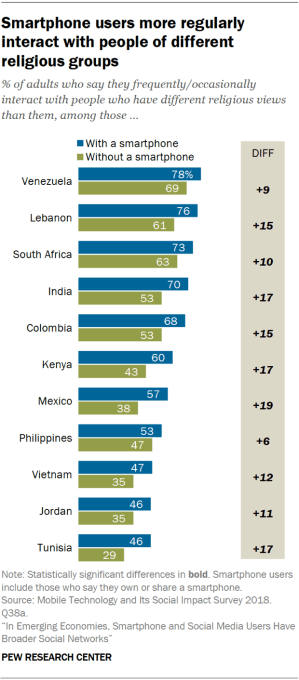
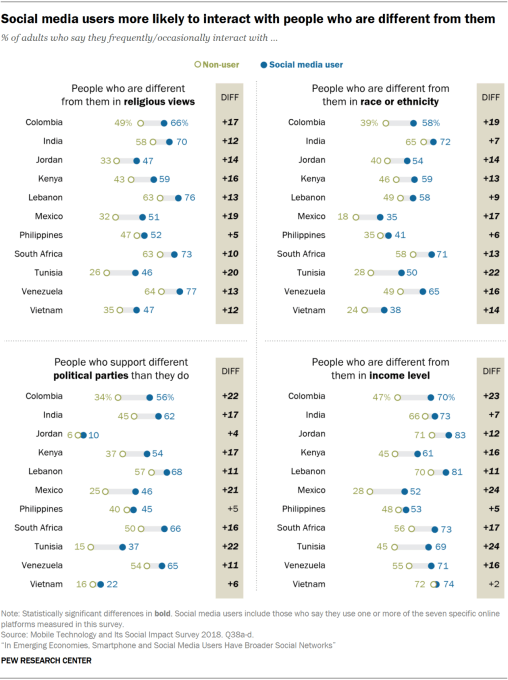
Instead of isolation, the study found that smartphone users in these markets, and particularly those who also used social media, were more regularly exposed to people with different racial and ethnic backgrounds, different religious preferences, different political parties, and different income levels, compared to those without a smartphone.

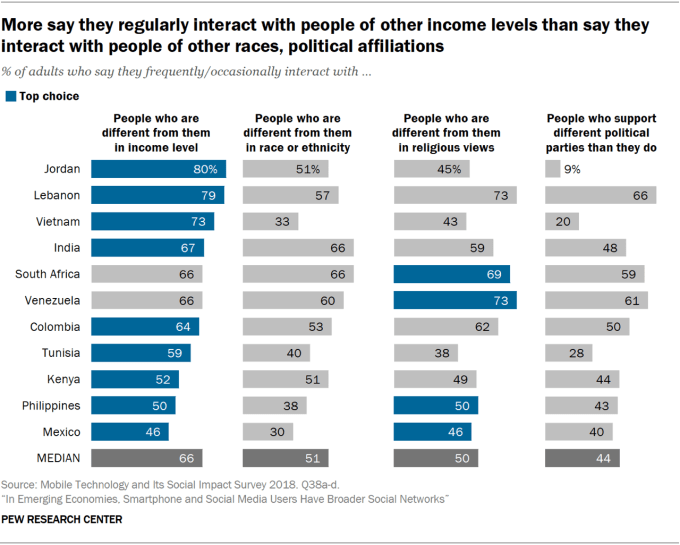
In Mexico, for example, 57% of smartphone owners regularly interacted with people of other religions, while only 38% of those without a smartphone did. And more than half (54%) interact with people who supported different political parties. They were also 24% more like to interact with people of different income levels, and 17% more likely to interact with people of different ethnic or racial backgrounds.

PI PG 2019.08.22 Social Networks Emerging Economies 0 01

These sorts of trends help up across the nations studied, Pew noted, with a median of 66% saying they interacted with people with different income levels, 51% saying they interacted with a those of different race or ethnicity, 50% saying they interacted with those having different religious views, and a median 44% saying they interacted with those who supported a different political party.

PI PG 2019.08.22 Social Networks Emerging Economies 2 03 1

The use of social media and messaging apps was found to be a huge contributor here, as it made people more likely to encounter people different from them, the study also said.

PI PG 2019.08.22 Social Networks Emerging Economies 2 04

The report, however, isn’t claiming that smartphone and the related social media use are the cause of this increase in diversity in these people’s lives. There may be other reasons for that. Smartphone owners, in general, may have more resources and money — they own a smartphone, after all — and this alone could help expose them to a more diverse group of people.

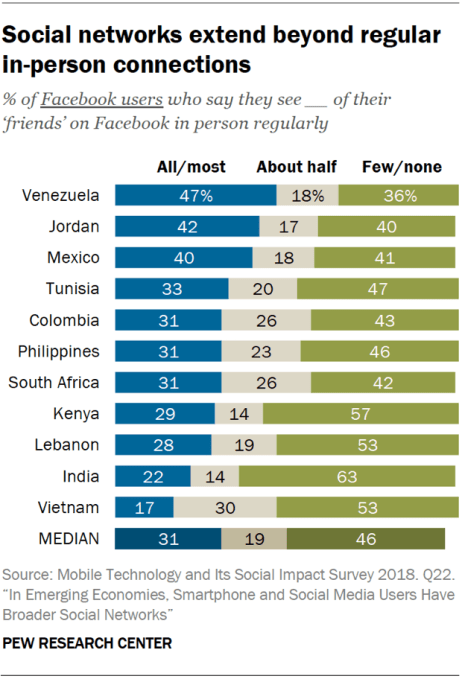
That said, smartphones are helping people stay connected to distant family and friends, and build out online networks of people they don’t ever see in person.

More than half of people in most of the surveyed countries said that only see half — or fewer — of the people they call or text in person. 93% said they keep in touch with far-flung contacts. And a median of 46% said they see their few or none of Facebook friends regularly.

PI PG 2019.08.22 Social Networks Emerging Economies 2 01

All this connecting isn’t seen as being fully positive, however.

An earlier Pew report found that users in these 11 countries believe the internet and social media are making people more divided in their opinions and only sometimes more accepting of different views. Exposure to diversity and acceptance of it are different things.

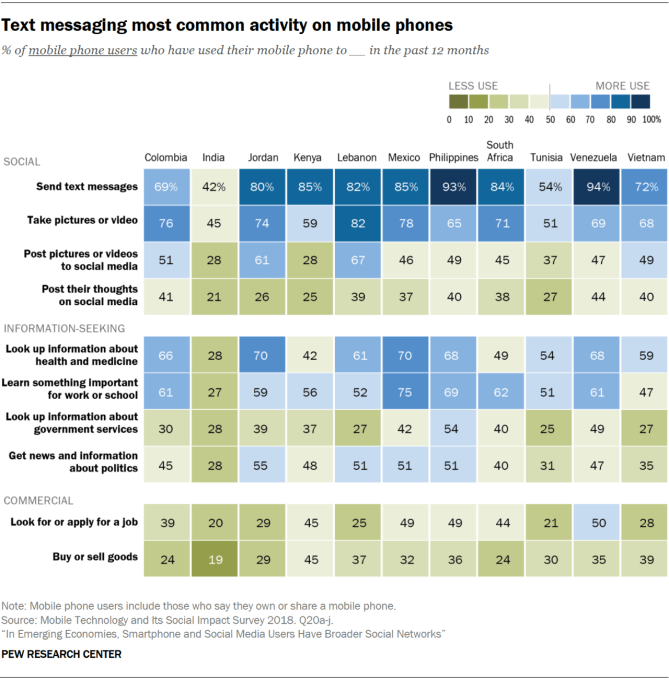
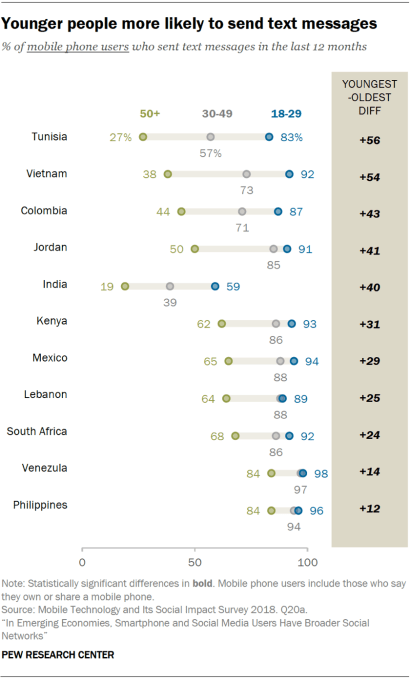
The new report also gets into how smartphones are used. For example, a median of 82% said they texted, 69% took photos or videos, 61% looked up health information, 47% looked up news and political information, and 37% looked up information about government resources.

PI PG 2019.08.22 Social Networks Emerging Economies 0 03

It also examined smartphones’ impact on digital divides, noting that people with access to these devices and social media, as well as younger people, those with higher levels of education and men, were gaining more benefits than others.

PI PG 2019.08.22 Social Networks Emerging Economies 0 04

The study is based on in-person interviews conducted by D3 Systems, Inc. and the results are based on national samples, notes Pew.

The full report is available here, with deeper dives on activities and data by individual countries.


Read Full Article

Pew: mobile and social media users in emerging markets have more diverse social networks


The latest study from Pew Research Center takes a look at the impact mobile technology, including the use of smartphones and social media, is having on the diversity of people’s social network in emerging markets. For the purpose of the study, Pew surveyed mobile users in eleven key markets: Mexico, Venezuela, Colombia, South Africa, Kenya, India, Vietnam, the Philippines, Tunisia, Jordan, and Lebanon. It found that users in these markets had broader social networks than those without smartphones and social media.

In the U.S., we’ve been concerned with social media’s ability to create “filter bubbles” — meaning how we surround ourselves online with people who hold the same opinions as us, which is then reinforced by social media’s engagement-focused algorithms. This leads us to believe, sometimes in error, that what we think is the most correct and most popular view.

According to Pew’s study, emerging markets are experiencing a somewhat different phenomenon.

Instead of isolation, the study found that smartphone users in these markets, and particularly those who also used social media, were more regularly exposed to people with different racial and ethnic backgrounds, different religious preferences, different political parties, and different income levels, compared to those without a smartphone.

In Mexico, for example, 57% of smartphone owners regularly interacted with people of other religions, while only 38% of those without a smartphone did. And more than half (54%) interact with people who supported different political parties. They were also 24% more like to interact with people of different income levels, and 17% more likely to interact with people of different ethnic or racial backgrounds.

PI PG 2019.08.22 Social Networks Emerging Economies 0 01

These sorts of trends help up across the nations studied, Pew noted, with a median of 66% saying they interacted with people with different income levels, 51% saying they interacted with a those of different race or ethnicity, 50% saying they interacted with those having different religious views, and a median 44% saying they interacted with those who supported a different political party.

PI PG 2019.08.22 Social Networks Emerging Economies 2 03 1

The use of social media and messaging apps was found to be a huge contributor here, as it made people more likely to encounter people different from them, the study also said.

PI PG 2019.08.22 Social Networks Emerging Economies 2 04

The report, however, isn’t claiming that smartphone and the related social media use are the cause of this increase in diversity in these people’s lives. There may be other reasons for that. Smartphone owners, in general, may have more resources and money — they own a smartphone, after all — and this alone could help expose them to a more diverse group of people.

That said, smartphones are helping people stay connected to distant family and friends, and build out online networks of people they don’t ever see in person.

More than half of people in most of the surveyed countries said that only see half — or fewer — of the people they call or text in person. 93% said they keep in touch with far-flung contacts. And a median of 46% said they see their few or none of Facebook friends regularly.

PI PG 2019.08.22 Social Networks Emerging Economies 2 01

All this connecting isn’t seen as being fully positive, however.

An earlier Pew report found that users in these 11 countries believe the internet and social media are making people more divided in their opinions and only sometimes more accepting of different views. Exposure to diversity and acceptance of it are different things.

The new report also gets into how smartphones are used. For example, a median of 82% said they texted, 69% took photos or videos, 61% looked up health information, 47% looked up news and political information, and 37% looked up information about government resources.

PI PG 2019.08.22 Social Networks Emerging Economies 0 03

It also examined smartphones’ impact on digital divides, noting that people with access to these devices and social media, as well as younger people, those with higher levels of education and men, were gaining more benefits than others.

PI PG 2019.08.22 Social Networks Emerging Economies 0 04

The study is based on in-person interviews conducted by D3 Systems, Inc. and the results are based on national samples, notes Pew.

The full report is available here, with deeper dives on activities and data by individual countries.


Read Full Article

Tumblr’s next step forward with Automattic CEO Matt Mullenweg


After months of rumors, Verizon finally sold off Tumblr for a reported $3 million — a fraction of what Yahoo paid for the once might blogging service back in 2013.

The media conglomerate (which also owns TechCrunch) was clearly never quite sure what to do with the property after gobbling it up as part of its 2016 Yahoo acquisition. All parties has since come to the conclusion that Tumblr simply wasn’t a good fit under either the Verizon or Yahoo umbrella, amounting to a $1.1 billion mistake.

For Tumblr, however, the story may still have a happy ending. By all accounts, its new home at Automattic is far better fit. The service joins a portfolio that includes popular blogging service WordPress.com, spam filtering service Akismet and long-form storytelling platform, Longreads.

In an interview, this week, Automattic founder and CEO Matt Mullenweg discussed Tumblr’s history and the impact of the poorly received adult content restrictions. He also shed some light on where Tumblr goes from here, including a potential increased focused on multimedia such as podcasting.

Brian Heater: I’m curious how [your meetings with Tumblr staff] went. What’s the feeling on the team right now? What are the concerns? How are people feeling about the transition?


Read Full Article

Reliability concerns raised over pi-top’s STEM learning laptop


TechCrunch has learned of a safety issue and a number of product reliability questions being raised about a modular computer made by a London edtech startup that’s intended for children to learn coding and electronics.

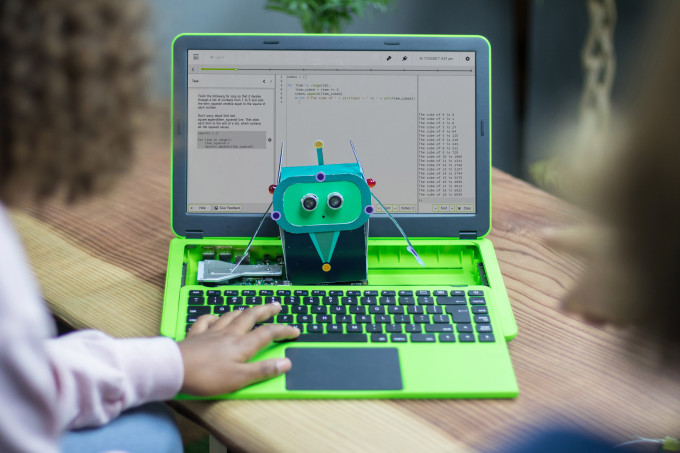
The product, called the pi-top 3, is a Raspberry Pi-powered laptop with a keyboard that slides out to access a rail for breadboarding electronics.

A student at a US school had to be attended by a nurse after touching a component in the device which had overheated, leaving them with redness to their finger.

A spokesperson for Cornell Tech confirmed the incident to us — which they said had happened in June. We’ve withheld the name of the school at their request.

In an internal pi-top email regarding this incident, which we’ve also reviewed, it describes the student being left with “a very nasty finger burn”.

Cornell Tech’s spokesperson told us it has stopped using the pi-top 3 — partly in response to this incident but also because of wider reliability issues with the device. They said some of their grad students will be working on a project with the K-12 team next semester with the aim of creating an alternative that’s more reliable, affordable and safe.

We have also been told of concerns about wider reliability issues with the pi-top 3 by a number of other sources.

We asked pi-top for comment on the safety incident at Cornell Tech and for details of how it responded. The company provided us with a statement in which it claims: “pitop incorporates all possible safeguards into our products to ensure they are safe.”

“As soon as we became aware of this incident we immediately investigated what had happened,” it went on. “We discovered that the incident was a one-in-a-million occurrence. The user dropped a piece of metal, with a specific size and shape, under the unit. This fell in such a way that it touched a particular pin and caused a linear regulator to heat up. They received a small minor burn to the tip of one finger when they tried to recover that piece of metal.”

“This is the only reported incident where a user has been hurt whilst using one of our products,” pi-top added.

It is not clear how many pi-top 3 laptops have been sold to schools at this stage because pi-top does not break out sales per product. Instead it provided us with a figure for the total number of devices sold since it was founded in 2014 — saying this amounts to “more than 200,000 devices in 4 years which have been used by more than half a million people”.

pi-top also says it has sold products to schools in 70 countries, saying “thousands” of schools have engaged with its products. (The bright green color of the laptop is easy to spot in promotional photos for school STEM programs and summer camps.)

The London-based DIY hardware startup began life around five years ago offering a ‘3D-print it yourself‘ laptop for makers via the Kickstarter crowdfunding platform before shifting its focus to the educational market — tapping into the momentum around STEM education that’s seen a plethora of ‘learn to code’ toys unboxed in recent years.

pi-top has raised more than $20M in VC funding to date and now sells a number of learning devices and plug-in components intended for schools to teach STEM — all of which build on the Raspberry Pi microprocessor.

pi-top adds its own layer of software to the Pi as well as hardware additions intended to expand the learning utility (such as a speaker for the pi-top 3 and an “inventors kit” with several electronics projects, including one that lets kids build and program a robot).

The pi-top 3 — its third device — was launched in October 2017, priced between $285-$320 per laptop (without or with a Raspberry Pi 3).

The distinctively bright green laptop is intended for use by students as young as eight years old.

Unusual failure mode

In the internal email discussing the “Cornell failure diagnosis” — which is dated July 16 — pi-top’s head of support and customer success, Preya Wylie, conveys the assessment of its VP of technology, Wil Bennett, that the “unusual failure mode was likely caused by an electrical short on the male 34-pin connector on the underside of the protoboard”.

She goes on to specify that the short would have been caused by the metal SD-card removal tool that’s bundled with the product — noting this was “reported to have been somewhere underneath the protoboard at the time”.

“[Bennett] has recreated the same conditions on his bench in China and has seen the pi-top enter similar failure modes, with an electrical short and subsequent overheating,” she writes.

An additional complication discussed in the email is that the component is designed to stay on at all times in order that the pi-top can respond to the power button being pressed when the unit is off. Wylie writes that this means, if shorted, the component remains “very hot” even when the pi-top has been shut down and unplugged — as heat is generated by the pi-top continuing to draw power from the battery.

Only once the battery has fully depleted will the component be able to cool down.

In the email — which was sent to pi-top’s founder and CEO Jesse Lozano and COO Paul Callaghan — she goes on to include a list of four “initial recommendations to ensure this does not happen again”, including that the company should inform teachers to remove the SD-card removal tool from all pi-top 3 laptops and to remove the SD card themselves rather than letting students do it; as well as advising teachers/users to turn the device off if they suspect something has got lost under the protoboard.

Another recommendation listed in the email is the possibility of creating a “simple plastic cover to go over the hub” to prevent the risk of users’ fingers coming into contact with hot components.

A final suggestion is a small modification to the board to cut off one of the pins to “greatly reduce the chance of this happening again”.
pi top 3

We asked pi-top to confirm what steps it has taken to mitigate the risk of pitop 3 components overheating and posing a safety risk via the same sort of shorting failure experienced by Cornell Tech — and to confirm whether it has informed existing users of the risk from this failure mode.

An internal pi-top sales document that we’ve also reviewed discusses a ‘back to school’ sales campaign — detailing a plan to use discounts to “dissolve as much pi-top [3] stock as we can over the next 8 weeks”.

This document says US schools will be targeted from mid August; UK schools/educators from early September; and International Schools Groups from early September. It also includes a strategy to go direct to US Private and Charter Schools — on account of “shorter decision making timelines and less seasonal budgets”.

It’s not clear if the document pre-dates the Cornell incident.

In response to our questions, pi-top told us it is now writing to pi-top 3 customers, suggesting it is acting on some of the initial recommendations set out in Wylie’s July 16 email after we raised concerns.

In a statement the company said: “Whilst it is highly unlikely that this would occur again, we are writing to customers to advise them to take a common-sense approach and switch off the unit if something has got lost inside it.  We are also advising customers to remove the SD card tool from the unit. These simple actions will make the remote possibility of a recurrence even less likely.”

In parallel, we have heard additional concerns about the wider reliability of the pi-top 3 product — in addition to the shorting incident experienced by Cornell.

One source, who identified themselves as a former pi-top employee, told us that a number of schools have experienced reliability issues with the device. One of the schools named, East Penn School District in the US, confirmed it had experienced problems with the model — telling us it had to return an entire order of 40 of the pi-top 3 laptops after experiencing “a large volume of issues”.

“We had initially purchased 40 pi-tops for middle level computers classes,” assistant superintendent Laura Witman told us. “I met one of the owners, Jesse, at a STEM conference. Conceptually the devices had promise, but functionally we experienced a large volume of issues. The company tried to remedy the situation and in the end refunded our monies. I would say it was learning experience for both our district and the company, but I appreciate how they handled things in the end.”

Witman did not recall any problems with pi-top 3 components overheating.

A US-based STEM summer camp provider that we also contacted to confirm whether it had experienced issues with the pi-top 3 — a device which features prominently in promotional materials for its program — declined to comment. A spokesman for iD Tech’s program told us he was not allowed to talk about the matter.

A separate source familiar with the pi-top 3 also told us the product has suffered from software reliability issues, including crashes and using a lot of processor power, as well as hardware problems related to its battery losing power quickly and/or not charging. This source, who was speaking on condition of anonymity, said they were not aware of any issues related to overheating.

Asked to respond to wider concerns about the pi-top 3’s reliability, pi-top sent us this statement:

pitop is a growing and dynamic company developing DIY computing tools which we believe can change the world for the better. In the past four and a half years we have shipped hundreds of thousands of products across our entire product range, and pitop hardware and software have become trusted assets to teachers and students in classrooms from America to Zimbabwe. pitop products are hard at work even in challenging environments such as the UN’s Kakuma refugee camp in Northern Kenya.

At the heart of our products is the idea that young makers can get inside our computers, learn how they work and build new and invaluable skills for the future. Part of what makes pitop special, and why kids who’ve never seen inside a computer before think it’s awesome, is that you have to build it yourself straight out of the box and then design, code and make electronic systems with it. We call this learning.

The nature of DIY computing and electronics means that, very occasionally, things can fail. If they do, pitop’s modular nature means they can be easily replaced. If customers encounter any issues with any of our products our excellent customer support team are always ready to help.

It is important to say that all electronic systems generate heat and Raspberry Pi is no exception. However, at pitop we do the very best to mitigate thanks to the cutting-edge design of our hardware. Faults on any of our products fall well below accepted thresholds. Although we are proud of this fact, this doesn’t make us complacent and we continually strive to do things better and provide our customers with world-class products that don’t compromise on safety.

Thousands of schools around the world recognise the fantastic benefits the pitop [3], pitop CEED, and pitop [1] brings as a Raspberry Pi-powered device. Our new flagship products, the pitop [4] and our learning platform, pitop Further, take coding education to the next level, as a programmable computing module for makers, creators and innovators everywhere. We are proud of our products and the enormous benefits they bring to schools, students and makers around the world.

Internal restructuring

We also recently broke the news that pi-top had laid off a number of staff after losing out on a large education contract. Our sources told us the company is restructuring to implement a new strategy. pi-top confirmed 12 job cuts at that stage. Our sources suggest more cuts are pending.

Some notable names departing pi-top’s payroll in recent weeks are its director of learning and research, William Rankin — formerly a director of learning at Apple — who writes on LinkedIn that he joined pi-top in March 2018 to “develop a constructionist learning framework to support pi-top’s maker computing platform”. Rankin left the business this month, per his LinkedIn profile.

pi-top’s chief education and product officer, Graham Brown-Martin — who joined the business in September 2017, with a remit to lead “learning, product design, brand development and communication strategy” to support growth of its “global education business, community and ecosystem” — also exited recently, leaving last month per his LinkedIn.

In another change this summer pi-top appointed a new executive chairman of its board: Stanley Buchesky, the founder of a US edtech seed fund who previously served in the Trump administration as an interim CFO for the US department for education under secretary of state, Betsy DeVos.

Buchesky’s fund, which is called The EdTech Fund, said it had made an investment in pi-top last month. The size of the investment has not been publicly disclosed.

Buchesky took over the chairman role from pi-top board member and investor Eric Wilkinson: A partner at its Series A investor, Hambro Perks. Wilkinson remains on the pi-top board but no longer as exec chairman.

The job cuts and restructuring could be intended to prepare pi-top for a trade sale to another STEM device maker, according to one of our sources.

Meanwhile pi-top’s latest device, the pi-top 4, represents something of a physical restructuring of its core edtech computing proposition which looks intended to expand the suggestive utility it offers teachers via multiple modular use-cases — from building drones and wheeled robots to enabling sensor-based IoT projects which could check science learning criteria, all powered by pi-top’s encased Raspberry Pi 4.

Out of the box, the pi-top 4 is a computer in a box, not a standalone laptop. (Though pi-top does plan to sell a range of accessories enabling it be plugged in to power a touchscreen tablet or a laptop, and more.)

pi top 4 4

pi-top is in the process of bringing the pi-top 4 to market after raising almost $200,000 on Kickstarter from more than 500 backers. Early backers have been told to expect it to ship in November.

While pi-top’s predecessor product is stuck with the compute power of the last-gen Raspberry Pi 3 (the pi-top 3 cannot be upgraded to the Raspberry Pi 4), the pi-top 4 will have the more powerful Pi 4 as its engine.

However the latter has encountered some heat management issues of its own.

The Raspberry Pi Foundation recently put out a firmware update that’s intended to reduce the microprocessor’s operating temperature after users had complained it ran hot.

Asked whether the Foundation has any advice on encasing the Raspberry Pi 4, in light of the heat issue, founder Eben Upton told us: “Putting the Pi in a case will tend to cause it to idle at a higher temperature than if it is left in the open. This means there’s less temperature ‘in reserve’, so the Pi will throttle more quickly during a period of sustained high-intensity operation.”

“In general, the advice is to choose a case which is appropriate to your use case, and to update firmware frequently to benefit from improvements to idle power consumption as they come through,” he added.

TechCrunch’s Steve O’Hear contributed to this report


Read Full Article