26 June 2019

Europe should ban AI for mass surveillance and social credit scoring, says advisory group


An independent expert group tasked with advising the European Commission to inform its regulatory response to artificial intelligence — to underpin EU lawmakers’ stated aim of ensuring AI developments are “human centric” — has published its policy and investment recommendations.

This follows earlier ethics guidelines for “trustworthy AI”, put out by the High Level Expert Group (HLEG) for AI back in April, when the Commission also called for participants to test the draft rules.

The AI HLEG’s full policy recommendations comprise a highly detailed 50-page document — which can be downloaded from this web page. The group, which was set up in June 2018, is made up of a mix of industry AI experts, civic society representatives, political advisers and policy wonks, academics and legal experts.

The document includes warnings on the use of AI for mass surveillance and scoring of EU citizens, such as China’s social credit system, with the group calling for an outright ban on “AI-enabled mass scale scoring of individuals”. It also urges governments to commit to not engage in blanket surveillance of populations for national security purposes. (So perhaps it’s just as well the UK has voted to leave the EU, given the swingeing state surveillance powers it passed into law at the end of 2016.) 

“While there may be a strong temptation for governments to ‘secure society’ by building a pervasive surveillance system based on AI systems, this would be extremely dangerous if pushed to extreme levels,” the HLEG writes. “Governments should commit not to engage in mass surveillance of individuals and to deploy and procure only Trustworthy AI systems, designed to be respectful of the law and fundamental rights, aligned with ethical principles and socio-technically robust.”

The group also calls for commercial surveillance of individuals and societies to be “countered” — suggesting the EU’s response to the potency and potential for misuse of AI technologies should include ensuring that online people-tracking is “strictly in line with fundamental rights such as privacy”, including (the group specifies) when it concerns ‘free’ services (albeit with a slight caveat on the need to consider how business models are impacted).

Last week the UK’s data protection watchdog fired an even more specific shot across the bows of the online behavioral ad industry — warning that adtech’s mass-scale processing of web users’ personal data for targeting ads does not comply with EU privacy standards. The industry was told its rights-infringing practices must change, even if the Information Commissioner’s Office isn’t about to bring down the hammer just yet. But the reform warning was clear.

As EU policymakers work on fashioning a rights-respecting regulatory framework for AI, seeking to steer  the next ten years+ of cutting-edge tech developments in the region, the wider attention and scrutiny that will draw to digital practices and business models looks set to drive a clean up of problematic digital practices that have been able to proliferate under no or very light touch regulation, prior to now.

The HLEG also calls for support for developing mechanisms for the protection of personal data, and for individuals to “control and be empowered by their data” — which they argue would address “some aspects of the requirements of trustworthy AI”.

“Tools should be developed to provide a technological implementation of the GDPR and develop privacy preserving/privacy by design technical methods to explain criteria, causality in personal data processing of AI systems (such as federated machine learning),” they write.

“Support technological development of anonymisation and encryption techniques and develop standards for secure data exchange based on personal data control. Promote the education of the general public in personal data management, including individuals’ awareness of and empowerment in AI personal data-based decision-making processes. Create technology solutions to provide individuals with information and control over how their data is being used, for example for research, on consent management and transparency across European borders, as well as any improvements and outcomes that have come from this, and develop standards for secure data exchange based on personal data control.”

Other policy suggestions among the many included in the HLEG’s report are that AI systems which interact with humans should include a mandatory self-identification. Which would mean no sneaky Google Duplex human-speech mimicking bots. In such a case the bot would have to introduce itself up front — thereby giving the human caller a chance to disengage.

The HLEG also recommends establishing a “European Strategy for Better and Safer AI for Children”. Concern and queasiness about rampant datafication of children, including via commercial tracking of their use of online services, has been raised  in multiple EU member states.

“The integrity and agency of future generations should be ensured by providing Europe’s children with a childhood where they can grow and learn untouched by unsolicited monitoring, profiling and interest invested habitualisation and manipulation,” the group writes. “Children should be ensured a free and unmonitored space of development and upon moving into adulthood should be provided with a “clean slate” of any public or private storage of data related to them. Equally, children’s formal education should be free from commercial and other interests.”

Member states and the Commission should also devise ways to continuously “analyse, measure and score the societal impact of AI”, suggests the HLEG — to keep tabs on positive and negative impacts so that policies can be adapted to take account of shifting effects.

“A variety of indices can be considered to measure and score AI’s societal impact such as the UN Sustainable Development Goals and the Social Scoreboard Indicators of the European Social Pillar. The EU statistical programme of Eurostat, as well as other relevant EU Agencies, should be included in this mechanism to ensure that the information generated is trusted, of high and verifiable quality, sustainable and continuously available,” it suggests. “AI-based solutions can help the monitoring and measuring its societal impact.”

The report is also heavy on pushing for the Commission to bolster investment in AI — calling particularly for more help for startups and SMEs to access funding and advice, including via the InvestEU program.

Another suggestion is the creation of an EU-wide network of AI business incubators to connect academia and industry. “This could be coupled with the creation of EU-wide Open Innovation Labs, which could be built further on the structure of the Digital Innovation Hub network,” it continues. 

There are also calls to encourage public sector uptake of AI, such as by fostering digitalisation by transforming public data into a digital format; providing data literacy education to government agencies; creating European large annotated public non-personal databases for “high quality AI”; and funding and facilitating the development of AI tools that can assist in detecting biases and undue prejudice in governmental decision-making.

Another chunk of the report covers recommendations to try to bolster AI research in Europe — such as strengthening and creating additional Centres of Excellence which address strategic research topics and become “a European level multiplier for a specific AI topic”.

Investment in AI infrastructures, such as distributed clusters and edge computing, large RAM and fast networks, and a network of testing facilities and sandboxes is also urged; along with support for an EU-wide data repository “through common annotation and standardisation” — to work against data siloing, as well as trusted data spaces for specific sectors such as healthcare, automative and agri-food.

The push by the HLEG to accelerate uptake of AI has drawn some criticism, with digital rights group Access Now’s European policy manager, Fanny Hidvegi, writing that: “What we need now is not more AI uptake across all sectors in Europe, but rather clarity on safeguards, red lines, and enforcement mechanisms to ensure that the automated decision making systems — and AI more broadly — developed and deployed in Europe respect human rights.”

Other ideas in the HLEG’s report include developing and implementing a European curriculum for AI; and monitoring and restricting the development of automated lethal weapons — including technologies such as cyber attack tools which are not “actual weapons” but which the group points out “can have lethal consequences if deployed. 

The HLEG further suggests EU policymakers refrain from giving AI systems or robots legal personhood, writing: “We believe this to be fundamentally inconsistent with the principle of human agency, accountability and responsibility, and to pose a significant moral hazard.”

The report can downloaded in full here.


Read Full Article

HER, the dating app for queer women, revamps profiles


HER, the app that provides safe space for queer women to meet, has today revamped the app’s profiles.

The updated profiles allow users to express themselves more fully in the categories of gender, sexuality, pronouns, diet preferences, star signs, drinking, smoking and cannabis habits, among others. HER has also added space for a text bio, which is very common on other dating apps but wasn’t a part of Her.

“It was interesting to reflect on how people have changed,” said founder and CEO Robyn Exton, in reference to text profiles. “People used to worry about writing a bio but now they really want more ways to express themselves, and they want to see other people’s writing skills when they’re browsing profiles.”

There is a downside to text profiles, which the Grindr community is all too familiar with, in that it allows users to also express their discrimination against certain people or groups. That said, HER’s first commitment is to provide safe space to queer women and has thusly built out reporting tools to weed out bad actors.

Perhaps more importantly, HER is providing a ‘What does this mean’ field across the categories of Sexuality, Gender and Pronouns, to help users understand each other more authentically.

Here’s what Exton had to say in a prepared release:

Profiles are a critical space to tell people who we are yet mostly end up becoming a bland wash where everyone sounds the same. Few social apps have invested any time in trying to truly understand and support the expression of queer identity – a limited number of sexualities and genders just doesn’t cut it. By enforcing these limitations, companies are denying LGBTQ+ people the opportunity to truly be ourselves. To express all of our identity, all the tiny, intersecting facets of what makes us, us.

[gallery ids="1849081,1849079,1849080"]

HER launched four years ago, rebranded from Daatch, with the intent to give queer women a space to safely and freely express themselves and meet each other. The profiles on the app have always been slightly more expressive than those of other dating apps, allowing users to post multiple pictures, interests etc., all of which were ‘likeable’ by other users.

The new profiles have refined the options available to users and have implemented multiple select so that no user ever gets put in a box.

Like most dating apps, HER operates with a freemium model, offering premium features to subscribers who pay $15USD/month. The company also makes money off of its events business, which operates in fifteen cities across the U.S.

HER has 4.5 million registered users, and has raised $2.5 million in funding. Exton says that HER has been profitable for several years.

Happy Pride!


Read Full Article

300M-user meme site Imgur raises $20M from Coil to pay creators


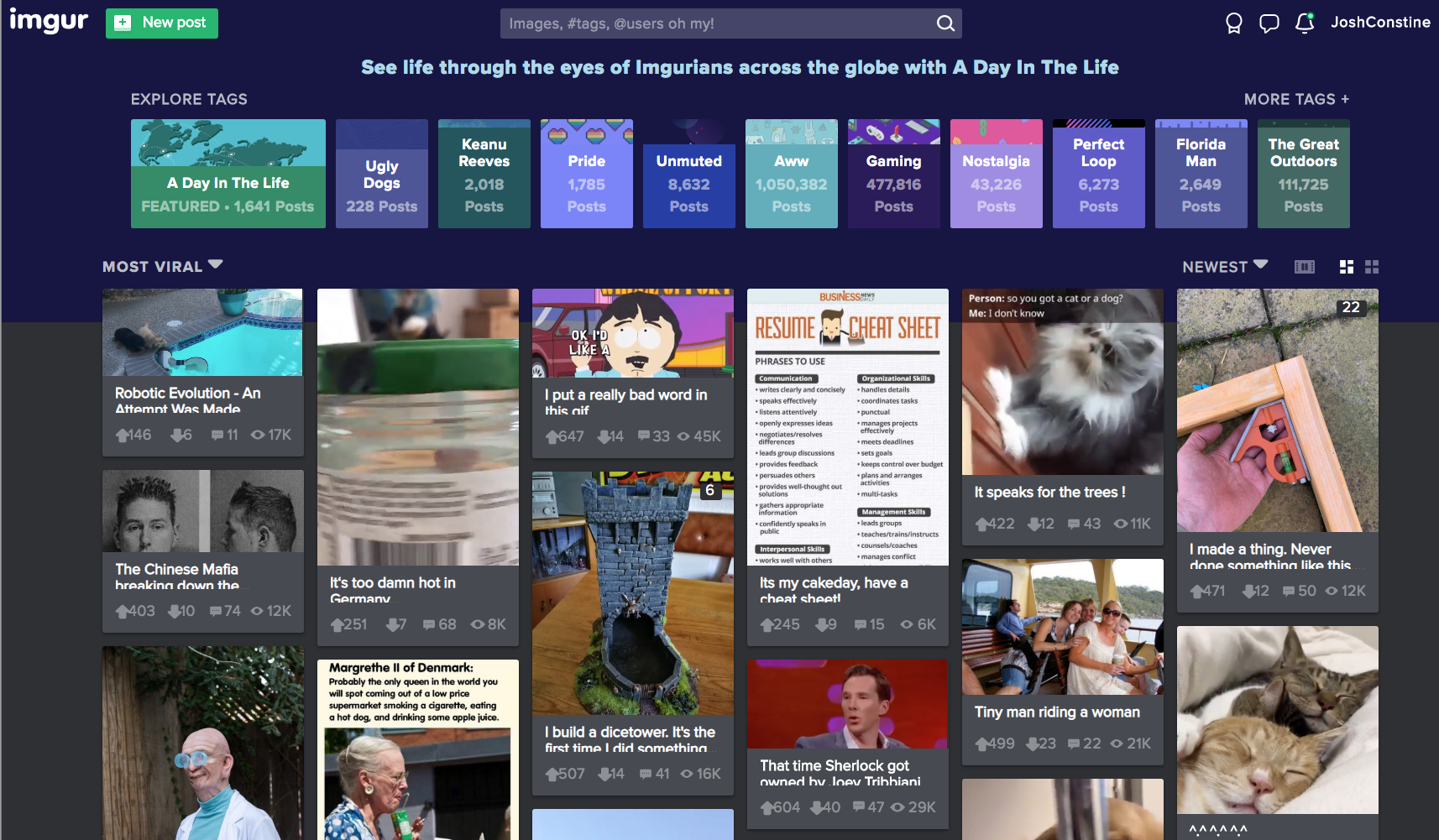
Meme creators have never gotten their fair share. Remixed and reshared across the web, their jokes props up social networks like Instagram and Twitter that pay back none of their ad revenue to artists and comedians. But 300 million monthly user meme and storytelling app Imgur wants to pioneer a way to pay creators per second that people view their content.

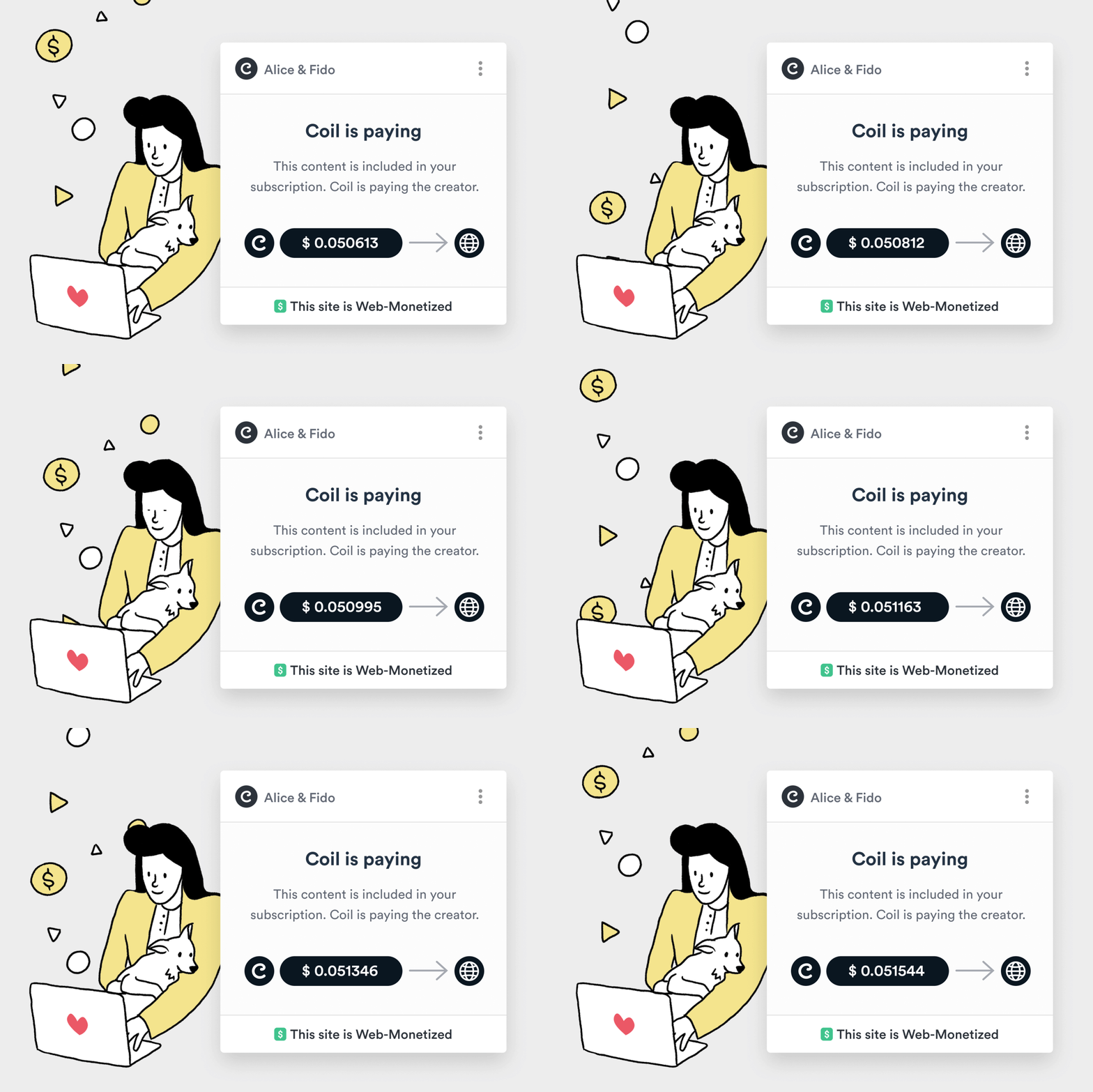
Today Imgur announces that it’s raised a $20 million venture equity round from Coil, a micropayment tool for creators that Imgur has agreed to build into its service. Imgur will eventually launch a premium membership with exclusive features and content reserved for Coil subscribers. Users pay Coil a fixed monthly fee, install its browser extension, the Ripple XRP cryptocurrency is used to route assets around, and then Coil pays creators per second that the subscriber spends consuming their content at a rate of 36 cents per hour. Imgur and Coil will earn a cut too, diversifying the meme network’s revenue beyond ads.

Imgur

“Imgur began in 2009 as a gift to the internet. Over the last 10 years we’ve built one of the largest, most positive online communities, based on our core value to ‘give more than we take’” says Alan Schaaf, founder and CEO of Imgur. The startup bootstrapped for its first five years before raising a $40 million Series A from Andreessen Horowitz and Reddit. It’s grown into the premier place to browse ‘meme dumps’ of 50+ funny images and GIFs, as well as art, science, and inspirational tales.

While the new round brings in fewer dollars, Schaaf explains that Imgur raised at a valuation that’s “higher than last time. Our investors are happy with the valuation. This is a really exciting strategic partnership.” Coil founder and CEO Stefan Thomas who was formerly the CTO of cryptocurrency company Ripple Labs will join Imgur’s board. Coil received the money it’s investing in Imgur from Ripple Labs’ Xpring Initiative, which aims to fund proliferation of the Ripple XRP ecosystem, though Imgur received US dollars in the funding deal.

Thomas tells me that “There’s no built in business model” as part of the web. Publishers and platforms “either make money with ads or with subscriptions. The problem is that only works when you have huge scale” that can bring along societal problems as we’ve seen with Facebook. Coil will “hopefully offer a third potential business model for the internet and offer a way for creators to get paid.”

Coil Micropayments

Founded last year, Coil’s $5 per month subscription is now in open beta, and it provides extensions for Chrome and Firefox as it tries to get baked into browsers natively. Unlike Patreon where you pick a few creators and choose how much to pay each every month, Coil lets you browse content from as many creators as you want and it pays them appropriately. Sites like Imgur can code in tags to their pages that tell Coil’s Web Monetization API who to send money to.

The challenge for Imgur will be avoiding the cannibalization of its existing content to the detriment of its non-paying users who’ve always known it to be free. “We’re in the business of making the internet better. We do not plan on taking anything away for the community” Schaaf insists. That means it will have to recruit new creators and add bonus features that are reserved for Coil subscribers without making the rest of its 300 million users feel deprived.

It’s surprising thT meme culture hasn’t spawned more dedicated apps. Decade-old Imgur precedes the explosion in popularity of bite-sized internet content. But rather than just host memes like Instagram, Imgur has built its own meme creation tools. If Imgur and Coil can prove users are willing to pay for quick hits of entertainment and creators can be fairly compensated, they could inspire more apps to help content makers turn their passion into a profession…or at least a nice side hustle.


Read Full Article

Reading in the Original


Reading in the Original

300M-user meme site Imgur raises $20M from Coil to pay creators


Meme creators have never gotten their fair share. Remixed and reshared across the web, their jokes props up social networks like Instagram and Twitter that pay back none of their ad revenue to artists and comedians. But 300 million monthly user meme and storytelling app Imgur wants to pioneer a way to pay creators per second people view their content.

Today Imgur announces that it’s raised a $20 million venture equity round from Coil, a micropayment tool for creators that Imgur has agreed to build into its service. Imgur will eventually launch a premium membership with bonus features and content with access reserved for Coil subscribers. Users pay Coil a fixed monthly fee, install its browser extension, the Ripple XRP cryptocurrency is used to route assets around, and then Coil pays creators per second the subscriber spends consuming their content at a rate of 36 cents per hour. Imgur and Coil will earn a cut too, diversifying the meme network’s revenue beyond ads.

Imgur

“Imgur began in 2009 as a gift to the internet. Over the last 10 years we’ve built one of the largest, most positive online communities, based on our core value to ‘give more than we take’” says Alan Schaaf, founder and CEO of Imgur. The startup bootstrapped for its first five years before raising a $40 million Series A from Andreessen Horowitz and Reddit. It’s grown into the premier place to browse ‘meme dumps’ of 50+ funny images and GIFs, as well as art, science, and inspirational tales.

While the new round brings in fewer dollars, Schaaf explains that Imgur raised a valuation that “higher than last time. Our investors are happy with the valuation. This is a really exciting strategic partnership.” Coil founder and CEO Stefan Thomas who was formerly the CTO of cryptocurrency company Ripple Labs will join Imgur’s board. Coil received the money it’s investing in Imgur from Ripple Labs’ Xpring Initiative, which aims to fund proliferation of the Ripple XRP ecosystem, though Imgur received US dollars in the funding deal.

Thomas tells me that “There’s no built in business model” as part of the web. Businesses “either make money with ads or with subscriptions. The problem is that only works when you have huge scale” that can bring about societal problems as we’ve seen with Facebook. Coil will “hopefully offer a third potential business model for the internet and offer a way for creators to get paid.”

Coil Micropayments

Founded last year, Coil’s $5 per month subscription is now in open beta, and it provides extensions for Chrome and Firefox as it tries to get baked into browsers natively. Unlike Patreon where you pick a few creators and choose how much to pay each every month, Coil just lets you browse content from as many creators as you want and it pays them appropriately. Sites like Imgur can code in tags to their pages that tell Coil’s Web Monetization API who to send money to.

The challenge for Imgur will be avoiding the cannibalization of its existing content to the detriment of its non-paying users who’ve always known it to be free. “We’re in the business of making the internet better. We do not plan on taking anything away for the community” Schaaf insists. That means it will have to recruit new creators and add bonus features that are exclusive to Coil subscribers without making the rest of its 300 million users feel deprived.

It’s surprising the meme culture hasn’t spawned more dedicated apps. Decade-old Imgur precedes the explosion in popularity of bite-sized internet content. But rather than just host memes like Instagram, Imgur has built its own meme creation tools. If Imgur and Coil can prove users are willing to pay for quick hits of entertainment and creators can be fairly compensated, they could inspire more apps to help content makers turn their passion into a profession…or at least a nice side hustle.


Read Full Article

UK law review eyes abusive trends like deepfaked porn and cyber flashing


The UK government has announced the next phase of a review of the law around the making and sharing of non-consensual intimate images, with ministers saying they want to ensure it keeps pace with evolving digital tech trends.

The review is being initiated in response to concerns that abusive and offensive communications are on the rise, as a result of it becoming easier to create and distribute sexual images of people online without their permission.

Among the issues the Law Commission will consider are so-called ‘revenge porn’, where intimate images of a person are shared without their consent; deepfaked porn, which refers to superimposing a real photograph of a person’s face onto a pornographic image or video without their consent; and cyber flashing, the unpleasant practice of sending unsolicited sexual images to a person’s phone by exploiting technologies such as Bluetooth that allow for proximity-based file sharing.

On the latter practice, the screengrab below is of one of two unsolicited messages I received as pop-ups on my phone in the space of a few seconds while waiting at a UK airport gate — and before I’d had a chance to locate the iOS master setting that actually nixes Bluetooth.

On iOS, even without accepting the AirDrop the cyberflasher is still able to send an unsolicited placeholder image with their request.

Safe to say, this example is at the tamer end of what tends to be involved. More often it’s actual dick pics fired at people’s phones, not a parrot-friendly silicone substitute…

cyber flashing

A patchwork of UK laws already covers at least some of the offensive and abusive communications in question, such as the offence of voyeurism under the Sexual Offences Act 2003, which criminalises certain non-consensual photography taken for sexual gratification — and carries a two-year maximum prison sentence (with the possibility that a perpetrator may be required to be listed on the sexual offender register); while revenge porn was made a criminal offence under section 33 of the Criminal Justice and Courts Act 2015.

But the government says that while it feels the law in this area is “robust”, it is keen not to be seen as complacent — hence continuing to keep it under review.

It will also hold a public consultation to help assess whether changes in the law are required.

The Law Commission published Phase 1 of their review of Abusive and Offensive Online Communications on November 1 last year — a scoping report setting out the current criminal law which applies.

The second phase, announced today, will consider the non-consensual taking and sharing of intimate images specifically — and look at possible recommendations for reform. Though it will not report for two years so any changes to the law are likely to take several years to make it onto the statute books.

Among specific issues the Law Commission will consider is whether anonymity should automatically be granted to victims of revenge porn.

Commenting in a statement, justice minister Paul Maynard said: “No one should have to suffer the immense distress of having intimate images taken or shared without consent. We are acting to make sure our laws keep pace with emerging technology and trends in these disturbing and humiliating crimes.”

Maynard added that the review builds on recent changes to toughen UK laws around revenge porn and to outlaw ‘upskirting’ in English law; aka the degrading practice of taking intimate photographs of others without consent.

“Too many young people are falling victim to co-ordinated abuse online or the trauma of having their private sexual images shared. That’s not the online world I want our children to grow up in,” added the secretary of state for digital issues, Jeremy Wright, in another supporting statement.

“We’ve already set out world-leading plans to put a new duty of care on online platforms towards their users, overseen by an independent regulator with teeth. This Review will ensure that the current law is fit for purpose as we deliver our commitment to make the UK the safest place to be online.”

The Law Commission review will begin on July 1, 2019 and report back to the government in summer 2021.

Terms of Reference will be published on the Law Commission’s website in due course.


Read Full Article

New Google Tricks, Raspberry Pi 4, Bitcoin Rally, Tech Jobs Without Coding


no-coding-job

Want to know how to share Google search results or report suspicious websites? Heard about the Raspberry Pi 4 and want to know more? In this week’s Really Useful Podcast we look at these things and more, including a brief chat about the sudden crypto coin rally, the “ghost broker” insurance scam, and how to find tech jobs with no coding skills.

Really Useful Podcast Season 3 Episode 4 Shownotes

In this week’s show, we covered:

This week, Christian Cawley is joined by Ian Buckley. Follow them both on Twitter:

Please share our podcast with anyone you think would benefit from some jargon-free clarity and honesty about technology. You’ll find the Really Useful Podcast on:

Subscribe now and catch the tech podcast for technophobes every week!

Read the full article: New Google Tricks, Raspberry Pi 4, Bitcoin Rally, Tech Jobs Without Coding


Read Full Article

Telegram Launches Location-Based Group Chats


Telegram has released its latest update, adding a number of new features. The headline feature is location-based group chats, which let you join or create group chats with people nearby. Which could help you make new friends with people in your area.

Chat to Telegram Users Near Your Location

Telegram details the new features in a blog post. The change underpinning the location-based chats is the ability for people to exchange contact info without knowing each other’s phone numbers. Which enables you to chat with what are essentially strangers.

You can do this by utilizing the Add to Contacts button at the top of new chats. Allowing you to add anyone who messages you to your Telegram contacts. You can also use Add People Nearby to exchange contact info with Telegram users standing close by.

The new People Nearby section also opens up the possibility of Location-Based Group Chats. You can either browse Groups Nearby available for you to join, or Create a Local Group to start your own chat for neighbors, co-workers, or fellow students.

Other improvements Telegram has made with version 5.8 include the option to transfer group ownership to new people and preview themes without applying them, enhanced notification exceptions, and Siri shortcuts to open chats hands-free.

Download: Telegram on Android | iOS

Telegram Helps You Forge New Friendships

These location-based group chats are a fantastic idea. Especially for anyone who wants to forge new friendships with people in their apartment building or on their campus. Just employ the usual safeguards before meeting anyone you only know online.

Telegram is a fantastic messaging app well worth checking out. So much so that we found several reasons why Telegram is the only messaging app you need. And if you’re already a fan here are the useful Telegram features you should be using.

Read the full article: Telegram Launches Location-Based Group Chats


Read Full Article

Twitter’s underrated Lists feature finally gets some attention


Twitter Lists have never gotten the attention they deserve. A feature largely adopted by Twitter power users, lists allow you to create custom timelines by adding only those users whose tweets you want to track. And this can be done without having to also follow those Twitter accounts, which keeps your main timeline clutter-free. But the Twitter Lists feature has always been somewhat buried in Twitter’s interface — at least until now. The company today announced it’s testing a way to make lists easier to access, by relocating them only a swipe away from your home screen.

According to a tweet shared today, Twitter has been thinking about how to make lists easier to get to.

“One idea we had is for you to be able to swipe to your lists from home,” the company explained, followed by a request for feedback.

If you’ve been added to the test, your home timeline will now show dashed lines across the top for each list — a familiar design for anyone who’s ever used Snapchat or Instagram Stories, for example.

From the main timeline, you simply swipe left to move through all your custom timelines, much like you’d advance through Stories.

Lists are especially useful for things you want to track only sometimes — like tweets about a favorite sports team, TV show, or hashtag, perhaps. Or you could make a list of Twitter accounts that tweet cute animal photos, for when the rest of Twitter gets you down. You can also use lists for tracking notable accounts in a given industry, for research purposes, or for following accounts around any other particular interest. You can even use lists as a way to follow someone’s tweets without actually following them.

Lists can also be both public and private, depending on whether you’re looking to share your Twitter curation with the wider world or not.

Twitter didn’t say how many people would be added to the test.

Nor does a test mean the feature is definitely going to launch to the public. But a better interface for accessing lists is something those who use the Lists feature have wanted for some time.

The test is available in Twitter’s mobile app for those who have been opted in.


Read Full Article

How to Delete Tinder Once and for All

VR Goes Mainstream: Oculus Quest is The Headset You’ve Been Waiting For

The 6 Best Free Online Landscape and Garden Design Tools


landscape-garden-design-tools

While you could plan your garden or landscape design just by using your own imagination, visualizing it on paper or on a design software usually yields better results. You don’t have to spend money on expensive software to plan out a patio, deck or garden—you can access plenty of free tools right from your browser. That way, you can focus your expenditures on plants and accessories for your yard.

Are you ready to give your backyard a makeover? Check out these free online tools for gardening and landscaping.

1. Kitchen Garden Planner

Kitchen Garden Planner Design Tool

With the Kitchen Garden Planner, you can start designing from scratch or opt to base your garden on one of the pre-made templates. Choose Pre-Planned Gardens to get started right away—this option offers 26 templates, including ideas for both in-ground gardens and raised beds.

However, if you want a fully customized garden, select Design Your Garden. By default, it will direct you to the Design Your Row or Bed option. From here, you can choose the length and width of your garden, along with the types of vegetables you want to plant. Drag and drop vegetable icons into any of the squares to create an arrangement. Scroll down to see some extra planting information to make sure that your plants actually grow.

The Kitchen Garden Planner allows you to plan your entire yard as well. Hit the Design Your Site tab and enter the area of your yard. If you already created and saved a garden, you can insert it into your yard design by selecting Place a Saved Garden.

2. Gardena My Garden

Gardena Garden Design Planner

The Gardena My Garden tool is very handy, especially if you’re looking to install a smart sprinkler system. You can start out by drawing the shape of your garden and yard, or by choosing a pre-made garden template.

Once you create the plot of land, you can add houses, trees, fences, furniture, ponds, pools, and more to make the drawing resemble your yard. Since this tool is more focused on landscaping, it won’t provide you with an extensive amount of information about different plants and vegetables.

If you’re thinking about a sprinkler system, simply click the Plan tab and then navigate to Sprinkler Plan. You don’t need to use any complex calculations to place your sprinklers or pipeline, as Gardena will automatically do that for you based on the size of your yard.

3. VegPlotter

VegPlotter Garden Design Planner

To visualize this season’s crops, register for an account on VegPlotter and design your garden. Start out by dragging and dropping garden plots under the Add Beds tab to mimic your actual (or potential) garden arrangement.

Navigate to the Plant This Month tab to add plants to your garden. VegPlotter automatically filters out any plants that aren’t in season. If you want to plan, you can adjust the season by changing the month at the top of the screen.

VegPlotter allows you to play around with your overall landscape as well. Head to the Add Structures section to place anything from beehives, brick walls, fences, sheds, greenhouses, and pavement to your yard.

4. TimberTech Deck Designer

TimberTech Deck Designer Tool

Perhaps you’re thinking about installing a deck in your backyard. In this case, the TimberTech Deck Designer is your go-to tool for visualizing your new addition. While you can’t start completely from scratch, you can still choose from and customize several templates.

For a head start, click View Inspiration. This function lets you view a 3D rendition of your dream deck and change the color of the deck and railings. If you want to work with a specific deck size and style, select View Templates from the main menu.

Once you pick a size, you’ll have many more customization options. Not only can you change the deck width, colors, and type, but you can also add doors, pools, railings, and even change the surrounding environment.

5. Marshalls Paving Planner

Marshalls Paver Design Planner Tool

A stone patio is a beautiful addition to any backyard—these fun spaces allow you to relax during hot days, while listening to some summer soundtracks. After you sign up for an account, you can access the planner. This tool provides you with a clean-cut blueprint to inspire your design ideas.

When you start a new project, you’ll have to input the length and width of your paving area. Click Draw your paving area, and the planner will generate a preliminary plan.

In order to customize the shape of your patio, click Change Shape. You can decide on a square, rectangle, L-shape, circle or semicircle paving area. Bring your blueprint to life by adding a border and changing your desired pavement type. You can incorporate some charming paving circles into your design as well.

6. Bradstone Paving Planner

Bradstone Paver Patio Design Planner

Bradstone Paving Planner takes you through a step-by-step process of creating a paved patio from scratch. You can either freehand the shape of your patio or use a specific size and shape. The site already comes pre-loaded with several shapes such as a square, circle, T-shaped, and more. You can adjust each shape by simply dragging its corners to your liking.

Once you finish creating the outline of your patio, click the Next button to choose a contemporary or traditional pavement type. After that, you’ll get to pick a paving shape and add paving circles. You can then choose from a variety of borders with different materials and designs. Print out or save your design, and you’re on your way to creating an amazing backyard feature.

Beautify Your Backyard

Fortunately, you don’t have to invest tons of time and money in a high-tech program to envision your ideal backyard. They allow you to construct decks, patios, and gardens right from your browser. Better yet, none of these free tools require extensive design skills. All you need is some creativity and a sense of what you want your yard to look like.

Gardening can be hard but also a lot of fun. Rather than relying on your instinct, you can make it easier with the latest gardening tech that’s available today.

Read the full article: The 6 Best Free Online Landscape and Garden Design Tools


Read Full Article

How to Find Cheap International Flights Using Kiwi


kiwi-cheap-flights

Traveling overseas may sound like a luxury you’ll never be able to afford, so you pull out that hammock and have an underwhelming staycation in your own backyard. But here’s the thing: you can travel to Europe and even Asia without breaking the bank, if you just know how to find cheap flights.

As vacation season is kicking in, we’re sharing our hacks for getting cheap international flights with a lesser-known flight finder that’s worth checking out: Kiwi.

How Does Kiwi Find Cheap Flights?

The secret sauce behind Kiwi’s cheap international flights has several ingredients—among them mixing and matching flights in an unconventional way and being more creative with dates and destinations. In a nutshell, here’s how Kiwi gets you those dirt cheap flight results.

  • Searches for the cheapest route, regardless of codeshares. A codeshare is an agreement between airlines to share a flight and market it on both their websites. But Kiwi often combines flights from airlines that aren’t affiliated in any way, if that combination results in a lower fare.
  • Gives you more flexibility with dates and destinations. Many flight finders are rigid about specific departure dates and cities. Kiwi is more flexible about that, which allows you to book cheaper dates like the weekdays or have different arrival and return airports.
  • Includes many low-cost airlines. Vast access to cheap airlines is one of Kiwi’s biggest strengths. Smaller carriers that fly under the radar of Expedia and Skyscanner can pop up on Kiwi with wonderfully low fare.

How to Get Cheap Airline Tickets on Kiwi

Now, the key to finding affordable flights on Kiwi is taking full advantage of the aforementioned flexibility. Here are a few hacks you should try to land the lowest fare.

1. Use “Anywhere” for the Cheapest Destinations

Sure, sometimes you’ve got your mind set on Paris, and no amount of cheap tickets can persuade you to go elsewhere. But that’s not always the case. More often than not you just have this vague thought that a vacation would be nice, and that’s where Kiwi steps in with its Anywhere option.

When you select Anywhere as a destination, Kiwi will show you available options for your time range, plus a convenient map with prices. Then you can dive deeper and search for flights to the destination that’s both appealing and affordable.

How to find cheap flights with Kiwi's Anywhere option

2. Try Countries and Regions, Rather Than Cities

Sometimes there are no cheap tickets to the city you want—but you can fly elsewhere in the country and do a road trip that includes that city. Or maybe you don’t have a specific country in mind, but you know you want to do Western Europe or South-East Asia.

Kiwi allows you to select a whole country or even a part of the world where you want to go, so you can compare the prices and decide exactly where you’ll be flying.

How to book cheap flights to Europe by selecting the whole region

3. Select “Anytime” for the Cheapest Dates

Sometimes you know where you want to go, and you know you can take a week or two off work, but it doesn’t have to be a particular month. In that case, being more flexible about your travel dates can save you a lot of cash.

If you enter Anytime as departure date and Trip Length as a return date, Kiwi will find you the cheapest flights within the next six months. It’s likely going to be during the offseason and during the week. Summers and weekends are the most expensive time to travel, and also the busiest, so you might be better off booking a trip in October. As a bonus, you’ll enjoy milder weather and no crowds!

How to find cheap international flights with Kiwi's Anytime feature

4. Look Within a Date Range

Suppose you want to do a trip for your birthday. In that case, Anytime is not going to work. But you can still select a date range rather than concrete dates and see if you can find cheap flights within that time frame.

Like we said above, flights during the week are often less expensive. So if you enter your date range as departure date and the trip length you want as a return date, you can get an excellent price for your coveted birthday trip.

How to get cheap international flights within a certain date range

5. Include Flights Without Checked Bags

Sure, you’d love to bring all your sneakers and seven different jackets with you on the trip, but if you’re pressed for cash, you need to learn to travel light.

Most cheap international flights only include carry-on, and you can save $50 and more by not checking your bag. Moreover, some itineraries don’t even have the option of adding a checked bag. Kiwi has a checkbox Include flights without checked baggage, so if you’re willing to pack less stuff for the sake of saving money, make sure it’s enabled.

6. Don’t Be Put Off by Long Layovers

Spending four hours at the airport, tired and bored out of your mind, is definitely not part of your dream vacation. But oftentimes the flights Kiwi combines are eight hours apart or more. If those eight hours are during the day, that gives you plenty of time to check out the city.

So as long as the layover is morning to evening, and the visa restrictions allow you to go out, view it as an opportunity rather than a snag.

How to book a low-cost flight with a long layover

The Caveats of Booking With Kiwi

The money-saver that it is, Kiwi’s not without flaws. Here are some of the things to keep in mind when you’re trying to land a cheap airline ticket with Kiwi.

Adding Bags After Booking Can Cost More

Each airline charges a different amount for a checked bag, and Kiwi just charges an average sum. That means for some flights the bag is going to cost less on Kiwi. But in other cases, it will be more expensive than if you booked directly with the airline.

It Often Combines Separate Flights

When you think of connecting flights, you assume you step out of one airplane and just hop onto the other, perhaps with a couple hours’ wait in between. But that’s not always the case with Kiwi.

Sometimes it combines separate flights to save you money. That means you’ll have to go through security and passport control all over again. It can be done, but you’re going to need more time. So maybe skip the flights with a 1-hour layover, and remember to check your visa restrictions.

Sometimes Booking Directly Is Cheaper

This seems to defeat the whole purpose of Kiwi, but it doesn’t. Kiwi is a flight finder, geared specifically towards finding the best prices. So even if you check the airline’s website and see the route is $30 cheaper, it was still worth using Kiwi to find that flight faster.

Not All Local Airlines Are Included

Kiwi does a great job with European low-cost airlines, which makes it perfect for finding cheap flights to Europe. However, some local carriers in Asia aren’t included, so you might miss out on a good fare.

You May Not Be Able to Get a Refund

According to Kiwi’s support section, you may or may not get a partial refund if you need to cancel the flight. That depends on the policy of the airline. It’s important to understand that most low-cost airlines don’t issue refunds—that’s the price you pay for the lower fares.

If you booked a U.S. inbound, outbound, or domestic flight on the U.S. domain, you can cancel within 24 hours without penalty. Just make sure you contact Kiwi directly with your request.

More Hacks for Finding Dirt-Cheap Flights

In the end, it’s not necessarily about which flight finder you use. The internet is packed full of cheap flight websites that help you score the best airfare. It’s more about how you take advantage of the search tools and options they give you.

From being flexible with your dates to using a VPN to find insanely cheap flights, the lifehacks are aplenty. We’ve shared more know-how for finding travel deals online, so feel free to take advantage.

Read the full article: How to Find Cheap International Flights Using Kiwi


Read Full Article

Facebook may finally let you turn off those annoying notification dots


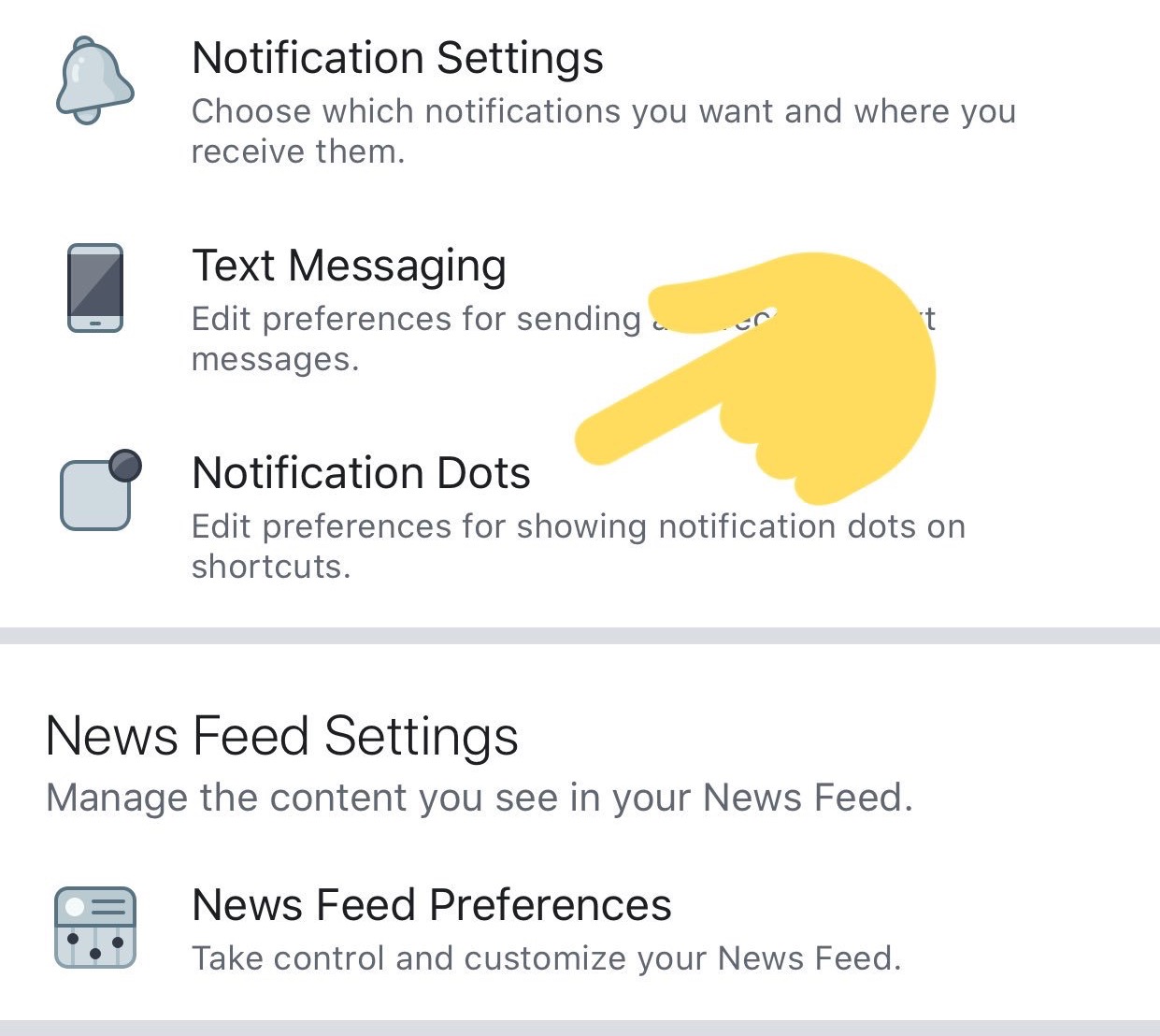
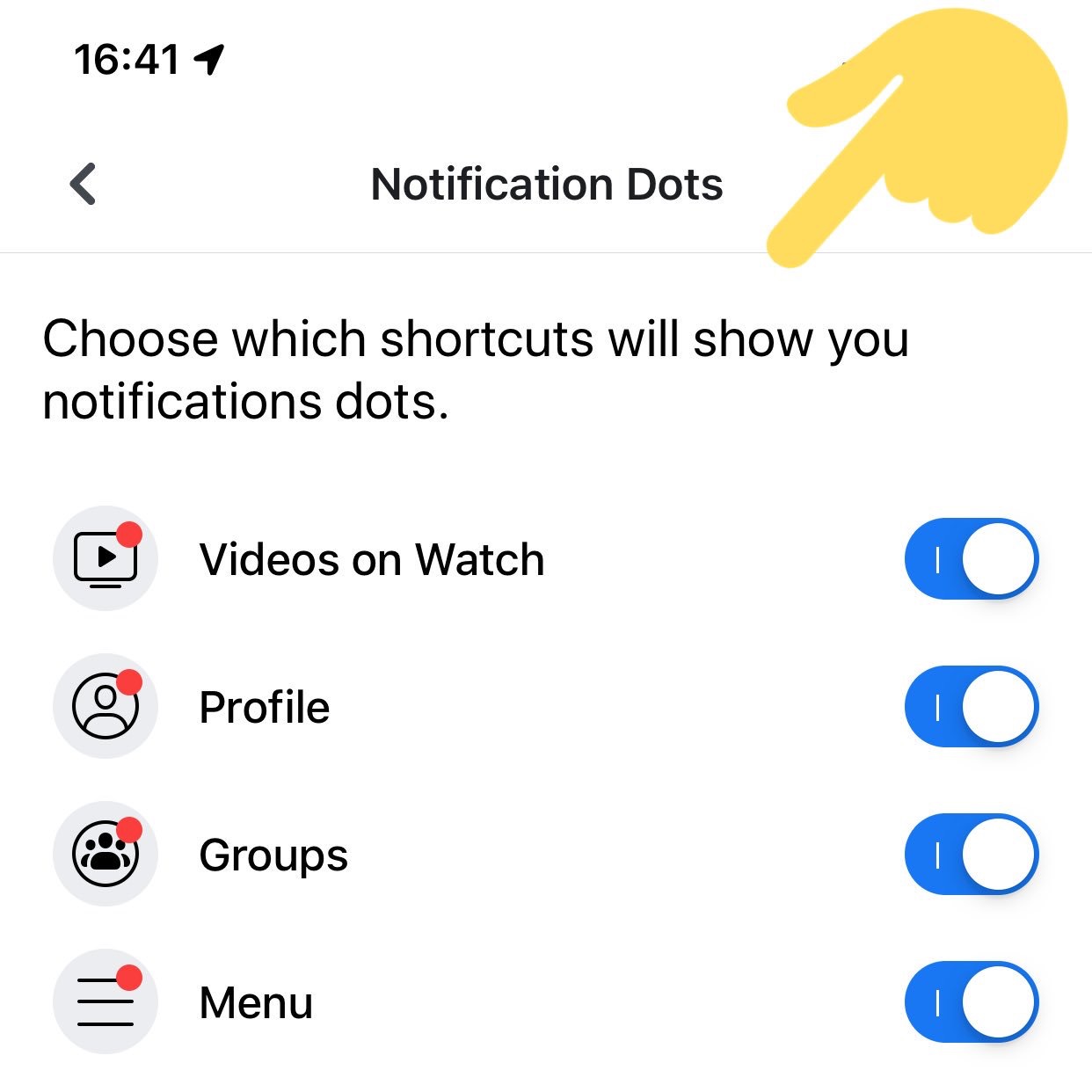
Sick of those anxiety-inducing red dots constantly appearing on the Groups, Watch, or other tabs in your Facebook app? Well the social network may be easing up a little in its unending war for your attention. Facebook is now testing a toggle to turn off the red in-app notification dots on its homescreen. Until now you had to manually open each of Facebook’s features to extinguishing the maddening flame of the notification badge. This could make Facebook feel more tranquil, and keep you focused on whatever you actually opened the app to do.

“It’s related to the work we’re doing with the well-being team. We’re thinking about how people spend their time in the app and making sure that it’s time well spent” a Facebook spokesperson tells me. Many people can’t feel settled if there are red dots begging to be tapped — a psychological quirk Facebook takes advantage of. The company seems to be realizing that its growth hacking can backfire if its pleas for engagement actually deter us from opening its app in the first place.Turn Off Facebook Notification Dots

The Facebook Notification Dots setting was first spotted in its prototype form by reverse engineering specialist Jane Manchun Wong, hidden in the Android app’s code earlier this summer. Today, social media consultant Matt Navarra noticed the feature being publicly tested. Facebook now confirms to TechCrunch that this is a new global test that started recently on iOS and Android for a subset of users. “We are testing new ways to give people more control over the notifications they receive in the Facebook app” a spokesperson tells me.

Facebook plans to continue offering additional ways to personalize notifications so you don’t miss what’s important but aren’t drowned in noise. “People don’t necessarily want to see a notification on the badge [the in-app dots on tabs] if they’re already getting notifications in the jewel [the red counter on the Facebook app icon on your phone’s homescreen]” the spokesperson tells me. It considered a snooze option but went with an on/off switch that’s the least confusion. The Notification dots feature is likely to roll out to everyone unless it suddenly proves to decimate Facebook usage.

Facebook Notification Dots

How To Turn Off Facebook Notification Dots

If you have access to this feature test, you’ll find the option in your Facebook app under the three-lined More/Menu tab -> Settings & Privacy -> Settings -> Notifications -> Notification Dots. There you can “Choose which shortcuts will show you notifications dots” with options for “Videos On Watch”, “Profile”, “Groups”, “Menu”.

One tab/shortcut where you can’t disable the dots is Notifications, which actually makes sense since that’s the main way the app alerts you to activity around your profile and content. But since you already get a heads-up about new Groups posts or when you’re tagged in a photo there, the notification dots on the other tabs are just redundant and distracting.

Facebook notification settings

If you want to control which activities trigger alerts in your Notifications tab, you can go to More/Menu tab -> Settings & Privacy -> Settings -> Notifications -> Notification Settings -> Mobile. There you can see a list of your recent notifications and turn off ones like it in case you’re sick of hearing about friends starting fundraisers, reminders about upcoming events, or comments after yours on a Group post. The Notification Settings page also lets you turn off sound for Facebook notifications, axe them from specific groups or other apps, turn down the frequency of On This Day alerts, and choose what notifications get bumped up to email or text message.

Confusingly, there’s also a totally separate menu that’s accessible from the Notifications tab’s settings gear icon. There you can temporarily or permanently mute push notifications and choose where you receive each type. Obviously there should be a link between these two different spaces. A great next step for Facebook would be allowing user to batch notifications, Instead of either being constantly pestered or totally in the dark, it could let users opt for an occasional digest of notifications, like once per day or when they get to 10 alerts.

Facebook and Instagram Your Activity Counter

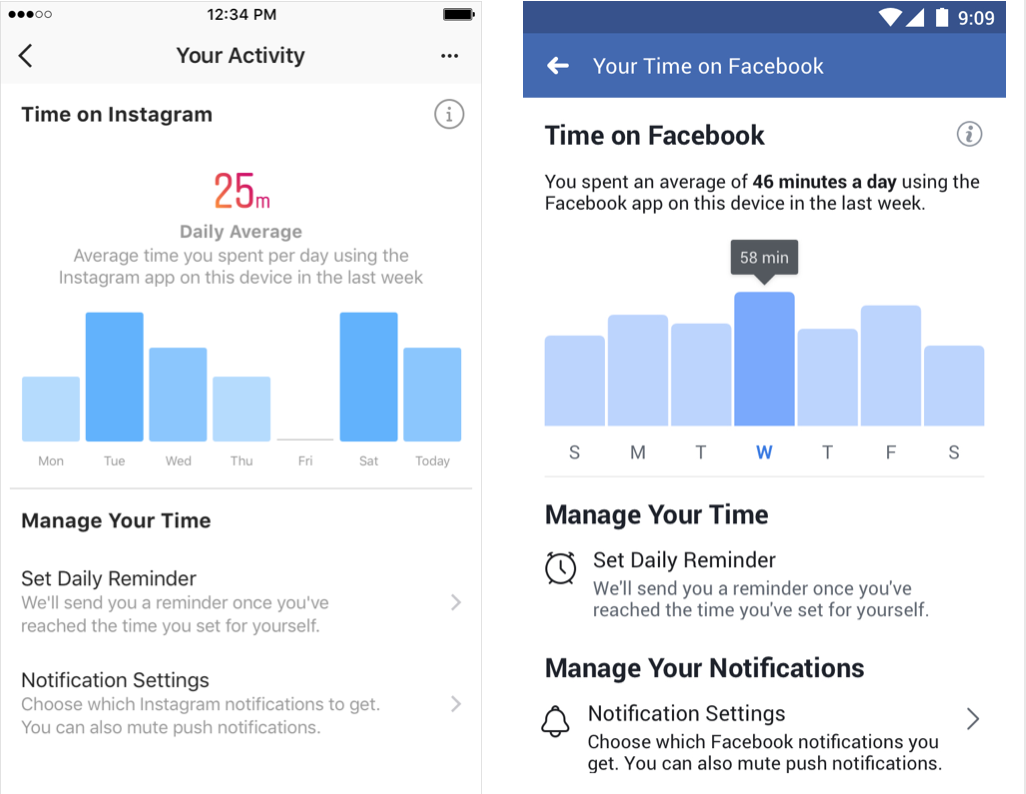
A year ago Facebook trumpeted how it launched a Time Well Spent dashboard in its app and Instagram for showing how long per day you use the apps with an option to set a reminder to stop after enough minutes. But buried inside Menu -> Settings & Privacy -> Your Time on Facebook, the toothless feature we’d previously scooped isn’t doing much good. If Facebook wants to be a principled citizen of our devices, it shouldn’t be so hard to say when we do or don’t want to be nagged for attention.


Read Full Article

‘This is Your Life in Silicon Valley’: Former Pinterest President, Moment CEO Tim Kendall on Smartphone Addiction


Welcome to this week’s transcribed edition of This is Your Life in Silicon Valley. We’re running an experiment for Extra Crunch members that puts This is Your Life in Silicon Valley in words – so you can read from wherever you are.

This is Your Life in Silicon Valley was originally started by Sunil Rajaraman and Jascha Kaykas-Wolff in 2018. Rajaraman is a serial entrepreneur and writer (Co-Founded Scripted.com, and is currently an EIR at Foundation Capital), Kaykas-Wolff is the current CMO at Mozilla and ran marketing at BitTorrent. Rajaraman and Kaykas-Wolff started the podcast after a series of blog posts that Sunil wrote for The Bold Italic went viral.

The goal of the podcast is to cover issues at the intersection of technology and culture – sharing a different perspective of life in the Bay Area. Their guests include entrepreneurs like Sam Lessin, journalists like Kara Swisher and politicians like Mayor Libby Schaaf and local business owners like David White of Flour + Water.

This week’s edition of This is Your Life in Silicon Valley features Tim Kendall, the former President of Pinterest and current CEO of Moment. Tim ran monetization at Facebook, and has very strong opinions on smartphone addiction and what it is doing to all of us. Tim is an architect of much of the modern social media monetization machinery, so you definitely do not want to miss his perspective on this important subject.

For access to the full transcription, become a member of Extra Crunch. Learn more and try it for free. 

Sunil Rajaraman: Welcome to season three of This is Your Life in Silicon Valley. A Podcast about the Bay Area, technology, and culture. I’m your host, Sunil Rajaraman and I’m joined by my cohost, Jascha Kaykas-Wolff.

Jascha Kaykas-Wolff: Are you recording?

Rajaraman: I’m recording.

Kaykas-Wolff: I’m almost done. My phone’s been buzzing all afternoon and I just have to finish this text message.

Rajaraman: So you’re one of those people who can’t go five seconds without checking their phone.


Read Full Article

Innovations in Graph Representation Learning


Relational data representing relationships between entities is ubiquitous on the Web (e.g., online social networks) and in the physical world (e.g., in protein interaction networks). Such data can be represented as a graph with nodes (e.g., users, proteins), and edges connecting them (e.g., friendship relations, protein interactions). Given the widespread prevalence of graphs, graph analysis plays a fundamental role in machine learning, with applications in clustering, link prediction, privacy, and others. To apply machine learning methods to graphs (e.g., predicting new friendships, or discovering unknown protein interactions) one needs to learn a representation of the graph that is amenable to be used in ML algorithms.

However, graphs are inherently combinatorial structures made of discrete parts like nodes and edges, while many common ML methods, like neural networks, favor continuous structures, in particular vector representations. Vector representations are particularly important in neural networks, as they can be directly used as input layers. To get around the difficulties in using discrete graph representations in ML, graph embedding methods learn a continuous vector space for the graph, assigning each node (and/or edge) in the graph to a specific position in a vector space. A popular approach in this area is that of random-walk-based representation learning, as introduced in DeepWalk.

Left: The well-known Karate graph representing a social network. Right: A continuous space embedding of the nodes in the graph using DeepWalk.
Here we present the results of two recent papers on graph embedding: “Is a Single Embedding Enough? Learning Node Representations that Capture Multiple Social Contexts” presented at WWW’19 and “Watch Your Step: Learning Node Embeddings via Graph Attention” at NeurIPS’18. The first paper introduces a novel technique to learn multiple embeddings per node, enabling a better characterization of networks with overlapping communities. The second addresses the fundamental problem of hyperparameter tuning in graph embeddings, allowing one to easily deploy graph embeddings methods with less effort. We are also happy to announce that we have released the code for both papers in the Google Research github repository for graph embeddings.

Learning Node Representations that Capture Multiple Social Contexts
In virtually all cases, the crucial assumption of standard graph embedding methods is that a single embedding has to be learned for each node. Thus, the embedding method can be said to seek to identify the single role or position that characterizes each node in the geometry of the graph. Recent work observed, however, that nodes in real networks belong to multiple overlapping communities and play multiple roles—think about your social network where you participate in both your family and in your work community. This observation motivates the following research question: is it possible to develop methods where nodes are embedded in multiple vectors, representing their participation in overlapping communities?

In our WWW’19 paper, we developed Splitter, an unsupervised embedding method that allows the nodes in a graph to have multiple embeddings to better encode their participation in multiple communities. Our method is based on recent innovations in overlapping clustering based on ego-network analysis, using the persona graph concept, in particular. This method takes a graph G, and creates a new graph P (called the persona graph), where each node in G is represented by a series of replicas called the persona nodes. Each persona of a node represents an instantiation of the node in a local community to which it belongs. For each node U in the graph, we analyze the ego-network of the node (i.e., the graph connecting the node to its neighbors, in this example A, B, C, D) to discover local communities to which the node belongs. For instance, in the figure below, node U belongs to two communities: Cluster 1 (with the friends A and B, say U’s family members) and Cluster 2 (with C and D, say U’s colleagues).
Ego-net of node U
Then, we use this information to “split” node U into its two personas U1 (the family persona) and U2 (the work persona). This disentangles the two communities, so that they no longer overlap.
The ego-splitting method separating the U nodes in 2 personas.
This technique has been used to improve the state-of-the-art results in graph embedding methods, showing up to 90% reduction in link prediction (i.e., predicting which link will form in the future) error on a variety of graphs. The key reason for this improvement is the ability of the method to disambiguate highly overlapping communities found in social networks and other real-world graphs. We further validate this result with an in-depth analysis of co-authorship graphs where authors belong to overlapping research communities (e.g., machine learning and data mining).
Top Left: A typical graphs with highly overlapping communities. Top Right: A traditional embedding of the graph on the left using node2vec. Bottom Left: A persona graph of the graph above. Bottom Right: The Splitter embedding of the persona graph. Notice how the persona graph clearly disentangles the overlapping communities of the original graph and Splitter outputs well-separated embeddings.
Automatic hyper-parameter tuning via graph attention.
Graph embedding methods have shown outstanding performance on various ML-based applications, such as link prediction and node classification, but they have a number of hyper-parameters that must be manually set. For example, are nearby nodes more important to capture when learning embeddings than nodes that are further away? Even though experts may be able to fine tune these hyper-parameters, one must do so independently for each graph. To obviate such manual work, in our second paper, we proposed a method to learn the optimal hyper-parameters automatically.

Specifically, many graph embedding methods, like DeepWalk, employ random walks to explore the context around a given node (i.e. the direct neighbors, the neighbors of the neighbors, etc). Such random walks can have many hyper-parameters that allow tuning of the local exploration of the graph, thus regulating the attention given by the embeddings to nearby nodes. Different graphs may present different optimal attention patterns and hence different optimal hyperparameters (see the picture below, where we show two different attention distributions). Watch Your Step formulates a model for the performance of the embedding methods based on the above mentioned hyper-parameters. Then we optimize the hyper-parameters to maximize the performance predicted by the model, using standard backpropagation. We found that the values learned by backpropagation agree with the optimal hyper-parameters obtained by grid search.
Our new method for automatic hyper-parameter tuning, Watch Your Step, uses an attention model to learn different graph context distributions. Shown above are two example local neighborhoods about a center node (in yellow) and the context distributions (red gradient) that was learned by the model. The left-side graph shows a more diffused attention model, while the distribution on the right shows one concentrated on direct neighbors.
This work falls under the growing family of AutoML, where we want to alleviate the burden of optimizing the hyperparameters—a common problem in practical machine learning. Many AutoML methods use neural architecture search. This paper instead shows a variant, where we use the mathematical connection between the hyperparameters in the embeddings and graph-theoretic matrix formulations. The “Auto” portion corresponds to learning the graph hyperparameters by backpropagation.

We believe that our contributions will further advance the state of the research in graph embedding in various directions. Our method for learning multiple node embeddings draws a connection between the rich and well-studied field of overlapping community detection, and the more recent one of graph embedding which we believe may result in fruitful future research. An open problem in this area is the use of multiple-embedding methods for classification. Furthermore, our contribution on learning hyperparameters will foster graph embedding adoption by reducing the need for expensive manual tuning. We hope the release of these papers and code will help the research community pursue these directions.

Acknowledgements
We thank Sami Abu-el-Haija who contributed to this work and is now a Ph.D. student at USC.

25 June 2019

‘This is Your Life in Silicon Valley’: Former Pinterest President, Moment CEO Tim Kendall on Smartphone Addiction


Welcome to this week’s transcribed edition of This is Your Life in Silicon Valley. We’re running an experiment for Extra Crunch members that puts This is Your Life in Silicon Valley in words – so you can read from wherever you are.

This is Your Life in Silicon Valley was originally started by Sunil Rajaraman and Jascha Kaykas-Wolff in 2018. Rajaraman is a serial entrepreneur and writer (Co-Founded Scripted.com, and is currently an EIR at Foundation Capital), Kaykas-Wolff is the current CMO at Mozilla and ran marketing at BitTorrent. Rajaraman and Kaykas-Wolff started the podcast after a series of blog posts that Sunil wrote for The Bold Italic went viral.

The goal of the podcast is to cover issues at the intersection of technology and culture – sharing a different perspective of life in the Bay Area. Their guests include entrepreneurs like Sam Lessin, journalists like Kara Swisher and politicians like Mayor Libby Schaaf and local business owners like David White of Flour + Water.

This week’s edition of This is Your Life in Silicon Valley features Tim Kendall, the former President of Pinterest and current CEO of Moment. Tim ran monetization at Facebook, and has very strong opinions on smartphone addiction and what it is doing to all of us. Tim is an architect of much of the modern social media monetization machinery, so you definitely do not want to miss his perspective on this important subject.

For access to the full transcription, become a member of Extra Crunch. Learn more and try it for free. 

Sunil Rajaraman: Welcome to season three of This is Your Life in Silicon Valley. A Podcast about the Bay Area, technology, and culture. I’m your host, Sunil Rajaraman and I’m joined by my cohost, Jascha Kaykas-Wolff.

Jascha Kaykas-Wolff: Are you recording?

Rajaraman: I’m recording.

Kaykas-Wolff: I’m almost done. My phone’s been buzzing all afternoon and I just have to finish this text message.

Rajaraman: So you’re one of those people who can’t go five seconds without checking their phone.


Read Full Article
Peter Thiel-backed auto commerce startup Drive Motors has a new name and $5M in capital


Not that long ago, visiting the website of an auto dealership was a little like going to a store without a cash register. The retailer’s website might list all the cars, trucks and SUVs in its inventory, but there would be no way to actually buy one online.

A digital commerce startup called Drive Motors jumped in to fill that void. Unlike Carvana and Shift and other online used car startups that have emerged on the scene, this company is providing the “buy button” for  dealerships and automakers by creating a native transaction layer within their existing webpages and stores.

Now, the three-year-old company is flush with a fresh injection of capital, high-profile investors and a new name that founder Aaron Krane says better reflects its broader vision and business plan. 

The startup, now called Modal, has raised $5 million in capital from new investors, including Peter Thiel, Japanese dealer conglomerate IDOM, and Ally Ventures, the investing arm of national auto lender Ally Financial.

The company started small, first landing local dealerships in California as customers of its real-time financing and digital commerce platform. Today, its customers include auto brands and some of the largest dealer groups in the country. In 2018, the startup saw its online monthly volume per store double to more than $1.8 million per month, and more than $10 million per month for top-performing individual stores.

That transaction layer is still the core feature of the company’s business, Krane told TechCrunch. Modal has added several new features since its last funding round, including real-time financing, digital documents and in-store point of sale.

Krane initially landed on the name Drive Motors because it sounded relevant to the auto dealerships he wanted to win over and not the Silicon Valley tech world where he had come from. (Krane founded Drive Motors after selling his fantasy sports startup Hitpost to Yahoo, and becoming an entrepreneur-in-residence at Khosla Ventures.)

The new name and capital just better reflects its broader strategy, he added. Krane landed on the name Modal because it embodies the company’s primary mission of delivering transactions within someone else’s experience.

“We want to be invisible, we want to be a fully self-contained embedded feature within a car brand’s vehicle page, or a car retailer’s vehicle page,” Krane said. “We don’t want to change the context on the buyer at all; that’s a philosophy that starts at the top and penetrates all the way down even the smallest decisions in our company.”

That notion of transparency and self-contained interactions led Krane to the new name because “modal,” in software terminology, means a self-contained user interface that is overlaid on top of an existing application page and keeps that existing application page in full view the whole time.

The new name also hints towards where the company is headed.

“The platform starts with just creating accessibility to a digital transaction, but it becomes the ultimate channel to introduce an entire ownership operating system, which can span everything from the more contemporary mundane automotive needs like servicing, all the way through introducing the most far out mobility or connected vehicle features,” Krane said.


Read Full Article